remote control MERCEDES-BENZ S-CLASS SEDAN 2013 User Guide
[x] Cancel search | Manufacturer: MERCEDES-BENZ, Model Year: 2013, Model line: S-CLASS SEDAN, Model: MERCEDES-BENZ S-CLASS SEDAN 2013Pages: 536, PDF Size: 24.14 MB
Page 127 of 536
Cleaning instructions
!
Do not touch the COMAND display. The
display has a very sensitive high-gloss
surface;
there is a risk of scratching. If you
have to clean the screen, however, use a
mild cleaning agent and a soft, lint-free
cloth.
The display must be switched off and have
cooled down before you start cleaning. Clean
the display screen, when necessary, with a
commercially available microfiber cloth and
cleaning agent for TFT/LCD displays. Then,
dry the surface with a dry microfiber cloth.
Avoid using alcoholic thinners, gasoline or
abrasive cleaning agents. These could
damage the display surface. Do not apply
pressure to the display surface when cleaning
it, as this could cause irreversible damage. Remote control
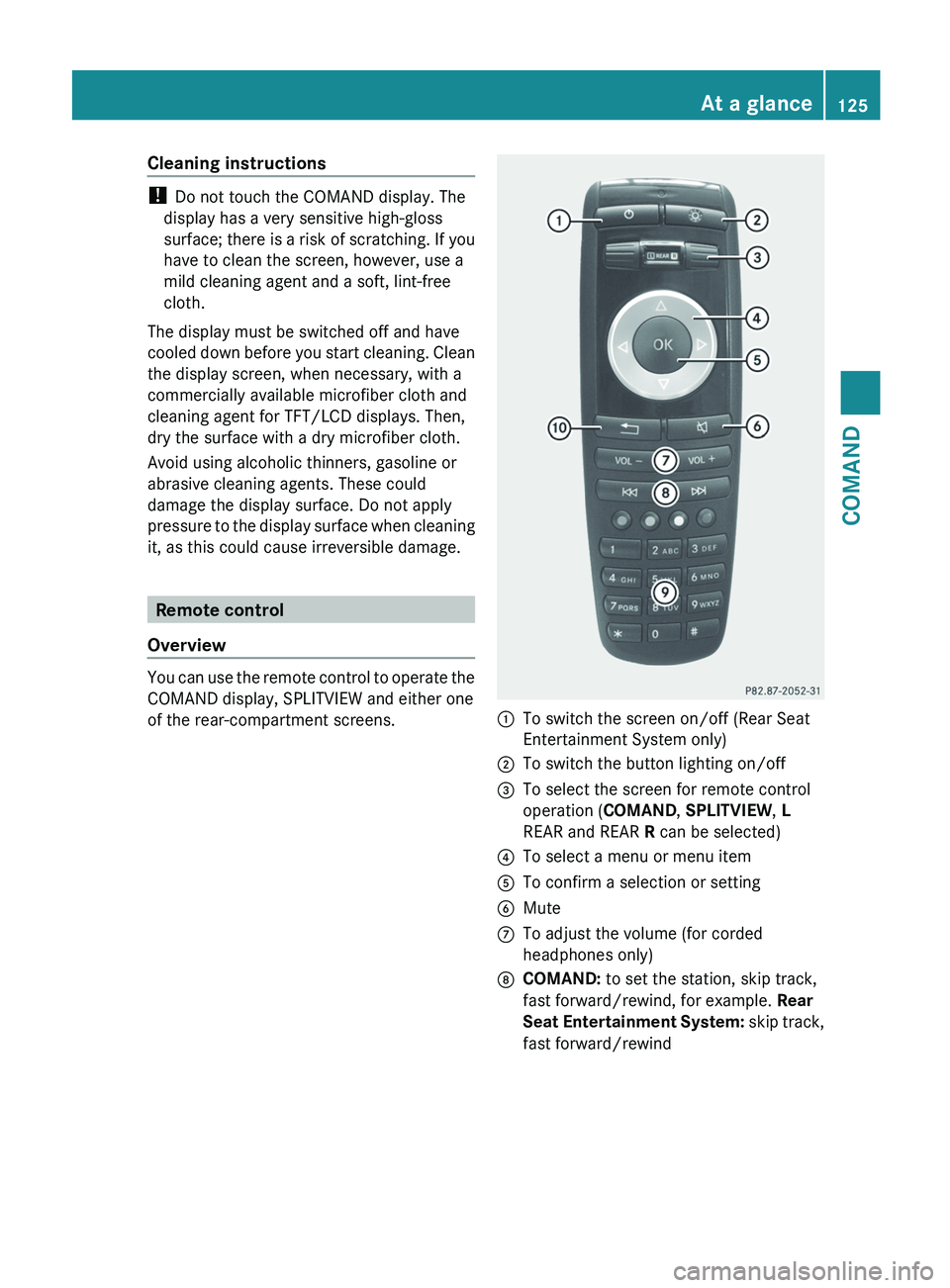
Overview You can use the remote control to operate the
COMAND display, SPLITVIEW and either one
of the rear-compartment screens.
:
To switch the screen on/off (Rear Seat
Entertainment System only)
; To switch the button lighting on/off
= To select the screen for remote control
operation (COMAND , SPLITVIEW, L
REAR and REAR R can be selected)
? To select a menu or menu item
A To confirm a selection or setting
B Mute
C To adjust the volume (for corded
headphones only)
D COMAND: to set the station, skip track,
fast forward/rewind, for example. Rear
Seat
Entertainment System: skip track,
fast forward/rewind At a glance
125
COMAND Z
Page 128 of 536
E
COMAND: to select a station from
presets, select a track, enter directly,
enter
a phone number, for example. Rear
Seat Entertainment System: to select a
track, enter directly
F To exit a menu (back)
X Point the remote control at the
corresponding screen and execute the
functions by pressing the corresponding
buttons.
i The remote control's function may be
restricted
depending on the angle at which
it is pointed at the respective screen.
Selecting the screen for the remote
control X
Turn thumbwheel = until the desired
display is highlighted in the window.
Switching the screen on/off (Rear Seat
Entertainment System only) If the SmartKey is in the ignition lock in
position
0
or 1 or if the SmartKey is not in the
ignition lock, the rear screens will switch off
after 30 minutes. Before the screens switch
off, they show a message to this effect.
You can switch the screens back on.
However, this will discharge the starter
battery.
X Point the remote control at the rear-
compartment screen which has been
selected for remote operation.
X Press button : on the remote control.
The respective rear screen switches on or
off.
i You
can only switch the screens on using
the remote control if the ignition is
switched on.
Switching the button lighting on/off X
Press button ; on the remote control.
Depending on the previous status, the
button lighting is switched on or off. i
If you do not use the remote control for
about 15 seconds, the button lighting
switches off automatically.
Mute X
Press button B on the remote control.
The sound is switched on/off.
Adjusting the volume This function is available for SPLITVIEW and
for the Rear Seat Entertainment System in
conjunction with corded headphones.
X
Press one of buttons C on the remote
control.
The
volume of the currently selected audio
or video source changes.
For COMAND, you can also adjust the
volume for phone calls and navigation
messages.
Selecting a menu/menu item and
confirming your selection X
Press the =;9: buttons to
select
the menu/menu item and press the
9 button to confirm. 126
At a glance
COMAND
Page 129 of 536
Functions with the
E and F buttonYou can use the remote control to execute the same functions as the COMAND control panel.
Mode Function
Audio mode Selects a station using the station search function (
Y page 212)Selects a track by skipping to a track (Y page 224)
Fast forward/rewind (
Y page 225)Video mode Selects a scene or chapter (video DVD mode) (Y page 243)
Fast-forward/rewind (video DVD mode) (
Y page 242)Functions of the number keypad
You can use the remote control to execute the same functions as the COMAND control panel.
Mode Function
Audio mode Selects stations via the station presets (Y page 212)
Sets stations by entering the frequency manually (
Y page 212)Stores stations manually (
Y page 213) Selects a track (Y page 224)
Selects a data medium via the media list (
Y page 224)Telephone mode Telephone number entry (
Y page 200)Character entry Enters characters (direct entry) (
Y page 130)Operating COMAND
Selecting a main function Initial situation
You
would like to change from the telephone
menu to the vehicle settings, for example.
X Slide ZV the COMAND controller and
switch to the main function bar.
X Select Vehicle
in the main function bar by
turning cVd the COMAND controller and
press W to confirm.
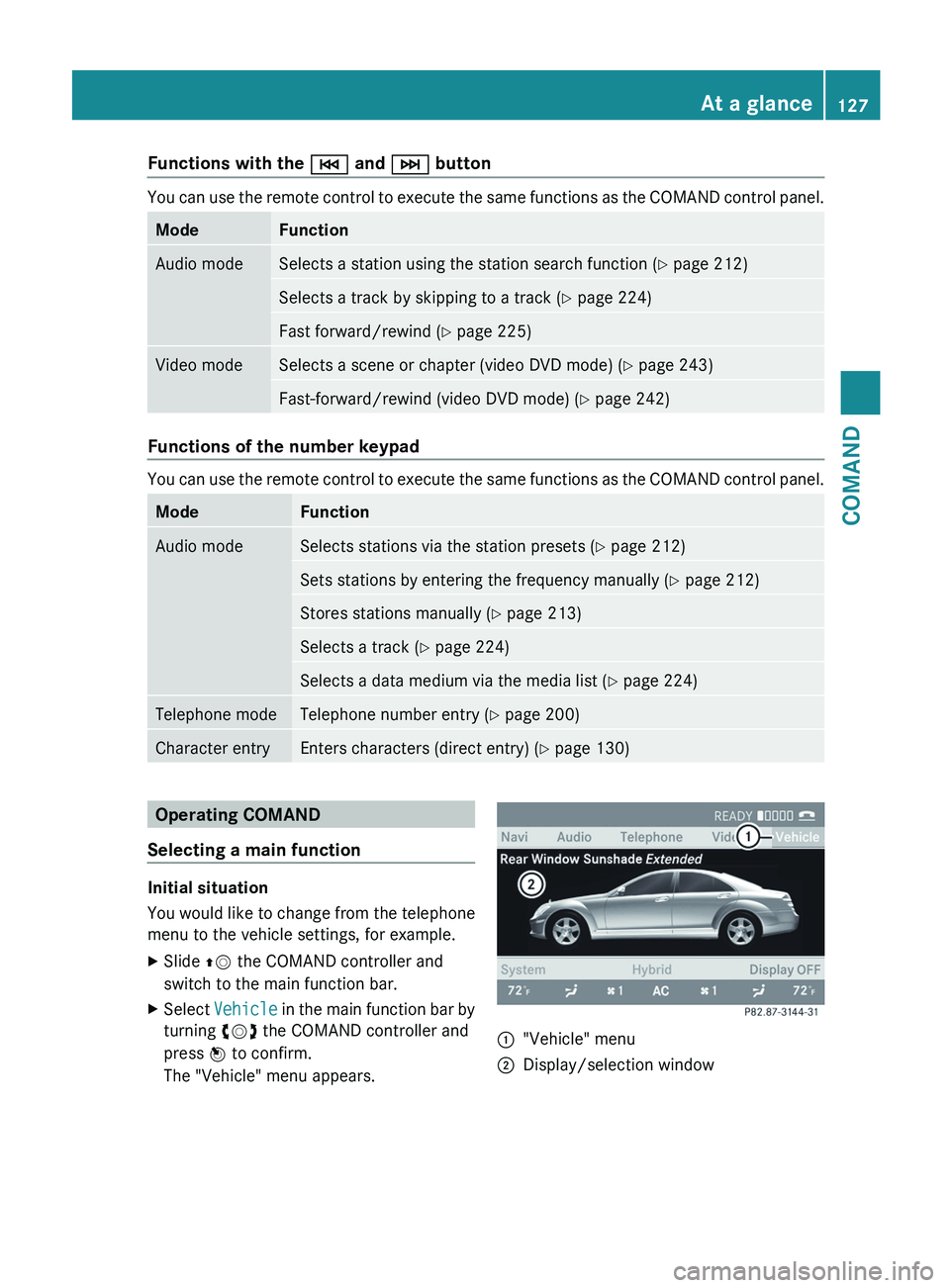
The "Vehicle" menu appears. :
"Vehicle" menu
; Display/selection window At a glance
127
COMAND Z
Page 140 of 536
dts™
MLP™
Selecting settings for the Bang & Olufsen
sound system
Calling up the selection menu
X
Select Sound.
X Highlight Bang & Olufsen.
X Press W.
A selection menu appears.
A # dot in front of an entry indicates the
current setting.
Selecting the setting for True Image™
X Turn cVd or slide ZVÆ and highlight
reference or 3D Sound.
X Press W.
Selecting sound mode
X Select Sound Mode in the selection menu.
X Turn cVd or slide ZVÆ and highlight left,
all or right.
X Press W.
X To exit the menu: press the % back
button beside the COMAND controller.
or
X Slide XVY.
i Please bear the following in mind: You will achieve the best sound results on
your Bang & Olufsen sound system by
playing high-quality audio DVDs and CDs.
MP3
tracks should have a bit rate of at least
224 kbit/s.
When playing using an iPod ®
, the bit rate
should also be at least 224 kbit/s.
For optimum playback quality:
XDeactivate the EQ setting on the
iPod ®
.
Surround-sound playback does not
function for mono signal sources, such as
the medium wave range (MW) in radio
mode.
On some stereo recordings, the sound
characteristics may differ from
conventional stereo playback. Rear Seat Entertainment System
Components Overview
The Rear Seat Entertainment System
comprises:
R
two screens for the rear behind the front-
seat head restraints
R two remote controls
R a CD/DVD drive
R AUX jacks on both screens (display AUX)
and on the CD/DVD drive (drive AUX)
R two sets of cordless headphones138
At a glance
COMAND
Page 142 of 536
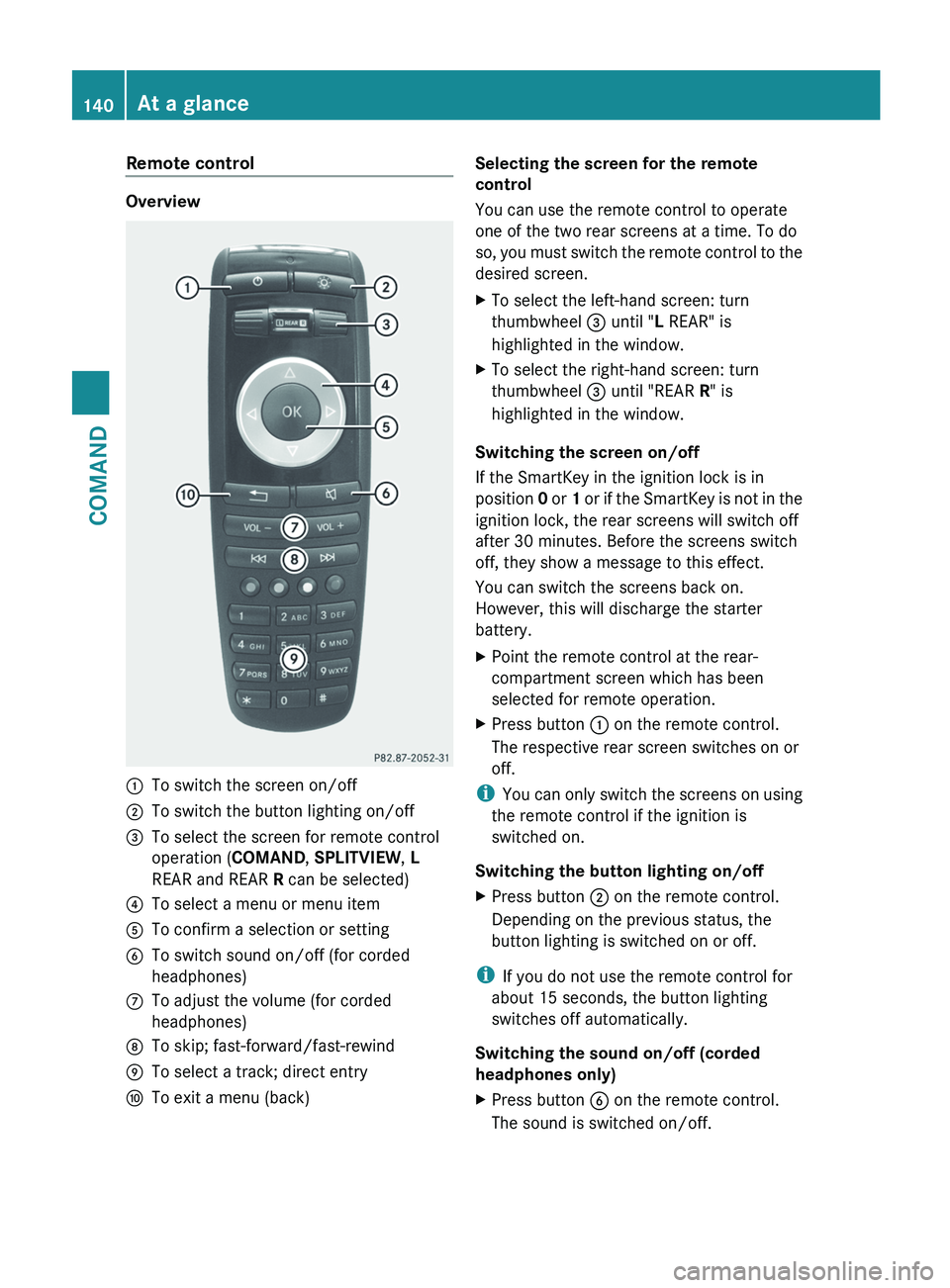
Remote control
Overview
:
To switch the screen on/off
; To switch the button lighting on/off
= To select the screen for remote control
operation (COMAND , SPLITVIEW, L
REAR and REAR R can be selected)
? To select a menu or menu item
A To confirm a selection or setting
B To switch sound on/off (for corded
headphones)
C To adjust the volume (for corded
headphones)
D To skip; fast-forward/fast-rewind
E To select a track; direct entry
F To exit a menu (back) Selecting the screen for the remote
control
You can use the remote control to operate
one of the two rear screens at a time. To do
so,
you must switch the remote control to the
desired screen.
X To select the left-hand screen: turn
thumbwheel = until "L REAR" is
highlighted in the window.
X To select the right-hand screen: turn
thumbwheel = until "REAR R" is
highlighted in the window.
Switching the screen on/off
If the SmartKey in the ignition lock is in
position 0
or 1 or if the SmartKey is not in the
ignition lock, the rear screens will switch off
after 30 minutes. Before the screens switch
off, they show a message to this effect.
You can switch the screens back on.
However, this will discharge the starter
battery.
X Point the remote control at the rear-
compartment screen which has been
selected for remote operation.
X Press button : on the remote control.
The respective rear screen switches on or
off.
i You
can only switch the screens on using
the remote control if the ignition is
switched on.
Switching the button lighting on/off
X Press button ; on the remote control.
Depending on the previous status, the
button lighting is switched on or off.
i If you do not use the remote control for
about 15 seconds, the button lighting
switches off automatically.
Switching the sound on/off (corded
headphones only)
X Press button B on the remote control.
The sound is switched on/off.140
At a glance
COMAND
Page 144 of 536
Cordless headphones
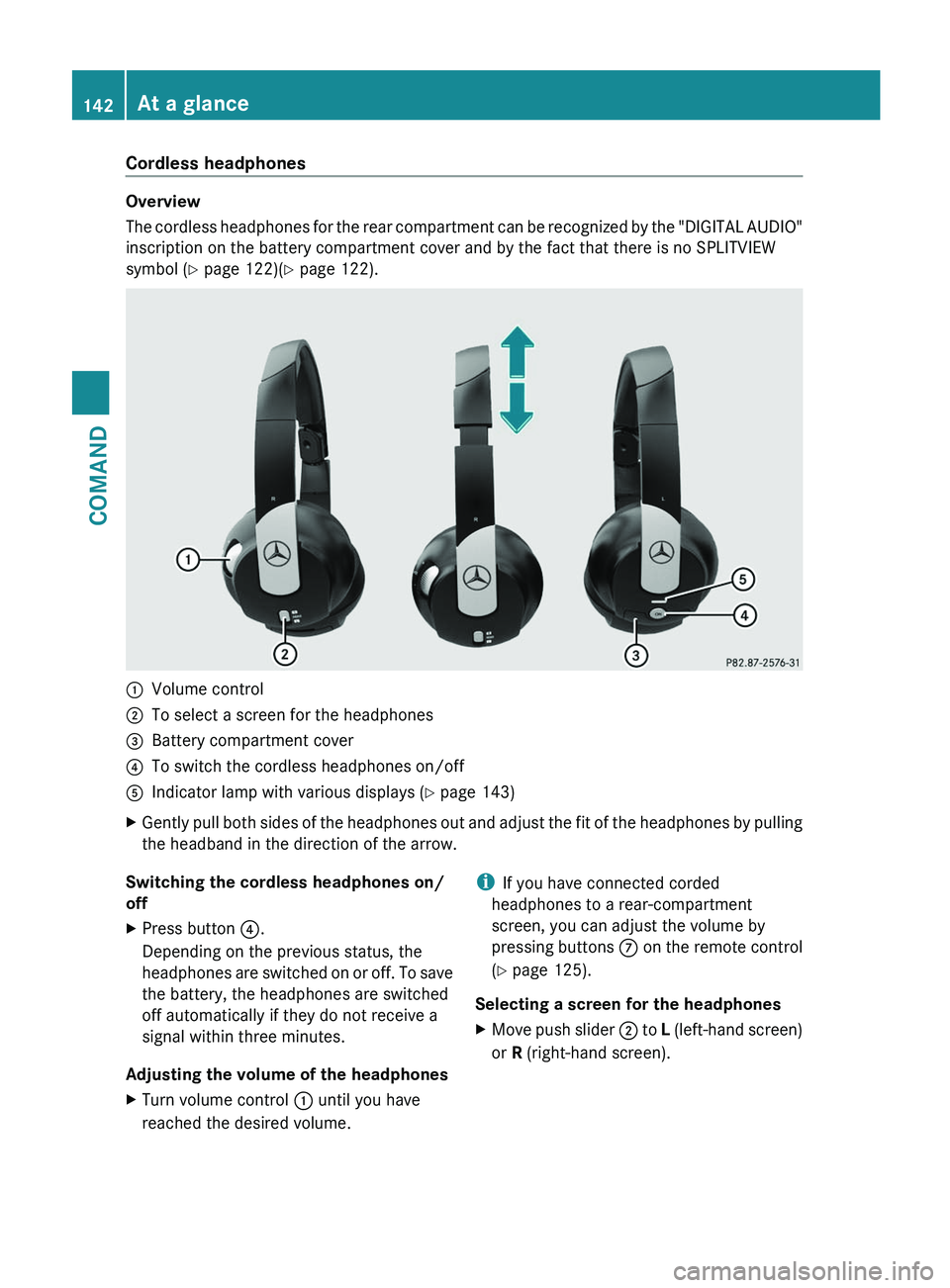
Overview
The
cordless headphones for the rear compartment can be recognized by the "DIGITAL AUDIO"
inscription on the battery compartment cover and by the fact that there is no SPLITVIEW
symbol ( Y page 122)( Y page 122).:
Volume control
; To select a screen for the headphones
= Battery compartment cover
? To switch the cordless headphones on/off
A Indicator lamp with various displays ( Y page 143)
X Gently pull both sides of the headphones out and adjust the fit of the headphones by pulling
the headband in the direction of the arrow.
Switching the cordless headphones on/
off
X Press button ?.
Depending on the previous status, the
headphones
are switched on or off. To save
the battery, the headphones are switched
off automatically if they do not receive a
signal within three minutes.
Adjusting the volume of the headphones
X Turn volume control : until you have
reached the desired volume. i
If you have connected corded
headphones to a rear-compartment
screen, you can adjust the volume by
pressing
buttons C on the remote control
(Y page 125).
Selecting a screen for the headphones
X Move push slider ;
to L (left-hand screen)
or R (right-hand screen). 142
At a glance
COMAND
Page 145 of 536
Indicator lamp displays
The indicator lamp displays the following
possible stati for the batteries and
headphones:
Display Status
Green The batteries are fine.
Red The batteries are almost
discharged.
Continuou
sly lit
either
green or
red The headphones are switched
on
and connected to a screen. Flashes
either
green or
red The headphones are
searching for the connection
to a screen.
No display
(dark) The headphones are switched
off or the batteries are
discharged.
Connecting additional headphones
You can connect an additional set of corded
headphones to each rear-compartment
screen (Y page 139).
Changing batteries
Batteries are required for the remote control
and
for the two sets of cordless headphones.
Changing batteries ( Y page 247)System settings
Display settings
Switching the display on/off X
Select Vehicle by turning cVd the
COMAND controller and press W to
confirm.
X Select Display OFF by turning cVd the
COMAND controller and press W to
confirm. X
To switch on the display: press W or
cVd turn the COMAND controller.
Display design Your COMAND display features optimized
designs for operation during daytime and
night-time hours. You can customize the
design to suit your personal preferences by
manually
selecting day or night design or opt
for an automatic setting.
X Select Vehicle by turning cVd the
COMAND controller and press W to
confirm.
X Select System by turning cVd the
COMAND controller and press W to
confirm.
X Select Display and press W to confirm.
X Select Day Mode, Night Mode or
Automatic by turning cVd the COMAND
controller and press W to confirm.
The # icon indicates the current setting. Design Explanation
Day Mode The display is set
permanently to day
design.
Night Mode The display is set
permanently to night
design.
Automatic The display design
changes depending on
the brightness around
the vehicle.
i
In the Automatic setting, COMAND
evaluates the readings from the automatic
vehicle light sensor and switches between
the display designs automatically. System settings
143
COMAND Z
Page 205 of 536
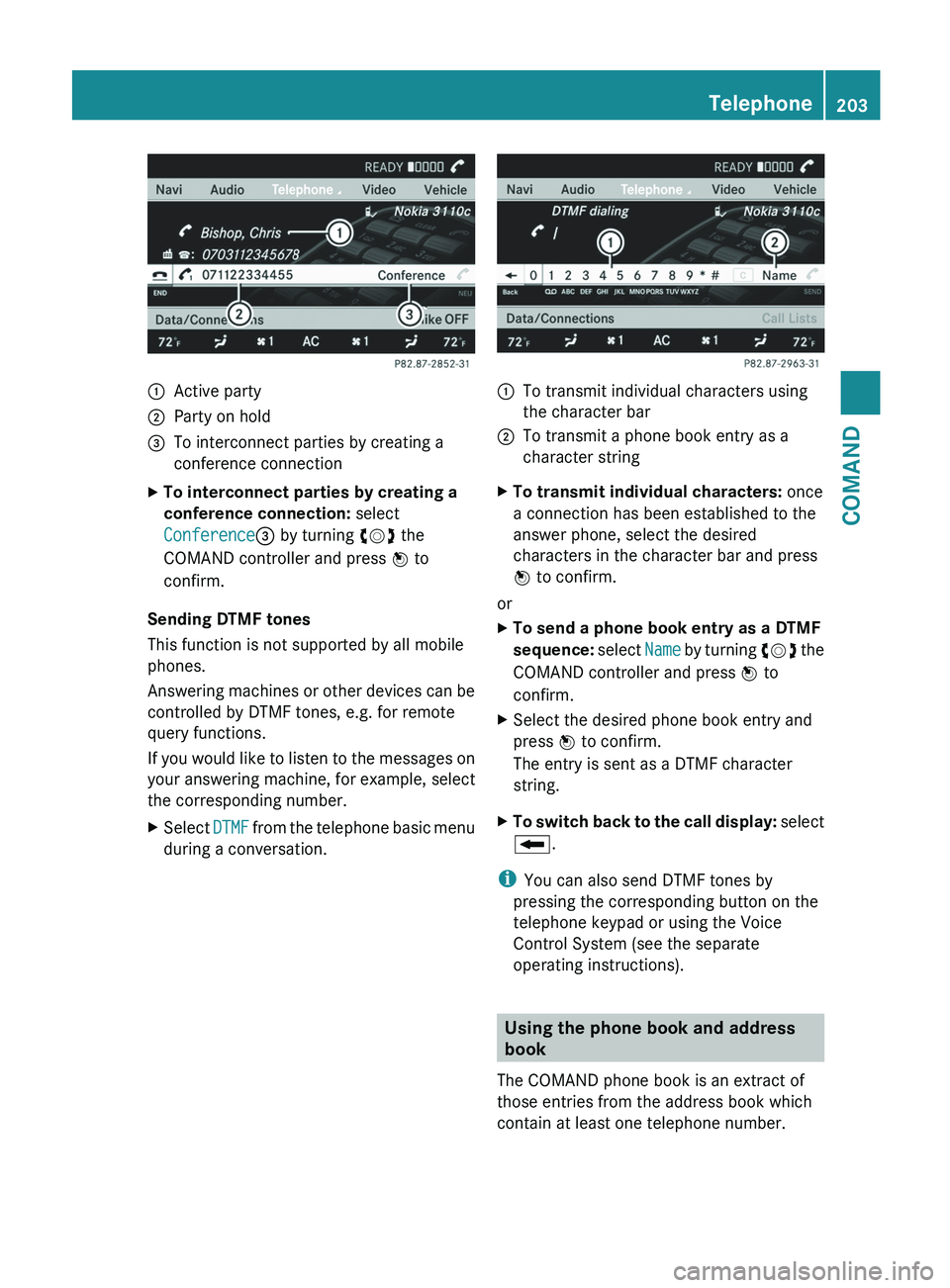
:
Active party
; Party on hold
= To interconnect parties by creating a
conference connection
X To interconnect parties by creating a
conference connection: select
Conference= by turning cVd the
COMAND controller and press W to
confirm.
Sending DTMF tones
This function is not supported by all mobile
phones.
Answering
machines or other devices can be
controlled by DTMF tones, e.g. for remote
query functions.
If you would like to listen to the messages on
your answering machine, for example, select
the corresponding number.
X Select DTMF
from the telephone basic menu
during a conversation. :
To transmit individual characters using
the character bar
; To transmit a phone book entry as a
character string
X To transmit individual characters: once
a connection has been established to the
answer phone, select the desired
characters in the character bar and press
W to confirm.
or
X To send a phone book entry as a DTMF
sequence:
select Name by turning cVd the
COMAND controller and press W to
confirm.
X Select the desired phone book entry and
press W to confirm.
The entry is sent as a DTMF character
string.
X To switch back to the call display:
select
B.
i You can also send DTMF tones by
pressing the corresponding button on the
telephone keypad or using the Voice
Control System (see the separate
operating instructions). Using the phone book and address
book
The COMAND phone book is an extract of
those entries from the address book which
contain at least one telephone number. Telephone
203
COMAND Z
Page 236 of 536
800 mA (it may be necessary to connect a
separate power supply)
R certain MP3 players
i The Media Interface supports USB
storage
media of "USB Device Subclass 6".
Information concerning USB Device
Subclass 6 is available from the equipment
manufacturer.
For details and a list of supported devices,
visit http://www.mbusa-mobile.com. Or
call the Mercedes-Benz Customer Assistance
Center at
1-800-FOR-MERCedes(1-800-367-6372) (for
the USA) or Customer Relations at
1-800-387-0100 (for Canada).
Connecting an external device i
Do not leave external devices in the
vehicle as extreme temperatures (e.g.
direct sunlight or extremely low outside
temperatures) could cause them to
malfunction
(see the operating instructions
for the respective device). Mercedes-Benz
USA, LLC accepts no liability for damage to
external devices.
Never connect more than one device at a
time. You will otherwise not be able to
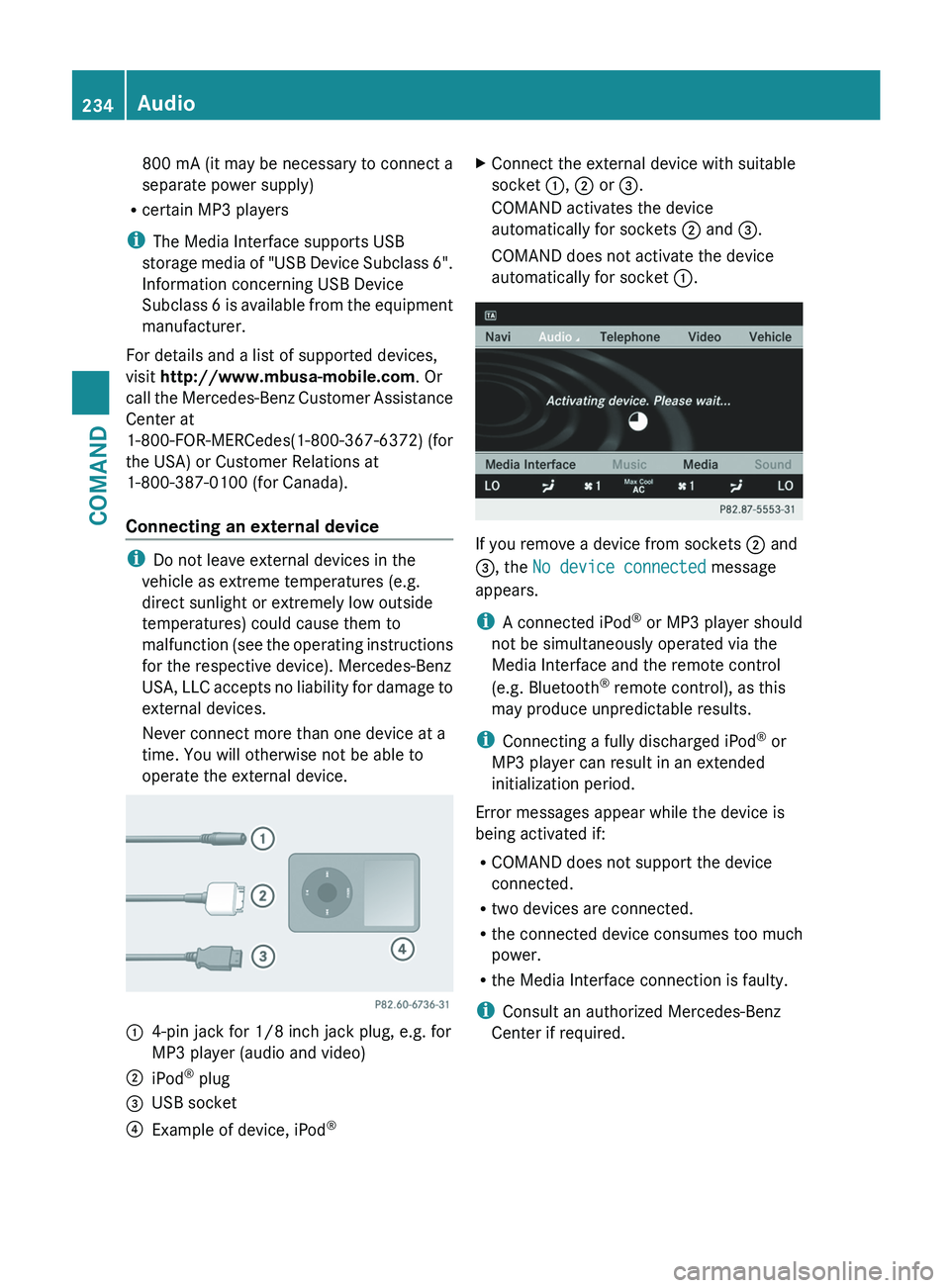
operate the external device. :
4-pin jack for 1/8 inch jack plug, e.g. for
MP3 player (audio and video)
; iPod ®
plug
= USB socket
? Example of device, iPod ®X
Connect the external device with suitable
socket :, ; or =.
COMAND activates the device
automatically for sockets ; and =.
COMAND does not activate the device
automatically for socket :. If you remove a device from sockets ; and
=, the No device connected message
appears.
i
A connected iPod ®
or MP3 player should
not be simultaneously operated via the
Media Interface and the remote control
(e.g. Bluetooth ®
remote control), as this
may produce unpredictable results.
i Connecting a fully discharged iPod ®
or
MP3 player can result in an extended
initialization period.
Error messages appear while the device is
being activated if:
R COMAND does not support the device
connected.
R two devices are connected.
R the connected device consumes too much
power.
R the Media Interface connection is faulty.
i Consult an authorized Mercedes-Benz
Center if required. 234
Audio
COMAND
Page 249 of 536
Changing batteries
Batteries are required for the remote control
and
for the two sets of cordless headphones. G
WARNING
Keep the batteries out of the reach of
children. Consult a doctor immediately if a
child should swallow a battery.
Do not dismantle, short-circuit or burn a
battery. H
Environmental note
Dispose of discharged batteries in an
environmentally responsible manner.
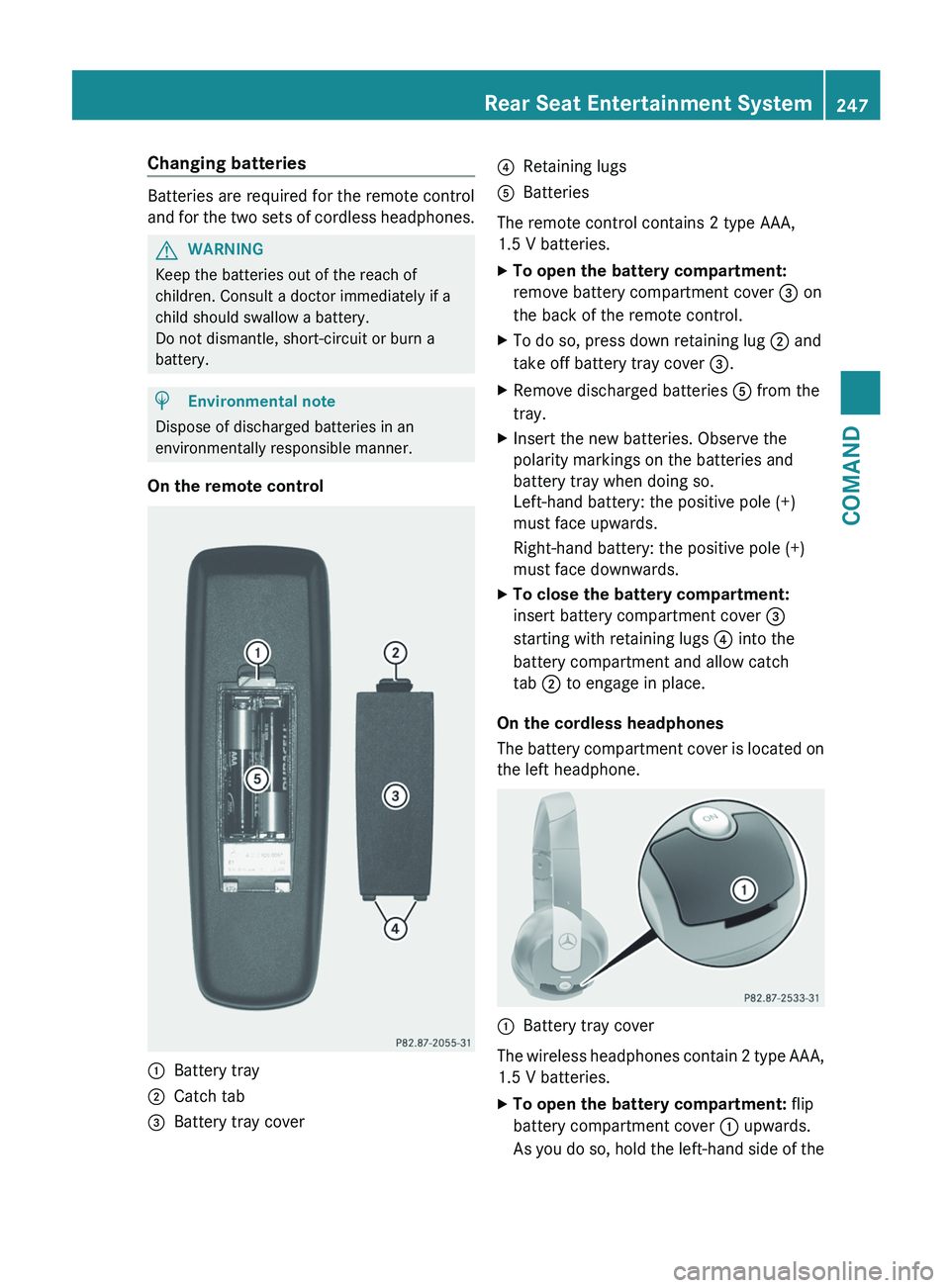
On the remote control :
Battery tray
; Catch tab
= Battery tray cover ?
Retaining lugs
A Batteries
The remote control contains 2 type AAA,
1.5 V batteries.
X To open the battery compartment:
remove battery compartment cover = on
the back of the remote control.
X To do so, press down retaining lug ; and
take off battery tray cover =.
X Remove discharged batteries A from the
tray.
X Insert the new batteries. Observe the
polarity markings on the batteries and
battery tray when doing so.
Left-hand battery: the positive pole (+)
must face upwards.
Right-hand battery: the positive pole (+)
must face downwards.
X To close the battery compartment:
insert battery compartment cover =
starting with retaining lugs ? into the
battery compartment and allow catch
tab ; to engage in place.
On the cordless headphones
The
battery compartment cover is located on
the left headphone. :
Battery tray cover
The wireless headphones contain 2 type AAA,
1.5 V batteries.
X To open the battery compartment: flip
battery compartment cover : upwards.
As
you do so, hold the left-hand side of the Rear Seat Entertainment System
247
COMAND Z