ignition MERCEDES-BENZ S-CLASS SEDAN 2013 Manual Online
[x] Cancel search | Manufacturer: MERCEDES-BENZ, Model Year: 2013, Model line: S-CLASS SEDAN, Model: MERCEDES-BENZ S-CLASS SEDAN 2013Pages: 536, PDF Size: 24.14 MB
Page 359 of 536
Night View Assist Plus
Important safety notes In addition to the illumination provided by the
normal headlamps, Night View Assist Plus
uses
infrared light to illuminate the road. The
Night View Assist Plus camera picks up the
infrared light and shows a black-and-white
image in the multifunction display. The image
shown in the multifunction display
corresponds to a road lit up by high-beam
headlamps. This enables you to see the road's
course and any obstacles in good time. If
pedestrian recognition is activated,
pedestrians recognized by the system are
highlighted in the Night View Assist Plus
display. G
WARNING
Night View Assist Plus is only an aid designed
to assist driving. It is not a substitute for
attentive driving. Do not rely solely on the
Night View Assist Plus display. Continue to
look through the windshield. You are
responsible for safety and must drive in
accordance
with traffic conditions. You could
otherwise put yourself and others in danger.
The system may be impaired or unavailable if:
R there is poor visibility, e.g. due to snow,
rain, fog or heavy spray.
R the windshield is dirty, fogged up or
covered, for instance by a sticker, in the
vicinity of the camera.
R you are driving on bends, uphill gradients
or downhill gradients.
Light from the headlamps of oncoming
vehicles does not affect the Night View Assist
Plus display in the multifunction display. This
is also the case if you cannot switch on the
high-beam headlamps due to oncoming
traffic. G
WARNING
The Night View Assist Plus cannot record
objects immediately in front of or next to the
vehicle. When maneuvering, continue to look through the windshield. Make sure no
persons or animals are in the area in which
you are maneuvering. You could otherwise
injure them.
i Infrared light is not visible to the human
eye and therefore does not glare. Night
View Assist Plus can therefore remain
switched on even if there is oncoming
traffic. :
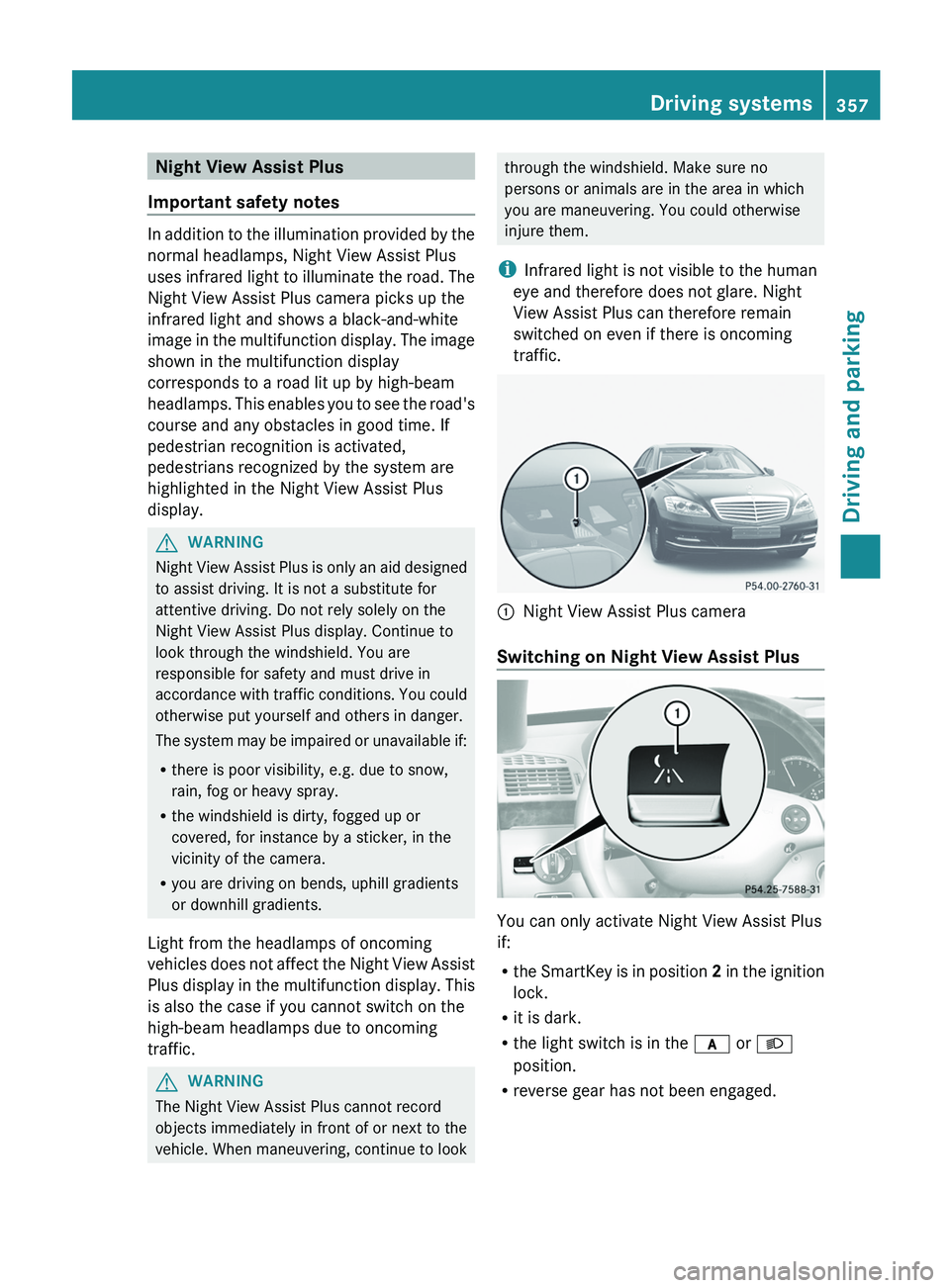
Night View Assist Plus camera
Switching on Night View Assist Plus You can only activate Night View Assist Plus
if:
R
the
SmartKey is in position 2 in the ignition
lock.
R it is dark.
R the light switch is in the c or L
position.
R reverse gear has not been engaged. Driving systems
357
Driving and parking Z
Page 364 of 536
When Blind Spot Assist is activated, indicator
lamp
: lights up yellow in the exterior
mirrors up to a vehicle speed of 20 mph
(30 km/h). When the vehicle speed exceeds
20 mph (30 km/h)
, the indicator lamp goes
out and Blind Spot Assist is ready for use.
When your speed exceeds approximately
20 mph (30 km/h), warning lamp : lights up
red on the corresponding side whenever a
vehicle is detected in the blind spot
monitoring range. This warning is always
given when a vehicle enters the blind spot
monitoring range from behind or from the
side. When you are passing another vehicle,
the warning is emitted only if the difference
in speed is less than 7 mph (12 km/h).
The yellow indicator lamp goes out if reverse
gear is engaged. In this event, Blind Spot
Assist is no longer active.
The brightness of the indicator/warning
lamps is adjusted automatically according to
the ambient light. G
WARNING
Blind Spot Assist is not active at speeds under
approximately 20 mph
(30 km/h). The
indicator lamps in the exterior mirrors are
yellow. Vehicles in the monitoring range are
then not indicated.
Always pay attention to traffic conditions and
your surroundings. Otherwise, you may fail to
recognize dangers in time, cause an accident
and injure yourself and others.
Collision warning
If a vehicle is detected in the monitoring range
of Blind Spot Assist and you switch on the turn
signal, a double warning tone sounds. Red
warning lamp : flashes. If the turn signal
remains on, detected vehicles are indicated
by the flashing of red warning lamp :. There
are no further warning tones.
Switching on Blind Spot Assist
X Make sure that the radar sensor system
(Y page 387) and Blind Spot Assist (Y page
385) are activated in the on-board
computer.
X Turn the SmartKey to position 2 in the
ignition lock.
Warning lamps : light up red in the
exterior mirrors for approximately 1.5
seconds and then turn yellow.
Lane Keeping Assist Important safety notes
Lane Keeping Assist monitors the area in
front
of your vehicle by means of a camera at
the top of the windshield. Lane Keeping Assist
detects lane markings on the road and warns
you before you leave your lane
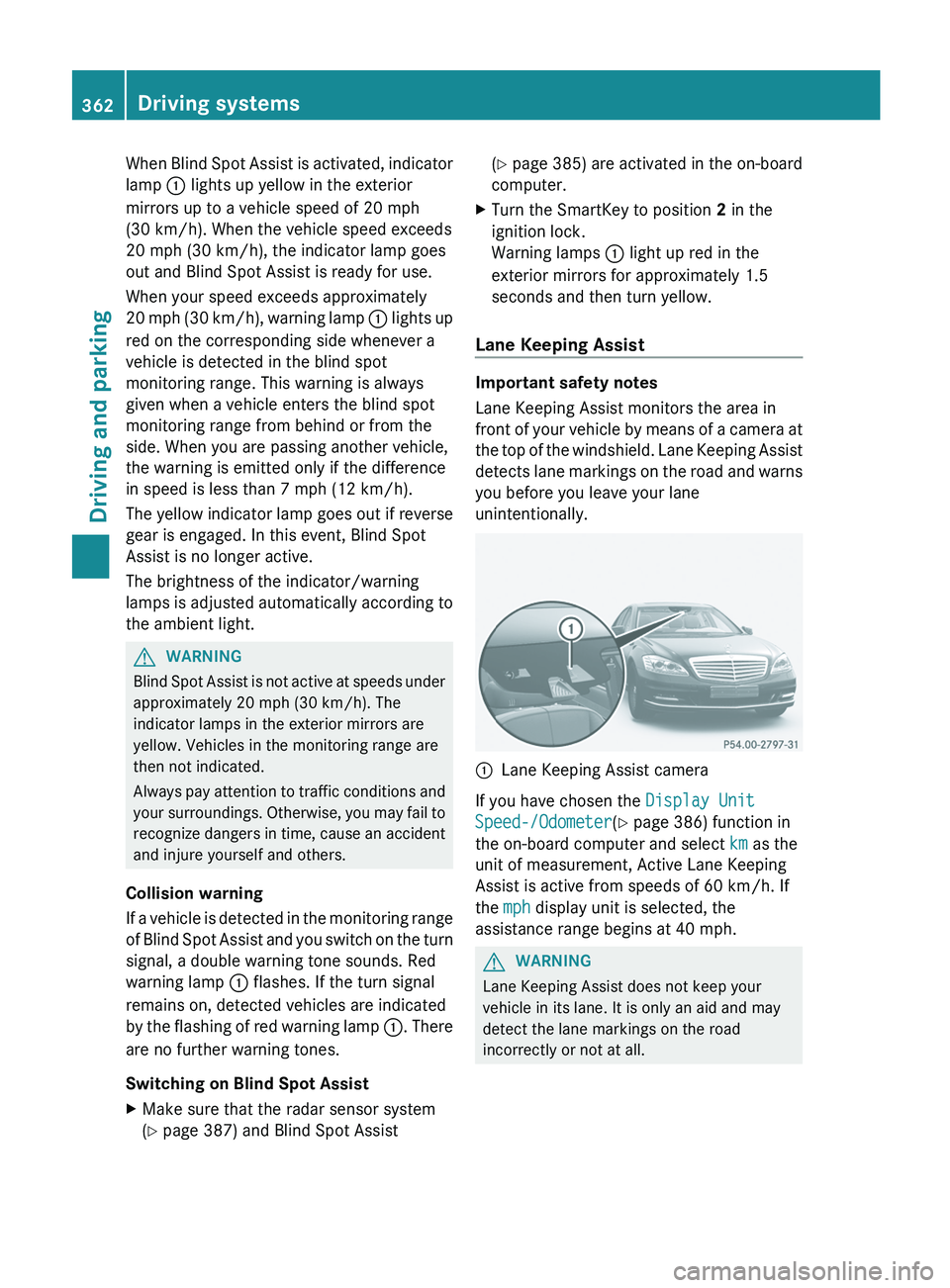
unintentionally. :
Lane Keeping Assist camera
If you have chosen the Display Unit
Speed-/Odometer(Y page 386) function in
the on-board computer and select km as the
unit of measurement, Active Lane Keeping
Assist is active from speeds of 60 km/h. If
the mph display unit is selected, the
assistance range begins at 40 mph. G
WARNING
Lane Keeping Assist does not keep your
vehicle in its lane. It is only an aid and may
detect the lane markings on the road
incorrectly or not at all. 362
Driving systems
Driving and parking
Page 368 of 536
recognize dangers in time, cause an accident
and injure yourself and others.
Visual and audible collision warnings
If you switch on the appropriate turn signals
and a vehicle is detected in the side
monitoring
range, you will receive a visual and
acoustic collision warning. You will hear a
double warning tone and red warning
lamp : flashes. If the turn signal remains on,
vehicles detected are indicated by the
flashing of red warning lamp :. There are no
further warning tones.
Course-correcting brake application
If Active Blind Spot Assist detects a risk of a
lateral collision in the monitoring range, a
course-correcting brake application is carried
out. This is meant to assist you in avoiding a
collision.
The course-correcting brake application is
available in the range between 20 mph
(30 km/h) and 120 mph (200 km/h).
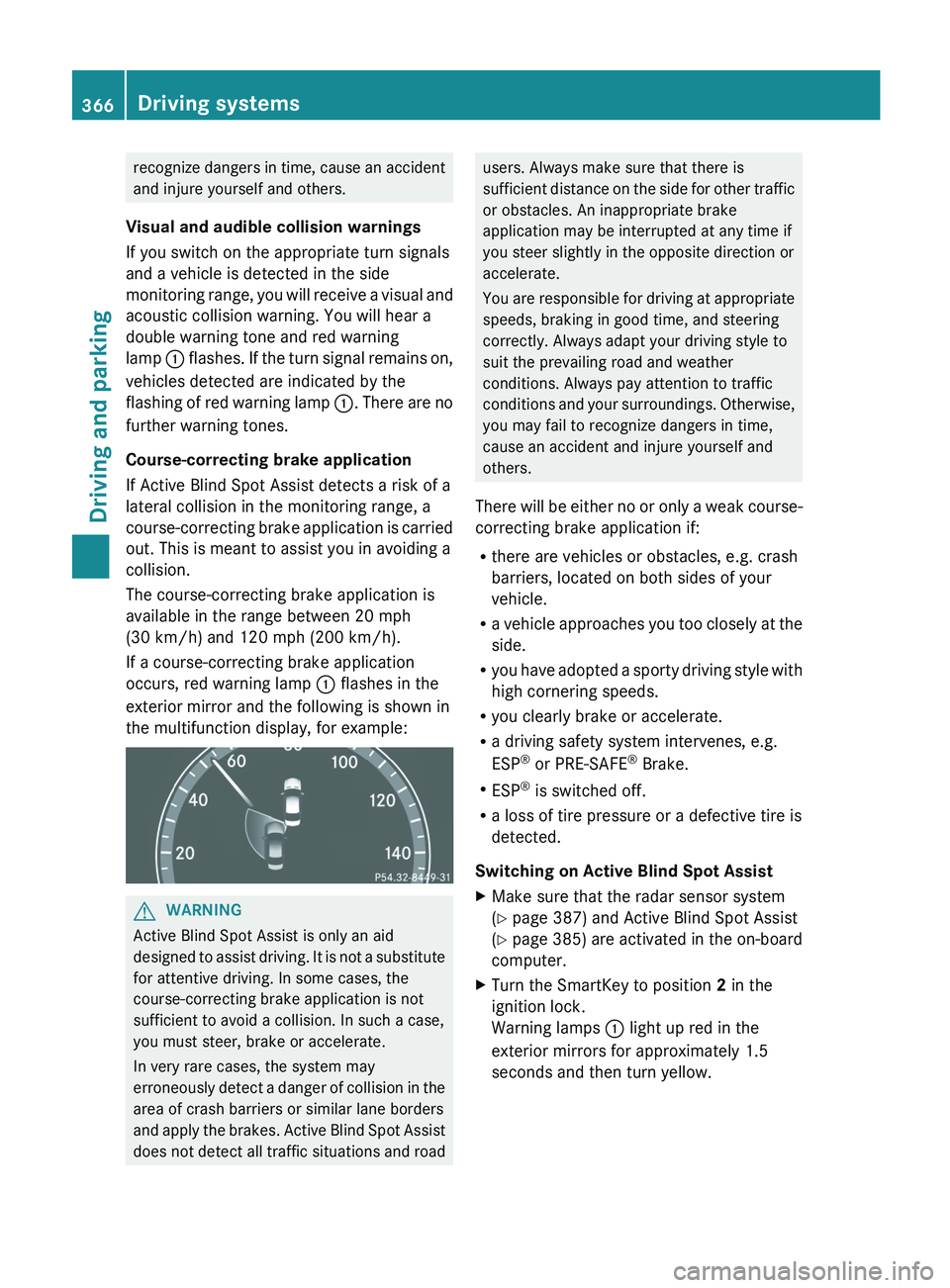
If a course-correcting brake application
occurs, red warning lamp : flashes in the
exterior mirror and the following is shown in
the multifunction display, for example: G
WARNING
Active Blind Spot Assist is only an aid
designed
to assist driving. It is not a substitute
for attentive driving. In some cases, the
course-correcting brake application is not
sufficient to avoid a collision. In such a case,
you must steer, brake or accelerate.
In very rare cases, the system may
erroneously detect a danger of collision in the
area of crash barriers or similar lane borders
and apply the brakes. Active Blind Spot Assist
does not detect all traffic situations and road users. Always make sure that there is
sufficient
distance on the side for other traffic
or obstacles. An inappropriate brake
application may be interrupted at any time if
you steer slightly in the opposite direction or
accelerate.
You are responsible for driving at appropriate
speeds, braking in good time, and steering
correctly. Always adapt your driving style to
suit the prevailing road and weather
conditions. Always pay attention to traffic
conditions and your surroundings. Otherwise,
you may fail to recognize dangers in time,
cause an accident and injure yourself and
others.
There will be either no or only a weak course-
correcting brake application if:
R there are vehicles or obstacles, e.g. crash
barriers, located on both sides of your
vehicle.
R a vehicle approaches you too closely at the
side.
R you have adopted a sporty driving style with
high cornering speeds.
R you clearly brake or accelerate.
R a driving safety system intervenes, e.g.
ESP ®
or PRE-SAFE ®
Brake.
R ESP ®
is switched off.
R a loss of tire pressure or a defective tire is
detected.
Switching on Active Blind Spot Assist
X Make sure that the radar sensor system
(Y page 387) and Active Blind Spot Assist
(Y page
385) are activated in the on-board
computer.
X Turn the SmartKey to position 2 in the
ignition lock.
Warning lamps : light up red in the
exterior mirrors for approximately 1.5
seconds and then turn yellow. 366
Driving systems
Driving and parking
Page 375 of 536
vehicle and do not stand near the vehicle until
the engine has cooled down.
The coolant temperature gauge is in the
instrument cluster on the left-hand side.
Under normal operating conditions and with
the specified coolant level, the coolant
temperature may rise to 248 ‡ (120 †).
! If the coolant temperature is too high a
display message is shown.
If the coolant temperature rises above
248
‡(120 †), do not drive any further as
this could damage the engine. Tachometer
The
red band in the tachometer indicates the
engine's overrevving range.
! Do not drive in the overrevving range, as
this could damage the engine.
The fuel supply is interrupted to protect the
engine when the red band is reached. Outside temperature display
The outside temperature display is in the
multifunction display
(Y page 374). G
WARNING
The outside temperature indicator is not
designed to serve as an ice-warning device
and is therefore unsuitable for that purpose.
Indicated temperatures just above the
freezing
point do not guarantee that the road
surface is free of ice. The road may still be icy,
especially in wooded areas or on bridges.
Changes in the outside temperature are
displayed after a short delay. Operating the on-board computer
The on-board computer is activated as soon
as
you turn the SmartKey to position 2 in the
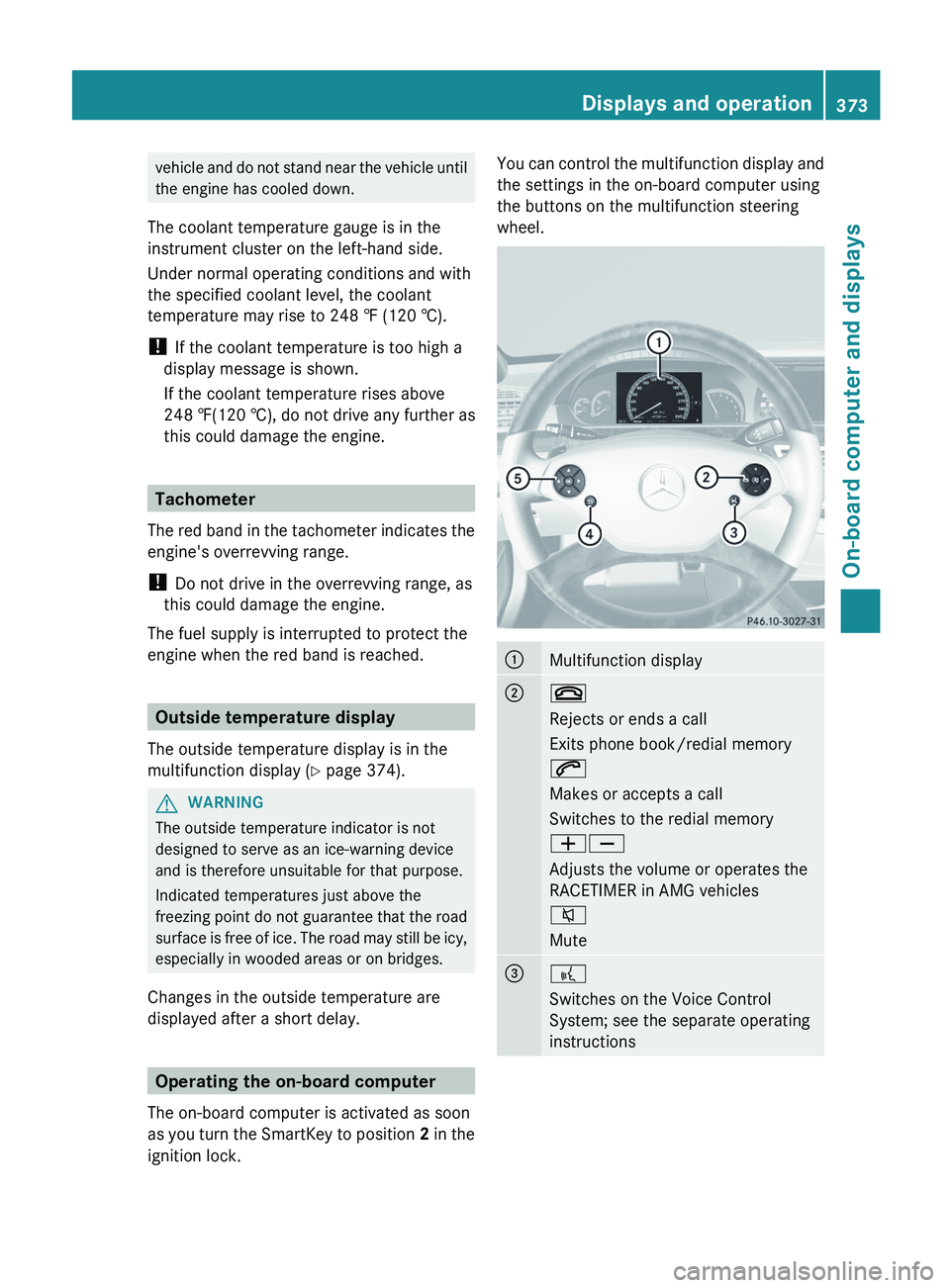
ignition lock. You can control the multifunction display and
the settings in the on-board computer using
the buttons on the multifunction steering
wheel.
:
Multifunction display
;
~
Rejects or ends a call
Exits phone book/redial memory
6
Makes or accepts a call
Switches to the redial memory
WX
Adjusts the volume or operates the
RACETIMER in AMG vehicles
8
Mute
=
?
Switches on the Voice Control
System; see the separate operating
instructions Displays and operation
373
On-board computer and displays Z
Page 378 of 536
Trip menu
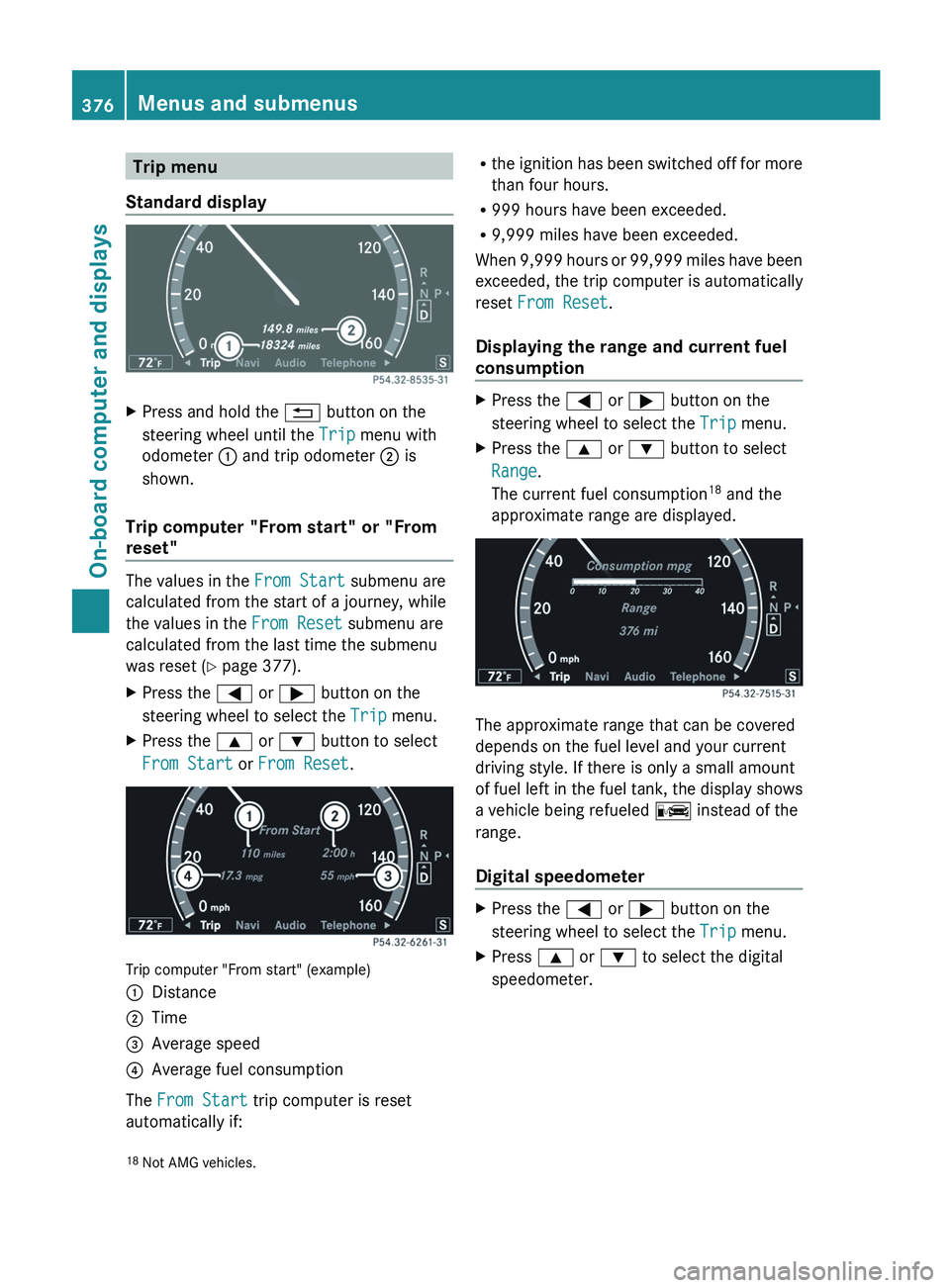
Standard display X
Press and hold the % button on the
steering wheel until the Trip menu with
odometer : and trip odometer ; is
shown.
Trip computer "From start" or "From
reset" The values in the
From Start submenu are
calculated from the start of a journey, while
the values in the From Reset submenu are
calculated from the last time the submenu
was reset ( Y page 377).
X Press the = or ; button on the
steering wheel to select the Trip menu.
X Press the 9 or : button to select
From Start or From Reset. Trip computer "From start" (example)
:
Distance
; Time
= Average speed
? Average fuel consumption
The From Start trip computer is reset
automatically if: R
the ignition has been switched off for more
than four hours.
R 999 hours have been exceeded.
R 9,999 miles have been exceeded.
When 9,999 hours or 99,999 miles have been
exceeded, the trip computer is automatically
reset From Reset.
Displaying the range and current fuel
consumption X
Press the = or ; button on the
steering wheel to select the Trip menu.
X Press the 9 or : button to select
Range.
The current fuel consumption 18
and the
approximate range are displayed. The approximate range that can be covered
depends on the fuel level and your current
driving style. If there is only a small amount
of
fuel left in the fuel tank, the display shows
a vehicle being refueled C instead of the
range.
Digital speedometer X
Press the = or ; button on the
steering wheel to select the Trip menu.
X Press 9 or : to select the digital
speedometer.
18 Not AMG vehicles.376
Menus and submenus
On-board computer and displays
Page 382 of 536
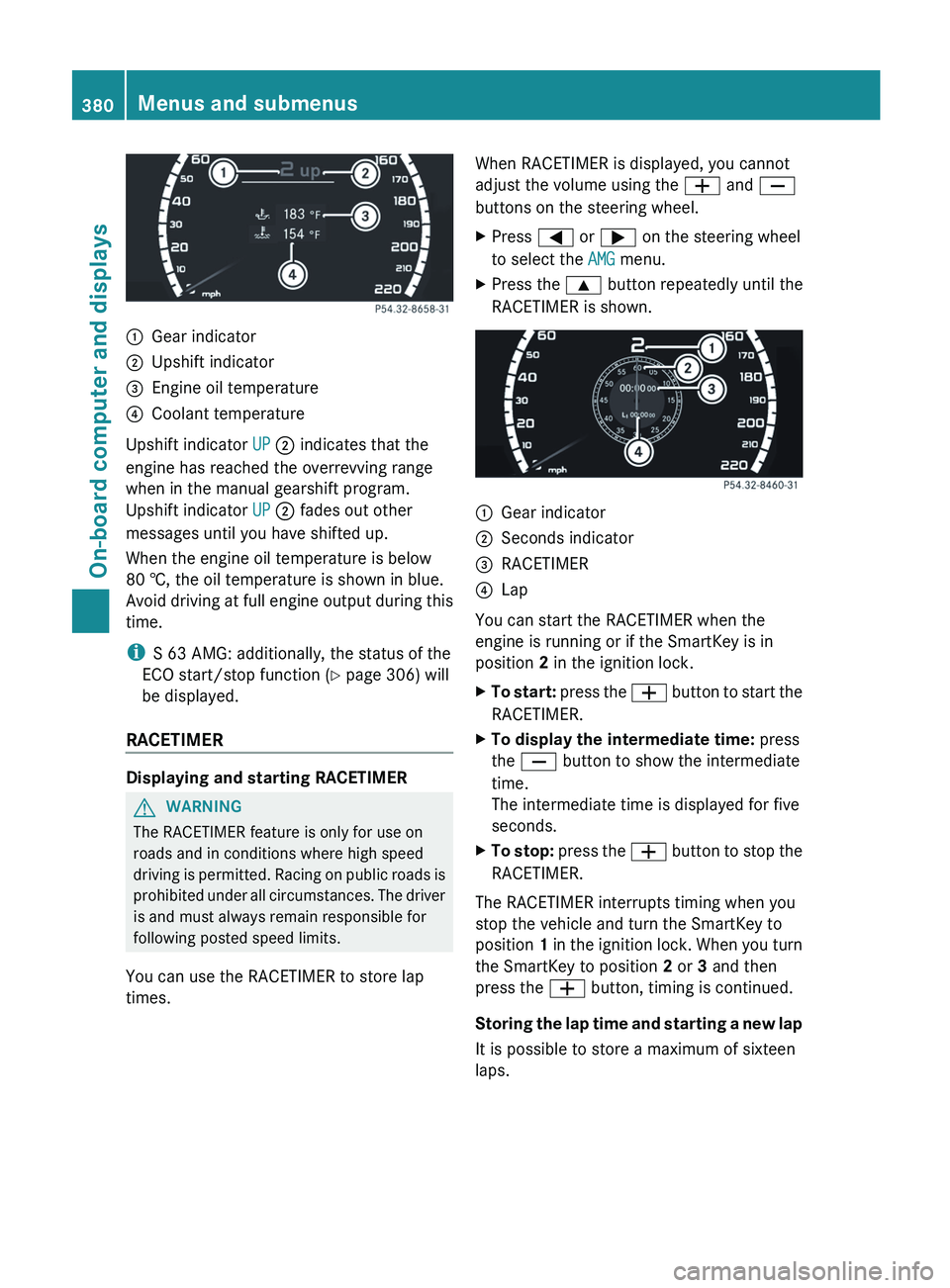
:
Gear indicator
; Upshift indicator
= Engine oil temperature
? Coolant temperature
Upshift indicator UP ; indicates that the
engine has reached the overrevving range
when in the manual gearshift program.
Upshift indicator UP ; fades out other
messages until you have shifted up.
When the engine oil temperature is below
80 †, the oil temperature is shown in blue.
Avoid
driving at full engine output during this
time.
i S 63 AMG: additionally, the status of the
ECO start/stop function (Y page 306) will
be displayed.
RACETIMER Displaying and starting RACETIMER
G
WARNING
The RACETIMER feature is only for use on
roads and in conditions where high speed
driving
is permitted. Racing on public roads is
prohibited under all circumstances. The driver
is and must always remain responsible for
following posted speed limits.
You can use the RACETIMER to store lap
times. When RACETIMER is displayed, you cannot
adjust the volume using the
W and X
buttons on the steering wheel.
X Press = or ; on the steering wheel
to select the AMG menu.
X Press the 9 button repeatedly until the
RACETIMER is shown. :
Gear indicator
; Seconds indicator
= RACETIMER
? Lap
You can start the RACETIMER when the
engine is running or if the SmartKey is in
position 2 in the ignition lock.
X To start:
press the W button to start the
RACETIMER.
X To display the intermediate time: press
the X button to show the intermediate
time.
The intermediate time is displayed for five
seconds.
X To stop:
press the W button to stop the
RACETIMER.
The RACETIMER interrupts timing when you
stop the vehicle and turn the SmartKey to
position 1
in the ignition lock. When you turn
the SmartKey to position 2 or 3 and then
press the W button, timing is continued.
Storing the lap time and starting a new lap
It is possible to store a maximum of sixteen
laps. 380
Menus and submenus
On-board computer and displays
Page 387 of 536
X
Press a.
The current selection is displayed.
X To activate/deactivate: press a
again.
When ATTENTION ASSIST (Y page 356) is
activated, the À symbol appears in the
multifunction
display when the ignition is on.
Activating/deactivating Blind Spot
Assist You can use the
Blind Spot Assist
function to activate or deactivate Blind Spot
Assist (Y page 360) or Active Blind Spot
Assist (Y page 364).
X Press = or ; on the steering wheel
to select the DriveAssist menu.
X Press 9
or : to select Blind Spot
Assist.
X Press a.
The current selection is displayed.
X To activate/deactivate: press a
again.
Activating/deactivating Lane Keeping
Assist You can use the
Lane Keeping Assist
function
to activate/deactivate Lane Keeping
Assist (Y page 362) or Active Lane Keeping
Assist (Y page 367).
X Press the = or ; button on the
steering wheel to select the DriveAssist
menu.
X Press the 9 or : button to select
Lane Keeping Assist.
X Press a.
The current selection is displayed.
X To activate/deactivate: press a
again.
If Lane Keeping Assist or Active Lane keeping
Assist is activated, the multifunction display
shows the à symbol when the ignition is
switched on. Service menu
In the Service menu you can:
R call up display messages
(Y page 388)
R check the tire pressure electronically
(Y page 497)
R call up the service due date (Y page 462)
R check the oil level ( Y page 457) Settings menu
Introduction The Settings menu can be used for:
R
switching the daytime running lamps on/
off
R switching Adaptive Highbeam Assist on/
off
R showing or hiding the additional
speedometer
R selecting the units for speed and distance
R switching the belt adjustment on/off
R activating/deactivating the radar sensor
system
Switching the daytime running lamps
on/off This function is not available in Canada.
If
you have activated the Daytime Running
Light function and the light switch is in the
$ or c position, the daytime running
lamps are switched on automatically when
the engine is running.
In the dark, the following also light up:
R the parking lamps
R the tail lamps
R the license plate lamp
R the side marker lamps
If you turn the light switch to a different
position, the corresponding lights are
switched on. If you switch off the daytime
running lamps at night, make sure that the
light switch is set to L or c.
The factory setting is On. Menus and submenus
385
On-board computer and displays Z
Page 390 of 536
Display messages
General notes
G
WARNING
All categories of messages contain important information which should be taken note of and,
where a malfunction is indicated, addressed as soon as possible at an authorized Mercedes-Benz
Center.
Failure to repair the condition noted may cause damage not covered by the Mercedes-Benz
Limited Warranty, or result in property damage or personal injury.
Display messages appear in the multifunction display.
Display messages with graphic displays may be shown in simplified form in the Operator's
Manual and may differ from the messages shown in the multifunction display.
Please respond in accordance with the display messages and follow the additional notes in
this Operator's Manual.
Certain display messages are accompanied by an audible warning tone or a continuous tone.
When you stop and park the vehicle, please observe the notes on the HOLD function
(Y page 342) and parking ( Y page 323).Hiding display messages
You can hide some display messages with a low priority.
X Press the a or % button on the steering wheel to hide the display message.
The display message is cleared.
Display messages with a low priority are shown in either yellow or white.
Display messages with a high priority are shown in red.
You cannot hide display messages of the highest priority. The multifunction display shows
these messages continuously until the causes for the messages have been remedied. Message memory
The
on-board computer saves certain display messages. You can call up the display messages
in the message memory.
X Press the = or ; button on the steering wheel to select the Service menu.
If there are display messages, the multifunction display shows, for example, 2 messages.
X Press the 9 or : button to select the entry, e.g. 2 messages.
X Confirm with a.
X Press the 9 or : button to scroll through the display messages.
When the ignition is switched off, all display messages are deleted apart from some high-
priority display messages. Once the causes of the high-priority display messages have been
rectified, the corresponding display messages are also deleted. 388
Display messages
On-board computer and displays
Page 395 of 536
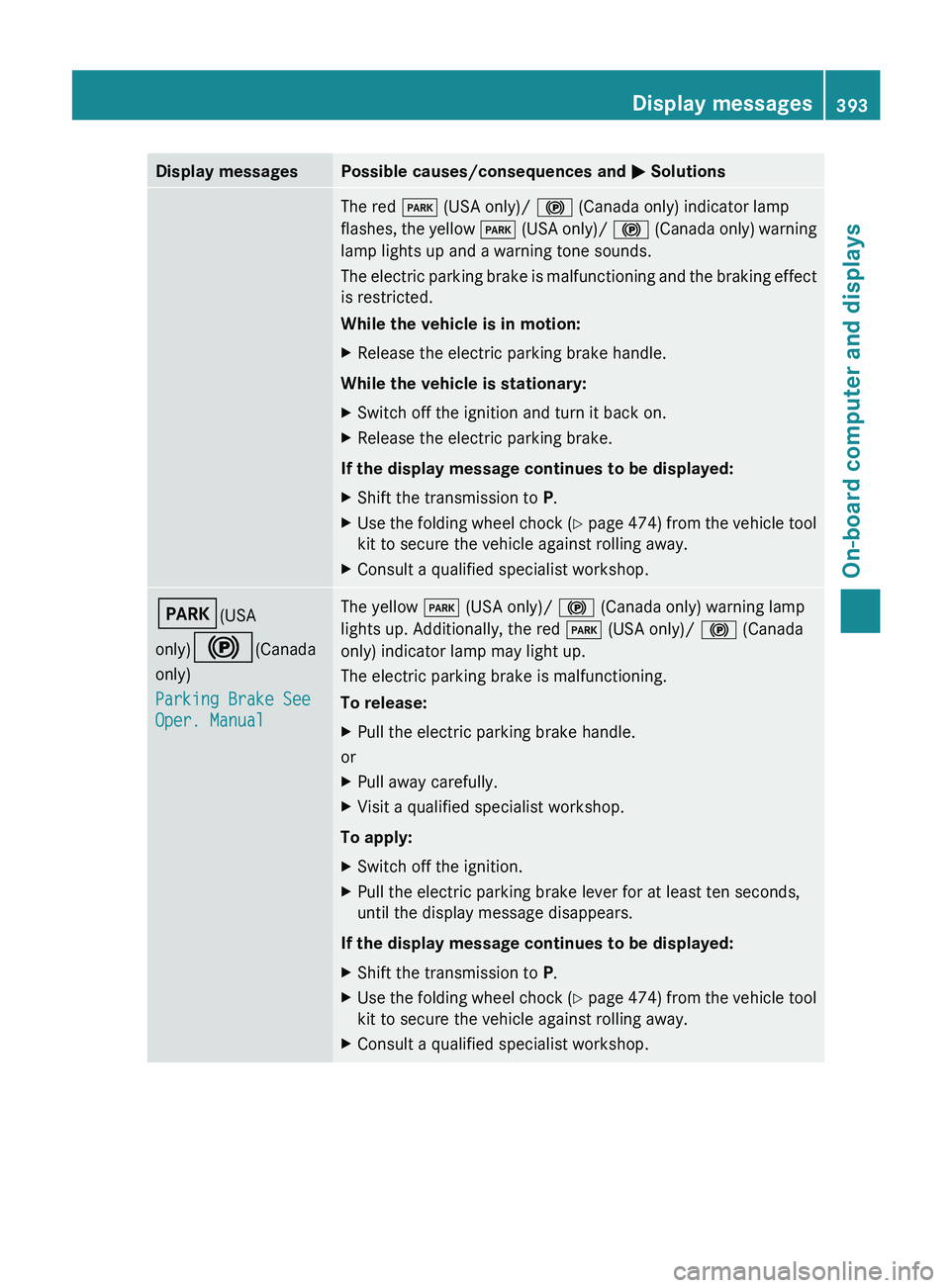
Display messages Possible causes/consequences and
M SolutionsThe red
F (USA only)/ ! (Canada only) indicator lamp
flashes, the yellow F (USA only)/ ! (Canada only) warning
lamp lights up and a warning tone sounds.
The electric parking brake is malfunctioning and the braking effect
is restricted.
While the vehicle is in motion:
X Release the electric parking brake handle.
While the vehicle is stationary:
X Switch off the ignition and turn it back on.
X Release the electric parking brake.
If the display message continues to be displayed:
X Shift the transmission to P.
X Use the folding wheel chock (Y
page 474) from the vehicle tool
kit to secure the vehicle against rolling away.
X Consult a qualified specialist workshop. F(USA
only)!(Canada
only)
Parking Brake See
Oper. Manual The yellow
F (USA only)/ ! (Canada only) warning lamp
lights up. Additionally, the red F (USA only)/ ! (Canada
only) indicator lamp may light up.
The electric parking brake is malfunctioning.
To release:
X Pull the electric parking brake handle.
or
X Pull away carefully.
X Visit a qualified specialist workshop.
To apply:
X Switch off the ignition.
X Pull the electric parking brake lever for at least ten seconds,
until the display message disappears.
If the display message continues to be displayed:
X Shift the transmission to P.
X Use the folding wheel chock (Y
page 474) from the vehicle tool
kit to secure the vehicle against rolling away.
X Consult a qualified specialist workshop. Display messages
393
On-board computer and displays Z
Page 396 of 536
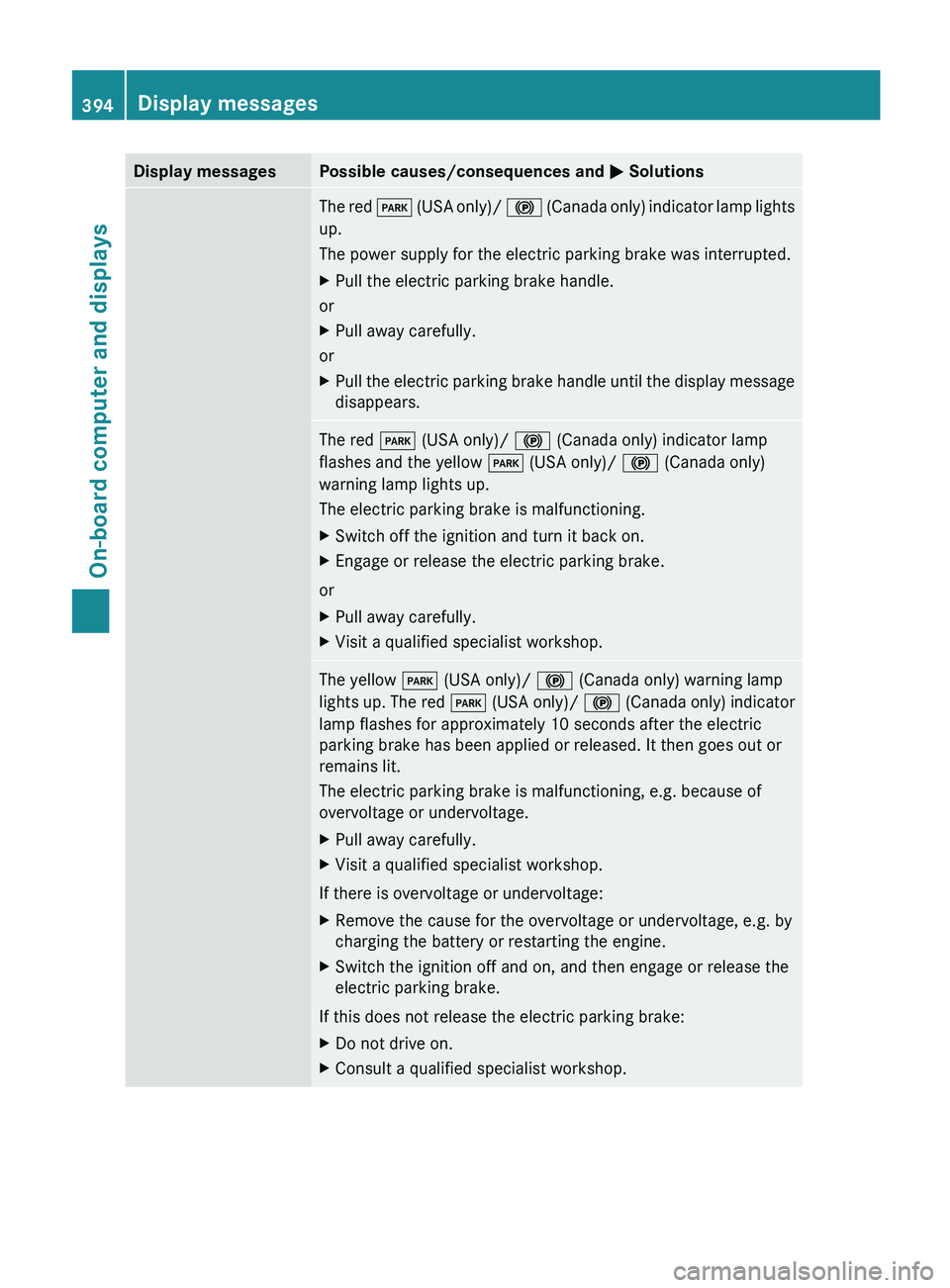
Display messages Possible causes/consequences and
M SolutionsThe red
F (USA only)/ ! (Canada only) indicator lamp lights
up.
The power supply for the electric parking brake was interrupted.
X Pull the electric parking brake handle.
or
X Pull away carefully.
or
X Pull the electric parking brake handle until the display message
disappears. The red
F (USA only)/ ! (Canada only) indicator lamp
flashes and the yellow F (USA only)/ ! (Canada only)
warning lamp lights up.
The electric parking brake is malfunctioning.
X Switch off the ignition and turn it back on.
X Engage or release the electric parking brake.
or
X Pull away carefully.
X Visit a qualified specialist workshop. The yellow
F (USA only)/ ! (Canada only) warning lamp
lights
up. The red F (USA only)/ ! (Canada only) indicator
lamp flashes for approximately 10 seconds after the electric
parking brake has been applied or released. It then goes out or
remains lit.
The electric parking brake is malfunctioning, e.g. because of
overvoltage or undervoltage.
X Pull away carefully.
X Visit a qualified specialist workshop.
If there is overvoltage or undervoltage:
X Remove the cause for the overvoltage or undervoltage, e.g. by
charging the battery or restarting the engine.
X Switch the ignition off and on, and then engage or release the
electric parking brake.
If this does not release the electric parking brake:
X Do not drive on.
X Consult a qualified specialist workshop.394
Display messages
On-board computer and displays