CD player MERCEDES-BENZ S-CLASS SEDAN 2013 Owners Manual
[x] Cancel search | Manufacturer: MERCEDES-BENZ, Model Year: 2013, Model line: S-CLASS SEDAN, Model: MERCEDES-BENZ S-CLASS SEDAN 2013Pages: 536, PDF Size: 24.14 MB
Page 9 of 536
Car
see Vehicle
Care
Carpets .......................................... 469
Car wash ........................................ 463
Display ........................................... 467
Exterior lights ................................ 466
Gear or selector lever ....................468
Matte finish ................................... 465
Night View Assist Plus ...................467
Notes ............................................. 463
Paint .............................................. 465
Plastic trim .................................... 468
Power washer ................................ 464
Rear view camera .......................... 467
Roof lining ...................................... 469
Seat belt ........................................ 469
Seat cover ..................................... 469
Sensors ......................................... 467
Steering wheel ............................... 468
Tail pipes ....................................... 467
Trim pieces .................................... 468
Washing by hand ........................... 464
Wheels ........................................... 465
Windows ........................................ 466
Wiper blades .................................. 466
Wooden trim .................................. 468
Cargo tie down rings .........................435
Car pool lanes .................................... 169
Car wash (care) ................................. 463
Category Satellite radio ................................ 218
CD
Copy protection ............................. 229
Fast forward/fast rewind ............... 225
General information ....................... 229
Inserting ........................................ 220
Inserting/loading (Rear Seat
Entertainment System) .................. 251
Mode, switching to ........................ 221
Multisession .................................. 228
Notes on discs ............................... 229
Operating the player/changer
(on-board computer) ...................... 379
Pause function ............................... 223
Playback options ........................... 228
Player/changer operation
(COMAND) ..................................... 220Removing/ejecting (Rear Seat
Entertainment System)
..................251
Safety notes .................................. 220
Selecting a media type .................. 224
Selecting a track ............................ 224
Sound settings (balance, bass,
fader, treble) .................................. 135
Cell phone
see Mobile phone
Center console ..................................... 38
Central locking Automatic locking feature
(COMAND) ..................................... 264
Locking/unlocking (SmartKey) ........ 78
Changing batteries (remote
control, headphones) ........................247
Changing bulbs High-beam headlamps (vehicles
with halogen daytime running
lamps) ............................................ 284
High-beam headlamps (vehicles
with LED daylight lamps) ...............284
Important safety notes .................. 282
Overview of bulb types ..................283
Changing direction
Announcement phase .................... 166
Change of direction phase ............. 167
Preparation phase ......................... 166
Character bar ..................................... 129
Characters Entering ......................................... 130
Entering (address book, phone
book) ............................................. 132
Entering (navigation) ......................129
Child-proof locks
Important safety notes .................... 66
Rear doors ....................................... 67
Children
In the vehicle ................................... 62
Restraint systems ............................ 62
Child seat
LATCH-type (ISOFIX) child seat
anchors ............................................ 65
Special seat belt retractor ............... 64
Top Tether ....................................... 65
Cigarette lighter ................................ 440 Index
7
Page 39 of 536
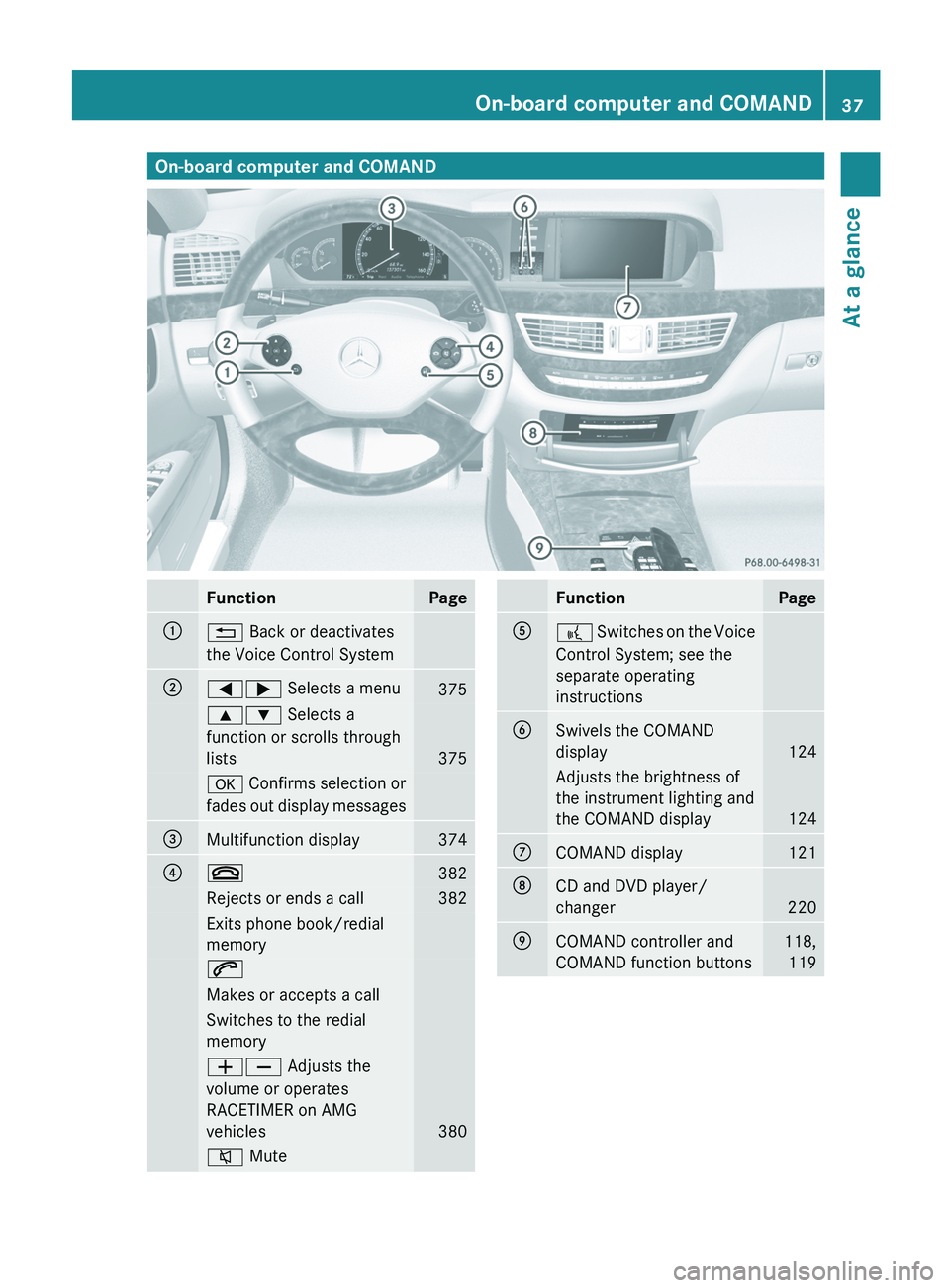
On-board computer and COMAND
Function Page
:
% Back or deactivates
the Voice Control System
;
=; Selects a menu
375
9: Selects a
function or scrolls through
lists
375
a Confirms selection or
fades out display messages
=
Multifunction display 374
?
~
382
Rejects or ends a call 382
Exits phone book/redial
memory
6
Makes or accepts a call
Switches to the redial
memory
WX Adjusts the
volume or operates
RACETIMER on AMG
vehicles
380
8 Mute Function Page
A
?
Switches on the Voice
Control System; see the
separate operating
instructions
B
Swivels the COMAND
display
124
Adjusts the brightness of
the instrument lighting and
the COMAND display
124
C
COMAND display 121
D
CD and DVD player/
changer
220
E
COMAND controller and
COMAND function buttons 118,
119 On-board computer and COMAND
37
At a glance
Page 230 of 536
X
Select Group by turning cVd and press
W to confirm.
The list of available groups appears. The
# dot indicates the group currently
selected.
X To exit the menu: slide XVY the COMAND
controller or press the % button.
Playback options The following options are available to you:
R
Normal Track Sequence
The tracks are played in the normal order
(e.g. track 1, 2, 3, etc.).
In
MP3 mode, the track order is determined
by the order in which the tracks are written
to the MP3 data carrier when it is created.
Alphabetical order is the most common.
Once all the tracks in a folder have been
played, the tracks in the next folder are
played.
R Medium Mix
All the tracks on the medium are played in
random order (e.g. track 3, 8, 5 etc.).
R Track List Mix (MP3 mode only)
All the tracks that are listed in the current
track list are played in random order.
X To select options: switch on audio CD/
DVD or MP3 mode ( Y page 221).
X Select CD, DVD-A
or MP3 by sliding VÆ and
turning cVd the COMAND controller and
press W to confirm.
The options list appears. The # dot
indicates the option selected.
X Select an option by turning cVd
and press
W to confirm.
The option is switched on. For all options
except "Normal track sequence", you will
see a corresponding display in the display/
selection window. See the example of the
display in audio CD mode ( Y page 221).
i The "Normal track sequence" option is
automatically selected when you change
the medium you are currently listening to or when you select a different medium. If
an option is selected, it remains selected
after COMAND is switched on or off.
Notes on MP3 mode Permissible discs
R
CD-R and CD-RW
R DVD+R and DVD+RW
R DVD-R and DVD-RW
R SD memory card:
R USB stick
R iPod ®
R MP3 player
Permissible file systems
R ISO 9660/Joliet standard for CDs
R UDF for audio and video DVDs
R FAT16 or FAT32 for storage media
Multisession CDs
For
multisession CDs, the content of the first
session determines how COMAND will
process the CD. COMAND plays only one
session and gives priority to the audio CD
session.
If possible, use COMAND to play only CDs
which have been written in one session.
File structure of a data carrier
When you create a disc with compressed
music files, the tracks can be organized in
folders. A folder may also contain subfolders.
A disc can contain a maximum of 255 folders.
Each folder can contain a maximum of
255 tracks and 255 subfolders.
The disc may contain no more than eight
directory levels. Files beyond the eighth level
will not be recognized by the system.
Track and file names
When you create a disc with compressed
music files, you can assign names to the
tracks and folders.
COMAND uses these names accordingly for
the display. Folders which contain data other 228
Audio
COMAND
Page 235 of 536
X
Enter a name for the folder/track.
X To save the changes: select ¬ and
press W to confirm.
Deleting folders/tracks
X Select Rename/Delete Files by sliding
VÆ and turning cVd the COMAND
controller and press W to confirm.
X Select the folder/track by turning cVd.
X Select Options by sliding VY and press
W to confirm.
X Select Delete and press W to confirm.
A query appears. No is highlighted.
If you select Yes, the folders/tracks are
deleted. You see the Please wait...
message. Then, you see the Deletion
Successful message.
If
you select No, the process will be aborted.
Playback options The following options are available:
R
Normal Track Sequence
The tracks are played in the normal order
(e.g. track 1, 2, 3, etc.).
R Medium Mix
All the tracks on the medium are played in
random order.
R Track List Mix (MP3 mode only)
All the tracks that are listed in the current
track list are played in random order.
X To select options: switch on the MUSIC
REGISTER (Y page 230).
X Select Music
Register by sliding VÆ and
turning cVd the COMAND controller and
press W to confirm.
The options list appears. The # dot
indicates the option selected.
X Select an option and press W to confirm.
The option is switched on. All options
except Normal Track Sequence will be
indicated by a corresponding icon in the
display/selection window. i
The Normal Track Sequence option is
automatically selected when you change
the disc you are currently listening to or
when you select a different medium. If an
option
is selected, it remains selected after
COMAND is switched on or off. Media Interface mode
Connection options Overview
You will find the connection sockets in the
glove box.
Device-specific adapter cables are required
to connect external devices to the Media
Interface. These cables are included in the
Media Interface scope of delivery.
i
Store individual parts in a safe place.
Only use genuine Mercedes-Benz
connection cables.
You can connect the following data carriers
to COMAND via the Media Interface:
R iPod ®
R USB devices (USB sticks, USB hard drives,
MP3 players)
i iPod ®
is a registered trademark of Apple
Inc., Cupertino, California, USA.
Supported iPod ®
variants
The following are examples of supported
iPod ®
variants:
R iPod ®
nano
R iPod ®
classic
R iPod ®
touch
R iPhone ®
Supported USB devices
The following USB devices are supported:
R USB sticks (flash memory)
R USB hard drives requiring a startup/
permanent current of a maximum of Audio
233
COMAND Z
Page 236 of 536
800 mA (it may be necessary to connect a
separate power supply)
R certain MP3 players
i The Media Interface supports USB
storage
media of "USB Device Subclass 6".
Information concerning USB Device
Subclass 6 is available from the equipment
manufacturer.
For details and a list of supported devices,
visit http://www.mbusa-mobile.com. Or
call the Mercedes-Benz Customer Assistance
Center at
1-800-FOR-MERCedes(1-800-367-6372) (for
the USA) or Customer Relations at
1-800-387-0100 (for Canada).
Connecting an external device i
Do not leave external devices in the
vehicle as extreme temperatures (e.g.
direct sunlight or extremely low outside
temperatures) could cause them to
malfunction
(see the operating instructions
for the respective device). Mercedes-Benz
USA, LLC accepts no liability for damage to
external devices.
Never connect more than one device at a
time. You will otherwise not be able to
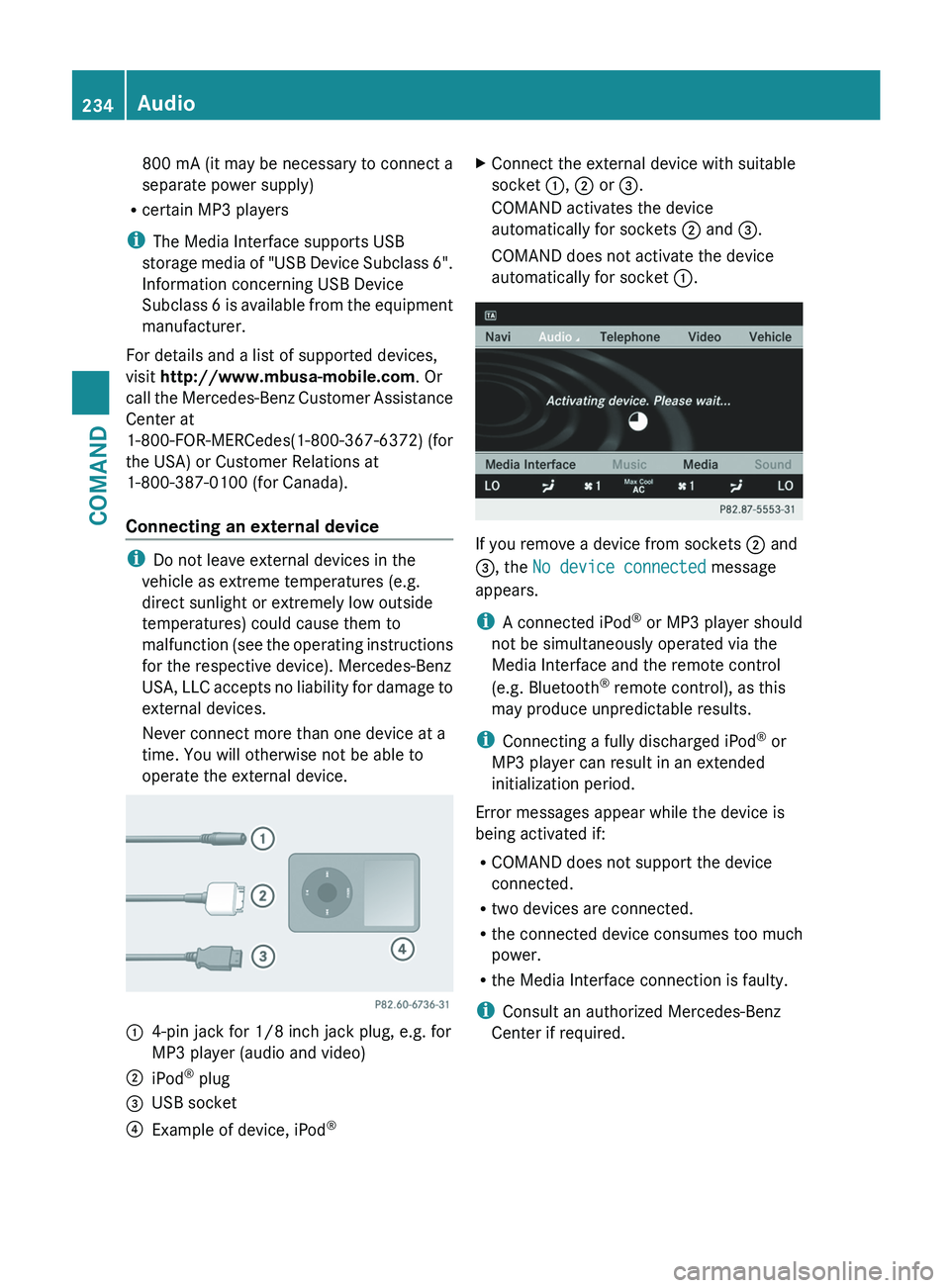
operate the external device. :
4-pin jack for 1/8 inch jack plug, e.g. for
MP3 player (audio and video)
; iPod ®
plug
= USB socket
? Example of device, iPod ®X
Connect the external device with suitable
socket :, ; or =.
COMAND activates the device
automatically for sockets ; and =.
COMAND does not activate the device
automatically for socket :. If you remove a device from sockets ; and
=, the No device connected message
appears.
i
A connected iPod ®
or MP3 player should
not be simultaneously operated via the
Media Interface and the remote control
(e.g. Bluetooth ®
remote control), as this
may produce unpredictable results.
i Connecting a fully discharged iPod ®
or
MP3 player can result in an extended
initialization period.
Error messages appear while the device is
being activated if:
R COMAND does not support the device
connected.
R two devices are connected.
R the connected device consumes too much
power.
R the Media Interface connection is faulty.
i Consult an authorized Mercedes-Benz
Center if required. 234
Audio
COMAND
Page 237 of 536
Switching to Media Interface mode
General notes
In extreme cases, starting up individual
functions can take up to several minutes –
this depends on the external device and its
content (e.g. video podcasts).
Only
use the original software to save files on
iPods or MP3 players. Otherwise, some or all
functions may not be available.
Option 1
X Connect an external device (Y page 234).
COMAND activates the device. Following
this, the basic display appears if there are
any playable files on the data carrier.
or
X Select Audio in the main function bar by
sliding ZV
and turning cVd the COMAND
controller and press W to confirm.
If you had previously selected Media
Interface mode, this will now be activated.
If another audio source is switched on, you
can now switch to Media Interface mode in
the audio menu.
X Select Audio by sliding ZV and turning
cVd the COMAND controller and press
W to confirm.
The audio menu appears.
X Select Media Interface and press W to
confirm.
Option 2
X Select Audio by sliding ZV and turning
cVd the COMAND controller and press
W to confirm.
The audio menu appears.
X Select Media Interface and press W to
confirm.
Option 3
X In the media list, ( Y page 224) turn cVd
the
COMAND controller to select the entry under the corresponding position and
press W to confirm.
COMAND activates the connected device.
You will see a message to this effect. The
basic display then appears.
If no device is connected, you will see the
Media Interface entry instead of a
device name.
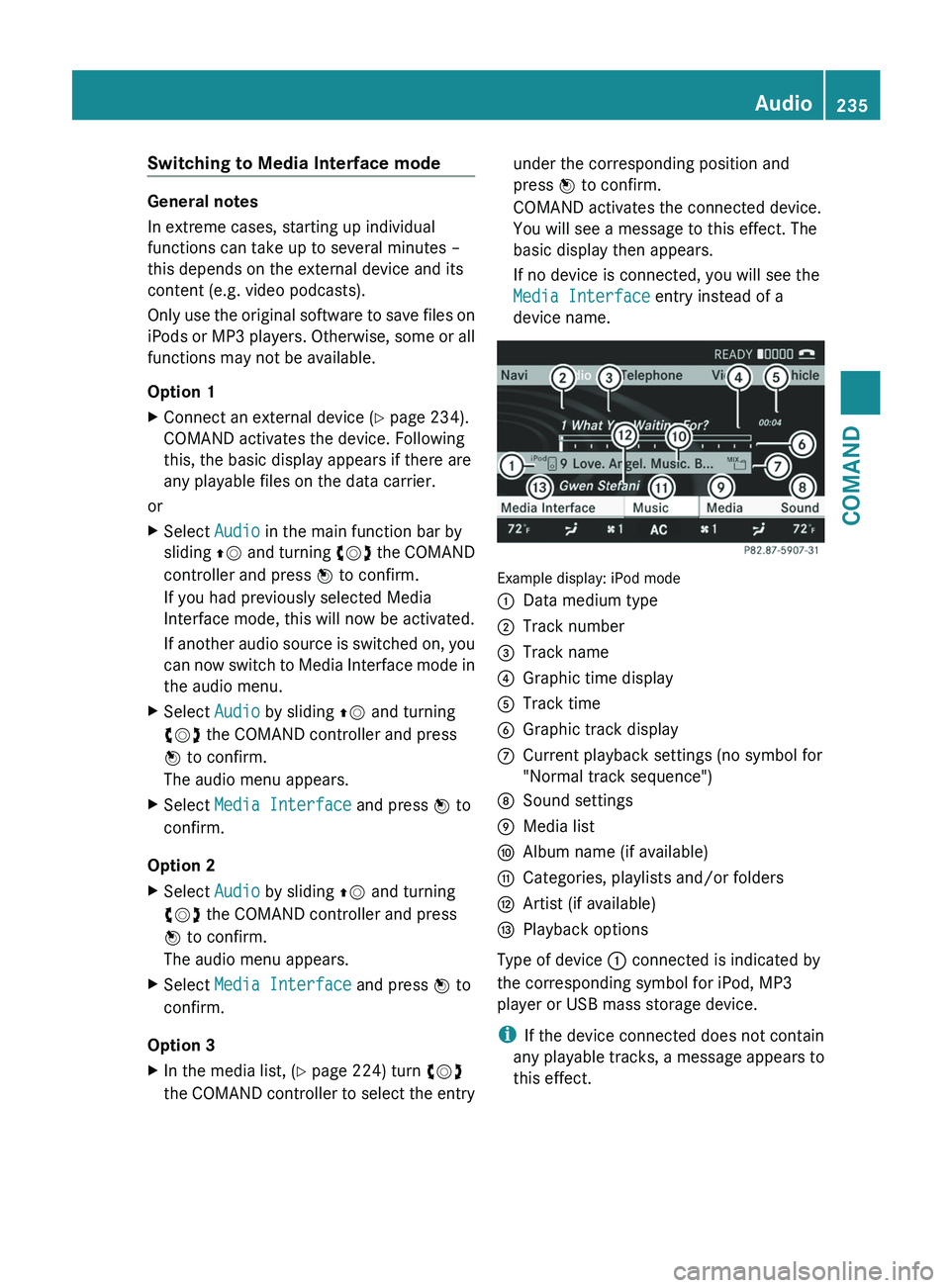
Example display: iPod mode
:
Data medium type
; Track number
= Track name
? Graphic time display
A Track time
B Graphic track display
C Current playback settings (no symbol for
"Normal track sequence")
D Sound settings
E Media list
F Album name (if available)
G Categories, playlists and/or folders
H Artist (if available)
I Playback options
Type of device : connected is indicated by
the corresponding symbol for iPod, MP3
player or USB mass storage device.
i If the device connected does not contain
any
playable tracks, a message appears to
this effect. Audio
235
COMAND Z
Page 238 of 536
Selecting music files
Note
COMAND displays the data stored on the
iPod
®
, MP3 player or USB mass storage
device according to the filing structure used
in the respective medium.
Selecting by skipping to a track
X To skip forwards or back to a track: turn
cVd the COMAND controller when the
display/selection window is active.
The skip forward function skips to the next
track. The skip back function skips to the
beginning of the current track if the track
has been playing for more than eight
seconds. If the track has been playing for
less than eight seconds, it skips to the start
of the previous track. If you have selected
a playback option other than Normal
Track Sequence, the track sequence is
random.
X On the multifunction steering wheel:
switch on Media Interface mode
(Y page 234).
X On the multifunction steering wheel, press
the = or ; button to select the
Audio menu.
X On the multifunction steering wheel, press
9 or : to select a track.
Selecting using the number keypad
X To make an entry:
press the Ä button.
An input menu appears. The number of
characters available for input depends on
the number of tracks that can currently be
selected.
X To enter a track number: press
a number
key, e.g. q.
The digit is entered in the first position in
the input line.
i COMAND will ignore and not display an
invalid digit.
X Enter more numbers if desired.
The selected track is played. Fast forward/rewind
X
While the display/selection window is
active, slide XVY and hold the COMAND
controller until the desired position has
been reached.
i On an iPod ®
, fast rewind only functions
within the current track.
Selecting a category/playlist/folder iPod
®
and certain MP3 players
For an iPod ®
or MP3 player, you can select
tracks using categories or folders.
Depending on the device connected, the
following categories may be available, for
example:
R Current tracklist
R Playlists (e.g. All)
R Artists
R Albums
R Tracks
R Podcasts
R Genres
R Composers
R Audiobooks
i Some playback categories contain the
entry All. If this entry has been selected,
the
entire content of the category selected
will be played.
USB devices
For USB mass storage devices, you can select
both folders as well as any existing playlists.
COMAND can also display the album name
and artist (metadata) during playback, if this
information has been entered into the
system.
Playlists are indicated in the display by a
special icon. When you open the playlist, the
corresponding tracks are displayed and
playback begins once a track is selected. You
can now select Category Mix instead of
Random Folder as a playback option. 236
Audio
COMAND
Page 239 of 536
For USB mass storage devices, you can
choose to display the metadata contained in
the tags of the encoded music data, or to
display the file and directory names during
playback.
X
To display the album and artist name:
select Media Interface in the basic
display
by sliding VÆ and turning cVd the
COMAND controller and press W to
confirm.
X Select Display
Metadata and press W to
confirm.
Selecting a category and opening a folder
X Press W
the COMAND controller when the
display/selection window is active.
X Select Folder by sliding VÆ and turning
cVd the COMAND controller and press
W to confirm.
You
will see the available categories or the
folder content (e.g. other folders). The
display's status bar shows the selected
category or the folder name.
i The Music
menu item is not available until
the device has been activated.
X Select the category/folder by turning
cVd the COMAND controller and press
W to confirm.
You will see the content of the selected
category or selected folder.
i If the data needs to be read from the
connected device, the Please wait...
message appears.
X If necessary, repeat this step until the
tracks
in the desired folder/album appear.
X Select the track by turning cVd the
COMAND controller and press W to
confirm.
The track is played.
X To select one folder higher: select the
U icon and confirm with W.
i The U
icon is always shown at the top
of the respective folder. Playing back the contents of a category
or folder X
Select the category or folder by turning
cVd the COMAND controller.
X Press W
the COMAND controller for longer
than two seconds.
The content of the category or folder
selected is played in accordance with the
playback option (Y page 238) selected.
Alphabetical track selection iPod
®
and MP3 players
This function is available for alphabetically
sorted categories and folders. This function
is not available for albums or playlists, for
example.
X Select a category, e.g. Artists,
by turning
cVd the COMAND controller and press
W to confirm.
The available artists are displayed.
X Press the corresponding number key once
or several times to select the first letter of
the artist's name (e.g. for an artist
beginning
with the letter "C", press number
key l three times).
The available letters are listed at the lower
edge of the display.
After a message, the first entry in the list
which matches the letter entered is
highlighted.
i If no corresponding entry exists, the last
entry corresponding to a previous letter is
highlighted instead.
i For iPods ®
and MP3 players, the quality
of
the search results is highly dependent on
the version and language variant of the
software (e.g. iTunes ®
version) used to
populate the device.
USB mass storage device
This function is available for alphabetically
sorted directories. This function is not
available for albums or playlists, for example. Audio
237
COMAND Z
Page 248 of 536
Switching to video AUX mode
X
Select Video in the main function bar by
sliding ZV
and turning cVd the COMAND
controller and press W to confirm.
If video AUX mode was the last mode
selected, it will now be active.
If another video source is switched on, you
can now switch to video AUX mode in the
video menu.
X Select Video and press W to confirm.
X Select AUX and press W to confirm.
The
video AUX menu appears. You will hear
and see the content of the external video
source if it is connected and switched to
playback.
For details on how to operate the external
video source, see the respective device's
operating instructions.
Showing/hiding the menu X
To show: press W the COMAND
controller.
X To hide: slide ZV
the COMAND controller
and confirm Full screen by pressing W.
Volume and sound settings You will find details on volume (
Y page 134)
and sound ( Y page 135) settings in the "At a
glance" section. G
WARNING
External video sources may have different
volumes, which can mean that system
messages
such as traffic announcements and
navigation system announcements are much
louder. If necessary, please deactivate the
system messages or adjust their volume
manually.
i In some cases, the volume of the AUX
device may be quieter or louder, or the
usual maximum possible volume cannot be
reached. On some devices, it is possible to
adjust the volume separately. In this case,
start at a medium volume and increase it gradually. This enables you to determine
whether the system is able to play the
music at high volume without distorting it.
Rear Seat Entertainment System
General information
Important safety notes G
WARNING
The RSE CD/DVD player is a Class 1 laser
product. There is a danger of invisible laser
radiation
when you open or damage the cover.
Do not remove the cover. The RSE CD/DVD
player does not contain any parts which can
be serviced by the user. For safety reasons,
have any necessary service work performed
by qualified personnel. G
WARNING
The driver should not wear a Rear Seat
Entertainment headset while operating the
vehicle under any circumstances. The use of
a headset while driving the vehicle could
drastically
impair the ability to react to audible
traffic conditions (e.g. emergency sirens from
police/fire/ambulance, another car's horn,
etc.). G
WARNING
When not in use, headsets or external video
sources should be stored in a safe location
(e.g. one of the vehicle's storage
compartments) so that they are not loose
within the passenger compartment during
braking, vehicle maneuvers or a traffic
accident. Objects moving within the
passenger compartment could cause serious
personal injury to vehicle occupants. G
WARNING
Due to a potential choking hazard, wired
headset usage by children should only occur
with adult supervision. 246
Rear Seat Entertainment System
COMAND
Page 252 of 536
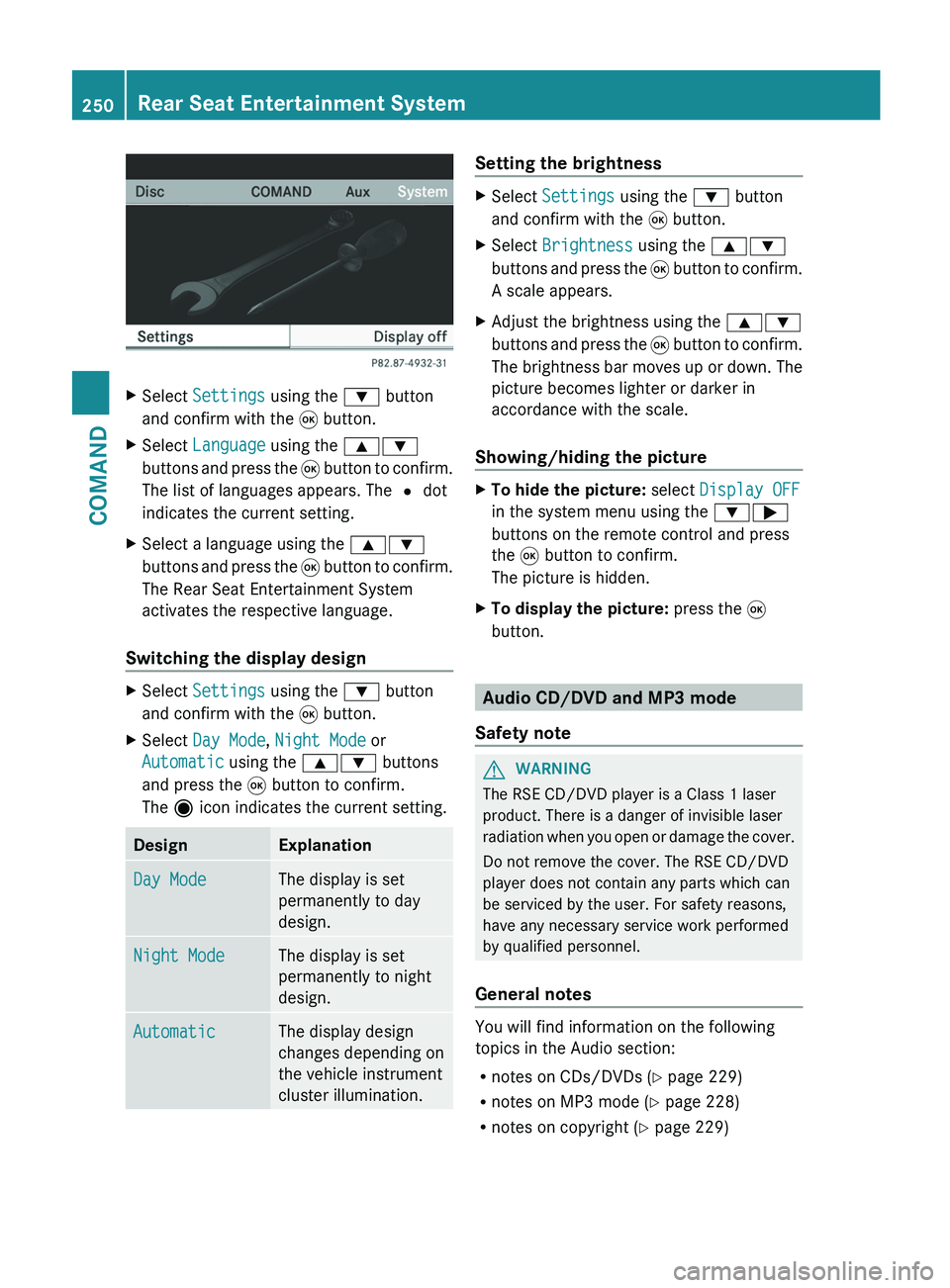
X
Select Settings using the : button
and confirm with the 9 button.
X Select Language using the 9:
buttons and press the 9 button to confirm.
The list of languages appears. The # dot
indicates the current setting.
X Select a language using the 9:
buttons
and press the 9 button to confirm.
The Rear Seat Entertainment System
activates the respective language.
Switching the display design X
Select Settings using the : button
and confirm with the 9 button.
X Select Day Mode, Night Mode or
Automatic using the 9: buttons
and press the 9 button to confirm.
The ä icon indicates the current setting. Design Explanation
Day Mode The display is set
permanently to day
design.
Night Mode The display is set
permanently to night
design.
Automatic The display design
changes depending on
the vehicle instrument
cluster illumination. Setting the brightness
X
Select Settings using the : button
and confirm with the 9 button.
X Select Brightness using the 9:
buttons
and press the 9 button to confirm.
A scale appears.
X Adjust the brightness using the 9:
buttons
and press the 9 button to confirm.
The brightness bar moves up or down. The
picture becomes lighter or darker in
accordance with the scale.
Showing/hiding the picture X
To hide the picture: select Display OFF
in the system menu using the :;
buttons on the remote control and press
the 9 button to confirm.
The picture is hidden.
X To display the picture: press the 9
button. Audio CD/DVD and MP3 mode
Safety note G
WARNING
The RSE CD/DVD player is a Class 1 laser
product. There is a danger of invisible laser
radiation
when you open or damage the cover.
Do not remove the cover. The RSE CD/DVD
player does not contain any parts which can
be serviced by the user. For safety reasons,
have any necessary service work performed
by qualified personnel.
General notes You will find information on the following
topics in the Audio section:
R
notes on CDs/DVDs
(Y page 229)
R notes on MP3 mode ( Y page 228)
R notes on copyright ( Y page 229)250
Rear Seat Entertainment System
COMAND