media MERCEDES-BENZ S-Class SEDAN 2016 W222 Owner's Manual
[x] Cancel search | Manufacturer: MERCEDES-BENZ, Model Year: 2016, Model line: S-Class SEDAN, Model: MERCEDES-BENZ S-Class SEDAN 2016 W222Pages: 438, PDF Size: 10.93 MB
Page 2 of 438
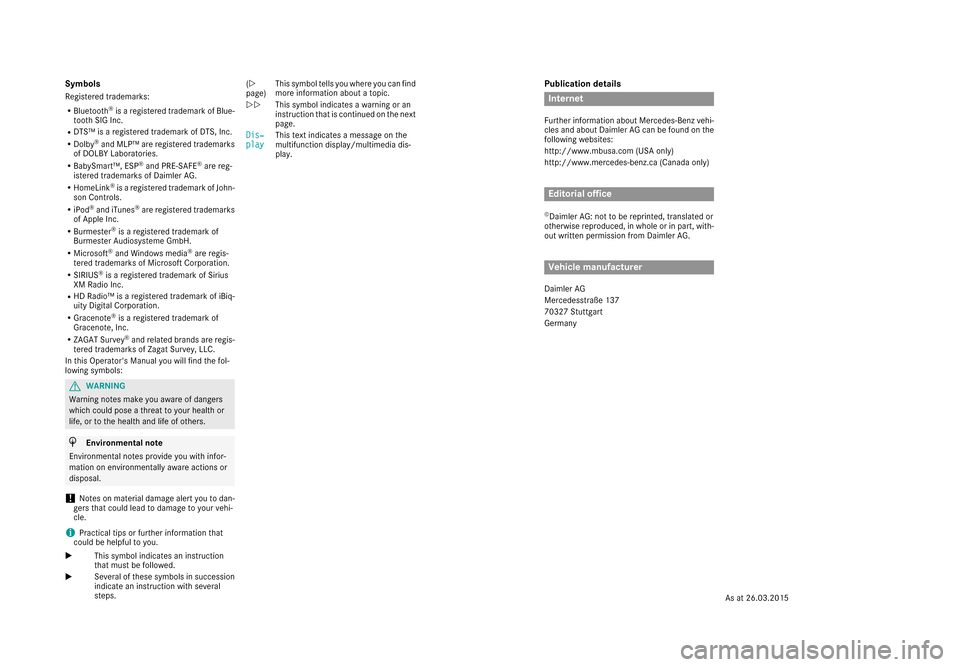
Publication details
Internet
Further information about Mercedes-Benz vehi-
cles and about Daimler AG can be found on the
following websites:
http://www.mbusa.com (USA only)
http://www.mercedes-benz.ca (Canada only)
Editorial office
©Daimler AG: not to be reprinted, translated or
otherwise reproduced, in whole or in part, with- out written permission from Daimler AG.
Vehicle manufacturer
Daimler AG
Mercedesstraße 137
70327 Stuttgart
Germany
Symbols
Registered trademarks:
RBluetooth®is a registered trademark of Blue-
tooth SIG Inc.
RDTS™ is a registered trademark of DTS, Inc.
RDolby®and MLP™ are registered trademarks
of DOLBY Laboratories.
RBabySmart™, ESP®and PRE-SAFE®are reg-
istered trademarks of Daimler AG.
RHomeLink®is a registered trademark of John-
son Controls.
RiPod®and iTunes®are registered trademarks
of Apple Inc.
RBurmester®is a registered trademark of
Burmester Audiosysteme GmbH.
RMicrosoft®and Windows media®are regis-
tered trademarks of Microsoft Corporation.
RSIRIUS®is a registered trademark of Sirius
XM Radio Inc.
RHD Radio™ is a registered trademark of iBiq-
uity Digital Corporation.
RGracenote®is a registered trademark of
Gracenote, Inc.
RZAGAT Survey®and related brands are regis-
tered trademarks of Zagat Survey, LLC.
In this Operator's Manual you will find the fol-
lowing symbols:
GWARNING
Warning notes make you aware of dangers
which could pose a threat to your health or
life, or to the health and life of others.
HEnvironmental note
Environmental notes provide you with infor-
mation on environmentally aware actions or
disposal.
!Notes on material damage alert you to dan-
gers that could lead to damage to your vehi-
cle.
iPractical tips or further information that
could be helpful to you.
X This symbol indicates an instruction
that must be followed.
X Several of these symbols in succession
indicate an instruction with several
steps. (Y
page)
This symbol tells you where you can find
more information about a topic.
YY This symbol indicates a warning or an
instruction that is continued on the next
page.
Dis‐
playThis text indicates a message on the
multifunction display/multimedia dis-
play.
As at 26.03.2015
Page 7 of 438
Brake Assistsee BAS (Brake Assist System)
Brake fluid
Display message ............................ 283
Notes ............................................. 430
Brake force distribution
see EBD (electronic brake force
distribution)
Brake lamps
Display message ............................ 291
Brake pedal
Pedal resistance/pedal travel .......... 44
Brakes
ABS .................................................. 68
Adaptive Brake Assist ...................... 72
BAS .................................................. 69
BAS PLUS with Cross-Traffic
Assist ............................................... 69
Brake fluid (notes) ......................... 430
Display message ............................ 278
EBD .................................................. 75
High-performance brake system .... 196
Hill start assist ............................... 165
HOLD function ............................... 208
Important safety notes .................. 194
Maintenance .................................. 195
Parking brake ................................ 190
RBS warning lamp .......................... 315
Recuperative Brake System ............. 44
Riding tips ...................................... 194
Warning lamp ................................. 315
Breakdown
Where will I find...? ........................ 367
see Flat tire
see Towing away
Brightness control (instrument
cluster lighting) ................................... 35
Buttons on the steering wheel ......... 257
C
California
Important notice for retail cus-
tomers and lessees .......................... 25
Calling up a malfunction
see Display messages
Camera
see 360° camera see Rear view camera
Car
see Vehicle
Care
360° camera ................................. 363
Car wash ........................................ 359
Carpets .......................................... 366
Display ........................................... 364
Exhaust pipe .................................. 363
Exterior lights ................................ 362
Gear or selector lever .................... 365
General notes ................................ 359
Interior ........................................... 364
Matte finish ................................... 361
Night View Assist Plus ................... 364
Paint .............................................. 361
Plastic trim .................................... 364
Power washer ................................ 360
Rear view camera .......................... 363
Roof lining ...................................... 366
Seat belt ........................................ 366
Seat cover ..................................... 365
Sensors ......................................... 362
Steering wheel ............................... 365
Trim pieces .................................... 365
Washing by hand ........................... 360
Wheels ........................................... 361
Windows ........................................ 362
Wiper blades .................................. 362
Wooden trim .................................. 365
CD player (on-board computer) ........ 266
Center console
Overview .......................................... 37
Stowage space .............................. 326
Center console in the rear com-
partment
Stowage compartment .................. 327
Central locking
Locking/unlocking (SmartKey) ........ 79
Changing the media source ............. 265
Charging
see Charging the high-voltage bat-
tery (important safety notes)
Charging cable
Connecting .................................... 185
Controls ......................................... 183
Important safety notes .................. 183
Indicator lamp ................................ 184
Index5
Page 8 of 438
Removing...................................... .185
Storing ...........................................1 83
Warming up ................................... 182
Charging the high-voltage battery
(important safety notes) ................... 180
Chauffeur mode
Display message ............................ 310
Fully reclined position .................... 114
General notes ................................ 111
Installing the head restraint ........... 113
Moving front-passenger seat into
the chauffeur position .................... 112
Moving the front-passenger seat
into the normal position ................. 113
Removing the head restraint .......... 113
Child
Restraint system .............................. 62
Child seat
Forward-facing restraint system ...... 66
LATCH-type (ISOFIX) child seat
anchors ............................................ 63
On the front-passenger seat ............ 65
Rearward-facing restraint system .... 66
Top Tether ....................................... 64
Child-proof locks
Important safety notes .................... 66
Rear doors ....................................... 67
Children
Special seat belt retractor ............... 62
Cigarette lighter ................................ 335
Cleaning
Mirror turn signal ........................... 362
Climate control
Automatic climate control ............. 141
Controlling automatically ............... 147
Cooling with air dehumidification .. 146
Defrosting the windows ................. 151
Defrosting the windshield .............. 151
ECO start/stop function ................ 145
General notes ................................ 140
Immediate pre-entry climate con-
trol ................................................. 158
Indicator lamp ................................ 147
Ionization ....................................... 155
Notes on using the automatic cli-
mate control .................................. 145
Overview of systems ...................... 140
Perfume atomizer .......................... 153 Pre-entry climate control at
departure time ............................... 157
Pre-entry climate control via
key ... 155
P
roblem with the rear window
defroster ........................................ 152
Problems with cooling with air
dehumidification ............................ 147
Rear control panel ......................... 141
Refrigerant ..................................... 432
Refrigerant filling capacity ............. 432
Setting the air distribution ............. 149
Setting the air vents ...................... 158
Setting the airflow ......................... 150
Setting the climate mode ............... 148
Setting the temperature ................ 148
Switching air-recirculation mode
on/off ............................................ 152
Switching on/off ........................... 145
Switching residual heat on/off ...... 152
Switching the rear window
defroster on/off ............................ 151
Switching the synchronization
function on and off ........................ 150
Climate control system
Climate control .............................. 145
Cockpit
Overview .......................................... 32
COLLISION PREVENTION ASSIST
PLUS
Activating/deactivating ................. 270
Display message ............................ 284
Operation/notes .............................. 71
COMAND display
Cleaning ......................................... 364
Combination switch .......................... 131
Consumption statistics (on-board
computer) .......................................... 262
Convenience closing feature .............. 96
Convenience opening feature ............ 95
Coolant (engine)
Checking the level ......................... 356
Display message ............................ 294
Displaying the temperature (on-
board computer) ............................ 269
Filling capacity ............................... 431
Important safety notes .................. 431
Temperature gauge ........................ 257
Warning lamp ................................. 320
6Index
Page 14 of 438
LATCH-type (ISOFIX) child seat
anchors................................................ 63
License plate lamp (display mes-
sage) .................................................. .292
Light function, active
Display message ............................ 293
Light sensor (display message) ....... 293
Lights
Adaptive Highbeam Assist PLUS .... 133
Automatic headlamp mode ............ 130
Cornering light function ................. 132
Fogged up headlamps .................... 134
General notes ................................ 130
Hazard warning lamps ................... 132
High beam flasher .......................... 132
High-beam headlamps ................... 132
Light switch ................................... 130
Low-beam headlamps .................... 131
Parking lamps ................................ 131
Setting exterior lighting ................. 130
Standing lamps .............................. 131
Switching the daytime running
lamps on/off (on-board com-
puter) ............................................. 274
Switching the spotlight on/off ....... 274
Turn signals ................................... 131
see Interior lighting
see Replacing bulbs
Loading guidelines ............................ 325
Locking
see Central locking
Locking (doors)
Automatic ........................................ 87
Emergency locking ........................... 88
From inside (central locking but-
ton) ..................................................8 6
Locking centrally
see Central locking
Low-beam headlamps
Display message ............................ 291
Switching on/off .......................... .131
Lumbar support
Adjusting the 4-way lumbar sup-
port ................................................ 118
Luxury head restraints .....................115M
M+S tires
............................................ 386
Magic Body Control ........................... 210
MAGIC SKY CONTROL ....................... 100
Malfunction message
see Display messages
Matte finish (cleaning instruc-
tions) ..................................................3 61
Maximum charge current
Setting (charging cable) ................. 184
Setting (on-board computer) .......... 272
MBC
see Magic Body Control
mbrace
Call priority ....................................3 44
Display message ............................ 283
Downloading destinations
(COMAND) ..................................... 344
Downloading routes ....................... 347
Emergency call .............................. 341
General notes ................................ 340
Geo fencing ................................... 347
Locating a stolen vehicle ...............3 46
MB info call button ........................ 343
Remote fault diagnosis .................. 346
Remote vehicle locking .................. 345
Roadside Assistance button .......... 342
Search & Send ............................... 344
Self-test ......................................... 341
Speed alert ....................................3 47
System .......................................... 341
Triggering the vehicle alarm ........... 347
Vehicle remote unlocking .............. 345
Mechanical key
Function/notes ................................ 81
General notes .................................. 81
Inserting .......................................... 82
Locking vehicle ................................ 88
Removing ......................................... 81
Unlocking the driver's door .............. 87
Media Interface
USB port in the armrest of the
center console ............................... 327
see Separate operating instructions
Memory card (audio) ......................... 266
Memory function
In the rear compartment ................ 127
12Index
Page 16 of 438
Operation ......................................... 54
System self-test ...............................56
Occupant safety
Air bags ...........................................5 0
Automatic measures after an acci-
dent ................................................. 61
Children in the vehicle ..................... 61
Important safety notes .................... 45
Introduction to the restraint sys-
tem .................................................. 44
Occupant Classification System
(OCS) ............................................... 53
PASSENGER AIR BAG indicator
lamps ............................................... 46
Pets in the vehicle ........................... 67
PRE-SAFE
®(anticipatory occu-
pant protection) ............................... 59
PRE-SAFE
®PLUS (anticipatory
occupant protection PLUS) .............. 60
Restraint system warning lamp ........ 45
OCS
Conditions ....................................... 53
Faults ............................................... 57
Operation ......................................... 54
System self-test ............................... 56
Odometer ........................................... 261
Oil
see Engine oil
On-board computer
AMG menu ..................................... 275
Assistance graphic menu ............... 268
Assistance menu ........................... 269
Display messages .......................... 277
Displaying a service message ........ 358
DISTRONIC PLUS ........................... 204
Factory settings ............................. 275
Head-up display ............................. 259
HYBRID menu ................................ 272
Important safety notes .................. 256
Instrument cluster menu ............... 274
Lights menu ................................... 274
Media menu ................................... 265
Menu overview .............................. 261
Message memory .......................... 277
Navigation menu ............................ 263
Operation ....................................... 257
Radio menu ................................... 265 Service menu ................................. 269
Settings menu ............................... 269
Standard display ............................ 261
Telephone menu ............................ 267
Trip menu ...................................... 261
Video DVD operation ..................... 267
Online access to the vehicle
Data protection .............................. 188
Functions ....................................... 189
General informa tion ....................... 188
Inte
rnet .......................................... 189
Opening the fuel filler flap
(PLUG-IN HYBRID vehicles) ............ 179
Operating safety
Declaration of conformity ................ 28
Important safety notes .................... 27
Operating system
see On-board computer
Operator's Manual
Overview .......................................... 25
Vehicle equipment ........................... 25
Outside temperature display ........... 257
Overhead control panel ...................... 39
Override feature
Rear side windows ........................... 67
P
Paint code number ............................ 426
Paintwork (cleaning instructions) ... 361
Panic alarm .......................................... 44
Panorama roof with power tilt/
sliding panel
Important safety notes .................... 97
Opening/closing the roller sun-
blind ............................................... 100
Operating ......................................... 98
Operating the roller sunblinds for
the sliding sunroof ........................... 99
Problem (malfunction) ................... 103
Rain closing feature ......................... 99
Resetting ....................................... 102
Reversing feature ............................. 98
Parcel net hooks ............................... 329
Parking
Important safety notes .................. 189
Parking brake ................................ 190
14Index
Page 29 of 438
One Mercedes Drive
Montvale, NJ 07645-0350
In Canada
Mercedes-Benz Canada, Inc.
European Delivery Department
98 Vanderhoof Avenue
Toronto, Ontario M4G 4C9
Operating safety
Important safety notes
GWARNING
If you do not have the prescribed service/
maintenance work or any required repairs
carried out, this can result in malfunctions or system failures. There is a risk of an accident.
Always have the prescribed service/mainte-
nance work as well as any required repairs
carried out at a qualified specialist workshop.
GWARNING
Flammable material such as leaves, grass or
twigs may ignite if they come into contact with
hot parts of the exhaust system. There is a risk of fire.
When driving off road or on unpaved roads,
check the vehicle's underside regularly. In
particular, remove parts of plants or other
flammable materials which have become
trapped. In the case of damage, contact a
qualified specialist workshop.
GWARNING
Modifications to electronic components, their software as well as wiring can impair their
function and/or the function of other net-
worked components. In particular, systems
relevant to safety could also be affected. As a
result, these may no longer function as inten-
ded and/or jeopardize the operating safety of
the vehicle. There is an increased risk of an
accident and injury.
Never tamper with the wiring as well as elec-
tronic components or their software. You
should have all work to electrical and elec-
tronic equipment carried out at a qualified
specialist workshop.
!There is a risk of damage to the vehicle if:
Rthe vehicle becomes stuck, e.g. on a high
curb or an unpaved road
Ryou drive too fast over an obstacle, e.g. a
curb or a hole in the road
Ra heavy object strikes the undercarriage or
parts of the chassis
In situations like this, the body, the undercar-
riage, chassis parts, wheels or tires could be
damaged without the damage being visible.
Components damaged in this way can unex-
pectedly fail or, in the case of an accident, no
longer withstand the strain they are designed to.
If the underbody paneling is damaged, com-
bustible materials such as leaves, grass or
twigs can gather between the underbody and
the underbody paneling. If these materials
come in contact with hot parts of the exhaust
system, they can catch fire.
In such situations, have the vehicle checked
and repaired immediately at a qualified spe-
cialist workshop. If on continuing your jour-
ney you notice that driving safety is impaired,
pull over and stop the vehicle immediately,
paying attention to road and traffic condi-
tions. In such cases, consult a qualified spe-
cialist workshop.
Hybrid vehicles have a combustion engine and
an electric motor. The voltage supply for oper-
ating the vehicle electrically is provided by the
vehicle's high-voltage electrical system.
GDANGER
The vehicle's high-voltage electrical system is under high voltage. If you modify components
in the vehicle's high-voltage electrical system
or touch damaged components, you may be
electrocuted. The components in the vehi-
cle's high-voltage electrical system may be
damaged in an accident, although the damage
is not visible. There is a risk of fatal injury.
Following an accident, do not touch any high-
voltage components and never modify the
vehicle's high-voltage electrical system. Have
the vehicle towed away after an accident and
Introduction27
Z
Page 31 of 438
Correct use
If you remove any warning stickers, you or oth-
ers could fail to recognize certain dangers.
Leave warning stickers in position.
Observe the following information when driving
your vehicle:
Rthe safety notes in this manual
Rthe vehicle technical data
Rtraffic rules and regulations
Rlaws and safety standards pertaining to motor
vehicles
Problems with your vehicle
If you should experience a problem with your
vehicle, particularly one that you believe may
affect its safe operation, we urge you to contact
an authorized Mercedes-Benz Center immedi-
ately to have the problem diagnosed and recti-
fied. If the problem is not resolved to your sat-
isfaction, please discuss the problem again with
a Mercedes-Benz Center or contact us at one of
the following addresses.
In the USA
Customer Assistance Center
Mercedes-Benz USA, LLC
One Mercedes Drive
Montvale, NJ 07645-0350
In Canada
Customer Relations Department
Mercedes-Benz Canada, Inc.
98 Vanderhoof Avenue
Toronto, Ontario M4G 4C9
Reporting safety defects
USA only:
The following text is published as required of
manufacturers under Title 49, Code of U.S. Fed-
eral Regulations, Part 575 pursuant to the
"National Traffic and Motor Vehicle Safety Act of 1966".
If you believe that your vehicle has a defect
which could cause a crash or could cause injury
or death, you should immediately inform the
National Highway Traffic Safety Administration
(NHTSA) in addition to notifying Mercedes-Benz
USA, LLC. If NHTSA receives similar complaints, it may
open an investigation, and if it finds that a safety
defect exists in a group of vehicles, it may order
a recall and remedy campaign. However, NHTSA
cannot become involved in individual problems
between you, your dealer, or Mercedes-Benz
USA, LLC.
To contact NHTSA, you may call the Vehicle
Safety Hotline toll-free at
1-888-327-4236(TTY: 1-800-424-9153
);go to
http://www.safercar.gov ; or write to: Admin-
istrator, NHTSA, 400 Seventh Street, SW.,
Washington, DC 20590.
You can also obtain other information about
motor vehicle safety from
http://www.safercar.gov
Limited Warranty
!
Follow the instructions in this manual about
the proper operation of your vehicle as well as
about possible vehicle damage. Damage to
your vehicle that arises from culpable contra-
ventions against these instructions is not cov-
ered either by the Mercedes-Benz Limited
Warranty or by the New or Used-Vehicle War-
ranty.
QR codes for the rescue card
The QR codes are secured in the fuel filler flap
and on the opposite side on the B-pillar. In the
event of an accident, rescue services can use
the QR code to quickly find the appropriate res-
cue card for your vehicle. The current rescue
card contains the most important information
about your vehicle in a compact form, e.g. the
routing of the electric cables.
You can find more information under http://
portal.aftersales.i.daimler.com/public/
content/asportal/en/communication/
informationen_fuer/QRCode.html.
Data stored in the vehicle
Data storage
A wide range of electronic components in your
vehicle contain data memories.
Introduction29
Z
Page 34 of 438
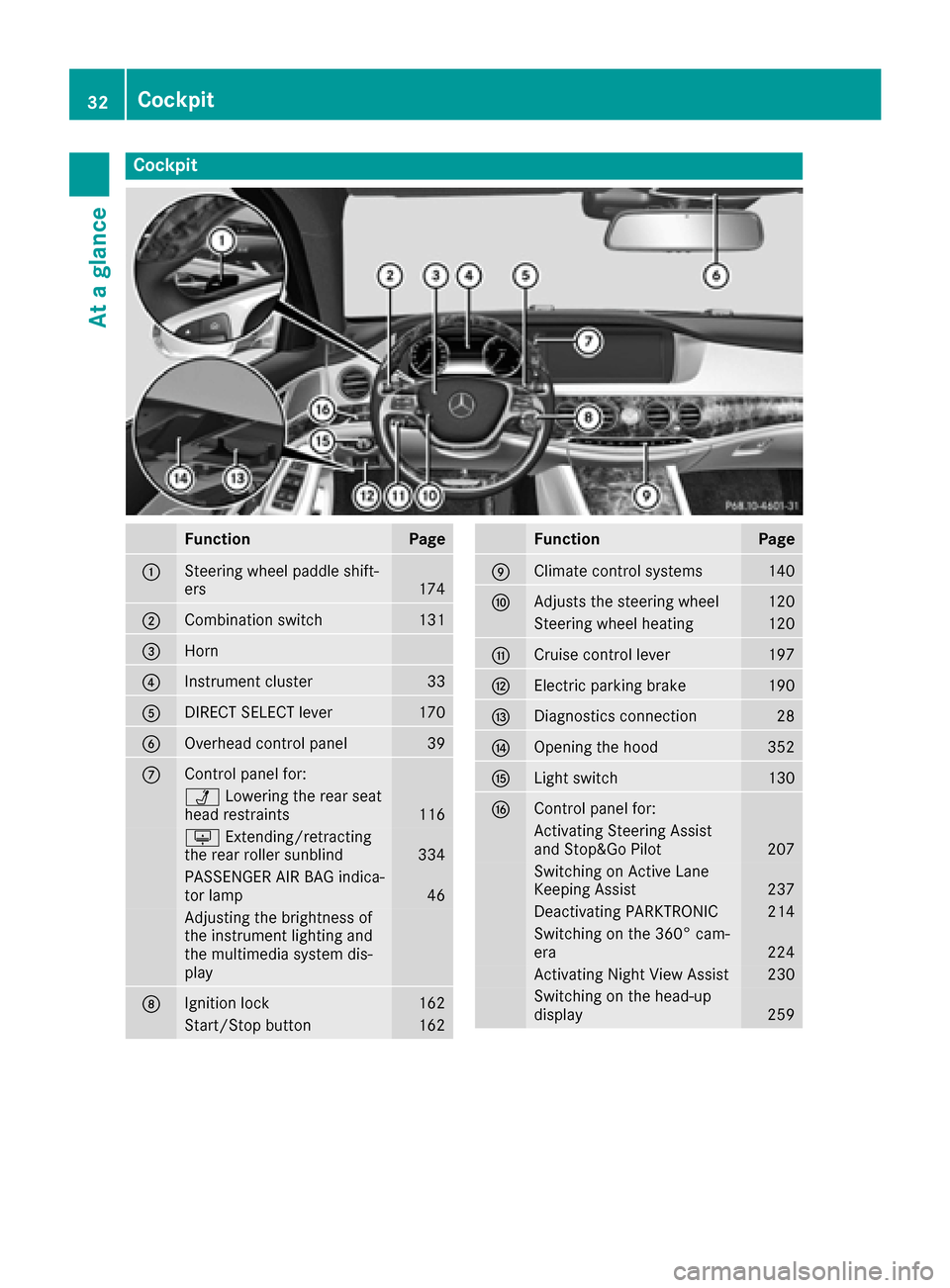
Cockpit
FunctionPage
:Steering wheel paddle shift-
ers174
;Combination switch131
=Horn
?Instrument cluster33
ADIRECT SELECT lever170
BOverhead control panel39
CControl panel for:
ÜLowering the rear seat
head restraints116
u Extending/retracting
the rear roller sunblind334
PASSENGER AIR BAG indica-
tor lamp46
Adjusting the brightness of
the instrument lighting and
the multimedia system dis-
play
DIgnition lock162
Start/Stop button162
FunctionPage
EClimate control systems140
FAdjusts the steering wheel120
Steering wheel heating120
GCruise control lever197
HElectric parking brake190
IDiagnostics connection28
JOpening the hood352
KLight switch130
LControl panel for:
Activating Steering Assist
and Stop&Go Pilot207
Switching on Active Lane
Keeping Assist237
Deactivating PARKTRONIC214
Switching on the 360° cam-
era224
Activating Night View Assist230
Switching on the head-up
display259
32Cockpit
At a glance
Page 37 of 438
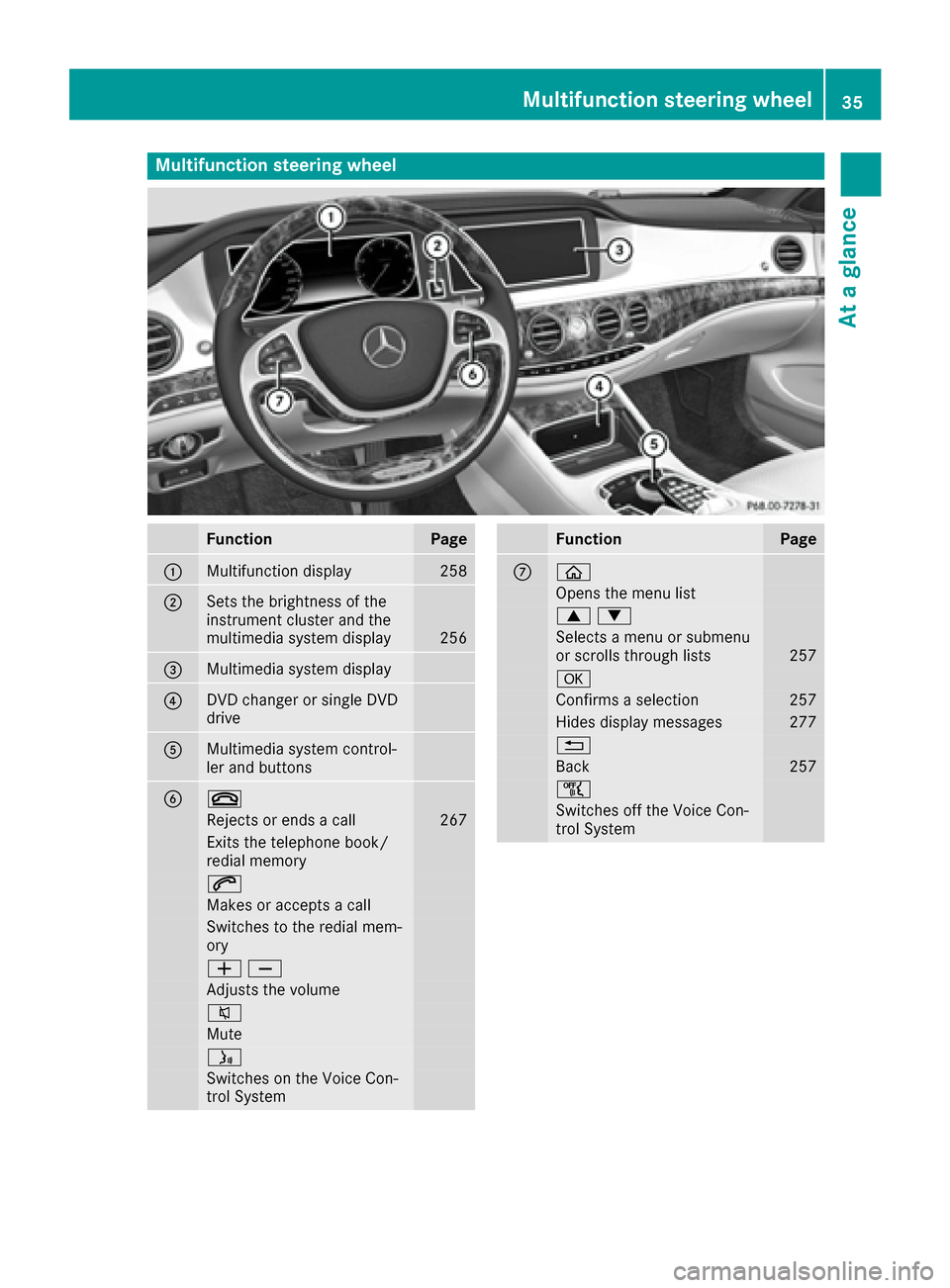
Multifunction steering wheel
FunctionPage
:Multifunction display258
;Sets the brightness of the
instrument cluster and the
multimedia system display
256
=Multimedia system display
?DVD changer or single DVD
drive
AMultimedia system control-
ler and buttons
B~
Rejects or ends a call267
Exits the telephone book/
redial memory
6
Makes or accepts a call
Switches to the redial mem-
ory
WX
Adjusts the volume
8
Mute
ó
Switches on the Voice Con-
trol System
FunctionPage
Cò
Opens the menu list
9:
Selects a menu or submenu
or scrolls through lists257
a
Confirms a selection257
Hides display messages277
%
Back257
ñ
Switches off the Voice Con-
trol System
Multifunction steering wheel35
At a glance
Page 38 of 438
iIn vehicles with multimedia system
COMAND you can find further information:
Ron the multimedia system in the Digital
Operator's Manual
Ron the DVD changer or single DVD drive in
the Digital Operator's Manual
Ron the Voice Control System in the sepa-
rate operating instructions
36Multifunction steering wheel
At a glance