trunk MERCEDES-BENZ S-Class SEDAN 2016 W222 Owner's Manual
[x] Cancel search | Manufacturer: MERCEDES-BENZ, Model Year: 2016, Model line: S-Class SEDAN, Model: MERCEDES-BENZ S-Class SEDAN 2016 W222Pages: 438, PDF Size: 10.93 MB
Page 11 of 438
ECO displayFunction/notes ............................ .193
On-board computer ....................... 262
ECO start/stop function
Automatic engine start .................. 167
Automatic engine switch-off .......... 166
Deactivating/activating ................. 167
General information ....................... 166
Important safety notes .................. 166
Introduction ................................... 166
Electronic Stability Program
see ESP
®(Electronic Stability Program)
Emergency
Automatic measures after an acci-
dent ................................................. 61
Emergency release
Driver's door ....................................8 7
Trunk ............................................... 94
Vehicle ............................................. 87
Emergency Tensioning Devices
Activation ......................................... 57
Emissions control
Service and warranty information ....2 5
Engine
Check Engine warning lamp .......... .320
Display message ............................ 294
ECO start/stop function ................ 166
Engine number ............................... 427
Irregular running ............................ 169
Jump-starting ................................. 376
Starting (important safety notes) ... 164
Starting problems .......................... 169
Starting the engine with the
SmartKey ....................................... 164
Starting via smartphone ................ 164
Starting with the Start/Stop but-
ton ................................................. 164
Switching off .................................. 190
Switching off with the Start/Stop
button ............................................ 190
Switching off with the vehicle key .. 190
Tow-starting (vehicle) ..................... 381
Engine electronics
Problem (malfunction) ................... 169
Engine oil
Adding ...........................................3 55
Additives ........................................ 430
Checking the oil leve l ..................... 353 C
hecking the oil level using the
dipstick .......................................... 353
Checking the oil level using the
on-board computer ........................ 355
Display message ............................ 296
Filling capacity ............................... 430
General notes ................................ 429
Notes about oil grades ................... 429
Notes on oil level/consumption .... 353
Temperature (on-board computer,
Mercedes-AMG vehicles) ...............2 75
Viscosity ........................................ 430
ESP
®(Electronic Stability Pro-
gram)
AMG menu (on-board computer) ... 276
Characteristics ................................. 73
Deactivating/activating ................. 269
Deactivating/activating (notes) ....... 74
Display message ............................ 278
Function/notes ................................ 73
General notes .................................. 73
Important safety information ........... 73
Trailer stabilization ........................... 74
Warning lamp ................................. 317
ETS/4ETS (Electronic Traction Sys-
tem) ...................................................... 73
Exhaust
see Exhaust pipe
Exhaust check ................................... 193
Exhaust pipe
Cleaning ......................................... 363
Exhaustive discharging (high-volt-
age battery) ....................................... 374
Exterior lighting
Cleaning ......................................... 362
see Lights
Exterior mirrors
Adjusting ....................................... 123
Dipping (automatic) ....................... 124
Folding in/out (automatically) ....... 124
Folding in/out (electrically) ........... 124
Out of position (troubleshooting) ... 124
Setting ........................................... 124
Storing settings (memory func-
tion) ............................................... 126
Storing the parking position .......... 125
Eyeglasses compartment ................. 326
Index9
Page 12 of 438
F
Features............................................ .330
Filling capacities (Technical data) ... 427
Flat tire
Changing a wheel/mounting the
spare wheel ................................... 405
MOExtended tires .......................... 368
Preparing the vehicle ..................... 367
TIREFIT kit ...................................... 369
Floormats ...........................................3 50
Folding table ...................................... 328
Frequencies
Mobile phone ................................. 425
Two-way radio ................................ 425
Front-passenger seat
Adjusting from the driver's seat ..... 108
Adjusting from the rear compart-
ment .............................................. 108
Fuel
Additives ........................................ 429
Consumption statistics .................. 262
Displaying the current consump-
tion ................................................ 261
Displaying the range ......................2 61
Driving tips ....................................1 92
Fuel gauge ....................................... 33
Grade (gasoline) ............................ 428
Important safety notes .................. 428
Problem (malfunction) ................... 180
Refueling ........................................ 177
Tank content/reserve fuel ............. 428
Fuel level
Calling up the range (on-board
computer) ...................................... 261
Fuel tank
Capacity ........................................ 428
Problem (malfunction) ................... 180
Fuses
Allocation chart ..................... 381, 383
Before changing .............................3 82
Dashboard fuse box ....................... 382
Fuse box in the engine compart-
ment .............................................. 383
Fuse box in the front-passenger
footwell .......................................... 382
Fuse box in the trunk ..................... 383
Important safety notes .................. 381
G
Garage door opener
Clearing the memory ..................... 350
General notes ................................ 347
Important safety notes .................. 348
Opening/closing the garage door .. 350
Problems when programming ........3 49
Programming (button in the rear-
view mirror) ................................... 348
Synchronizing the rolling code ....... 349
Gasoline ............................................. 428
Gear indicator (on-board com-
puter, Mercedes-AMG vehicles) ....... 275
Genuine parts ...................................... 24
Glove box ...........................................3 26
H
Handbrake
see Parking brake
HANDS-FREE ACCESS .......................... 91
Hazard warning lamps ......................132
Head restraints
Adjusting ....................................... 114
Adjusting (manually) ......................1 15
Adjusting (rear) .............................. 116
EASY ADJUST luxury head
restraint ......................................... 115
Luxury ............................................ 115
Supplementary cushion ................. 116
Head-up display
Adjusting the brightness ................ 273
Displays and operating .................. 259
Function/notes .............................2 59
Important safety notes .................. 259
Selecting displays .......................... 273
Setting the position ....................... 273
Headlamps
Fogging up ..................................... 134
see Automatic headlamp mode
Heating
see Climate control
High beam flasher .............................1 32
High-beam headlamps
Adaptive Highbeam Assist PLUS .... 133
Display message ............................ 292
Switching on/off ........................... 132
10Index
Page 19 of 438
Refuelingprocess (PLUG-IN
HYBRID vehicles) .......................... .178
see Fuel
Remote control
Garage door opener ....................... 347
Programming (garage door
opener) .......................................... 348
Replacing bulbs
General notes ................................ 135
Reporting safety defects .................... 29
Rescue card ......................................... 29
Reserve (fuel tank)
see Fuel
Reserve fuel
Display message ............................ 296
Warning lamp ................................. 320
Residual heat (climate control) ........ 152
Restraint system
Display message ............................ 287
Introduction ..................................... 44
Warning lamp ................................. 319
Warning lamp (function) ................... 45
Reversing feature
Panorama sliding sunroof ................ 98
Roller sunblinds ............................... 99
Side windows ................................... 94
Trunk lid ........................................... 89
Reversing lamps (display mes-
sage) ................................................... 292
ROAD SURFACE SCAN ....................... 211
Roadside Assistance (breakdown) .... 26
Roller sunblind
Panorama roof with power tilt/
sliding panel ..................................... 99
Rear side windows ......................... 333
Rear window .................................. 334
Roller sunblind of the panorama
roof with power tilt/sliding panel
Operating (front roller sunblind) .... 100
Operating (rear roller sunblind) ...... 100
Roof carrier ........................................ 330
Roof lining and carpets (cleaning
guidelines) ......................................... 366
Roof load (maximum) ........................ 433S
Safety
Children in the vehicle ..................... 61
Hybrid drive system ......................... 42
see Occupant safety
see Operating safety
Safety notes
Hybrid vehicles ................................ 42
Safety system
see Driving safety systems
SD memory card
Selecting ........................................ 266
Seat
Adjusting the front-passenger
seat from the driver's seat ............. 108
Multicontour seat in the rear com-
partment ........................................ 117
Seat belt buckle extender
Display message ............................ 285
Seat belt extender
Function/notes ................................ 49
Seat belts
Adjusting the driver's and front-
passenger seat belt ......................... 50
Adjusting the height ......................... 49
Cleaning ......................................... 366
Correct usage .................................. 48
Fastening ......................................... 49
Important safety guidelines ............. 47
Introduction ..................................... 46
Releasing ......................................... 50
Seat belt extender ........................... 49
Warning lamp ................................. 313
Warning lamp (function) ................... 50
Seating
Seating comfort package ............... 117
Seating comfort package ................. 117
Seats
Active multicontour seat ................ 117
Adjusting (electrically) ................... 106
Adjusting (rear compartment) ........ 107
Adjusting the 4-way lumbar sup-
port ................................................ 118
Adjusting the head restraint .......... 114
Calling up a stored setting (mem-
ory function) .................................. 127
Chauffeur mode ............................. 111
Index17
Page 20 of 438
Cleaning the cover .........................365
Correct driver's seat position ........1 04
Display message ............................ 310
EASY-ENTRY/EXIT system ............. 122
Important safety notes .................. 105
Multicontour seat .......................... 117
Seat heating .................................. 118
Seat heating problem .................... 119
Seat ventilation .............................. 119
Seat ventilation problem ................ 120
Storing settings (memory func-
tion) ............................................... 126
Switching seat heating on/off ....... 118
Switching seat ventilation on/off .. 119
Section
Wheels and tires ............................ 384
Securing a load
see Securing cargo
Securing cargo .................................. 329
Selector lever
Cleaning ......................................... 365
see Automatic transmission
Sensors (cleaning instructions) ....... 362
Service menu (on-board com-
puter) ..................................................2 69
Service message
see ASSYST PLUS
Service products
Brake fluid ..................................... 430
Coolant (engine) ............................ 431
Engine oil ....................................... 429
Fuel ................................................ 428
Important safety notes .................. 427
Refrigerant (air-conditioning sys-
tem) ............................................... 432
Washer fluid ................................... 431
Setting the charge current (on-
board computer) ............................... 272
Setting the departure time (on-
board computer) ............................... 272
Settings
Factory (on-board computer) ......... 275
On-board computer ....................... 269
SETUP (on-board computer) ............. 276
Side impact air bag .............................5 2
Side marker lamp (display mes-
sage) ................................................... 292 Side windows
Cleaning ........................... .............. 362
Convenience closing feature ............ 96
Convenience opening feature ..........9 5
Importa
nt safety information ........... 94
Opening/closing .............................. 95
Problem (malfunction) .....................9 7
Resettin g........................................ .96
Reversin gfeature ............................ .94
Sliding sunroof
see Panorama roof with power
tilt/sliding panel
SmartKey
Changing the battery ....................... 82
Changing the programming .............8 1
Checking the battery ...................... .82
Convenience closing feature ............ 96
Convenience opening feature .......... 95
Display message ............................ 312
Door central locking/unlocking ...... .79
Important safety notes .................... 79
KEYLESS-GO start function .............. 81
Loss .................................................8 4
Mechanical key ................................ 81
Overview .......................................... 79
Positions (ignition lock) ................. 162
Problem (malfunction) ..................... 84
Starting the engine ........................ 164
Smartphone
Starting the engine ........................ 164
Snow chains ...................................... 386
Sockets
Center console .............................. 336
General notes ................................ 336
Rear compartment .........................3 37
Trunk ............................................. 337
Special seat be
lt retractor
.................. 62
Specialist workshop ............................ 28
Speed, controlling
see Cruise control
Speedometer
Activating/deactivating the addi-
tional speedometer ........................ 274
Digital ............................................ 263
In the Instrument cluster ................. 33
Selecting the display unit ...............2 74
Standing lamps
Display message ............................ 292
18Index
Page 21 of 438
Switching on/off ........................... 131
Start/Stop button
General notes ................................ 162
Key positions ................................. 163
Removing ....................................... 163
Starting the engine ........................ 164
Start/stop function
see ECO start/stop function
Starting (engine) ................................ 164
STEER CONTROL .................................. 77
Steering
Display message ............................ 311
Warning lamps ............................... 324
Steering Assist
see DISTRONIC PLUS
Steering Assist and Stop&Go Pilot
(DISTRONIC PLUS)
Display message ............................ 305
Steering assistant STEER CON-
TROL
see STEER CONTROL
Steering wheel
Adjusting (electrically) ................... 120
Button overview ............................... 35
Buttons (on-board computer) ......... 257
Cleaning ......................................... 365
EASY ENTRY/EXIT feature ............. 122
Important safety notes .................. 120
Paddle shifters ............................... 174
Steering wheel heating .................. 120
Storing settings (memory func-
tion) ............................................... 126
Steering wheel heating
Problem (malfunction) ................... 122
Switching on/off ........................... 120
Steering wheel paddle shifters ........ 174
Stop&Go Pilot
see DISTRONIC PLUS
Stowage areas ................................... 325
Stowage compartments
Armrest (under) ............................. 327
Center console .............................. 326
Center console in rear compart-
ment .............................................. 327
Cup holders ................................... 330
Door ............................................... 327
Eyeglasses compartment ............... 326
Glove box ....................................... 326 Important safety information ......... 325
Rear ............................................... 327
Rear seat backrest ......................... 328
Stowage net ................................... 329
see Stowage areas
Stowage net ....................................... 329
Stowage space
Folding table .................................. 328
Parcel net retainers ....................... 329
Securing a load .............................. 329
Stowage well beneath the trunk
floor .................................................... 329
Summer tires
In w
inter ........................................ 386
Sun visor ............................................ 333
Suspension mode
Active Body Control ABC ............... 210
Suspension setting
AIRMATIC ...................................... 212
Suspension settings
SETUP (on-board computer) .......... 276
Switching air-recirculation mode
on/off ................................................. 152
T
Tachometer ........................................ 256
Tail lamps
Display message ............................ 292
see Lights
Tank content
Fuel gauge ....................................... 33
Technical data
Capacities ...................................... 427
Information .................................... 425
Tires/wheels ................................. 410
Vehicle data ................................... 433
Telephone
Accepting a call (multifunction
steering wheel) .............................. 267
Display message ............................ 311
Introduction ................................... 267
Menu (on-board computer) ............ 267
Number from the phone book ........ 268
Redialing ........................................ 268
Rejecting/ending a call ................. 268
Temperature
Coolant .......................................... 257
Index19
Page 23 of 438
Tire bead (definition) ...................... 404
Tire pressure (definition) ................ 404
Tire pressures (recommended) ...... 403
Tire size (data) ............................... 410
Tire size designation, load-bearing
capacity, speed rating .................... 400
Tire tread ....................................... 385
Tire tread (definition) ..................... 404
Total load limit (definition) ............. 405
Traction ......................................... 399
Traction (definition) ....................... 405
Tread wear ..................................... 399
Uniform Tire Quality Grading
Standards ...................................... 398
Uniform Tire Quality Grading
Standards (definition) .................... 403
Wear indicator (definition) ............. 405
Wheel and tire combination ........... 412
Wheel rim (definition) .................... 403
see Flat tire
Top Tether ............................................ 64
Tow-starting
Emergency engine starting ............ 381
Important safety notes .................. 379
Towing a trailer
ESP
®(Electronic Stability Pro-
gram) ............................................... 74
Towing away
Important safety guidelines ........... 379
Installing the towing eye ................ 380
Notes for 4MATIC vehicles ............ 381
Removing the towing eye ............... 380
Transporting the vehicle ................ 381
With both axles on the ground ....... 380
Towing eye ......................................... 367
Traffic Sign Assist
Activating ....................................... 229
Display message ............................ 303
Function/notes ............................. 229
Important safety notes .................. 229
Instrument cluster display ............. 230
Switching on/off ........................... 270
Transfer case ..................................... 177
Transmission
see Automatic transmission
Transporting the vehicle .................. 381Trim pieces (cleaning instruc-
tions)
.................................................. 365
Trip computer (on-board com-
puter) .................................................. 262
Trip odometer
Calling up ....................................... 261
Resetti ng (
on-board computer) ...... 263
Trunk
Emergency release .......................... 93
Important safety notes .................... 88
Locking separately ........................... 93
Opening/closing (automatically
from inside) ...................................... 92
Opening/closing (automatically
from outside) ................................... 90
Opening/closing (from outside,
HANDS-FREE ACCESS) .................... 91
Opening/closing (manually from
outside) ............................................ 89
Power closing .................................. 87
Trunk lid
Display message ............................ 309
Obstacle recognition ........................ 89
Opening dimensions ...................... 433
Opening/closing .............................. 88
Trunk load (maximum) ...................... 433
Turn signals
Display message ............................ 291
Switching on/off ........................... 131
Two-way radio
Frequencies ................................... 425
Installation ..................................... 425
Transmission output (maximum) .... 425
Windshield (infrared reflective) ...... 351
Type identification plate
see Vehicle identification plate
U
UnlockingEmergency unlocking ....................... 87
From inside the vehicle (central
unlocking button) ............................. 86
Upshift indicator (on-board com-
puter, Mercedes-AMG vehicles) ....... 275
Index21
Page 42 of 438
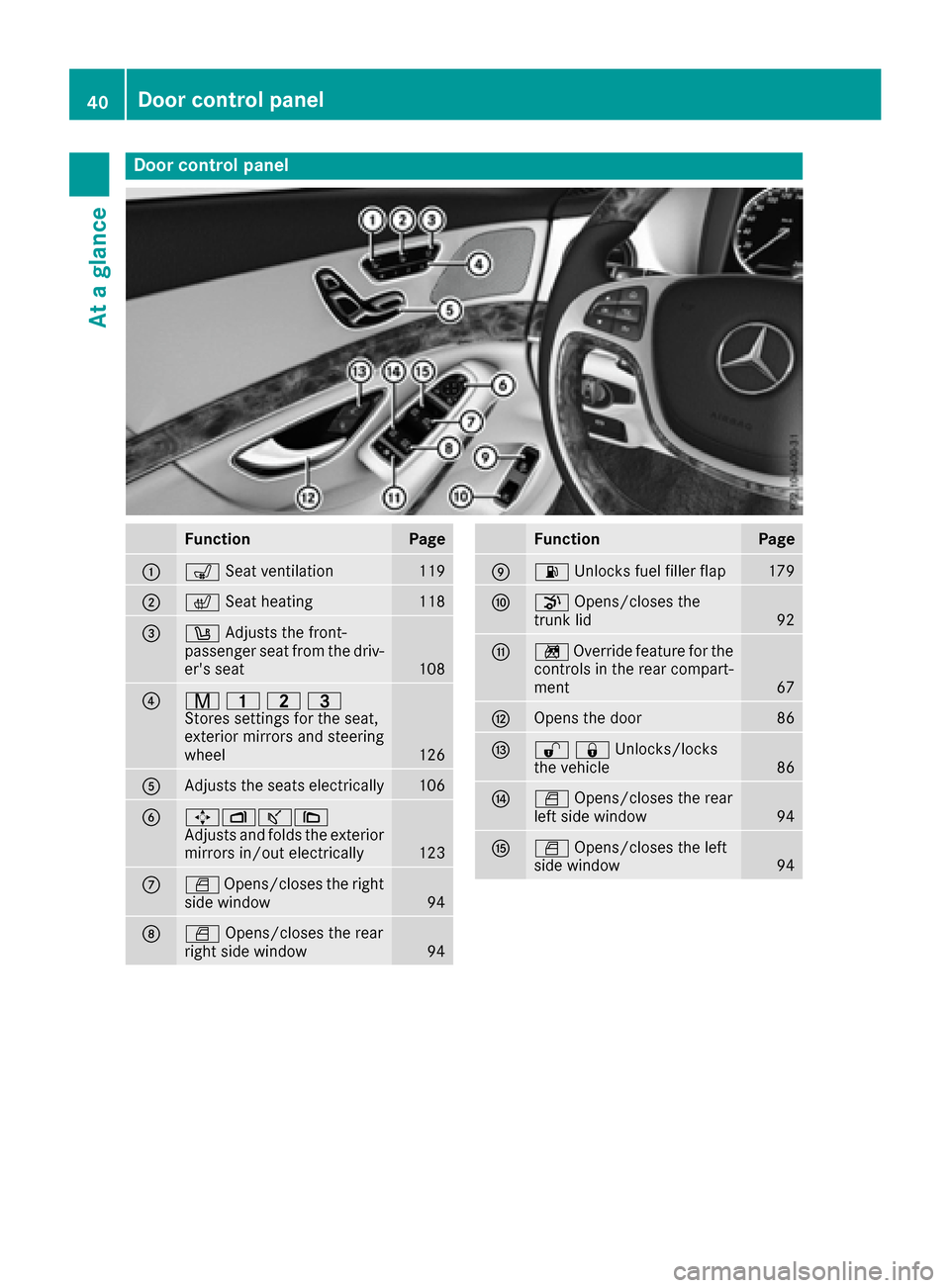
Door controlpanel
FunctionPage
:s Seat ventilation119
;c Seat heatin g118
=w Adjust sth efront-
passenger seat from th edriv-
er' sseat
10 8
?r 45=
Stores settings for the seat,
exterior mirrors and steering
wheel
126
AAdjusts the seats electrically106
B7Zª\
Adjusts and folds the exterior
mirrors in/out electrically
123
CW Opens/closes the right
side window94
DW Opens/closes the rear
right side window94
FunctionPage
E6 Unlocks fuel filler flap179
FpOpens/closes the
trunk lid92
Gn Override feature for the
controls in the rear compart-
ment
67
HOpens the door86
I%&Unlocks/locks
the vehicle86
JW Opens/closes the rear
left side window94
KW Opens/closes the left
side window94
40Door control panel
At a glance
Page 45 of 438
Deactivate the hybrid system manually if:
Rthe6 restraint system warning lamp in the
instrument cluster lights up after an accident
Rthe vehicle is badly damaged, e.g. after an
accident, and the restraint system compo-
nents were not activated
Rthe vehicle is badly damaged and has to be
towed or transported
XIf possible, move the vehicle out of the
danger zone: shift the automatic transmis-
sion into position N.
XRelease the electric parking brake.
XRoll the vehicle to a safe place and park it
safely.
Get assistance from others if necessary.
iThe vehicle is locked automatically when
the ignition is switched on and the wheels are
turning. There is therefore a risk of being
locked out if the vehicle is being pushed or
tested on a dynamometer.
XSwitch the ignition off.
XShift the automatic transmission to park posi-
tion P(Ypage 170).
Depress the electric parking brake
(
Ypage 190).
Secure the vehicle against rolling away
(
Ypage 406).
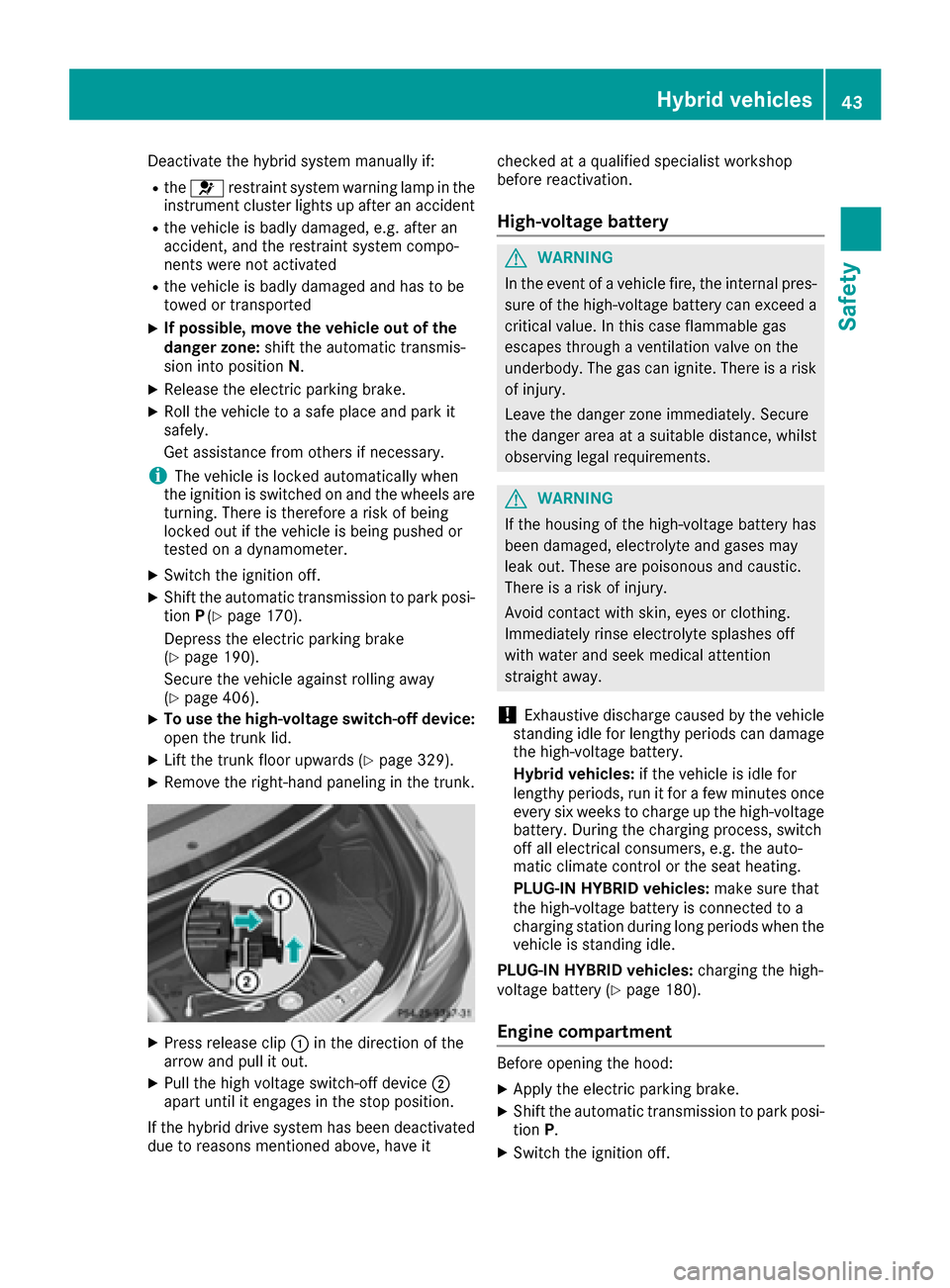
XTo use the high-voltage switch-off device:
open the trunk lid.
XLift the trunk floor upwards (Ypage 329).
XRemove the right-hand paneling in the trunk.
XPress release clip :in the direction of the
arrow and pull it out.
XPull the high voltage switch-off device ;
apart until it engages in the stop position.
If the hybrid drive system has been deactivated
due to reasons mentioned above, have it checked at a qualified specialist workshop
before reactivation.
High-voltage battery
GWARNING
In the event of a vehicle fire, the internal pres- sure of the high-voltage battery can exceed a
critical value. In this case flammable gas
escapes through a ventilation valve on the
underbody. The gas can ignite. There is a risk
of injury.
Leave the danger zone immediately. Secure
the danger area at a suitable distance, whilst
observing legal requirements.
GWARNING
If the housing of the high-voltage battery has
been damaged, electrolyte and gases may
leak out. These are poisonous and caustic.
There is a risk of injury.
Avoid contact with skin, eyes or clothing.
Immediately rinse electrolyte splashes off
with water and seek medical attention
straight away.
!Exhaustive discharge caused by the vehicle
standing idle for lengthy periods can damage
the high-voltage battery.
Hybrid vehicles: if the vehicle is idle for
lengthy periods, run it for a few minutes once every six weeks to charge up the high-voltage
battery. During the charging process, switch
off all electrical consumers, e.g. the auto-
matic climate control or the seat heating.
PLUG-IN HYBRID vehicles: make sure that
the high-voltage battery is connected to a
charging station during long periods when the
vehicle is standing idle.
PLUG-IN HYBRID vehicles: charging the high-
voltage battery (
Ypage 180).
Engine compartment
Before opening the hood:
XApply the electric parking brake.
XShift the automatic transmission to park posi-
tion P.
XSwitch the ignition off.
Hybrid vehicles43
Safety
Z
Page 80 of 438
Protection against theft
Immobilizer
The immobilizer prevents your vehicle from
being started without the correct SmartKey.
XTo activate with the SmartKey:remove the
SmartKey from the ignition lock.
XTo activate with KEYLESS-GO: switch the
ignition off and open the driver's door.
XTo deactivate: switch on the ignition.
When leaving the vehicle, always take the
SmartKey with you and lock the vehicle. Anyone
can start the engine if a valid SmartKey has been
left inside the vehicle.
iThe immobilizer is always deactivated when
you start the engine.
In the event that the engine cannot be started
(yet the vehicle's battery is charged), the sys-
tem is not operational. Contact an authorized
Mercedes-Benz Center or call
1-800-FOR-MERCedes (in the USA) or
1-800-387-0100 (in Canada).
ATA (anti-theft alarm system)
XTo arm: lock the vehicle with the SmartKey or
KEYLESS-GO.
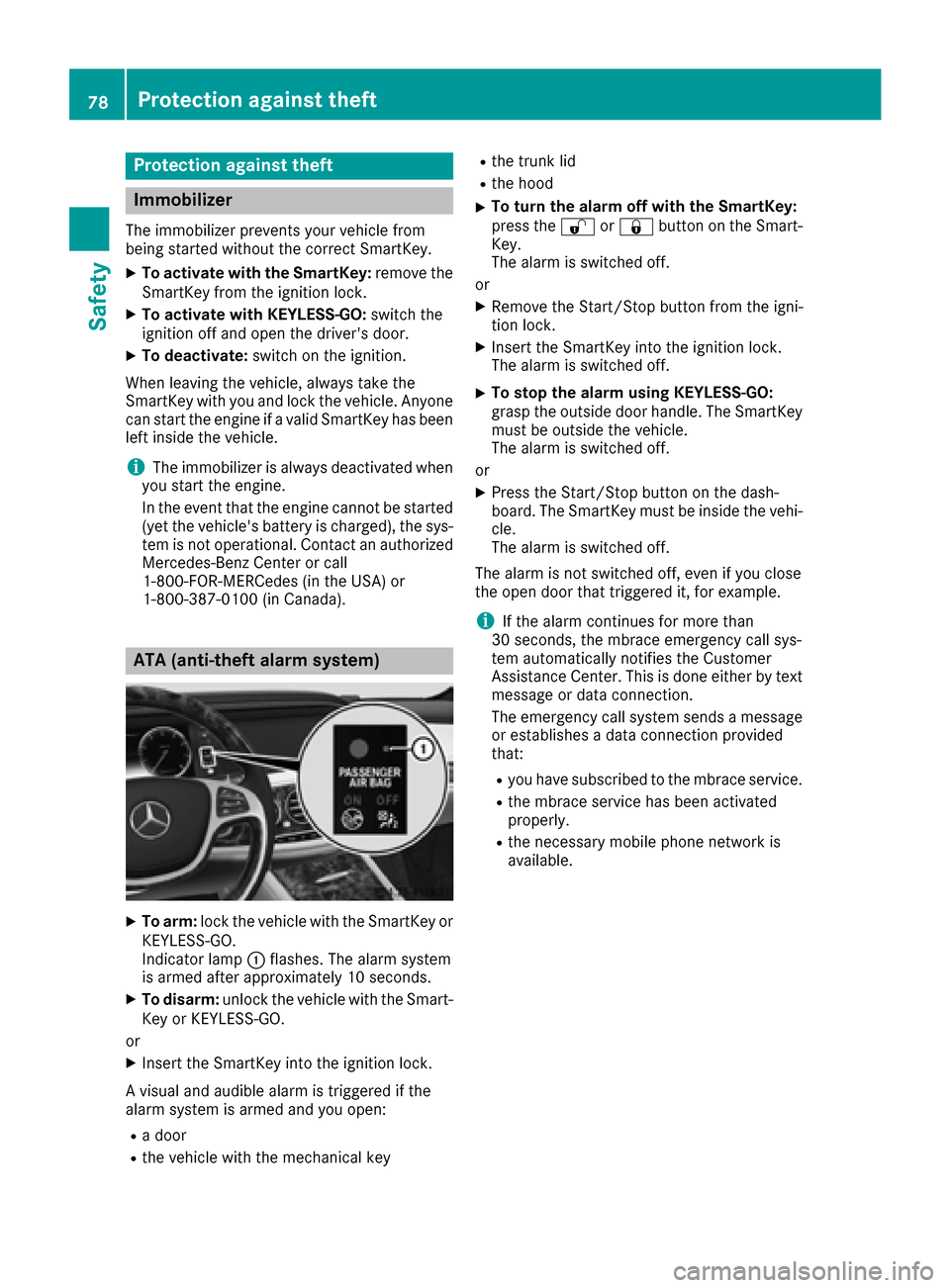
Indicator lamp :flashes. The alarm system
is armed after approximately 10 seconds.
XTo disarm: unlock the vehicle with the Smart-
Key or KEYLESS-GO.
or
XInsert the SmartKey into the ignition lock.
A visual and audible alarm is triggered if the
alarm system is armed and you open:
Ra door
Rthe vehicle with the mechanical key
Rthe trunk lid
Rthe hood
XTo turn the alarm off with the SmartKey:
press the %or& button on the Smart-
Key.
The alarm is switched off.
or
XRemove the Start/Stop button from the igni-
tion lock.
XInsert the SmartKey into the ignition lock.
The alarm is switched off.
XTo stop the alarm using KEYLESS-GO:
grasp the outside door handle. The SmartKey
must be outside the vehicle.
The alarm is switched off.
or
XPress the Start/Stop button on the dash-
board. The SmartKey must be inside the vehi-
cle.
The alarm is switched off.
The alarm is not switched off, even if you close
the open door that triggered it, for example.
iIf the alarm continues for more than
30 seconds, the mbrace emergency call sys-
tem automatically notifies the Customer
Assistance Center. This is done either by text message or data connection.
The emergency call system sends a message
or establishes a data connection provided
that:
Ryou have subscribed to the mbrace service.
Rthe mbrace service has been activated
properly.
Rthe necessary mobile phone network is
available.
78Protection against theft
Safety
Page 81 of 438
Useful information
i
This Operator's Manual describes all models
and all standard and optional equipment of
your vehicle available at the time of publica-
tion of the Operator's Manual. Country-spe-
cific differences are possible. Please note
that your vehicle may not be equipped with all
features described. This also applies to
safety-related systems and functions.
iRead the information on qualified specialist
workshops (Ypage 28).
SmartKey
Important safety notes
GWARNING
If children are left unsupervised in the vehicle,
they could:
Ropen the doors, thus endangering other
people or road users.
Rget out and disrupt traffic.
Roperate the vehicle's equipment.
Additionally, children could set the vehicle in
motion if, for example, they:
Rrelease the parking brake.
Rshifting the automatic transmission out of
park position P
RStart the engine.
There is a risk of an accident and injury.
When leaving the vehicle, always take the
SmartKey with you and lock the vehicle. Never
leave children or animals unattended in the
vehicle. Always keep the SmartKey out of
reach of children.
GWARNING
If you attach heavy or large objects to the
SmartKey, the SmartKey could be uninten-
tionally turned in the ignition lock. This could
cause the engine to be switched off. There is a risk of an accident.
Do not attach any heavy or large objects to theSmartKey. Remove any bulky key rings before
inserting the SmartKey into the ignition lock.
!Keep the SmartKey away from strong mag-
netic fields. Otherwise, the remote control
function could be affected.
Strong magnetic fields can occur in the vicin-
ity of powerful electrical installations.
Do not keep the SmartKey:
Rwith electronic devices, e.g. a mobile phone
or another SmartKey.
Rwith metallic objects, e.g. coins or metal foil.
Rinside metallic objects, e.g. a metal case.
This can affect the functionality of the Smart-
Key.
Do not keep the SmartKey in the temperature-
controlled cup holder (
Ypage 332). On vehicles
with the KEYLESS-GO start function, do not
keep it on the parcel shelf or in the trunk. Oth-
erwise, the SmartKey may not be detected, e.g. when starting the engine using the Start/Stop
button.
A check which periodically establishes a radio
connection between the vehicle and the Smart-
Key determines whether a valid SmartKey is in
the vehicle. This occurs, for example:
Rwhen starting the engine
Rwhilst driving
Rwhen using HANDS-FREE ACCESS
Rwhen the external door handles are touched
Rduring convenience closing
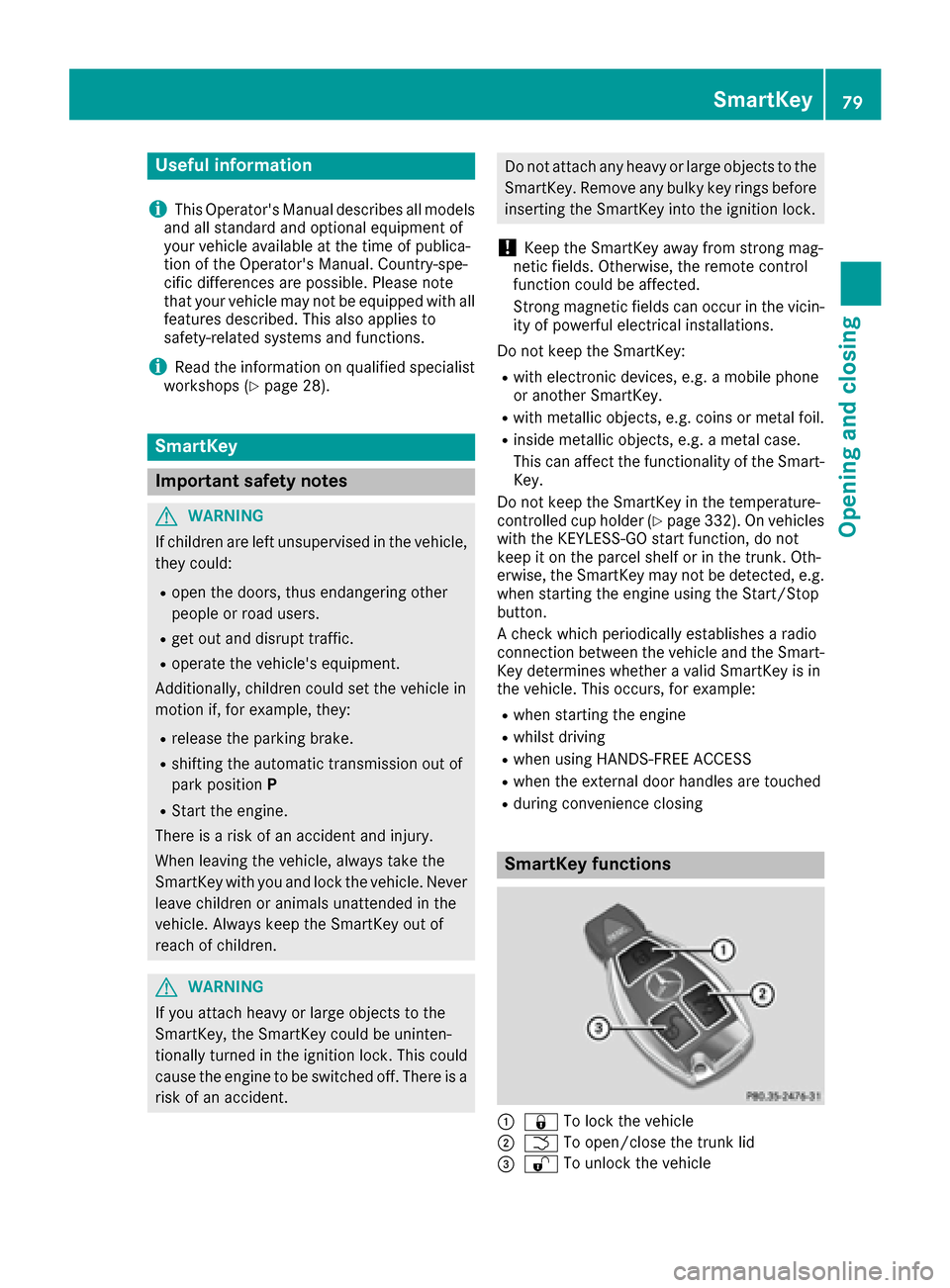
SmartKey functions
:& To lock the vehicle
;FTo open/close the trunk lid
=%To unlock the vehicle
SmartKey79
Opening and closing
Z