ECO mode MERCEDES-BENZ S-COUPE 2015 Owners Manual
[x] Cancel search | Manufacturer: MERCEDES-BENZ, Model Year: 2015, Model line: S-COUPE, Model: MERCEDES-BENZ S-COUPE 2015Pages: 286, PDF Size: 29.85 MB
Page 7 of 286
Special service requirements ......... 216
ATA (Anti-Theft Alarm system)
Activating/deactivating ................... 76
Function ........................................... 76
Switching off the alarm .................... 76
ATTENTION ASSIST
Activating/deactivating ................. 164
Display message ............................ 165
Function/note s............................. 148
Authorized Mercedes-Benz Center
see Qualified specialist workshop
Authorized workshop
see Qualified specialist workshop
AUTO lights
Display message ............................ 165
Automatic car wash (care) ............... 216
Automatic engine start (ECO start/
stop function) .................................... 119
Automatic engine switch-off (ECO
start/stop function) .......................... 119
Automatic headlamp mode .............. 103
Automatic transmission
Accelerator pedal position ............. 121
Automatic drive program ............... 121
Changing gear ............................... 121
DIRECT SELECT lever ..................... 120
Display message ............................ 165
Driving tips .................................... 121
Emergency running mode .............. 121
Engaging drive position .................. 120
Engaging neutral ............................ 120
Engaging park position automati-
cally ............................................... 120
Engaging reverse gear ................... 120
Engaging the park position ............ 120
Kickdown ....................................... 121
Manual drive program (AMG vehi-
cles) ............................................... 121
Overview ........................................ 120
Problem (malfunction) ................... 121
Program selector button ................ 121
Pulling away ................................... 118
Starting the engine ........................ 118
Steering wheel paddle shifters ...... 121
Transmission position display ........ 121
Transmission positions .................. 121 Automatic transmission emer-
gency mode
....................................... 121
B
Back button ....................................... 193
BAS (Brake Assist System) ................. 66
BAS PLUS Q (Brake Assist System
PLUS) with Cross-Traffic Assist
Function/note s................................ 67
Important safety notes .................... 67
Battery (SmartKey)
Checking .......................................... 81
Important safety notes .................... 81
Replacing ......................................... 81
Battery (vehicle)
Charging ........................................ 227
Important safety notes .................. 225
Jump starting ................................. 229
Belt
see Seat belts
Blind Spot Assist
see Active Blind Spot Assist
Bluetooth ®
see also Digital Operator's Man-
ual .................................................. 188
Brake Assist
see BAS (Brake Assist System)
Brake fluid
Display message ............................ 169
Notes ............................................. 278
Brake force distribution, elec-
tronic
see EBD (electronic brake force
distribution)
Brake lamps
Display message ............................ 165
Brakes
ABS .................................................. 66
Adaptive Brake Assist ...................... 70
BAS .................................................. 66
BAS PLUS with Cross-Traffic
Assist ............................................... 67
Brake fluid (notes) ......................... 278
Display message ............................ 166
EBD .................................................. 73
High-performance brake system .... 128
Hill start assis t............................... 118
Index5
Page 19 of 286
Mechanical key ................................ 80
Overview .......................................... 78
Positions (ignition lock) ................. 115
Problem (malfunction) ..................... 82
Starting the engine ........................ 118
SMS
see also Digital Operator's Man-
ual .................................................. 188
Snow chains ...................................... 242
Sockets
Center console .............................. 198
General notes ................................ 198
Rear compartment ........................ .198
Trunk ............................................. 198
Special seat belt retractor .................. 61
Specialist workshop ............................ 27
Speed, controlling
see Cruise control
Speedometer
In the Instrument cluster ................. 33
Selecting the unit of measure-
ment .............................................. 164
see Instrument cluster
Standing lamps
Display message ............................ 165
Switching on/off ........................... 103
Start/Stop button
Removing ....................................... 117
Starting the engine ........................ 118
Start/stop function
see ECO start/stop function
Starting (engine) ................................ 117
STEER CONTROL .................................. 75
Steering
Warning lamps ............................... 186
Steering (display message) .............. 176
Steering Assist (DISTRONIC PLUS)
Display message ............................ 165
Steering assistant STEER CON-TROL
see STEER CONTROL
Steering wheel
Adjusting (electrically) ..................... 99
Button overview ............................... 35
Buttons (on-board computer) ......... 161
Important safety notes .................... 99
Paddle shifters ............................... 121 Steering wheel heating .................... 99
Storing settings (memory func-
tion) ................................................. 99
Steering wheel (cleaning instruc-
tions) ................................................. .218
Steering wheel heating
Switching on/off .............................. 99
Steering wheel paddle shifters ........121
Stowage areas ................................... 196
Stowage compartments
Armrest (under) ............................ .197
Center console .............................. 197
Center console in rear compart-
ment .............................................. 197
Cup holders ................................... 198
Door ............................................... 197
Eyeglasses compartment .............. .197
Glove box ....................................... 197
Important safety information ......... 196
Rear ............................................... 197
Rear seat backrest ......................... 197
Stowage net ................................... 197
Stowage net ....................................... 197
Stowage space
Parcel net retainers ....................... 197
Securing a load .............................. 197
Stowage well beneath the trunk
floor .................................................... 197
Summer tires
In winter ........................................ 242
Sun visor ............................................ 198
Suspension tuning
Active Body Control ABC .............. .140
AIRMATIC ...................................... 141
Switching air-recirculation mode
on/off ................................................. 111
T
Tachometer ........................................ 160
Tail lamps
Display message ............................ 165
see Lights
Tank content
Fuel gauge ....................................... 33
Technical data
Capacities ...................................... 275
Information ................................... .274
Index17
Page 28 of 286
the Service and Guarantee booklet or simply
call the Mercedes-Benz Customer Assistance
Center (USA) at the hotline number
1-800-FOR-MERCede s(1-800-367-6372 )or
Customer Service (Canada) at
1-800-387-0100.
Vehicle operation outside the USA
and Canada
If you plan to operate your vehicle in foreign
countries, please be aware that:
R service facilities or replacement parts may
not be readily available.
R unleaded fuel for vehicles with a catalytic
converter may not be available. Leaded fuel
may cause damage to the catalytic con-
verter.
R the fuel may have a considerably lower
octane rating. Unsuitable fuel can cause
engine damage.
Some Mercedes-Benz models are available
for delivery in Europe through our European
Delivery Program. For details, consult an
authorized Mercedes-Benz Center or write to
one of the following addresses.
In the USA
Mercedes-Benz USA, LLC
European Delivery Department
One Mercedes Drive
Montvale, NJ 07645-0350
In Canada
Mercedes-Benz Canada, Inc.
European Delivery Department
98 Vanderhoof Avenue
Toronto, Ontario M4G 4C9
Operating safety
Important safety notes
GWARNING
If you do not have the prescribed service/
maintenance work or any required repairs
carried out, this can result in malfunctions or system failures. There is a risk of an accident.
Always have the prescribed service/mainte-
nance work as well as any required repairs
carried out at a qualified specialist workshop.
GWARNING
Flammable material such as leaves, grass or
twigs may ignite if they come into contact with hot parts of the exhaust system. There is a risk of fire.
When driving off road or on unpaved roads,
check the vehicle's underside regularly. In
particular, remove parts of plants or other
flammable materials which have become
trapped. In the case of damage, contact a
qualified specialist workshop.
GWARNING
Modifications to electronic components, their software as well as wiring can impair their
function and/or the function of other net-
worked components. In particular, systems
relevant to safety could also be affected. As a
result, these may no longer function as inten-
ded and/or jeopardize the operating safety of
the vehicle. There is an increased risk of an
accident and injury.
Never tamper with the wiring as well as elec-
tronic components or their software. You
should have all work to electrical and elec-
tronic equipment carried out at a qualified
specialist workshop.
If you make any changes to the vehicle elec-
tronics, the general operating permit is ren-
dered invalid.
!There is a risk of damage to the vehicle if:
R the vehicle becomes stuck, e.g. on a high
curb or an unpaved road
R you drive too fast over an obstacle, e.g. a
curb or a hole in the road
R a heavy object strikes the undercarriage
or parts of the chassis
26Introduction
Page 44 of 286
Useful information
iThis Operator's Manual describes all
models and all standard and optional equip- ment of your vehicle available at the time of
publication of the Operator's Manual.
Country-specific differences are possible.
Please note that your vehicle may not be
equipped with all features described. This
also applies to safety-related systems and
functions.
iRead the information on qualified special-
ist workshops ( Ypage 27).
Panic alarm
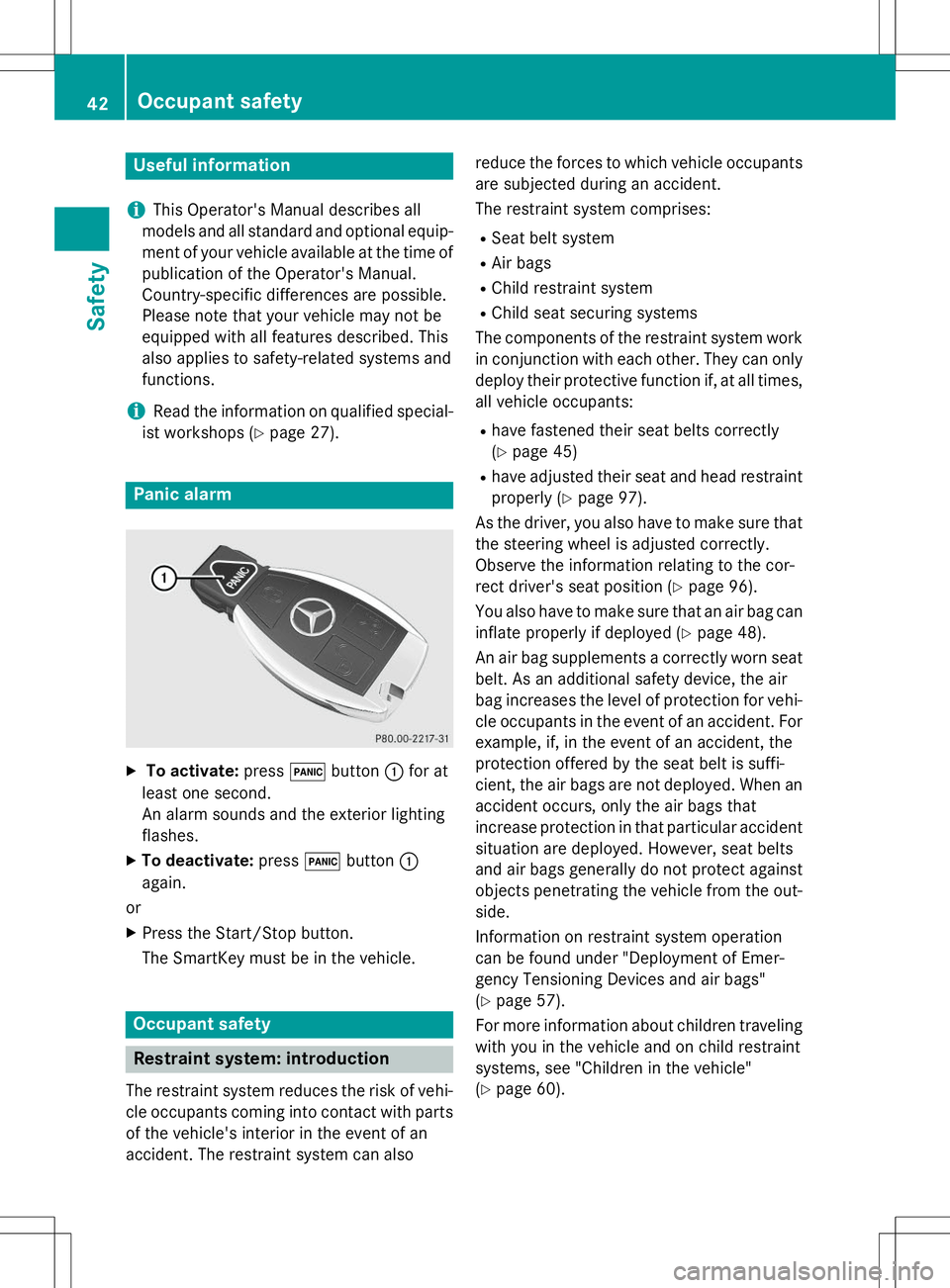
X
To activate: press!button :for at
least one second.
An alarm sounds and the exterior lightingflashes.
X To deactivate: press!button :
again.
or
X Press the Start/Stop button.
The SmartKey must be in the vehicle.
Occupant safety
Restraint system: introduction
The restraint system reduces the risk of vehi-
cle occupants coming into contact with parts of the vehicle's interior in the event of an
accident. The restraint system can also reduce the forces to which vehicle occupants
are subjected during an accident.
The restraint system comprises:
R Seat belt system
R Air bags
R Child restraint system
R Child seat securing systems
The components of the restraint system work
in conjunction with each other. They can only deploy their protective function if, at all times,
all vehicle occupants:
R have fastened their seat belts correctly(Y page 45)
R have adjusted their seat and head restraint
properly ( Ypage 97).
As the driver, you also have to make sure that
the steering wheel is adjusted correctly.
Observe the information relating to the cor-
rect driver's seat position ( Ypage 96).
You also have to make sure that an air bag can inflate properly if deployed ( Ypage 48).
An air bag supplements a correctly worn seat
belt. As an additional safety device, the air
bag increases the level of protection for vehi-
cle occupants in the event of an accident. For example, if, in the event of an accident, the
protection offered by the seat belt is suffi-
cient, the air bags are not deployed. When an
accident occurs, only the air bags that
increase protection in that particular accident
situation are deployed. However, seat belts
and air bags generally do not protect against objects penetrating the vehicle from the out-
side.
Information on restraint system operation
can be found under "Deployment of Emer-
gency Tensioning Devices and air bags"( Y page 57).
For more information about children traveling
with you in the vehicle and on child restraint
systems, see "Children in the vehicle"( Y page 60).
42Occupant safety
Safety
Page 104 of 286
Useful information
iThis Operator's Manual describes all
models and all standard and optional equip- ment of your vehicle available at the time of
publication of the Operator's Manual.
Country-specific differences are possible.
Please note that your vehicle may not be
equipped with all features described. This
also applies to safety-related systems and
functions.
iRead the information on qualified special-
ist workshops ( Ypage 27).
Exterior lighting
General notes
For reasons of safety, Mercedes-Benz recom-
mends that you drive with the lights switchedon even during the daytime. In some coun-
tries, operation of the headlamps varies due
to legal requirements and self-imposed obli-
gations.
Driving abroad
Symmetrical low-beam headlamps
Switch the headlamps to symmetrical low
beam in countries in which traffic drives on
the opposite side of the road from the country where the vehicle is registered. This prevents
glare to oncoming traffic. When using sym-
metrical lights, the edge of the road is not lit
as widely and as far ahead as normal.
Have the headlamps converted at a qualified
specialist workshop as close to the border as
possible before driving in these countries.
Asymmetrical low beam
Have the headlamps converted back to asym- metrical low-beam headlamps at a qualified
specialist workshop as soon as possible after
crossing the border again.
Information in the Digital Operator's
Manual
In the Digital Operator's Manual you will find
information on the following topics: R Hazard warning lamps
R Headlamps fogged up on the inside
Setting the exterior lighting
Setting options
Exterior lighting can be set using:
R the light switch
R the combination switch ( Ypage 103)
Light switch
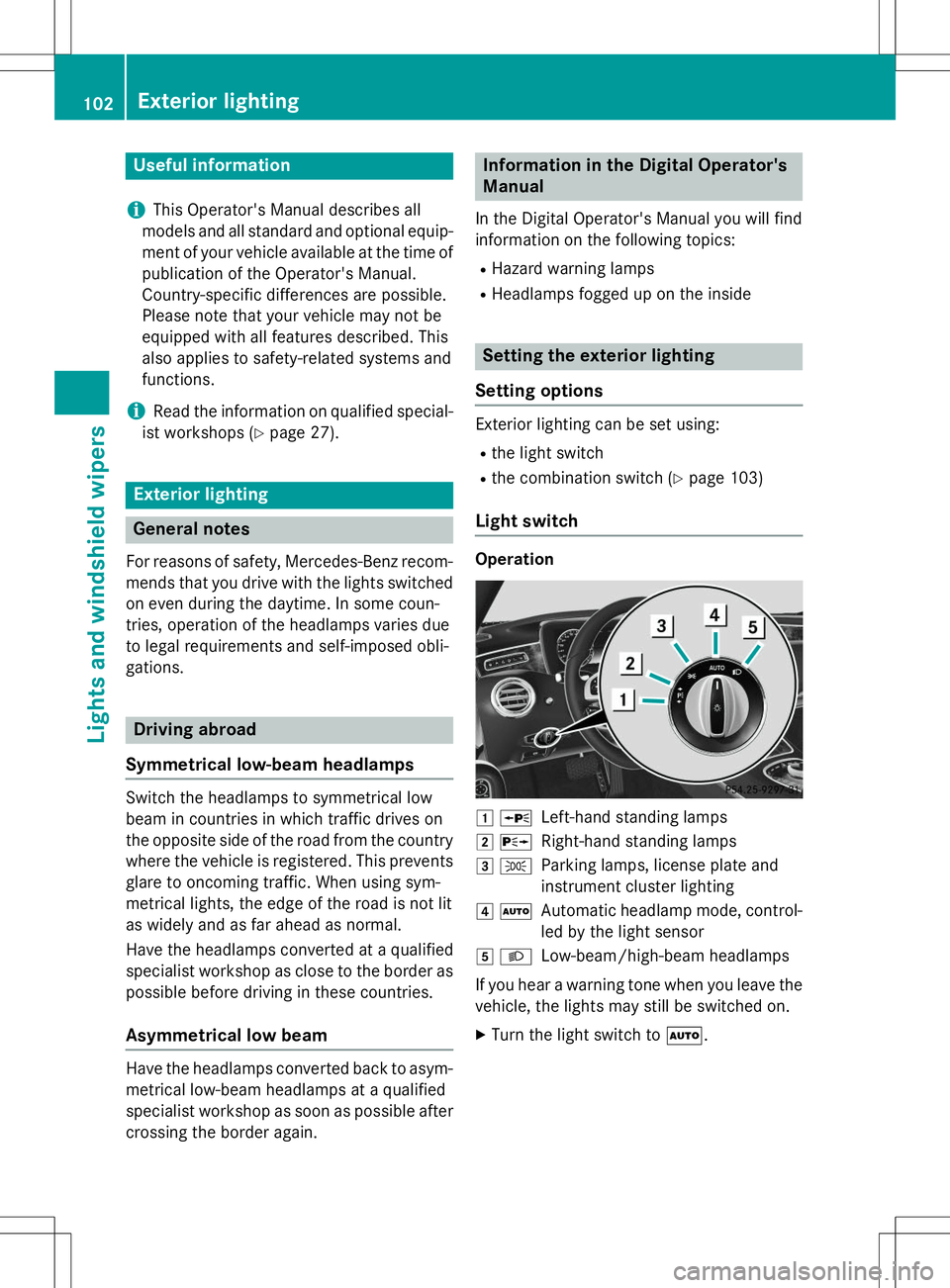
Operation
1 WLeft-hand standing lamps
2XRight-hand standing lamps
3 TParking lamps, license plate and
instrument cluster lighting
4ÃAutomatic headlamp mode, control-
led by the light sensor
5 LLow-beam/high-beam headlamps
If you hear a warning tone when you leave the
vehicle, the lights may still be switched on. X Turn the light switch to Ã.
102Exterior lighting
Lights and windshield wipers
Page 112 of 286
Useful information
iThis Operator's Manual describes all
models and all standard and optional equip- ment of your vehicle available at the time of
publication of the Operator's Manual.
Country-specific differences are possible.
Please note that your vehicle may not be
equipped with all features described. This
also applies to safety-related systems and
functions.
iRead the information on qualified special-
ist workshops ( Ypage 27).
Overview of climate control systems
General notes
Observe the settings recommended on the
following pages. The windows could other-
wise fog up.
To prevent the windows from fogging up:
R switch off climate control only briefly
R switch on air-recirculation mode only briefly
R switch on the cooling with air dehumidifi-
cation function
R switch on the defrost windshield function
briefly, if required
Climate control regulates the temperature
and air humidity in the vehicle interior. The air filter cleans the air, thus improving the inte-
rior climate.
The "Cooling with air dehumidification" func-
tion is only available when the engine is run-
ning. Optimum climate control is only ach-
ieved with the side windows and roof closed.
The residual heat function can only be acti-
vated or deactivated if the ignition is switched
off. See the Digital Operator's Manual, key-
word "Residual heat".
iVentilate the vehicle in briefly in warm
weather conditions, e.g. with the "Conve-
nience opening" function, see the Digital
Operator's Manual, keyword "Convenience opening". This will speed up the cooling
process and the desired interior tempera-
ture will be reached more quickly.
iThe integrated filter filters out most par-
ticles of dust and soot and completely fil-
ters out pollen. It also reduces gaseous pol-
lutants and odors. A clogged filter reduces the amount of air supplied to the vehicle
interior. For this reason, you should alwaysobserve the interval for replacing the filter,which is specified in the Maintenance
Booklet. As it depends on environmental
conditions, e.g. heavy air pollution, the
interval may be shorter than stated in the
Maintenance Booklet.
iIt is possible that the blower may be acti-
vated automatically 60 minutes after the
SmartKey has been removed depending on various factors, e.g. the outside tempera-
ture. The vehicle is then ventilated for
30 minutes to dry the climate control sys-
tem.
110Overview of climate control systems
Climate control
Page 120 of 286
Automatic transmission
XShift the transmission to position P. You
can find information about this in the Digital Operator's Manual.
The transmission position display in the
multifunction display shows P. You can find
information about this in the Digital Oper-
ator's Manual.
You can start the engine in transmission posi-
tion Pand N.
Starting procedure with the SmartKey
To start the engine using the SmartKey
instead of the Start/Stop button, pull the
Start/Stop button out of the ignition lock. X
Turn the SmartKey to position 3in the igni-
tion ( Ypage 115) lock and release it as
soon as the engine is running.
Starting procedure with the Start/Stop button
The Start/Stop button can be used to start
the vehicle manually without inserting the
SmartKey into the ignition lock. The Start/
Stop button must be inserted in the ignition
lock and the SmartKey must be in the vehicle. This mode for starting the engine operates
independently of the ECO start/stop auto-
matic engine start function.
You can start the engine if a valid SmartKey isin the vehicle. Always take the SmartKey with
you when leaving the vehicle, even if you only leave it for a short time. Pay attention to the
important safety notes.
X Depress the brake pedal and keep it
depressed.
X Press the Start/Stop button once(Y page 115).
The engine starts.
Pulling away
General notes
GWARNING
If the engine speed is above the idling speed
and you engage transmission position Dor R,
the vehicle could pull away suddenly. There is a risk of an accident.
When engaging transmission position Dor R,
always firmly depress the brake pedal and do not simultaneously accelerate.
Depress the accelerator carefully when pull-
ing away.
The vehicle locks centrally once you have
pulled away. The locking knobs in the doors
drop down.
You can open the doors from the inside at any
time.
You can also deactivate the automatic locking feature ( Ypage 82).
It is only possible to shift the transmission
from position Pto the desired position if you
depress the brake pedal. Only then is the
parking lock released. If the brake pedal is not
depressed, the DIRECT SELECT lever can still be moved but the parking lock remains
engaged.
iUpshifts take place at higher engine
speeds after a cold start. This helps the
catalytic converter to reach its operating
temperature more quickly.
Information on the automatic release of the
electric parking brake can be found in the
Digital Operator's Manual.
Hill start assist
Hill start assist helps you when pulling away
forwards or in reverse on an uphill gradient. It holds the vehicle for a short time after you
have removed your foot from the brake pedal.
This gives you enough time to move your foot from the brake pedal to the accelerator pedal
and to depress it before the vehicle begins to roll.
118Driving
Driving and pa rking
Page 129 of 286
Driving tips
General driving tips
Important safety notes
GWARNING
If you switch off the ignition while driving,
safety-relevant functions are only available
with limitations, or not at all. This could affect, for example, the power steering and the brake
boosting effect. You will require considerably
more effort to steer and brake. There is a risk
of an accident.
Do not switch off the ignition while driving.
GWARNING
If you operate mobile communication equip-
ment while driving, you will be distracted from traffic conditions. You could also lose controlof the vehicle. There is a risk of an accident.
Only operate this equipment when the vehicle is stationary.
Observe the legal requirements for the coun- try in which you are driving. Some jurisdic-
tions prohibit the driver from using a mobile
phone while driving a vehicle.
If you make a call while driving, always use
hands-free mode. Only operate the telephone
when the traffic situation permits. If you are
unsure, pull over to a safe location and stop
before operating the telephone.
Bear in mind that at a speed of only 30 mph
(approximately 50 km/h), the vehicle covers
a distance of 44 ft (approximately 14 m) per
second.
Drive sensibly – save fuel
Observe the following tips to save fuel:
X The tires should always be inflated to the
recommended tire pressure.
X Remove unnecessary loads.
X Remove roof racks when they are not nee-ded.
X Warm up the engine at low engine speeds. X
Avoid frequent acceleration or braking.
X Have all maintenance work carried out as
indicated by the service intervals in the
Maintenance Booklet or by the service
interval display.
Fuel consumption also increases when driv-
ing in cold weather, in stop-start traffic and in
hilly terrain.
Drinking and driving
GWARNING
Drinking and driving and/or taking drugs and driving are very dangerous combinations.
Even a small amount of alcohol or drugs can
affect your reflexes, perceptions and judg-
ment.
The possibility of a serious or even fatal acci-
dent is greatly increased when you drink or
take drugs and drive.
Do not drink or take drugs and drive or allow
anyone to drive who has been drinking or tak-
ing drugs.
Emission control
GWARNING
Combustion engines emit poisonous exhaust
gases such as carbon monoxide. Inhaling
these exhaust gases leads to poisoning. There is a risk of fatal injury. Therefore never leave
the engine running in enclosed spaces with-
out sufficient ventilation.
Certain engine systems are designed to keep
the level of poisonous components in exhaust fumes within legal limits.
These systems only work at peak efficiency if they are serviced exactly in accordance with
the manufacturer's specifications. For this
reason, all work on the engine must be carried
out by qualified and authorized Mercedes-
Benz technicians.
The engine settings must not be changed
under any circumstances. Furthermore, all
specific service work must be carried out at
Driving tips127
Driving and pa rking
Z
Page 142 of 286
When the HOLD function is activated, the
transmission is shifted automatically to posi-tion Pif:
R the driver's seat belt is not fastened and the
driver's door is open
R the engine is switched off, unless it is auto-
matically switched off by the ECO start/
stop function
The electric parking brake secures the vehicle
automatically if DISTRONIC PLUS is activated
when the vehicle is stationary and:
R a system malfunction occurs.
R the power supply is not sufficient.
If a malfunction in the electric parking brake
occurs, then the transmission may also be
shifted into position Pautomatically.
Magic Body Control
General notes
MAGIC BODY CONTROL consists of Active
Body Control (ABC), ROAD SURFACE SCAN,
the CURVE cornering function as well as auto-
matic vehicle stabilization in the event of a
crosswind.
Your vehicle automatically adjusts its ride
height to reduce fuel consumption. The sus-
pension mode is adjusted according to your
selection (SPORT, COMFORT or CURVE), the
road surface conditions and the vehicle load. A multifunction camera detects bumps in the
road surface before the vehicle drives over
them. This reduces chassis movements.
Important safety notes
GWARNING
When the vehicle is being lowered, people
could become trapped if their limbs are
between the vehicle body and the wheels or
underneath the vehicle. There is a risk ofinjury.
Make sure no one is underneath the vehicle or in the immediate vicinity of the wheel arches
when the vehicle is being lowered.
!The vehicle is lowered when the engine is
switched off. When parking, position your
vehicle so that it does not make contact
with the curb as the vehicle is lowered. Your vehicle could otherwise be damaged.
Information in the Digital Operator's
Manual
In the Digital Operator's Manual you can find information about:
R Crosswind driving assistance
R Active Body Control (ABC)
R ROAD SURFACE SCAN
AIRMATIC
General notes
AIRMATIC is an air suspension with variable
damping for improved driving comfort. All-
round level control ensures the best possible suspension and constant ground clearance,
even with a laden vehicle. When you drive
fast, the vehicle is lowered automatically to
improve driving safety and to reduce fuel con-
sumption. There is also the option to manually
adjust the vehicle level. AIRMATIC consists of
level setting, level control and the Adaptive
Damping System ADS PLUS.
Important safety notes
GWARNING
When the vehicle is being lowered, people
could become trapped if their limbs are
between the vehicle body and the wheels or
underneath the vehicle. There is a risk ofinjury.
Make sure no one is underneath the vehicle or in the immediate vicinity of the wheel arches
when the vehicle is being lowered.
140Driving systems
Driving and parking
Page 150 of 286
Activating the 360° camera using
reverse gear
The 360° camera images can be automati-
cally displayed by engaging reverse gear. XMake sure that the SmartKey is in position
2 in the ignition lock.
X Make sure that the
Activation by R
gearfunction is selected in COMAND (see
Digital Operator's Manual).
X To show the 360° camera image: engage
reverse gear.
The area behind the vehicle is shown in the
COMAND display in split-screen mode. You see the top view of the vehicle and the
image from the rear view camera.
Information in the Digital Operator's
Manual
In the Digital Operator's Manual you will find
information on the following topics: R Selecting the split-screen and full screen
displays
R Displays in the COMAND display
R Display with the PARKTRONIC display
Exiting 360° camera display mode
The 360° camera display is stopped Rwhen you select transmission position P, or
R when you are driving at moderate speeds
The view which was active before the 360°
camera was displayed appears in the
COMAND display. You can also stop the 360° camera display split-screen view by selecting
the % symbol in the display and then con-
firming with the COMAND controller.
ATTENTION ASSIST
General notes
ATTENTION ASSIST helps you during long,
monotonous journeys, such as on highways.
It is active in the 37 mph (60 km/h) to 125 mph
(200 km/ h)range. If ATTEN-
TION ASSIST detects typical indicators of fati-
gue or increasing lapses in concentration on
the part of the driver, it suggests taking a
break.
Important safety notes
ATTENTION ASSIST is only an aid to the
driver. It might not always recognize fatigue
or increasing inattentiveness in time or fail to
recognize them at all. The system is not a
substitute for a well-rested and attentive
driver.
The functionality of ATTENTION ASSIST is
restricted and warnings may be delayed or
not occur at all:
R if the length of the journey is less than
approximately 30 minutes
R if the road condition is poor, e.g. if the sur-
face is uneven or if there are potholes
R if there is a strong side wind
R if you have adopted a sporty driving style
with high cornering speeds or high rates of
acceleration
R if you are predominantly driving slower
than 37 mph (60 km/h) or faster than
125 mph (200 km/h)
R if you are driving with the active Steer
Assist of DISTRONIC PLUS
R if the time has been set incorrectly
R in active driving situations, such as when
you change lanes or change your speed
ATTENTION ASSIST is reset when you con-
tinue your journey and starts assessing your
tiredness again if:
R you switch off the engine.
R you take off your seat belt and open the
driver's door, e.g. for a change of drivers or
to take a break.
148Driving systems
Driving and parking