instrument cluster MERCEDES-BENZ S-COUPE 2015 Owners Manual
[x] Cancel search | Manufacturer: MERCEDES-BENZ, Model Year: 2015, Model line: S-COUPE, Model: MERCEDES-BENZ S-COUPE 2015Pages: 286, PDF Size: 29.85 MB
Page 8 of 286
HOLD function............................... 138
Important safety notes .................. 128
Maintenance .................................. 128
Parking brake ................................ 126
Riding tips ...................................... 128
Warning lamp ................................. 178
Breakdown
see Flat tire
see Towing away
Brightness control (instrument
cluster lighting) ................................... 35
Buttons and controller ...................... 192
Buttons on the steering wheel ......... 161
C
California
Important notice for retail cus-
tomers and lessees .......................... 25
Calling up a malfunction
see Display messages
Car
see Vehicle
Car key
see SmartKey
Care
360° camera ................................. 217
Car wash ........................................ 216
Carpets .......................................... 218
Display ........................................... 218
Exhaust pipe .................................. 217
Exterior lights ................................ 217
Gear or selector lever .................... 218
Interior ........................................... 218
Matte finish ................................... 217
Night View Assist Plus ................... 218Note s............................................. 216
Paint .............................................. 217
Plastic trim .................................... 218
Power washer ................................ 217
Rear view camera .......................... 217
Roof lining ...................................... 218
Seat belt ........................................ 218
Seat cove r..................................... 218
Sensors ......................................... 217
Trim pieces .................................... 218
Washing by hand ........................... 217
Wheels ........................................... 217 Windows ........................................ 217
Wiper blades .................................. 217
Wooden trim .................................. 218
CD
see also Digital Operator's Man-
ual .................................................. 188
CD player/CD changer (on-board
computer) .......................................... 164
Center console
Overview .......................................... 37
Center console in the rear com-
partment
Stowage compartment .................. 197
Central locking
Locking/unlocking (SmartKey )........ 79
Child
Restraint system .............................. 62
Child seat
Forward-facing restraint system ...... 65
LATCH-type (ISOFIX) child seat
anchors ............................................ 63
On the front-passenger sea t............ 64
Rearward-facing restraint system .... 64
Top Tether ....................................... 63
Children
In the vehicl e................................... 60
Special seat belt retractor ............... 61
Cigarette lighter ................................ 198
Cleaning
Mirror turn signal ........................... 217
Climate control
Automatic climate control ............. 111
Controlling automaticall y............... 111
Cooling with air dehumidification .. 111
Defrosting the window s................. 111
Defrosting the windshield .............. 111
General notes ................................ 110
Indicator lamp ................................ 111
Ionization ....................................... 111
Overview of systems ...................... 110
Perfume atomizer .......................... 111
Problem with the rear window
defroster ........................................ 111
Problems with cooling with air
dehumidification ............................ 111
Refrigerant ..................................... 280
Refrigerant filling capacity ............. 280
Setting the air distribution ............. 111
6Index
Page 9 of 286
Setting the airflow ......................... 111
Setting the climate mode............... 111
Setting the temperature ................ 111
Switching air-recirculation modeon/of f............................................ 111
Switching on/of f........................... 111
Switching residual heat on/off ...... 111
Switching the rear window
defroster on/of f............................ 111
Switching the synchronization
function on and off ........................ 111
Climate control system
Automatic engine start .................. 119
Automatic engine switch-off .......... 119
Deactivating/activating ................. 119
Important safety notes .................. 119
Introduction ................................... 119
Cockpit
Overview .......................................... 32
see Instrument cluster
COLLISION PREVENTION ASSIST
PLUS
Activating/deactivating ................. 164
Operation/note s.............................. 68
COMAND
Controller ...................................... 192
Display ........................................... 192
Combination switch .......................... 103
Connecting a USB device
see also Digital Operator's Man-
ual .................................................. 188
Consumption statistics (on-board
computer) .......................................... 164
Coolant (engine)
Checking the level ......................... 214
Display message ............................ 174
Filling capacity ............................... 279
Important safety notes .................. 279
Temperature gaug e........................ 160
Warning lamp ................................. 183
Coolbox .............................................. 198
Cooling
see Climate control
Copyright ............................................. 30
Cornering light function
Display message ............................ 165
Function/note s............................. 103 Crash-responsive emergency light-
ing ....................................................... 105
Crosswind Assist (vehicles with
MAGIC BODY CONTROL) ................... 140
Crosswind Assist (vehicles with-
out MAGIC BODY CONTROL) ............... 72
Cruise control
Activation conditions ..................... 130
Cruise control lever ....................... 130
Deactivating ................................... 130
Display message ............................ 165
Driving system ............................... 129
Function/note s............................. 129
Important safety notes .................. 129
Selecting ........................................ 130
Setting a speed .............................. 130
Storing and maintaining current
speed ............................................. 130
Cup holder
Important safety notes .................. 198
Rear compartment ......................... 198
Customer Assistance Center
(CAC) ..................................................... 28
Customer Relations Department ....... 28
D
Data
see Technical data
Daytime running lamps
Display message ............................ 165
Function/note s............................. 103
Switching on/off (on-board com-
puter) ............................................. 164
Declarations of conformity ................. 27
Diagnostics connection ...................... 27
Digital Operator's Manual
Help ................................................. 21
Introduction ..................................... 21
Digital speedometer ......................... 164
DIRECT SELECT lever
Automatic transmission ................. 120
Display
see Display messages
see Warning and indicator lamps
Display (cleaning instructions) ........ 218
Display messages
ASSYST PLUS ................................ 216
Index7
Page 13 of 286
Head-up displayAdjusting the brightness ............... .164
Function/notes ............................ .162
Important safety notes .................. 162
Setting the position ....................... 164
Storing settings (memory func-
tion) ................................................. 99
Switching on or off ......................... 162
Switching the display on/off ......... 164
Headlamps
Fogging up ..................................... 102
see Automatic headlamp mode
Heating
see Climate control
High-beam headlamps
Adaptive Highbeam Assist PLUS .... 104
Display message ............................ 165
Switching on/off ........................... 103
Hill start assist .................................. 118
HOLD function
Activating ....................................... 139
Deactivating ................................... 139
Function/notes ............................ .138
Home address
see also Digital Operator's Man-
ual ................................................. .188
Hood
Closing .......................................... .211
Display message ............................ 176
Important safety notes .................. 210
Opening ......................................... 210
Horn ...................................................... 32
Hydroplaning ..................................... 128
I
Ignition lock
see Key positions
Immobilizer .......................................... 75
Indicator and warning lamps
COLLISION PREVENTION ASSIST
PLUS .............................................. 184
Indicator lamps
see Warning and indicator lamps
Indicators
see Turn signals
Instrument cluster
Overview .......................................... 33 Warning and indicator lamps ........... 34
Instrument cluster lighting ................ 35
Intelligent Light System
Display message ............................ 165
Interior lighting
Automatic control .......................... 105
Emergency lighting ........................ 105
Manual control ............................... 105
Overview ........................................ 105
Reading lamp ................................. 105
iPod ®
see also Digital Operator's Man-
ual ................................................. .188
J
Jack
Using ............................................. 263
Jump starting (engine) ......................229
K
Key positions
SmartKey ....................................... 115
Start/Stop button .......................... 115
KEYLESS-GO
Deactivation ..................................... 79
Display message ............................ 165
Locking ............................................ 79
Unlocking ......................................... 79
Kickdown
Driving tips ................................... .121
Manual drive program .................... 122
Knee bag .............................................. 50
L
Lamps
see Warning and indicator lamps
Lane Keeping Assist
see Active Lane Keeping Assist
LATCH-type (ISOFIX) child seat
anchors ................................................ 63
License plate lamp (display mes-
sage) ................................................... 165
Light function, active
Display message ............................ 165
Light sensor (display message) ....... 165
Index11
Page 19 of 286
Mechanical key ................................ 80
Overview .......................................... 78
Positions (ignition lock) ................. 115
Problem (malfunction) ..................... 82
Starting the engine ........................ 118
SMS
see also Digital Operator's Man-
ual .................................................. 188
Snow chains ...................................... 242
Sockets
Center console .............................. 198
General notes ................................ 198
Rear compartment ........................ .198
Trunk ............................................. 198
Special seat belt retractor .................. 61
Specialist workshop ............................ 27
Speed, controlling
see Cruise control
Speedometer
In the Instrument cluster ................. 33
Selecting the unit of measure-
ment .............................................. 164
see Instrument cluster
Standing lamps
Display message ............................ 165
Switching on/off ........................... 103
Start/Stop button
Removing ....................................... 117
Starting the engine ........................ 118
Start/stop function
see ECO start/stop function
Starting (engine) ................................ 117
STEER CONTROL .................................. 75
Steering
Warning lamps ............................... 186
Steering (display message) .............. 176
Steering Assist (DISTRONIC PLUS)
Display message ............................ 165
Steering assistant STEER CON-TROL
see STEER CONTROL
Steering wheel
Adjusting (electrically) ..................... 99
Button overview ............................... 35
Buttons (on-board computer) ......... 161
Important safety notes .................... 99
Paddle shifters ............................... 121 Steering wheel heating .................... 99
Storing settings (memory func-
tion) ................................................. 99
Steering wheel (cleaning instruc-
tions) ................................................. .218
Steering wheel heating
Switching on/off .............................. 99
Steering wheel paddle shifters ........121
Stowage areas ................................... 196
Stowage compartments
Armrest (under) ............................ .197
Center console .............................. 197
Center console in rear compart-
ment .............................................. 197
Cup holders ................................... 198
Door ............................................... 197
Eyeglasses compartment .............. .197
Glove box ....................................... 197
Important safety information ......... 196
Rear ............................................... 197
Rear seat backrest ......................... 197
Stowage net ................................... 197
Stowage net ....................................... 197
Stowage space
Parcel net retainers ....................... 197
Securing a load .............................. 197
Stowage well beneath the trunk
floor .................................................... 197
Summer tires
In winter ........................................ 242
Sun visor ............................................ 198
Suspension tuning
Active Body Control ABC .............. .140
AIRMATIC ...................................... 141
Switching air-recirculation mode
on/off ................................................. 111
T
Tachometer ........................................ 160
Tail lamps
Display message ............................ 165
see Lights
Tank content
Fuel gauge ....................................... 33
Technical data
Capacities ...................................... 275
Information ................................... .274
Index17
Page 25 of 286
Protection of the environment
General notes
HEnvironmental note
Daimler's declared policy is one of compre-
hensive environmental protection.
The objectives are for the natural resources
that form the basis of our existence on this
planet to be used sparingly and in a manner
that takes the requirements of both nature
and humanity into account.
You too can help to protect the environment
by operating your vehicle in an environmen-
tally responsible manner.
Fuel consumption and the rate of engine,
transmission, brake and tire wear are affected by these factors:
R operating conditions of your vehicle
R your personal driving style
You can influence both factors. You should
bear the following in mind:
Operating conditions:
R avoid short trips as these increase fuel con-
sumption.
R always make sure that the tire pressures
are correct.
R do not carry any unnecessary weight.
R remove roof racks once you no longer need
them.
R a regularly serviced vehicle will contribute
to environmental protection. You should
therefore adhere to the service intervals.
R always have service work carried out at a
qualified specialist workshop.
Personal driving style:
R do not depress the accelerator pedal when
starting the engine.
R do not warm up the engine when the vehicle
is stationary.
R drive carefully and maintain a safe distance
from the vehicle in front.
R avoid frequent, sudden acceleration andbraking.
R change gear in good time and use each gear
only up to Ôof its maximum engine speed.
R switch off the engine in stationary traffic.
R keep an eye on the vehicle's fuel consump-
tion.
Environmental concerns and recom-
mendations
Wherever the operating instructions require
you to dispose of materials, first try to regen-
erate or re-use them. Observe the relevant
environmental rules and regulations when
disposing of materials. In this way you will
help to protect the environment.
Genuine Mercedes-Benz parts
HEnvironmental note
Daimler AG also supplies reconditioned major
assemblies and parts which are of the same
quality as new parts. They are covered by the same Limited Warranty entitlements as newparts.
!Air bags and Emergency Tensioning Devi-
ces, as well as control units and sensors for these restraint systems, may be installed in
the following areas of your vehicle:
R doors
R door pillars
R door sills
R seats
R cockpit
R instrument cluster
R center console
Do not install accessories such as audio
systems in these areas. Do not carry out
repairs or welding. You could impair the
operating efficiency of the restraint sys-tems.
Have aftermarket accessories installed at a qualified specialist workshop.
Introduction23
Z
Page 33 of 286
Cockpit................................................. 32
Instrument cluster ..............................33
Multifunction steering wheel .............35
Center console .................................... 37
Overhead control panel ......................38
Door control panel .............................. 39
Rear seats ............................................ 40
31
At a glance
Page 34 of 286
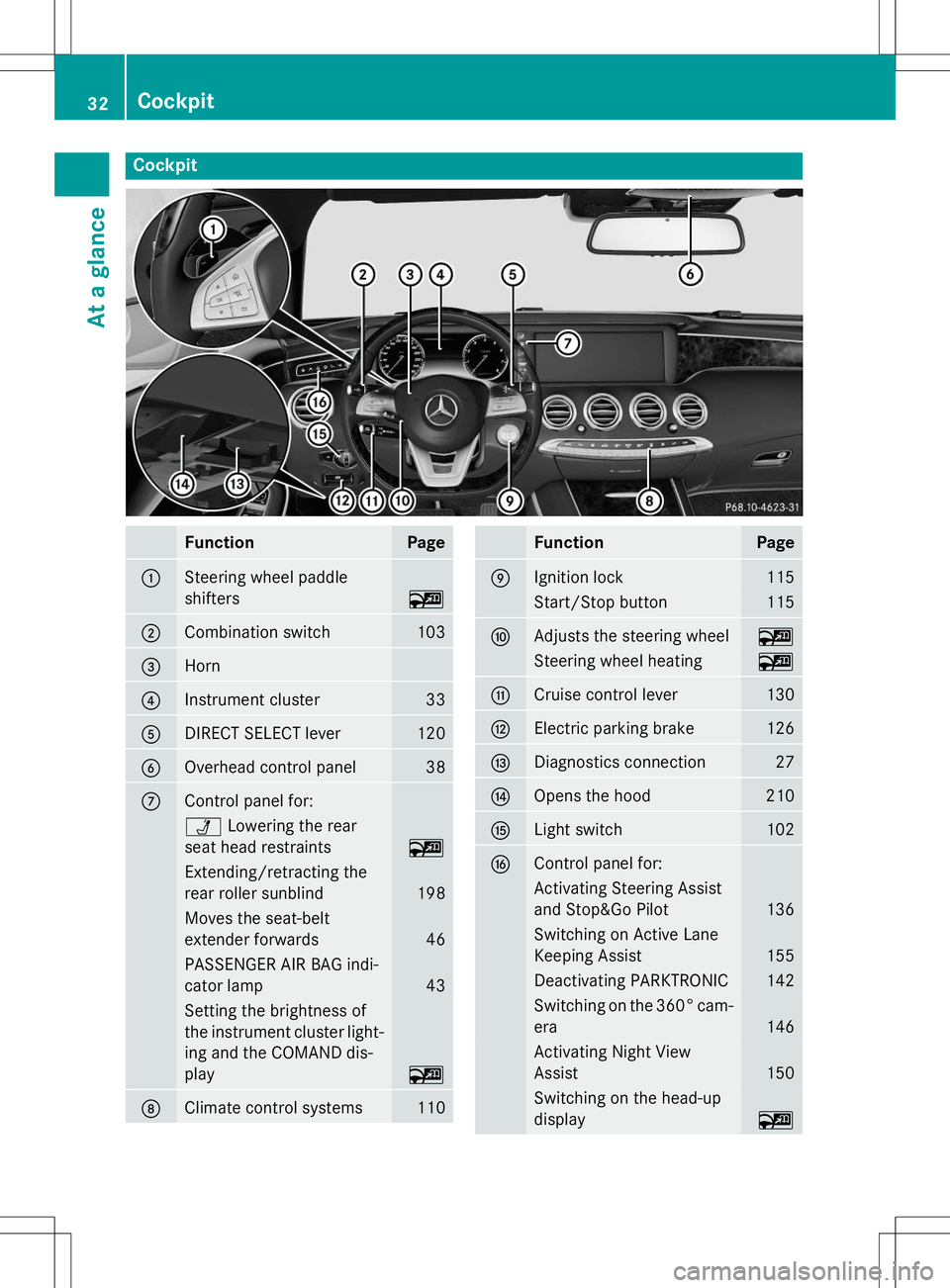
Cockpit
FunctionPage
:Steering wheel paddle
shifters
~
;Combination switch103
=Horn
?Instrument cluster33
ADIRECT SELECT lever120
BOverhead control panel38
CControl panel for:
ÜLowering the rear
seat head restraints
~
Extending/retracting the
rear roller sunblind
198
Moves the seat-belt
extender forwards
46
PASSENGER AIR BAG indi-
cator lamp
43
Setting the brightness of
the instrument cluster light- ing and the COMAND dis-play
~
DClimate control systems110
FunctionPage
EIgnition lock115
Start/Stop button115
FAdjusts the steering wheel~
Steering wheel heating~
GCruise control lever130
HElectric parking brake126
IDiagnostics connection27
JOpens the hood210
KLight switch102
LControl panel for:
Activating Steering Assist
and Stop&Go Pilot
136
Switching on Active Lane
Keeping Assist
155
Deactivating PARKTRONIC142
Switching on the 360° cam-
era
146
Activating Night View
Assist
150
Switching on the head-up
display
~
32Cockpit
At a glance
Page 35 of 286
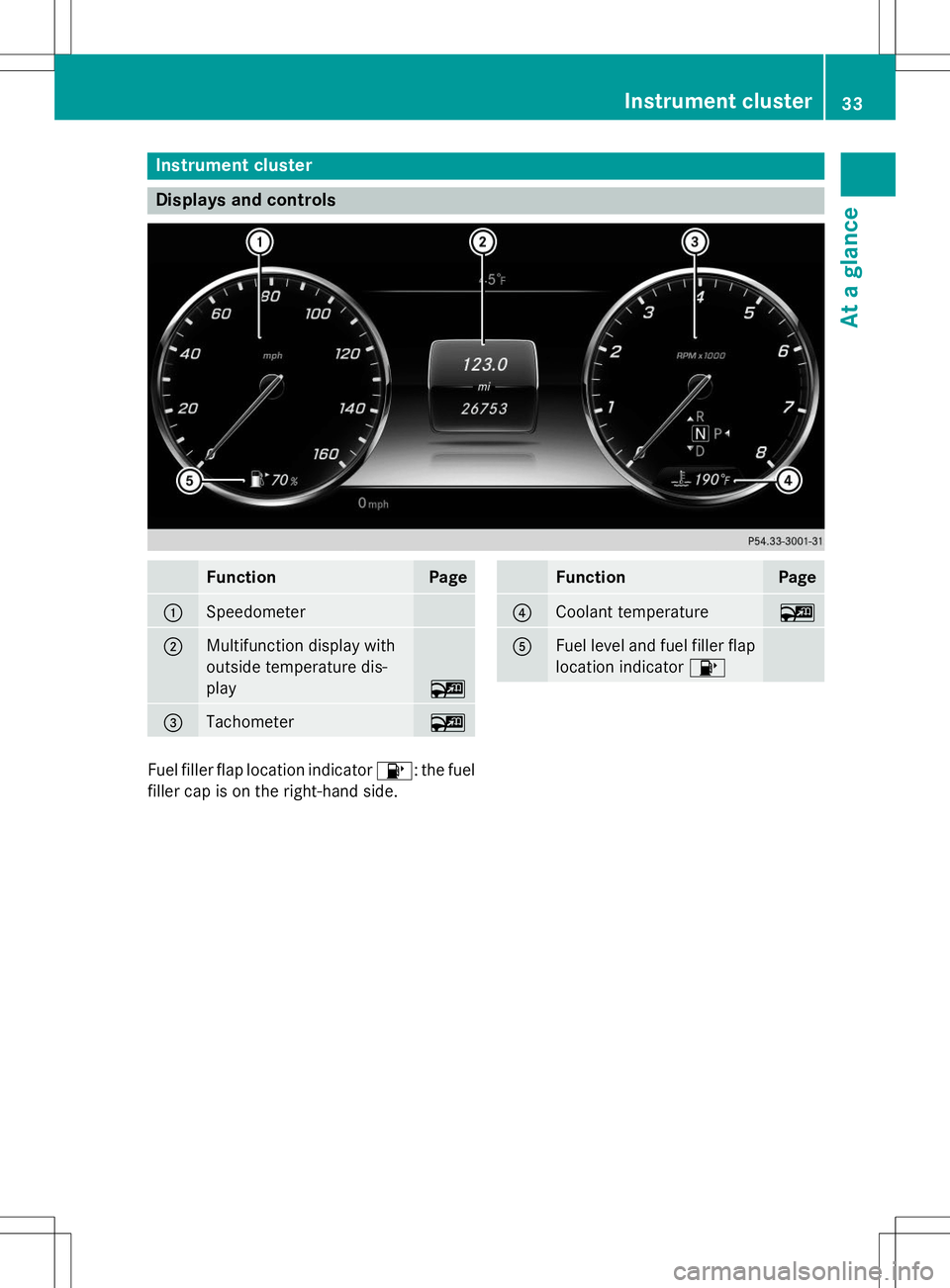
Instrument cluster
Displays and controls
FunctionPage
:Speedometer
;Multifunction display with
outside temperature dis-play
~
=Tachometer~
FunctionPage
?Coolant temperature~
AFuel level and fuel filler flaplocation indicator 8
Fuel filler flap location indicator 8: the fuel
filler cap is on the right-hand side.
Instrument cluster33
At a glance
Page 36 of 286
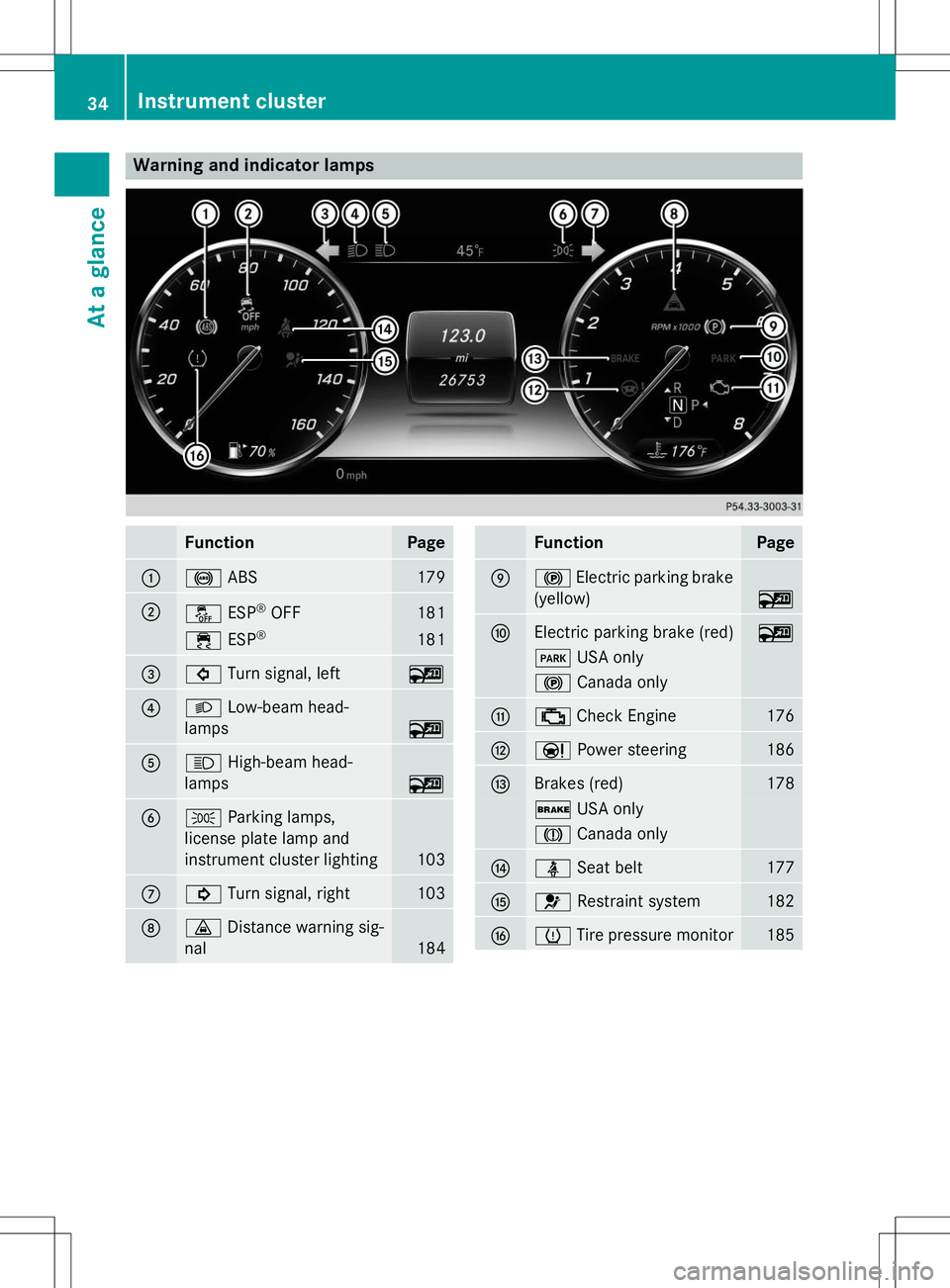
Warning and indicator lamps
FunctionPage
:!ABS179
;åESP®
OFF181
÷ ESP®181
=#
Turn signal, left~
?LLow-beam head-
lamps
~
AK High-beam head-
lamps
~
BT Parking lamps,
license plate lamp and
instrument cluster lighting
103
C! Turn signal, right103
D·Distance warning sig-
nal
184
FunctionPage
E! Electric parking brake
(yellow)
~
FElectric parking brake (red)~
F USA only
!Canada only
G;Check Engine176
HÐ Power steering186
IBrakes (red)178
$USA only
JCanada only
JüSeat belt177
K6Restraint system182
LhTire pressure monitor185
34Instrument cluster
At a glance
Page 37 of 286
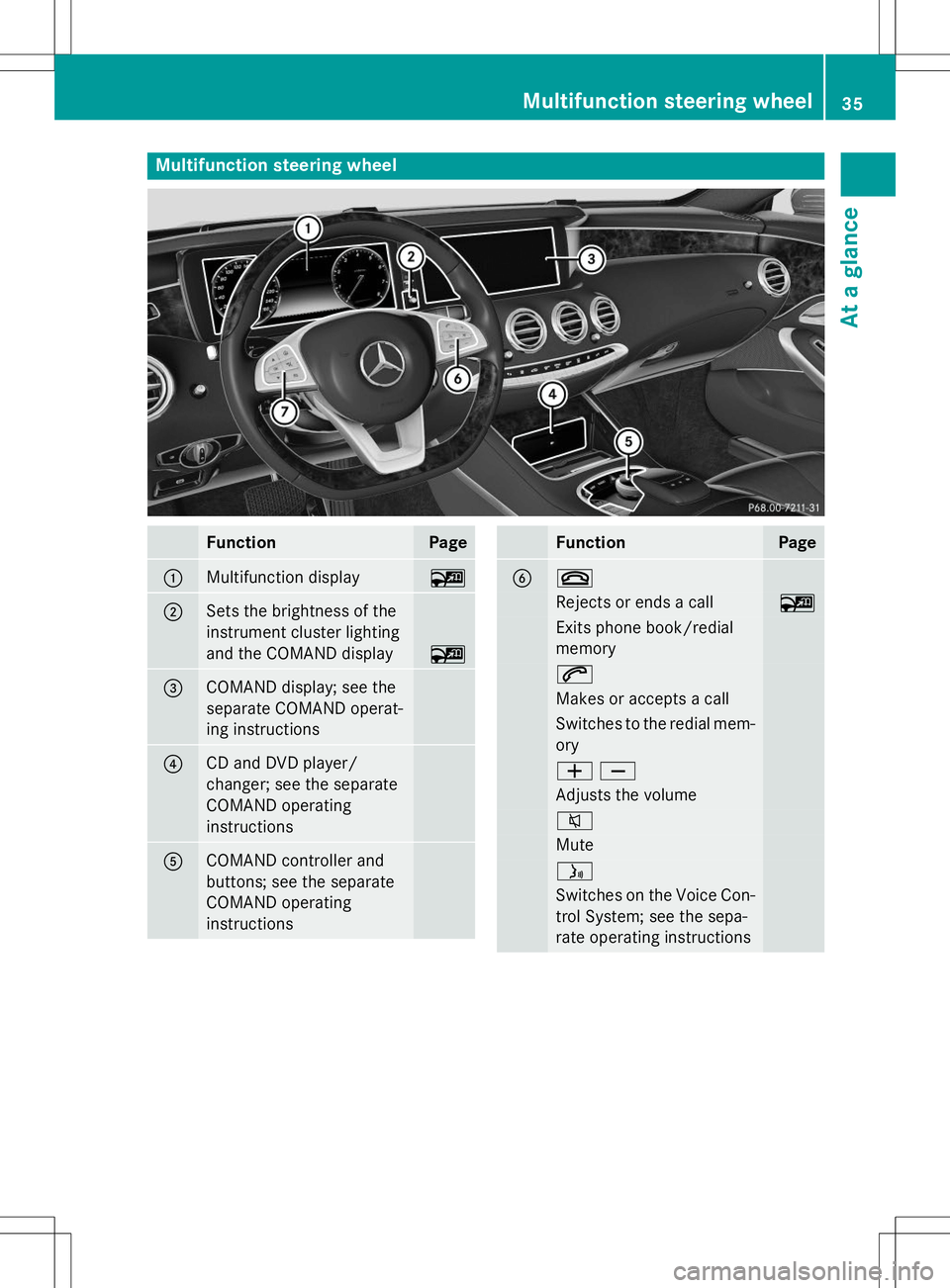
Multifunction steering wheel
FunctionPage
:Multifunction display~
;Sets the brightness of the
instrument cluster lighting
and the COMAND display
~
=COMAND display; see the
separate COMAND operat-
ing instructions
?CD and DVD player/
changer; see the separate
COMAND operatinginstructions
ACOMAND controller and
buttons; see the separate
COMAND operatinginstructions
FunctionPage
B~
Rejects or ends a call~
Exits phone book/redial memory
6
Makes or accepts a call
Switches to the redial mem-ory
WX
Adjusts the volume
8
Mute
ó
Switches on the Voice Con-
trol System; see the sepa-
rate operating instructions
Multifunction steering wheel35
At a glance