remote start MERCEDES-BENZ S-COUPE 2015 Owners Manual
[x] Cancel search | Manufacturer: MERCEDES-BENZ, Model Year: 2015, Model line: S-COUPE, Model: MERCEDES-BENZ S-COUPE 2015Pages: 286, PDF Size: 29.85 MB
Page 17 of 286
General notes ................................ 118
Hill start assist ...............................118
Q
QR code
Rescue card ..................................... 29
Qualified specialist workshop ........... 27
R
Radio
Selecting a station ......................... 164
see separate operating instructions
Radio mode
see also Digital Operator's Man-
ual ................................................. .188
Radio-wave reception/transmis-
sion in the vehicle
Declaration of conformity ................ 27
Reading lamp ..................................... 105
Rear compartment
Stowage compartment .................. 197
Rear fog lamp
Display message ............................ 165
Rear lamps
see Lights
Rear seats
Overview .......................................... 40
Rear view camera
Cleaning instructions ..................... 217
Function/notes ............................ .144
Switching on/off ........................... 145
Rear window blind ............................ 198
Rear window defroster
Problem (malfunction) ................... 111
Switching on/off ........................... 111
Rear-view mirror
Anti-glare (manual) .......................... 99
Dipping (automatic) ......................... 99
Refrigerant (air-conditioning sys-tem)
Important safety notes .................. 280
Refueling
Fuel gauge ....................................... 33
Important safety notes .................. 122
Refueling process .......................... 123
see Fuel Remote control
Garage door opener ....................... 203
Programming (garage door
opener) .......................................... 204
Replacing bulbs
General notes ................................ 105
Reporting safety defects .................... 28
Rescue card ......................................... 29
Reserve (fuel tank)
see Fuel
Reserve fuel
Display message ............................ 165
Warning lamp ................................. 176
Residual heat (climate control) ........111
Restraint system
Display message ............................ 170
Introduction ..................................... 42
Warning lamp ................................. 182
Warning lamp (function) ................... 43
Reversing feature
Roller sunblind ................................. 91
Side windows ................................... 90
Trunk lid .......................................... .84
Reversing lamps (display mes-
sage) ................................................... 165
ROAD SURFACE SCAN ....................... 140
Roadside Assistance (breakdown) .... 25
Roller sunblind
Panorama roof ................................. 91
Rear window .................................. 198
Roller sunblind for the panorama
roof
Opening and closing ........................ 92
Operating ......................................... 91
Resetting ......................................... 92
Roof
Display message ............................ 165
Roof lining and carpets (cleaning
guidelines) ......................................... 218
Roof load (maximum) ........................ 281
Route (navigation)
see Route guidance (navigation)
Route guidance
see also Digital Operator's Man-
ual .................................................. 188
Route guidance (navigation) ............ 164
Index15
Page 80 of 286
Useful information
iThis Operator's Manual describes all
models and all standard and optional equip- ment of your vehicle available at the time of
publication of the Operator's Manual.
Country-specific differences are possible.
Please note that your vehicle may not be
equipped with all features described. This
also applies to safety-related systems and
functions.
iRead the information on qualified special-
ist workshops ( Ypage 27).
SmartKey
Important safety notes
GWARNING
If children are left unsupervised in the vehicle,
they could:
R open the doors, thus endangering other
people or road users.
R get out and disrupt traffic.
R operate the vehicle's equipment.
Additionally, children could set the vehicle in
motion if, for example, they:
R release the parking brake.
R shifting the automatic transmission out of
park position P
R Start the engine.
There is a risk of an accident and injury.
When leaving the vehicle, always take the
SmartKey with you and lock the vehicle. Never
leave children or animals unattended in the
vehicle. Always keep the SmartKey out of
reach of children.
GWARNING
If you attach heavy or large objects to the
SmartKey, the SmartKey could be uninten-
tionally turned in the ignition lock. This could
cause the engine to be switched off. There is a risk of an accident.
Do not attach any heavy or large objects to the SmartKey. Remove any bulky key rings before
inserting the SmartKey into the ignition lock.
!Keep the SmartKey away from strong
magnetic fields. Otherwise, the remote
control function could be affected.
Strong magnetic fields can occur in the
vicinity of powerful electrical installations.
Do not keep the SmartKey: R with electronic devices, e.g. a mobile
phone or another SmartKey
R with metallic objects, e.g. coins or metalfoil
R inside metallic objects, e.g. a metal case
This can affect the functionality of the
SmartKey.
Vehicles with KEYLESS-GO start function: do not keep the SmartKey on the parcel shelf or in the trunk. Otherwise, the SmartKey maynot be detected, e.g. when starting the engine
using the Start/Stop button.
A check which periodically establishes a radio
connection between the vehicle and the
SmartKey determines whether a valid Smart- Key is in the vehicle. This occurs, for example:
R when starting the engine
R whilst driving
R when using HANDS-FREE ACCESS
R when the external door handles are
touched
R during convenience closing
78SmartKey
Opening and closing
Page 81 of 286
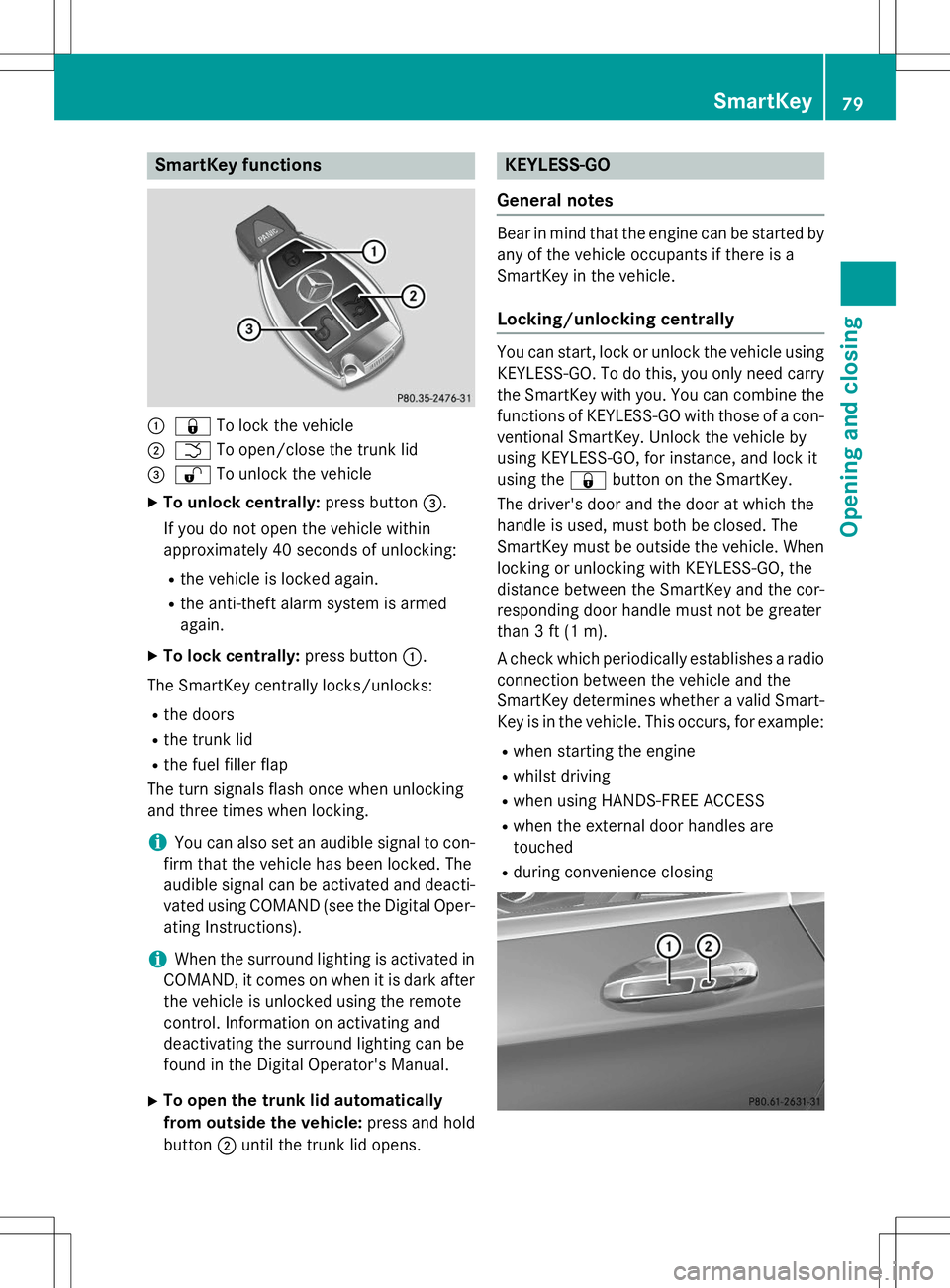
SmartKey functions
:&To lock the vehicle
;FTo open/close the trunk lid
=%To unlock the vehicle
X To unlock centrally: press button=.
If you do not open the vehicle within
approximately 40 seconds of unlocking:
R the vehicle is locked again.
R the anti-theft alarm system is armedagain.
X To lock centrally: press button:.
The SmartKey centrally locks/unlocks:
R the doors
R the trunk lid
R the fuel filler flap
The turn signals flash once when unlocking
and three times when locking.
iYou can also set an audible signal to con-
firm that the vehicle has been locked. The
audible signal can be activated and deacti-
vated using COMAND (see the Digital Oper- ating Instructions).
iWhen the surround lighting is activated in
COMAND, it comes on when it is dark after
the vehicle is unlocked using the remote
control. Information on activating and
deactivating the surround lighting can be
found in the Digital Operator's Manual.
X To open the trunk lid automatically
from outside the vehicle: press and hold
button ;until the trunk lid opens.
KEYLESS-GO
General notes
Bear in mind that the engine can be started by any of the vehicle occupants if there is a
SmartKey in the vehicle.
Locking/unlocking centrally
You can start, lock or unlock the vehicle using KEYLESS-GO. To do this, you only need carry
the SmartKey with you. You can combine the
functions of KEYLESS-GO with those of a con- ventional SmartKey. Unlock the vehicle by
using KEYLESS-GO, for instance, and lock it
using the &button on the SmartKey.
The driver's door and the door at which the
handle is used, must both be closed. The
SmartKey must be outside the vehicle. When
locking or unlocking with KEYLESS-GO, the
distance between the SmartKey and the cor-
responding door handle must not be greater
than 3 ft (1 m).
A check which periodically establishes a radio
connection between the vehicle and the
SmartKey determines whether a valid Smart- Key is in the vehicle. This occurs, for example:
R when starting the engine
R whilst driving
R when using HANDS-FREE ACCESS
R when the external door handles aretouched
R during convenience closing
SmartKey79
Opening and closing
Z
Page 87 of 286
This means that the reversing feature cannot
prevent someone being trapped in these sit-
uations. There is a risk of injury.
Make sure that no body parts are in close
proximity during the closing procedure.
If somebody becomes trapped:R press the Fbutton on the SmartKey, or
R pull or press the remote operating switch
on the driver's door or
R press the closing or locking button on the
trunk lid
Opening/closing automatically from outside
Important safety notes
GWARNING
Parts of the body could become trapped dur-
ing automatic closing of the trunk lid. More-
over, people, e.g. children, may be standing in the closing area or may enter the closing area
during the closing process. There is a risk ofinjury.
Make sure that nobody is in the vicinity of theclosing area during the closing process.
Use one of the following options to stop the
closing process:
R press the Fbutton on the SmartKey.
R pull or press the remote operating switch
on the driver's door.
R press the closing or locking button on the
trunk lid.
GWARNING
Combustion engines emit poisonous exhaust
gases such as carbon monoxide. Exhaust
gases can enter the vehicle interior if the
trunk lid is open when the engine is running,
especially if the vehicle is in motion. There is a
risk of poisoning.
Always switch off the engine before opening
the trunk lid. Never drive with the trunk lidopen.
!The trunk lid swings upwards when
opened. Therefore, make sure that there is
sufficient clearance above the trunk lid.
iThe opening dimensions of the trunk lid
can be found in the "Vehicle data" section ( Y page 281).
Opening
You can open the trunk lid automatically
using the SmartKey. X
Press and hold the Fbutton on the
SmartKey until the trunk lid opens.
Closing
You can close the trunk lid automatically
using the SmartKey or the closing button in
the trunk lid.
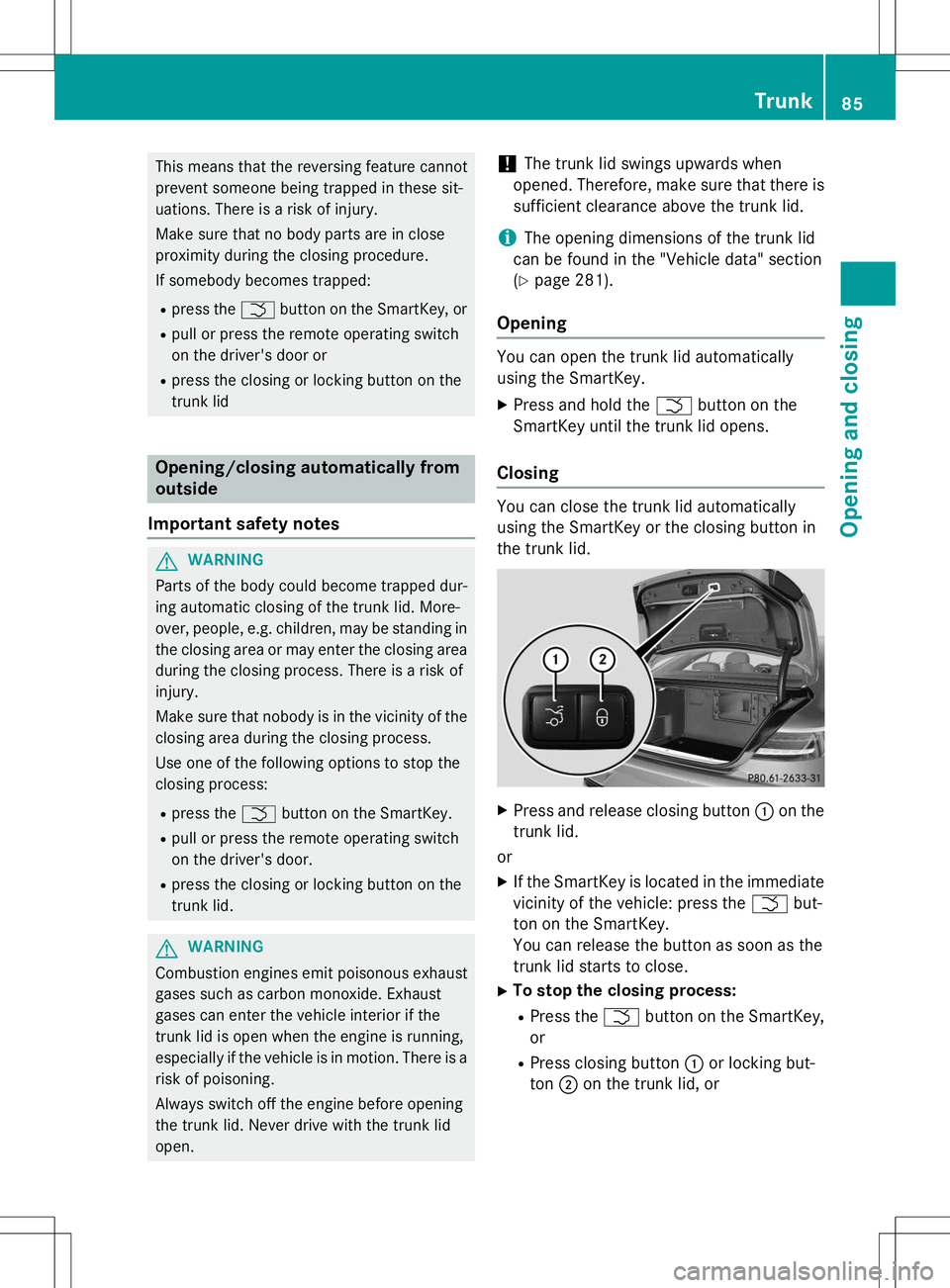
X Press and release closing button :on the
trunk lid.
or X If the SmartKey is located in the immediate
vicinity of the vehicle: press the Fbut-
ton on the SmartKey.
You can release the button as soon as the
trunk lid starts to close.
X To stop the closing process:
R Press the Fbutton on the SmartKey,
or
R Press closing button :or locking but-
ton ;on the trunk lid, or
Trunk85
Opening and closing
Z
Page 88 of 286
RPress the remote operating switch on the
driver's door, or
R In vehicles with HANDS-FREE ACCESS:
kick into the sensor detection range
under the bumper with your foot.
iIf the F button on the SmartKey is
pressed or HANDS-FREE ACCESS is initi-
ated after the closing process is stopped,
the trunk lid opens.
Vehicles with trunk lid remote closing
feature and KEYLESS-GO: when all the
doors are closed, you can simultaneously
close the trunk lid and lock the vehicle. The
key must be located to the rear of the vehicle. X Press and release locking button ;on the
trunk lid.
If a KEYLESS-GO key is detected outside
the vehicle, the trunk lid closes and the
vehicle locks.
iIf KEYLESS-GO detects a SmartKey in the
trunk, the trunk lid opens again after it is closed.
If KEYLESS-GO detects a second SmartKey outside the vehicle, the trunk lid remains closed.
HANDS-FREE ACCESS
Important safety notes
GWARNING
The vehicle's exhaust system may be very hot. You could burn yourself by touching the
exhaust system if you use HANDS-FREE
ACCESS. There is a risk of injury. Always
ensure that you only make the kicking move-
ment within the detection range of sensors.
!If the SmartKey is within the rear detec-
tion range of KEYLESS-GO, the following
situations, for example, could lead to the
unintentional opening of the trunk:
R using a car wash
R using a power washer Make sure that the SmartKey is at least
10 ft (3 m) away from the vehicle.
General notes
With KEYLESS-GO and HANDS-FREE
ACCESS, you can open or close the trunk lid
or stop the procedure without using your
hands. This is useful if you have your hands
full. To do this, make a kicking movement
under the bumper with your foot.
Observe the following points:
R Carry your KEYLESS-GO key about your
person. The KEYLESS-GO key must be in
the rear detection range of the vehicle.
R When making the kicking movement, make
sure that you are standing firmly on the
ground and that there is sufficient clear-
ance to the rear of the vehicle. You could
otherwise lose your balance e.g. on ice.
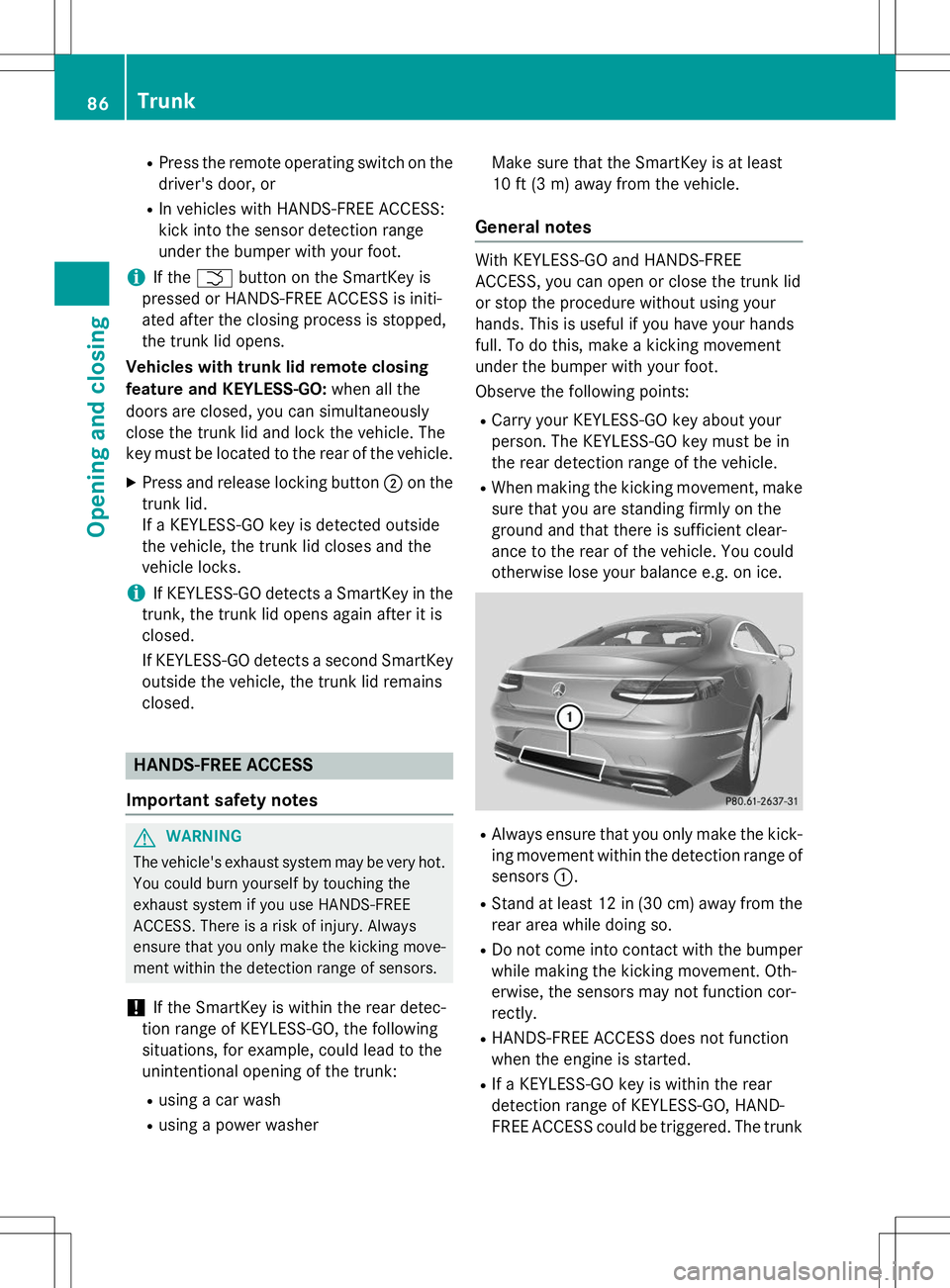
R Always ensure that you only make the kick-
ing movement within the detection range of sensors :.
R Stand at least 12 in (30 cm) away from the
rear area while doing so.
R Do not come into contact with the bumper
while making the kicking movement. Oth-
erwise, the sensors may not function cor-
rectly.
R HANDS-FREE ACCESS does not function
when the engine is started.
R If a KEYLESS-GO key is within the rear
detection range of KEYLESS-GO, HAND-
FREE ACCESS could be triggered. The trunk
86Trunk
Opening and closing
Page 118 of 286
the case if you are not depressing the brake
pedal.
If you depress the brake pedal and press the
Start/Stop button, the engine starts immedi-
ately.
A check which periodically establishes a radio
connection between the vehicle and the
SmartKey determines whether a valid Smart- Key is in the vehicle. This occurs, for example, when starting the engine.
To start the vehicle without actively using the
SmartKey:
R the Start/Stop button must be inserted in
the ignition lock.
R the SmartKey must be in the vehicle.
R the vehicle must not be locked with the
SmartKey or KEYLESS-GO ( Ypage 79).
Do not keep the SmartKey:
R with electronic devices, e.g. a mobile
phone or another SmartKey
R with metallic objects, e.g. coins or metal
foil
R inside metallic objects, e.g. a metal case
This can affect the functionality of the Smart- Key.
If you lock the vehicle with the SmartKey's
remote control or with KEYLESS-GO, after a
short time:
R you will not be able to switch on the ignition
with the Start/Stop button.
R you will not be able to start the engine with
the Start/Stop button until the vehicle is
unlocked again.
If you lock the vehicle centrally using the but-
ton on the front door ( Ypage 82), you can
continue to start the engine with the Start/
Stop button.
The engine can be turned off while the vehicle
is in motion by pressing and holding the
Start/Stop button for approximately three
seconds. This function operates independ-
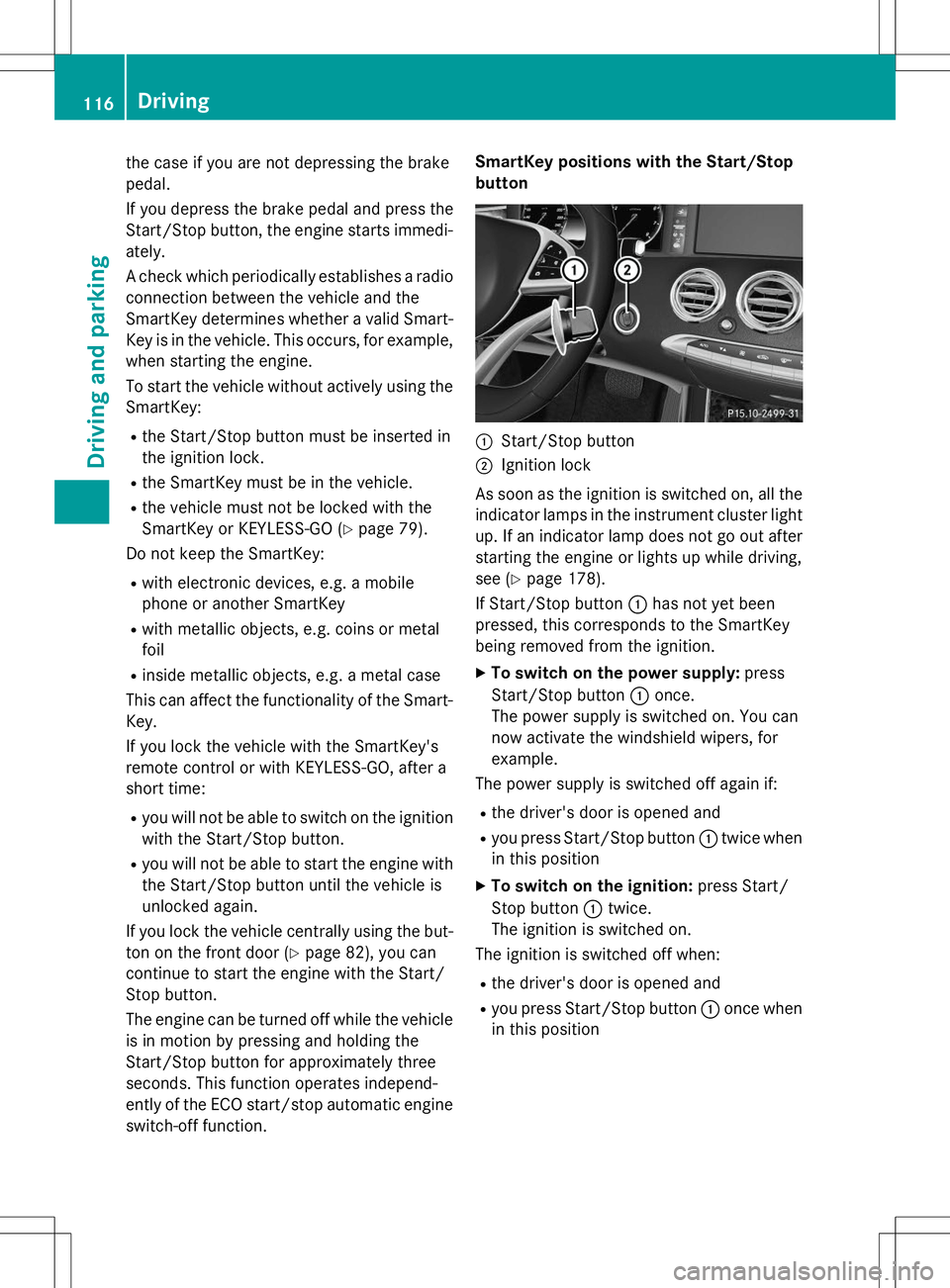
ently of the ECO start/stop automatic engine switch-off function. SmartKey positions with the Start/Stop
button
:Start/Stop button
;Ignition lock
As soon as the ignition is switched on, all the
indicator lamps in the instrument cluster light up. If an indicator lamp does not go out afterstarting the engine or lights up while driving,
see ( Ypage 178).
If Start/Stop button :has not yet been
pressed, this corresponds to the SmartKey
being removed from the ignition.
X To switch on the power supply: press
Start/Stop button :once.
The power supply is switched on. You can
now activate the windshield wipers, for
example.
The power supply is switched off again if:
R the driver's door is opened and
R you press Start/Stop button :twice when
in this position
X To switch on the ignition: press Start/
Stop button :twice.
The ignition is switched on.
The ignition is switched off when:
R the driver's door is opened and
R you press Start/Stop button :once when
in this position
116Driving
Driving an d parking
Page 201 of 286
Information in the Digital Operator's
Manual
In the Digital Operator's Manual you will find
information on the following topics: RVanity mirror in the sun visor
R Glare from the side
mbrace
Information in the Digital Operator's
Manual
In the Digital Operator's Manual you will find
information on the following topics: R Downloading destinations in COMAND
R Search & Send
R Vehicle remote opening
R Vehicle remote closing
R Stolen vehicle recovery service
R Vehicle remote malfunction diagnosis
R Downloading routes
R Speed alert
R Geo fencing
R Triggering the vehicle alarm
iThe mbrace system is only available in the
USA.
General notes
The mbrace system is only available in the
USA.
You must have a license agreement to acti-
vate the mbrace service. Make sure that your system is activated and operational. To log in,
press the ïMB Info call button. If any of
the steps mentioned are not carried out, the
system may not be activated.
If you have questions about the activation,
contact one of the following telephone hot-
lines:
Mercedes-Benz Customer Assistance Center
at 1-800-FOR-MERCedes (1-800-367-6372)
or 1-866-990-9007 Shortly after successfully registering with the
mbrace service, a user ID and password will
be sent to you by mail. You can use this pass-
word to log onto the mbrace area under "Own-
ers Online" at http://www.mbusa.com .
The system is available if:
R it has been activated and is operational
R the corresponding mobile phone network is
available for transmitting data to the Cus-
tomer Center
R a service subscription is available
R the starter battery is sufficiently charged
Determining the location of the vehicle on a
map is only possible if:
R GPS reception is available.
R the vehicle position can be forwarded to
the Customer Assistance Center.
The mbrace system
To adjust the volume during a call, proceed as
follows:
X Press the WorX button on the mul-
tifunction steering wheel.
or
X Use the COMAND volume control.
The system offers various services, e.g.:
R Automatic and manual emergency call
R Roadside Assistance call
R MB Info call
You can find information and a description of all available features under "Owners Online"
at http://www.mbusa.com.
System self-test
After you have switched on the ignition, the
system carries out a self-diagnosis.
Features199
Stowage and featu res
Z
Page 206 of 286
USA: FCC ID: CB2HMIHL4
Canada: IC: 279B-HMIHL4
Important safety notes
GWARNING
When you operate or program the garage doorwith the integrated garage door opener, per-
sons in the range of movement of the garage
door can become trapped or struck by the
garage door. There is a risk of injury.
When using the integrated garage door
opener, always make sure that nobody is
within the range of movement of the garagedoor.
GWARNING
Combustion engines emit poisonous exhaust
gases such as carbon monoxide. Inhaling
these exhaust gases leads to poisoning. There is a risk of fatal injury. Therefore never leave
the engine running in enclosed spaces with-
out sufficient ventilation.
Programming
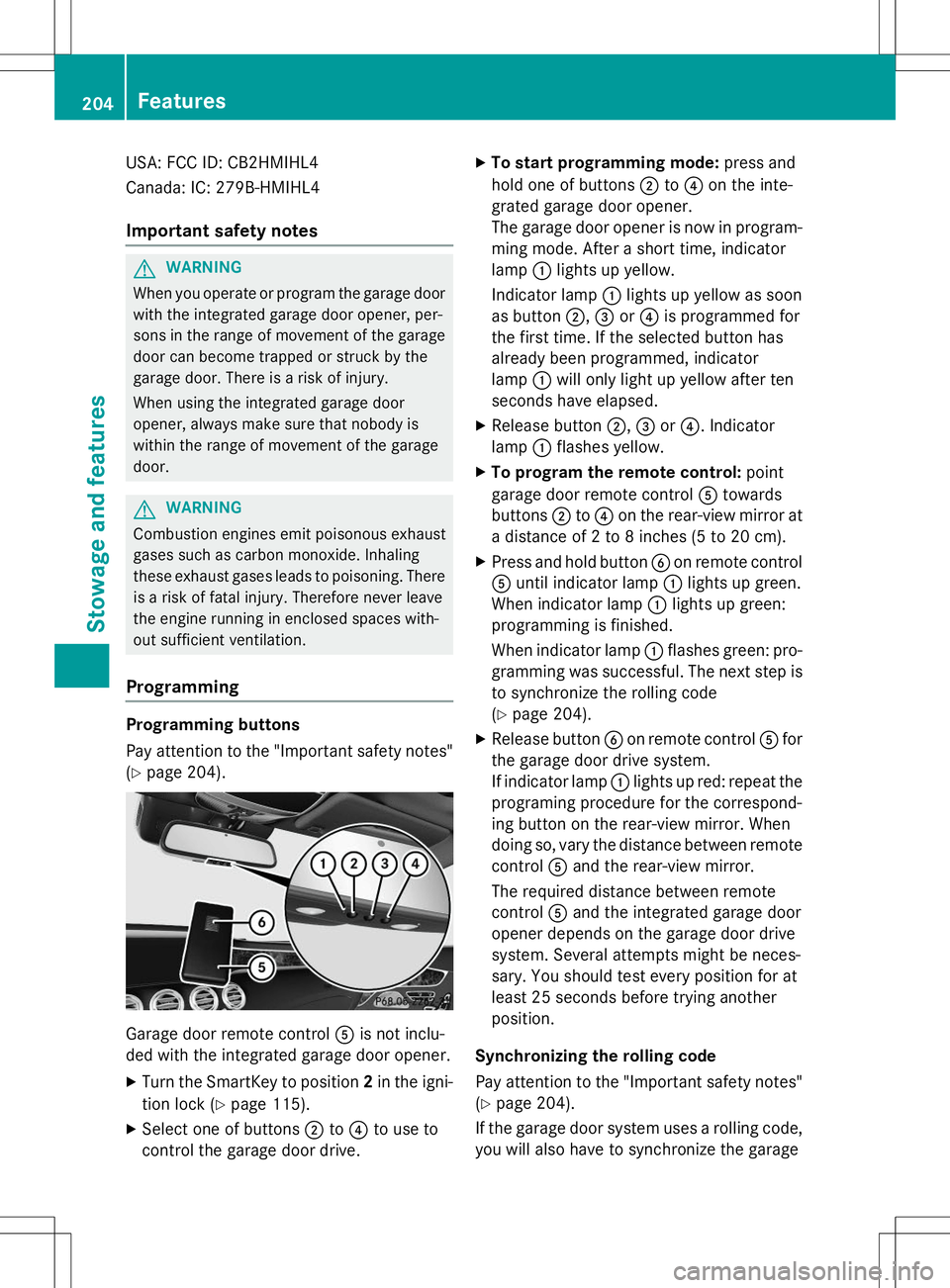
Programming buttons
Pay attention to the "Important safety notes"
( Y page 204).
Garage door remote control Ais not inclu-
ded with the integrated garage door opener.
X Turn the SmartKey to position 2in the igni-
tion lock ( Ypage 115).
X Select one of buttons ;to? to use to
control the garage door drive. X
To start programming mode: press and
hold one of buttons ;to? on the inte-
grated garage door opener.
The garage door opener is now in program-
ming mode. After a short time, indicatorlamp :lights up yellow.
Indicator lamp :lights up yellow as soon
as button ;,= or? is programmed for
the first time. If the selected button has
already been programmed, indicatorlamp :will only light up yellow after ten
seconds have elapsed.
X Release button ;,= or? . Indicator
lamp :flashes yellow.
X To program the remote control: point
garage door remote control Atowards
buttons ;to? on the rear-view mirror at
a distance of 2 to 8 inches (5 to 20 cm).
X Press and hold button Bon remote control
A until indicator lamp :lights up green.
When indicator lamp :lights up green:
programming is finished.
When indicator lamp :flashes green: pro-
gramming was successful. The next step is to synchronize the rolling code ( Y page 204).
X Release button Bon remote control Afor
the garage door drive system.
If indicator lamp :lights up red: repeat the
programing procedure for the correspond-
ing button on the rear-view mirror. When
doing so, vary the distance between remote control Aand the rear-view mirror.
The required distance between remote
control Aand the integrated garage door
opener depends on the garage door drive
system. Several attempts might be neces-
sary. You should test every position for at
least 25 seconds before trying anotherposition.
Synchronizing the rolling code
Pay attention to the "Important safety notes"
( Y page 204).
If the garage door system uses a rolling code,
you will also have to synchronize the garage
204Features
Stowage and features