engine MERCEDES-BENZ S-COUPE 2016 Owners Manual
[x] Cancel search | Manufacturer: MERCEDES-BENZ, Model Year: 2016, Model line: S-COUPE, Model: MERCEDES-BENZ S-COUPE 2016Pages: 410, PDF Size: 8.62 MB
Page 222 of 410
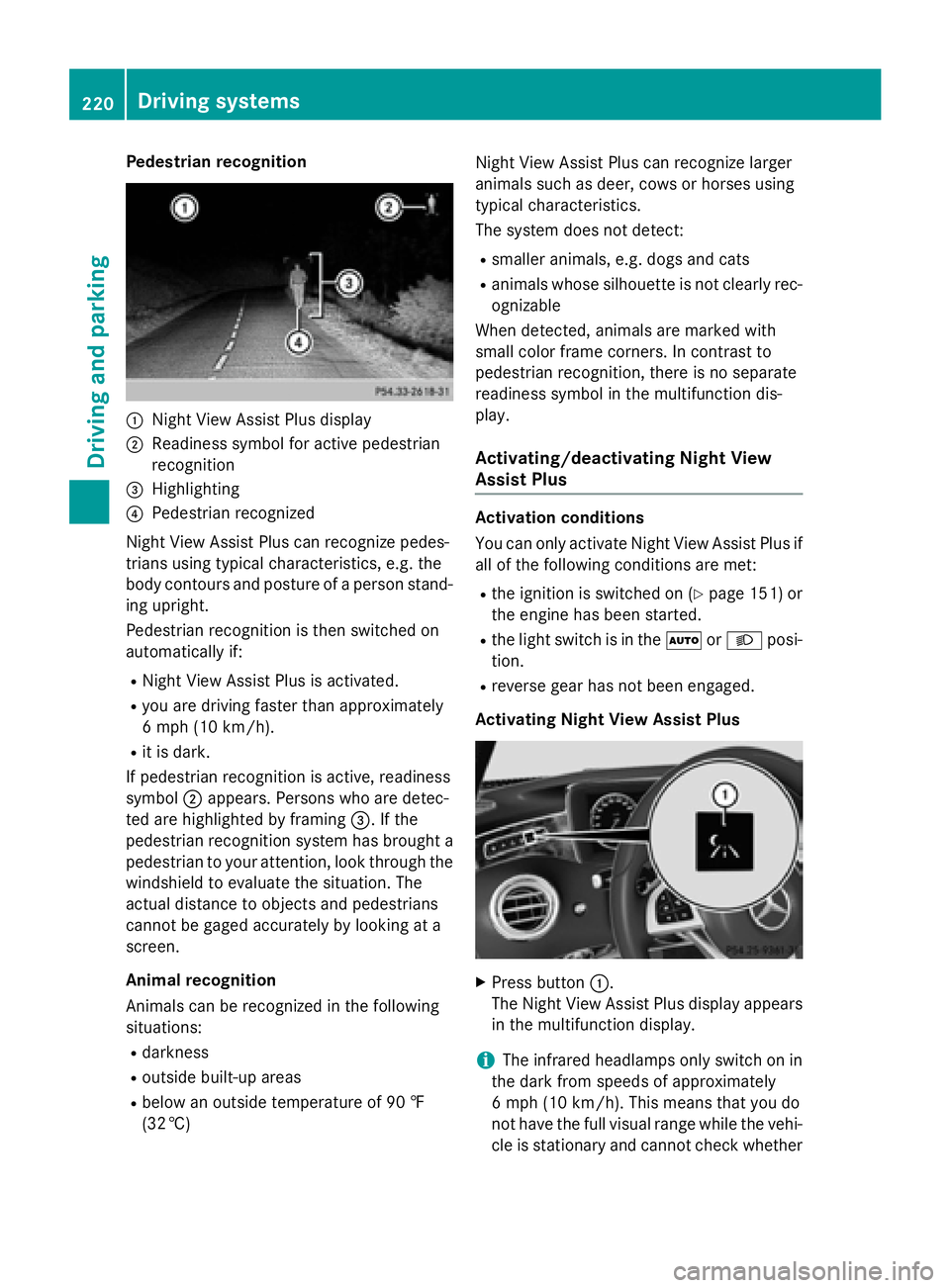
Pedestrian recognition
:Night View Assist Plus display
;Readiness symbol for active pedestrian
recognition
=Highlighting
?Pedestrian recognized
Night View Assist Plus can recognize pedes-
trians using typical characteristics, e.g. the
body contours and posture of a person stand-
ing upright.
Pedestrian recognition is then switched on
automatically if:
RNight View Assist Plus is activated.
Ryou are driving faster than approximately
6 mph (10 km/h) .
Rit is dark.
If pedestrian recognition is active, readiness
symbol ;appears. Persons who are detec-
ted are highlighted by framing =. If the
pedestrian recognition system has brought a pedestrian to your attention, look through the
windshield to evaluate the situation. The
actual distance to objects and pedestrians
cannot be gaged accurately by looking at a
screen.
Animal recognition
Animals can be recognized in the following
situations:
Rdarkness
Routside built-up areas
Rbelow an outside temperature of 90 ‡
(32 †) Night View Assist Plus can recognize larger
animals such as deer, cows or horses using
typical characteristics.
The system does not detect:
Rsmaller animals, e.g. dogs and cats
Ranimals whose silhouette is not clearly rec-
ognizable
When detected, animals are marked with
small color frame corners. In contrast to
pedestrian recognition, there is no separate
readiness symbol in the multifunction dis-
play.
Activating/deactivating Night View
Assist Plus
Activation conditions
You can only activate Night View Assist Plus if
all of the following conditions are met:
Rthe ignition is switched on (Ypage 151) or
the engine has been started.
Rthe light switch is in the ÃorL posi-
tion.
Rreverse gear has not been engaged.
Activating Night View Assist Plus
XPress button :.
The Night View Assist Plus display appears
in the multifunction display.
iThe infrared headlamps only switch on in
the dark from speeds of approximately
6 mph (10 km/h). This means that you do
not have the full visual range while the vehi-
cle is stationary and cannot check whether
220Driving systems
Driving and parking
Page 232 of 410
Useful information
i
This Operator's Manual describes all
models and all standard and optional equip-
ment of your vehicle available at the time of
publication of the Operator's Manual.
Country-specific differences are possible.
Please note that your vehicle may not be
equipped with all features described. This
also applies to safety-related systems and
functions.
iRead the information on qualified special-
ist workshops (
Ypage 26).
Important safety notes
GWARNING
If you operate information systems and com-
munication equipment integrated in the vehi-
cle while driving, you will be distracted from
traffic conditions. You could also lose control
of the vehicle. There is a risk of an accident.
Only operate the equipment when the traffic
situation permits. If you are not sure that this
is possible, park the vehicle paying attention
to traffic conditions and operate the equip-
ment when the vehicle is stationary.
You must observe the legal requirements for
the country in which you are currently driving
when operating the on-board computer.
GWARNING
If the instrument cluster has failed or mal-
functioned, you may not recognize function
restrictions in systems relevant to safety. The
operating safety of your vehicle may be
impaired. There is a risk of an accident.
Pull over as soon as it is safe to do so and
consult a qualified specialist workshop.
GWARNING
If the instrument cluster has failed or mal-
functioned, you may not recognize function
restrictions in systems relevant to safety. The
operating safety of your vehicle may be
impaired. There is a risk of an accident.
Drive on carefully. Have the vehicle checked
at a qualified specialist workshop immedi-
ately.
If the operating safety of your vehicle is
impaired, pull over as soon as it is safe to do
so. Contact a qualified specialist workshop.
The on-board computer only shows messages
or warnings from certain systems in the mul-
tifunction display. You should therefore make
sure your vehicle is operating safely at all
times.
For an overview, see the instrument panel
illustration (
Ypage 33).
Displays and operation
Instrument cluster lighting
The light sensor in the instrument cluster
automatically controls the brightness of the
multifunction display. In daylight, the displays in the instrument cluster are illuminated. A
dimming function is not possible in daylight.
The lighting in the instrument cluster, in the
displays and the controls in the vehicle inte-
rior can be adjusted using the brightness con-
trol knob.
The brightness control is located between the
instrument cluster and the COMAND Display
(
Ypage 35).
XTurn the brightness control knob clockwise
or counter-clockwise.
If the light switch (
Ypage 126) is set to
Ã, TorL, the brightness is
dependent upon the brightness of the
ambient light.
Tachometer
!
Do not drive in the overrevving range, as
this could damage the engine.
230Displays and operation
On-board computer and displays
Page 233 of 410
The red band in the tachometer indicates the
engine's overrevving range.
The fuel supply is interrupted to protect the
engine when the red band is reached.
Outside temperature display
You should pay special attention to road con-
ditions when temperatures are around freez-
ing point.
Bear in mind that the outside temperature
display indicates the temperature measured
and does not record the road temperature.
The outside temperature display is in the mul-
tifunction display (
Ypage 232).
There is a short delay before a change in out-
side temperature is shown in the multifunc-
tion display.
Coolant temperature display
GWARNING
Opening the hood when the engine is over-
heated or when there is a fire in the engine
compartment could expose you to hot gases
or other service products. There is a risk of
injury.
Let an overheated engine cool down before
opening the hood. If there is a fire in the
engine compartment, keep the hood closed
and contact the fire department.
!A display message is shown if the coolant
temperature is too high.
If the coolant temperature is above 257 ‡
(125 †) do not drive any further. The
engine will otherwise be damaged.
The coolant temperature gauge is in the lower
section of the tachometer (
Ypage 33).
Under normal operating conditions and with
the specified coolant level, the coolant tem-
perature may rise to 255 ‡ (124 †).
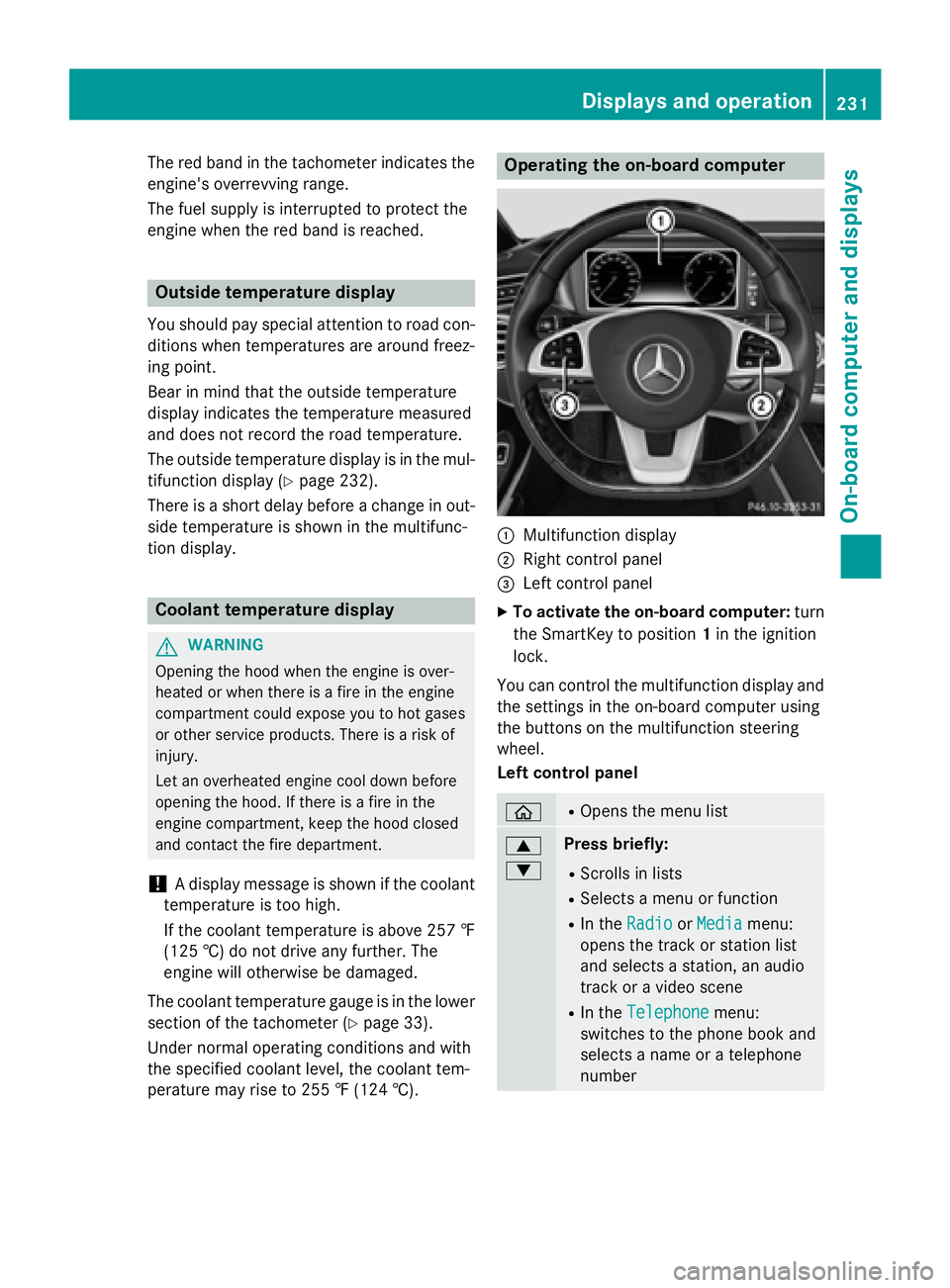
Operating the on-board computer
:Multifunction display
;Right control panel
=Left control panel
XTo activate the on-board computer: turn
the SmartKey to position 1in the ignition
lock.
You can control the multifunction display and
the settings in the on-board computer using
the buttons on the multifunction steering
wheel.
Left control panel
òROpens the menu list
9
:Press briefly:
RScrolls in lists
RSelects a menu or function
RIn the RadioorMediamenu:
opens the track or station list
and selects a station, an audio
track or a video scene
RIn the Telephonemenu:
switches to the phone book and
selects a name or a telephone
number
Displays and operation231
On-board computer and displays
Z
Page 236 of 410
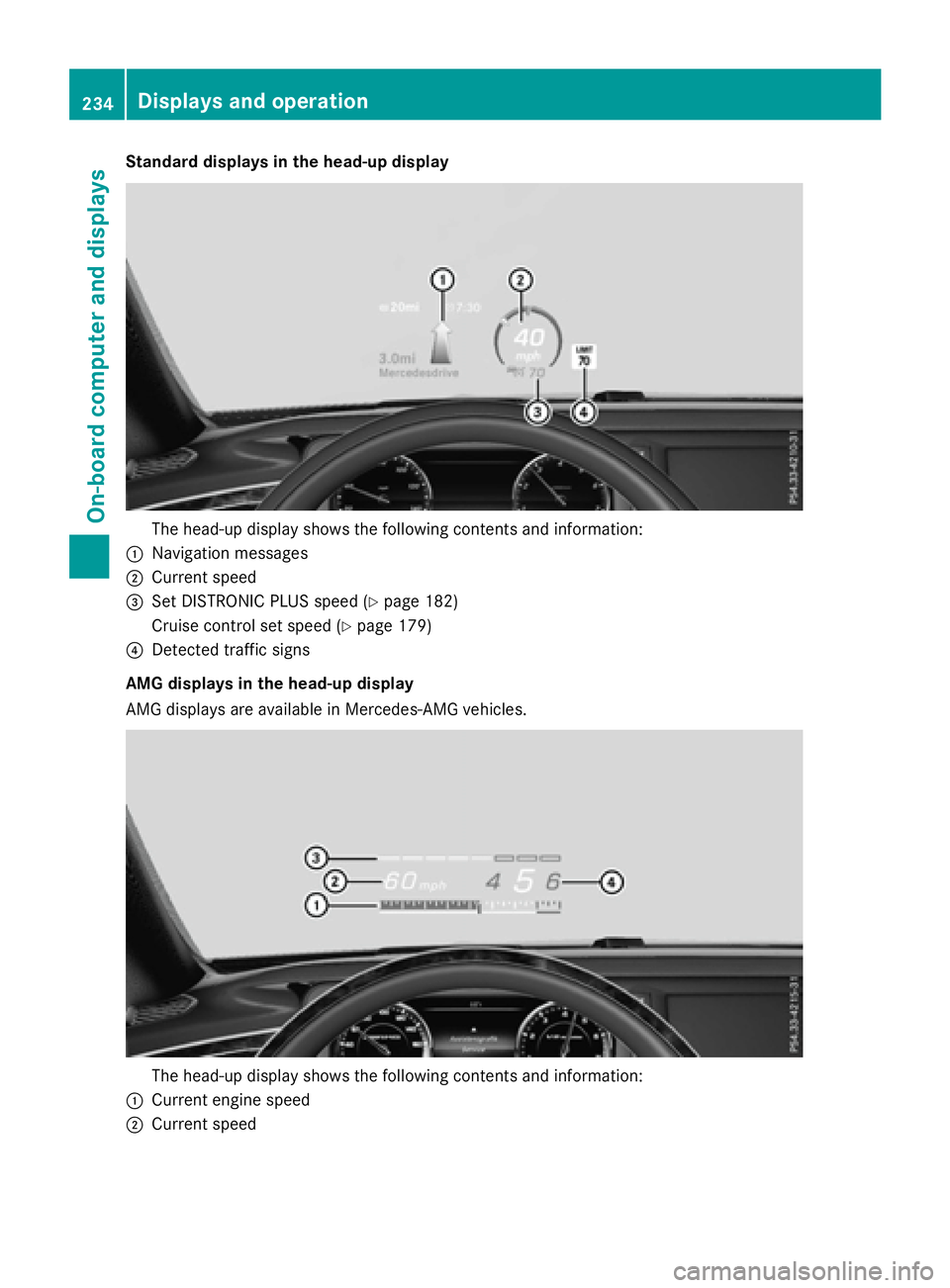
Standard displays in the head-up display
The head-up display shows the following contents and information:
:Navigation messages
;Current speed
=Set DISTRONIC PLUS speed (Ypage 182)
Cruise control set speed (
Ypage 179)
?Detected traffic signs
AMG displays in the head-up display
AMG displays are available in Mercedes-AMG vehicles.
The head-up display shows the following contents and information:
:Current engine speed
;Current speed
234Displays and operation
On-board computer and displays
Page 238 of 410
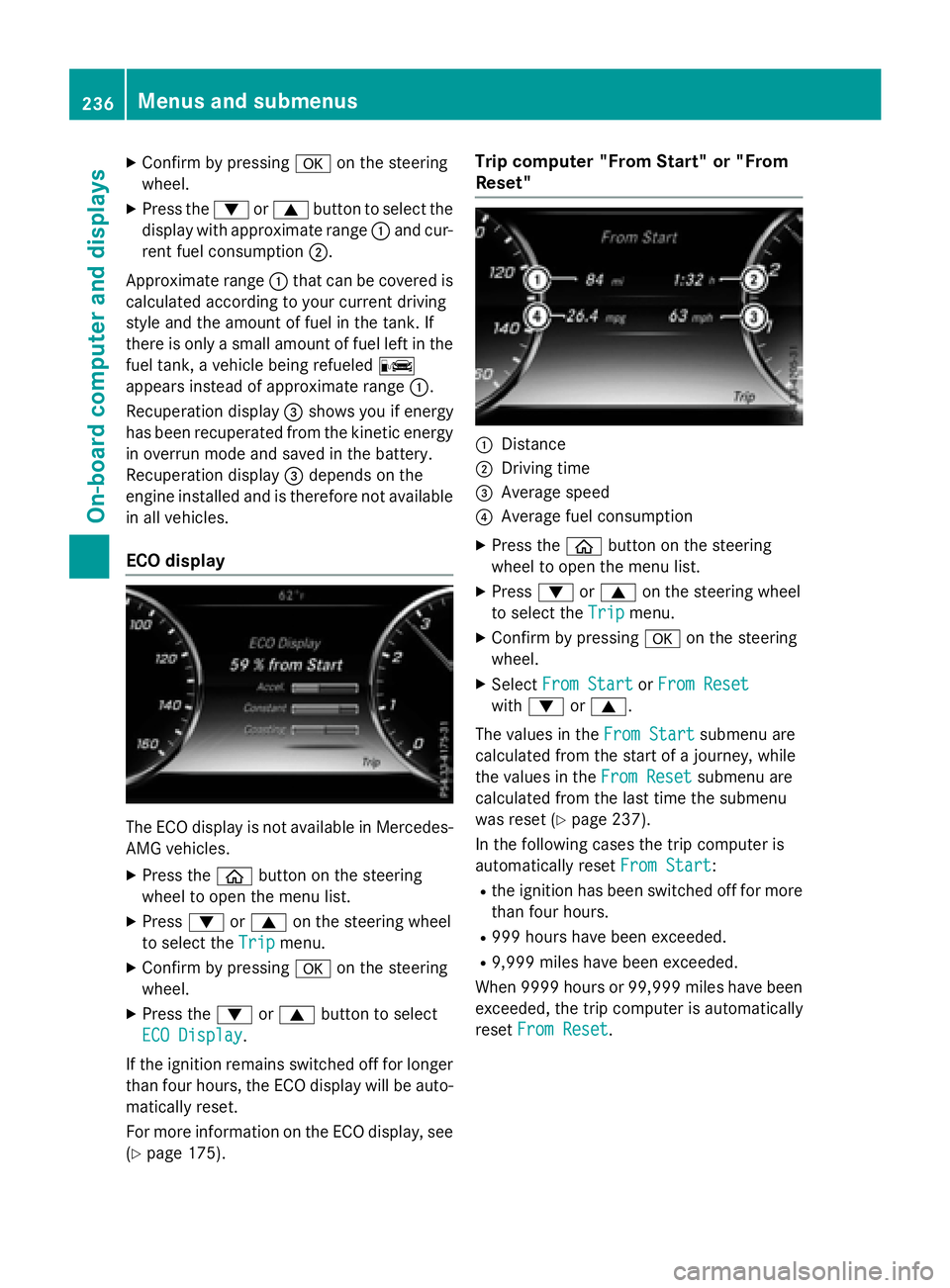
XConfirmbypressing aon the steering
wheel.
XPress the :or9 button to select the
disp laywithappr oximate range :and cur-
rent fuel consumption ;.
Approximate range :that can be covered is
calculated according to your current driving
style and the amount of fuel inthe tank. If
there isonly a small amount of fuel left inthe
fuel tank, a veh iclebeing refueled C
appears instead of approximate range :.
Recuperation display=shows youifenergy
has been recuperated from the kinetic energy
in overrun mode and saved in the battery.
Recuperation display=depends on the
engine installed and istherefore not availab le
in all veh icles.
ECO display
The ECO display is not availab le inMercedes-
AMG veh icles.
XPress the òbutton on the steering
wheel to open the menu list.
XPress :or9 on the steering wheel
to select the Trip
menu.
XConfirmbypressing aon the steering
wheel.
XPress the :or9 button to select
ECO Display
.
If the ignit ion remains switched off for longer
than four hours, the ECO display willbe auto-
matical lyreset.
For more information on the ECO display, see
(
Ypage 175).
Trip computer "From Start" or "From
Reset"
:Distance
;Dr ivin g time
=Average speed
?Average fuel consumption
XPress the òbutton on the steering
wheel to open the menu list.
XPress :or9 on the steering wheel
to select the Trip
menu.
XConfirmbypressing aon the steering
wheel.
XSe lect From StartorFrom Reset
wit h: or9.
The values inthe From Start
submenu are
calculated from the start of a journey, while
the values inthe From Reset
submenu are
calculated from the last time the submenu
was reset (
Ypage 237).
In the following cases the tr ipcomputer is
automatical lyreset From Start
:
Rthe ignit ion has been switched off for more
than four hours.
R999 hours have been excee ded.
R9,999 miles have been excee ded.
When 9999 hourso r 99,999 miles have been
exceeded, the trip computer is automatically
reset From Reset
.
236Menus and submenus
On-board computer and displays
Page 246 of 410
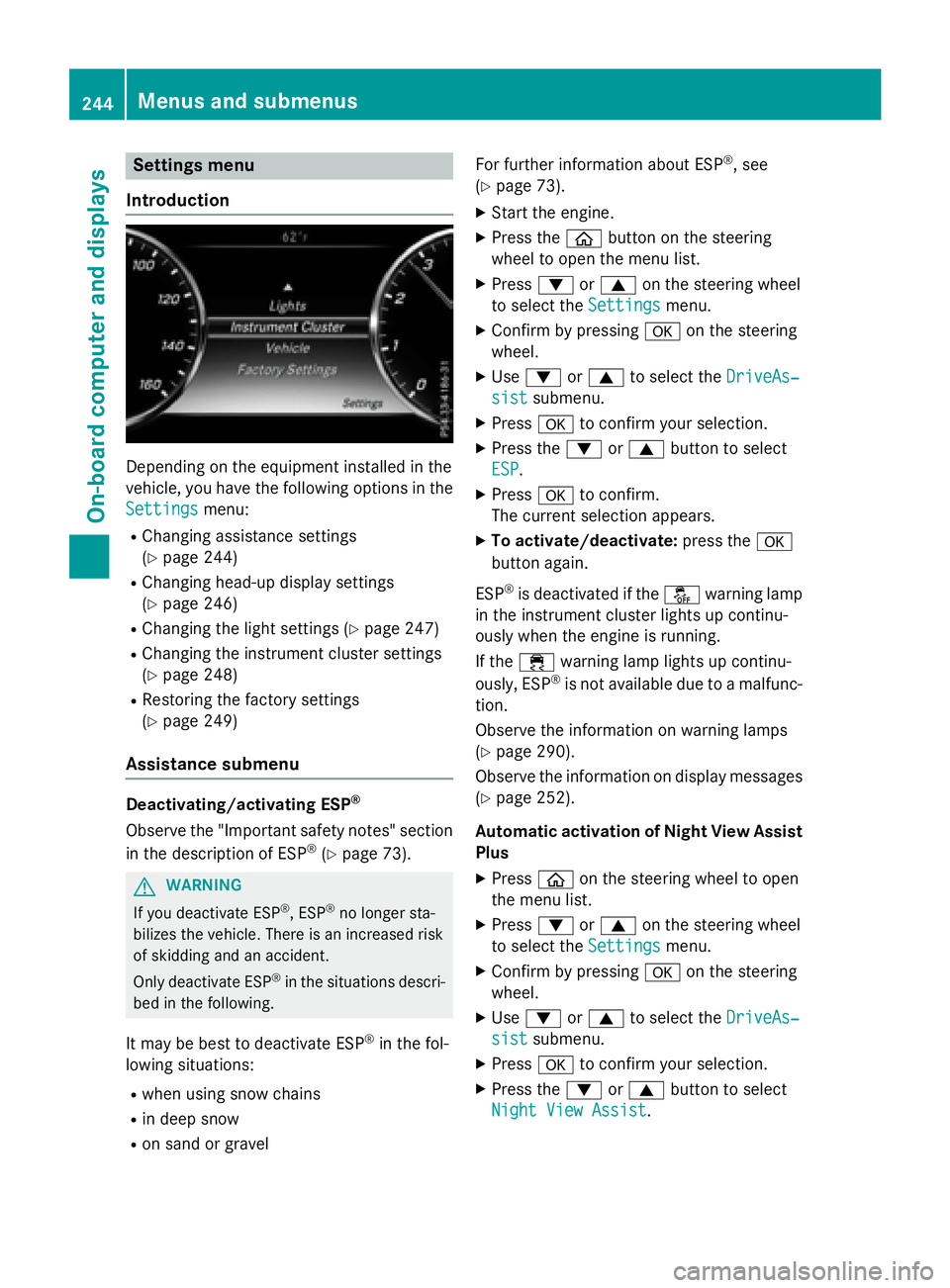
Settings menu
Introduction
Depending on the equipment installed in the
vehicle, you have the following options in the
Settings
menu:
RChanging assistance settings
(
Ypage 244)
RChanging head-up display settings
(
Ypage 246)
RChanging the light settings (Ypage 247)
RChanging the instrument cluster settings
(
Ypage 248)
RRestoring the factory settings
(
Ypage 249)
Assistance submenu
Deactivating/activating ESP®
Observe the "Important safety notes" section
in the description of ESP®(Ypage 73).
GWARNING
If you deactivate ESP
®, ESP®no longer sta-
bilizes the vehicle. There is an increased risk
of skidding and an accident.
Only deactivate ESP
®in the situations descri-
bed in the following.
It may be best to deactivate ESP®in the fol-
lowing situations:
Rwhen using snow chains
Rin deep snow
Ron sand or gravel For further information about ESP
®, see
(
Ypage 73).
XStart the engine.
XPress the òbutton on the steering
wheel to open the menu list.
XPress :or9 on the steering wheel
to select the Settings
menu.
XConfirm by pressing aon the steering
wheel.
XUse : or9 to select the DriveAs‐
sistsubmenu.
XPressato confirm your selection.
XPress the :or9 button to select
ESP
.
XPress ato confirm.
The current selection appears.
XTo activate/deactivate: press thea
button again.
ESP
®is deactivated if the åwarning lamp
in the instrument cluster lights up continu-
ously when the engine is running.
If the ÷ warning lamp lights up continu-
ously, ESP
®is not available due to a malfunc-
tion.
Observe the information on warning lamps
(
Ypage 290).
Observe the information on display messages
(
Ypage 252).
Automatic activation of Night View Assist
Plus
XPress òon the steering wheel to open
the menu list.
XPress :or9 on the steering wheel
to select the Settings
menu.
XConfirm by pressing aon the steering
wheel.
XUse : or9 to select the DriveAs‐
sistsubmenu.
XPressato confirm your selection.
XPress the :or9 button to select
Night View Assist
.
244Menus and submenus
On-board computer and displays
Page 251 of 410
XPressòon the steering wheel to open
the menu list.
XPress :or9 on the steering wheel
to select the Settings
menu.
XConfirm by pressing aon the steering
wheel.
XPress :or9 to select the Instru‐
ment Clustersubmenu.
XPressato confirm your selection.
XPress :or9 to select the Addi‐
tional Speedometer [km/h]function.
The current selection appears.
XTo activate/deactivate: pressa
again.
Restoring the factory settings
XPress òon the steering wheel to open
the menu list.
XPress :or9 on the steering wheel
to select the Settings
menu.
XConfirm by pressing aon the steering
wheel.
XPress :or9 to select the Factory
Settingssubmenu.
XPressato confirm.
The Reset All Settings?
function
appears.
XPress the :or9 button to select No
orYes.
XPress the abutton to confirm the selec-
tion.
If you have selected Yes
, the multifunction
display shows a confirmation message.
For safety reasons, the Daytime Running
Lightsfunction in theLightssubmenu is
only reset when the vehicle is stationary.
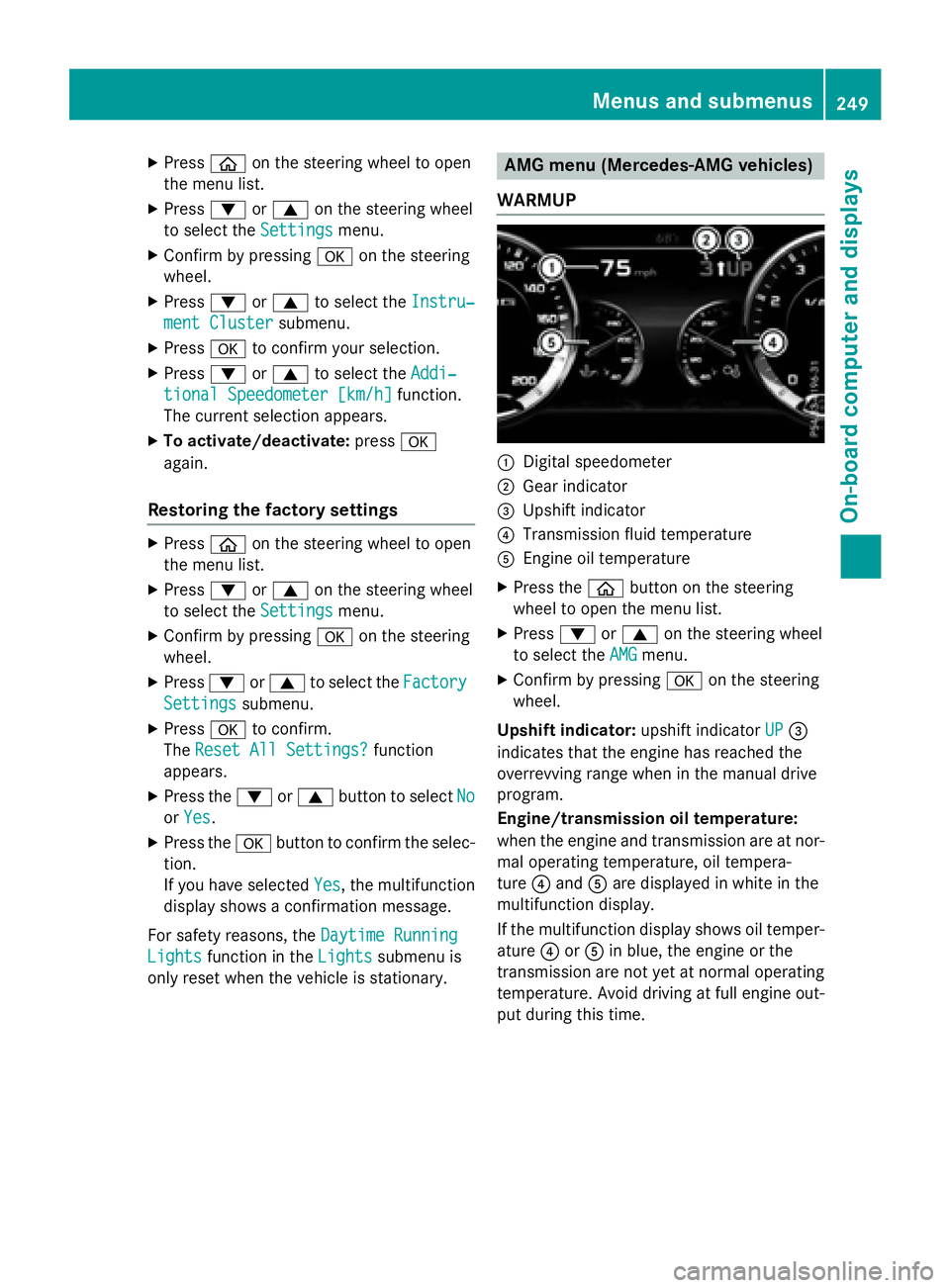
AMG menu (Mercedes-AMG vehicles)
WARMUP
:Digital speedometer
;Gear indicator
=Upshift indicator
?Transmission fluid temperature
AEngine oil temperature
XPress the òbutton on the steering
wheel to open the menu list.
XPress :or9 on the steering wheel
to select the AMG
menu.
XConfirm by pressing aon the steering
wheel.
Upshift indicator: upshift indicatorUP
=
indicates that the engine has reached the
overrevving range when in the manual drive
program.
Engine/transmission oil temperature:
when the engine and transmission are at nor-
mal operating temperature, oil tempera-
ture ?and Aare displayed in white in the
multifunction display.
If the multifunction display shows oil temper-
ature ?orA in blue, the engine or the
transmission are not yet at normal operating
temperature. Avoid driving at full engine out-
put during this time.
Menus and submenus249
On-board computer and displays
Z
Page 260 of 410
Display messagesPossible causes/consequences andMSolutions
F(USA
only)
!(Canada
only)
Parkin g
BrakeInop‐
erative
The yello w! warnin glamp lights up. The red F(USAonly)
or ! (Canada only) indicato rlamp flashes fo rabout te nsec -
onds after th eelectric parkin gbrak ehas been applied or released.
It then goe sout or remain slit .
The electric parkin gbrak eis malfunctioning, e.g. because of over-
voltag eor undervoltage.
XRemove th ecaus efo rth eovervoltage or undervoltage, e.g. by
chargin gth ebattery or restarting th eengine.
XEngage or release th eelectric parkin gbrake.
If it remain simpossible to apply or release th eelectric parkin g
brake:
XSwitc hof fth eignition and tur nit bac kon .
XEngage or release th eelectric parkin gbrake.
If th eelectric parkin gbrak estill canno tbe released:
XConsult aqualified specialist workshop .
If th eelectric parkin gbrak estill canno tbe applied:
XVisit aqualified specialist workshop .
The yellow! warnin glamp lights up and th ered F (USA
only) or !(Canada only) indicato rlamp flashes .
It is no tpossibl eto apply th eelectric parkin gbrak emanually.
XShift th eselector lever to position P.
XVisitaqualified specialist workshop .
$(USA
only)
J(Canada
only)
Check Brake Fluid
Level
There is no tenough brak eflui din th ebrak eflui dreservoir .
In addition ,th e$ (USAonly) or J(Canada only) warnin g
lamp lights up in th einstrumen tcluster and awarnin gtone
sounds.
GWARNIN G
The brakin geffec tmay be impaired.
There is aris kof an accident.
XPull ove rand stop th evehicl esafely as soo nas possible, payin g
attention to roa dand traffic conditions. Do no tcontinue drivin g
under any circumstances.
XSecur eth evehicl eagainst rollin gaway (Ypage 170).
XConsult aqualified specialist workshop .
XDo notadd brak efluid. This does no tcorrec tth emalfunction .
258Display messages
On-board computer and displays
Page 261 of 410
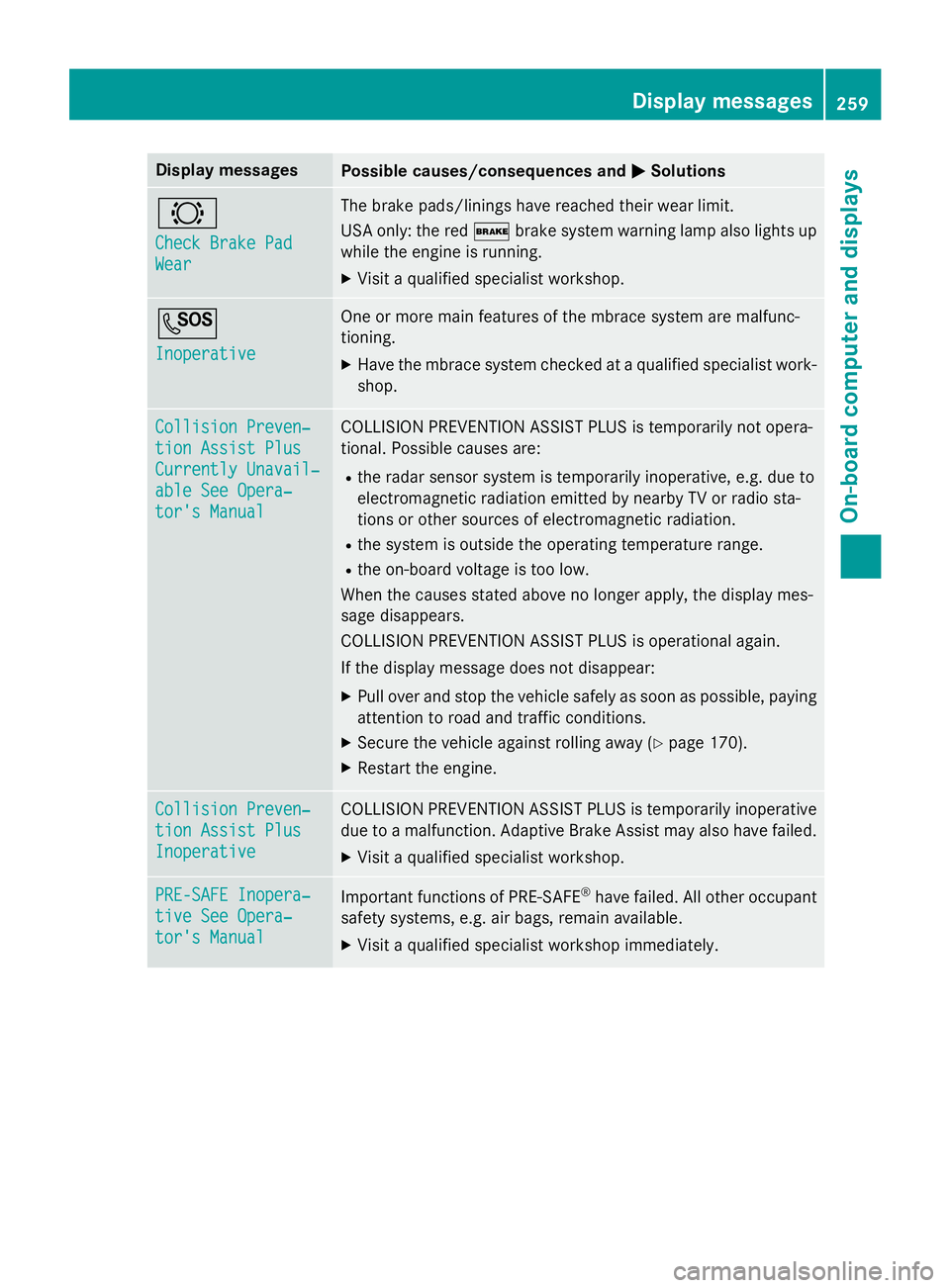
Display messagesPossible causes/consequences andMSolutions
#
Check Brake Pad
Wear
The brak epads/lining shav ereached their wear limit.
US Aonly: th ered $ brakesystem warnin glamp also lights up
while th eengin eis running .
XVisitaqualified specialist workshop .
G
Inoperative
Oneor mor emain features of th embrace system are malfunc -
tioning.
XHav eth embrace system checke dat aqualified specialist work-
shop.
Collision Preven ‐
tionAssist Plu s
Currently Unavail‐
ableSee Opera‐
tor's Manual
COLLISION PREVENTION ASSIST PLU Sis temporarily no topera-
tional. Possibl ecauses are:
Rth erada rsensor system is temporarily inoperative, e.g. due to
electromagnetic radiation emitted by nearby TV or radi osta-
tion sor other source sof electromagnetic radiation .
Rthesystem is outside th eoperating temperature range.
Rth eon-boar dvoltag eis to olow.
Whe nth ecauses state dabov eno longer apply, th edisplay mes -
sage disappears.
COLLISION PREVENTION ASSIST PLU Sis operational again .
If th edisplay message does no tdisappear :
XPull overand stop th evehicl esafely as soo nas possible, payin g
attention to roa dand traffic conditions.
XSecur eth evehicl eagainst rollin gaway (Ypage 170).
XRestart th eengine.
Collision Preven ‐
tionAssist Plu s
Inoperative
COLLISION PREVENTION ASSIST PLU Sis temporarily inoperative
due to amalfunction .Adaptive Brake Assis tmay also hav efailed.
XVisit aqualified specialist workshop .
PRE-SAFE Inopera‐
tiveSee Opera‐
tor's Manual
Importan tfunction sof PRE-SAF E®havefailed. Al lother occupant
safet ysystems ,e.g. air bags ,remain available.
XVisit aqualified specialist workshop immediately.
Display messages25 9
On-board computer and displays
Z
Page 262 of 410
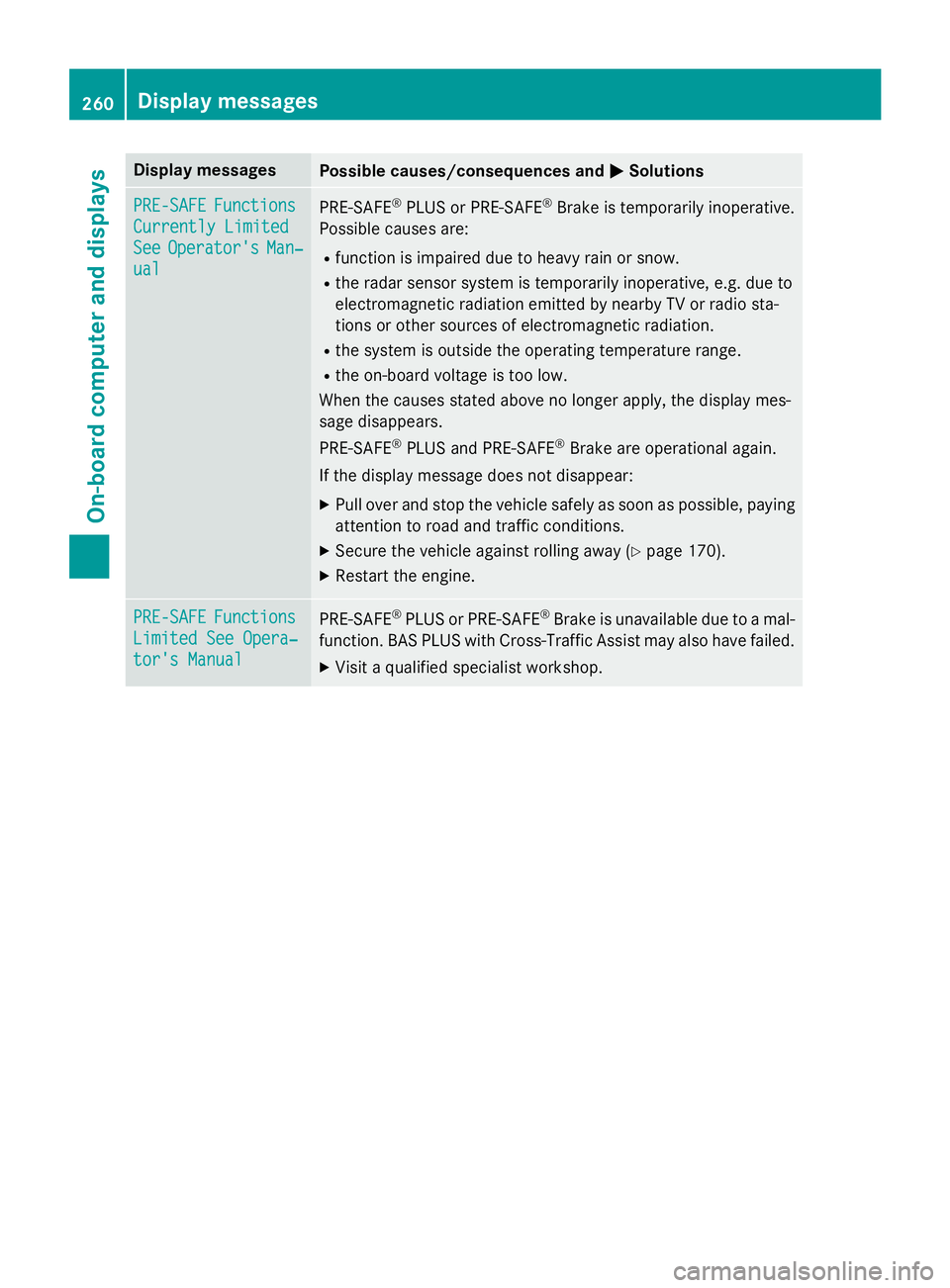
Display messagesPossible causes/consequences andMSolutions
PRE-SAFEFunctions
Currently Limited
SeeOperator'sMan‐
ual
PRE ‑S AF E®PLU Sor PRE ‑SAFE®Brake is temporarily inoperative.
Possibl ecauses are:
Rfunction is impaire ddue to heav yrain or snow.
Rth erada rsensor system is temporarily inoperative, e.g. due to
electromagnetic radiation emitted by nearby TV or radi osta-
tion sor other source sof electromagnetic radiation .
Rthesystem is outside th eoperating temperature range.
Rth eon-boar dvoltag eis to olow.
Whe nth ecauses state dabov eno longer apply, th edisplay mes -
sage disappears.
PRE ‑S AF E
®PLU Sand PRE ‑S AF E®Brake are operational again .
If th edisplay message does no tdisappear :
XPull overand stop th evehicl esafely as soo nas possible, payin g
attention to roa dand traffic conditions.
XSecur eth evehicl eagainst rollin gaway (Ypage 170).
XRestart th eengine.
PRE-SAFEFunctions
Limite dSee Opera‐
tor's Manual
PRE ‑S AF E®PLU Sor PRE‑SAFE®Brake is unavailable due to amal-
function .BA SPLU Swit hCross-Traffic Assis tmay also hav efailed.
XVisit aqualified specialist workshop .
260Display messages
On-board computer and displays