door lock MERCEDES-BENZ S-COUPE 2016 Owner's Manual
[x] Cancel search | Manufacturer: MERCEDES-BENZ, Model Year: 2016, Model line: S-COUPE, Model: MERCEDES-BENZ S-COUPE 2016Pages: 410, PDF Size: 8.62 MB
Page 97 of 410
tions similar to these. This will prevent the
unintentional opening/closing of the trunk.
RDirt caused by road salt around sensors:
may restrict functionality.
RUsing the HANDS-FREE ACCESS with a
prosthetic leg may restrict functionality.
Operation
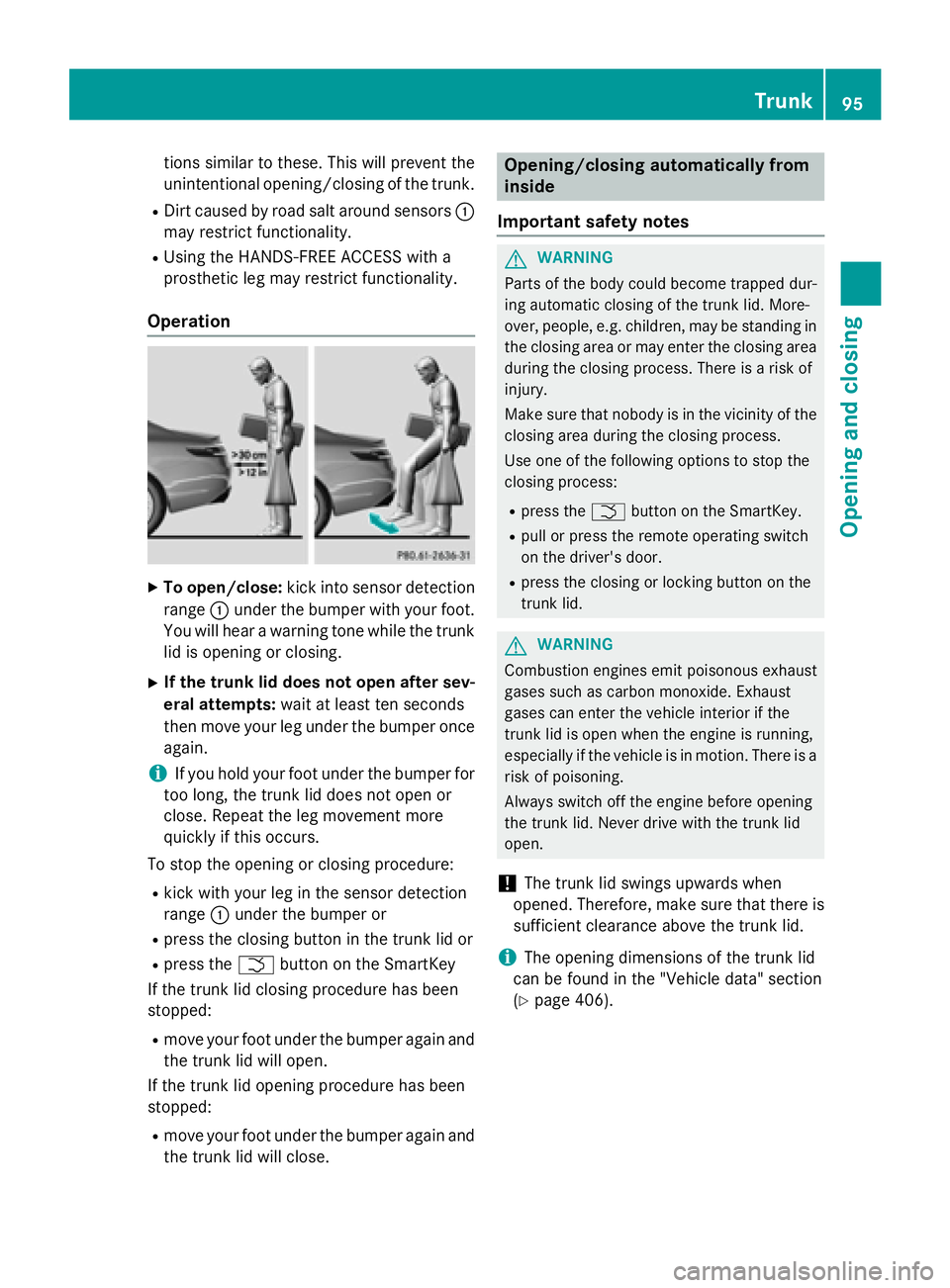
XTo open/close: kick into sensor detection
range :under the bumper with your foot.
You will hear a warning tone while the trunk
lid is opening or closing.
XIf the trunk lid does not open after sev-
eral attempts: wait at least ten seconds
then move your leg under the bumper once
again.
iIf you hold your foot under the bumper for
too long, the trunk lid does not open or
close. Repeat the leg movement more
quickly if this occurs.
To stop the opening or closing procedure:
Rkick with your leg in the sensor detection
range :under the bumper or
Rpress the closing button in the trunk lid or
Rpress the Fbutton on the SmartKey
If the trunk lid closing procedure has been
stopped:
Rmove your foot under the bumper again and
the trunk lid will open.
If the trunk lid opening procedure has been
stopped:
Rmove your foot under the bumper again and
the trunk lid will close.
Opening/closing automatically from
inside
Important safety notes
GWARNING
Parts of the body could become trapped dur-
ing automatic closing of the trunk lid. More-
over, people, e.g. children, may be standing in the closing area or may enter the closing area
during the closing process. There is a risk of
injury.
Make sure that nobody is in the vicinity of the
closing area during the closing process.
Use one of the following options to stop the
closing process:
Rpress the Fbutton on the SmartKey.
Rpull or press the remote operating switch
on the driver's door.
Rpress the closing or locking button on the
trunk lid.
GWARNING
Combustion engines emit poisonous exhaust
gases such as carbon monoxide. Exhaust
gases can enter the vehicle interior if the
trunk lid is open when the engine is running,
especially if the vehicle is in motion. There is a
risk of poisoning.
Always switch off the engine before opening
the trunk lid. Never drive with the trunk lid
open.
!The trunk lid swings upwards when
opened. Therefore, make sure that there is
sufficient clearance above the trunk lid.
iThe opening dimensions of the trunk lid
can be found in the "Vehicle data" section
(
Ypage 406).
Trunk95
Opening and closing
Z
Page 98 of 410
Opening and closing
You can open and close the trunk lid from the
driver's seat when the vehicle is stationary
and unlocked.
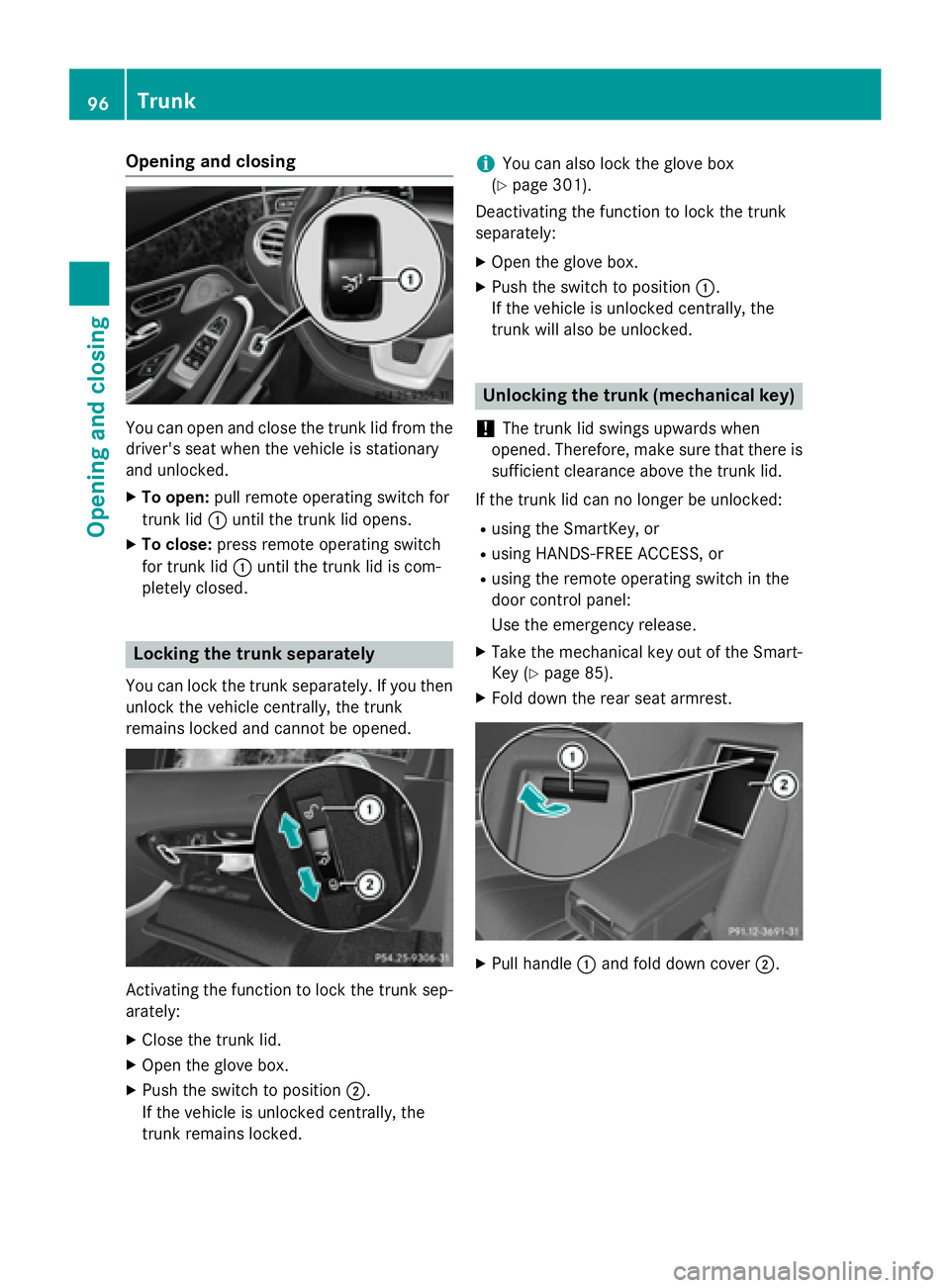
XTo open:pull remote operating switch for
trunk lid :until the trunk lid opens.
XTo close: press remote operating switch
for trunk lid :until the trunk lid is com-
pletely closed.
Locking the trunk separately
You can lock the trunk separately. If you then
unlock the vehicle centrally, the trunk
remains locked and cannot be opened.
Activating the function to lock the trunk sep-
arately:
XClose the trunk lid.
XOpen the glove box.
XPush the switch to position ;.
If the vehicle is unlocked centrally, the
trunk remains locked.
iYou can also lock the glove box
(
Ypage 301).
Deactivating the function to lock the trunk
separately:
XOpen the glove box.
XPush the switch to position :.
If the vehicle is unlocked centrally, the
trunk will also be unlocked.
Unlocking the trunk (mechanical key)
!
The trunk lid swings upwards when
opened. Therefore, make sure that there is
sufficient clearance above the trunk lid.
If the trunk lid can no longer be unlocked:
Rusing the SmartKey, or
Rusing HANDS-FREE ACCESS, or
Rusing the remote operating switch in the
door control panel:
Use the emergency release.
XTake the mechanical key out of the Smart-
Key (
Ypage 85).
XFold down the rear seat armrest.
XPull handle :and fold down cover ;.
96Trunk
Opening and closing
Page 99 of 410
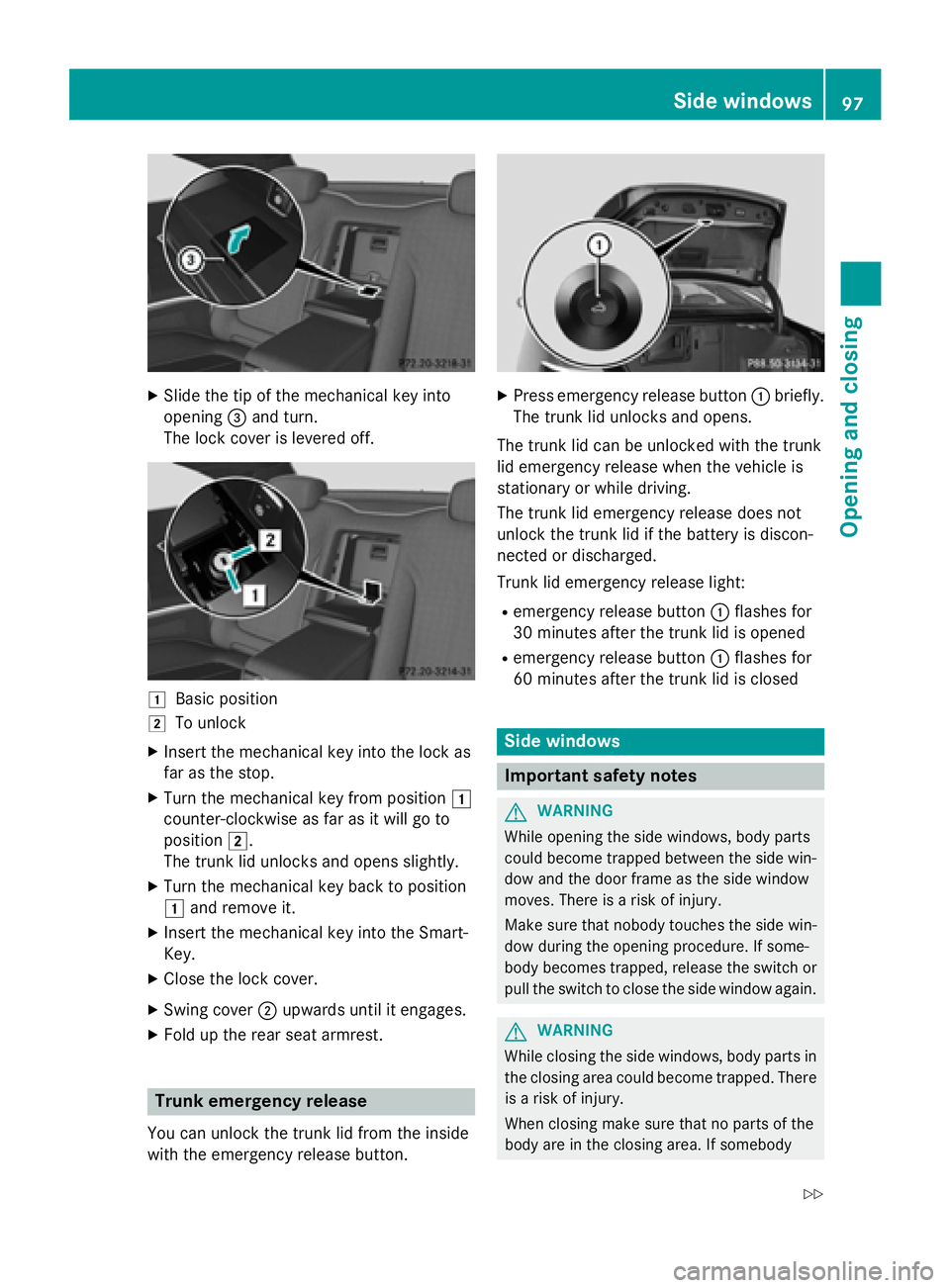
XSlide the tip of the mechanical key into
opening=and turn.
The lock cover is levered off.
1Basic position
2To unlock
XInsert the mechanical key into the lock as
far as the stop.
XTurn the mechanical key from position 1
counter-clockwise as far as it will go to
position 2.
The trunk lid unlocks and opens slightly.
XTurn the mechanical key back to position
1 and remove it.
XInsert the mechanical key into the Smart-
Key.
XClose the lock cover.
XSwing cover ;upwards until it engages.
XFold up the rear seat armrest.
Trunk emergency release
You can unlock the trunk lid from the inside
with the emergency release button.
XPress emergency release button :briefly.
The trunk lid unlocks and opens.
The trunk lid can be unlocked with the trunk
lid emergency release when the vehicle is
stationary or while driving.
The trunk lid emergency release does not
unlock the trunk lid if the battery is discon-
nected or discharged.
Trunk lid emergency release light:
Remergency release button :flashes for
30 minutes after the trunk lid is opened
Remergency release button :flashes for
60 minutes after the trunk lid is closed
Side windows
Important safety notes
GWARNING
While opening the side windows, body parts
could become trapped between the side win-
dow and the door frame as the side window
moves. There is a risk of injury.
Make sure that nobody touches the side win-
dow during the opening procedure. If some-
body becomes trapped, release the switch or
pull the switch to close the side window again.
GWARNING
While closing the side windows, body parts in
the closing area could become trapped. There is a risk of injury.
When closing make sure that no parts of the
body are in the closing area. If somebody
Side windows97
Opening and closing
Z
Page 100 of 410
becomes trapped, release the switch or press
the switch to open the side window again.
GWARNING
If children operate the side windows they
could become trapped, particularly if they are left unsupervised. There is a risk of injury.
Activate the override feature for the rear side
windows. When leaving the vehicle, always
take the SmartKey with you and lock the vehi-
cle. Never leave children unsupervised in the
vehicle.
Side window reversing feature
The front side windows are equipped with an
automatic reversing feature. If a solid object
blocks or restricts one of the front side win-
dows from traveling upwards during the auto-
matic closing process, the side window opens
again automatically. During the manual clos-
ing process, the side window only opens
again automatically after the corresponding
switch is released. However, the automatic
reversing feature is only an aid and does not
relieve you of the responsibility of paying
attention when closing a side window.
GWARNING
The reversing feature does not react:
Rto soft, light and thin objects, e.g. small fin-
gers
Rwhile resetting
This means that the reversing feature cannot
prevent someone being trapped in these sit-
uations. There is a risk of injury.
Make sure that no body parts are in close
proximity during the closing procedure. If
someone becomes trapped, press the switch
to open the side window again.
Opening and closing the side win-
dows
The switches for all side windows are located
on the driver's door. There is also a switch for
the front-passenger side window on the front-
passenger door.
The switches on the driver's door take prec-
edence.
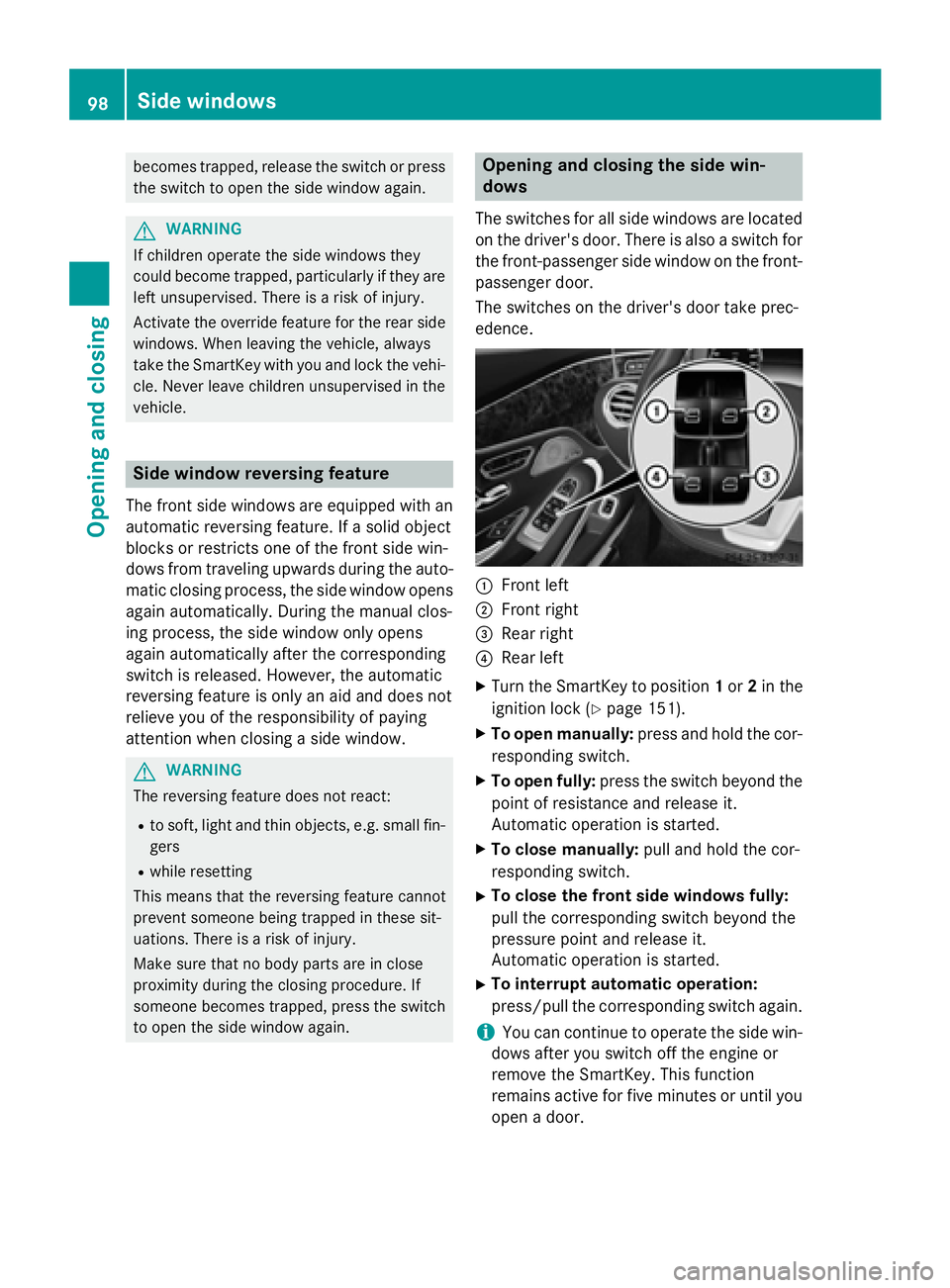
:Front left
;Front right
=Rear right
?Rear left
XTurn the SmartKey to position 1or 2in the
ignition lock (
Ypage 151).
XTo open manually: press and hold the cor-
responding switch.
XTo open fully: press the switch beyond the
point of resistance and release it.
Automatic operation is started.
XTo close manually: pull and hold the cor-
responding switch.
XTo close the front side windows fully:
pull the corresponding switch beyond the
pressure point and release it.
Automatic operation is started.
XTo interrupt automatic operation:
press/pull the corresponding switch again.
iYou can continue to operate the side win-
dows after you switch off the engine or
remove the SmartKey. This function
remains active for five minutes or until you
open a door.
98Side windows
Opening and closing
Page 101 of 410
iBefore opening or closing the side win-
dows, a check is carried out to see whether
a valid SmartKey is in the vehicle, if:
Ra side window switch is pressed or pulled
and
Rthe Start/Stop button is used instead of
the SmartKey in the ignition lock
and
Rthe engine is not running
This is carried out by means of a brief radio
connection between the vehicle and the
SmartKey.
Convenience opening
General notes
You can ventilate the vehicle before you start
driving.
If the SmartKey is in close proximity to the
vehicle, the convenience opening function is
available.
The "convenience opening" feature is also
available on unlocked vehicles.
To do this, the SmartKey is used to carry out
the following functions simultaneously:
Runlock the vehicle
Ropen the side windows
Rswitch on the seat ventilation for the driv-
er's seat
Convenience opening
XKeep the %button pressed until the
side windows are in the desired position.
XTo interrupt convenience opening:
release the %button.
Convenience closing feature
Important safety notes
GWARNING
When using the convenience closing feature,
parts of the body could be trapped in the clos-
ing area when a side window is being closed.
There is a risk of injury.
Observe the complete closing procedure
when the convenience closing feature is oper-
ating. Make sure that no body parts are in
close proximity during the closing procedure.
When you lock the vehicle, you can close the
windows at the same time.
You can then close the roller sunblinds.
iNotes on the automatic reversing feature
for:
Rthe side window (Ypage 98)
Rthe roller sunblind (Ypage 101)
Using the SmartKey
XPress and hold the &button until the
side windows are fully closed.
XMake sure that all the side windows are
closed.
XPress and hold the &button again until
the roller sunblinds of the panorama roof
close.
XTo interrupt convenience closing:
release the &button.
Using KEYLESS-GO
The SmartKey must be outside the vehicle. All
the doors must be closed.
Side windows99
Opening and closing
Z
Page 102 of 410
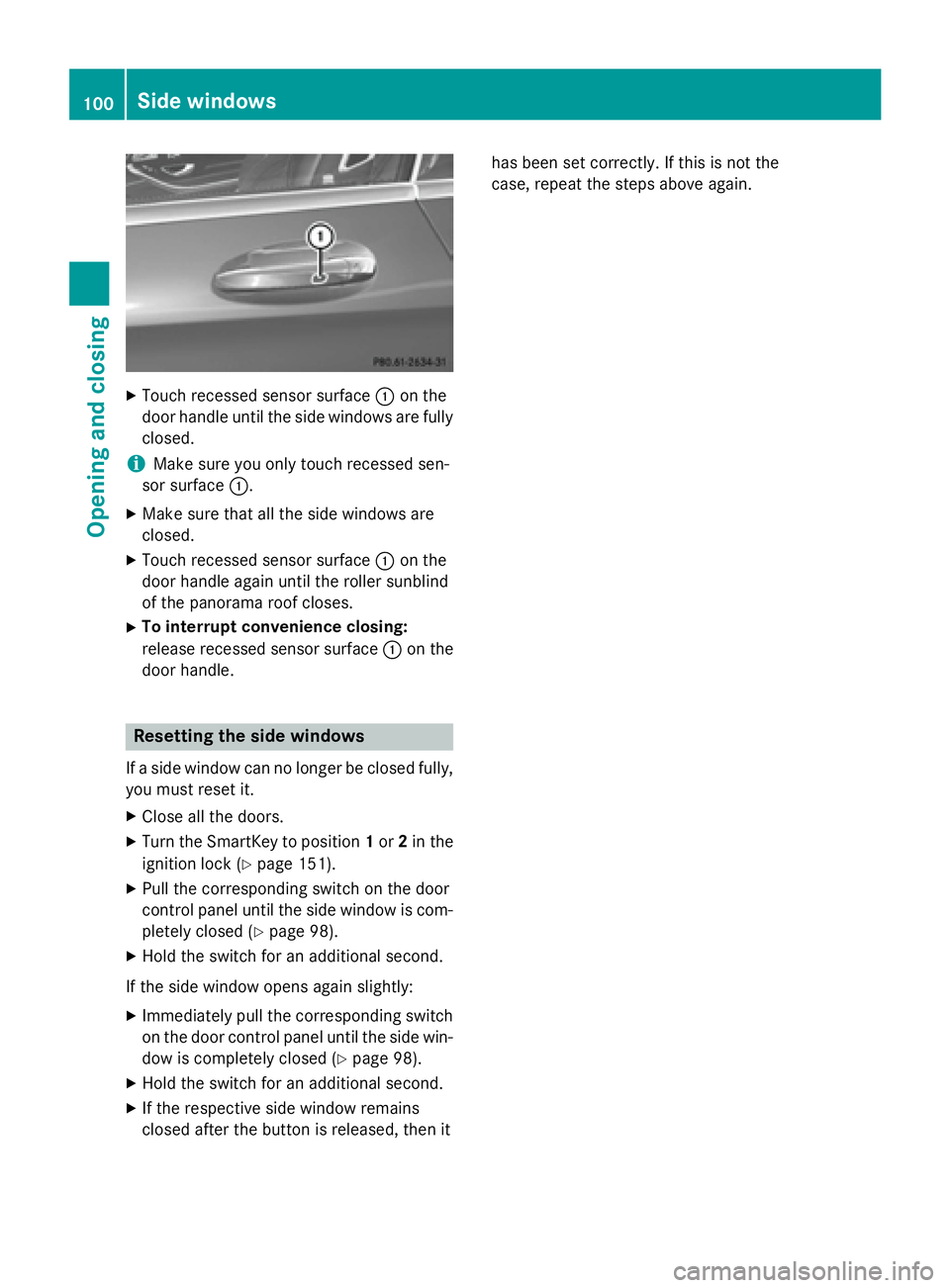
XTouch recessed sensor surface:on the
door handle until the side windows are fully
closed.
iMake sure you only touch recessed sen-
sor surface :.
XMake sure that all the side windows are
closed.
XTouch recessed sensor surface :on the
door handle again until the roller sunblind
of the panorama roof closes.
XTo interrupt convenience closing:
release recessed sensor surface :on the
door handle.
Resetting the side windows
If a side window can no longer be closed fully,
you must reset it.
XClose all the doors.
XTurn the SmartKey to position 1or 2in the
ignition lock (
Ypage 151).
XPull the corresponding switch on the door
control panel until the side window is com-
pletely closed (
Ypage 98).
XHold the switch for an additional second.
If the side window opens again slightly:
XImmediately pull the corresponding switch on the door control panel until the side win-
dow is completely closed (
Ypage 98).
XHold the switch for an additional second.
XIf the respective side window remains
closed after the button is released, then it has been set correctly. If this is not the
case, repeat the steps above again.
100Side windows
Opening and closing
Page 114 of 410
For vehicles equipped with the Warmth Com-
fort package: the armrest in the door and thecenter console can also be heated when you
switch on the seat heating of one of the front
seats. This can be set with COMAND (see the
separate operating instructions).
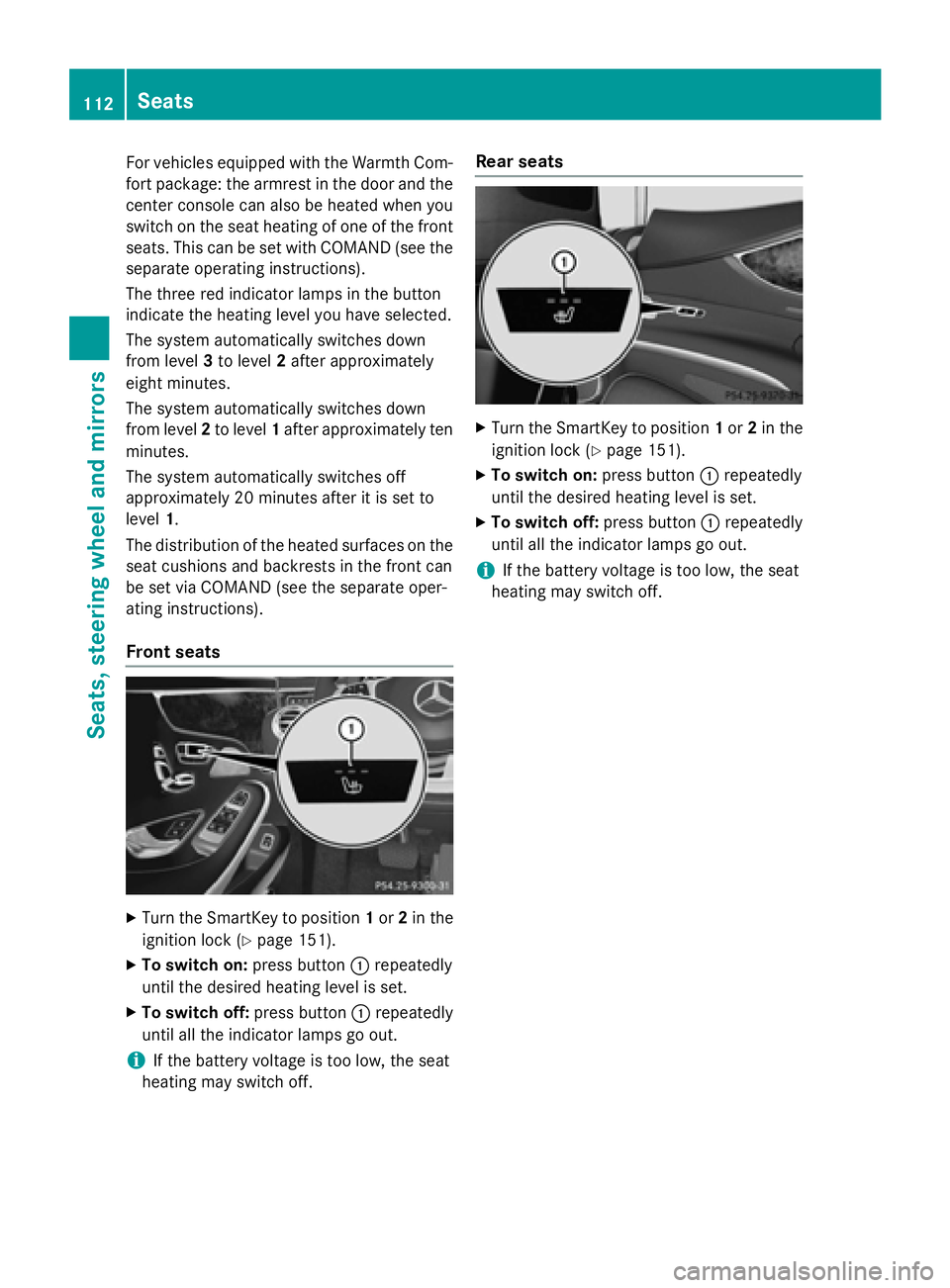
The three red indicator lamps in the button
indicate the heating level you have selected.
The system automatically switches down
from level 3to level 2after approximately
eight minutes.
The system automatically switches down
from level 2to level 1after approximately ten
minutes.
The system automatically switches off
approximately 20 minutes after it is set to
level 1.
The distribution of the heated surfaces on the seat cushions and backrests in the front can
be set via COMAND (see the separate oper-
ating instructions).
Front seats
XTurn the SmartKey to position 1or 2in the
ignition lock (
Ypage 151).
XTo switch on: press button:repeatedly
until the desired heating level is set.
XTo switch off: press button:repeatedly
until all the indicator lamps go out.
iIf the battery voltage is too low, the seat
heating may switch off.
Rear seats
XTurn the SmartKey to position 1or 2in the
ignition lock (
Ypage 151).
XTo switch on: press button:repeatedly
until the desired heating level is set.
XTo switch off: press button:repeatedly
until all the indicator lamps go out.
iIf the battery voltage is too low, the seat
heating may switch off.
112Seats
Seats, steering wheel and mirrors
Page 117 of 410
Steering wheel heating
Activating/deactivating
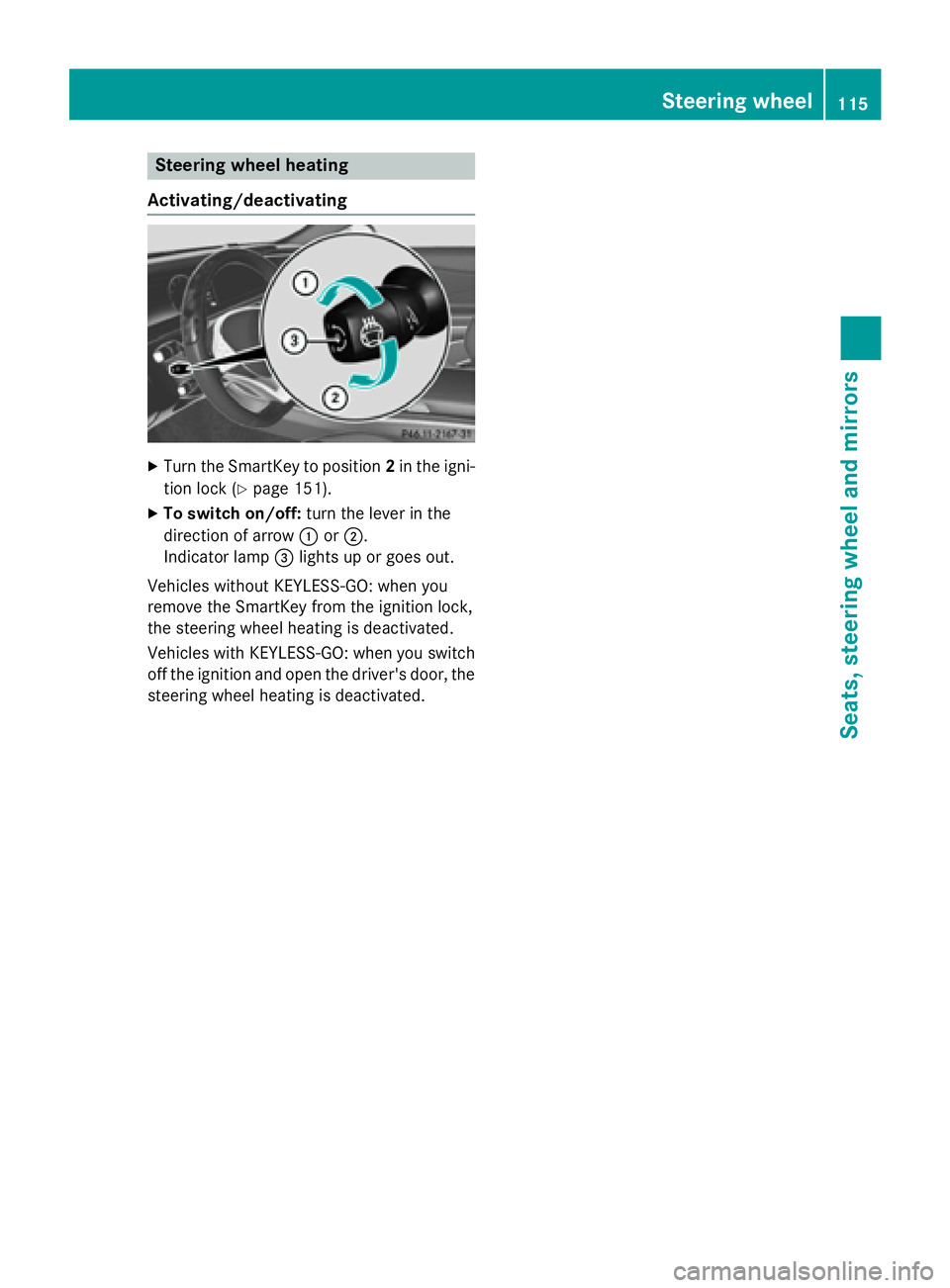
XTurn the SmartKey to position 2in the igni-
tion lock (
Ypage 151).
XTo switch on/off: turn the lever in the
direction of arrow :or;.
Indicator lamp =lights up or goes out.
Vehicles without KEYLESS-GO: when you
remove the SmartKey from the ignition lock,
the steering wheel heating is deactivated.
Vehicles with KEYLESS-GO: when you switch
off the ignition and open the driver's door, the steering wheel heating is deactivated.
Steering wheel115
Seats, steering wheel and mirrors
Z
Page 118 of 410
Problems with the steering wheel heating
ProblemPossible causes/consequences andMSolutions
The steering wheel
heating has switched
off prematurely or can-
not be switched on.The on-board voltage is too low because too many electrical con-
sumers are switched on.
XSwitch off electrical consumers that you do not need, such as
the rear window defroster or interior lighting.
EASY-ENTRY/EXIT feature
Important safety notes
GWARNING
When the EASY-ENTRY/EXIT feature adjusts
the steering wheel and the driver's seat, you
and other vehicle occupants – particularly
children – could become trapped. There is a
risk of injury.
While the EASY-ENTRY/EXIT feature is mak-
ing adjustments, make sure that no one has
any body parts in the sweep of the seat and
the steering wheel.
If there is a risk of becoming trapped by
Rthe steering wheel: move the steering
wheel adjustment lever.
Rthe seat: press the switch for seat adjust-
ment.
The adjustment process is stopped.
Press one of the memory function position
switches. The adjustment process is stopped.
GWARNING
If children activate the EASY-ENTRY/EXIT fea-
ture, they can become trapped, particularly
when unattended. There is a risk of injury.
When leaving the vehicle, always take the
SmartKey with you and lock the vehicle. Never
leave children unsupervised in the vehicle.
GWARNING
If you drive off while the EASY-ENTRY/EXIT
feature is making adjustments, you could lose
control of the vehicle. There is a risk of an
accident.
Always wait until the adjustment process is
complete before driving off.
The EASY-ENTRY/EXIT feature makes getting
in and out of your vehicle easier.
You can activate and deactivate the EASY-
ENTRY/EXIT feature using COMAND (see the
separate operating instructions).
Position of the steering wheel and the
driver's seat when the EASY-ENTRY/
EXIT feature is active
The steering wheel tilts upwards and the driv-
er's seat moves backwards if you:
Rremove the SmartKey from the ignition lock
Rwith KEYLESS-GO: open the driver's door;
KEYLESS-GO must be in position 1
Rwith the SmartKey:open the driver's
door; the SmartKey must be in position 0or
1 in the ignition lock (
Ypage 151)
Ropen the driver's door when the ignition is
switched off
iThe steering wheel only tilts upwards and
the driver's seat only moves backwards if
the driving position is stored after seat or
steering wheel adjustment.
The last position of the steering wheel or seat
is stored if:
Rthe ignition is switched off
Rthe setting is stored with the memory func-
tion (
Ypage 121).
iThe steering wheel only moves upwards if
it has not already reached the upper stop.
116Steering wheel
Seats, steering wheel and mirrors
Page 119 of 410
The driver's seat only moves backwards if itis not already in the rearmost position.
Position of the steering wheel and the
driver's seat for driving
The steering wheel and the driver's seat are
moved to the previously set position if:
Rthe driver's door is closed and you insert
the SmartKey into the ignition lock
Ryou close the driver's door when the igni-
tion is switched on
Ryou press the Start/Stop button once on
vehicles with KEYLESS-GO
iThe steering wheel and the driver's seat
only return to the last set position when the
driving position is stored after seat or steer-
ing wheel adjustment.
The last position of the steering wheel or seat
is stored if:
Rthe ignition is switched off
Rthe setting is stored with the memory func-
tion (
Ypage 121).
Crash-responsive EASY-EXIT feature
If the crash-responsive EASY-EXIT feature is
triggered in an accident, the steering column
will move upwards when the driver's door is
opened or the SmartKey is removed from the ignition lock. This makes it easier to exit the
vehicle and rescue the occupants.
The crash-responsive EASY-EXIT feature is
only operational if the EASY-EXIT/ENTRY fea-
ture is activated in COMAND (see the sepa-
rate operating instructions).
Mirrors
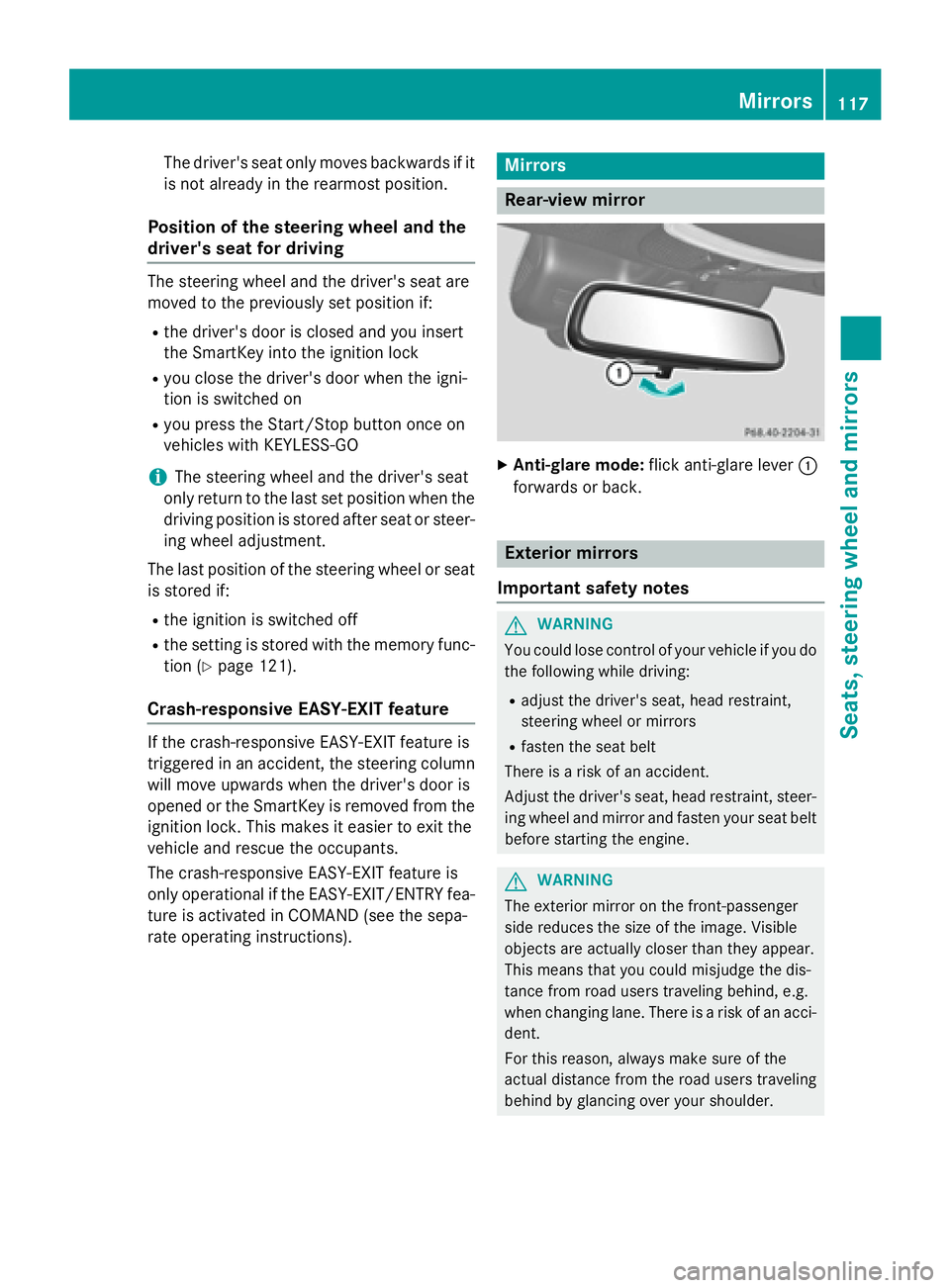
Rear-view mirror
XAnti-glare mode: flick anti-glare lever :
forwards or back.
Exterior mirrors
Important safety notes
GWARNING
You could lose control of your vehicle if you do the following while driving:
Radjust the driver's seat, head restraint,
steering wheel or mirrors
Rfasten the seat belt
There is a risk of an accident.
Adjust the driver's seat, head restraint, steer-
ing wheel and mirror and fasten your seat belt before starting the engine.
GWARNING
The exterior mirror on the front-passenger
side reduces the size of the image. Visible
objects are actually closer than they appear.
This means that you could misjudge the dis-
tance from road users traveling behind, e.g.
when changing lane. There is a risk of an acci-
dent.
For this reason, always make sure of the
actual distance from the road users traveling
behind by glancing over your shoulder.
Mirrors117
Seats, steering wheel and mirrors
Z