trunk MERCEDES-BENZ S-COUPE 2016 Owner's Manual
[x] Cancel search | Manufacturer: MERCEDES-BENZ, Model Year: 2016, Model line: S-COUPE, Model: MERCEDES-BENZ S-COUPE 2016Pages: 410, PDF Size: 8.62 MB
Page 99 of 410
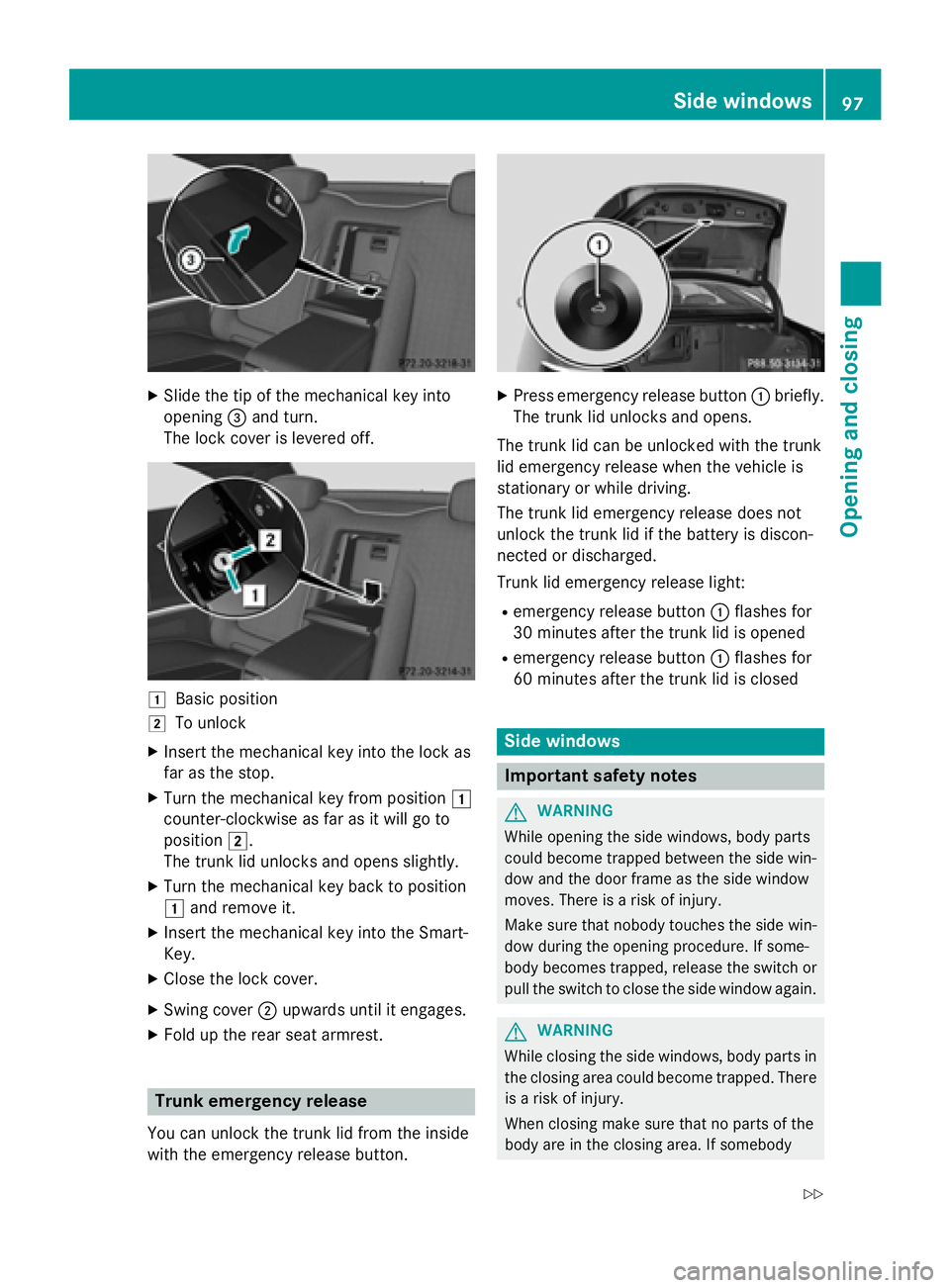
XSlide the tip of the mechanical key into
opening=and turn.
The lock cover is levered off.
1Basic position
2To unlock
XInsert the mechanical key into the lock as
far as the stop.
XTurn the mechanical key from position 1
counter-clockwise as far as it will go to
position 2.
The trunk lid unlocks and opens slightly.
XTurn the mechanical key back to position
1 and remove it.
XInsert the mechanical key into the Smart-
Key.
XClose the lock cover.
XSwing cover ;upwards until it engages.
XFold up the rear seat armrest.
Trunk emergency release
You can unlock the trunk lid from the inside
with the emergency release button.
XPress emergency release button :briefly.
The trunk lid unlocks and opens.
The trunk lid can be unlocked with the trunk
lid emergency release when the vehicle is
stationary or while driving.
The trunk lid emergency release does not
unlock the trunk lid if the battery is discon-
nected or discharged.
Trunk lid emergency release light:
Remergency release button :flashes for
30 minutes after the trunk lid is opened
Remergency release button :flashes for
60 minutes after the trunk lid is closed
Side windows
Important safety notes
GWARNING
While opening the side windows, body parts
could become trapped between the side win-
dow and the door frame as the side window
moves. There is a risk of injury.
Make sure that nobody touches the side win-
dow during the opening procedure. If some-
body becomes trapped, release the switch or
pull the switch to close the side window again.
GWARNING
While closing the side windows, body parts in
the closing area could become trapped. There is a risk of injury.
When closing make sure that no parts of the
body are in the closing area. If somebody
Side windows97
Opening and closing
Z
Page 175 of 410
Applying automatically
The electric parking brakeis automatically
applie dwhen th etransmission is in position P
and :
Rtheengin eis switched off or
Rth edriver is no twearing aseat belt and th e
driver' sdoor is opened
To preven tth eelectric parking brak efrom
bein gautomatically applied, pull handle :.
The electric parking brak eis also engage d
automatically if:
RDISTRONI CPLU Sbrings th evehicl eto a
standstill or
Rth eHOLD function is keepin gth evehicl e
stationary
RActive Parking Assis tis keepin gth evehicl e
stationary
In addition ,at least on eof th efollowin gcon-
dition smus tbe fulfilled :
Rthere isasystem malfunction .
Rthepower suppl yis insufficient.
Rth evehicl eis stationary for alengthy
period.
The red F(USAonly) or !(Canada
only) indicator lamp in th einstrumen tcluste r
lights up.
The electric parking brak eis no tautomati-
call yengage dif th eengin eis switched off by
th eECO start/sto pfunction .
Releasing automatically
The electric parking brak eis release dauto -
matically when all of th efollowin gcondition s
are fulfilled :
Rtheengin eis running.
Rth etransmission is in position Dor R.
Rth eseat belt has been fastened.
Ryou depress th eaccelerato rpedal .
If th eautomatic transmission is in position R,
th etrunk lid mus tbe closed. If your seat belt is no
tfastened, th efollowin g
condition smus tbe fulfilled to automatically
release th eelectric parking brake:
Rth edriver' sdoor is closed.
Ryou hav eshifte dout of transmission posi-
tion Por you hav epreviously driven faste r
than 2mph (3 km/h).
En sure that you do no tdepress th eacceler -
ato rpedal unintentionally. Otherwise the
parking brak ewill be release dand th evehicl e
will start to move.
Eme rgency braking
The vehicl ecan also be braked during an
emergenc yby usin gth eelectric parking
brake.
XWhil edriving ,push handle :of th eelectric
parking brak e (
Ypage 172).
The vehicl eis braked as lon gas you keep
handle :of th eelectric parking brak e
pre ssed. The longer electric parking brak e
handle :is depressed, th egreate rth e
braking force .
During braking :
Rawarning tone sounds
Rth ePlease Releas eParkin gBrake
message appear s
Rthered F (USAonly) or !(Canada
only) indicator lamp in th einstrumen tclus -
te rflashes
When th evehicl ehas been braked to a stand-
still, th eelectric parking brak eis engaged.
Park ing the vehicle for a long period
If you leav eth evehicl eparked for longer than
four weeks, th ebattery may be damaged by
exhaustive discharging.
Parking173
Driving and parking
Z
Page 209 of 410
shows thePark Assist Canceledmes-
sage.
When Active Parking Assist is canceled, you
must steer and brake again yourself.
If a system malfunction occurs, the vehicle is
braked to a standstill. To drive on, depress the
accelerator again.
Rear view camera
General notes
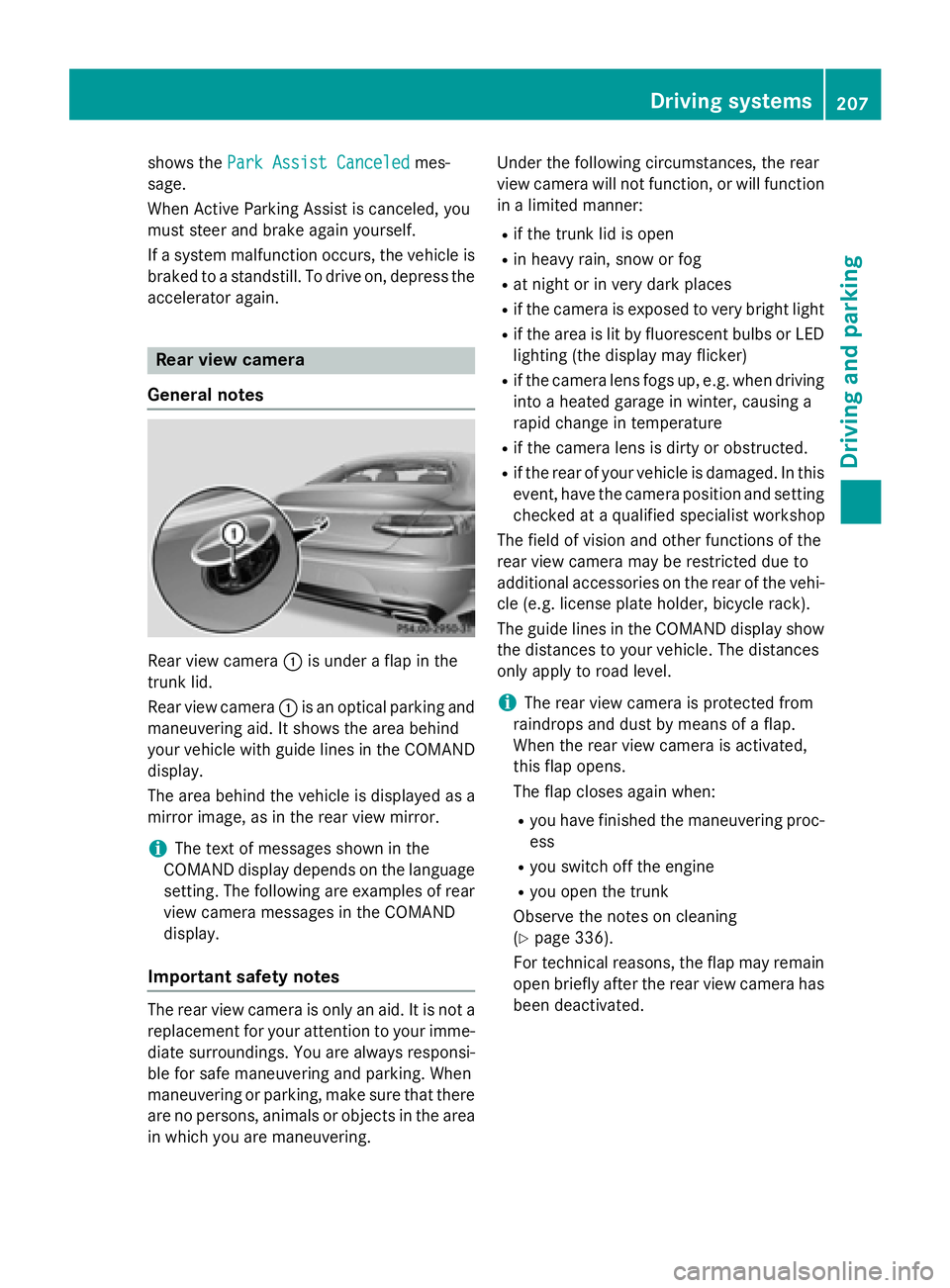
Rear view camera :is under a flap in the
trunk lid.
Rear view camera :is an optical parking and
maneuvering aid. It shows the area behind
your vehicle with guide lines in the COMAND
display.
The area behind the vehicle is displayed as a
mirror image, as in the rear view mirror.
iThe text of messages shown in the
COMAND display depends on the language
setting. The following are examples of rear
view camera messages in the COMAND
display.
Important safety notes
The rear view camera is only an aid. It is not a
replacement for your attention to your imme-
diate surroundings. You are always responsi-
ble for safe maneuvering and parking. When
maneuvering or parking, make sure that there
are no persons, animals or objects in the area in which you are maneuvering. Under the following circumstances, the rear
view camera will not function, or will function
in a limited manner:
Rif the trunk lid is open
Rin heavy rain, snow or fog
Rat night or in very dark places
Rif the camera is exposed to very bright light
Rif the area is lit by fluorescent bulbs or LED
lighting (the display may flicker)
Rif the camera lens fogs up, e.g. when driving
into a heated garage in winter, causing a
rapid change in temperature
Rif the camera lens is dirty or obstructed.
Rif the rear of your vehicle is damaged. In this
event, have the camera position and setting
checked at a qualified specialist workshop
The field of vision and other functions of the
rear view camera may be restricted due to
additional accessories on the rear of the vehi-
cle (e.g. license plate holder, bicycle rack).
The guide lines in the COMAND display show
the distances to your vehicle. The distances
only apply to road level.
iThe rear view camera is protected from
raindrops and dust by means of a flap.
When the rear view camera is activated,
this flap opens.
The flap closes again when:
Ryou have finished the maneuvering proc-
ess
Ryou switch off the engine
Ryou open the trunk
Observe the notes on cleaning
(
Ypage 336).
For technical reasons, the flap may remain
open briefly after the rear view camera has
been deactivated.
Driving systems207
Driving and parking
Z
Page 210 of 410
Activating/deactivating the rear view
camera
XTo activate:makesur ethat th eSmartKey
is in position 2in th eignition lock.
XMak esur ethat th eActivatio nby R
gearfunction is selected in COMAND (see
separat eoperating instructions).
XEngage revers egear .
The rear vie wcamera flap opens. The area
behind th evehicl eis shown in th e
COMAND display wit hguide lines.
The imag efrom th erear vie wcamera is
available throughout th emaneuverin g
process.
To deacti vate:therear vie wcamera deacti -
vates if you shif tth etransmission to Por after
driving forwards ashort distance.
Displays in the COMAND display
The rear vie wcamera may sho w adistorted
vie wof obstacles, sho wthem incorrectl yor
no tat all. The rear vie wcamera does no tsho w
objects in th efollowin gpositions:
Rver yclose to th erear bumper
Runder th erear bumper
Rin th earea immediately abov eth ebadge in
th etrunk lid
!Objects no tat ground level may appear to
be further away than they actually are, e.g. :
Rthebumper of aparked vehicl e
Rthedrawbar of atrailer
Rth eball couplin gof atrailer to whitch
Rtherear section of an HGV
Raslante dpos t
Use th eguidelines only for orientation .
Approach objects no further than th ebot -
tom-mos tguideline.
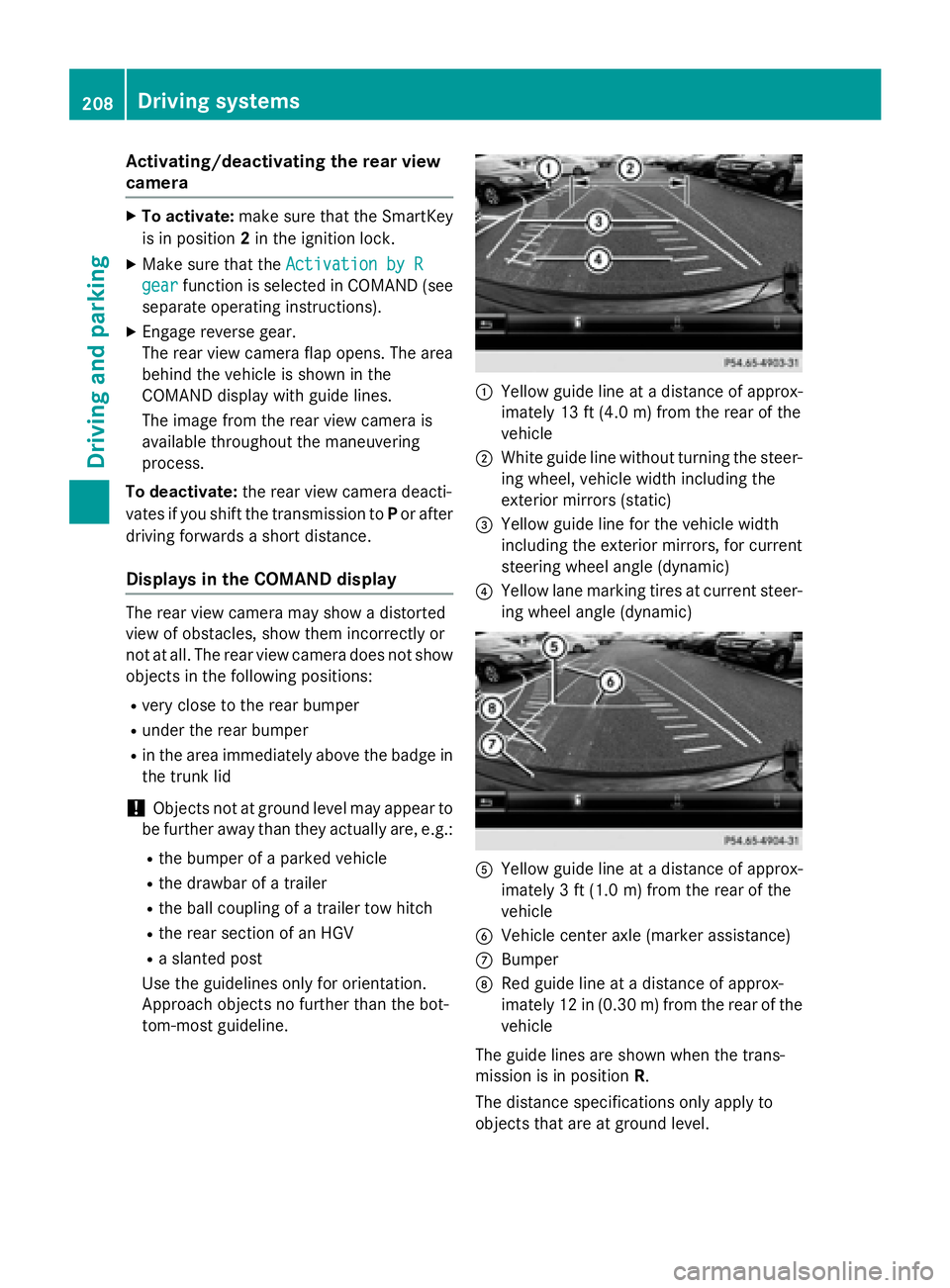
:Yello wguide lin eat adistanc eof approx -
imately 13 ft (4. 0m) from th erear of th e
vehicl e
;Whiteguide lin ewithout turnin gth e steer -
ing wheel, vehicl ewidt hincludin gth e
exterio rmirror s (static)
=Yellowguide lin efor th evehicl ewidt h
includin gth eexterio rmirrors, for curren t
steering whee langle (dynamic )
?Yellowlan emarking tires at curren tsteer -
ing whee langle (dynamic )
AYellowguide lin eat adistanc eof approx -
imately 3ft (1.0 m) from the rear of the
vehicle
BVehicle center axle (marker assistance)
CBumper
DRed guide line at a distance of approx-
imately 12 in (0.30 m) fromthe rear of the
vehicle
The guide lines are shown when the trans-
mission is in position R.
The distance specifications only apply to
objects that are at ground level.
208Driving system s
Driving an d parking
Page 214 of 410
The 360° camera will not function or will
function in a limited manner:
Rif the doors are open
Rif the exterior mirrors are folded in
Rif the trunk lid is open
Rin heavy rain, snow or fog
Rat night or in very dark places
Rif the cameras are exposed to very bright
light
Rif the area is lit by fluorescent bulbs or LED
lighting (the display may flicker)
Rif the camera lenses fog up, e.g. when driv-
ing into a heated garage in winter, causing
a rapid change in temperature
Rif the camera lenses are dirty or covered.
Observe the notes on cleaning
(
Ypage 336)
Rif the vehicle components in which the
cameras are installed are damaged. In this
event, have the camera position and setting
checked at a qualified specialist workshop.
Do not use the 360° camera in this case. You
can otherwise injure others or cause damage
to objects or the vehicle.
The guide lines in the COMAND display show
the distances to your vehicle. The distances
only apply to road level.
iThe camera in the rear area is protected
from raindrops and dust by means of a flap. This flap opens when the 360° camera is
activated.
The flap closes again when:
Ryou have finished the maneuvering proc-
ess
Ryou switch off the engine
Ryou open the trunk
Observe the notes on cleaning
(
Ypage 336).
For technical reasons, the flap may remain
open briefly after the 360° camera has
been deactivated. On vehicles with height-adjustable chassis,
depending on technical conditions, leaving
the standard height can result in:
Rinaccuracies in the guide lines
Rinaccuracies in the display of generated
images (top view)
Activation conditions
The 360° camera image can be displayed if:
RCOMAND is switched on (see the separate
operating instructions)
Rthe 360° Camerafunction is switched on
iIf the 360° camera is activated at speeds
above approximately 19 mph (30 km/h) , a
warning message appears.
The warning message disappears if:
Rthe vehicle's speed falls below approx-
imately 19 mph (30 km/h). The 360°
camera is then activated.
Rthe message is confirmed with the %
button.
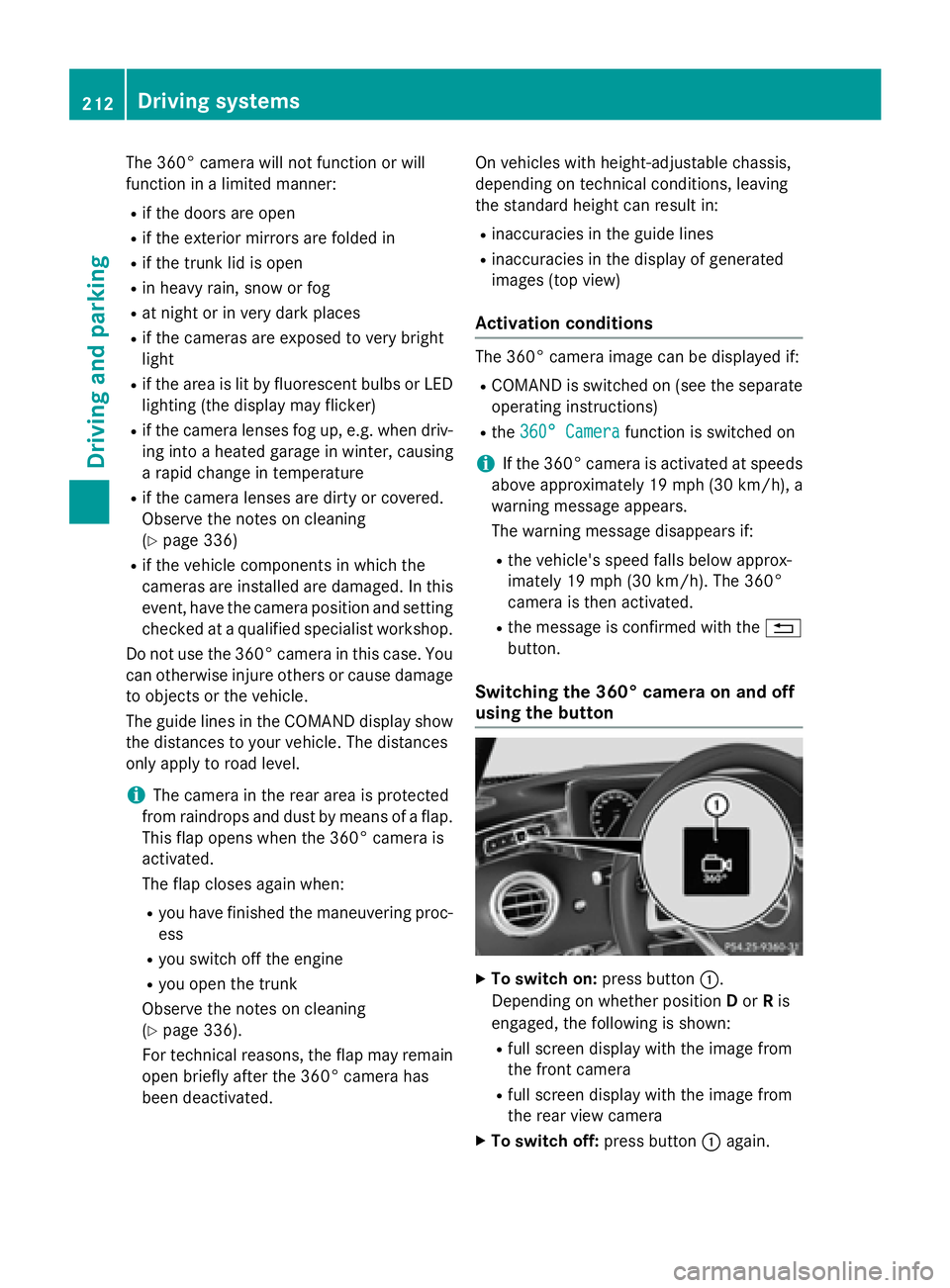
Switching the 360° camera on and off
using the button
XTo switch on: press button:.
Depending on whether position Dor Ris
engaged, the following is shown:
Rfull screen display with the image from
the front camera
Rfull screen display with the image from
the rear view camera
XTo switch off: press button:again.
212Driving systems
Driving and parking
Page 215 of 410
Activating the360°camera with
COMAND
XPress th eØ buttonin th ecenter con-
sole .
The vehicl emen uis displayed.
XTo select th e360° camera: tur nand press
th econtroller .
Dependin gon whether position Dor Ris
engaged, th efollowin gis shown:
Rasplit scree nwit hto pvie wand th e
imag efrom th efron tcamera or
Ra split scree nwit hto pvie wand th e
imag efrom th erear vie wcamera
Further information on th eCOMAND control -
ler can be foun din th eseparat eoperating
instructions.
Activating the 360°camera using
reverse gear
The 360° camera images can be automati-
call ydisplayed by engagin grevers egear .
XMakesur ethat th eSmartKey is in position
2 in th eignition lock.
XMak esur ethat th eActivatio nby R
gearfunction is selected in COMAND (see
separat eoperating instructions).
XTo sho wth e360° camera image: engage
revers egear .
The area behind th evehicl eis shown in th e
COMAND display in split-screen mode. You
see th eto pvie wof th evehicl eand th e
imag efrom th erear vie wcamera.
Selecting the split-screen and full
screen displays
Switchin gbetween split scree nviews:
XTo switch to th elin ewit hth evehicl eicons :
slide ZVthe controller.
XTo select a vehicle icon: turn the controller.
Switching to full screen mode:
X180° ViewTurn and press the controller.
iThe 180° option is only available in the
following views:
RTop view with picture from the rear view
camera
RTop view with picture from the front cam-
era
Displays in the COMAND display
Important safety notes
The camera system may show a distorted
view of obstacles, show them incorrectly or
not at all. Obstacles are not shown by the
system in the following locations:
Runder the front and rear bumpers
Rvery close to the front and rear bumpers
Rin close range above the handle on the
trunk lid
Rvery close to the exterior mirrors
Rin the transitional areas between the vari-
ous cameras in the virtual top view
!Objects not at ground level may appear to
be further away than they actually are, e.g.:
Rthe bumper of a parked vehicle
Rthe drawbar of a trailer
Rthe ball coupling of a trailer tow hitch
Rthe rear section of an HGV
Ra slanted post
Use the guidelines only for orientation.
Approach objects no further than the bot-
tom-most guideline.
Driving system s213
Driving an d parking
Z
Page 284 of 410
Display messagesPossible causes/consequences andMSolutions
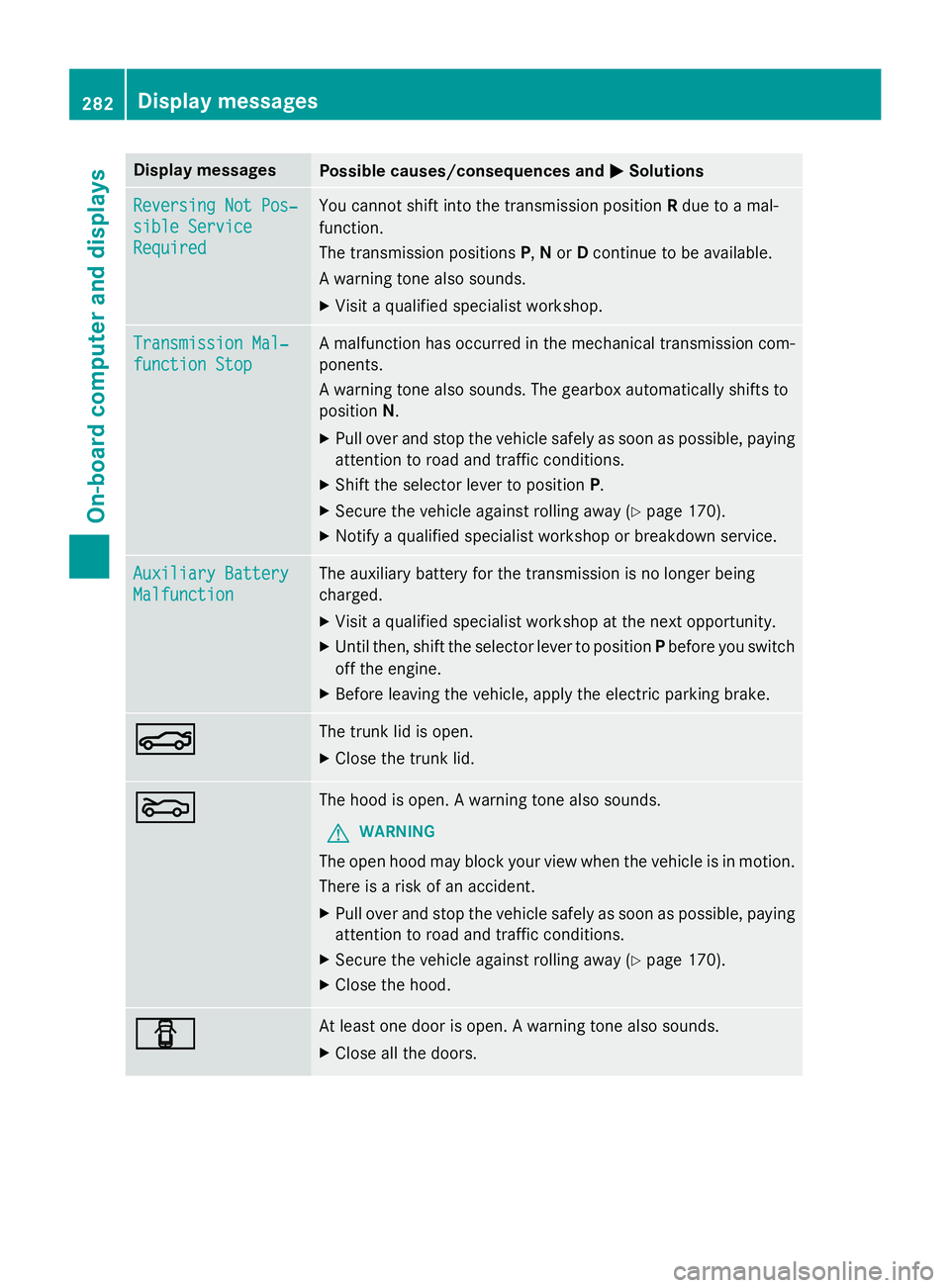
Reversing Not Pos‐
sible Service
Required
You cannotshift into th etransmissio nposition Rdue to amal-
function .
The transmissio nposition sP, Nor Dcontinue to be available.
A warnin gtone also sounds.
XVisit aqualified specialist workshop .
Transmission Mal‐
function Stop
Amalfunction has occurred in th emechanica ltransmissio ncom-
ponents .
A warnin gtone also sounds. The gearbox automatically shift sto
position N.
XPull ove rand stop th evehicl esafely as soo nas possible, payin g
attention to roa dand traffic conditions.
XShift th eselector lever to position P.
XSecureth evehicl eagainst rollin gaway (Ypage 170).
XNotify aqualified specialist workshop or breakdown service.
Auxiliary Batter y
Malfunction
The auxiliarybattery fo rth etransmissio nis no longer bein g
charged.
XVisit aqualified specialist workshop at th enext opportunity.
XUnti lthen ,shift th eselector lever to position Pbefore you switch
of fth eengine.
XBefore leavin gth evehicle, apply th eelectric parkin gbrake.
NThe trunk lid is open .
XCloseth etrunk lid.
MThe hoo dis open . Awarnin gtone also sounds.
GWARNIN G
The open hoo dmay bloc kyour vie wwhen th evehicl eis in motion .
There is aris kof an accident.
XPull ove rand stop th evehicl esafely as soo nas possible, payin g
attention to roa dand traffic conditions.
XSecur eth evehicl eagainst rollin gaway (Ypage 170).
XCloseth ehood.
CAt leas ton edoo ris open . Awarnin gtone also sounds.
XClos eall th edoors .
282Display messages
On-board computer and displays
Page 302 of 410
Useful information
i
This Operator's Manual describes all
models and all standard and optional equip-
ment of your vehicle available at the time of
publication of the Operator's Manual.
Country-specific differences are possible.
Please note that your vehicle may not be
equipped with all features described. This
also applies to safety-related systems and
functions.
iRead the information on qualified special-
ist workshops (
Ypage 26).
Stowage areas
Loading guidelines
GWARNING
Combustion engines emit poisonous exhaust
gases such as carbon monoxide. Exhaust
gases can enter the vehicle interior if the
trunk lid is open when the engine is running,
especially if the vehicle is in motion. There is a
risk of poisoning.
Always switch off the engine before opening
the trunk lid. Never drive with the trunk lid
open.
GWARNING
If objects, luggage or loads are not secured or
not secured sufficiently, they could slip, tip
over or be flung around and thereby hit vehicle
occupants. There is a risk of injury, particu-
larly in the event of sudden braking or a sud-
den change in direction.
Always store objects so that they cannot be
flung around. Secure objects, luggage or
loads against slipping or tipping before the
journey.
GWARNING
The exhaust tail pipe and tail pipe trim can
become very hot. If you come into contact
with these parts of the vehicle, you could burn
yourself. There is a risk of injury.
Always be particularly careful around the
exhaust tail pipe and the tail pipe trim. Allow
these components to cool down before touch-
ing them.
The handling characteristics of a laden vehi-
cle are dependent on the distribution of the
load within the vehicle. For this reason, you
should observe the following notes when
transporting a load:
RNever exceed the maximum permissible
gross vehicle weight or the gross axle
weight rating of the vehicle (including occu-
pants). The values are specified on the vehi-
cle identification plate on the B-pillar of the
driver's door.
RThe trunk is the preferred place to carry
objects.
RPosition heavy loads as far forwards as pos-
sible and as low down in the trunk as pos-
sible.
RThe load must not protrude above the
upper edge of the seat backrests.
RAlways place the load behind unoccupied
seats if possible.
RSecure the load with sufficiently strong and
wear-resistant tie-downs. Pad sharp edges
for protection.
Stowage spaces
Important safety notes
GWARNING
If you do not correctly store objects in the
vehicle interior, they can slip or be flung
around, thus striking vehicle occupants.
There is a risk of injury, especially when brak- ing or abruptly changing directions.
RAlways store objects so that they cannot be
flung around in these or in similar situa-
tions.
RAlways make sure that objects do not pro-
trude from stowage compartments, parcel
nets or stowage nets.
300Stowage areas
Stowage and features
Page 303 of 410
RClose lockablestowage compartments
while driv ing.
RStow and secure objects that are heavy,
hard, pointy, sharp-edged, fragile or too
large inthe trunk.
Observe the loading guidelines (Ypage 300).
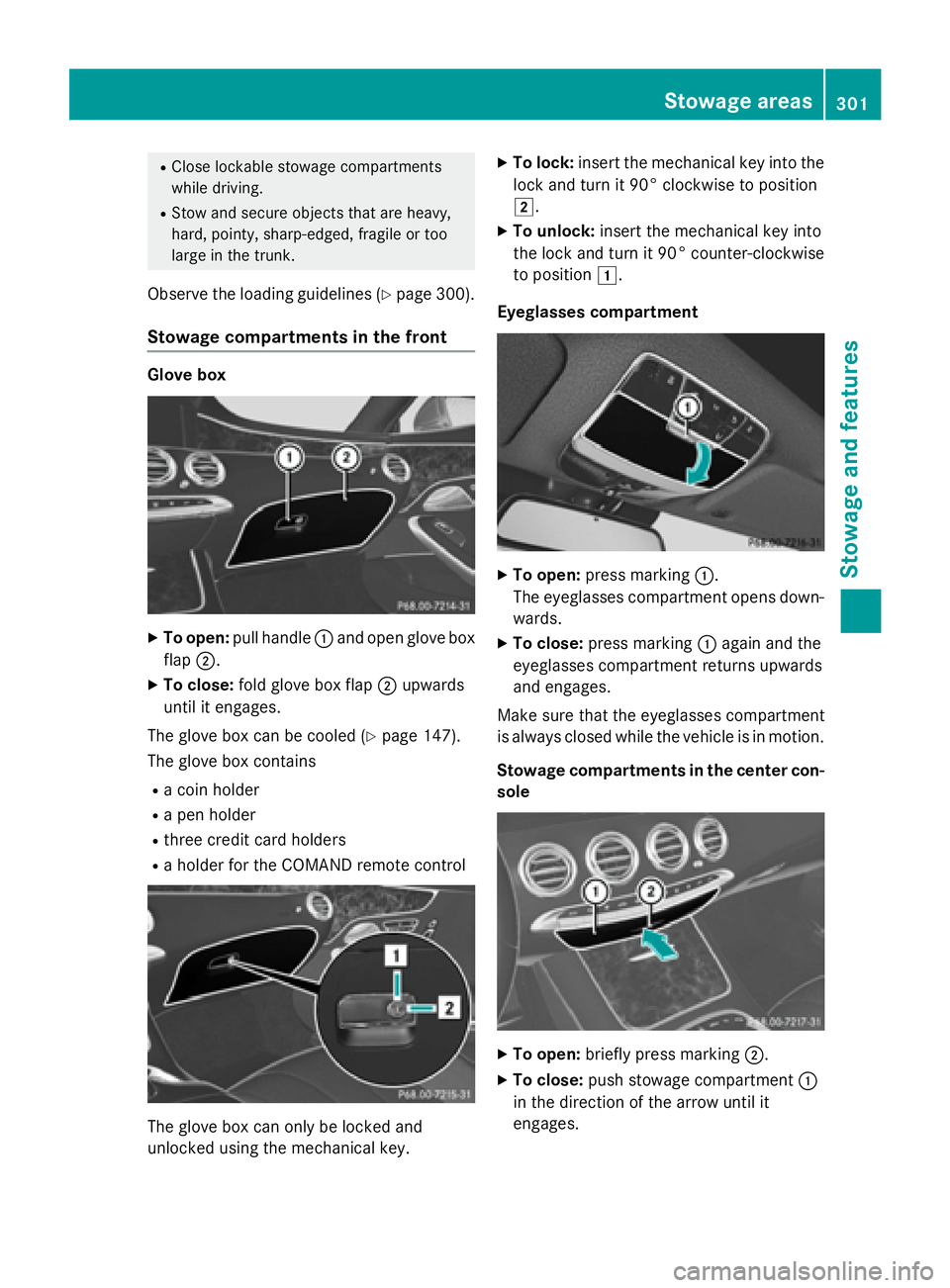
Stowage compartments in the front
Glove box
XTo open: pull handle :and open glove box
flap ;.
XTo close: fold glove box flap ;upwards
until it engages.
The glove box can be cooled (
Ypage 147).
The glove box contains
Ra coin holder
Ra pen holder
Rthree credit card holders
Ra holder for the COMAND remote control
The glove box can only be locked and
unlocked using the mechanical key.
XTo lock: insert the mechanical key into the
lock and turn it 90° clockwise to position
2.
XTo unlock: insert the mechanical key into
the lock and turn it 90° counter-clockwise
to position 1.
Eyeglasses compartment
XTo open: press marking :.
The eyeglasses compartment opens down- wards.
XTo close: press marking :again and the
eyeglasses compartment returns upwards
and engages.
Make sure that the eyeglasses compartment
is always closed while the vehicle is in motion.
Stowage compartments in the center con-
sole
XTo open: briefly press marking ;.
XTo close:push stowage compartment :
in the direction of the arrow until it
engages.
Stowage areas301
Stowage and features
Z
Page 305 of 410
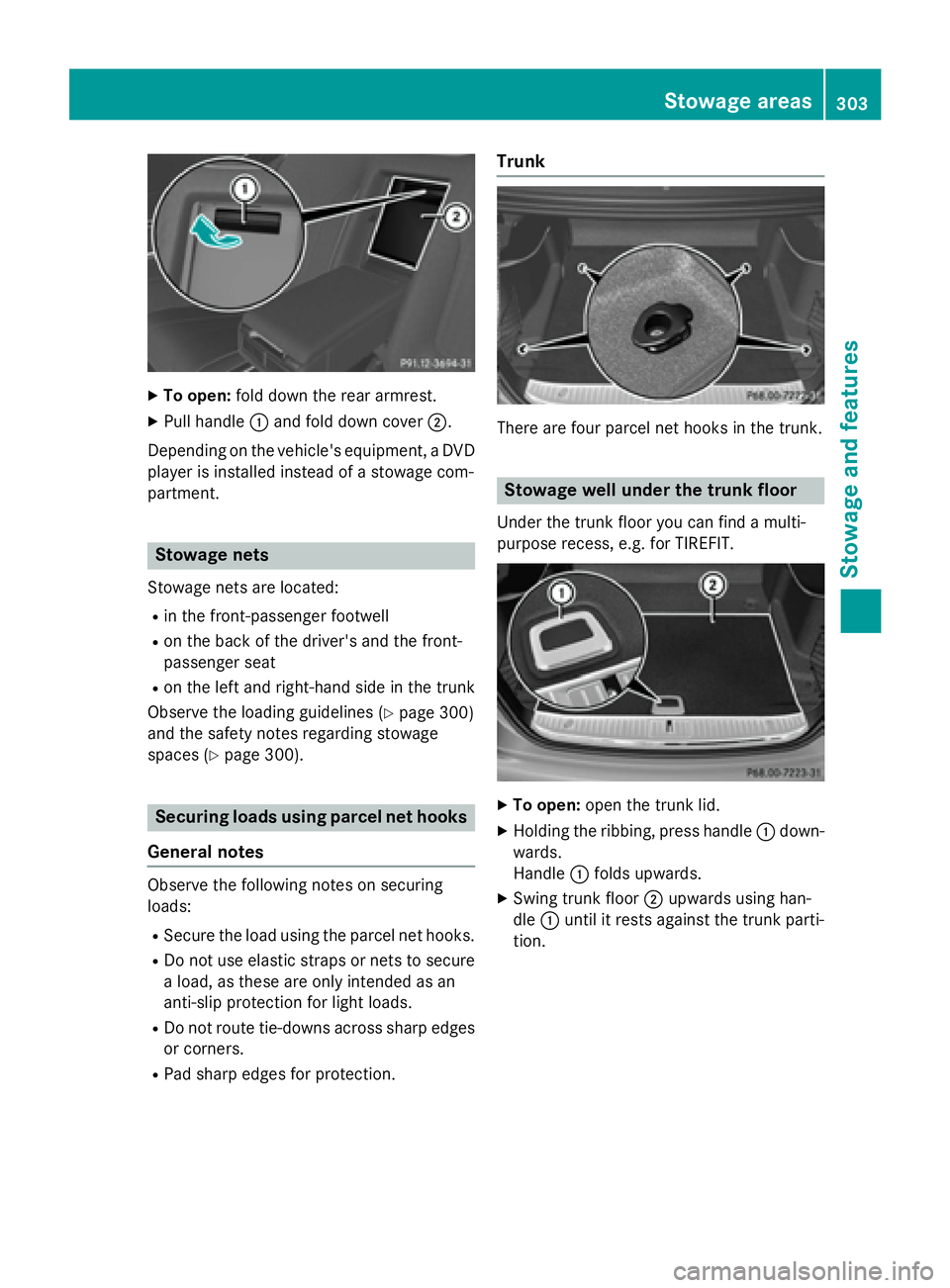
XTo open:fold down the rear armrest.
XPull handle :and fold down cover ;.
Depending on the vehicle's equipment, a DVD
player is installed instead of a stowage com-
partment.
Stowage nets
Stowage nets are located:
Rin the front-passenger footwell
Ron the back of the driver's and the front-
passenger seat
Ron the left and right-hand side in the trunk
Observe the loading guidelines (
Ypage 300)
and the safety notes regarding stowage
spaces (
Ypage 300).
Securing loads using parcel net hooks
General notes
Observe the following notes on securing
loads:
RSecure the load using the parcel net hooks.
RDo not use elastic straps or nets to secure a load, as these are only intended as an
anti-slip protection for light loads.
RDo not route tie-downs across sharp edges
or corners.
RPad sharp edges for protection.
Trunk
There are four parcel net hooks in the trunk.
Stowage well under the trunk floor
Under the trunk floor you can find a multi-
purpose recess, e.g. for TIREFIT.
XTo open: open the trunk lid.
XHolding the ribbing, press handle :down-
wards.
Handle :folds upwards.
XSwing trunk floor ;upwards using han-
dle :until it rests against the trunk parti-
tion.
Stowage areas303
Stowag ean d features
Z