ignition MERCEDES-BENZ S-COUPE 2016 Repair Manual
[x] Cancel search | Manufacturer: MERCEDES-BENZ, Model Year: 2016, Model line: S-COUPE, Model: MERCEDES-BENZ S-COUPE 2016Pages: 410, PDF Size: 8.62 MB
Page 200 of 410
Suspension tuning
General notes
The Adaptive Damping System ADS PLUS
automatically controls the calibration of the
dampers.
The damping is tuned individually to each
wheel and depends on:
Ryour driving style, e.g. sporty
Rthe road surface condition, e.g. bumps
Ryour individual selection, i.e. sports or com-
fort
Your selection remains stored even if you
remove the SmartKey from the ignition lock.
iYou can choose between the sporty and
comfortable mode. One of the two modes is
always active.
Sports tuning
The firmer suspension tuning in sport mode
ensures the best possible contact with the
road. Select this mode when employing a
sporty driving style, e.g. on winding country
roads.
All vehicles except AMG vehicles:
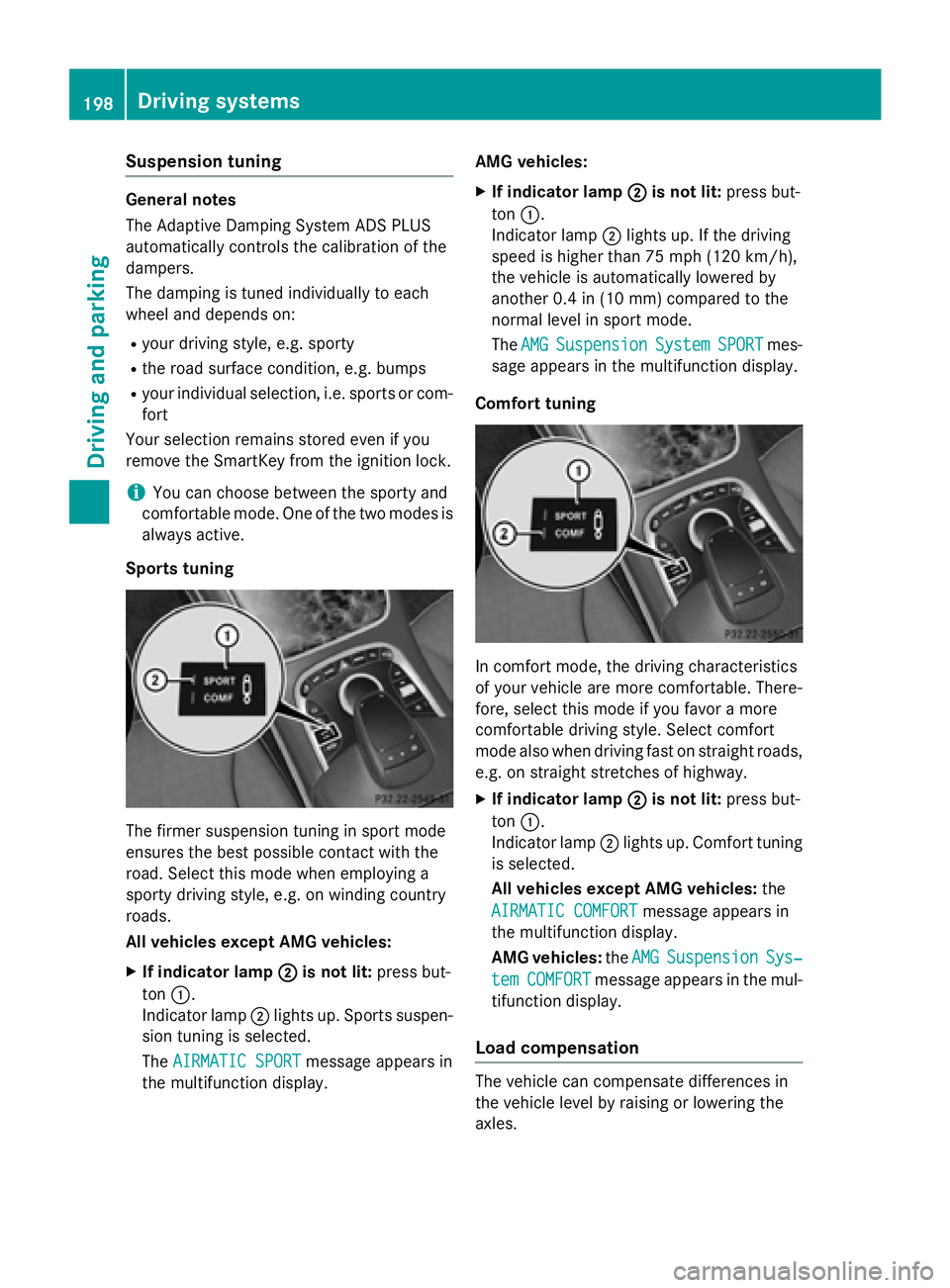
XIf indicator lamp ;is not lit:press but-
ton :.
Indicator lamp ;lights up. Sports suspen-
sion tuning is selected.
The AIRMATIC SPORT
message appears in
the multifunction display. AMG vehicles:
XIf indicator lamp
;is not lit:press but-
ton :.
Indicator lamp ;lights up. If the driving
speed is higher than 75 mph (120 km/h) ,
the vehicle is automatically lowered by
another 0.4 in (10 mm) compared to the
normal level in sport mode.
The AMG
SuspensionSystemSPORTmes-
sage appears in the multifunction display.
Comfort tuning
In comfort mode, the driving characteristics
of your vehicle are more comfortable. There-
fore, select this mode if you favor a more
comfortable driving style. Select comfort
mode also when driving fast on straight roads,
e.g. on straight stretches of highway.
XIf indicator lamp ;is not lit:press but-
ton :.
Indicator lamp ;lights up. Comfort tuning
is selected.
All vehicles except AMG vehicles: the
AIRMATIC COMFORT
message appears in
the multifunction display.
AMG vehicles: theAMG
SuspensionSys‐
temCOMFORTmessage appears in the mul-
tifunction display.
Load compensation
The vehicle can compensate differences in
the vehicle level by raising or lowering the
axles.
198Driving system s
Driving an d parking
Page 201 of 410
4MATIC (permanent four-wheel drive)
4MATIC ensures that all four wheels are per-
manently driven. Together with ESP®, it
improves the traction of your vehicle when-
ever a drive wheel spins due to insufficient
grip.
If you fail to adapt your driving style, 4MATIC can neither reduce the risk of accident nor
override the laws of physics. 4MATIC cannot
take account of road, weather and traffic con-
ditions. 4MATIC is only an aid. You are
responsible for the distance to the vehicle in
front, for vehicle speed, for braking in good
time and for staying in your lane.
If a drive wheel spins due to insufficient grip:
ROnly depress the accelerator pedal as far as
necessary when pulling away.
RAccelerate less when driving.
!Never tow the vehicle with one axle
raised. This may damage the transfer case. Damage of this sort is not covered by the
Mercedes-Benz Limited Warranty. All
wheels must remain either on the ground or
be fully raised. Observe the instructions fortowing the vehicle with all wheels in full
contact with the ground.
iIn wintry driving conditions, the maximum
effect of 4MATIC can only be achieved if
you use winter tires (M+S tires), with snow
chains if necessary.
PARKTRONIC
Important safety notes
PARKTRONIC is an electronic parking aid with ultrasonic sensors. It monitors the area
around your vehicle using six sensors in the
front bumper and six sensors in the rear
bumper. PARKTRONIC indicates visually and
audibly the distance between your vehicle
and an object.
PARKTRONIC is only an aid. It is not a replace-
ment for your attention to your immediate
surroundings. You are always responsible for safe maneuvering, parking and exiting a park-
ing space. When maneuvering, parking or
pulling out of a parking space, make sure that
there are no persons, animals or objects in
the area in which you are maneuvering.
!When parking, pay particular attention to
objects above or below the sensors, such
as flower pots or trailer drawbars.
PARKTRONIC does not detect such objects
when they are in the immediate vicinity of
the vehicle. You could damage the vehicle
or the objects.
The sensors may not detect snow and other
objects that absorb ultrasonic waves.
Ultrasonic sources such as an automatic
car wash, the compressed-air brakes on a
truck or a pneumatic drill could cause
PARKTRONIC to malfunction.
PARKTRONIC may not function correctly on
uneven terrain.
PARKTRONIC is activated automatically when
you:
Rswitch on the ignition
Rshift the transmission to position D,Ror N
PARKTRONIC is deactivated at speeds above
11 mph (18 km/h). It is reactivated at lower
speeds.
Range of the sensors
General notes
PARKTRONIC does not take objects into con-
sideration that are:
Rbelow the detection range, e.g. people, ani-
mals or objects.
Rabove the detection range, e.g. overhang-
ing loads, truck overhangs or loading
ramps.
Driving systems199
Driving and parking
Z
Page 203 of 410
mine which warning display is active when the
engine is running.
Transmission
positionWarning display
DFront area activated
R,Nor the vehicle
is rolling back-
wardsRear and front areas
activated
PNo areas activated
One or more segments light up as the vehicle
approaches an obstacle, depending on the
vehicle's distance from the obstacle.
From the:
Rsixth segment onwards, you will hear an
intermittent warning tone for approx-
imately two seconds.
Rseventh segment onwards, you will hear a
warning tone for approximately two sec-
onds. This indicates that you have now
reached the minimum distance.
Deactivating/activating PARKTRONIC
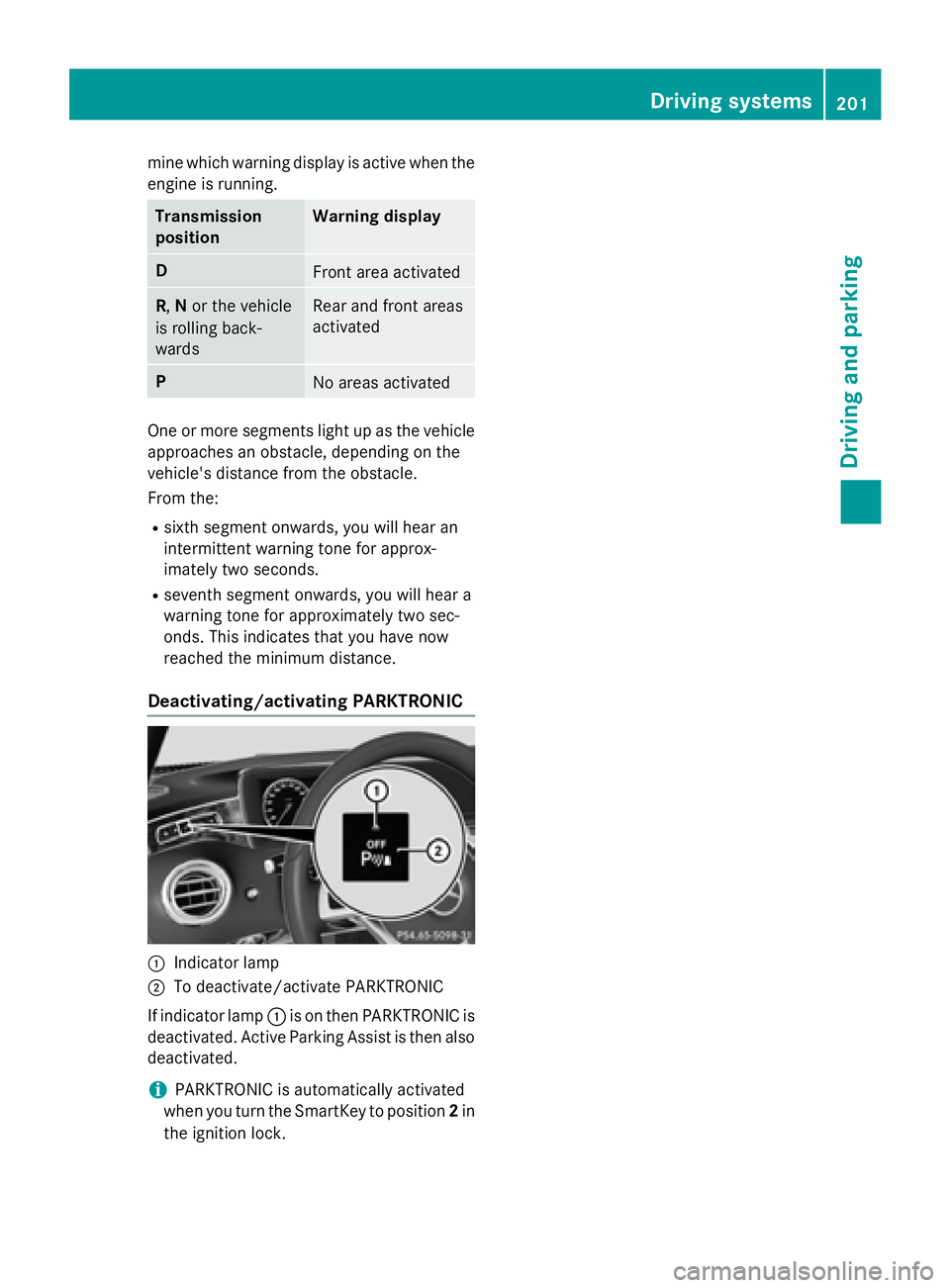
:Indicator lamp
;To deactivate/activate PARKTRONIC
If indicator lamp :is on then PARKTRONIC is
deactivated. Active Parking Assist is then also
deactivated.
iPARKTRONIC is automatically activated
when you turn the SmartKey to position 2in
the ignition lock.
Driving systems201
Driving and parking
Z
Page 204 of 410
Problems with PARKTRONIC
ProblemPossible causes/consequences andMSolutions
Only the red segments
in the PARKTRONIC
warning displays are lit.
You also hear a warning
tone for approximately
two seconds.
PARKTRONIC is then
deactivated and the
indicator lamp on the
PARKTRONIC button
lights up.PARKTRONIC has malfunctioned and has switched off.
XIf problems persist, have PARKTRONIC checked at a qualified
specialist workshop.
Only the red segments
in the PARKTRONIC
warning displays are lit.
PARKTRONIC is then
deactivated.The PARKTRONIC sensors are dirty or there is interference.
XClean the PARKTRONIC sensors (Ypage 335).
XSwitch the ignition back on.
The problem may be caused by an external source of radio or
ultrasound waves.
XSee if PARKTRONIC functions in a different location.
Active Parking Assist
General notes
Active Parking Assist is an electronic parking
aid with ultrasound. It measures the road on
both sides of the vehicle. A parking symbol
indicates a suitable parking space. Active
steering intervention and brake application
can assist you during parking and when exit-
ing a parking space. You may also use
PARKTRONIC (
Ypage 199).
Important safety notes
Active Parking Assist is merely an aid. It is not
a replacement for your attention to your
immediate surroundings. You are always
responsible for safe maneuvering, parking
and exiting a parking space. Make sure that
no persons, animals or objects are in the
maneuvering range.
When PARKTRONIC is switched off, Active
Parking Assist is also unavailable.
GWARNING
While parking or pulling out of a parking
space, the vehicle swings out and can drive
onto areas of the oncoming lane. This could
result in a collision with another road user.
There is a risk of an accident.
Pay attention to other road users. Stop the
vehicle if necessary or cancel the Active Park- ing Assist parking procedure.
!If unavoidable, you should drive over
obstacles such as curbs slowly and not at a
sharp angle. Otherwise, you may damage
the wheels or tires.
Active Parking Assist may possibly indicate
parking spaces which are not suitable for
parking, for example:
Rwhere parking or stopping is prohibited
Rin front of driveways or entrances and exits
Ron unsuitable surfaces
202Driving systems
Driving and parking
Page 210 of 410
Activating/deactivating the rear view
camera
XTo activate:makesur ethat th eSmartKey
is in position 2in th eignition lock.
XMak esur ethat th eActivatio nby R
gearfunction is selected in COMAND (see
separat eoperating instructions).
XEngage revers egear .
The rear vie wcamera flap opens. The area
behind th evehicl eis shown in th e
COMAND display wit hguide lines.
The imag efrom th erear vie wcamera is
available throughout th emaneuverin g
process.
To deacti vate:therear vie wcamera deacti -
vates if you shif tth etransmission to Por after
driving forwards ashort distance.
Displays in the COMAND display
The rear vie wcamera may sho w adistorted
vie wof obstacles, sho wthem incorrectl yor
no tat all. The rear vie wcamera does no tsho w
objects in th efollowin gpositions:
Rver yclose to th erear bumper
Runder th erear bumper
Rin th earea immediately abov eth ebadge in
th etrunk lid
!Objects no tat ground level may appear to
be further away than they actually are, e.g. :
Rthebumper of aparked vehicl e
Rthedrawbar of atrailer
Rth eball couplin gof atrailer to whitch
Rtherear section of an HGV
Raslante dpos t
Use th eguidelines only for orientation .
Approach objects no further than th ebot -
tom-mos tguideline.
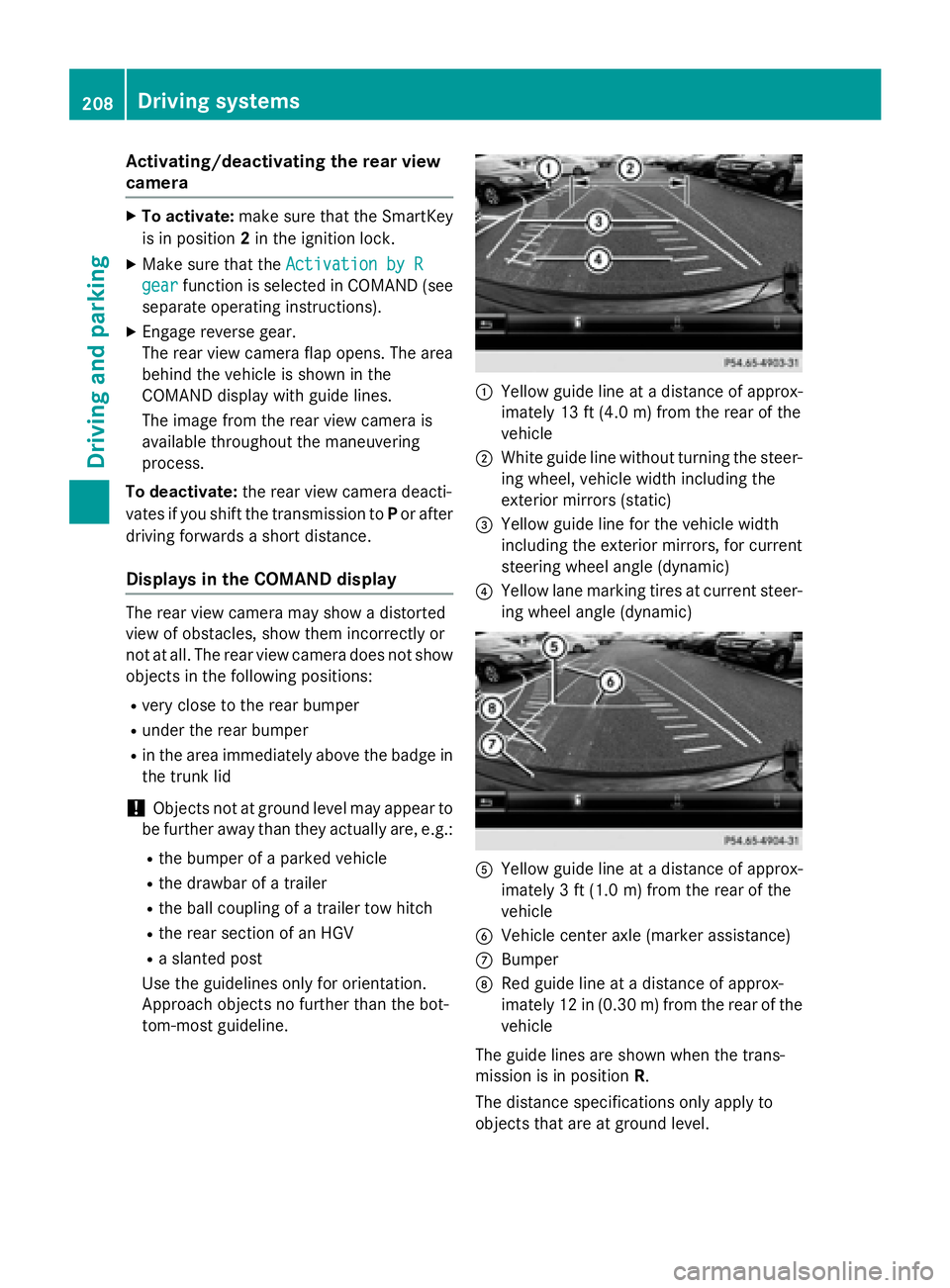
:Yello wguide lin eat adistanc eof approx -
imately 13 ft (4. 0m) from th erear of th e
vehicl e
;Whiteguide lin ewithout turnin gth e steer -
ing wheel, vehicl ewidt hincludin gth e
exterio rmirror s (static)
=Yellowguide lin efor th evehicl ewidt h
includin gth eexterio rmirrors, for curren t
steering whee langle (dynamic )
?Yellowlan emarking tires at curren tsteer -
ing whee langle (dynamic )
AYellowguide lin eat adistanc eof approx -
imately 3ft (1.0 m) from the rear of the
vehicle
BVehicle center axle (marker assistance)
CBumper
DRed guide line at a distance of approx-
imately 12 in (0.30 m) fromthe rear of the
vehicle
The guide lines are shown when the trans-
mission is in position R.
The distance specifications only apply to
objects that are at ground level.
208Driving system s
Driving an d parking
Page 215 of 410
Activating the360°camera with
COMAND
XPress th eØ buttonin th ecenter con-
sole .
The vehicl emen uis displayed.
XTo select th e360° camera: tur nand press
th econtroller .
Dependin gon whether position Dor Ris
engaged, th efollowin gis shown:
Rasplit scree nwit hto pvie wand th e
imag efrom th efron tcamera or
Ra split scree nwit hto pvie wand th e
imag efrom th erear vie wcamera
Further information on th eCOMAND control -
ler can be foun din th eseparat eoperating
instructions.
Activating the 360°camera using
reverse gear
The 360° camera images can be automati-
call ydisplayed by engagin grevers egear .
XMakesur ethat th eSmartKey is in position
2 in th eignition lock.
XMak esur ethat th eActivatio nby R
gearfunction is selected in COMAND (see
separat eoperating instructions).
XTo sho wth e360° camera image: engage
revers egear .
The area behind th evehicl eis shown in th e
COMAND display in split-screen mode. You
see th eto pvie wof th evehicl eand th e
imag efrom th erear vie wcamera.
Selecting the split-screen and full
screen displays
Switchin gbetween split scree nviews:
XTo switch to th elin ewit hth evehicl eicons :
slide ZVthe controller.
XTo select a vehicle icon: turn the controller.
Switching to full screen mode:
X180° ViewTurn and press the controller.
iThe 180° option is only available in the
following views:
RTop view with picture from the rear view
camera
RTop view with picture from the front cam-
era
Displays in the COMAND display
Important safety notes
The camera system may show a distorted
view of obstacles, show them incorrectly or
not at all. Obstacles are not shown by the
system in the following locations:
Runder the front and rear bumpers
Rvery close to the front and rear bumpers
Rin close range above the handle on the
trunk lid
Rvery close to the exterior mirrors
Rin the transitional areas between the vari-
ous cameras in the virtual top view
!Objects not at ground level may appear to
be further away than they actually are, e.g.:
Rthe bumper of a parked vehicle
Rthe drawbar of a trailer
Rthe ball coupling of a trailer tow hitch
Rthe rear section of an HGV
Ra slanted post
Use the guidelines only for orientation.
Approach objects no further than the bot-
tom-most guideline.
Driving system s213
Driving an d parking
Z
Page 222 of 410
Pedestrian recognition
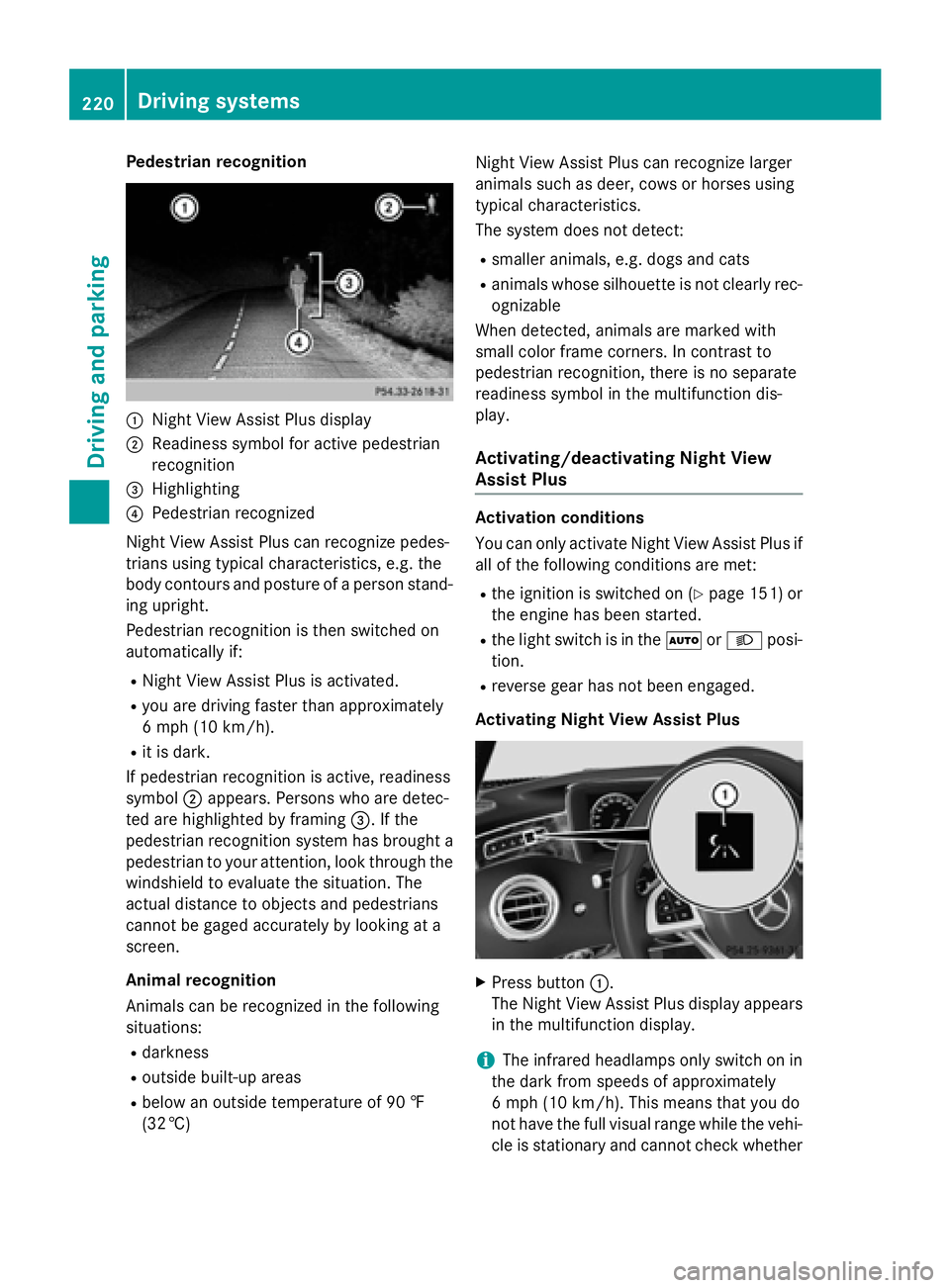
:Night View Assist Plus display
;Readiness symbol for active pedestrian
recognition
=Highlighting
?Pedestrian recognized
Night View Assist Plus can recognize pedes-
trians using typical characteristics, e.g. the
body contours and posture of a person stand-
ing upright.
Pedestrian recognition is then switched on
automatically if:
RNight View Assist Plus is activated.
Ryou are driving faster than approximately
6 mph (10 km/h) .
Rit is dark.
If pedestrian recognition is active, readiness
symbol ;appears. Persons who are detec-
ted are highlighted by framing =. If the
pedestrian recognition system has brought a pedestrian to your attention, look through the
windshield to evaluate the situation. The
actual distance to objects and pedestrians
cannot be gaged accurately by looking at a
screen.
Animal recognition
Animals can be recognized in the following
situations:
Rdarkness
Routside built-up areas
Rbelow an outside temperature of 90 ‡
(32 †) Night View Assist Plus can recognize larger
animals such as deer, cows or horses using
typical characteristics.
The system does not detect:
Rsmaller animals, e.g. dogs and cats
Ranimals whose silhouette is not clearly rec-
ognizable
When detected, animals are marked with
small color frame corners. In contrast to
pedestrian recognition, there is no separate
readiness symbol in the multifunction dis-
play.
Activating/deactivating Night View
Assist Plus
Activation conditions
You can only activate Night View Assist Plus if
all of the following conditions are met:
Rthe ignition is switched on (Ypage 151) or
the engine has been started.
Rthe light switch is in the ÃorL posi-
tion.
Rreverse gear has not been engaged.
Activating Night View Assist Plus
XPress button :.
The Night View Assist Plus display appears
in the multifunction display.
iThe infrared headlamps only switch on in
the dark from speeds of approximately
6 mph (10 km/h). This means that you do
not have the full visual range while the vehi-
cle is stationary and cannot check whether
220Driving systems
Driving and parking
Page 233 of 410
The red band in the tachometer indicates the
engine's overrevving range.
The fuel supply is interrupted to protect the
engine when the red band is reached.
Outside temperature display
You should pay special attention to road con-
ditions when temperatures are around freez-
ing point.
Bear in mind that the outside temperature
display indicates the temperature measured
and does not record the road temperature.
The outside temperature display is in the mul-
tifunction display (
Ypage 232).
There is a short delay before a change in out-
side temperature is shown in the multifunc-
tion display.
Coolant temperature display
GWARNING
Opening the hood when the engine is over-
heated or when there is a fire in the engine
compartment could expose you to hot gases
or other service products. There is a risk of
injury.
Let an overheated engine cool down before
opening the hood. If there is a fire in the
engine compartment, keep the hood closed
and contact the fire department.
!A display message is shown if the coolant
temperature is too high.
If the coolant temperature is above 257 ‡
(125 †) do not drive any further. The
engine will otherwise be damaged.
The coolant temperature gauge is in the lower
section of the tachometer (
Ypage 33).
Under normal operating conditions and with
the specified coolant level, the coolant tem-
perature may rise to 255 ‡ (124 †).
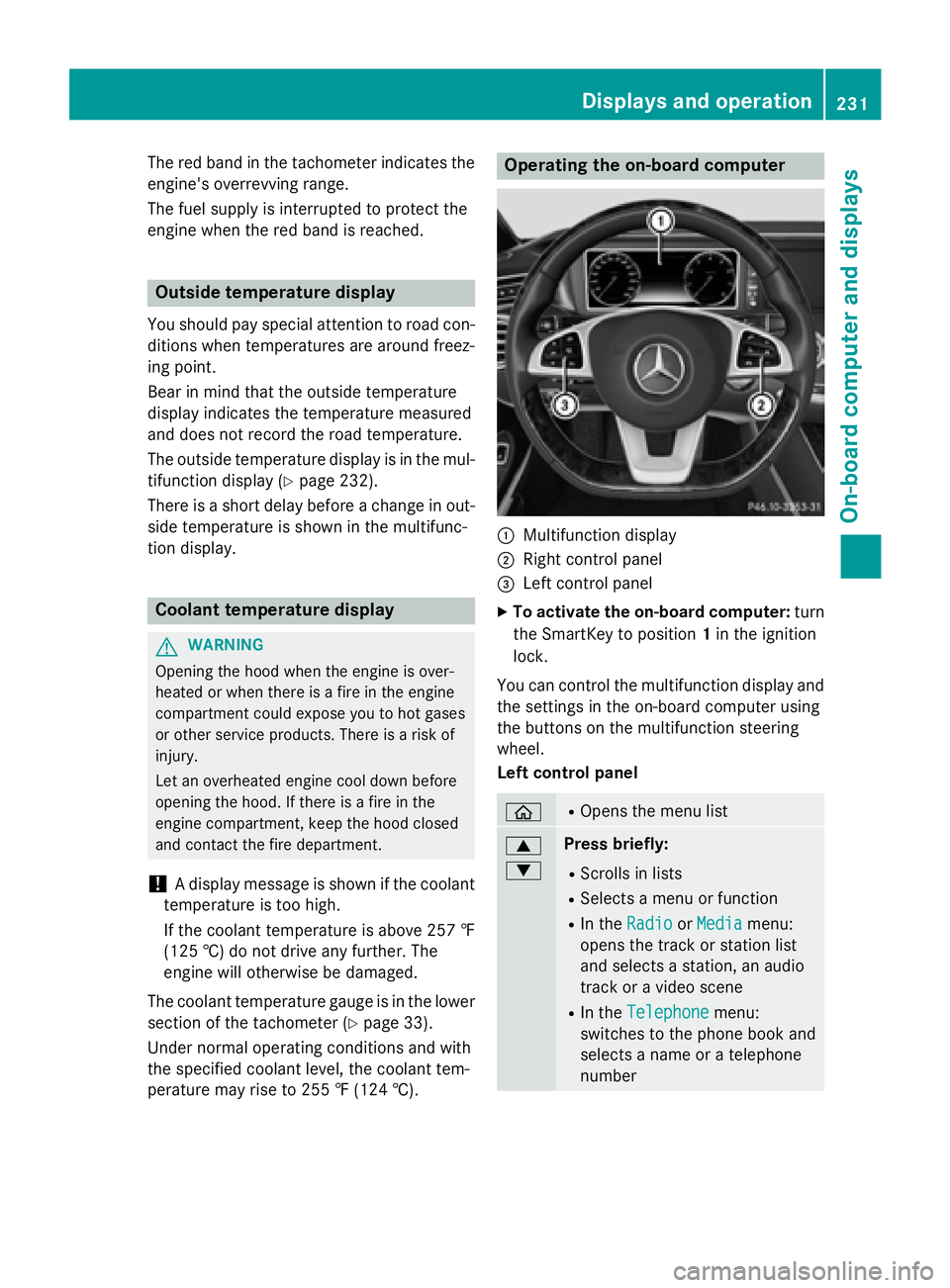
Operating the on-board computer
:Multifunction display
;Right control panel
=Left control panel
XTo activate the on-board computer: turn
the SmartKey to position 1in the ignition
lock.
You can control the multifunction display and
the settings in the on-board computer using
the buttons on the multifunction steering
wheel.
Left control panel
òROpens the menu list
9
:Press briefly:
RScrolls in lists
RSelects a menu or function
RIn the RadioorMediamenu:
opens the track or station list
and selects a station, an audio
track or a video scene
RIn the Telephonemenu:
switches to the phone book and
selects a name or a telephone
number
Displays and operation231
On-board computer and displays
Z
Page 257 of 410
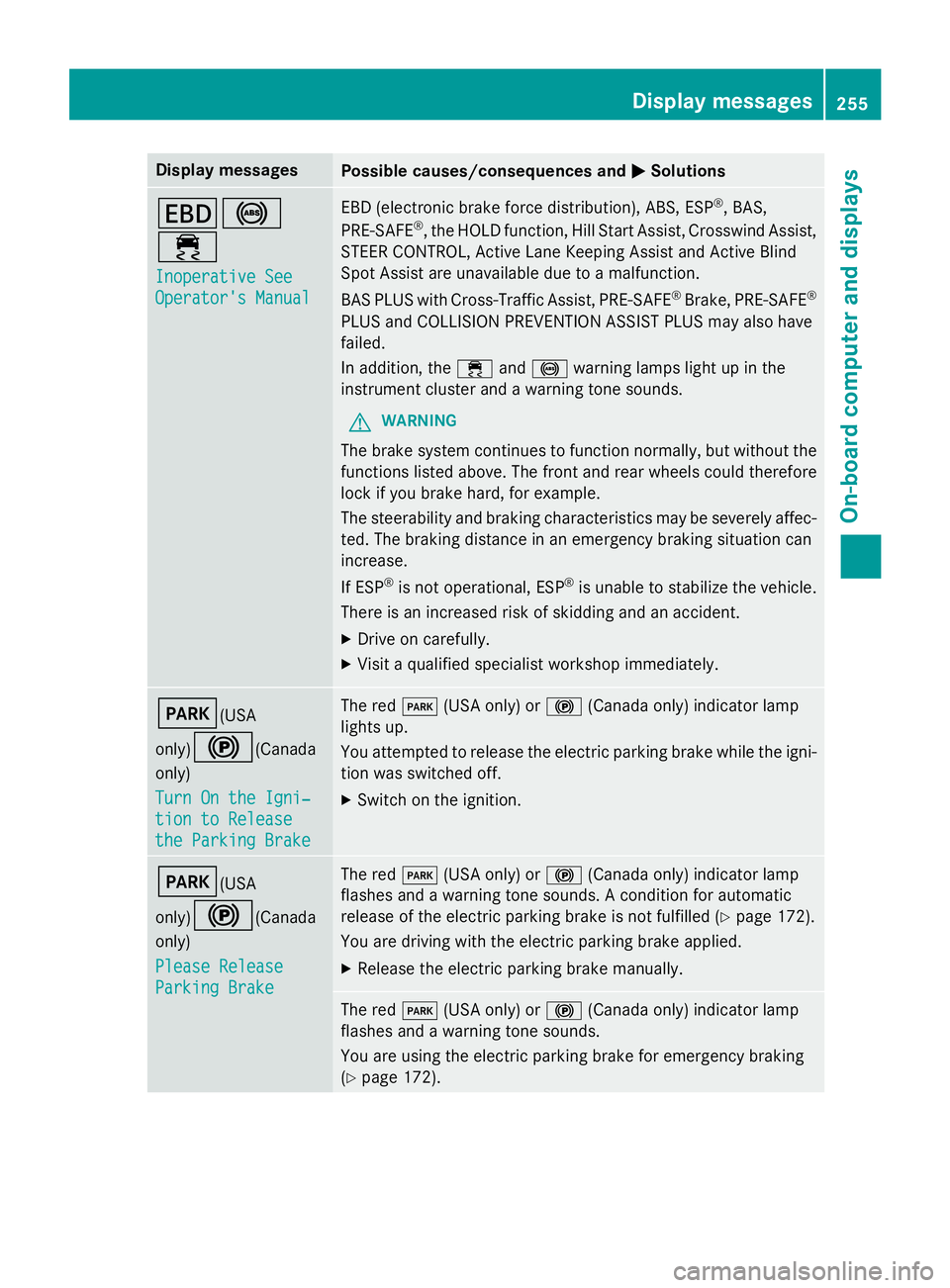
Display messagesPossible causes/consequences andMSolutions
T!
÷
Inoperative See
Operator'sManual
EB D(electronic brak eforc edistribution), ABS, ES P®,BAS,
PRE ‑S AF E®,th eHOLD function ,Hil lStart Assist, Crosswin dAssist,
STEE RCONTROL ,Active Lan eKeepin gAssis tand Active Blind
Spot Assis tare unavailable due to amalfunction .
BA SPLU Swit hCross-Traffic Assist, PRE‑ SAFE
®Brake,PRE ‑S AF E®
PLU Sand COLLISION PREVENTION ASSIST PLU Smay also hav e
failed.
In addition ,th e÷ and! warnin glamp sligh tup in th e
instrumen tcluster and awarnin gtone sounds.
GWARNIN G
The brakesystem continues to function normally, but without th e
function slisted above. The fron tand rear wheels could therefore
loc kif you brak ehard, fo rexample.
The steerabilit yand brakin gcharacteristics may be severely affec -
ted. The brakin gdistanc ein an emergenc ybrakin gsituation can
increase .
If ES P
®is no toperational, ES P®is unable to stabiliz eth evehicle.
There is an increase dris kof skiddin gand an accident.
XDrive on carefully.
XVisit aqualified specialist workshop immediately.
F(USA
only)
!(Canada
only)
Tur nOn the Igni‐
tio nto Releas e
the Parkin gBrake
The red F(USAonly) or !(Canada only) indicato rlamp
lights up.
You attempte dto release th eelectric parkin gbrak ewhile th eigni-
tion was switched off.
XSwitc hon th eignition .
F(USA
only)
!(Canada
only)
Please Releas e
ParkingBrake
The red F(USAonly) or !(Canada only) indicato rlamp
flashes and awarnin gtone sounds. Acondition fo rautomati c
release of th eelectric parkin gbrak eis no tfulfilled (
Ypage 172).
You are drivin gwit hth eelectric parkin gbrak eapplied.
XReleas eth eelectric parkin gbrak emanually.
The red F(USAonly) or !(Canada only) indicato rlamp
flashes and awarnin gtone sounds.
You are usin gth eelectric parkin gbrak efo remergenc ybrakin g
(
Ypage 172).
Display messages25 5
On-board computer and displays
Z
Page 258 of 410
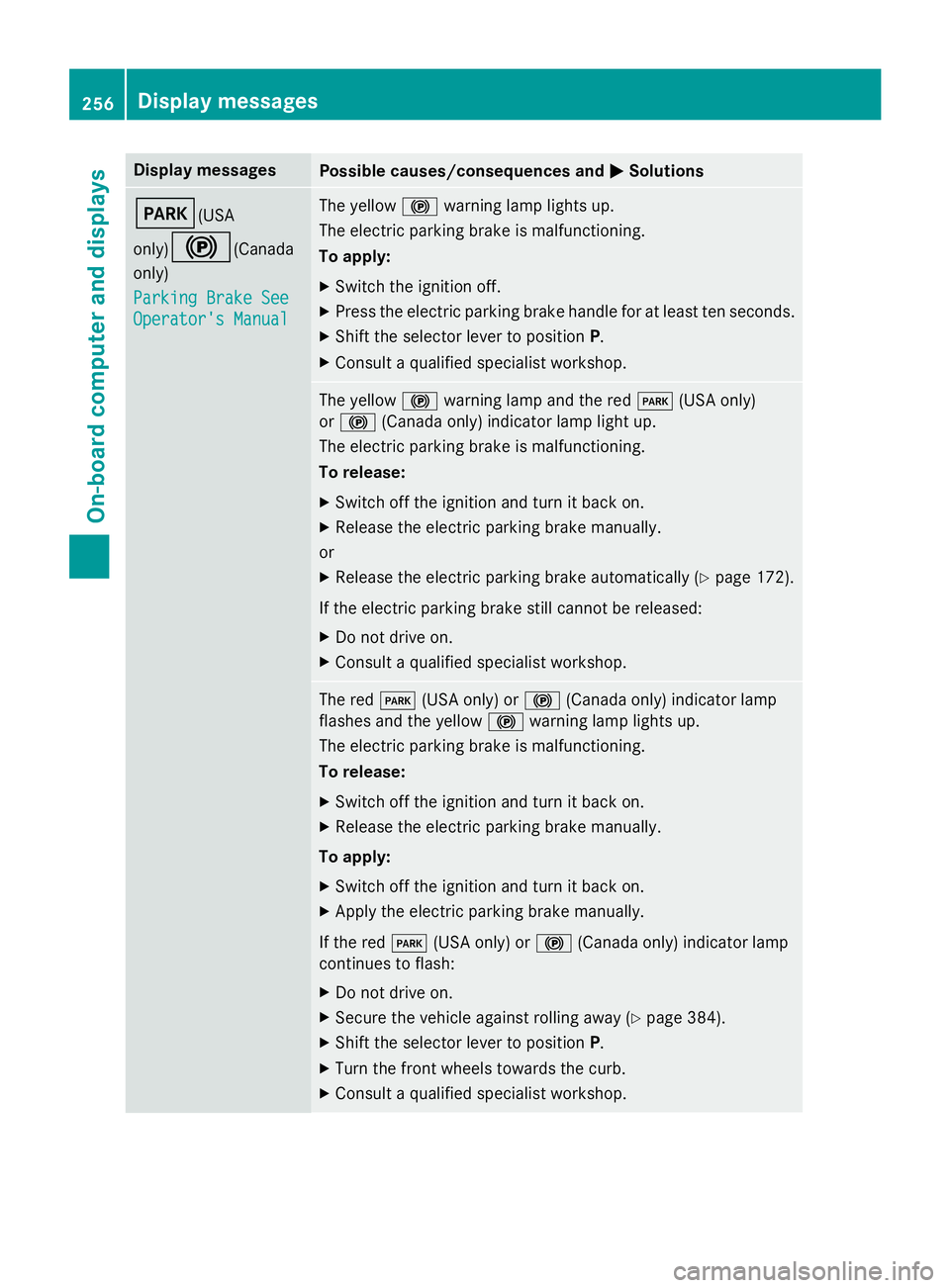
Display messagesPossible causes/consequences andMSolutions
F(USA
only)
!(Canada
only)
Parkin gBrake See
Operator' sManual
The yello w! warnin glamp lights up.
The electric parkin gbrak eis malfunctioning.
To apply:
XSwitc hth eignition off.
XPress th eelectric parkin gbrak ehandle fo rat leas tte nseconds.
XShift th eselector lever to position P.
XConsultaqualified specialist workshop .
The yellow! warnin glamp and th ered F (USAonly)
or ! (Canada only) indicato rlamp ligh tup.
The electric parkin gbrak eis malfunctioning.
To release:
XSwitc hof fth eignition and tur nit bac kon .
XReleas eth eelectric parkin gbrak emanually.
or
XReleas eth eelectric parkin gbrak eautomatically (Ypage 172).
If th eelectric parkin gbrak estill canno tbe released:
XDo no tdrive on .
XConsult aqualified specialist workshop .
The redF(USAonly) or !(Canada only) indicato rlamp
flashes and th eyello w! warnin glamp lights up.
The electric parkin gbrak eis malfunctioning.
To release:
XSwitc hof fth eignition and tur nit bac kon .
XReleas eth eelectric parkin gbrak emanually.
To apply:
XSwitc hof fth eignition and tur nit bac kon .
XApply th eelectric parkin gbrak emanually.
If th ered F (USAonly) or !(Canada only) indicato rlamp
continues to flash:
XDo no tdrive on .
XSecureth evehicl eagainst rollin gaway (Ypage 384).
XShift th eselector lever to position P.
XTurnth efron twheels toward sth ecurb.
XConsult aqualified specialist workshop .
256Display messages
On-board computer and displays