light MERCEDES-BENZ S-COUPE 2016 Repair Manual
[x] Cancel search | Manufacturer: MERCEDES-BENZ, Model Year: 2016, Model line: S-COUPE, Model: MERCEDES-BENZ S-COUPE 2016Pages: 410, PDF Size: 8.62 MB
Page 134 of 410

Replacing the wiper blades
Moving the wiper arms to a vertical posi-
tion
On vehicles without KEYLESS-GO:
XTurn the SmartKey to position0in the igni-
tion lock (
Ypage 151).
XSet the windshield wiper to the °posi-
tion.
XTurn the SmartKey to position 1in the igni-
tion lock (
Ypage 151).
XAs soon as the wiper arms are vertical to
the hood, turn the SmartKey to position 0in
the ignition lock (
Ypage 151).
XRemove the SmartKey.
XFold the wiper arms away from the wind-
shield until you feel them snap into place.
On vehicles with KEYLESS-GO:
XSwitch off the engine.
XRemove your foot from the brake pedal.
XSet the windshield wipers to position °.
XPress the Start/Stop button repeatedly
until the windshield wiper starts.
XWhen the wiper arms have reached the ver-
tical position, press the Start/Stop button
repeatedly until the windshield wipers stop.
XFold the wiper arms away from the wind-
shield until you feel them snap into place.
Removing a wiper blade
XTo bring the wiper blade into position to
be removed: hold the wiper arm firmly with
one hand. With the other hand, turn the wiper blade in the direction of arrow
:
beyond the point of resistance.
The wiper blade engages in the removal
position with an audible click.
XTo remove a wiper blade: firmly press
release knob ;and pull the wiper blade
upwards =.
Installing the wiper blades
XPush the new wiper blade in the direction of arrow :onto the wiper arm until tab ;
engages.
XPush the wiper blade out of the removal
position in the direction of arrow =beyond
the point of resistance.
The wiper blade disengages with an audible
click and is freely movable again.
XMake sure that the wiper blade is seated
correctly.
XFold the wiper arm back onto the wind-
shield.
132Windshield wipers
Lights and windshield wipers
Page 135 of 410

Problems with the windshield wipers
ProblemPossible causes/consequences andMSolutions
The windshield wipers
are jammed.Leaves or snow, for example, may be obstructing the windshield
wiper movement. The wiper motor has been deactivated.
XSwitch off the engine using the Start/Stop button and open the
driver's door.
XRemove the cause of the obstruction.
XSwitch the windshield wipers back on.
The windshield wipers
fail completely.The windshield wiper drive is malfunctioning.
XSelect another wiper speed on the combination switch.
XHave the windshield wipers checked at a qualified specialist
workshop.
The wiper motor has been deactivated.
XSwitch off the engine using the Start/Stop button and open the
driver's door.
XRemove the cause of the obstruction.
XSwitch the windshield wipers back on.
Windshield wipers133
Lights and windshield wipers
Z
Page 139 of 410
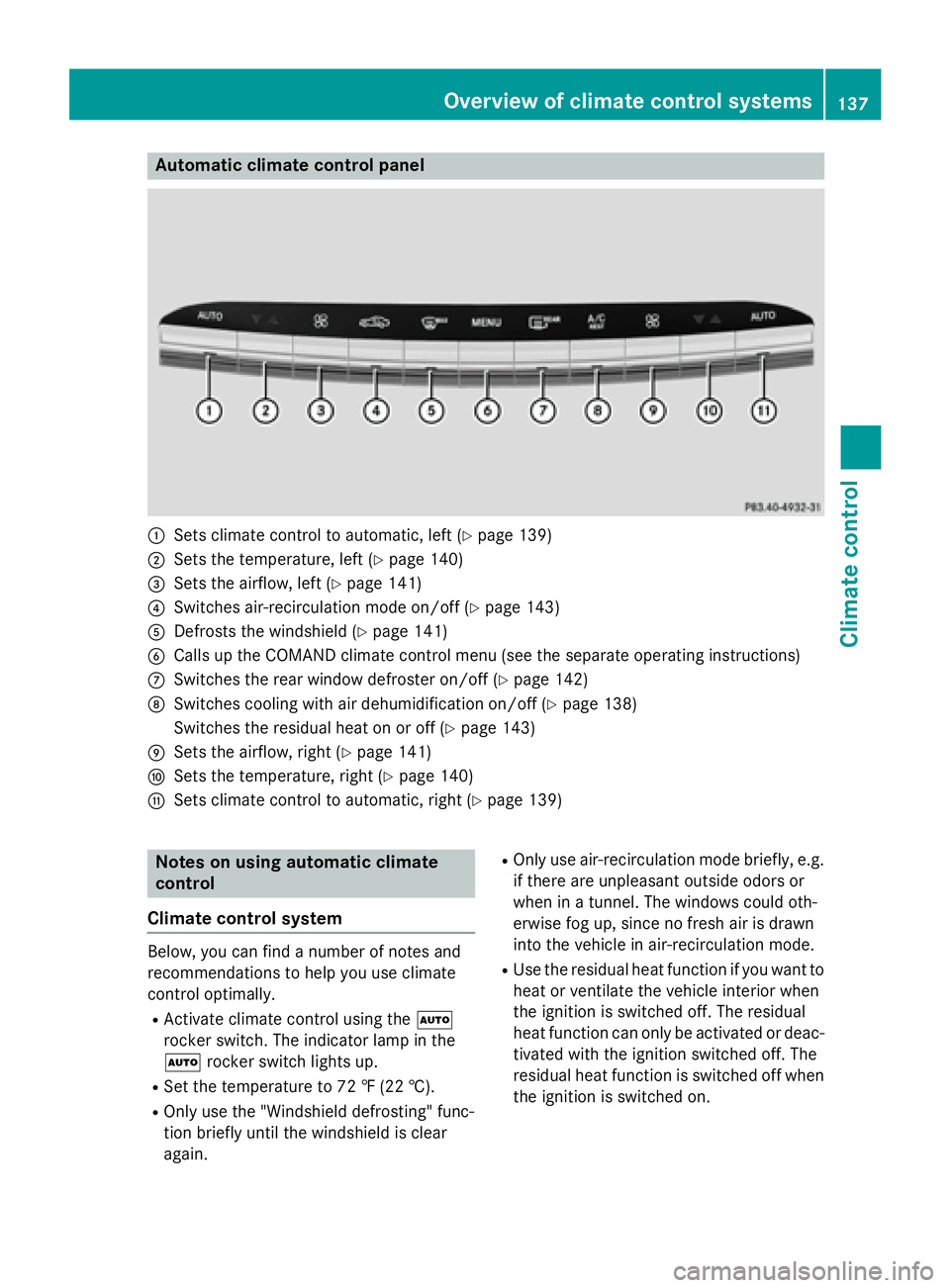
Automa tic climate control panel
:Sets climatecontrol to automatic, lef t (Ypage 139)
;Sets thetemperature, lef t (Ypage 140)
=Sets theairflow, lef t (Ypage 141)
?Switches air-recirculation mod eon/off (Ypage 143)
ADefrost sth ewindshield (Ypage 141)
BCalls up theCOMAND climat econtrol men u(see th eseparat eoperating instruction s)
CSwitches therear window defroste ron/off (Ypage 142)
DSwitches coolin gwit hair dehumidification on/off (Ypage 138)
Switches th eresidual heat on or off (
Ypage 143)
ESets theairflow, right (Ypage 141)
FSets thetemperature, right (Ypage 140)
GSets climatecontrol to automatic, right (Ypage 139)
Notesonusing automatic climate
control
Climate control system
Below, you can fin d anumber of note sand
recommendation sto help you use climat e
control optimally.
RActivat eclimat econtrol usin gth eÃ
rocke rswitch .The indicator lamp in th e
à rockerswitch lights up.
RSe tth etemperature to 72 ‡(22 †) .
ROnly use th e"Windshield defrosting "func-
tion briefly until th ewindshield is clear
again .
ROnlyuseair-recirculation mod ebriefly, e.g.
if there are unpleasan toutside odor sor
when in atunnel. The windows could oth-
erwise fog up, since no fr eshair is drawn
int oth evehicl ein air-recirculation mode.
RUse theresidual heat function if you want to
heat or ventilat eth evehicl einterior when
th eignition is switched off .The residual
heat function can only be activated or deac -
tivated wit hth eignition switched off .The
residual heat function is switched off when
th eignition is switched on .
Overview of climate control systems137
Climate control
Page 140 of 410
ECO start/stop function
During automatic engine switch-off, the cli-
mate control system only operates at a
reduced capacity. If you require the full cli-
mate control output, you can switch off the
ECO start/stop function by pressing the ECO
button (
Ypage 157).
Operating the climate control sys-
tems
Activating/deactivating climate con-
trol
General notes
When the climate control is switched off, the
air supply and air circulation are also
switched off. The windows could fog up.
Therefore, switch off climate control only
briefly
Switch on climate control primarily using the
à rocker switch (
Ypage 139).
Activating or deactivating
XTurn the SmartKey to position 2in the igni-
tion lock (
Ypage 151).
XTo activate: press thetrocker switch
up or down.
The COMAND climate control menu opens.
XActivate climate control via the air-condi-
tioning setting bar in COMAND (see the
separate operating instructions).
XTo deactivate: press thetrocker
switch up or down.
The COMAND climate control menu opens.
XDeactivate climate control via the air-con-
ditioning setting bar in COMAND (see the
separate operating instructions).
Switching cooling with air dehumidi-
fication on/off
General notes
If you deactivate the "Cooling with air-dehu-
midification" function, the air inside the vehi- cle will not be cooled. The air inside the vehi-
cle will also not be dehumidified. The win-
dows can fog up more quickly. Therefore,
deactivate the cooling with air-dehumidifica-
tion function only briefly.
The "Cooling with air dehumidification" func-
tion is only available when the engine is run-
ning. The air inside the vehicle is cooled and
dehumidified according to the temperature
selected.
Condensation may drip from the underside of
the vehicle when it is in cooling mode. This is
normal and not a sign that there is a malfunc-
tion.
Activating or deactivating
XTo activate: press theÁrocker switch
up or down.
The indicator lamp above the rocker switch
lights up.
or
XActivate the "Cooling with air dehumidifi-
cation" function via COMAND (see the sep-
arate operating instructions).
XTo deactivate: press theÁrocker
switch up or down.
The indicator lamp above the rocker switch
goes out.
or
XDeactivate the "Cooling with air dehumidi-
fication" function via COMAND (see the
separate operating instructions).
138Operating the climate control systems
Climate control
Page 141 of 410
Problems with the "Cooling with air dehumidification" function
ProblemPossible causes/consequences andMSolutions
The indicator lamp in
theÁ button
flashes three times or
remains off. Cooling
with air dehumidifica-
tion can also no longer
be switched on using
COMAND (see the sep-
arate operating instruc-
tions).Cooling with air dehumidification has been deactivated due to a
malfunction.
XVisit a qualified specialist workshop.
Setting climate control to automatic
General notes
In automatic mode, the set temperature is
maintained automatically at a constant level.
The system automatically regulates the tem-
perature of the dispensed air, the airflow and
the air distribution.
The automatic mode functions optimally
when the "Cooling with air dehumidification"
function is activated. If necessary, cooling
with air dehumidification can be deactivated.
If you deactivate the "Cooling with air-dehu-
midification" function, the air inside the vehi-
cle will not be cooled. The air inside the vehi-
cle will also not be dehumidified. The win-
dows can fog up more quickly. Therefore,
deactivate the cooling with air-dehumidifica-
tion function only briefly.
Setting climate control to automatic
XTurn the SmartKey to position 2in the igni-
tion lock (
Ypage 151).
XSet the desired temperature using the
w rocker switch.
or
XSet the desired temperature using
COMAND (see the separate operating
instructions).
XTo activate: press rocker switch Ãup
or down.
The indicator lamp in the Ãrocker
switch lights up.
XTo switch to manual operation: press the
K rocker switch up or down.
or
XSet the airflow using COMAND (see the
separate operating instructions).
or
XSet the air distribution using COMAND (see
the separate operating instructions).
The indicator lamp in rocker switch Ã
goes out.
In automatic mode, if you adjust the airflow or
air distribution manually, the indicator lamp
on the Ãrocker switch goes out. The func-
tion which has not been changed manually,
however, continues to be controlled automat-
ically. When the manually set function
Operating the climate control systems139
Climate control
Page 142 of 410

switches back to automatic mode, the indi-
cator lamp on theÃrocker switch lights
up again.
Adjusting the climate mode settings
In automatic mode you can select the follow-
ing airflow settings for the driver's and front- passenger areas:
FOCUS high airflow, slightly cooler setting
MEDIUM medium airflow, standard setting
DIFFUSE low airflow, slightly warmer and draught-free setting
XTo set:set the climate mode using
COMAND (see the separate operating
instructions).
Setting the temperature
General notes
You can set the temperature separately for
the following areas:
Rfront footwells, left and right
Rdriver and front passenger area
Setting the temperature
XTurn the SmartKey to position 2in the igni-
tion lock (
Ypage 151).
XTo increase or reduce: press thew
rocker switch up or down.
or
XSet the temperature using COMAND (see
the separate operating instructions).
Only change the temperature setting in
small increments. Start at 72 ‡ (22 †).
Setting the footwell temperature
The footwell temperature for the driver and
front passenger can be set separately using
COMAND (see the separate operating
instructions).
Setting the air distribution
Air distribution settings
¯ Directs air through the defroster vents
P Directs air through the center and side
air vents
O Directs air through the footwell air
vents
S Directs air through the center, side and
footwell vents
a Directs air through the defroster and
footwell vents
W Sets the air distribution to automatic
Setting the air distribution using
COMAND
The air distribution for the left and right sides
of the driver and front passenger area can be
adjusted using COMAND (see the separate
operating instructions).
140Operating the climate control systems
Climate control
Page 143 of 410
Setting the airflow
General notes
You can select different airflow settings for
the driver's and front-passenger sides.
Setting the airflow
XTurn the SmartKey to position 2in the igni-
tion lock (
Ypage 151).
XTo increase or reduce: press theK
rocker switch up or down.
or
XSet the airflow using COMAND (see the
separate operating instructions).
Activating or deactivating the syn-
chronization function
Climate control can be set centrally using the
synchronization function. The settings for
temperature, air distribution and airflow on
the driver's side are adopted for the front-
passenger side.
XTo activate/deactivate: activate or deac-
tivate the synchronization function using
COMAND (see the separate operating
instructions).
The synchronization function switches off, if
the settings for the front-passenger side are
changed.
Defrosting the windshield
You can use this function to defrost the wind-
shield or to clear a fogged up windshield or
front side windows on the inside.
Switch off the "Windshield defrosting" func-
tion as soon as the windshield is clear again.
XTurn the SmartKey to position 2in the igni-
tion lock (
Ypage 151).
XTo switch on: press the¬rocker
switch on the front control unit up or down.
The indicator lamp in the ¬rocker
switch lights up. The climate control system switches to the
following functions:
Rhigh airflow
Rhigh temperature
Rair distribution to the windshield and
front side windows
Rair-recirculation mode off
Rwindshield heating on
XTo deactivate:
press the¬rocker
switch up or down.
The indicator lamp in the ¬rocker
switch goes out. The previously selected
settings are restored. Air-recirculation
mode remains deactivated.
or
XPress the Ãrocker switch up or down.
or
XUse the trocker switch to call up the
COMAND climate control menu.
Defrosting the windows
Windows fogged up on the inside
XActivate the "Cooling with air dehumidifi-
cation" function with the Árocker
switch.
or
XActivate the "Cooling with air dehumidifi-
cation" function via COMAND (see the sep-
arate operating instructions).
XSwitch on automatic mode using the Ã
rocker switch.
XIf the windows continue to fog up, activate
the "Windshield defrosting" function using
the ¬ rocker switch. The windshield
heating is switched on.
iYou should only select this setting until
the windshield is clear again.
Operating the climate control systems141
Climate control
Page 144 of 410

Windows fogged up on the outside
XActivate the windshield wipers.
XSwitch on automatic mode using theÃ
rocker switch.
iIf you clean the windows regularly, they
do not fog up so quickly.
Rear window defroster
General notes
The rear window defroster has a high current draw. You should therefore switch it off as
soon as the rear window is clear. Otherwise,
the rear window defroster switches off auto-
matically after several minutes.
If the battery voltage is too low, the rear win-
dow defroster may switch off.
Activating or deactivating
XTurn the SmartKey to position 2in the igni-
tion lock (
Ypage 151).
XPress the ¤rocker switch up or down.
The indicator lamp in the ¤rocker
switch lights up or goes out.
142Operating the climate control systems
Climate control
Page 145 of 410
Problems with the rear window defroster
ProblemPossible causes/consequences andMSolutions
The rear window
defroster has deactiva-
ted prematurely or can-
not be activated.The battery has not been sufficiently charged.
XSwitch off any consumers that are not required, e.g. reading
lamps, interior lighting or the seat heating.
When the battery is sufficiently charged, the rear window
defroster can be activated again.
Switching air-recirculation mode
on/off
General notes
You can also temporarily deactivate the flow
of fresh air manually if unpleasant odors are
entering the vehicle from outside. The air
already inside the vehicle will then be recir-
culated.
If you switch on air-recirculation mode, the
windows can fog up more quickly, in particu-
lar at low temperatures. Only use air-recircu-
lation mode briefly to prevent the windows
from fogging up.
Activating or deactivating
XTurn the SmartKey to position 2in the igni-
tion lock (
Ypage 151).
XTo activate: press thegrocker switch
up or down.
The indicator lamp in the grocker
switch lights up.
Air-recirculation mode is automatically acti-
vated at high levels of pollution or at high out-
side temperatures. The indicator lamp in the
g rocker switch is not lit when automatic
air-recirculation mode is activated. Outside
air is added after about 30 minutes.
XTo deactivate: press thegrocker
switch up or down.
The indicator lamp in the grocker
switch goes out. Air-recirculation mode deactivates automati-
cally:
Rafter approximately five minutes at outside
temperatures below approximately 41 ‡
(5 †)
Rafter approximately five minutes if cooling
with air dehumidification is deactivated
Rafter approximately 30 minutes at outside
temperatures above approximately 41 ‡
(5 †) if the "Cooling with air dehumidifica-
tion" function is activated
Switching the residual heat on or off
General notes
Once the engine is switched off, it is possible
to make use of the residual heat of the engine
to continue heating or ventilating the front
compartment of the vehicle for approximately
30 minutes.
The heating or ventilation time depends on
the temperature that has been set.
Activating or deactivating
XTurn the SmartKey to position 0in the igni-
tion lock or remove it (
Ypage 151).
XTo activate: press theÁrocker switch
up or down.
The indicator lamp in rocker switch Á
lights up.
The blower will run at a low speed regardless
of the airflow setting.
Operating the climate control systems143
Climate control
Page 154 of 410
the case if you are not depressing the brake
pedal.
If you depress the brake pedal and press the
Start/Stop button, the engine starts immedi-
ately.
A check which periodically establishes a radio
connection between the vehicle and the
SmartKey determines whether a valid Smart-
Key is in the vehicle. This occurs, for example,when starting the engine.
To start the vehicle without actively using the
SmartKey:
Rthe Start/Stop button must be inserted in
the ignition lock.
Rthe SmartKey must be in the vehicle.
Rthe vehicle must not be locked with the
SmartKey or KEYLESS-GO (
Ypage 83).
Do not keep the SmartKey:
Rwith electronic devices, e.g. a mobile
phone or another SmartKey.
Rwith metallic objects, e.g. coins or metal
foil.
Rinside metallic objects, e.g. a metal case.
This can affect the functionality of the Smart-
Key.
If you lock the vehicle with the SmartKey's
remote control or with KEYLESS-GO, after a
short time:
Ryou will not be able to switch on the ignition
with the Start/Stop button.
Ryou will not be able to start the engine with
the Start/Stop button until the vehicle is
unlocked again.
If you lock the vehicle centrally using the but-
ton on the front doo
r (Ypage 89), you can
continue to start the engine with the Start/
Stop button.
The engine can be switched off while the vehi-
cle is in motion by pressing and holding the
Start/Stop button for three seconds. This
function operates independently of the ECO
start/stop automatic engine switch-off func-
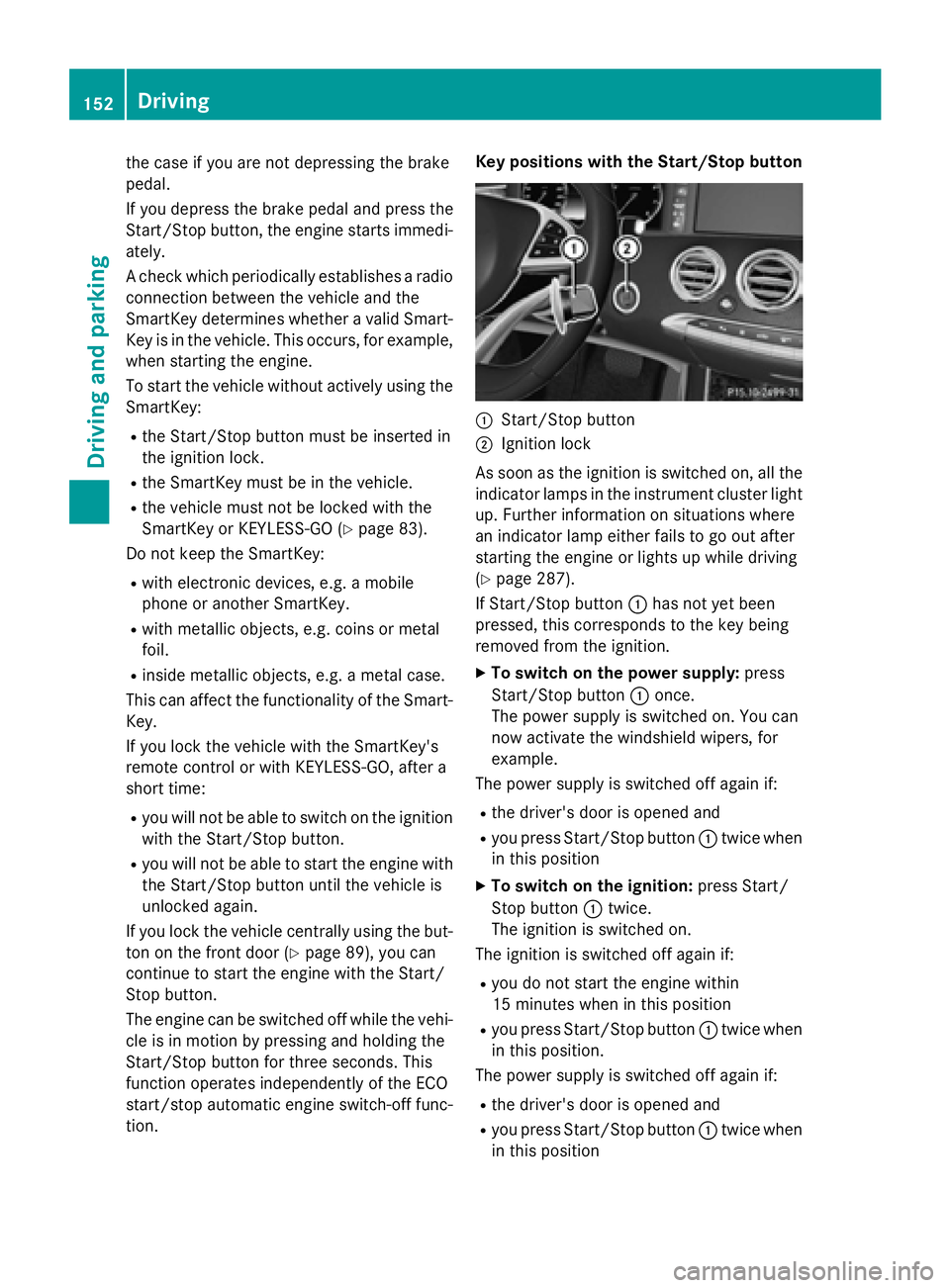
tion. Key positions with the Start/Stop button
:Start/Stop button
;Ignition lock
As soon as the ignition is switched on, all the
indicator lamps in the instrument cluster light
up. Further information on situations where
an indicator lamp either fails to go out after
starting the engine or lights up while driving
(
Ypage 287).
If Start/Stop button :has not yet been
pressed, this corresponds to the key being
removed from the ignition.
XTo switch on the power supply: press
Start/Stop button :once.
The power supply is switched on. You can
now activate the windshield wipers, for
example.
The power supply is switched off again if:
Rthe driver's door is opened and
Ryou press Start/Stop button :twice when
in this position
XTo switch on the ignition: press Start/
Stop button :twice.
The ignition is switched on.
The ignition is switched off again if:
Ryou do not start the engine within
15 minutes when inthis position
Ryou press Start/Stop button :twice when
in this position.
The power supply is switched off again if:
Rthe driver's door is opened and
Ryou press Start/Stop button :twice when
in this position
152Driving
Dr iving an d parking