light MERCEDES-BENZ S430 2002 W220 User Guide
[x] Cancel search | Manufacturer: MERCEDES-BENZ, Model Year: 2002, Model line: S430, Model: MERCEDES-BENZ S430 2002 W220Pages: 430, PDF Size: 20.81 MB
Page 38 of 430
35 Central locking system
Te ch n i c a l
data Instruments
and controlsOperationDrivingInstrument
cluster displayPractical hints Car care Index Locking and unlocking with remote control
Unlocking:
Press transmit button Œ. All turn signal lamps blink
once to indicate that the vehicle is unlocked.
The remote control can be programmed for two kinds of
unlocking modes (see below):
Selective unlocking mode –
Press transmit button Œ o nce to un lock dr iver’s d oor
and fuel filler flap.
Press transmit button Πtwice to unlock all doors,
fuel filler flap, and trunk.
Global unlocking mode –
Press transmit button Πonce to unlock all doors,
fuel filler flap, and trunk.
Notes:
If the trunk was previously locked separately, it will
remain locked, see page 51.
The presently active unlocking mode (selective or
global) can only be determined by unlocking the vehicle
with the remote control (see below for changing mode).If within 40 seconds of unlocking with the remote
control, neither door nor trunk is opened, the electronic
key is not inserted in the starter switch, or the central
locking switch is not activated, the vehicle will
automatically lock.
Locking:
Press transmit button ‹ once. All turn signal lamps
blink three times to indicate that the vehicle is locked. If
they do not blink three times, a door or trunk is not
properly closed.
Note:
If the vehicle cannot be locked or unlocked by pressing
the transmit button, then it may be necessary to change
the batteries in the electronic key (if ok, battery check
lamp in electronic key will light briefly when pressing
transmit button) or to synchronize the remote control,
see pages 371 and 373.
Choosing global or selective mode on remote control
Press and hold transmit buttons‹ andŒ
simultaneously for five seconds to reprogram the
remote control. Battery check lamp will blink two times
indicating the completed mode change.
Page 40 of 430
37 Central locking system
Te ch n i c a l
data Instruments
and controlsOperationDrivingInstrument
cluster displayPractical hints Car care Index •If the KEYLESS-GO-card is removed from the vehicle
while the engine is running, or by placing the card
in front of the center armrest (see page 198), the
message “CHIP-CARD – NOT RECOGNIZED!” will
appear repeatedly for approx. 2 seconds in the
multifunction display, see page 328.
If the message “CHIP - CARD – NOT RECOGNIZED”
is ignored for an extended of time (approx.
15 minutes), the engine could stop by itself during a
vehicle stop (e.g. traffic light). The vehicle can then
no longer be centrally locked or the engine
restarted. You must first find the card. Start the
engine again. See page 230.
•Do not forget, the engine can be started by anyone
with a KEYLESS-GO-card that is left inside the
vehicle. Leaving the chip-card behind when exiting
and locking the vehicle, the message “CHIP-CARD –
STILL IN VEHICLE” appears in the multifunction
display, see page 328.
•Opening the driver’s door with the engine shut off
and no electronic key in the starter switch, the
message “CHIP-CARD – DO NOT FORGET” appears
as a reminder, see page 328. Important!
In the case of a malfunction in the KEYLESS-GO-system,
we recommend that you carry the electronic key plus
mechanical key with you and keep them in a safe place
so that they are always handy. Never leave the electronic
key in the vehicle.
Notes:
The KEYLESS-GO-function also permits closing of
windows and sliding / pop-up roof (convenience feature),
see page 44.
With the KEYLESS-GO-card in close proximity (approx.
3 ft. [1 m]) of the vehicle, aiming a jet of water at a door
handle (e.g. when washing the vehicle) or cleaning
snow from a door could lock or unlock the vehicle
inadvertently.
To prevent a possible inadvertent lockout, the trunk lid
will open automatically if a KEYLESS-GO-card is
recognized in the area of the rear shelf or inside the
trunk.
Page 44 of 430
41 Central locking system
Te ch n i c a l
data Instruments
and controlsOperationDrivingInstrument
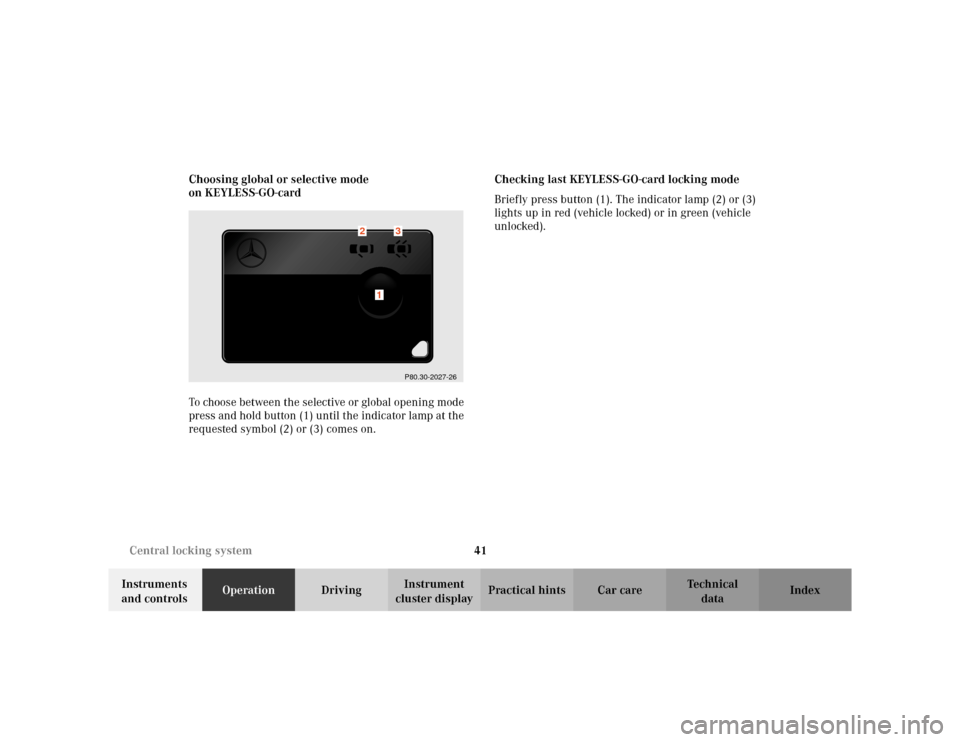
cluster displayPractical hints Car care Index Choosing global or selective mode
on KEYLESS-GO-card
To choose between the selective or global opening mode
press and hold button (1) until the indicator lamp at the
requested symbol (2) or (3) comes on.Checking last KEYLESS-GO-card locking mode
Briefly press button (1). The indicator lamp (2) or (3)
lights up in red (vehicle locked) or in green (vehicle
unlocked).
P80.30-2027-26
1
2
3
Page 47 of 430
44 Central locking system
Te ch n i c a l
data Instruments
and controlsOperationDrivingInstrument
cluster displayPractical hints Car care Index
Note:
If the windows and sliding / pop-up roof cannot be
operated automatically by pressing the transmit button
of t he r emote con trol t hen it may b e ne ces sary to change
the batteries in the electronic key (if ok, battery check
lamp in electronic key will light briefly when pressing
transmit button), or to synchronize the remote control,
see page 371 and 373.
Convenience feature
(Operation with KEYLESS-GO)
Continue to press lock button on door handle after
locking the vehicle.
The windows and sliding / pop-up roof begin to close
after approx. 1 second.
To interrupt closing procedure, release lock button. To
reverse direction (within 2 seconds after closing), pull
and hold door handle. Opening of windows starts and
continues for as long as the door handle is held but the
door not opened.Ensure that all side windows and the sliding / pop-up
roof are properly closed before leaving the vehicle.
Wa r n i n g !
Never operate the windows or sliding / pop-up roof
if there is the possibility of anyone being harmed
by the closing procedure.In case the procedure causes potential danger, the
procedure can be immediately halted by releasing
the lock button. To reverse direction of movement
pull and hold outside door handle.
Page 56 of 430
53 Central locking system
Te ch n i c a l
data Instruments
and controlsOperationDrivingInstrument
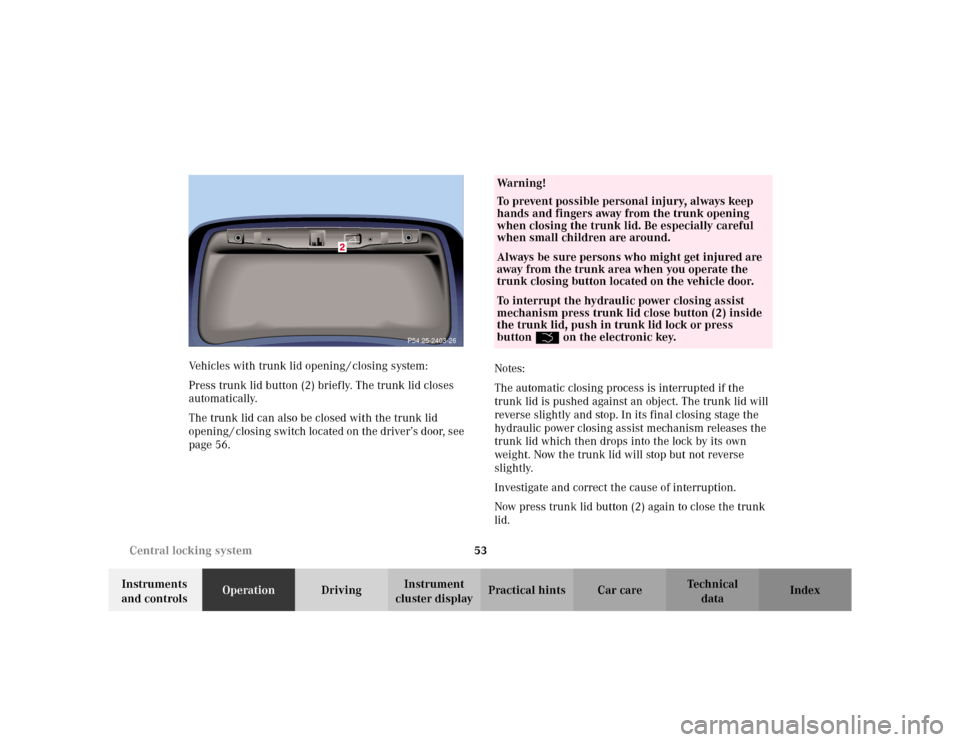
cluster displayPractical hints Car care Index Vehicles with trunk lid opening / closing system:
Press trunk lid button (2) briefly. The trunk lid closes
automatically.
The trunk lid can also be closed with the trunk lid
opening / closing switch located on the driver’s door, see
page 56.Notes:
The automatic closing process is interrupted if the
trunk lid is pushed against an object. The trunk lid will
reverse slightly and stop. In its final closing stage the
hydraulic power closing assist mechanism releases the
trunk lid which then drops into the lock by its own
weight. Now the trunk lid will stop but not reverse
slightly.
Investigate and correct the cause of interruption.
Now press trunk lid button (2) again to close the trunk
lid.
P54.25-2403-26
Wa r n i n g !
To prevent possible personal injury, always keep
hands and fingers away from the trunk opening
when closing the trunk lid. Be especially careful
when small children are around.Always be sure persons who might get injured are
away from the trunk area when you operate the
trunk closing button located on the vehicle door.To interrupt the hydraulic power closing assist
mechanism press trunk lid close button (2) inside
the trunk lid, push in trunk lid lock or press
buttonŠ on the electronic key.
Page 60 of 430
57 Central locking system
Te ch n i c a l
data Instruments
and controlsOperationDrivingInstrument
cluster displayPractical hints Car care Index Notes:
The automatic closing process is interrupted, if the
trunk lid is pushed against an object. The trunk lid will
reverse slightly and stop. In its final closing stage the
hydraulic power closing assist mechanism releases the
trunk lid which then drops into the lock by its own
weight. Now the trunk lid will stop but not reverse
slightly.
Investigate and correct the cause of interruption.
Now press trunk lid opening/closing switch again to
close the trunk lid.
In case of a malfunction the trunk lid can be opened and
closed manually.
To open, unlock trunk lid with the mechanical key and
open lid by hand, see page 51.
To close, lower trunk lid with hands placed flat on trunk
lid. Please remember to keep your fingers out of the
space between the lid and the vehicle.The trunk can also be opened by using the remote
control. PressŠ button.
The trunk lid cannot be opened by the switch or the
remote control when previously locked separately with
the mechanical key. To open, see page 51.
The trunk lid cannot be opened with the trunk lid
opening/closing switch when the vehicle was
previously locked with the central locking switch. To
unlock vehicle with the central locking switch, see
page 48.
Ve h i c l e s w i t h K E Y L E S S - G O :
To prevent a possible inadvertent lockout, the trunk lid
will open automatically if a KEYLESS-GO-card is
recognized in the area of rear shelf or inside the trunk.
Page 68 of 430
65 Seats
Te ch n i c a l
data Instruments
and controlsOperationDrivingInstrument
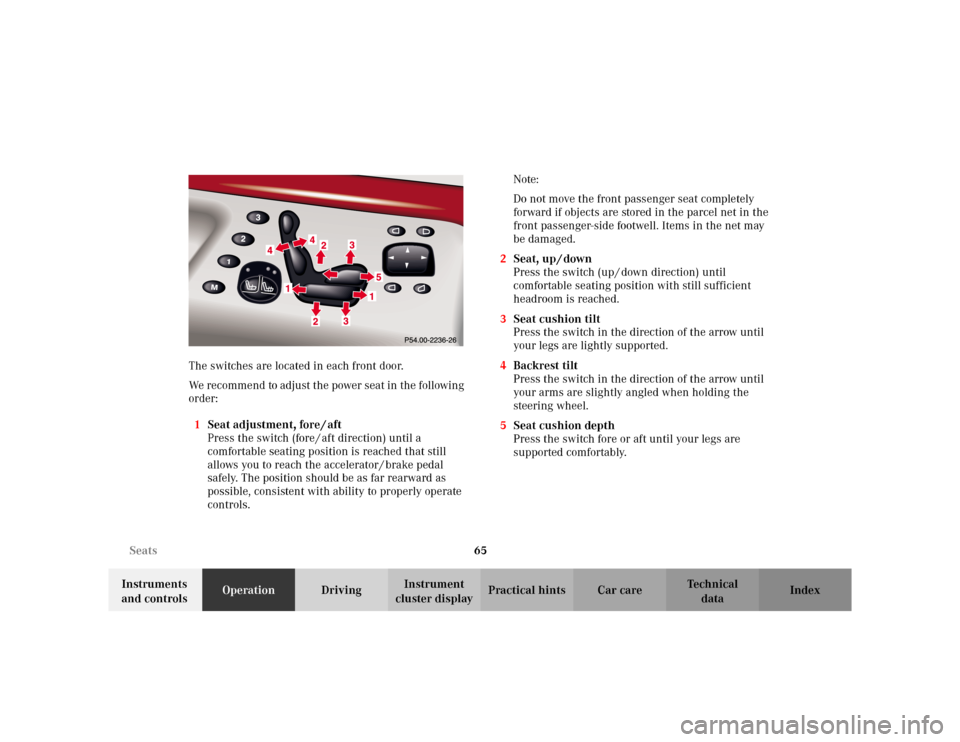
cluster displayPractical hints Car care Index The switches are located in each front door.
We recommend to adjust the power seat in the following
order:
1Seat adjustment, fore / aft
Press the switch (fore / aft direction) until a
comfortable seating position is reached that still
allows you to reach the accelerator / brake pedal
safely. The position should be as far rearward as
possible, consistent with ability to properly operate
controls.Note:
Do not move the front passenger seat completely
forward if objects are stored in the parcel net in the
front passenger-side footwell. Items in the net may
be damaged.
2Seat, up / down
Press the switch (up / down direction) until
comfortable seating position with still sufficient
headroom is reached.
3Seat cushion tilt
Press the switch in the direction of the arrow until
your legs are lightly supported.
4Backrest tilt
Press the switch in the direction of the arrow until
your arms are slightly angled when holding the
steering wheel.
5Seat cushion depth
Press the switch fore or aft until your legs are
supported comfortably.
Page 74 of 430
71 Seats
Te ch n i c a l
data Instruments
and controlsOperationDrivingInstrument
cluster displayPractical hints Car care Index 4Massage function(PULSE)
The multicontour backrest is equipped with a
massage function to help prevent fatigue during
longer journeys.
The PULSE function inflates and deflates the air
cushions in the backrest rhythmically.
An indicator lamp on the switch lights up when the
PULSE function is switched on. The PULSE function
switches off automatically after approximately
5minutes.
Note:
If the top cushion is inflated, only the middle air
cushion is inflated and deflated.Seat heater
The seat heaters can be switched on with the electronic
key in starter switch positions 1 or 2.
The buttons are located on each door.
Note:
When in operation, the seat heater consumes a large
amount of electrical power. It is not advisable to use the
seat heater longer than necessary.
The seat heaters may automatically switch off if too
many power consumers are switched on at the same
time or if the battery charge is low. In this case, one or
both indicator lamps will blink.
The seat heaters switch back on again automatically as
soon as sufficient voltage is available.
If the blinking of the indicator lamps is distracting to
you, the seat heaters can be switched off.
Page 75 of 430
72 Seats
Te ch n i c a l
data Instruments
and controlsOperationDrivingInstrument
cluster displayPractical hints Car care Index
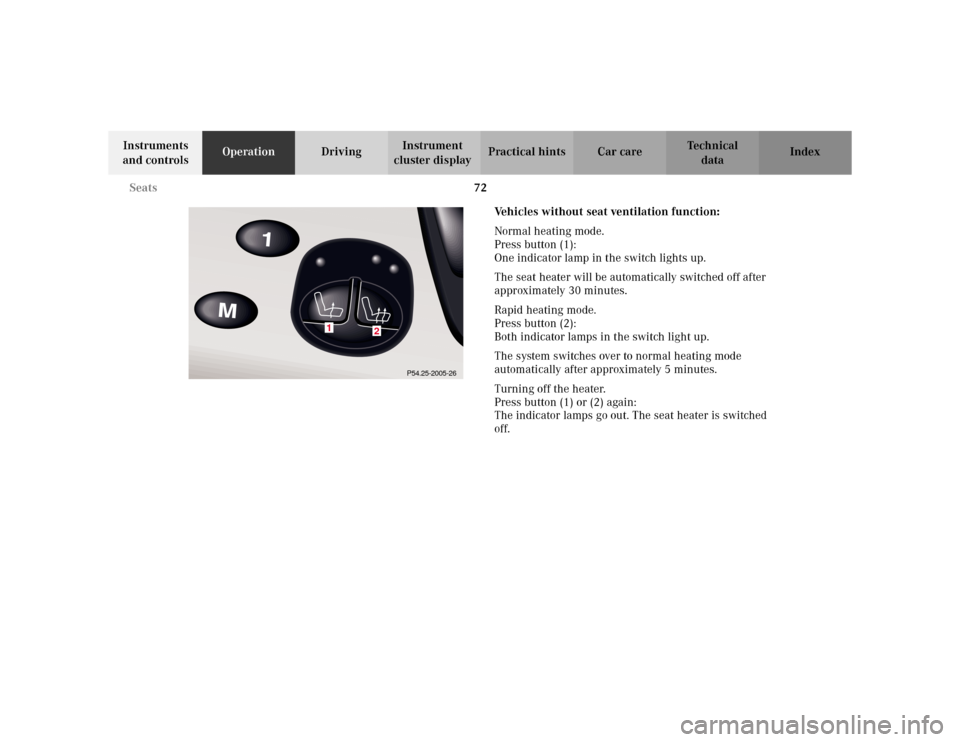
Vehicles without seat ventilation function:
Normal heating mode.
Press button (1):
One indicator lamp in the switch lights up.
The seat heater will be automatically switched off after
approximately 30 minutes.
Rapid heating mode.
Press button (2):
Both indicator lamps in the switch light up.
The system switches over to normal heating mode
automatically after approximately 5 minutes.
Turning off the heater.
Press button (1) or (2) again:
The indicator lamps go out. The seat heater is switched
off.
1
2
P54.25-2005-26
Page 76 of 430
73 Seats
Te ch n i c a l
data Instruments
and controlsOperationDrivingInstrument
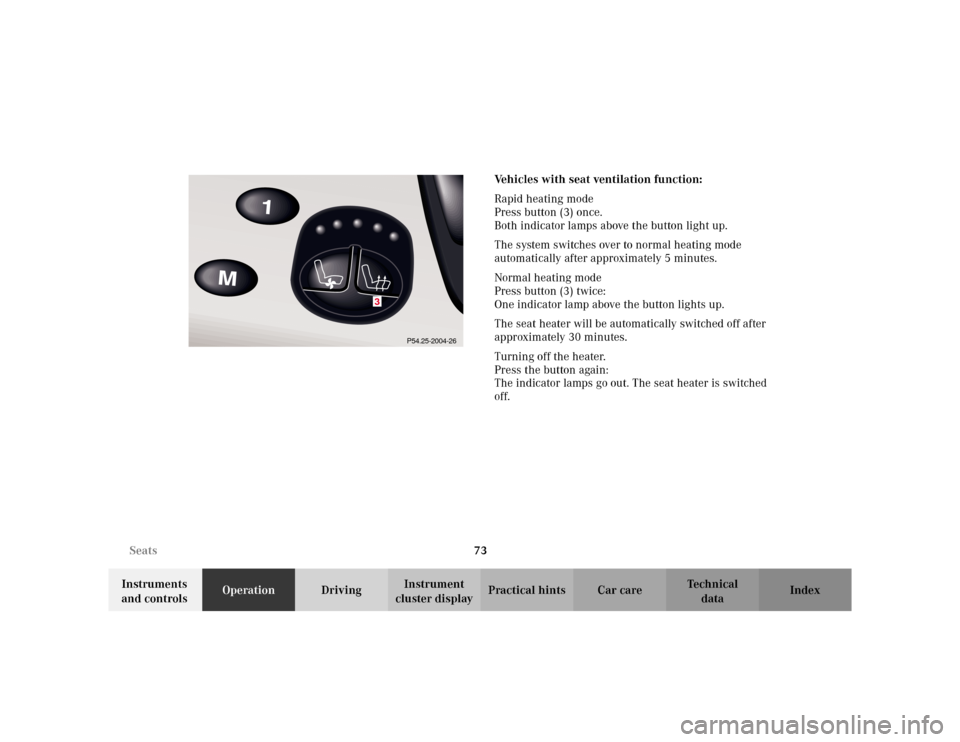
cluster displayPractical hints Car care IndexVehicles with seat ventilation function:
Rapid heating mode
Press button (3) once.
Both indicator lamps above the button light up.
The system switches over to normal heating mode
automatically after approximately 5 minutes.
Normal heating mode
Press button (3) twice:
One indicator lamp above the button lights up.
The seat heater will be automatically switched off after
approximately 30 minutes.
Turning off the heater.
Press the button again:
The indicator lamps go out. The seat heater is switched
off.
3
P54.25-2004-26