lane assist MERCEDES-BENZ S550 4MATIC 2010 W221 Owner's Manual
[x] Cancel search | Manufacturer: MERCEDES-BENZ, Model Year: 2010, Model line: S550 4MATIC, Model: MERCEDES-BENZ S550 4MATIC 2010 W221Pages: 548, PDF Size: 12.48 MB
Page 10 of 548
Locking/unlocking (SmartKey) ......274
Messages in the multifunction
display ........................................... 478
Opening from inside ......................278
Remote door lock (Tele Aid) ........... 394
Remote door unlock (Tele Aid) .......394
Unlocking (Mechanical key) ...........499
DOT (Department of
Transportation) .................................. 430
Drinking and driving ......................... 434
Drive-dynamic multicontour seats .. 219
Driving
Abroad ........................................... 438
Hydroplaning ................................. 437
Instructions ........................... 311, 434
In winter ........................................ 433
Problems ....................................... 314
Safety systems ................................ 63
Systems ......................................... 327
Through standing water .................437
With DISTRONIC PLUS ...................339
Driving and parking
Safety notes .................................. 311
Driving off .................................. 313, 437
Driving safety systems ....................... 63
ABS .................................................. 63
Adaptive Brake ................................ 65
Adaptive Brake Lights ......................66
BAS .................................................. 64
BAS PLUS ........................................ 64
EBP .................................................. 66
ESC .................................................. 66
ETS/4-ETS ....................................... 67
PRE-SAFE ®
Brake ............................. 69
Driving systems
Active Body Control (ABC) .............345
AIRMATIC ...................................... 343
All-wheel drive (4MATIC) ................ 347
ATTENTION ASSIST ........................355
Blind Spot Assist ............................ 359
Cruise control ................................ 328
DISTRONIC PLUS ........................... 330
Hill-start assist system ..................341
HOLD function ............................... 342
Lane Keeping Assist ......................362
Night View Assist Plus ...................356
Parking Guidance ........................... 350Parktronic system ..........................347
Rear view camera .......................... 354
Driving tips, automatic
transmission ...................................... 321
DVD, audio ......................................... 176
DVD, video ......................................... 191
E
EBP (Electronic Brake
Proportioning) ...................................... 66
Electrical system
Improper work on or
modifications ................................... 23
Power outlets ................................. 388
Electrical system (Technical data)
see Vehicle specification
Electronic parking brake .................. 315
Electronic Stability Control see ESC
Electronic Traction System
see ETS/4-ETS
Emergency, in case of
First aid kit ..................................... 450
Flat tire .......................................... 508
Hazard warning flasher ..................302
Roadside Assistance ................ 22, 391
Towing the vehicle .........................516
Emergency calls
Tele Aid .......................................... 390
Telephone ...................................... 150
Emergency engine shutdown ........... 521
Emergency operations
Remote door lock (Tele Aid) ........... 394
Remote door unlock (Tele Aid) .......394
Trunk lid, emergency release .........282
Emergency Tensioning Device
see ETD
Emission control ............................... 438
Information label ............................ 525
System warranties ...........................21
Engine
Break-in recommendations ............402
Cleaning ......................................... 442
Compartment ................................ 404
Malfunction indicator lamp ............496
Messages in the multifunction
display ........................................... 480
8Index221_AKB; 6; 20, en-USd2ugruen,Version: 2.11.8.12009-09-24T13:28:17+02:00 - Seite 8
Page 14 of 548
ESC OFF ........................................ 495
Fog lamps ...................................... 300
Front passenger front air bag
off ............................................ 46, 498
Fuel tank reserve ........................... 496
High-beam headlamps .............32, 301
Instrument cluster .........................489
Low-beam headlamps ....................299
Low tire pressure/TPMS
malfunction telltale ........................497
Seat belt telltale ................32, 52, 493
SRS .......................................... 40, 494
Turn signals ..................................... 32
Lane Keeping Assist .......................... 362
Messages in the multifunction
display ........................................... 462
Switching on or off ......................... 233
Language settings ............................... 94
LATCH-type child seat anchors (ISOFIX) see Children in the vehicle
License plate lamps
Messages in the multifunction
display ........................................... 486
Light alloy wheels, cleaning ............. 445
Lighters see Cigarette lighters
Lighting .............................................. 298
Daytime running lamp mode ..........299
Exterior .......................................... 298
Interior ........................................... 304
Limp-home mode .............................. 325
Load index (tires) ...................... 426, 431
Loading see Vehicle loading
Locking the vehicle
KEYLESS-GO .................................. 275
Manually ........................................ 500
SmartKey ....................................... 274
Loss of
Key ................................................ 277
Service and Warranty Information
booklet .......................................... 524
Low-beam headlamps ....................... 299
Exterior lamp switch ......................298
Switching on .................................. 299
Lubricants .......................................... 537M
Maintenance ........................................ 22
Maintenance Call, automatic (Tele
Aid) ..................................................... 395
Maintenance System
Service indicator display ................439
Service indicator message .............439
Service term exceeded ..................439
Manual headlamp mode (Low-
beam headlamps) .............................. 299
Manual shift program ....................... 324
Maximum engine speed see Vehicle specification
Maximum loaded vehicle weight ..... 431
Maximum load rating (tires) ............. 431
Maximum permissible tire
inflation pressure .............................. 431
Mechanical key see Key, Mechanical
Media interface ................................. 200
Memory function ............................... 297
Menus see Control system menus
Minispare wheel
see Spare wheel
Mirrors ............................................... 294
Auto-dimming rear view mirrors ....295
Exterior rear view mirror parking
position .......................................... 295
Exterior rear view mirrors ..............295
Front vanity mirrors .......................386
Interior rear view mirror .................294
Memory function ........................... 297
Power-folding exterior rear view
mirrors ........................................... 296
Rear vanity mirrors ........................386
MON (Motor Octane Number) .......... 541
Motor Octane Number see MON
MP3 .................................................... 176
Multicontour seats, front ................. 218
Multicontour seats, rear ................... 293
Multifunction display ........................ 222
Symbol messages ..........................466
Text messages ............................... 454
Vehicle status messages ...............45212Index221_AKB; 6; 20, en-USd2ugruen,Version: 2.11.8.12009-09-24T13:28:17+02:00 - Seite 12
Page 15 of 548
Multifunction display messages
ABC (Active Body Control) .............457
ABS ....................................... 467, 468
Active headlamps .......................... 485
Advanced Parking Guidance ..........461
Advanced TPMS ............................. 464
Air bags ......................................... 455
AIRMATIC ...................................... 476
Alternator .............................. 463, 482
ATTENTION ASSIST ........................476
Automatic
transmission .......................... 462, 463
Battery ................................... 463, 482
Blind Spot Assist ............................ 460
Brake fluid ..................................... 472
Brake pads ..................................... 466
Coolant .......................................... 480
Corner-illuminating lamps ..............488
Cruise control ................................ 458
DISTRONIC PLUS ........................... 459
Doors ............................................. 478
EBP ................................................ 468
Engine oil ....................................... 483
ESC ............................... 467, 468, 473
Fog lamps .............................. 485, 487
Front passenger front air bag ........455
Gas cap .......................................... 484
High-beam lamps ........................... 486
Hood .............................................. 478
Lane Keeping Assist ......................462
License plate lamps .......................486
Light sensor ................................... 487
Low-beam lamps ............................ 487
Night View Assist Plus ...................477
Parking lamps ................................ 486
PRE-SAFE ®
.................................... 454
Radar sensors ................................ 461
Reserve fuel ................................... 484
Reverse lamp ................................. 485
Side marker lamps .........................485
SmartKey ....................................... 478
SmartKey with KEYLESS-GO ..........478
SRS ................................................ 474
Tele Aid .......................................... 474
Tire inflation pressure ............464, 489
Tire pressure monitor ....................464
Tires ...................................... 464, 489Trunk ............................................. 478
Turn signals ................................... 488
Multifunction steering wheel
Adjustment .................................... 293
Buttons .......................................... 221
Cleaning ......................................... 446
Gearshift control ............................ 323
Heating .......................................... 294
Memory function ........................... 297
Music Register ................................... 196
N
Navigation ............................................ 95
Alternative route ............................ 138
Compass ........................................ 137
Destination memory ......................145
Entering a destination ....................106
Entering a stopover ........................ 122
Introduction ..................................... 95
Lane recommendation ...................131
Last destinations ........................... 147
Map software version ......................96
Points of interest (POI) ................... 124
Route guidance .............................. 129
Traffic messages ............................ 138
Zagat ®
Rating Service ....................128
“Where am I?” function ..................136
Navi menu .......................................... 225
NECK-PRO active front head
restraints ............................................. 55
Resetting ....................................... 501
Nets, parcel ....................................... 380
Night security illumination .............. 208
Night View Assist Plus ...................... 356
Cleaning the windshield in front of
the camera .................................... 444
Messages in the multifunction
display ........................................... 477
Normal occupant weight .................. 431
Number, vehicle identification
(VIN) ................................................... 525
Index13221_AKB; 6; 20, en-USd2ugruen,Version: 2.11.8.12009-09-24T13:28:17+02:00 - Seite 13
Page 35 of 548
FunctionPageå ESC OFF warning
lamp
473
j Parking space indicator
lamp
350
é Recuperative Brake
System (RBS) warning
lamp, S 400 HYBRID only 2Green or yellow READY
indicator lamp for the
HYBRID system, S 400
HYBRID only 2AParktronic/Parking
Guidance warning indicator
for right front area
349
BTransmission position/
range indicator
321
CTachometer with: ; Engine malfunction
indicator lamp
496
FunctionPageDProgram mode indicator322EMain menus for instrument
cluster control system
222
FOutside temperature327GDisplay with:Additional speedometer235_ Adaptive Highbeam
Assist indicator lamp
301
à Lane Keeping
Assistance indicator lamp
362
À Attention Assist
indicator lamp
355
Ä PRE-SAFE ®
Brake
indicator lamp
232
orHOLD function indicator
lamp
3422 See separate HYBRID Supplemental Operating Instructions.Instrument cluster33At a glance221_AKB; 6; 20, en-USd2ugruen,Version: 2.11.8.12009-09-24T13:28:17+02:00 - Seite 33Z
Page 233 of 548
Ending a call or rejecting an incoming
callXPress button ~.
Dialing a number from the phone book
When your telephone is ready to receive calls,
you may select and dial a number from the
phone book at any time.
XPress button = or ; to select the
Telephone menu.XPress button : or 9 or a to
switch to the phone book.
The stored names are displayed in
ascending alphabetical order.XPress button : or 9 to select the
desired entry.
If you press and hold button : or
9 the system scrolls rapidly through the
list of names (quick search). After holding
button : or 9 for a short while the
scrolling speed increases. Release the
button to stop the quick search. The search
stops automatically at the end of the list.XIf the Symbol G appears on the right-hand
side of the name several entries are
present for the same name: Press button
6 or a and select the desired entry.XPress button 6 or a .
The control system dials the selected
phone number.
If the connection is successful and this
feature is supported by your network
provider, the name of the party (if stored in
your phone book) you are calling will
appear in the multifunction display.
The control system stores the dialed
number in the redial memory.
or
XPress button ~ if you do not want to
make the call.Redialing
The control system stores the most recently
dialed phone numbers. This eliminates the
need to search through your entire phone
book.
XPress button = or ; to select the
Telephone menu.XPress button 6.XPress button : or 9 to select the
desired number or name.XPress button 6 or a .
The control system dials the selected
phone number.
Assistance menu
In the DriveAssist menu, you can change
the settings of your driving systems.
The following functions are available:
R Displaying distance graphic, DISTRONIC
PLUS ( Y page 334)
R Switching ESC on or off ( Y page 232)
R Activating/deactivating PRE-SAFE ®
Brake
(vehicles with DISTRONIC PLUS only)
( Y page 232)
R Switching ATTENTION ASSIST on or off
( Y page 232)
R Switching Blind Spot Assist on or off
( Y page 233)
R Switching Lane Keeping Assist on or off
( Y page 233)
Instrument cluster control system231Control systems221_AKB; 6; 20, en-USd2ugruen,Version: 2.11.8.12009-09-24T13:28:17+02:00 - Seite 231Z
Page 235 of 548
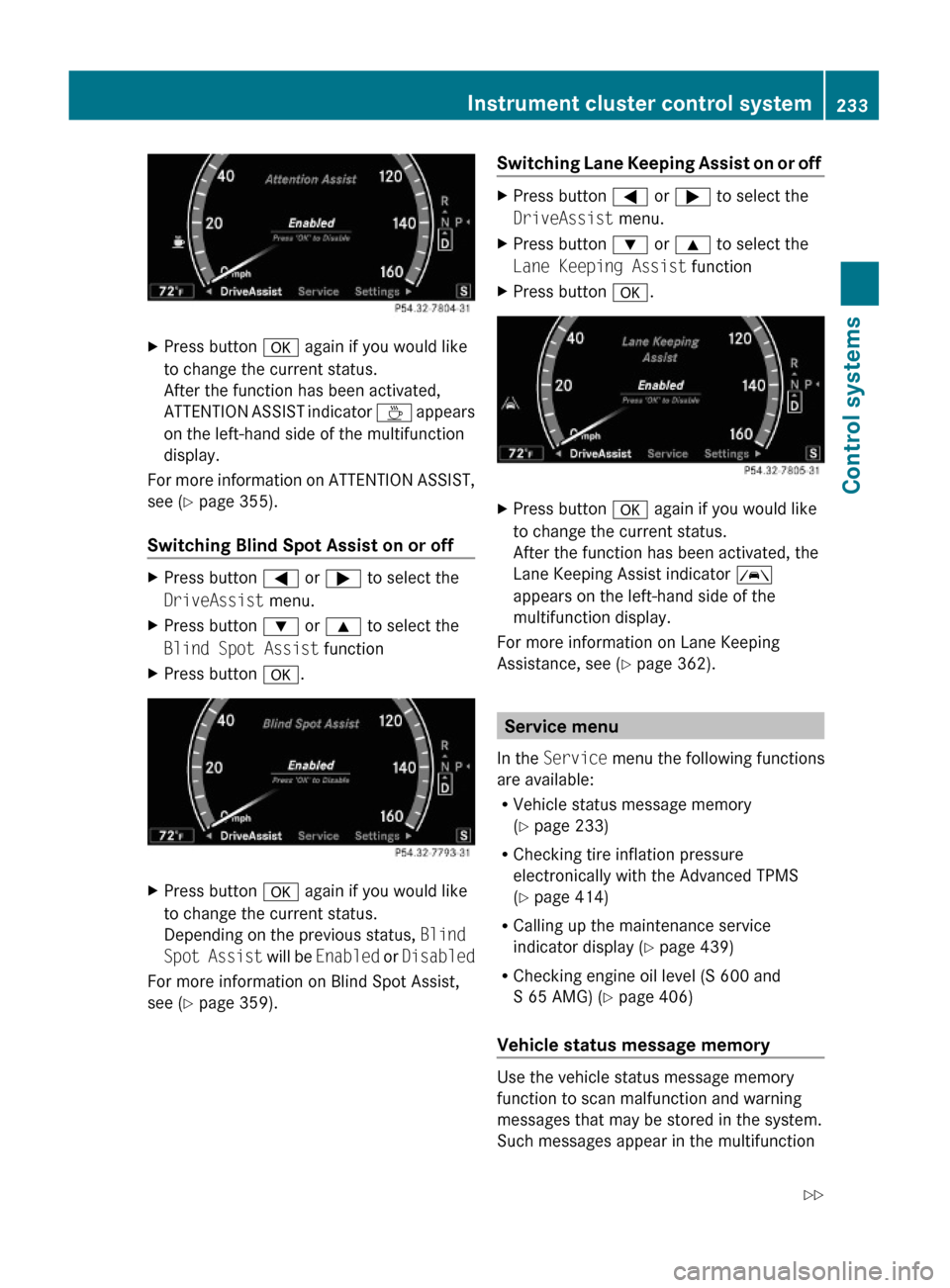
XPress button a again if you would like
to change the current status.
After the function has been activated,
ATTENTION ASSIST indicator À appears
on the left-hand side of the multifunction
display.
For more information on ATTENTION ASSIST,
see (Y page 355).
Switching Blind Spot Assist on or off
XPress button = or ; to select the
DriveAssist menu.
XPress button : or 9 to select the
Blind Spot Assist function
XPress button a.XPress button a again if you would like
to change the current status.
Depending on the previous status, Blind
Spot Assist will be Enabled or Disabled
For more information on Blind Spot Assist,
see (Y page 359).
Switching Lane Keeping Assist on or off XPress button = or ; to select the
DriveAssist menu.
XPress button : or 9 to select the
Lane Keeping Assist function
XPress button a.XPress button a again if you would like
to change the current status.
After the function has been activated, the
Lane Keeping Assist indicator Ã
appears on the left-hand side of the
multifunction display.
For more information on Lane Keeping
Assistance, see (Y page 362).
Service menu
In the Service menu the following functions
are available:
RVehicle status message memory
(Y page 233)
RChecking tire inflation pressure
electronically with the Advanced TPMS
(Y page 414)
RCalling up the maintenance service
indicator display (Y page 439)
RChecking engine oil level (S 600 and
S 65 AMG) (Y page 406)
Vehicle status message memory
Use the vehicle status message memory
function to scan malfunction and warning
messages that may be stored in the system.
Such messages appear in the multifunction
Instrument cluster control system233Control systems221_AKB; 6; 20, en-USd2ugruen,Version: 2.11.8.12009-09-24T13:28:17+02:00 - Seite 233Z
Page 297 of 548
Exterior rear view mirrorsGWarning!
Exercise care when using the passenger-side
exterior rear view mirror. The mirror surface
is convex (outwardly curved surface for a
wider field of view). Objects in mirror are
closer than they appear. Check your interior
rear view mirror and glance over your
shoulder before changing lanes.
iYou can store the settings for the exterior
rear view mirror position with the memory
function (Y page 297).
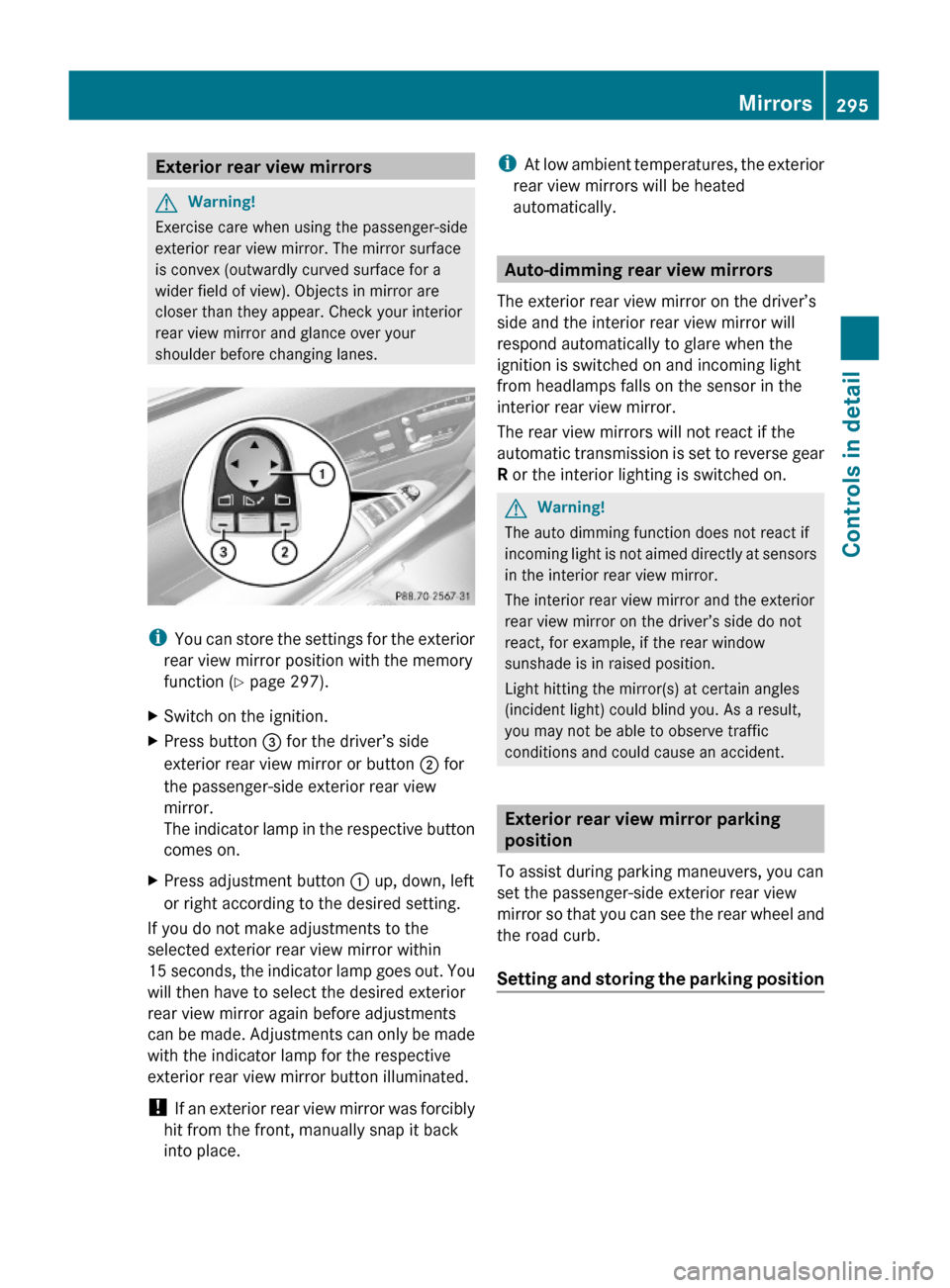
XSwitch on the ignition.XPress button = for the driver’s side
exterior rear view mirror or button ; for
the passenger-side exterior rear view
mirror.
The indicator lamp in the respective button
comes on.
XPress adjustment button : up, down, left
or right according to the desired setting.
If you do not make adjustments to the
selected exterior rear view mirror within
15 seconds, the indicator lamp goes out. You
will then have to select the desired exterior
rear view mirror again before adjustments
can be made. Adjustments can only be made
with the indicator lamp for the respective
exterior rear view mirror button illuminated.
! If an exterior rear view mirror was forcibly
hit from the front, manually snap it back
into place.
iAt low ambient temperatures, the exterior
rear view mirrors will be heated
automatically.
Auto-dimming rear view mirrors
The exterior rear view mirror on the driver’s
side and the interior rear view mirror will
respond automatically to glare when the
ignition is switched on and incoming light
from headlamps falls on the sensor in the
interior rear view mirror.
The rear view mirrors will not react if the
automatic transmission is set to reverse gear
R or the interior lighting is switched on.
GWarning!
The auto dimming function does not react if
incoming light is not aimed directly at sensors
in the interior rear view mirror.
The interior rear view mirror and the exterior
rear view mirror on the driver’s side do not
react, for example, if the rear window
sunshade is in raised position.
Light hitting the mirror(s) at certain angles
(incident light) could blind you. As a result,
you may not be able to observe traffic
conditions and could cause an accident.
Exterior rear view mirror parking
position
To assist during parking maneuvers, you can
set the passenger-side exterior rear view
mirror so that you can see the rear wheel and
the road curb.
Setting and storing the parking position
Mirrors295Controls in detail221_AKB; 6; 20, en-USd2ugruen,Version: 2.11.8.12009-09-24T13:28:17+02:00 - Seite 295Z
Page 329 of 548
Coolant temperature gauge
The coolant temperature gauge is located on
the left side in the instrument cluster
( Y page 32).GWarning!
Driving when your engine is overheated can
cause some fluids which may have leaked into
the engine compartment to catch fire. You
could be seriously burned.
Steam from an overheated engine can cause
serious burns which can occur just by opening
the engine hood. Stay away from the engine
if you see or hear steam coming from it.
Stop the vehicle in a safe location away from
other traffic. Turn off the engine, get out of the
vehicle and do not stand near the vehicle until
the engine has cooled down.
During severe operating conditions, e.g. stop-
and-go traffic, the coolant temperature may
rise close to 248‡ (120†), i.e close to the
red zone of the temperature gauge.
! Excessive coolant temperature triggers a
warning in the multifunction display.
The engine should not be operated with a
coolant temperature above 248‡ (120†),
i.e. in the red zone of the coolant
temperature gauge. Doing so may cause
serious engine damage which is not
covered by the Mercedes-Benz Limited
Warranty.
Tachometer
The red marking on the tachometer
( Y page 32) denotes excessive engine speed.
! Avoid driving at excessive engine speeds,
as it may result in serious engine damage
that is not covered by the Mercedes-Benz
Limited Warranty.
To help protect the engine, the fuel supply is
interrupted if the engine is operated within
the red marking.
Outside temperature indicator
The outside temperature indicator is on the
bottom left-hand side of the instrument
cluster ( Y page 32).GWarning!
The outside temperature indicator is not
designed to serve as an ice-warning device
and is therefore unsuitable for that purpose.
Indicated temperatures just above the
freezing point do not guarantee that the road
surface is free of ice. The road may still be icy,
especially in wooded areas or on bridges.
Fuel gauge
The fuel gauge is on the left-hand side of the
instrument cluster (Y page 32). Once the fuel
level has fallen below the reserve mark, the
yellow segment indicator for the fuel reserve
comes on.
Driving systems
Introduction
This section describes the following driving
systems of your vehicle:
R Cruise control
R DISTRONIC PLUS
R Hill-start assist system
R HOLD function
R AIRMATIC
R Active Body Control (ABC)
R All-wheel drive (4MATIC)
R Parktronic system with Parking Guidance
R Rear view camera
R Night View Assist Plus
R ATTENTION ASSIST
R Blind Spot Assist
R Lane Keeping Assist
Driving systems327Controls in detail221_AKB; 6; 20, en-USd2ugruen,Version: 2.11.8.12009-09-24T13:28:17+02:00 - Seite 327Z
Page 334 of 548
switched on. Otherwise, you may not be able
to recognize dangerous situations until it is
too late. This could cause an accident in which
you and/or others could be injured.GWarning!
The “Resume” function should only be
operated if the driver is fully aware of the
previously set speed and wishes to resume
this particular preset speed.
GWarning!
Close attention to road and traffic conditions
is imperative at all times, regardless of
whether or not the DISTRONIC PLUS is
activated.
Use of the DISTRONIC PLUS can be
dangerous on winding roads or in heavy traffic
because conditions do not allow safe driving
at a constant speed.
The DISTRONIC PLUS will not react to
stationary objects in the roadway (e.g. a
stopped vehicle in a traffic jam or a disabled
vehicle). The DISTRONIC PLUS will also not
respond to oncoming vehicles.
Switch off the DISTRONIC PLUS:
R when changing from the left to the right
lane if vehicles are moving more slowly in
the left lane
R when entering a turn lane or highway off
ramp
R in complex driving situations, such as in
highway construction zones
In these situations, the DISTRONIC PLUS will
continue to maintain the set speed unless
deactivated.
The DISTRONIC PLUS is designed and
intended only to maintain a set speed and
keep a set distance from moving objects in
front of it.
The DISTRONIC PLUS functions in a speed
range of 0 to 120 mph
(Canada: 0 to 200 km/h) if a preceding
vehicle is detected. If no preceding vehicle is
detected the DISTRONIC PLUS functions in a
speed range of 20 to 120 mph
(Canada: 30 to 200 km/h).
Always obey applicable speed limits.
Do not use the DISTRONIC PLUS if you are
driving on a road with steep uphill or downhill
slopes.
When traveling in Canada in a vehicle not
registered in Canada, you must switch off the
radar sensor system ( Y page 236). Canadian
law does not permit the use of the radar
sensor system for vehicles from outside of
Canada. When you switch off the radar sensor
system, the following functions are
deactivated:
R DISTRONIC PLUS
R BAS PLUS ( Y page 64)
R PRE-SAFE ®
Brake ( Y page 69)
R Blind Spot Assist ( Y page 359)
i Due to its radar-emitting nature
DISTRONIC PLUS may have an appearance
similar to a radar detector to law
enforcement officials. You may want to
refer to this section of your Operator’s
Manual when asked.
i USA only:
This device has been approved by the FCC
as a “Vehicular Radar System”. The radar
sensor is intended for use in an automotive
radar system only. Removal, tampering, or
altering of the device will void any
warranties, and is not permitted by the
FCC. Do not tamper with, alter, or use in
any non-approved way.
Any unauthorized modification to this
device could void the user’s authority to
operate the equipment.332Driving systemsControls in detail
221_AKB; 6; 20, en-USd2ugruen,Version: 2.11.8.12009-09-24T13:28:17+02:00 - Seite 332
Page 343 of 548
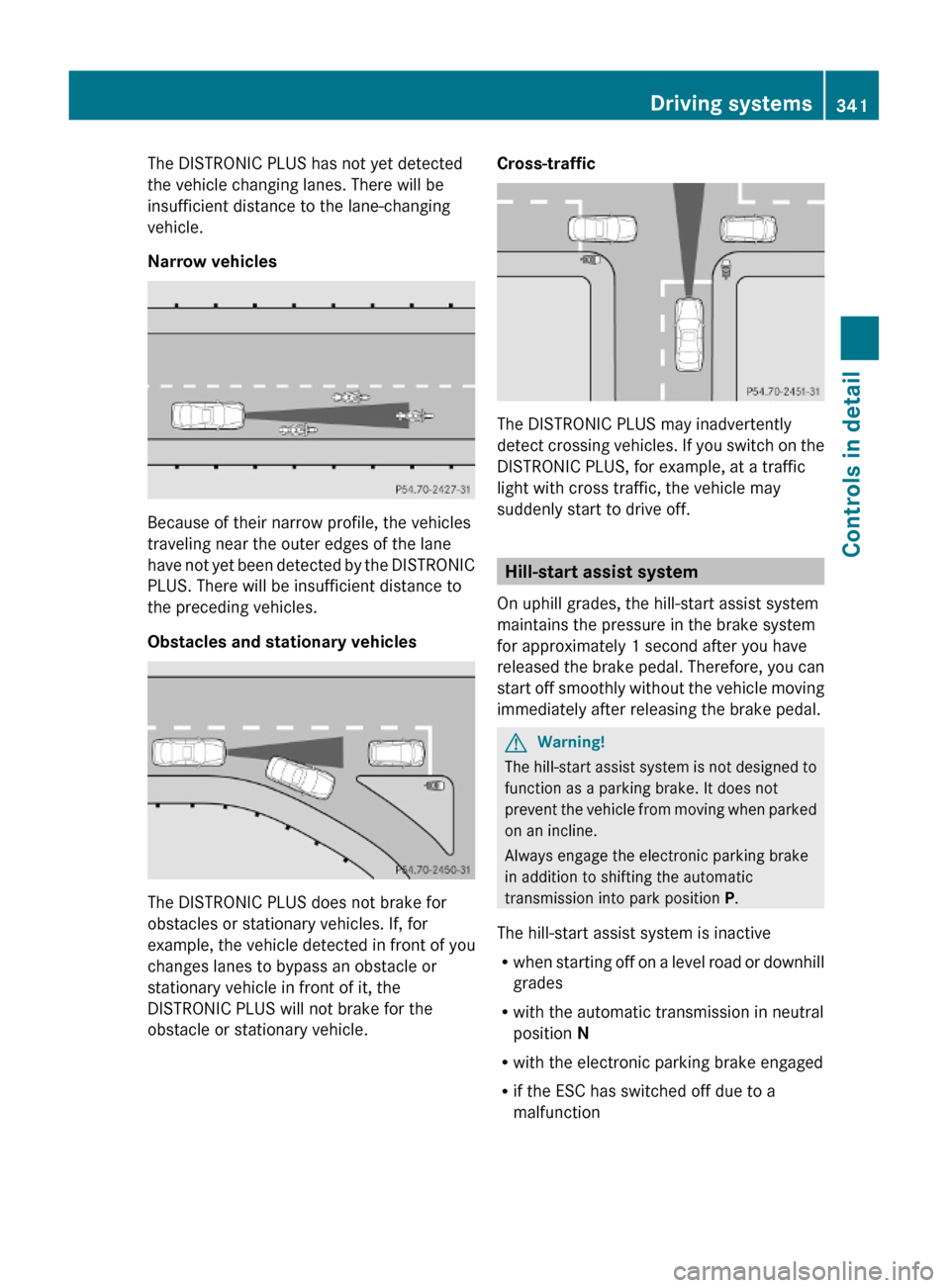
The DISTRONIC PLUS has not yet detected
the vehicle changing lanes. There will be
insufficient distance to the lane-changing
vehicle.
Narrow vehicles
Because of their narrow profile, the vehicles
traveling near the outer edges of the lane
have not yet been detected by the DISTRONIC
PLUS. There will be insufficient distance to
the preceding vehicles.
Obstacles and stationary vehicles
The DISTRONIC PLUS does not brake for
obstacles or stationary vehicles. If, for
example, the vehicle detected in front of you
changes lanes to bypass an obstacle or
stationary vehicle in front of it, the
DISTRONIC PLUS will not brake for the
obstacle or stationary vehicle.
Cross-traffic
The DISTRONIC PLUS may inadvertently
detect crossing vehicles. If you switch on the
DISTRONIC PLUS, for example, at a traffic
light with cross traffic, the vehicle may
suddenly start to drive off.
Hill-start assist system
On uphill grades, the hill-start assist system
maintains the pressure in the brake system
for approximately 1 second after you have
released the brake pedal. Therefore, you can
start off smoothly without the vehicle moving
immediately after releasing the brake pedal.
GWarning!
The hill-start assist system is not designed to
function as a parking brake. It does not
prevent the vehicle from moving when parked
on an incline.
Always engage the electronic parking brake
in addition to shifting the automatic
transmission into park position P.
The hill-start assist system is inactive
Rwhen starting off on a level road or downhill
grades
Rwith the automatic transmission in neutral
position N
Rwith the electronic parking brake engaged
Rif the ESC has switched off due to a
malfunction
Driving systems341Controls in detail221_AKB; 6; 20, en-USd2ugruen,Version: 2.11.8.12009-09-24T13:28:17+02:00 - Seite 341Z