fuel MERCEDES-BENZ SL CLASS 2000 User Guide
[x] Cancel search | Manufacturer: MERCEDES-BENZ, Model Year: 2000, Model line: SL CLASS, Model: MERCEDES-BENZ SL CLASS 2000Pages: 297, PDF Size: 7.11 MB
Page 39 of 297
35 Central locking system
Technical
data Instruments
and controlsOperationDrivingInstrument
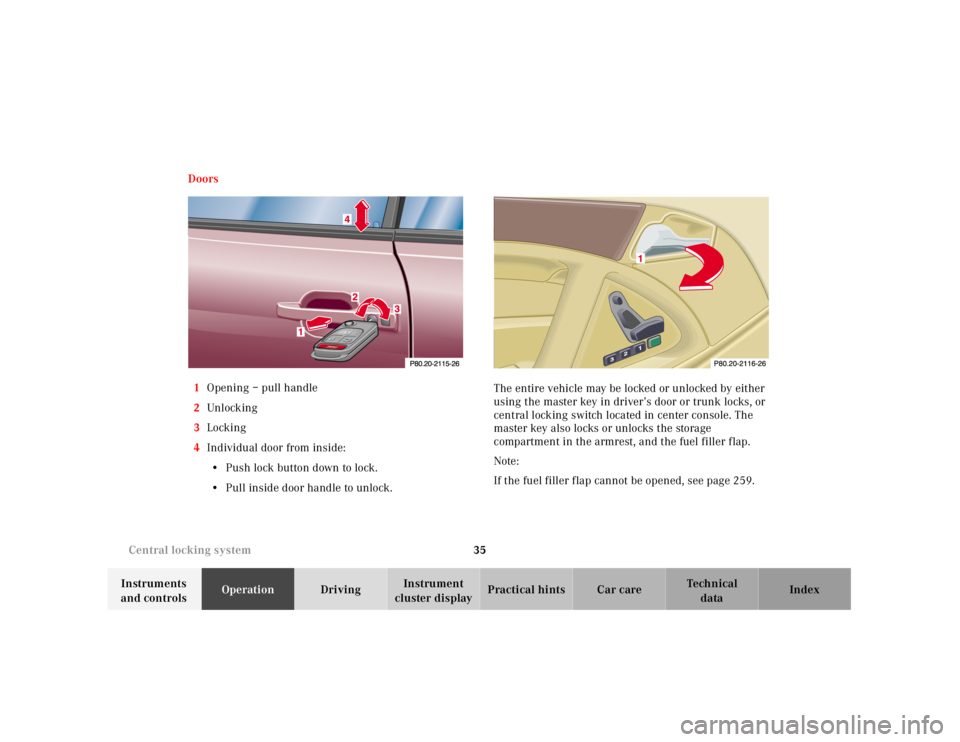
cluster displayPractical hints Car care Index Doors
1Opening – pull handle
2Unl ock ing
3Locking
4Individual door from inside:
• Push lock button down to lock.
• Pull inside door handle to unlock.The entire vehicle may be locked or unlocked by either
using the master key in driver’s door or trunk locks, or
central locking switch located in center console. The
master key also locks or unlocks the storage
compartment in the armrest, and the fuel filler flap.
Note:
If the fuel filler f lap cannot be opened, see page 259.
Page 40 of 297

36 Central locking system
Technical
data Instruments
and controlsOperationDrivingInstrument
cluster displayPractical hints Car care Index
When you lock the vehicle, both door lock buttons
should move down. If any one stays up, the respective
door is not properly closed.
You should then unlock the vehicle, open and reclose
this door, and lock the vehicle again. Each individual
door can be locked with door lock button – the driver’s
door can only be locked when it is closed.
If the vehicle has previously been locked from the
outside, only the door being opened from the inside will
unlock, and the alarm will come on. The other door, the
trunk, the interior storage compartments, and fuel filler
flap remain locked.Notes:
In case of a malfunction in the central locking system
the doors can be locked and unlocked individually.
To lock, turn key in driver’s door lock to position 3 or
push down lock buttons.
To unlock, turn key in driver’s door lock to position 2 or
pull inside door handles.
Page 41 of 297

37 Central locking system
Technical
data Instruments
and controlsOperationDrivingInstrument
cluster displayPractical hints Car care Index Central locking switch
1Locking
2Unl ock ing
The central locking switch is located in the center
console.
The doors and trunk can only be locked with the central
locking switch, if both doors are closed.Notes:
If the vehicle was previously locked with the remote
control or key, the doors and trunk cannot be unlocked
with the central locking switch.
Opening a door with the inside door handle will cause
the alarm to come on. To switch the alarm off,
pressΠbutton or insert key in steering lock and
turn it to position 1.
If the vehicle was previously locked with the central
locking switch, while in the selective remote control
mode, only the door opened from the inside is unlocked.
If the vehicle was previously locked with the central
locking switch , wh il e in th e global remote control mode,
the complete vehicle is unlocked when a door is opened
from the inside.
Note:
The storage compartment in the armrest as well as the
fuel filler f lap cannot be locked or unlocked with the
central locking switch.
12
P54.25-0314-26
Page 42 of 297

38 Central locking system
Technical
data Instruments
and controlsOperationDrivingInstrument
cluster displayPractical hints Car care Index
Automatic central locking
The central locking switch also operates the automatic
central locking.
Wit h th e automa tic central locking system activated, t he
doors and trunk are locked at vehicle speeds of approx.
9 mph (15 km/h) or more. The fuel filler f lap remains
unlocked.
To a ctiva te:
With key in steering lock position 2 hold upper portion
of switch (1) for a minimum of 5 seconds.
To dea cti vate :
With key in steering lock position 2 hold lower portion
of switch (2) for a minimum of 5 seconds.
Notes:
If doors are unlocked with the central locking switch
after activating the automatic central locking, and
neither door is opened, then the doors remain unlocked
even at vehicle speeds of approx. 9 mph (15 km/h) or
more.If a door is opened from the inside at speeds of approx.
9 mph (15 km/h) or less with the automatic central
locking activated, the door will again be automatically
locked at speeds of approx. 9 mph (15 km/h) or more.
Important!
When towing the vehicle, or with the vehicle on a
dynamometer test stand, please, note the following:
With the automatic central locking activated and the
key in steering lock position 2, the vehicle doors will
lock if the left front wheel as well as the right rear
wheel spin are turning at vehicle speeds of approx.
9 mph (15 km/h) or more.
To prevent the vehicle door locks from locking,
deactivate the automatic central locking.
Emergency unlocking in case of accident
The doors unlock automatically a short time after a
strong deceleration is detected, such as in a collision
(this is intended to aid rescue and exit). Driving on
rough roads may cause the vehicle to unlock. If
necessary, the vehicle can be locked again with the
interior central locking switch.
Page 43 of 297

39 Central locking system
Technical
data Instruments
and controlsOperationDrivingInstrument
cluster displayPractical hints Car care Index Trunk
0Neutral position – push to open (arrow)
1Unl ock ing
2Locking (detent)
3Separate locking of trunk – remove key in this
position.When the trunk is separately locked, it remains locked
when centrally unlocking the vehicle.
To deny any unauthorized person access to the trunk,
lock it separately with the mechanical key. Leave only
the valet key with the vehicle.
Notes:
In case of a malfunction in the central locking system
the trunk can be locked and unlocked individually.
To lock, turn key to position 2 or 3.
To unlock and open the trunk lid, turn key to position 1,
hold and push to open.
If the fuel filler f lap cannot be opened, see page 259.
Important!
Do not place key inside trunk, since trunk is locked
again when closing the lid.
Lower trunk lid using handle and close it with hands
placed flat on edges on trunk.
Page 79 of 297
75 Instrument cluster
Technical
data Instruments
and controlsOperationDrivingInstrument
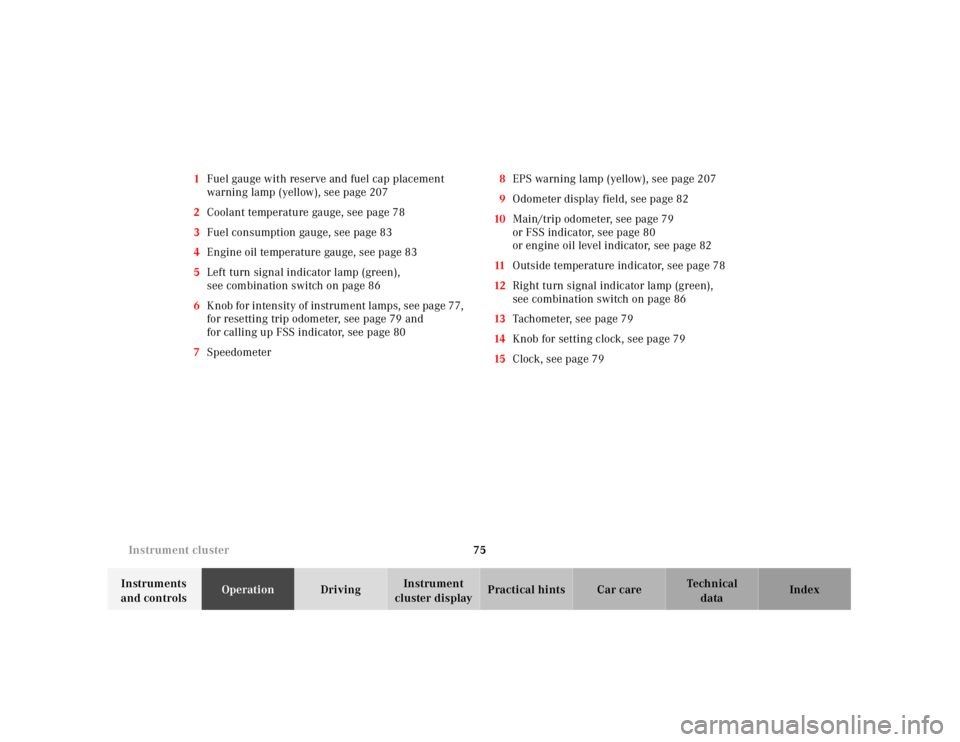
cluster displayPractical hints Car care Index 1Fuel gauge with reserve and fuel cap placement
warning lamp (yellow), see page 207
2Coolant temperature gauge, see page 78
3Fuel consumption gauge, see page 83
4Engine oil temperature gauge, see page 83
5Left turn signal indicator lamp (green),
see combination switch on page 86
6K nob for intensity of instrum ent l amps, see pa ge 77,
for resetting trip odometer, see page 79 and
for calling up FSS indicator, see page 80
7Speedometer8EPS warning lamp (yellow), see page 207
9Odometer display field, see page 82
10Main/trip odometer, see page 79
or FSS indicator, see page 80
or engine oil level indicator, see page 82
11Outside temperature indicator, see page 78
12Right turn signal indicator lamp (green),
see combination switch on page 86
13Tachometer, see page 79
14Knob for setting clock, see page 79
15Clock, see page 79
Page 80 of 297
76 Instrument cluster
Technical
data Instruments
and controlsOperationDrivingInstrument
cluster displayPractical hints Car care Index
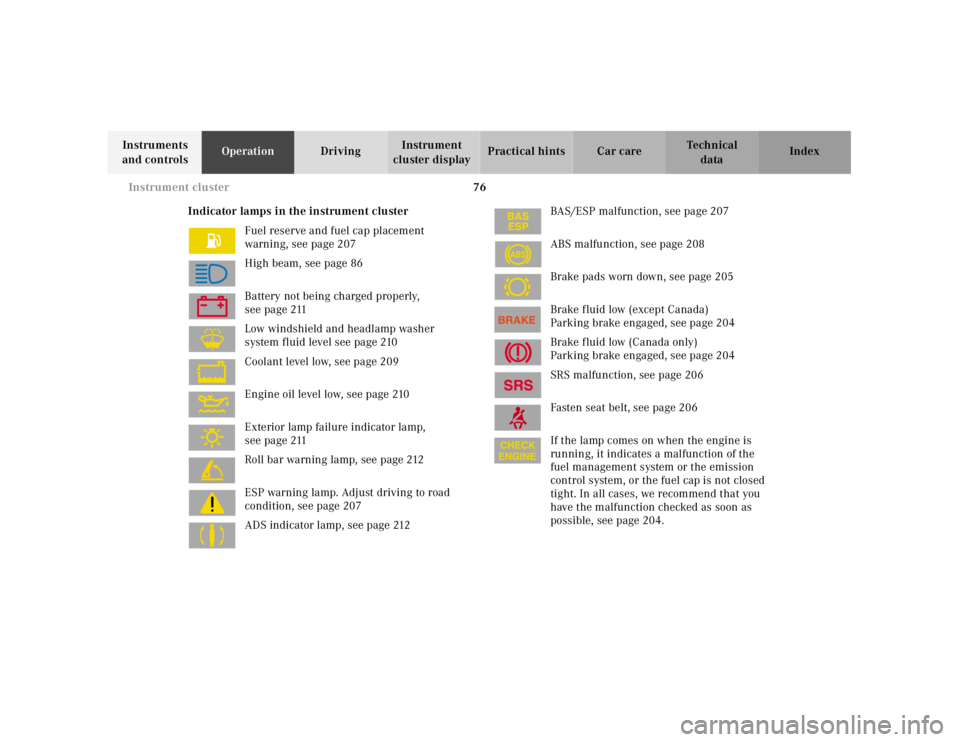
Indicator lamps in the instrument cluster
Fuel reserve and fuel cap placement
warning, see page 207
High beam, see page 86
Battery not being charged properly,
see page 211
Low windshield and headlamp washer
system fluid level see page 210
Coolant level low, see page 209
Engine oil level low, see page 210
Exterior lamp failure indicator lamp,
see page 211
Roll bar warning lamp, see page 212
ESP warning lamp. Adjust driving to road
condition, see page 207
ADS indicator lamp, see page 212BAS/ESP malfunction, see page 207
ABS malfunction, see page 208
Brake pads worn down, see page 205
Brake fluid low (except Canada)
Parking brake engaged, see page 204
Brake fluid low (Canada only)
Parking brake engaged, see page 204
SRS malfunction, see page 206
Fasten seat belt, see page 206
If the lamp comes on when the engine is
running, it indicates a malfunction of the
fuel management system or the emission
control system, or the fuel cap is not closed
tight. In all cases, we recommend that you
have the malfunction checked as soon as
possible, see page 204.
ABS
Page 83 of 297
79 Instrument cluster
Technical
data Instruments
and controlsOperationDrivingInstrument
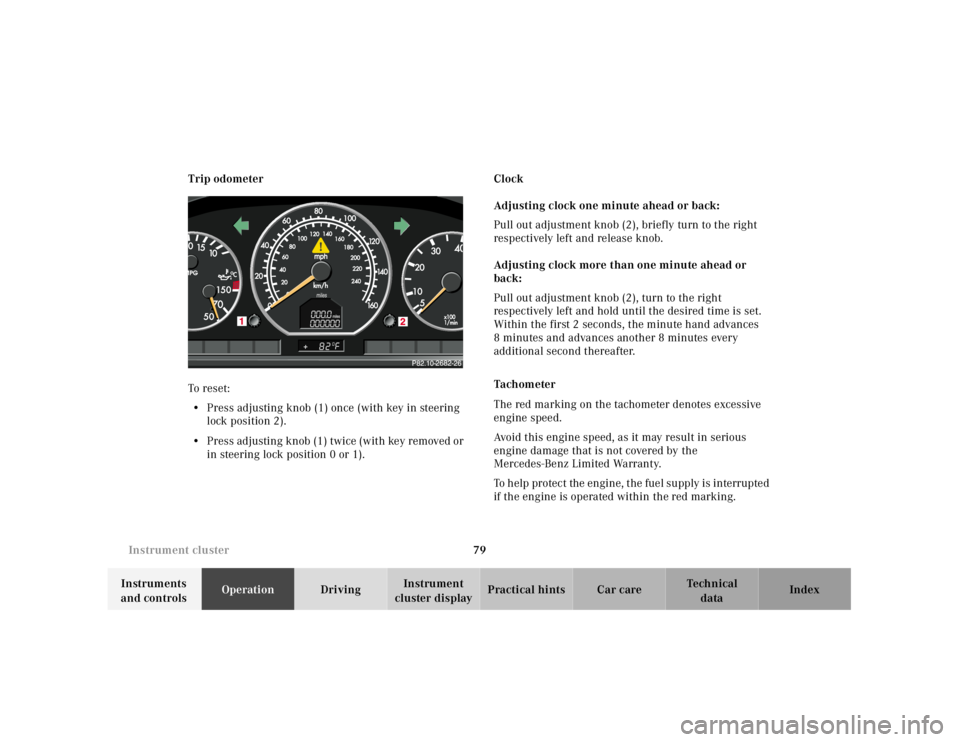
cluster displayPractical hints Car care Index Trip odometer
To reset:
• Press adjusting knob (1) once (with key in steering
lock position 2).
• Press adjusting knob (1) twice (with key removed or
in steering lock position 0 or 1).Clock
Adjusting clock one minute ahead or back:
Pull out adjustment knob (2), briefly turn to the right
respectively left and release knob.
Adjusting clock more than one minute ahead or
back:
Pull out adjustment knob (2), turn to the right
respectively left and hold until the desired time is set.
Within the first 2 seconds, the minute hand advances
8 minutes and advances another 8 minutes every
additional second thereafter.
Tachometer
The red marking on the tachometer denotes excessive
engine speed.
Avoid this engine speed, as it may result in serious
engine damage that is not covered by the
Mercedes-Benz Limited Warranty.
To help protect the engine, the fuel supply is interrupted
if the engine is operated within the red marking.
Page 87 of 297
83 Checking engine oil level indicator
Technical
data Instruments
and controlsOperationDrivingInstrument
cluster displayPractical hints Car care Index Notes:
If the symbols : and I are continuously
illuminated after pressing button (1) twice and there is
no change in the odometer display field or the low
engine oil level warning lamp comes on, a malfunction
has occurred to the system. Perform the engine oil level
check with the dipstick.
If no oil leaks are noted continue to drive to the nearest
Mercedes-Benz Center to have the system checked.
Observe the engine oil temperature gauge.
Fuel consumption gauge
While driving, instantaneous fuel consumption is
indicated in miles per gallon (mpg), or in Canada liters
per 100 kilometers (l/100 km).
With the engine switched off, the needle reads “0”.
Due to system design, minimum consumption is
indicated at idle speed.Engine oil temperature gauge
Normal operating engine oil temperatures are from
175 F (80 C) to 250 F (120 C).
During severe operating conditions and stop-and-go
traffic, the engine oil temperature may rise close to the
red marking.
The engine should not be operated with the engine oil
temperature in the red zone. Doing so may cause
serious engine damage which is not covered by the
Mercedes-Benz Limited Warranty.
When the engine oil temperature is close to the red
marking, relieve the load on the engine by decreasing
vehicle speed to lower engine oil temperature.
Once the engine oil temperature returns to the normal
temperature range, the engine oil level should be
checked. See page 82 or 221.
Engine oil consumption
Engine oil consumption checks should only be made
after the break-in period. During the break-in period,
higher oil consumption may be noticed and is normal.
Frequent driving at high engine speeds results in
increased consumption.
Page 97 of 297
93 Automatic climate control
Technical
data Instruments
and controlsOperationDrivingInstrument
cluster displayPractical hints Car care Index Basic setting - automatic mode
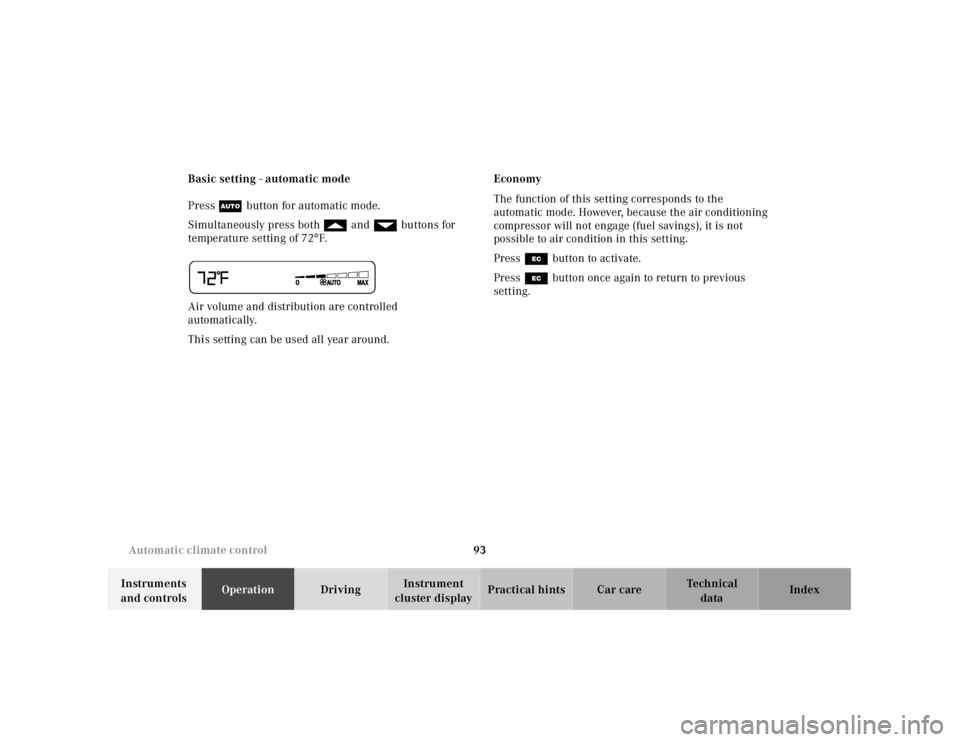
Press U button for automatic mode.
Simultaneously press both f and gbuttons for
temperature setting of 72°F.
Air volume and distribution are controlled
automatically.
This setting can be used all year around.Economy
The function of this setting corresponds to the
automatic mode. However, because the air conditioning
compressor will not engage (fuel savings), it is not
possible to air condition in this setting.
Press S button to activate.
Press S button once again to return to previous
setting.