radio controls MERCEDES-BENZ SL CLASS 2000 User Guide
[x] Cancel search | Manufacturer: MERCEDES-BENZ, Model Year: 2000, Model line: SL CLASS, Model: MERCEDES-BENZ SL CLASS 2000Pages: 297, PDF Size: 7.11 MB
Page 117 of 297
113 Audio system
Technical
data Instruments
and controlsOperationDrivingInstrument
cluster displayPractical hints Car care Index Telephone operation
Various functions of the Mercedes-Benz integrated
cellular telephone
1 can be performed and displayed via
the car radio. Further instructions for operating the car
telephone can be found in the operation guide for the
cellular telephone1 .
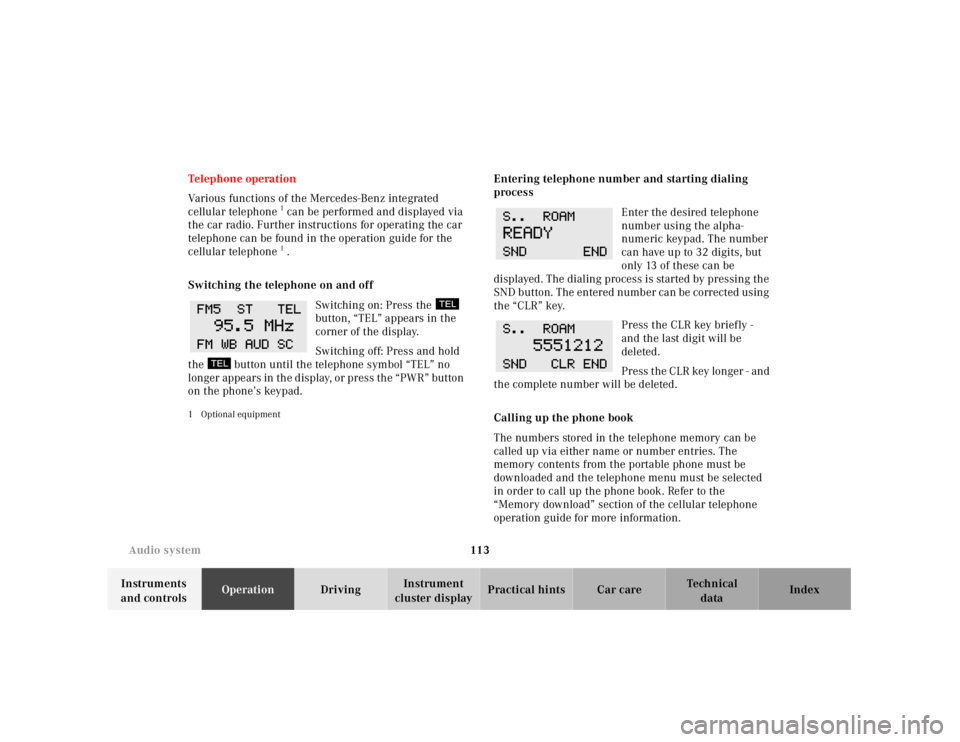
Switching the telephone on and off
Switching on: Press the
button, “TEL” appears in the
corner of the display.
Switching off: Press and hold
the button until the telephone symbol “TEL” no
longer appears in the display, or press the “PWR” button
on the phone’s keypad.
1 Optional equipment
Entering telephone number and starting dialing
process
Enter the desired telephone
number using the alpha-
numeric keypad. The number
can have up to 32 digits, but
only 13 of these can be
displayed. The dialing process is started by pressing the
SND button. The entered number can be corrected using
the “CLR” key.
Press the CLR key briefly -
and the last digit will be
deleted.
Press the CLR key longer - and
the complete number will be deleted.
Calling up the phone book
The numbers stored in the telephone memory can be
called up via either name or number entries. The
memory contents from the portable phone must be
downloaded and the telephone menu must be selected
in order to call up the phone book. Refer to the
“Memory download” section of the cellular telephone
operation guide for more information.
Page 119 of 297

115 Audio system
Technical
data Instruments
and controlsOperationDrivingInstrument
cluster displayPractical hints Car care Index Accepting incoming call in telephone mode
With an incoming call, the ringing tone will be heard
and the message “CALL” appears in the display. Press
the SND key to answer the call.
Accepting incoming call in tape, CD or radio mode
If the telephone is activated in the background
(telephone symbol in the display), then a switch is made
automatically to telephone when an incoming call is
received. The audio source is muted, the ringing tone is
heard and the message “CALL” appears. After the call
has been terminated, the previously selected audio
source is resumed.
Terminating call
A current call can be terminated by pressing the END
button.Component malfunctions
The radio, CD changer
1 , and Mercedes-Benz integrated
cellular telephone
1 are part of a fiberoptic networked
system. Failure of one of the components can lead to
malfunctions of the other components. Please contact
your authorized Mercedes-Benz Center or call
1-800-FOR-MERCedes for more information in the event
of a malfunction.
1 Optional equipment
Page 136 of 297

132 Telephone
Technical
data Instruments
and controlsOperationDrivingInstrument
cluster displayPractical hints Car care Index
Telephone, general
See separate instruction manual for instructions on how
to operate the telephone.
1 Observe the legal requirements in all countries concerned.
Wa r n i n g !
Your concentration on the road and traffic
conditions must take priority. Only use the
telephone
1 when road and traffic conditions
permit.
Park if you wish to use the handset rather than the
hands-free device to make a call.Bear in mind that at a speed of just 30 mph
(approximately 50 km/h), your vehicle is covering
a distance of approximately 50 feet (approximately
14 m ) e v e r y s e c o n d .
Never operate radio transmitters equipped with a
built-in or attached antenna (i.e. without being
connected to an external antenna) from inside the
vehicle while the engine is running. Doing so could
lead to a malfunction of the vehicle’s electronic
system, possibly resulting in an accident and
personal injury.
Page 143 of 297
139 Hardtop
Technical
data Instruments
and controlsOperationDrivingInstrument
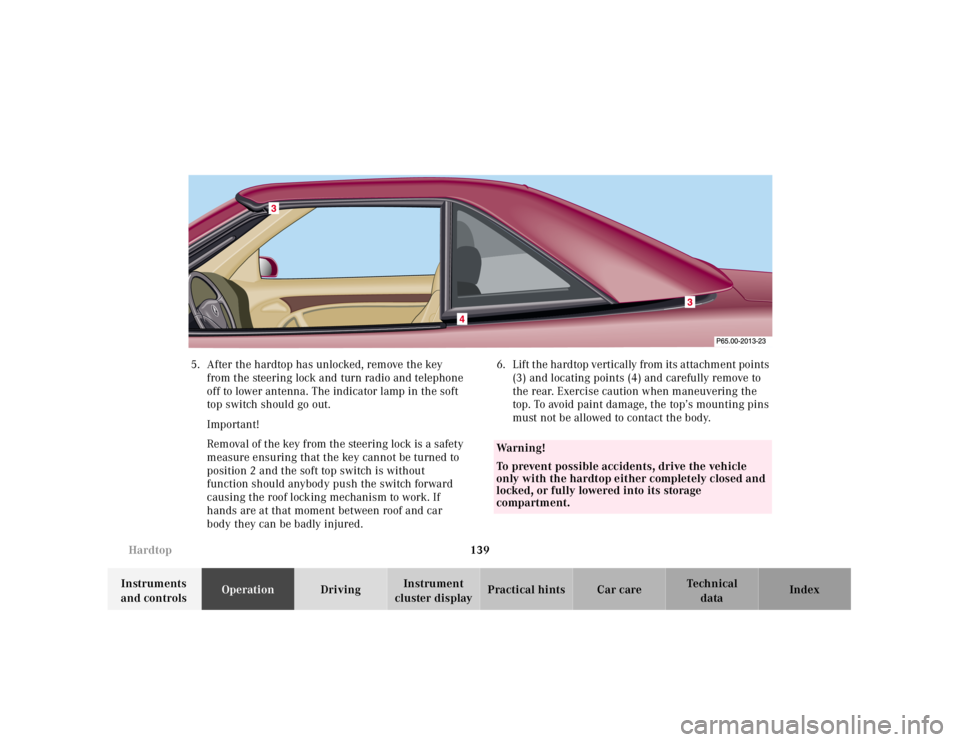
cluster displayPractical hints Car care Index 5. After the hardtop has unlocked, remove the key
from the steering lock and turn radio and telephone
off to lower antenna. The indicator lamp in the soft
top switch should go out.
Important!
Removal of the key from the steering lock is a safety
measure ensuring that the key cannot be turned to
position 2 and the soft top switch is without
function should anybody push the switch forward
causing the roof locking mechanism to work. If
hands are at that moment between roof and car
body they can be badly injured.6. Lift the hardtop vertically from its attachment points
(3) and locating points (4) and carefully remove to
the rear. Exercise caution when maneuvering the
top. To avoid paint damage, the top’s mounting pins
must not be allowed to contact the body.
Wa r n i n g !
To prevent possible accidents, drive the vehicle
only with the hardtop either completely closed and
locked, or fully lowered into its storage
compartment.
Page 144 of 297
140 Hardtop
Technical
data Instruments
and controlsOperationDrivingInstrument
cluster displayPractical hints Car care Index
Attaching hardtop
1. Engage parking brake and turn key in steering lock
to position 2.
2. Lower roll bar, see page 118.
3. Open doors.
4. Turn radio and telephone off to lower power
antenna, turn key in steering lock to position 0 and
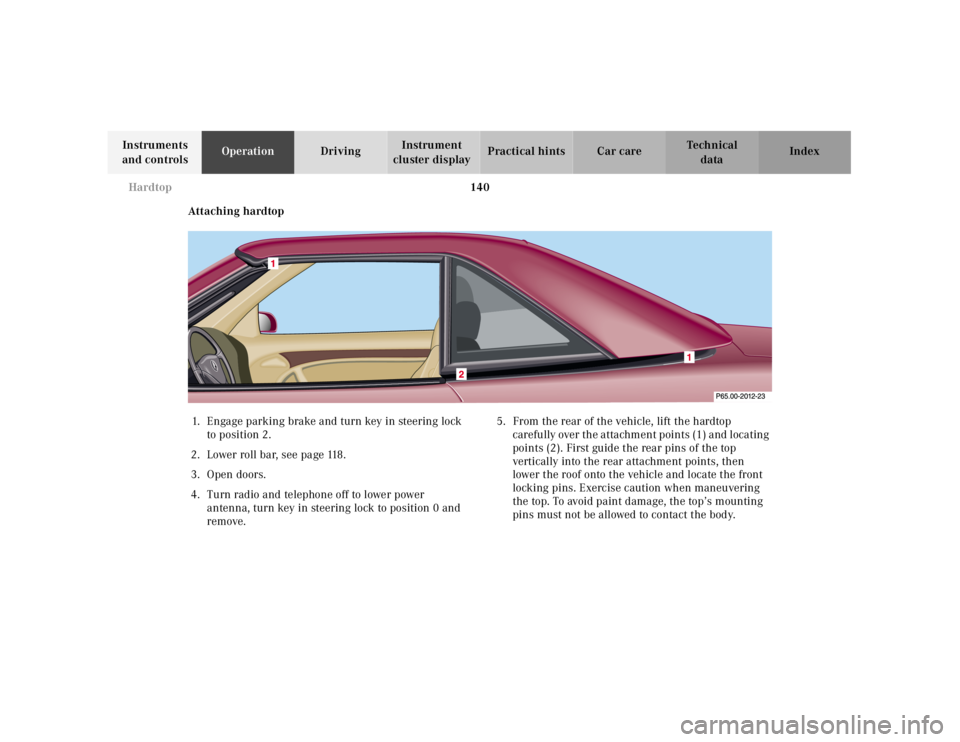
remove.5. From the rear of the vehicle, lift the hardtop
c a r e f u l ly ove r t h e a t ta ch m e n t p oi n t s ( 1 ) a nd l oc a t in g
points (2). First guide the rear pins of the top
vertically into the rear attachment points, then
lower the roof onto the vehicle and locate the front
locking pins. Exercise caution when maneuvering
the top. To avoid paint damage, the top’s mounting
pins must not be allowed to contact the body.
Page 155 of 297

151 Wind screen
Technical
data Instruments
and controlsOperationDrivingInstrument
cluster displayPractical hints Car care Index 5. Pull wind screen down (5) and remove from roll bar.
The wind screen can be stored in a trunk mounted
container.Antenna
The antenna extends when switching on the radio and/
or telephone.
Note:
To retract the antenna (e.g. when entering a car wash)
both radio and telephone must be switched off.
5
P65.00-0293-26
Page 156 of 297
152 Contents – Driving
Technical
data Instruments
and controlsOperationDrivingInstrument
cluster displayPractical hints Car care Index
DrivingControl and operation of radio
transmitters ............................... 153
Radio, telephone and
two-way radio .............................. 153
The first 1 000 miles
(1 500 km) ................................. 154
Maintenance ................................... 154
Tele Aid ........................................... 155
Catalytic converter ........................ 163
Emission control ............................ 164
Steering lock ................................... 165
Starting and turning off
the engine .................................. 167
Before starting ............................ 167
Starting ........................................ 167
Turning off .................................. 167
Automatic transmission ............... 168
Driving ......................................... 168
Accelerator Position ................... 169
Selector lever positions ............. 169
Maneuvering ............................... 172
Stopping ....................................... 172Program mode
selector switch ........................... 173
Emergency Operation ................174
Parking brake ................................ 175
Driving instructions ....................... 176
Drive sensibly - Save fuel .......... 176
Drinking and driving ................. 176
Pedals ........................................... 176
Power assistance ........................ 177
Brakes .......................................... 177
Driving off ................................... 178
Parking ........................................ 178
Tires ............................................. 179
Aquaplaning ................................180
Tire traction .................................180
Tire speed rating ........................181
Snow chains ................................ 181
Ve h i c l e s w i t h s p o r t
package ........................................181
Winter driving
instructions .................................182
Winter driving .............................183
Block heater .................................183
Deep water ...................................184Traveling abroad ........................ 184
Cruise control ................................. 185
Brake assist system (BAS) ............ 188
Antilock brake system (ABS) ....... 190
ABS control ................................. 191
Electronic Stability Program
(ESP) ........................................... 192
Synchronizing ESP .................... 193
ESP Control Switch .................... 194
Level control system ...................... 196
Level control switch
positions ...................................... 196
Normal Level ............................... 197
Wheel Change Switch ............... 198
Adaptive Damping System
(ADS) ........................................... 199
Adaptive damping system
adjustment .................................. 199
What you should know at the gas
station .........................................200
Fuel supply ..................................200
Fuel ...............................................200
Check regularly and before
a long trip ...................................202
Page 157 of 297

153 Control and operation of radio transmitters
Technical
data Instruments
and controlsOperationDrivingInstrument
cluster displayPractical hints Car care Index Control and operation of radio transmitters
Radio, telephone and two-way radio
1 Observe all legal requirements.
Telephones and two-way radio
Radio transmitters, such as a portable telephone or a
citizens band unit should only be used inside the
vehicle if they are connected to an antenna that is
installed on the outside of the vehicle.
Refer to the radio transmitter operation instructions
regarding use of an external antenna.
Wa r n i n g !
Please do not forget that your primary
responsibility is to drive the vehicle. Only operate
the radio, telephone
1 or two-way radio
1 if road and
traffic conditions permit.
Bear in mind that at a speed of just 30 mph
(approximately 50 km/h), your vehicle is covering
a distance of approximately 50 feet (approximately
14 m ) e v e r y s e c o n d .
Wa r n i n g !
Never operate radio transmitters equipped with a
built-in or attached antenna (i.e. without being
connected to an external antenna) from inside the
vehicle while the engine is running. Doing so could
lead to a malfunction of the vehicle’s electronic
system, possibly resulting in an accident and
personal injury.
Page 164 of 297

160 Tele Aid
Technical
data Instruments
and controlsOperationDrivingInstrument
cluster displayPractical hints Car care Index
Upgrade Signals
Tele Aid system processes calls using the following
priority.
• Automatic emergency – First priority
• Manual emergency – Second priority
• Roadside assistance – Third priority
• Information – Fourth priority
Should a higher priority call be initiated while you are
connected, an upgrade (alternating) tone will be heard,
and the appropriate indicator lamp will f lash. If certain
information such as vehicle identification number or
client information is not available, the operator may
need to retransmit. During this time you will hear a
chirp and voice contact will be interrupted. Voice
contact will resume once the retransmission is
c omplete. Once a cal l is concl uded , a ch irp w ill be hea rd ,
the appropriate indicator lamp will stop flashing and a
tone will be heard indicating that the system has reset.
The audio system operation will resume.Important!
If the indicator lamp continues to flash or the system
does not reset, contact the Response Center at
1-800-756-9018 (in the USA) or 1-888-923-8367 (in
Canada), or Mercedes-Benz Client Assistance at
1-800-FOR-MERCedes (1-800-367-6372) in the USA or
Customer Service at 1-800-387-0100 in Canada.
Notes:
The indicator lamp in the respective button flashes until
the call is concluded and this can only be completed by
a Response Center or Client Assistance Center
representative.
When a Tele Aid call has been initiated, the audio
system is muted and the selected mode (radio, tape or
CD) pauses. The optional cellular phone (if installed)
switches off. If you must use this phone, the vehicle
must be parked. Disconnect the coiled cord and place
the call. A message will appear in the radio display to
indicate that a Tele Aid call is in progress.
Page 289 of 297

285
Technical
data Instruments
and controlsOperation DrivingInstrument
cluster displayPractical hints Car careIndex
Index
AABS (Antilock brake system) ....................................... 190
Malfunction indicator lamp .....................................208
Adj usting steering c ol umn
Storing steering column position in memory ........ 70
ADS indicator lamp ....................................................... 212
ADS warning lamp ......................................................... 212
Air conditioner refrigerant ...........................................278
Airbags .............................................................................. 60
Airbag OFF indicator lamp ...................................... 213
SRS indicator lamp ...................................................206
Antenna ........................................................................... 151
Antilock brake system (ABS) ....................................... 190
Antitheft alarm system ................................................... 42
Aquaplaning ................................................................... 180
Armrest ........................................................................... 127
Ashtrays .................................................................. 130, 131
Audio system
Anti-theft system ...................................................... 100
Button and soft key operation ................................. 101
Cassette mode ........................................................... 106
CD changer .................................................................110CD mode ..................................................................... 109
Operating and display elements ...............................99
Operating safety ..........................................................98
Operation ............................................................. 98, 102
Radio mode ................................................................ 104
Telephone operation ................................................. 113
Automatic climate control ..............................................90
Air distribution ............................................................95
Air recirculation ..........................................................96
Air volume .................................................................... 95
Basic setting - automatic mode ................................. 93
Defogging windows .....................................................94
Defrosting .....................................................................94
Display and controls ...................................................92
Dust filter .....................................................................97
Rear window defroster ............................................... 95
Residual engine heat utilization ...............................96
Automatic transmission ................................................ 168
Emergency operation ............................................... 174
Fluid level ...................................................................221
Maneuvering ..............................................................172
Program mode selector switch ................................173
Selector lever positions ............................................ 169