mirror MERCEDES-BENZ SL CLASS 2002 User Guide
[x] Cancel search | Manufacturer: MERCEDES-BENZ, Model Year: 2002, Model line: SL CLASS, Model: MERCEDES-BENZ SL CLASS 2002Pages: 302, PDF Size: 7.05 MB
Page 76 of 302
72 Rear view mirrors
Te ch n ica l
data Instruments
and controlsOperationDrivingInstrument
cluster displayPractical hints Car care Index
Exterior rear view mirrors
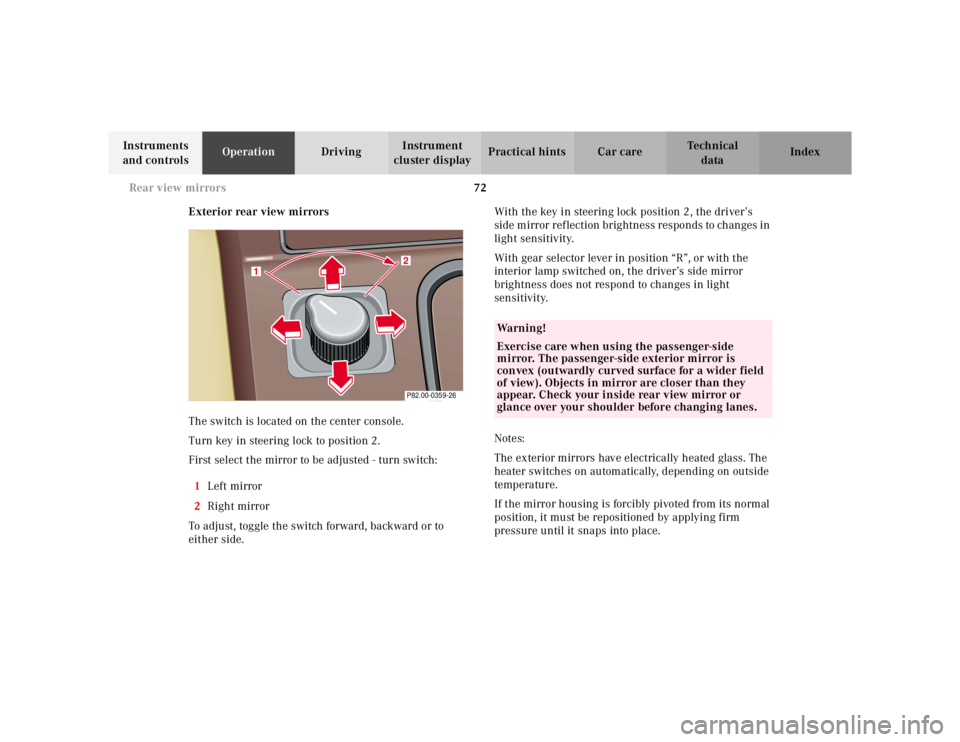
The switch is located on the center console.
Turn key in steering lock to position 2.
First select the mirror to be adjusted - turn switch:
1Left mirror
2Right mirror
To adjust, toggle the switch forward, backward or to
either side.With the key in steering lock position 2, the driver’s
side mirror reflection brightness responds to changes in
light sensitivity.
With gear selector lever in position “R”, or with the
interior lamp switched on, the driver’s side mirror
brightness does not respond to changes in light
sensitivity.
Notes:
The exterior mirrors have electrically heated glass. The
heater switches on automatically, depending on outside
temperature.
If the mirror housing is forcibly pivoted from its normal
position, it must be repositioned by applying firm
pressure until it snaps into place.
2
1
P82.00-0359-26
Wa r n i n g !
Exercise care when using the passenger-side
mirror. The passenger-side exterior mirror is
convex (outwardly curved surface for a wider field
of view). Objects in mirror are closer than they
appear. Check your inside rear view mirror or
glance over your shoulder before changing lanes.
Page 77 of 302
73 Rear view mirrors
Te ch n ica l
data Instruments
and controlsOperationDrivingInstrument
cluster displayPractical hints Car care Index Important!
Electrolyte drops coming into contact with the vehicle
paint finish can only be completely removed while in
their liquid state, by applying plenty of water.Storing mirror positions in memory
The exterior rear view mirror positions are stored in
memory with the seat/head restraint/steering column
position and can be recalled when necessary,
see memory recalling on page 46.
Wa r n i n g !
In the case of an accident liquid electrolyte may
escape the mirror housing when the mirror glass
breaks.Electrolyte has an irritating effect. Do not allow the
liquid come into contact with eyes, skin, clothing,
or respiratory system. In cases it does, immediately
flush affected area with water, and seek medical
help if necessary.
Page 124 of 302
120 Interior equipment
Te ch n ica l
data Instruments
and controlsOperationDrivingInstrument
cluster displayPractical hints Car care Index
Interior lighting
Interior lamps
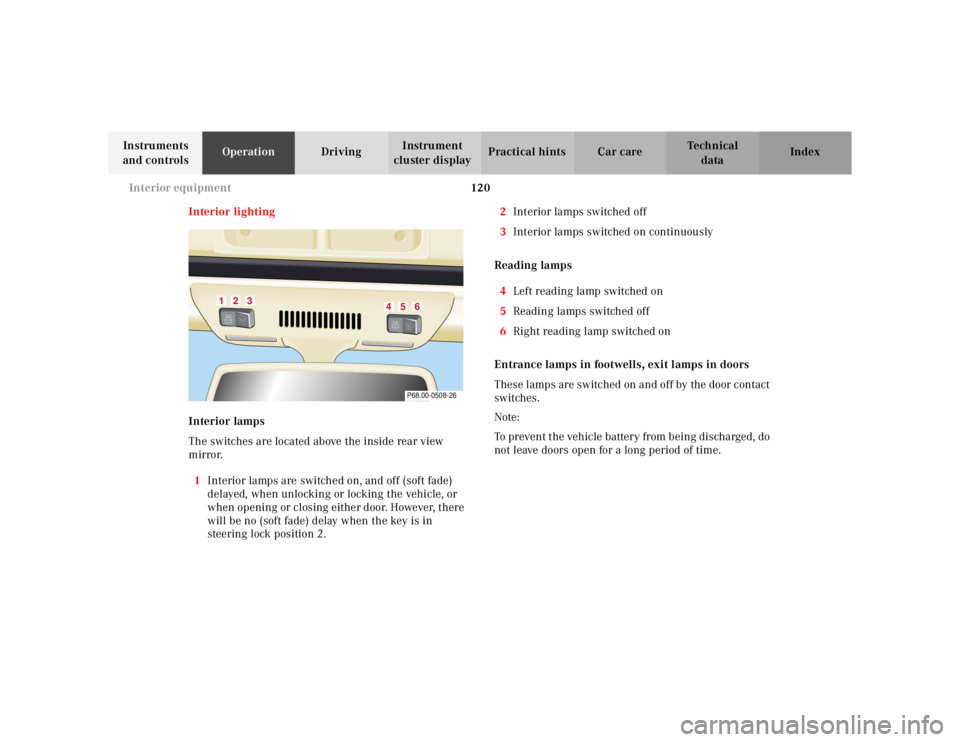
The switches are located above the inside rear view
mirror.
1Interior lamps are switched on, and off (soft fade)
delayed, when unlocking or locking the vehicle, or
when opening or closing either door. However, there
will be no (soft fade) delay when the key is in
steering lock position 2.2Interior lamps switched off
3Interior lamps switched on continuously
Reading lamps
4Left reading lamp switched on
5Reading lamps switched off
6Right reading lamp switched on
Entrance lamps in footwells, exit lamps in doors
These lamps are switched on and off by the door contact
switches.
Note:
To prevent the vehicle battery from being discharged, do
not leave doors open for a long period of time.
1
2
3
4
5
6P68.00-0508-26
Page 126 of 302
122 Interior equipment
Te ch n ica l
data Instruments
and controlsOperationDrivingInstrument
cluster displayPractical hints Car care Index
Power sunshade
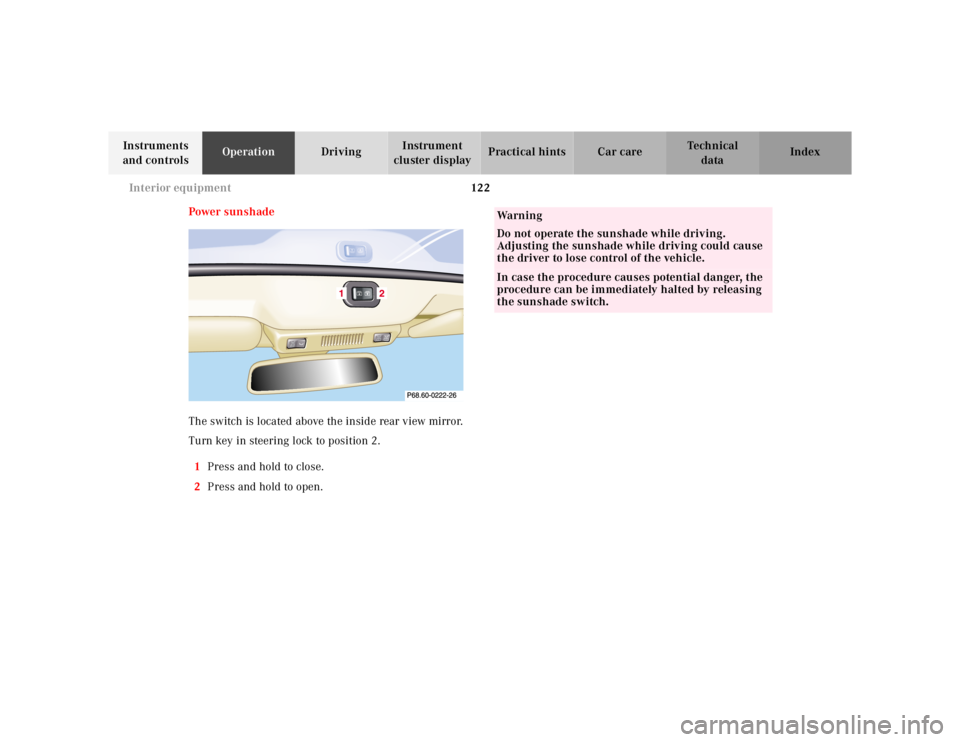
The switch is located above the inside rear view mirror.
Turn key in steering lock to position 2.
1Press and hold to close.
2Press and hold to open.
Wa r n i n g
Do not operate the sunshade while driving.
Adjusting the sunshade while driving could cause
the driver to lose control of the vehicle.In case the procedure causes potential danger, the
procedure can be immediately halted by releasing
the sunshade switch.
Page 127 of 302
123 Interior equipment
Te ch n ica l
data Instruments
and controlsOperationDrivingInstrument
cluster displayPractical hints Car care Index Sun visors
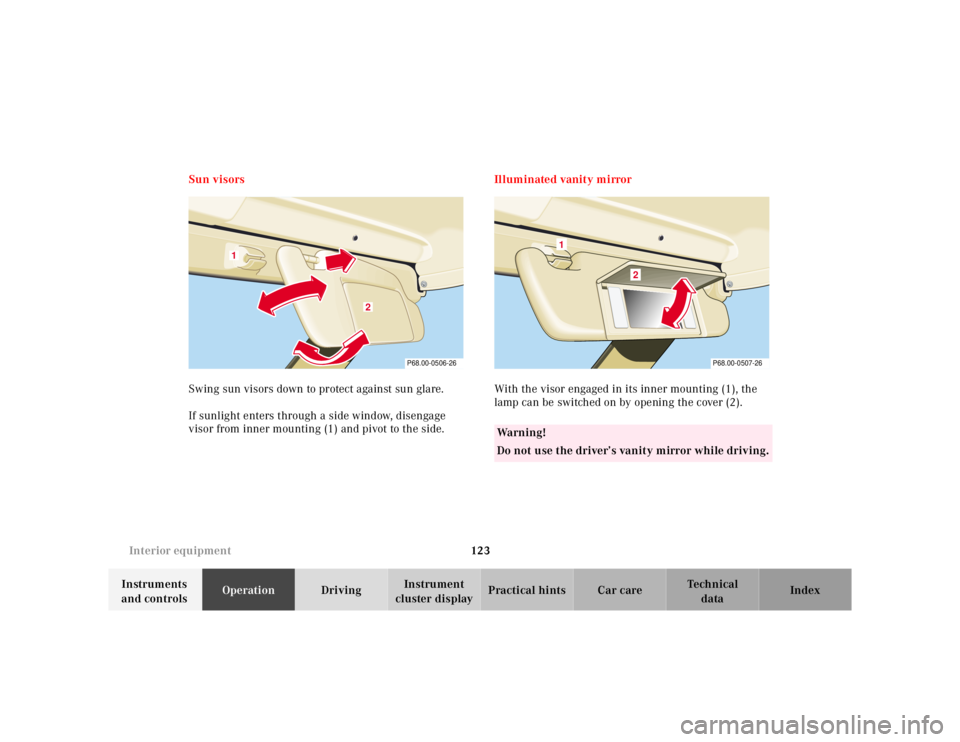
Swing sun visors down to protect against sun glare.
If sunlight enters through a side window, disengage
visor from inner mounting (1) and pivot to the side.Illuminated vanity mirror
With the visor engaged in its inner mounting (1), the
lamp can be switched on by opening the cover (2).
1
2
P68.00-0506-26
Wa r n i n g !
Do not use the driver’s vanity mirror while driving.
1
2
P68.00-0507-26
Page 138 of 302
134 Garage door opener
Te ch n ica l
data Instruments
and controlsOperationDrivingInstrument
cluster displayPractical hints Car care Index
For operation in the USA only: This device complies
with Part 15, Subpart C, Section 209 of the FCC Rules.
Operation is subject to the following two conditions:
(1) This device may not cause harmful interference, and
(2) this device must accept any interference received,
including interference that may cause undesired
operation.
Warning: Changes or modification not expressly
approved by party responsible for compliance could void
the user’ s authority to operate the equipment.
Programming or reprogramming the integrated
remote control:
1. Turn electronic key in steering lock to position 1
or 2.
2. Hold the end of the hand-held transmitter of the
device you wish to train approximately 2 to 5 inches
(5 cm to 12 cm) away from the surface of the
integrated remote control located on the inside rear
view mirror, keeping the indicator lamp in view.3. Using both hands, simultaneously push the hand-
held transmitter button and the desired integrated
remote control button. Do not release the buttons
until completing step 4.
4. The indicator lamp on the integrated remote control
will flash, first slowly and then rapidly. When the
indicator lamp flashes rapidly, both buttons may be
released (the rapid flashing lamp indicates
successful programming of the new frequency
signal). To program the remaining two buttons,
follow ste ps 1 through 4.
Note:
If, after repeated attempts, you do not successfully
program the integrated remote control device to learn
the signal of the hand-held transmitter, the garage door
opener could be equipped with the “rolling code
feature”.
Page 161 of 302
157 Tele Aid
Te ch n ica l
data Instruments
and controlsOperationDrivingInstrument
cluster displayPractical hints Car care Index Emergency calls
An emergency call is initiated automatically:
• following an accident in which the Emergency
Tensioning Retractors (ETR’s) or airbags deploy,
• if the antitheft alarm or the tow away alarm stays on
for more than 20 seconds, see page 42 and page 43.
An emergency call can also be initiated manually by
opening the cover next to the interior rear view mirror
labeled “SOS”, then pressing the button (for longer than
2 seconds) located under the cover. See below for
instructions on initiating an emergency call manually.
Once the emergency call is in progress, the indicator
lamp in the “SOS” button will begin to f lash. All
information relevant to the emergency, such as the
location of the vehicle (determined by the GPS satellite
location system), vehicle model, identification number
and color are generated.
A voice connection between the Response Center and
the occupants of the vehicle will be established
automatically soon after the emergency call has been
initiated. When a voice connection is established the
audio system mutes. The Response Center will attempt
to determine more precisely the nature of the accident
provided they can speak to an occupant of the vehicle.The Tele Aid system is available if:
• it has been activated and is operational. Activation
requires a subscription for monitoring services and
cellular air time
• the relevant cellular phone network and GPS signals
are available pass the information on to the
Response Center.
Note:
Location of the vehicle on a map is possible if the
vehicle is able to receive signals from the GPS satellite
network pass the information on to the Response
Center.
Wa r n i n g !
If the indicator lamp in the “SOS” button is
illuminated continuously and there was no voice
connection to the Response Center established,
then the Tele Aid system could not initiate an
emergency call (e.g. the relevant cellular phone
network is not available).Should this occur, assistance must be summoned
by oth er means.
Page 293 of 302

289 Index
Te ch n ica l
data Instruments
and controlsOperation DrivingInstrument
cluster displayPractical hints Car careIndex
IIdentification labels ....................................................... 271
Illuminated vanity mirror ............................................ 123
Indicator lamps in the
instrument cluster ..............................................76, 204
Infant and Child Restraint Systems
SRS indicator lamp ...................................................206
Infant and child restraint systems ................................ 68
Information call
See Tele Aid ............................................................... 156
Instrument cluster ........................................................... 74
Display illumination ................................................... 77
Indicator lamps ........................................................... 76
Instrument lamps ....................................................... 77
Malfunction and indicator lamps ...........................204
Instruments and controls ............................................... 18
Interior
General notes ............................................................. 124
Interior central locking system ................................... 125
Integration with vehicle
central locking system ........................................ 126
Separate locking of
storage compartments ......................................... 126
Interior lamps ................................................................. 120
Interior lighting ............................................................. 120
JJump starting ................................................................. 239KKeys ....................................................................................28
Master key .................................................................... 28LLayout of poly-V-belt drive ........................................... 272
Leather upholstery ........................................................ 268
Level control system ...................................................... 196
Lighter ............................................................................. 131
Locking the vehicle ..........................................................30MMaintenance ................................................................... 155
Malfunction lamps
in the instrument cluster ........................................ 204
Multicontour seats ........................................................... 49
Page 294 of 302

290 Index
Te ch n ica l
data Instruments
and controlsOperation DrivingInstrument
cluster displayPractical hints Car careIndex
NNight security illumination ........................................... 85OOdometer display field .................................................... 82
On-board diagnostic system .........................................204
Opening the trunk ........................................................... 31
Outside temperature indicator ...................................... 78PPanic button ...................................................................... 32
Parcel net in passenger footwell ................................. 128
Parking ............................................................................ 178
Parking brake ................................................................. 175
Brake warning lamp .................................................205
Passenger airbag indicator lamp ................................. 213
Power assistance ............................................................ 177
Power sunshade ............................................................. 122
Power windows ................................................................116
Express opening ........................................................117
Opening with key ........................................................ 41
Problems with your vehicle ........................................... 14Product information .......................................................... 7
RRadio and telephone ...................................................... 154
Rain sensor ....................................................................... 87
Raising soft top manually ............................................ 254
Reading lamps ................................................................ 120
Rear storage compartment ............................................129
Rear view mirrors ............................................................ 71
Exterior ......................................................................... 72
Inside ............................................................................ 71
Remote control .................................................................28
Changing batteries .................................................. 252
Synchronizing .......................................................... 253
Replacement keys
Obtaining replacement keys ..................................... 29
Replacing wiper blade .................................................. 258
Roadside assistance call
See Tele Aid ............................................................... 156
Roll bar ............................................................................ 118
Roll bar warning lamp ................................................... 212