alarm MERCEDES-BENZ SL CLASS 2011 User Guide
[x] Cancel search | Manufacturer: MERCEDES-BENZ, Model Year: 2011, Model line: SL CLASS, Model: MERCEDES-BENZ SL CLASS 2011Pages: 316, PDF Size: 6.55 MB
Page 71 of 316
you cannot shut a door, do not force it or
you could damage the door or the window.
Fix whatever is affecting the window before
trying to shut the door.
i USA only:
This device complies with Part 15 of the
FCC Rules. Operation is subject to the
following two conditions:
1. This device may not cause harmful interference, and
2. this device must accept any interference received, including
interference that may cause undesired
operation.
Any unauthorized modification to this
device could void the user’s authority to
operate the equipment.
i Canada only:
This device complies with RSS-210 of
Industry Canada. Operation is subject to
the following two conditions:
1. This device may not cause interference,
and
2. this device must accept any interference received, including
interference that may cause undesired
operation of the device.
Any unauthorized modification to this
device could void the user’s authority to
operate the equipment.
Factory setting XGlobal unlocking: Press button 0036.
Unless you open a door or the trunk within
approximately 40 seconds after unlocking
the vehicle:
R The vehicle will be locked again.
R The anti-theft alarm system will be
rearmed.
XGlobal locking: Press button 0037.Selective setting
If you frequently travel alone, you may wish
to reprogramm the SmartKey. Pressing
button 0036 will then only unlock the driver’s
door, interior lockable storage
compartments, and the fuel filler flap.
XSwitching on/off: Press and hold buttons
0036 and 0037 simultaneously for
approximately 6 seconds until the battery
check lamp ( Y page 71) flashes twice.
The SmartKey will then function as follows:
XUnlocking driver’s door and fuel filler
flap: Press button 0036 once.XGlobal unlocking: Press button 0036
twice.XGlobal locking: Press button 0037.
KEYLESS-GO
Vehicles equipped with KEYLESS-GO come
with two SmartKeys with KEYLESS-GO, each
with remote control and a removable
mechanical key.
The KEYLESS-GO function is integrated into
the SmartKey. The validity of the SmartKey is
checked every time you grasp an outside door
handle.
When the SmartKey is valid, your vehicle
unlocks
R the doors
R the trunk lid
R the fuel filler flap
R the glove box
R the storage compartment under the
armrest
R the rear storage compartments
When you open a door, the windows on that
side lowers slightly. Once you close the door,
the windows move up again.
! A window will not work if it is blocked with
ice or if the vehicle battery is discharged. If
Locking and unlocking69Controls in detail230_AKB; 6; 22, en-USd2ureepe,Version: 2.11.8.12009-07-28T18:49:58+02:00 - Seite 69Z
Page 73 of 316
RThe vehicle could be inadvertently
unlocked if the SmartKey is within 3 ft (1 m)
of the vehicle and
-an outside door handle is splashed with
water
or
-you attempt to clean an outside door
handle
RRemember that the engine can be started
by anyone with a SmartKey that is left
inside the vehicle. If you leave the
SmartKey behind when exiting and locking
the vehicle, the message Key Detected
In Vehicle appears in the multifunction
display.
Factory setting
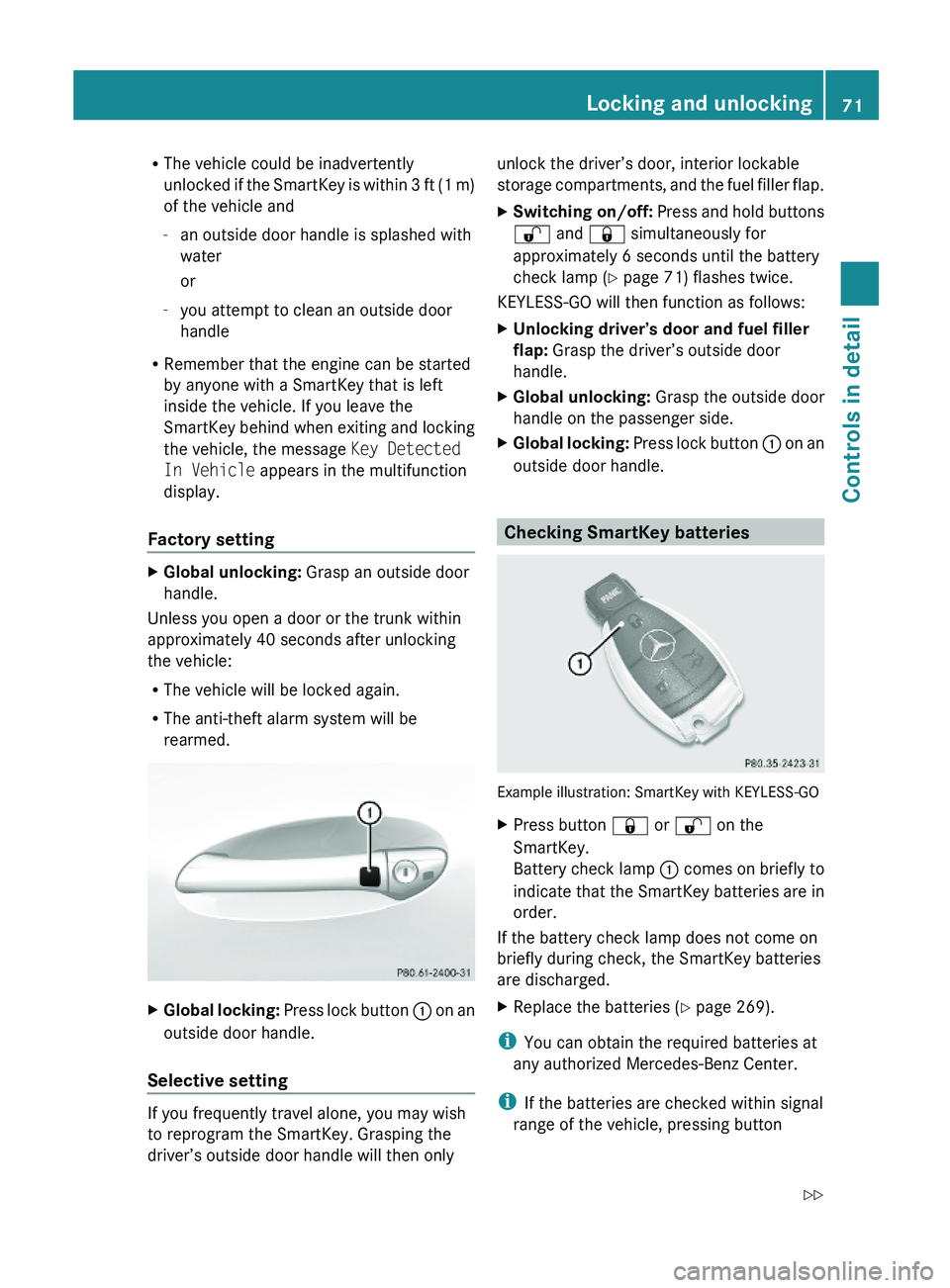
XGlobal unlocking: Grasp an outside door
handle.
Unless you open a door or the trunk within
approximately 40 seconds after unlocking
the vehicle:
RThe vehicle will be locked again.
RThe anti-theft alarm system will be
rearmed.
XGlobal locking: Press lock button \000F on an
outside door handle.
Selective setting
If you frequently travel alone, you may wish
to reprogram the SmartKey. Grasping the
driver’s outside door handle will then only
unlock the driver’s door, interior lockable
storage compartments, and the fuel filler flap.
XSwitching on/off: Press and hold buttons
\0006 and \0007 simultaneously for
approximately 6 seconds until the battery
check lamp (Y page 71) flashes twice.
KEYLESS-GO will then function as follows:
XUnlocking driver’s door and fuel filler
flap: Grasp the driver’s outside door
handle.
XGlobal unlocking: Grasp the outside door
handle on the passenger side.
XGlobal locking: Press lock button \000F on an
outside door handle.
Checking SmartKey batteries
Example illustration: SmartKey with KEYLESS-GO
XPress button \0007 or \0006 on the
SmartKey.
Battery check lamp \000F comes on briefly to
indicate that the SmartKey batteries are in
order.
If the battery check lamp does not come on
briefly during check, the SmartKey batteries
are discharged.
XReplace the batteries (Y page 269).
iYou can obtain the required batteries at
any authorized Mercedes-Benz Center.
iIf the batteries are checked within signal
range of the vehicle, pressing button
Locking and unlocking71Controls in detail230_AKB; 6; 22, en-USd2ureepe,Version: 2.11.8.12009-07-28T18:49:58+02:00 - Seite 71Z
Page 74 of 316
\0007 or \0006 will lock or unlock the vehicle
accordingly.
Loss of the SmartKey
If you lose your SmartKey or mechanical key,
you should do the following:
XHave the SmartKey deactivated by an
authorized Mercedes-Benz Center.
XReport the loss of the SmartKey or the
mechanical key to your car insurance
company immediately.
XHave the mechanical lock replaced if
necessary.
Any authorized Mercedes-Benz Center will be
glad to supply you with a replacement. For
information on replacing the SmartKey, see
“Replacing the SmartKey” (Y page 72).
Replacing the SmartKey
Only you, or someone authorized by you can
order a replacement key from any Mercedes-
Benz Center. In order to do so, the Mercedes-
Benz Center will require proof of identity and
vehicle ownership with original documents,
including the following:
If you are the current owner of the vehicle:
Rthe vehicle’s current state registration
Ra current identity card, passport, or drivers
license
If you are an authorized person:
Rthe vehicle’s current state registration
Ra current identity card, passport, or drivers
license for the authorized individual
Rsigned and dated authorization from the
owner of the vehicle for which the key is
being requested
iDuplicated or photocopied
documentation will not be accepted.
Activating the key
Once you, or an authorized person, has
provided the appropriate documents, the
Mercedes-Benz Center will need to
synchronize the key to your vehicle before it
can be used. In order to do so, the Mercedes-
Benz Center need access to your vehicle.
Opening the doors from the inside
You can open a locked door from the inside.
Open door only when conditions are safe to
do so.
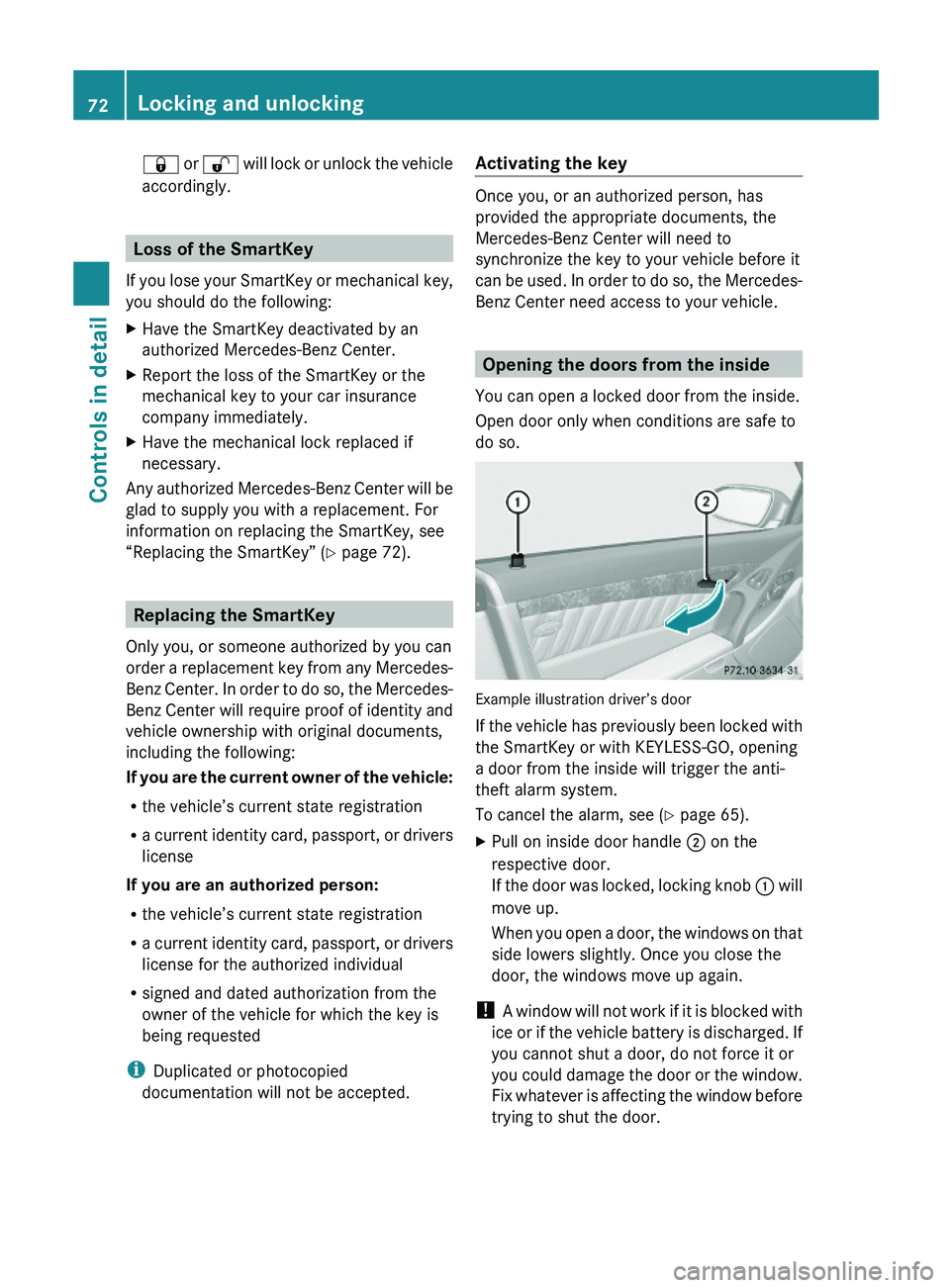
Example illustration driver’s door
If the vehicle has previously been locked with
the SmartKey or with KEYLESS-GO, opening
a door from the inside will trigger the anti-
theft alarm system.
To cancel the alarm, see (Y page 65).
XPull on inside door handle \000G on the
respective door.
If the door was locked, locking knob \000F will
move up.
When you open a door, the windows on that
side lowers slightly. Once you close the
door, the windows move up again.
! A window will not work if it is blocked with
ice or if the vehicle battery is discharged. If
you cannot shut a door, do not force it or
you could damage the door or the window.
Fix whatever is affecting the window before
trying to shut the door.
72Locking and unlockingControls in detail
230_AKB; 6; 22, en-USd2ureepe,Version: 2.11.8.12009-07-28T18:49:58+02:00 - Seite 72
Page 79 of 316
XMake sure you have the SmartKey with
KEYLESS-GO with you.
XPress KEYLESS-GO locking/closing
switch \000F briefly.
With all doors closed:
RThe locking knobs in the doors move
down.
RThe trunk lid starts to close
automatically.
RAll turn signal lamps flash three times
once the trunk has closed completely.
RAn acoustic signal sounds three times
once the trunk has closed completely.
RThe anti-theft alarm system is armed.
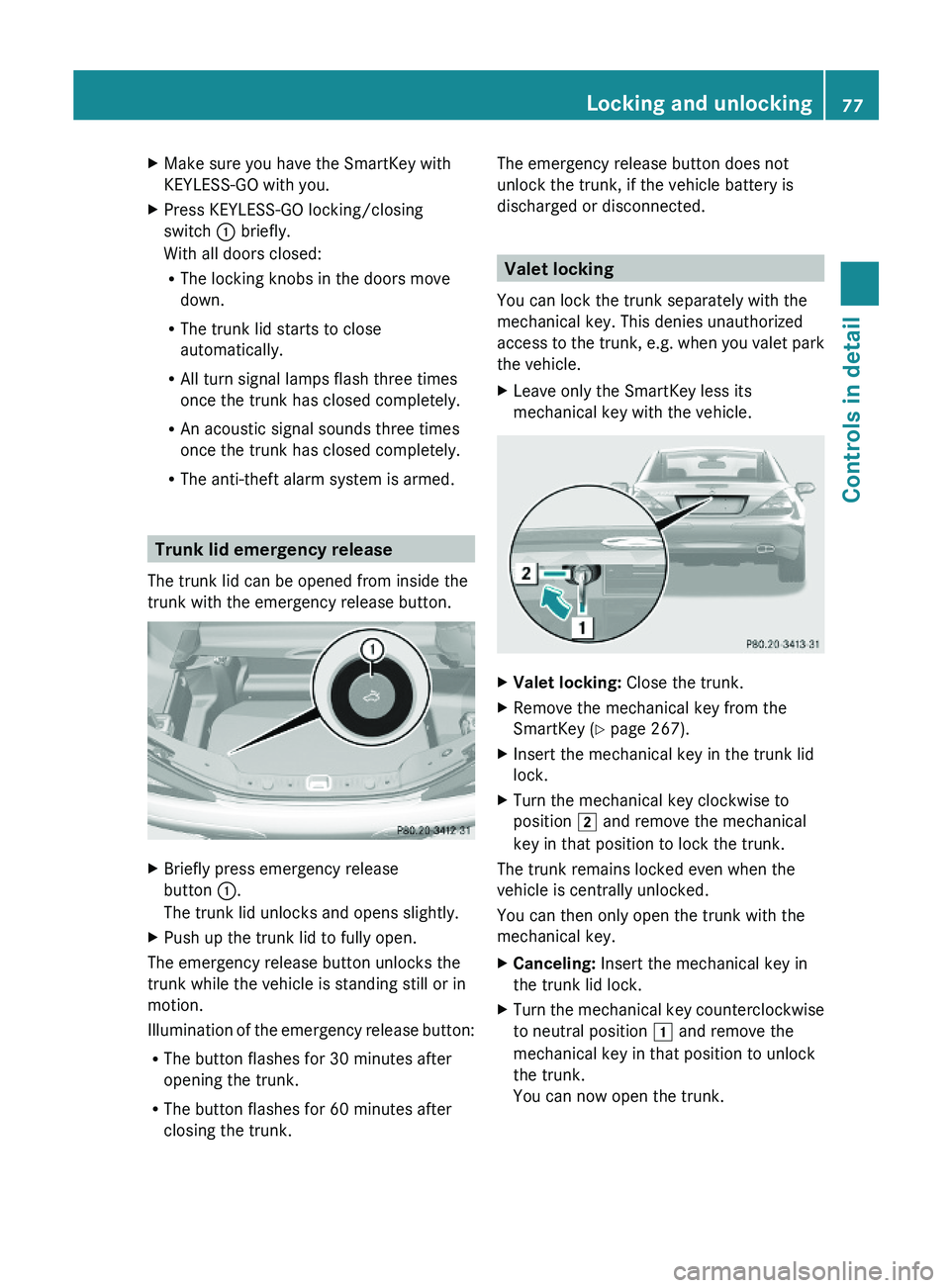
Trunk lid emergency release
The trunk lid can be opened from inside the
trunk with the emergency release button.
XBriefly press emergency release
button \000F.
The trunk lid unlocks and opens slightly.
XPush up the trunk lid to fully open.
The emergency release button unlocks the
trunk while the vehicle is standing still or in
motion.
Illumination of the emergency release button:
RThe button flashes for 30 minutes after
opening the trunk.
RThe button flashes for 60 minutes after
closing the trunk.
The emergency release button does not
unlock the trunk, if the vehicle battery is
discharged or disconnected.
Valet locking
You can lock the trunk separately with the
mechanical key. This denies unauthorized
access to the trunk, e.g. when you valet park
the vehicle.
XLeave only the SmartKey less its
mechanical key with the vehicle.
XValet locking: Close the trunk.XRemove the mechanical key from the
SmartKey (Y page 267).
XInsert the mechanical key in the trunk lid
lock.
XTurn the mechanical key clockwise to
position \000K and remove the mechanical
key in that position to lock the trunk.
The trunk remains locked even when the
vehicle is centrally unlocked.
You can then only open the trunk with the
mechanical key.
XCanceling: Insert the mechanical key in
the trunk lid lock.
XTurn the mechanical key counterclockwise
to neutral position \000J and remove the
mechanical key in that position to unlock
the trunk.
You can now open the trunk.
Locking and unlocking77Controls in detail230_AKB; 6; 22, en-USd2ureepe,Version: 2.11.8.12009-07-28T18:49:58+02:00 - Seite 77Z
Page 169 of 316

Tele Aid
! In order to activate the Tele Aid system, a
subscriber agreement must be completed.
To ensure your system is activated and
operational, please press Information
button 005D to perform the acquaintance
call. Failure to complete either of these
steps may result in a system that is not
activated.
If you have any questions regarding
activation, please call the Customer
Assistance Center at
1-800-FOR-MERCedes (1-800-367-6372)
(USA only) or 1-888-923-8367 (Canada
only).
Shortly after the completion of your Tele Aid
acquaintance call, you will receive a user ID
and password in the mail. You may use this
password to access the Tele Aid section in
“Owner’s Online” at www.mbusa.com (USA
only). The “My Tele Aid” section will give you
access to account information, remote door
unlock and more.
The Tele Aid system is available if
R it has been activated and is operational.
Activation requires a subscription for
monitoring services, connection and
cellular air time
R vehicle battery power is available
R the relevant cellular phone network and
GPS signals are available and pass the
information on to the Customer Assistance
Center
i Location of the vehicle on a map is only
possible if the vehicle is able to receive
signals from the GPS satellite network and
pass the information on to the Customer
Assistance Center.
The Tele Aid system
(Telematic Alarm Identification on Demand)
The Tele Aid system consists of three types
of response:
R Automatic and manual emergency
R Roadside Assistance
R Information
To adjust the speaker volume during a Tele
Aid call do the following:XPress button 005A or 005B on the
multifunction steering wheel.
or
XUse the adjustment button on your
COMAND system.
Be sure to check “Owner’s Online” at
www.mbusa.com (USA only) for more
information and a description of all available
features.
System self-test
The system performs a self-test after you
have switched on the ignition.
GWarning!
A malfunction in the system has been
detected if any or all of the following
conditions occur:
R The indicator lamp in the SOS button does
not come on during the system self-test.
R The indicator lamp in Roadside Assistance
button 00A1 does not come on during the
system self-test.
R The indicator lamp in Information button
005D does not come on during the system
self-test.
R The indicator lamp in the SOS button,
Roadside Assistance button 00A1, or
Information button 005D remains
illuminated constantly in red after the
system self-test.
R The message Tele Aid Inoperative
appears in the multifunction display after
the system self-test.
Useful features167Controls in detail230_AKB; 6; 22, en-USd2ureepe,Version: 2.11.8.12009-07-28T18:49:58+02:00 - Seite 167Z
Page 174 of 316
Stolen Vehicle Recovery Services
In the event your vehicle was stolen:
XReport the incident to the police.
The police will issue a numbered incident
report.
XPass this number on to the Customer
Assistance Center along with your
password.
The Customer Assistance Center will then
attempt to covertly contact the vehicle’s
Tele Aid system. Once the vehicle is
located, the Customer Assistance Center
will contact the local law enforcement and
you. The vehicle’s location will only be
provided to law enforcement.
iIf the anti-theft alarm or the tow-away
alarm stays on for more than 30 seconds,
a call to the Customer Assistance Center is
initiated automatically by the Tele Aid
system provided Tele Aid service was
subscribed to and properly activated, and
that necessary cellular service and GPS
coverage are available. See “Anti-theft
alarm system” (Y page 63) and “Tow-away
alarm” (Y page 64).
Garage door opener
The integrated remote control can operate up
to three separately controlled devices
compatible with HomeLink® or some other
systems.
GWarning!
Before programming the integrated remote
control to a garage door opener or gate
operator, make sure people and objects are
out of the way of the device to prevent
potential harm or damage. When
programming a garage door opener, the door
moves up or down. When programming a gate
operator, the gate opens or closes.
Do not use the integrated remote control with
any garage door opener that lacks safety stop
and reverse features as required by U.S.
federal safety standards (this includes any
garage door opener model manufactured
before April 1, 1982). A garage door that
cannot detect an object - signaling the door
to stop and reverse - does not meet current
U.S. federal safety standards.
When programming a garage door opener,
park vehicle outside the garage.
Do not run the engine while programming the
integrated remote control. Inhalation of
exhaust gas is hazardous to your health. All
exhaust gas contains carbon monoxide (CO),
and inhaling it can cause unconsciousness
and possible death.
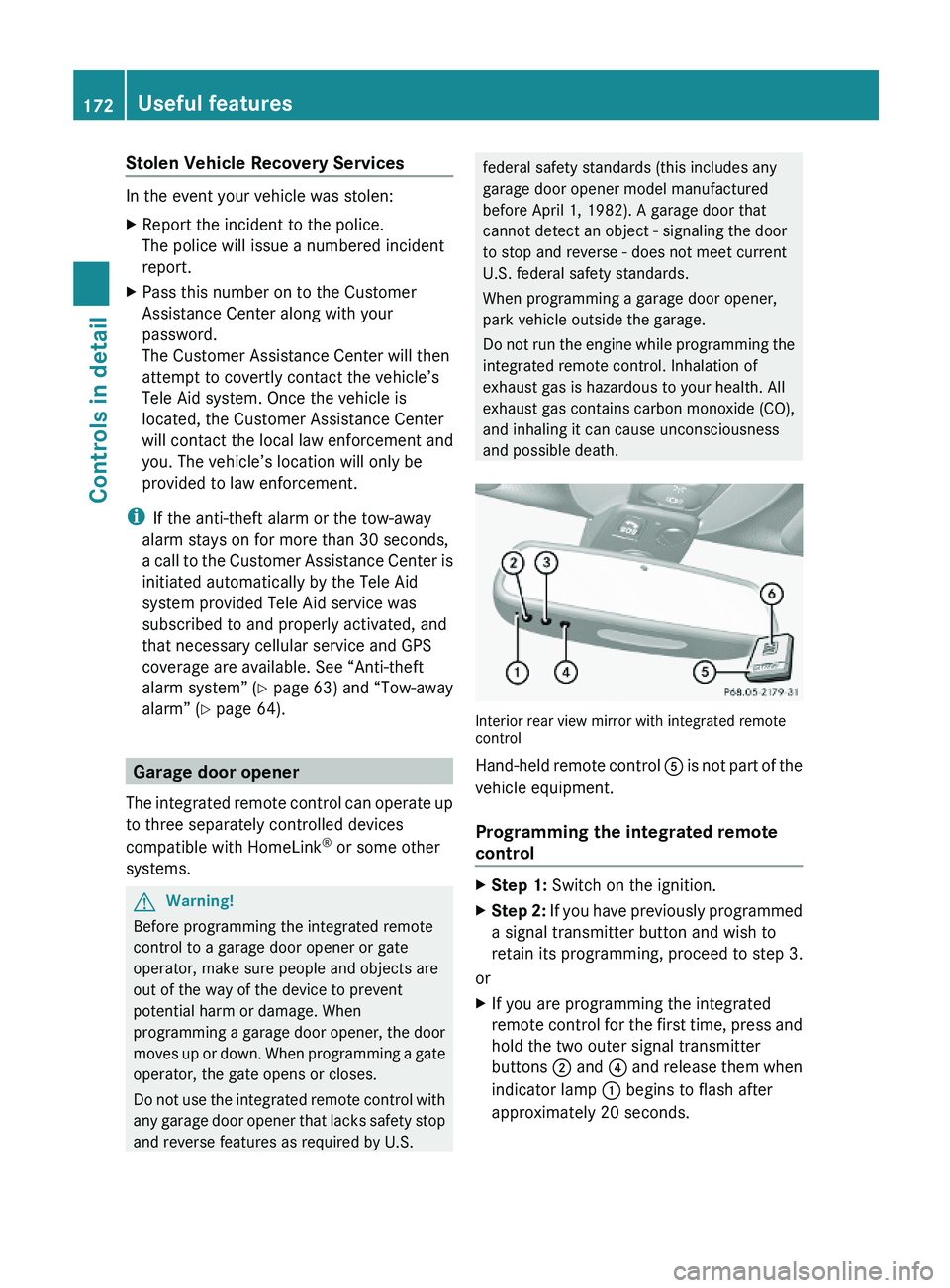
Interior rear view mirror with integrated remotecontrol
Hand-held remote control \000
Page 271 of 316
Locking the vehicle
If you cannot lock the vehicle with the
SmartKey or with KEYLESS-GO, lock it as
follows:
XOpen the driver’s door.XClose the passenger door and the trunk.XPress the central locking switch
(Y page 73).
XCheck to see whether the locking knob on
the passenger door has moved down.
XIf necessary, push it down manually.XExit the vehicle and close the driver’s door.XRemove the mechanical key from the
SmartKey (Y page 267).
XCheck whether the trunk is locked.XIf it is not locked, lock it with the
mechanical key (Y page 77).
Except for the driver’s door, the vehicle
should now be locked.
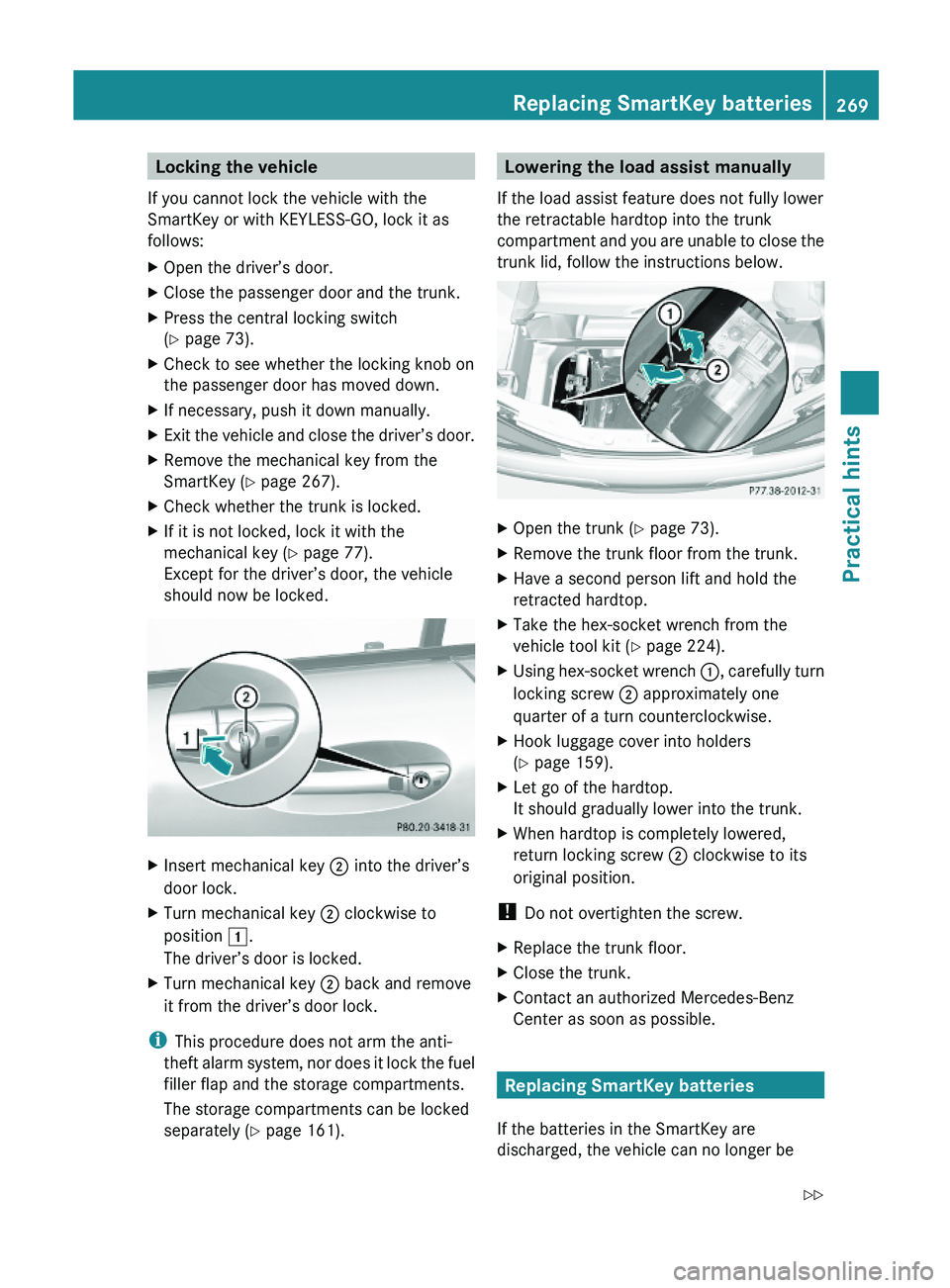
XInsert mechanical key \000G into the driver’s
door lock.
XTurn mechanical key \000G clockwise to
position \000J.
The driver’s door is locked.
XTurn mechanical key \000G back and remove
it from the driver’s door lock.
iThis procedure does not arm the anti-
theft alarm system, nor does it lock the fuel
filler flap and the storage compartments.
The storage compartments can be locked
separately (Y page 161).
Lowering the load assist manually
If the load assist feature does not fully lower
the retractable hardtop into the trunk
compartment and you are unable to close the
trunk lid, follow the instructions below.
XOpen the trunk (Y page 73).XRemove the trunk floor from the trunk.XHave a second person lift and hold the
retracted hardtop.
XTake the hex-socket wrench from the
vehicle tool kit (Y page 224).
XUsing hex-socket wrench \000F, carefully turn
locking screw \000G approximately one
quarter of a turn counterclockwise.
XHook luggage cover into holders
(Y page 159).
XLet go of the hardtop.
It should gradually lower into the trunk.
XWhen hardtop is completely lowered,
return locking screw \000G clockwise to its
original position.
! Do not overtighten the screw.
XReplace the trunk floor.XClose the trunk.XContact an authorized Mercedes-Benz
Center as soon as possible.
Replacing SmartKey batteries
If the batteries in the SmartKey are
discharged, the vehicle can no longer be
Replacing SmartKey batteries269Practical hints230_AKB; 6; 22, en-USd2ureepe,Version: 2.11.8.12009-07-28T18:49:58+02:00 - Seite 269Z
Page 290 of 316
warning lamp comes on and warning
messages appear in the multifunction display
while driving. To brake, the driver must then
apply significantly greater brake pedal
pressure and depress the pedal much further
to obtain the expected braking effect. If
necessary, apply full pressure to the brake
pedal. Brakes are only applied to the front
wheels. Stopping distance is increased! For
more information, see “Electro-hydraulic
brake system” in this in this Operator’s
Manual.
If there is a malfunction in the electro-
hydraulic brake system, we recommend that
the vehicle be transported with all wheels off
the ground using flatbed or appropriate wheel
lift/dolly equipment.
If circumstances do not permit the
recommended towing methods, the vehicle
may be towed with all wheels on the ground
or one axle raised only so far as necessary to
have the vehicle moved to a safe location
where the recommended towing methods
can be employed.XSwitch off the tow-away alarm before
towing the vehicle with all wheels on the
ground or one axle raised ( Y page 64).
!
Before towing the vehicle observe the
following instructions:
R Do not tow-start the vehicle. You could
otherwise seriously damage the
automatic transmission which is not
covered by the Mercedes-Benz Limited
Warranty.
R Do not tow with sling-type equipment.
Towing with sling-type equipment over
bumpy roads will damage radiator and
supports.
R Towing of the vehicle should only be
done using the properly installed towing
eye bolt. Never attach a tow cable, tow
rope or tow rod to the vehicle chassis,
frame or suspension parts.
GWarning!
With the engine not running, there is no power
assistance for the brake and steering
systems. In this case, it is important to keep
in mind that a considerably higher degree of
effort is necessary to brake and steer the
vehicle. Adapt your driving accordingly.
! Avoid pulling the vehicle abruptly or
diagonally, since it could result in damage
to the chassis alignment.
! Do not use the towing eye bolt for
recovery, as this could damage the vehicle.
If in doubt, recover the vehicle with a crane.
i If the battery is disconnected or
discharged
R the SmartKey will not turn in the starter
switch
R the automatic transmission will remain in
park position P
For more information see “Battery”
( Y page 283) or “Jump starting”
( Y page 285).
Installing towing eye bolt
Depending on whether you are towing a
vehicle or you are being towed, the towing eye
bolt can be screwed into threaded holes
which are located behind covers on each
bumper.
The towing eye bolt is supplied with the
vehicle tool kit, located in the compartment
underneath the trunk floor ( Y page 224).
XTake the vehicle tool kit out of the trunk.
Removing cover in front bumper
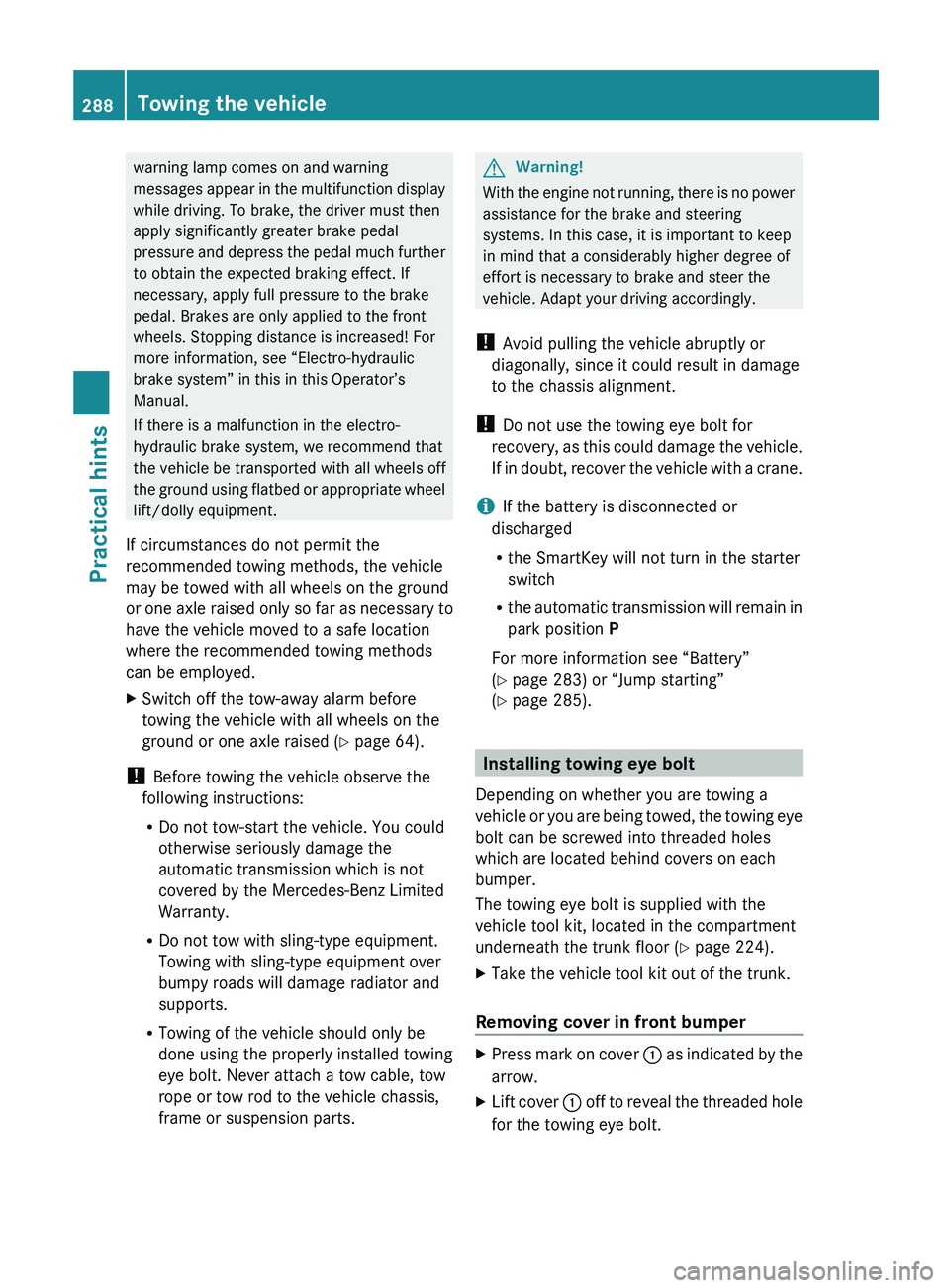
XPress mark on cover 0046 as indicated by the
arrow.XLift cover 0046 off to reveal the threaded hole
for the towing eye bolt.288Towing the vehiclePractical hints
230_AKB; 6; 22, en-USd2ureepe,Version: 2.11.8.12009-07-28T18:49:58+02:00 - Seite 288