trunk MERCEDES-BENZ SL CLASS 2011 Owner's Manual
[x] Cancel search | Manufacturer: MERCEDES-BENZ, Model Year: 2011, Model line: SL CLASS, Model: MERCEDES-BENZ SL CLASS 2011Pages: 316, PDF Size: 6.55 MB
Page 159 of 316
XClose the luggage cover (Y page 158).XClose the trunk lid.XAim the transmitter eye at an outside door
handle.
The SmartKey must be in close proximity to
the outside door handle.
Opening (Summer opening feature)
i Make sure the retractable hardtop is dry
before you open it. Otherwise water may
enter the trunk interior.
XPress and hold button 0036 until the
retractable hardtop is completely open.
The seat ventilation for the driver’s seat
switches on and the rear side windows also
open.XRelease button 0036 to interrupt the
opening procedure.XPress and hold button 0036 once more to
open the door windows.
Closing (Convenience closing feature)
XPress and hold button 0037 until the
retractable hardtop is completely closed.
All currently open windows also close.XRelease button 0037 to interrupt the
closing procedure.
Locking
GObserve Safety notes, see page 155.
The retractable hardtop is not fully closed and
locked or not fully opened and locked if
R the message 0059 Retractable Roof
In Operation appears in the
multifunction display
R a warning sounds for 10 seconds when
driving off or while driving
If the retractable hardtop is not properly
locked, lock it as follows.
Unlocked status noticed when stoppedXSwitch on the ignition.XTo lock the retractable hardtop in its fully
closed position, press down on the
retractable hardtop switch ( Y page 156)
until the retractable hardtop is fully closed.
or
XTo lock the retractable hardtop in its fully
opened position, pull up on the retractable
hardtop switch ( Y page 156) until the
retractable hardtop is fully opened.
Unlocked status noticed while driving
GWarning!
Stop the vehicle in a safe location or as soon
as it is safe to do so and lock the retractable
hardtop before continuing to drive. You could
otherwise endanger yourself and others.
XStop the vehicle in a safe location or as
soon as it is safe to do so.XLeave the ignition switched on.XTo lock the retractable hardtop in its fully
closed position, press down on the
retractable hardtop switch ( Y page 156)
until the retractable hardtop is fully closed.
or
XTo lock the retractable hardtop in its fully
opened position, pull up on the retractable
hardtop switch ( Y page 156) until the
retractable hardtop is fully opened.
Wind screen
GWarning!
The wind screen can restrict the driver’s
vision to the rear of the vehicle. To prevent a
possible accident when visibility is limited
(e.g. in darkness), the upper part of the wind
screen should be folded back.
The wind screen deflects drafts away from the
driver and passenger when the retractable
hardtop is lowered.
Retractable hardtop157Controls in detail230_AKB; 6; 22, en-USd2ureepe,Version: 2.11.8.12009-07-28T18:49:58+02:00 - Seite 157Z
Page 160 of 316
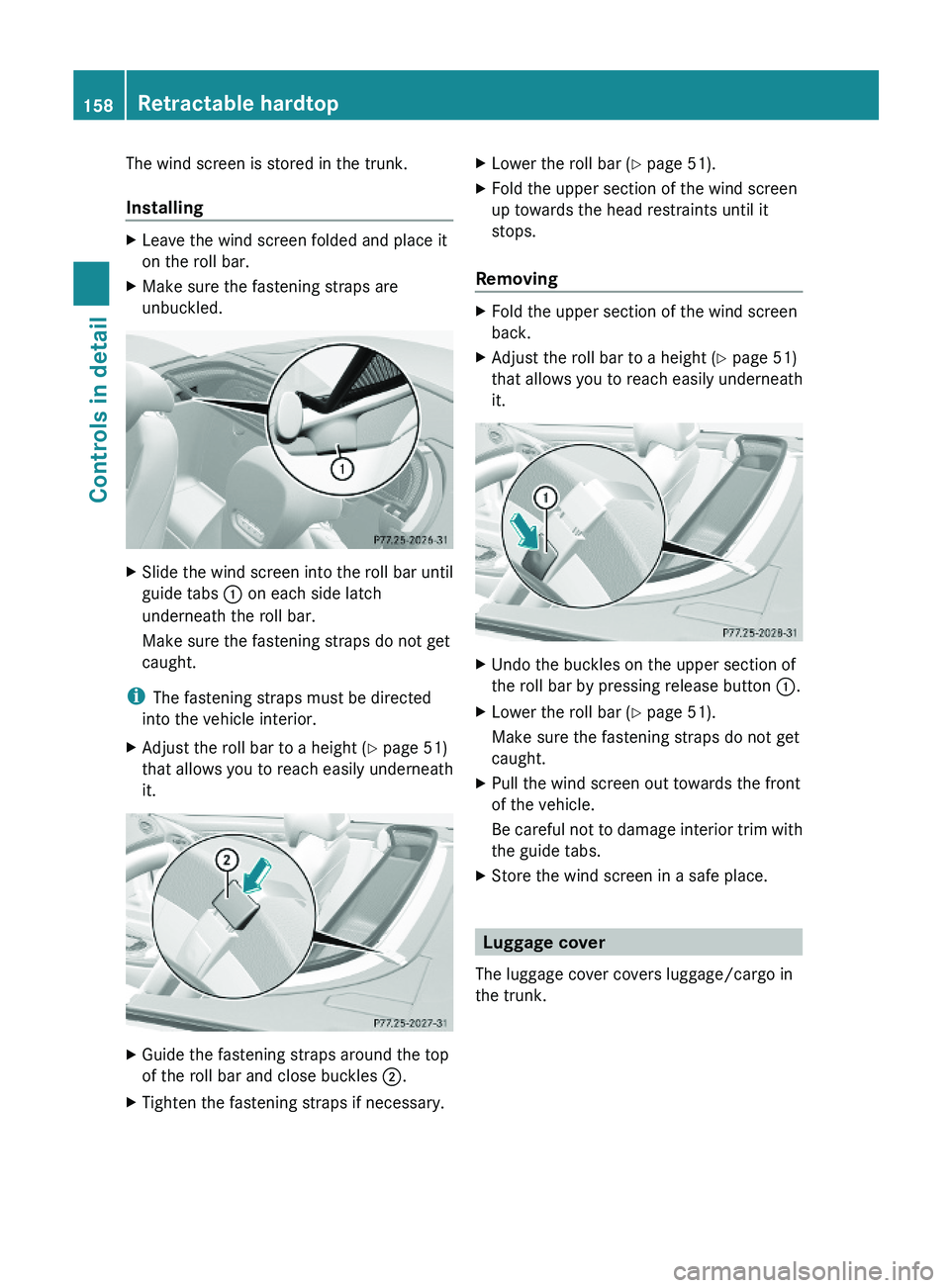
The wind screen is stored in the trunk.
Installing
XLeave the wind screen folded and place it
on the roll bar.
XMake sure the fastening straps are
unbuckled.
XSlide the wind screen into the roll bar until
guide tabs \000F on each side latch
underneath the roll bar.
Make sure the fastening straps do not get
caught.
iThe fastening straps must be directed
into the vehicle interior.
XAdjust the roll bar to a height (Y page 51)
that allows you to reach easily underneath
it.
XGuide the fastening straps around the top
of the roll bar and close buckles \000G.
XTighten the fastening straps if necessary.XLower the roll bar (Y page 51).XFold the upper section of the wind screen
up towards the head restraints until it
stops.
Removing
XFold the upper section of the wind screen
back.
XAdjust the roll bar to a height (Y page 51)
that allows you to reach easily underneath
it.
XUndo the buckles on the upper section of
the roll bar by pressing release button \000F.
XLower the roll bar (Y page 51).
Make sure the fastening straps do not get
caught.
XPull the wind screen out towards the front
of the vehicle.
Be careful not to damage interior trim with
the guide tabs.
XStore the wind screen in a safe place.
Luggage cover
The luggage cover covers luggage/cargo in
the trunk.
158Retractable hardtopControls in detail
230_AKB; 6; 22, en-USd2ureepe,Version: 2.11.8.12009-07-28T18:49:58+02:00 - Seite 158
Page 161 of 316
! To prevent damage to the retractable
hardtop or luggage/cargo when lowering
the retractable hardtop:
RLoad trunk only to the height of the
luggage cover.
RDo not permit luggage/cargo to push up
the closed luggage cover.
RDo not place anything on top of or in front
of the luggage cover.
RDo not place anything on the shelf behind
the roll bar.
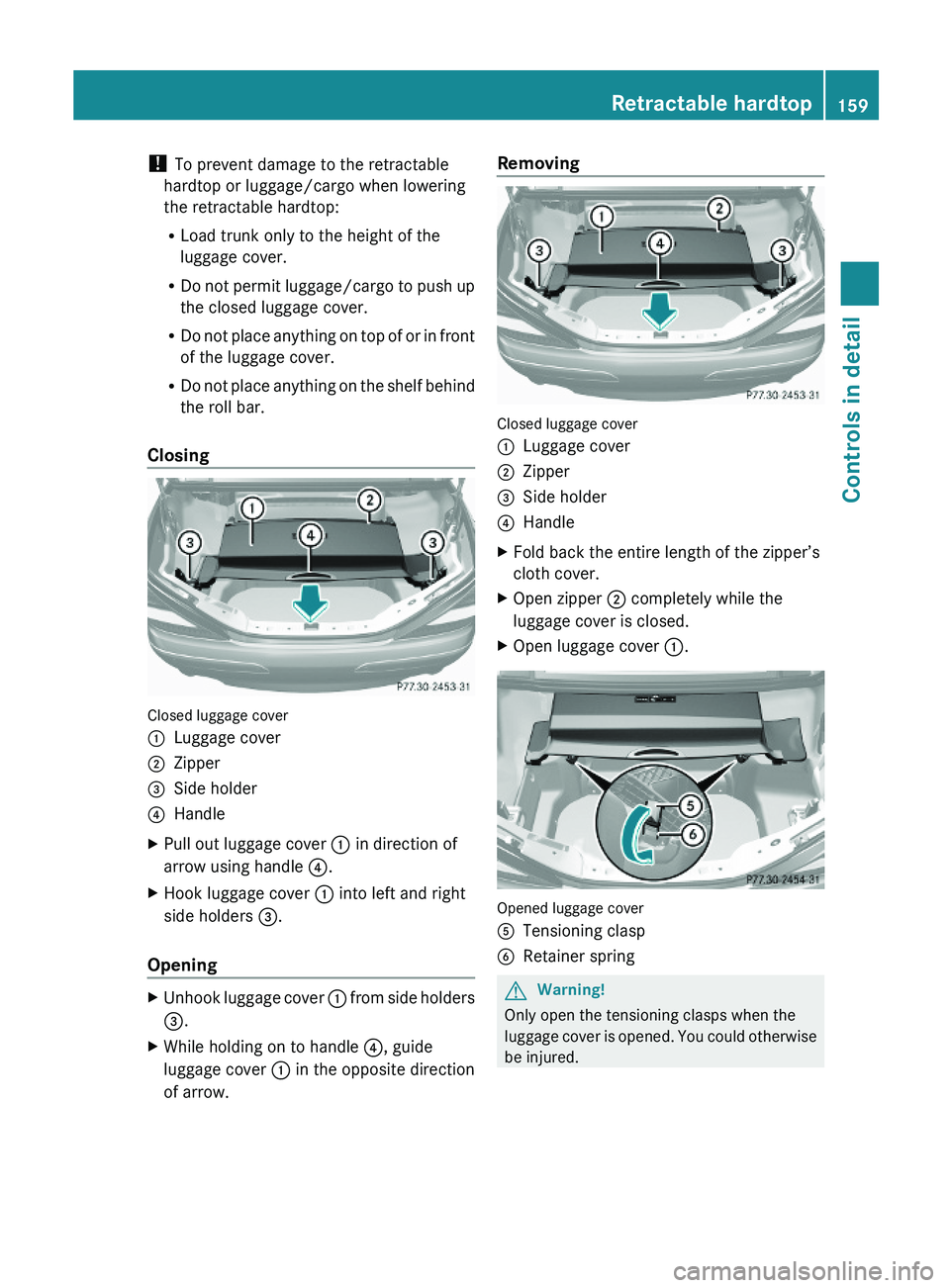
Closing
Closed luggage cover
\000FLuggage cover\000GZipper\000
Page 163 of 316
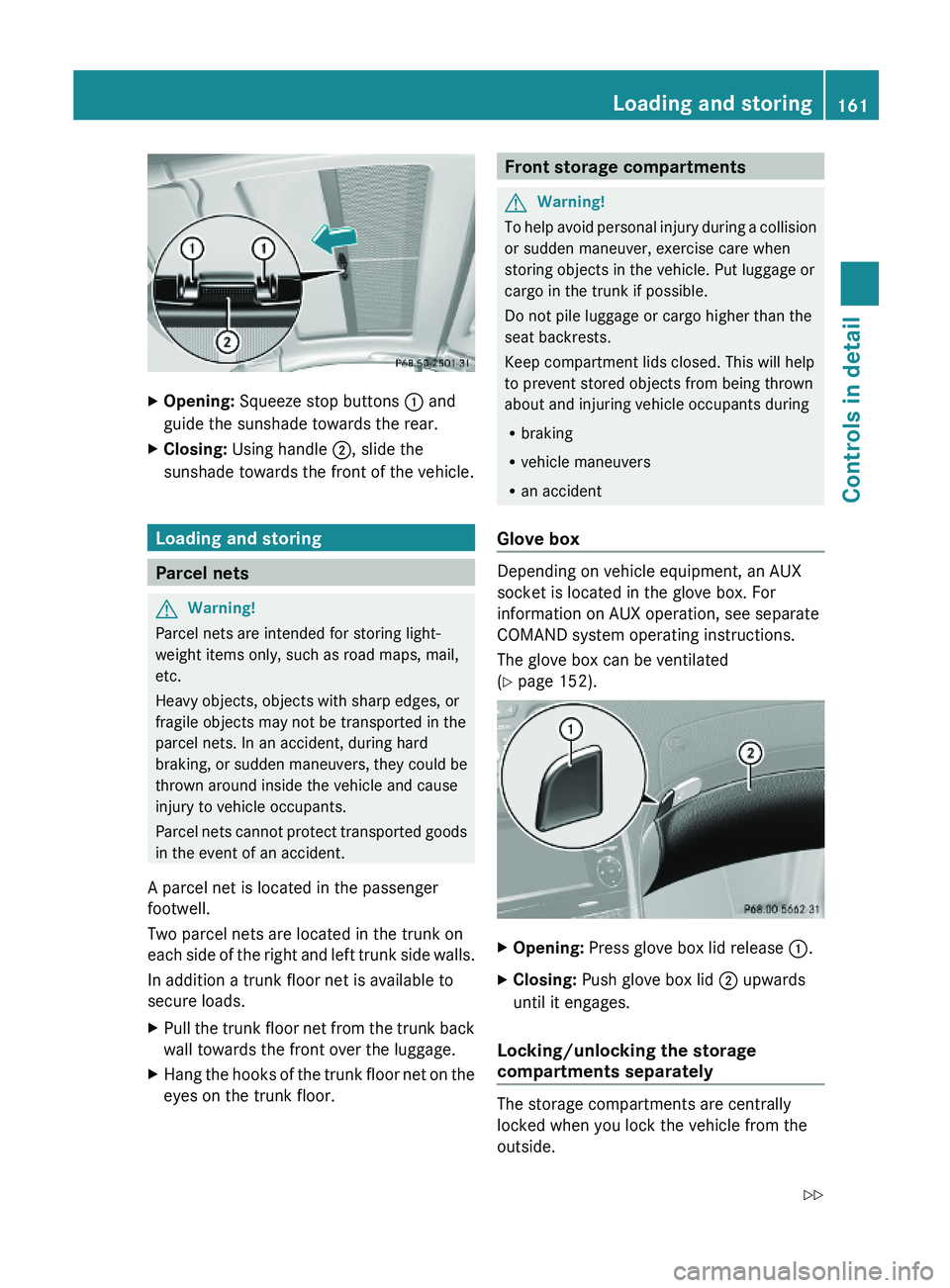
XOpening: Squeeze stop buttons \000F and
guide the sunshade towards the rear.
XClosing: Using handle \000G, slide the
sunshade towards the front of the vehicle.
Loading and storing
Parcel nets
GWarning!
Parcel nets are intended for storing light-
weight items only, such as road maps, mail,
etc.
Heavy objects, objects with sharp edges, or
fragile objects may not be transported in the
parcel nets. In an accident, during hard
braking, or sudden maneuvers, they could be
thrown around inside the vehicle and cause
injury to vehicle occupants.
Parcel nets cannot protect transported goods
in the event of an accident.
A parcel net is located in the passenger
footwell.
Two parcel nets are located in the trunk on
each side of the right and left trunk side walls.
In addition a trunk floor net is available to
secure loads.
XPull the trunk floor net from the trunk back
wall towards the front over the luggage.
XHang the hooks of the trunk floor net on the
eyes on the trunk floor.Front storage compartmentsGWarning!
To help avoid personal injury during a collision
or sudden maneuver, exercise care when
storing objects in the vehicle. Put luggage or
cargo in the trunk if possible.
Do not pile luggage or cargo higher than the
seat backrests.
Keep compartment lids closed. This will help
to prevent stored objects from being thrown
about and injuring vehicle occupants during
Rbraking
Rvehicle maneuvers
Ran accident
Glove box
Depending on vehicle equipment, an AUX
socket is located in the glove box. For
information on AUX operation, see separate
COMAND system operating instructions.
The glove box can be ventilated
(Y page 152).
XOpening: Press glove box lid release \000F.XClosing: Push glove box lid \000G upwards
until it engages.
Locking/unlocking the storage
compartments separately
The storage compartments are centrally
locked when you lock the vehicle from the
outside.
Loading and storing161Controls in detail230_AKB; 6; 22, en-USd2ureepe,Version: 2.11.8.12009-07-28T18:49:58+02:00 - Seite 161Z
Page 165 of 316
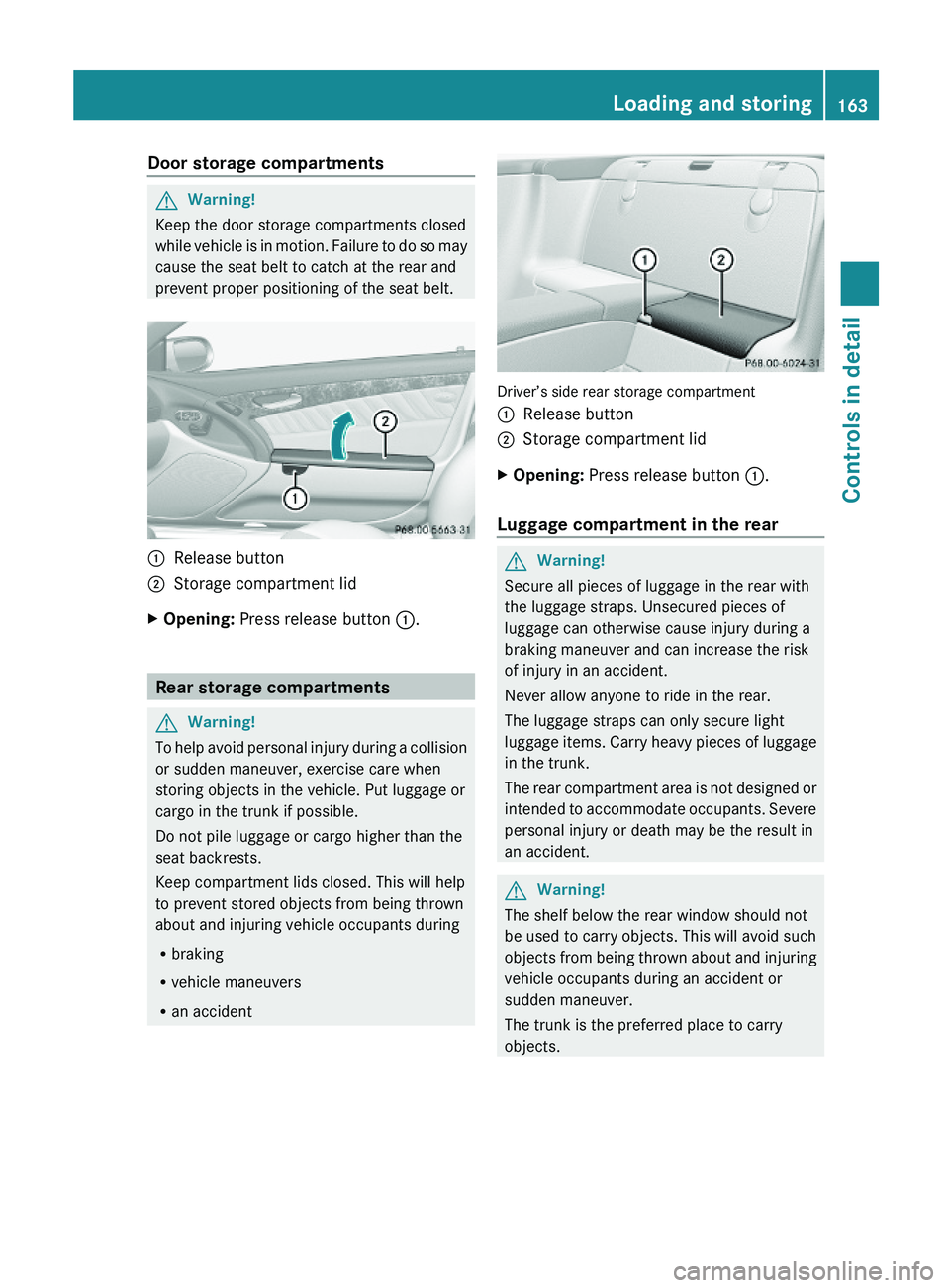
Door storage compartmentsGWarning!
Keep the door storage compartments closed
while vehicle is in motion. Failure to do so may
cause the seat belt to catch at the rear and
prevent proper positioning of the seat belt.
\000FRelease button\000GStorage compartment lidXOpening: Press release button \000F.
Rear storage compartments
GWarning!
To help avoid personal injury during a collision
or sudden maneuver, exercise care when
storing objects in the vehicle. Put luggage or
cargo in the trunk if possible.
Do not pile luggage or cargo higher than the
seat backrests.
Keep compartment lids closed. This will help
to prevent stored objects from being thrown
about and injuring vehicle occupants during
Rbraking
Rvehicle maneuvers
Ran accident
Driver’s side rear storage compartment
\000FRelease button\000GStorage compartment lidXOpening: Press release button \000F.
Luggage compartment in the rear
GWarning!
Secure all pieces of luggage in the rear with
the luggage straps. Unsecured pieces of
luggage can otherwise cause injury during a
braking maneuver and can increase the risk
of injury in an accident.
Never allow anyone to ride in the rear.
The luggage straps can only secure light
luggage items. Carry heavy pieces of luggage
in the trunk.
The rear compartment area is not designed or
intended to accommodate occupants. Severe
personal injury or death may be the result in
an accident.
GWarning!
The shelf below the rear window should not
be used to carry objects. This will avoid such
objects from being thrown about and injuring
vehicle occupants during an accident or
sudden maneuver.
The trunk is the preferred place to carry
objects.
Loading and storing163Controls in detail230_AKB; 6; 22, en-USd2ureepe,Version: 2.11.8.12009-07-28T18:49:58+02:00 - Seite 163Z
Page 168 of 316
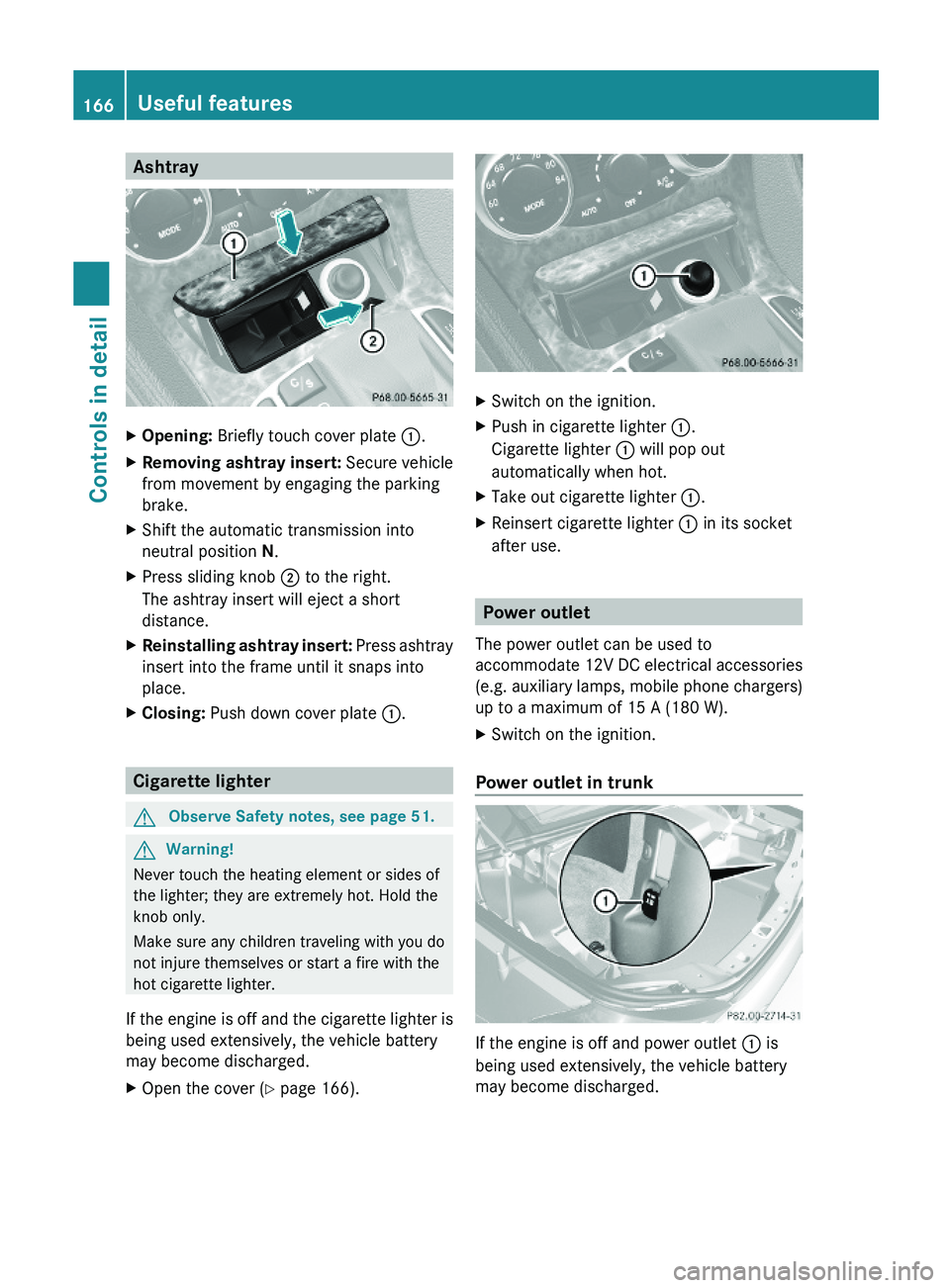
AshtrayXOpening: Briefly touch cover plate \000F.XRemoving ashtray insert: Secure vehicle
from movement by engaging the parking
brake.
XShift the automatic transmission into
neutral position N.
XPress sliding knob \000G to the right.
The ashtray insert will eject a short
distance.
XReinstalling ashtray insert: Press ashtray
insert into the frame until it snaps into
place.
XClosing: Push down cover plate \000F.
Cigarette lighter
GObserve Safety notes, see page 51.GWarning!
Never touch the heating element or sides of
the lighter; they are extremely hot. Hold the
knob only.
Make sure any children traveling with you do
not injure themselves or start a fire with the
hot cigarette lighter.
If the engine is off and the cigarette lighter is
being used extensively, the vehicle battery
may become discharged.
XOpen the cover (Y page 166).XSwitch on the ignition.XPush in cigarette lighter \000F.
Cigarette lighter \000F will pop out
automatically when hot.
XTake out cigarette lighter \000F.XReinsert cigarette lighter \000F in its socket
after use.
Power outlet
The power outlet can be used to
accommodate 12V DC electrical accessories
(e.g. auxiliary lamps, mobile phone chargers)
up to a maximum of 15 A (180 W).
XSwitch on the ignition.
Power outlet in trunk
If the engine is off and power outlet \000F is
being used extensively, the vehicle battery
may become discharged.
166Useful featuresControls in detail
230_AKB; 6; 22, en-USd2ureepe,Version: 2.11.8.12009-07-28T18:49:58+02:00 - Seite 166
Page 173 of 316
iWhen a Tele Aid call has been initiated,
the COMAND system audio is muted. The
mobile phone is no longer connected to the
COMAND system. If you must use this
phone, we recommend that you use it only
with the vehicle at a standstill in a safe
location.
Destination Download to the COMAND
system
i The components and operating principles
of the COMAND system can be found in the
separate COMAND system operating
instructions.
Destination Download allows you access to a
database of over 10 million points of interest
(POIs) that can be downloaded to your
vehicle’s navigation system. If you know the
destination, the address can be downloaded,
or can be provided with points of interests
near your location.
Route guidance
You will be prompted to confirm that route
guidance to the entered address is to be
started.
XSelect Yes using button 0040 or 003E on
the COMAND system.XPress button 0077 on the COMAND system
to confirm.
The system calculates the route and
subsequently starts the route guidance to the
defined address.
i If you select No, you can save the address
to your address book.
i The Destination Download feature is
available if the relevant mobile phone
network is available and data connection is
possible.
Search & Send
“Search & Send” is a navigation destination
address entry service. For more information
on “Search & Send”, refer to separate
COMAND system operating instructions.
Remote door unlock
In case you have locked your vehicle
unintentionally (e.g. SmartKey inside vehicle),
and the reserve SmartKey is not available:
XContact the Customer Assistance Center
at 1-800-FOR-MERCedes
(1-800-367-6372) (USA only) or
1-888-923-8367 (Canada only).
You will be asked to provide your password.XThen return to your vehicle at the time
arranged with the Customer Assistance
Center and pull the trunk recessed handle
for a minimum of 20 seconds until the
indicator lamp in the SOS button is flashing.
The message Connecting Call appears in
the multifunction display.
As an alternative, you may unlock the vehicle
via Internet in the “My Tele Aid” section of
“Owner’s Online”, using your ID and password
(USA only).
i The remote door unlock feature is
available if the relevant cellular phone
network is available.
The SOS button will flash and the message
Call Connected will appear in the
multifunction display to indicate receipt of
the door unlock command.
If the trunk recessed handle was pulled for
more than 20 seconds before door unlock
authorization was received by the
Customer Assistance Center, you must
wait 15 minutes before pulling the trunk
recessed handle again.
Useful features171Controls in detail230_AKB; 6; 22, en-USd2ureepe,Version: 2.11.8.12009-07-28T18:49:58+02:00 - Seite 171Z
Page 226 of 316
Vehicle equipment
iThis Operator’s Manual describes all
features, standard or optional, potentially
available for your vehicle at the time of
purchase. Please be aware that your
vehicle might not be equipped with all
features described in this manual.
Where will I find ...?
First aid kit
! Always keep the storage compartment
under the passenger seat closed while the
vehicle is in motion.
iCheck expiration dates and contents for
completeness at least once a year and
replace missing/expired items.
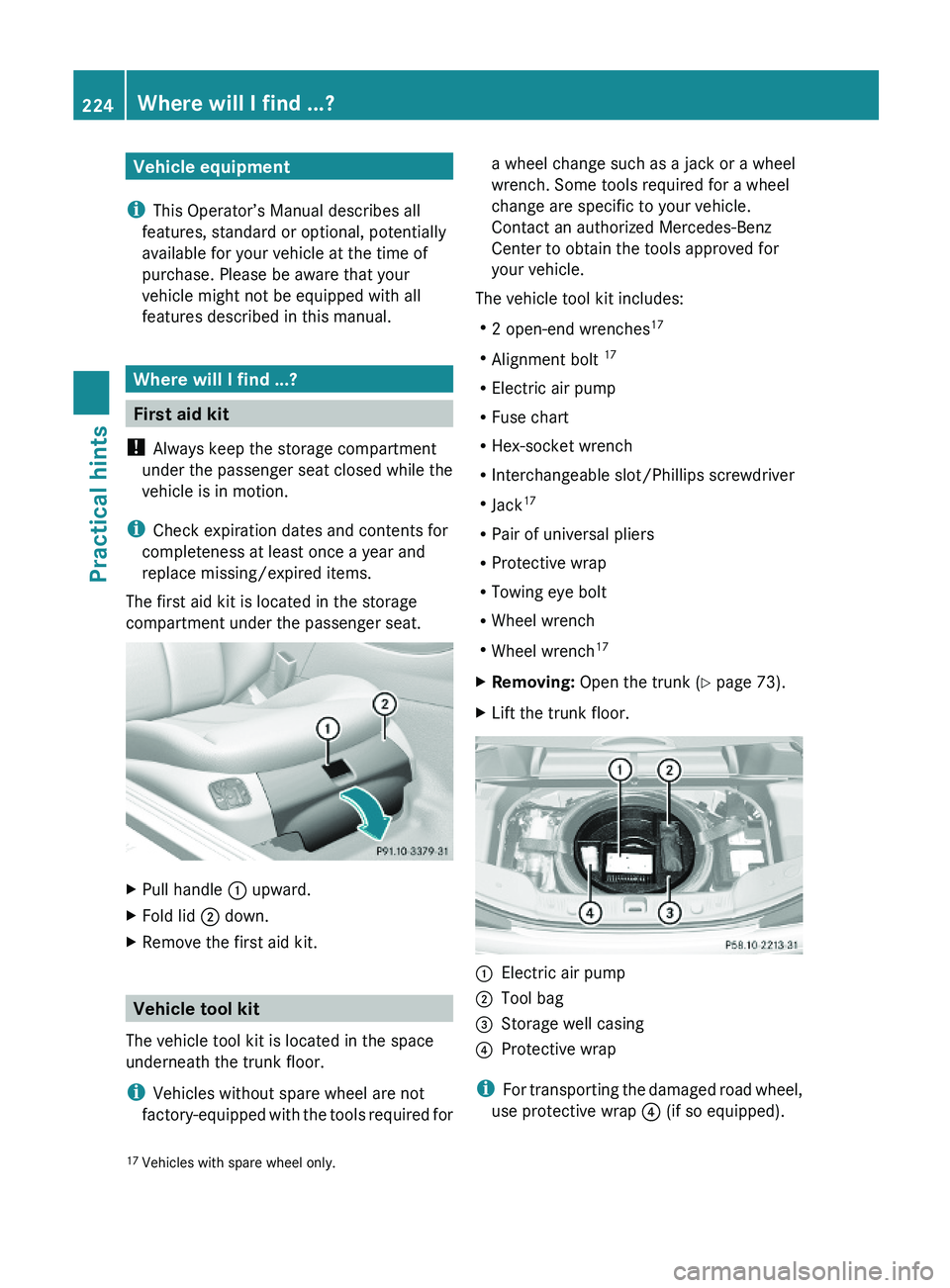
The first aid kit is located in the storage
compartment under the passenger seat.
XPull handle \000F upward.XFold lid \000G down.XRemove the first aid kit.
Vehicle tool kit
The vehicle tool kit is located in the space
underneath the trunk floor.
iVehicles without spare wheel are not
factory-equipped with the tools required for
a wheel change such as a jack or a wheel
wrench. Some tools required for a wheel
change are specific to your vehicle.
Contact an authorized Mercedes-Benz
Center to obtain the tools approved for
your vehicle.
The vehicle tool kit includes:
R2 open-end wrenches17
RAlignment bolt 17
RElectric air pump
RFuse chart
RHex-socket wrench
RInterchangeable slot/Phillips screwdriver
RJack17
RPair of universal pliers
RProtective wrap
RTowing eye bolt
RWheel wrench
RWheel wrench17
XRemoving: Open the trunk (Y page 73).XLift the trunk floor.\000FElectric air pump\000GTool bag\000
Page 243 of 316
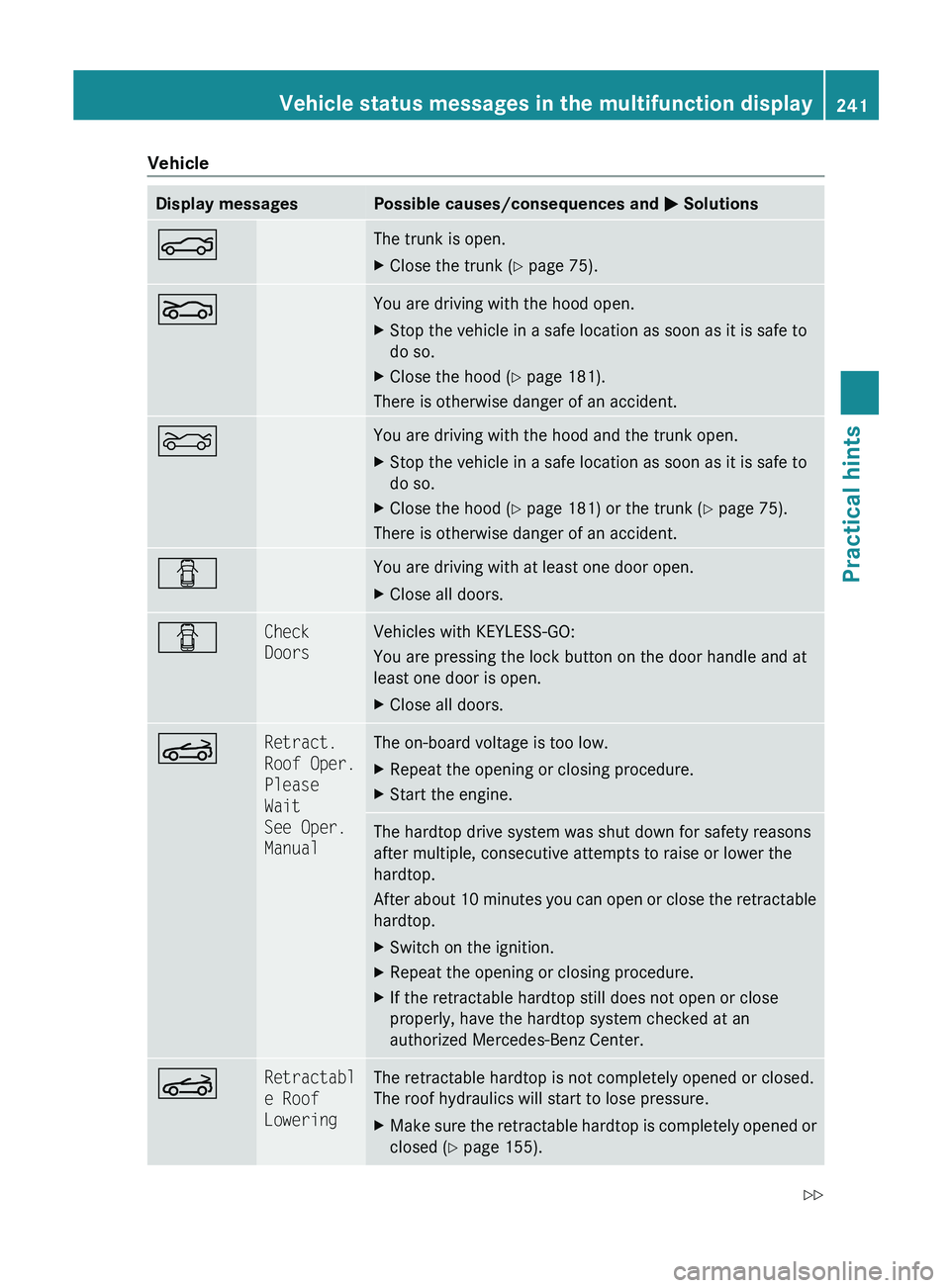
VehicleDisplay messagesPossible causes/consequences and 0050 Solutions0084The trunk is open.XClose the trunk ( Y page 75).005AYou are driving with the hood open.XStop the vehicle in a safe location as soon as it is safe to
do so.XClose the hood ( Y page 181).
There is otherwise danger of an accident.
0085You are driving with the hood and the trunk open.XStop the vehicle in a safe location as soon as it is safe to
do so.XClose the hood ( Y page 181) or the trunk ( Y page 75).
There is otherwise danger of an accident.
0051You are driving with at least one door open.XClose all doors.0051Check
DoorsVehicles with KEYLESS-GO:
You are pressing the lock button on the door handle and at
least one door is open.XClose all doors.0059Retract.
Roof Oper.
Please
Wait
See Oper.
ManualThe on-board voltage is too low.XRepeat the opening or closing procedure.XStart the engine.The hardtop drive system was shut down for safety reasons
after multiple, consecutive attempts to raise or lower the
hardtop.
After about 10 minutes you can open or close the retractable
hardtop.XSwitch on the ignition.XRepeat the opening or closing procedure.XIf the retractable hardtop still does not open or close
properly, have the hardtop system checked at an
authorized Mercedes-Benz Center.0059Retractabl
e Roof
LoweringThe retractable hardtop is not completely opened or closed.
The roof hydraulics will start to lose pressure.XMake sure the retractable hardtop is completely opened or
closed ( Y page 155).Vehicle status messages in the multifunction display241Practical hints230_AKB; 6; 22, en-USd2ureepe,Version: 2.11.8.12009-07-28T18:49:58+02:00 - Seite 241Z
Page 244 of 316
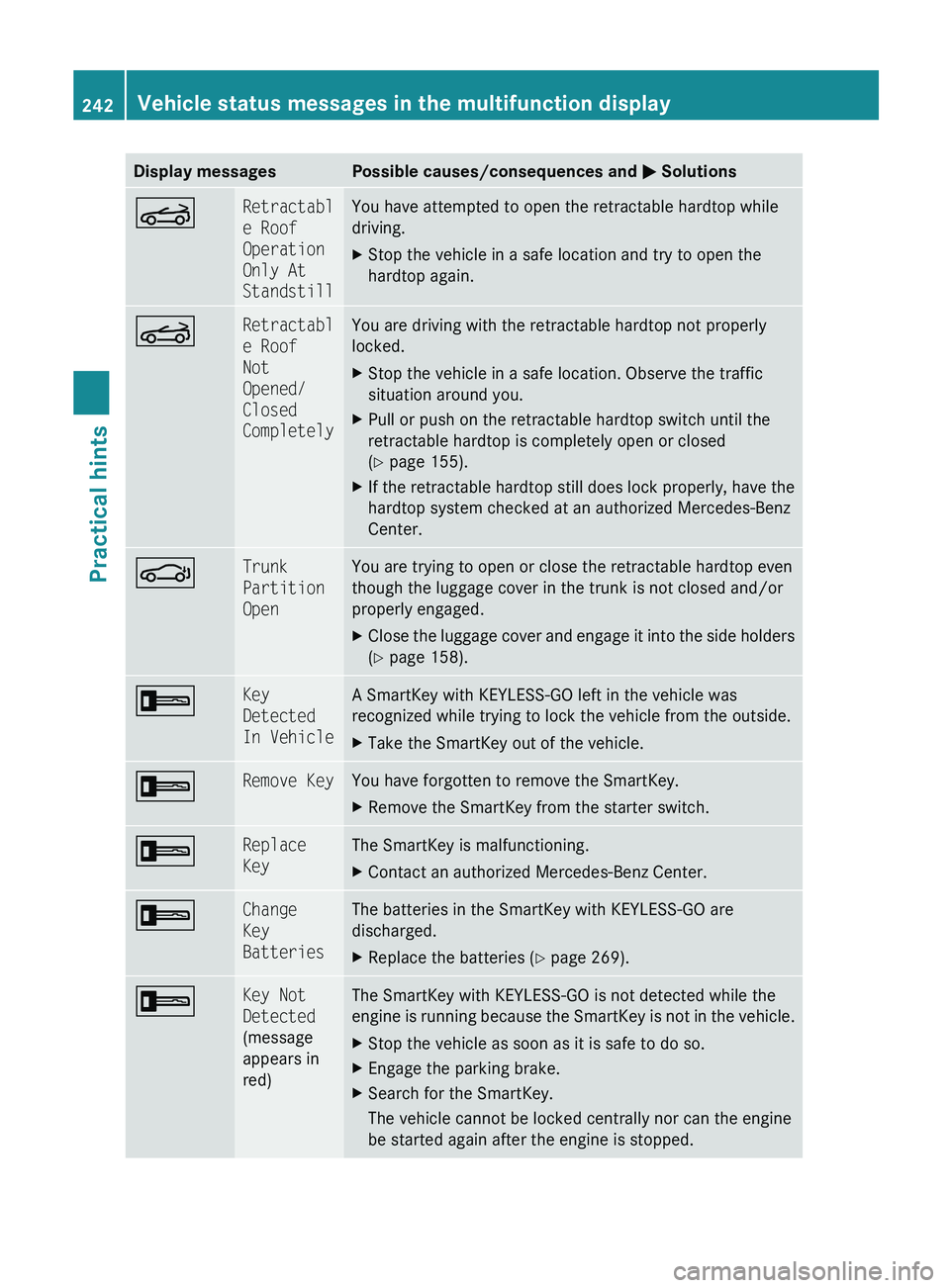
Display messagesPossible causes/consequences and 0050 Solutions0059Retractabl
e Roof
Operation
Only At
StandstillYou have attempted to open the retractable hardtop while
driving.XStop the vehicle in a safe location and try to open the
hardtop again.0059Retractabl
e Roof
Not
Opened/
Closed
CompletelyYou are driving with the retractable hardtop not properly
locked.XStop the vehicle in a safe location. Observe the traffic
situation around you.XPull or push on the retractable hardtop switch until the
retractable hardtop is completely open or closed
( Y page 155).XIf the retractable hardtop still does lock properly, have the
hardtop system checked at an authorized Mercedes-Benz
Center.0058Trunk
Partition
OpenYou are trying to open or close the retractable hardtop even
though the luggage cover in the trunk is not closed and/or
properly engaged.XClose the luggage cover and engage it into the side holders
( Y page 158).0039Key
Detected
In VehicleA SmartKey with KEYLESS-GO left in the vehicle was
recognized while trying to lock the vehicle from the outside.XTake the SmartKey out of the vehicle.0039Remove KeyYou have forgotten to remove the SmartKey.XRemove the SmartKey from the starter switch.0039Replace
KeyThe SmartKey is malfunctioning.XContact an authorized Mercedes-Benz Center.0039Change
Key
BatteriesThe batteries in the SmartKey with KEYLESS-GO are
discharged.XReplace the batteries ( Y page 269).0039Key Not
Detected
(message
appears in
red)The SmartKey with KEYLESS-GO is not detected while the
engine is running because the SmartKey is not in the vehicle.XStop the vehicle as soon as it is safe to do so.XEngage the parking brake.XSearch for the SmartKey.
The vehicle cannot be locked centrally nor can the engine
be started again after the engine is stopped.242Vehicle status messages in the multifunction displayPractical hints
230_AKB; 6; 22, en-USd2ureepe,Version: 2.11.8.12009-07-28T18:49:58+02:00 - Seite 242