display MERCEDES-BENZ SL-Class 2015 R131 Owner's Guide
[x] Cancel search | Manufacturer: MERCEDES-BENZ, Model Year: 2015, Model line: SL-Class, Model: MERCEDES-BENZ SL-Class 2015 R131Pages: 610, PDF Size: 12.21 MB
Page 24 of 610

Adjusting the lumbar support
(COMAND) ....................................
.315
Balance (seat heating) ................... 316
Belt guide ...................................... 111
Cleaning the cover ......................... 545
Correct driver's seat position ....... .108
Important safety notes .................. 109
Multicontour seat .......................... 314
Overview ........................................ 109
Resetting settings .......................... 317
Seat functions (COMAND) ............. 314
Seat heating problem .................... 113
Seat ventilation problem ................ 113
Selecting for adjustment
(COMAND) ..................................... 314
Sliding forward/back ..................... 111
Storing settings (memory func-
tion) ............................................... 119
Switching AIRSCARF on/off .......... 113
Switching seat heating on/off ....... 112
Switching seat ventilation on/off .. 113
Selecting a province ......................... 323
Selecting a state ............................... 323
Selecting stations Radio ............................................. 436
Selector lever
Cleaning ......................................... 545
Positions ........................................ 159
Sending DTMF tones ......................... 389
Sensors (cleaning instructions) ....... 543
Service center see Qualified specialist workshop
Service Center
see Qualified specialist workshop
Service menu (on-board com-
puter) ................................................. .231
Service products Brake fluid ..................................... 604
Coolant (engine) ............................ 605
Engine oil ....................................... 603
Fuel ................................................ 602
Important safety notes .................. 601
Refrigerant (air-conditioning sys-
tem) ............................................... 606
Washer fluid ................................... 606 Settings
Factory (on-board computer) ......... 236
Menu overview .............................. 288
On-board computer ....................... 232
Picture (COMAND) ......................... 473
Sound settings ............................... 296
Setting the air distribution ...............142
Setting the airflow ............................ 143
Setting the audio format Rear Seat Entertainment System ... 496
Setting the language
COMAND ....................................... 308
Rear Seat Entertainment System ... 496
Setting the night design ................... 306
Setting the text reader speed .......... 308
Setting the volume Telephone call s.............................. 296
Video AUX ..................................... 479
SETUP (on-board computer) ............. 236
Side impact air bag ............................. 57
Side windows Cleaning ......................................... 542
Convenience closing feature ............ 99
Important safety information ........... 96
Opening/closing (all) ....................... 98
Opening/closing (front) ................... 97
Opening/closing (rear) .................... 98
Overview .......................................... 96
Problem (malfunction) ................... 100
Resetting ......................................... 99
SIRIUS weather display
5-day forecast ................................ 501
Daily forecas t................................. 500
Detail information .......................... 501
Information chart ........................... 500
Selecting the area for the weather forecast ......................................... 501
Switching on/of f........................... 500
Weather map ................................. 503
SmartKey
Changing the battery ....................... 85
Changing the programming ............. 83
Checking the battery ....................... 85
Convenience opening feature .......... 98
Display message ............................ 268
Door central locking/unlocking ....... 82
Important safety notes .................... 82 22
Index
Page 25 of 610
Loss .................................................87
Mechanical key ................................ 84
Opening/closing the roof .............. 102
Overview .......................................... 82
Positions (ignition lock) ................. 151
Problem (malfunction) ..................... 87
Starting the engine ........................ 154
Snow chains ...................................... 571
Sockets Front-passenger footwell ............... 519
General notes ................................ 518
Trunk ............................................. 519
Under the armrest .........................5 19
Sound
Switching on/off ........................... 295
Sound menu ....................................... 296
Sound mode ....................................... 298
Sound settings Calling up the sound menu ............ 296
Surround sound ............................ .297
Treble and bas s............................. 296
Specialist workshop ............................ 35
Special seat belt retractor .................. 69
Speed, controlling see Cruise control
Speed dial list
Storing a phone book entry in the
speed dial list ................................ 397
Speedometer
Digital ............................................ 226
In the Instrument cluster ................. 41
Segments ...................................... 223
Selecting the unit of measure-
ment .............................................. 232
SPLITVIEW ......................................... 303
SPORT handling mode Activating/deactivating (AMG
vehicles) .......................................... 76
Warning lamp ................................. 274
Standing lamps
Display message ............................ 252
Switching on/of f........................... 124
Start/stop function
see ECO start/stop function
Starting (engine) ................................ 153
Station search ................................... 436
STEER CONTROL .................................. 79 Steering (display message)
.............. 266
Steering assistant STEER CON-
TROL see STEER CONTROL
Steering wheel
Adjusting (electrically) ................... 114
Button overview ............................... 43
Buttons (on-board computer) ......... 223
Cleaning ......................................... 545
Important safety notes .................. 114
Paddle shifters ............................... 164
Storing settings (memory func-
tion) ............................................... 119
Steering wheel paddle shifters ........ 164
Stop function Video DVD ..................................... 475
Stopwatch (RACETIMER) ................... 237
Storing stations Radi o............................................. 437
Stowage areas ................................... 512
Stowage compartments Armrest (under) ............................. 513
Center console .............................. 513
Center console (rear) ..................... 514
Cup holders ................................... 516
Eyeglasses compartment ............... 513
Glove box ....................................... 512
Important safety information ......... 512
Rear ............................................... 514
Stowage net ................................... 514
Stowage net ....................................... 514
Stowage space Umbrella holde r............................. 513
Stowage well beneath the trunk
floor .................................................... 516
Street View ........................................ 331
Summer tires ..................................... 570
Sun visor ............................................ 517
Surround lighting (on-board com-
puter) .................................................. 233
Surround sound ................................. 297
Surround sound (harman/kardon ®
surround sound system) Notes ............................................. 297
Switching on/of f........................... 297 Index
23
Page 26 of 610
Suspension tuning
Active Body Control (AMG vehi-
cles) ............................................... 198
Active Body Control (except AMG
vehicles) ........................................1 95
SETUP (on-board computer) .......... 236
Switching air-recirculation mode
on/off ................................................. 146
Switching between picture for-
mats (TV, video) ................................. 473
Switching between summer time
and standard time .............................307
Switching HD Radio on/off see Radio
Switching the hands-free micro-
phone on/off ..................................... 388
Switching wavebands (radio) ........... 436
System settings
Bluetooth ®
..................................... 308
Date ............................................... 306
Language ....................................... 308
Text reader speed .......................... 308
Time ............................................... 306
Time zone ...................................... 307
Voice Control System .................... 308 T
Tachometer ........................................ 223
Tail lamps Display message ............................ 252
see Lights
Tank content
Fuel gauge ....................................... 41
Technical data
Capacities ...................................... 601
Information ................................... .600
Tires/wheels ................................. 593
Vehicle data ................................... 607
TELEAID
Call priority ................................... .523
Downloading destinations
(COMAND) ..................................... 523
Downloading routes ....................... 526
Emergency call .............................. 520
General notes ................................ 519
Geo fencing ................................... 527 Locating a stolen vehicle ..............
.525
MB info call button ........................ 522
Remote vehicle locking .................. 525
Roadside Assistance button .......... 521
Search & Send ............................... 524
Self-test ......................................... 520
Speed alert ................................... .527
System .......................................... 520
Triggering the vehicle alarm ........... 527
Vehicle remote malfunction diag-
nosis .............................................. 526
Vehicle remote unlocking .............. 524
Telephone
Accepting/ending a call ................ 387
Accepting a call ............................ .229
Adjusting the volume for calls ....... 296
Calling (outgoing call ).................... 387
Conference connection .................. 390
Connecting a mobile phone (gen-
eral information) ............................ 381
De-authorizing a mobile phone ...... 385
Display message ............................ 266
Ending an active cal l...................... 390
Entering a number ......................... 387
Entering phone numbers ................ 387
External authorization (Blue-
tooth ®
) ........................................... 384
Function restrictions ...................... 380
General notes ................................ 379
Incoming call ................................. 387
Making a call ................................. 390
Making a call via speed dial ........... 388
Menu (on-board computer) ............ 229
Number from the phone book ........ 230
Operating options .......................... 380
Overview of functions .................... 388
Reception and transmission vol-
ume ............................................... 386
Redialing ........................................ 230
Rejecting/accepting a waiting
call ................................................. 389
Rejecting/ending a call ................. 229
Rejecting a call .............................. 387
Safety notes .................................. 379
Sending DTMF tones ...................... 389
Single call ...................................... 388
Switching hands-free microphone on/of f............................................ 388 24
Index
Page 27 of 610

Text messages (SMS) .................... 398
Toggling ......................................... 390
Using the telephone ....................... 387
see Bluetooth
®
Telephone basic menu Bluetooth ®
interface ......................3 85
Telephone mode
Redialing ........................................ 388
Telephone number
Entering ......................................... 387
Temperature
Coolant .......................................... 222
Coolant (on-board computer) ......... 236
Engine oil (on-board computer) ...... 236
Outside temperature ..................... .223
Setting (climate control) ................ 142
Text messages (SMS)
Calling the sender .......................... 400
Deleting ......................................... 400
Inbox .............................................. 399
Information and requirements ....... 398
Reading .......................................... 399
Reading aloud ................................ 399
Storing sender in address book ..... 400
Storing the sender as a new
address book entry ........................ 400
Time
Setting .......................................... .307
Setting summer/standard time ..... 307
Setting the forma t......................... 306
Setting the time ............................. 306
Setting the time/date format ........ 306
Setting the time manually .............. 306
Setting the time zone ..................... 307
Timing (RACETIMER) ......................... 237
TIREFIT kit .......................................... 550
Tire pressure Calling up (on-board computer) ..... 575
Checking manually ........................ 575
Display message ............................ 263
Important safety notes .................. 575
Maximum ....................................... 574
Notes ............................................. 573
Not reached (TIREFIT) .................... 552
Reached (TIREFIT) .......................... 552
Recommended ............................... 572 Tire pressure monitor
Radio type approval for the tire
pressure monitor ........................... 578
Tire pressure monitoring system
Checking the tire pressure elec-
tronically ........................................ 577
Function/note s............................. 575
General notes ................................ 575
Important safety notes .................. 575
Restarting ...................................... 577
Warning lamp ................................. 280
Warning message .......................... 577
Tires
Aspect ratio (definition) ................. 587
Average weight of the vehicle
occupants (definition) .................... 586
Bar (definition) ............................... 586
Changing a whee l.......................... 588
Characteristics .............................. 586
Checking ........................................ 569
Curb weight (definition) ................. 587
Definition of terms ......................... 586
Direction of rotation ...................... 589
Display message ............................ 263
Distribution of the vehicle occu-
pants (definition) ............................ 588
DOT, Tire Identification Number
(TIN) ............................................... 585
DOT (Department of Transporta-
tion) (definition) ............................. 586
GAWR (Gross Axle Weight Rating)
(definition) ..................................... 587
GVW (Gross Vehicle Weight) (def-
inition) ........................................... 587
GVWR (Gross Vehicle Weight Rat-
ing) (definition) .............................. 587
Important safety notes .................. 568
Increased vehicle weight due to
optional equipment (definition) ...... 587
Kilopascal (kPa) (definition) ........... 587
Labeling (overview) ........................ 582
Load bearing index (definition) ...... 588
Load index ..................................... 585
Load index (definition) ................... 587
M+S tire s....................................... 570
Maximum loaded vehicle weight
(definition) ..................................... 587 Index
25
Page 29 of 610
Trunk lid
Display message ............................ 266
Opening/closing .............................. 91
Opening dimensions ...................... 607
Trunk load (maximum) ...................... 607
Trunk partition Display message ............................ 266
General notes ................................ 102
Installing ........................................ 103
Opening/closing ............................ 103
Removing ....................................... 103
Turn signals
Display message ............................ 251
Switching on/off ........................... 125
TV
Automatic picture shutoff .............. 472
Picture settings .............................. 473
Sound settings (balance, bass,
treble) ............................................ 296
Type identification plate
see Vehicle identification plate U
Umbrella holder ................................. 513
Unlocking Emergency unlocking ....................... 90
From inside the vehicle (central
unlocking button) ............................. 89
Updating the digital map .................. 375
USB see Media Interface V
Vanity mirror (in the sun visor) ........ 517
Vehicle Correct use ...................................... 35
Data acquisition ....................... 36, 284
Display message ............................ 265
Equipment ....................................... 31
Individual settings .......................... 232
Limited Warranty ............................. 36
Loading .......................................... 578
Locking (in an emergency) ............... 90
Locking (SmartKey) .......................... 82
Lowering ........................................ 593
Maintenance .................................... 32 Parking for a long period ................ 174
Pulling away ................................... 154
Raising ........................................... 590
Reporting problems ........................
.35
Securing from rolling away ............ 590
Towing away .................................. 559
Tow-starting ................................... 559
Transporting .................................. 562
Unlocking (in an emergency) ........... 90
Unlocking (SmartKey )...................... 82
Vehicle data ................................... 607
Vehicle battery
see Battery (vehicle)
Vehicle data ....................................... 607
Vehicle dimensions ........................... 607
Vehicle emergency locking ................ 90
Vehicle identification number see VIN
Vehicle identification plate .............. 600
Vehicle level Active Body Control (AMG vehi-
cles) ............................................... 197
Active Body Control (except AMG
vehicles) ........................................ 194
Display message ............................ 257
Vehicle tool kit .................................. 548
Video Operating the DVD ......................... 229
see Video DVD
Video AUX
Setting the picture ......................... 473
Video DVD
Automatic picture shutoff .............. 472
DVD menu ..................................... 476
Fast forward/rewind ...................... 475
Function restrictions ...................... 474
Interactive content ........................ 478
Notes on discs ............................... 473
Operation ....................................... 473
Pause function ............................... 476
Playing conditions .......................... 474
Safety notes .................................. 473
Selecting ........................................ 476
Selecting a film/title ...................... 476
Selecting a scene/chapter ............ 476
Setting the audio format ................ 477
Setting the language ...................... 477 Index
27
Page 30 of 610
Setting the picture ......................... 473
Showing/hiding the control
menu ............................................. 474
Showing/hiding the menu ............. 475
Stop function ................................. 475
Subtitles ........................................ 478
Switching to ................................... 474
VIN ...................................................... 600
Voice Control System Setting s......................................... 308
Volume, adjusting
COMAND ....................................... 295
Navigation messages ..................... 295 W
Warning and indicator lamps ABS ................................................ 271
Brakes ........................................... 271
Check Engine ................................. 277
Coolant .......................................... 277
Distance warning ........................... 279
DISTRONIC PLUS ........................... 279
ESP ®
.............................................. 273
ESP ®
OFF ....................................... 274
Overview .......................................... 42
PASSENGER AIR BAG OFF ............... 51
Reserve fue l................................... 277
Restraint system ............................ 276
Seat belt ........................................ 269
SPORT handling mod e................... 274
Tire pressure monitor .................... 280
Warranty .............................................. 31
Washer fluid Display message ............................ 267
Waypoints
Accepting waypoints for the
route .............................................. 334
Creating ......................................... 331
Editing ........................................... 333
Entering ......................................... 331
Searching for a gas station when
the fuel level is lo w........................ 334
Weather Band
Searching for a channel ................. 438
Switching on .................................. 438 Weather map (SIRIUS)
Calling up ....................................... 503
Legend ........................................... 508
Moving ........................................... 504
Showing/hiding layers ................... 504
Showing/hiding the menu ............. 504
Time stamp .................................... 508
Weather memory (SIRIUS)
Selecting an area ........................... 503
Storing an area .............................. 503
Website
Add to favorites ............................. 431
Wheel and tire combination
see Tires
Wheel bolt tightening torque ........... 593
Wheel chock ...................................... 590
Wheels Changing a whee l.......................... 588
Checking ........................................ 569
Cleaning ......................................... 542
Cleaning (warning) ......................... 589
Important safety notes .................. 568
Interchanging/changing ................ 588
Mounting a new whee l................... 592
Mounting a whee l.......................... 589
Overview ........................................ 568
Removing a whee l.......................... 592
Storing ........................................... 589
Tightening torque ........................... 593
Wheel size/tire size ....................... 593
Windows
see Side windows
Wind screen
Electrical wind screen .................... 104
Windshield
Defrosting ...................................... 143
Windshield washer fluid
see Windshield washer system
Windshield washer system
Adding washer fluid ....................... 537
Notes ............................................. 606
Windshield wipers
Display message ............................ 267
Problem (malfunction) ................... 133
Replacing the wiper blades ............ 131
Switching on/of f........................... 130 28
Index
Page 43 of 610
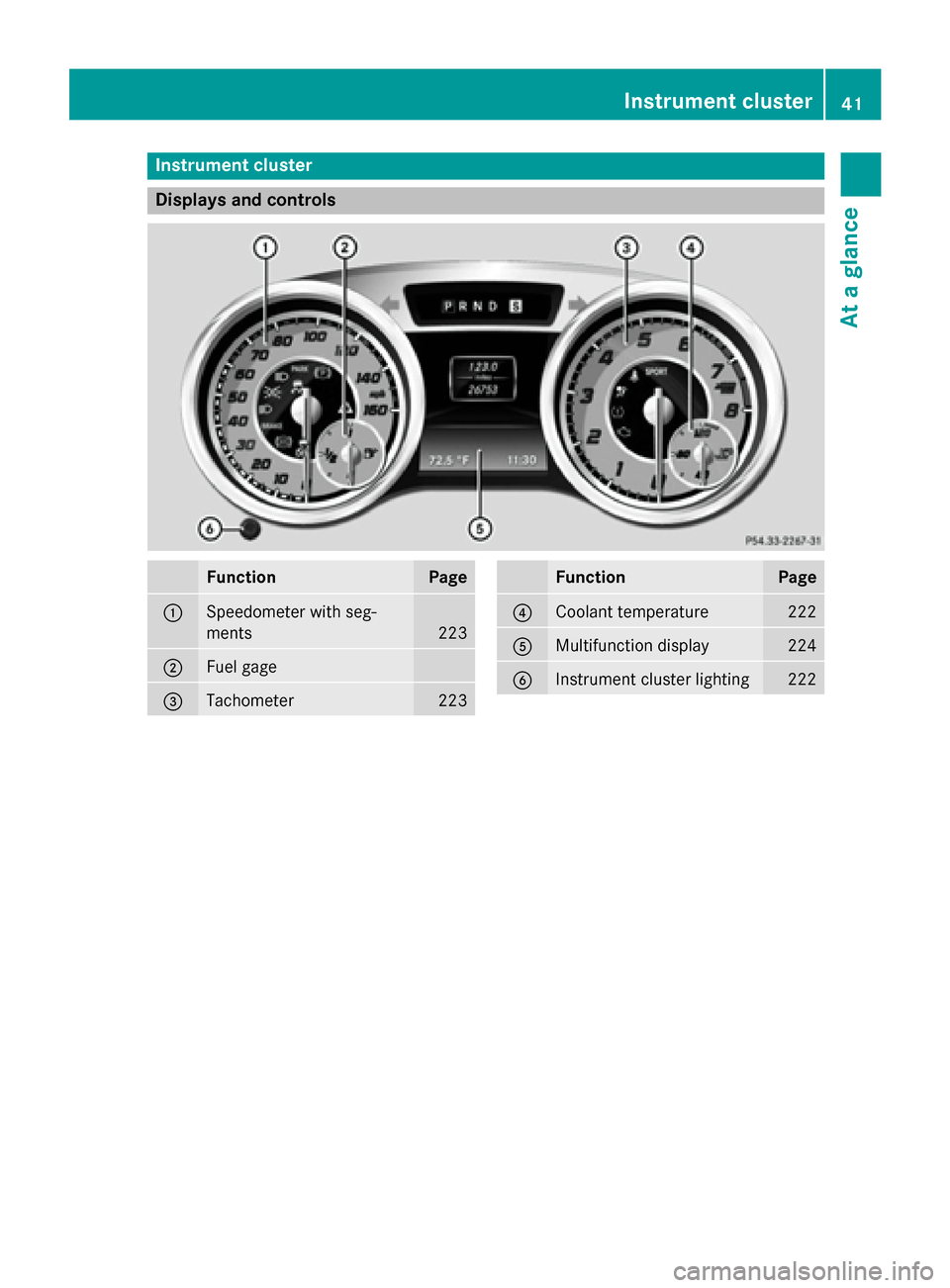
Instrument cluster
Displays and controls
Function Page
0043
Speedometer with seg-
ments
223
0044
Fuel gage
0087
Tachometer 223 Function Page
0085
Coolant temperature 222
0083
Multifunction display 224
0084
Instrument cluster lighting 222Instrument cluster
41At a glance
Page 45 of 610
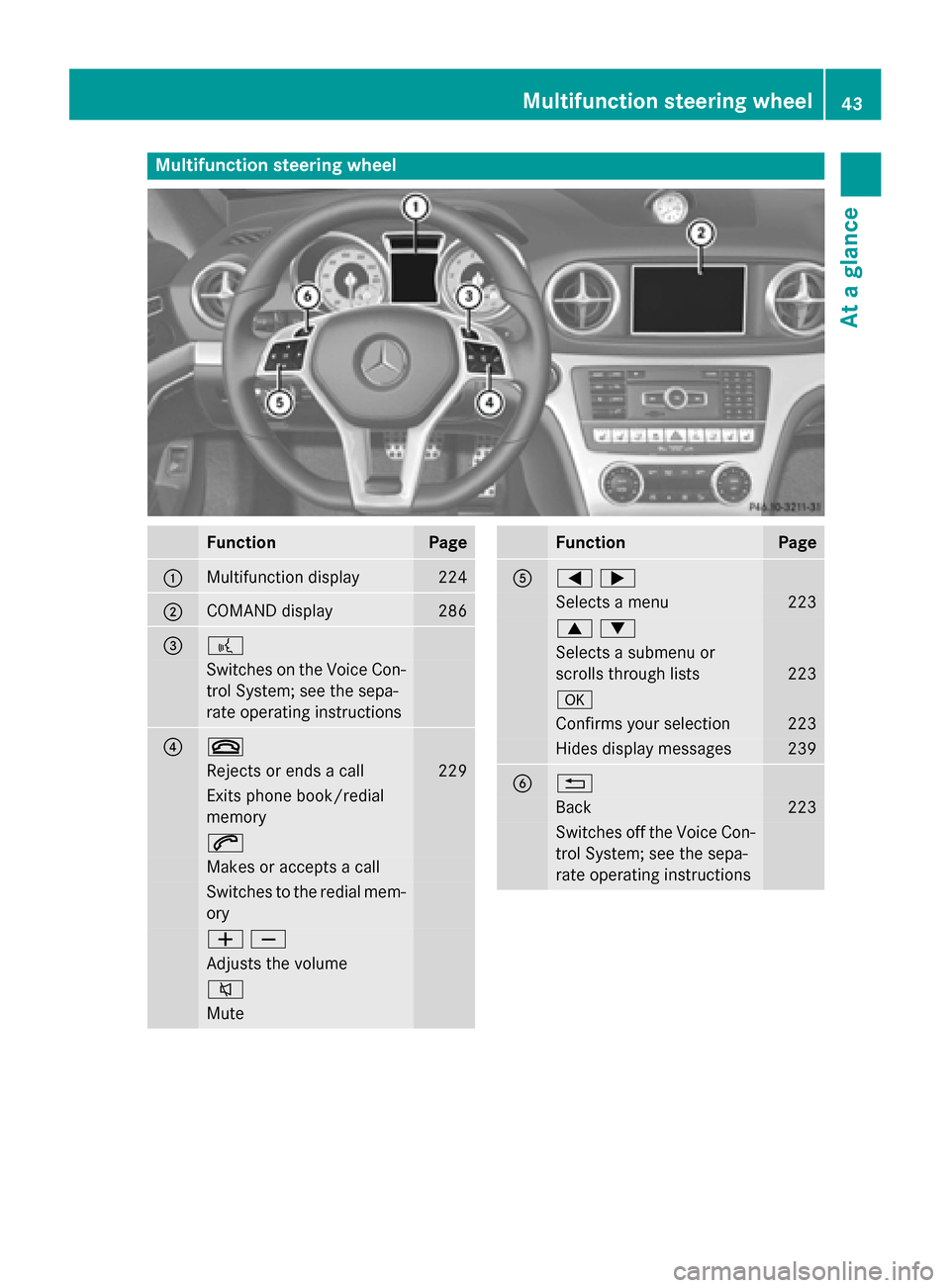
Multifunction steering wheel
Function Page
0043
Multifunction display 224
0044
COMAND display 286
0087 0059
Switches on the Voice Con-
trol System; see the sepa-
rate operating instructions 0085 0076
Rejects or ends a call 229
Exits phone book/redial
memory
0061
Makes or accepts a call
Switches to the redial mem-
ory 00810082
Adjusts the volume
0063
Mute Function Page
0083
00590065
Selects a menu 223
00630064
Selects a submenu or
scrolls through lists
223
0076
Confirms your selection 223
Hides display messages 239
0084 0038
Back 223
Switches off the Voice Con-
trol System; see the sepa-
rate operating instructions Multifunction steering wheel
43At a glance
Page 47 of 610
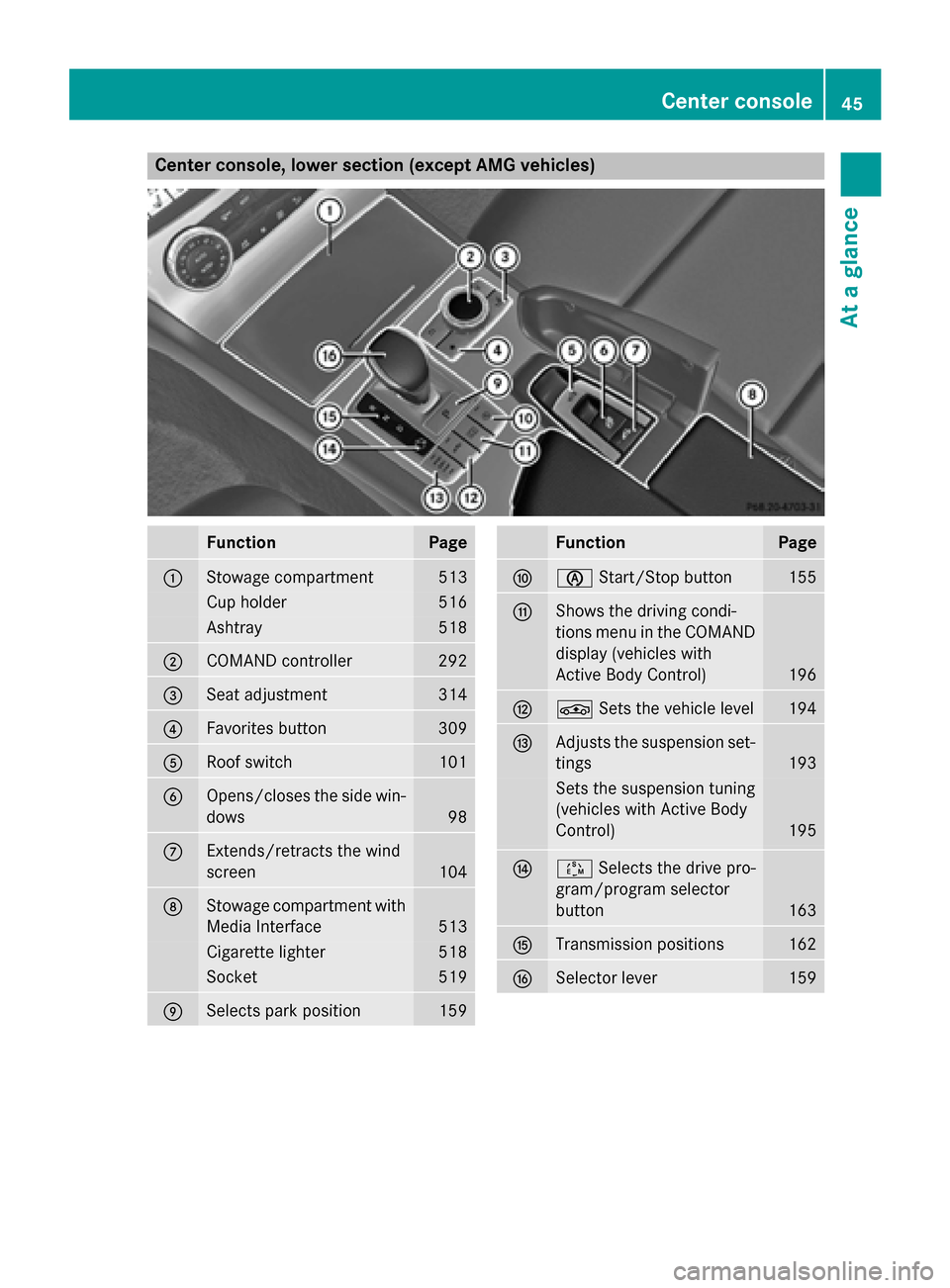
Center console, lower section (except AMG vehicles)
Function Page
0043
Stowage compartment 513
Cup holder 516
Ashtray 518
0044
COMAND controller 292
0087
Seat adjustment 314
0085
Favorites button 309
0083
Roof switch 101
0084
Opens/closes the side win-
dows 98
006B
Extends/retracts the wind
screen
104
006C
Stowage compartment with
Media Interface 513
Cigarette lighter 518
Socket 519
006D
Selects park position 159 Function Page
006E
00D6
Start/Stop button 155
006F
Shows the driving condi-
tions menu in the COMAND
display (vehicles with
Active Body Control) 196
0070
00CC
Sets the vehicle level 194
0071
Adjusts the suspension set-
tings 193
Sets the suspension tuning
(vehicles with Active Body
Control)
195
0072
00C8
Selects the drive pro-
gram/program selector
button 163
0073
Transmission positions 162
0074
Selector lever 159Center console
45At a glance
Page 61 of 610

Occupant Classification System
(OCS)
Introduction The Occupant Classification System (OCS)
categorizes the person in the front-passenger
seat. Depending on that result, the front-
passenger front air bag and front-passenger
knee bag are either enabled or deactivated.
The system does not deactivate:
R the side impact air bag
R the front-passenger head bag
R the Emergency Tensioning Devices
Prerequisites To be classified correctly, the front passenger
must sit:
R with the seat belt fastened correctly
R in an almost upright position with their
back against the seat backrest
R with their feet resting on the floor, if possi-
ble
If the front passenger does not observe these
conditions, OCS may produce a false classi-
fication, e.g. because the front passenger:
R transfers their weight by supporting them-
selves on a vehicle armrest
R sits in such a way that their weight is raised
from the seat cushion
If you install a child restraint system on the
front-passenger seat, be sure to observe the
correct positioning of the child restraint sys-
tem. Never place objects under or behind the
child restraint system, e.g. cushions. The
entire base of the child restraint system must always rest on the seat cushion of the front-
passenger seat. The backrest of the forwards-
facing child restraint system must, as far as
possible, be resting on the backrest of the
front-passenger seat.
The child restraint system must not touch the
roof or be put under strain by the head
restraint. Adjust the angle of the seat back- rest and the head restraint position accord-
ingly.
Only then can OCS be guaranteed to function correctly. Always observe the child restraint
system manufacturer's installation instruc-
tions.
Occupant Classification System opera-
tion (OCS) 0043
PASSENGER AIR BAG OFF indicator lamp
0044 PASSENGER AIR BAG ON indicator lamp
PASSENGER AIR BAG OFF indicator lamp 0043
informs you whether the front-passenger
front air bag is deactivated.
X Turn the SmartKey to position 1or 2in the
ignition lock, or press the Start/Stop but-
ton once or twice on vehicles with KEY-
LESS-GO.
The system carries out a self-diagnosis.
The PASSENGER AIR BAG ON indicator lamp
is inoperative. It lights up briefly when the
ignition is switched on and then goes out
again.
The PASSENGER AIR BAG OFF indicator lamp
must light up for approximately six seconds.
The PASSENGER AIR BAG OFF indicator lamp
then displays the status of the front-
passenger front air bag. If the status of the
front-passenger front air bag changes while
the vehicle is in motion, an air bag display
message may appear in the instrument clus-
ter (Y page 250). When the front-passenger
seat is occupied, always pay attention to the
PASSENGER AIR BAG OFF indicator lamp. Be Occupant safety
59Safety Z