parking brake MERCEDES-BENZ SL-Class 2015 R131 Service Manual
[x] Cancel search | Manufacturer: MERCEDES-BENZ, Model Year: 2015, Model line: SL-Class, Model: MERCEDES-BENZ SL-Class 2015 R131Pages: 610, PDF Size: 12.21 MB
Page 188 of 610
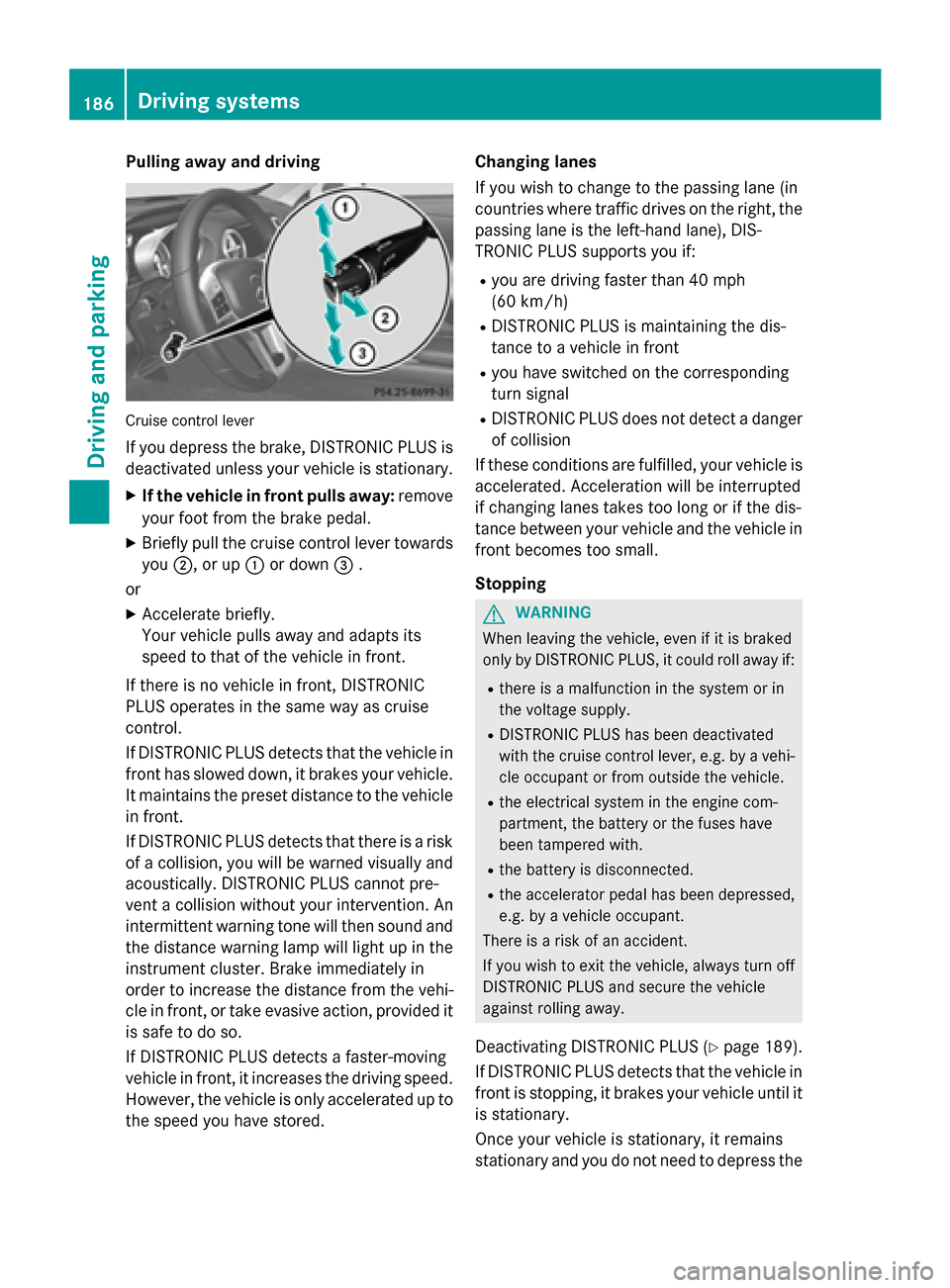
Pulling away and driving
Cruise control lever
If you depress the brake, DISTRONIC PLUS is deactivated unless your vehicle is stationary.
X If the vehicle in front pulls away: remove
your foot from the brake pedal.
X Briefly pull the cruise control lever towards
you 0044, or up 0043or down 0087.
or X Accelerate briefly.
Your vehicle pulls away and adapts its
speed to that of the vehicle in front.
If there is no vehicle in front, DISTRONIC
PLUS operates in the same way as cruise
control.
If DISTRONIC PLUS detects that the vehicle in front has slowed down, it brakes your vehicle.
It maintains the preset distance to the vehicle
in front.
If DISTRONIC PLUS detects that there is a risk of a collision, you will be warned visually and acoustically. DISTRONIC PLUS cannot pre-
vent a collision without your intervention. An
intermittent warning tone will then sound and
the distance warning lamp will light up in the instrument cluster. Brake immediately in
order to increase the distance from the vehi-
cle in front, or take evasive action, provided it
is safe to do so.
If DISTRONIC PLUS detects a faster-moving
vehicle in front, it increases the driving speed.
However, the vehicle is only accelerated up to the speed you have stored. Changing lanes
If you wish to change to the passing lane (in
countries where traffic drives on the right, the passing lane is the left-hand lane), DIS-
TRONIC PLUS supports you if:
R you are driving faster than 40 mph
(60 km/h)
R DISTRONIC PLUS is maintaining the dis-
tance to a vehicle in front
R you have switched on the corresponding
turn signal
R DISTRONIC PLUS does not detect a danger
of collision
If these conditions are fulfilled, your vehicle is
accelerated. Acceleration will be interrupted
if changing lanes takes too long or if the dis-
tance between your vehicle and the vehicle in front becomes too small.
Stopping G
WARNING
When leaving the vehicle, even if it is braked
only by DISTRONIC PLUS, it could roll away if:
R there is a malfunction in the system or in
the voltage supply.
R DISTRONIC PLUS has been deactivated
with the cruise control lever, e.g. by a vehi-
cle occupant or from outside the vehicle.
R the electrical system in the engine com-
partment, the battery or the fuses have
been tampered with.
R the battery is disconnected.
R the accelerator pedal has been depressed,
e.g. by a vehicle occupant.
There is a risk of an accident.
If you wish to exit the vehicle, always turn off
DISTRONIC PLUS and secure the vehicle
against rolling away.
Deactivating DISTRONIC PLUS (Y page 189).
If DISTRONIC PLUS detects that the vehicle in front is stopping, it brakes your vehicle until it
is stationary.
Once your vehicle is stationary, it remains
stationary and you do not need to depress the 186
Driving systemsDriving an
d parking
Page 189 of 610
brake. After a time, the electric parking brake
secures the vehicle and relieves the service
brake.
Depending on the specified minimum dis-
tance, your vehicle will come to a standstill at a sufficient distance behind the vehicle in
front. The specified minimum distance is set
using the control on the cruise control lever.
The electric parking brake automatically
secures the vehicle if DISTRONIC PLUS is
activated and:
R the driver's door is open and the driver's
seat belt is unfastened.
R the engine is switched off, unless it is auto-
matically switched off by the ECO start/
stop function.
R a system malfunction occurs.
R the power supply is not sufficient.
If a malfunction occurs, then the transmission may also be shifted into position Pautomat-
ically.
Storing the current speed or calling up the
last stored speed G
WARNING
If you call up the stored speed and it differs
from the current speed, the vehicle acceler-
ates or decelerates. If you do not know the
stored speed, the vehicle could accelerate or brake unexpectedly. There is a risk of an acci-
dent.
Pay attention to the road and traffic condi-
tions before calling up the stored speed. If you do not know the stored speed, store the
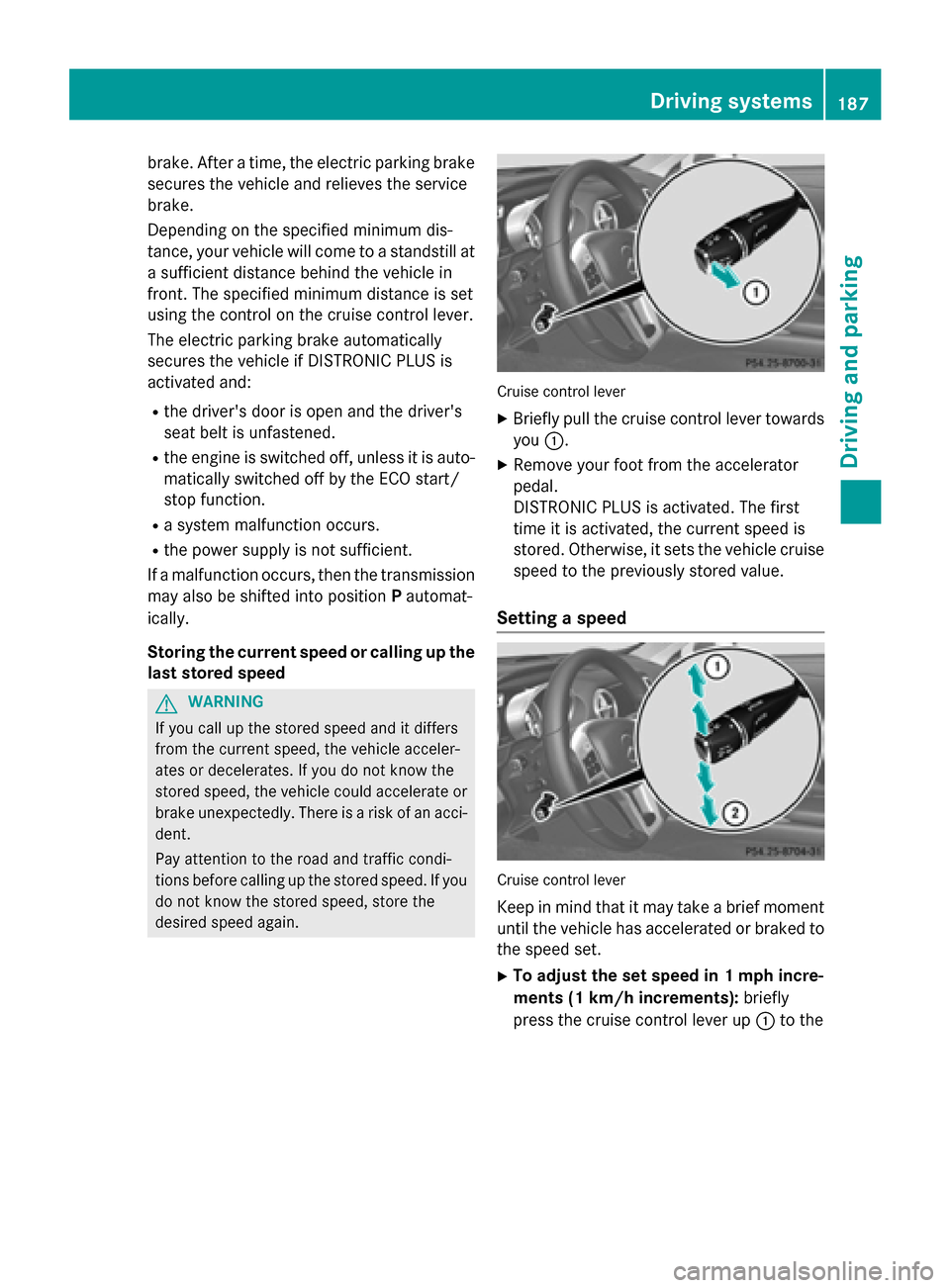
desired speed again. Cruise control lever
X Briefly pull the cruise control lever towards
you 0043.
X Remove your foot from the accelerator
pedal.
DISTRONIC PLUS is activated. The first
time it is activated, the current speed is
stored. Otherwise, it sets the vehicle cruise
speed to the previously stored value.
Setting a speed Cruise control lever
Keep in mind that it may take a brief moment until the vehicle has accelerated or braked to
the speed set.
X To adjust the set speed in 1 mph incre-
ments (1 km/h increments): briefly
press the cruise control lever up 0043to the Driving systems
187Driving and parking Z
Page 191 of 610
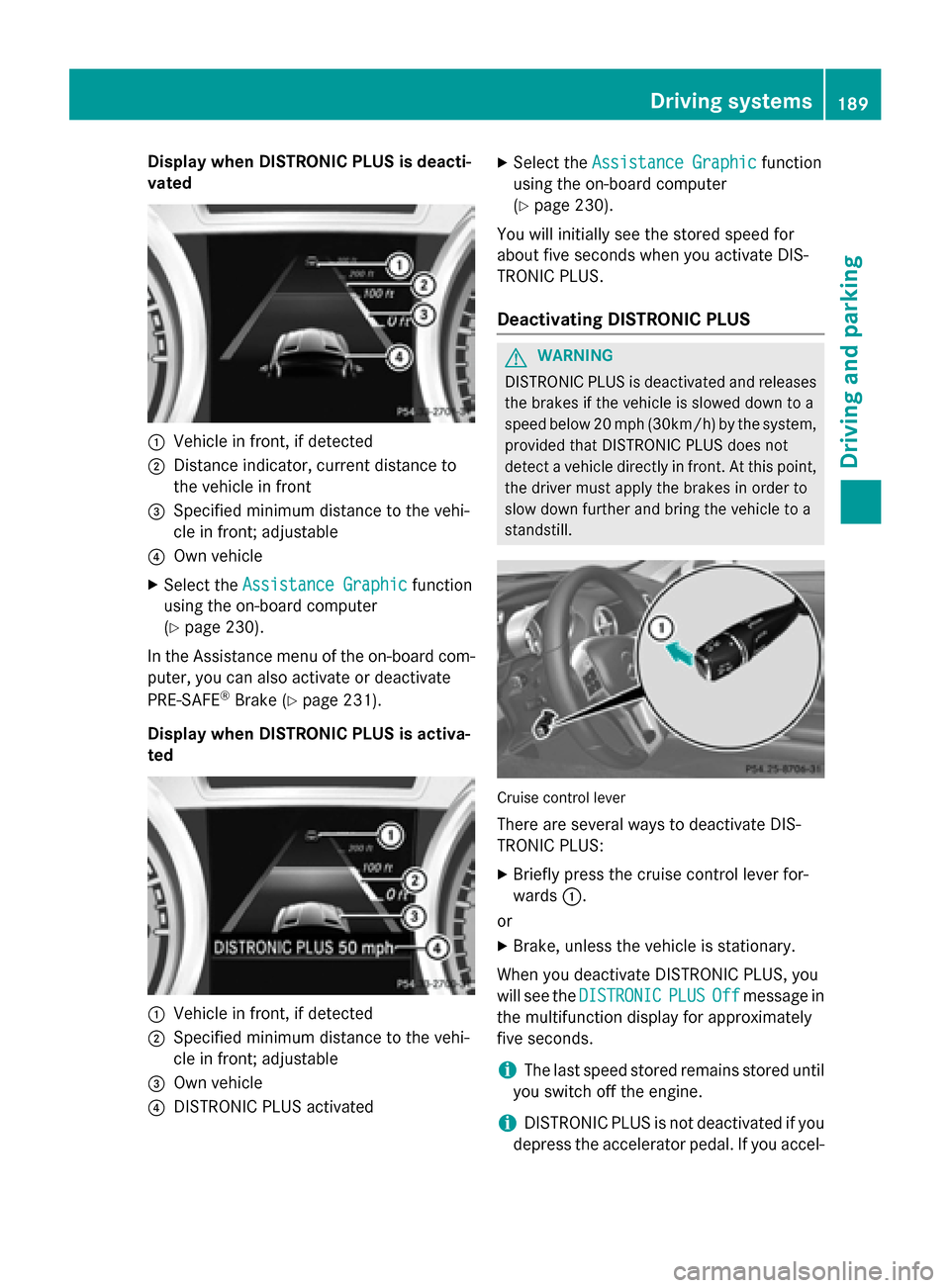
Display when DISTRONIC PLUS is deacti-
vated 0043
Vehicle in front, if detected
0044 Distance indicator, current distance to
the vehicle in front
0087 Specified minimum distance to the vehi-
cle in front; adjustable
0085 Own vehicle
X Select the Assistance Graphic
Assistance Graphic function
using the on-board computer
(Y page 230).
In the Assistance menu of the on-board com- puter, you can also activate or deactivate
PRE-SAFE ®
Brake (Y page 231).
Display when DISTRONIC PLUS is activa-
ted 0043
Vehicle in front, if detected
0044 Specified minimum distance to the vehi-
cle in front; adjustable
0087 Own vehicle
0085 DISTRONIC PLUS activated X
Select the Assistance Graphic
Assistance Graphic function
using the on-board computer
(Y page 230).
You will initially see the stored speed for
about five seconds when you activate DIS-
TRONIC PLUS.
Deactivating DISTRONIC PLUS G
WARNING
DISTRONIC PLUS is deactivated and releases the brakes if the vehicle is slowed down to a
speed below 20 mph (30km/h) by the system,provided that DISTRONIC PLUS does not
detect a vehicle directly in front. At this point,
the driver must apply the brakes in order to
slow down further and bring the vehicle to a
standstill. Cruise control lever
There are several ways to deactivate DIS-
TRONIC PLUS:
X Briefly press the cruise control lever for-
wards 0043.
or X Brake, unless the vehicle is stationary.
When you deactivate DISTRONIC PLUS, you
will see the DISTRONIC DISTRONIC PLUS
PLUSOff
Offmessage in
the multifunction display for approximately
five seconds.
i The last speed stored remains stored until
you switch off the engine.
i DISTRONIC PLUS is not deactivated if you
depress the accelerator pedal. If you accel- Driving syste
ms
189Driving an d parking Z
Page 192 of 610
erate to overtake, DISTRONIC PLUS
adjusts the vehicle's speed to the last
speed stored after you have finished over-
taking.
DISTRONIC PLUS is automatically deactiva-
ted if:
R you engage the electric parking brake or if
the vehicle is automatically secured with
the electric parking brake
R you are driving slower than 15 mph
(25 km/h) and there is no vehicle in front,
or if the vehicle in front is no longer detec- ted
R ESP ®
intervenes or you deactivate ESP ®
R the transmission is in the P,Ror Nposition
R you pull the cruise control lever towards
you in order to pull away and the front-
passenger door is open
R the vehicle has skidded
If DISTRONIC PLUS is deactivated, you will
hear a warning tone. You will see the DIS‐
DIS‐
TRONIC
TRONIC PLUS PLUSOff
Offmessage in the multifunc-
tion display for approximately five seconds.
Tips for driving with DISTRONIC PLUS General notes
The following contains descriptions of certain
road and traffic conditions in which you must be particularly attentive. In such situations,
brake if necessary. DISTRONIC PLUS is then
deactivated.
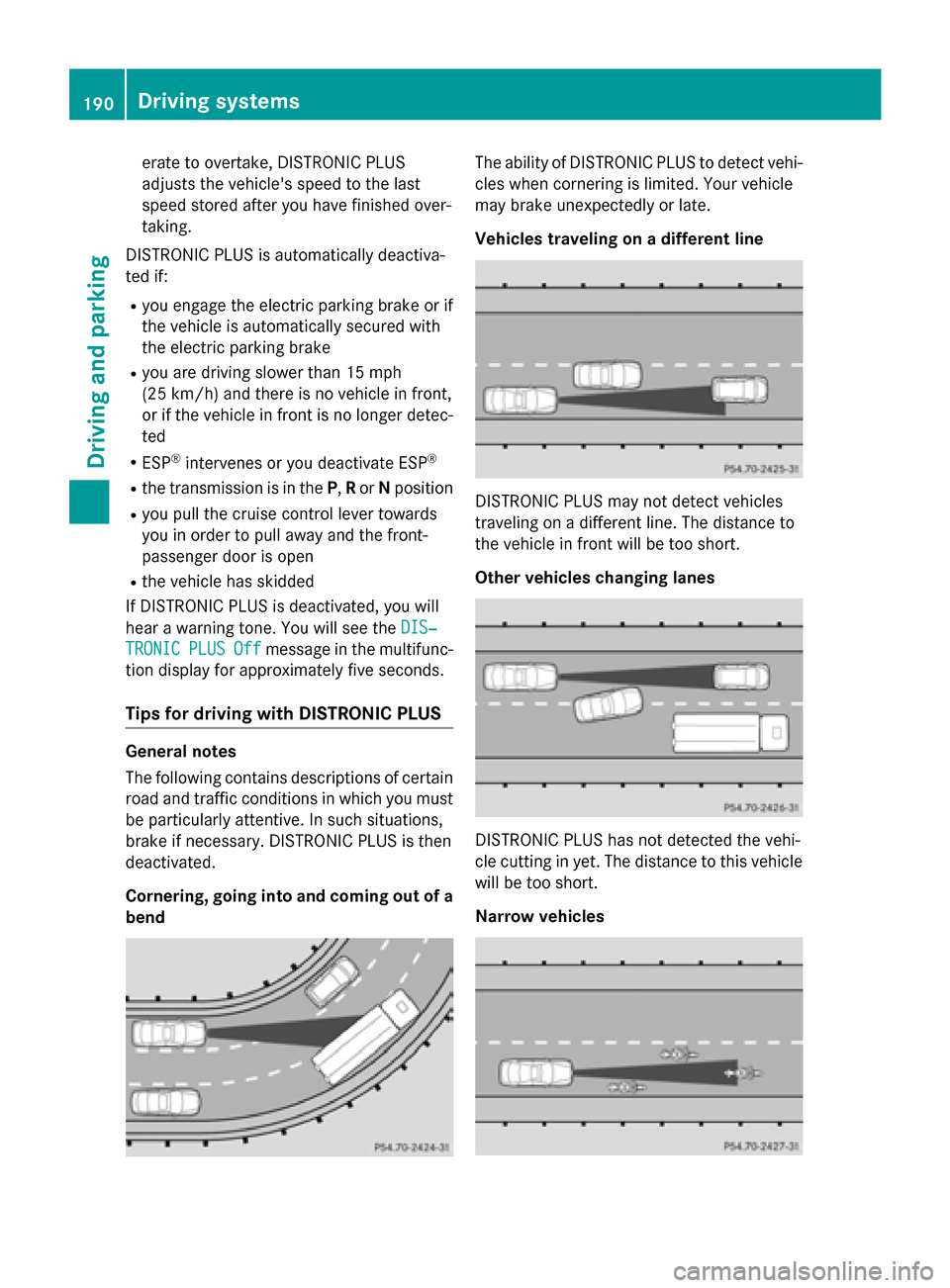
Cornering, going into and coming out of a
bend The ability of DISTRONIC PLUS to detect vehi-
cles when cornering is limited. Your vehicle
may brake unexpectedly or late.
Vehicles traveling on a different line DISTRONIC PLUS may not detect vehicles
traveling on a different line. The distance to
the vehicle in front will be too short.
Other vehicles changing lanes
DISTRONIC PLUS has not detected the vehi-
cle cutting in yet. The distance to this vehicle
will be too short.
Narrow vehicles 190
Driving systemsDriving and parking
Page 193 of 610
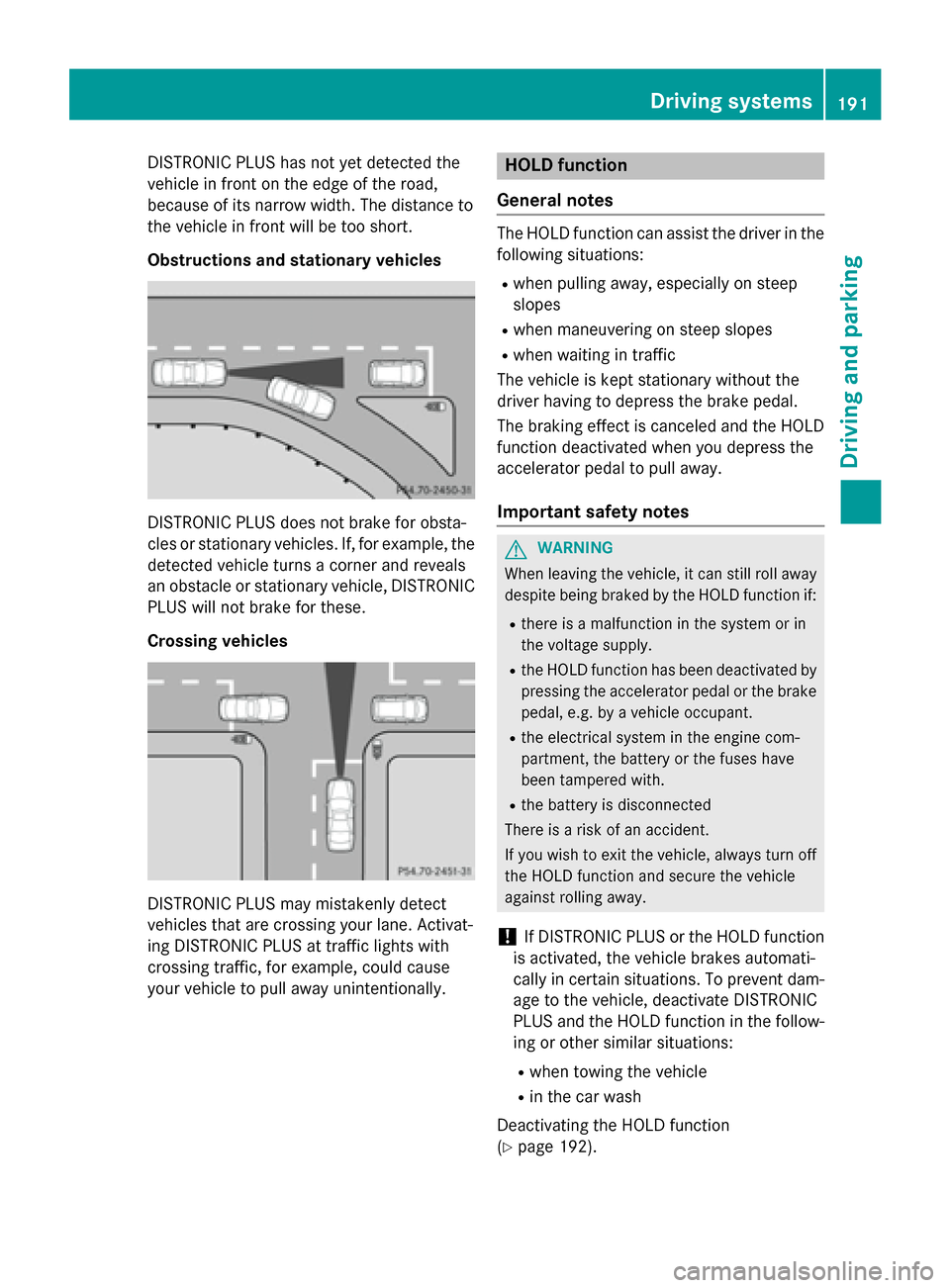
DISTRONIC PLUS has not yet detected the
vehicle in front on the edge of the road,
because of its narrow width. The distance to
the vehicle in front will be too short.
Obstructions and stationary vehicles DISTRONIC PLUS does not brake for obsta-
cles or stationary vehicles. If, for example, the
detected vehicle turns a corner and reveals
an obstacle or stationary vehicle, DISTRONIC PLUS will not brake for these.
Crossing vehicles DISTRONIC PLUS may mistakenly detect
vehicles that are crossing your lane. Activat-
ing DISTRONIC PLUS at traffic lights with
crossing traffic, for example, could cause
your vehicle to pull away unintentionally. HOLD function
General notes The HOLD function can assist the driver in the
following situations:
R when pulling away, especially on steep
slopes
R when maneuvering on steep slopes
R when waiting in traffic
The vehicle is kept stationary without the
driver having to depress the brake pedal.
The braking effect is canceled and the HOLD
function deactivated when you depress the
accelerator pedal to pull away.
Important safety notes G
WARNING
When leaving the vehicle, it can still roll away despite being braked by the HOLD function if:
R there is a malfunction in the system or in
the voltage supply.
R the HOLD function has been deactivated by
pressing the accelerator pedal or the brake
pedal, e.g. by a vehicle occupant.
R the electrical system in the engine com-
partment, the battery or the fuses have
been tampered with.
R the battery is disconnected
There is a risk of an accident.
If you wish to exit the vehicle, always turn off the HOLD function and secure the vehicle
against rolling away.
! If DISTRONIC PLUS or the HOLD function
is activated, the vehicle brakes automati-
cally in certain situations. To prevent dam-
age to the vehicle, deactivate DISTRONIC
PLUS and the HOLD function in the follow-
ing or other similar situations:
R when towing the vehicle
R in the car wash
Deactivating the HOLD function
(Y page 192). Driving systems
191Driving and parking Z
Page 194 of 610
Activation conditions
You can activate the HOLD function if:
R
the vehicle is stationary
R the engine is running or if it has been auto-
matically switched off by the ECO start/
stop function
R the driver's door is closed or your seat belt
is fastened
R the electric parking brake is released
R the transmission is in position D,Ror N
R DISTRONIC PLUS is deactivated
Activating the HOLD function X
Make sure that the activation conditions
are met.
X Depress the brake pedal.
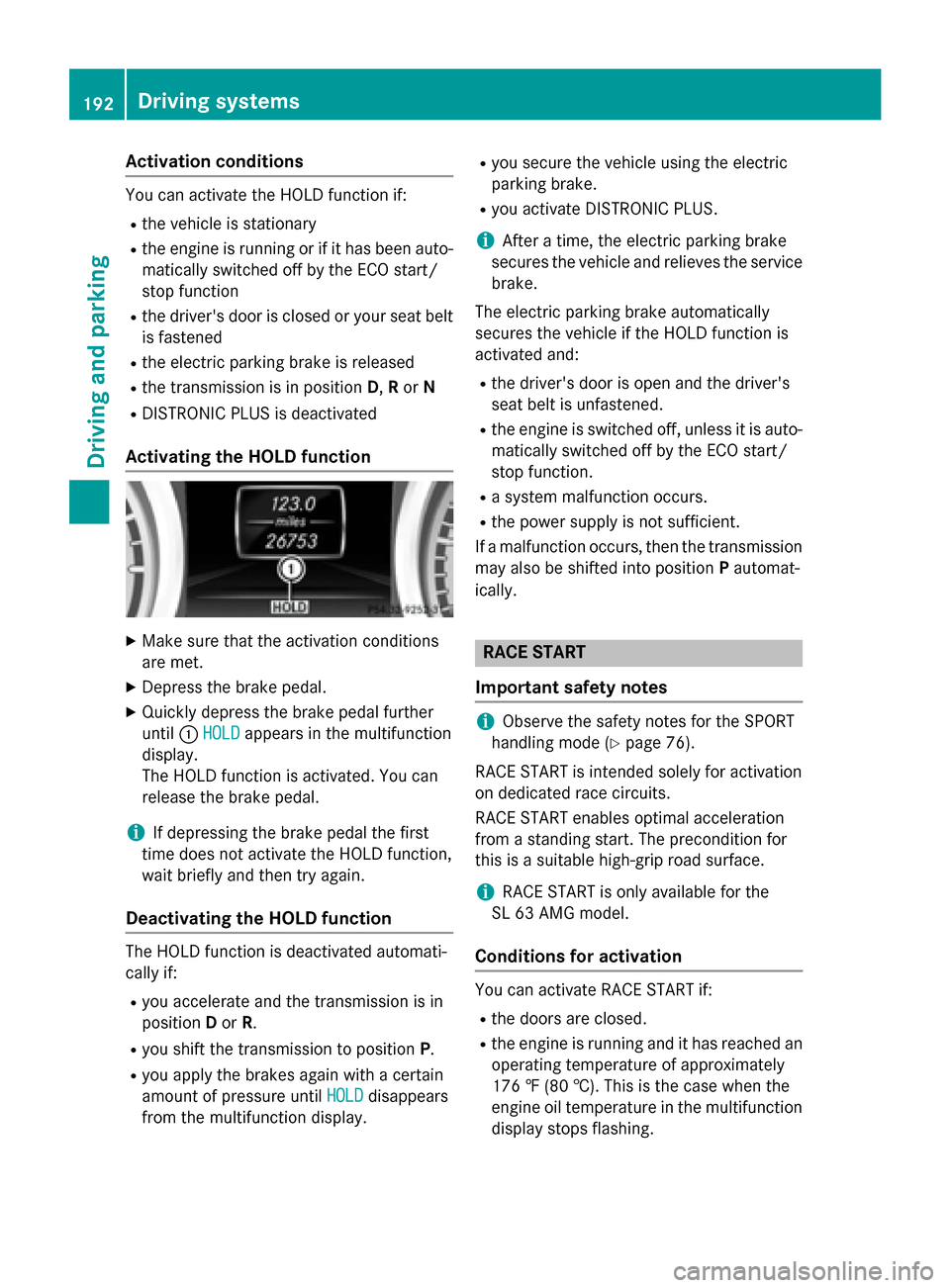
X Quickly depress the brake pedal further
until 0043HOLD
HOLD appears in the multifunction
display.
The HOLD function is activated. You can
release the brake pedal.
i If depressing the brake pedal the first
time does not activate the HOLD function,
wait briefly and then try again.
Deactivating the HOLD function The HOLD function is deactivated automati-
cally if:
R you accelerate and the transmission is in
position Dor R.
R you shift the transmission to position P.
R you apply the brakes again with a certain
amount of pressure until HOLD HOLDdisappears
from the multifunction display. R
you secure the vehicle using the electric
parking brake.
R you activate DISTRONIC PLUS.
i After a time, the electric parking brake
secures the vehicle and relieves the service
brake.
The electric parking brake automatically
secures the vehicle if the HOLD function is
activated and:
R the driver's door is open and the driver's
seat belt is unfastened.
R the engine is switched off, unless it is auto-
matically switched off by the ECO start/
stop function.
R a system malfunction occurs.
R the power supply is not sufficient.
If a malfunction occurs, then the transmission may also be shifted into position Pautomat-
ically. RACE START
Important safety notes i
Observe the safety notes for the SPORT
handling mode (Y page 76).
RACE START is intended solely for activation
on dedicated race circuits.
RACE START enables optimal acceleration
from a standing start. The precondition for
this is a suitable high-grip road surface.
i RACE START is only available for the
SL 63 AMG model.
Conditions for activation You can activate RACE START if:
R the doors are closed.
R the engine is running and it has reached an
operating temperature of approximately
176 ‡ (80 †). This is the case when the
engine oil temperature in the multifunction
display stops flashing. 192
Driving systemsDriving and pa
rking
Page 195 of 610
R
SPORT handling mode is activated.
(Y page 76)
R the steering wheel is in the straight-ahead
position.
R the vehicle is stationary and the brake
pedal is depressed (left foot).
R the transmission is in position D.
Activating RACE START X
Depress the brake pedal with your left foot
and keep it depressed.
X Turn the drive program selector clockwise
(Y page 163) until the RSlamp lights up.
The RACE START Confirm: Paddle UP
RACE START Confirm: Paddle UP
Cancel: Paddle DOWN Cancel: Paddle DOWN message appears
in the multifunction display.
i If the activation conditions are no longer
fulfilled, RACE START is canceled. The mul-
tifunction display shows the RACE START
RACE START
Canceled
Canceled message.
X To cancel: pull the left steering wheel pad-
dle shifter (Y page 164).
or X To confirm: pull the right steering wheel
paddle shifter (Y page 164).
The RACE START Available Depress
RACE START Available Depress
gas pedal
gas pedal message appears in the multi-
function display.
i If you do not depress the accelerator
pedal fully within two seconds, RACE
START is canceled. The RACE START Not RACE START Not
Possible
Possible See
SeeOperator's
Operator's Manual
Manualmes-
sage appears in the multifunction display.
X Fully depress the accelerator pedal.
The engine speed increases to at least
3,500 rpm.
The RACE START Release brake to
RACE START Release brake to
start start message appears in the multifunc-
tion display.
i If you do not release the brake pedal
within five seconds, RACE START is can- celed. The multifunction display shows the
RACE START Canceled
RACE START Canceled message.
X Take your foot off the brake, but keep the
accelerator pedal depressed.
The vehicle pulls away at maximum accel-
eration.
The RACE START Active
RACE START Active appears in the
multifunction display.
RACE START is deactivated when the vehicle
reaches a speed of approximately 30 mph
(Canada: 50 km/h). Drive program S+is acti-
vated. SPORT handling mode remains activa-
ted.
RACE START is deactivated immediately if
you release the accelerator pedal during
RACE START or if any of the activation condi-
tions are no longer fulfilled. The RACE RACESTART
START
Not Possible See Operator's Manual
Not Possible See Operator's Manual
message appears in the multifunction dis-
play.
i If RACE START is used repeatedly within a
short period of time, it is only available
again after the vehicle has been driven a
certain distance. Adaptive Damping System
General notes The adjustable damping system adapts to the
current driving conditions. The adjustment
depends on whether you have selected Sport or Comfort mode. Your selection remains
stored even if you remove the SmartKey from
the ignition lock. Driving systems
193Driving and parking Z
Page 201 of 610
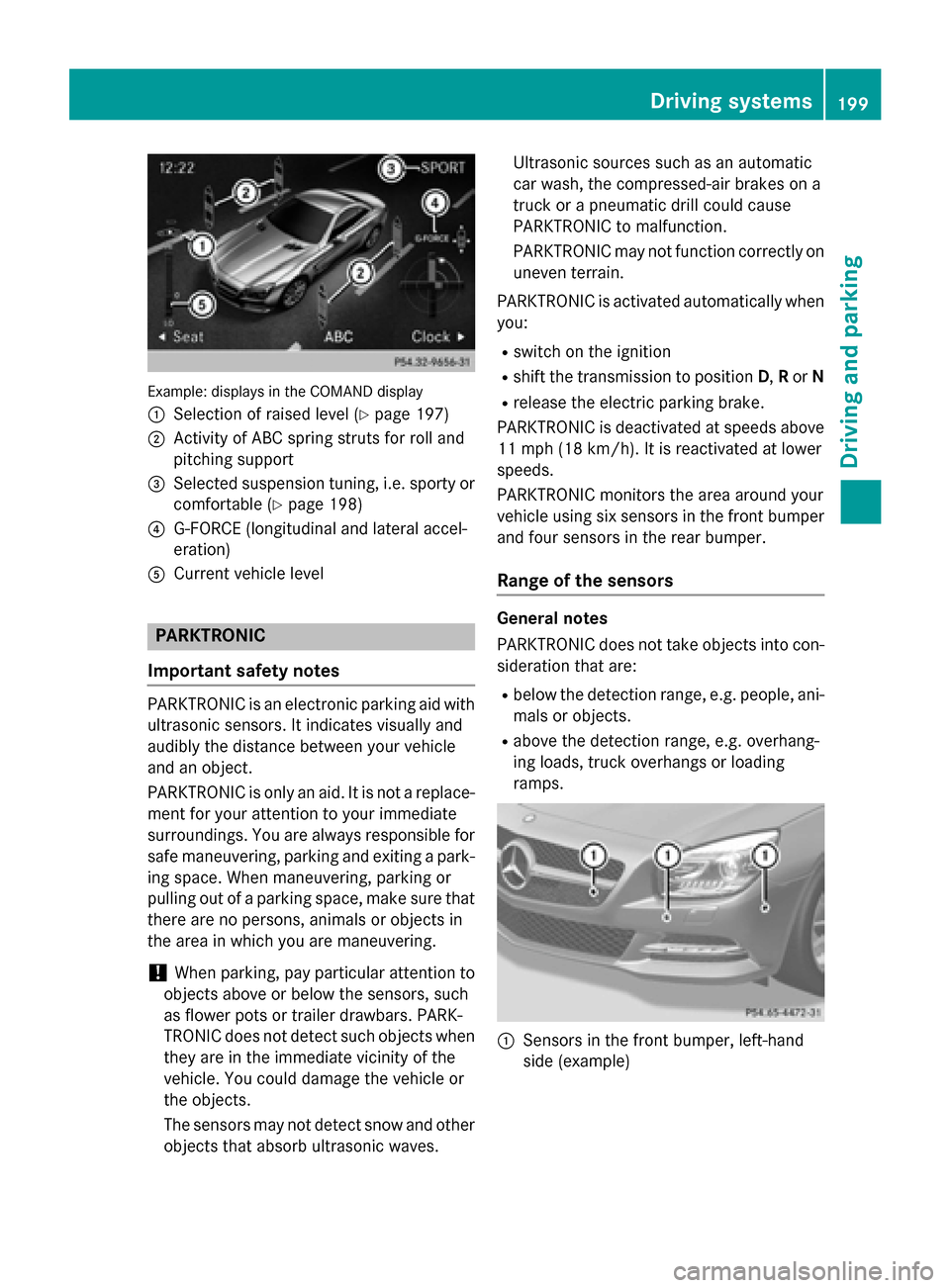
Example: displays in the COMAND display
0043 Selection of raised level (Y page 197)
0044 Activity of ABC spring struts for roll and
pitching support
0087 Selected suspension tuning, i.e. sporty or
comfortable (Y page 198)
0085 G-FORCE (longitudinal and lateral accel-
eration)
0083 Current vehicle level PARKTRONIC
Important safety notes PARKTRONIC is an electronic parking aid with
ultrasonic sensors. It indicates visually and
audibly the distance between your vehicle
and an object.
PARKTRONIC is only an aid. It is not a replace-
ment for your attention to your immediate
surroundings. You are always responsible for
safe maneuvering, parking and exiting a park- ing space. When maneuvering, parking or
pulling out of a parking space, make sure thatthere are no persons, animals or objects in
the area in which you are maneuvering.
! When parking, pay particular attention to
objects above or below the sensors, such
as flower pots or trailer drawbars. PARK-
TRONIC does not detect such objects when they are in the immediate vicinity of the
vehicle. You could damage the vehicle or
the objects.
The sensors may not detect snow and other
objects that absorb ultrasonic waves. Ultrasonic sources such as an automatic
car wash, the compressed-air brakes on a
truck or a pneumatic drill could cause
PARKTRONIC to malfunction.
PARKTRONIC may not function correctly on
uneven terrain.
PARKTRONIC is activated automatically when you:
R switch on the ignition
R shift the transmission to position D,Ror N
R release the electric parking brake.
PARKTRONIC is deactivated at speeds above
11 mph (18 km/h). It is reactivated at lower
speeds.
PARKTRONIC monitors the area around your
vehicle using six sensors in the front bumper and four sensors in the rear bumper.
Range of the sensors General notes
PARKTRONIC does not take objects into con-
sideration that are:
R below the detection range, e.g. people, ani-
mals or objects.
R above the detection range, e.g. overhang-
ing loads, truck overhangs or loading
ramps. 0043
Sensors in the front bumper, left-hand
side (example) Driving systems
199Driving and parking Z
Page 205 of 610
!
If unavoidable, you should drive over
obstacles such as curbs slowly and not at a sharp angle. Otherwise, you may damage
the wheels or tires.
Active Parking Assist may possibly indicate
parking spaces which are not suitable for
parking, for example:
R where parking or stopping is prohibited
R in front of driveways or entrances and exits
R on unsuitable surfaces
Parking tips:
R On narrow roads, drive as close to the park-
ing space as possible.
R Parking spaces that are littered or over-
grown might be identified or measured
incorrectly.
R Parking spaces that are partially occupied
by trailer drawbars might not be identified
as such or be measured incorrectly.
R Snowfall or heavy rain may lead to a parking
space being measured inaccurately.
R Pay attention to the PARKTRONIC
(Y page 200) warning messages during the
parking procedure.
R You can intervene in the steering procedure
to correct it at any time. Active Parking
Assist will then be canceled.
R When transporting a load which protrudes
from your vehicle, you should not use
Active Parking Assist.
R Never use Active Parking Assist when snow
chains are installed.
R Make sure that the tire pressures are
always correct. This has a direct influence
on the parking characteristics of the vehi-
cle.
Parking Important safety notes
Objects located above the height range of
Active Parking Assist will not be detected
when the parking space is measured. These
are not taken into account when the parking procedure is calculated, e.g. overhanging
loads, tail sections or loading ramps of goods
vehicles. In some circumstances, Active Park-
ing Assist may therefore guide you into the
parking space too early. G
WARNING
If there are objects above the detection range, Active Parking Assist may turn prematurely.
You may cause a collision as a result. There is
a risk of an accident.
If there are objects above the detection range,
stop and deactivate Active Parking Assist. G
WARNING
Active Parking Assist merely aids you by inter- vening actively in the steering. If you do not
brake there is a risk of an accident.
Always apply the brakes yourself when
maneuvering and parking.
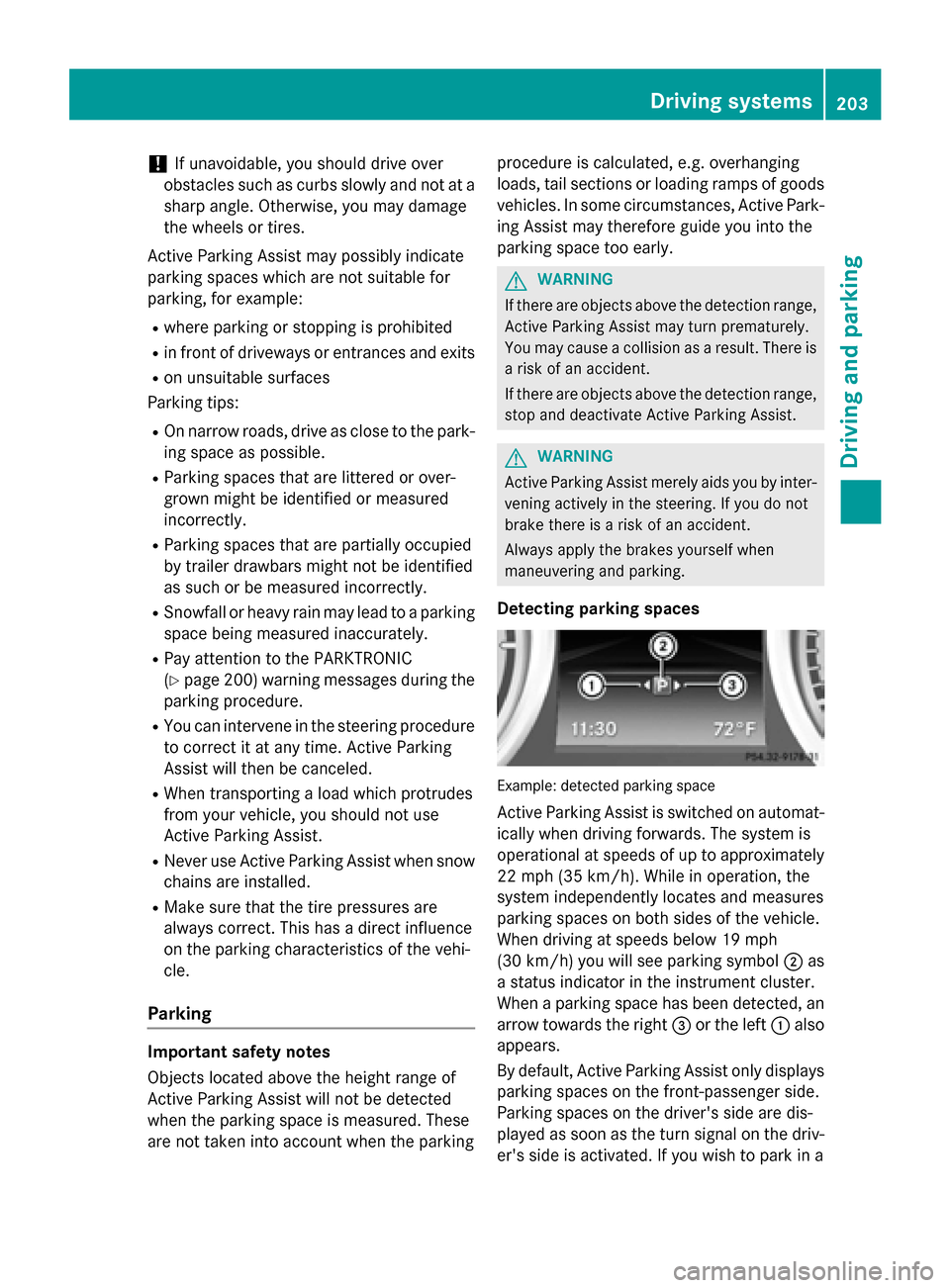
Detecting parking spaces Example: detected parking space
Active Parking Assist is switched on automat- ically when driving forwards. The system is
operational at speeds of up to approximately22 mph (35 km/h). While in operation, the
system independently locates and measures
parking spaces on both sides of the vehicle.
When driving at speeds below 19 mph
(30 km/h) you will see parking symbol 0044as
a status indicator in the instrument cluster.
When a parking space has been detected, an arrow towards the right 0087or the left 0043also
appears.
By default, Active Parking Assist only displays parking spaces on the front-passenger side.
Parking spaces on the driver's side are dis-
played as soon as the turn signal on the driv-
er's side is activated. If you wish to park in a Driving systems
203Driving and parking Z
Page 206 of 610
space on the driver's side, the indicator on
the driver's side must remain on. The turn
signal must remain switched on until you
acknowledge the use of Active Parking Assist by pressing the 0076button on the multi-
function steering wheel.
Active Parking Assist will only detect parking
spaces:
R that are parallel to the direction of travel
R that are at least 59 in (1.5 m) wide
R that are at least 40 in (1.0 m) longer than
your vehicle
A parking space is displayed while you are
driving past it, and until you are approx-
imately 50 ft (15 m) away from it.
Backing up into the parking space
X Stop the vehicle when the parking space
symbol shows the desired parking space in
the instrument cluster.
X Shift the transmission to position R.
The Start Park Assist? Yes: OK No:
Start Park Assist? Yes: OK No:
0038 message appears in the multifunction
display.
X To cancel the procedure: press the0038
button on the multifunction steering wheel
or pull away.
or
X To park using Active Parking Assist:
press the 0076button on the multifunction
steering wheel.
The Park Assist Active Accelerate
Park Assist Active Accelerate
and and Brake
Brake Observe
Observe Surroundings
Surroundings mes-
sage appears in the multifunction display.
X Let go of the multifunction steering wheel.
X Back up the vehicle, being ready to brake at
all times. Do not exceed a maximum speed of approximately 6 mph (10 km/h) when
backing up. Otherwise Active Parking
Assist will be canceled.
i When parking in tight spaces, you will
achieve the best results by backing up as far as possible. When doing so, also
observe the PARKTRONIC messages.
X Stop as soon as PARKTRONIC sounds the
continuous warning tone, if not before.
Additional maneuvering may be required in
tight parking spaces.
The Park Assist Active Select D
Park Assist Active Select D
Observe Observe Surroundings
Surroundings message appears in
the multifunction display.
X Shift the transmission to position Dwhile
the vehicle is stationary.
Active Parking Assist immediately steers in
the other direction.
The Park Assist Active Accelerate Park Assist Active Accelerate
and
and Brake
Brake Observe
Observe Surroundings
Surroundings mes-
sage appears in the multifunction display.
i You will achieve the best results by wait-
ing for the steering procedure to complete before pulling away.
X Drive forwards and be ready to brake at all
times.
X Stop as soon as PARKTRONIC sounds the
continuous warning tone, if not before.
The Park Assist Active Select R
Park Assist Active Select R
Observe
Observe Surroundings
Surroundings message appears in
the multifunction display.
X Drive forwards and back up according to
the information shown in the multifunction
display.
As soon as the parking procedure is com-
plete, the Park Assist Finished Park Assist Finished message
appears in the multifunction display. PARK-
TRONIC continues to be available.
X Maneuver if necessary.
X Always observe the warning messages dis-
played by PARKTRONIC (Y page 200).
Parking tips: R On narrow roads, drive as close to the park-
ing space as possible.
R Parking spaces that are littered, overgrown
or partially occupied by trailer drawbars
might be identified incorrectly or not at all. 204
Driving systemsDriving and parking