ECO mode MERCEDES-BENZ SL-Class 2016 R231 User Guide
[x] Cancel search | Manufacturer: MERCEDES-BENZ, Model Year: 2016, Model line: SL-Class, Model: MERCEDES-BENZ SL-Class 2016 R231Pages: 614, PDF Size: 15.67 MB
Page 140 of 614
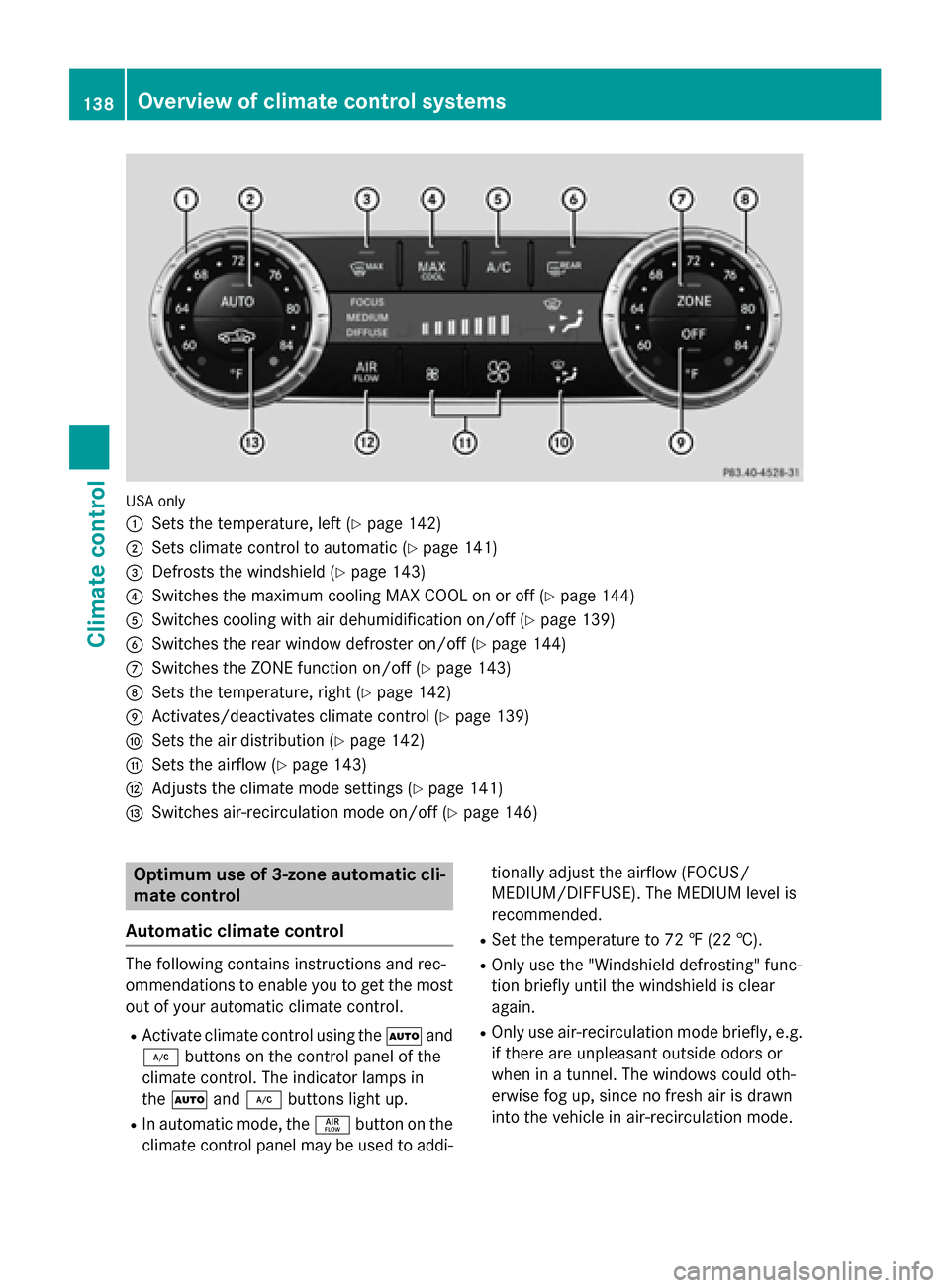
USA only
:
Sets the temperature, left (Ypage 142)
;Sets climate control to automatic (Ypage 141)
=Defrosts the windshield (Ypage 143)
?Switches the maximum cooling MAX COOL on or off (Ypage 144)
ASwitches cooling with air dehumidification on/off (Ypage 139)
BSwitches the rear window defroster on/off (Ypage 144)
CSwitches the ZONE function on/off (Ypage 143)
DSets the temperature, right (Ypage 142)
EActivates/deactivates climate control (Ypage 139)
FSets the air distribution (Ypage 142)
GSets the airflow (Ypage 143)
HAdjusts the climate mode settings (Ypage 141)
ISwitches air-recirculation mode on/off (Ypage 146)
Optimum use of 3-zone automatic cli-
mate control
Automatic climate control
The following contains instructions and rec-
ommendations to enable you to get the most
out of your automatic climate control.
RActivate climate control using the Ãand
¿ buttons on the control panel of the
climate control. The indicator lamps in
the à and¿ buttons light up.
RIn automatic mode, the ñbutton on the
climate control panel may be used to addi- tionally adjust the airflow (FOCUS/
MEDIUM/DIFFUSE). The MEDIUM level is
recommended.
RSet the temperature to 72 ‡ (22 †).
ROnly use the "Windshield defrosting" func-
tion briefly until the windshield is clear
again.
ROnly use air-recirculation mode briefly, e.g.
if there are unpleasant outside odors or
when in a tunnel. The windows could oth-
erwise fog up, since no fresh air is drawn
into the vehicle in air-recirculation mode.
138Overview of climate control systems
Climate control
Page 141 of 614
RUse the ZONE function to adopt the tem-
perature settings on the driver's side for
the front-passenger side as well. The indi-
cator lamp in theábutton goes out.
RUse the residual heat function if you want to
heat or ventilate the vehicle interior when
the ignition is switched off. The residual
heat function can only be activated or deac-
tivated with the ignition switched off.
RVehicles with COMAND: if you change the
settings of the climate control system, the
climate status display appears for three
seconds at the bottom of the screen in the
COMAND display. See also the separate
COMAND operating instructions. You will
see the current settings of the various cli-
mate control functions.
ECO start/stop function
During automatic engine switch-off, the cli-
mate control only operates at a reduced capa-
city. If you require full climate control capa-
city, the ECO start/stop function can be
deactivated by pressing the ECO button
(
Ypage 156).
Operating the climate control sys-
tems
Activating/deactivating climate con-
trol
General notes
When the climate control is switched off, the
air supply and air circulation are also
switched off. The windows could fog up.
Therefore, switch off climate control only
briefly
iActivate climate control primarily using
the à button (
Ypage 141).
Activating or deactivating
XTurn the SmartKey to position 2in the igni-
tion lock (
Ypage 151).
XTo activate: press theÃbutton.
The indicator lamp in the Ãbutton lights
up. Airflow and air distribution are set to
automatic mode.
or
XPress the ^button.
The indicator lamp in the ^button goes
out. The previously selected settings are
restored.
XTo deactivate: press the^button.
The indicator lamp in the ^button lights
up.
Switching cooling with air dehumidi-
fication on/off
General notes
If you deactivate the "Cooling with air-dehu-
midification" function, the air inside the vehi- cle will not be cooled. The air inside the vehi-
cle will also not be dehumidified. The win-
dows can fog up more quickly. Therefore,
deactivate the cooling with air-dehumidifica-
tion function only briefly.
The "Cooling with air dehumidification" func-
tion is only available when the engine is run-
ning. The air inside the vehicle is cooled and
dehumidified according to the temperature
selected.
Condensation may drip from the underside of
the vehicle when it is in cooling mode. This is
normal and not a sign that there is a malfunc-
tion.
Operating the climate control systems139
Climate control
Page 165 of 614
Double-clutch function
Whenshiftin gdown ,th edouble-clutch func-
tion is active regardles sof th ecurrentl yselec -
te ddrive program. The double-clutch function
reduce sload chang ereaction sand is condu-
cive to asport ydrivin gstyle. The soun dgen -
erate dby th edouble-clutch function depend s
on th edrive program selected.
Kickdown
Use kickdown fo rmaximum acceleration .
XDepress theaccelerator peda lbeyond th e
pressure point.
The automatic transmissio nshift sto a
lowe rgear dependin gon th eengin espeed.
XEase of fth eaccelerator peda lonce th e
desire dspeed is reached.
The automatic transmissio nshift sbac kup.
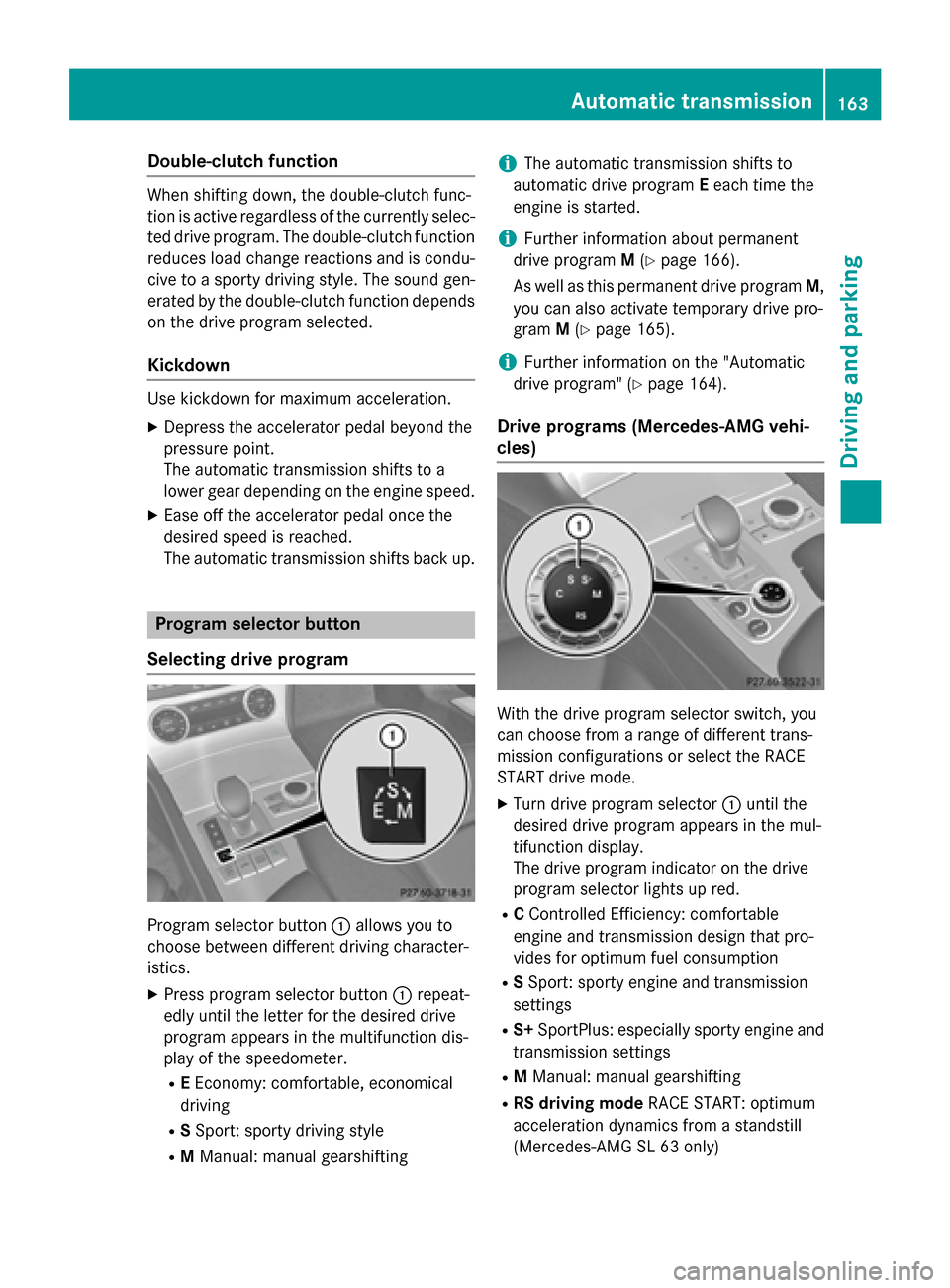
Program selector butto n
Selecting drive program
Program selecto rbutto n: allow syou to
choos ebetween differen tdrivin gcharacter-
istics.
XPress program selecto rbutto n: repeat -
edly until th elette rfo rth edesire ddrive
program appears in th emultifunction dis -
play of th espeedometer.
RE Economy: comfortable, economical
drivin g
RSSport: sport ydrivin gstyle
RM Manual: manual gearshiftin g
iThe automatic transmissionshift sto
automatic drive program Eeac htime th e
engin eis started.
iFurther information about permanen t
drive program M(
Ypage 166).
As well as this permanen tdrive program M,
you can also activat etemporar ydrive pro -
gram M(
Ypage 165).
iFurther information on th e"Automatic
drive program" (
Ypage 164).
Drive program s(Mercedes-AMG vehi-
cles)
Wit hth edrive program selecto rswitch ,you
can choos efrom arange of differen ttrans -
missio nconfiguration sor selec tth eRAC E
START drive mode.
XTur ndrive program selecto r: until th e
desire ddrive program appears in th emul-
tifunction display.
The drive program indicator on th edrive
program selecto rlights up red .
RCControlle dEfficiency: comfortable
engin eand transmissio ndesign that pro -
vides fo roptimum fue lconsumption
RS Sport: sport yengin eand transmissio n
setting s
RS+SportPlus: especially sport yengin eand
transmissio nsetting s
RMManual: manual gearshiftin g
RRS drivingmode RACESTART :optimum
acceleration dynamic sfrom astandstill
(Mercedes-AMG SL 63 only)
Automatic transmission163
Driving and parking
Z
Page 170 of 614
Problems with the transmission
ProblemPossible causes/consequences andMSolutions
The transmission has
problems shifting gear.The transmission is losing oil.
XHave the transmission checked at a qualified specialist work-
shop immediately.
The acceleration ability
is deteriorating.
The transmission no
longer changes gear.The transmission is in emergency mode.
It is only possible to shift intosecondgear and reverse gear.
XStop the vehicle.
XShift the transmission to position P.
XSwitch off the engine.
XWait at least ten seconds before restarting the engine.
XShift the transmission to positionDor R.
If D is selected, the transmission shifts into secondgear; ifRis
selected, the transmission shifts into reverse gear.
XHave the transmission checked at a qualified specialist work-
shop immediately.
Refueling
Important safety notes
GWARNING
Fuel is highly flammable. If you handle fuel
incorrectly, there is a risk of fire and explo-
sion.
You must avoid fire, open flames, creating
sparks and smoking. Switch off the engine
and, if applicable, the auxiliary heating before refueling.
GWARNING
Fuel is poisonous and hazardous to health.
There is a risk of injury.
You must make sure that fuel does not come into contact with your skin, eyes or clothing
and that it is not swallowed. Do not inhale fuel
vapors. Keep fuel away from children.
If you or others come into contact with fuel,
observe the following:
RWash away fuel from skin immediately
using soap and water.
RIf fuel comes into contact with your eyes,
immediately rinse them thoroughly with
clean water. Seek medical assistance with-
out delay.
RIf fuel is swallowed, seek medical assis-
tance without delay. Do not induce vomit-
ing.
RImmediately change out of clothing which
has come into contact with fuel.
GWARNING
Electrostatic buildup can create sparks and
ignite fuel vapors. There is a risk of fire and
explosion.
Always touch the vehicle body before opening
the fuel filler flap or touching the fuel pump
nozzle. Any existing electrostatic buildup is
thereby discharged.
168Refueling
Driving and parking
Page 176 of 614
brake handle is depressed, the greater the
braking force.
During braking:
Ra warning tone sounds
Rthe Please Release Parking Brake
message appears
Rthe red F(USA only) or !(Canada
only) indicator lamp in the instrument clus- ter flashes
When the vehicle has been braked to a stand-
still, the electric parking brake is engaged.
Parking the vehicle for a long period
If you leave the vehicle parked for longer than
four weeks, the battery may be damaged by
exhaustive discharging.
If you leave the vehicle parked for longer than
six weeks, the vehicle may suffer damage as a
result of lack of use.
XVisit a qualified specialist workshop and
seek advice.
iYou can obtain information about trickle
chargers from a qualified specialist work-
shop.
Driving tips
General notes
Important safety notes
GWARNING
If you switch off the ignition while driving,
safety-relevant functions are only available
with limitations, or not at all. This could affect, for example, the power steering and the brake
boosting effect. You will require considerably
more effort to steer and brake. There is a risk
of an accident.
Do not switch off the ignition while driving.
GWARNING
If you operate mobile communication equip-
ment while driving, you will be distracted from traffic conditions. You could also lose control
of the vehicle. There is a risk of an accident.
Only operate this equipment when the vehicle
is stationary.
Observe the legal requirements for the coun-
try in which you are driving. Some jurisdic-
tions prohibit the driver from using a mobile
phone while driving a vehicle.
If you make a call while driving, always use
hands-free mode. Only operate the telephone
when the traffic situation permits. If you are
unsure, pull over to a safe location and stop
before operating the telephone.
Bear in mind that at a speed of only 30 mph
(approximately 50 km/h), the vehicle covers
a distance of 44 ft (approximately 14 m) per
second.
Drive sensibly – save fuel
Observe the following tips to save fuel:
RThe tires should always be inflated to the
recommended tire pressure.
RRemove unnecessary loads.
RWarm up the engine at low engine speeds.
RAvoid frequent acceleration or braking.
RObserve the service intervals in the Main-
tenance Booklet or in the service interval
display. Have all the maintenance work car-ried in accordance with Daimler AG regu-
lations.
Fuel consumption also increases when driv-
ing in cold weather, in stop-start traffic and in
hilly terrain.
Drinking and driving
GWARNING
Drinking and driving and/or taking drugs and driving are very dangerous combinations.
Even a small amount of alcohol or drugs can
174Driving tips
Driving and parking
Page 178 of 614
RAccel.(evaluation of all acceleration pro-
cesses):
-The bar fills up: moderate acceleration,
especially at higher speeds
-The bar empties: sporty acceleration
RConstant(assessment of driving behavior
at all times):
-The bar fills up: constant speed and
avoidance of unnecessary acceleration
and deceleration
-The bar empties: fluctuations in speed
RCoasting(assessment of all deceleration
processes):
-The bar fills up: anticipatory driving,
keeping your distance and early release
of the accelerator. The vehicle can coast
without use of the brakes.
-The bar empties: frequent braking
iAn economical driving style specially
requires driving at moderate engine
speeds.
To achieve a higher value in the categories
Acceleration
and Constant:
Robserve the gearshift recommendations.
Rdrive in drive program E.
iOn long journeys at a constant speed, e.g.
on the highway, only the bar for Constant
will change.
iThe ECO display summarizes the driving
characteristics from the start of the journey
to its completion. For this reason, the bars
change dynamically at the beginning of the
journey. On longer journeys, there are
fewer changes. For more dynamic changes,
carry out a manual reset.
For more information on the ECO display, see
(
Ypage 226).
Brakes
Important safety notes
GWARNING
If you shift down on a slippery road surface in an attempt to increase the engine's braking
effect, the drive wheels could lose their grip.
There is an increased danger of skidding and
accidents.
Do not shift down for additional engine brak-
ing on a slippery road surface.
Downhill gradients
!On long, steep gradients, you must
reduce the load on the brakes. To use
engine braking, shift to a lower gear in good
time. This helps you to avoid overheating
the brakes and wearing them out exces-
sively.
When making use of the engine braking
effect, it is possible that a drive wheel may
not turn for some time, e.g. in the case of
suddenly changing or slippery road surface
conditions. This could cause damage to the
drive train. This type of damage is not cov-
ered by the Mercedes-Benz warranty.
Change into a lower gear in good time on long
and steep downhill gradients. This is espe-
cially important if the vehicle is laden.
This also applies if you have activated cruise
control, SPEEDTRONIC or DISTRONIC PLUS.
Heavy and light loads
GWARNING
If you rest your foot on the brake pedal while
driving, the braking system can overheat. This increases the stopping distance and can even
cause the braking system to fail. There is a
risk of an accident.
Never use the brake pedal as a footrest. Never
depress the brake pedal and the accelerator
pedal at the same time.
176Driving tips
Driving and parking
Page 179 of 614
!Depressing the brake pedal constantly
results in excessive and premature wear to
the brake pads.
If the brakes have been subjected to a heavy
load, do not stop the vehicle immediately, but
drive on for a short while. This allows the air-
flow to cool the brakes more quickly.
Wet roads
If you have driven for a long time in heavy rain
without braking, there may be a delayed reac-
tion from the brakes when braking for the first
time. This may also occur after the vehicle has been washed or driven through deep water.
You then have to depress the brake pedal
more firmly. Maintain a greater distance from
the vehicle in front.
After driving on a wet road or having the vehi- cle washed, brake firmly while paying atten-
tion to the traffic conditions. This will warm up
the brake discs, thereby drying them more
quickly and protecting them against corro-
sion.
Limited braking performance on salt-
treated roads
If you drive on salted roads, a layer of salt
residue may form on the brake discs and
brake pads. This can result in a significantly
longer braking distance.
RBrake occasionally to remove any possible
salt residue. Make sure that you do not
endanger other road users when doing so.
RCarefully depress the brake pedal and the
beginning and end of a journey.
RMaintain a greater distance to the vehicle
ahead.
Servicing the brakes
!If the brake warning lamp lights up in the
instrument cluster and you hear a warning
tone even though the parking brake has
been released, the brake fluid level may be too low. Observe additional warning mes-
sages in the multifunction display.
The brake fluid level may be too low due to
brake pad wear or leaking brake lines.
Have the brake system checked immedi-
ately. This work should be carried out at a
qualified specialist workshop.
!As the ESP®system operates automati-
cally, the engine and the ignition system
must be switched off (SmartKey in position
0 or 1in the ignition lock or Start/Stop
button in position 0or 1) when:
Rtesting the parking brake on a brake
dynamometer.
Ryou intend to have the vehicle towed with
the front axle raised.
Braking maneuvers triggered automatically by ESP
®may seriously damage the brake
system.
All checks and maintenance work on the
brake system must be carried out at a quali-
fied specialist workshop.
Have brake pads installed and brake fluid
replaced at a qualified specialist workshop.
If the brake system has only been subject to
moderate loads, you should test the function-
ality of your brakes at regular intervals.
Information on BAS (Brake Assist)
(
Ypage 72).
Mercedes-Benz recommends that you only
have brake pads/linings installed on your
vehicle which have been approved for
Mercedes-Benz vehicles or which correspond
to an equivalent quality standard. Brake
pads/linings which have not been approved
for Mercedes-Benz vehicles or which are not
of an equivalent quality could affect your vehi-
cle's operating safety.
Mercedes-Benz recommends that you only
use brake fluid that has been specially
approved for your vehicle by Mercedes-Benz,
or which corresponds to an equivalent quality
standard. Brake fluid which has not been
approved for Mercedes-Benz vehicles or
Driving tips177
Driving and parking
Z
Page 195 of 614
RSPORT handling mode is activated.
(
Ypage 76)
Rthe steering wheel is in the straight-ahead
position.
Rthe vehicle is stationary and the brake
pedal is depressed (left foot).
Rthe transmission is in positionD.
Activating RACE START
XDepress the brake pedal with your left foot
and keep it depressed.
XTurn the drive program selector clockwise
(
Ypage 163) until the RSlamp lights up.
The RACE START Confirm: Paddle UP
Cancel: Paddle DOWNmessage appears
in the multifunction display.
iIf the activation conditions are no longer
fulfilled, RACE START is canceled. The mul-
tifunction display shows the RACE START
Canceledmessage.
XTo cancel: pull the left steering wheel pad-
dle shifter (
Ypage 164).
or
XTo confirm: pull the right steering wheel
paddle shifter (
Ypage 164).
The RACE START Available Depress
gas pedal.message appears in the mul-
tifunction display.
iIf you do not depress the accelerator
pedal fully within two seconds, RACE
START is canceled. The RACE START Not
PossibleSeeOperator'sManualmes-
sage appears in the multifunction display.
XFully depress the accelerator pedal.
The engine speed increases to at least
3,500 rpm.
The RACE START Release brake to
startmessage appears in the multifunc-
tion display.
iIf you do not release the brake pedal
within five seconds, RACE START is can- celed. The multifunction display shows the
RACE START Canceled
message.
XTake your foot off the brake, but keep the
accelerator pedal depressed.
The vehicle pulls away at maximum accel-
eration.
The
RACE
STARTActivemessage appears
in the multifunction display.
RACE START is deactivated when the vehicle
reaches a speed of approximately 30 mph
(Canada: 50 km/h). Drive program S+is acti-
vated. SPORT handling mode remains activa-
ted.
RACE START is deactivated immediately if
you release the accelerator pedal during
RACE START or if any of the activation condi-
tions are no longer fulfilled. The RACE
START
Not Possible See Operator's Manual
message appears in the multifunction dis-
play.
iIf RACE START is used repeatedly within a
short period of time, it is only available
again after the vehicle has been driven a
certain distance.
Adaptive Damping System
General notes
The adjustable damping system adapts to the
current driving conditions. The adjustment
depends on whether you have selected Sport
or Comfort mode. Your selection remains
stored even if you remove the SmartKey from
the ignition lock.
Driving systems193
Driving and parking
Z
Page 196 of 614
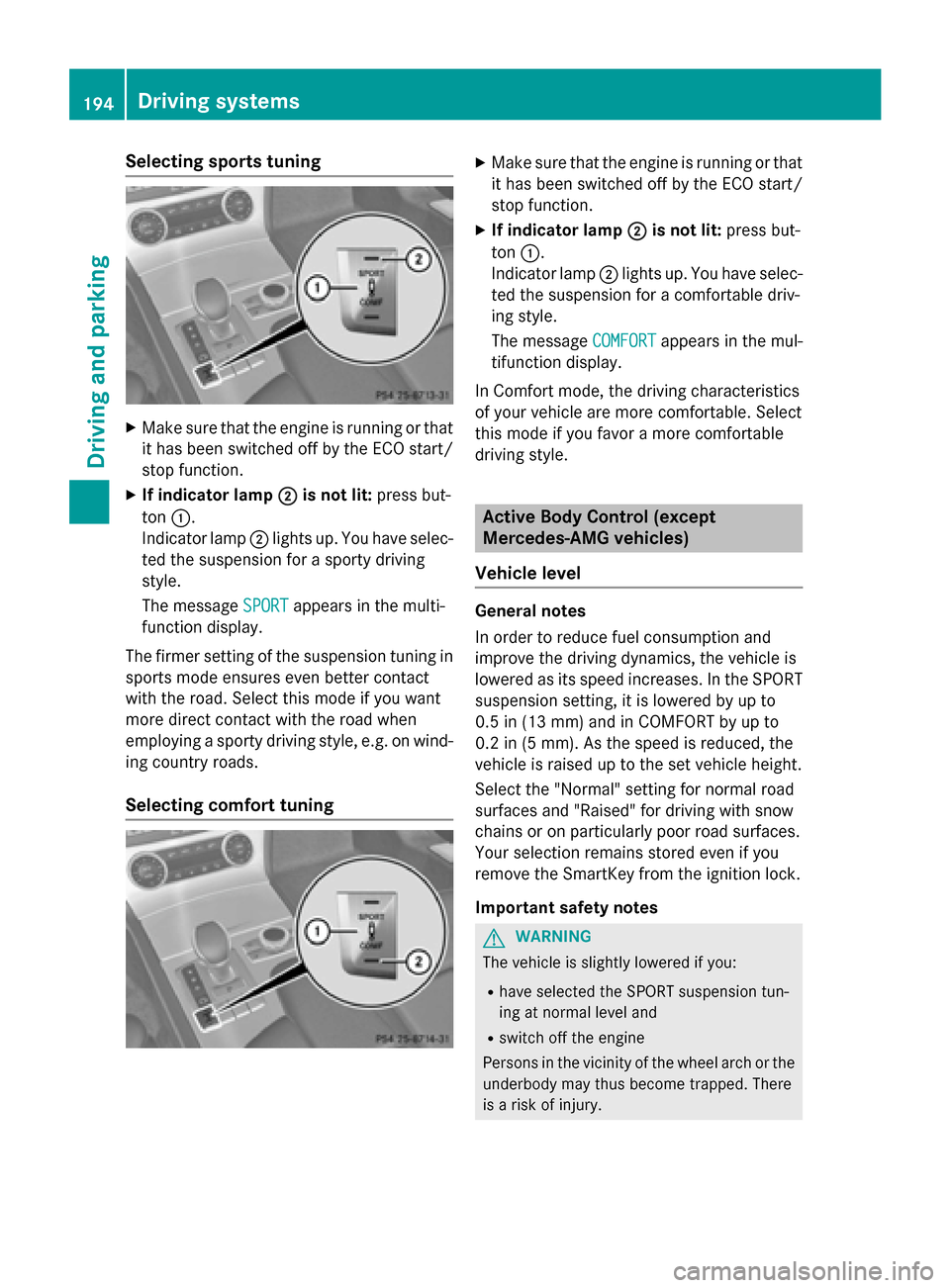
Selecting sports tuning
XMake sure that the engine is running or that
it has been switched off by the ECO start/
stop function.
XIf indicator lamp;is not lit:press but-
ton :.
Indicator lamp ;lights up. You have selec-
ted the suspension for a sporty driving
style.
The message SPORT
appears in the multi-
function display.
The firmer setting of the suspension tuning in sports mode ensures even better contact
with the road. Select this mode if you want
more direct contact with the road when
employing a sporty driving style, e.g. on wind-
ing country roads.
Selecting comfort tuning
XMake sure that the engine is running or that
it has been switched off by the ECO start/
stop function.
XIf indicator lamp ;is not lit:press but-
ton :.
Indicator lamp ;lights up. You have selec-
ted the suspension for a comfortable driv-
ing style.
The message COMFORT
appears in the mul-
tifunction display.
In Comfort mode, the driving characteristics
of your vehicle are more comfortable. Select
this mode if you favor a more comfortable
driving style.
Active Body Control (except
Mercedes-AMG vehicles)
Vehicle level
General notes
In order to reduce fuel consumption and
improve the driving dynamics, the vehicle is
lowered as its speed increases. In the SPORT
suspension setting, it is lowered by up to
0.5 in (13 mm) and in COMFORT by up to
0.2 in (5 mm). As the speed is reduced, the
vehicle is raised up to the set vehicle height.
Select the "Normal" setting for normal road
surfaces and "Raised" for driving with snow
chains or on particularly poor road surfaces.
Your selection remains stored even if you
remove the SmartKey from the ignition lock.
Important safety notes
GWARNING
The vehicle is slightly lowered if you:
Rhave selected the SPORT suspension tun-
ing at normal level and
Rswitch off the engine
Persons in the vicinity of the wheel arch or the underbody may thus become trapped. There
is a risk of injury.
194Driving systems
Driving and parking
Page 198 of 614
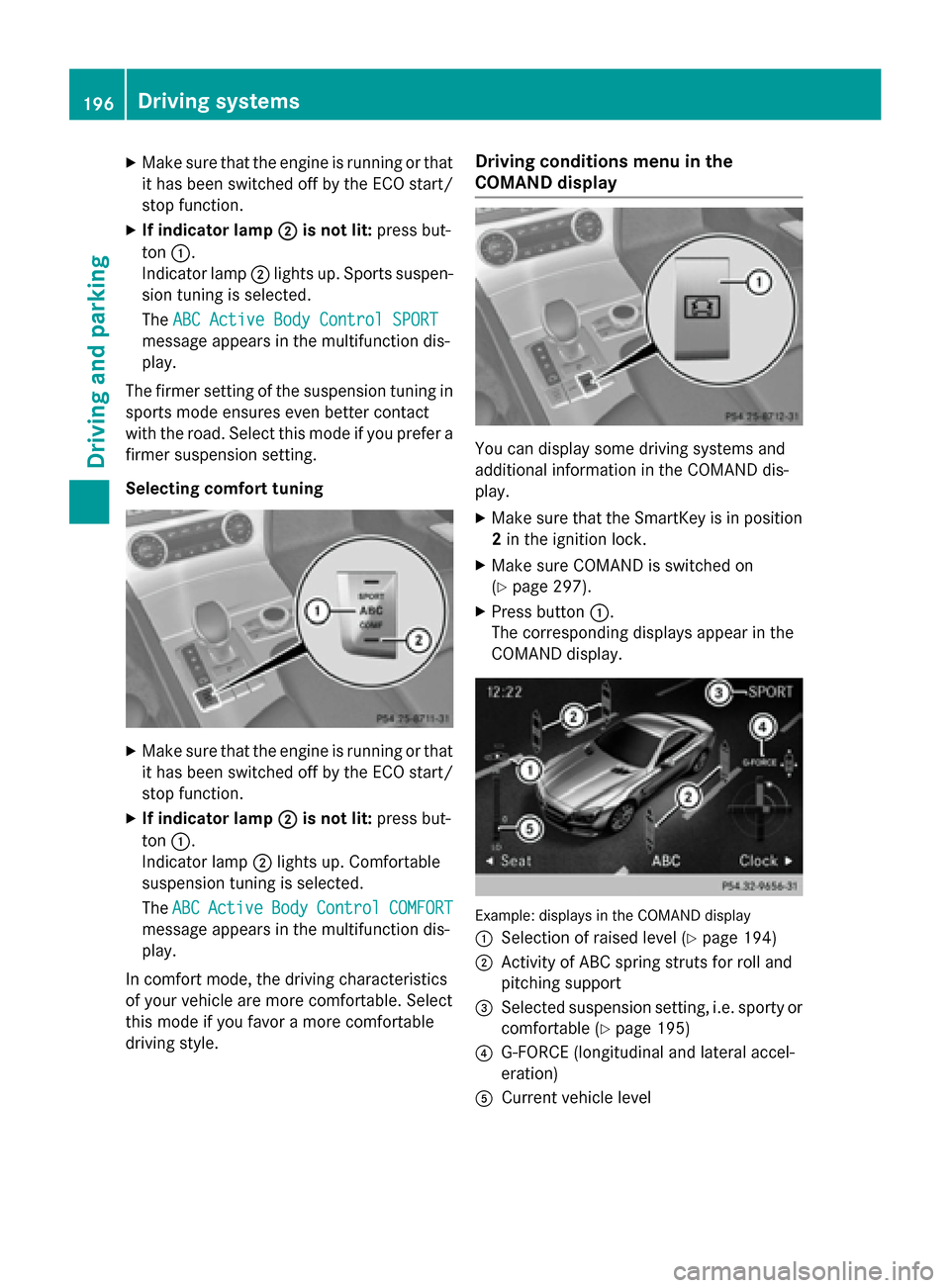
XMake sure that the engine is running or thatit has been switched off by the ECO start/
stop function.
XIf indicator lamp ;is not lit:press but-
ton :.
Indicator lamp ;lights up. Sports suspen-
sion tuning is selected.
The ABC Active Body Control SPORT
message appears in the multifunction dis-
play.
The firmer setting of the suspension tuning in
sports mode ensures even better contact
with the road. Select this mode if you prefer a
firmer suspension setting.
Selecting comfort tuning
XMake sure that the engine is running or that it has been switched off by the ECO start/
stop function.
XIf indicator lamp ;is not lit:press but-
ton :.
Indicator lamp ;lights up. Comfortable
suspension tuning is selected.
The ABC
ActiveBodyControlCOMFORT
message appears in the multifunction dis-
play.
In comfort mode, the driving characteristics
of your vehicle are more comfortable. Select
this mode if you favor a more comfortable
driving style.
Driving conditions menu in the
COMAND display
You can display some driving systems and
additional information in the COMAND dis-
play.
XMake sure that the SmartKey is in position
2 in the ignition lock.
XMake sure COMAND is switched on
(
Ypage 297).
XPress button :.
The corresponding displays appear in the
COMAND display.
Example: displays in the COMAND display
:
Selection of raised level (Ypage 194)
;Activity of ABC spring struts for roll and
pitching support
=Selected suspension setting, i.e. sporty or
comfortable (
Ypage 195)
?G-FORCE (longitudinal and lateral accel-
eration)
ACurrent vehicle level
196Driving systems
Driving and parking