CD player MERCEDES-BENZ SL-Class 2016 R231 Owner's Manual
[x] Cancel search | Manufacturer: MERCEDES-BENZ, Model Year: 2016, Model line: SL-Class, Model: MERCEDES-BENZ SL-Class 2016 R231Pages: 614, PDF Size: 15.67 MB
Page 9 of 614
see Flat tire
see Towing away
Brightness control (instrument
cluster lighting) ................................... 41
Brightness, setting (TV, video) ......... 475
Buttons on the COMAND control-
ler ........................................................ 295
C
California
Important notice for retail cus-
tomers and lessees .......................... 32
Call
Accepting/ending/rejecting .......... 389
see Telephone
Call lists
Displaying details ........................... 397
Opening and selecting an entry ..... 397
Saving an entry in the address
book .............................................. 397
Calling up a malfunction
see Display messages
Car
see Vehicle
Car key
see SmartKey
Car pool lanes .................................... 323
Care
Car wash ........................................ 542
Carpets .......................................... 548
Display ........................................... 546
Exhaust pipe .................................. 546
Exterior lights ................................ 545
Gear or selector lever .................... 547
Interior ........................................... 546
Matte finish ................................... 544
Night View Assist Plus ................... 547
Notes ............................................. 541
Paint .............................................. 543
Plastic trim .................................... 547
Power washer ................................ 543
Rear view camera .......................... 546
Roof lining ...................................... 548
Seat belt ........................................ 548
Seat cover ..................................... 548
Sensors ......................................... 546
Steering wheel ............................... 547 Trim pieces .................................... 547
Washing by hand ........................... 542
Wheels ........................................... 544
Windows ........................................ 545
Wiper blades .................................. 545
Wooden trim .................................. 547
Category list (music search) ............ 454
CD
Copy protection ............................. 454
Fast forward/fast rewind ............... 450
General information ....................... 454
Inserting ........................................ 446
Inserting/loading (Rear Seat
Entertainment System) .................. 491
Mode, switching to ........................ 448
Multisession .................................. 453
Notes on discs ............................... 454
Pause function ............................... 449
Removing/ejecting (Rear Seat
Entertainment System) .................. 491
Safety notes .................................. 446
Selecting a media type .................. 449
Selecting a track ............................ 449
Sound settings (balance, bass,
treble) ............................................ 298
CD mode
Playb
ack options ........................... 452
CD player/CD changer (on-board
computer) .......................................... 229
CD/DVD
Inserting ........................................ 447
Removing ....................................... 447
Center console
Lower section .................................. 45
Lower section (AMG vehicles) .......... 46
Upper section .................................. 44
Central locking
Automatic locking (on-board com-puter) ............................................. 234
Locking/unlocking (SmartKey) ........ 82
Changing direction
Announcement phase .................... 347
Change-of-direction phase ............. 347
Preparation phase ......................... 347
Changing the character set .............. 304
Channel presets ................................ 438
Characters
Changing the character set ............ 302
Index7
Page 18 of 614
Speed alert .................................... 529
System .......................................... 522
Triggering the vehicle alarm ........... 529
Vehicle remote unlocking .............. 527
Mechanical key
Function/notes ................................ 84
Inserting .......................................... 85
Locking vehicle ................................ 90
Removing ......................................... 85
Unlocking the driver's door .............. 90
Media Interface
Alphabetical track selection .......... 471
Basic menu .................................... 469
Connecting an external audio
source ............................................ 467
Connection options ....................... 467
iPod
®............................................. 467
Mode ............................................. 467
MP3 player .................................... 467
Notes for the MP3 player ............... 472
Playback options ........................... 472
Selecting a music file ..................... 469
Selecting category ......................... 470
Selecting folder ............................. 470
Selecting playlist ............................ 470
Switching to ................................... 468
USB mass storage device .............. 467
see Separate operating instructions
Media list ........................................... 449
Memory card (audio) ......................... 229
Memory function ............................... 119
Message memory (on-board com-
puter) .................................................. 239
Messages
see Display messages
Microphone, switching on/off ......... 390
Mirrors
see Exterior mirrors
see Vanity mirror (in the sun visor)
Mobile phone
Authorizing .................................... 385
Connecting (Bluetooth
®inter-
face) .............................................. 383
De-authorizing ............................... 387
External authorization .................... 386
Frequencies ................................... 600
Installation ..................................... 600 Menu (on-board computer) ............ 229
Registering (authorizing) ................ 385
Transmission output (maximum) .... 600
Mobile phone network providers
Calling up ....................................... 413
Modifying the programming
(SmartKey) ........................................... 84
MOExtended tires .............................. 551
Mounting wheels
Lowering the veh icle ...................... 593
Mo
unting a new wheel ................... 592
Preparing the vehicle ..................... 589
Raising the vehicle ......................... 590
Removing a wheel .......................... 592
Securing the vehicle against roll-
ing away ........................................ 589
MP3
Bit/sampling rates ......................... 453
Copyright ....................................... 454
Data medium ................................. 453
Fast forward/fast rewind ............... 450
File systems ................................... 453
Formats ......................................... 453
Mode, switching to ........................ 448
Notes ............................................. 453
Operation ....................................... 229
Pause function ............................... 449
Playback options ........................... 452
Safety notes .................................. 446
Selecting a media type .................. 449
Selecting a track ............................ 449
Sound settings (balance, bass,
treble) ............................................ 298
Multifunction display
Function/notes ............................. 224
Permanent display ......................... 233
Multifunction steering wheel
Adjusting the volume ..................... 297
Operating the on-board compute r..2 23
Overview .......................................... 43
Multisession CD ................................ 453
Music files
Importing ....................................... 458
MUSIC REGISTER
Deleting all music files ................... 459
Deleting individual music files ....... 460
General notes ................................ 457
Memory space info ........................ 459
16Index
Page 231 of 614
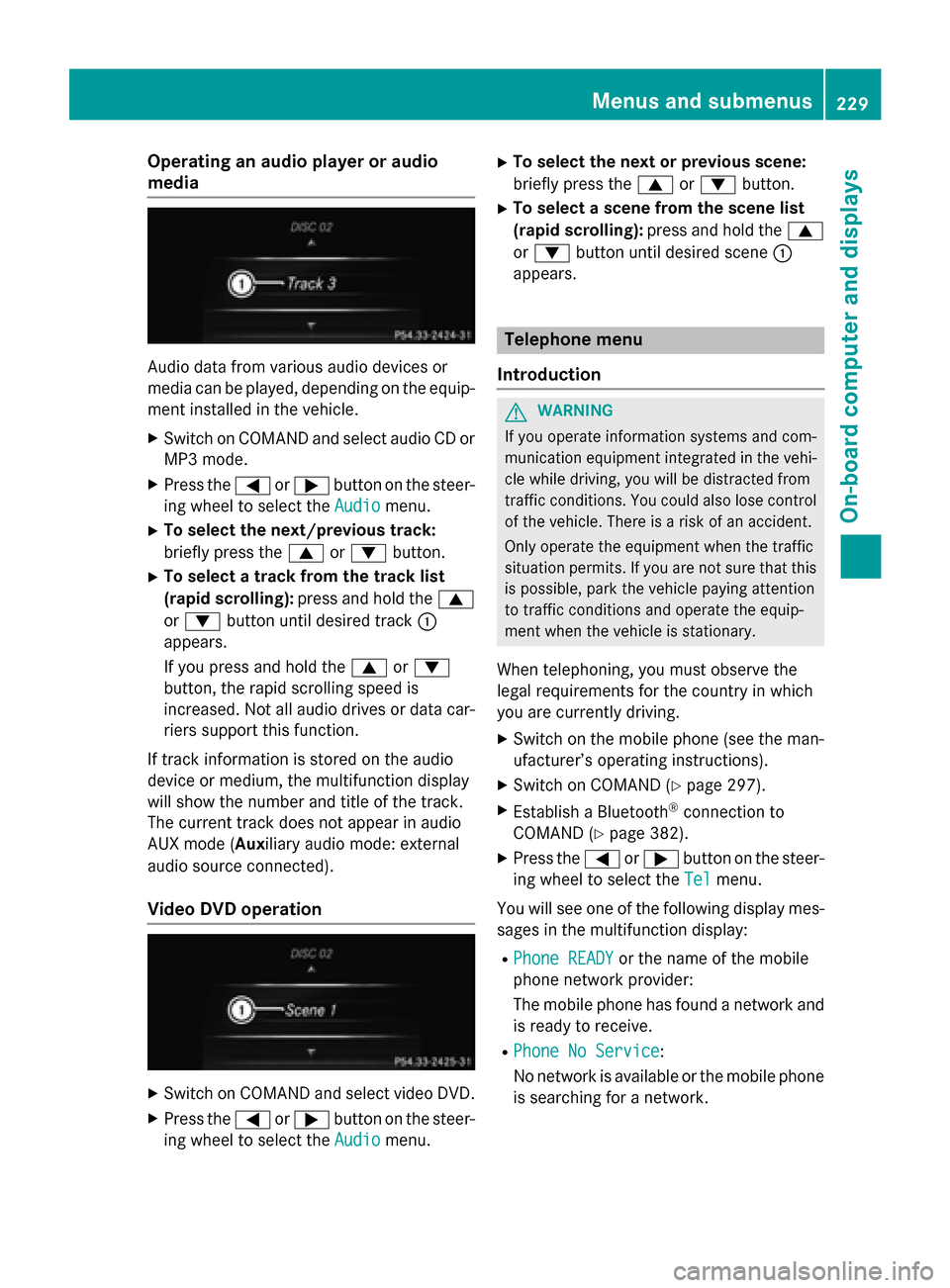
Operating an audio player or audio
media
Audio data from various audio devices or
media can be played, depending on the equip-ment installed in the vehicle.
XSwitch on COMAND and select audio CD or
MP3 mode.
XPress the =or; button on the steer-
ing wheel to select the Audio
menu.
XTo select the next/previous track:
briefly press the9or: button.
XTo select a track from the track list
(rapid scrolling): press and hold the 9
or : button until desired track :
appears.
If you press and hold the 9or:
button, the rapid scrolling speed is
increased. Not all audio drives or data car-
riers support this function.
If track information is stored on the audio
device or medium, the multifunction display
will show the number and title of the track.
The current track does not appear in audio
AUX mode (Aux iliary audio mode: external
audio source connected).
Video DVD operation
XSwitch on COMAND and select video DVD.
XPress the =or; button on the steer-
ing wheel to select the Audio
menu.
XTo select the next or previous scene:
briefly press the9or: button.
XTo select a scene from the scene list
(rapid scrolling): press and hold the 9
or : button until desired scene :
appears.
Telephone menu
Introduction
GWARNING
If you operate information systems and com-
munication equipment integrated in the vehi-
cle while driving, you will be distracted from
traffic conditions. You could also lose control
of the vehicle. There is a risk of an accident.
Only operate the equipment when the traffic
situation permits. If you are not sure that this
is possible, park the vehicle paying attention
to traffic conditions and operate the equip-
ment when the vehicle is stationary.
When telephoning, you must observe the
legal requirements for the country in which
you are currently driving.
XSwitch on the mobile phone (see the man-
ufacturer’s operating instructions).
XSwitch on COMAND (Ypage 297).
XEstablish a Bluetooth®connection to
COMAND (
Ypage 382).
XPress the =or; button on the steer-
ing wheel to select the Tel
menu.
You will see one of the following display mes-
sages in the multifunction display:
RPhone READYor the name of the mobile
phone network provider:
The mobile phone has found a network and
is ready to receive.
RPhone No Service:
No network is available or the mobile phone
is searching for a network.
Menus and submenus229
On-board computer and displays
Z
Page 449 of 614
iIf a medium contains other files in addi-
tion to music files, the loading time before
the first track starts to play may be longer.
Inserting
XPress the 8button.
If there is a disc already inserted, it will be
ejected.
XTake the disc out of the slot.
XInsert a disc into the slot.
When a suitable data carrier is correctly
inserted, the drive draws it in and plays it.
Removing
XPress the 8button.
XTake the disc out of the slot.
If you do not take the disc out of the slot, it
is drawn in again automatically after a short
while and reloaded.
Inserting and ejecting an SD memory
card
General information
COMAND supports SD memory cards
(Secure Digital), SDHC memory cards
(Secure Digital HighCapacity) and SDXC
memory cards (Secure Digital eXtended
Capacity.
iNot all memory cards available on the
market are designed for the temperatures
which may be reached in the vehicle.
If the SD memory card is no longer in use,
you should remove it from COMAND. High
temperatures can damage the card.
Due to the wide range of SD memory cards
available on the market, playback cannot
be guaranteed for all brands of SD memory
card.
The readable storage capacity depends on
the memory card used. You can obtain fur-
ther information at any authorized
Mercedes-Benz Center. Inserting an SD memory card
XInsert the memory card into the slot on the
control panel until it engages in place. The
side with the contacts must face down-
wards and point towards the slot.
If no MP3 tracks can be found, you will see
a message to this effect.
The first 100 MP3 tracks are loaded. The
first MP3 track is then played. Further
tracks are loaded in the background; this is
indicated by an hourglass symbol.
Ejecting an SD memory card
XPress the memory card.
The memory card is ejected.
XRemove the memory card from slot.
Connecting a USB device
The USB port is located in the stowage com-
partment in the center console.
Electrical consumption at this connection
must not exceed a continuous current of
500 mA. If the electrical consumption is
higher, use a separate source to provide
power for the USB device (e.g.
12 V power supply).
XConnect the USB device (e.g. USB stick) to
the USB port.
If no MP3 tracks can be found, you will see
a message to this effect.
The first 100 MP3 tracks are loaded. The
first MP3 track is then played. Further
tracks are loaded in the background; this is
indicated by an hourglass symbol.
iDue to the wide range of USB devices
available on the market, playback cannot
be guaranteed for all brands of USB device.
Information about suitable USB devices
can be obtained from an authorized
Mercedes-Benz Center.
MP3 players must support Media Transfer
Protocol (MTP). The MTP mode must be
active.
Audio447
COMAND
Z
Page 464 of 614
You can authorize up to fifteen Bluetooth®
devices.
iIf you authorize a mobile phone that sup-
ports Bluetooth®audio, the A2DP and
AVRCP Bluetooth®audio profiles are con-
nected automatically.
The mobile phone is then entered:
Rin the Bluetooth®telephone list
(
Ypage 385)
Rin the Bluetooth®device list
(
Ypage 462).
Mercedes-Benz recommends authorizing a
mobile phone in Bluetooth
®telephony
(
Ypage 385).
Searching for and authorizing a Blue-
tooth
®audio device
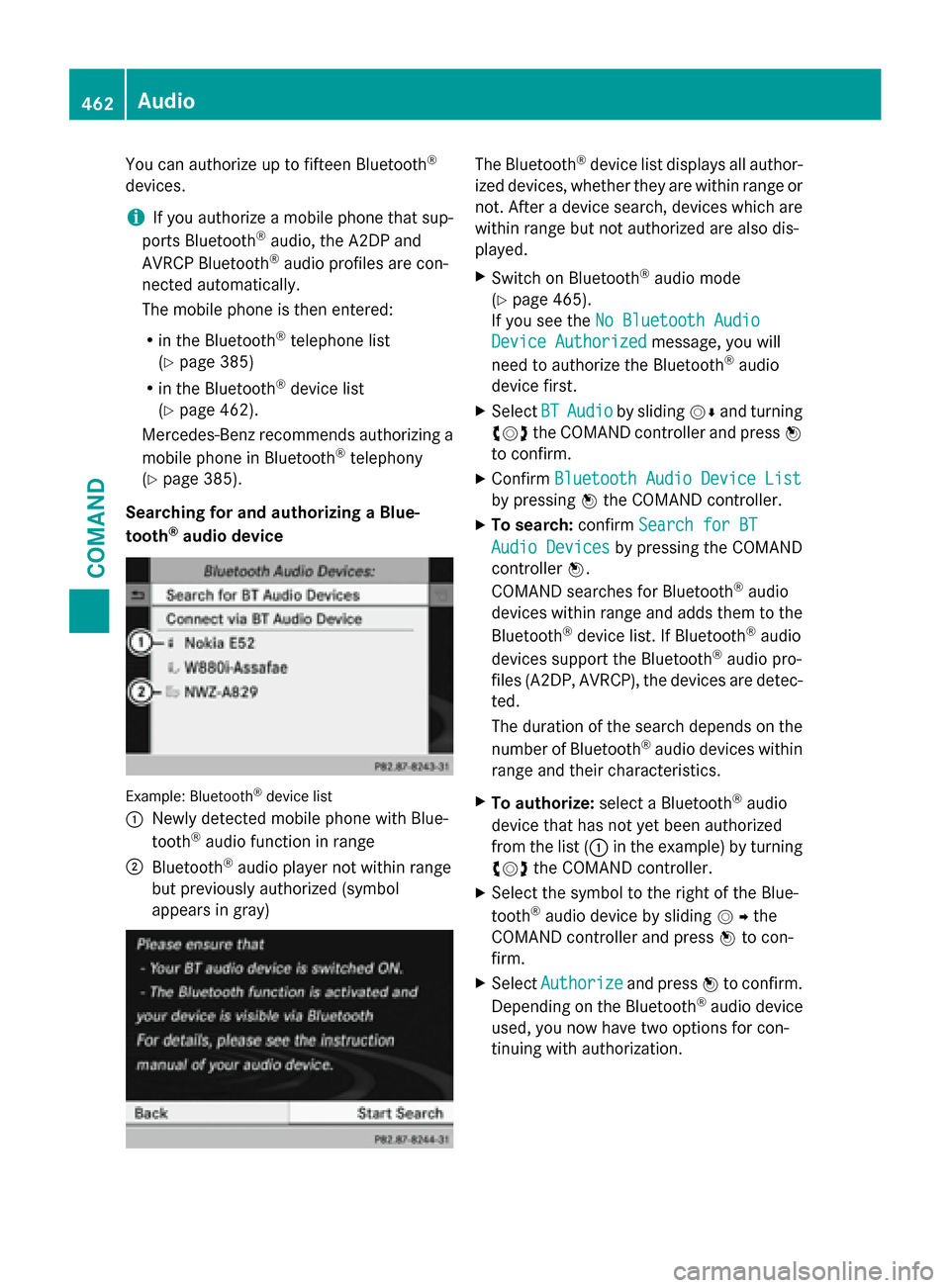
Example: Bluetooth®device list
:
Newly detected mobile phone with Blue-
tooth®audio function in range
;Bluetooth®audio player not within range
but previously authorized (symbol
appears in gray)
The Bluetooth®device list displays all author-
ized devices, whether they are within range or
not. After a device search, devices which are
within range but not authorized are also dis-
played.
XSwitch on Bluetooth®audio mode
(
Ypage 465).
If you see the No Bluetooth Audio
Device Authorizedmessage, you will
need to authorize the Bluetooth®audio
device first.
XSelect BTAudioby sliding VÆand turning
cVd the COMAND controller and press W
to confirm.
XConfirm Bluetooth Audio Device List
by pressing Wthe COMAND controller.
XTo search: confirmSearch for BT
Audio Devicesby pressing the COMAND
controller W.
COMAND searches for Bluetooth
®audio
devices within range and adds them to the
Bluetooth
®device list. If Bluetooth®audio
devices support the Bluetooth®audio pro-
files (A2DP, AVRCP), the devices are detec-
ted.
The duration of the search depends on the
number of Bluetooth
®audio devices within
range and their characteristics.
XTo authorize: select a Bluetooth®audio
device that has not yet been authorized
from the list (: in the example) by turning
cVd the COMAND controller.
XSelect the symbol to the right of the Blue-
tooth®audio device by sliding VYthe
COMAND controller and press Wto con-
firm.
XSelect Authorizeand press Wto confirm.
Depending on the Bluetooth®audio device
used, you now have two options for con-
tinuing with authorization.
462Audio
COMAND
Page 465 of 614
XOption 1:enter the passkey (Ypage 385).
After successful authorization, the Blue-
tooth
®audio device is connected and
starts playing.
XOption 2 (Secure Simple Pairing): if the
digit codes displayed in COMAND and on
the Bluetooth
®audio device are the same,
confirm Yes
by pressing W.
If you select Yes
, authorization continues
and the Bluetooth®audio device is connec-
ted. Playback starts.
If you select No
, authorization will be can-
celed.
iThe Bluetooth®audio device must sup-
port Bluetooth®version 2.1 for connection
via Secure Simple Pairing. COMAND cre-
ates a six-digit code, which is displayed on
both devices that are to be connected
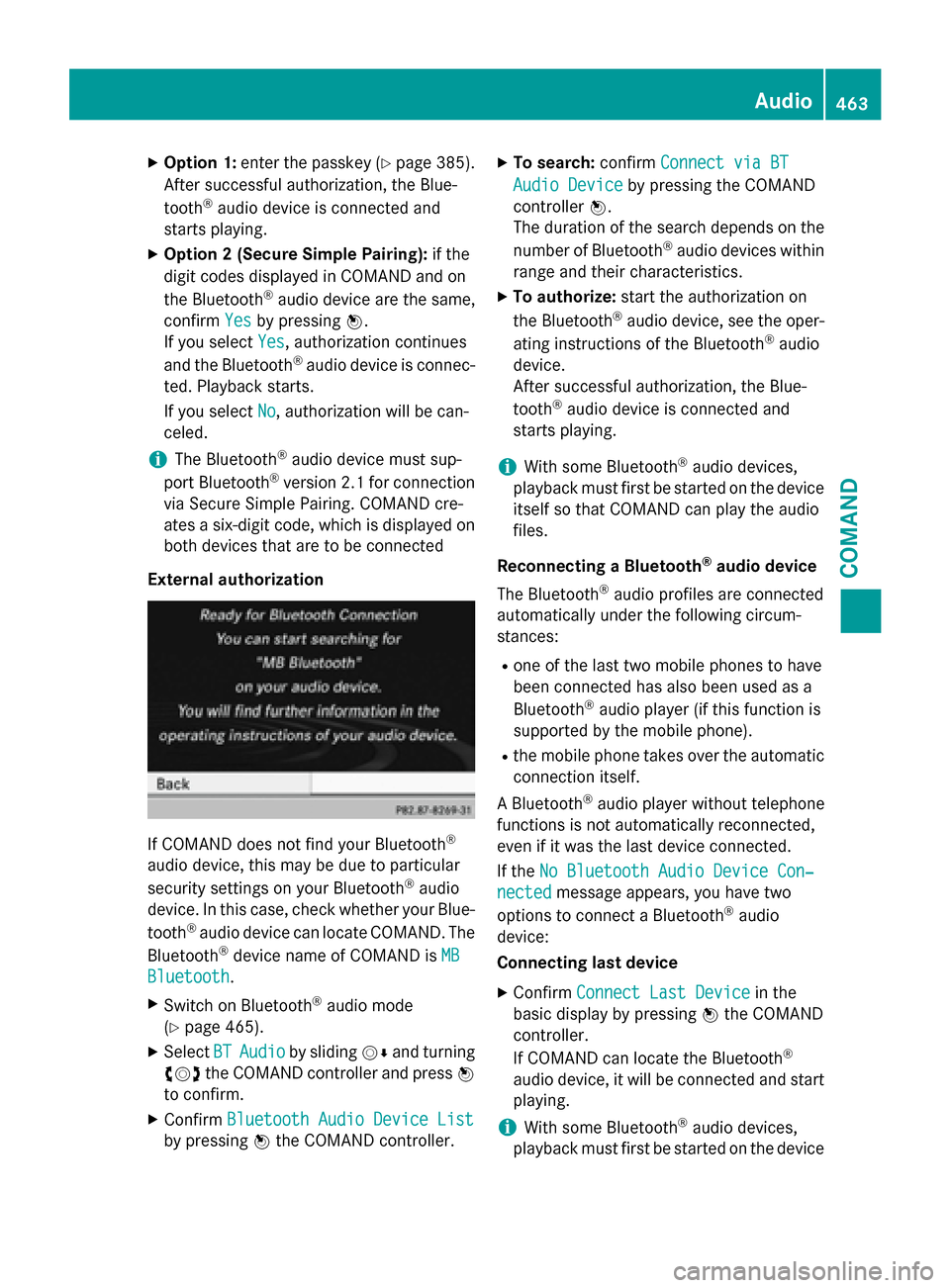
External authorization
If COMAND does not find your Bluetooth®
audio device, this may be due to particular
security settings on your Bluetooth®audio
device. In this case, check whether your Blue-
tooth
®audio device can locate COMAND. The
Bluetooth®device name of COMAND is MB
Bluetooth.
XSwitch on Bluetooth®audio mode
(
Ypage 465).
XSelect BTAudioby sliding VÆand turning
cVd the COMAND controller and press W
to confirm.
XConfirm Bluetooth Audio Device List
by pressing Wthe COMAND controller.
XTo search: confirmConnect via BT
Audio Deviceby pressing the COMAND
controller W.
The duration of the search depends on the
number of Bluetooth
®audio devices within
range and their characteristics.
XTo authorize: start the authorization on
the Bluetooth®audio device, see the oper-
ating instructions of the Bluetooth®audio
device.
After successful authorization, the Blue-
tooth
®audio device is connected and
starts playing.
iWith some Bluetooth®audio devices,
playback must first be started on the device
itself so that COMAND can play the audio
files.
Reconnecting a Bluetooth
®audio device
The Bluetooth
®audio profiles are connected
automatically under the following circum-
stances:
Rone of the last two mobile phones to have
been connected has also been used as a
Bluetooth
®audio player (if this function is
supported by the mobile phone).
Rthe mobile phone takes over the automatic
connection itself.
A Bluetooth
®audio player without telephone
functions is not automatically reconnected,
even if it was the last device connected.
If the No Bluetooth Audio Device Con‐
nectedmessage appears, you have two
options to connect a Bluetooth®audio
device:
Connecting last device
XConfirm Connect Last Devicein the
basic display by pressing Wthe COMAND
controller.
If COMAND can locate the Bluetooth
®
audio device, it will be connected and start
playing.
iWith some Bluetooth®audio devices,
playback must first be started on the device
Audio463
COMAND
Z
Page 469 of 614
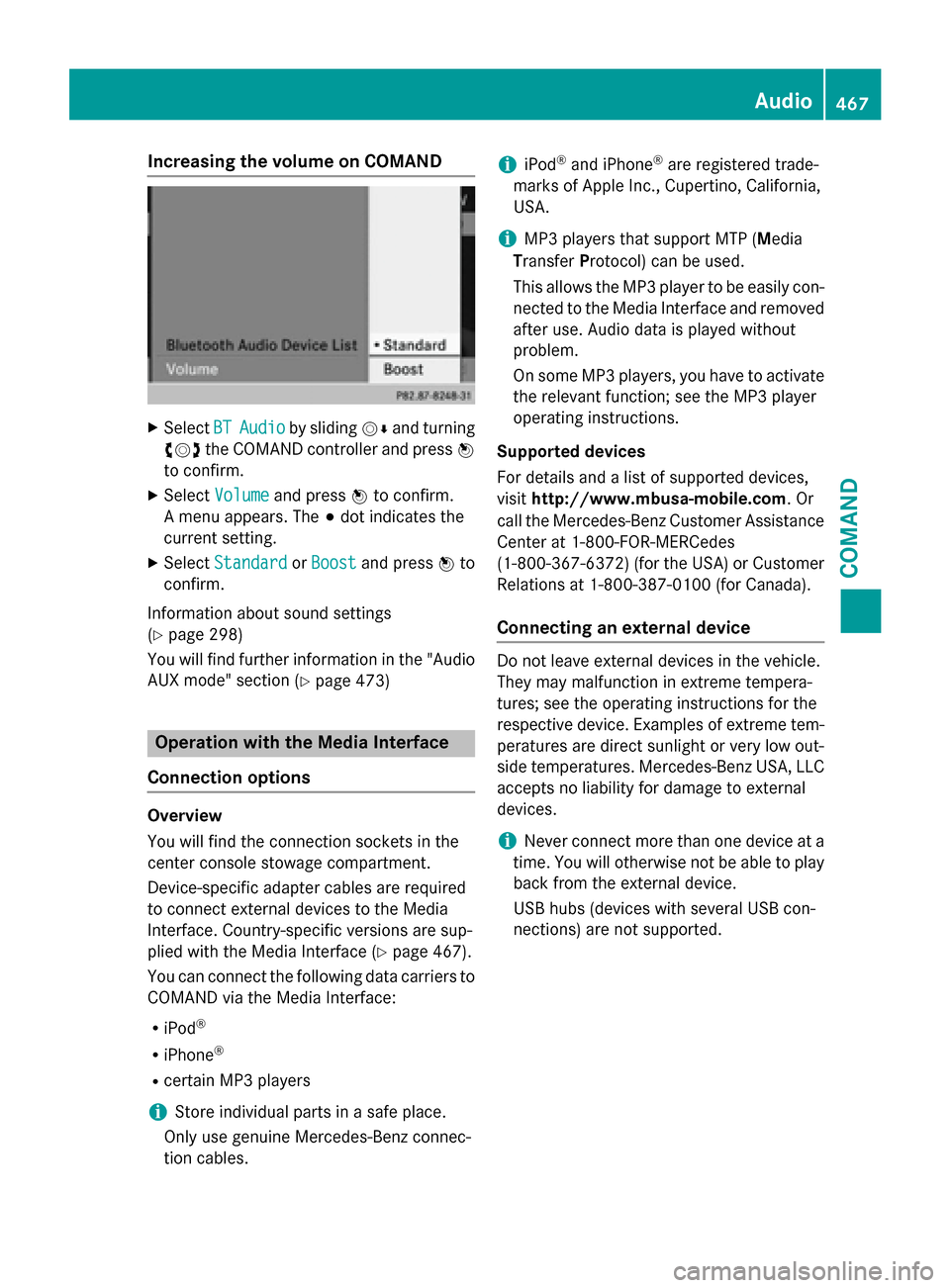
Increasing the volume on COMAND
XSelect BTAudioby sliding VÆand turning
cVd the COMAND controller and press W
to confirm.
XSe lect Volumeand press Wto confirm.
A menu appears. The #dot indicates the
current setting.
XSe lect StandardorBoostand press Wto
confirm.
In formation about sound settings
(
Ypage 298)
You willfind further information inthe "Audio
AUX mode" section (
Ypage 473)
Operation with the Media Interface
Connection options
Overview
You willfind the connection sockets in the
center console stowage compartment.
Device-specific adapter cables are required
to connect external devices to the Media
In terface. Country-specific versions are sup-
plied wit h the Media Interface (
Ypage 467).
You can connect the following data carriers to
COMAND via the Media Interface:
RiPod®
RiPhone®
Rcertain MP3 players
iSt ore ind ividual parts ina safe place.
Only use genuine Mercedes-Benz connec-
tion cables.
iiPod®and iPhone®are registered trade-
marks of Ap ple Inc., Cupertino, California,
USA.
iMP3 players that support MTP ( Med ia
T ransfer Protoco l)can beused.
This allows the MP3 player to beeasily con-
nected to the Media Interface and removed
after use. Aud iodata isplayed without
problem.
On some MP3 players, you have to act ivate
the relevant function; see the MP3 player
operating instructions.
Supported devices
For details and a listof supported devices,
vis itht tp://www.mbusa- mobile.com . Or
call the Mercedes-Benz Customer Assistance
Center at 1-800-FOR-MERCedes
(1-800-367-6372 )(for the USA) or Customer
Relations at 1-800-387-0100 (for Canada).
Connecting an external device
Do not leave external devices in the vehicle.
They may malfunction in extreme tempera-
tures; see the operating instructions for the
respective device. Examples of extreme tem-
peratures are direct sunlight or very low out-
side temperatures. Mercedes-Benz USA, LLC
accepts no liability for damage to external
devices.
iNever connect more than one device at a
time. You will otherwise not be able to play back from the external device.
USB hubs (devices with several USB con-
nections) are not supported.
Audio467
COMAND
Z
Page 470 of 614
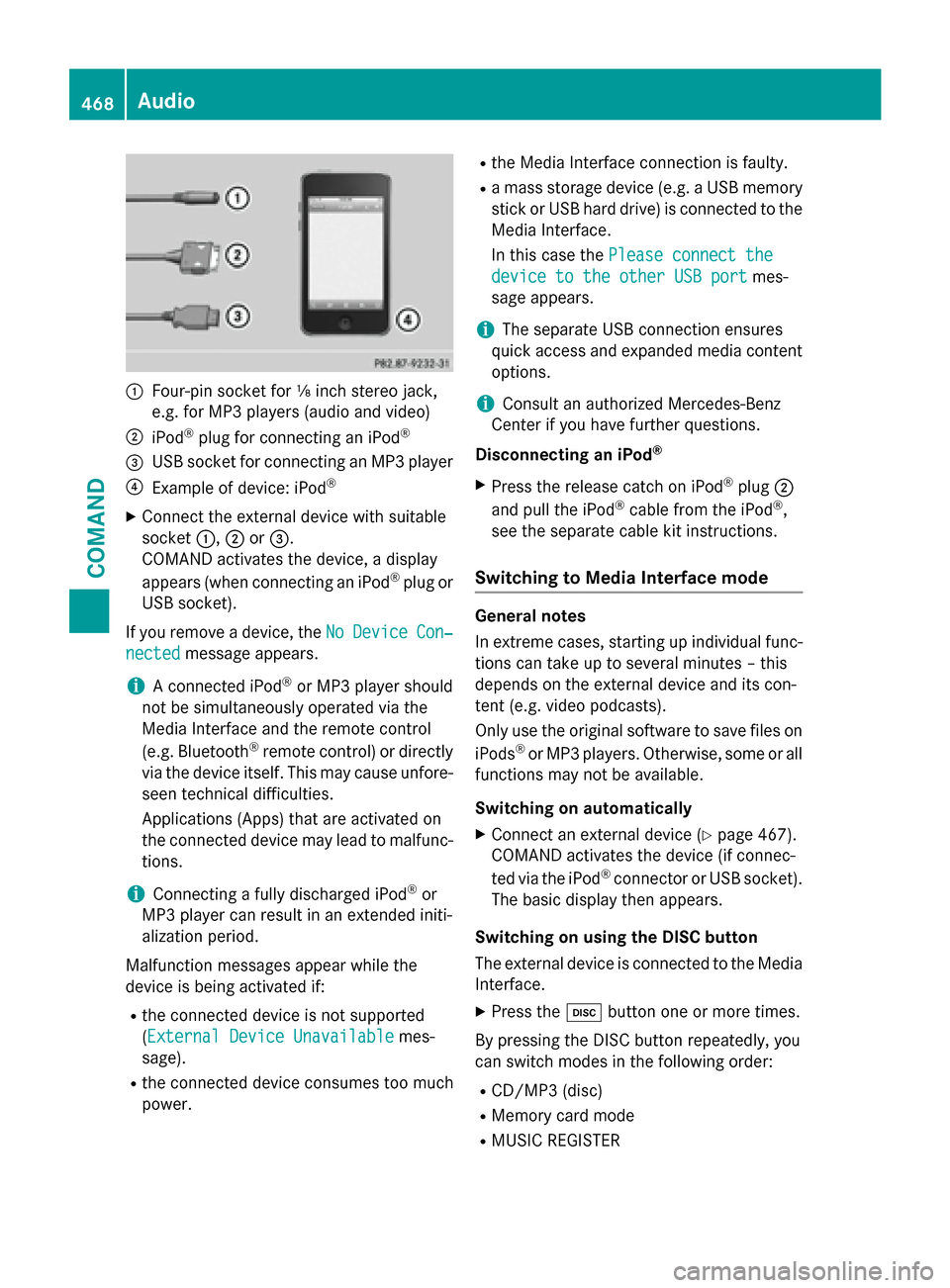
:Four-pin socket for ⅛ inch stereo jack,
e.g. for MP3 players (audio and video)
;iPod®plug for connecting an iPod®
=USB socket for connecting an MP3 player
?Example of device: iPod®
XConnect the external device with suitable
socket:,;or=.
COMAND activates the device, a display
appears (when connecting an iPod
®plug or
USB socket).
If you remove a device, the No
DeviceCon‐
nectedmessage appears.
iA connected iPod®or MP3 player should
not be simultaneously operated via the
Media Interface and the remote control
(e.g. Bluetooth
®remote control) or directly
via the device itself. This may cause unfore- seen technical difficulties.
Applications (Apps) that are activated on
the connected device may lead to malfunc-
tions.
iConnecting a fully discharged iPod®or
MP3 player can result in an extended initi-
alization period.
Malfunction messages appear while the
device is being activated if:
Rthe connected device is not supported
( External Device Unavailable
mes-
sage).
Rthe connected device consumes too much
power.
Rthe Media Interface connection is faulty.
Ra mass storage device (e.g. a USB memory
stick or USB hard drive) is connected to the
Media Interface.
In this case the Please connect the
device to the other USB portmes-
sage appears.
iThe separate USB connection ensures
quick access and expanded media content options.
iConsult an authorized Mercedes-Benz
Center if you have further questions.
Disconnecting an iPod
®
XPress the release catch on iPod®plug ;
and pull the iPod®cable from the iPod®,
see the separate cable kit instructions.
Switching to Media Interface mode
General notes
In extreme cases, starting up individual func-
tions can take up to several minutes – this
depends on the external device and its con-
tent (e.g. video podcasts).
Only use the original software to save files on
iPods
®or MP3 players. Otherwise, some or all
functions may not be available.
Switching on automatically
XConnect an external device (Ypage 467).
COMAND activates the device (if connec-
ted via the iPod
®connector or USB socket).
The basic display then appears.
Switching on using the DISC button
The external device is connected to the Media Interface.
XPress the hbutton one or more times.
By pressing the DISC button repeatedly, you
can switch modes in the following order:
RCD/MP3 (disc)
RMemory card mode
RMUSIC REGISTER
468Audio
COMAND
Page 471 of 614
RUSB storage device
RMedia Interface or audio AUX mode
RBluetooth®audio mode
Switching on using a number key
XPress the onumber key (single DVD
drive).
This selects the connected external audio
device directly.
Switching on via the media list
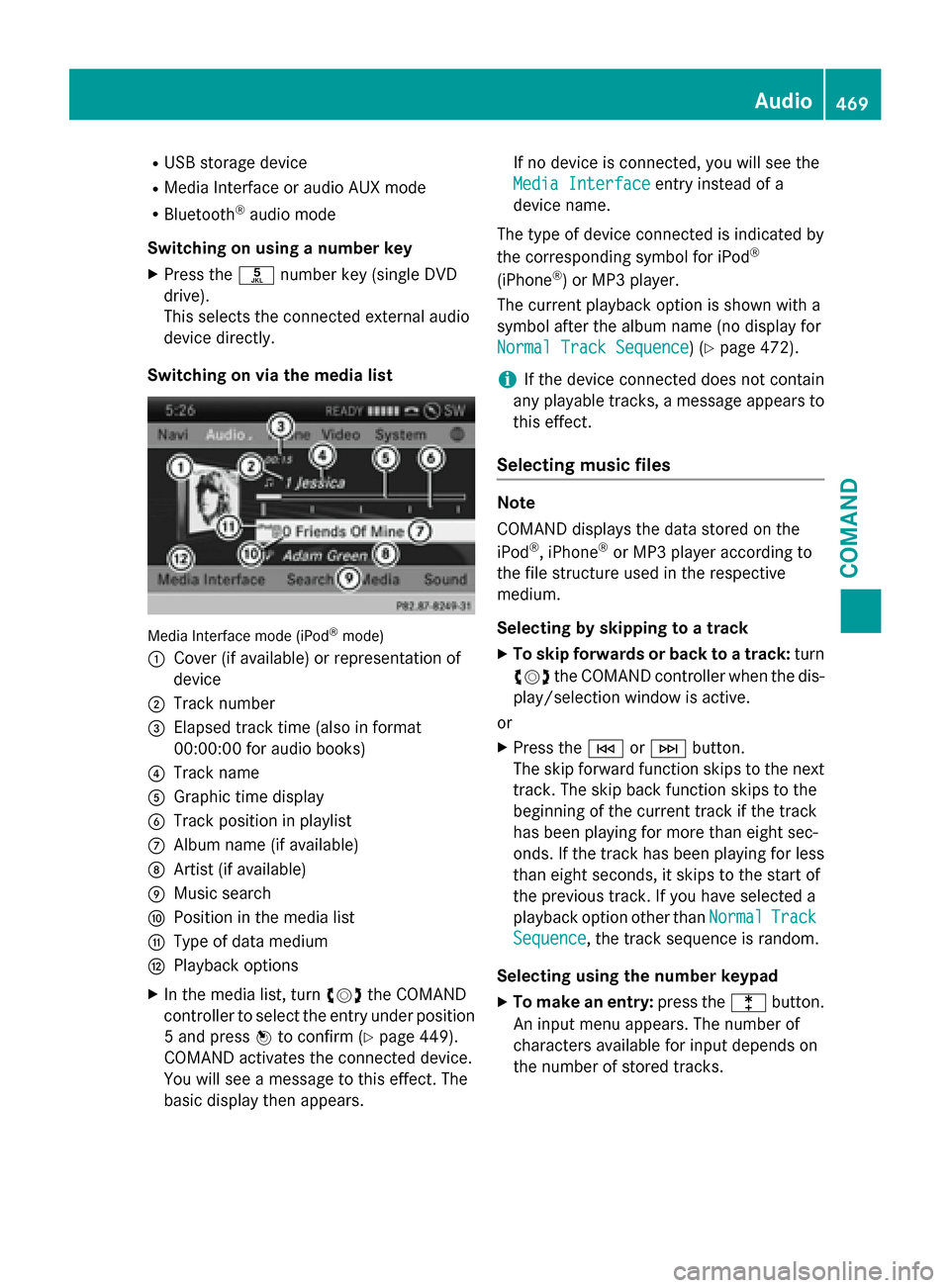
Media Interface mode (iPod®mode)
:
Cover (if available) or representation of
device
;Track number
=Elapsed track time (also in format
00:00:00 for audio books)
?Track name
AGraphic time display
BTrack position in playlist
CAlbum name (if available)
DArtist (if available)
EMusic search
FPosition in the media list
GType of data medium
HPlayback options
XIn the media list, turn cVdthe COMAND
controller to select the entry under position
5 and press Wto confirm (
Ypage 449).
COMAND activates the connected device.
You will see a message to this effect. The
basic display then appears. If no device is connected, you will see the
Media Interface
entry instead of a
device name.
The type of device connected is indicated by
the corresponding symbol for iPod
®
(iPhone®) or MP3 player.
The current playback option is shown with a
symbol after the album name (no display for
Normal Track Sequence
) (Ypage 472).
iIf the device connected does not contain
any playable tracks, a message appears to
this effect.
Selecting music files
Note
COMAND displays the data stored on the
iPod
®, iPhone®or MP3 player according to
the file structure used in the respective
medium.
Selecting by skipping to a track
XTo skip forwards or back to a track: turn
cVd the COMAND controller when the dis-
play/selection window is active.
or
XPress the EorF button.
The skip forward function skips to the next
track. The skip back function skips to the
beginning of the current track if the track
has been playing for more than eight sec-
onds. If the track has been playing for less
than eight seconds, it skips to the start of
the previous track. If you have selected a
playback option other than Normal
Track
Sequence, the track sequence is random.
Selecting using the number keypad
XTo make an entry: press thelbutton.
An input menu appears. The number of
characters available for input depends on
the number of stored tracks.
Audio469
COMAND
Z
Page 472 of 614
XTo enter a track number:press a number
key, e.g. q.
The digit is entered in the first position in
the input line.
iCOMAND will ignore and not display an
invalid digit.
XEnter more numbers if desired.
The track plays after the last possible num-
ber is entered.
iPressing and holding a number key for
more than two seconds completes the
entry, and the corresponding track is
played.
Fast forwarding/rewinding
XWhile the display/selection window is
active, slide XVYand hold the COMAND
controller until the desired position has
been reached.
or
XPress and hold the EorF button
until the desired position is reached.
iOn an iPod®or iPhone®, fast rewind only
functions within the current track.
Selecting a category/playlist/folder
Overview
For an iPod
®, iPhone®or certain MP3 players,
you can select tracks using categories or fold-
ers.
Depending on the device connected, the fol-
lowing categories may be available, for exam-
ple:
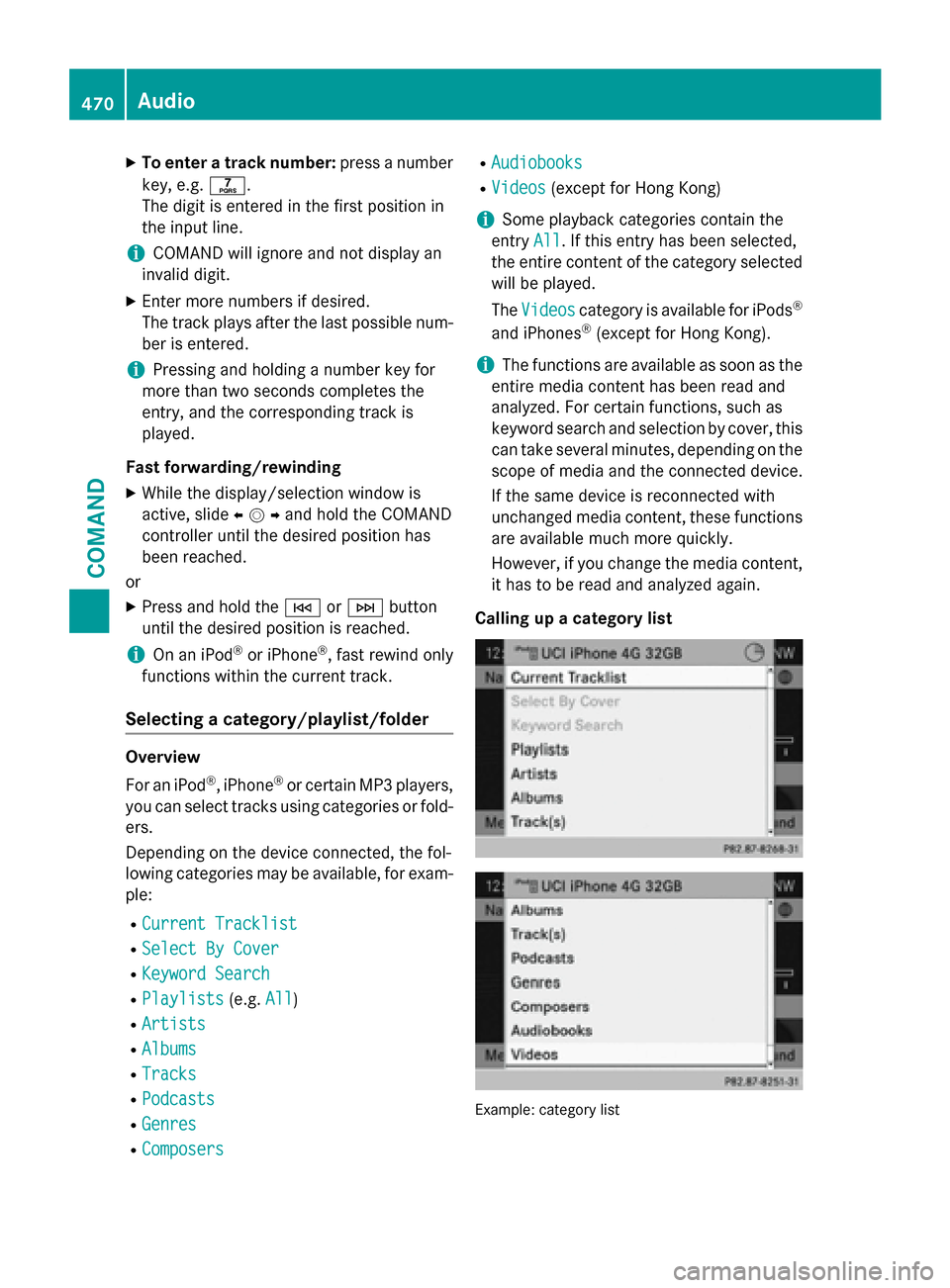
RCurrent Tracklist
RSelect By Cover
RKeyword Search
RPlaylists(e.g. All)
RArtists
RAlbums
RTracks
RPodcasts
RGenres
RComposers
RAudiobooks
RVideos(except for Hong Kong)
iSome playback categories contain the
entry All
. If this entry has been selected,
the entire content of the category selected
will be played.
The Videos
category is available for iPods®
and iPhones®(except for Hong Kong).
iThe functions are available as soon as the
entire media content has been read and
analyzed. For certain functions, such as
keyword search and selection by cover, this
can take several minutes, depending on the
scope of media and the connected device.
If the same device is reconnected with
unchanged media content, these functions
are available much more quickly.
However, if you change the media content,
it has to be read and analyzed again.
Calling up a category list
Example :categor ylist
470Audio
COMAND