ignition MERCEDES-BENZ SL CLASS 2019 User Guide
[x] Cancel search | Manufacturer: MERCEDES-BENZ, Model Year: 2019, Model line: SL CLASS, Model: MERCEDES-BENZ SL CLASS 2019Pages: 330, PDF Size: 16.53 MB
Page 76 of 330
SmartKey
Important safety notes
GWARNING
If children are left unsupervised in the vehi-
cle, they could:
Roperate the vehicle's equipment
Additionally, children could set the vehicle in
motion if, for example, they:
Rrelease the parking brake
Rshift the automatic transmission out of
park position]
Rstart the engine
There is a risk of an accident and injury.
Never leave children or animals unattended
in the vehicle.
When leaving the vehicle, always take the
SmartKey with you and lock the vehicle. This
also applies for the Digital Vehicle Key if the
"Digital Vehicle Key" function is activated via
Mercedes me connect.
GWARNING
If you attach heavy or large objects to the
SmartKey, the SmartKey could be uninten-
tionally turned in the ignition lock. This
could cause the engine to be switched off.
There is a risk of an accident.
Do not attach any heavy or large objects to
the SmartKey. Remove any bulky key rings
before inserting the SmartKey into the igni-
tion lock.
!Keep the SmartKey away from strong mag-netic fields. Otherwise, the remote controlfunction could be affected.
Strong magnetic fields can occur in thevicinity of powerful electrical installations.
Do not keep the SmartKey:
Rwith electronic devices, e.g. a mobile phoneor another SmartKey
Rwith metallic objects, e.g. coins or metal foil
Rinside metallic objects, e.g. a metal case
This can affect the functionality of theSmartKey.
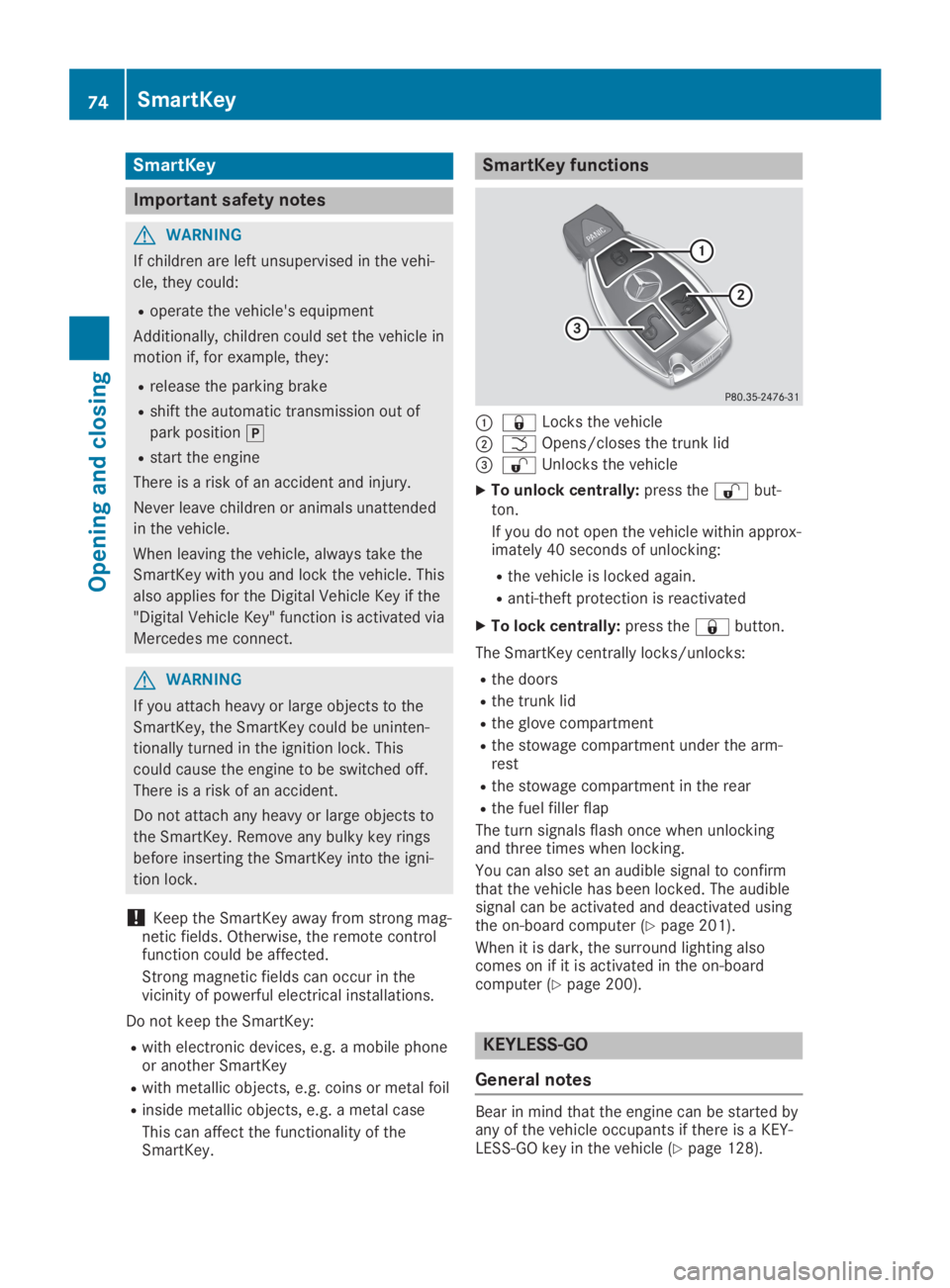
SmartKey functions
C7Locks the vehicle
DTOpens/closes the trunk lid
Page 77 of 330

Locking/unlocking centrally
You can start, lock or unlock the vehicle usingKEYLESS-GO. To do this, you only need carrythe SmartKey with you. You can combine thefunctions of KEYLESS-GO with those of a con-ventional SmartKey. Unlock the vehicle byusing KEYLESS-GO, for instance, and lock itusing the7button on the SmartKey.
The driver's door and the door at which thehandle is used, must both be closed. TheSmartKey must be outside the vehicle. Whenlocking or unlocking with KEYLESS-GO, thedistance between the key and the correspond-ing door handle must not be greater than 3 ft(1 m).
A check which periodically establishes a radioconnection between the vehicle and theSmartKey determines whether a valid Smart-Key is in the vehicle. This occurs, for example:
Rwhen starting the engine
Rwhile driving
Rwhen using HANDS-FREE ACCESS
Rwhen the external door handles are touched
XTo unlock the vehicle:touch the inner sur-face of the door handle.
XTo lock the vehicle:touch sensor sur-faceCorD.
Make sure that you do not touch the innersurface of the door handle.
XConvenience closing feature:touchrecessed sensor surfaceDfor an extendedperiod.
Further information on the convenienceclosing feature (Ypage 89).
Deactivating and activating
If you do not intend to use a SmartKey for anextended period of time, you can deactivatethe KEYLESS-GO function of the key. TheSmartKey will then use very little power,thereby conserving battery power. For the pur-poses of activation/deactivation, the vehiclemust not be nearby.
XTo deactivate:press the7button onthe SmartKey twice in rapid succession.The battery check lamp (Ypage 77) of theSmartKey flashes twice briefly and lights uponce, then KEYLESS-GO is deactivated.
XTo activate:press any button on the Smart-Key.
or
XInsert the SmartKey into the ignition lock.KEYLESS-GO and all of its associated fea-tures are available again.
Changing the settings of the locking
system
You can change the settings of the lockingsystem. This means only the driver's door, thelockable stowage compartments in the vehicleinterior and the fuel filler flap are unlockedwhen the vehicle is unlocked. This is useful ifyou frequently travel alone.
XTo change the setting:press and holddown the6and7buttons simultane-ously for about six seconds until the batteryindicator lamp (Ypage 77) flashes twice.
If the setting of the locking system is changedwithin the signal range of the vehicle, pressingthe7or6button:
Rlocks or
Runlocks the vehicle
The SmartKey now functions as follows:
XTo unlock:press the6button once.
XTo unlock centrally:press the6buttontwice.
XTo lock centrally:press the7button.
SmartKey75
Opening and closing
Z
Page 81 of 330
ProblemPossible causes/consequences andPPSolutions
The engine cannot bestarted using the Smart-Key.
The on-board voltage is too low.
XSwitch off non-essential consumers, e.g. seat heating or interiorlighting, and try to start the engine again.
If this does not work:
XCheck the starter battery and charge it if necessary(Ypage 284).
or
XJump-start the vehicle (Ypage 285).
or
XConsult a qualified specialist workshop.
The engine cannot bestarted using KEYLESS-GO. The SmartKey is inthe vehicle.
The vehicle is locked.
XUnlock the vehicle and try to start the vehicle again.
The SmartKey battery is discharged or nearly discharged.
XCheck the SmartKey battery (Ypage 77) and replace it if neces-sary (Ypage 77).
If this does not work:
XStart your vehicle with the SmartKey in the ignition lock.
There is interference from a powerful source of radio waves.
XStart your vehicle with the SmartKey in the ignition lock.
You have lost a Smart-Key.XHave the SmartKey deactivated at a qualified specialist work-shop.
XReport the loss immediately to the vehicle insurers.
XIf necessary, have the locks changed as well.
You have lost themechanical key.XReport the loss immediately to the vehicle insurers.
XIf necessary, have the locks changed as well.
The side windows can-not be opened or closedusing the convenienceopening/closing fea-ture.
The SmartKey battery is discharged or nearly discharged.
XCheck the SmartKey battery (Ypage 77) and replace it if neces-sary (Ypage 77).
Doors
Important safety notes
GWARNING
If children are left unsupervised in the vehi-
cle, they could:
Roperate the vehicle's equipment
Additionally, children could set the vehicle in
motion if, for example, they:
Rrelease the parking brake
Rshift the automatic transmission out of
park position]
Rstart the engine
There is a risk of an accident and injury.
Doors79
Opening and closing
Z
Page 83 of 330
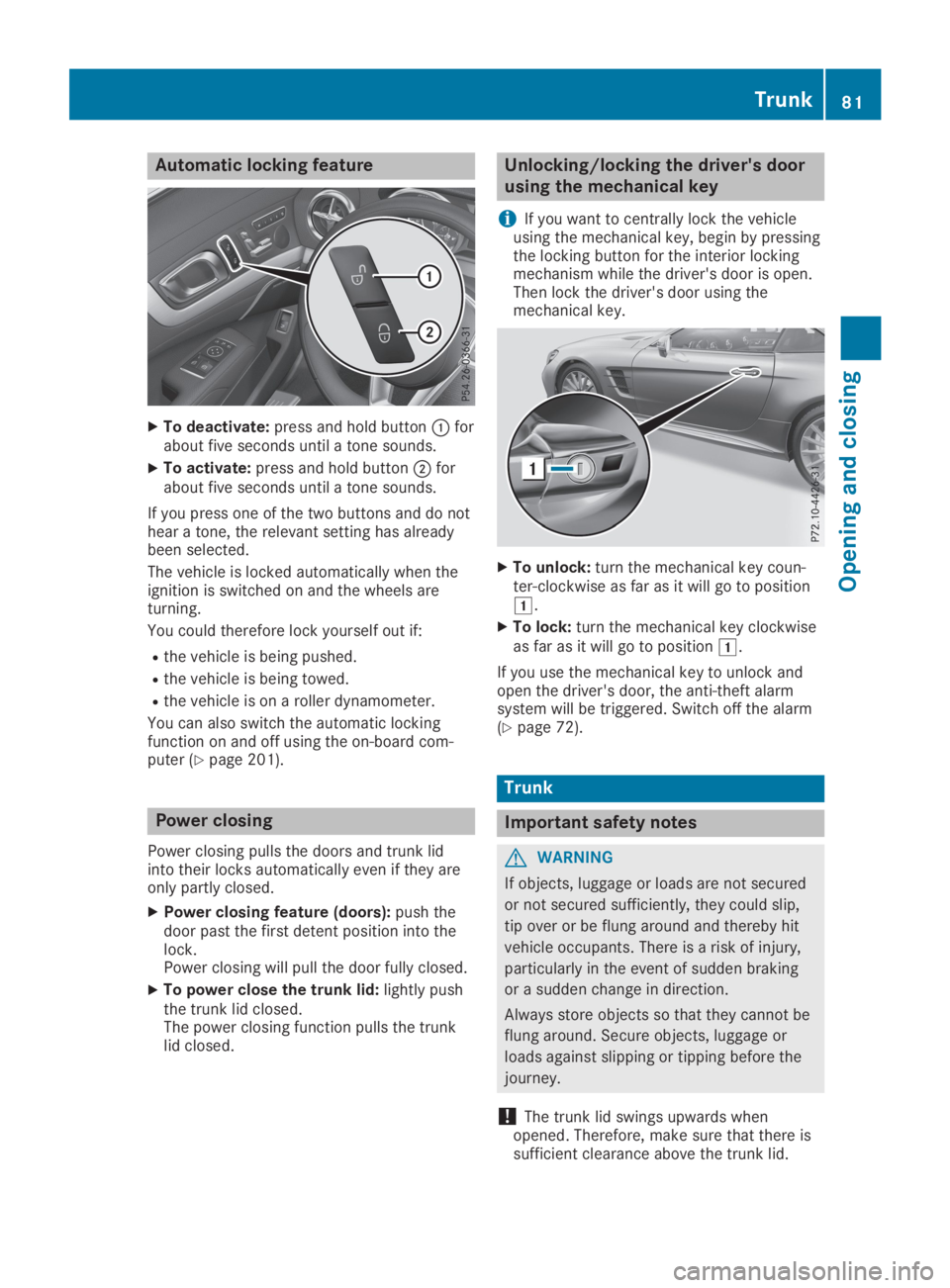
Automatic locking feature
XTo deactivate:press and hold buttonCforabout five seconds until a tone sounds.
XTo activate:press and hold buttonDforabout five seconds until a tone sounds.
If you press one of the two buttons and do nothear a tone, the relevant setting has alreadybeen selected.
The vehicle is locked automatically when theignition is switched on and the wheels areturning.
You could therefore lock yourself out if:
Rthe vehicle is being pushed.
Rthe vehicle is being towed.
Rthe vehicle is on a roller dynamometer.
You can also switch the automatic lockingfunction on and off using the on-board com-puter (Ypage 201).
Power closing
Power closing pulls the doors and trunk lidinto their locks automatically even if they areonly partly closed.
XPower closing feature (doors):push thedoor past the first detent position into thelock.Power closing will pull the door fully closed.
XTo power close the trunk lid:lightly pushthe trunk lid closed.The power closing function pulls the trunklid closed.
Unlocking/locking the driver's door
using the mechanical key
iIf you want to centrally lock the vehicleusing the mechanical key, begin by pressingthe locking button for the interior lockingmechanism while the driver's door is open.Then lock the driver's door using themechanical key.
XTo unlock:turn the mechanical key coun-ter-clockwise as far as it will go to positionG.
XTo lock:turn the mechanical key clockwiseas far as it will go to positionG.
If you use the mechanical key to unlock andopen the driver's door, the anti-theft alarmsystem will be triggered. Switch off the alarm(Ypage 72).
Trunk
Important safety notes
GWARNING
If objects, luggage or loads are not secured
or not secured sufficiently, they could slip,
tip over or be flung around and thereby hit
vehicle occupants. There is a risk of injury,
particularly in the event of sudden braking
or a sudden change in direction.
Always store objects so that they cannot be
flung around. Secure objects, luggage or
loads against slipping or tipping before the
journey.
!The trunk lid swings upwards whenopened. Therefore, make sure that there issufficient clearance above the trunk lid.
Trunk81
Opening and closing
Z
Page 90 of 330
Opening and closing the side win-
dows
Opening and closing the side windows
in the front
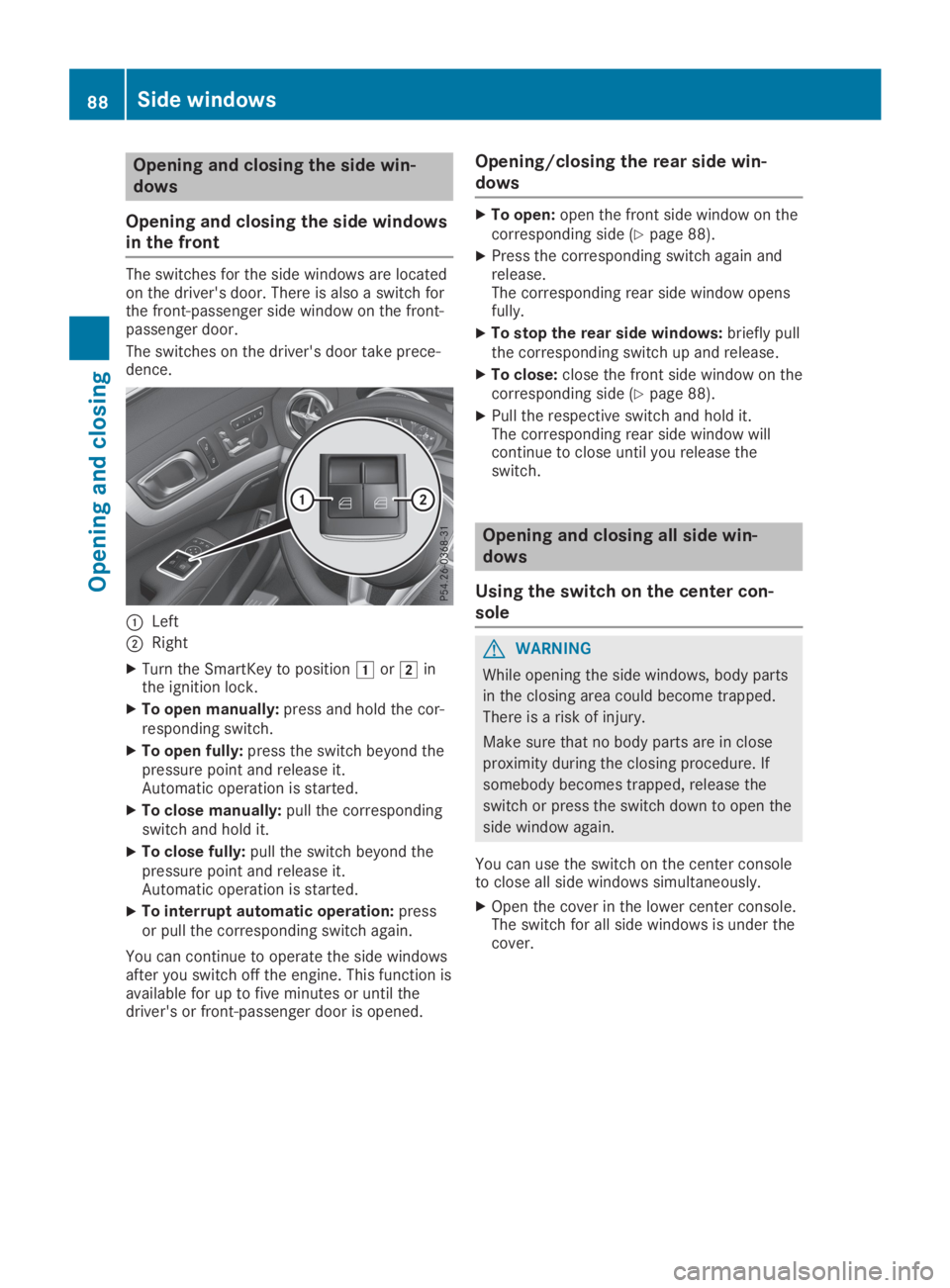
The switches for the side windows are locatedon the driver's door. There is also a switch forthe front-passenger side window on the front-passenger door.
The switches on the driver's door take prece-dence.
CLeft
DRight
XTurn the SmartKey to positionGorHinthe ignition lock.
XTo open manually:press and hold the cor-responding switch.
XTo open fully:press the switch beyond thepressure point and release it.Automatic operation is started.
XTo close manually:pull the correspondingswitch and hold it.
XTo close fully:pull the switch beyond thepressure point and release it.Automatic operation is started.
XTo interrupt automatic operation:pressor pull the corresponding switch again.
You can continue to operate the side windowsafter you switch off the engine. This function isavailable for up to five minutes or until thedriver's or front-passenger door is opened.
Opening/closing the rear side win-
dows
XTo open:open the front side window on thecorresponding side (Ypage 88).
XPress the corresponding switch again andrelease.The corresponding rear side window opensfully.
XTo stop the rear side windows:briefly pullthe corresponding switch up and release.
XTo close:close the front side window on thecorresponding side (Ypage 88).
XPull the respective switch and hold it.The corresponding rear side window willcontinue to close until you release theswitch.
Opening and closing all side win-
dows
Using the switch on the center con-
sole
GWARNING
While opening the side windows, body parts
in the closing area could become trapped.
There is a risk of injury.
Make sure that no body parts are in close
proximity during the closing procedure. If
somebody becomes trapped, release the
switch or press the switch down to open the
side window again.
You can use the switch on the center consoleto close all side windows simultaneously.
XOpen the cover in the lower center console.The switch for all side windows is under thecover.
88Side windows
Opening and closing
Page 91 of 330

XTo open all side windows:press buttonCto the point of resistance.
XTo open all side windows fully:pressswitchCbeyond the point of resistance.
XTo close all side windows:pull switchC.All side windows begin the closing proce-dure simultaneously. The rear side windowsclose after the front side windows.
If, after opening the windows, you close oneside window using the switch in the door con-trol panel:
Rthe front side window closes first and
Rthen the corresponding rear side windowcloses.
Convenience closing with KEYLESS-GO
GWARNING
When using the convenience closing feature,
parts of the body could be trapped in the
closing area when a side window is being
closed. There is a risk of injury.
Observe the complete closing procedure
when the convenience closing feature is
operating. Make sure that no body parts are
in close proximity during the closing proce-
dure.
Proceed as follows if someone is trapped:
XRelease the recessed sensor surface on thedoor handle.
XImmediately pull and hold the door handleand keep the door handle pulled.The side windows open.
With KEYLESS-GO you can close all side win-dows simultaneously. The KEYLESS-GO keymust be outside the vehicle. All the doorsmust be closed.
XTouch recessed sensor surfaceCon thedoor handle until the side windows are fullyclosed.
iMake sure you only touch recessed sensorsurfaceC.
XTo interrupt convenience closing:releaserecessed sensor surfaceCon the doorhandle.
Resetting the side windows
If a side window can no longer be closed fully,you must reset it.
XClose all the doors.
XTurn the SmartKey to positionGorHinthe ignition lock.
XPull the corresponding switch on the doorcontrol panel until the side window is com-pletely closed (Ypage 88).
XHold the switch for an additional second.
If the side window opens again slightly:
XImmediately pull the corresponding switchon the door control panel until the side win-dow is completely closed (Ypage 88).
XHold the switch for an additional second.If the respective side window remainsclosed after the button is released, then ithas been set correctly. If this is not thecase, repeat the steps above.
Side windows89
Opening and closing
Z
Page 94 of 330
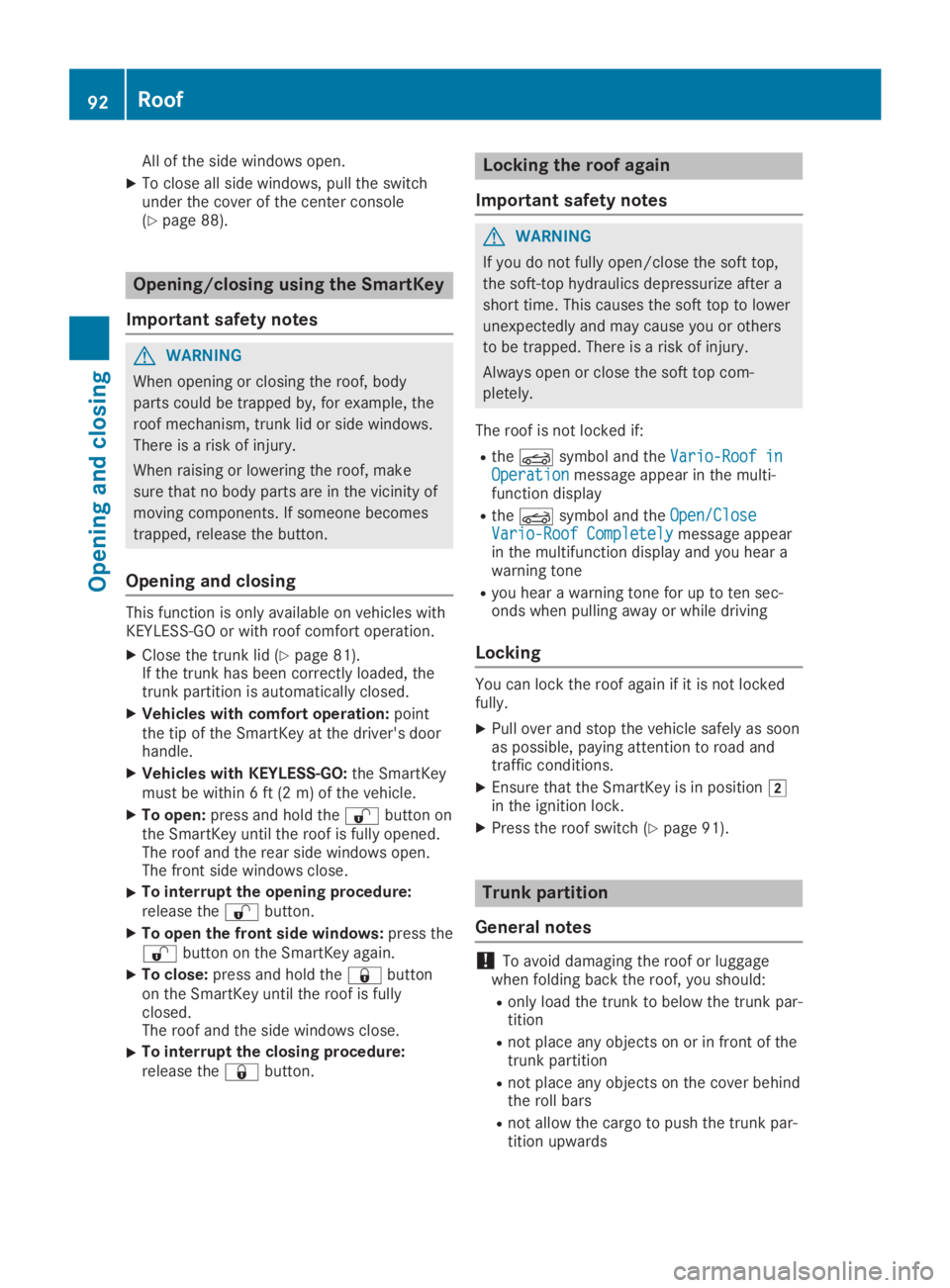
All of the side windows open.
XTo close all side windows, pull the switchunder the cover of the center console(Ypage 88).
Opening/closing using the SmartKey
Important safety notes
GWARNING
When opening or closing the roof, body
parts could be trapped by, for example, the
roof mechanism, trunk lid or side windows.
There is a risk of injury.
When raising or lowering the roof, make
sure that no body parts are in the vicinity of
moving components. If someone becomes
trapped, release the button.
Opening and closing
This function is only available on vehicles withKEYLESS-GO or with roof comfort operation.
XClose the trunk lid (Ypage 81).If the trunk has been correctly loaded, thetrunk partition is automatically closed.
XVehicles with comfort operation:pointthe tip of the SmartKey at the driver's doorhandle.
XVehicles with KEYLESS-GO:the SmartKeymust be within 6 ft (2 m) of the vehicle.
XTo open:press and hold the6button onthe SmartKey until the roof is fully opened.The roof and the rear side windows open.The front side windows close.
XTo interrupt the opening procedure:release the6button.
XTo open the front side windows:press the6button on the SmartKey again.
XTo close:press and hold the7buttonon the SmartKey until the roof is fullyclosed.The roof and the side windows close.
XTo interrupt the closing procedure:release the7button.
Locking the roof again
Important safety notes
GWARNING
If you do not fully open/close the soft top,
the soft-top hydraulics depressurize after a
short time. This causes the soft top to lower
unexpectedly and may cause you or others
to be trapped. There is a risk of injury.
Always open or close the soft top com-
pletely.
The roof is not locked if:
RtheYsymbol and theVario-Roof inVario-Roof inOperationOperationmessage appear in the multi-function display
RtheYsymbol and theOpen/CloseOpen/CloseVario-Roof CompletelyVario-Roof Completelymessage appearin the multifunction display and you hear awarning tone
Ryou hear a warning tone for up to ten sec-onds when pulling away or while driving
Locking
You can lock the roof again if it is not lockedfully.
XPull over and stop the vehicle safely as soonas possible, paying attention to road andtraffic conditions.
XEnsure that the SmartKey is in positionHin the ignition lock.
XPress the roof switch (Ypage 91).
Trunk partition
General notes
!To avoid damaging the roof or luggagewhen folding back the roof, you should:
Ronly load the trunk to below the trunk par-tition
Rnot place any objects on or in front of thetrunk partition
Rnot place any objects on the cover behindthe roll bars
Rnot allow the cargo to push the trunk par-tition upwards
92Roof
Opening and closing
Page 98 of 330
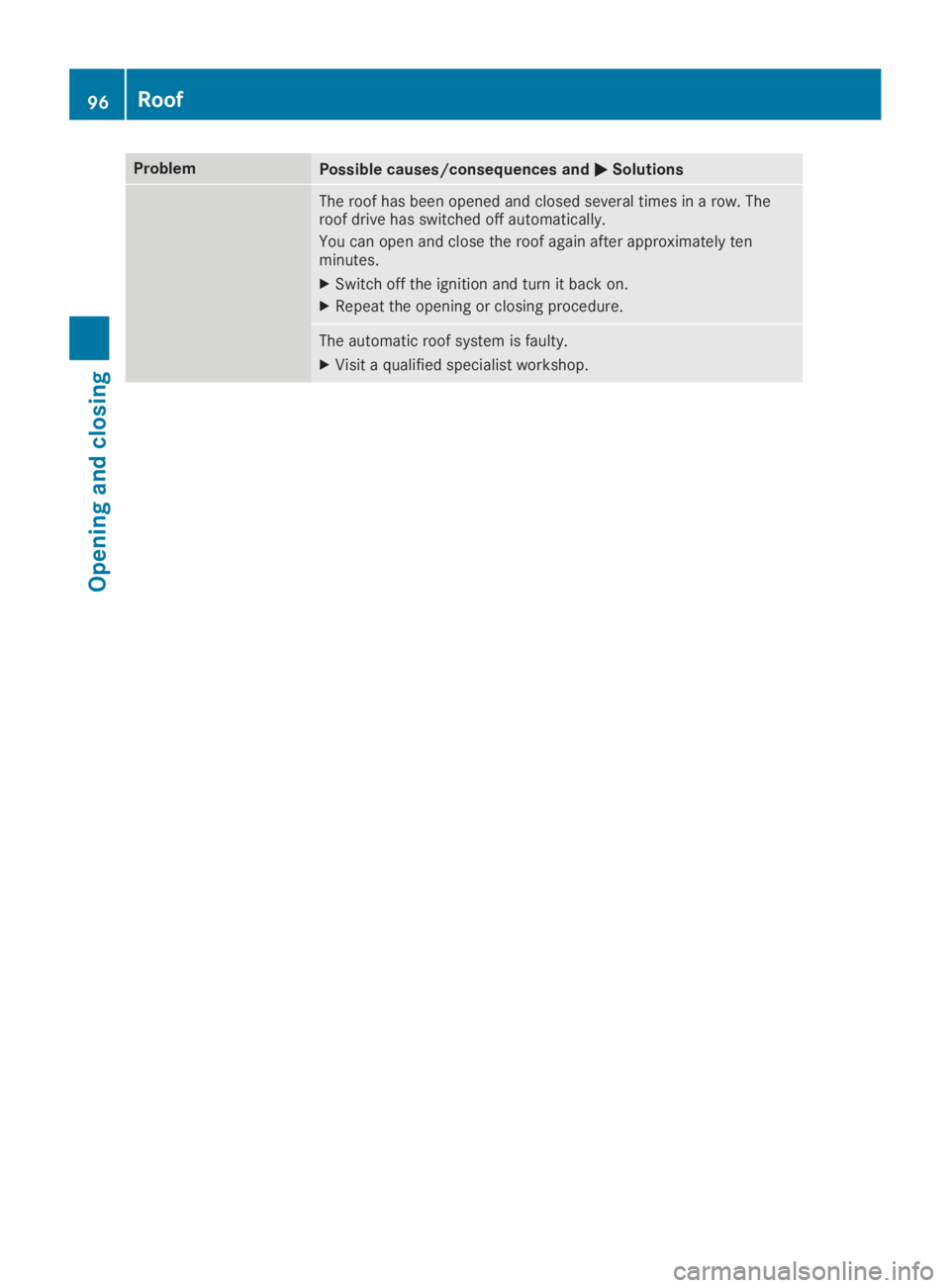
ProblemPossible causes/consequences andPPSolutions
The roof has been opened and closed several times in a row. Theroof drive has switched off automatically.
You can open and close the roof again after approximately tenminutes.
XSwitch off the ignition and turn it back on.
XRepeat the opening or closing procedure.
The automatic roof system is faulty.
XVisit a qualified specialist workshop.
96Roof
Opening and closing
Page 100 of 330
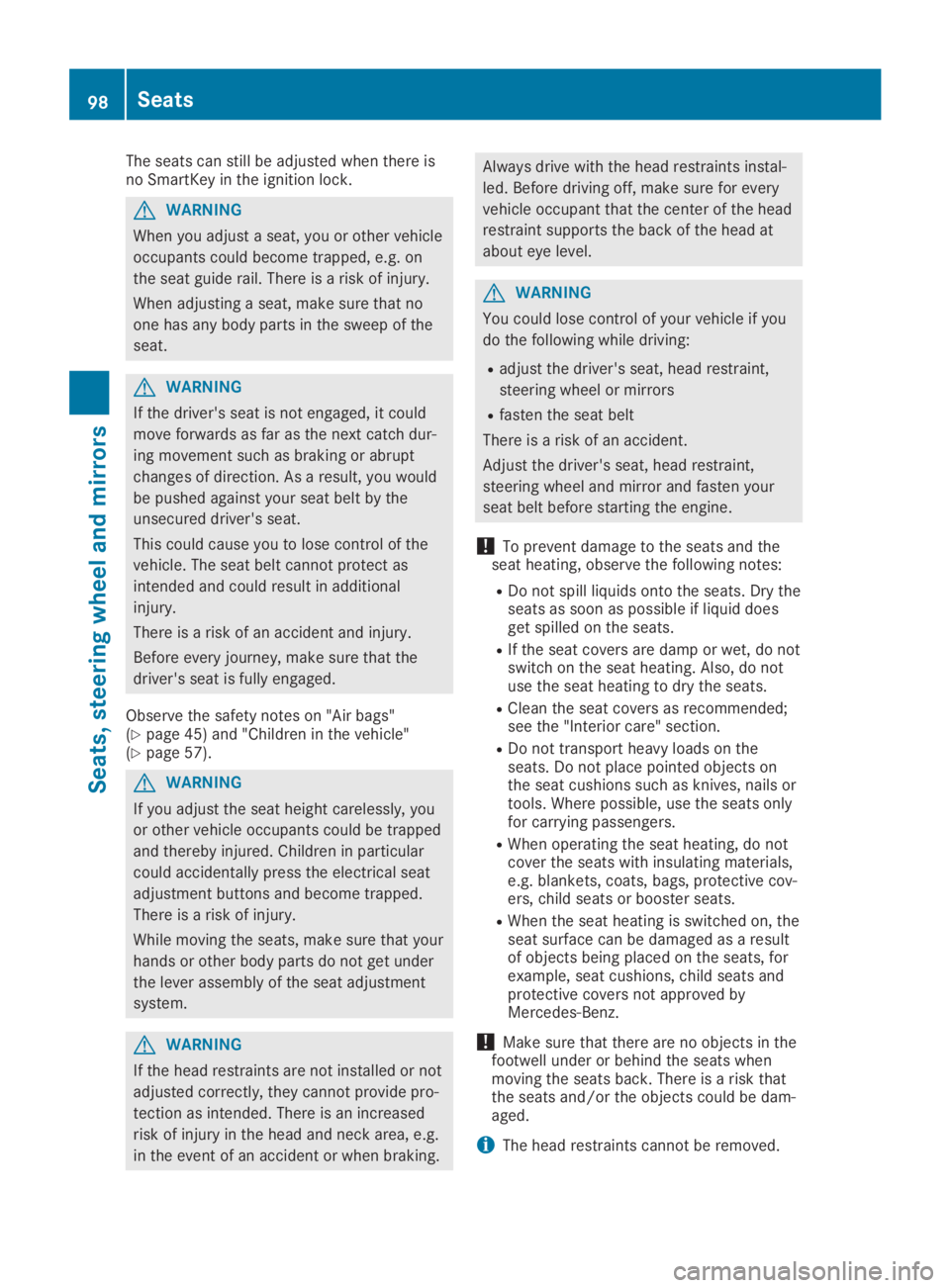
The seats can still be adjusted when there isno SmartKey in the ignition lock.
GWARNING
When you adjust a seat, you or other vehicle
occupants could become trapped, e.g. on
the seat guide rail. There is a risk of injury.
When adjusting a seat, make sure that no
one has any body parts in the sweep of the
seat.
GWARNING
If the driver's seat is not engaged, it could
move forwards as far as the next catch dur-
ing movement such as braking or abrupt
changes of direction. As a result, you would
be pushed against your seat belt by the
unsecured driver's seat.
This could cause you to lose control of the
vehicle. The seat belt cannot protect as
intended and could result in additional
injury.
There is a risk of an accident and injury.
Before every journey, make sure that the
driver's seat is fully engaged.
Observe the safety notes on "Air bags"(Ypage 45) and "Children in the vehicle"(Ypage 57).
GWARNING
If you adjust the seat height carelessly, you
or other vehicle occupants could be trapped
and thereby injured. Children in particular
could accidentally press the electrical seat
adjustment buttons and become trapped.
There is a risk of injury.
While moving the seats, make sure that your
hands or other body parts do not get under
the lever assembly of the seat adjustment
system.
GWARNING
If the head restraints are not installed or not
adjusted correctly, they cannot provide pro-
tection as intended. There is an increased
risk of injury in the head and neck area, e.g.
in the event of an accident or when braking.
Always drive with the head restraints instal-
led. Before driving off, make sure for every
vehicle occupant that the center of the head
restraint supports the back of the head at
about eye level.
GWARNING
You could lose control of your vehicle if you
do the following while driving:
Radjust the driver's seat, head restraint,
steering wheel or mirrors
Rfasten the seat belt
There is a risk of an accident.
Adjust the driver's seat, head restraint,
steering wheel and mirror and fasten your
seat belt before starting the engine.
!To prevent damage to the seats and theseat heating, observe the following notes:
RDo not spill liquids onto the seats. Dry theseats as soon as possible if liquid doesget spilled on the seats.
RIf the seat covers are damp or wet, do notswitch on the seat heating. Also, do notuse the seat heating to dry the seats.
RClean the seat covers as recommended;see the "Interior care" section.
RDo not transport heavy loads on theseats. Do not place pointed objects onthe seat cushions such as knives, nails ortools. Where possible, use the seats onlyfor carrying passengers.
RWhen operating the seat heating, do notcover the seats with insulating materials,e.g. blankets, coats, bags, protective cov-ers, child seats or booster seats.
RWhen the seat heating is switched on, theseat surface can be damaged as a resultof objects being placed on the seats, forexample, seat cushions, child seats andprotective covers not approved byMercedes-Benz.
!Make sure that there are no objects in thefootwell under or behind the seats whenmoving the seats back. There is a risk thatthe seats and/or the objects could be dam-aged.
iThe head restraints cannot be removed.
98Seats
Seats, steering wheel and mirrors
Page 103 of 330
Switching the seat heating on/off
Switching on/off
GWARNING
Repeatedly switching on the seat heating
can cause the seat cushion and backrest
pads to become very hot. The health of per-
sons with limited temperature sensitivity or
a limited ability to react to high tempera-
tures may be affected or they may even suf-
fer burn-like injuries. There is a risk of injury.
Therefore, do not switch the seat heating on
repeatedly.
!When the seat heating is switched on, theseat surface can be damaged as a result ofobjects being placed on the seats, for exam-ple, seat cushions, child seats and protec-tive covers not approved by Mercedes-Benz.
Ensure that there are no objects on the seatsurface when the seat heating is switchedon.
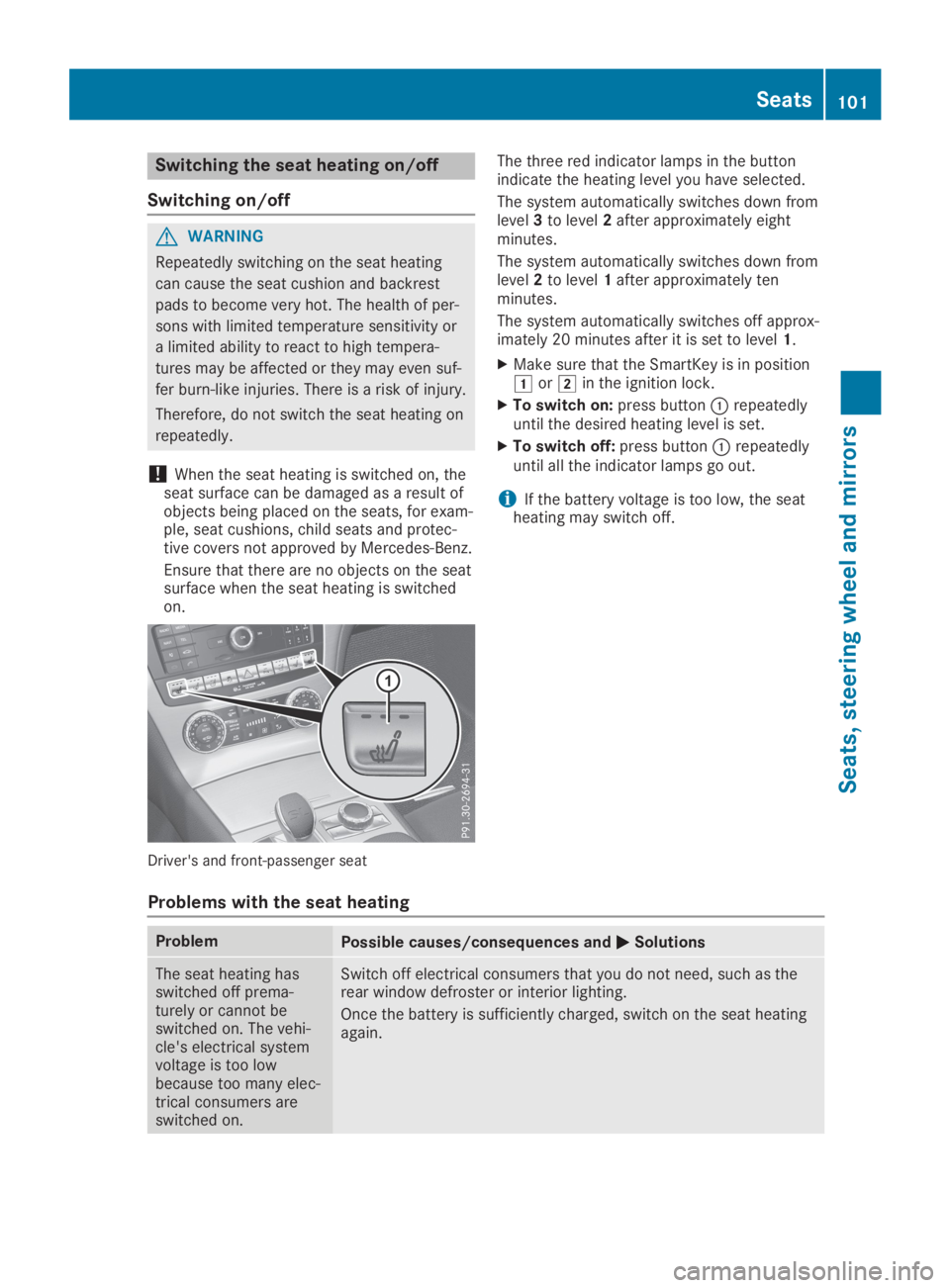
Driver's and front-passenger seat
The three red indicator lamps in the buttonindicate the heating level you have selected.
The system automatically switches down fromlevel3to level2after approximately eightminutes.
The system automatically switches down fromlevel2to level1after approximately tenminutes.
The system automatically switches off approx-imately 20 minutes after it is set to level1.
XMake sure that the SmartKey is in positionGorHin the ignition lock.
XTo switch on:press buttonCrepeatedlyuntil the desired heating level is set.
XTo switch off:press buttonCrepeatedlyuntil all the indicator lamps go out.
iIf the battery voltage is too low, the seatheating may switch off.
Problems with the seat heating
ProblemPossible causes/consequences andPPSolutions
The seat heating hasswitched off prema-turely or cannot beswitched on. The vehi-cle's electrical systemvoltage is too lowbecause too many elec-trical consumers areswitched on.
Switch off electrical consumers that you do not need, such as therear window defroster or interior lighting.
Once the battery is sufficiently charged, switch on the seat heatingagain.
Seats101
Seats, steering wheel and mirrors
Z