sensor MERCEDES-BENZ SL CLASS 2019 Owner's Manual
[x] Cancel search | Manufacturer: MERCEDES-BENZ, Model Year: 2019, Model line: SL CLASS, Model: MERCEDES-BENZ SL CLASS 2019Pages: 330, PDF Size: 16.53 MB
Page 114 of 330

detects any other vehicles, it reactivates thehigh-beam headlamps.
The system's optical sensor is located behindthe windshield near the overhead controlpanel.
Important safety notes
GWARNING
Adaptive Highbeam Assist does not recog-
nize road users:
Rwho have no lights, e.g. pedestrians
Rwho have poor lighting, e.g. cyclists
Rwhose lighting is blocked, e.g. by a barrier
On very rare occasions, Adaptive Highbeam
Assist may fail to recognize other road users
that have lights, or may recognize them too
late. In this, or in similar situations, the auto-
matic high-beam headlamps will not be
deactivated or will be activated regardless.
There is a risk of an accident.
Always carefully observe the traffic condi-
tions and switch off the high-beam head-
lamps in good time.
Adaptive Highbeam Assist cannot take intoaccount road, weather or traffic conditions.Adaptive Highbeam Assist is only an aid. Youare responsible for adjusting the vehicle'slighting to the prevailing light, visibility andtraffic conditions.
In particular, the detection of obstacles can berestricted if there is:
Rpoor visibility, e.g. due to fog, heavy rain orsnow
Rdirt on the sensors or the sensors areobscured
Switching Adaptive Highbeam Assist
on/off
XTo switch on:turn the light switch toX.
XPress the combination switch beyond thepressure point in the direction of arrowC.The
Page 115 of 330

Interior lighting control
General notes
In order to prevent the vehicle's battery fromdischarging, the interior lighting functions areautomatically deactivated after some time,unless the SmartKey is in positionHin theignition lock.
The color and brightness of the ambient light-ing are set via the multimedia system(Ypage 200).
Automatic interior lighting control
XTo switch on:set the switch to center posi-tionK.
XTo switch off:set the switch to the3position.
The interior lighting automatically switches onif you:
Runlock the vehicle
Ropen a door
Rremove the SmartKey from the ignition lock
The interior lighting is switched on for a settime when the SmartKey is removed from theignition lock. You can activate this delayedswitch-off using the on-board computer(Ypage 201).
Replacing bulbs
The front and rear lamps of your vehicle areequipped with LED bulbs. Do not replace thebulbs yourself. Contact a qualified specialistworkshop which has the necessary specialistknowledge and tools to carry out the workrequired.
Bulbs and lamps are an important aspect ofvehicle safety. You must therefore make surethat these function correctly at all times. Havethe headlamp setting checked regularly.
Windshield wipers
Switching the windshield wipers
on/off
!Do not operate the windshield wiperswhen the windshield is dry, as this could
damage the wiper blades. Moreover, dustthat has collected on the windshield canscratch the glass if wiping takes place whenthe windshield is dry.
If it is necessary to switch on the windshieldwipers in dry weather conditions, always usewasher fluid when operating the windshieldwipers.
!If the windshield wipers leave smears onthe windshield after the vehicle has beenwashed in an automatic car wash, wax orother residues may be the reason for this.Clean the windshield using washer fluidafter washing the vehicle in an automaticcar wash.
!Intermittent wiping with rain sensor: dueto optical influences and the windshieldbecoming dirty in dry weather conditions,the windshield wipers may be activatedinadvertently. This could then damage thewindshield wiper blades or scratch the wind-shield.
For this reason, you should always switchoff the windshield wipers in dry weather.
Combination switch
G?Windshield wiper off
HbIntermittent wipe, low (rain sensorset to low sensitivity)
IcIntermittent wipe, high (rain sensorset to high sensitivity)
J
Page 127 of 330

Notes on breaking-in a new vehicle
Important safety notes
The sensor system of some driving and drivingsafety systems adjusts automatically while acertain distance is being driven after the vehi-cle has been delivered or after repairs. Fullsystem effectiveness is not reached until theend of this teach-in procedure.
New and replaced brake pads and discs onlyreach their optimum braking effect after sev-eral hundred kilometers of driving. Compen-sate for this by applying greater force to thebrake pedal.
The first 1000 miles (1500 km)
The more you look after the engine when it isnew, the more satisfied you will be with itsperformance in the future.
RYou should therefore drive at varying vehicleand engine speeds for the first 1,000 miles(1,500 km).
RAvoid heavy loads, e.g. driving at full throt-tle, during this period.
RChange gear in good time, before the tach-ometer needle is
Page 158 of 330

Active Distance Assist DISTRONIC
General notes
Active Distance Assist DISTRONIC regulatesthe speed and automatically helps you main-tain the distance from the vehicle detected infront. Vehicles are detected with the aid of theradar sensor system. Active Distance AssistDISTRONIC brakes automatically to avoidexceeding the set speed or to maintain thedesignated distance from the vehicle in front.
You must select a lower gear in good time onlong and steep downhill gradients, especially ifthe vehicle is laden. By doing so, you will makeuse of the braking effect of the engine. Thisrelieves the load on the brake system and pre-vents the brakes from overheating and wear-ing too quickly.
If Active Distance Assist DISTRONIC detectsthat there is a risk of a collision with the vehi-cle in front, you will be warned visually andaudibly. Active Distance Assist DISTRONICcannot prevent a collision without your inter-vention. An intermittent warning tone will thensound and the distance warning lamp will lightup in the instrument cluster. Brake immedi-ately in order to increase the distance fromthe vehicle in front, or take evasive action, pro-vided it is safe to do so.
For Active Distance Assist DISTRONIC toassist you when driving, the radar sensor sys-tem must be operational.
Active Distance Assist DISTRONIC operates inthe speed range between 0 mph (0 km/h) and120 mph (200 km/h).
Do not use Active Distance Assist DISTRONICwhile driving on roads with steep gradients.
As Active Distance Assist DISTRONIC trans-mits radar waves, it can resemble the radardetectors of the responsible authorities. Youcan refer to the relevant chapter in the Opera-tor's Manual if questions are asked about this.
iUSA only:
This device has been approved by the FCCas a "Vehicular Radar System". The radarsensor is intended for use in an automotiveradar system only. Removing, tamperingwith, or altering the device will void any war-ranties, and is not permitted by the FCC. Donot tamper with, alter, or use in any non-approved way.
Any unauthorized modification to this devicecould void the user's authority to operatethe equipment.
iCanada only: This device complies withRSS-210 of Industry Canada. Operation issubject to the following two conditions:
1. This device may not cause interference,and
2. This device must accept any interferencereceived, including interference that maycause undesired operation of the device.
Removal, tampering, or altering of thedevice will void any warranties, and is notpermitted. Do not tamper with, alter, or usein any non-approved way.
Any unauthorized modification to this devicecould void the user's authority to operatethe equipment.
Important safety notes
GWARNING
Active Distance Assist DISTRONIC does not
react to:
Rpeople or animals
Rstationary objects in the road, e.g. stop-
ped or parked vehicles
Roncoming vehicles and crossing traffic
As a result, Active Distance Assist
DISTRONIC may neither give warnings nor
intervene in such situations. There is a risk
of an accident.
Always pay careful attention to the traffic
situation and be ready to brake.
GWARNING
Active Distance Assist DISTRONIC does not
react to:
Rpeople or animals
Rstationary objects in the road, e.g. stop-
ped or parked vehicles (vehicles without
the Driving Assistance package)
Rstationary objects in the road, e.g. stop-
ped or parked vehicles, if sufficient detec-
tion is not possible (vehicles with the Driv-
ing Assistance package)
Roncoming vehicles and crossing traffic
156Driving systems
Driving and pa rking
Page 159 of 330

As a result, Active Distance Assist
DISTRONIC may neither give warnings nor
intervene in such situations. There is a risk
of an accident.
Always pay careful attention to the traffic
situation and be ready to brake.
GWARNING
Distance keeping assistant cannot always
clearly identify other road users and com-
plex traffic situations.
In such cases, distance keeping assistant
can:
Raccelerate or brake the vehicle unexpect-
edly
Rintervene unexpectedly
There is a risk of an accident.
Continue to drive carefully and be ready to
brake, especially if distance keeping assis-
tant warns you.
GWARNING
Active Distance Assist DISTRONIC brakes
your vehicle with up to 50% of the maximum
possible deceleration. If this deceleration is
not sufficient, Active Distance Assist
DISTRONIC alerts you with a visual and
acoustic warning. There is a risk of an acci-
dent.
Adjust your speed in these cases and main-
tain sufficient distance.
Apply the brakes yourself and/or take eva-
sive action.
!When Active Distance Assist DISTRONICor the HOLD function is activated, the vehi-cle brakes automatically in certain situa-tions.
To avoid damage to the vehicle, deactivateActive Distance Assist DISTRONIC and theHOLD function in the following or similar sit-uations:
Rwhen towing the vehicle
Rin the car wash
Active Distance Assist DISTRONIC can neitherreduce the risk of an accident if you fail to
adapt your driving style, nor override the lawsof physics. Active Distance Assist DISTRONICcannot take into account road, weather or traf-fic conditions. Active Distance AssistDISTRONIC is only an aid. You are responsiblefor the distance to the vehicle in front, forvehicle speed, for braking in good time and forstaying in your lane.
Do not use Active Distance Assist DISTRONIC:
RIn road and traffic conditions which do notallow you to maintain a constant speed, e.g.in heavy traffic or on winding roads
Ron slippery road surfaces. Braking or accel-erating could cause the drive wheels to losetraction and the vehicle could then skid
RIn poor visibility, e.g. due to fog, heavy rainor snow
Active Distance Assist DISTRONIC may notdetect narrow vehicles driving in front, e.g.motorcycles, or vehicles driving in a staggeredformation.
In particular, the detection of obstacles can beimpaired if:
RThere is dirt on the sensors or anything elsecovering the sensors
RThere is snow or heavy rain
RThere is interference by other radar sources
RThere are strong radar reflections, for exam-ple in parking garages
If Active Distance Assist DISTRONIC no longerdetects a vehicle in front, Distance PilotDISTRONIC may unexpectedly accelerate tothe speed stored.
This speed may:
RBe too high if you are driving in a turninglane or an exit lane
RBe so high when driving in the right-handlane that you overtake vehicles in the left-hand lane
RBe so high in the left lane that you passvehicles driving on the right
If there is a change of drivers, advise the newdriver of the speed stored.
Driving systems157
Driving an d parking
Z
Page 174 of 330
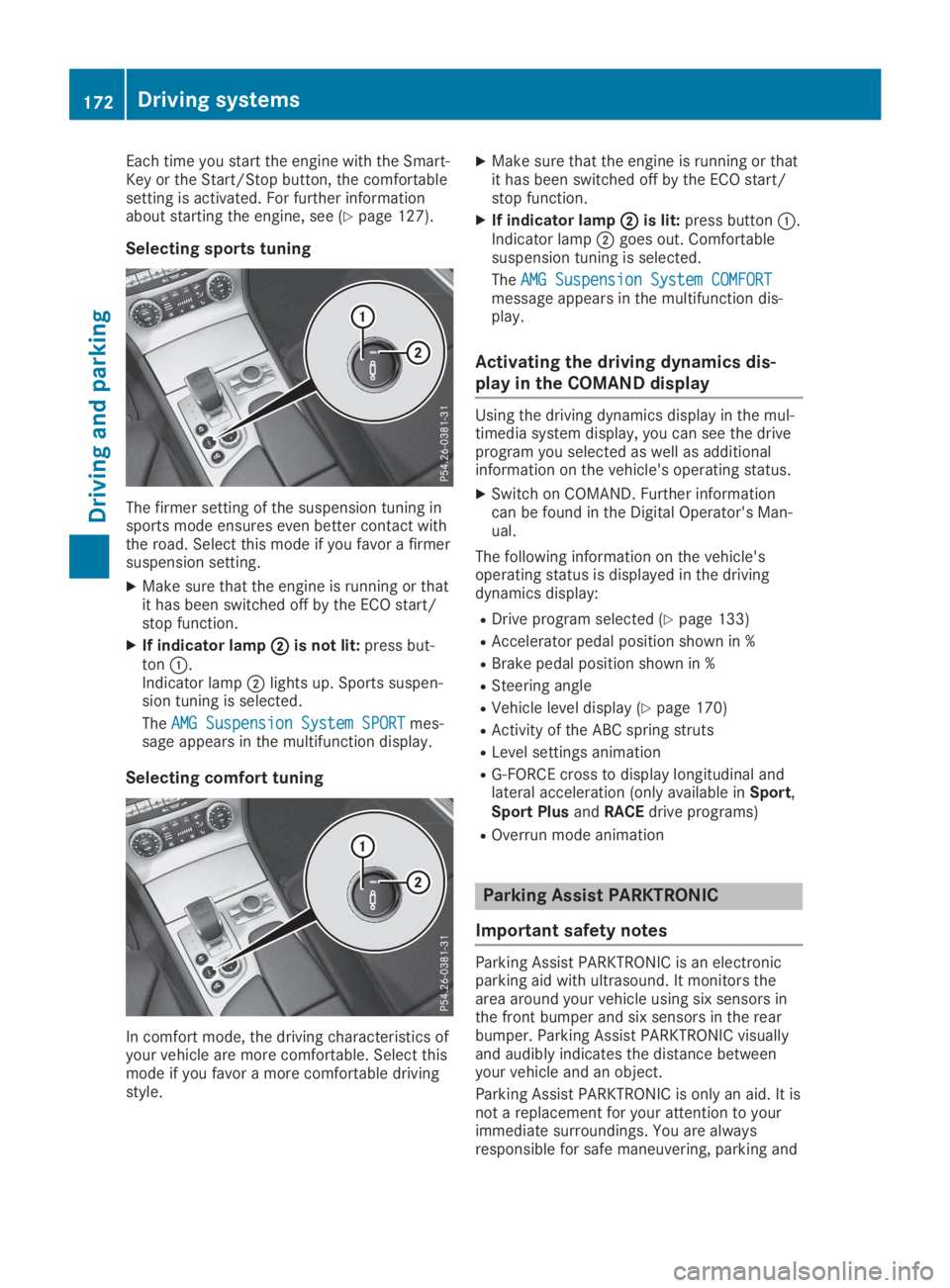
Each time you start the engine with the Smart-Key or the Start/Stop button, the comfortablesetting is activated. For further informationabout starting the engine, see (Ypage 127).
Selecting sports tuning
The firmer setting of the suspension tuning insports mode ensures even better contact withthe road. Select this mode if you favor a firmersuspension setting.
XMake sure that the engine is running or thatit has been switched off by the ECO start/stop function.
XIf indicator lampDDis not lit:press but-tonC.Indicator lampDlights up. Sports suspen-sion tuning is selected.
TheAMG Suspension System SPORTAMG Suspension System SPORTmes-sage appears in the multifunction display.
Selecting comfort tuning
In comfort mode, the driving characteristics ofyour vehicle are more comfortable. Select thismode if you favor a more comfortable drivingstyle.
XMake sure that the engine is running or thatit has been switched off by the ECO start/stop function.
XIf indicator lampDDis lit:press buttonC.Indicator lampDgoes out. Comfortablesuspension tuning is selected.
TheAMG Suspension System COMFORTAMG Suspension System COMFORTmessage appears in the multifunction dis-play.
Activating the driving dynamics dis-
play in the COMAND display
Using the driving dynamics display in the mul-timedia system display, you can see the driveprogram you selected as well as additionalinformation on the vehicle's operating status.
XSwitch on COMAND. Further informationcan be found in the Digital Operator's Man-ual.
The following information on the vehicle'soperating status is displayed in the drivingdynamics display:
RDrive program selected (Ypage 133)
RAccelerator pedal position shown in %
RBrake pedal position shown in %
RSteering angle
RVehicle level display (Ypage 170)
RActivity of the ABC spring struts
RLevel settings animation
RG-FORCE cross to display longitudinal andlateral acceleration (only available inSport,Sport PlusandRACEdrive programs)
ROverrun mode animation
Parking Assist PARKTRONIC
Important safety notes
Parking Assist PARKTRONIC is an electronicparking aid with ultrasound. It monitors thearea around your vehicle using six sensors inthe front bumper and six sensors in the rearbumper. Parking Assist PARKTRONIC visuallyand audibly indicates the distance betweenyour vehicle and an object.
Parking Assist PARKTRONIC is only an aid. It isnot a replacement for your attention to yourimmediate surroundings. You are alwaysresponsible for safe maneuvering, parking and
172Driving systems
Driving an d parking
Page 175 of 330

exiting a parking space. Make sure that thereare no persons, animals or objects in themaneuvering area when you are maneuveringor parking.
!When parking, pay particular attention toobjects above or below the sensors, such asflower pots or trailer drawbars.PARKTRONIC does not detect such objectswhen they are in the immediate vicinity ofthe vehicle. You could damage the vehicleor the objects.
The sensors may not detect snow and otherobjects that absorb ultrasonic waves.
Ultrasonic sources such as an automatic carwash, the compressed-air brakes on a truckor a pneumatic drill could causePARKTRONIC to malfunction.
PARKTRONIC may not function correctly onuneven terrain.
Parking Assist PARKTRONIC is activated auto-matically when you:
Rswitch on the ignition
Rshift the transmission to position[,^or\\
Rrelease the electric parking brake
Parking Assist PARKTRONIC is deactivated atspeeds above 11 mph (18 km/h). It is reacti-vated at lower speeds.
Range of the sensors
General notes
Parking Assist PARKTRONIC does not take intoaccount obstacles located:
Rbelow the detection range, such as persons,animals or objects
Rabove the detection range, e.g. overhangingloads, tail sections or loading ramps oftrucks
CSensors in the front bumper, left-hand side(example)
The sensors must be free from dirt, ice orslush. They can otherwise not function cor-rectly. Clean the sensors regularly, taking carenot to scratch or damage them (Ypage 275).
Range
Front sensors
CenterApprox. 40 in (approx.100 cm)
CornersApprox. 24 in (approx.60 cm)
Driving systems173
Driving and parking
Z
Page 176 of 330
Rear sensors
CenterApprox. 48 in (approx.120 cm)
CornersApprox. 32 in (approx.80 cm)
Minimum distance
CenterApprox. 8 in (approx.20 cm)
CornersApprox. 6 in (approx.15 cm)
If there is an obstacle within this range, therelevant warning displays light up and a warn-ing tone sounds. If the distance falls below theminimum, the distance may no longer beshown.
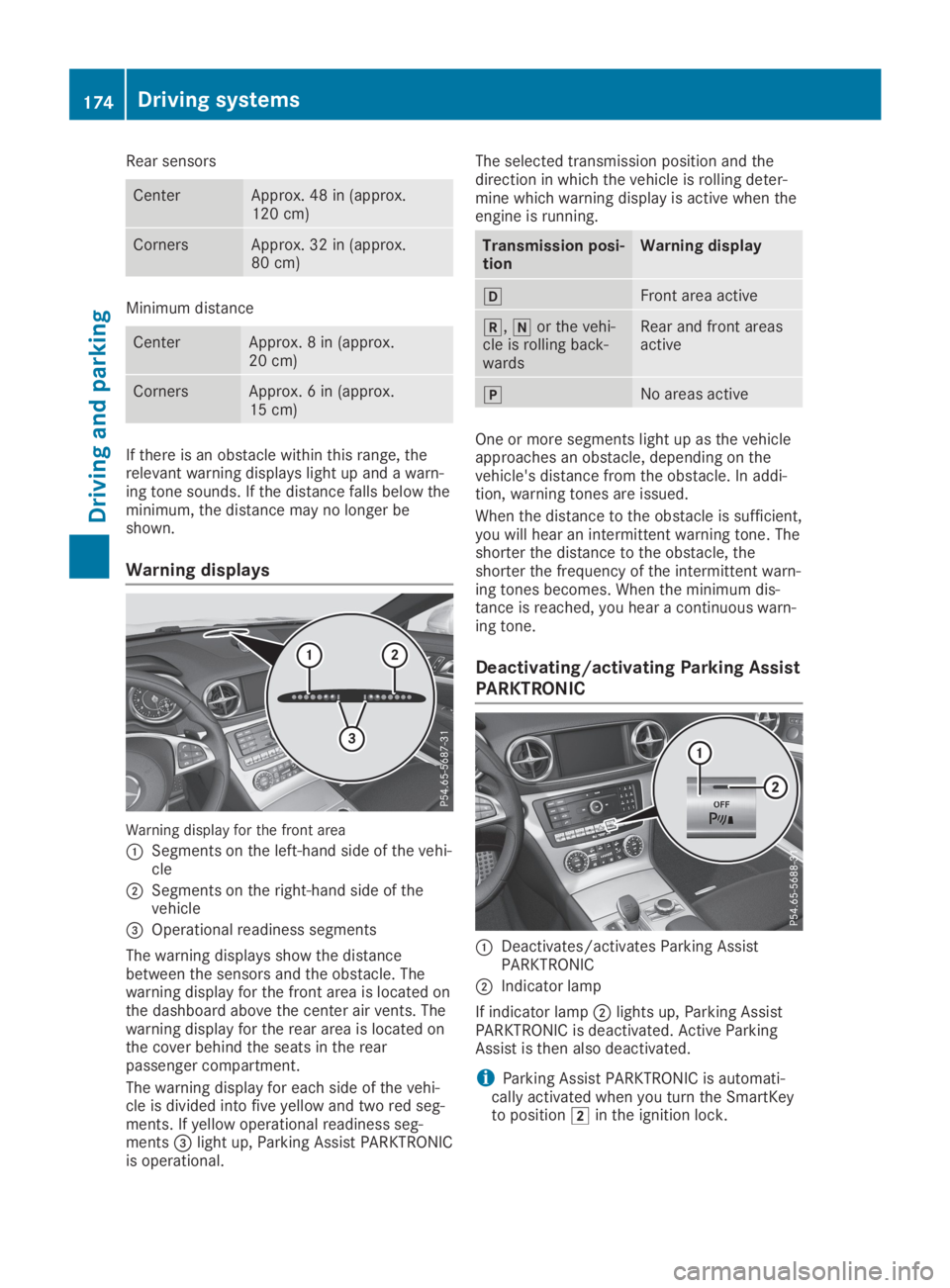
Warning displays
Warning display for the front area
CSegments on the left-hand side of the vehi-cle
DSegments on the right-hand side of thevehicle
Page 177 of 330
Problems with Parking Assist PARKTRONIC
ProblemPossible causes/consequences andPPSolutions
Only the red segmentsin the Parking AssistPARKTRONIC warningdisplays are lit. You alsohear a warning tone forapproximately two sec-onds.
Parking AssistPARKTRONIC is deacti-vated after approx-imately five secondsand the indicator lampin the Parking AssistPARKTRONIC buttonlights up.
Parking Assist PARKTRONIC has malfunctioned and has been deac-tivated.
XIf problems persist, have Parking Assist PARKTRONIC checked ata qualified specialist workshop.
Only the red segmentsin the Parking AssistPARKTRONIC warningdisplays are lit. ParkingAssist PARKTRONIC isdeactivated afterapproximately five sec-onds.
The Parking Assist PARKTRONIC sensors are dirty or there is inter-ference.
XClean the Parking Assist PARKTRONIC sensors (Ypage 275).
XSwitch the ignition back on.
The problem may be caused by an external source of radio or ultra-sound waves.
XCheck to see if Parking Assist PARKTRONIC works at a differentlocation.
Active Parking Assist
General notes
Active Parking Assist is an electronic parkingaid with ultrasound. It measures the road onboth sides of the vehicle. A parking symbolindicates a suitable parking space. Activesteering intervention can assist you duringparking and when exiting a parking space. Youcan also still use Parking Assist PARKTRONIC(Ypage 172).
Important safety notes
Active Parking Assist is merely an aid. It is nota replacement for your attention to your imme-diate surroundings. You are always responsi-ble for safe maneuvering, parking and exiting aparking space. Make sure that no persons, ani-mals or objects are in the path of your vehicle.
When Parking Assist PARKTRONIC is deactiva-ted, Active Parking Assist is also unavailable.
GWARNING
While parking or pulling out of a parking
space, the vehicle swings out and can drive
onto areas of the oncoming lane. This could
cause you to collide with other road users or
objects. There is a risk of an accident.
Pay attention to other road users or objects.
Stop the vehicle if necessary or cancel the
Active Parking Assist parking procedure.
GWARNING
While parking or pulling out of a parking
space, the vehicle swings out and can drive
onto areas of the oncoming lane. This could
cause you to collide with other road users or
objects. There is a risk of an accident.
Pay attention to other road users or objects.
Stop the vehicle if necessary or cancel the
Driving systems175
Driving and parking
Z
Page 187 of 330
GWARNING
Active Blind Spot Assist does not react to:
Rvehicles overtaken too closely on the side,
placing them in the blind spot area
Rvehicles which approach with a large
speed differential and overtake your vehi-
cle
As a result, Active Blind Spot Assist may nei-
ther give warnings nor intervene in such sit-
uations. There is a risk of an accident.
Always observe the traffic conditions care-
fully, and maintain a safe lateral distance.
iUSA only: This device has been approvedby the FCC as a "Vehicular Radar System".The radar sensor is intended for use in anautomotive radar system only. Removal,tampering, or altering of the device will voidany warranties, and is not permitted by theFCC. Do not tamper with, alter, or use in anynon-approved way.
Any unauthorized modification to this devicecould void the user's authority to operatethe equipment.
iCanada only: This device complies withRSS-210 of Industry Canada. Operation issubject to the following two conditions:
1. This device may not cause interference,and
2. This device must accept any interferencereceived, including interference that maycause undesired operation of the device.
Removal, tampering, or altering of thedevice will void any warranties, and is notpermitted. Do not tamper with, alter, or usein any non-approved way.
Any unauthorized modification to this devicecould void the user's authority to operatethe equipment.
Radar sensors
The radar sensors for Active Blind Spot Assistare integrated in the rear bumper and in theradiator trim. Make sure that the bumpers andradiator trim are free from dirt, ice and slush.The rear sensors must not be covered, forexample by cycle racks or overhanging cargo.Following a severe impact or in the event ofdamage to the bumpers, have the function ofthe radar sensors checked at a qualified spe-
cialist workshop. Active Blind Spot Assist mayotherwise no longer work properly.
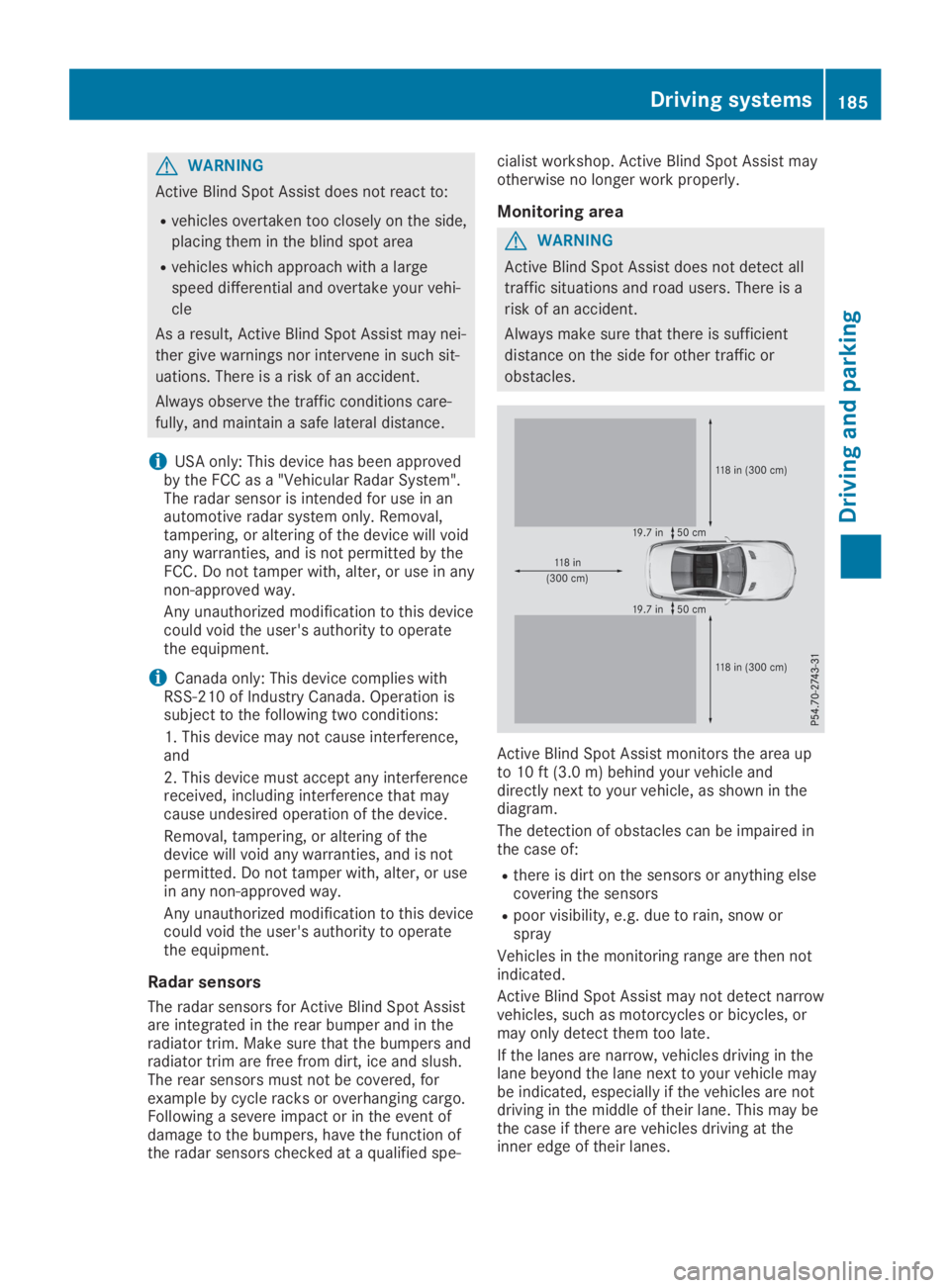
Monitoring area
GWARNING
Active Blind Spot Assist does not detect all
traffic situations and road users. There is a
risk of an accident.
Always make sure that there is sufficient
distance on the side for other traffic or
obstacles.
Active Blind Spot Assist monitors the area upto 10 ft (3.0 m) behind your vehicle anddirectly next to your vehicle, as shown in thediagram.
The detection of obstacles can be impaired inthe case of:
Rthere is dirt on the sensors or anything elsecovering the sensors
Rpoor visibility, e.g. due to rain, snow orspray
Vehicles in the monitoring range are then notindicated.
Active Blind Spot Assist may not detect narrowvehicles, such as motorcycles or bicycles, ormay only detect them too late.
If the lanes are narrow, vehicles driving in thelane beyond the lane next to your vehicle maybe indicated, especially if the vehicles are notdriving in the middle of their lane. This may bethe case if there are vehicles driving at theinner edge of their lanes.
Driving systems185
Driving and parking
Z