start stop button MERCEDES-BENZ SL CLASS 2019 Owner's Manual
[x] Cancel search | Manufacturer: MERCEDES-BENZ, Model Year: 2019, Model line: SL CLASS, Model: MERCEDES-BENZ SL CLASS 2019Pages: 330, PDF Size: 16.53 MB
Page 171 of 330
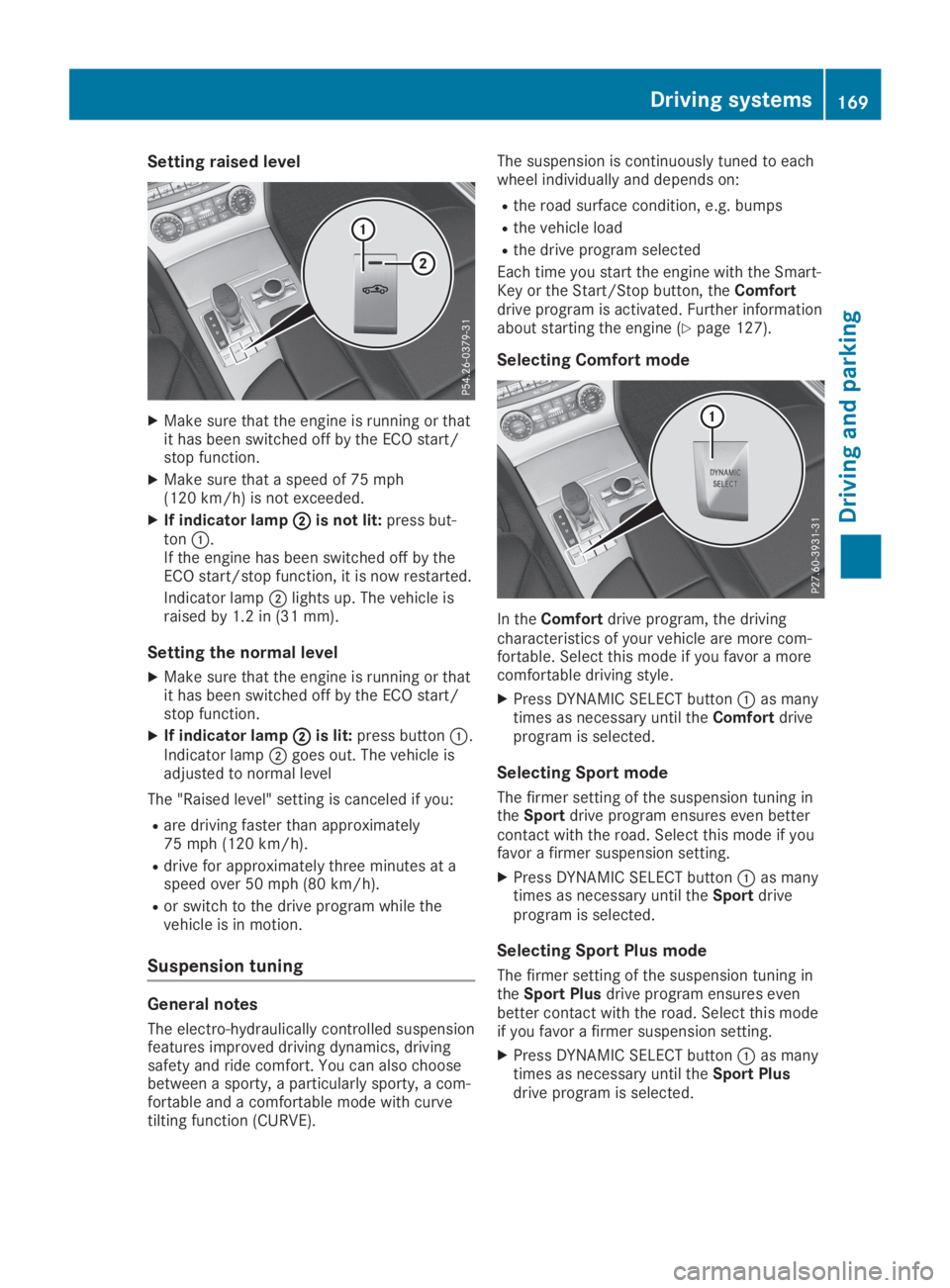
Setting raised level
XMake sure that the engine is running or thatit has been switched off by the ECO start/stop function.
XMake sure that a speed of 75 mph(120 km/h) is not exceeded.
XIf indicator lampDDis not lit:press but-tonC.If the engine has been switched off by theECO start/stop function, it is now restarted.
Indicator lampDlights up. The vehicle israised by 1.2 in (31 mm).
Setting the normal level
XMake sure that the engine is running or thatit has been switched off by the ECO start/stop function.
XIf indicator lampDDis lit:press buttonC.Indicator lampDgoes out. The vehicle isadjusted to normal level
The "Raised level" setting is canceled if you:
Rare driving faster than approximately75 mph (120 km/h).
Rdrive for approximately three minutes at aspeed over 50 mph (80 km/h).
Ror switch to the drive program while thevehicle is in motion.
Suspension tuning
General notes
The electro-hydraulically controlled suspensionfeatures improved driving dynamics, drivingsafety and ride comfort. You can also choosebetween a sporty, a particularly sporty, a com-fortable and a comfortable mode with curvetilting function (CURVE).
The suspension is continuously tuned to eachwheel individually and depends on:
Rthe road surface condition, e.g. bumps
Rthe vehicle load
Rthe drive program selected
Each time you start the engine with the Smart-Key or the Start/Stop button, theComfortdrive program is activated. Further informationabout starting the engine (Ypage 127).
Selecting Comfort mode
In theComfortdrive program, the drivingcharacteristics of your vehicle are more com-fortable. Select this mode if you favor a morecomfortable driving style.
XPress DYNAMIC SELECT buttonCas manytimes as necessary until theComfortdriveprogram is selected.
Selecting Sport mode
The firmer setting of the suspension tuning intheSportdrive program ensures even bettercontact with the road. Select this mode if youfavor a firmer suspension setting.
XPress DYNAMIC SELECT buttonCas manytimes as necessary until theSportdriveprogram is selected.
Selecting Sport Plus mode
The firmer setting of the suspension tuning intheSport Plusdrive program ensures evenbetter contact with the road. Select this modeif you favor a firmer suspension setting.
XPress DYNAMIC SELECT buttonCas manytimes as necessary until theSport Plusdrive program is selected.
Driving systems169
Driving and parking
Z
Page 172 of 330
Selecting the CURVE setting
In theCURVEdrive program, the curve tiltingfunction is activated. The vehicle tilts by up to2.65 degrees into bends. The tilt function andthe comfort suspension tuning increase drivingcomfort in corners.CURVEis available in thespeed range between 9 mph (15 km/h) and112 mph (180 km/h). Select this mode onwinding roads in particular. Outside this speedrange, theCURVEdrive program is the sameas theComfortdrive program.
The curve tilting function monitors the road infront of your vehicle by means of a cameraattached at the top of the windshield. Thisfunction is automatically active if you selecttheCURVEdrive program. The system isoperational at speeds of up to 112 mph(180 km/h).
XPress DYNAMIC SELECT buttonCas manytimes as necessary until theCURVEdriveprogram is selected.
The system is deactivated if you select a differ-ent drive program.
The system may be impaired or may not func-tion if:
Ryou are driving more slowly than 9 mph(15 km/h) or faster than 112 mph(180 km/h).
Rthe vehicle is fully laden.
Ryou drive with very high lateral acceleration.
Activating the driving dynamics dis-
play
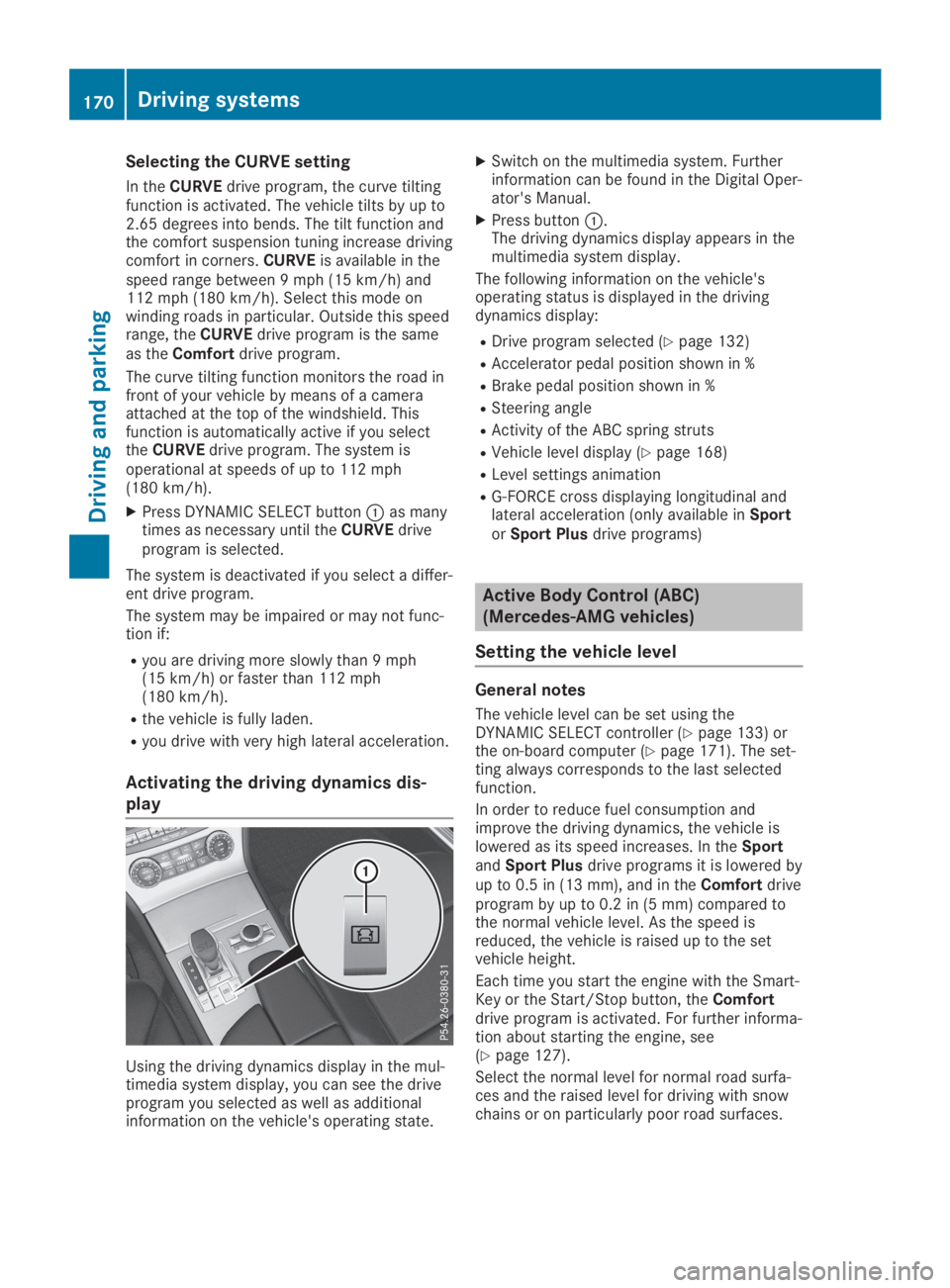
Using the driving dynamics display in the mul-timedia system display, you can see the driveprogram you selected as well as additionalinformation on the vehicle's operating state.
XSwitch on the multimedia system. Furtherinformation can be found in the Digital Oper-ator's Manual.
XPress buttonC.The driving dynamics display appears in themultimedia system display.
The following information on the vehicle'soperating status is displayed in the drivingdynamics display:
RDrive program selected (Ypage 132)
RAccelerator pedal position shown in %
RBrake pedal position shown in %
RSteering angle
RActivity of the ABC spring struts
RVehicle level display (Ypage 168)
RLevel settings animation
RG-FORCE cross displaying longitudinal andlateral acceleration (only available inSportorSport Plusdrive programs)
Active Body Control (ABC)
(Mercedes-AMG vehicles)
Setting the vehicle level
General notes
The vehicle level can be set using theDYNAMIC SELECT controller (Ypage 133) orthe on-board computer (Ypage 171). The set-ting always corresponds to the last selectedfunction.
In order to reduce fuel consumption andimprove the driving dynamics, the vehicle islowered as its speed increases. In theSportandSport Plusdrive programs it is lowered byup to 0.5 in (13 mm), and in theComfortdriveprogram by up to 0.2 in (5 mm) compared tothe normal vehicle level. As the speed isreduced, the vehicle is raised up to the setvehicle height.
Each time you start the engine with the Smart-Key or the Start/Stop button, theComfortdrive program is activated. For further informa-tion about starting the engine, see(Ypage 127).
Select the normal level for normal road surfa-ces and the raised level for driving with snowchains or on particularly poor road surfaces.
170Driving systems
Driving and parking
Page 173 of 330
Important safety notes
The vehicle is slightly lowered when the engineis switched off.
GWARNING
When the vehicle is being lowered, people
could become trapped if their limbs are
between the vehicle body and the wheels or
underneath the vehicle. There is a risk of
injury.
Make sure no one is underneath the vehicle
or in the immediate vicinity of the wheel
arches when the vehicle is being lowered.
Setting raised level
XMake sure that the engine is running or thatit has been switched off by the ECO start/stop function.
XMake sure that a speed of 75 mph(120 km/h) is not exceeded.
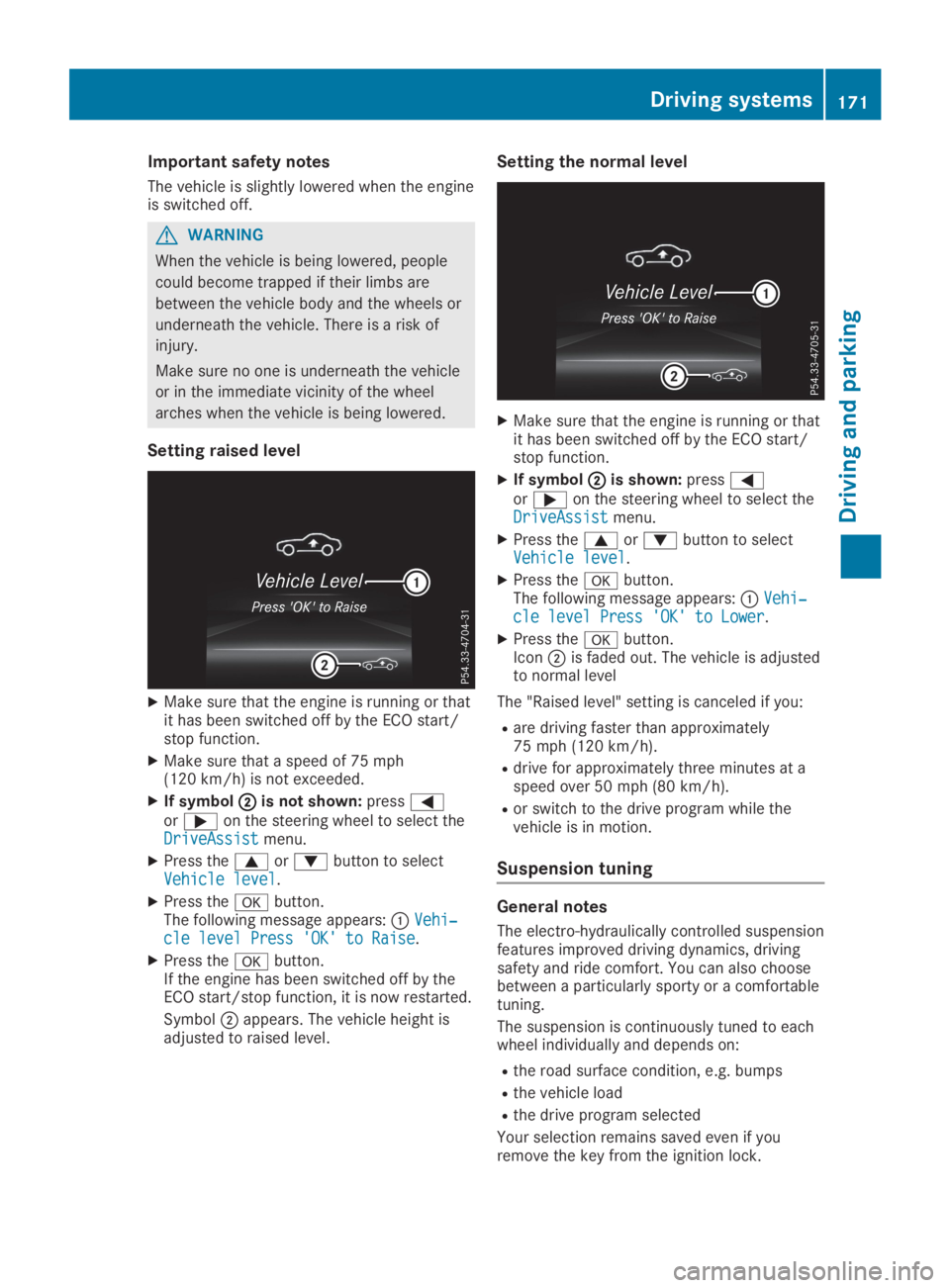
XIf symbolDDis not shown:pressYoreon the steering wheel to select theDriveAssistDriveAssistmenu.
XPress thecordbutton to selectVehicle levelVehicle level.
XPress thevbutton.The following message appears:CVehi‐Vehi‐cle level Press 'OK' to Raisecle level Press 'OK' to Raise.
XPress thevbutton.If the engine has been switched off by theECO start/stop function, it is now restarted.
SymbolDappears. The vehicle height isadjusted to raised level.
Setting the normal level
XMake sure that the engine is running or thatit has been switched off by the ECO start/stop function.
XIf symbolDDis shown:pressYoreon the steering wheel to select theDriveAssistDriveAssistmenu.
XPress thecordbutton to selectVehicle levelVehicle level.
XPress thevbutton.The following message appears:CVehi‐Vehi‐cle level Press 'OK' to Lowercle level Press 'OK' to Lower.
XPress thevbutton.IconDis faded out. The vehicle is adjustedto normal level
The "Raised level" setting is canceled if you:
Rare driving faster than approximately75 mph (120 km/h).
Rdrive for approximately three minutes at aspeed over 50 mph (80 km/h).
Ror switch to the drive program while thevehicle is in motion.
Suspension tuning
General notes
The electro-hydraulically controlled suspensionfeatures improved driving dynamics, drivingsafety and ride comfort. You can also choosebetween a particularly sporty or a comfortabletuning.
The suspension is continuously tuned to eachwheel individually and depends on:
Rthe road surface condition, e.g. bumps
Rthe vehicle load
Rthe drive program selected
Your selection remains saved even if youremove the key from the ignition lock.
Driving systems171
Driving and pa rking
Z
Page 174 of 330
Each time you start the engine with the Smart-Key or the Start/Stop button, the comfortablesetting is activated. For further informationabout starting the engine, see (Ypage 127).
Selecting sports tuning
The firmer setting of the suspension tuning insports mode ensures even better contact withthe road. Select this mode if you favor a firmersuspension setting.
XMake sure that the engine is running or thatit has been switched off by the ECO start/stop function.
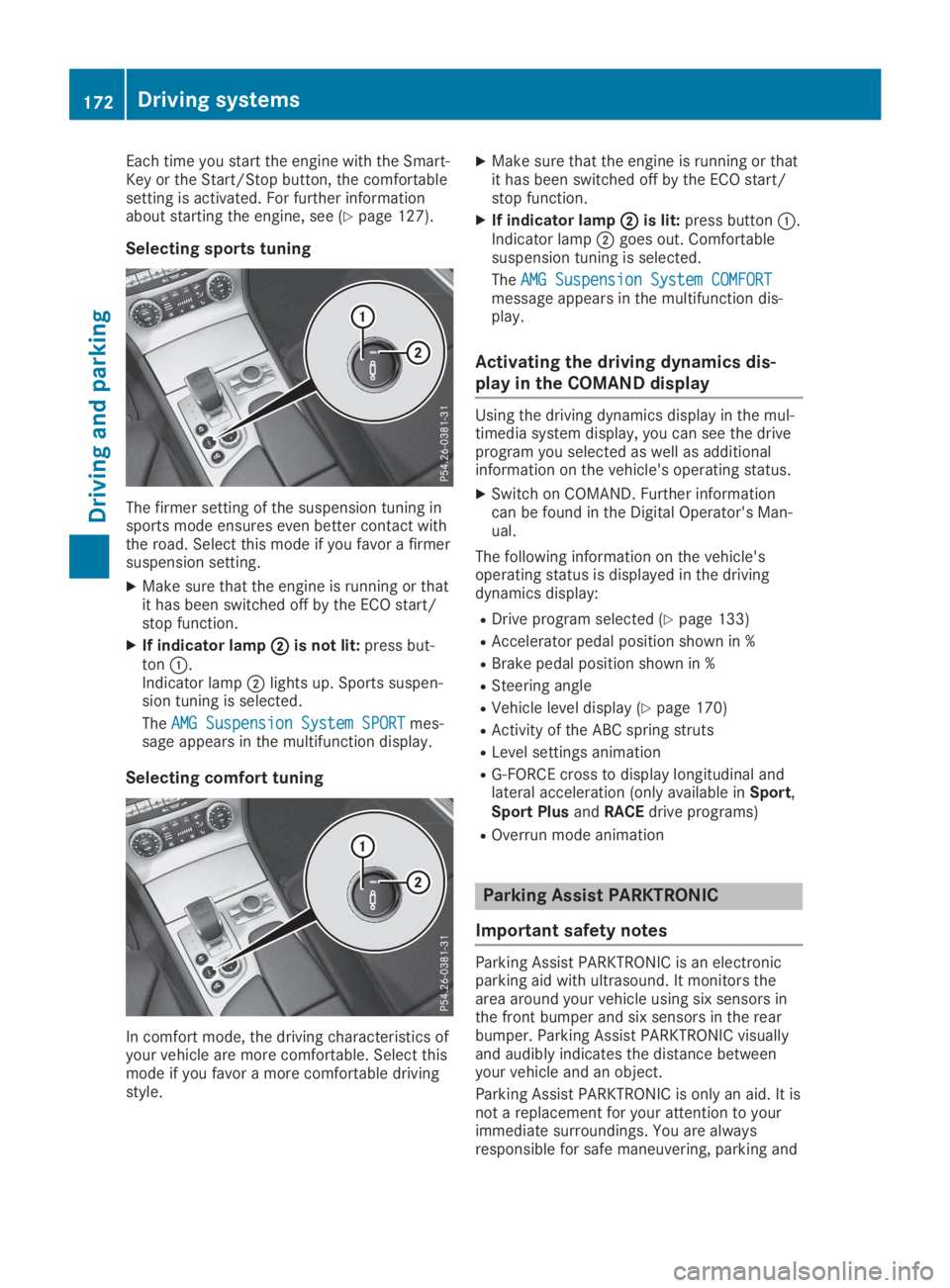
XIf indicator lampDDis not lit:press but-tonC.Indicator lampDlights up. Sports suspen-sion tuning is selected.
TheAMG Suspension System SPORTAMG Suspension System SPORTmes-sage appears in the multifunction display.
Selecting comfort tuning
In comfort mode, the driving characteristics ofyour vehicle are more comfortable. Select thismode if you favor a more comfortable drivingstyle.
XMake sure that the engine is running or thatit has been switched off by the ECO start/stop function.
XIf indicator lampDDis lit:press buttonC.Indicator lampDgoes out. Comfortablesuspension tuning is selected.
TheAMG Suspension System COMFORTAMG Suspension System COMFORTmessage appears in the multifunction dis-play.
Activating the driving dynamics dis-
play in the COMAND display
Using the driving dynamics display in the mul-timedia system display, you can see the driveprogram you selected as well as additionalinformation on the vehicle's operating status.
XSwitch on COMAND. Further informationcan be found in the Digital Operator's Man-ual.
The following information on the vehicle'soperating status is displayed in the drivingdynamics display:
RDrive program selected (Ypage 133)
RAccelerator pedal position shown in %
RBrake pedal position shown in %
RSteering angle
RVehicle level display (Ypage 170)
RActivity of the ABC spring struts
RLevel settings animation
RG-FORCE cross to display longitudinal andlateral acceleration (only available inSport,Sport PlusandRACEdrive programs)
ROverrun mode animation
Parking Assist PARKTRONIC
Important safety notes
Parking Assist PARKTRONIC is an electronicparking aid with ultrasound. It monitors thearea around your vehicle using six sensors inthe front bumper and six sensors in the rearbumper. Parking Assist PARKTRONIC visuallyand audibly indicates the distance betweenyour vehicle and an object.
Parking Assist PARKTRONIC is only an aid. It isnot a replacement for your attention to yourimmediate surroundings. You are alwaysresponsible for safe maneuvering, parking and
172Driving systems
Driving an d parking
Page 180 of 330
erwise, Active Parking Assist will be can-celed.
XStop as soon as Parking Assist PARKTRONICsounds the continuous warning tone, if notbefore.Maneuvering may be required in tight park-ing spaces.
TheParking Assist Active Select DParking Assist Active Select DObserve SurroundingsObserve Surroundingsmessage appears inthe multifunction display.
XShift the transmission to position[whilethe vehicle is stationary.Active Parking Assist immediately steers inthe other direction.
TheParking Assist Active Acceler‐Parking Assist Active Acceler‐ate and Brake Observe Surroundingsate and Brake Observe Surroundingsmessage appears in the multifunction dis-play.
iYou will achieve the best results by waitingfor the steering procedure to completebefore pulling away.
XDrive forwards and be ready to brake at alltimes.
XStop as soon as Parking Assist PARKTRONICsounds the continuous warning tone, if notbefore.
TheParking Assist Active Select RParking Assist Active Select RObserve SurroundingsObserve Surroundingsmessage appears inthe multifunction display.
As soon as the parking procedure is complete,theActive Parking Assist FinishedActive Parking Assist Finishedmes-sage appears on the multifunction display andyou hear a tone. The vehicle is now parked.
Active Parking Assist no longer supports youwith steering interventions. When Active Park-ing Assist is finished, you must steer againyourself. Parking Assist PARKTRONIC is stillavailable.
Parking tips:
RThe way your vehicle is positioned in theparking space after parking is dependent onvarious factors. These include the positionand shape of the vehicles parked in frontand behind it and the conditions of the loca-tion. It may be the case that Active ParkingAssist guides you too far into a parkingspace, or not far enough into it. In somecases, it may also lead you across or onto
the curb. If necessary, cancel the parkingprocedure with Active Parking Assist.
RYou can also preselect transmission position[. The vehicle redirects and does not driveas far into the parking space. Should thetransmission change take place too early,the parking procedure is canceled. A sensi-ble parking position can no longer be ach-ieved from this position.
Exiting a parking space
In order that Active Parking Assist can supportyou when exiting the parking space:
Rthe border of the parking space must behigh enough at the front and the rear. Acurb is too small, for example.
Rthe border of the parking space must not betoo wide. Your vehicle can be maneuveredinto a position at a maximum of 45° to thestarting position in the parking space.
Ra maneuvering distance of at least 3.3 ft(1.0 m) must be available.
Active Parking Assist can only assist you withexiting a parking space if you have parked thevehicle parallel to the direction of travel usingActive Parking Assist.
XStart the engine.
XRelease the electric parking brake.
XSwitch on the turn signal in the directionyou will drive out of the parking space.
XShift the transmission to position[or^.TheStart Parking Assist? Yes: OKStart Parking Assist? Yes: OKNo:No:8message appears in the multifunc-tion display.
XTo cancel the procedure:press the8button on the multifunction steering wheelor pull away.
or
XTo exit a parking space using ActiveParking Assist:press thevbutton onthe multifunction steering wheel.TheParking Assist Active Acceler‐Parking Assist Active Acceler‐ate and Brake Observe Surroundingsate and Brake Observe Surroundingsmessage appears in the multifunction dis-play.
XLet go of the multifunction steering wheel.
XPull away, being ready to brake at all times.Do not exceed a maximum speed of approx-imately 6 mph (10 km/h) when exiting aparking space. Otherwise, Active ParkingAssist will be canceled.
178Driving systems
Driving and parking
Page 199 of 330
XEstablish a Bluetooth®connection to themultimedia system (Ypage 246).
XPress theYorebutton on the steer-ing wheel to select theTelTelmenu.
You will see one of the following display mes-sages in the multifunction display:
RPhone READYPhone READYor the name of the networkprovider: the mobile phone has found a net-work and is ready to receive.
RPhone No ServicePhone No Service: there is no networkavailable or the mobile phone is searchingfor a network.
Accepting a call
If someone calls you when you are in theTelTelmenu, a display message appears in the multi-function display.
You can accept a call at any time regardless ofthe menu selected.
XPress theabutton on the steering wheelto accept an incoming call.
Rejecting or ending a call
XPress thevbutton on the steering wheelto reject or end a call.
Selecting an entry in the phone book
XPress theYorebutton on the steer-ing wheel to select theTelTelmenu.
XPress thec,dorvbutton toswitch to the phone book.
XAuthorize access to the phone book on thephone.
XPressdorcto select the names oneafter the other.
or
XTo start rapid scrolling:press and holdthedorcbutton for longer than onesecond.The names in the phone book are displayedquickly one after the other.
Rapid scrolling stops when you release thebutton or reach the end of the list.
XIf only one telephone number is storedfor a name:press theaorvbuttonto start dialing.
or
XIf there is more than one number for aparticular name:press theaorvbutton to display the numbers.
XPress thecordbutton to select thenumber you want to dial.
XPress theaorvbutton to start dial-ing.
or
XTo exit the telephone book:press thevor8button.
Redialing
The on-board computer saves the last namesor numbers dialed in the redial memory.
XPress theYorebutton on the steer-ing wheel to select theTelTelmenu.
XPress theabutton to switch to theredial memory.
XPress thecordbutton to select thedesired name or number.
XPress theaorvbutton to start dial-ing.
or
XTo exit the redial memory:press thevor8button.
Assistance menu
Introduction
Depending on your vehicle's equipment, in theDriveAssistDriveAssistmenu, you have the followingoptions:
RDisplaying the assistance graphic(Ypage 198)
RMercedes-AMG vehicles: setting the vehiclelevel (Ypage 170)
RActivating/deactivating Active SteeringAssist (Ypage 198)
RActivating/deactivating Active Brake Assist(Ypage 198)
RActivating/deactivating Active Brake Assistwith cross-traffic function (Ypage 198)
RActivating/deactivating ATTENTION ASSIST(Ypage 198)
RActivating/deactivating Active Blind SpotAssist (Ypage 199)
RActivating/deactivating Active Lane KeepingAssist (Ypage 199)
Menus and submenus197
On-board computer and displays
Z
Page 206 of 330
Stopping the RACE TIMER
XPress the8button on the steeringwheel.
XConfirmYesYeswithv.
The RACE TIMER interrupts timing if you stopthe vehicle and turn the SmartKey to positionGin the ignition lock. If you turn the Smart-Key to position3and then pressvto con-
firmStartStart, timing is continued.
Resetting the current lap
XStop the RACE TIMER.
XPress theYorebutton to selectReset LapReset Lap.
XPressvto reset the lap time to "0".
Deleting all laps
If you switch off the engine, the RACE TIMER isreset to "0" after 30 seconds. All laps aredeleted.
You cannot delete individual stored laps. If youhave stopped 16 laps, the current lap does nothave to be reset.
XReset the current lap.
XPressvto confirmResetReset.Reset Race-Timer?Reset Race-Timer?appears in the multi-function display.
XPress thedbutton to selectYesYesandpress thevbutton to confirm.All laps are deleted.
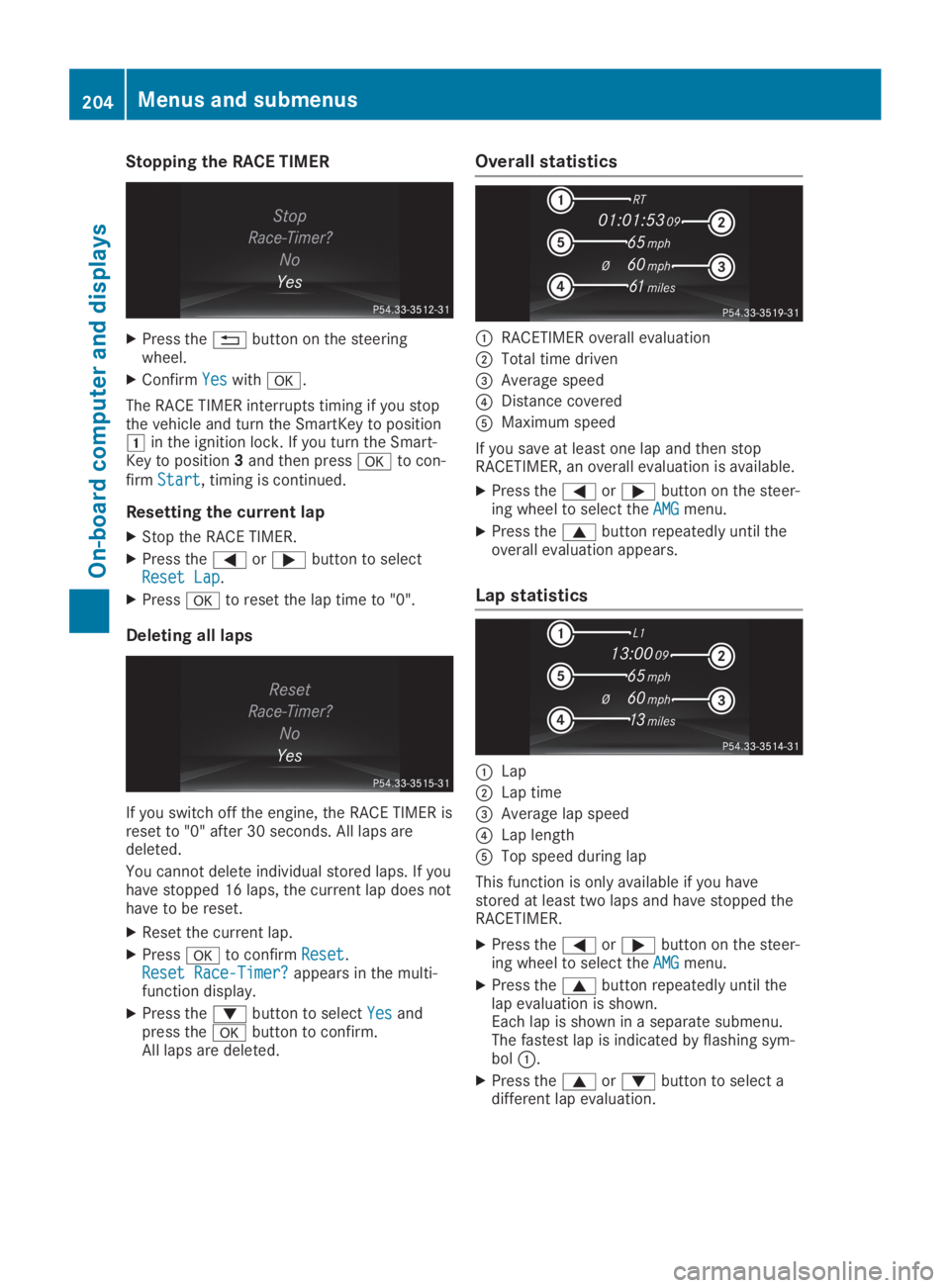
Overall statistics
CRACETIMER overall evaluation
DTotal time driven
Page 261 of 330
All other calls can be ended by pressing:
Rthevbutton on the multifunction steer-ing wheel
Ror the corresponding COMAND button forending a telephone call
iWhen a call is initiated, the audio systemis muted. The mobile phone is no longerconnected to COMAND. However, if youwant to use your mobile phone, do so onlywhen the vehicle is stationary and in a safelocation.
Vehicle Health Check
With the Vehicle Health Check, the CustomerAssistance Center can provide improved sup-port for problems with your vehicle. During anexisting call, vehicle data is transferred to theCustomer Assistance Center. The customerservice representative can use the receiveddata to decide what kind of assistance isrequired. You are then, for example, guided tothe nearest Mercedes-Benz Service Center ora recovery vehicle is called.
If vehicle data needs to be transferred duringan MB Info call or a Roadside Assistance call,this is initiated by the Customer AssistanceCenter. You will see theRoadside Assis‐Roadside Assis‐tance Connectedtance Connectedmessage in the COMANDdisplay. If the Vehicle Health Check can bestarted, theRequest for vehicle diagno‐Request for vehicle diagno‐sis received. Start vehicle diagno‐sis received. Start vehicle diagno‐sis?sis?message appears in the display.
XConfirm the message withYesYes.
XWhen theVehicle Diagnosis: PleaseVehicle Diagnosis: Pleasestart ignition.start ignition.message appears, turnthe SmartKey to positionHin the ignitionlock (Ypage 126).
XWhen thePlease follow the instruc‐Please follow the instruc‐tions received by phone and movetions received by phone and moveyour vehicle to a safe positionyour vehicle to a safe positionmes-sage appears, follow the customer servicerepresentative's instructions.The message in the display disappears.
If you selectCancelCancelthe Vehicle HealthCheck is canceled completely.
The vehicle operating state check begins.You will see theVehicle diagnosisVehicle diagnosisactivated.activated.message.
When the check is completed, theSendSendvehicle diagnostics data (Voice con‐vehicle diagnostics data (Voice con‐nection may be interrupted duringnection may be interrupted during
data transfer)data transfer)message appears. The vehi-cle data can now be sent to the CustomerAssistance Center.
XPressOKOKto confirm the message.The voice connection with the CustomerAssistance Center is terminated.
You will see theVehicle Diagnosis:Vehicle Diagnosis:Transferring data...Transferring data...message.
The vehicle data is sent to the CustomerAssistance Center.
Depending on what the customer service rep-resentative agreed with you, the voice connec-tion is re-established after the transfer is com-plete. If necessary, you will be contacted at alater time by another means, e.g. by e-mail orphone.
Another function of the Vehicle Health Checkis the transfer of service data to the CustomerAssistance Center. If a service is overdue, theCOMAND display shows a message about vari-ous special offers at your workshop.
USA only: this information can also be calledup under "Owners Online" at http://www.mbusa.com.
Information on the data stored in the vehicle(Ypage 29).
Information on Roadside Assistance(Ypage 26).
Garage door opener
General notes
The HomeLink®garage door opener integratedin the rear-view mirror allows you to operateup to three different door and gate systems.
Use the integrated garage door opener only ongarage doors that:
Rhave safety stop and reverse features and
Rmeet current U.S. federal safety standards
Once programed, the integrated garage dooropener in the rear-view mirror will assume thefunction of the garage door system's remotecontrol. Please also read the operating instruc-tions for the garage door system.
When programming a garage door opener,park the vehicle outside the garage. Do notrun the engine while programming.
Certain garage door drives are incompatiblewith the integrated garage door opener. If youhave difficulty programing the integrated
Features259
Sto wage an d features
Z
Page 270 of 330
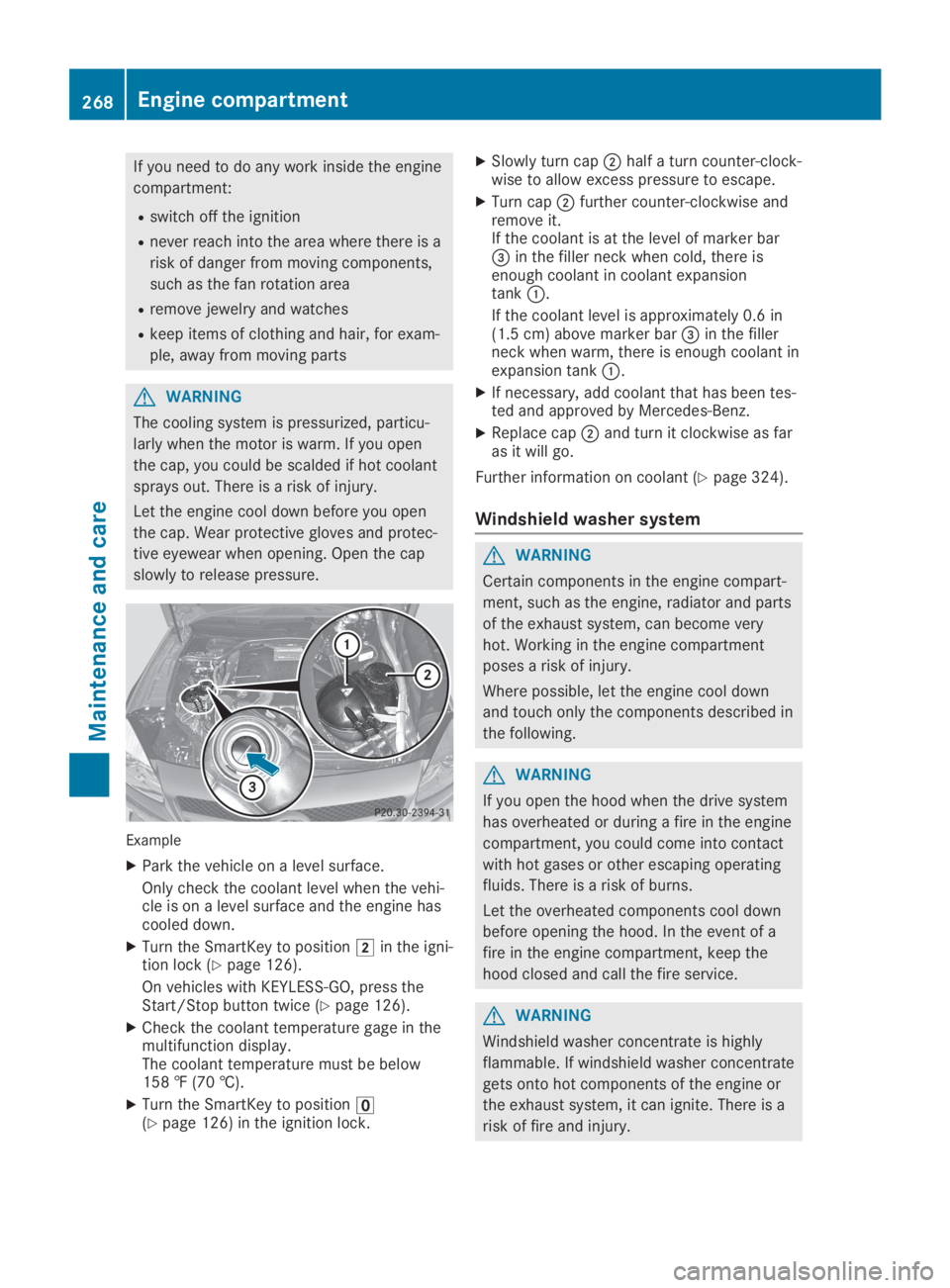
If you need to do any work inside the engine
compartment:
Rswitch off the ignition
Rnever reach into the area where there is a
risk of danger from moving components,
such as the fan rotation area
Rremove jewelry and watches
Rkeep items of clothing and hair, for exam-
ple, away from moving parts
GWARNING
The cooling system is pressurized, particu-
larly when the motor is warm. If you open
the cap, you could be scalded if hot coolant
sprays out. There is a risk of injury.
Let the engine cool down before you open
the cap. Wear protective gloves and protec-
tive eyewear when opening. Open the cap
slowly to release pressure.
Example
XPark the vehicle on a level surface.
Only check the coolant level when the vehi-cle is on a level surface and the engine hascooled down.
XTurn the SmartKey to positionHin the igni-tion lock (Ypage 126).
On vehicles with KEYLESS-GO, press theStart/Stop button twice (Ypage 126).
XCheck the coolant temperature gage in themultifunction display.The coolant temperature must be below158 ‡ (70 †).
XTurn the SmartKey to position
Page 280 of 330
Tire-change tool kit
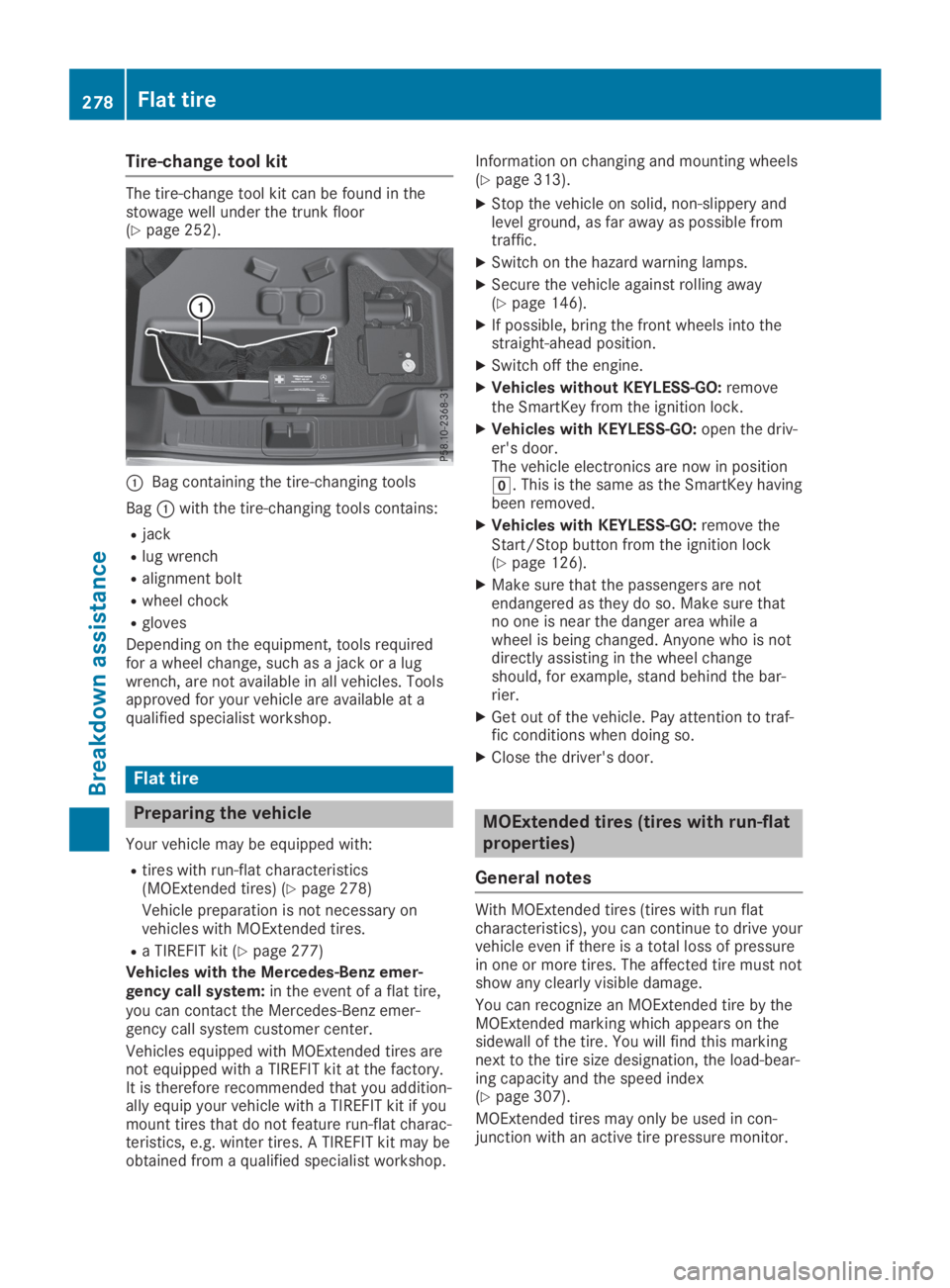
The tire-change tool kit can be found in thestowage well under the trunk floor(Ypage 252).
CBag containing the tire-changing tools
BagCwith the tire-changing tools contains:
Rjack
Rlug wrench
Ralignment bolt
Rwheel chock
Rgloves
Depending on the equipment, tools requiredfor a wheel change, such as a jack or a lugwrench, are not available in all vehicles. Toolsapproved for your vehicle are available at aqualified specialist workshop.
Flat tire
Preparing the vehicle
Your vehicle may be equipped with:
Rtires with run-flat characteristics(MOExtended tires) (Ypage 278)
Vehicle preparation is not necessary onvehicles with MOExtended tires.
Ra TIREFIT kit (Ypage 277)
Vehicles with the Mercedes-Benz emer-gency call system:in the event of a flat tire,you can contact the Mercedes-Benz emer-gency call system customer center.
Vehicles equipped with MOExtended tires arenot equipped with a TIREFIT kit at the factory.It is therefore recommended that you addition-ally equip your vehicle with a TIREFIT kit if youmount tires that do not feature run-flat charac-teristics, e.g. winter tires. A TIREFIT kit may beobtained from a qualified specialist workshop.
Information on changing and mounting wheels(Ypage 313).
XStop the vehicle on solid, non-slippery andlevel ground, as far away as possible fromtraffic.
XSwitch on the hazard warning lamps.
XSecure the vehicle against rolling away(Ypage 146).
XIf possible, bring the front wheels into thestraight-ahead position.
XSwitch off the engine.
XVehicles without KEYLESS-GO:removethe SmartKey from the ignition lock.
XVehicles with KEYLESS-GO:open the driv-er's door.The vehicle electronics are now in positionZ. This is the same as the SmartKey havingbeen removed.
XVehicles with KEYLESS-GO:remove theStart/Stop button from the ignition lock(Ypage 126).
XMake sure that the passengers are notendangered as they do so. Make sure thatno one is near the danger area while awheel is being changed. Anyone who is notdirectly assisting in the wheel changeshould, for example, stand behind the bar-rier.
XGet out of the vehicle. Pay attention to traf-fic conditions when doing so.
XClose the driver's door.
MOExtended tires (tires with run-flat
properties)
General notes
With MOExtended tires (tires with run flatcharacteristics), you can continue to drive yourvehicle even if there is a total loss of pressurein one or more tires. The affected tire must notshow any clearly visible damage.
You can recognize an MOExtended tire by theMOExtended marking which appears on thesidewall of the tire. You will find this markingnext to the tire size designation, the load-bear-ing capacity and the speed index(Ypage 307).
MOExtended tires may only be used in con-junction with an active tire pressure monitor.
278Flat tire
Breakdown assistance