ESP MERCEDES-BENZ SL CLASS 2019 Workshop Manual
[x] Cancel search | Manufacturer: MERCEDES-BENZ, Model Year: 2019, Model line: SL CLASS, Model: MERCEDES-BENZ SL CLASS 2019Pages: 330, PDF Size: 16.53 MB
Page 156 of 330
Observe the notes in the "Winter operation"section (Ypage 295).
Driving systems
Cruise control
General notes
Cruise control maintains a constant roadspeed for you. It brakes automatically in orderto avoid exceeding the set speed. On long andsteep downhill gradients, especially if the vehi-cle is laden, you must select a lower gear ingood time. By doing so, you will make use ofthe braking effect of the engine. This relievesthe load on the brake system and prevents thebrakes from overheating and wearing tooquickly.
Use cruise control only if road and traffic con-ditions make it appropriate to maintain asteady speed for a prolonged period. You canstore any road speed above 20 mph(30 km/h).
Important safety notes
If you fail to adapt your driving style, cruisecontrol can neither reduce the risk of an acci-dent nor override the laws of physics. Cruisecontrol cannot take into account the road,traffic and weather conditions. Cruise controlis only an aid. You are responsible for the dis-tance to the vehicle in front, for vehicle speed,for braking in good time and for staying inlane.
Do not use cruise control:
Rin road and traffic conditions which do notallow you to maintain a constant speed e.g.in heavy traffic or on winding roads
Ron slippery road surfaces. Braking or accel-erating could cause the drive wheels to losetraction and the vehicle could then skid
Rwhen there is poor visibility, e.g. due to fog,heavy rain or snow
If there is a change of drivers, advise the newdriver of the speed stored.
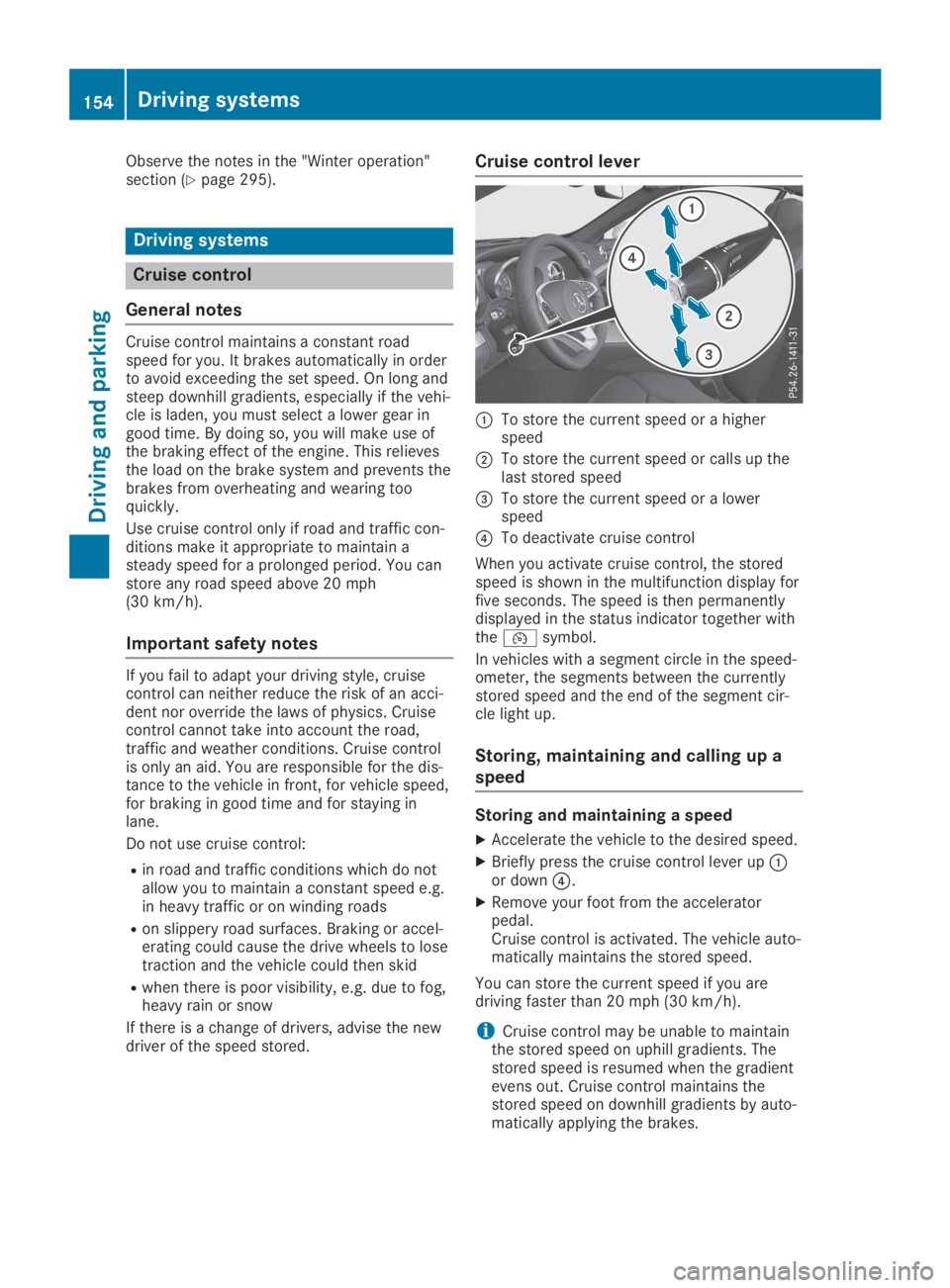
Cruise control lever
CTo store the current speed or a higherspeed
DTo store the current speed or calls up thelast stored speed
Page 158 of 330

Active Distance Assist DISTRONIC
General notes
Active Distance Assist DISTRONIC regulatesthe speed and automatically helps you main-tain the distance from the vehicle detected infront. Vehicles are detected with the aid of theradar sensor system. Active Distance AssistDISTRONIC brakes automatically to avoidexceeding the set speed or to maintain thedesignated distance from the vehicle in front.
You must select a lower gear in good time onlong and steep downhill gradients, especially ifthe vehicle is laden. By doing so, you will makeuse of the braking effect of the engine. Thisrelieves the load on the brake system and pre-vents the brakes from overheating and wear-ing too quickly.
If Active Distance Assist DISTRONIC detectsthat there is a risk of a collision with the vehi-cle in front, you will be warned visually andaudibly. Active Distance Assist DISTRONICcannot prevent a collision without your inter-vention. An intermittent warning tone will thensound and the distance warning lamp will lightup in the instrument cluster. Brake immedi-ately in order to increase the distance fromthe vehicle in front, or take evasive action, pro-vided it is safe to do so.
For Active Distance Assist DISTRONIC toassist you when driving, the radar sensor sys-tem must be operational.
Active Distance Assist DISTRONIC operates inthe speed range between 0 mph (0 km/h) and120 mph (200 km/h).
Do not use Active Distance Assist DISTRONICwhile driving on roads with steep gradients.
As Active Distance Assist DISTRONIC trans-mits radar waves, it can resemble the radardetectors of the responsible authorities. Youcan refer to the relevant chapter in the Opera-tor's Manual if questions are asked about this.
iUSA only:
This device has been approved by the FCCas a "Vehicular Radar System". The radarsensor is intended for use in an automotiveradar system only. Removing, tamperingwith, or altering the device will void any war-ranties, and is not permitted by the FCC. Donot tamper with, alter, or use in any non-approved way.
Any unauthorized modification to this devicecould void the user's authority to operatethe equipment.
iCanada only: This device complies withRSS-210 of Industry Canada. Operation issubject to the following two conditions:
1. This device may not cause interference,and
2. This device must accept any interferencereceived, including interference that maycause undesired operation of the device.
Removal, tampering, or altering of thedevice will void any warranties, and is notpermitted. Do not tamper with, alter, or usein any non-approved way.
Any unauthorized modification to this devicecould void the user's authority to operatethe equipment.
Important safety notes
GWARNING
Active Distance Assist DISTRONIC does not
react to:
Rpeople or animals
Rstationary objects in the road, e.g. stop-
ped or parked vehicles
Roncoming vehicles and crossing traffic
As a result, Active Distance Assist
DISTRONIC may neither give warnings nor
intervene in such situations. There is a risk
of an accident.
Always pay careful attention to the traffic
situation and be ready to brake.
GWARNING
Active Distance Assist DISTRONIC does not
react to:
Rpeople or animals
Rstationary objects in the road, e.g. stop-
ped or parked vehicles (vehicles without
the Driving Assistance package)
Rstationary objects in the road, e.g. stop-
ped or parked vehicles, if sufficient detec-
tion is not possible (vehicles with the Driv-
ing Assistance package)
Roncoming vehicles and crossing traffic
156Driving systems
Driving and pa rking
Page 159 of 330

As a result, Active Distance Assist
DISTRONIC may neither give warnings nor
intervene in such situations. There is a risk
of an accident.
Always pay careful attention to the traffic
situation and be ready to brake.
GWARNING
Distance keeping assistant cannot always
clearly identify other road users and com-
plex traffic situations.
In such cases, distance keeping assistant
can:
Raccelerate or brake the vehicle unexpect-
edly
Rintervene unexpectedly
There is a risk of an accident.
Continue to drive carefully and be ready to
brake, especially if distance keeping assis-
tant warns you.
GWARNING
Active Distance Assist DISTRONIC brakes
your vehicle with up to 50% of the maximum
possible deceleration. If this deceleration is
not sufficient, Active Distance Assist
DISTRONIC alerts you with a visual and
acoustic warning. There is a risk of an acci-
dent.
Adjust your speed in these cases and main-
tain sufficient distance.
Apply the brakes yourself and/or take eva-
sive action.
!When Active Distance Assist DISTRONICor the HOLD function is activated, the vehi-cle brakes automatically in certain situa-tions.
To avoid damage to the vehicle, deactivateActive Distance Assist DISTRONIC and theHOLD function in the following or similar sit-uations:
Rwhen towing the vehicle
Rin the car wash
Active Distance Assist DISTRONIC can neitherreduce the risk of an accident if you fail to
adapt your driving style, nor override the lawsof physics. Active Distance Assist DISTRONICcannot take into account road, weather or traf-fic conditions. Active Distance AssistDISTRONIC is only an aid. You are responsiblefor the distance to the vehicle in front, forvehicle speed, for braking in good time and forstaying in your lane.
Do not use Active Distance Assist DISTRONIC:
RIn road and traffic conditions which do notallow you to maintain a constant speed, e.g.in heavy traffic or on winding roads
Ron slippery road surfaces. Braking or accel-erating could cause the drive wheels to losetraction and the vehicle could then skid
RIn poor visibility, e.g. due to fog, heavy rainor snow
Active Distance Assist DISTRONIC may notdetect narrow vehicles driving in front, e.g.motorcycles, or vehicles driving in a staggeredformation.
In particular, the detection of obstacles can beimpaired if:
RThere is dirt on the sensors or anything elsecovering the sensors
RThere is snow or heavy rain
RThere is interference by other radar sources
RThere are strong radar reflections, for exam-ple in parking garages
If Active Distance Assist DISTRONIC no longerdetects a vehicle in front, Distance PilotDISTRONIC may unexpectedly accelerate tothe speed stored.
This speed may:
RBe too high if you are driving in a turninglane or an exit lane
RBe so high when driving in the right-handlane that you overtake vehicles in the left-hand lane
RBe so high in the left lane that you passvehicles driving on the right
If there is a change of drivers, advise the newdriver of the speed stored.
Driving systems157
Driving an d parking
Z
Page 162 of 330
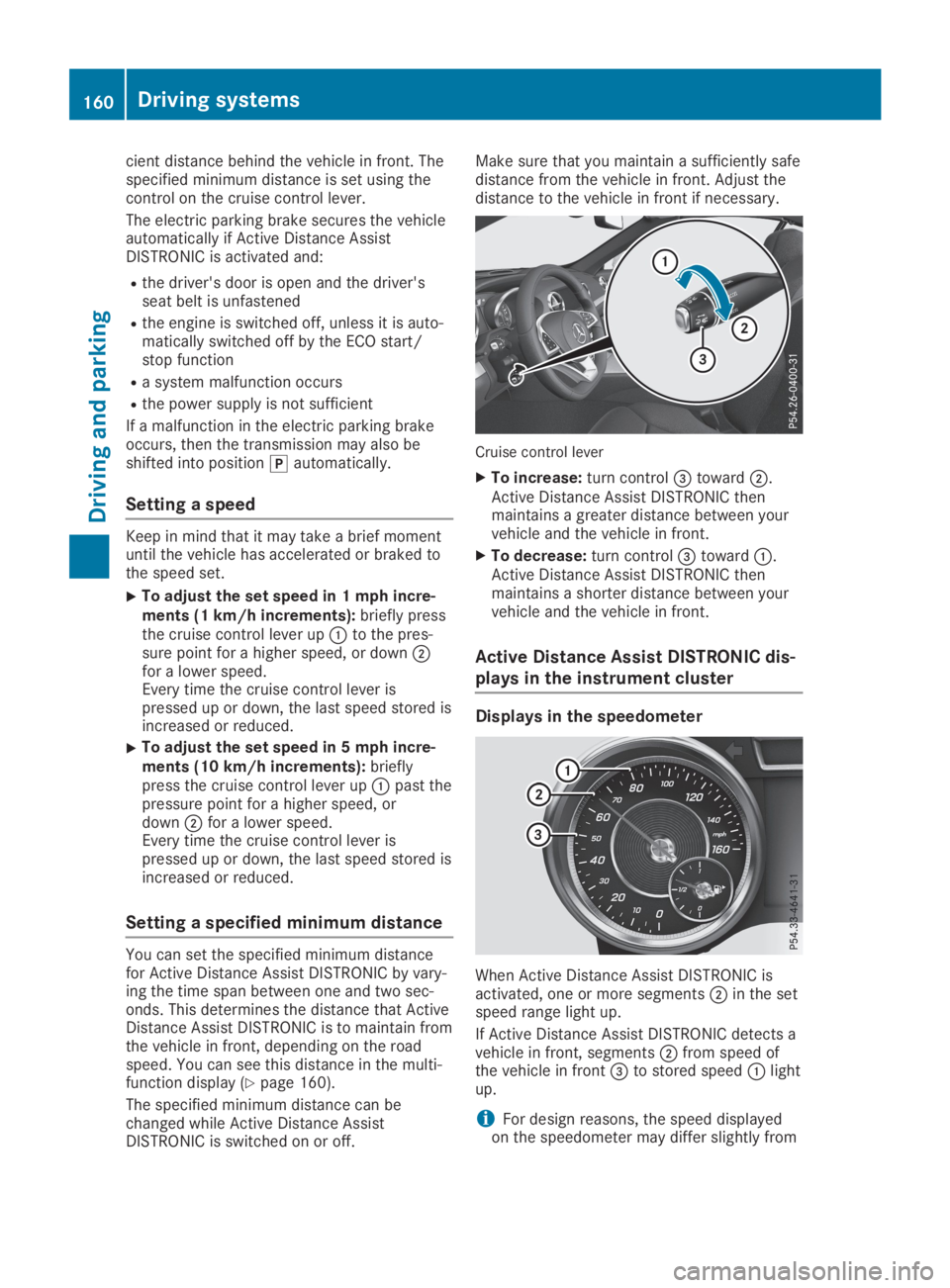
cient distance behind the vehicle in front. Thespecified minimum distance is set using thecontrol on the cruise control lever.
The electric parking brake secures the vehicleautomatically if Active Distance AssistDISTRONIC is activated and:
Rthe driver's door is open and the driver'sseat belt is unfastened
Rthe engine is switched off, unless it is auto-matically switched off by the ECO start/stop function
Ra system malfunction occurs
Rthe power supply is not sufficient
If a malfunction in the electric parking brakeoccurs, then the transmission may also beshifted into position]automatically.
Setting a speed
Keep in mind that it may take a brief momentuntil the vehicle has accelerated or braked tothe speed set.
XTo adjust the set speed in 1 mph incre-ments (1 km/h increments):briefly pressthe cruise control lever upCto the pres-sure point for a higher speed, or downDfor a lower speed.Every time the cruise control lever ispressed up or down, the last speed stored isincreased or reduced.
XTo adjust the set speed in 5 mph incre-ments (10 km/h increments):brieflypress the cruise control lever upCpast thepressure point for a higher speed, ordownDfor a lower speed.Every time the cruise control lever ispressed up or down, the last speed stored isincreased or reduced.
Setting a specified minimum distance
You can set the specified minimum distancefor Active Distance Assist DISTRONIC by vary-ing the time span between one and two sec-onds. This determines the distance that ActiveDistance Assist DISTRONIC is to maintain fromthe vehicle in front, depending on the roadspeed. You can see this distance in the multi-function display (Ypage 160).
The specified minimum distance can bechanged while Active Distance AssistDISTRONIC is switched on or off.
Make sure that you maintain a sufficiently safedistance from the vehicle in front. Adjust thedistance to the vehicle in front if necessary.
Cruise control lever
XTo increase:turn control
Page 165 of 330
revealed, Active Distance Assist DISTRONICwill not brake for them.
Crossing vehicles
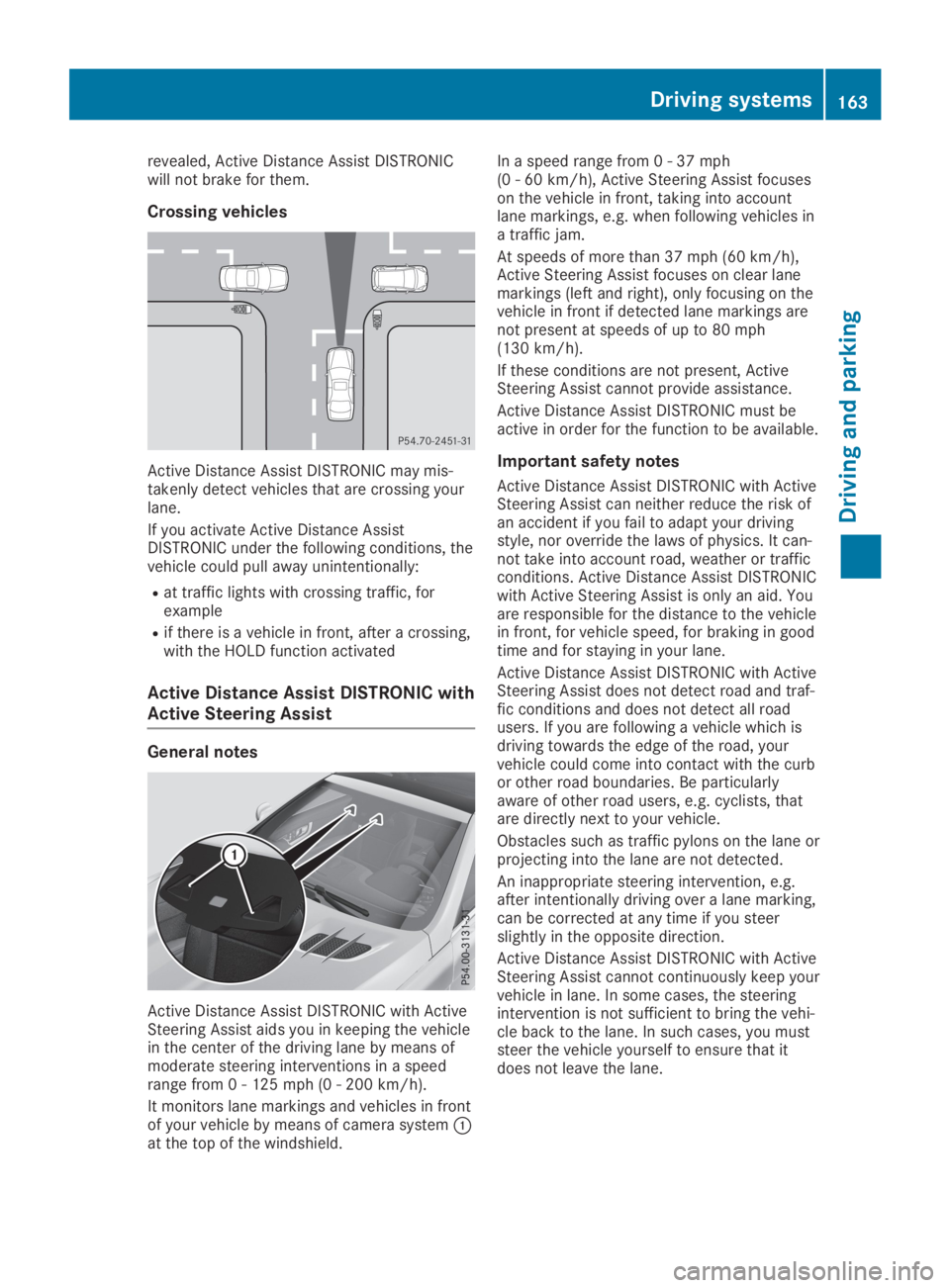
Active Distance Assist DISTRONIC may mis-takenly detect vehicles that are crossing yourlane.
If you activate Active Distance AssistDISTRONIC under the following conditions, thevehicle could pull away unintentionally:
Rat traffic lights with crossing traffic, forexample
Rif there is a vehicle in front, after a crossing,with the HOLD function activated
Active Distance Assist DISTRONIC with
Active Steering Assist
General notes
Active Distance Assist DISTRONIC with ActiveSteering Assist aids you in keeping the vehiclein the center of the driving lane by means ofmoderate steering interventions in a speedrange from 0 - 125 mph (0 - 200 km/h).
It monitors lane markings and vehicles in frontof your vehicle by means of camera systemCat the top of the windshield.
In a speed range from 0 - 37 mph(0 - 60 km/h), Active Steering Assist focuseson the vehicle in front, taking into accountlane markings, e.g. when following vehicles ina traffic jam.
At speeds of more than 37 mph (60 km/h),Active Steering Assist focuses on clear lanemarkings (left and right), only focusing on thevehicle in front if detected lane markings arenot present at speeds of up to 80 mph(130 km/h).
If these conditions are not present, ActiveSteering Assist cannot provide assistance.
Active Distance Assist DISTRONIC must beactive in order for the function to be available.
Important safety notes
Active Distance Assist DISTRONIC with ActiveSteering Assist can neither reduce the risk ofan accident if you fail to adapt your drivingstyle, nor override the laws of physics. It can-not take into account road, weather or trafficconditions. Active Distance Assist DISTRONICwith Active Steering Assist is only an aid. Youare responsible for the distance to the vehiclein front, for vehicle speed, for braking in goodtime and for staying in your lane.
Active Distance Assist DISTRONIC with ActiveSteering Assist does not detect road and traf-fic conditions and does not detect all roadusers. If you are following a vehicle which isdriving towards the edge of the road, yourvehicle could come into contact with the curbor other road boundaries. Be particularlyaware of other road users, e.g. cyclists, thatare directly next to your vehicle.
Obstacles such as traffic pylons on the lane orprojecting into the lane are not detected.
An inappropriate steering intervention, e.g.after intentionally driving over a lane marking,can be corrected at any time if you steerslightly in the opposite direction.
Active Distance Assist DISTRONIC with ActiveSteering Assist cannot continuously keep yourvehicle in lane. In some cases, the steeringintervention is not sufficient to bring the vehi-cle back to the lane. In such cases, you muststeer the vehicle yourself to ensure that itdoes not leave the lane.
Driving systems163
Driving and parking
Z
Page 167 of 330
HOLD function
General notes
The HOLD function can assist the driver in thefollowing situations:
RWhen pulling away, especially on steepslopes
RWhen maneuvering on steep slopes
RWhen waiting in traffic
The vehicle is kept stationary without thedriver having to depress the brake pedal.
The braking effect is canceled and the HOLDfunction deactivated when you depress theaccelerator pedal to pull away.
Important safety notes
GWARNING
If the vehicle is only braked using the HOLD
function, the vehicle may roll away in the fol-
lowing situations when you leave the vehi-
cle:
Rif there is a malfunction in the system or
in the voltage supply
Rif the HOLD function is deactivated by
depressing the accelerator pedal or brake
pedal, e.g. by a vehicle occupant
There is a risk of an accident.
Always deactivate the HOLD function and
secure the vehicle against rolling away
before you leave it.
!When Active Distance Assist DISTRONICor the HOLD function is activated, the vehi-cle brakes automatically in certain situa-tions.
To avoid damage to the vehicle, deactivateActive Distance Assist DISTRONIC and theHOLD function in the following or similar sit-uations:
Rwhen towing the vehicle
Rin the car wash
Deactivating the HOLD function (Ypage 165).
Activation conditions
You can activate the HOLD function if all of thefollowing conditions are fulfilled:
Rthe vehicle is stationary.
Rthe engine is running or if it has been auto-matically switched off by the ECO start/stop function.
Rthe driver's door is closed or your seat beltis fastened.
Rthe electric parking brake is released.
Rthe transmission is in position[,^or\\.
RActive Distance Assist DISTRONIC is deacti-vated
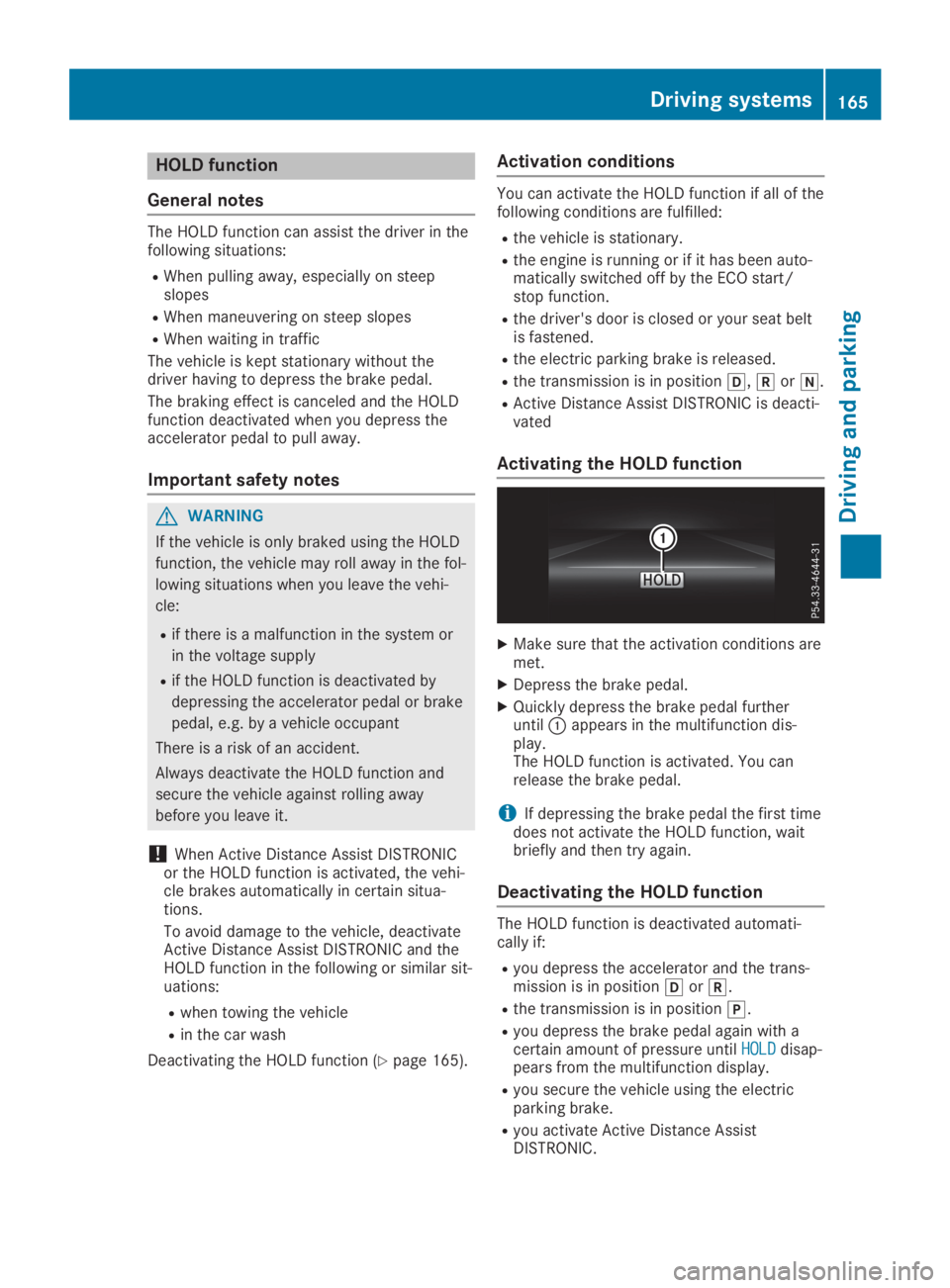
Activating the HOLD function
XMake sure that the activation conditions aremet.
XDepress the brake pedal.
XQuickly depress the brake pedal furtheruntilCappears in the multifunction dis-play.The HOLD function is activated. You canrelease the brake pedal.
iIf depressing the brake pedal the first timedoes not activate the HOLD function, waitbriefly and then try again.
Deactivating the HOLD function
The HOLD function is deactivated automati-cally if:
Ryou depress the accelerator and the trans-mission is in position[or^.
Rthe transmission is in position].
Ryou depress the brake pedal again with acertain amount of pressure untilHOLDHOLDdisap-pears from the multifunction display.
Ryou secure the vehicle using the electricparking brake.
Ryou activate Active Distance AssistDISTRONIC.
Driving systems165
Driving and parking
Z
Page 168 of 330
![MERCEDES-BENZ SL CLASS 2019 Workshop Manual iAfter a time, the electric parking brakesecures the vehicle and relieves the servicebrake.
When the HOLD function is activated, thetransmission is shifted automatically to posi-tion]if:
Rthe driver&](/img/4/59125/w960_59125-167.png "MERCEDES-BENZ SL CLASS 2019 Workshop Manual iAfter a time, the electric parking brakesecures the vehicle and relieves the servicebrake.
When the HOLD function is activated, thetransmission is shifted automatically to posi-tion]if:
Rthe driver&")
iAfter a time, the electric parking brakesecures the vehicle and relieves the servicebrake.
When the HOLD function is activated, thetransmission is shifted automatically to posi-tion]if:
Rthe driver's seat belt is not fastened and thedriver's door is open.
Rthe engine is switched off, unless it is auto-matically switched off by the ECO start/stop function.
The electric parking brake secures the vehicleautomatically if the HOLD function is activatedwhen the vehicle is stationary and:
Ra system malfunction occurs
Rthe power supply is not sufficient
If a malfunction in the electric parking brakeoccurs, the transmission may also be shiftedinto position]automatically.
RACE START
Important safety notes
iRACE START must not be used on normalroads. RACE START must only be activatedand used on dedicated road circuits, outsideof public road use.
iRACE START is only available forMercedes‑AMG vehicles.
RACE START enables optimal accelerationfrom a standing start. For this, a suitably high-grip road surface is required and the vehicleand tires must be in good working order.
GWARNING
If you use RACE START, individual tires may
start to spin and the vehicle could skid.
Depending on the selected ESP®mode,
there is an increased risk of skidding and
having an accident. Make sure that no per-
sons, animals or obstacles are within range
of the vehicle.
iObserve the safety notes on driving safetysystems (Ypage 60).
Be sure to read the safety notes and infor-
mation on ESP®(Ypage 65).
Activation conditions
You can activate RACE START if:
Rthe doors are closed.
Rthe engine is running and it has reached anoperating temperature of approximately160 ‡ (71 †). This is the case when the oiltemperature gage in the multifunction dis-play is shown in white.
Rthe engine is running and the engine andtransmission are at operating temperature.This is the case when the oil temperaturegage in the multifunction display is shown inwhite (Ypage 202).
RESP®is functioning correctly (Ypage 66)
Rthe drive programS,S+orRaceis selected(Ypage 133)
Rthe steering wheel is in the straight-aheadposition
Rthe vehicle is stationary and the brake pedalis depressed (left foot)
Rthe transmission is in position[
Activating RACE START
iWhen manual mode (Ypage 141) is active,the transmission automatically shifts up inthe RACE START drive program. This func-tion supports maximum acceleration withRACE START. After going through an accel-erating process once from a stationary posi-tion, this function is automatically deactiva-ted.
XDepress the brake pedal with your left footand keep it depressed.
XPull and hold both steering wheel paddleshifters.
XTheRACE START Confirm: Paddle UPRACE START Confirm: Paddle UPCancel: Paddle DOWNCancel: Paddle DOWNmessage appears inthe multifunction display.
XRelease both steering wheel paddle shifters.
iIf the activation conditions are no longerfulfilled, RACE START is canceled. TheRACE START CanceledRACE START Canceledmessage appears inthe multifunction display.
166Driving systems
Driving an d parking
Page 169 of 330
XTo cancel:pull the left-hand steering wheelpaddle shifter (Ypage 141).
or
XTo confirm:pull the right-hand steeringwheel paddle shifter (Ypage 141).TheRACE START Available DepressRACE START Available Depressgas pedal.gas pedal.message appears in the multi-function display.
iIf you do not depress the accelerator pedalwithin a few seconds, RACE START is can-celed. The multifunction display shows theRACE START CanceledRACE START Canceledmessage.
XDepress the accelerator pedal completely,until the engine speed stops increasing.TheRACE START Release brake toRACE START Release brake tostartstartmessage appears in the multifunctiondisplay.
iIf you do not release the brake pedalwithin five seconds, RACE START is can-celed. TheRACE START CanceledRACE START Canceledmessageappears in the multifunction display.
XTake your foot off the brake, but keep theaccelerator pedal depressed.The vehicle pulls away at maximum acceler-ation.
TheRACE START ActiveRACE START Activemessage appearsin the multifunction display.
RACE START is deactivated when the vehiclereaches a speed of approximately 30 mph(Canada: 50 km/h).
RACE START is deactivated immediately if yourelease the accelerator pedal during RACESTART or if any of the activation conditions areno longer fulfilled. TheRACE START Not Pos‐RACE START Not Pos‐sible See Operator's Manualsible See Operator's ManualorRACERACESTART CanceledSTART Canceledmessage appears in the mul-tifunction display.
iIf RACE START is used repeatedly within ashort period of time, it is only availableagain after the vehicle has been driven acertain distance.
Adaptive damping system
General notes
A suspension with the adaptive damping sys-tem provides improved driving comfort andcontinuously controls the calibration of thedampers. The damping characteristics adaptto the current operating and driving situation.
The damping is tuned individually to eachwheel and depends on:
Ryour driving style, e.g. sporty
Rthe road surface conditions
Rthe selected drive program (Ypage 132).
Selecting the Comfort or Economy
drive programs
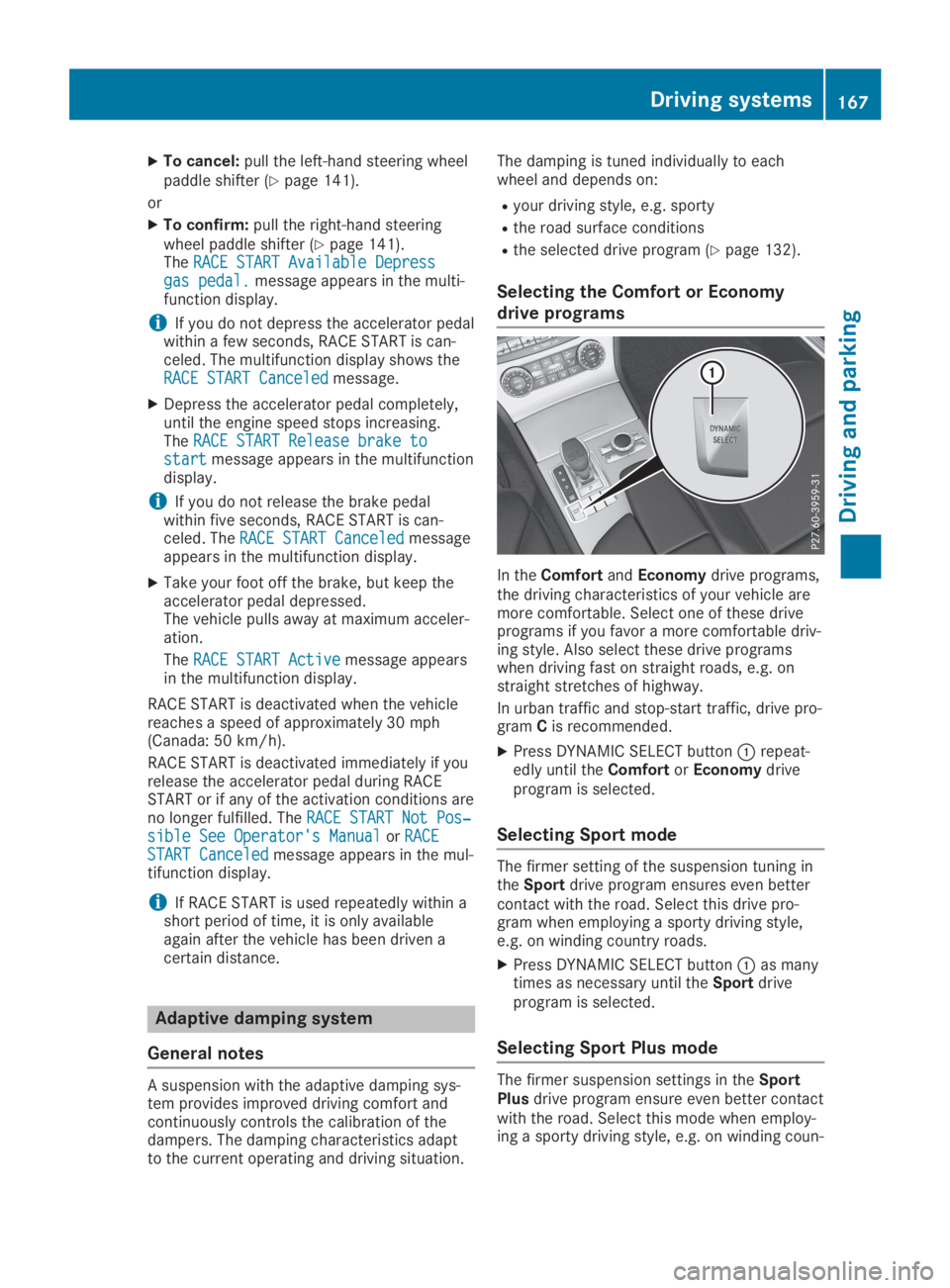
In theComfortandEconomydrive programs,the driving characteristics of your vehicle aremore comfortable. Select one of these driveprograms if you favor a more comfortable driv-ing style. Also select these drive programswhen driving fast on straight roads, e.g. onstraight stretches of highway.
In urban traffic and stop-start traffic, drive pro-gramCis recommended.
XPress DYNAMIC SELECT buttonCrepeat-edly until theComfortorEconomydriveprogram is selected.
Selecting Sport mode
The firmer setting of the suspension tuning intheSportdrive program ensures even bettercontact with the road. Select this drive pro-gram when employing a sporty driving style,e.g. on winding country roads.
XPress DYNAMIC SELECT buttonCas manytimes as necessary until theSportdriveprogram is selected.
Selecting Sport Plus mode
The firmer suspension settings in theSportPlusdrive program ensure even better contactwith the road. Select this mode when employ-ing a sporty driving style, e.g. on winding coun-
Driving systems167
Driving an d parking
Z
Page 170 of 330
try roads or, ideally, when driving on closedrace circuits.
XPress DYNAMIC SELECT buttonCrepeat-edly until theSport Plusdrive program isselected.
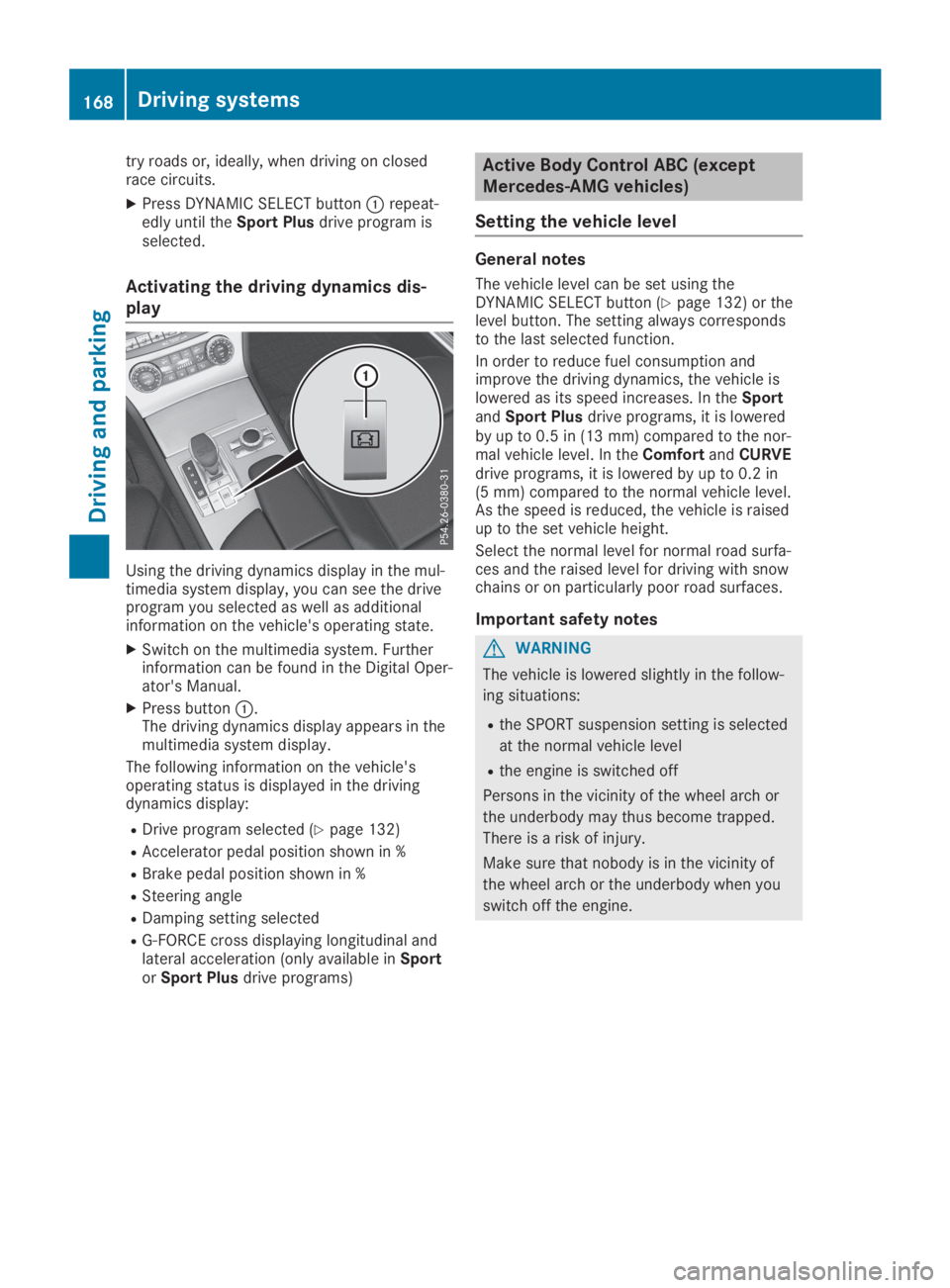
Activating the driving dynamics dis-
play
Using the driving dynamics display in the mul-timedia system display, you can see the driveprogram you selected as well as additionalinformation on the vehicle's operating state.
XSwitch on the multimedia system. Furtherinformation can be found in the Digital Oper-ator's Manual.
XPress buttonC.The driving dynamics display appears in themultimedia system display.
The following information on the vehicle'soperating status is displayed in the drivingdynamics display:
RDrive program selected (Ypage 132)
RAccelerator pedal position shown in %
RBrake pedal position shown in %
RSteering angle
RDamping setting selected
RG-FORCE cross displaying longitudinal andlateral acceleration (only available inSportorSport Plusdrive programs)
Active Body Control ABC (except
Mercedes-AMG vehicles)
Setting the vehicle level
General notes
The vehicle level can be set using theDYNAMIC SELECT button (Ypage 132) or thelevel button. The setting always correspondsto the last selected function.
In order to reduce fuel consumption andimprove the driving dynamics, the vehicle islowered as its speed increases. In theSportandSport Plusdrive programs, it is loweredby up to 0.5 in (13 mm) compared to the nor-mal vehicle level. In theComfortandCURVEdrive programs, it is lowered by up to 0.2 in(5 mm) compared to the normal vehicle level.As the speed is reduced, the vehicle is raisedup to the set vehicle height.
Select the normal level for normal road surfa-ces and the raised level for driving with snowchains or on particularly poor road surfaces.
Important safety notes
GWARNING
The vehicle is lowered slightly in the follow-
ing situations:
Rthe SPORT suspension setting is selected
at the normal vehicle level
Rthe engine is switched off
Persons in the vicinity of the wheel arch or
the underbody may thus become trapped.
There is a risk of injury.
Make sure that nobody is in the vicinity of
the wheel arch or the underbody when you
switch off the engine.
168Driving systems
Driving an d parking
Page 171 of 330
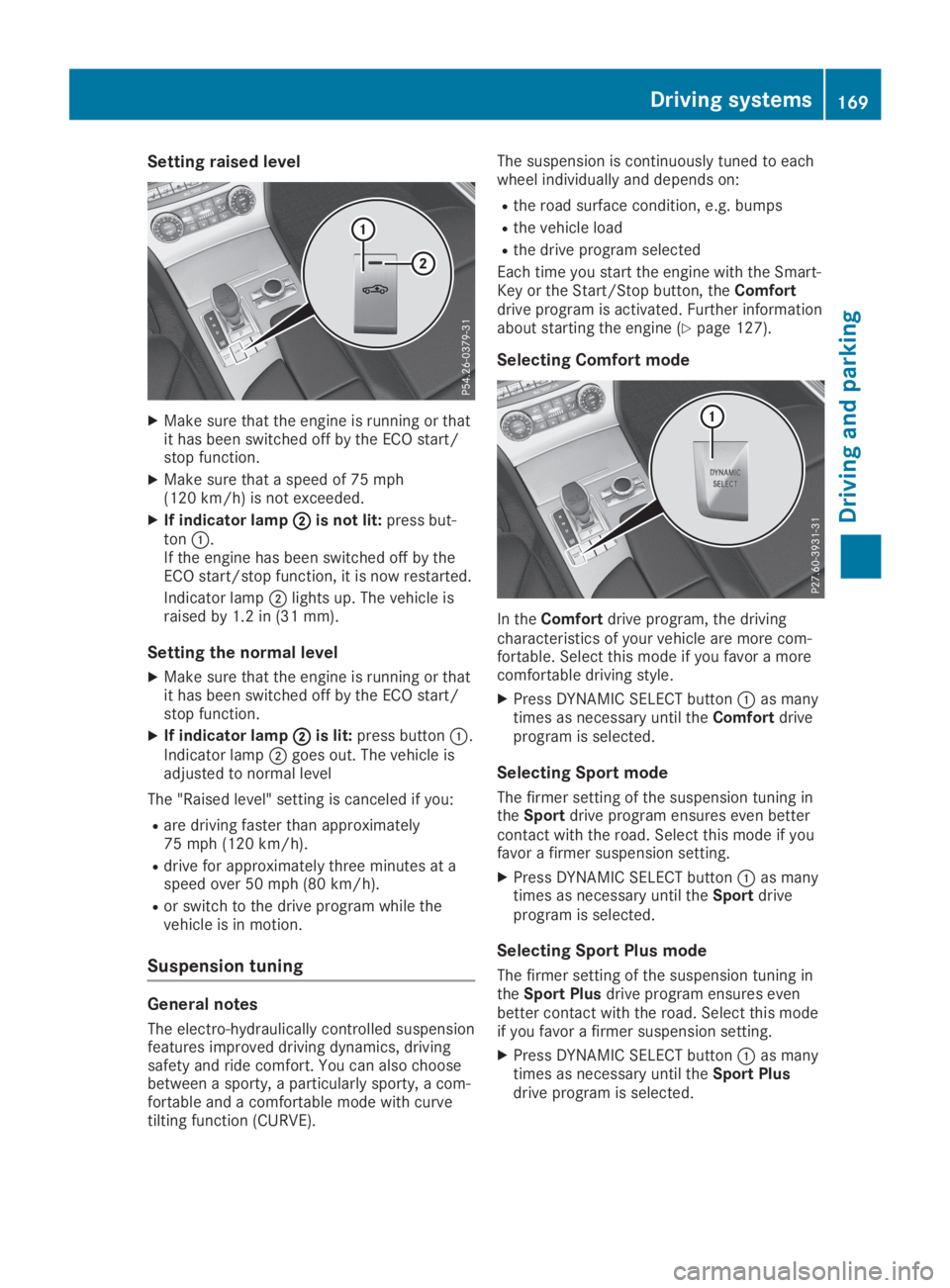
Setting raised level
XMake sure that the engine is running or thatit has been switched off by the ECO start/stop function.
XMake sure that a speed of 75 mph(120 km/h) is not exceeded.
XIf indicator lampDDis not lit:press but-tonC.If the engine has been switched off by theECO start/stop function, it is now restarted.
Indicator lampDlights up. The vehicle israised by 1.2 in (31 mm).
Setting the normal level
XMake sure that the engine is running or thatit has been switched off by the ECO start/stop function.
XIf indicator lampDDis lit:press buttonC.Indicator lampDgoes out. The vehicle isadjusted to normal level
The "Raised level" setting is canceled if you:
Rare driving faster than approximately75 mph (120 km/h).
Rdrive for approximately three minutes at aspeed over 50 mph (80 km/h).
Ror switch to the drive program while thevehicle is in motion.
Suspension tuning
General notes
The electro-hydraulically controlled suspensionfeatures improved driving dynamics, drivingsafety and ride comfort. You can also choosebetween a sporty, a particularly sporty, a com-fortable and a comfortable mode with curvetilting function (CURVE).
The suspension is continuously tuned to eachwheel individually and depends on:
Rthe road surface condition, e.g. bumps
Rthe vehicle load
Rthe drive program selected
Each time you start the engine with the Smart-Key or the Start/Stop button, theComfortdrive program is activated. Further informationabout starting the engine (Ypage 127).
Selecting Comfort mode
In theComfortdrive program, the drivingcharacteristics of your vehicle are more com-fortable. Select this mode if you favor a morecomfortable driving style.
XPress DYNAMIC SELECT buttonCas manytimes as necessary until theComfortdriveprogram is selected.
Selecting Sport mode
The firmer setting of the suspension tuning intheSportdrive program ensures even bettercontact with the road. Select this mode if youfavor a firmer suspension setting.
XPress DYNAMIC SELECT buttonCas manytimes as necessary until theSportdriveprogram is selected.
Selecting Sport Plus mode
The firmer setting of the suspension tuning intheSport Plusdrive program ensures evenbetter contact with the road. Select this modeif you favor a firmer suspension setting.
XPress DYNAMIC SELECT buttonCas manytimes as necessary until theSport Plusdrive program is selected.
Driving systems169
Driving and parking
Z