light MERCEDES-BENZ SL CLASS 2019 Repair Manual
[x] Cancel search | Manufacturer: MERCEDES-BENZ, Model Year: 2019, Model line: SL CLASS, Model: MERCEDES-BENZ SL CLASS 2019Pages: 330, PDF Size: 16.53 MB
Page 173 of 330
Important safety notes
The vehicle is slightly lowered when the engineis switched off.
GWARNING
When the vehicle is being lowered, people
could become trapped if their limbs are
between the vehicle body and the wheels or
underneath the vehicle. There is a risk of
injury.
Make sure no one is underneath the vehicle
or in the immediate vicinity of the wheel
arches when the vehicle is being lowered.
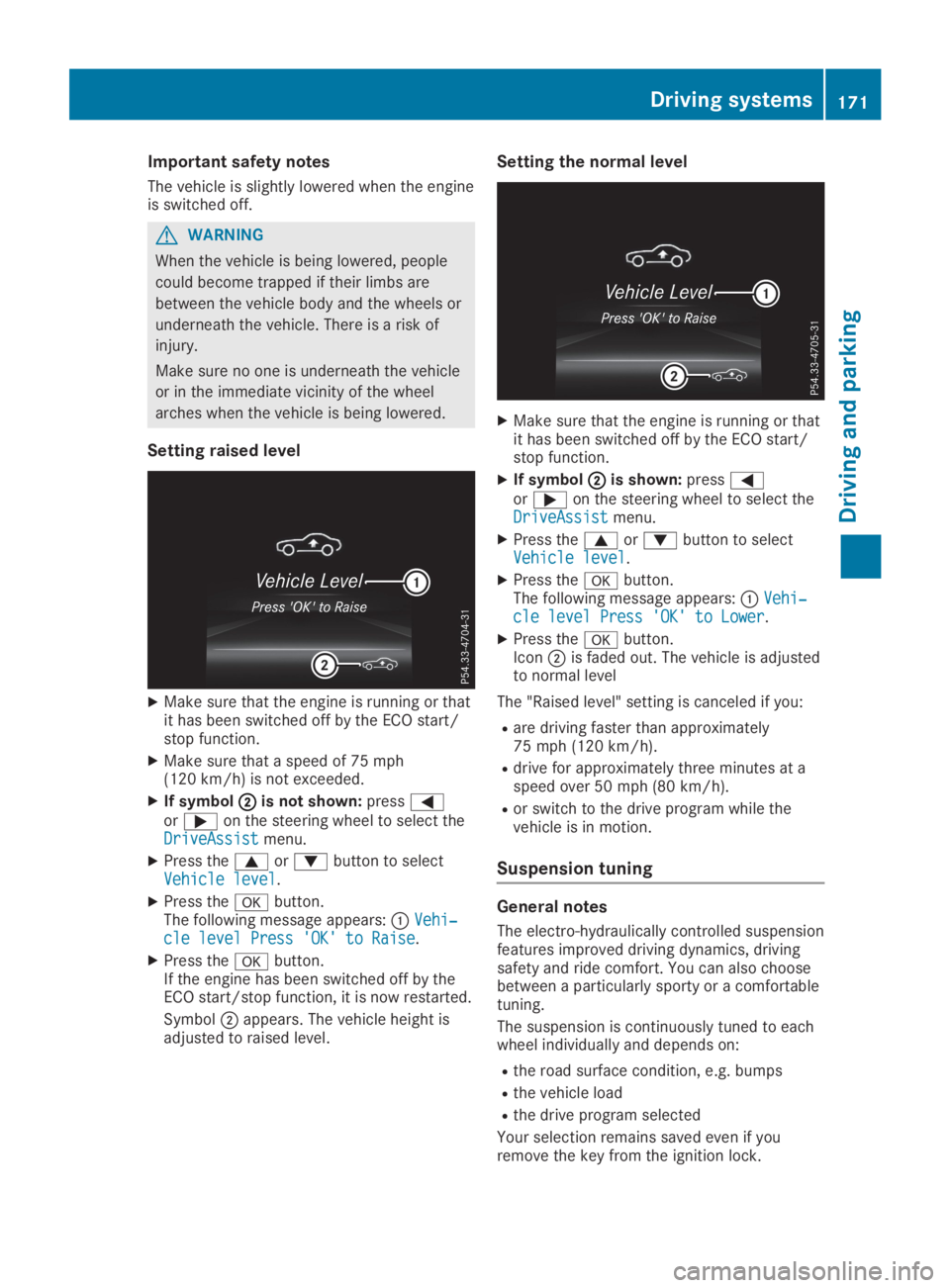
Setting raised level
XMake sure that the engine is running or thatit has been switched off by the ECO start/stop function.
XMake sure that a speed of 75 mph(120 km/h) is not exceeded.
XIf symbolDDis not shown:pressYoreon the steering wheel to select theDriveAssistDriveAssistmenu.
XPress thecordbutton to selectVehicle levelVehicle level.
XPress thevbutton.The following message appears:CVehi‐Vehi‐cle level Press 'OK' to Raisecle level Press 'OK' to Raise.
XPress thevbutton.If the engine has been switched off by theECO start/stop function, it is now restarted.
SymbolDappears. The vehicle height isadjusted to raised level.
Setting the normal level
XMake sure that the engine is running or thatit has been switched off by the ECO start/stop function.
XIf symbolDDis shown:pressYoreon the steering wheel to select theDriveAssistDriveAssistmenu.
XPress thecordbutton to selectVehicle levelVehicle level.
XPress thevbutton.The following message appears:CVehi‐Vehi‐cle level Press 'OK' to Lowercle level Press 'OK' to Lower.
XPress thevbutton.IconDis faded out. The vehicle is adjustedto normal level
The "Raised level" setting is canceled if you:
Rare driving faster than approximately75 mph (120 km/h).
Rdrive for approximately three minutes at aspeed over 50 mph (80 km/h).
Ror switch to the drive program while thevehicle is in motion.
Suspension tuning
General notes
The electro-hydraulically controlled suspensionfeatures improved driving dynamics, drivingsafety and ride comfort. You can also choosebetween a particularly sporty or a comfortabletuning.
The suspension is continuously tuned to eachwheel individually and depends on:
Rthe road surface condition, e.g. bumps
Rthe vehicle load
Rthe drive program selected
Your selection remains saved even if youremove the key from the ignition lock.
Driving systems171
Driving and pa rking
Z
Page 174 of 330
Each time you start the engine with the Smart-Key or the Start/Stop button, the comfortablesetting is activated. For further informationabout starting the engine, see (Ypage 127).
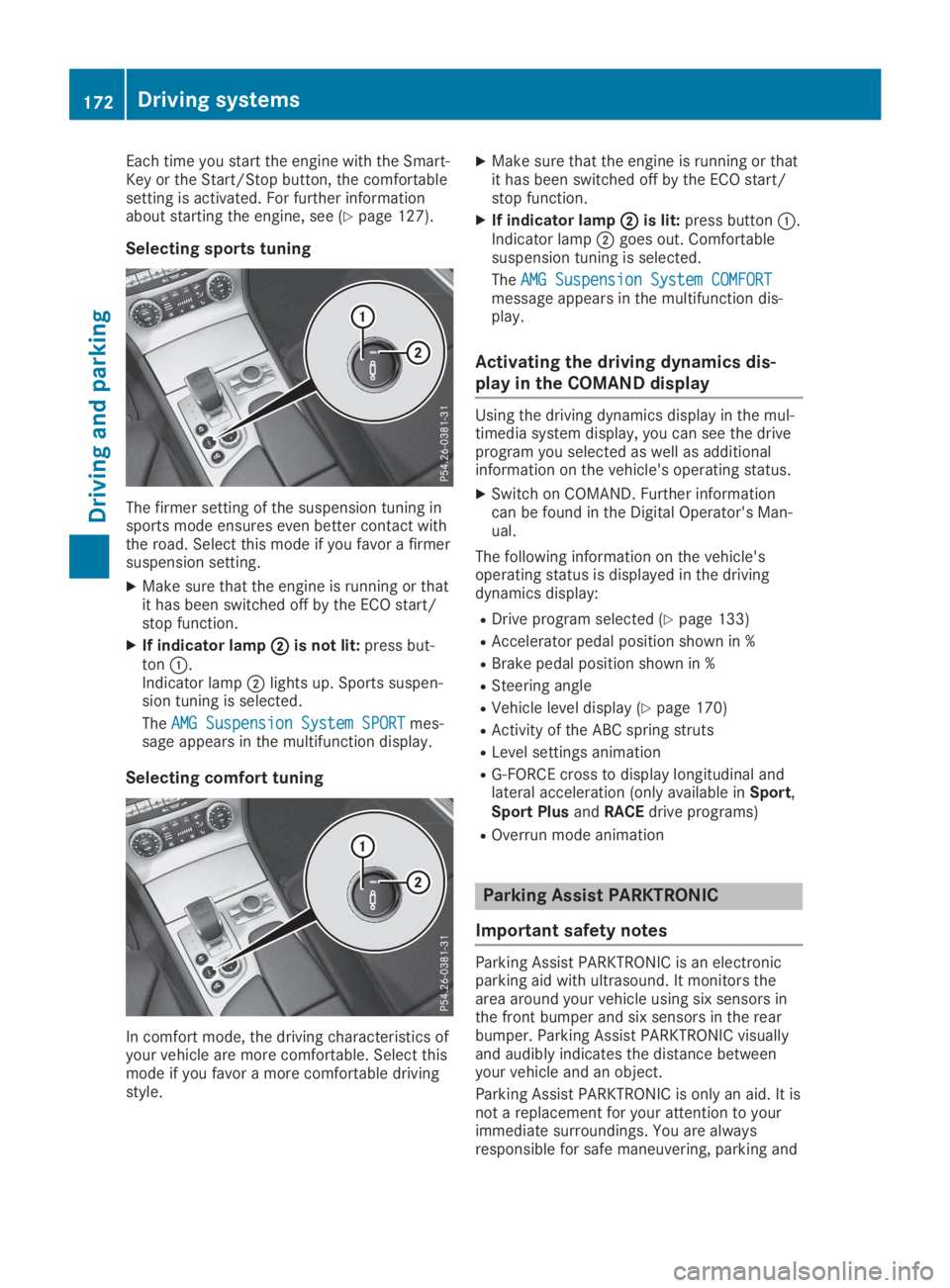
Selecting sports tuning
The firmer setting of the suspension tuning insports mode ensures even better contact withthe road. Select this mode if you favor a firmersuspension setting.
XMake sure that the engine is running or thatit has been switched off by the ECO start/stop function.
XIf indicator lampDDis not lit:press but-tonC.Indicator lampDlights up. Sports suspen-sion tuning is selected.
TheAMG Suspension System SPORTAMG Suspension System SPORTmes-sage appears in the multifunction display.
Selecting comfort tuning
In comfort mode, the driving characteristics ofyour vehicle are more comfortable. Select thismode if you favor a more comfortable drivingstyle.
XMake sure that the engine is running or thatit has been switched off by the ECO start/stop function.
XIf indicator lampDDis lit:press buttonC.Indicator lampDgoes out. Comfortablesuspension tuning is selected.
TheAMG Suspension System COMFORTAMG Suspension System COMFORTmessage appears in the multifunction dis-play.
Activating the driving dynamics dis-
play in the COMAND display
Using the driving dynamics display in the mul-timedia system display, you can see the driveprogram you selected as well as additionalinformation on the vehicle's operating status.
XSwitch on COMAND. Further informationcan be found in the Digital Operator's Man-ual.
The following information on the vehicle'soperating status is displayed in the drivingdynamics display:
RDrive program selected (Ypage 133)
RAccelerator pedal position shown in %
RBrake pedal position shown in %
RSteering angle
RVehicle level display (Ypage 170)
RActivity of the ABC spring struts
RLevel settings animation
RG-FORCE cross to display longitudinal andlateral acceleration (only available inSport,Sport PlusandRACEdrive programs)
ROverrun mode animation
Parking Assist PARKTRONIC
Important safety notes
Parking Assist PARKTRONIC is an electronicparking aid with ultrasound. It monitors thearea around your vehicle using six sensors inthe front bumper and six sensors in the rearbumper. Parking Assist PARKTRONIC visuallyand audibly indicates the distance betweenyour vehicle and an object.
Parking Assist PARKTRONIC is only an aid. It isnot a replacement for your attention to yourimmediate surroundings. You are alwaysresponsible for safe maneuvering, parking and
172Driving systems
Driving an d parking
Page 176 of 330
Rear sensors
CenterApprox. 48 in (approx.120 cm)
CornersApprox. 32 in (approx.80 cm)
Minimum distance
CenterApprox. 8 in (approx.20 cm)
CornersApprox. 6 in (approx.15 cm)
If there is an obstacle within this range, therelevant warning displays light up and a warn-ing tone sounds. If the distance falls below theminimum, the distance may no longer beshown.
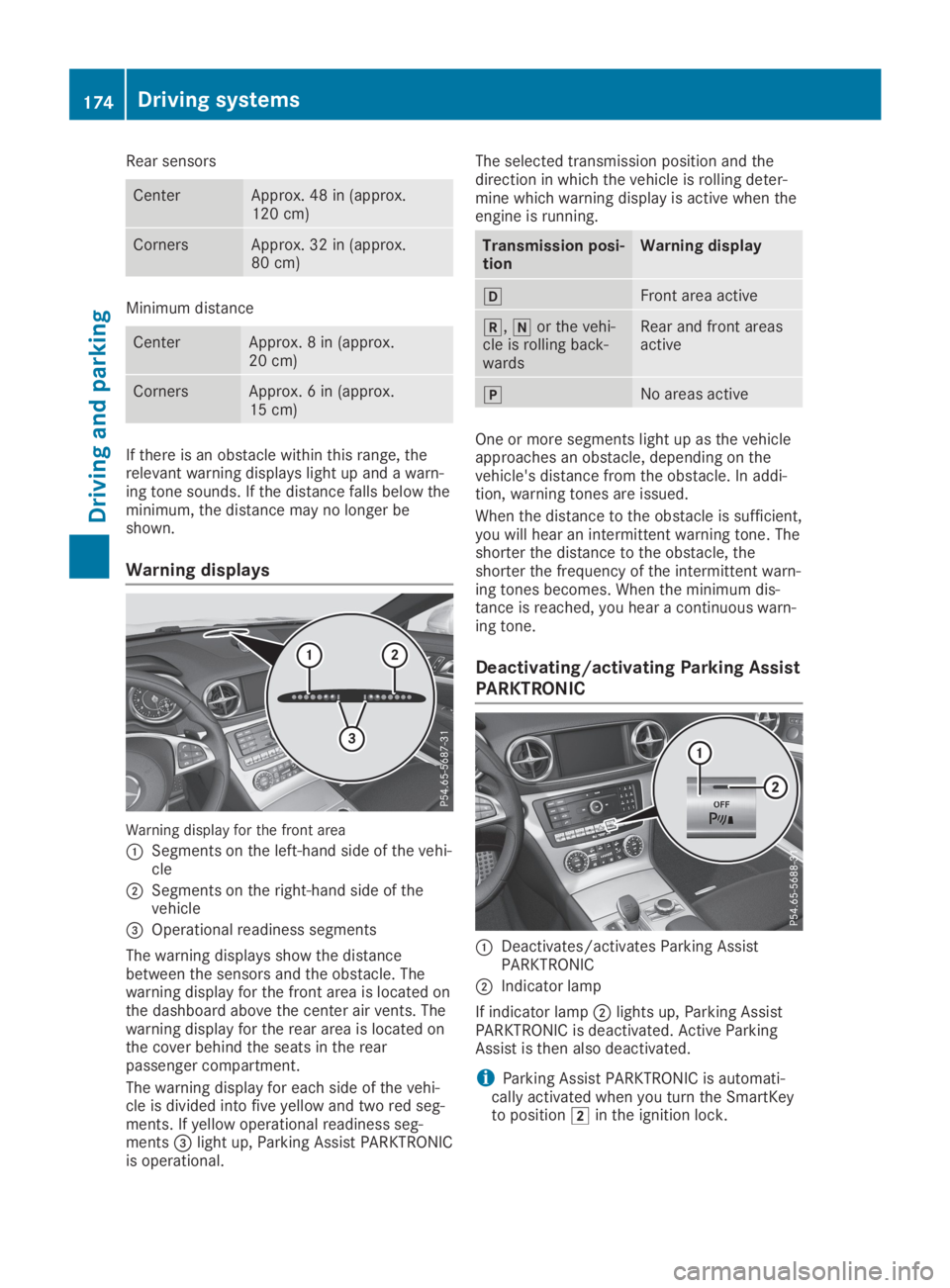
Warning displays
Warning display for the front area
CSegments on the left-hand side of the vehi-cle
DSegments on the right-hand side of thevehicle
Page 177 of 330
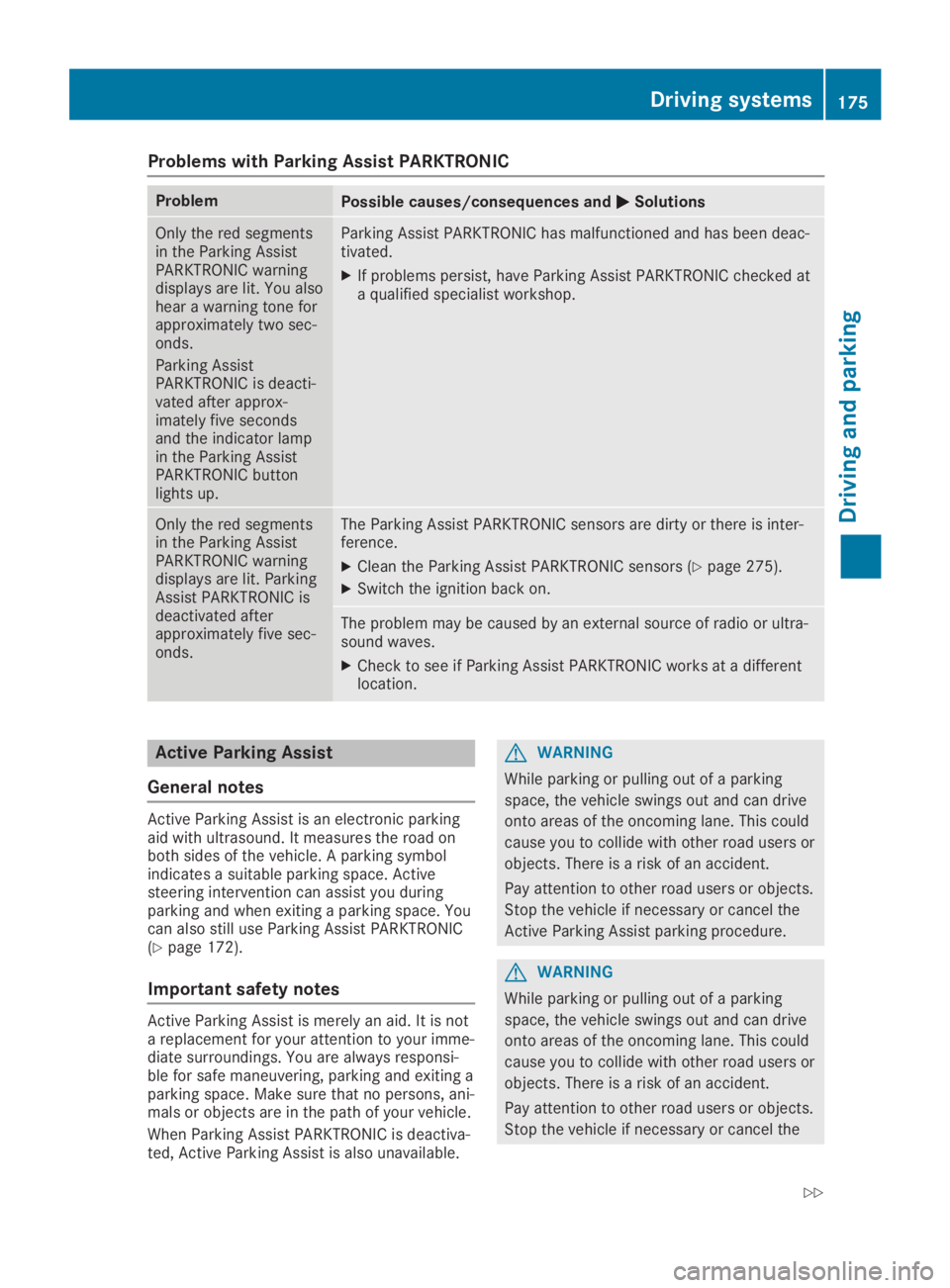
Problems with Parking Assist PARKTRONIC
ProblemPossible causes/consequences andPPSolutions
Only the red segmentsin the Parking AssistPARKTRONIC warningdisplays are lit. You alsohear a warning tone forapproximately two sec-onds.
Parking AssistPARKTRONIC is deacti-vated after approx-imately five secondsand the indicator lampin the Parking AssistPARKTRONIC buttonlights up.
Parking Assist PARKTRONIC has malfunctioned and has been deac-tivated.
XIf problems persist, have Parking Assist PARKTRONIC checked ata qualified specialist workshop.
Only the red segmentsin the Parking AssistPARKTRONIC warningdisplays are lit. ParkingAssist PARKTRONIC isdeactivated afterapproximately five sec-onds.
The Parking Assist PARKTRONIC sensors are dirty or there is inter-ference.
XClean the Parking Assist PARKTRONIC sensors (Ypage 275).
XSwitch the ignition back on.
The problem may be caused by an external source of radio or ultra-sound waves.
XCheck to see if Parking Assist PARKTRONIC works at a differentlocation.
Active Parking Assist
General notes
Active Parking Assist is an electronic parkingaid with ultrasound. It measures the road onboth sides of the vehicle. A parking symbolindicates a suitable parking space. Activesteering intervention can assist you duringparking and when exiting a parking space. Youcan also still use Parking Assist PARKTRONIC(Ypage 172).
Important safety notes
Active Parking Assist is merely an aid. It is nota replacement for your attention to your imme-diate surroundings. You are always responsi-ble for safe maneuvering, parking and exiting aparking space. Make sure that no persons, ani-mals or objects are in the path of your vehicle.
When Parking Assist PARKTRONIC is deactiva-ted, Active Parking Assist is also unavailable.
GWARNING
While parking or pulling out of a parking
space, the vehicle swings out and can drive
onto areas of the oncoming lane. This could
cause you to collide with other road users or
objects. There is a risk of an accident.
Pay attention to other road users or objects.
Stop the vehicle if necessary or cancel the
Active Parking Assist parking procedure.
GWARNING
While parking or pulling out of a parking
space, the vehicle swings out and can drive
onto areas of the oncoming lane. This could
cause you to collide with other road users or
objects. There is a risk of an accident.
Pay attention to other road users or objects.
Stop the vehicle if necessary or cancel the
Driving systems175
Driving and parking
Z
Page 182 of 330
Under the following circumstances, the rearview camera will not function, or will functionin a limited manner:
Rif the trunk lid is open
Rin heavy rain, snow or fog
Rat night or in very dark places
Rif the camera is exposed to very bright light
Rif the area is lit by fluorescent bulbs or LEDlighting (the display may flicker)
Rif there is a sudden change in temperature,e.g. when driving into a heated garage inwinter
Rif the camera lens is dirty or obstructed.Observe the notes on cleaning(Ypage 275)
Rif the rear of your vehicle is damaged. In thiscase, have the camera position and settingchecked at a qualified specialist workshop.
The field of vision and other functions of therear view camera may be restricted due toadditional accessories on the rear of the vehi-cle (e.g. license plate holder, bicycle rack).
On vehicles with height-adjustable chassis,leaving the standard height can result in inac-curacies in the guide lines, depending on tech-nical conditions.
iThe contrast of the display may be affec-ted by the sudden presence of sunlight orother light sources, e.g. when exiting agarage. Pay particular attention in this situa-tion.
iIf usability is severely restricted, e.g. dueto pixel errors, have the display repaired orreplaced.
Activating/deactivating the rear view
camera
XTo activate:make sure that the SmartKeyis in positionHin the ignition lock.
XMake sure that theActivation by R gearActivation by R gearfunction is selected in the multimedia sys-tem; see the Digital Operator's Manual.
XEngage reverse gear.The multimedia system shows the areabehind the vehicle with guide lines.
The image from the rear view camera isavailable throughout the maneuvering proc-ess.
To deactivate:the rear view camera deacti-vates if you shift the transmission to position], or after driving forwards a short distance.
The inner segments of the warning indicatorare displayed in red if there is a complete sys-tem failure. The indicator lamp in thePARKTRONIC button lights up.
If the system fails at the rear of the vehicle:
Rthe rear segments are shown in red whenbacking up.
Rthe rear segments are hidden when drivingforwards.
Displays in the multimedia system
The rear view camera may show a distortedview of obstacles, show them incorrectly ornot at all. The rear view camera does not showobjects in the following positions:
Rvery close to the rear bumper
Runder the rear bumper
Rin close range above the handle on the trunklid
!Objects not at ground level may appear tobe further away than they actually are, e.g.:
Rthe bumper of a parked vehicle
Rthe drawbar of a trailer
Rthe ball coupling of a trailer tow hitch
Rthe rear section of an HGV
Ra slanted post
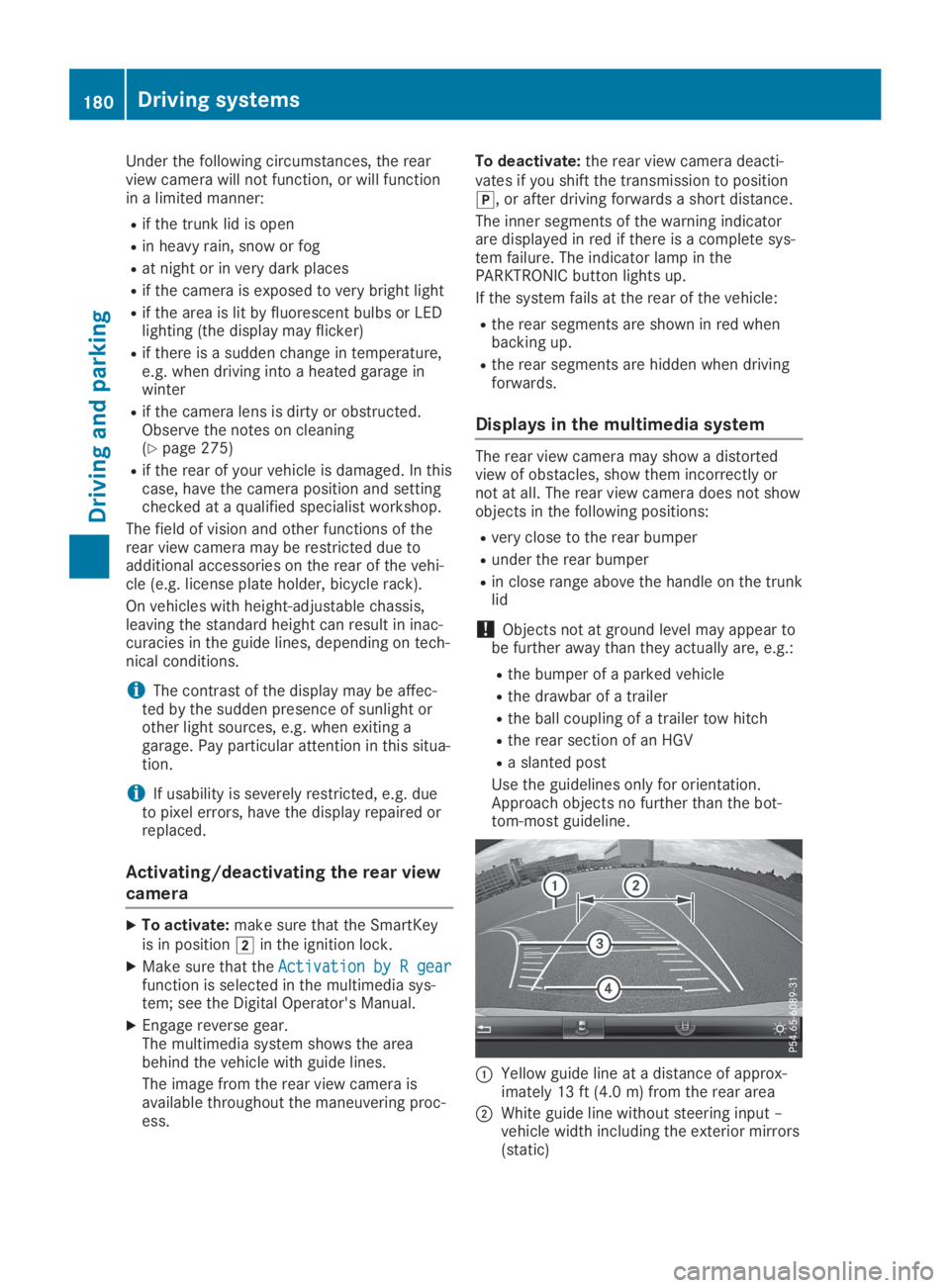
Use the guidelines only for orientation.Approach objects no further than the bot-tom-most guideline.
CYellow guide line at a distance of approx-imately 13 ft (4.0 m) from the rear area
DWhite guide line without steering input –vehicle width including the exterior mirrors(static)
180Driving systems
Driving and parking
Page 188 of 330
Due to the nature of the system:
Rwarnings may be issued in error when driv-ing close to crash barriers or similar solidlane borders.
Rwarnings may be interrupted when drivingalongside particularly long vehicles, e.g.trucks, for a prolonged time.
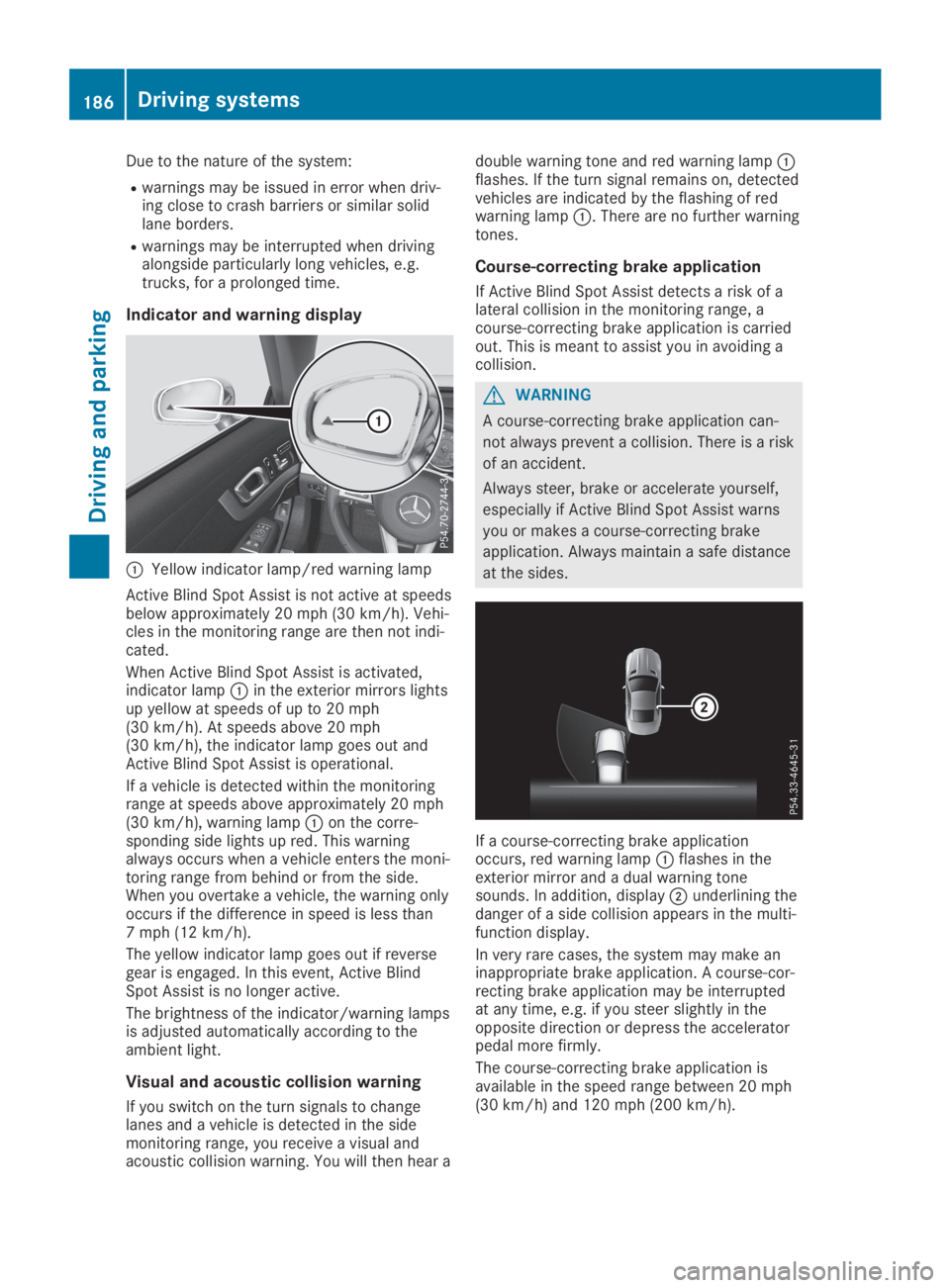
Indicator and warning display
CYellow indicator lamp/red warning lamp
Active Blind Spot Assist is not active at speedsbelow approximately 20 mph (30 km/h). Vehi-cles in the monitoring range are then not indi-cated.
When Active Blind Spot Assist is activated,indicator lampCin the exterior mirrors lightsup yellow at speeds of up to 20 mph(30 km/h). At speeds above 20 mph(30 km/h), the indicator lamp goes out andActive Blind Spot Assist is operational.
If a vehicle is detected within the monitoringrange at speeds above approximately 20 mph(30 km/h), warning lampCon the corre-sponding side lights up red. This warningalways occurs when a vehicle enters the moni-toring range from behind or from the side.When you overtake a vehicle, the warning onlyoccurs if the difference in speed is less than7 mph (12 km/h).
The yellow indicator lamp goes out if reversegear is engaged. In this event, Active BlindSpot Assist is no longer active.
The brightness of the indicator/warning lampsis adjusted automatically according to theambient light.
Visual and acoustic collision warning
If you switch on the turn signals to changelanes and a vehicle is detected in the sidemonitoring range, you receive a visual andacoustic collision warning. You will then hear a
double warning tone and red warning lampCflashes. If the turn signal remains on, detectedvehicles are indicated by the flashing of redwarning lampC. There are no further warningtones.
Course-correcting brake application
If Active Blind Spot Assist detects a risk of alateral collision in the monitoring range, acourse-correcting brake application is carriedout. This is meant to assist you in avoiding acollision.
GWARNING
A course-correcting brake application can-
not always prevent a collision. There is a risk
of an accident.
Always steer, brake or accelerate yourself,
especially if Active Blind Spot Assist warns
you or makes a course-correcting brake
application. Always maintain a safe distance
at the sides.
If a course-correcting brake applicationoccurs, red warning lampCflashes in theexterior mirror and a dual warning tonesounds. In addition, displayDunderlining thedanger of a side collision appears in the multi-function display.
In very rare cases, the system may make aninappropriate brake application. A course-cor-recting brake application may be interruptedat any time, e.g. if you steer slightly in theopposite direction or depress the acceleratorpedal more firmly.
The course-correcting brake application isavailable in the speed range between 20 mph(30 km/h) and 120 mph (200 km/h).
186Driving systems
Driving an d parking
Page 189 of 330

Either no braking application, or a course-cor-recting brake application adapted to the driv-ing situation occurs if:
Rthere are vehicles or obstacles, e.g. crashbarriers, located on both sides of your vehi-cle.
Ra vehicle approaches you too closely at theside.
Ryou have adopted a sporty driving style withhigh cornering speeds.
Ryou clearly brake or accelerate.
Ra driving safety system intervenes, e.g.
ESP®or PRE-SAFE®Brake.
RESP®is switched off.
Ra loss of tire pressure or a defective tire isdetected.
Switching on Active Blind Spot Assist
XMake sure that Active Blind Spot Assist isactivated (Ypage 199).
XTurn the SmartKey to positionHin the igni-tion lock.Warning lampsCin the exterior mirrorslight up red for approximately 1.5 secondsand then turn yellow.
Active Lane Keeping Assist
General notes
Active Lane Keeping Assist monitors the areain front of your vehicle by means of multifunc-tion cameraCat the top of the windshield.Various areas to the front, rear and side ofyour vehicle are also monitored with the aid ofthe radar sensor system. Active Lane KeepingAssist detects lane markings on the road andcan warn you before you leave your lane unin-tentionally. If you do not react to the warning,a lane-correcting application of the brakes canbring the vehicle back into the original lane.
This function is available in a speed rangebetween 40 mph and 120 mph (60 km/h and200 km/h).
For Active Lane Keeping Assist to assist youwhen driving, the radar sensor system must beoperational.
Important safety notes
If you fail to adapt your driving style, ActiveLane Keeping Assist can neither reduce therisk of accident nor override the laws of phys-ics. Active Lane Keeping Assist cannot takeinto account road, weather or traffic condi-tions. Active Lane Keeping Assist is only anaid. You are responsible for the distance to thevehicle in front, for vehicle speed, for brakingin good time and for staying in your lane.
Active Lane Keeping Assist cannot continu-ously keep your vehicle in its lane.
GWARNING
Active Lane Keeping Assist cannot always
clearly detect lane markings.
Driving systems187
Driving an d parking
Z
Page 190 of 330
In such cases, Active Lane Keeping Assist
can:
Rgive an unnecessary warning and then
make a course-correcting brake applica-
tion
Rneither give a warning nor intervene
There is a risk of an accident.
Always pay particular attention to the traffic
situation and keep within the lane, espe-
cially if Active Lane Keeping Assist alerts
you. Terminate the intervention in a non-crit-
ical driving situation.
The system may be impaired or may not func-tion if:
Rthere is poor visibility, e.g. due to insuffi-cient illumination of the road, or due tosnow, rain, fog or heavy spray
Rthere is glare, e.g. from oncoming traffic,the sun or reflection from other vehicles(e.g. if the road surface is wet)
Rthe windshield is dirty, fogged up, damagedor covered, for instance by a sticker, in thevicinity of the camera
Rthere are no lane markings, or severalunclear lane markings are present, e.g.around construction sites
Rthe lane markings are worn away, dark orcovered up, e.g. by dirt or snow
Rthe distance to the vehicle in front is tooshort and thus the lane markings cannot bedetected
Rthe lane markings change quickly, e.g. lanesbranch off, cross one another or merge
Rthe road is narrow and winding
Rthere are highly variable shade conditionson the roadway
Rno vehicle is detected in the adjacent laneand there are broken lane markings
Warning vibration in the steering wheel
A warning may be given if a front wheel passesover a lane marking. You will then be warnedby means of a vibration through the steeringwheel lasting for up to 1.5 seconds.
In order that you are warned only when neces-sary and in good time if you cross the lanemarking, the system detects certain condi-tions and warns you accordingly.
The warning vibration occurs earlier if:
Ryou approach the outer lane marking on abend
Rthe road has very wide lanes, e.g. a freeway
Rthe system detects solid lane markings
The warning vibration occurs later if:
Rthe road has narrow lanes
Ryou cut the corner on a bend
Lane-correcting brake application
GWARNING
A lane-correcting brake application cannot
always bring the vehicle back into the origi-
nal lane. There is a risk of an accident.
Always steer, brake or accelerate yourself,
especially if Active Lane Keeping Assist
warns you or makes a lane-correcting brake
application.
GWARNING
Active Lane Keeping Assist only detects traf-
fic conditions or road users to a limited
extent. In very rare cases, the system may
make an inappropriate brake application,
e.g. after intentionally driving over a solid
lane marking. There is a risk of an accident.
An inappropriate brake application may be
interrupted at any time if you steer slightly
in the opposite direction. Always make sure
that there is sufficient distance on the side
for other traffic or obstacles.
In rare cases, Active Lane Keeping Assistcould detect broken line markings or specialstructures on the road surface as solid lanemarkings. An inappropriate brake applicationcan be interrupted at any time, for example ifyou steer slightly in the opposite direction.
188Driving systems
Driving and parking
Page 191 of 330
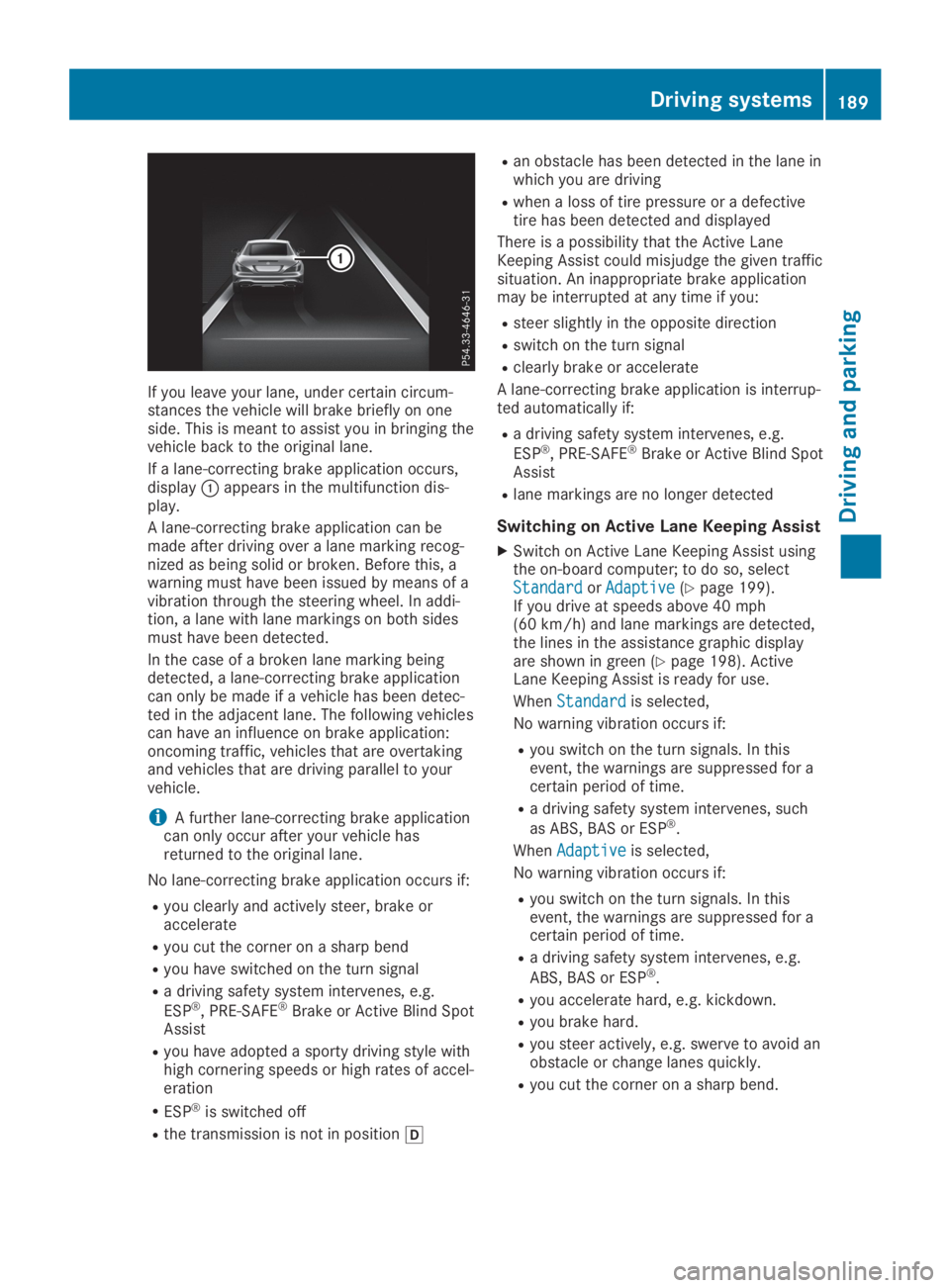
If you leave your lane, under certain circum-stances the vehicle will brake briefly on oneside. This is meant to assist you in bringing thevehicle back to the original lane.
If a lane-correcting brake application occurs,displayCappears in the multifunction dis-play.
A lane-correcting brake application can bemade after driving over a lane marking recog-nized as being solid or broken. Before this, awarning must have been issued by means of avibration through the steering wheel. In addi-tion, a lane with lane markings on both sidesmust have been detected.
In the case of a broken lane marking beingdetected, a lane-correcting brake applicationcan only be made if a vehicle has been detec-ted in the adjacent lane. The following vehiclescan have an influence on brake application:oncoming traffic, vehicles that are overtakingand vehicles that are driving parallel to yourvehicle.
iA further lane-correcting brake applicationcan only occur after your vehicle hasreturned to the original lane.
No lane-correcting brake application occurs if:
Ryou clearly and actively steer, brake oraccelerate
Ryou cut the corner on a sharp bend
Ryou have switched on the turn signal
Ra driving safety system intervenes, e.g.
ESP®, PRE-SAFE®Brake or Active Blind SpotAssist
Ryou have adopted a sporty driving style withhigh cornering speeds or high rates of accel-eration
RESP®is switched off
Rthe transmission is not in position[
Ran obstacle has been detected in the lane inwhich you are driving
Rwhen a loss of tire pressure or a defectivetire has been detected and displayed
There is a possibility that the Active LaneKeeping Assist could misjudge the given trafficsituation. An inappropriate brake applicationmay be interrupted at any time if you:
Rsteer slightly in the opposite direction
Rswitch on the turn signal
Rclearly brake or accelerate
A lane-correcting brake application is interrup-ted automatically if:
Ra driving safety system intervenes, e.g.
ESP®, PRE-SAFE®Brake or Active Blind SpotAssist
Rlane markings are no longer detected
Switching on Active Lane Keeping Assist
XSwitch on Active Lane Keeping Assist usingthe on-board computer; to do so, selectStandardStandardorAdaptiveAdaptive(Ypage 199).If you drive at speeds above 40 mph(60 km/h) and lane markings are detected,the lines in the assistance graphic displayare shown in green (Ypage 198). ActiveLane Keeping Assist is ready for use.
WhenStandardStandardis selected,
No warning vibration occurs if:
Ryou switch on the turn signals. In thisevent, the warnings are suppressed for acertain period of time.
Ra driving safety system intervenes, such
as ABS, BAS or ESP®.
WhenAdaptiveAdaptiveis selected,
No warning vibration occurs if:
Ryou switch on the turn signals. In thisevent, the warnings are suppressed for acertain period of time.
Ra driving safety system intervenes, e.g.
ABS, BAS or ESP®.
Ryou accelerate hard, e.g. kickdown.
Ryou brake hard.
Ryou steer actively, e.g. swerve to avoid anobstacle or change lanes quickly.
Ryou cut the corner on a sharp bend.
Driving systems189
Driving and parking
Z
Page 192 of 330

Important safety notes
GWARNING
If you operate information systems and com-
munication equipment integrated in the
vehicle when driving, you may be distracted
from the traffic situation. You could also
lose control of the vehicle. There is a risk of
an accident.
Only operate this equipment when the traffic
situation permits. If you are not sure that
this is possible, park the vehicle paying
attention to traffic conditions and operate
the equipment when the vehicle is station-
ary.
You must observe the legal requirements forthe country in which you are currently drivingwhen operating the on-board computer.
GWARNING
If the instrument cluster has failed or mal-
functioned, you may not recognize function
restrictions in systems relevant to safety.
The operating safety of your vehicle may be
impaired. There is a risk of an accident.
Drive on carefully. Have the vehicle checked
at a qualified specialist workshop immedi-
ately.
The on-board computer only shows messagesor warnings from certain systems in the multi-function display. You should therefore makesure your vehicle is operating safely at alltimes.
If the operating safety of your vehicle isimpaired, pull over as soon as it is safe to doso. Contact a qualified specialist workshop.
For an overview, see the instrument panelillustration (Ypage 33).
Displays and operation
Instrument cluster lighting
The lighting in the instrument cluster, in thedisplays and the controls in the vehicle interiorcan be adjusted using the brightness controlknob.
The brightness control knob is located on thebottom left of the instrument cluster(Ypage 33).
XTurn the brightness control knob clockwiseor counter-clockwise.If you turn the light switch (Ypage 109) totheX,`orXposition, the bright-ness will depend upon the brightness of theambient light.
The light sensor in the instrument clusterautomatically controls the brightness of themultifunction display. In daylight, the dis-plays in the instrument cluster are not illu-minated.
Speedometer with segments
The segments in the speedometer indicatewhich speed range is available.
RCruise control activated (Ypage 154):
The segments light up from the storedspeed to the maximum speed.
RActive Distance Assist DISTRONIC activated(Ypage 156):
One or two segments in the set speed rangelight up.
RActive Distance Assist DISTRONIC detects avehicle in front moving more slowly than thestored speed:
The segments between the speed of thevehicle in front and the stored speed lightup.
Tachometer
!Do not drive in the overrevving range, asthis could damage the engine.
The red band in the tachometer indicates theengine's overrevving range.
The fuel supply is interrupted to protect theengine when the red band is reached.
Outside temperature display
You should pay special attention to road con-ditions when temperatures are around freezingpoint.
190Displays and operation
On-board computer and displays