air condition MERCEDES-BENZ SL CLASS 2019 Owners Manual
[x] Cancel search | Manufacturer: MERCEDES-BENZ, Model Year: 2019, Model line: SL CLASS, Model: MERCEDES-BENZ SL CLASS 2019Pages: 330, PDF Size: 16.53 MB
Page 7 of 330

Important safety notes .................. 175
Parking .......................................... 177
Active Steering Assist
Activating/deactivating .................198
Display message ............................ 226
Adaptive adjustable damping
Driving dynamics display............... 168
ADAPTIVE BRAKE................................. 70
Adaptive Brake Assist
Function/notes................................ 64
Adaptive brake lights.......................... 65
Adaptive Damping System
Function/notes............................. 167
Adaptive Highbeam Assist
Display message ............................ 218
Function/notes............................. 111
Switching on/off........................... 112
Additives (engine oil)........................ 324
Address book
see also Digital Operator's Man-
ual .................................................. 243
Adjusting the volume
Multimedia system ........................ 244
Air bags
Deployment ..................................... 53
Display message ............................ 215
Front air bag (driver, front
passenger) ....................................... 46
Head bag ......................................... 47
Important safety notes .................... 45
Introduction ..................................... 45
Knee bag .......................................... 46
Occupant Classification System
(OCS) ............................................... 48
PASSENGER AIR BAG indicator
lamps ............................................... 41
Side impact air bag.......................... 47
AIR FLOW........................................... 119
Air vents
Glove box ....................................... 123
Important safety notes .................. 122
Setting ........................................... 122
Setting the blower output of the
AIRSCARF vents ............................. 124
Setting the center air vents ........... 123
Setting the side air vents ............... 123
Switching AIRSCARF on/off.......... 102
Air-conditioning system
see Climate control
AIRSCARF
Switching on/off........................... 102
AIRSCARF vents
Setting the blower output .............. 124
Alarm
ATA (Anti-Theft Alarm system)......... 72
Switching off (ATA) .......................... 72
Switching the function on/off
(ATA) ................................................ 72
Alarm system
see ATA (Anti-Theft Alarm system)
Ambient lighting
Setting the brightness (on-board
computer) ...................................... 200
Setting the color (on-board com-
puter) ............................................. 200
AMG menu (on-board computer)..... 202
Anti-lock braking system
see ABS (Anti-lock Braking System)
Anti-skid chains
see Snow chains
Anti-theft alarm system
see ATA (Anti-Theft Alarm system)
Ashtray............................................... 254
Assistance display (on-board
computer).......................................... 198
Assistance menu (on-board com-
puter).................................................. 197
ASSYST PLUS
Displaying a service message ........ 270
Hiding a service message .............. 270
Resetting the service interval dis-
play ................................................ 270
Service message ............................ 269
Special service requirements ......... 270
ATA (Anti-Theft Alarm system)
Activating/deactivating ................... 72
Function ........................................... 72
Switching off the alarm .................... 72
ATTENTION ASSIST
Activating/deactivating ................. 198
Display message ............................ 222
Function/notes............................. 183
Audio menu (on-board computer).... 195
Index5
Page 16 of 330
Modifying the programming
(SmartKey)........................................... 75
MOExtended tires.............................. 278
Mounting wheels
Lowering the vehicle ...................... 317
Mounting a new wheel ................... 316
Preparing the vehicle .....................313
Raising the vehicle ......................... 314
Removing a wheel .......................... 316
Securing the vehicle against roll-
ing away ........................................ 314
MP3
Operation ....................................... 196
see also Digital Operator's Man-
ual ..................................................243
Multifunction display
Function/notes .............................192
Permanent display ......................... 199
Multifunction steering wheel
Operating the on-board com-
puter .............................................. 191
Overview .......................................... 34
Multimedia system
Switching on and off ......................244
Music files
see also Digital Operator's Man-
ual ..................................................243
N
Navigation
Entering a destination .................... 245
Menu (on-board computer) ............ 194
see also Digital Operator's Man-
ual ..................................................243
Navigation menu
Important safety notes .................. 194
NECK-PRO head restraints
Important safety notes .................... 55
Operation ......................................... 55
Resetting triggered .......................... 55
Notes on breaking-in a new vehi-
cle....................................................... 125
O
Occupant Classification System
(OCS)
Conditions ....................................... 48
Faults ............................................... 51
Operation ......................................... 48
Self-test ...........................................50
Occupant safety
Air bags ...........................................45
Automatic measures after an
accident ........................................... 56
Belt warning ..................................... 44
Children in the vehicle ..................... 57
Important safety notes.................... 40
Introduction to the restraint sys-
tem .................................................. 40
Occupant Classification System
(OCS) ............................................... 48
PASSENGER AIR BAG indicator
lamps ............................................... 41
Pets in the vehicle........................... 59
PRE-SAFE®(anticipatory occu-
pant protection) ............................... 55
PRE-SAFE®PLUS (anticipatory
occupant protection PLUS) .............. 56
Restraint system warning lamp ........ 41
Seat belt .......................................... 41
OCS
Faults ............................................... 51
Operation ......................................... 48
Self-test ........................................... 50
Odometer........................................... 193
Oil
see Engine oil
On-board computer
AMG menu ..................................... 202
Assistance menu ........................... 197
Audio menu ................................... 195
Convenience submenu .................. 201
Display messages .......................... 205
Displaying a service message ........ 270
Factory settings submenu ............. 202
Important safety notes .................. 190
Instrument cluster submenu .......... 199
Lighting submenu .......................... 200
Menu overview .............................. 193
Message memory .......................... 205
14Index
Page 18 of 330
Qualified specialist workshop........... 28
R
RACE START
Important safety notes .................. 166
RACE START (Mercedes-AMG
vehicles)............................................. 166
RACE TIMER (on-board computer,
Mercedes-AMG vehicles).................. 203
Radio
Selecting a station .........................195
see Digital Operator's Manual
Radio mode
see also Digital Operator's Man-
ual ..................................................243
Radio-wave reception/transmis-
sion in the vehicle
Declaration of conformity ................ 27
REACH Regulation............................... 28
Reading lamp..................................... 112
Rear fog lamp
Display message ............................ 217
Rear lamps
see Lights
Rear view camera
Cleaning instructions ..................... 275
Display in the multimedia system .. 180
Function/notes .............................179
Switching on/off ........................... 180
Rear window defroster
General notes ................................ 121
Problem (malfunction) ................... 121
Switching on/off ........................... 121
Rear-view mirror
Dipping (automatic) ....................... 106
Refrigerant (air-conditioning sys-
tem)
Important safety notes .................. 326
Refueling
Fuel gauge ....................................... 33
Important safety notes .................. 144
Refueling process .......................... 145
see Fuel
Remote control
Programming (garage door
opener) .......................................... 260
Replacing bulbs
General notes ................................ 113
Reporting safety defects.................... 29
Rescue card......................................... 29
Reserve (fuel tank)
see Fuel
Reserve fuel
Display message ............................ 221
Warning lamp ................................. 239
Residual heat (climate control)........122
Restraint system
Display message ............................ 214
Introduction ..................................... 40
Warning lamp ................................. 238
Warning lamp (function) ................... 41
Reverse gear (selector lever)........... 136
Reversing feature
Side windows ................................... 87
Trunk lid ...........................................82
Reversing lamps (display mes-
sage)................................................... 217
Roadside Assistance (breakdown).... 26
Roll bar
Display message............................ 213
Operation ......................................... 52
Roller sunblind.................................... 94
Roof
Display message ............................ 230
Important safety notes .................... 90
Opening/closing (with roof
switch) ............................................. 91
Opening/closing (with SmartKey) .... 92
Overview .......................................... 90
Problem (malfunction) ..................... 95
Relocking ......................................... 92
Roof switch.......................................... 91
Route guidance
see also Digital Operator's Man-
ual .................................................. 243
Route guidance active...................... 194
S
Safety
Children in the vehicle ..................... 57
see Occupant safety
Safety system
see Driving safety systems
16Index
Page 19 of 330

SD card
Inserting ........................................248
Inserting/removing ........................ 248
Removing ....................................... 248
SD memory card
see also Digital Operator's Man-
ual ..................................................243
Selecting ........................................ 196
Search & Send
see also Digital Operator's Man-
ual ..................................................243
Seat
Correct driver's seat position ........... 97
Seat belts
Adjusting the driver's and front-
passenger seat belt......................... 44
Correct usage .................................. 43
Fastening ......................................... 44
Important safety guidelines ............. 42
Introduction ..................................... 41
Releasing ......................................... 44
Seat belt guide ................................. 99
Switching belt adjustment on/off
(on-board computer) ...................... 202
Warning lamp ................................. 233
Warning lamp (function) ................... 44
Seats
Adjusting (electrically) ..................... 99
Adjusting the head restraint .......... 100
Belt guide ......................................... 99
Important safety notes .................... 97
Overview .......................................... 97
Seat heating problem .................... 101
Seat ventilation problem ................ 102
Sliding forward/back ..................... 100
Storing settings (memory func-
tion) ............................................... 107
Switching AIRSCARF on/off.......... 102
Switching seat heating on/off....... 101
Switching seat ventilation on/off.. 102
Selector lever
Positions ........................................ 134
Sensors (cleaning instructions)....... 275
Service menu (on-board com-
puter).................................................. 199
Service message
see ASSYST PLUS
Service products
Brake fluid ..................................... 324
Coolant (engine) ............................ 324
Engine oil ....................................... 323
Fuel ................................................ 322
Important safety notes .................. 321
Refrigerant (air-conditioning sys-
tem) ............................................... 326
Washer fluid ................................... 325
Setting the air distribution............... 120
Setting the airflow............................ 120
Setting the date/time format
see also Digital Operator's Man-
ual .................................................. 243
Setting the language
see also Digital Operator's Man-
ual .................................................. 243
Setting the time
see also Digital Operator's Man-
ual .................................................. 243
Settings
Factory (on-board computer) ......... 202
On-board computer ....................... 199
SETUP (on-board computer,
Mercedes-AMG vehicles).................. 203
Side impact air bag............................. 47
Side marker lamp (display mes-
sage)................................................... 217
Side windows
Cleaning ......................................... 274
Convenience closing feature ............ 89
Important safety information ........... 87
Opening/closing (all) ....................... 88
Opening/closing (front) ................... 88
Opening/closing (rear) .................... 88
Overview .......................................... 87
Problem (malfunction) ..................... 90
Resetting ......................................... 89
Reversing feature ............................. 87
SIRIUS services
see also Digital Operator's Man-
ual .................................................. 243
SmartKey
Changing the battery ....................... 77
Changing the programming ............. 75
Checking the battery ....................... 77
Display message ............................ 231
Index17
Page 27 of 330

have not been approved by Mercedes-Benz.This could lead to malfunctions in safety-rele-vant systems, e.g. the brake system. Use onlygenuine Mercedes-Benz parts or parts of equalquality. Only use tires, wheels and accessoriesthat have been specifically approved for yourvehicle.
Genuine Mercedes-Benz parts are subject tostrict quality control. Every part has been spe-cifically developed, manufactured or selectedfor and adapted to Mercedes-Benz vehicles.Therefore, only genuine Mercedes-Benz partsshould be used.
More than 300,000 different genuineMercedes-Benz parts are available forMercedes-Benz models.
All authorized Mercedes-Benz Centers main-tain a supply of genuine Mercedes-Benz partsfor necessary service and repair work. In addi-tion, strategically located parts delivery cen-ters provide quick and reliable parts service.
Always specify the vehicle identification num-ber (VIN) when ordering genuine Mercedes-Benz parts (Ypage 320).
Operator's Manual
Vehicle equipment
iThis Operator's Manual describes all mod-els and all standard and optional equipmentof your vehicle available at the time of goingto print. Country-specific differences arepossible. Bear in mind that your vehicle maynot feature all functions described here.This also applies to safety-relevant systemsand functions. The equipment in your vehi-cle may therefore differ from that shown inthe descriptions and illustrations.
The original purchase agreement lists all sys-tems installed in your vehicle.
Should you have any questions concerningequipment and operation, please consult anauthorized Mercedes-Benz Center.
The Operator's Manual and MaintenanceBooklet are important documents and shouldbe kept in the vehicle.
Service and vehicle operation
Warranty
The implied warranty for your vehicle appliesin accordance with the warranty terms andconditions in the Service and Warranty Infor-mation booklet.
Your authorized Mercedes-Benz Center willreplace and repair all factory-installed parts inaccordance with the following warranty termsand conditions:
RNew Vehicle Limited Warranty
REmission System Warranty
REmission Performance Warranty
RCalifornia, Connecticut, Maine, Massachu-setts, New York, Pennsylvania, Rhode Islandand Vermont Emission Control System War-ranty
RState warranty enforcement laws (lemonlaws)
Replacement parts and accessories are cov-ered by the Mercedes-Benz Parts and Acces-sories warranties. These are available at anyauthorized Mercedes-Benz Center.
iShould you lose your Service and WarrantyInformation booklet, have an authorizedMercedes-Benz Center arrange for areplacement. The new Service and WarrantyInformation booklet will be posted to you.
Information for customers in Califor-
nia
Under California law you may be entitled to areplacement of your vehicle or a refund of thepurchase price or lease price, if after a reason-able number of repair attempts Mercedes-Benz USA, LLC and/or its authorized repair orservice facilities fail to fix one or more sub-stantial defects or malfunctions in the vehiclethat are covered by its express warranty.
During the period of 18 months from originaldelivery of the vehicle or the accumulation of29,000 km (approximately 18,000 miles) onthe odometer of the vehicle, whichever occursfirst, a reasonable number of repair attemptsis presumed for a retail buyer or lessee if oneor more of the following occurs:
(1) the same substantial defect or malfunc-tion results in a condition that is likely to
Service and vehicle operation25
Introduction
Z
Page 29 of 330

European Delivery Department
98 Vanderhoof Avenue
Toronto, Ontario M4G 4C9
Operating safety
Important safety notes
GWARNING
If you do not have the prescribed service/
maintenance work or any required repairs
carried out, this can result in malfunctions
or system failures. There is a risk of an acci-
dent.
Always have the prescribed service/mainte-
nance work as well as any required repairs
carried out at a qualified specialist work-
shop.
GWARNING
Flammable material such as leaves, grass or
twigs may ignite if they come into contact
with hot parts of the exhaust system. There
is a risk of fire.
When driving on an unpaved road or off-
road, check the vehicle underside regularly.
In particular, remove trapped plant parts or
other flammable material. Contact a quali-
fied specialist workshop immediately if dam-
age is detected.
GWARNING
Modifications to electronic components,
their software as well as wiring can impair
their function and/or the function of other
networked components. In particular, sys-
tems relevant to safety could also be affec-
ted. As a result, these may no longer func-
tion as intended and/or jeopardize the oper-
ating safety of the vehicle. There is an
increased risk of an accident and injury.
Never tamper with the wiring as well as elec-
tronic components or their software. You
should have all work to electrical and elec-
tronic equipment carried out at a qualified
specialist workshop.
!There is a risk of damage to the vehicle if:
Rthe vehicle becomes stuck, e.g. on a highcurb or an unpaved road
Ryou drive too fast over an obstacle, e.g. acurb, a speed bump or a pothole in theroad
Ra heavy object strikes the underbody orparts of the chassis
In situations like this, the body, the under-body, chassis parts, wheels or tires could bedamaged without the damage being visible.Components damaged in this way can unex-pectedly fail or, in the case of an accident,no longer withstand the loads they aredesigned to.
If the underbody paneling is damaged, com-bustible materials such as leaves, grass ortwigs can gather between the underbodyand the underbody paneling. If these materi-als come in contact with hot parts of theexhaust system, they can catch fire.
In such situations, have the vehicle checkedand repaired immediately at a qualified spe-cialist workshop. If on continuing your jour-ney you notice that driving safety isimpaired, pull over and stop the vehicleimmediately, paying attention to road andtraffic conditions. In such cases, consult aqualified specialist workshop.
Declarations of conformity
Vehicle components which receive
and/or transmit radio waves
USA:"The wireless devices of this vehiclecomply with Part 15 of the FCC Rules. Opera-tion is subject to the two following two condi-tions: 1) These devices may not cause harmfulinterference, and 2) These devices mustaccept any interference received, includinginterference that may cause undesired opera-tion. Changes or modifications not expresslyapproved by the party responsible for compli-ance could void the user’s authority to operatethe equipment."
Canada:"The wireless devices of this vehiclecomply with Industry Canada license-exemptRSS standard(s). Operation is subject to thefollowing two conditions: (1) These devicesmay not cause interference, and (2) Thesedevices must accept any interference, includ-
Operating safety27
Introduction
Z
Page 32 of 330

Rmalfunctions and defects in important sys-tem components, e.g. lights, brakes
Rvehicle reactions and operating conditionsin special driving situations, e.g. air bagdeployment, intervention of stability controlsystems
Rambient conditions, e.g. outside tempera-ture
This data is of an exclusively technical natureand can be used to:
Rassist in recognizing and rectifying malfunc-tions and defects
Ranalyze vehicle functions, e.g. after an acci-dent
Roptimize vehicle functions
The data cannot be used to trace the vehicle'smovements.
When your vehicle is serviced, technical infor-mation can be read from the event data mem-ory and malfunction data memory.
Services include, for example:
Rrepair services
Rservice processes
Rwarranties
Rquality assurance
The vehicle is read out by employees of theservice network (including the manufacturer)using special diagnostic testers. More detailedinformation is obtained from it, if required.
After a malfunction has been rectified, theinformation is deleted from the malfunctionmemory or is continually overwritten.
When operating the vehicle, situations areconceivable in which this technical data, inconnection with other information (if neces-sary, under consultation with an authorizedexpert), could be traced to a person.
Examples include:
Raccident reports
Rdamage to the vehicle
Rwitness statements
Further additional functions that have beencontractually agreed upon with the customerallow certain vehicle data to be conveyed bythe vehicle as well. The additional functionsinclude, for example, vehicle location in caseof an emergency.
COMAND/Mercedes me connect
(Canada: TELEAID)
If the vehicle is equipped with COMAND orMercedes me connect, additional data aboutthe vehicle's operation, the use of the vehiclein certain situations, and the location of thevehicle is compiled through COMAND or theMercedes me connect system.
For additional information, please refer to theCOMAND User Manual or Digital Operator'sManual and/or the Mercedes me connectTerms and Conditions.
Event data recorders
USA only:
This vehicle is equipped with an event datarecorder (EDR). This vehicle is equipped withan event data recorder (EDR). The main pur-pose of an EDR is to record, in certain crash ornear crash-like situations, such as an air bagdeployment or hitting a road obstacle, datathat will assist in understanding how a vehi-cle's systems performed. The EDR is designedto record data related to vehicle dynamics andsafety systems for a short period of time, typi-cally 30 seconds or less.
The EDR in this vehicle is designed to recordsuch data as:
RHow various systems in your vehicle wereoperating
RWhether or not the driver and passengersafety belts were buckled/fastened
RHow far (if at all) the driver was depressingthe accelerator and/or brake pedal; and,
RHow fast the vehicle was traveling
These data can help provide a better under-standing of the circumstances in whichcrashes and injuries occur. NOTE: EDR dataare recorded by your vehicle only if a non-triv-ial crash situation occurs; no data are recor-ded by the EDR under normal driving condi-tions and no personal data (e.g. name, gender,age and crash location) are recorded. How-ever, other parties, such as law enforcementcould combine the EDR data with the type ofpersonally identifying data routinely acquiredduring a crash investigation.
Access to the vehicle and/or the EDR is nee-ded to read data that is recorded by an EDR,and special equipment is required. In addition
30Data storage
Introduction
Page 49 of 330
The driver's and front-passenger knee bagsoffer additional thigh, knee and lower leg pro-tection.
Side impact air bags
GWARNING
Unsuitable seat covers can obstruct or pre-
vent deployment of the air bags integrated
into the seats. Consequently, the air bags
cannot protect vehicle occupants as they
are designed to do. In addition, the opera-
tion of the occupant classification system
(OCS) could be adversely affected. This
poses an increased risk of injury or even
fatal injury.
You should only use seat covers that have
been approved for the respective seat by
Mercedes-Benz.
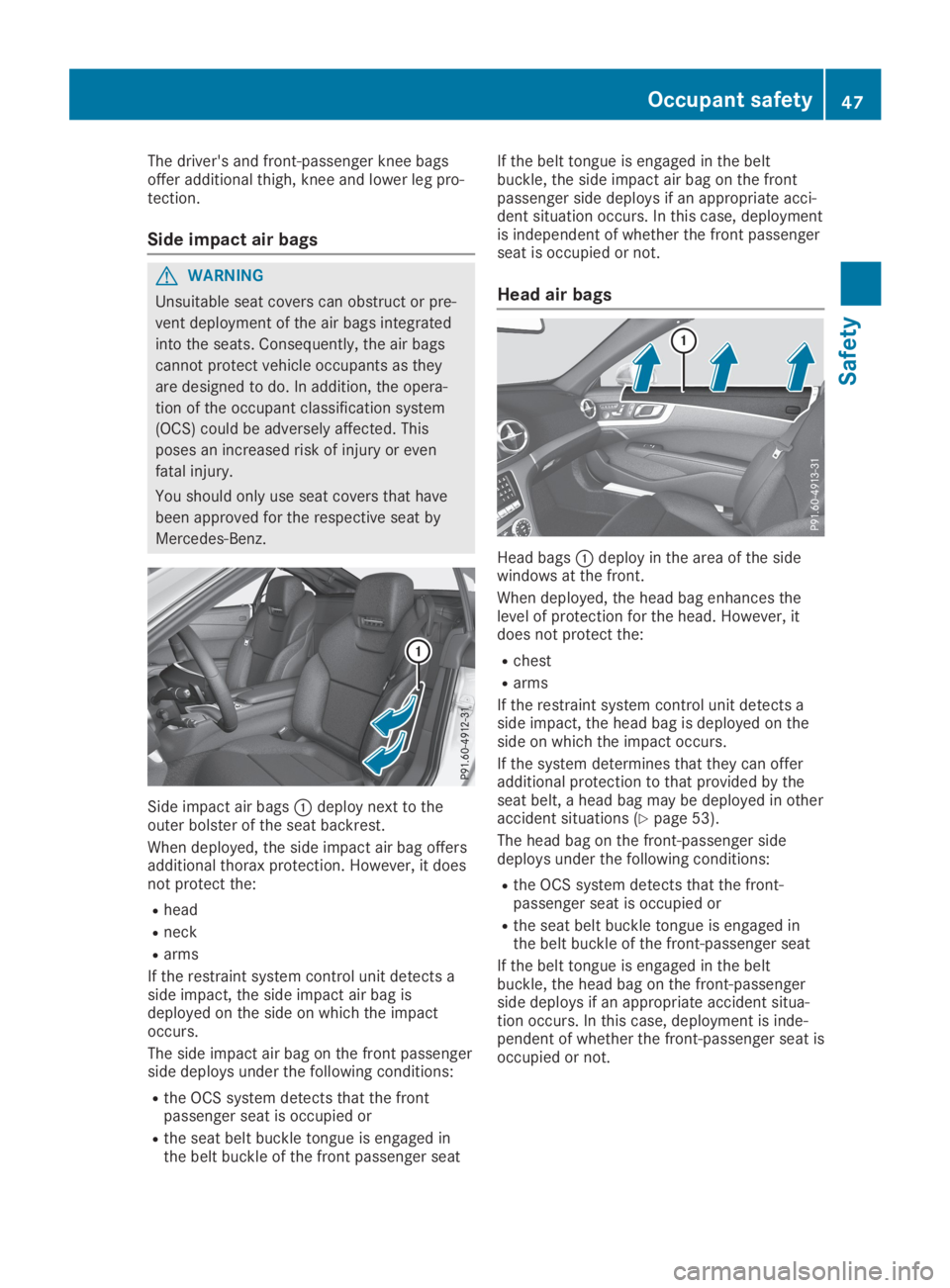
Side impact air bagsCdeploy next to theouter bolster of the seat backrest.
When deployed, the side impact air bag offersadditional thorax protection. However, it doesnot protect the:
Rhead
Rneck
Rarms
If the restraint system control unit detects aside impact, the side impact air bag isdeployed on the side on which the impactoccurs.
The side impact air bag on the front passengerside deploys under the following conditions:
Rthe OCS system detects that the frontpassenger seat is occupied or
Rthe seat belt buckle tongue is engaged inthe belt buckle of the front passenger seat
If the belt tongue is engaged in the beltbuckle, the side impact air bag on the frontpassenger side deploys if an appropriate acci-dent situation occurs. In this case, deploymentis independent of whether the front passengerseat is occupied or not.
Head air bags
Head bagsCdeploy in the area of the sidewindows at the front.
When deployed, the head bag enhances thelevel of protection for the head. However, itdoes not protect the:
Rchest
Rarms
If the restraint system control unit detects aside impact, the head bag is deployed on theside on which the impact occurs.
If the system determines that they can offeradditional protection to that provided by theseat belt, a head bag may be deployed in otheraccident situations (Ypage 53).
The head bag on the front-passenger sidedeploys under the following conditions:
Rthe OCS system detects that the front-passenger seat is occupied or
Rthe seat belt buckle tongue is engaged inthe belt buckle of the front-passenger seat
If the belt tongue is engaged in the beltbuckle, the head bag on the front-passengerside deploys if an appropriate accident situa-tion occurs. In this case, deployment is inde-pendent of whether the front-passenger seat isoccupied or not.
Occupant safety47
Safety
Z
Page 50 of 330
Occupant Classification System
(OCS)
Introduction
The Occupant Classification System (OCS) cat-egorizes the person in the front-passengerseat. Depending on that result, the front-passenger front air bag and front-passengerknee bag are either enabled or deactivated.
The system does not deactivate:
Rthe side impact air bag
Rthe headbag
Rthe Emergency Tensioning Devices
Requirements
To be classified correctly, the front passengermust sit:
Rwith the seat belt fastened correctly
Rin an almost upright position with their backagainst the seat backrest
Rwith their feet resting on the floor, if possi-ble
If the front passenger does not observe theseconditions, OCS may produce a false classifi-cation, e.g. because the front passenger:
Rtransfers their weight by supporting them-selves on a vehicle armrest
Rsits in such a way that their weight is raisedfrom the seat cushion
If you install a child restraint system on thefront-passenger seat, be sure to observe thecorrect positioning of the child restraint sys-tem. Never place objects under or behind thechild restraint system, e.g. a cushion. Fullyretract the seat cushion length. The entirebase of the child restraint system must alwaysrest on the seat cushion of the front-passenger seat. The backrest of the forward-facing child restraint system must lie as flat aspossible against the backrest of the front-passenger seat.
The child restraint system must not touch theroof or be subjected to a load by the headrestraint. Adjust the angle of the seat backrestand the head restraint position accordingly.
Only then can OCS be guaranteed to functioncorrectly. Always observe the child restraintsystem manufacturer's installation and operat-ing instructions.
Occupant Classification System opera-
tion (OCS)
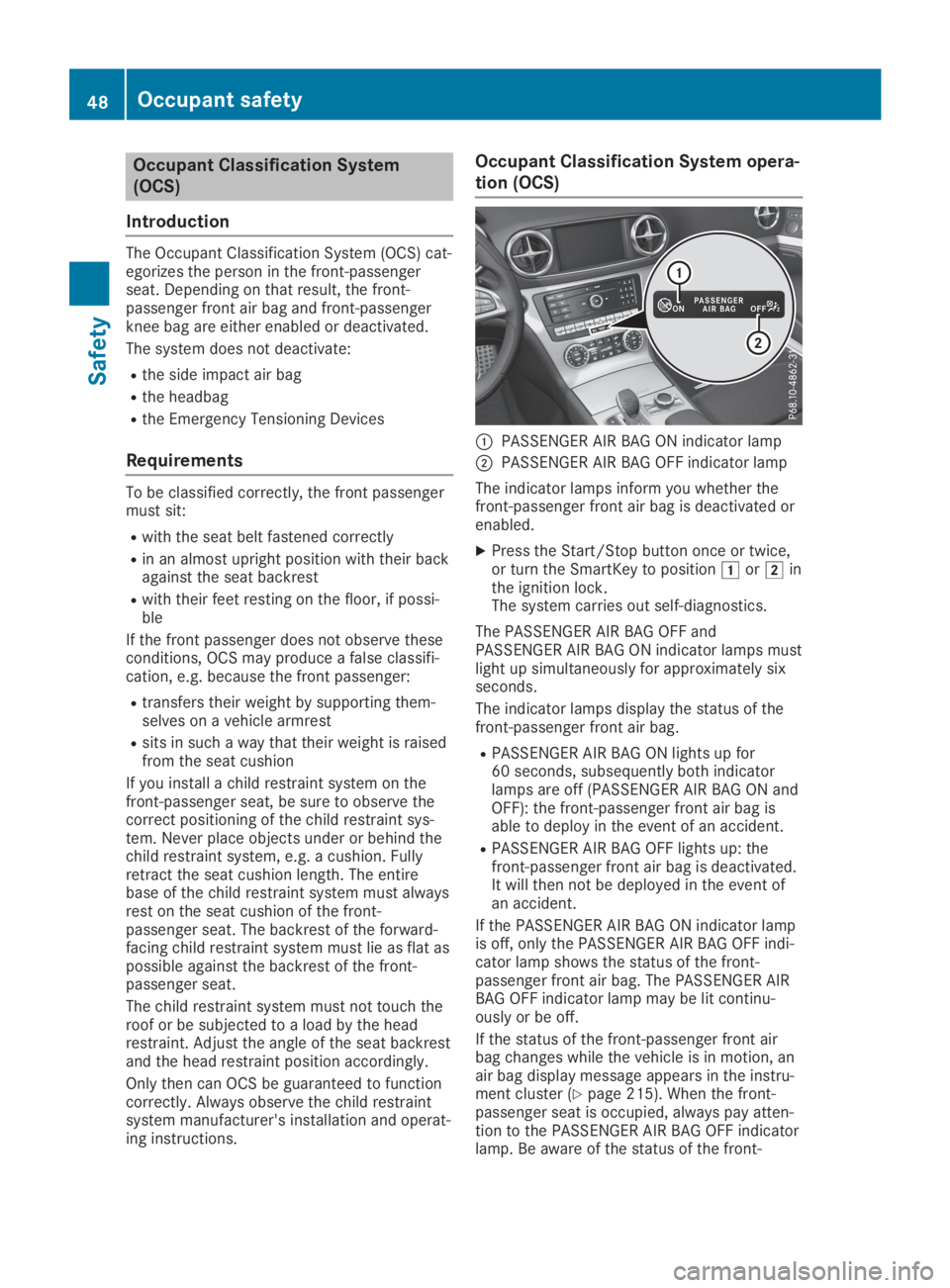
CPASSENGER AIR BAG ON indicator lamp
DPASSENGER AIR BAG OFF indicator lamp
The indicator lamps inform you whether thefront-passenger front air bag is deactivated orenabled.
XPress the Start/Stop button once or twice,or turn the SmartKey to positionGorHinthe ignition lock.The system carries out self-diagnostics.
The PASSENGER AIR BAG OFF andPASSENGER AIR BAG ON indicator lamps mustlight up simultaneously for approximately sixseconds.
The indicator lamps display the status of thefront-passenger front air bag.
RPASSENGER AIR BAG ON lights up for60 seconds, subsequently both indicatorlamps are off (PASSENGER AIR BAG ON andOFF): the front-passenger front air bag isable to deploy in the event of an accident.
RPASSENGER AIR BAG OFF lights up: thefront-passenger front air bag is deactivated.It will then not be deployed in the event ofan accident.
If the PASSENGER AIR BAG ON indicator lampis off, only the PASSENGER AIR BAG OFF indi-cator lamp shows the status of the front-passenger front air bag. The PASSENGER AIRBAG OFF indicator lamp may be lit continu-ously or be off.
If the status of the front-passenger front airbag changes while the vehicle is in motion, anair bag display message appears in the instru-ment cluster (Ypage 215). When the front-passenger seat is occupied, always pay atten-tion to the PASSENGER AIR BAG OFF indicatorlamp. Be aware of the status of the front-
48Occupant safety
Safety
Page 52 of 330

child restraint system and the child's stat-ure. Make sure that the conditions for a cor-rect classification are met. If thePASSENGER AIR BAG OFF indicator lampremains off, do not install a child restraintsystem on the front-passenger seat.
RThe front-passenger seat is occupied by aperson of smaller stature (e.g. a teenager orsmall adult), the PASSENGER AIR BAG OFFindicator lamp either lights up and remainslit after the self-test depending on the resultof the classification or, alternatively, goesout.
-If the PASSENGER AIR BAG OFF indicatorlamp is off, move the front-passenger seatas far back as possible.
-If the PASSENGER AIR BAG OFF indicatorlamp is lit, a person of smaller statureshould not use the front-passenger seat.
RThe front-passenger seat is occupied by anadult or a person of corresponding stature,the PASSENGER AIR BAG OFF indicatorlamp goes out after the self-test. This indi-cates that the front-passenger front air bagis activated.
If children are traveling in the vehicle, be sureto observe the notes on "Children in the vehi-cle" (Ypage 57).
When the Occupant Classification System(OCS) is malfunctioning, the redurestraintsystem warning lamp on the instrument clus-ter and the PASSENGER AIR BAG OFF indica-tor lamp light up simultaneously. The front-passenger front air bag is deactivated in thiscase and does not deploy during an accident.Have the Occupant Classification System(OCS) checked and repaired immediately at aqualified specialist workshop. Mercedes-Benzrecommends that you use an authorizedMercedes-Benz Center for this purpose.
If the front-passenger seat, the seat cover orthe seat cushion are damaged, have the nec-essary repair work carried out at a qualifiedspecialist workshop. Mercedes-Benz recom-mends that you use an authorized Mercedes-Benz Center for this purpose.
For safety reasons, Mercedes-Benz recom-mends that you only use seat accessories thathave been approved by Mercedes-Benz.
Deployment of the driver's air bag does notmean that the front-passenger front air bagdeploys as well. The Occupant ClassificationSystem (OCS) categorizes the occupant on the
front-passenger seat. Depending on thatresult, the front-passenger front air bag iseither enabled or deactivated.
Self-check of the occupant classifica-
tion system (OCS)
GDANGER
If the PASSENGER AIR BAG OFF and
PASSENGER AIR BAG ON indicator lamps do
not both light up during the self-test, the
system is malfunctioning. The front-
passenger front air bag might be triggered
unintentionally or might not be triggered at
all in the event of an accident with high
deceleration. This poses an increased risk of
injury or even fatal injury.
In this case the front-passenger seat may
not be used. Do not install a child restraint
system on the front-passenger seat. Have
the Occupant Classification System (OCS)
checked and repaired immediately at a
qualified specialist workshop.
GWARNING
If the PASSENGER AIR BAG OFF indicator
lamp remains lit after the self-test, the front-
passenger front air bag is deactivated. It will
not be deployed in the event of an accident.
In this case, the front-passenger front air
bag cannot perform its intended protective
function, e.g. when a person is seated in the
front-passenger seat.
That person could, for example, come into
contact with the vehicle's interior, especially
if the person is sitting too close to the dash-
board. This poses an increased risk of injury
or even fatal injury.
When the front-passenger seat is occupied,
always ensure that:
Rthe classification of the person in the
front-passenger seat is correct and the
front-passenger front air bag is enabled or
50Occupant safety
Safety