warning MERCEDES-BENZ SL CLASS 2020 Owners Manual
[x] Cancel search | Manufacturer: MERCEDES-BENZ, Model Year: 2020, Model line: SL CLASS, Model: MERCEDES-BENZ SL CLASS 2020Pages: 334, PDF Size: 17.43 MB
Page 248 of 334

Gene
ralnotes
The multime diasystem section inthis Opera -
tor's Manua ldescrib esthe basi cprincipl esfor
opera tion.More information canbefound in
the Digital Operator'sManua l. Important
safetynotes G
WARNING
If you opera teinformation systemsandcom-
municatio nequ ipment integrated inthe
vehicle whendriving, youmay bedistracted
from thetraffic situation. Youcould also
lose control ofthe vehicle .There isarisk of
an accide nt.
Only opera tethis equipment whenthetraffic
situa tionpermits. Ifyou arenot sure that
this ispossi ble,park thevehicle paying
attention totraffic conditions andopera te
the equipment whenthevehicle isstation-
ary .
You must observe thelega lrequ irements for
the country inwhich youarecurrently driving
when operatingthemultime diasystem.
The multime diasystem calculates theroute to
the destinati onwithou ttaking thefollo wing
into account, forexampl e:
R traffic lights
R stop andyieldsigns
R parking orstopping restrictions
R road narrowi ng
R other roadandtraffic rulesand regul ations
The multime diasystem maygiveincorrect nav-
iga tion recommendati onsifthe actual street/
traffic situationdoes notcorrespond withthe
digi talmap's data.
For exampl e:
R adiverted route
R the road layout orthe direction ofaone-way
street hasbeen changed
For this reaso n,you must alwaysobserve road
and traffic rulesand regul ations duringyou r
journey. Roadand traffic rulesand regul ations
alw ayshave priorityover multime diasystem
driving recommendati ons. Navig
ation announcements areintended to
direct youwhiledriving withoutdiverting your
attention fromtheroad anddriving.
Plea sealw aysuse this feature instead ofcon-
sul ting themap displayfordirections. Looking
at the icons ormap displaycan distract you
from traffic conditions anddriving, and
increase therisk ofan accide nt.
This equipment complieswith FCCradiation
exposu relimi tsset forth foruncontrolled
equ ipment andmeets theFCC radiofreque ncy
(RF) Exposure Guideli nes inSuppl ement Cto
OET65.
This equipment hasvery lowlevel sof RF
energy thatisdeeme dto comply withoutmaxi-
mum permis siveexposu reeval uation(MPE).
However, itis recommended toinstall itat a
distance ofat lea st8inches (approx. 20cm)
betwee nthe radiation source andaperson's
body (notinclud inglimb ssuch ashands,
wrists, feetandlegs) . G
WARNING
Modi fications toelectronic components,
their software aswel las wiri ngcan impa ir
their function and/orthefunction ofother
networked components. Inparticu lar,sys-
tems releva ntto safety couldalsobeaffec-
ted. Asaresul t,these maynolonger func-
tion asintended and/orjeopardizethe oper-
ating safety ofthe vehicle .There isan
increase drisk ofan accide ntand injury.
Never tamper withthewiringaswel las elec-
tronic components ortheir software .You
shoul dhave allwork toelectrica land elec-
tronic equipment carried outataqua lified
specia listworkshop . Func
tionrestrictio ns
For safety reasons,some functions arerestric-
ted orunava ilable whil ethe vehicle isin
motion. Youwillnotice this,forexampl e,
becau seeither youwillnot beableto sele ct
certain menuitemsoramessag ewil lapp ear
to this effect. 246
Func
tionrestrictio nsMultimedia system
Page 254 of 334

Stowage
areas Stowage
spaces
Import antsafety notes G
WARNING
If object sin the passenger compartmen tare
stowed incorrec tly,they canslide orbe
thrown around andhitvehicle occupants. In
addition, cupholders, openstowage spaces
and mobile phonebrackets cannotalways
retain allobject sthey contain.There isa
risk ofinjury, particularly inthe event ofsud-
den braking orasudden changeindirection.
R Always stowobject sso that they cannot
be thrown around insuch situations.
R Always makesurethatobject sdo not pro-
trude fromstowage spaces,parcelnetsor
stowage nets.
R Close thelockable stowagespacesbefore
startin gajourney.
R Always stowandsecure heavy,hard,poin-
ted, sharp-edged, fragileorbulky object s
in the trunk .
Glove box X
To open: pullhandle 0043and open glove box
flap 0044.
X To close :fold glove boxflap 0044upuntil it
engages.
In the glove box,there areacoin holder, a
map holder andapen holder.
i The
glove boxcanbevent ilated
(Y page 123). The
glove boxcanbelocked andunlocked
using themechanical key.
X To lock: insert themechanical keyinto the
lock andturn itto position 0048.
X To unlock: insertthemechanical keyinto
the lock andturn itto position 0047.
Stowage compartment/telephone
compar tment under thearm rest X
To open: pressbutton 0043.
Amrest 0044folds out.
In the stowage compartmen t,there isastow-
age tray.
i Depending
onthe vehicle equipment, a
USB portandaMedia Interface isinstalled
in the stowage compartmen t.AMedia Inter-
face isauniversal interfaceformobile audio
equipment, e.g.foraniPod ®
or MP3 Playe r. 252
Stowage
areasStowage andfeatu res
Page 256 of 334

Stowage
compartment inthe rear
passenger compartment Only
theleft side ofthe vehicle features arear
stowage compartmen t.
X Open theseat beltguide andremove the
seat belt(Ypage 99).
X Move theleft-hand frontseatforward
(Y page 100)andfold theseat backrest
forward.
X To open: pressrelease button0044.
Cover 0043folds up.
X To close :fold down cover 0043and letit
engage.
X Fold back theseat backrest ofthe left-hand
front seatandmove theseat back
(Y page 100).
X Insert theseat beltback intotheseat belt
guide. Stowage
net There
isastowage net0043inthe front -
passenger footwell. Loading
aidinthe trunk
Raising/low eringtheroof G
WARNING
Body parts canbecome trappedwhenthe
roof isbeing raised orlowered. Thereisa
risk ofinjury.
When raising orlowering theroof, make
sure thatnoparts ofthe body areinthe
vicinity ofmoving parts.Presstheswitch
again ifsomeone becomestrapped.
! Only
close thetrunk oncetheroof islow-
ered completely. Otherwise,youcould dam-
age theroof.
If you close thetrunk lidbefore theroof is
lowered completely, theloading aidswitch
lights upand awarning tonesounds. To
make iteasier toload your luggage ,you
can raise thestowed roofafter youhave
opened thetrunk lid.
You canonly raise roof0044when thetrunk lid
is fully open.
X To raise theroof: press switch 0043.
Roof 0044israised slightly andtrunk partition
0087 moves tothe open position. Switch0043
lights upbrightly.
X To lowe rthe roof: press switch 0043.
The trunk partition movestothe closed
position androof 0044lowers slightly.
Switch 0043lights updimly.
Vehicles withtrunk lidremote closing
featur e:when thetrunk lidisopened, the
loading aidraises automatically. Itlowers
automatically whenthetrunk lidisclosed.
Vehicles withKEYLESS-GO andHANDS-
FREE ACCESS:when thetrunk lidis 254
Stowage
areasStowage andfeatu res
Page 257 of 334

opened,
theloading aidrises automatically.
When theroof isclosed, thetrunk partition
remains inthe open position. Thetrunk par- tition
moves tothe closed position automat-
ically when theroof islowered.
Problems withtheloading aid Problem
Possible
causes/conse quencesand0050 0050
Solutions It
is no longer possible
to lower thestowed
roof inthe trunk using
the loading aid. You
cann otclose thetrunk anymore.
X Call aquali fiedspecialist workshop. Stowage
wellunder thetrunk floor X
To open: opentrunk partition 0044
(Y page 93).
X Swing trunkfloor0087upusing loop0043.
The TIREFIT kit,tire-c hange toolkit,etc. is
located inthe stowage compartm ent. Featur
es Cup
holder
Import antsafety notes G
WARNING
If object sin the passenger compartmentare
stowed incorrectly, theycanslide orbe
thrown around andhitvehicle occupant s.In
addition, cupholders, openstowage spaces
and mobile phonebracket scann otalway s
retain allobject sthey contain.There isa
risk ofinjury, particularly inthe event ofsud-
den braking orasudden changeindirection . R
Always stowobject sso that they cannot
be thrown around insuch situations.
R Always makesurethatobject sdo not pro-
trude fromstowage spaces,parcelnetsor
stowage nets.
R Close thelockable stowagespacesbefore
start ingajourney.
R Always stowandsecure heavy,hard,poin-
ted, sharp-edged, fragileorbulky object s
in the trunk . G
WARNING
The heating elements ofthe cup holder can
become veryhot.Youcould burnyourself on
them.
There isarisk ofinjury.
Do not touch thehot heating elements of
the cup holder. Alwaysmakesurethatchil-
dren cannotaccess thehot heating ele-
ment sof the cup holder. Neverleavechil-
dren unsupervised inthe vehicle.
! Only
usethecup holders forcont ainers of
the right sizeandwhich havelids.The
drinks couldotherwise spill.
! Do
not expose drinksbottles inthe cup
holder inthe cent erconsole tocont inuous,
stron gand direct sunlight. Thepassenger
compartm entinthe area ofthe cent ercon-
sole canotherwise bedamaged bythe con-
cent rated andreflect edsunlight. Featur
es
255Stowage andfeatu res Z
Page 261 of 334

R
The indicator lampinone ormore ofthe fol-
lowing buttonscont inues tolight upred
after thesystem self-diagnosis:
- SOS button
- 0052 Roadside Assistancecallbutton
- 00D9 MBInfo callbutton
R Aft erthe system self-diagnosis, theInoper‐ Inoper‐
ative ative
orService NotActivated Service
NotActivated mes-
sage appears inthe multifunct iondisplay .
If amalfunct ionisindicated asoutlined above,
the system maynotoperate asexpect ed.In
the event ofan emergenc y,help willhave to
be summoned byother means.
Have thesystem checkedatthe nearest
Mercedes- BenzServic eCenter orcont actthe
following servicehotlines:
R USA: Mercedes- BenzCustomer Assistance
Center at1-8 00-FOR-ME RCedes
(1-80 0-367-6372 )or 1-86 6-990-9007
R Canada: Customer Serviceat
1-88 8-92 3-8367
Emergency call Import
antsafety notes G
WARNING
It can bedangerous toremain inthe vehicle,
even ifyou have pressed theSOS button in
an emergenc yif:
R you seesmoke insideoroutside ofthe
vehicle, e.g.ifthere isafire after anacci-
dent
R the vehicle ison adangerous sectionof
road
R the vehicle isnot visible orcann oteasily
be seen byother roadusers, particularly
when darkorinpoor visibility conditions
There isarisk ofan accident andinjury.
Leave thevehicle immediately inthis orsim-
ilar situations assoon asitis safe todo so.
Move toasafe location alongwithother
vehicle occupant s.In such situations, secure
the vehicle inaccordanc ewith national regu-
lations, e.g. with awarning triangle.
A license agreement mustbeinplace inorder
to activate theMercedes meconn ectservice.
Make surethatyour system isactivated andoperational.
Toregister, pressthe00D9 MB
Info callbutton .If any ofthe steps mentioned
are not carried out,thesystem maynotbe
activated.
If you have questions abouttheactivation ,
cont actone ofthe following telephone hot-
lines:
R USA: Mercedes-B enzCustomer Assistance
Center at1-80 0-FOR-MERCedes
(1-80 0-367-6372)or1-86 6-990-9007
R Canada: Customer Serviceat
1-88 8-923-8367
General notes
An emergenc ycall isdialed automatically ifan
air bag orEmergen cyTensionin gDevice istrig-
gered.
i You
cann otend anautomatically triggered
emergenc ycall yourself.
An emergenc ycall can also beinitiated man-
ually .
As soon asthe emergenc ycall has been initi-
ated, theindicator lampinthe SOS button
flashes. Themultifunct iondisplay showsthe
Connecting Call Connecting
Callmessage.
The audio output ismuted.
Once theconn ection hasbeen made, the
Call Connected Call
Connected messageappearsinthe mul-
tifunc tiondisplay .
All important informationonthe emergenc yis
transm itted,forexample:
R Current location ofthe vehicle (asdeter-
mined bythe GPS system)
R Vehicle identificat ionnumber
R Infor mation onthe severity ofthe accident
Short lyafter theemergenc ycall has been initi-
ated, avoice connection isautomatically
established betweentheCustomer Assistance
Center andthevehicle occupant s.
R Ifthe vehicle occupant sare responsive, the
Mercedes-B enzCustomer AssistanceCenter
attempt sto get more informat iononthe
emergenc y.
R Ifthere isno response fromthevehicle
occupant s,an ambulance isimmediately
sent tothe vehicle.
If no voice connection canbeestablished to
the Mercedes-B enzCustomer AssistanceCen-
ter, thesystem hasbeen unable toinitiate an
emergenc ycall. Featur
es
259Stowage andfeatu res Z
Page 265 of 334

garage
dooropener, contactanauthorized
Mercedes-B enzCenter.
Altern atively, youcan callthefollowing tele-
phone assistance services:
R USA: Mercedes-B enzCustomer Assistance
Center at1-80 0-FOR-MERCedes
R Canada: Customer Serviceat
1-80 0-38 7-0100
R HomeLink ®
hotline 1-800-355-3515(free of
charge)
More informat iononHomeLink ®
and/or com-
patible products isalso availa bleonline at
htt p:// www.homelink.c om.
Notes onthe declaration ofconf ormity
(Y page 28).
USA: FCCID:CB2HMIH L4
Canada: IC:279B -HMIH L4
Import antsafety notes G
WARNING
When youoperate orprogram thedoor with
the integrat edgarage dooropener, persons
in the range ofmovement ofthe door may
become trappedorbe struck bythe door.
There isarisk ofinjury.
When usingtheintegrat edgarage door
opener, alwaysmake surethatnobody is
within therange ofmovement ofthe door. G
DANGER
Combustion enginesemitpoisonous
exhaust gasessuchascarbon monoxide.
Inhaling theseexhaust gasesishazardous to
health andcanresult inpoisoning. Thereisa
risk offatal injury. Therefore, neverleavethe
engine runningan enclosed spacewithout
adequa tevent ilation.
Program ming Program
mingthebutt ons
Pay atten tiontothe "Important safetynotes"
(Y page 263). Garage
doorremote control0083 isnot included
with theintegrat edgarage dooropener.
X Turn theSmart Keytoposition 0048inthe igni-
tion lock (Ypage 126).
X Select oneofbutton s0044 to0085 touse to
cont rolthe garage doordrive.
X To star tprogr ammingmode: pressand
hold oneofbutton s0044 to0085 onthe integra-
ted garage dooropener.
The garage dooropener isnow inprogram-
ming mode. Afterashort time,indicator
lamp 0043lights upyellow .
Indicator lamp0043lights upyellow assoon
as button 0044,0087or0085 isstored forthe first
time. Ifthe selected buttonhasalready
been programed, indicatorlamp0043will only
light upyellow aftertenseconds have
elapsed.
X Release button0044,0087or0085. Indicator
lamp 0043flashes yellow.
X To progr amthe remote control: point
garage doorremote control0083 towards but-
tons 0044to0085 onthe rear-view mirrorata
distance of2to 8in (5 to 20 cm).
X Press andhold button 0084onremote control
0083 until indicator lamp0043lights upgreen.
When indicator lamp0043lights upgreen:
programming isfinished.
When indicator lamp0043flashes green:pro-
gramming wassuccessful. Thenext step is
to synchron izethe rolling code
(Y page 264).
X Release button0084onremote control0083 for
the garage doordrive system.
If indicator lamp0043lights upred: repeat the
programing procedureforthe correspon ding
button onthe rear-view mirror.Whendoing
so, vary thedistance between remotecon-
trol 0083and therear-view mirror. Featur
es
263Stowage andfeatu res Z
Page 268 of 334
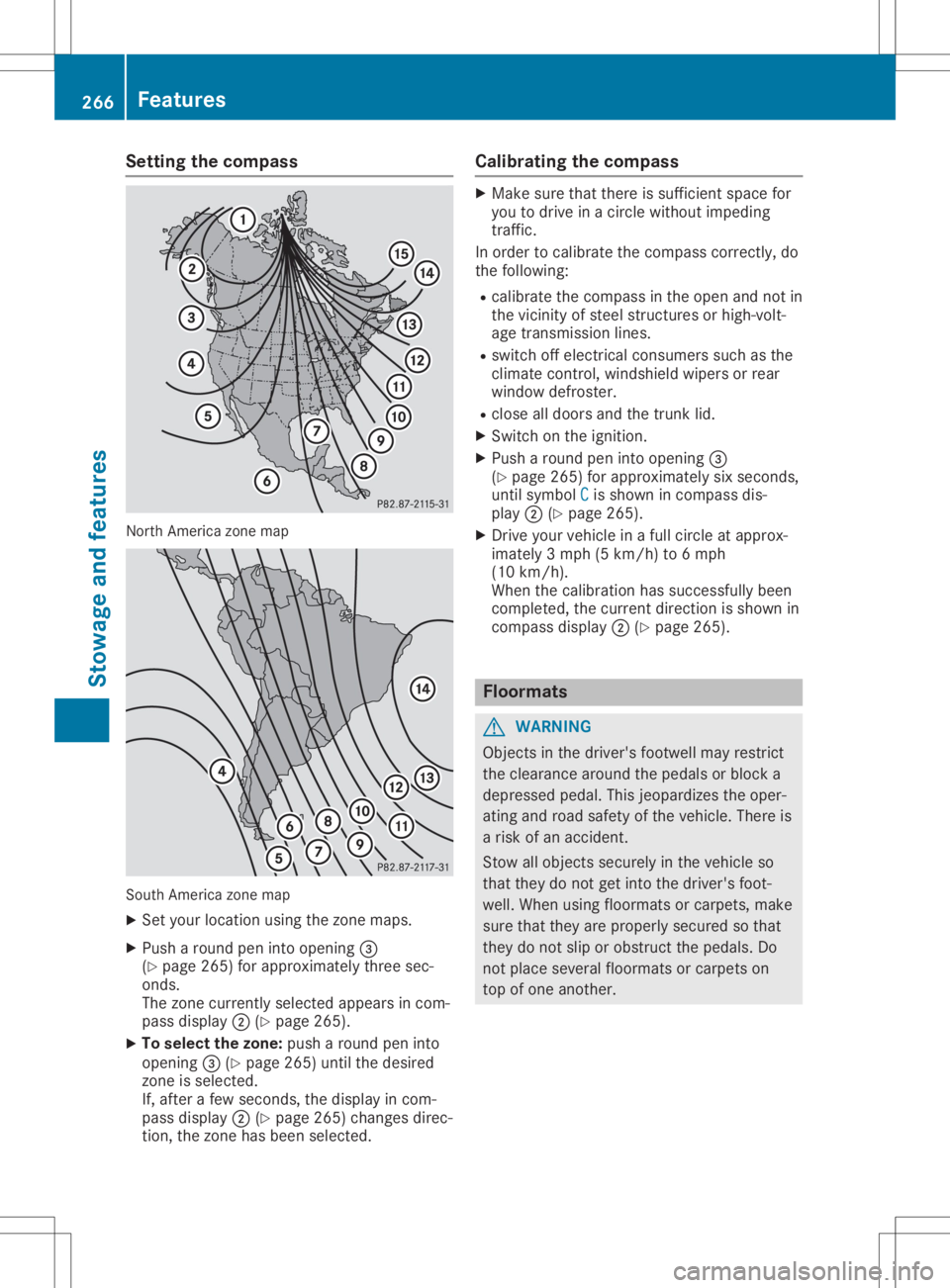
Setting
thecompass North
America zonemap South
America zonemap
X Set your location usingthezone maps.
X Push around peninto opening 0087
(Y page 265)forapproximately threesec-
onds.
The zone current lyselected appearsincom-
pass display 0044(Ypage 265).
X To selec tthe zone: pusharound peninto
opening 0087(Ypage 265)untilthedesired
zone isselected.
If, after afew seconds, thedisplay incom-
pass display 0044(Ypage 265)changes direc-
tion, thezone hasbeen selected. Calibrating
thecompass X
Make surethatthere issufficient spacefor
you todrive inacircle without impeding
traffic.
In order tocalibrate thecompass correctly,do
the following:
R calibrate thecompass inthe open andnotin
the vicinity ofsteel struct uresorhigh-volt-
age transm issionlines.
R switch offelectrical consumers suchasthe
climate control,windshield wipersorrear
window defroster.
R close alldoors andthetrunk lid.
X Switch onthe ignition.
X Push around peninto opening 0087
(Y page 265)forapproximately sixseconds,
until symbol C C
is shown incompass dis-
play 0044(Ypage 265).
X Drive yourvehicle inafull circle atapprox-
imately 3mph (5km/h) to6mph
(10 km/h).
When thecalibration hassuccessfully been
completed, thecurrent direction isshown in
compass display0044(Ypage 265). Floo
rmats G
WARNING
Object sin the driver's footwell mayrestrict
the clearance aroundthepedals orblock a
depressed pedal.Thisjeopardizes theoper-
ating androad safety ofthe vehicle. Thereis
a risk ofan accident.
Stow allobject ssecurely inthe vehicle so
that they donot getinto thedriver's foot-
well. When usingfloormats orcarpets, make
sure thatthey areproperly securedsothat
they donot slip orobstruct thepedals. Do
not place several floormats orcarpets on
top ofone another. 266
FeaturesStowage
andfeatu res
Page 272 of 334
G
WARNING
If engine oilcomes intocontact withhot
components inthe engine compartment, it
may ignite. Thereisarisk offire and injury .
Make surethatengine oilisnot spilled next
to the filler neck. Letthe engine cooldown
and thoroug hlyclea nthe engine oiloff the
components beforestarting theengine. H
Envi
ronmental note
When addingoil,take carenottospil lany. If
oil enters thesoil orwate rways,itis harmfu l
to the environment.
! Use
only engine oilsand oilfilters thatare
app roved forvehicl eswith aservice system.
A list ofthe engine oilsand oilfilters that
have been tested andapproved inaccord-
ance withMercede s-BenzSpecifications for
Service Productsisava ilable atany author-
ized Mercede s-BenzCenter.
The followi ngcaus eengine failure ordam-
age tothe exhau stsystem:
R Use ofengine oilsand oilfilters thathave
not been express lyapp roved forthe ser-
vice system
R Rep lace ment ofengine oiland oilfilter
after thereplacement intervalspecified
by the service system hasexpire d
R Use ofengine oiladd itives
! Do
not add toomuch oil.If the oilleve lis
abo vethe "ma x"mark onthe dipstick, too
much oilhas been added. This canleadto
dama getothe engine orthe catal yticcon-
verter. Haveexcess oilsiph oned off. Example
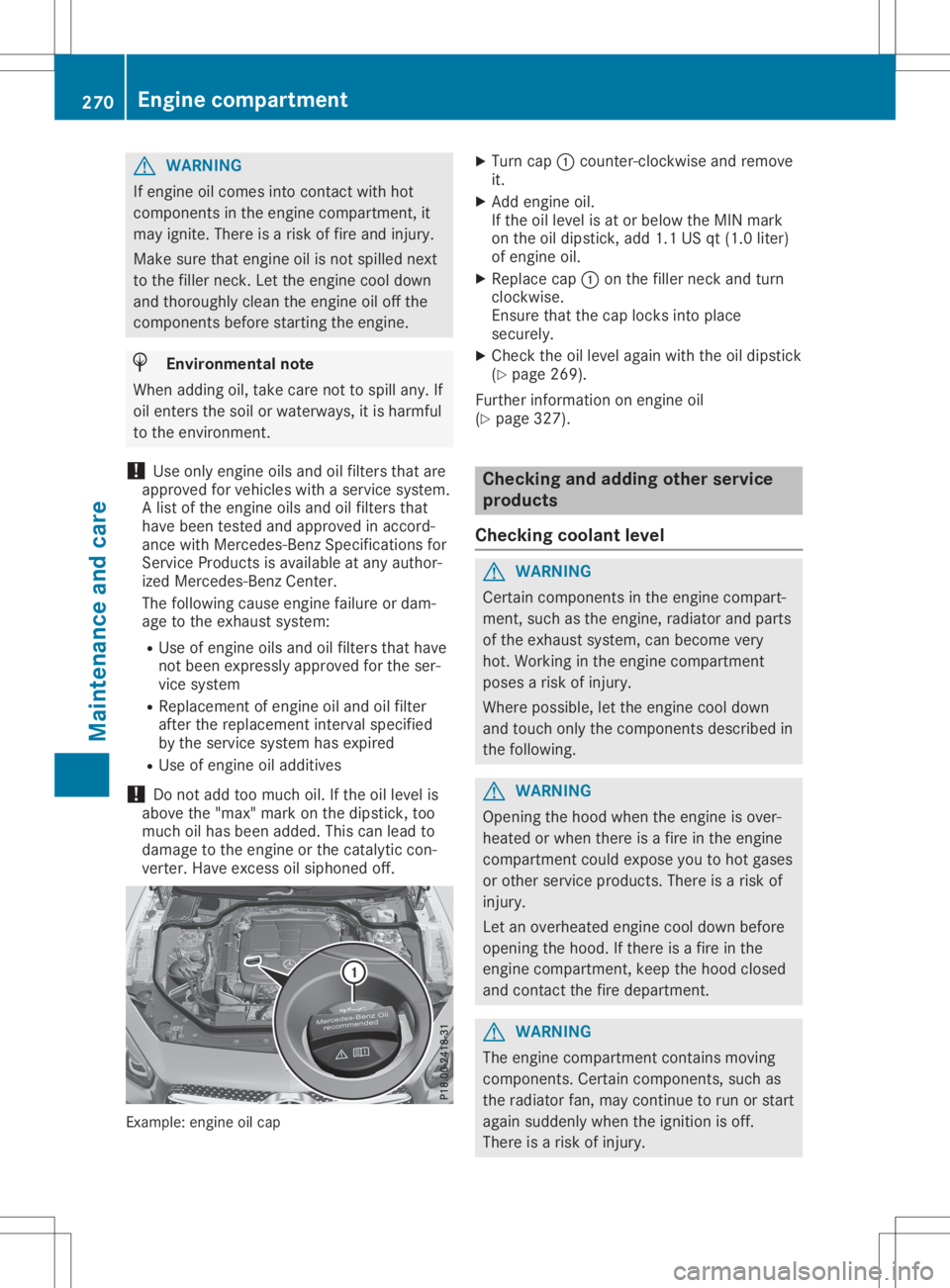
:engine oilcap X
Turn cap0043counter-clockwi seand remove
it.
X Add engine oil.
If the oilleve lis at or bel ow the MIN mark
on the oildip stick, add1.1USqt(1.0 liter)
of engine oil.
X Rep lace cap0043onthe filler neck andturn
clockwis e.
Ensure thatthecap locks intoplace
secure ly.
X Che ckthe oilleve laga inwith theoildip stick
(Y pag e269) .
Further informati ononengine oil
(Y pag e327) . Che
ckin gand adding otherservice
products
Che ckin gco olan tlev el G
WARNING
Certa incomponents inthe engine compart-
ment, suchasthe engine, radiator andparts
of the exhau stsystem, canbecome very
hot. Working inthe engine compartment
poses arisk ofinjury .
Where possible,let the engine cooldown
and touch onlythecomponents describedin
the followi ng. G
WARNING
Opening thehood when theengine isover-
hea ted orwhen thereisafire inthe engine
compartment couldexpose youtohot gase s
or other service products.There isarisk of
injury .
Let anoverhe atedengine cooldownbefore
openi ngthe hood. Ifthere isafire inthe
engine compartment, keepthehood closed
and contact thefire depa rtment. G
WARNING
The engine compartment containsmoving
components. Certaincomponents, suchas
the radiator fan,may continue torun orstart
aga insud denly whentheignitio nis off.
There isarisk ofinjury . 270
Eng
inecompar tmentMainten anceandcare
Page 273 of 334
If
you need todo any work inside theengine
compartment:
R switch offthe ignition
R never reach intothearea where thereisa
risk ofdanger frommoving components,
such asthe fanrotation area
R remove jewelryandwatches
R keep items ofclothing andhair, forexam-
ple, awayfrom moving parts G
WARNING
The cooling systemispressu rized,particu-
larl ywhen themotor iswarm. Ifyou open
the cap, youcould bescalde difhot coolant
spray sout. There isarisk ofinjury.
Let the engine cooldown before youopen
the cap. Wear protective glovesandprotec-
tive eyew earwhen opening. Openthecap
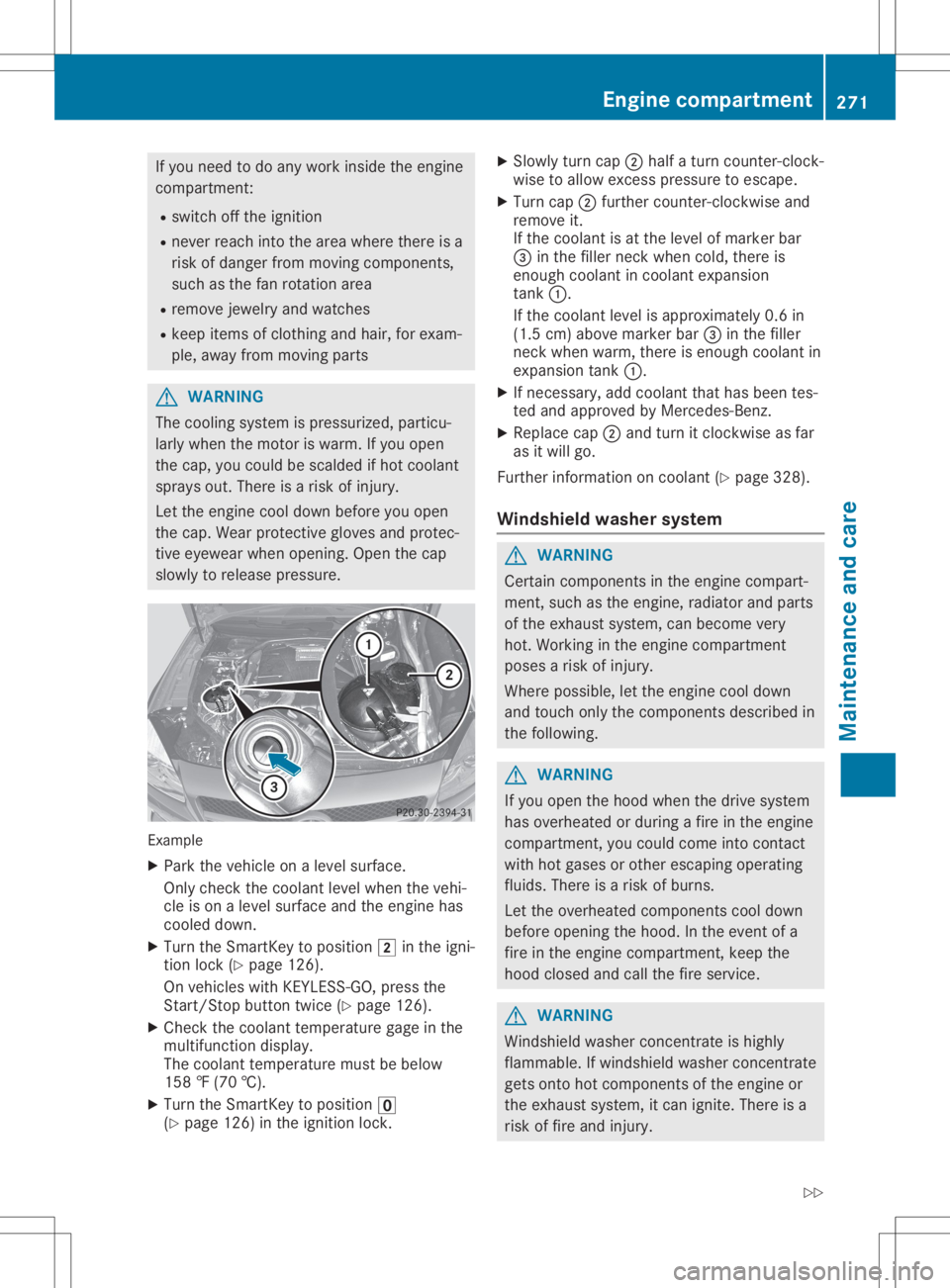
slow lyto relea sepressu re. Example
X Park thevehicle onalevel surface.
Only check thecoolant levelwhen thevehi-
cle ison alevel surface andtheengine has
cooled down.
X Turn theSmartKey topositio n0048 inthe igni-
tion lock (Ypage 126).
On vehicle swith KEYLESS- GO,press the
Start/St opbutton twice(Ypage 126).
X Check thecoolant temperature gageinthe
multifu nctiondisplay.
The coolant temperature mustbebelow
158 ‡(70 †).
X Turn theSmartKey topositio n0092
(Y page 126)inthe ignition lock. X
Slowl yturn cap0044half aturn counter-clock-
wise toallow excess pressureto escape .
X Turn cap0044further <004600520058005100570048005500100046004F00520046004E005A004C0056
0048[ and
remove it.
If the coolant isat the level ofmarker bar
0087 inthe fillerneck when cold,there is
enough coolant incoolant expansion
tank 0043.
If the coolant levelisappro ximately 0.6in
(1.5 cm)above marker bar0087inthe filler
neck when warm, thereisenough coolant in
expansion tank0043.
X Ifnecessary ,add coolant thathasbeen tes-
ted and appro vedbyMercedes-Benz.
X Repl acecap 0044and turn itclockwise asfar
as itwil lgo.
Further information oncoolant (Ypage 328).
Windshie ldwashe rsystem G
WARNING
Certai ncomponents inthe engine compart-
ment, suchasthe engine, radiator andparts
of the exhau stsystem, canbecome very
hot. Working inthe engine compartment
poses arisk ofinjury.
Where possible,let the engine cooldown
and touch onlythecomponents describedin
the follow ing. G
WARNING
If you open thehood when thedrive system
has overhea tedorduri ngafire inthe engine
compartment, youcould come intocontact
with hotgases orother escapi ngopera ting
flui ds. There isarisk ofburns.
Let the overhea tedcomponents cooldown
before opening thehood. Inthe event ofa
fire inthe engine compartment, keepthe
hood closed andcallthefire service. G
WARNING
Windshi eldwash erconcentrate ishighl y
flamma ble.Ifwindshi eldwash erconcentrate
gets onto hotcomponents ofthe engine or
the exhau stsystem, itcan ignite. Thereisa
risk offire and injury. Eng
inecompar tment
271Maintenanc eand care
Z
Page 276 of 334
R
solvents
R cleaning agentscontaining solvents
Do not scrub.
Do not touch thesurfaces andfilms with
hard objects, e.g.rings orice scrapers. Oth-
erwise, youmay scratch ordamage thesur-
faces andfilms.
! Do
not park yourvehicle foralong period
of time directly aftercleaning, particularly
after cleaning thewheel rimwith wheel
cleaner. Wheelcleaner canlead tothe
increased corrosionofthe brake discsand
pads. Therefore, driveforafew minutes
after cleaning. Byheating upthe brakes, the
brake discsandpads dry.Thevehicle can
then beparked foralong period oftime.
Regu larcare ofyour vehicle isacondition for
retaining thequal ityinthe long term.
Use care products andcleaning agentsrecom-
mended andapproved byMercedes-Benz . Washing
thevehicl eand cleani ng
the paintwork
Automatic carwash G
WARNING
Braking efficiency isreduced afterwashing
the vehicle. Thereisarisk ofan accident.
Aft erthe vehicle hasbeen washed, brake
carefully whilepayingattent iontothe traffic
conditions untilfullbraking poweris
restored.
! When
DISTRONIC PLUSorthe HOLD func-
tion isactivated, thevehicle brakesauto-
matically incertain situations.
To avoid damage tothe vehicle, deactivate
DISTRONIC PLUSandtheHOLD function in
the followi ngorsimilar situations:
R when towing thevehicle
R in the carwash
! It
is preferable touse carwashes with
adjustable high-pressure pre-cleaningthat
corresponds tothe specification forthe
Cabri oletprogram. Incar washes thatuse
high water pressures, thereisarisk that a
small amount ofwater mayleakintothe
vehicle. !
Vehicles
withHAND S-FREE ACCESS: ifa
key with KEYLES S-GOiswithin thedetec-
tion range ofthe KEYLES S-GOantenn as,the
trunk lidcould openunintent ionallyinthe
followi ngsituations, forexample:
R when usinganautomatic carwash
R when usingapower washer
Make surethatthekey isat least 6.5ft
(2 m) awa yfrom thevehicle.
! Never
cleanyourvehicle inaTouchless
Automatic CarWash asthese usespecial
cleaning agents.Thesecleaning agentscan
damage thepaintwork orplastic parts.
If you have yourvehicle cleaned inahigh-
pressure automatic carwash, small
amounts ofwater mayenter thevehicle.
! Make
surethattheautomatic transmission
is in position Nwhen washing yourvehicle
in atow-through carwash. Thevehicle could
be damaged ifthe transmission isin another
position.
! Make
surethat:
R the side windows androof arecompletely
closed
R the climate controlblower isswitched off
R the windshiel dwiper switch isin position
0
The vehicle mayotherwise bedamaged .
You canclean thevehicle atan automatic car
wash fromthevery start.
Preferably cleanthevehicle atautomatic car
washes thatusetextilewashing elements
without brushes. Thisprevents finescratches
from forming onthe paintwork andfilm.
If the vehicle isvery dirty, pre-wash itbefore
cleaning itin an automatic carwash.
Aft erusing anautomatic carwash, wipeoff
wax from thewindshiel dand thewiper blades.
This willprevent smearsandreduce wiping
noises caused byresidue onthe windshiel d.
i Vehicles
withdecorative film:select a
wash program withouthotwax atthe auto-
matic carwash.
Washing byhand In
some countries, washingbyhand isonly
allow edatspeciall yequip pedwashing bays. 274
CareMaintenance
andcare