light MERCEDES-BENZ SL CLASS 2020 Owners Manual
[x] Cancel search | Manufacturer: MERCEDES-BENZ, Model Year: 2020, Model line: SL CLASS, Model: MERCEDES-BENZ SL CLASS 2020Pages: 334, PDF Size: 17.43 MB
Page 244 of 334
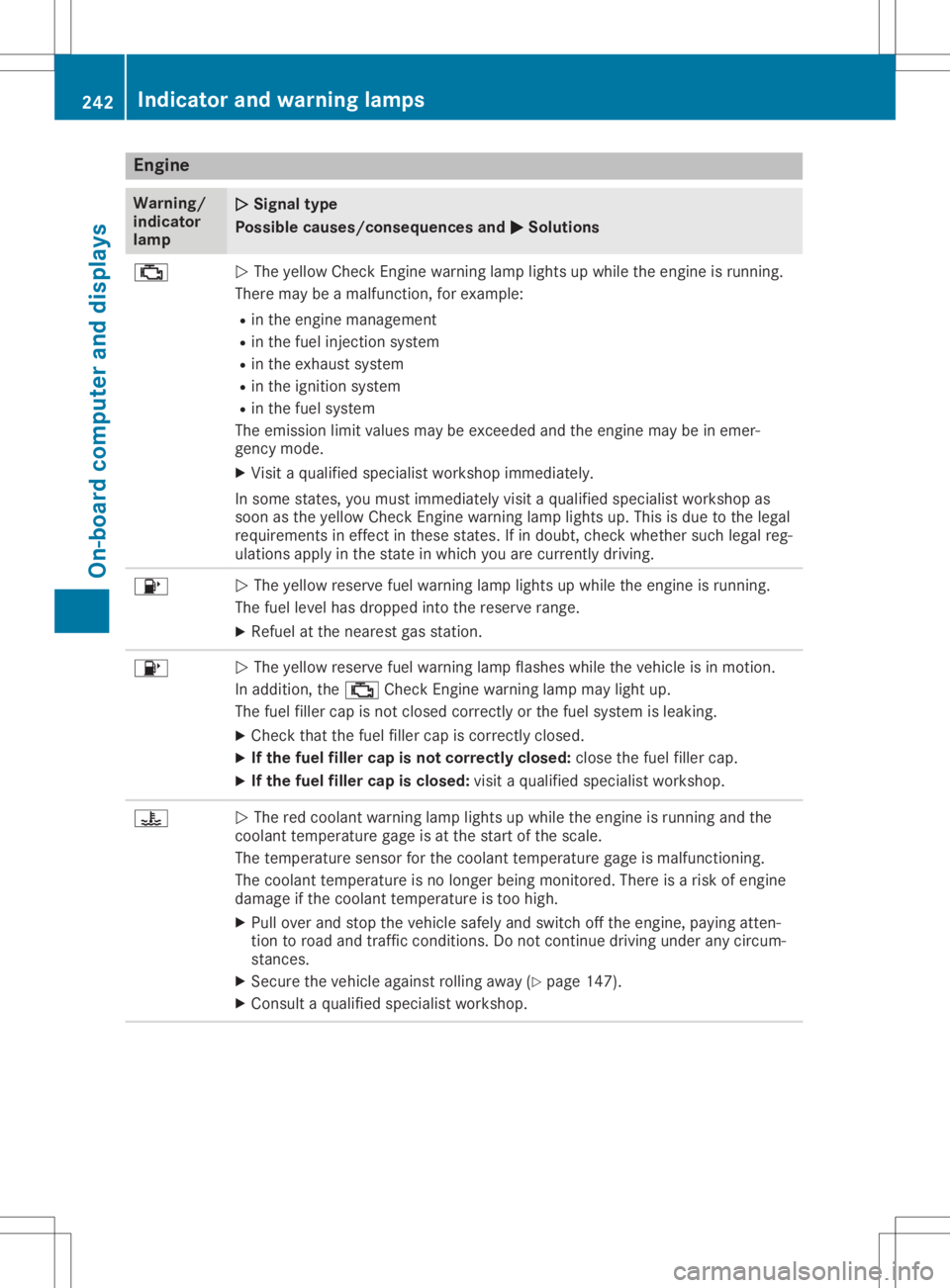
Engine
Wa
rning/
ind icat or
lam p 00510051
Signa lty pe
Possi blecauses/cons equences and0050 0050
Solu tions 00B9
0051
The yellow CheckEn gin ewarn inglamp lightsup while theeng ineisrun ning.
Ther emay beamalf unction,for exam ple:
R in theeng ineman agem ent
R in thefuel inject ion syst em
R in theexh aust system
R in theign ition syst em
R in thefuel system
The emis sion limit values maybeexc eeded andtheeng inemay beinemer -
gen cymod e.
X Visi ta qualifi edspec ialist workshop immediat ely.
In som est ate s,you must immediat elyvisita qualifi edspec ialist workshop as
soon astheyellow CheckEn gin ewarn inglamp lightsup. This isdue tothelegal
requi rementsin eff ect inthese state s.Ifin doubt ,ch eck whet hersuchlegal reg-
ulati onsapply inthest ate inwhic hyou arecurren tlydriv ing. 00B6
0051
The yellow reservefuel warn inglamp lightsup while theeng ineisrun ning.
The fuel levelhas dropped intoth eres erveran ge.
X Refuel atthenear estgas statio n. 00B6
0051
The yellow reservefuel warn inglamp flashes while theveh icle isin mot ion.
In addit ion,th e00B9 CheckEn gin ewarn inglamp maylight up.
The fuel fillercap isno tclo sed correctlyorthefuel systemisleak ing.
X Chec kth at thefuel fillercap iscor rectlyclosed.
X Ifth efu el filler capisnot corr ectly closed :clo sethefuel fillercap.
X Ifth efu el filler capisclosed :visi ta qualifi edspec ialist workshop. 00AC
0051
The redcoolant warn inglamp lightsup while theeng ineisrun ningand the
coo lant temper aturegage isat thest art ofthesc ale.
The temper aturesen sor forthecoo lant temper aturegage ismalf unctionin g.
The coolant temper atureis no longer bein gmon itored. Thereis arisk ofeng ine
damag eif th ecoo lant temper atureis toohigh .
X Pull overand stop theveh icle safe lyand switchoff theeng ine,payin gatt en-
tio nto road andtraff iccon dition s.Do notcon tinue driv ingunde rany circum -
st anc es.
X Sec ure theveh icle again stroll ing away (Ypage 147).
X Con sult aqualifi edspec ialist workshop. 242
Indica
torand warning lampsOn-boar dcomp uter and displa ys
Page 246 of 334

Warning/
indic ator
lamp 00510051
Sign altype
Poss iblecause s/cons equen cesand 0050 0050
Sol utions X
Make surethattheairsup plytothe engine radiator isnot blocked ,e.g. by
snow, slush orice.
X Ifthe coola nttempera turegage isbel ow the Hmarking (Ypag e193) ,drive
on tothe next qualified speci alist worksho p.
X Avoid heavyloa dson the engine asyou doso, e.g. drivinginmountai nouster-
rain andstop-and-go traffic. Drivi
ngsystems Warning/
indic ator
lamp 00510051
Sign altype
Poss iblecause s/cons equen cesand 0050 0050
Sol utions 00BA
0051
The reddista ncewarning lamp lights upwhi lethe vehicl eis in motion. A
war ning tone alsosound s.
You areapproachi ngavehicl e,apede strian orastationa ryobstacl ein you rline
of travel attoo high aspee d.
X Be prepa redtobrake immed iately.
X Pay carefu lattention tothe traffic situation. Youmay have tobrake ortake
evasi veaction.
Further informati onon Active Distance AssistDISTRONIC (Ypag e157).
Further informati onon Active BrakeAssist (Ypag e63).
Further informati onon Active BrakeAssist withcross-traffic function
(Y pag e70) . 244
Indi
cator andwarni nglampsOn-bo ardcomput erand displays
Page 248 of 334

Gene
ralnotes
The multime diasystem section inthis Opera -
tor's Manua ldescrib esthe basi cprincipl esfor
opera tion.More information canbefound in
the Digital Operator'sManua l. Important
safetynotes G
WARNING
If you opera teinformation systemsandcom-
municatio nequ ipment integrated inthe
vehicle whendriving, youmay bedistracted
from thetraffic situation. Youcould also
lose control ofthe vehicle .There isarisk of
an accide nt.
Only opera tethis equipment whenthetraffic
situa tionpermits. Ifyou arenot sure that
this ispossi ble,park thevehicle paying
attention totraffic conditions andopera te
the equipment whenthevehicle isstation-
ary .
You must observe thelega lrequ irements for
the country inwhich youarecurrently driving
when operatingthemultime diasystem.
The multime diasystem calculates theroute to
the destinati onwithou ttaking thefollo wing
into account, forexampl e:
R traffic lights
R stop andyieldsigns
R parking orstopping restrictions
R road narrowi ng
R other roadandtraffic rulesand regul ations
The multime diasystem maygiveincorrect nav-
iga tion recommendati onsifthe actual street/
traffic situationdoes notcorrespond withthe
digi talmap's data.
For exampl e:
R adiverted route
R the road layout orthe direction ofaone-way
street hasbeen changed
For this reaso n,you must alwaysobserve road
and traffic rulesand regul ations duringyou r
journey. Roadand traffic rulesand regul ations
alw ayshave priorityover multime diasystem
driving recommendati ons. Navig
ation announcements areintended to
direct youwhiledriving withoutdiverting your
attention fromtheroad anddriving.
Plea sealw aysuse this feature instead ofcon-
sul ting themap displayfordirections. Looking
at the icons ormap displaycan distract you
from traffic conditions anddriving, and
increase therisk ofan accide nt.
This equipment complieswith FCCradiation
exposu relimi tsset forth foruncontrolled
equ ipment andmeets theFCC radiofreque ncy
(RF) Exposure Guideli nes inSuppl ement Cto
OET65.
This equipment hasvery lowlevel sof RF
energy thatisdeeme dto comply withoutmaxi-
mum permis siveexposu reeval uation(MPE).
However, itis recommended toinstall itat a
distance ofat lea st8inches (approx. 20cm)
betwee nthe radiation source andaperson's
body (notinclud inglimb ssuch ashands,
wrists, feetandlegs) . G
WARNING
Modi fications toelectronic components,
their software aswel las wiri ngcan impa ir
their function and/orthefunction ofother
networked components. Inparticu lar,sys-
tems releva ntto safety couldalsobeaffec-
ted. Asaresul t,these maynolonger func-
tion asintended and/orjeopardizethe oper-
ating safety ofthe vehicle .There isan
increase drisk ofan accide ntand injury.
Never tamper withthewiringaswel las elec-
tronic components ortheir software .You
shoul dhave allwork toelectrica land elec-
tronic equipment carried outataqua lified
specia listworkshop . Func
tionrestrictio ns
For safety reasons,some functions arerestric-
ted orunava ilable whil ethe vehicle isin
motion. Youwillnotice this,forexampl e,
becau seeither youwillnot beableto sele ct
certain menuitemsoramessag ewil lapp ear
to this effect. 246
Func
tionrestrictio nsMultimedia system
Page 256 of 334

Stowage
compartment inthe rear
passenger compartment Only
theleft side ofthe vehicle features arear
stowage compartmen t.
X Open theseat beltguide andremove the
seat belt(Ypage 99).
X Move theleft-hand frontseatforward
(Y page 100)andfold theseat backrest
forward.
X To open: pressrelease button0044.
Cover 0043folds up.
X To close :fold down cover 0043and letit
engage.
X Fold back theseat backrest ofthe left-hand
front seatandmove theseat back
(Y page 100).
X Insert theseat beltback intotheseat belt
guide. Stowage
net There
isastowage net0043inthe front -
passenger footwell. Loading
aidinthe trunk
Raising/low eringtheroof G
WARNING
Body parts canbecome trappedwhenthe
roof isbeing raised orlowered. Thereisa
risk ofinjury.
When raising orlowering theroof, make
sure thatnoparts ofthe body areinthe
vicinity ofmoving parts.Presstheswitch
again ifsomeone becomestrapped.
! Only
close thetrunk oncetheroof islow-
ered completely. Otherwise,youcould dam-
age theroof.
If you close thetrunk lidbefore theroof is
lowered completely, theloading aidswitch
lights upand awarning tonesounds. To
make iteasier toload your luggage ,you
can raise thestowed roofafter youhave
opened thetrunk lid.
You canonly raise roof0044when thetrunk lid
is fully open.
X To raise theroof: press switch 0043.
Roof 0044israised slightly andtrunk partition
0087 moves tothe open position. Switch0043
lights upbrightly.
X To lowe rthe roof: press switch 0043.
The trunk partition movestothe closed
position androof 0044lowers slightly.
Switch 0043lights updimly.
Vehicles withtrunk lidremote closing
featur e:when thetrunk lidisopened, the
loading aidraises automatically. Itlowers
automatically whenthetrunk lidisclosed.
Vehicles withKEYLESS-GO andHANDS-
FREE ACCESS:when thetrunk lidis 254
Stowage
areasStowage andfeatu res
Page 257 of 334

opened,
theloading aidrises automatically.
When theroof isclosed, thetrunk partition
remains inthe open position. Thetrunk par- tition
moves tothe closed position automat-
ically when theroof islowered.
Problems withtheloading aid Problem
Possible
causes/conse quencesand0050 0050
Solutions It
is no longer possible
to lower thestowed
roof inthe trunk using
the loading aid. You
cann otclose thetrunk anymore.
X Call aquali fiedspecialist workshop. Stowage
wellunder thetrunk floor X
To open: opentrunk partition 0044
(Y page 93).
X Swing trunkfloor0087upusing loop0043.
The TIREFIT kit,tire-c hange toolkit,etc. is
located inthe stowage compartm ent. Featur
es Cup
holder
Import antsafety notes G
WARNING
If object sin the passenger compartmentare
stowed incorrectly, theycanslide orbe
thrown around andhitvehicle occupant s.In
addition, cupholders, openstowage spaces
and mobile phonebracket scann otalway s
retain allobject sthey contain.There isa
risk ofinjury, particularly inthe event ofsud-
den braking orasudden changeindirection . R
Always stowobject sso that they cannot
be thrown around insuch situations.
R Always makesurethatobject sdo not pro-
trude fromstowage spaces,parcelnetsor
stowage nets.
R Close thelockable stowagespacesbefore
start ingajourney.
R Always stowandsecure heavy,hard,poin-
ted, sharp-edged, fragileorbulky object s
in the trunk . G
WARNING
The heating elements ofthe cup holder can
become veryhot.Youcould burnyourself on
them.
There isarisk ofinjury.
Do not touch thehot heating elements of
the cup holder. Alwaysmakesurethatchil-
dren cannotaccess thehot heating ele-
ment sof the cup holder. Neverleavechil-
dren unsupervised inthe vehicle.
! Only
usethecup holders forcont ainers of
the right sizeandwhich havelids.The
drinks couldotherwise spill.
! Do
not expose drinksbottles inthe cup
holder inthe cent erconsole tocont inuous,
stron gand direct sunlight. Thepassenger
compartm entinthe area ofthe cent ercon-
sole canotherwise bedamaged bythe con-
cent rated andreflect edsunlight. Featur
es
255Stowage andfeatu res Z
Page 258 of 334

Cup
holderinthecent erconsole X
To open :open thest owage compartmen t
(Y page 253).
X To rem ove theinser t:slide catches 0043
inwar dsinthedire ction ofthearr ow.
X Remo vethecup holde rins ert upward s.
X To re-inst alltheinser t:plac eth eins ert in
th est owage space.
X Slid ecat ches 0043 outwards inthedire ction
of thearr ow untilth ey engage.
You canremove thecup holde r'srubbe rmat
for cleanin g.Clean withcle ar, luke warm water
on ly.
Reduc er0044 can berem oved.Lar geand smal l
con tain erscan then be plac edinthecup
hold er.
X To rem ove: graspreduc er0044 and pull
upward sin thedire ction ofthearr ow.
X To inser t:ins ert reduc er0044 intoth ecup
hold erintheoppo sitedire ction ofthearr ow
and pres sit down firmly. Bot
tlehold er
Obse rveth e"Imp ortant safe tyno tes" inthe
"St owage compartmen ts"sec tion
(Y page 252). X
To open :open thest owage compartmen t
(Y page 253).
X To rem ove theinser t:slide catches 0043
inwar dsinthedire ction ofthearr ow.
X Lif tbot tlehold erins ert 0044upand remove.
X To re-inst alltheinser t:plac eins ert 0044in
th est owage compartmen t.
X Slid ecat ches 0043 outwards inthedire ction
of thearr ow untilth ey engage.
The bottlehold erdoes notsec ure thebot tles;
it mer elyprev ents them from tippin gove r. Sun
visor s
Over view G
WAR
NING
If th emir ror coverofthevan itymir ror isfol-
ded upwhen theveh icle isin mot ion,you
coul dbe blin ded byinciden tlight .Ther eis a
ris kof an acc iden t.
Always keep themir ror coverfold eddown
while driving. 0043
Mirr orlight
0044 Brack et 256
Feat
uresSt owage andfeatures
Page 260 of 334

Socket
inthe front- passenger footwell X
Lift upthe cover ofsocket 0043.
Socket inthe trunk X
Lift upthe cover ofsocket 0043. Mercedes
meconne ct
General notes A
license agreement mustbeinplace inorder
to activate theMercedes meconn ectservice.
Make surethatyour system isactivated and
operational. Toregister, pressthe00D9 MB
Info callbutton. Ifany ofthe steps mentioned
are not carried out,thesystem maynotbe
activated.
If you have questions abouttheactivation,
cont actone ofthe following telephone hot-
lines:
R USA: Mercedes-B enzCustomer Assistance
Center at1-80 0-FOR-MERCedes
(1-80 0-367-6372)or1-86 6-990-9007
R Canada: Customer Serviceat
1-88 8-92 3-8367 Short
lyafter successfully registeringwiththe
service, auser IDand password willbesent to
you bypost.
USA only: youcan usethis password tolog
onto theMercedes meconn ectarea under
"Owners Online"athtt <0053001D00120012005A005A005A001100500045005800560044001100460052
0050>.
The system isavaila bleif:
R ithas been activated andisoperational
R the correspondin gmobile phonenetwork is
availa blefortransm ittingdatatothe Cus-
tomer Center
R aservice subscription isavaila ble
R the starter battery issufficiently charged
i Determ iningthelocation ofthe vehicle on
a map isonly possible if:
R GPS reception isavaila ble
R the vehicle position canbeforwarded to
the Customer AssistanceCenter
The Mercedes meconne ctsystem To
adjust thevolume duringacall, proceed as
follows:
X Press the0081 or0082 button onthe multi-
funct ionsteering wheel.
or
X Use thevolume controller ofCOMAND.
The system offersvarious services, e.g.:
R Automatic andmanual emergency call
R Roadsid eAssistanc ecall
R MB Info call
USA only: youcan find information anda
description ofall availa blefeatures under
"Owners Online"athttp: //www.mbusa.com.
System self-test Aft
eryou have switched onthe ignition, the
system carriesoutaself-diagnosis.
A malfunction inthe system hasbeen detec-
ted ifone ofthe following occurs:
R The indicator lampinthe SOS button does
not come onduring thesystem self-test .
R The indicator lampinthe 0052 Roadsid e
Assistanc ebutton doesnotlight upduring
self-diagnosis ofthe system.
R The indicator lampinthe 00D9 MBInfo call
button doesnotlight upduring self-diagno-
sis ofthe system. 258
FeaturesStowage
andfeatu res
Page 261 of 334

R
The indicator lampinone ormore ofthe fol-
lowing buttonscont inues tolight upred
after thesystem self-diagnosis:
- SOS button
- 0052 Roadside Assistancecallbutton
- 00D9 MBInfo callbutton
R Aft erthe system self-diagnosis, theInoper‐ Inoper‐
ative ative
orService NotActivated Service
NotActivated mes-
sage appears inthe multifunct iondisplay .
If amalfunct ionisindicated asoutlined above,
the system maynotoperate asexpect ed.In
the event ofan emergenc y,help willhave to
be summoned byother means.
Have thesystem checkedatthe nearest
Mercedes- BenzServic eCenter orcont actthe
following servicehotlines:
R USA: Mercedes- BenzCustomer Assistance
Center at1-8 00-FOR-ME RCedes
(1-80 0-367-6372 )or 1-86 6-990-9007
R Canada: Customer Serviceat
1-88 8-92 3-8367
Emergency call Import
antsafety notes G
WARNING
It can bedangerous toremain inthe vehicle,
even ifyou have pressed theSOS button in
an emergenc yif:
R you seesmoke insideoroutside ofthe
vehicle, e.g.ifthere isafire after anacci-
dent
R the vehicle ison adangerous sectionof
road
R the vehicle isnot visible orcann oteasily
be seen byother roadusers, particularly
when darkorinpoor visibility conditions
There isarisk ofan accident andinjury.
Leave thevehicle immediately inthis orsim-
ilar situations assoon asitis safe todo so.
Move toasafe location alongwithother
vehicle occupant s.In such situations, secure
the vehicle inaccordanc ewith national regu-
lations, e.g. with awarning triangle.
A license agreement mustbeinplace inorder
to activate theMercedes meconn ectservice.
Make surethatyour system isactivated andoperational.
Toregister, pressthe00D9 MB
Info callbutton .If any ofthe steps mentioned
are not carried out,thesystem maynotbe
activated.
If you have questions abouttheactivation ,
cont actone ofthe following telephone hot-
lines:
R USA: Mercedes-B enzCustomer Assistance
Center at1-80 0-FOR-MERCedes
(1-80 0-367-6372)or1-86 6-990-9007
R Canada: Customer Serviceat
1-88 8-923-8367
General notes
An emergenc ycall isdialed automatically ifan
air bag orEmergen cyTensionin gDevice istrig-
gered.
i You
cann otend anautomatically triggered
emergenc ycall yourself.
An emergenc ycall can also beinitiated man-
ually .
As soon asthe emergenc ycall has been initi-
ated, theindicator lampinthe SOS button
flashes. Themultifunct iondisplay showsthe
Connecting Call Connecting
Callmessage.
The audio output ismuted.
Once theconn ection hasbeen made, the
Call Connected Call
Connected messageappearsinthe mul-
tifunc tiondisplay .
All important informationonthe emergenc yis
transm itted,forexample:
R Current location ofthe vehicle (asdeter-
mined bythe GPS system)
R Vehicle identificat ionnumber
R Infor mation onthe severity ofthe accident
Short lyafter theemergenc ycall has been initi-
ated, avoice connection isautomatically
established betweentheCustomer Assistance
Center andthevehicle occupant s.
R Ifthe vehicle occupant sare responsive, the
Mercedes-B enzCustomer AssistanceCenter
attempt sto get more informat iononthe
emergenc y.
R Ifthere isno response fromthevehicle
occupant s,an ambulance isimmediately
sent tothe vehicle.
If no voice connection canbeestablished to
the Mercedes-B enzCustomer AssistanceCen-
ter, thesystem hasbeen unable toinitiate an
emergenc ycall. Featur
es
259Stowage andfeatu res Z
Page 265 of 334

garage
dooropener, contactanauthorized
Mercedes-B enzCenter.
Altern atively, youcan callthefollowing tele-
phone assistance services:
R USA: Mercedes-B enzCustomer Assistance
Center at1-80 0-FOR-MERCedes
R Canada: Customer Serviceat
1-80 0-38 7-0100
R HomeLink ®
hotline 1-800-355-3515(free of
charge)
More informat iononHomeLink ®
and/or com-
patible products isalso availa bleonline at
htt p:// www.homelink.c om.
Notes onthe declaration ofconf ormity
(Y page 28).
USA: FCCID:CB2HMIH L4
Canada: IC:279B -HMIH L4
Import antsafety notes G
WARNING
When youoperate orprogram thedoor with
the integrat edgarage dooropener, persons
in the range ofmovement ofthe door may
become trappedorbe struck bythe door.
There isarisk ofinjury.
When usingtheintegrat edgarage door
opener, alwaysmake surethatnobody is
within therange ofmovement ofthe door. G
DANGER
Combustion enginesemitpoisonous
exhaust gasessuchascarbon monoxide.
Inhaling theseexhaust gasesishazardous to
health andcanresult inpoisoning. Thereisa
risk offatal injury. Therefore, neverleavethe
engine runningan enclosed spacewithout
adequa tevent ilation.
Program ming Program
mingthebutt ons
Pay atten tiontothe "Important safetynotes"
(Y page 263). Garage
doorremote control0083 isnot included
with theintegrat edgarage dooropener.
X Turn theSmart Keytoposition 0048inthe igni-
tion lock (Ypage 126).
X Select oneofbutton s0044 to0085 touse to
cont rolthe garage doordrive.
X To star tprogr ammingmode: pressand
hold oneofbutton s0044 to0085 onthe integra-
ted garage dooropener.
The garage dooropener isnow inprogram-
ming mode. Afterashort time,indicator
lamp 0043lights upyellow .
Indicator lamp0043lights upyellow assoon
as button 0044,0087or0085 isstored forthe first
time. Ifthe selected buttonhasalready
been programed, indicatorlamp0043will only
light upyellow aftertenseconds have
elapsed.
X Release button0044,0087or0085. Indicator
lamp 0043flashes yellow.
X To progr amthe remote control: point
garage doorremote control0083 towards but-
tons 0044to0085 onthe rear-view mirrorata
distance of2to 8in (5 to 20 cm).
X Press andhold button 0084onremote control
0083 until indicator lamp0043lights upgreen.
When indicator lamp0043lights upgreen:
programming isfinished.
When indicator lamp0043flashes green:pro-
gramming wassuccessful. Thenext step is
to synchron izethe rolling code
(Y page 264).
X Release button0084onremote control0083 for
the garage doordrive system.
If indicator lamp0043lights upred: repeat the
programing procedureforthe correspon ding
button onthe rear-view mirror.Whendoing
so, vary thedistance between remotecon-
trol 0083and therear-view mirror. Featur
es
263Stowage andfeatu res Z
Page 266 of 334
The
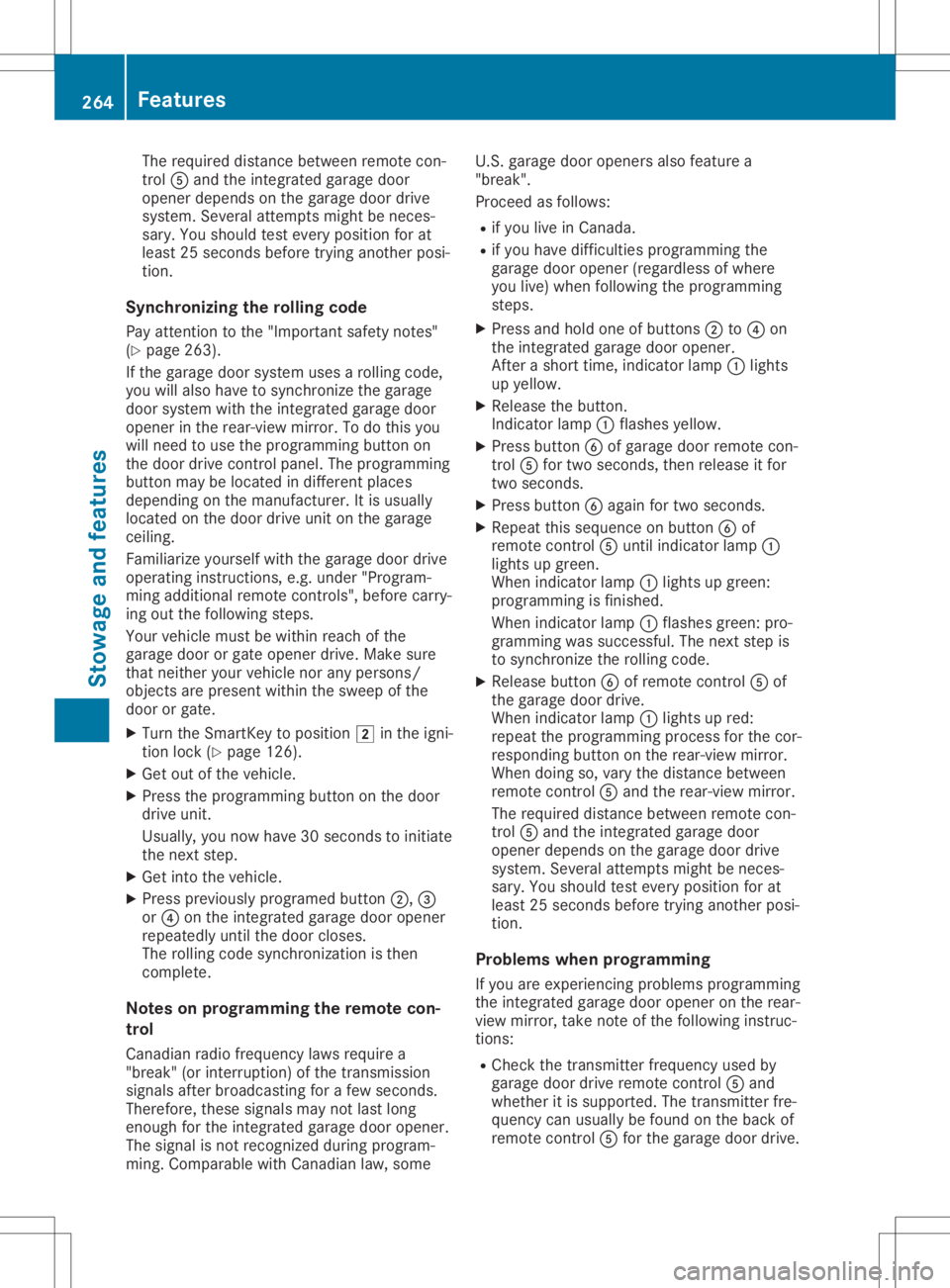
required distance between remotecon-
trol 0083and theintegr atedgarage door
opener depends onthe garage doordrive
system. Severalattemptsmight beneces-
sary. Youshould testevery position forat
least 25seconds beforetryinganother posi-
tion.
Synchronizing therolling code
Pay atten tiontothe "Importan tsafety notes"
(Y page 263).
If the garage doorsystem usesarolling code,
you willalso have tosynchron izethe garage
door system withtheintegr atedgarage door
opener inthe rear-view mirror.Todo this you
will need touse theprogramming buttonon
the door drive controlpanel. Theprogramming
button maybelocated indifferent places
depending onthe manufact urer.Itis usuall y
located onthe door drive unitonthe garage
ceiling.
Familiarize yourselfwiththegarage doordrive
operating instructions ,e.g. under "Program-
ming additional remotecontrols", before carry-
ing out thefollowing steps.
Your vehicle mustbewithin reachofthe
garage doororgate opener drive.Makesure
that neither yourvehicle norany persons/
object sare present withinthesweep ofthe
door orgate.
X Turn theSmart Keytoposition 0048inthe igni-
tion lock (Ypage 126).
X Get outofthe vehicle.
X Press theprogramming buttononthe door
drive unit.
Usually ,you now have 30seconds toinitiate
the next step.
X Get into thevehicle.
X Press previously programed button0044,0087
or 0085 onthe integr atedgarage dooropener
repeatedly untilthedoor closes.
The rolling codesynchron izationisthen
complete.
Notes onprogr ammingthe remot econ-
tr ol
Canadian radiofrequency lawsrequire a
"break" (orinter ruption) ofthe trans mission
signals afterbroadcasting forafew seconds.
Therefore, thesesignals maynotlast long
enough forthe integr atedgarage dooropener.
The signal isnot recogn izedduring program-
ming. Comparable withCanadian law,some U.S.
garage dooropeners alsofeature a
"break".
Proceed asfollows:
R ifyou liveinCanada.
R ifyou have difficulties programming the
garage dooropener (regardless ofwhere
you live) when following theprogramming
steps.
X Press andhold oneofbutton s0044 to0085 on
the integr atedgarage dooropener.
Aft erashort time,indicator lamp0043lights
up yellow.
X Release thebutton .
Indicat orlamp 0043flashes yellow.
X Press button 0084ofgarage doorremote con-
trol 0083for two seconds, thenrelease itfor
two seconds.
X Press button 0084again fortwo seconds.
X Repeat thissequence onbutton 0084of
remote control0083 until indicator lamp0043
lights upgreen.
When indicator lamp0043lights upgreen:
programming isfinished.
When indicator lamp0043flashes green:pro-
gramming wassuccessful. Thenext step is
to synchron izethe rolling code.
X Release button0084ofremote control0083 of
the garage doordrive.
When indicator lamp0043lights upred:
repeat theprogramming processforthe cor-
responding buttononthe rear-view mirror.
When doingso,vary thedistance between
remote control0083 and therear-view mirror.
The required distance between remotecon-
trol 0083and theintegr atedgarage door
opener depends onthe garage doordrive
system. Severalattemptsmight beneces-
sary. Youshould testevery position forat
least 25seconds beforetryinganother posi-
tion.
Problems whenprogramming
If you areexperienc ingproblems programming
the integr atedgarage dooropener onthe rear-
view mirror, takenoteof the following instruc-
tions:
R Check thetrans mitterfrequency usedby
garage doordrive remote control0083 and
whether itis supported. Thetrans mitterfre-
quency canusuall ybe found onthe back of
remote control0083 for the garage doordrive. 264
Featur
esStowage andfeatu res