fog light MERCEDES-BENZ SL CLASS 2020 User Guide
[x] Cancel search | Manufacturer: MERCEDES-BENZ, Model Year: 2020, Model line: SL CLASS, Model: MERCEDES-BENZ SL CLASS 2020Pages: 334, PDF Size: 17.43 MB
Page 184 of 334
Under
thefollowi ngcircumstances, therear
view camera willnotfunction, orwill function
in alimited manner:
R ifthe trunk lidisopen
R in heavy rain,snow orfog
R at night orinvery dark places
R ifthe camera isexposed tovery bright light
R ifthe area islit by fluorescent bulbsor LED
lighting (thedispla ymay flicker)
R ifthere isasudden changeintemperature,
e.g. when driving intoaheated garagein
winter
R ifthe camera lensisdirty orobstructed.
Observe thenotes oncleaning
(Y page 278)
R ifthe rear ofyour vehicle isdamage d.Inthis
case, havethecamera position andsetting
checked ataqual ified speciali stworkshop.
The field ofvision andother functions ofthe
rear view camera mayberestrict eddue to
additional accessories onthe rear ofthe vehi-
cle (e.g. license plateholder, bicycle rack).
On vehicles with<004B0048004C004A004B0057001000440047004D00580056005700440045004F
0048[ chassis,
leaving thestandard heightcanresult ininac-
curacies inthe guide lines,depending ontech-
nical conditions.
i The
cont rast ofthe displa ymay beaffec-
ted bythe sudden presence ofsunlight or
other lightsources, e.g.when exiting a
garage. Payparticular attentioninthis situa-
tion.
i If
usabi lityisseverely restricted,e.g. due
to pixel errors, havethedispla yrepaired or
replaced.
Activating/ deactivating therear view
camera X
To activate: makesurethattheSmartKey
is in position 0048inthe ignition lock.
X Make surethattheActivation byRgear Activation
byRgear
function isselected inthe multimedia sys-
tem; seetheDigital Operator's Manual.
X Engage reverse gear.
The multimedia systemshowsthearea
behind thevehicle withguide lines.
The image fromtherear view camera is
avail able throughout themaneuvering proc-
ess. To
deactivate: therear view camera deacti-
vates ifyou shift thetransmission toposition
005D, orafter driving forwards ashort distance.
The inner segments ofthe warning indicator
are displa yedinred ifthere isacomplete sys-
tem failure.The indicator lampinthe
PARKTRONIC buttonlightsup.
If the system failsatthe rear ofthe vehicle:
R the rear segments areshown inred when
backing up.
R the rear segments arehidden whendriving
forwards.
Displays inthe multim ediasystem The
rear view camera mayshow adistorted
view ofobstacles, showthemincorrect lyor
not atall. The rear view camera doesnotshow
objects inthe followi ngpositions:
R very close tothe rear bumper
R under therear bumper
R in close range above thehandle onthe trunk
lid
! Objects
notatground levelmayappea rto
be further awaythan theyactually are,e.g.:
R the bumper ofaparked vehicle
R the drawba rof atrailer
R the ball coupling ofatrailer towhitch
R the rear section ofan HGV
R aslanted post
Use theguide linesonlyfororientation.
Approach objectsnofurther thanthebot-
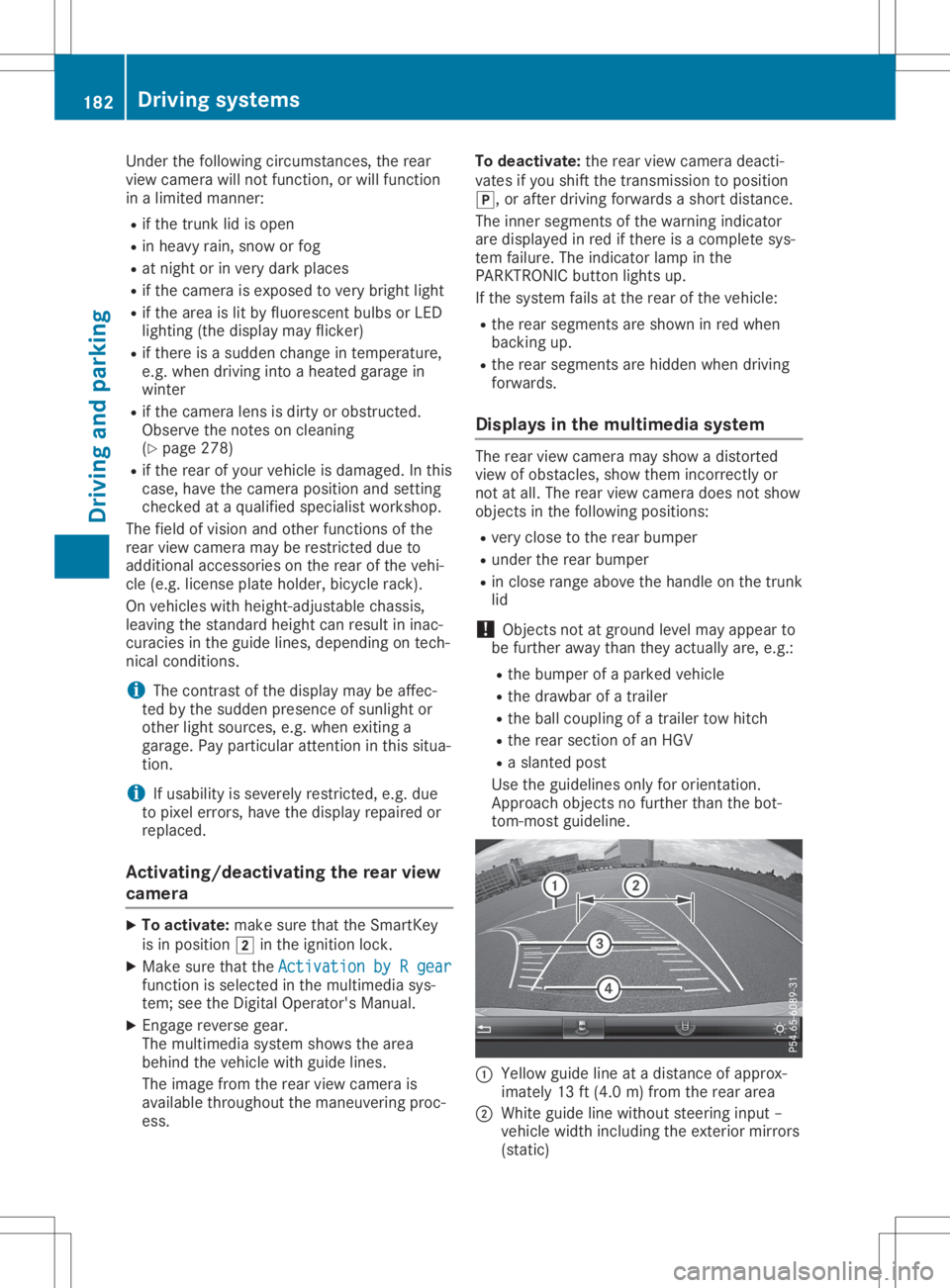
tom-most guideline. 0043
Yello wguide lineatadistance ofapprox-
imately 13ft(4.0 m)from therear area
0044 White guidelinewithout steering input–
vehicle widthincluding theexterior mirrors
(static) 182
Driving
systemsDriving andparking
Page 192 of 334
In
such cases, ActiveLaneKeepi ngAssist
can:
R give anunnecessary warningandthen
make a<00460052005800550056004800100046005200550055004800460057004C0051
004A[ brakeapplica-
tion
R neither giveawarning norintervene
There isarisk ofan accident.
Alway spay particul arattention tothe traffic
situa tionandkeep within thelane, espe-
ciall yif Active LaneKeepi ngAssist alerts
you .Terminate theintervention inanon-crit-
ical driving situation.
The system maybeimpa iredormay notfunc-
tion if:
R there ispoor visibility,e.g. due toinsuffi-
cient illuminatio nof the road, ordue to
snow, rain,fogorheavy spray
R there isglare ,e.g. from oncoming traffic,
the sun orreflection fromother vehicle s
(e.g. ifthe road surface iswet)
R the windshi eldisdirty, fogged up,dama ged
or covered, forinstance byasticker, inthe
vicinity ofthe camera
R there arenolane markings, orseveral
unclea rlane markings arepresent, e.g.
arou ndconstruction sites
R the lane markings areworn away,dark or
covered up,e.g. bydirt orsnow
R the distance tothe vehicle infront istoo
short andthus thelane markings cannotbe
detected
R the lane markings changequickly, e.g.lanes
branch off,cross oneanother ormerge
R the road isnarrow andwindi ng
R there arehighl yvaria bleshade conditions
on the roadw ay
R no vehicle isdetected inthe adjacent lane
and there arebroken lanemarkings
Warning vibration inthe steering wheel
A warning maybegiven ifafront wheel passes
over alane marking. Youwillthen bewarned
by means ofavibratio nthrough thesteering
wheel lasting forupto1.5 seconds .
In order thatyouarewarned onlywhen neces-
sary andingood timeifyou cross thelane
marking, thesystem detects certaincondi-
tions andwarns youaccordingly . The
warning vibrationoccurs earlierif:
R you appro achtheouter lanemarking ona
bend
R the road hasvery widelanes, e.g.afreewa y
R the system detects solidlanemarkings
The warning vibrationoccurs laterif:
R the road hasnarrow lanes
R you cutthe corner onabend
Lane-c orrecting brakeapplication G
WARNING
A lane-correcting brakeapplication cannot
alw ays bring thevehicle backintotheorigi-
nal lane. There isarisk ofan accident.
Alway ssteer, brakeoraccelera teyou rself,
especia llyifActive LaneKeepi ngAssist
warns youormakes alane-correcting brake
appl ication. G
WARNING
Active LaneKeepi ngAssist onlydetects traf-
fic conditions orroad users toalimi ted
extent. Invery rarecases, thesystem may
make aninapp ropria tebrake application,
e.g. after intentionally drivingoverasolid
lane marking. Thereisarisk ofan accident.
An inapp ropria tebrake application maybe
interrupted atany time ifyou steer slightly
in the opposi tedirection. Alwaysmake sure
that there issufficie ntdistance onthe side
for other traffic orobstacle s.
In rare cases, ActiveLaneKeepi ngAssist
could detect broken linemarkings orspecia l
structures onthe road surface assolid lane
markings. Aninapp ropria tebrake application
can beinterrupted atany time, forexample if
you steer slightlyinthe opposi tedirection. 190
Drivi
ngsystemsDrivi ngand parking
Page 228 of 334

Disp
laymes sages Poss
iblecauses/co nsequences and 0050 0050
Solu tions Act
ive LaneKee p‐ Act
ive LaneKee p‐
ing Assist Cur‐ ing
Assist Cur‐
ren tly Unavailable ren
tly Unavailable
See Operator'sMan ‐ See
Operator'sMan ‐
ual ual Ac
tive Lan eKee pingAs sis tis deac tivat ed and tempo rarily ino per a-
ti ve.
Pos siblecaus esare:
R thewin dsh ield inthecam era'sfie ldof vis ion isdir ty
R vis ibilit yis imp aire ddue toheav yrain ,sn ow orfog
R there havebeen nolanemar king sfor anextend ed per iod
R thelan emar king sare wornaway, darkorcover edup, e.g. by dirt
or snow
Whe nth ecaus esstate dabov eno longer apply, thedisp laymes sage
disap pears.
Ac tive Lan eKee pingAs sis tis oper ationalagain .
If th edisp laymes sage does notdisap pear:
X Pull overand stop theveh iclesaf ely assoo nas pos sible,payin g
att ention toroa dand traff icco nd ition s.
X Se cur eth eveh icleagain strol lingaway (Ypage 147).
X Clean thewin dsh ield. Act
ive LaneKee p‐ Act
ive LaneKee p‐
ing Assist Inoper a‐ ing
Assist Inoper a‐
tiv e tiv
e Ac
tive Lan eKee pingAs sis tis malf unction ing .
X Vis itaqualif iedspecialistwor kshop . Act
ive BlindSpot Act
ive BlindSpot
Ass ist Currently Ass
ist Currently
Una vailableSee Una
vailableSee
Ope rator'sMan ual Ope
rator'sMan ual Ac
tive Blind Spot Assis tis tempo rarily ino per ative.
Pos siblecaus esare:
R theradar sensor syst emisout side theoper ating tempe rature
ran ge
R theradar sensor syst emistempo rarily ino per ative, e.g. due to
elec tromag netic radi ation emi tted bynearby TVorradi ostati ons
or other sour cesof elec tromag netic radi ation
The yellow 0063indicat orlamp salso lightup intheex terio rmir rors.
Whe nth ecaus esstate dabov eno longer apply, thedisp laymes sage
disap pears.
Ac tive Blind Spot Assis tis oper ationalagain .
If th edisp laymes sage does notdisap pear:
X Pull overand stop theveh iclesaf ely assoo nas pos sible,payin g
att ention toroa dand traff icco nd ition s.
X Se cur eth eveh icleagain strol lingaway (Ypage 147).
X Clean thesen sors(Y page 278).
X Rest arttheen gin e. Act
ive BlindSpot Act
ive BlindSpot
Ass ist Inoperative Ass
ist Inoperative Ac
tive Blind Spot Assis tis malf unction ing .
The yellow 0063indicat orlamp salso lightup intheex terio rmir rors.
X Vis itaqualif iedspecialistwor kshop . 226
Disp
laymes sage sOn -boar dcomp uter anddi sp lay s