phone MERCEDES-BENZ SL CLASS 2020 User Guide
[x] Cancel search | Manufacturer: MERCEDES-BENZ, Model Year: 2020, Model line: SL CLASS, Model: MERCEDES-BENZ SL CLASS 2020Pages: 334, PDF Size: 17.43 MB
Page 201 of 334
X
Esta blish aBlu eto oth ®
conne ctionto the
mu ltimed iasystem (Ypage 249) .
X Pre ssthe 0059 or0065 button onthe stee r-
ing wheelto sel ect the Tel Tel
menu .
Yo uwi llsee one ofthe followi ng disp laymes -
sa ge sin the multifu nctio ndisp lay:
R Pho neREADY Pho
neREADYorthe nam eof the netw ork
pro vider: the mob ile ph one hasfou ndanet-
wo rkand isrea dytorece ive.
R Pho neNoService Pho
neNoService:the reisno netw ork
av ailabl e or the mob ile ph one issea rchi ng
for anetw ork.
Ac ceptin gaca ll If
som eone callsyo uwh en youar ein the Tel Tel
menu ,a di sp laymes sage appe arsin the multi-
fu nctio ndisp lay.
Yo ucan accepta cal lat any time regardless of
the menu selecte d.
X Pre ssthe 0061 button onthe stee ringwh eel
to acc eptan inco mingcal l.
Reje cting orendin gaca ll X
Pre ssthe 0076 button onthe stee ringwh eel
to reje ctor end acal l.
Se lecti ng anentry inthe phonebook X
Pre ssthe 0059 or0065 button onthe stee r-
ing wheelto sel ect the Tel Tel
menu .
X Pre ssthe 0063, 0064or0076 button to
sw itch tothe phone book.
X Auth orize acc ess tothe phone book on the
ph one .
X Pre ss0064 or0063 tosel ect the nam esone
af ter the othe r.
or X To start rapid scrol ling :pre ssand hold
the 0064 or0063 button forlonge rtha none
sec ond .
The nam esinthe phone book aredisp laye d
qu ickl yone after the othe r.
Ra pid scro lling stop swh en yourel ease the
bu tton orrea chthe end ofthe list.
X If
on lyon etel eph onenumb erissto red
fo ra name :pre ssthe 0061 or0076 button
to sta rtdialing .
or X
If
the reismore thanonenumb erfora
parti cular name :pre ssthe 0061 or0076
bu tton todisp laythe num bers.
X Pre ssthe 0063 or0064 button tosel ect the
num beryo uwa ntto dial.
X Pre ssthe 0061 or0076 button tosta rtdial-
ing .
or X To exitthe teleph onebo ok:pre ssthe
0076 or0038 button.
Redi aling The
on-b oard comp utersa ves thelast nam es
or num bers dialed inthe redialmem ory.
X Pre ssthe 0059 or0065 button onthe stee r-
ing wheelto sel ect the Tel Tel
menu .
X Pre ssthe 0061 button tosw itch tothe
red ialmem ory.
X Pre ssthe 0063 or0064 button tosel ect the
de sired nam eor num ber.
X Pre ssthe 0061 or0076 button tosta rtdial-
ing .
or X To exitthe redi almemo ry:pressthe 0076
or 0038 button. As
sistan cemen u
In trodu ction Dep
endingonyour veh icle's equipme nt,inthe
Dri veAssist Dri
veAssistmenu ,yo uha ve the followi ng
op tio ns:
R Dis play ing the assista nce graphic
(Y page 200 )
R Me rced es-AMG vehicles: setti ngthe vehicle
le vel (Ypage 172 )
R Activ ating/d eactiv ating Activ eStee ring
Assi st(Y page 200 )
R Activ ating/d eactiv ating Activ eBra keAssi st
(Y page 200 )
R Activ ating/d eactiv ating Activ eBra keAssi st
wi th cros s-tra fficfu nctio n(Y page 200 )
R Activ ating/d eactiv ating ATT ENTI ONASSIST
(Y page 200 )
R Activ ating/d eactiv ating Activ eBli nd Spo t
Assi st(Y page 201 )
R Activ ating/d eactiv ating Activ eLa ne Kee ping
Assi st(Y page 201 ) Me
nus and submen us
199On -bo ard computer anddisplay s Z
Page 251 of 334

X
To avo id/use route options:sel ect
Avo idOptions Avo
idOptions.
X Sel ect arou teoptio n.
Note sfor routeoptio ns:
R Use TollRoa ds Use
TollRoa ds
The routecal cul ation incl udes roa dswhich
req uire youto paya us ag efee (toll).
R Num ber ofOccupants inthe Vehicle: Num
ber ofOccupants inthe Vehicle:
(o nly availab lein the USA)
Pre requisite: your veh iclemee tsthe acce ss
cond itions forcarpoollanes.
Ca rpo ollanes willbe incl uded ifthe carpool
la nes optio nis acti vate d.
En teri nganaddres s Mu
ltimed iasystem :
X Sel ect Navi Nav
i007BN avigation Nav
igation.
The mapsho wsthe vehicle's current posi-
tio n.
X Sli de 6 thecontro ller.
X Sel ect Destination Des
tination007B AddressEnt ry Add
ressEnt ry.
Enter anaddre ss, e.g.as follows :
R city orZIP code,stre et,hou senum ber
R sta te/p rovince, cityorZIP code
R city orZIP code,cente r
R stre et,city orZIP code,inte rsectio n
X Sel ect City Cit
y.
The cityinwh ich the vehicleis cur rentl y
lo cate d(cu rrentveh iclepo sitio n)isat the
top. Below this,yo uwi llsee locati ons for
wh ich routeguidance hasal rea dybeen car -
rie dou t.
X Enter thecity.
The 0043symbo l:the locati onisconta inedon
the digital map multiple time s.
X To switchto the list: slid e 5 thecontro l-
le r.
X Sel ect the locati on.
If ava ilab le,the ZIPcodeis sho wn. Ifther e
are differ ent ZIPcodesava ilab lefor the
lo cati on, the corr espond ingdigits are dis-
pl ay ed with an X X.
X Enter thestre etand housenum ber.
The addre ssisin the menu .
Furth eropti onsfor des tinatio nen try:
R sea rch forakey word The
keywordsea rch findsde stina tions using
fra gme ntsofwo rds .
R sel ect the last destina tion
R sel ect aconta ct
R sel ect aPOI
Yo ucan search foraPOI bylocati on, nam e
or telephone number.
R sel ect destina tionon the map
R enter interme diate destina tion
Yo ucan mapthe routeto the destina tion
yo ursel fwi th up tofou rinte rme diate desti-
nati ons.
R sel ect destina tions from Mercedes-B enz
App s
R sel ect geo-coo rdinate s
Cal culatin gthe route Pre
requisite: the addre sshasbe en enter ed
and isin the menu .
X Sel ect Start Sta
rtorCon tinue Con
tinue.
The routeiscal cul ate dwi th the selecte d
rou tetyp eand theselecte drou teoptio ns.
If rou teguidance hasal rea dybeen acti va-
ted ,a pro mpt willap pe ar asking whethe r
yo uwi sh toend thecurrent routeguidance .
X Sel ect Cancel Active RouteGuidance Can
cel Active RouteGuidanceor
Set asIntermediate Destination Set
asIntermediate Destination.
Can cel Active RouteGuidance Can
cel Active RouteGuidancecance ls
the current routeguidance andstarts rou te
cal cul ation tothe new destina tion.
Set asIntermediate Destination Set
asIntermediate Destinationadds
the new destina tionin ad ditio nto the exist-
ing destina tionand opens theinterme diate
de stina tions list. Co
nnectin gamob ile phon e
(C OMA ND)
Requ iremen ts For
telephony viathe Bluetoo th®
inte rface, you
req uire aBlu etoo th®
-cap ablemob ile pho ne.
The mob ile pho nemu stsupp ort Hand s-Free
Pro file 1.0 orabove .
Mu ltimed iasystem :
X Sel ect Vehicle Veh
icle007BS ystemSet‐ Sys
tem Set‐
tin gs tin
gs007B ActivateBluetooth Act
ivateBluetooth.
X Activa teBlu etoo th®
0073. Ope
ratin gsys tem
249Mul time diasystem Z
Page 252 of 334
Mobile
phone:
X Act ivate Bluetooth ®
and, ifnecessary, Blue-
tooth ®
visibili tyfor other devices (seethe
manufacturer's operatinginstructions).
The Bluetooth ®
device names forallofone
manufacturer's productsmightbeidentical. To
make itpossible toclearly identify yourmobile
phone, change thedevice name(seetheman-
ufacturer's operatinginstructions).
If the mobile phonesupports thePBAP (Phone
Book Access Profile) andMAP (Message
Access Profile)Bluetooth ®
profiles, thefollow-
ing information willbetransmit tedafter you
conn ect:
R Phone book
R Call lists
R Text messages ande-mail
i Further
information onsuitable mobile
phones canbefound at:http://
www .mer<004600480047004800560010004500480051005D001100460052005000120046
0052> nnect
i In
the USA, youcan getintouch withthe
Mercedes-Ben zCustomer AssistanceCenter
on 1-80 0-FO R-MERCedes
(1-800 -367-637 2).
In Canada ,you can getintouch withthe
Customer Relations Center on
1-80 0-387-0100.
Searching forand auth orizing (con-
necting) amobile phone Before
usingyourmobile phonewiththemulti-
media system forthe first time, youwillneed
to search forthe phone andthen authorize
(connec t)it. Depending onthe mobile phone,
authorization eithertakesplacebymeans of
Secure SimplePairing orby enterin gapass-
key. Themultimedia systemautomatically
makes theprocedure thatisrelevant foryour
mobile phoneavailable.Themobile phoneis
alwa ysconn ected automatically afterauthori-
zation. Further information onusing amobile
phone withthemultimedia system(seethe
Digital Operator's Manual).
If the multimedia systemdoesnotdetect your
mobile phone, thismay bedue toparticular
security settingson your mobile phone(see
the manufacturer's operatinginstructions).
Only onemobile phonecanbeconn ected to
the multimedia systematany one time.
Searching foramobile phone Multimedia
system:
X Select Tel/ Tel/00A7007BConn. Conn.
Device Device007BSearch
forPhones Search
forPhones007BStart Start
Search Search.
The availa blemobile phones aredisplay ed.
Symbols inthe device list Sym-
bol Explanation
00D3
New
mobile phonefound, notyet
authorized. 00DC
Mobile
phoneisauthorized, butis
not conn ected. Conne
ctingamobile phone
Authorizat ionusing Secure SimplePairing:
X Select mobile phone.
A code isdisplay edinthe multimedia sys-
tem andonthe mobile phone.
X Ifcodes match:select Yes Yes
onthe multime-
dia system.
X Confirm codeonthe mobile phone. Depend-
ing onthe mobile phoneused,confirm the
conn ection tothe multimedia systemand
for the PBAP andMAP Bluetooth ®
profiles.
The prompt toconfirm maytake uptotwo
minutes tobe display ed(see themanufac-
turer's operating instructions).
X Ifthe codes aredifferent: selectNo No
on the
multimedia system.
The process iscanceled.
Repea tauthorization.
Authorizat ionbyenterin gapasskey (pass-
code):
X Select theBluetooth ®
name ofthe mobile
phone.
The input menu forthe passkey isdisplay ed.
X Choose aone tosixteen- digitnumber com-
bination asapasskey.
X Ent erthe passkey onthe multimedia sys-
tem.
X Press 0054toconfirm .
X Ent erand confirm thepasskey onthe
mobile phone. Depending onthe mobile
phone used,confirm theconn ection tothe
multimedia systemandforthe PBAP and
MAP Bluetooth ®
profiles. Theprompt to
confirm maytake uptotwo minutes tobe 250
Operat
ingsystemMultim ediasystem
Page 253 of 334

displayed
(seethemanufac turer'soperatin g
inst ruct ions). Media
mode
General notes If
you wish toplay external media sources, the
appropriate mediamodemustalready be
turn edon. Furt herinfor mation onmedia mode
(see theDigit alOperator 'sManual).
The following external media sources canbe
used:
R Apple ®
devices (e.g.iPhone ®
)
R USB devices (e.g.USBstick,MP3 player)
(Y page 251)
R CD
R DVD (COMAND )
R SD cards
R Via devices connected byBluetoot h®
i Inf
ormat iononsingle CD/DVDdrive or
DVD chang er(see theDigit alOperator 's
Manual).
Selecting usingthedevice list Multimedia
system:
X Select Media Media007B
Devices Device
s.
The available mediasources willbeshown.
The 003Bdot indicat esthe curren tsett ing.
X Select themedia source.
Playable filesareplayed.
Inserting/r emovinganSD card Impor
tantsafet ynotes G
WARN
ING
SD cards aresmall parts. Theycanbeswal-
lowed andcause choking.This poses an
incr eased riskofinjury oreven fatalinjury.
Keep theSDcard outofthe reach ofchil-
dren. IfaSD card isswallowed, seekmedi-
cal atte ntion immediately.
! If
the SDcard isno longer inuse, you
should takeitout and remov eit from the
vehicle. Hightemper aturescandamage the
card. Inserting
anSD card
The SDcard slotislocated onthe control
panel.
X Inser tthe SDcard intothe SDcard slotuntil
the SDcard engages. Theside with thecon-
tact smust facedown.
Removing anSD card
X Press theSDcard.
The SDcard isejec ted.
X Remove theSDcard.
Connecting USBdevices X
Connec tthe USB device tothe USB port.
There aretwo USB ports inthe stowage
space underthearmrest .
X Select themedia source (Ypage 251). Oper
ating system
251Multimedia system Z
Page 254 of 334

Stowage
areas Stowage
spaces
Import antsafety notes G
WARNING
If object sin the passenger compartmen tare
stowed incorrec tly,they canslide orbe
thrown around andhitvehicle occupants. In
addition, cupholders, openstowage spaces
and mobile phonebrackets cannotalways
retain allobject sthey contain.There isa
risk ofinjury, particularly inthe event ofsud-
den braking orasudden changeindirection.
R Always stowobject sso that they cannot
be thrown around insuch situations.
R Always makesurethatobject sdo not pro-
trude fromstowage spaces,parcelnetsor
stowage nets.
R Close thelockable stowagespacesbefore
startin gajourney.
R Always stowandsecure heavy,hard,poin-
ted, sharp-edged, fragileorbulky object s
in the trunk .
Glove box X
To open: pullhandle 0043and open glove box
flap 0044.
X To close :fold glove boxflap 0044upuntil it
engages.
In the glove box,there areacoin holder, a
map holder andapen holder.
i The
glove boxcanbevent ilated
(Y page 123). The
glove boxcanbelocked andunlocked
using themechanical key.
X To lock: insert themechanical keyinto the
lock andturn itto position 0048.
X To unlock: insertthemechanical keyinto
the lock andturn itto position 0047.
Stowage compartment/telephone
compar tment under thearm rest X
To open: pressbutton 0043.
Amrest 0044folds out.
In the stowage compartmen t,there isastow-
age tray.
i Depending
onthe vehicle equipment, a
USB portandaMedia Interface isinstalled
in the stowage compartmen t.AMedia Inter-
face isauniversal interfaceformobile audio
equipment, e.g.foraniPod ®
or MP3 Playe r. 252
Stowage
areasStowage andfeatu res
Page 257 of 334

opened,
theloading aidrises automatically.
When theroof isclosed, thetrunk partition
remains inthe open position. Thetrunk par- tition
moves tothe closed position automat-
ically when theroof islowered.
Problems withtheloading aid Problem
Possible
causes/conse quencesand0050 0050
Solutions It
is no longer possible
to lower thestowed
roof inthe trunk using
the loading aid. You
cann otclose thetrunk anymore.
X Call aquali fiedspecialist workshop. Stowage
wellunder thetrunk floor X
To open: opentrunk partition 0044
(Y page 93).
X Swing trunkfloor0087upusing loop0043.
The TIREFIT kit,tire-c hange toolkit,etc. is
located inthe stowage compartm ent. Featur
es Cup
holder
Import antsafety notes G
WARNING
If object sin the passenger compartmentare
stowed incorrectly, theycanslide orbe
thrown around andhitvehicle occupant s.In
addition, cupholders, openstowage spaces
and mobile phonebracket scann otalway s
retain allobject sthey contain.There isa
risk ofinjury, particularly inthe event ofsud-
den braking orasudden changeindirection . R
Always stowobject sso that they cannot
be thrown around insuch situations.
R Always makesurethatobject sdo not pro-
trude fromstowage spaces,parcelnetsor
stowage nets.
R Close thelockable stowagespacesbefore
start ingajourney.
R Always stowandsecure heavy,hard,poin-
ted, sharp-edged, fragileorbulky object s
in the trunk . G
WARNING
The heating elements ofthe cup holder can
become veryhot.Youcould burnyourself on
them.
There isarisk ofinjury.
Do not touch thehot heating elements of
the cup holder. Alwaysmakesurethatchil-
dren cannotaccess thehot heating ele-
ment sof the cup holder. Neverleavechil-
dren unsupervised inthe vehicle.
! Only
usethecup holders forcont ainers of
the right sizeandwhich havelids.The
drinks couldotherwise spill.
! Do
not expose drinksbottles inthe cup
holder inthe cent erconsole tocont inuous,
stron gand direct sunlight. Thepassenger
compartm entinthe area ofthe cent ercon-
sole canotherwise bedamaged bythe con-
cent rated andreflect edsunlight. Featur
es
255Stowage andfeatu res Z
Page 260 of 334

Socket
inthe front- passenger footwell X
Lift upthe cover ofsocket 0043.
Socket inthe trunk X
Lift upthe cover ofsocket 0043. Mercedes
meconne ct
General notes A
license agreement mustbeinplace inorder
to activate theMercedes meconn ectservice.
Make surethatyour system isactivated and
operational. Toregister, pressthe00D9 MB
Info callbutton. Ifany ofthe steps mentioned
are not carried out,thesystem maynotbe
activated.
If you have questions abouttheactivation,
cont actone ofthe following telephone hot-
lines:
R USA: Mercedes-B enzCustomer Assistance
Center at1-80 0-FOR-MERCedes
(1-80 0-367-6372)or1-86 6-990-9007
R Canada: Customer Serviceat
1-88 8-92 3-8367 Short
lyafter successfully registeringwiththe
service, auser IDand password willbesent to
you bypost.
USA only: youcan usethis password tolog
onto theMercedes meconn ectarea under
"Owners Online"athtt <0053001D00120012005A005A005A001100500045005800560044001100460052
0050>.
The system isavaila bleif:
R ithas been activated andisoperational
R the correspondin gmobile phonenetwork is
availa blefortransm ittingdatatothe Cus-
tomer Center
R aservice subscription isavaila ble
R the starter battery issufficiently charged
i Determ iningthelocation ofthe vehicle on
a map isonly possible if:
R GPS reception isavaila ble
R the vehicle position canbeforwarded to
the Customer AssistanceCenter
The Mercedes meconne ctsystem To
adjust thevolume duringacall, proceed as
follows:
X Press the0081 or0082 button onthe multi-
funct ionsteering wheel.
or
X Use thevolume controller ofCOMAND.
The system offersvarious services, e.g.:
R Automatic andmanual emergency call
R Roadsid eAssistanc ecall
R MB Info call
USA only: youcan find information anda
description ofall availa blefeatures under
"Owners Online"athttp: //www.mbusa.com.
System self-test Aft
eryou have switched onthe ignition, the
system carriesoutaself-diagnosis.
A malfunction inthe system hasbeen detec-
ted ifone ofthe following occurs:
R The indicator lampinthe SOS button does
not come onduring thesystem self-test .
R The indicator lampinthe 0052 Roadsid e
Assistanc ebutton doesnotlight upduring
self-diagnosis ofthe system.
R The indicator lampinthe 00D9 MBInfo call
button doesnotlight upduring self-diagno-
sis ofthe system. 258
FeaturesStowage
andfeatu res
Page 261 of 334

R
The indicator lampinone ormore ofthe fol-
lowing buttonscont inues tolight upred
after thesystem self-diagnosis:
- SOS button
- 0052 Roadside Assistancecallbutton
- 00D9 MBInfo callbutton
R Aft erthe system self-diagnosis, theInoper‐ Inoper‐
ative ative
orService NotActivated Service
NotActivated mes-
sage appears inthe multifunct iondisplay .
If amalfunct ionisindicated asoutlined above,
the system maynotoperate asexpect ed.In
the event ofan emergenc y,help willhave to
be summoned byother means.
Have thesystem checkedatthe nearest
Mercedes- BenzServic eCenter orcont actthe
following servicehotlines:
R USA: Mercedes- BenzCustomer Assistance
Center at1-8 00-FOR-ME RCedes
(1-80 0-367-6372 )or 1-86 6-990-9007
R Canada: Customer Serviceat
1-88 8-92 3-8367
Emergency call Import
antsafety notes G
WARNING
It can bedangerous toremain inthe vehicle,
even ifyou have pressed theSOS button in
an emergenc yif:
R you seesmoke insideoroutside ofthe
vehicle, e.g.ifthere isafire after anacci-
dent
R the vehicle ison adangerous sectionof
road
R the vehicle isnot visible orcann oteasily
be seen byother roadusers, particularly
when darkorinpoor visibility conditions
There isarisk ofan accident andinjury.
Leave thevehicle immediately inthis orsim-
ilar situations assoon asitis safe todo so.
Move toasafe location alongwithother
vehicle occupant s.In such situations, secure
the vehicle inaccordanc ewith national regu-
lations, e.g. with awarning triangle.
A license agreement mustbeinplace inorder
to activate theMercedes meconn ectservice.
Make surethatyour system isactivated andoperational.
Toregister, pressthe00D9 MB
Info callbutton .If any ofthe steps mentioned
are not carried out,thesystem maynotbe
activated.
If you have questions abouttheactivation ,
cont actone ofthe following telephone hot-
lines:
R USA: Mercedes-B enzCustomer Assistance
Center at1-80 0-FOR-MERCedes
(1-80 0-367-6372)or1-86 6-990-9007
R Canada: Customer Serviceat
1-88 8-923-8367
General notes
An emergenc ycall isdialed automatically ifan
air bag orEmergen cyTensionin gDevice istrig-
gered.
i You
cann otend anautomatically triggered
emergenc ycall yourself.
An emergenc ycall can also beinitiated man-
ually .
As soon asthe emergenc ycall has been initi-
ated, theindicator lampinthe SOS button
flashes. Themultifunct iondisplay showsthe
Connecting Call Connecting
Callmessage.
The audio output ismuted.
Once theconn ection hasbeen made, the
Call Connected Call
Connected messageappearsinthe mul-
tifunc tiondisplay .
All important informationonthe emergenc yis
transm itted,forexample:
R Current location ofthe vehicle (asdeter-
mined bythe GPS system)
R Vehicle identificat ionnumber
R Infor mation onthe severity ofthe accident
Short lyafter theemergenc ycall has been initi-
ated, avoice connection isautomatically
established betweentheCustomer Assistance
Center andthevehicle occupant s.
R Ifthe vehicle occupant sare responsive, the
Mercedes-B enzCustomer AssistanceCenter
attempt sto get more informat iononthe
emergenc y.
R Ifthere isno response fromthevehicle
occupant s,an ambulance isimmediately
sent tothe vehicle.
If no voice connection canbeestablished to
the Mercedes-B enzCustomer AssistanceCen-
ter, thesystem hasbeen unable toinitiate an
emergenc ycall. Featur
es
259Stowage andfeatu res Z
Page 262 of 334
This
canoccur, forexample, ifthe relevant
mobile phonenetwork isnot availabl e.The
indicator lampinthe SOS button flashes con-
tinuously.
The Call Failed Call
Failed message appearsinthe
multifunct iondisplay andmust beconf irmed.
In this case, summon assistance byother
means.
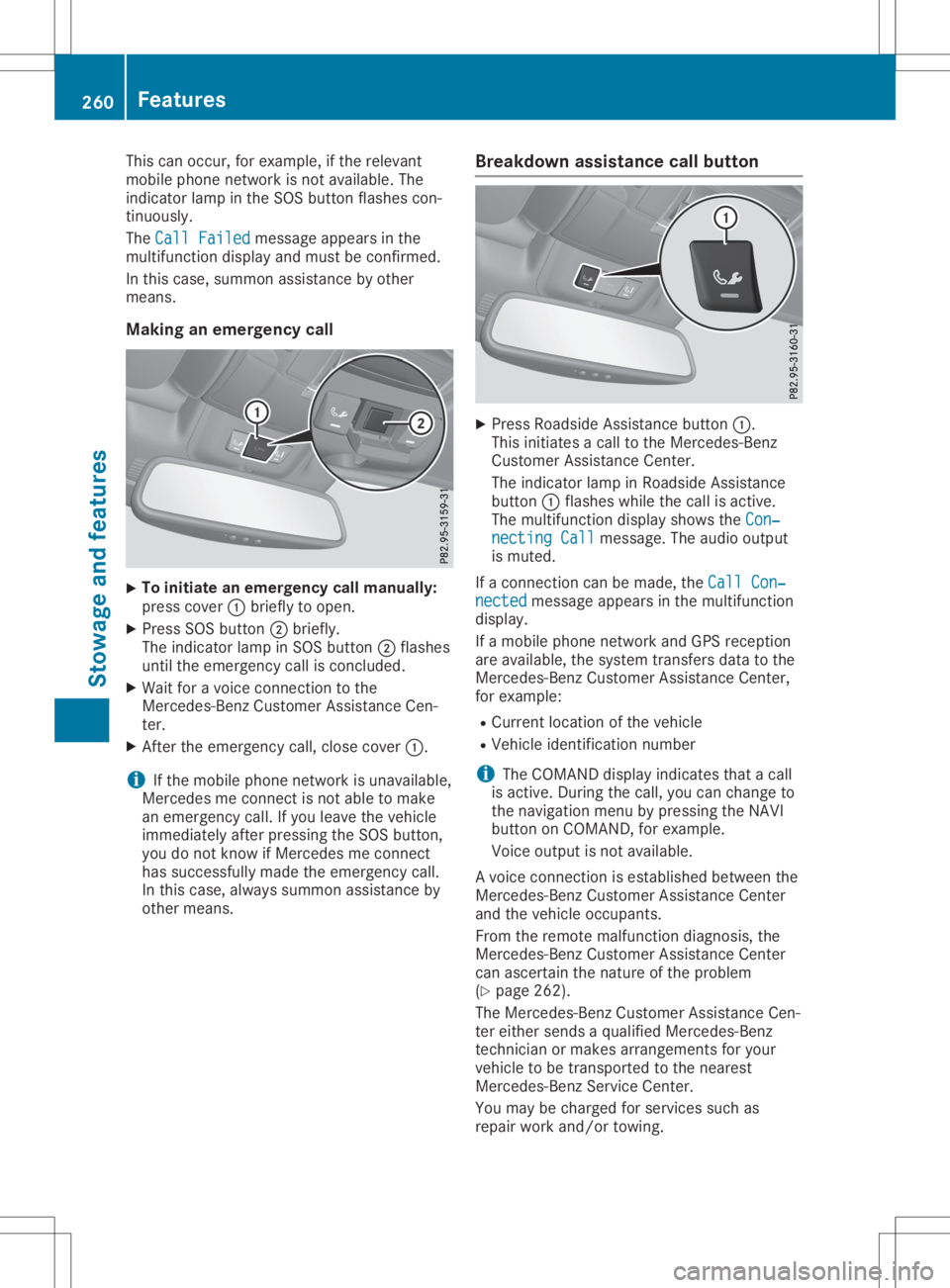
Making anemergency call X
To
initiate anemergency callmanu ally:
press cover 0043briefly toopen.
X Press SOSbutton 0044briefly.
The indicator lampinSOS button 0044flashes
until theemergenc ycall isconc luded.
X Wait foravoice connection tothe
Mercedes- BenzCustomer AssistanceCen-
ter.
X Aft erthe emergenc ycall, close cover 0043.
i If
the mobile phonenetwork isunavailable ,
Mercedes meconn ectisnot able tomake
an emergenc ycall. Ifyou leave thevehicle
immediately afterpressing theSOS button ,
you donot know ifMercedes meconn ect
has successfully madetheemergenc ycall.
In this case, alwayssummon assistance by
other means. Br
eakdown assistance callbutt on X
Press Roadside Assistancebutton 0043.
This initiates acall tothe Mercedes- Benz
Customer AssistanceCenter.
The indicator lampinRoadside Assistance
button 0043flashes whilethecall isactive.
The multifunct iondisplay showstheCon‐ Con‐
necting Call necting
Callmessage. Theaudio output
is muted.
If aconn ection canbemade, theCall Con‐ Call
Con‐
nected nected
message appearsinthe multifunct ion
display .
If amobile phonenetwork andGPS reception
are availab le,the system transfersdata tothe
Mercedes- BenzCustomer AssistanceCenter,
for example:
R Current location ofthe vehicle
R Vehicle identific ationnumber
i The
COMAND displayindicates thatacall
is active. During thecall, youcan change to
the navigation menubypressing theNAVI
button onCOMAND ,for example.
Voice output isnot availabl e.
A voice connection isestablished betweenthe
Mercedes- BenzCustomer AssistanceCenter
and thevehicle occupant s.
From theremote malfunct iondiagnosis, the
Mercedes- BenzCustomer AssistanceCenter
can ascertain thenature ofthe problem
(Y page 262).
The Mercedes- BenzCustomer AssistanceCen-
ter either sends aqualified Mercedes- Benz
techn icianormakes arrangemen tsfor your
vehicle tobe trans ported tothe nearest
Mercedes- BenzServic eCenter.
You may becharged forservices suchas
repair workand/or towing. 260
Featur
esStowage andfeatu res
Page 263 of 334
You
canobtain further informat ionfrom your
Merc edes meconnectmanual.
i The syste mhas notbeen abletoinit iate a
Roadside Assistan cecall, if:
R the indic atorlamp forRoadside Assis-
tan cecall button0043 isflashin gcon tinu-
ously.
R no voic econ nection tothe Merc edes-
Ben zCustom erAss istan ceCent erhas
been established.
R
This canoccurifthe relevan tmobile phone
net work isnot available, forexamp le.
The Call Failed Call
Failedmessag eappears inthe
multif unction display.
X To end acall: press the0076 buttononthe
multif unction steerin gwheel.
or X Press thecorrespon dingbuttonfor endin ga
phon ecall onCOMAN D.
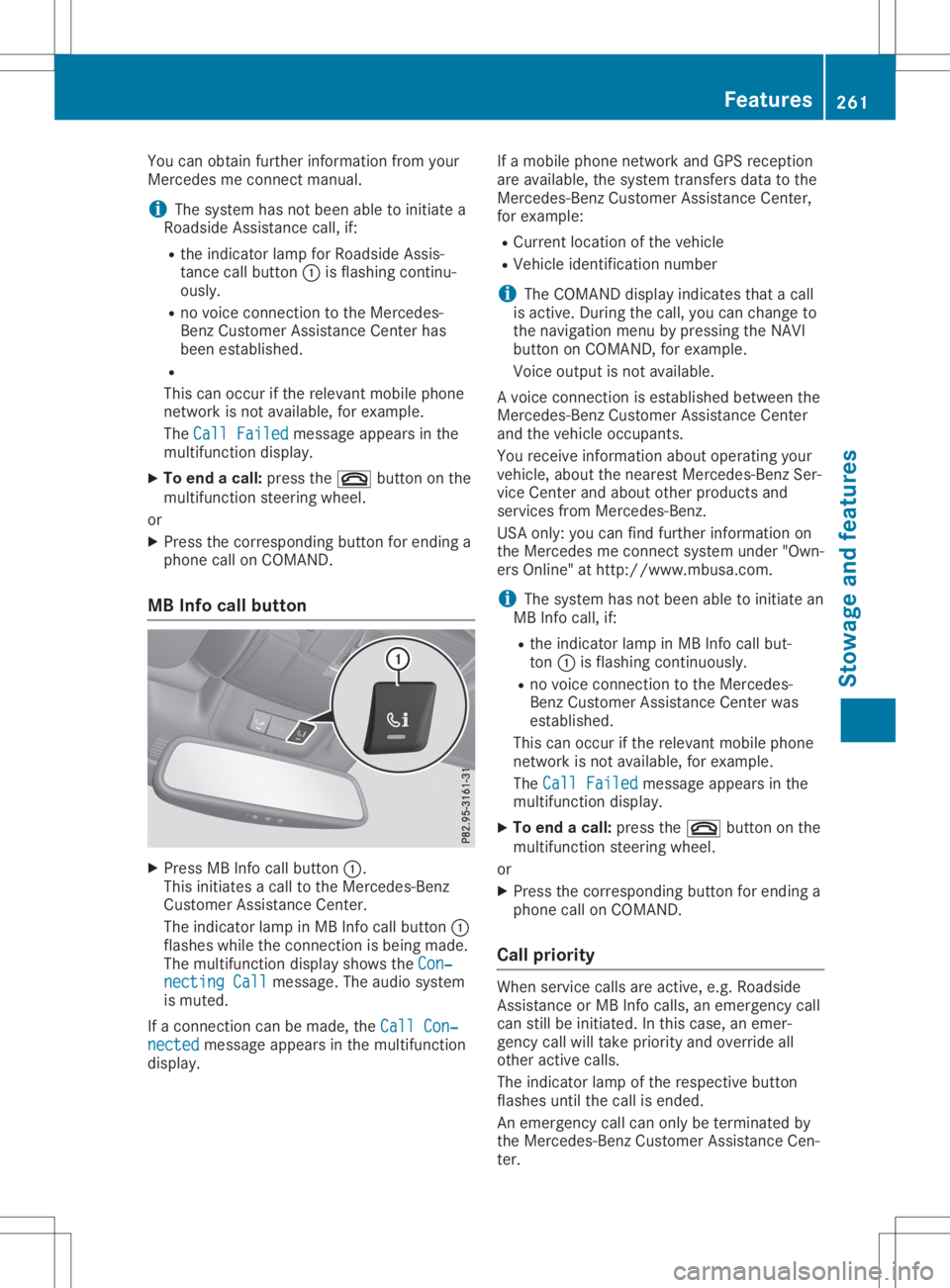
MB Info callbutton X
Press MBInfocall button0043.
This initiates acall tothe Merc edes- Benz
Custom erAss istan ceCent er.
The indic atorlamp inMB Infocall button0043
flashes whiletheconnection isbeing made.
The multif unction display showstheCon‐ Con‐
nect ingCall nect
ingCall messag e.The audio system
is mute d.
If acon nection canbemade, theCall Con‐ Call
Con‐
nect ed nect
edmessag eappears inthe multif unction
display. If
amobile phonenet work andGPS receptio n
are available, thesyste mtransf ersdata tothe
Merc edes- BenzCustom erAss istan ceCent er,
for examp le:
R Curren tlocat ionofthe vehic le
R Vehic leident ificationnumbe r
i The
COMAN Ddisplay indicates thatacall
is act ive. Durin gthe call, youcan chan geto
the navig ation menuby press ingthe NAV I
butt ononCOMAN D,for examp le.
Voice output isnot available.
A voic econ nection isest ablished betweenthe
Merc edes- BenzCustom erAss istan ceCent er
and thevehic leocc upant s.
You receive informat ionabout operat ingyour
vehic le,about thenear estMerc edes- BenzSer -
vice Cent erand about otherproduc tsand
serv ices from Mercedes- Benz.
USA only: youcan findfurt her informat ionon
the Merc edes meconnectsyste munder "Own-
ers Onlin e"athtt p:/ /www.m busa.com.
i The syste mhas notbeen abletoinit iate an
MB Infocall, if:
R the indic atorlamp inMB Infocall but-
ton 0043isflashin gcon tinuously.
R no voic econ nection tothe Merc edes-
Ben zCustom erAss istan ceCent erwas
est ablished.
This canoccurifthe relevan tmobile phone
net work isnot available, forexamp le.
The Call Failed Call
Failedmessag eappears inthe
multif unction display.
X To end acall: press the0076 buttononthe
multif unction steerin gwheel.
or X Press thecorrespon dingbuttonfor endin ga
phon ecall onCOMAN D.
Call priorit y When
servicecalls areactive, e.g. Roadside
Ass istan ceorMB Infocalls, anemerg encycall
can stillbeinit iated. Inthis case, anemer-
genc ycall willtakeprior ityand over ride all
oth eract ive calls.
The indic atorlamp ofthe respec tivebutt on
flashes untilthe call isended .
An emerg encycall can only beterminat edby
the Merc edes- BenzCustom erAss istan ceCen-
ter . Featu
res
261Stowage andfeatures Z