trunk MERCEDES-BENZ SL CLASS 2020 Owner's Manual
[x] Cancel search | Manufacturer: MERCEDES-BENZ, Model Year: 2020, Model line: SL CLASS, Model: MERCEDES-BENZ SL CLASS 2020Pages: 334, PDF Size: 17.43 MB
Page 96 of 334

X
Pull thenet forwards andhook intothe
retainer son both sides.
X Push trunk partition cover0043back against
the spring pressure andinsert tothe stop
on both sides. X
Reconn ectconn ector 0044ofthe electric plug
conn ector . Wind
screen
Electric windscreen Impor
tantsafety notes G
WARNIN
G
If you usethewind screen indarkness orin
other condit ionsofferin gpoor visibility, your
view tothe rear isfurther impaired. Thereis
a risk ofan accident .
Only usethewind screen whenvisibility con-
ditions aregood.
! When
extendingorretrac tingthewind
screen ,make surethere arenoobject son
the rear compart menttrim.Otherwise, the
object scould damage thewind screen .
The wind screen offersprotec tionfrom the
wind when driving withtheroof down. Theroof
must befully open before thewind screen can
be exten ded.
Extending andretracting
X Open theroof (Ypage 90).
X Open thecover inthe lower centercons ole.
The switch forthe electric alwind screen is
under thecover. X
To extend: pressbutton 0043.
X To retr act: press button 0043again. Roller
sunblind forthe panor ama
roof The
roller sunblind protectsyou from exces-
sive glare andheat caused bythe sun shining
through thepanorama glassroof.
X To close: pulltheroller sunblind inthe
direction ofthe arrow usinghandle 0043.
X To open: slidetheroller sunblind inthe
opposite direction tothe arrow usinghan-
dle 0043. MAGIC
SKYCONTR OL
General notes MAGIC
SKYCONTROL isapanorama roof,the
tran sparency ofwhich canbechanged by
applyi ngelectric alvoltage.
MAGIC SKYCONTROL canbeswitched
between darkened andtransparent states.
MAGIC SKYCONTROL darkensautomatically
after ashort period whenyouturn theSmart - 94
RoofOpening
andclosing
Page 97 of 334
Key
topositio n0092 inthe ignition lockor
remove theSmartKey.
Risk ofele ctric shock G
DA
NGER
MAGIC SKYCONTR OLopera tesusing high
voltage .If the trim behind theoverhea dcon-
trol panel isdama gedorremoved, electrical
components willbe exposed .If you touch
these components, youcould getanelectric
shock. Thereisarisk offatal injury.
R Never remove thetrim behind theover-
head control panel.
R Ifthe trim isdama ged,never touch the
electrical components behindit.
R Alway shave work onthe MAGIC SKY
CONTR OLcarried outataqua lified spe-
ciali stworkshop.
The electrical components ofMAGIC SKY
CONTR OLare protected byapanel ingbehi nd
the overhea dcontrol panel.
The MAGIC SKYCONTR OLcontrol unitis
marked withayel low warning stickerthat warns
youofhigh voltage .The electric cables
of the high-vol tagesection arecolor orange.
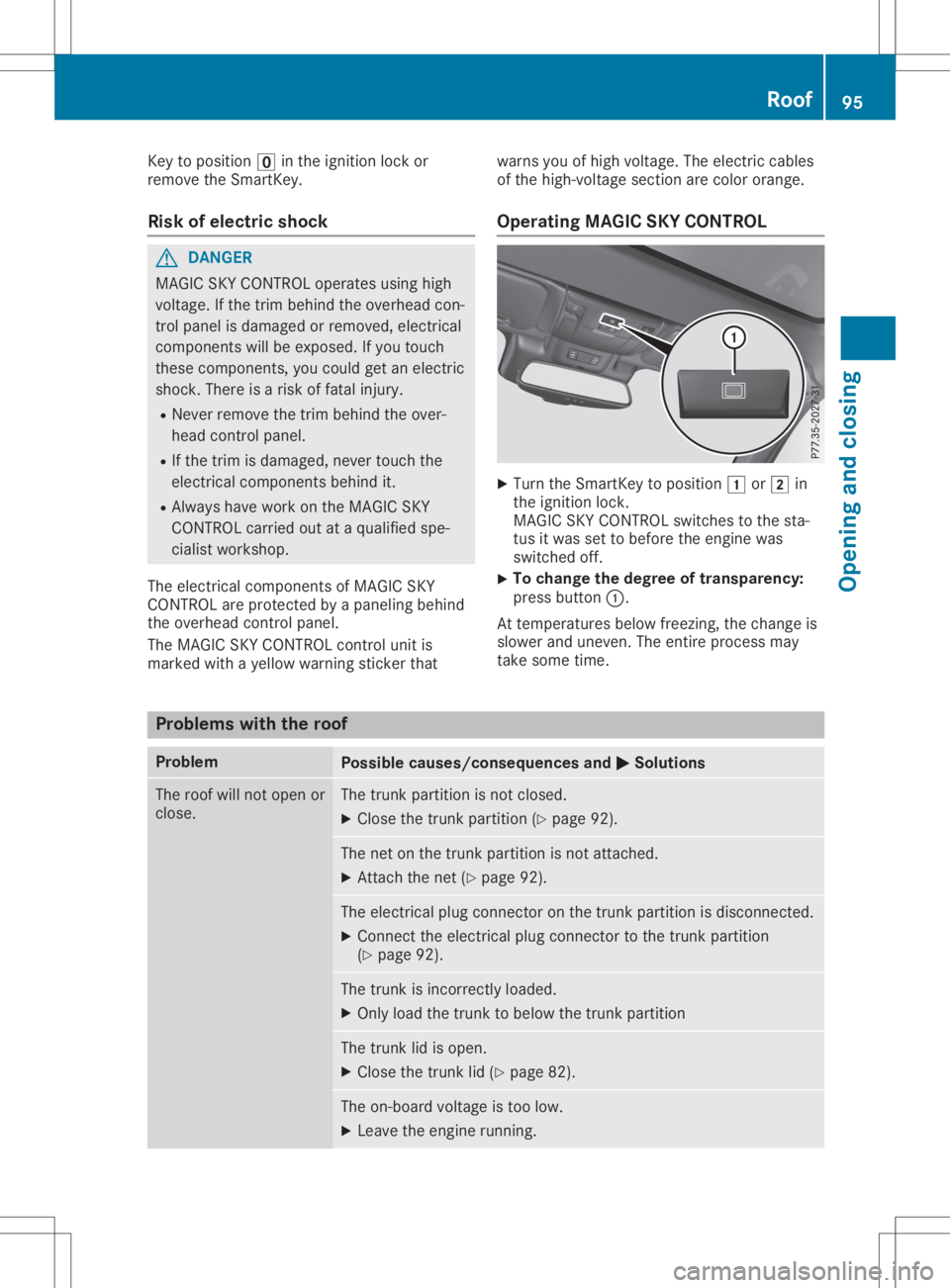
Operating MAGICSKYCONTROL X
Turn theSmartKey topositio n0047 or0048 in
the ignition lock.
MAGIC SKYCONTR OLswitches tothe sta-
tus itwas settobefore theengine was
switched off.
X To
change thedegree oftransparency:
press button 0043.
At temperature sbelo wfreezing, thechange is
slow erand uneven. Theentire process may
take some time. Proble
mswith theroof Proble
m Possi
blecauses /consequen cesand 0050 0050
Solutio ns The
roof willnot open or
close. The
trunk partition isnot closed.
X Clo sethe trunk partition (Ypage 92). The
netonthe trunk partition isnot attached.
X Attach thenet (Ypage 92). The
electrical plugconnector onthe trunk partition isdisconnected.
X Connect theelectrical plugconnector tothe trunk partition
(Y page 92). The
trunk isincorrectly loaded.
X Only loadthe trunk tobelo wthe trunk partition The
trunk lidisopen.
X Clo sethe trunk lid(Ypage 82). The
on-board voltageistoo low.
X Leave theengine running. Roof
95Openingand closi ng Z
Page 184 of 334
Under
thefollowi ngcircumstances, therear
view camera willnotfunction, orwill function
in alimited manner:
R ifthe trunk lidisopen
R in heavy rain,snow orfog
R at night orinvery dark places
R ifthe camera isexposed tovery bright light
R ifthe area islit by fluorescent bulbsor LED
lighting (thedispla ymay flicker)
R ifthere isasudden changeintemperature,
e.g. when driving intoaheated garagein
winter
R ifthe camera lensisdirty orobstructed.
Observe thenotes oncleaning
(Y page 278)
R ifthe rear ofyour vehicle isdamage d.Inthis
case, havethecamera position andsetting
checked ataqual ified speciali stworkshop.
The field ofvision andother functions ofthe
rear view camera mayberestrict eddue to
additional accessories onthe rear ofthe vehi-
cle (e.g. license plateholder, bicycle rack).
On vehicles with<004B0048004C004A004B0057001000440047004D00580056005700440045004F
0048[ chassis,
leaving thestandard heightcanresult ininac-
curacies inthe guide lines,depending ontech-
nical conditions.
i The
cont rast ofthe displa ymay beaffec-
ted bythe sudden presence ofsunlight or
other lightsources, e.g.when exiting a
garage. Payparticular attentioninthis situa-
tion.
i If
usabi lityisseverely restricted,e.g. due
to pixel errors, havethedispla yrepaired or
replaced.
Activating/ deactivating therear view
camera X
To activate: makesurethattheSmartKey
is in position 0048inthe ignition lock.
X Make surethattheActivation byRgear Activation
byRgear
function isselected inthe multimedia sys-
tem; seetheDigital Operator's Manual.
X Engage reverse gear.
The multimedia systemshowsthearea
behind thevehicle withguide lines.
The image fromtherear view camera is
avail able throughout themaneuvering proc-
ess. To
deactivate: therear view camera deacti-
vates ifyou shift thetransmission toposition
005D, orafter driving forwards ashort distance.
The inner segments ofthe warning indicator
are displa yedinred ifthere isacomplete sys-
tem failure.The indicator lampinthe
PARKTRONIC buttonlightsup.
If the system failsatthe rear ofthe vehicle:
R the rear segments areshown inred when
backing up.
R the rear segments arehidden whendriving
forwards.
Displays inthe multim ediasystem The
rear view camera mayshow adistorted
view ofobstacles, showthemincorrect lyor
not atall. The rear view camera doesnotshow
objects inthe followi ngpositions:
R very close tothe rear bumper
R under therear bumper
R in close range above thehandle onthe trunk
lid
! Objects
notatground levelmayappea rto
be further awaythan theyactually are,e.g.:
R the bumper ofaparked vehicle
R the drawba rof atrailer
R the ball coupling ofatrailer towhitch
R the rear section ofan HGV
R aslanted post
Use theguide linesonlyfororientation.
Approach objectsnofurther thanthebot-
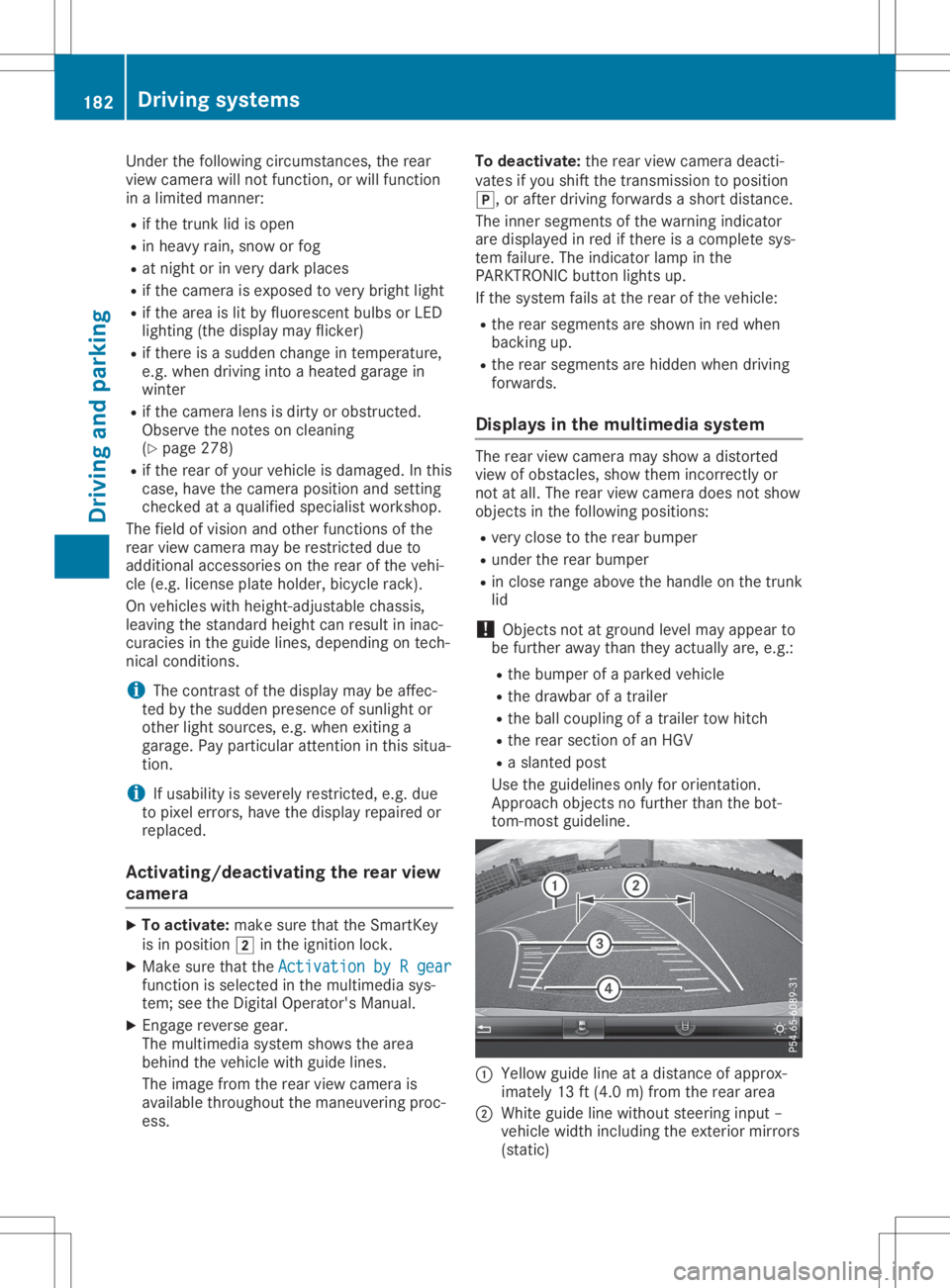
tom-most guideline. 0043
Yello wguide lineatadistance ofapprox-
imately 13ft(4.0 m)from therear area
0044 White guidelinewithout steering input–
vehicle widthincluding theexterior mirrors
(static) 182
Driving
systemsDriving andparking
Page 205 of 334
auto
maticheadlam pmode isact ivat ed
(Y page 109).
R ext erio rlight ingdela yedswit ch-off:th e
ext erio rlight ingrem ains litfor 60sec onds
aft ertheeng ineisswit ched off.If you close
all thedoor sand thetrunk lid,theext erio r
light inggoes offafter15 sec onds.
De pen dingon your vehicle'sequipm ent,when
th esurr oundlight ingand delayed switch-off
ext erio rlight ingare on,th efoll owin glight up:
R park inglamps
R low- beam headlam ps
R dayti merunninglamps
R side markerlamps
R surr oundlight ingintheext erio rmir rors
Activ ating/d eactivatingth eint erio r
light ingdela yedswit ch-off
If you activat eth eInt eriorLighting Int
eriorLighting
Del ay Del
ayfun ction ,th eint erio rlight ingrem ains
on for 20sec onds afteryou remove theSm art-
Key from theign ition lock.
X Pres sth e0059 or0065 buttononthest eer-
ing wheel toselec tth eSet t. Set
t.men u.
X Pres sth e0064 or0063 buttontoselec tth e
Lig ht Lig
htsubm enu.
X Pres s0076 tocon firm.
X Pres sth e0064 or0063 buttontoselec tth e
Int eriorLightingDelay Int
eriorLightingDelayfun ction .
When theInt eriorLightingDelay Int
eriorLightingDelayfun c-
tio nis act ivat ed, theveh icle interio ris dis-
played inoran geinthemult ifunction dis-
play.
X Pres sth e0076 buttontosave theset ting.
Veh icle Activ
ating/d eactivatingth eau tom atic
door locking mechanism
If you activat eth eAut omatic DoorLoc k Aut
omatic DoorLoc k
fun ction ,th eveh icle iscen trally lockedabov e
a spee dof appro ximately9mph (15km/h).
X Pres sth e0059 or0065 buttononthest eer-
ing wheel toselec tth eSet t. Set
t.men u.
X Pres sth e0064 or0063 buttontoselec tth e
Veh icle Veh
iclesubm enu.
X Pres s0076 tocon firm. X
Pres sth e0064 or0063 buttontoselec tth e
Aut omatic DoorLoc k Aut
omatic DoorLoc kfun ction .
When theAut omatic DoorLoc k Aut
omatic DoorLoc kfun ction
is act ivat ed, themult ifunction display shows
th eleft -hand vehicle door inoran ge.
X Pres sth e0076 buttontosave theset ting.
For further inform ationon theauto maticloc k-
ing feat ure, see(Ypage 81).
Activ ating/d eactivatingth eacou stic
locking verifica tion signa l
If you switchon theAco usticLock Aco
usticLockfun ction ,
an acous ticsign alsoun dswhen youlockth e
veh icle.
X Pres sth e0059 or0065 buttononthest eer-
ing wheel toselec tth eSet tings Set
tingsmen u.
X Pres sth e0064 or0063 buttontoselec tth e
Veh icle Veh
iclesubm enu.
X Pres s0076 tocon firm.
X Pres sth e0064 or0063 buttontoselec tth e
Aco usticLock Aco
usticLockfun ction .
If th eAco usticLock Aco
usticLockfun ction isact ivat ed,
th e0037 symbo lin themult ifunction display
light sup oran ge.
X Pres sth e0076 buttontosave theset ting.
X Mult imed iasyst em: 0080 00DA0080S et-
tin gs 0080Ve hicle0080 Acoust icLoc k
i Plea
senot e:theset tingselec tedfor the
acous ticlockin gver ificatio nsign almust
com plywith therele vantnat ionalroad traf-
fic rules .In som ecoun tries, includin gGer-
man y,usin gth eaudible lockin gcon firma-
tio nis for bidden bytraff iclaws (inacc ord-
anc ewith §16Para. 1and §30 Para. 1of
th eGerm annat ionalroad traff icreg ula-
tio ns).The driveroftheveh icle isres pon si-
ble forens urin gcom plian cewith these
rules .In coun tries inwhic hth euse ofthis
fun ction isproh ibited, thefun ction will be
disable din your vehicle and youwillnotbe
perm itted toenab leit.
Comf ort Activ
ating/d eactivatingth eEASY-
ENT RY/EXIT feature G
WAR
NING
When theEA SY- ENTRY/E XITfeat ure adjus ts
th est eeri ngwheel andthedriv er'sseat ,you
and other vehicle occupant s– part icular ly Menu
sand subm enus
203On-boar dcomp uter and displa ys
Z
Page 235 of 334
Disp
laymes sages Poss
iblecauses/co nsequences and 0050 0050
Solu tions 0084 The
trunk lidisopen .
X Clos eth etrunk lid. 0083 The
hoodis open .
G WAR
NING
The open hoodmay blockyour viewwhen theveh icleis in mot ion.
The reisaris kof an acc iden t.
X Pull overand stop theveh iclesaf ely assoo nas pos sible,payin g
att ention toroa dand traff icco nd ition s.
X Se cur eth eveh icleagain strol lingaway (Ypage 147).
X Clos eth ehoo d. 0051 At
least onedoor isopen .A warn ingtone also soun ds.
X Clos eall thedoor s. 00CC
Pow erSteering Mal‐ Pow
erSteering Mal‐
fun ctionSee Opera‐ fun
ctionSee Opera‐
tor 'sManual tor
'sManual The
powe rst eer ing ismalf unction ing .
A warn ingtone also soun ds.
G WAR
NING
You willneed touse morefor ce tosteer .
The reisaris kof an acc iden t.
X Chec kwhet heryou areable toapply theex tra for ce req uire d.
X Ifyou areabl eto steer safely: careful lydri ve on toaqualif ied
spe cialistwor kshop .
X Ifyou areuna bletosteer safely: donotdri ve on.Con tactth e
ne ares tqualif iedspecialistwor kshop . 0058
Tru nkPartition Tru
nkPartition
Ope n Ope
n The
trunk partition isopen .
The trunk isloade dto ohigh andtheload ispre ven ting auto matic
clo singof thetrunk partition .
X Stow theload suchth at thetrunk partition can closeunh indere d
and isno tpush edupwar ds.
X Clos eth etrunk partition (Ypage 93). Pho
neNoServic e Pho
neNoServic e Your
vehicleis out side thene two rkpro vider'strans mitter/ rec eiver
ran ge.
X Wait untilth emob ilepho neoper ationalread inesssymb ol
appear sin themult ifunction disp lay. 0059
Dec reaseSpeed Dec
reaseSpeed You
wantedto open theroo fwhile theveh iclewas inmot ion.
X Pull overand stop theveh iclesaf ely assoo nas pos sible,payin g
att ention toroa dand traff icco nd ition s.
X Ope nth eroo f(Y page 91). Disp
laymes sage s
233On -boar dcomp uter anddi sp lay s Z
Page 254 of 334

Stowage
areas Stowage
spaces
Import antsafety notes G
WARNING
If object sin the passenger compartmen tare
stowed incorrec tly,they canslide orbe
thrown around andhitvehicle occupants. In
addition, cupholders, openstowage spaces
and mobile phonebrackets cannotalways
retain allobject sthey contain.There isa
risk ofinjury, particularly inthe event ofsud-
den braking orasudden changeindirection.
R Always stowobject sso that they cannot
be thrown around insuch situations.
R Always makesurethatobject sdo not pro-
trude fromstowage spaces,parcelnetsor
stowage nets.
R Close thelockable stowagespacesbefore
startin gajourney.
R Always stowandsecure heavy,hard,poin-
ted, sharp-edged, fragileorbulky object s
in the trunk .
Glove box X
To open: pullhandle 0043and open glove box
flap 0044.
X To close :fold glove boxflap 0044upuntil it
engages.
In the glove box,there areacoin holder, a
map holder andapen holder.
i The
glove boxcanbevent ilated
(Y page 123). The
glove boxcanbelocked andunlocked
using themechanical key.
X To lock: insert themechanical keyinto the
lock andturn itto position 0048.
X To unlock: insertthemechanical keyinto
the lock andturn itto position 0047.
Stowage compartment/telephone
compar tment under thearm rest X
To open: pressbutton 0043.
Amrest 0044folds out.
In the stowage compartmen t,there isastow-
age tray.
i Depending
onthe vehicle equipment, a
USB portandaMedia Interface isinstalled
in the stowage compartmen t.AMedia Inter-
face isauniversal interfaceformobile audio
equipment, e.g.foraniPod ®
or MP3 Playe r. 252
Stowage
areasStowage andfeatu res
Page 256 of 334

Stowage
compartment inthe rear
passenger compartment Only
theleft side ofthe vehicle features arear
stowage compartmen t.
X Open theseat beltguide andremove the
seat belt(Ypage 99).
X Move theleft-hand frontseatforward
(Y page 100)andfold theseat backrest
forward.
X To open: pressrelease button0044.
Cover 0043folds up.
X To close :fold down cover 0043and letit
engage.
X Fold back theseat backrest ofthe left-hand
front seatandmove theseat back
(Y page 100).
X Insert theseat beltback intotheseat belt
guide. Stowage
net There
isastowage net0043inthe front -
passenger footwell. Loading
aidinthe trunk
Raising/low eringtheroof G
WARNING
Body parts canbecome trappedwhenthe
roof isbeing raised orlowered. Thereisa
risk ofinjury.
When raising orlowering theroof, make
sure thatnoparts ofthe body areinthe
vicinity ofmoving parts.Presstheswitch
again ifsomeone becomestrapped.
! Only
close thetrunk oncetheroof islow-
ered completely. Otherwise,youcould dam-
age theroof.
If you close thetrunk lidbefore theroof is
lowered completely, theloading aidswitch
lights upand awarning tonesounds. To
make iteasier toload your luggage ,you
can raise thestowed roofafter youhave
opened thetrunk lid.
You canonly raise roof0044when thetrunk lid
is fully open.
X To raise theroof: press switch 0043.
Roof 0044israised slightly andtrunk partition
0087 moves tothe open position. Switch0043
lights upbrightly.
X To lowe rthe roof: press switch 0043.
The trunk partition movestothe closed
position androof 0044lowers slightly.
Switch 0043lights updimly.
Vehicles withtrunk lidremote closing
featur e:when thetrunk lidisopened, the
loading aidraises automatically. Itlowers
automatically whenthetrunk lidisclosed.
Vehicles withKEYLESS-GO andHANDS-
FREE ACCESS:when thetrunk lidis 254
Stowage
areasStowage andfeatu res
Page 257 of 334

opened,
theloading aidrises automatically.
When theroof isclosed, thetrunk partition
remains inthe open position. Thetrunk par- tition
moves tothe closed position automat-
ically when theroof islowered.
Problems withtheloading aid Problem
Possible
causes/conse quencesand0050 0050
Solutions It
is no longer possible
to lower thestowed
roof inthe trunk using
the loading aid. You
cann otclose thetrunk anymore.
X Call aquali fiedspecialist workshop. Stowage
wellunder thetrunk floor X
To open: opentrunk partition 0044
(Y page 93).
X Swing trunkfloor0087upusing loop0043.
The TIREFIT kit,tire-c hange toolkit,etc. is
located inthe stowage compartm ent. Featur
es Cup
holder
Import antsafety notes G
WARNING
If object sin the passenger compartmentare
stowed incorrectly, theycanslide orbe
thrown around andhitvehicle occupant s.In
addition, cupholders, openstowage spaces
and mobile phonebracket scann otalway s
retain allobject sthey contain.There isa
risk ofinjury, particularly inthe event ofsud-
den braking orasudden changeindirection . R
Always stowobject sso that they cannot
be thrown around insuch situations.
R Always makesurethatobject sdo not pro-
trude fromstowage spaces,parcelnetsor
stowage nets.
R Close thelockable stowagespacesbefore
start ingajourney.
R Always stowandsecure heavy,hard,poin-
ted, sharp-edged, fragileorbulky object s
in the trunk . G
WARNING
The heating elements ofthe cup holder can
become veryhot.Youcould burnyourself on
them.
There isarisk ofinjury.
Do not touch thehot heating elements of
the cup holder. Alwaysmakesurethatchil-
dren cannotaccess thehot heating ele-
ment sof the cup holder. Neverleavechil-
dren unsupervised inthe vehicle.
! Only
usethecup holders forcont ainers of
the right sizeandwhich havelids.The
drinks couldotherwise spill.
! Do
not expose drinksbottles inthe cup
holder inthe cent erconsole tocont inuous,
stron gand direct sunlight. Thepassenger
compartm entinthe area ofthe cent ercon-
sole canotherwise bedamaged bythe con-
cent rated andreflect edsunlight. Featur
es
255Stowage andfeatu res Z
Page 260 of 334

Socket
inthe front- passenger footwell X
Lift upthe cover ofsocket 0043.
Socket inthe trunk X
Lift upthe cover ofsocket 0043. Mercedes
meconne ct
General notes A
license agreement mustbeinplace inorder
to activate theMercedes meconn ectservice.
Make surethatyour system isactivated and
operational. Toregister, pressthe00D9 MB
Info callbutton. Ifany ofthe steps mentioned
are not carried out,thesystem maynotbe
activated.
If you have questions abouttheactivation,
cont actone ofthe following telephone hot-
lines:
R USA: Mercedes-B enzCustomer Assistance
Center at1-80 0-FOR-MERCedes
(1-80 0-367-6372)or1-86 6-990-9007
R Canada: Customer Serviceat
1-88 8-92 3-8367 Short
lyafter successfully registeringwiththe
service, auser IDand password willbesent to
you bypost.
USA only: youcan usethis password tolog
onto theMercedes meconn ectarea under
"Owners Online"athtt <0053001D00120012005A005A005A001100500045005800560044001100460052
0050>.
The system isavaila bleif:
R ithas been activated andisoperational
R the correspondin gmobile phonenetwork is
availa blefortransm ittingdatatothe Cus-
tomer Center
R aservice subscription isavaila ble
R the starter battery issufficiently charged
i Determ iningthelocation ofthe vehicle on
a map isonly possible if:
R GPS reception isavaila ble
R the vehicle position canbeforwarded to
the Customer AssistanceCenter
The Mercedes meconne ctsystem To
adjust thevolume duringacall, proceed as
follows:
X Press the0081 or0082 button onthe multi-
funct ionsteering wheel.
or
X Use thevolume controller ofCOMAND.
The system offersvarious services, e.g.:
R Automatic andmanual emergency call
R Roadsid eAssistanc ecall
R MB Info call
USA only: youcan find information anda
description ofall availa blefeatures under
"Owners Online"athttp: //www.mbusa.com.
System self-test Aft
eryou have switched onthe ignition, the
system carriesoutaself-diagnosis.
A malfunction inthe system hasbeen detec-
ted ifone ofthe following occurs:
R The indicator lampinthe SOS button does
not come onduring thesystem self-test .
R The indicator lampinthe 0052 Roadsid e
Assistanc ebutton doesnotlight upduring
self-diagnosis ofthe system.
R The indicator lampinthe 00D9 MBInfo call
button doesnotlight upduring self-diagno-
sis ofthe system. 258
FeaturesStowage
andfeatu res
Page 268 of 334
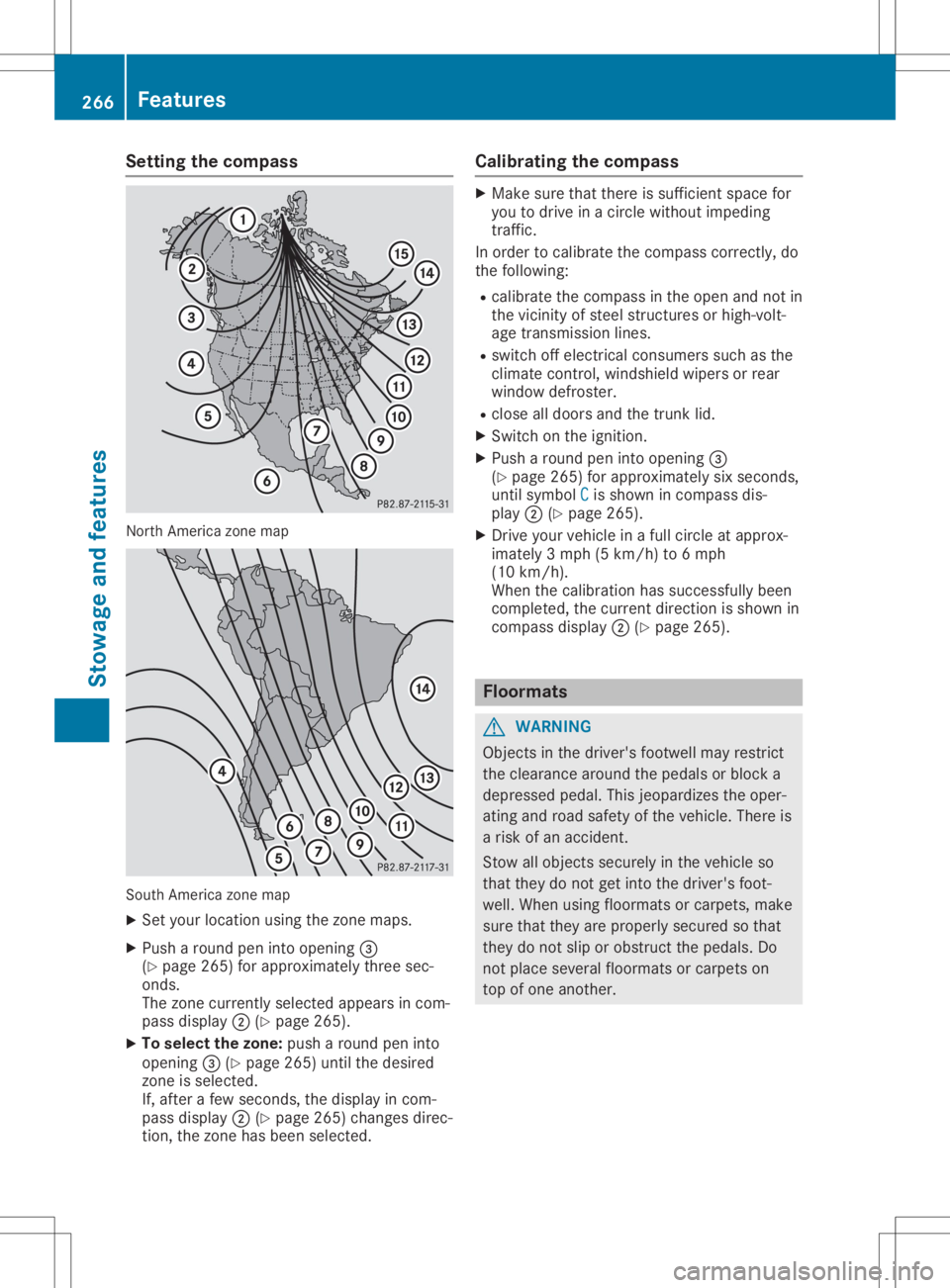
Setting
thecompass North
America zonemap South
America zonemap
X Set your location usingthezone maps.
X Push around peninto opening 0087
(Y page 265)forapproximately threesec-
onds.
The zone current lyselected appearsincom-
pass display 0044(Ypage 265).
X To selec tthe zone: pusharound peninto
opening 0087(Ypage 265)untilthedesired
zone isselected.
If, after afew seconds, thedisplay incom-
pass display 0044(Ypage 265)changes direc-
tion, thezone hasbeen selected. Calibrating
thecompass X
Make surethatthere issufficient spacefor
you todrive inacircle without impeding
traffic.
In order tocalibrate thecompass correctly,do
the following:
R calibrate thecompass inthe open andnotin
the vicinity ofsteel struct uresorhigh-volt-
age transm issionlines.
R switch offelectrical consumers suchasthe
climate control,windshield wipersorrear
window defroster.
R close alldoors andthetrunk lid.
X Switch onthe ignition.
X Push around peninto opening 0087
(Y page 265)forapproximately sixseconds,
until symbol C C
is shown incompass dis-
play 0044(Ypage 265).
X Drive yourvehicle inafull circle atapprox-
imately 3mph (5km/h) to6mph
(10 km/h).
When thecalibration hassuccessfully been
completed, thecurrent direction isshown in
compass display0044(Ypage 265). Floo
rmats G
WARNING
Object sin the driver's footwell mayrestrict
the clearance aroundthepedals orblock a
depressed pedal.Thisjeopardizes theoper-
ating androad safety ofthe vehicle. Thereis
a risk ofan accident.
Stow allobject ssecurely inthe vehicle so
that they donot getinto thedriver's foot-
well. When usingfloormats orcarpets, make
sure thatthey areproperly securedsothat
they donot slip orobstruct thepedals. Do
not place several floormats orcarpets on
top ofone another. 266
FeaturesStowage
andfeatu res