ignition MERCEDES-BENZ SL CLASS 2020 Owner's Guide
[x] Cancel search | Manufacturer: MERCEDES-BENZ, Model Year: 2020, Model line: SL CLASS, Model: MERCEDES-BENZ SL CLASS 2020Pages: 334, PDF Size: 17.43 MB
Page 179 of 334
Problems
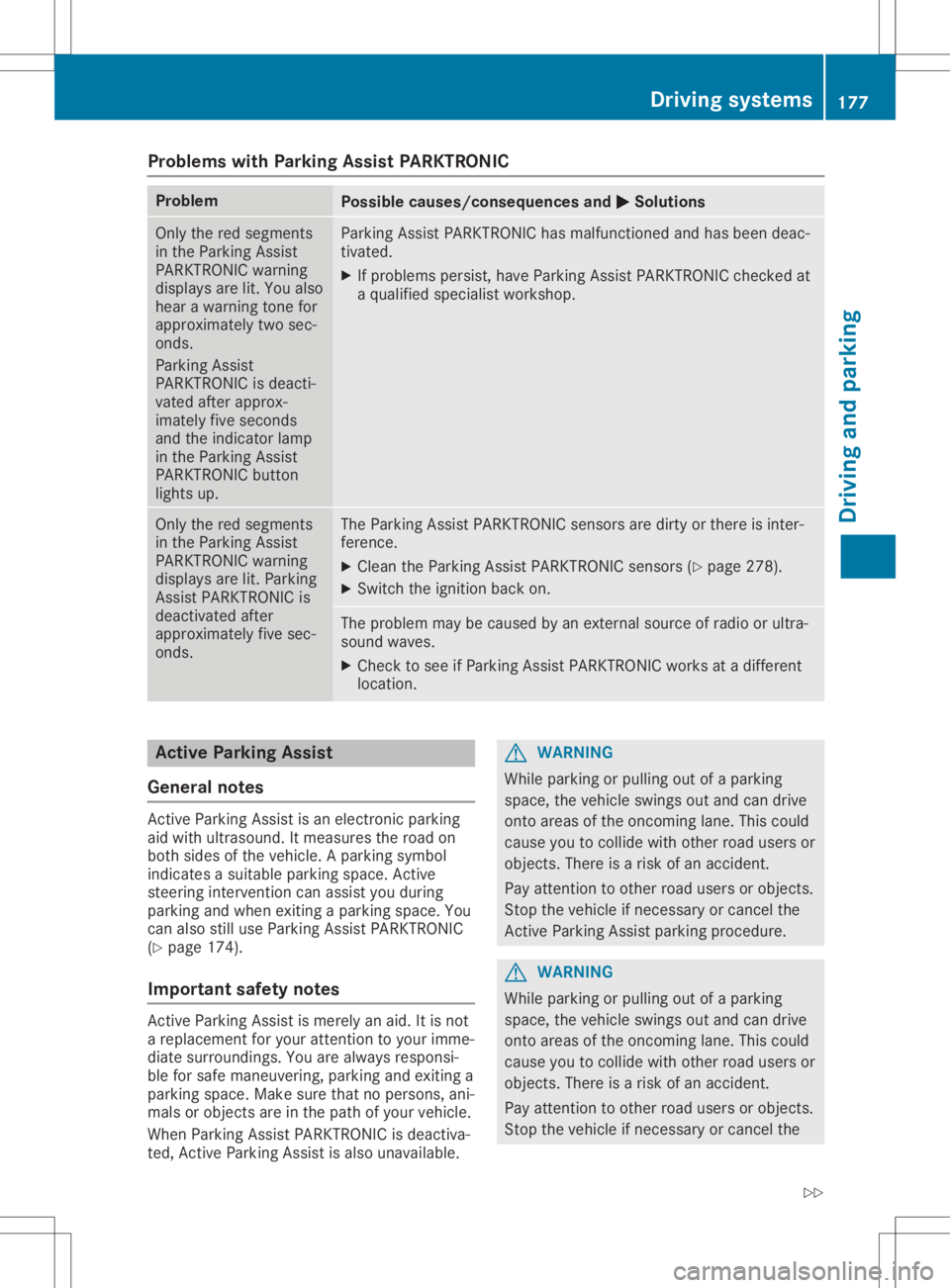
withParking AssistPARKTRONIC Problem
Possible
causes/co nsequences and0050 0050
Solutions Only
thered segments
in the Parking Assist
PARKTRONIC warning
display sare lit.You also
hear awarning tonefor
approximately twosec-
onds.
Parking Assist
PARKTRONIC isdeacti-
vated afterapprox-
imately fiveseconds
and theindicator lamp
in the Parking Assist
PARKTRONIC button
lights up. Parking
AssistPARKTRONIC hasmalfunction edand hasbeen deac-
tivated.
X Ifproblems persist,haveParking AssistPARKTRONIC checkedat
a quali fiedspecialist workshop. Only
thered segments
in the Parking Assist
PARKTRONIC warning
display sare lit.Parking
Assist PARKTRONIC is
deactivated after
approximately fivesec-
onds. The
Parking AssistPARKTRONIC sensorsaredirty orthere isinter-
ferenc e.
X Clean theParking AssistPARKTRONIC sensors(Ypage 278).
X Switch theignition backon. The
problem maybecaused byan extern alsource ofradio orultra-
sound waves.
X Check tosee ifParking AssistPARKTRONIC worksatadifferent
location. Active
Parking Assist
General notes Act
ive Parking Assistisan electron icparking
aid with ultrasound. Itmeasures theroad on
both sides ofthe vehicle. Aparking symbol
indicates asuitable parkingspace.Active
steering intervention canassist youduring
parking andwhen exiting aparking space.You
can also stilluse Parking AssistPARKTRONIC
(Y page 174).
Import antsafety notes Act
ive Parking Assistismerely anaid. Itis not
a replacement foryour atten tiontoyour imme-
diate surroundings. Youarealwa ysresponsi-
ble forsafe maneuvering, parkingandexiting a
parking space.Makesurethatnopersons, ani-
mals orobject sare inthe path ofyour vehicle.
When Parking AssistPARKTRONIC isdeactiva-
ted, Active Parking Assistisalso unavaila ble. G
WARNING
While parking orpulli ngout ofaparking
space, thevehicle swingsoutand candrive
onto areas ofthe oncomin glane. Thiscould
cause youtocollide withother roadusers or
object s.There isarisk ofan accident.
Pay atten tiontoother roadusers orobject s.
Stop thevehicle ifnecessary orcancel the
Act ive Parking Assistparking procedure. G
WARNING
While parking orpulli ngout ofaparking
space, thevehicle swingsoutand candrive
onto areas ofthe oncomin glane. Thiscould
cause youtocollide withother roadusers or
object s.There isarisk ofan accident.
Pay atten tiontoother roadusers orobject s.
Stop thevehicle ifnecessary orcancel the Driving
systems
177Drivingandparking
Z
Page 184 of 334
Under
thefollowi ngcircumstances, therear
view camera willnotfunction, orwill function
in alimited manner:
R ifthe trunk lidisopen
R in heavy rain,snow orfog
R at night orinvery dark places
R ifthe camera isexposed tovery bright light
R ifthe area islit by fluorescent bulbsor LED
lighting (thedispla ymay flicker)
R ifthere isasudden changeintemperature,
e.g. when driving intoaheated garagein
winter
R ifthe camera lensisdirty orobstructed.
Observe thenotes oncleaning
(Y page 278)
R ifthe rear ofyour vehicle isdamage d.Inthis
case, havethecamera position andsetting
checked ataqual ified speciali stworkshop.
The field ofvision andother functions ofthe
rear view camera mayberestrict eddue to
additional accessories onthe rear ofthe vehi-
cle (e.g. license plateholder, bicycle rack).
On vehicles with<004B0048004C004A004B0057001000440047004D00580056005700440045004F
0048[ chassis,
leaving thestandard heightcanresult ininac-
curacies inthe guide lines,depending ontech-
nical conditions.
i The
cont rast ofthe displa ymay beaffec-
ted bythe sudden presence ofsunlight or
other lightsources, e.g.when exiting a
garage. Payparticular attentioninthis situa-
tion.
i If
usabi lityisseverely restricted,e.g. due
to pixel errors, havethedispla yrepaired or
replaced.
Activating/ deactivating therear view
camera X
To activate: makesurethattheSmartKey
is in position 0048inthe ignition lock.
X Make surethattheActivation byRgear Activation
byRgear
function isselected inthe multimedia sys-
tem; seetheDigital Operator's Manual.
X Engage reverse gear.
The multimedia systemshowsthearea
behind thevehicle withguide lines.
The image fromtherear view camera is
avail able throughout themaneuvering proc-
ess. To
deactivate: therear view camera deacti-
vates ifyou shift thetransmission toposition
005D, orafter driving forwards ashort distance.
The inner segments ofthe warning indicator
are displa yedinred ifthere isacomplete sys-
tem failure.The indicator lampinthe
PARKTRONIC buttonlightsup.
If the system failsatthe rear ofthe vehicle:
R the rear segments areshown inred when
backing up.
R the rear segments arehidden whendriving
forwards.
Displays inthe multim ediasystem The
rear view camera mayshow adistorted
view ofobstacles, showthemincorrect lyor
not atall. The rear view camera doesnotshow
objects inthe followi ngpositions:
R very close tothe rear bumper
R under therear bumper
R in close range above thehandle onthe trunk
lid
! Objects
notatground levelmayappea rto
be further awaythan theyactually are,e.g.:
R the bumper ofaparked vehicle
R the drawba rof atrailer
R the ball coupling ofatrailer towhitch
R the rear section ofan HGV
R aslanted post
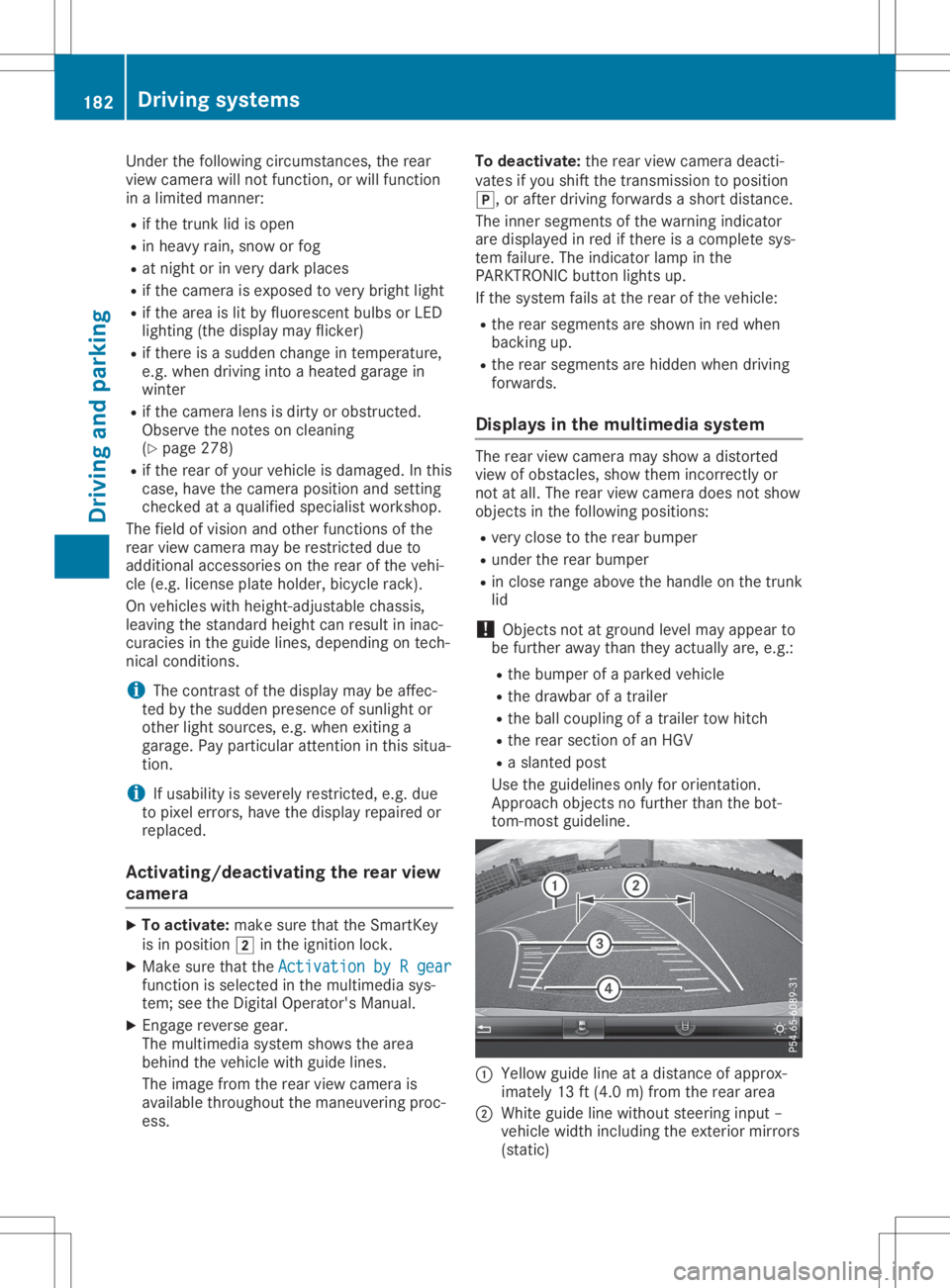
Use theguide linesonlyfororientation.
Approach objectsnofurther thanthebot-
tom-most guideline. 0043
Yello wguide lineatadistance ofapprox-
imately 13ft(4.0 m)from therear area
0044 White guidelinewithout steering input–
vehicle widthincluding theexterior mirrors
(static) 182
Driving
systemsDriving andparking
Page 195 of 334
Bea
rin mind thattheoutsid etempe raturedis-
pl ay indi cates thetempe raturemea suredand
doe snot recor dthe roadtempe rature.
The outsid etempe raturedispl ayisin the mul-
tifu nction displ ay(Y page 194 ).
A chang ein the outsid etempe ratureisshow n
in the multifunction displ ayafte ra del ay. Co
olant temperature gauge G
WARNI
NG
Ope ning thehoodwhe nthe engi neisover -
hea ted orwhe nthere isafire inthe engi ne
compa rtment couldexpo seyouto hot gases
or other serviceprod ucts. Thereisarisk of
inju ry.
Let anover heated engi necool downbef ore
ope ning thehood.Ifthere isafire inthe
engi necompa rtment, keepthehoodclos ed
and contact thefire departme nt.
! A
displ aymess ageis show nif the cool ant
tempe ratureistoo high.
If the cool anttempe ratureisover 248‡
(120 †),donot continu edri ving. The
engi newillother wise be damag ed.
The coolanttempe raturegage isin the instru -
ment cluster onthe right-ha ndside
(Y page 33).
The Hmarki nginthe cool anttempe rature
ga ug ecorre sponds toacool anttempe rature
of approxi mate ly248 ‡(120 †).
Unde rnorma lope ratingcondi tions andatthe
corre ctcool antlevel, the cool anttempe rature
ga ug emay risetothe Hmarki ng. Ope
rating theon-bo ard computer
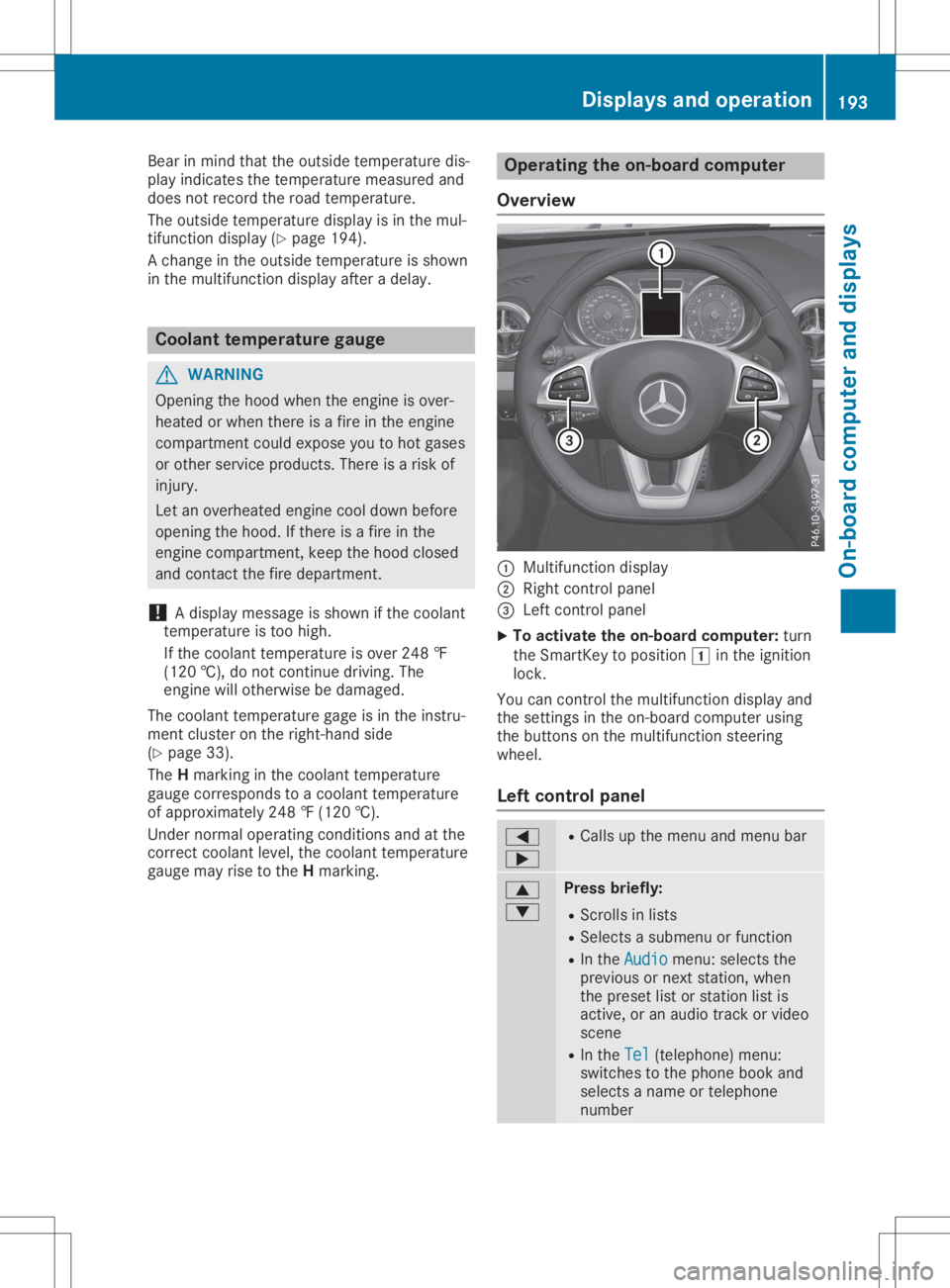
Ove rview 0043
Multifunctio ndispl ay
0044 Right control panel
0087 Left control panel
X To acti vate theon-bo ard computer: turn
the SmartKe yto pos ition0047 inthe ignition
lock.
You cancontrol themultifunction displ ayand
the setting sin the on-bo ardcompu terusing
the buttons onthe multifunction steering
whe el.
Le ftco ntrol panel 0059
0065 R
Ca lls up the menu andmenu bar 0063
0064 Pres
sbrie fly:
R Scrol lsin lists
R Sele ctsasub menu orfuncti on
R In the Audi o Audi
omenu :sel ects the
pre vious ornext station,whe n
the preset list or stati onlist is
acti ve,oran audio track orvid eo
scene
R In the Tel Tel
(teleph one) menu :
swi tches tothe phoneboo kand
sel ects aname ortele pho ne
numb er Di
splay sand operation
193On-board computer anddispl ays Z
Page 204 of 334
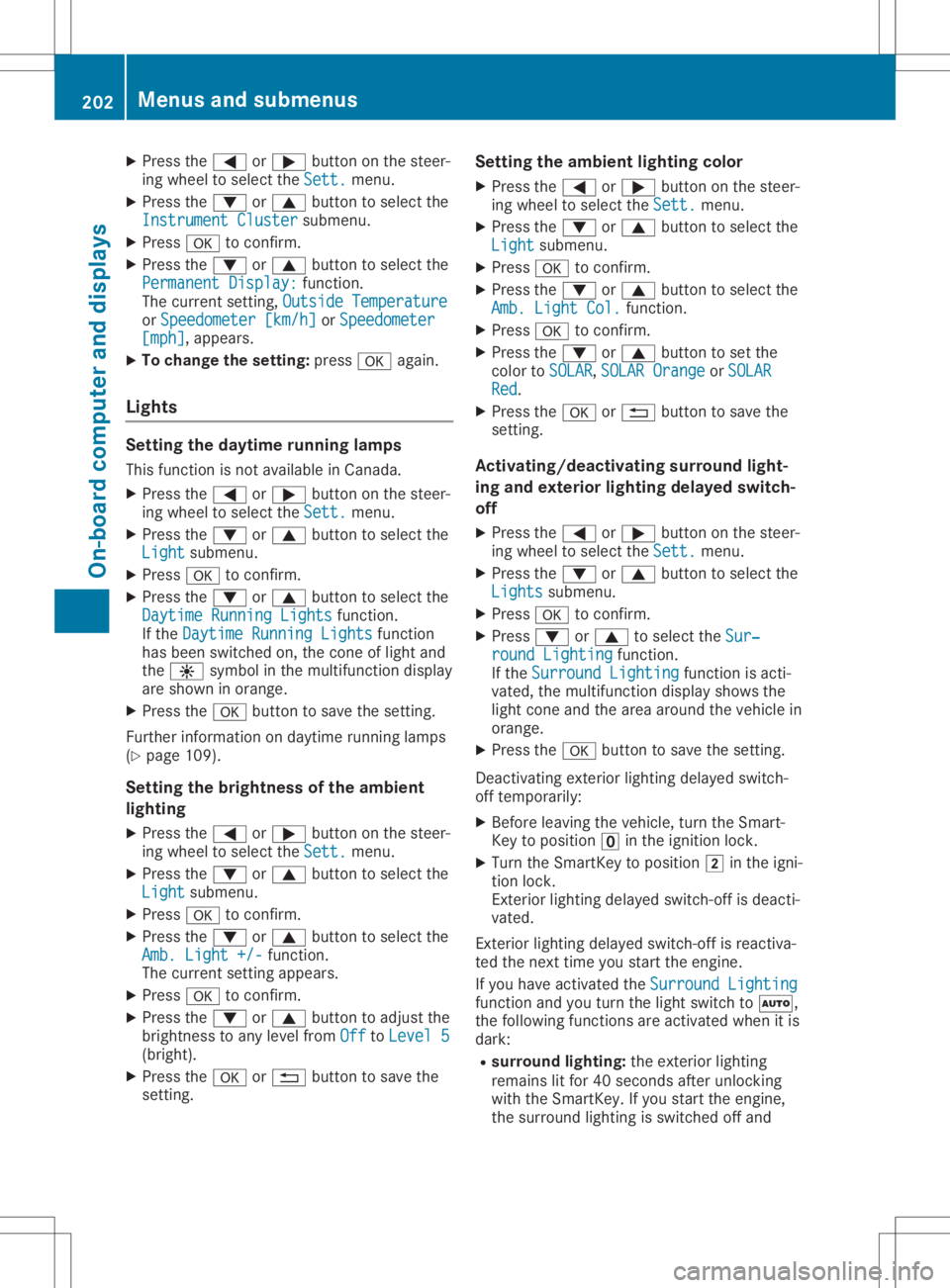
X
Press the0059 or0065 button onthe steer-
ing wheel toselect theSett. Sett.
menu.
X Press the0064 or0063 button toselect the
Instrument Cluster Instrument
Clustersubmenu.
X Press 0076toconf irm.
X Press the0064 or0063 button toselect the
Permanent Display: Permanent
Display:function.
The curren tsett ing, Outside Temperatur e Outside
Temperatur e
or Speedomete r[km/h] Speedomete
r[km/h] orSpeedomete r Speedomete
r
[mph] [mph],
appears.
X To change thesetting: press0076again.
Lights Setting
thedayt imerunning lamps
This funct ionisnot availabl ein Canada.
X Press the0059 or0065 button onthe steer-
ing wheel toselect theSett. Sett.
menu.
X Press the0064 or0063 button toselect the
Light Light
submenu.
X Press 0076toconf irm.
X Press the0064 or0063 button toselect the
Daytime RunningLights Daytime
RunningLightsfunction.
If the Daytime RunningLights Daytime
RunningLightsfunction
has been switched on,the cone oflight and
the 0086 symbol inthe multifunc tiondisplay
are shown inorange.
X Press the0076 button tosave thesetting.
Further informationondaytime runninglamps
(Y page 109).
Setting thebright nessofthe ambient
lighting
X Press the0059 or0065 button onthe steer-
ing wheel toselect theSett. Sett.
menu.
X Press the0064 or0063 button toselect the
Light Light
submenu.
X Press 0076toconf irm.
X Press the0064 or0063 button toselect the
Amb. Light +/- Amb.
Light +/-funct ion.
The curren tsett ingappears.
X Press 0076toconf irm.
X Press the0064 or0063 button toadjust the
brightn esstoany level from Off Off
toLevel 5 Level
5
(bright).
X Press the0076 or0038 button tosave the
sett ing. Setting
theambient lightingcolor
X Press the0059 or0065 button onthe steer-
ing wheel toselect theSett. Sett.
menu.
X Press the0064 or0063 button toselect the
Light Light
submenu.
X Press 0076toconf irm.
X Press the0064 or0063 button toselect the
Amb. Light Col. Amb.
Light Col.function.
X Press 0076toconf irm.
X Press the0064 or0063 button toset the
color toSOLAR SOLAR,
SOLAR Orange SOLAR
Orange orSOLAR SOLAR
Red Red.
X Press the0076 or0038 button tosave the
sett ing.
<002400460057004C005900440057004C0051004A001200470048004400460057
004C00590044> tingsurround light-
ing and exterior lightingdelayed switch-
off
X Press the0059 or0065 button onthe steer-
ing wheel toselect theSett. Sett.
menu.
X Press the0064 or0063 button toselect the
Lights Lights
submenu.
X Press 0076toconf irm.
X Press 0064or0063 toselect theSur‐ Sur‐
round Lighting round
Lighting function.
If the Surround Lighting Surround
Lightingfunctionisacti-
vated, themultifunc tiondisplay showsthe
light cone andthearea around thevehicle in
orange.
X Press the0076 button tosave thesetting.
Deact ivating exteriorlighting delayed switch-
off temporarily:
X Before leaving thevehicle, turntheSmart -
Key toposition 0092inthe ignition lock.
X Turn theSmart Keytoposition 0048inthe igni-
tion lock.
Ex terior lighting delayed switch-offisdeacti-
vated.
Ex terior lighting delayed switch-offisreactiva-
ted thenext time youstart theengine.
If you have activat edthe Surround Lighting Surround
Lighting
funct ionand youturn thelight switch to0058,
the following functionsareactivat edwhen itis
dark:
R surr ound lighting: theexter iorlighting
remains litfor 40seconds afterunlockin g
with theSmart Key.Ifyou start theengine,
the surround lightingisswitched offand 202
Menus
andsubmenusOn-board computerand display s
Page 208 of 334
X
Press the0059 or0065 button toselect
Interm. Time Interm.
Time.
X Press 0076toconf irm.
The inter mediate timeappears forfive sec-
onds.
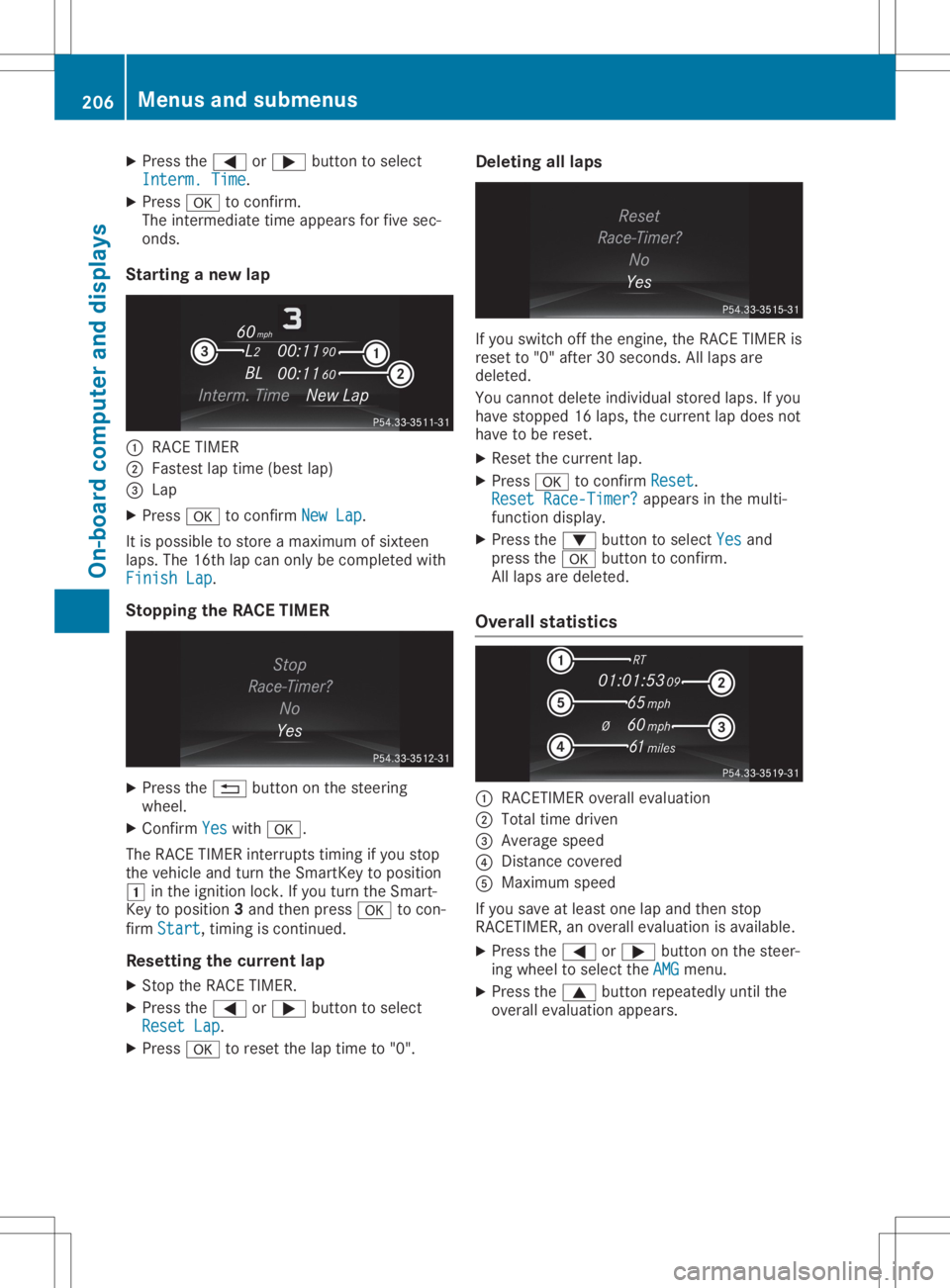
Star ting anew lap 0043
RACE TIMER
0044 Fastest laptime (best lap)
0087 Lap
X Press 0076toconf irmNew Lap New
Lap.
It is possible tostore amaximum ofsixteen
laps. The16thlap can only becompleted with
Finish Lap Finish
Lap.
Stopp ingthe RACE TIMER X
Press the0038 button onthe steerin g
wheel.
X Confirm Yes Yes
with 0076.
The RACE TIMER interrupts timing ifyou stop
the vehicle andturn theSmart Keytoposition
0047 inthe ignition lock.Ifyou turn theSmart -
Key toposition 3and then press 0076tocon-
firm Start Start,
timingiscont inued.
Resetting thecurr entlap
X Stop theRACE TIMER.
X Press the0059 or0065 button toselect
Reset Lap Reset
Lap.
X Press 0076toreset thelaptime to"0". Deleting
alllaps If
you switch offthe engine, theRACE TIMER is
reset to"0" after 30seconds .All laps are
deleted.
You cann otdelete individual storedlaps.Ifyou
have stopped 16laps, thecurren tlap does not
have tobe reset.
X Reset thecurren tlap.
X Press 0076toconf irmReset Reset.
Reset Race-Timer ? Reset
Race-Timer ?appears inthe multi-
funct iondisplay.
X Press the0064 button toselect Yes Yes
and
press the0076 button toconf irm.
All laps aredeleted.
Overall statistics 0043
RACETIME Roverall evaluation
0044 Total timedriven
0087 Average speed
0085 Dist ance covered
0083 Maximum speed
If you save atleast onelapand then stop
RACETIME R,an overall evaluation isavailabl e.
X Press the0059 or0065 button onthe steer-
ing wheel toselect theAMG AMG
menu.
X Press the0063 button repeatedly untilthe
overall evaluation appears. 206
Menus
andsubmenusOn-board computerand display s
Page 210 of 334
When
theignition isswitched off,alldisplay messages aredeleted, apartfromsome high-priorit y
display messages. Oncethe causes ofthe high-priorit ydisplay messages havebeen rectified, the
corr esponding displaymessages arealso deleted. 208
Display
messagesOn-boar dcomput erand displa ys
Page 220 of 334
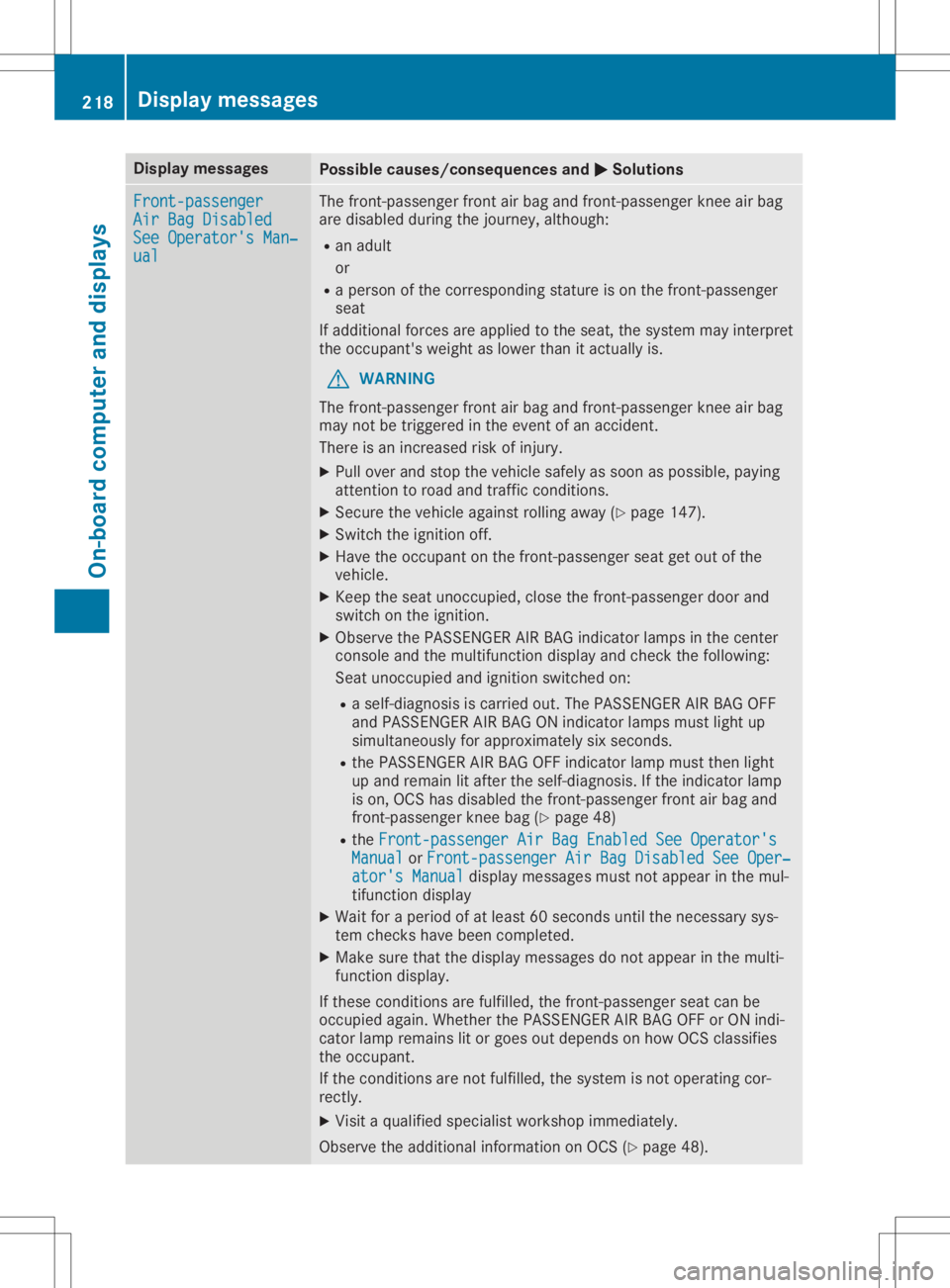
Disp
laymes sages Poss
iblecauses/co nsequences and 0050 0050
Solu tions Fro
nt-passenger Fro
nt-passenger
Air BagDisabled Air
BagDisabled
See Operator'sMan ‐ See
Operator'sMan ‐
ual ual The
fron t-pass enger fron tair bag and fron t-pass enger knee air bag
are disab ledduri ngthejo urn ey, althoug h:
R an adult
or
R aper son oftheco rresp ondin gst atur eis on thefron t-pass enger
seat
If addit ionalfor cesare applie dto theseat ,th esyst emmay interp ret
th eoc cup ant'sweigh tas lower than itact ually is.
G WAR
NING
The fron t-pass enger fron tair bag and fron t-pass enger knee air bag
may notbe trigge redintheeve ntofan acc iden t.
The reisan increas edriskof injury.
X Pull overand stop theveh iclesaf ely assoo nas pos sible,payin g
att ention toroa dand traff icco nd ition s.
X Se cur eth eveh icleagain strol lingaway (Ypage 147).
X Swi tchth eign ition off.
X Hav eth eoc cup ant onthefron t-pass enger seat getout ofthe
veh icle.
X Kee pth eseat unoccupied ,clo sethefron t-pass enger door and
swit chon theign ition .
X Obs erveth ePA SS EN GER AIR BA Gind icat orlamp sin thece nter
co nsole and themult ifunction disp layand checkth efol lowin g:
Se at uno ccupied andignition swit ched on:
R aself -diagn osis iscar riedout .The PASS EN GER AIR BA GOF F
and PASS EN GER AIR BA GON indicat orlamp smus tligh tup
sim ultane ousl yfor appr oximat elysixsec onds.
R thePA SS EN GER AIR BA GOF Find icat orlamp mustth en ligh t
up and remainlitaft ertheself -diagn osis.If th eind icat orlamp
is on ,OCS hasdisab ledthefron t-pass enger fron tair bag and
fr on t-pass enger knee bag (Ypage 48)
R theFro nt-passenger AirBagEnabledSee Operator's Fro
nt-passenger AirBagEnabledSee Operator's
Man ual Man
ual orFro nt-passenger AirBagDisabledSee Oper‐ Fro
nt-passenger AirBagDisabledSee Oper‐
ato r's Manual ato
r's Manual displaymes sage smus tno tappear inthemul-
ti fun ction disp lay
X Wait foraper iod ofat least 60sec onds unt ilth ene cessar ysys-
te m checks hav ebeen compl eted.
X Mak esur eth at thedisp laymes sage sdo notappear inthemult i-
fun ction disp lay.
If th ese cond ition sare fulfilled ,th efron t-pass enger seat canbe
oc cup iedagain .Whe ther thePA SS EN GER AIR BA GOF For ON indi-
cat orlamp remainslit or goe sout depe ndson how OCS classifies
th eoc cup ant.
If th eco nd ition sare notfulf illed ,th esyst emisno toper ating cor-
rec tly.
X Vis itaqualif iedspecialistwor kshop immediat ely.
Obs erveth eaddit ionalinf orm ation onOCS (Ypage 48). 218
Disp
laymes sage sOn -boar dcomp uter anddi sp lay s
Page 221 of 334
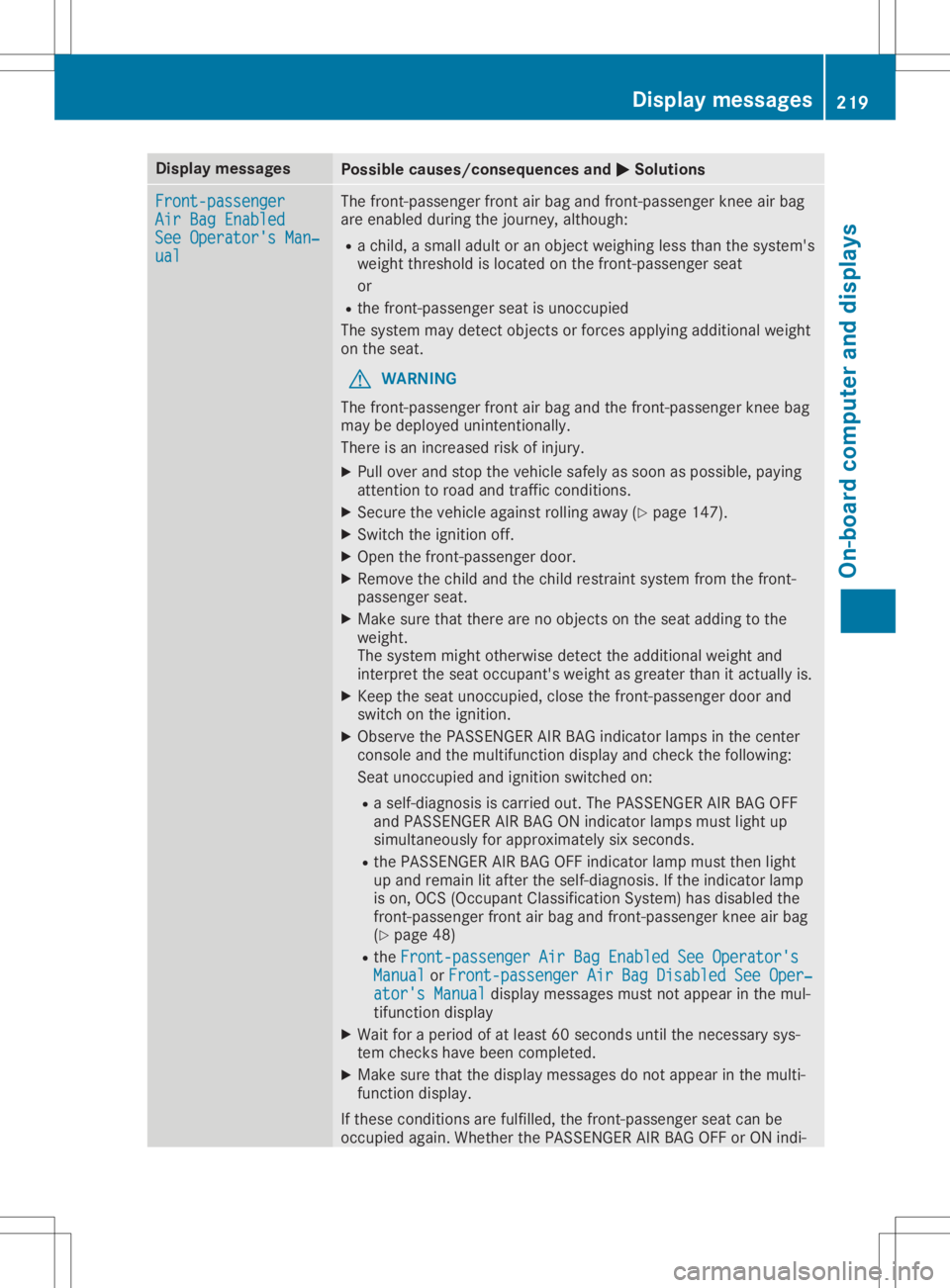
Disp
laymes sages Poss
iblecauses/co nsequences and 0050 0050
Solu tions Fro
nt-passenger Fro
nt-passenger
Air BagEnable d Air
BagEnable d
See Operator'sMan ‐ See
Operator'sMan ‐
ual ual The
fron t-pass enger fron tair bag and fron t-pass enger knee air bag
are enabled duringthejo urn ey, althoug h:
R ach ild, asma lladult oran obj ectweigh ingless than thesyst em's
weigh tth res hold isloc ate don thefron t-pass enger seat
or
R thefron t-pass enger seat isuno ccupied
The systemmay detectobj ects or for cesapplyin gaddit ionalweigh t
on theseat .
G WAR
NING
The fron t-pass enger fron tair bag and thefron t-pass enger knee bag
may bedepl oyed uninten tion ally.
The reisan increas edriskof injury.
X Pull overand stop theveh iclesaf ely assoo nas pos sible,payin g
att ention toroa dand traff icco nd ition s.
X Se cur eth eveh icleagain strol lingaway (Ypage 147).
X Swi tchth eign ition off.
X Ope nth efron t-pass enger door .
X Remo vethech ild and thech ild res train tsyst emfrom thefron t-
pass enger seat .
X Mak esur eth at there arenoobj ects on theseat addin gto the
weigh t.
The systemmightother wise detectth eaddit ionalweigh tand
int erp ret theseat occup ant'sweigh tas gre aterth an itact ually is.
X Kee pth eseat unoccupied ,clo sethefron t-pass enger door and
swit chon theign ition .
X Obs erveth ePA SS EN GER AIR BA Gind icat orlamp sin thece nter
co nsole and themult ifunction disp layand checkth efol lowin g:
Se at uno ccupied andignition swit ched on:
R aself -diagn osis iscar riedout .The PASS EN GER AIR BA GOF F
and PASS EN GER AIR BA GON indicat orlamp smus tligh tup
sim ultane ousl yfor appr oximat elysixsec onds.
R thePA SS EN GER AIR BA GOF Find icat orlamp mustth en ligh t
up and remainlitaft ertheself -diagn osis.If th eind icat orlamp
is on ,OCS (Occup ant Class ification Sys tem) has disab ledthe
fr on t-pass enger fron tair bag and fron t-pass enger knee air bag
(Y page 48)
R theFro nt-passen ger AirBagEnabledSee Operator's Fro
nt-passen ger AirBagEnabledSee Operator's
Man ual Man
ual orFro nt- passenger AirBagDisabledSee Oper‐ Fro
nt- passenger AirBagDisabledSee Oper‐
ato r's Manual ato
r's Manual displaymes sage smus tno tappear inthemul-
ti fun ction disp lay
X Wait foraper iod ofat least 60sec onds unt ilth ene cessar ysys-
te m checks hav ebeen compl eted.
X Mak esur eth at thedisp laymes sage sdo notappear inthemult i-
fun ction disp lay.
If th ese cond ition sare fulfilled ,th efron t-pass enger seat canbe
oc cup iedagain .Whe ther thePA SS EN GER AIR BA GOF For ON indi- Disp
laymes sage s
219On -boar dcomp uter anddi sp lay s Z
Page 260 of 334

Socket
inthe front- passenger footwell X
Lift upthe cover ofsocket 0043.
Socket inthe trunk X
Lift upthe cover ofsocket 0043. Mercedes
meconne ct
General notes A
license agreement mustbeinplace inorder
to activate theMercedes meconn ectservice.
Make surethatyour system isactivated and
operational. Toregister, pressthe00D9 MB
Info callbutton. Ifany ofthe steps mentioned
are not carried out,thesystem maynotbe
activated.
If you have questions abouttheactivation,
cont actone ofthe following telephone hot-
lines:
R USA: Mercedes-B enzCustomer Assistance
Center at1-80 0-FOR-MERCedes
(1-80 0-367-6372)or1-86 6-990-9007
R Canada: Customer Serviceat
1-88 8-92 3-8367 Short
lyafter successfully registeringwiththe
service, auser IDand password willbesent to
you bypost.
USA only: youcan usethis password tolog
onto theMercedes meconn ectarea under
"Owners Online"athtt <0053001D00120012005A005A005A001100500045005800560044001100460052
0050>.
The system isavaila bleif:
R ithas been activated andisoperational
R the correspondin gmobile phonenetwork is
availa blefortransm ittingdatatothe Cus-
tomer Center
R aservice subscription isavaila ble
R the starter battery issufficiently charged
i Determ iningthelocation ofthe vehicle on
a map isonly possible if:
R GPS reception isavaila ble
R the vehicle position canbeforwarded to
the Customer AssistanceCenter
The Mercedes meconne ctsystem To
adjust thevolume duringacall, proceed as
follows:
X Press the0081 or0082 button onthe multi-
funct ionsteering wheel.
or
X Use thevolume controller ofCOMAND.
The system offersvarious services, e.g.:
R Automatic andmanual emergency call
R Roadsid eAssistanc ecall
R MB Info call
USA only: youcan find information anda
description ofall availa blefeatures under
"Owners Online"athttp: //www.mbusa.com.
System self-test Aft
eryou have switched onthe ignition, the
system carriesoutaself-diagnosis.
A malfunction inthe system hasbeen detec-
ted ifone ofthe following occurs:
R The indicator lampinthe SOS button does
not come onduring thesystem self-test .
R The indicator lampinthe 0052 Roadsid e
Assistanc ebutton doesnotlight upduring
self-diagnosis ofthe system.
R The indicator lampinthe 00D9 MBInfo call
button doesnotlight upduring self-diagno-
sis ofthe system. 258
FeaturesStowage
andfeatu res
Page 264 of 334
All
othe rcal lscan beend edbypre ssing:
R the 0076 button onthe multifu nctio nstee r-
ing wheel
R or the corr espond ingCOMAND button for
end ingatel ephone call
i Whe
nacal lis ini tia ted ,the audio sy stem
is mu ted .The mob ile pho neisno longe r
conne ctedtoCO MAND. However,ifyo u
wa ntto useyo ur mob ile pho ne,dosoonl y
wh en the vehicleis sta tionar yand inasa fe
lo cati on.
Vehi cle Hea lthChe ck Wi
th the VehicleHea lthCheck, theCustom er
Assi stance Center canprovideimp rove dsu p-
po rtfor problems with your veh icle. Dur ing an
exi sting call,veh icleda ta istrans ferred tothe
Cu stom erAssi stance Center. Thecustome r
ser vice representa tivecanusethe rece ived
da ta to decid ewh atkind ofassista nce is
req uired .Yo uar ethen, forexa mpl e,gu ided to
the nearestMer cedes-B enzServ iceCenter or
a reco veryveh icleis cal led.
If veh icleda ta nee dstobe trans ferred during
an MB Info callor aRo adside Assi stance call,
thi sis ini tia ted bythe Custom erAssi stance
Ce nter. Youwi llsee theRoadsideAssis‐ Roa
dsideAssis‐
tan ceConnected tan
ceConnected message inthe COMAND
di spl ay.If the VehicleHea lthCheck can be
sta rted ,the Requestfor vehicledia gno‐ Req
uestfor vehicledia gno‐
sis received. Startvehicledia gno‐ sis
received. Startvehicledia gno‐
sis ? sis
?mes sage appe arsin the displ ay.
X Co nfir mthe mes sage with Yes Yes
.
X Whe nthe VehicleDia gnosis:Ple ase Veh
icleDia gnosis:Ple ase
sta rtignition. sta
rtignition. message appe ars, turn
the Sma rtKeyto positio n0048 inthe igniti on
lo ck (Ypage 126 ).
X Whe nthe Please follow theinstruc‐ Ple
ase follow theinstruc‐
tio nsreceivedbyphoneand move tio
nsreceivedbyphoneand move
you rveh icleto asaf epos ition you
rveh icleto asaf epos itionmes -
sa ge appe ars, fol low the custome rser vice
rep resenta tive'sins truc tions.
The message inthe displ aydisa pp ears.
If yo usel ect Cancel Can
cel theVehicleHea lth
Ch eck iscance led comp letel y.
The vehicleop era ting stateche ckbegins.
Yo uwi llsee theVehicledia gnosis Veh
icledia gnosis
act ivated. act
ivated.mes sage.
Whe nthe checkiscomp leted ,the Send Sen
d
veh icledia gno sticsdata(Vo ice con‐ veh
icledia gno sticsdata(Vo ice con‐
nec tionmay beinterruptedduring nec
tionmay beinterruptedduring dat
atra nsfer) dat
atra nsfer) message appe ars. The vehi-
cle data can now besent tothe Custom er
Assi stance Center.
X Pre ssOK OK
toconfi rmthe mes sage.
The voice conne ctionwi th the Custom er
Assi stance Center isterm inated .
Yo uwi llsee theVehicleDia gnosis: Veh
icleDia gnosis:
Tra nsferring data... Tra
nsferring data...mes sage .
The vehicleda ta issent tothe Custom er
Assi stance Center.
Dep endingonwhatthe custome rser vice rep-
res enta tiveagree dwi th you, the voice conne c-
tio nis re-e stablished afterthe trans feriscom-
pl ete .If nece ssary,yo uwi llbe conta ctedata
la ter time byano ther means,e.g.by e-ma ilor
pho ne.
Anothe rfu nctio nof the VehicleHea lthCheck
is the trans ferofser vice data to the Custom er
Assi stance Center. Ifaser vice isove rdue,the
CO MAND displ aysho wsames sage abou tva ri-
ou sspe cialoffe rsat your wo rksh op.
USA only:thi sinfo rma tioncan also be called
up und er"Owne rsOnl ine"at http:/ /
ww w.m busa.com.
Info rma tionon the data stor edinthe vehicle
(Y page 29) .
Info rma tionon Roadside Assi stance
(Y page 26). Garag
edoo rope ner
Ge neral notes The
Home Link®
ga rage door opene rinte grated
in the rear-view mirror allo ws youto opera te
up tothre ediffer ent door and gate system s.
Use theintegrated garage door opene ronl yon
ga rage doors that:
R ha ve safety stop andrevers efea ture sand
R mee tcur rent U.S. federa lsa fety standa rds
Once programed ,the integrated garage door
op ene rin the rear-view mirror willas su me the
fu nctio nof the garage door system 'srem ote
contro l.Pl ea se also rea dthe opera ting instruc -
tio ns for the garage door system .
Whe npro grammi ngaga rage door opene r,
pa rk the vehicleou tside the garage. Donot
ru nthe enginewhile pro grammi ng.
Ce rtai nga rage door drives areinco mpa tible
wi th the integrated garage door opene r.Ifyo u
ha ve diffi cul typro graming theintegrated 26
2 Fe
aturesSto wag ean dfe ature s