lights MERCEDES-BENZ SL-CLASS ROADSTER 2013 Repair Manual
[x] Cancel search | Manufacturer: MERCEDES-BENZ, Model Year: 2013, Model line: SL-CLASS ROADSTER, Model: MERCEDES-BENZ SL-CLASS ROADSTER 2013Pages: 572, PDF Size: 9.23 MB
Page 219 of 572
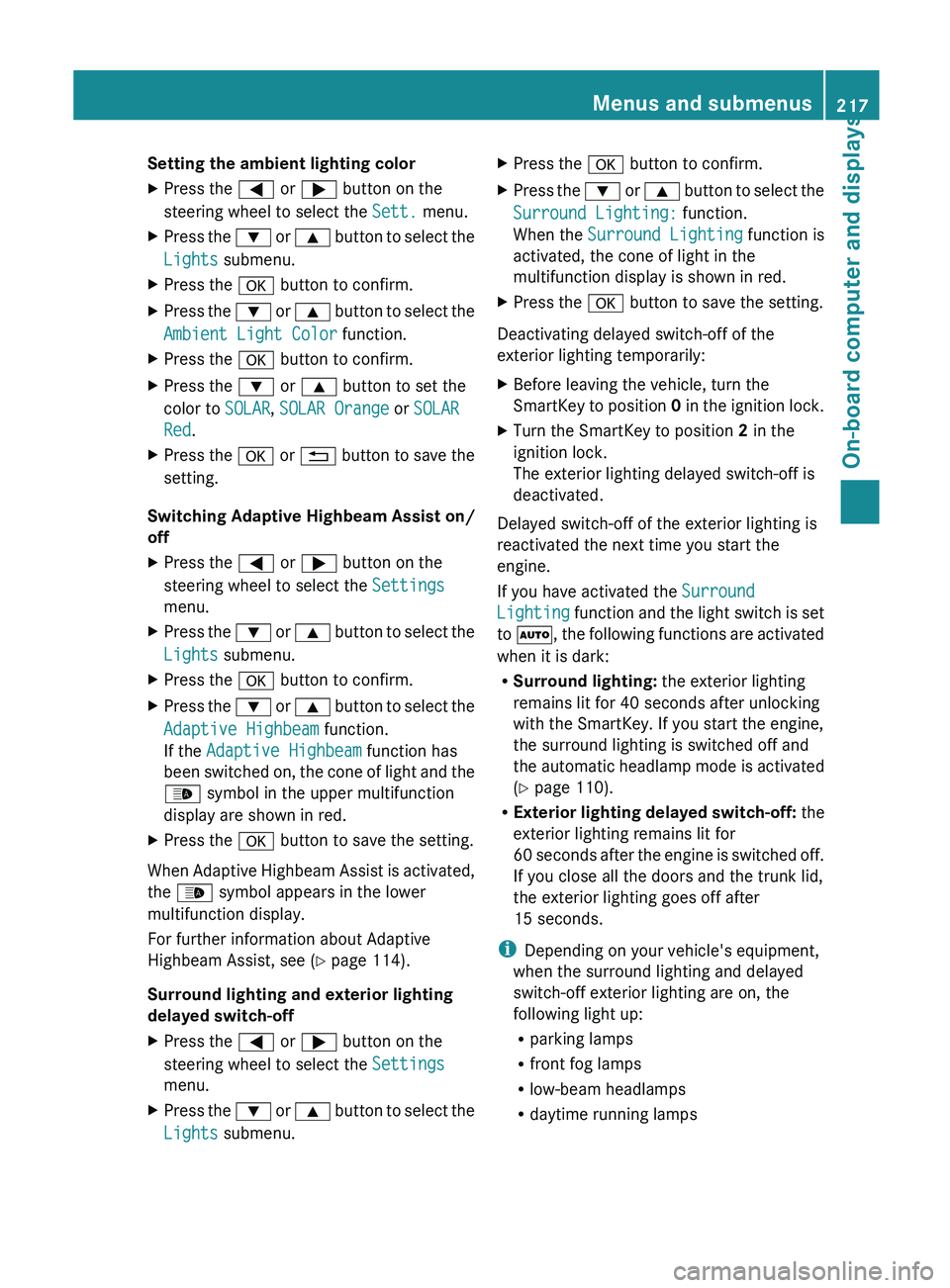
Setting the ambient lighting color
X
Press the = or ; button on the
steering wheel to select the Sett. menu.
X Press the : or 9 button to select the
Lights submenu.
X Press the a button to confirm.
X Press the : or 9
button to select the
Ambient Light Color function.
X Press the a button to confirm.
X Press the : or 9 button to set the
color to SOLAR, SOLAR Orange or SOLAR
Red.
X Press the a or % button
to save the
setting.
Switching Adaptive Highbeam Assist on/
off
X Press the = or ; button on the
steering wheel to select the Settings
menu.
X Press the : or 9
button to select the
Lights submenu.
X Press the a button to confirm.
X Press the :
or 9
button to select the
Adaptive Highbeam function.
If the Adaptive Highbeam function has
been switched on, the cone of light and the
_ symbol in the upper multifunction
display are shown in red.
X Press the a button to save the setting.
When Adaptive Highbeam Assist is activated,
the _ symbol appears in the lower
multifunction display.
For further information about Adaptive
Highbeam Assist, see ( Y page 114).
Surround lighting and exterior lighting
delayed switch-off
X Press the = or ; button on the
steering wheel to select the Settings
menu.
X Press the :
or 9
button to select the
Lights submenu. X
Press the a button to confirm.
X Press the :
or 9
button to select the
Surround Lighting: function.
When the Surround Lighting function is
activated, the cone of light in the
multifunction display is shown in red.
X Press the a button to save the setting.
Deactivating delayed switch-off of the
exterior lighting temporarily:
X Before leaving the vehicle, turn the
SmartKey to
position 0 in the ignition lock.
X Turn the SmartKey to position 2 in the
ignition lock.
The exterior lighting delayed switch-off is
deactivated.
Delayed switch-off of the exterior lighting is
reactivated the next time you start the
engine.
If you have activated the Surround
Lighting function
and the light switch is set
to Ã, the following functions are activated
when it is dark:
R Surround lighting: the exterior lighting
remains lit for 40 seconds after unlocking
with the SmartKey. If you start the engine,
the surround lighting is switched off and
the automatic headlamp mode is activated
(Y page 110).
R Exterior lighting delayed switch-off: the
exterior lighting remains lit for
60 seconds after the engine is switched off.
If you close all the doors and the trunk lid,
the exterior lighting goes off after
15 seconds.
i Depending on your vehicle's equipment,
when the surround lighting and delayed
switch-off exterior lighting are on, the
following light up:
R parking lamps
R front fog lamps
R low-beam headlamps
R daytime running lamps Menus and submenus
217
On-board computer and displays Z
Page 220 of 572
R
side marker lamps
R surround lighting in the exterior mirrors
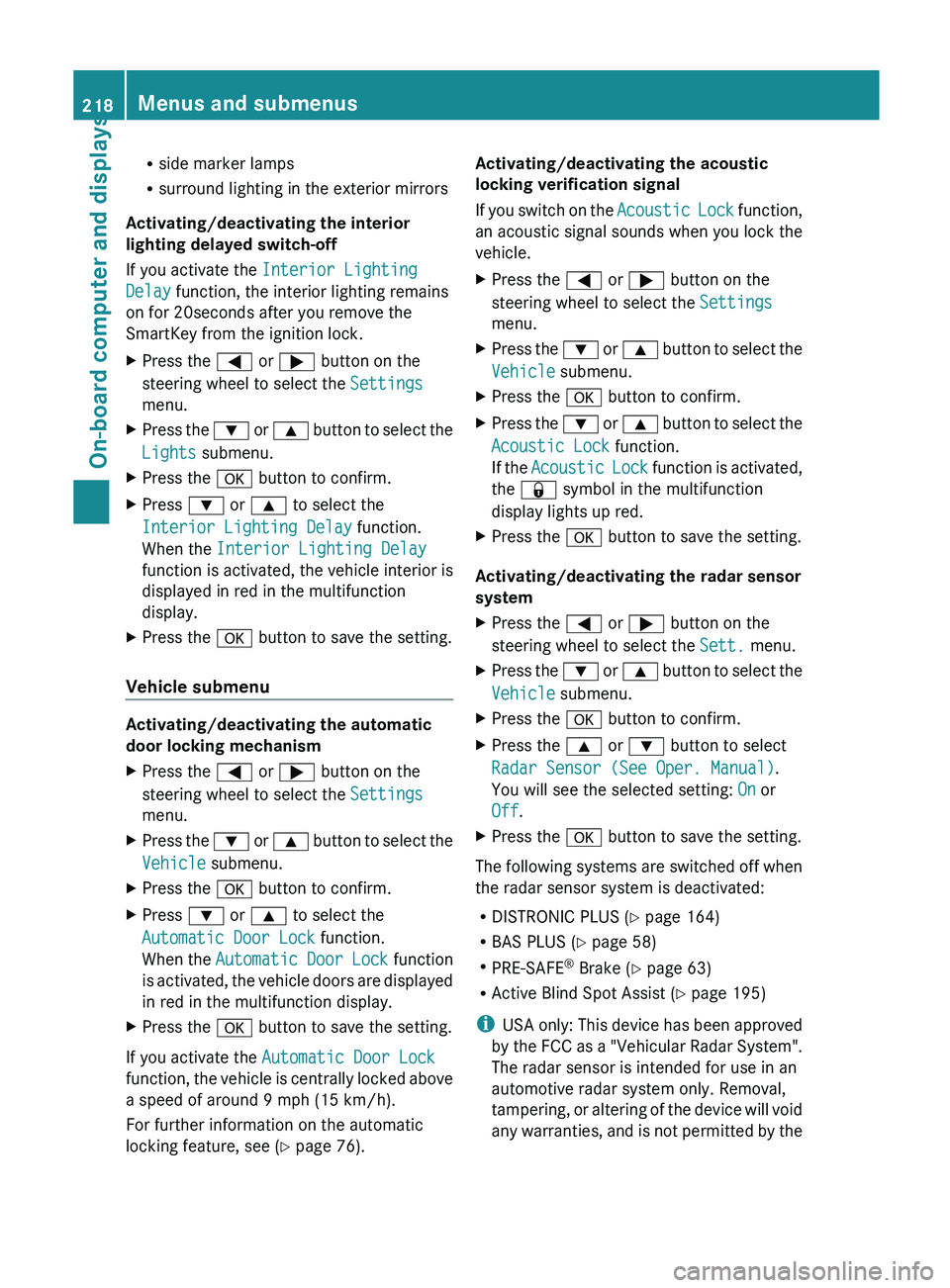
Activating/deactivating the interior
lighting delayed switch-off
If you activate the Interior Lighting
Delay function, the interior lighting remains
on for 20seconds after you remove the
SmartKey from the ignition lock.
X Press the = or ; button on the
steering wheel to select the Settings
menu.
X Press the : or 9 button to select the
Lights submenu.
X Press the a button to confirm.
X Press : or 9 to select the
Interior Lighting Delay function.
When the Interior Lighting Delay
function is
activated, the vehicle interior is
displayed in red in the multifunction
display.
X Press the a button to save the setting.
Vehicle submenu Activating/deactivating the automatic
door locking mechanism
X
Press the = or ; button on the
steering wheel to select the Settings
menu.
X Press the : or 9
button to select the
Vehicle submenu.
X Press the a button to confirm.
X Press : or 9 to select the
Automatic Door Lock function.
When the Automatic
Door Lock function
is activated, the vehicle doors are displayed
in red in the multifunction display.
X Press the a button to save the setting.
If you activate the Automatic Door Lock
function, the
vehicle is centrally locked above
a speed of around 9 mph (15 km/h).
For further information on the automatic
locking feature, see ( Y page 76). Activating/deactivating the acoustic
locking verification signal
If
you
switch on the Acoustic Lock function,
an acoustic signal sounds when you lock the
vehicle.
X Press the = or ; button on the
steering wheel to select the Settings
menu.
X Press the : or 9
button to select the
Vehicle submenu.
X Press the a button to confirm.
X Press the :
or 9
button to select the
Acoustic Lock function.
If the Acoustic Lock function is activated,
the & symbol in the multifunction
display lights up red.
X Press the a button to save the setting.
Activating/deactivating the radar sensor
system
X Press the = or ; button on the
steering wheel to select the Sett. menu.
X Press the : or 9
button to select the
Vehicle submenu.
X Press the a button to confirm.
X Press the 9 or : button to select
Radar Sensor (See Oper. Manual).
You will see the selected setting: On or
Off.
X Press the a button to save the setting.
The following systems are switched off when
the radar sensor system is deactivated:
R DISTRONIC PLUS (Y page 164)
R BAS PLUS (
Y page 58)
R PRE-SAFE ®
Brake (Y page 63)
R Active Blind Spot Assist (Y page 195)
i USA only: This device has been approved
by the FCC as a "Vehicular Radar System".
The radar sensor is intended for use in an
automotive radar system only. Removal,
tampering, or altering of the device will void
any warranties, and is not permitted by the 218
Menus and submenus
On-board computer and displays
Page 221 of 572
FCC. Do not tamper with, alter, or use in
any non-approved way.
Any unauthorized modification to this
device could void the user’s authority to
operate the equipment.
i Canada only:
This device complies with the RSS-210
Rules of Industry Canada. Operation is
subject to the following two conditions:
1. This device may not cause harmful
interference, and
2. this
device must accept any interference
received, including interference that may
cause undesired operation of the device.
Any unauthorized modification to this
device could void the user’s authority to
operate the equipment.
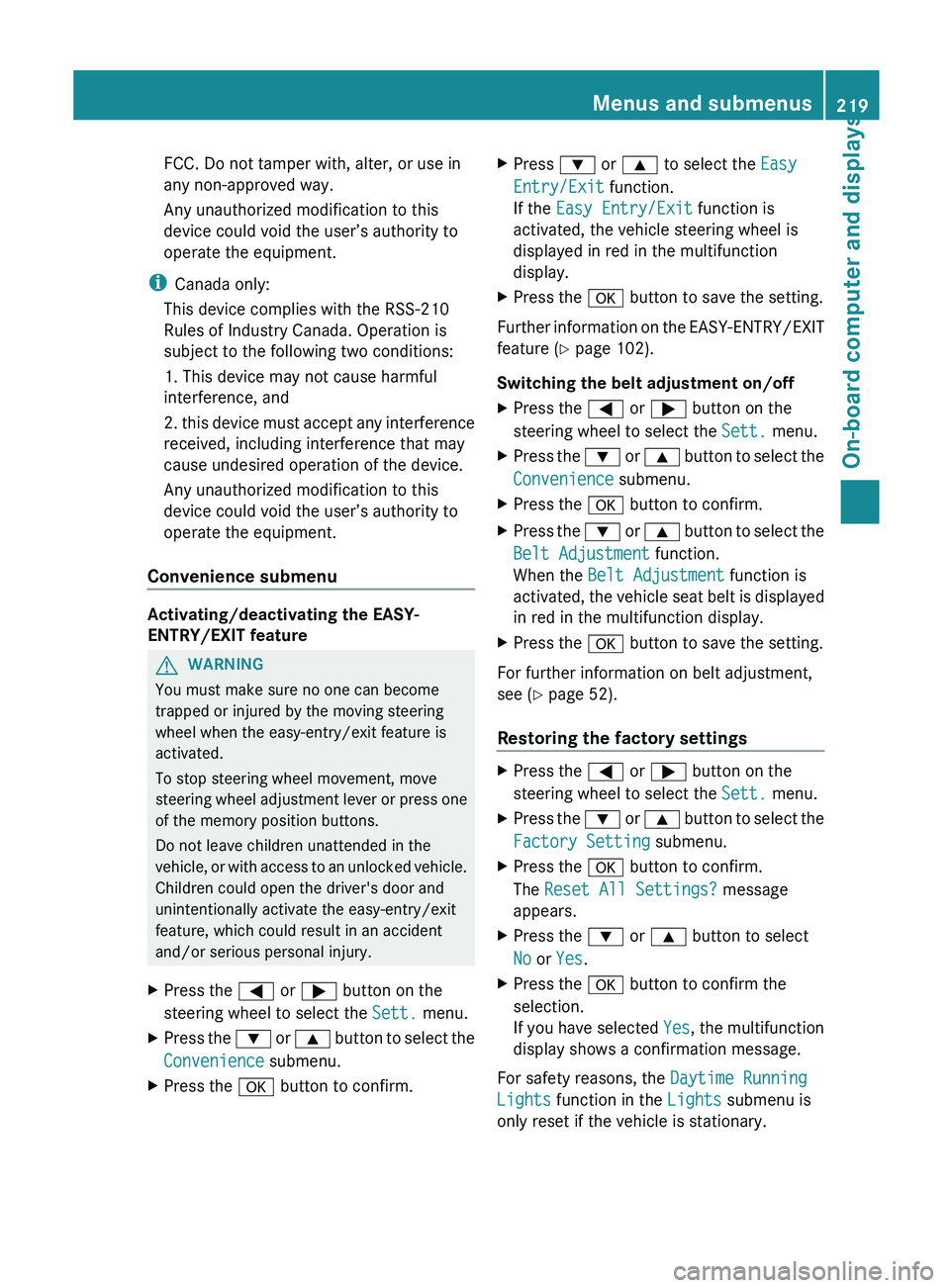
Convenience submenu Activating/deactivating the EASY-
ENTRY/EXIT feature
G
WARNING
You must make sure no one can become
trapped or injured by the moving steering
wheel when the easy-entry/exit feature is
activated.
To stop steering wheel movement, move
steering wheel
adjustment lever or press one
of the memory position buttons.
Do not leave children unattended in the
vehicle, or with access to an unlocked vehicle.
Children could open the driver's door and
unintentionally activate the easy-entry/exit
feature, which could result in an accident
and/or serious personal injury.
X Press the = or ; button on the
steering wheel to select the Sett. menu.
X Press the :
or 9
button to select the
Convenience submenu.
X Press the a button to confirm. X
Press : or 9 to select the Easy
Entry/Exit function.
If the Easy Entry/Exit function is
activated, the vehicle steering wheel is
displayed in red in the multifunction
display.
X Press the a button to save the setting.
Further information on the EASY-ENTRY/EXIT
feature ( Y page 102).
Switching the belt adjustment on/off
X Press the = or ; button on the
steering wheel to select the Sett. menu.
X Press the : or 9
button to select the
Convenience submenu.
X Press the a button to confirm.
X Press the :
or 9
button to select the
Belt Adjustment function.
When the Belt Adjustment function is
activated, the vehicle seat belt is displayed
in red in the multifunction display.
X Press the a button to save the setting.
For further information on belt adjustment,
see ( Y page 52).
Restoring the factory settings X
Press the = or ; button on the
steering wheel to select the Sett. menu.
X Press the : or 9
button to select the
Factory Setting submenu.
X Press the a button to confirm.
The Reset All Settings? message
appears.
X Press the : or 9 button to select
No or Yes.
X Press the a button to confirm the
selection.
If you
have selected Yes, the multifunction
display shows a confirmation message.
For safety reasons, the Daytime Running
Lights function in the Lights submenu is
only reset if the vehicle is stationary. Menus and submenus
219
On-board computer and displays Z
Page 229 of 572
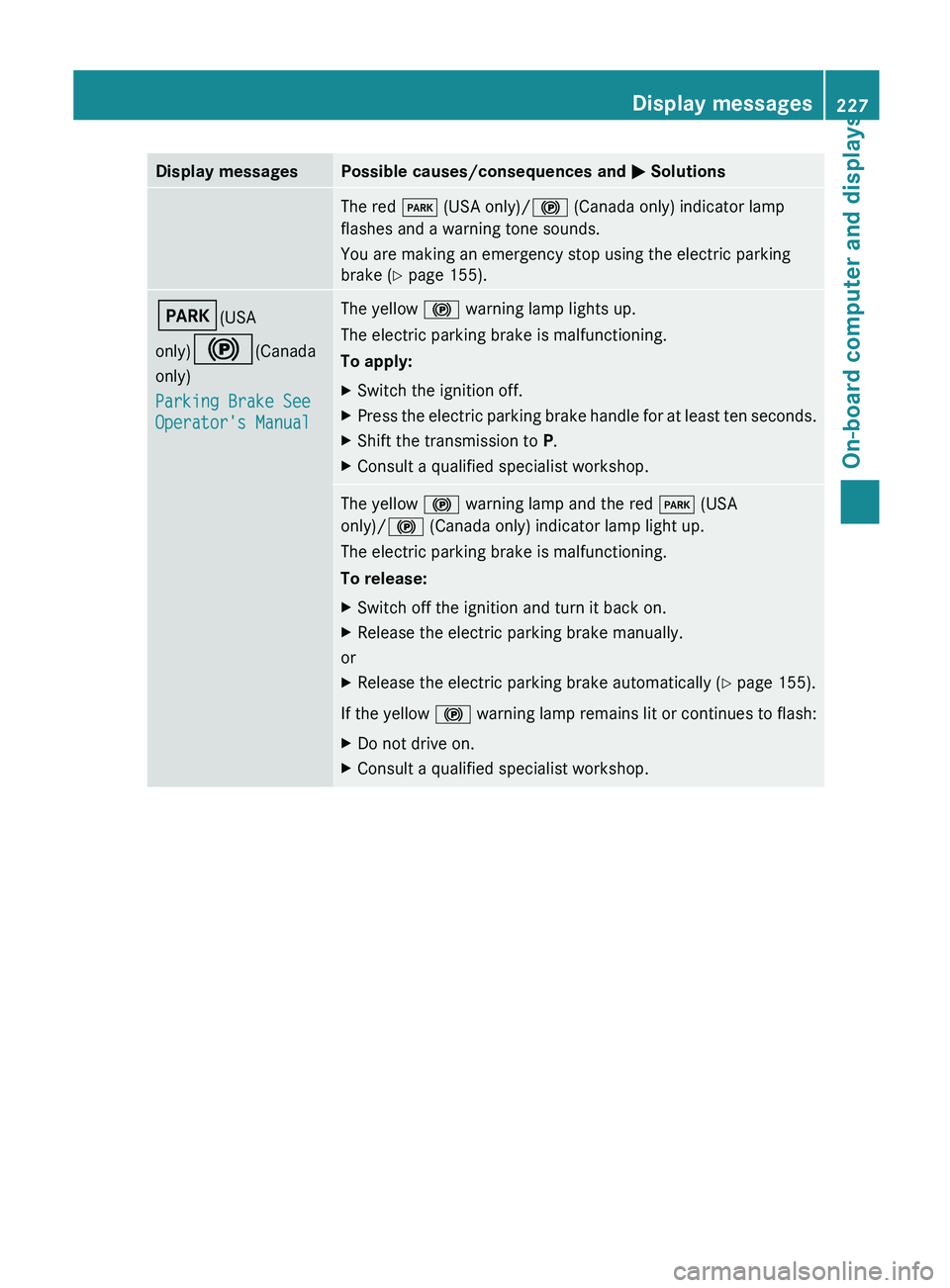
Display messages Possible causes/consequences and
M SolutionsThe red
F (USA only)/! (Canada only) indicator lamp
flashes and a warning tone sounds.
You are making an emergency stop using the electric parking
brake ( Y page 155). F(USA
only)!(Canada
only)
Parking Brake See
Operator's Manual The yellow
! warning lamp lights up.
The electric parking brake is malfunctioning.
To apply:
X Switch the ignition off.
X Press the electric parking brake handle for at least ten seconds.
X Shift the transmission to P.
X Consult a qualified specialist workshop. The yellow
! warning lamp and the red F (USA
only)/! (Canada only) indicator lamp light up.
The electric parking brake is malfunctioning.
To release:
X Switch off the ignition and turn it back on.
X Release the electric parking brake manually.
or
X Release the electric parking brake automatically ( Y page 155).
If the yellow !
warning lamp remains lit or continues to flash:
X Do not drive on.
X Consult a qualified specialist workshop. Display messages
227
On-board computer and displays Z
Page 230 of 572
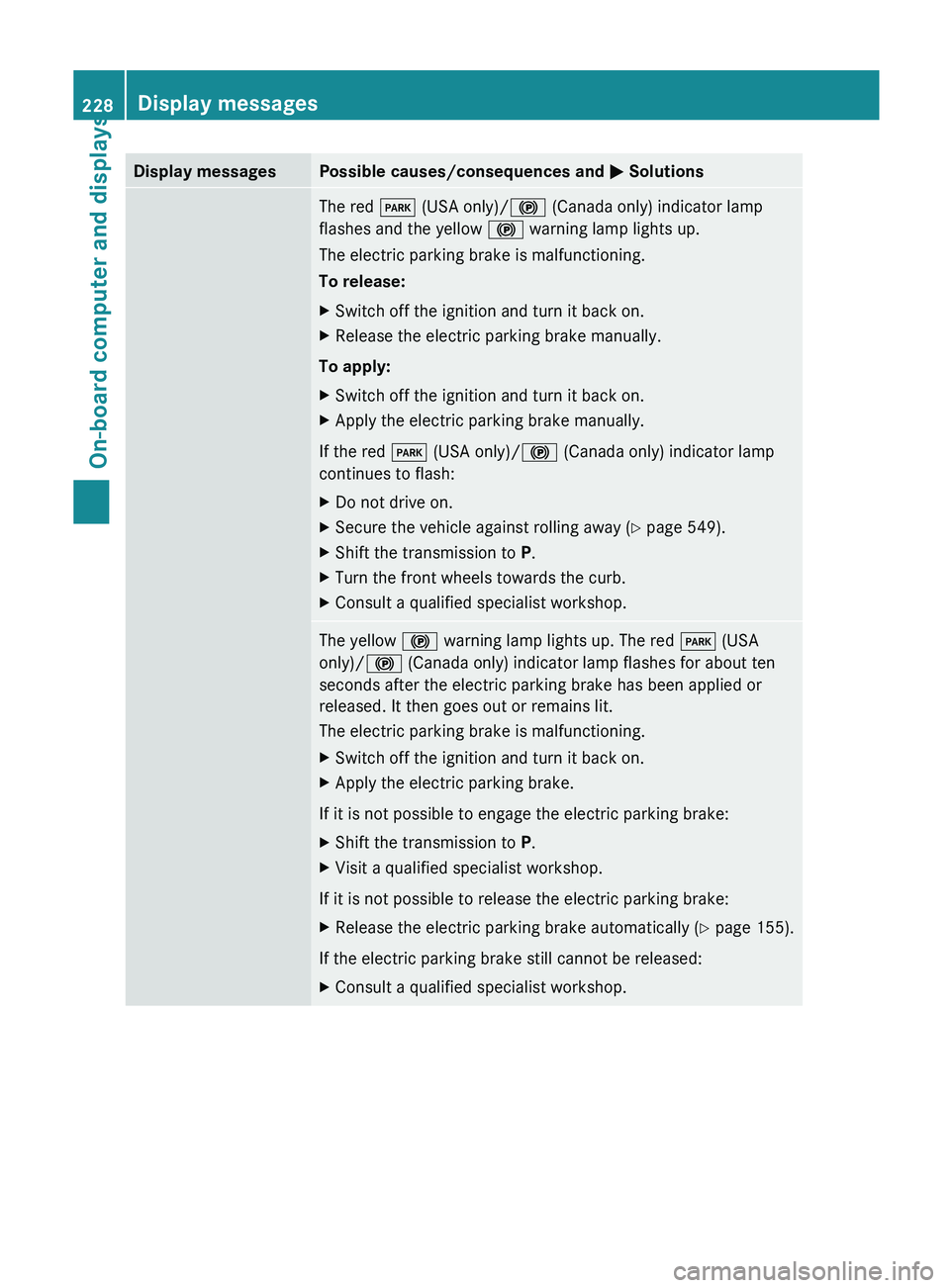
Display messages Possible causes/consequences and
M SolutionsThe red
F (USA only)/! (Canada only) indicator lamp
flashes and the yellow ! warning lamp lights up.
The electric parking brake is malfunctioning.
To release:
X Switch off the ignition and turn it back on.
X Release the electric parking brake manually.
To apply:
X Switch off the ignition and turn it back on.
X Apply the electric parking brake manually.
If the red F (USA only)/! (Canada only) indicator lamp
continues to flash:
X Do not drive on.
X Secure the vehicle against rolling away ( Y page 549).
X Shift the transmission to P.
X Turn the front wheels towards the curb.
X Consult a qualified specialist workshop. The yellow
! warning lamp lights up. The red F (USA
only)/! (Canada only) indicator lamp flashes for about ten
seconds after the electric parking brake has been applied or
released. It then goes out or remains lit.
The electric parking brake is malfunctioning.
X Switch off the ignition and turn it back on.
X Apply the electric parking brake.
If it is not possible to engage the electric parking brake:
X Shift the transmission to P.
X Visit a qualified specialist workshop.
If it is not possible to release the electric parking brake:
X Release the electric parking brake automatically ( Y page 155).
If the electric parking brake still cannot be released:
X Consult a qualified specialist workshop.228
Display messagesOn-board computer and displays
Page 231 of 572
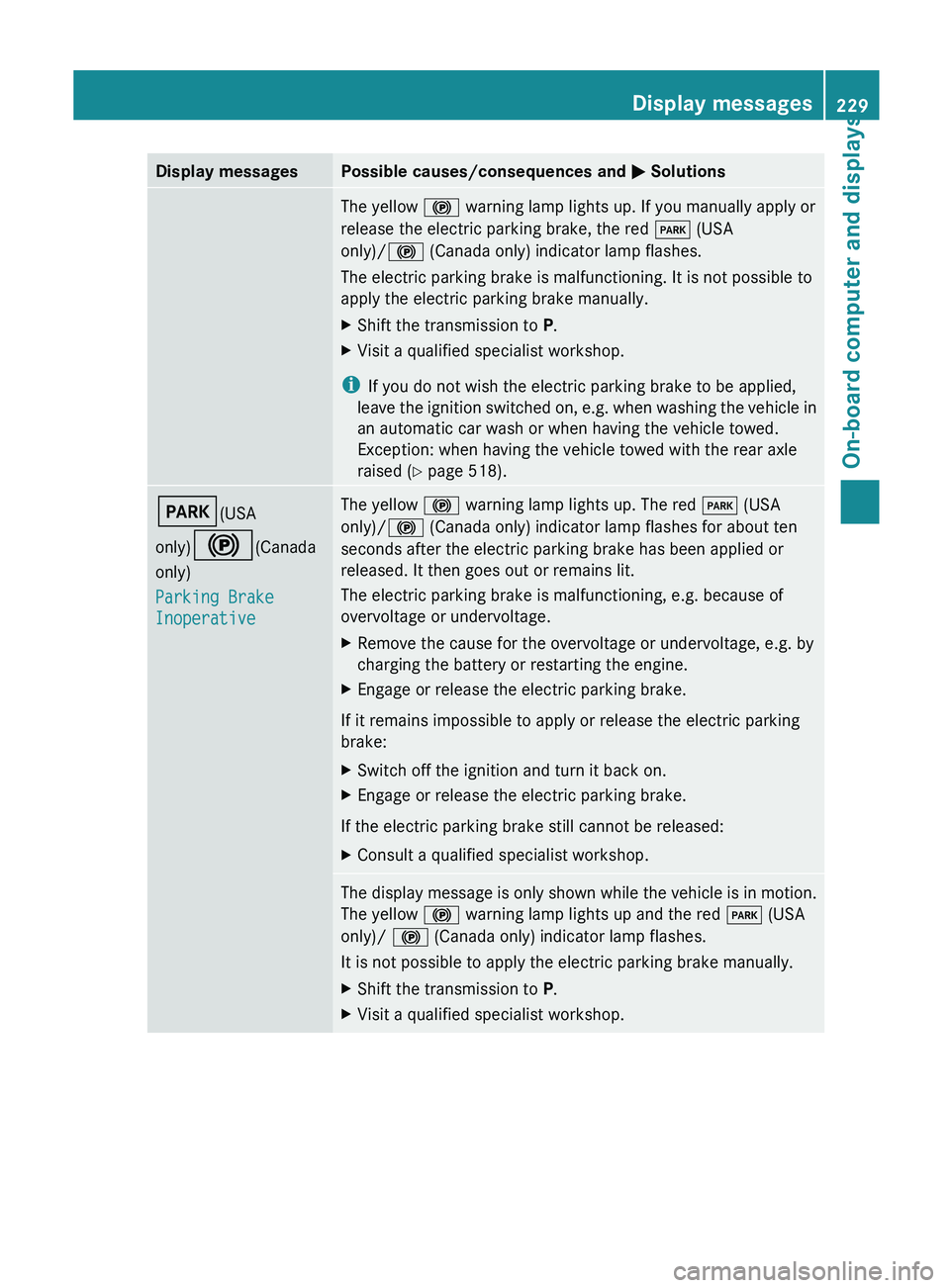
Display messages Possible causes/consequences and
M SolutionsThe yellow
! warning lamp lights up. If you manually apply or
release the electric parking brake, the red F (USA
only)/! (Canada only) indicator lamp flashes.
The electric parking brake is malfunctioning. It is not possible to
apply the electric parking brake manually.
X Shift the transmission to P.
X Visit a qualified specialist workshop.
i If you do not wish the electric parking brake to be applied,
leave the
ignition switched on, e.g. when washing the vehicle in
an automatic car wash or when having the vehicle towed.
Exception: when having the vehicle towed with the rear axle
raised ( Y page 518). F(USA
only)!(Canada
only)
Parking Brake
Inoperative The yellow
! warning lamp lights up. The red F (USA
only)/! (Canada only) indicator lamp flashes for about ten
seconds after the electric parking brake has been applied or
released. It then goes out or remains lit.
The electric parking brake is malfunctioning, e.g. because of
overvoltage or undervoltage.
X Remove the cause for the overvoltage or undervoltage, e.g. by
charging the battery or restarting the engine.
X Engage or release the electric parking brake.
If it remains impossible to apply or release the electric parking
brake:
X Switch off the ignition and turn it back on.
X Engage or release the electric parking brake.
If the electric parking brake still cannot be released:
X Consult a qualified specialist workshop. The display message is only shown while the vehicle is in motion.
The yellow
! warning lamp lights up and the red F (USA
only)/ ! (Canada only) indicator lamp flashes.
It is not possible to apply the electric parking brake manually.
X Shift the transmission to P.
X Visit a qualified specialist workshop. Display messages
229
On-board computer and displays Z
Page 232 of 572
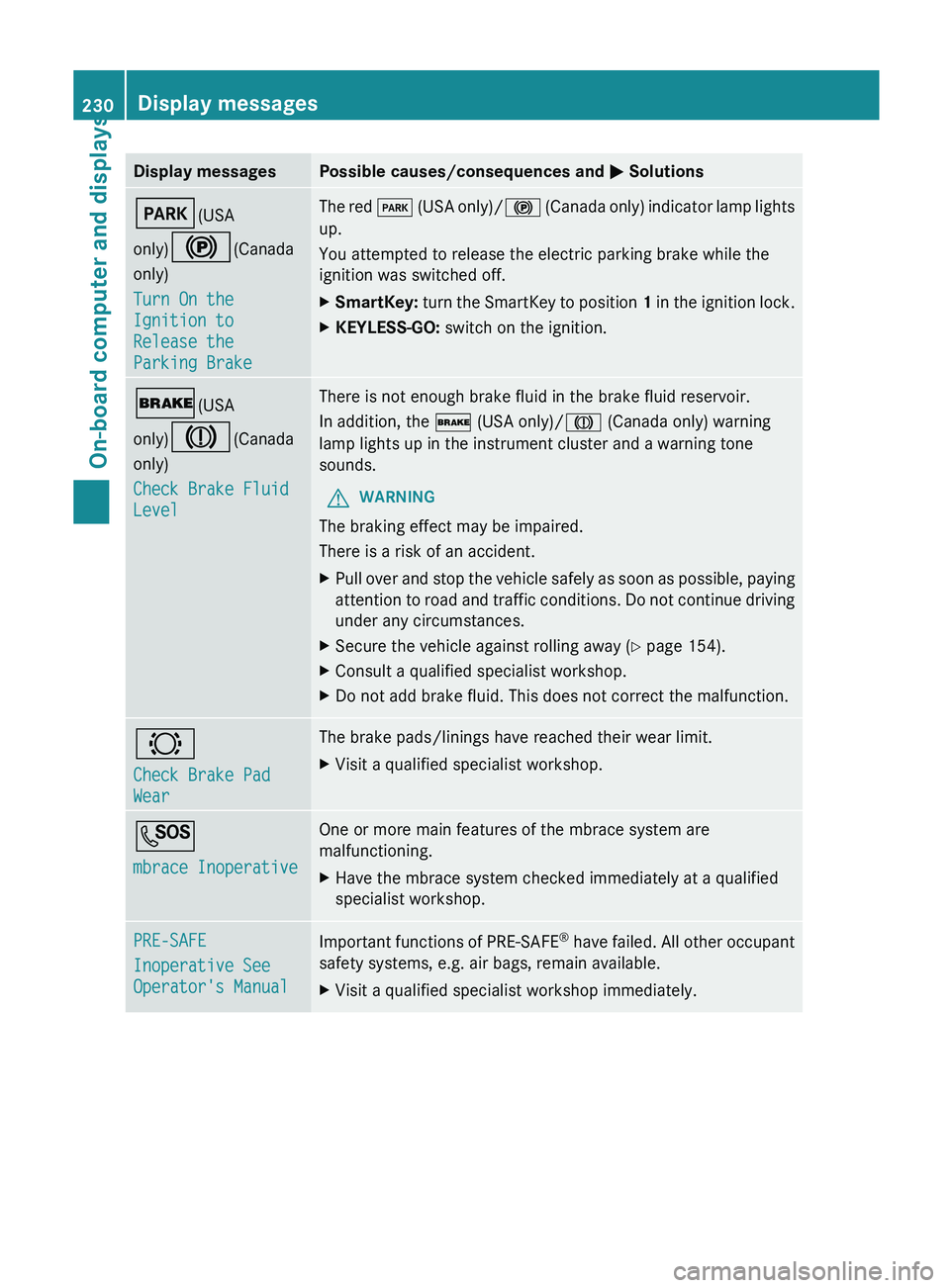
Display messages Possible causes/consequences and
M SolutionsF(USA
only)!(Canada
only)
Turn On the
Ignition to
Release the
Parking Brake The red
F
(USA only)/! (Canada only) indicator lamp lights
up.
You attempted to release the electric parking brake while the
ignition was switched off.
X SmartKey: turn the SmartKey to position 1
in the ignition lock.
X KEYLESS-GO: switch on the ignition.$(USA
only)J(Canada
only)
Check Brake Fluid
Level There is not enough brake fluid in the brake fluid reservoir.
In addition, the $ (USA only)/J (Canada only) warning
lamp lights up in the instrument cluster and a warning tone
sounds.
G WARNING
The braking effect may be impaired.
There is a risk of an accident.
X Pull over and stop the vehicle safely as soon as possible, paying
attention to
road and traffic conditions. Do not continue driving
under any circumstances.
X Secure the vehicle against rolling away ( Y page 154).
X Consult a qualified specialist workshop.
X Do not add brake fluid. This does not correct the malfunction. #
Check Brake Pad
Wear The brake pads/linings have reached their wear limit.
X
Visit a qualified specialist workshop. G
mbrace Inoperative One or more main features of the mbrace system are
malfunctioning.
X
Have the mbrace system checked immediately at a qualified
specialist workshop. PRE-SAFE
Inoperative See
Operator's Manual
Important functions of PRE-SAFE
®
have
failed. All other occupant
safety systems, e.g. air bags, remain available.
X Visit a qualified specialist workshop immediately.230
Display messages
On-board computer and displays
Page 234 of 572
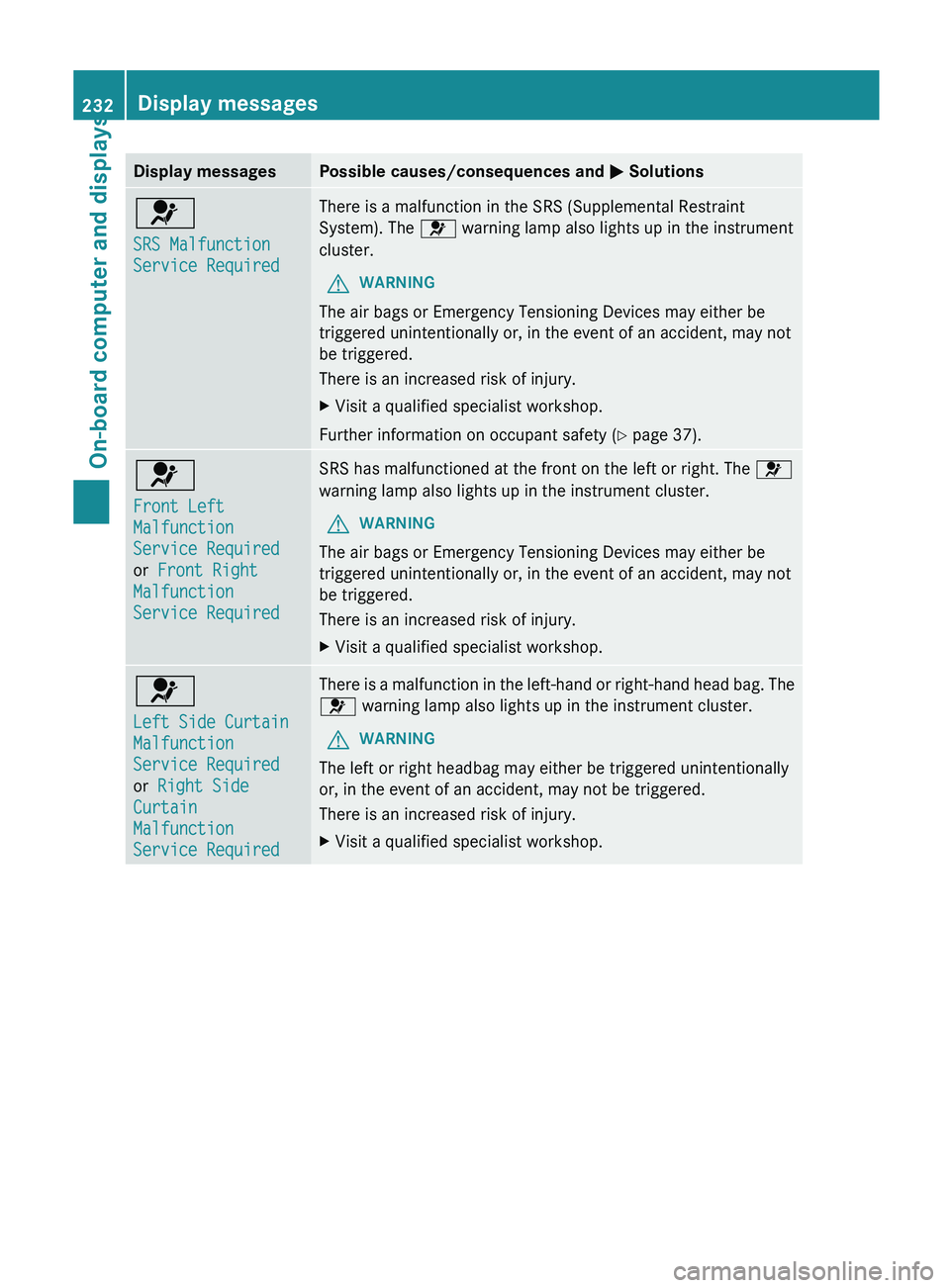
Display messages Possible causes/consequences and
M Solutions6
SRS Malfunction
Service Required There is a malfunction in the SRS (Supplemental Restraint
System). The 6 warning lamp also lights up in the instrument
cluster.
G WARNING
The air bags or Emergency Tensioning Devices may either be
triggered unintentionally or, in the event of an accident, may not
be triggered.
There is an increased risk of injury.
X Visit a qualified specialist workshop.
Further information on occupant safety (Y page 37). 6
Front Left
Malfunction
Service Required
or Front Right
Malfunction
Service Required SRS has malfunctioned at the front on the left or right. The
6
warning lamp also lights up in the instrument cluster.
G WARNING
The air bags or Emergency Tensioning Devices may either be
triggered unintentionally or, in the event of an accident, may not
be triggered.
There is an increased risk of injury.
X Visit a qualified specialist workshop. 6
Left Side Curtain
Malfunction
Service Required
or Right Side
Curtain
Malfunction
Service Required There is a malfunction in the left-hand or right-hand head bag. The
6 warning lamp also lights up in the instrument cluster.
G WARNING
The left or right headbag may either be triggered unintentionally
or, in the event of an accident, may not be triggered.
There is an increased risk of injury.
X Visit a qualified specialist workshop.232
Display messagesOn-board computer and displays
Page 237 of 572
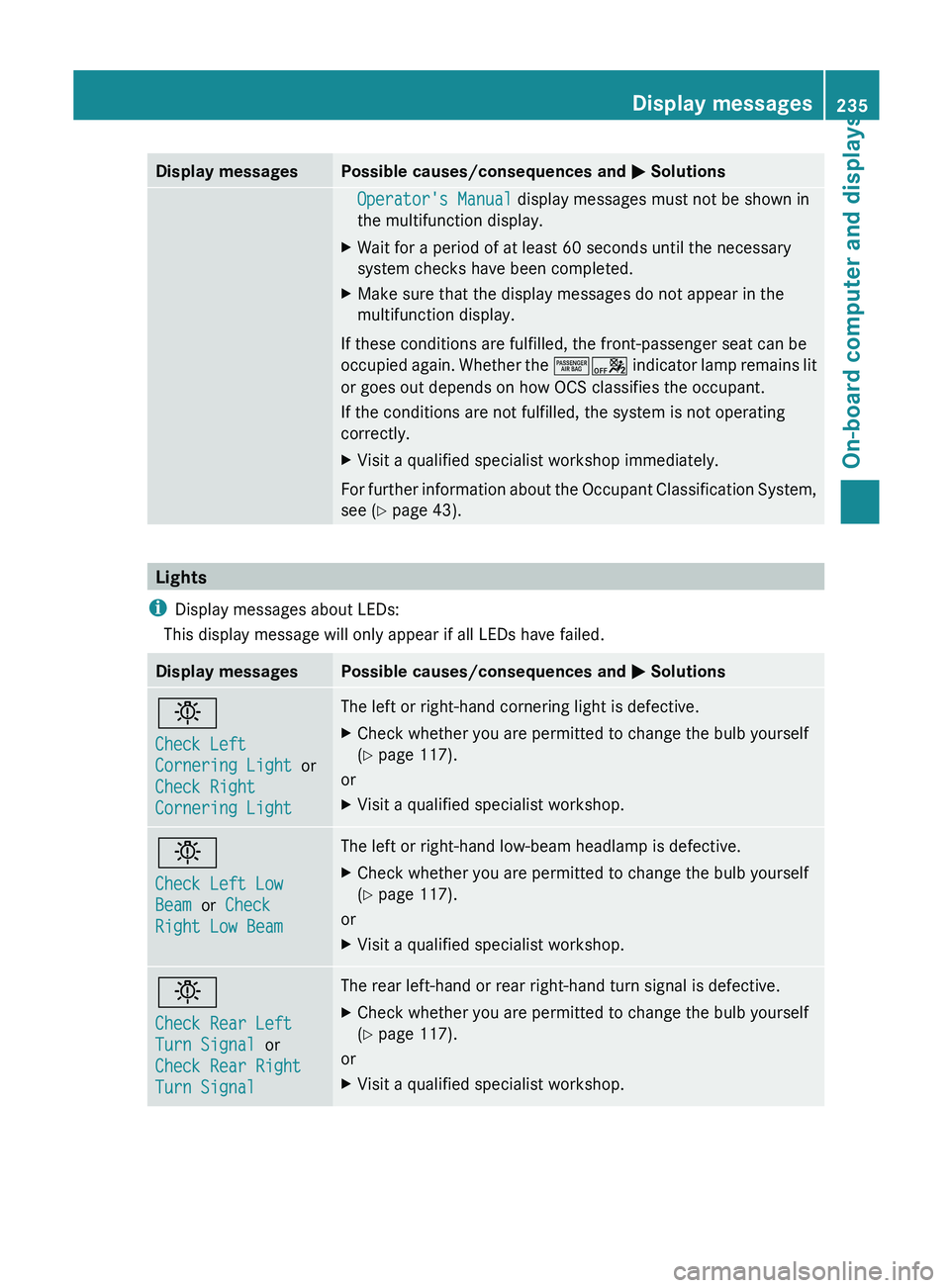
Display messages Possible causes/consequences and
M SolutionsOperator's Manual display messages must not be shown in
the multifunction display.
X Wait for a period of at least 60 seconds until the necessary
system checks have been completed.
X Make sure that the display messages do not appear in the
multifunction display.
If these conditions are fulfilled, the front-passenger seat can be
occupied again.
Whether the ^a indicator lamp remains lit
or goes out depends on how OCS classifies the occupant.
If the conditions are not fulfilled, the system is not operating
correctly.
X Visit a qualified specialist workshop immediately.
For further information about the Occupant Classification System,
see ( Y page 43). Lights
i Display messages about LEDs:
This display message will only appear if all LEDs have failed. Display messages Possible causes/consequences and
M Solutionsb
Check Left
Cornering Light
or
Check Right
Cornering Light The left or right-hand cornering light is defective.
X
Check whether you are permitted to change the bulb yourself
(Y page 117).
or
X Visit a qualified specialist workshop. b
Check Left Low
Beam or Check
Right Low Beam The left or right-hand low-beam headlamp is defective.
X
Check whether you are permitted to change the bulb yourself
(Y page 117).
or
X Visit a qualified specialist workshop. b
Check Rear Left
Turn Signal or
Check Rear Right
Turn Signal The rear left-hand or rear right-hand turn signal is defective.
X
Check whether you are permitted to change the bulb yourself
(Y page 117).
or
X Visit a qualified specialist workshop. Display messages
235
On-board computer and displays Z
Page 240 of 572
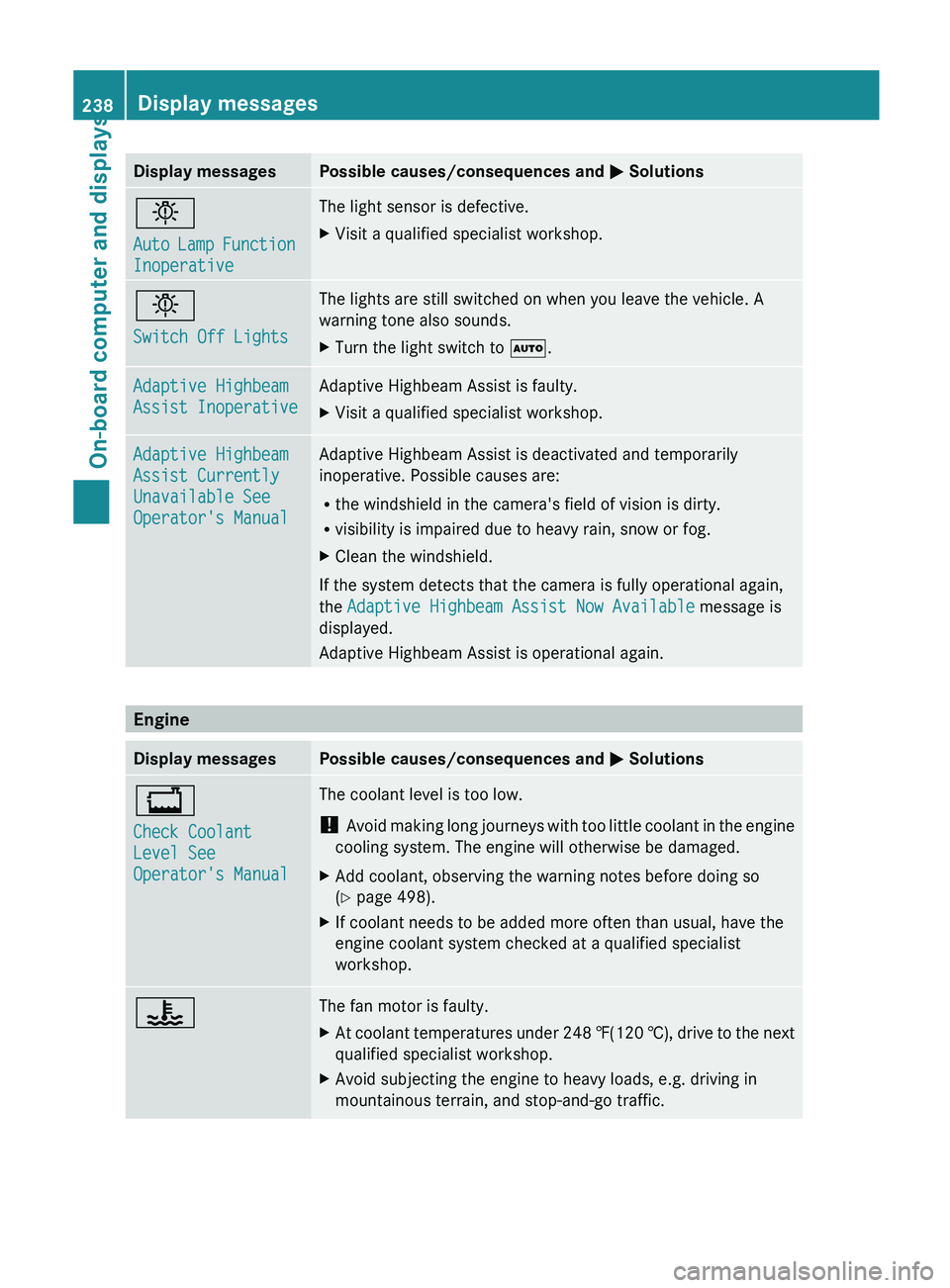
Display messages Possible causes/consequences and
M Solutionsb
Auto
Lamp
Function
Inoperative The light sensor is defective.
X
Visit a qualified specialist workshop. b
Switch Off Lights The lights are still switched on when you leave the vehicle. A
warning tone also sounds.
X
Turn the light switch to Ã. Adaptive Highbeam
Assist Inoperative Adaptive Highbeam Assist is faulty.
X
Visit a qualified specialist workshop. Adaptive Highbeam
Assist Currently
Unavailable See
Operator's Manual Adaptive Highbeam Assist is deactivated and temporarily
inoperative. Possible causes are:
R
the windshield in the camera's field of vision is dirty.
R visibility is impaired due to heavy rain, snow or fog.
X Clean the windshield.
If the system detects that the camera is fully operational again,
the Adaptive Highbeam Assist Now Available message is
displayed.
Adaptive Highbeam Assist is operational again. Engine
Display messages Possible causes/consequences and
M Solutions+
Check Coolant
Level See
Operator's Manual The coolant level is too low.
!
Avoid making
long journeys with too little coolant in the engine
cooling system. The engine will otherwise be damaged.
X Add coolant, observing the warning notes before doing so
(Y page 498).
X If coolant needs to be added more often than usual, have the
engine coolant system checked at a qualified specialist
workshop. ? The fan motor is faulty.
X
At coolant temperatures under 248 ‡(120 †), drive
to the next
qualified specialist workshop.
X Avoid subjecting the engine to heavy loads, e.g. driving in
mountainous terrain, and stop-and-go traffic.238
Display messages
On-board computer and displays