USB MERCEDES-BENZ SL-CLASS ROADSTER 2013 Owners Manual
[x] Cancel search | Manufacturer: MERCEDES-BENZ, Model Year: 2013, Model line: SL-CLASS ROADSTER, Model: MERCEDES-BENZ SL-CLASS ROADSTER 2013Pages: 572, PDF Size: 9.23 MB
Page 6 of 572
1, 2, 3 ...
12 V socket see Sockets
911 emergency call
..........................358A
ABS (Anti-lock Braking System) Display message ............................ 224
Function/notes
................................ 57
Important safety notes .................... 57
Warning lamp ................................. 257
Activating/deactivating cooling
with air dehumidification ................. 125
Active Blind Spot Assist Activating/deactivating (on-
board computer) ............................ 215
Display message ............................ 243
Function/information .................... 196
Active Body Control (AMG
vehicles)
Display message ............................ 241
Driving conditions menu in the
COMAND display (AMG vehicles) ... 183
Function/notes ............................. 181
Active Body Control (except AMG
vehicles)
Display message ............................ 241
Driving conditions menu in the
COMAND display ........................... 180
Function/notes ............................. 179
Active Driving Assistance package . 195
Active Lane Keeping Assist Activating/deactivating (on-
board computer) ............................ 215
Display message ............................ 243
Function/information .................... 199
Active light function .........................113
Active multicontour seat ..................286
Active Parking Assist Display message ............................ 244
Important safety notes .................. 186
Active partition (USB devices only)
Selecting ........................................ 430
ADAPTIVE BRAKE ................................. 63
Adaptive Damping System Function/notes ............................. 178Adaptive Highbeam Assist
Display message ............................ 238
Function/notes
............................. 114
Switching on/off (on-board
computer) ...................................... 217
Additives (engine oil) ........................563
Address book Browsing ........................................ 378
Calling up ....................................... 378
Changing an entry .......................... 380
Connecting a call ........................... 381
Creating an entry ........................... 379
Deleting an entry ........................... 379
Deleting contacts ........................... 384
Details about an entry ...................380
Entering characters .......................281
Entry as a home address ...............338
Importing contacts ........................ 383
Introduction ................................... 378
Receiving vCards ........................... 384
Searching for an entry ...................379
Starting route guidance ................. 381
Voice tag ....................................... 382
Address entry menu .......................... 299
Adjusting the sound settings Balance .......................................... 278
Adjusting the vehicle height
Active Body Control (AMG
vehicles) ........................................ 181
Active Body Control (except AMG
vehicles) ........................................ 179
Air bags
Display message ............................ 234
Front air bag (driver, front
passenger) ....................................... 40
Head bag ......................................... 42
Important safety notes .................... 38
Knee bag .......................................... 41
PASSENGER AIR BAG OFF
indicator lamp .................................. 43
Safety guidelines ............................. 38
Side impact air bag .......................... 41
Air-conditioning system
see Climate control
AIR FLOW ........................................... 126
Air pressure see Tire pressure 4
Index
Page 10 of 572
Indicator lamp ................................ 126
Maximum cooling
.......................... 128
Notes on
using automatic climate
control ........................................... 124
Overview of systems ...................... 122
Problems with cooling with air
dehumidification ............................ 126
Problem with the rear window
defroster ........................................ 129
Setting the air distribution .............127
Setting the airflow ......................... 127
Setting the air vents ......................131
Setting the climate mode (AIR
FLOW) ............................................ 126
Setting the temperature ................ 127
Switching air-recirculation mode
on/off ............................................ 130
Switching on/off ........................... 125
Switching residual heat on/off ...... 130
Switching the rear window
defroster on/off ............................ 129
Switching the ZONE function on/
off .................................................. 128
Cockpit
see Instrument cluster
Color, setting (TV, video) ..................453
COMAND Active multicontour seat ................ 287
Basic functions .............................. 275
Calling up drive status regulator
(ABC) ............................................. 291
Display ........................................... 271
Examples of operation ................... 273
Importing POIs ............................... 392
Multicontour seat .......................... 286
Seat functions ............................... 286
Settings ......................................... 410
Switching on/off ........................... 275
System settings ............................. 289
COMAND controller ...........................273
COMAND display Cleaning ......................................... 504
Cleaning instructions ..................... 272
Driving conditions menu (AMG
vehicles) ........................................ 183
Driving conditions menu (except
AMG vehicles) ................................ 180Setting ...........................................
289
Switching on/off
........................... 272
Combination switch ..........................112
Compass function ............................. 352
Connecting a USB device .................424
Consumption statistics (on-board
computer) .......................................... 209
Contacts Deleting ......................................... 384
Importing ....................................... 383
Contrast, setting (TV, video) ............453
Convenience closing feature ..............85
Convenience opening feature see Side windows
Coolant (engine)
Checking the level ......................... 498
Display message ............................ 238
Filling capacity ............................... 564
Notes ............................................. 563
Temperature (on-board computer) . 220
Temperature gauge ........................ 205
Warning lamp ................................. 263
Cooling
see Climate control
Copy protection (CD/DVD) ...............432
Cornering light function Display message ............................ 235
Function/notes ............................. 113
Crash-responsive emergency
lighting ............................................... 116
Cruise control Cruise control lever .......................162
Deactivating ................................... 164
Display message ............................ 246
Driving system ............................... 162
Function/notes ............................. 162
Important safety notes .................. 162
Setting a speed .............................. 163
Storing and maintaining current
speed ............................................. 163
Cup holder
Center console .............................. 478
Important safety notes .................. 478
Customer Assistance Center (CAC) ...32
Customer Relations Department .......328
Index
Page 15 of 572
H
Handbrake see Parking brake
HANDS-FREE ACCESS .......................... 80
Harman/kardon ®
Logic 7 ®
surround sound system see Surround sound (harman/
kardon ®
surround sound system)
Hazard warning lamps ......................113
Head bags Display message ............................ 232
Operation ......................................... 42
Heading up (navigation) ...................344
Headlamps Adding fluid to cleaning system .....499
Cleaning system (function) ............ 113
Cleaning system (notes) ................564
Fogging up ..................................... 115
see Automatic headlamp mode
Head level heating (AIRSCARF) ........101
Head restraints see NECK-PRO head restraints
Heating
see Climate control
High-beam headlamps
Display message ............................ 236
Switching Adaptive Highbeam
Assist on/off ................................. 115
Switching on/off ........................... 112
Hill start assist .................................. 138
HOLD function Display message ............................ 242
Function/notes ............................. 176
Home address
Entering and saving .......................304
Selecting from the destination
memory ......................................... 304
Hood
Closing ........................................... 497
Display message ............................ 251
Opening ......................................... 496
Hydroplaning ..................................... 161 I
Ignition lock see Key positions
Immobilizer .......................................... 65
Incident (traffic report) ..................... 333
Indicator lamps see Warning and indicator lamps
Indicators
see Turn signals
Inspection
see ASSYST PLUS
Instrument cluster
Overview ........................................ 205
Warning and indicator lamps .........255
Instrument cluster lighting .............. 205
Instrument lighting see Instrument cluster lighting
Interface (USB, iPod ®
)
see Media Interface
Interior lighting
Automatic control .......................... 116
Delayed switch-off (on-board
computer) ...................................... 218
Emergency lighting ........................ 116
Manual control ............................... 116
Overview ........................................ 115
Reading lamp ................................. 115
Setting the brightness of the
ambient lighting (on-board
computer) ...................................... 216
Setting the color of the ambient
lighting (on-board computer) ......... 217
Intermediate stop
Deleting ......................................... 308
Entering ......................................... 307
Internet
Calling up the carousel view .......... 402
Conditions for access .................... 385
Entering the URL ............................ 402
Favorites manager ......................... 408
Favorites menu .............................. 408
Menu functions .............................. 405
Opening favorites .......................... 407
Selecting favourites ....................... 403 Index
13
Page 17 of 572
Locking (doors)
Automatic ........................................ 76
Emergency locking ...........................
77
From inside (central locking
button) ............................................. 75
Locking centrally
see Central locking
Locking verification signal (on-
board computer) ............................... 218
Low-beam headlamps Display message ............................ 235
Setting for driving abroad
(symmetrical) ................................. 108
Switching on/off ........................... 109
Luggage cover
see Trunk partition
Lumbar support ................................. 287M
M+S tires ............................................ 528
MAGIC SKY CONTROL .........................92
Maintenance see ASSYST PLUS
Malfunction message
see Display messages
Map (navigation)
Adjusting the scale ........................ 342
Arrival time/distance to the
destination ..................................... 345
City model ..................................... 347
Geo-coordinate display .................. 345
Heading ......................................... 344
Information in the display ..............345
Map settings .................................. 343
Moving ........................................... 343
North orientation ........................... 344
Notes ............................................. 342
Point of interest symbols ............... 344
Road display .................................. 345
Saving the crosshair position ......... 343
Showing the map data version ....... 352
Topographical map ........................ 347
Updating ........................................ 353
Updating process ........................... 353
Matte finish (cleaning
instructions) ...................................... 502mbrace
Call priority
.................................... 489
Display message ............................ 230
Downloading destinations
(COMAND) ..................................... 489
Downloading routes .......................492
Emergency call .............................. 487
Geo fencing ................................... 493
Important safety notes .................. 485
Locating a stolen vehicle ............... 491
MB info call button ........................ 488
Remote vehicle locking .................. 491
Roadside Assistance button .......... 488
Search & Send ............................... 490
Self-test ......................................... 486
Speed alert .................................... 493
System .......................................... 486
Triggering the vehicle alarm ........... 493
Vehicle remote malfunction
diagnosis ....................................... 492
Vehicle remote unlocking .............. 490
Mechanical key
Function/notes ................................ 70
Locking vehicle ................................ 77
Unlocking the driver's door ..............76
Media Interface
Alphabetical track selection .......... 450
Basic menu .................................... 447
Connecting an external audio
source ............................................ 446
Connection options ....................... 445
iPod ®
............................................. 445
Mode ............................................. 445
MP3 player .................................... 446
Notes for the MP3 player ...............451
Playback options ........................... 450
Selecting categories ...................... 448
Selecting folders ............................ 448
Selecting music files ...................... 448
Selecting playlists ..........................448
Switching to ................................... 447
USB mass storage device .............. 445
Media list ........................................... 426
Memory card (audio) ......................... 212
Memory function ............................... 105
Message memory (on-board
computer) .......................................... 223 Index
15
Page 27 of 572
Removing the towing eye
...............519
With the rear axle raised
................519
Towing away
With both axles on the ground ....... 520
Tow-starting
Emergency engine starting ............ 520
Important safety notes .................. 518
Track
Selecting (CD, DVD, MP3) .............. 427
Selecting using the number
keypad ........................................... 427
Traffic jam function ........................... 326
Traffic reports Calling up a list .............................. 335
Reading out on route ..................... 336
Real-time traffic report .................. 336
Transmission
Selector lever ................................ 143
see Automatic transmission
Transporting the vehicle .................. 520
Treble, adjusting (sound) .................. 278
Trim pieces (cleaning instructions) . 505
Trip computer (on-board
computer) .......................................... 209
Trip meter see Trip odometer
Trip odometer
Calling up ....................................... 208
Resetting (on-board computer) ...... 210
True Image™ ...................................... 280
Trunk Emergency release .......................... 83
Important safety notes .................... 77
Locking separately ...........................82
Opening/closing (automatically
from inside) ...................................... 81
Opening/closing (automatically
from outside) ................................... 79
Opening/closing (from outside,
HANDS-FREE ACCESS) .................... 80
Opening/closing (manually from
outside) ............................................ 78
Overview .......................................... 77
Trunk lid
Display message ............................ 251
Opening/closing .............................. 77Opening dimensions ......................
565
Power closing feature ......................76
Trunk load (maximum) ......................
565
Trunk partition Display message
............................ 252
General notes .................................. 89
Installing .......................................... 89
Opening/closing .............................. 89
Removing ......................................... 89
Turn signals
Display message ............................ 235
Switching on/off ........................... 112
TV
Automatic picture shutoff ..............452
Picture settings .............................. 453
Sound settings (balance, bass,
treble) ............................................ 278
Type identification plate
see Vehicle identification plate U
Umbrella holder ................................. 475
Unlocking Emergency unlocking .......................76
From inside the vehicle (central
unlocking button) ............................. 75
Updating the digital map
..................353
USB see Media Interface V
Vanity mirror (in the sun visor) ........479
Vehicle Correct use
...................................... 31
Data acquisition ............................... 32
Display message ............................ 250
Equipment ....................................... 28
Individual settings ..........................215
Limited Warranty ............................. 32
Loading .......................................... 537
Locking (in an emergency) ............... 77
Locking (SmartKey) .......................... 68
Lowering ........................................ 552
Maintenance .................................... 29
Parking for a long period ................ 156
Pulling away ................................... 138 Index
25
Page 281 of 572
optimum surround sound in the vehicle
interior (Y page 279).
R Bang & Olufsen sound system
(Y page 280)
Both sound systems are available for the
following operating modes:
R radio (FM only)
R satellite radio
R audio CD
R audio DVD (MLP, dts, PCM and Dolby
Digital audio formats)
R MP3 (including SD memory card and USB
storage device)
R Media Interface
R Bluetooth ®
audio mode
R video DVD (PCM, dts and Dolby Digital
audio formats)
R AUX
Because some
DVDs contain both stereo and
multichannel audio formats, it may be
necessary to set the audio format
(Y page 430).
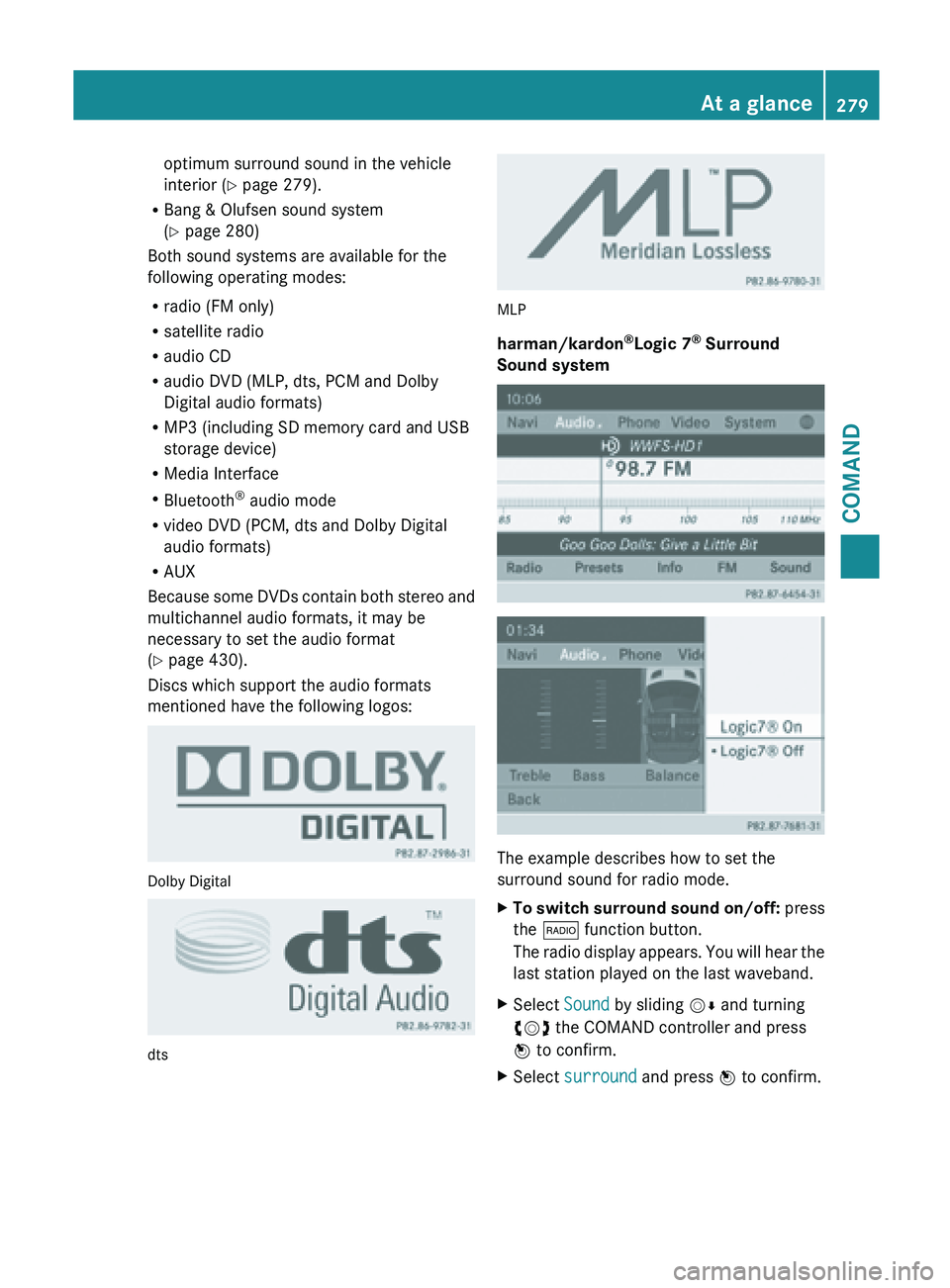
Discs which support the audio formats
mentioned have the following logos: Dolby Digital
dts MLP
harman/kardon
®
Logic 7 ®
Surround
Sound system The example describes how to set the
surround sound for radio mode.
X
To switch surround sound on/off: press
the $ function button.
The radio
display appears. You will hear the
last station played on the last waveband.
X Select Sound by sliding VÆ and turning
cVd the COMAND controller and press
W to confirm.
X Select surround and press W to confirm. At a glance
279
COMAND Z
Page 295 of 572
X
Select the language by turning cVd the
COMAND controller and press W to
confirm.
COMAND loads
the selected language and
sets it. Assigning a favorites button
X To assign a favorites button: press the
W button.
X Select Settings by
sliding VÆ and turning
cVd the COMAND controller and press
W to confirm.
X Select Assign as Favorite and press
W to confirm.
The list of predefined functions appears.
The dot
#
indicates the currently selected
function.
X Select the function by turning cVd the
COMAND controller and press W to
confirm.
The favorites button is assigned the
selected function.
X Example: to call up a favorite: press the
g favorites button.
This calls up the predefined function.
You can select the following predefined
functions in a menu:
R Display On/Off: you can switch the
display off or on.
R Full Screen: 'Clock': you can call up
the full screen with clock.
R Full Screen: 'Map' : you
can call up the
full screen with map.
R Spoken Driving Tip : you can call up the
current driving recommendation.
R Display Traffic Messages : you can call
up traffic reports.
R Navigate Home: you can start route
guidance to your home address if you have
already entered and saved the address
(Y page 304). R
Detour Menu: you can call up the Detour
menu and
then avoid a section of the route
and recalculate the route ( Y page 326).
R Compass Screen: you can call up the
compass.
R Driver’s Seat Massage, Front-
Passenger's Seat Massage or
Massage: Both Front Seats: you can
start the massage function, depending on
which seats are selected (Y page 288). Importing/exporting data
! Never remove the stick or card when
writing data
to the USB stick or the memory
card. You may otherwise lose data.
Using this function, you can:
R transfer your personal COMAND data from
one system/vehicle to another
R make a backup copy of your personal data
(export data) and load it again (import
data).
You can either use an SD memory card or a
USB storage device (e.g. a USB stick) as
temporary storage. System settings
293
COMAND Z
Page 296 of 572
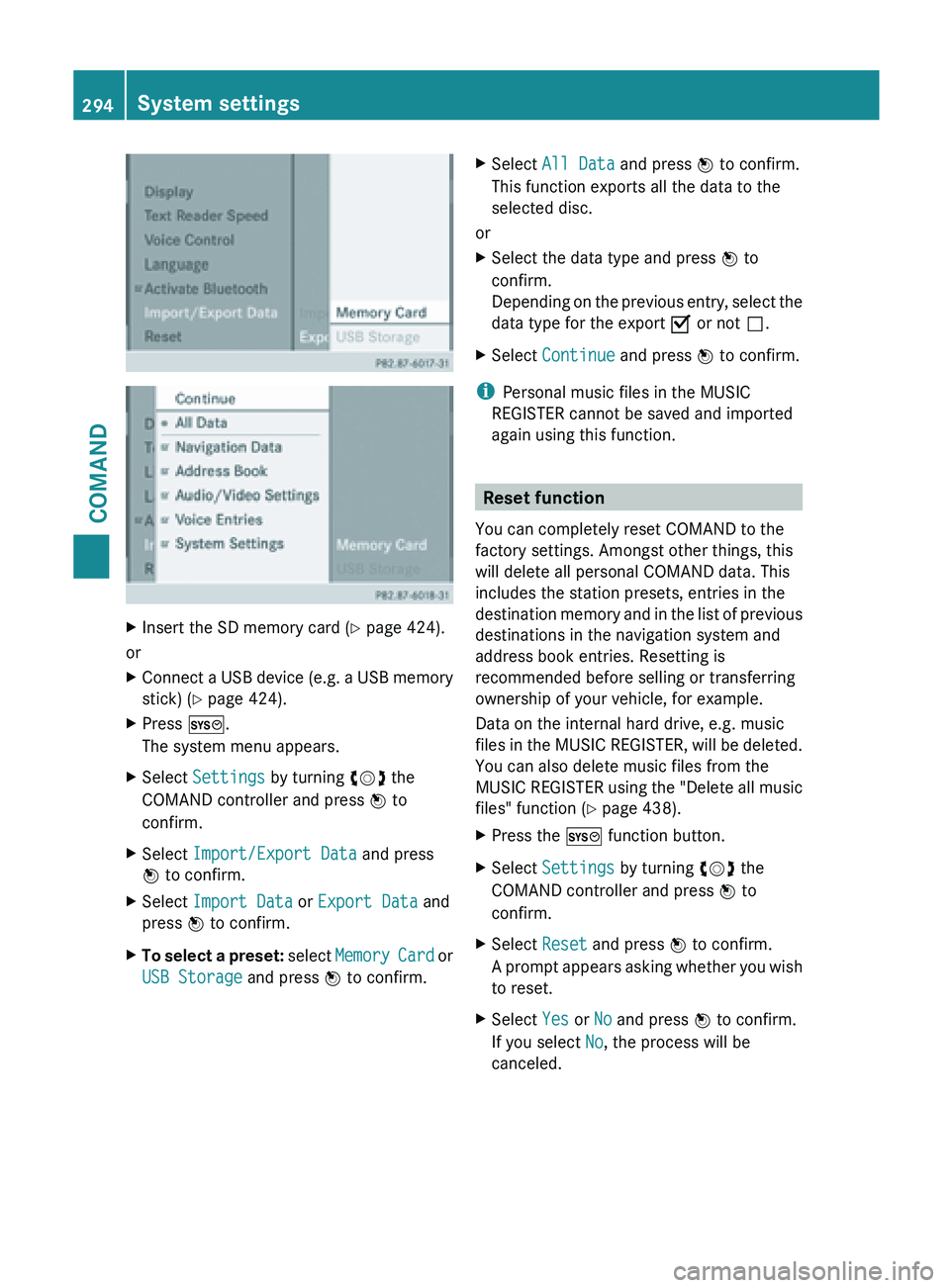
X
Insert the SD memory card (Y page 424).
or
X Connect a USB device (e.g. a USB memory
stick) ( Y page 424).
X Press W.
The system menu appears.
X Select Settings by turning cVd the
COMAND controller and press W to
confirm.
X Select Import/Export Data and press
W to confirm.
X Select Import Data or Export Data and
press W to confirm.
X To select a preset: select
Memory Card or
USB Storage and press W to confirm. X
Select All Data and press W to confirm.
This function exports all the data to the
selected disc.
or
X Select the data type and press W to
confirm.
Depending on
the previous entry, select the
data type for the export O or not ª.
X Select Continue and press W to confirm.
i Personal music files in the MUSIC
REGISTER cannot be saved and imported
again using this function. Reset function
You can completely reset COMAND to the
factory settings. Amongst other things, this
will delete all personal COMAND data. This
includes the station presets, entries in the
destination memory
and in the list of previous
destinations in the navigation system and
address book entries. Resetting is
recommended before selling or transferring
ownership of your vehicle, for example.
Data on the internal hard drive, e.g. music
files in the MUSIC REGISTER, will be deleted.
You can also delete music files from the
MUSIC REGISTER using the "Delete all music
files" function (Y page 438).
X Press the W function button.
X Select Settings by turning cVd the
COMAND controller and press W to
confirm.
X Select Reset and press W to confirm.
A prompt
appears asking whether you wish
to reset.
X Select Yes or No and press W to confirm.
If you select No, the process will be
canceled. 294
System settings
COMAND
Page 371 of 572
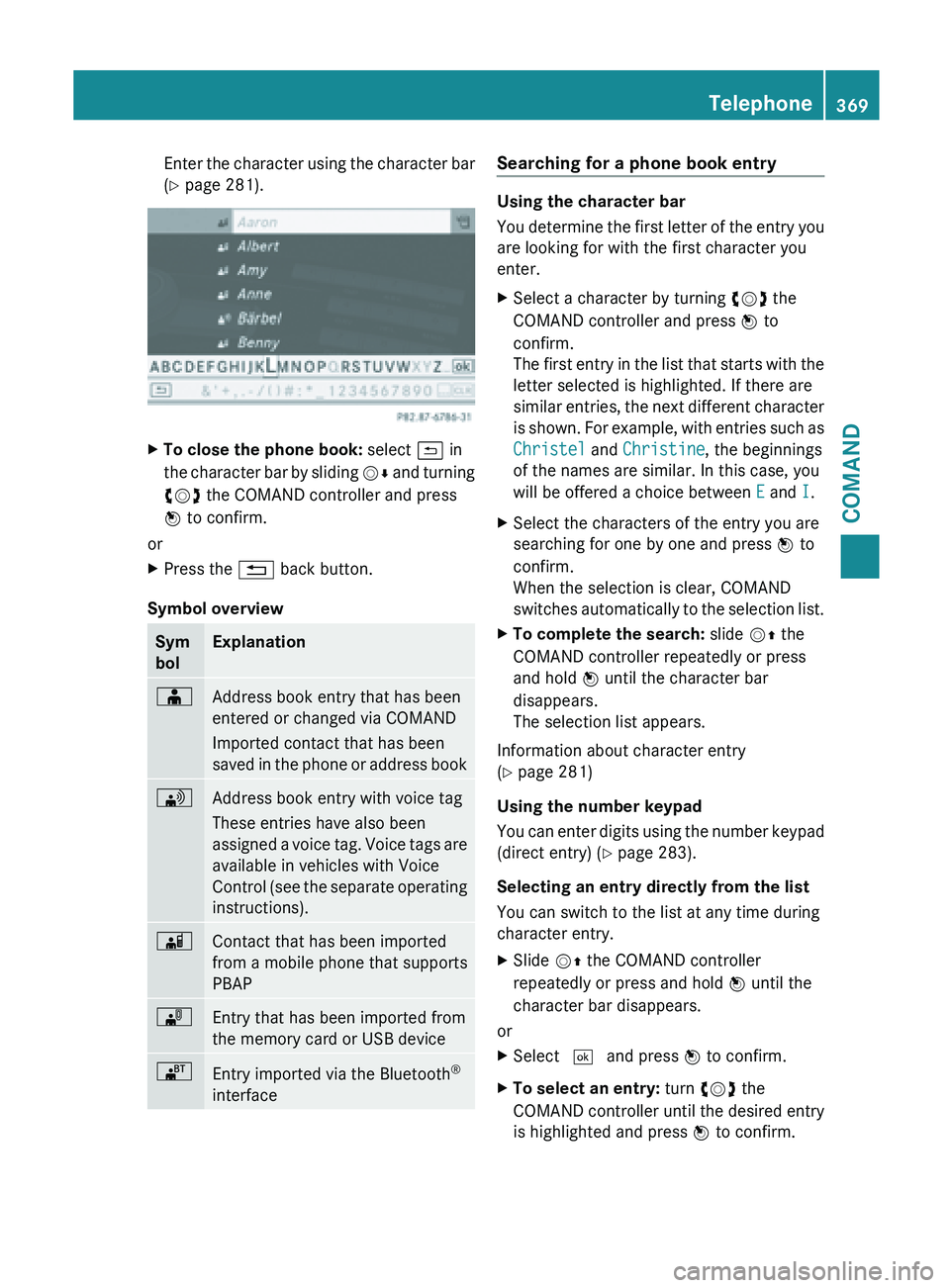
Enter the character using the character bar
(Y page 281).
X
To close the phone book: select & in
the character
bar by sliding VÆ and turning
cVd the COMAND controller and press
W to confirm.
or
X Press the % back button.
Symbol overview Sym
bol Explanation
Æ
Address book entry that has been
entered or changed via COMAND
Imported contact that has been
saved
in
the phone or address book \
Address book entry with voice tag
These entries have also been
assigned
a
voice tag. Voice tags are
available in vehicles with Voice
Control (see the separate operating
instructions). Ã
Contact that has been imported
from a mobile phone that supports
PBAP
¯
Entry that has been imported from
the memory card or USB device
®
Entry imported via the Bluetooth
®
interface Searching for a phone book entry
Using the character bar
You
determine
the first letter of the entry you
are looking for with the first character you
enter.
X Select a character by turning cVd the
COMAND controller and press W to
confirm.
The first
entry in the list that starts with the
letter selected is highlighted. If there are
similar entries, the next different character
is shown. For example, with entries such as
Christel and Christine, the beginnings
of the names are similar. In this case, you
will be offered a choice between E and I.
X Select the characters of the entry you are
searching for one by one and press W to
confirm.
When the selection is clear, COMAND
switches automatically
to the selection list.
X To complete the search: slide VZ the
COMAND controller repeatedly or press
and hold W until the character bar
disappears.
The selection list appears.
Information about character entry
(Y page 281)
Using the number keypad
You can
enter digits using the number keypad
(direct entry) (Y page 283).
Selecting an entry directly from the list
You can switch to the list at any time during
character entry.
X Slide VZ the COMAND controller
repeatedly or press and hold W until the
character bar disappears.
or
X Select ¬ and press W to confirm.
X To select an entry: turn cVd the
COMAND controller
until the desired entry
is highlighted and press W to confirm. Telephone
369
COMAND Z
Page 380 of 572
X
Select Delete and press W to confirm.
A deletion prompt appears.
X Select Yes or No and press W to confirm.
If you select Yes, the text message is
deleted.
If you
select No, the process will be aborted.
i This delete function is not supported by
all mobile phones. The Delete failed
message appears. Using the address book
Introduction G
WARNING
Always focus your attention on the traffic
conditions.
Before starting the journey, familiarize
yourself with the address book functions.
Only use COMAND if road and traffic
conditions permit. You could otherwise
become involved in an accident in which you
or others could be injured.
The address book organizes and stores
entries which are entered from different
sources (mobile phone, memory card, USB
storage device, COMAND telephone book,
navigation system).
You can
use these entries to make telephone
calls and for navigation.
i Number of contacts in the address
book: the address book can store a total of
4000 contacts.
1500 entries each are reserved in the
address book for:
R contacts from the mobile phone
R contacts that you create in COMAND or
import from other sources
The remaining 1,000 entries are assigned
by COMAND as necessary.
i Display of mobile phone contacts:
contacts downloaded from the mobile
phone remain in the address book even if you disconnect the mobile phone from
COMAND. Contacts that have previously
been
available
can be displayed as soon as
the mobile phone is reconnected.
COMAND downloads the contacts again so
that any new contacts that have been
added to the mobile phone can be
displayed.
Once you connect a new mobile phone to
COMAND, all contacts in the address book
from the previous mobile phone are
replaced by those from the new mobile
phone.
Address book entries remain stored when
the mobile phone is disconnected. For this
reason, delete your personal data using the
reset function before selling your vehicle,
for example ( Y page 294).
Calling up the address book Using the function button:
X
Press the % function button.
You see
either the telephone basic menu or
the address book, depending on which was
last active.
X If the telephone basic menu is displayed,
press the % function button again.
Using the telephone basic menu:
X With the telephone basic menu shown,
select Phone by sliding VZ the COMAND
controller and press W to confirm.
X Select Address Book from the menu and
press W to confirm. 378
Telephone
COMAND