roof MERCEDES-BENZ SL-CLASS ROADSTER 2013 Owners Manual
[x] Cancel search | Manufacturer: MERCEDES-BENZ, Model Year: 2013, Model line: SL-CLASS ROADSTER, Model: MERCEDES-BENZ SL-CLASS ROADSTER 2013Pages: 572, PDF Size: 9.23 MB
Page 9 of 572
Care
Carpets .......................................... 506
Car wash ........................................
500
Display ........................................... 504
Exterior lights ................................ 503
Gear or selector lever ....................505
Interior ........................................... 504
Matte finish ................................... 502
Notes ............................................. 500
Paint .............................................. 501
Plastic trim .................................... 505
Power washer ................................ 501
Rear view camera .......................... 504
Roof lining ...................................... 506
Seat belt ........................................ 506
Seat cover ..................................... 505
Sensors ......................................... 504
Steering wheel ............................... 505
Tail pipes ....................................... 504
Trim pieces .................................... 505
Washing by hand ........................... 501
Wheels ........................................... 502
Windows ........................................ 503
Wiper blades .................................. 503
Wooden trim .................................. 505
Car pool lanes .................................... 297
Car wash (care) ................................. 500
Category list (music search) ............433
CD Copy protection ............................. 432
Fast forward/fast rewind ............... 428
General information ....................... 432
Inserting ........................................ 421
Mode, switching to ........................ 424
Multisession .................................. 431
Notes on discs ............................... 432
Pause function ............................... 426
Player/changer operation
(COMAND) ..................................... 421
Safety notes .................................. 421
Selecting a media type .................. 426
Selecting a track ............................ 427
Sound settings (balance, bass,
treble) ............................................ 278
CD/DVD
Ejecting (DVD drive) ....................... 423
Inserting (DVD changer) ................421Inserting (single DVD drive)
...........421
Removing (single DVD drive) .......... 421
CD mode
Playback options ........................... 430
CD player/CD changer (on-board
computer)
.......................................... 212
Central locking Automatic locking (on-board
computer) ...................................... 218
Locking/unlocking (SmartKey) ........ 68
Changing bulbs
Important safety notes .................. 116
Overview of bulb types ..................117
Changing direction
Announcement phase .................... 322
Change of direction phase ............. 322
Preparation phase ......................... 322
Changing the character set .............. 284
Channel presets ................................ 413
Characters Changing the character set ............ 282
Changing the language ..................282
Deleting ......................................... 283
Entering ......................................... 283
Entering (address book, phone
book) ............................................. 281
Entering (navigation) ......................283
Moving the cursor .......................... 283
Switching to letters ........................ 282
Children
In the vehicle ................................... 54
Restraint systems ............................ 54
Special seat belt retractor ............... 56
Child seat
LATCH-type (ISOFIX) child seat
anchors ............................................ 56
Cigarette lighter ................................ 480
Cleaning Mirror turn signal ........................... 503
Clear button ....................................... 274
Climate control Automatic climate control (dual-
zone) .............................................. 123
Controlling automatically ...............126
Cooling with air dehumidification ..125
Defrosting the windows ................. 129
Defrosting the windshield .............. 128
Important safety notes .................. 122 Index
7
Page 14 of 572
Exterior mirrors
Adjusting ....................................... 103
Dipping (automatic) .......................103
Out of position (troubleshooting) ...103
Storing settings (memory
function) ........................................ 105
Storing the parking position
..........104
Eyeglasses compartment ................. 475F
Factory setting (reset function) .......294
Fast forward Audio mode (CD, DVD, MP3) .........428
Video DVD ..................................... 455
Fast rewind
Audio mode (CD, DVD, MP3) .........428
Video DVD ..................................... 455
Favorites (Internet) ...........................408
Favorites button ................................ 293
Filling capacities (Technical data) ...560
First-aid kit .........................................
508
Flat tire MOExtended tires
..........................510
Preparing the vehicle .....................509
TIREFIT kit ...................................... 510
Floormat ............................................. 481
Fog lamps Switching on/off ........................... 111
Freeway information .........................347
Frequencies Adjusting for radio stations ............ 413
Front fog lamps
Changing the bulbs ........................ 117
Display message ............................ 237
Switching on/off ........................... 111
Front-passenger seat
Adjusting from the driver's seat ....... 98
Front windshield
see Windshield
Fuel
Additives ........................................ 562
Consumption statistics ..................209
Displaying consumption ................. 290
Displaying the current
consumption .................................. 209
Displaying the range ...................... 209
Driving tips .................................... 157Fuel gauge
..................................... 205
Grade (gasoline)
............................ 561
Important safety notes .................. 561
Premium-grade unleaded gasoline . 561
Problem (malfunction) ...................154
Refueling ........................................ 152
Tank content/reserve fuel .............560
Fuel filler flap, opening/closing ....... 153
Fuel level Calling up the range (on-board
computer) ...................................... 209
Fuel tank
Capacity ........................................ 560
Problem (malfunction) ...................154
Fuse allocation chart (vehicle tool
kit) ...................................................... 508
Fuses Allocation chart ............................. 521
Before changing ............................. 521
Dashboard fuse box ....................... 522
Fuse box in the engine
compartment ................................. 521
Fuse box in the rear compartment . 522
Important safety notes .................. 521 G
Garage door opener Clearing the memory
.....................485
Notes ............................................. 481
Opening/closing the garage door ..485
Programming (button in the rear-
view mirror) ................................... 482
Gear indicator (on-board
computer) .......................................... 220
Genuine Mercedes-Benz parts ......... 558
Glass roof (sunblind) ...........................92
Glove box ........................................... 474
Google Maps ®
.................................... 320
Google™ local search Importing a destination/route .......388
Popular Searches ........................... 389
Search ........................................... 386
Search history ............................... 389
Selecting a search position ............ 387
Using as the destination ................ 388
GPS reception .................................... 295
Gracenote ®
Media Database ............ 42812
Index
Page 16 of 572
iPod
®
Alphabetical track selection .......... 450
Connecting to the Media
Interface ........................................ 446
Selecting a category/playlist
.........448
iTunes ®
............................................... 450J
Jack Storage location ............................ 508
Using ............................................. 549
Jump start (engine) ............................. 33
Jump starting (engine) ...................... 516K
Key see SmartKey
KEYLESS-GO
Convenience closing feature ............ 85
Display message ............................ 253
Locking ............................................ 69
Start/Stop button .......................... 135
Starting the engine ........................ 137
Unlocking ......................................... 69
Key positions
KEYLESS-GO .................................. 135
SmartKey ....................................... 135
Kickdown
Driving tips .................................... 147
Manual drive program ....................151
Knee bag .............................................. 41L
Lamps see Warning and indicator lamps
Lane Keeping Assist
see Active Lane Keeping Assist
Lane recommendations
Explanation .................................... 323
Presentation .................................. 323
Lap time (RACETIMER) ......................220
LATCH-type (ISOFIX) child seat
anchors ................................................ 56
License plate lamp (display
message) ............................................ 237Light function, active
Display message ............................ 237
Lighting
see Lights
Lights
Activating/deactivating the
interior lighting delayed switch-off . 218
Active light function .......................113
Automatic headlamp mode ............ 110
Cornering light function .................113
Driving abroad ............................... 108
Fog lamps ...................................... 111
Hazard warning lamps ................... 113
High beam flasher .......................... 112
High-beam headlamps ...................112
Light switch ................................... 108
Low-beam headlamps .................... 109
Parking lamps ................................ 109
Setting the brightness of the
ambient lighting (on-board
computer) ...................................... 216
Setting the color of the ambient
lighting (on-board computer) ......... 217
Standing lamps .............................. 111
Switching Adaptive Highbeam
Assist on/off ................................. 217
Switching the daytime running
lamps on/off (on-board
computer) ...................................... 216
Switching the daytime running
lamps on/off (switch) .................... 109
Switching the exterior lighting
delayed switch-off on/off (on-
board computer) ............................ 217
Switching the surround lighting
on/off (on-board computer) ..........217
Turn signals ................................... 112
see Changing bulbs
see Interior lighting
Light sensor (display message) .......238
Load/eject button ............................. 421
Loading aid (trunk) Raising/lowering the roof .............. 477
Locking
see Central locking 14
Index
Page 21 of 572
Pulling away (automatic
transmission) .....................................
138Q
Qualified specialist workshop ...........31 R
RACE START Important safety notes
..................177
RACETIMER (on-board computer) .... 220
Radar sensor system Activating/deactivating ................. 218
Display message ............................ 242
Radio
Overview ........................................ 411
Selecting a station .........................211
Setting a station ............................ 413
Sound settings (balance, bass,
treble) ............................................ 278
Storing stations ............................. 414
Switching on .................................. 411
Switching wavebands ....................413
Read-aloud function .......................... 336
Reading lamp ..................................... 115
Real-time traffic reports ...................333
Rear lamps see Lights
Rear view camera
Cleaning instructions ..................... 504
Displaying the image .....................276
Function/notes ............................. 190
Switching on/off ........................... 191
Rear-view mirror
Anti-glare (manual) ........................103
Dipping (automatic) .......................103
Rear window defroster
Problem (malfunction) ...................129
Switching on/off ........................... 129
Receiving vCards ............................... 384
Redialing (telephone) ........................365
Refueling Fuel gauge ..................................... 205
Important safety notes .................. 152
Refueling process .......................... 153
see Fuel Remote control
Programming (garage door
opener) .......................................... 482
Reporting safety defects .................... 32
Reserve (fuel tank) see Fuel
Reserve fuel
Display message ............................ 240
Warning lamp ................................. 263
see Fuel
Reset function ................................... 294
Resetting (factory settings) .............294
Residual heat (climate control) ........130
Restraint system see SRS (Supplemental Restraint
System)
Reverse gear (selector lever) ...........143
Reversing lamps (display
message) ............................................ 237
Roadside Assistance (breakdown) ....29
Roll bar Display message ............................ 231
Operation ......................................... 43
Roller sunblind .................................... 92
Roof Display message ............................ 252
Important safety notes .................... 86
Opening/closing (with roof
switch) ............................................. 87
Opening/closing (with SmartKey) .... 88
Overview .......................................... 86
Problem (malfunction) .....................94
Relocking ......................................... 88
Roof lining and carpets (cleaning
guidelines) ......................................... 506
Roof switch .......................................... 87
Route Estimated time of arrival ................ 328
Route (navigation)
Calling up the "Routes" menu ........ 330
Displaying the distance to the
destination ..................................... 328
Recording ...................................... 329
Route overview .............................. 328
Selecting an alternative route ........ 327 Index
19
Page 23 of 572
Service products
Brake fluid ..................................... 563
Coolant (engine) ............................ 563
Engine oil ....................................... 562
Fuel ................................................ 561
Important safety notes
..................560
Washer fluid ................................... 564
Settings
Factory (on-board computer) ......... 219
On-board computer ....................... 215
Picture (COMAND) ......................... 453
Sound settings ............................... 278
System settings ............................. 289
Setting the air distribution ...............127
Setting the airflow ............................ 127
Setting the language COMAND ....................................... 292
Setting the night design ...................289
Setting the text reader speed ..........291
Setting the volume Telephone calls .............................. 277
Video AUX ..................................... 459
SETUP (on-board computer) ............. 220
Side impact air bag ............................. 41
Side windows Cleaning ......................................... 503
Convenience closing feature ............ 85
Important safety information ........... 83
Opening/closing (all) ....................... 84
Opening/closing (front) ................... 83
Opening/closing (rear) .................... 84
Overview .......................................... 83
Problem (malfunction) .....................86
Resetting ......................................... 85
SIRIUS weather display
5-day forecast ................................ 462
Daily forecast ................................. 462
Detail information .......................... 462
Information chart ........................... 462
Selecting the area for the weather
forecast ......................................... 463
Switching on/off ........................... 462
Weather map ................................. 465
SmartKey
Changing the battery ....................... 71
Changing the programming ............. 70
Checking the battery ....................... 71
Convenience opening feature .......... 84Display message
............................ 253
Door central locking/unlocking
.......68
Important safety notes .................... 68
Loss ................................................. 73
Mechanical key ................................ 70
Opening/closing the roof ................88
Overview .......................................... 68
Positions (ignition lock) ................. 135
Problem (malfunction) .....................73
Starting the engine ........................ 137
Snow chains ...................................... 529
Sockets Front-passenger footwell ...............481
General notes ................................ 480
Trunk ............................................. 481
Under the armrest .........................481
Sound
Switching on/off ........................... 277
Sound menu ....................................... 278
Sound Mode ....................................... 280
Sound settings Calling up the sound menu ............ 278
Surround sound ............................. 278
Treble and bass ............................. 278
Spare wheel
see Emergency spare wheel
Specialist workshop ............................ 31
Special seat belt retractor .................. 56
Speed, controlling see Cruise control
Speed dial list
Storing a phone book entry in the
speed dial list ................................ 374
Speedometer
Digital ............................................ 209
In the Instrument cluster ............... 205
Segments ...................................... 206
Selecting the unit of
measurement ................................ 215
see Instrument cluster
SPORT handling mode
Activating/deactivating (AMG
vehicles) .......................................... 61
Warning lamp ................................. 260 Index
21
Page 45 of 572
Roll bar
G
DANGER
If the roll bar is malfunctioning, the
A Malfunction Service Required
message appears
in the multifunction display.
The roll bars will then possibly not be
extended in the event of an accident. This
could result in severe or even fatal injuries to
you and other occupants. In this case, visit a
qualified specialist workshop immediately
and have the roll bar checked. G
WARNING
If
you place objects or clothing on the roll bar
covers, these
could impair roll bar extension.
You and others could be injured by objects
being thrown around when the roll bars are
triggered.
Ensure that the area above the roll bar covers
is kept clear. Stow objects or clothing in a
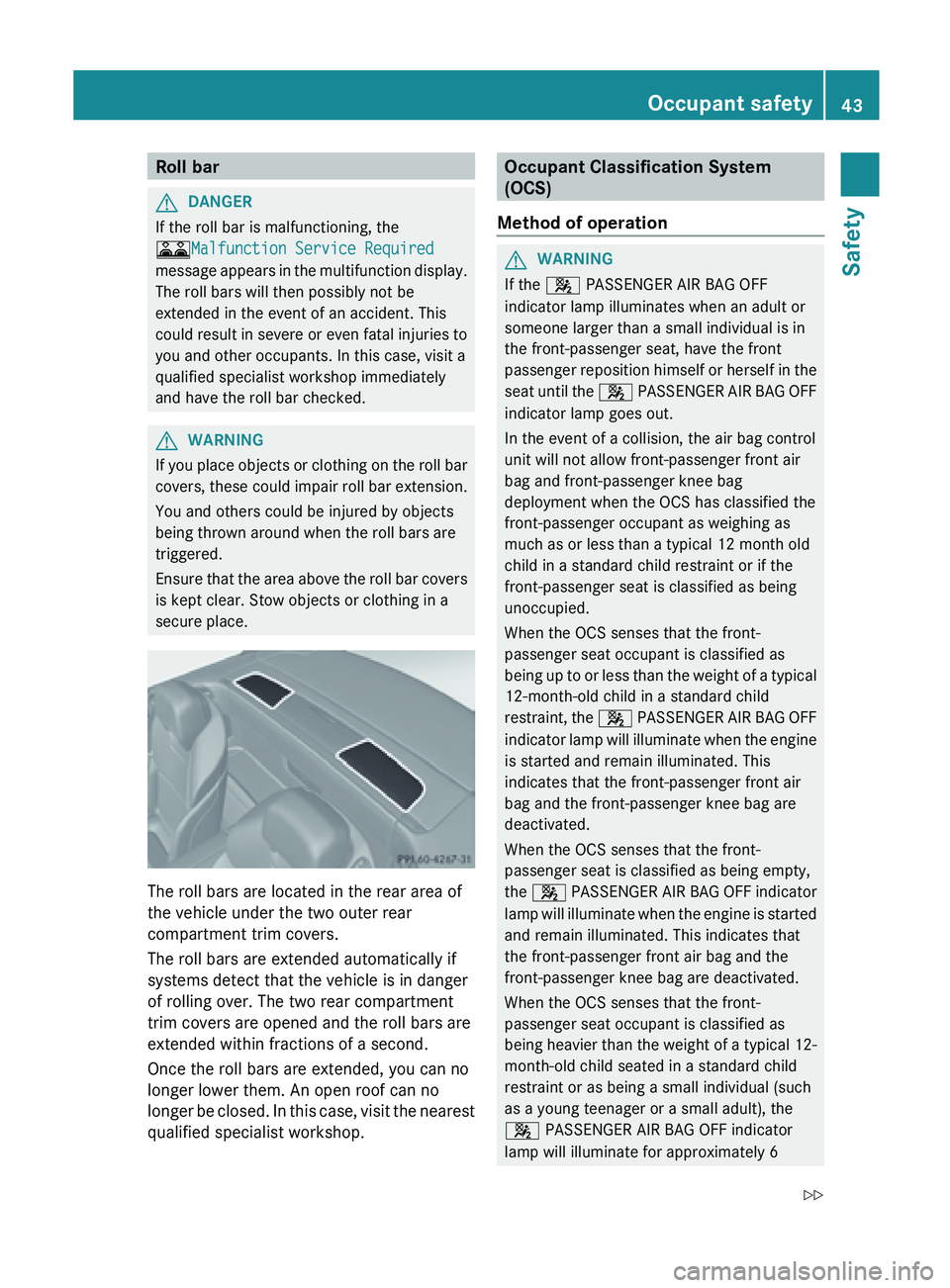
secure place. The roll bars are located in the rear area of
the vehicle under the two outer rear
compartment trim covers.
The roll bars are extended automatically if
systems detect that the vehicle is in danger
of rolling over. The two rear compartment
trim covers are opened and the roll bars are
extended within fractions of a second.
Once the roll bars are extended, you can no
longer lower them. An open roof can no
longer
be
closed. In this case, visit the nearest
qualified specialist workshop. Occupant Classification System
(OCS)
Method of operation G
WARNING
If the 4
PASSENGER AIR BAG OFF
indicator lamp illuminates when an adult or
someone larger than a small individual is in
the front-passenger seat, have the front
passenger reposition
himself or herself in the
seat until the 4 PASSENGER AIR BAG OFF
indicator lamp goes out.
In the event of a collision, the air bag control
unit will not allow front-passenger front air
bag and front-passenger knee bag
deployment when the OCS has classified the
front-passenger occupant as weighing as
much as or less than a typical 12 month old
child in a standard child restraint or if the
front-passenger seat is classified as being
unoccupied.
When the OCS senses that the front-
passenger seat occupant is classified as
being up to or less than the weight of a typical
12-month-old child in a standard child
restraint, the 4 PASSENGER AIR BAG OFF
indicator lamp will illuminate when the engine
is started and remain illuminated. This
indicates that the front-passenger front air
bag and the front-passenger knee bag are
deactivated.
When the OCS senses that the front-
passenger seat is classified as being empty,
the 4 PASSENGER AIR BAG OFF indicator
lamp will illuminate when the engine is started
and remain illuminated. This indicates that
the front-passenger front air bag and the
front-passenger knee bag are deactivated.
When the OCS senses that the front-
passenger seat occupant is classified as
being heavier than the weight of a typical 12-
month-old child seated in a standard child
restraint or as being a small individual (such
as a young teenager or a small adult), the
4 PASSENGER AIR BAG OFF indicator
lamp will illuminate for approximately 6 Occupant safety
43Safety
Z
Page 69 of 572
Useful information ..............................
68
SmartKey ............................................. 68
Doors .................................................... 74
Trunk .................................................... 77
Side windows ...................................... 83
Roof ...................................................... 86 67Opening/closing
Page 80 of 572
seat adjustment, steering wheel
adjustment or memory function.
If children open a door, they could cause
severe or
even fatal injury to other persons; if
they get out of the vehicle, they could injure
themselves when doing so or be seriously or
even fatally injured by any passing traffic.
Do not expose the child restraint system to
direct sunlight. The child restraint system's
metal parts, for example, could become very
hot, and a child could be burned on these
parts. G
WARNING
Do not carry heavy or hard objects in the
passenger compartment
or trunk unless they
are firmly secured in place.
Unsecured or improperly positioned cargo
increases a child's risk of injury in the event
of
R strong braking maneuvers
R sudden changes of direction
R an accident G
WARNING
Make sure the trunk lid is closed when the
engine is running and while driving. Among
other dangers, deadly carbon monoxide (CO)
gases may
enter the vehicle interior resulting
in unconsciousness and death.
! The trunk lid swings upwards when
opened. Therefore, make sure that there is
sufficient clearance above the trunk lid.
i The opening dimensions of the trunk lid
can be found in the "Vehicle data" section
(Y page 565).
i To make loading easier, the stowed roof
can be raised with the loading aid after the
trunk lid has been opened. The trunk
partition can also be detached. The trunk
partition must be put back in position after
loading. Otherwise, the roof cannot be
lowered. You can unlock the trunk lid if the vehicle is
stationary
and
the roof is completely open or
closed.
Do not leave the SmartKey in the trunk. You
could otherwise lock yourself out.
The trunk lid can be:
R opened and closed manually from outside
R opened automatically from outside
(vehicles without trunk lid remote closing
feature)
R opened and closed automatically from
outside (vehicles with trunk lid remote
closing feature)
R opened and closed from outside (vehicles
with KEYLESS-GO and HANDS-FREE
ACCESS)
R opened and closed automatically from
inside (vehicles with trunk lid remote
closing feature)
R locked separately
R unlocked with the mechanical key
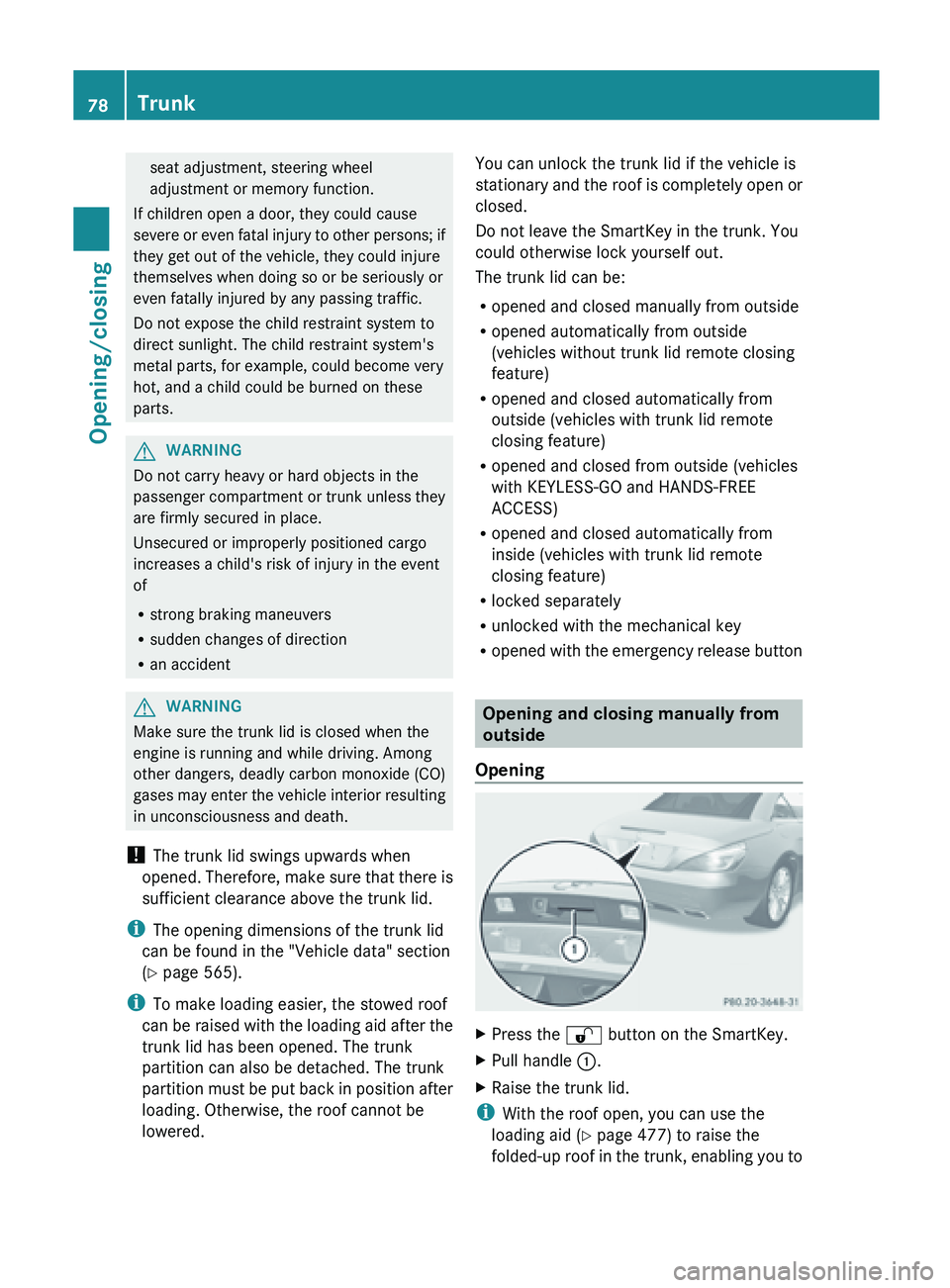
R opened with the emergency release button Opening and closing manually from
outside
Opening X
Press the
% button on the SmartKey.
X Pull handle :.
X Raise the trunk lid.
i With the roof open, you can use the
loading aid (Y
page 477) to raise the
folded-up roof in the trunk, enabling you to 78
Trunk
Opening/closing
Page 81 of 572
load and unload more easily. For this
purpose, you can also open the trunk
partition.
Do not forget to close the trunk partition
again afterwards. Otherwise, it will not be
possible to close the roof.
Closing G
WARNING
To prevent possible personal injury, always
keep hands and fingers away from the trunk
opening when closing the trunk lid. Be
especially careful when small children are
around. X
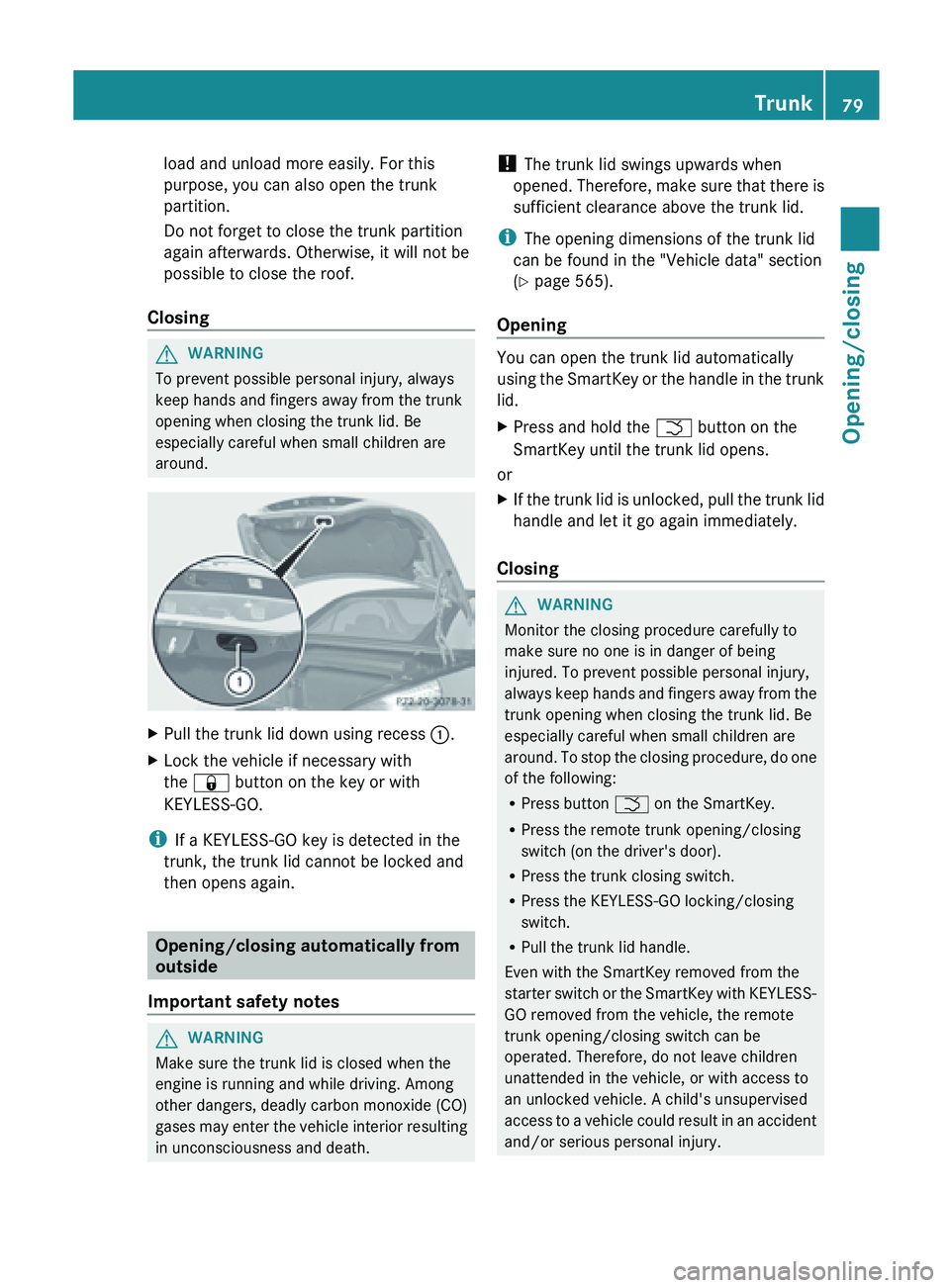
Pull the trunk lid down using recess :.
X Lock the vehicle if necessary with
the & button on the key or with
KEYLESS-GO.
i If a KEYLESS-GO key is detected in the
trunk, the trunk lid cannot be locked and
then opens again. Opening/closing automatically from
outside
Important safety notes G
WARNING
Make sure the trunk lid is closed when the
engine is running and while driving. Among
other dangers, deadly carbon monoxide (CO)
gases may
enter the vehicle interior resulting
in unconsciousness and death. !
The trunk lid swings upwards when
opened. Therefore,
make sure that there is
sufficient clearance above the trunk lid.
i The opening dimensions of the trunk lid
can be found in the "Vehicle data" section
(Y page 565).
Opening You can open the trunk lid automatically
using
the
SmartKey or the handle in the trunk
lid.
X Press and hold the F button on the
SmartKey until the trunk lid opens.
or
X If the trunk lid is unlocked, pull the trunk lid
handle and let it go again immediately.
Closing G
WARNING
Monitor the closing procedure carefully to
make sure no one is in danger of being
injured. To prevent possible personal injury,
always keep
hands and fingers away from the
trunk opening when closing the trunk lid. Be
especially careful when small children are
around. To stop the closing procedure, do one
of the following:
R Press button F on the SmartKey.
R Press the remote trunk opening/closing
switch (on the driver's door).
R Press the trunk closing switch.
R Press the KEYLESS-GO locking/closing
switch.
R Pull the trunk lid handle.
Even with the SmartKey removed from the
starter switch or the SmartKey with KEYLESS-
GO removed from the vehicle, the remote
trunk opening/closing switch can be
operated. Therefore, do not leave children
unattended in the vehicle, or with access to
an unlocked vehicle. A child's unsupervised
access to a vehicle could result in an accident
and/or serious personal injury. Trunk
79
Opening/closing Z
Page 87 of 572
You can use the key to open or close all side
windows simultaneously.
X
Close the roof ( Y page 87).
X Open the trunk partition ( Y page 89).
X Vehicles without KEYLESS-GO: point the
tip of the SmartKey at the door handle on
the driver's door.
X Vehicles with KEYLESS-GO: the
SmartKey must be within 6 ft (2 m) of the
vehicle.
X To open all side windows: press
the % button on the key until the side
windows are fully opened.
X To interrupt the opening procedure:
release the % button.
X To close all side windows: press the
& button on the key until the side
windows are fully closed.
X To interrupt the closing procedure:
release the & button.
Convenience closing with KEYLESS-GO G
WARNING
When using the convenience closing feature,
make sure
that nobody can become trapped.
Proceed as follows if there is a risk of
entrapment:
R release the locking button on the door
handle.
R pull the door handle immediately and hold
it.
The side windows open.
With KEYLESS-GO you can close all side
windows simultaneously. The KEYLESS-GO
key must be outside the vehicle. All the doors
must be closed. X
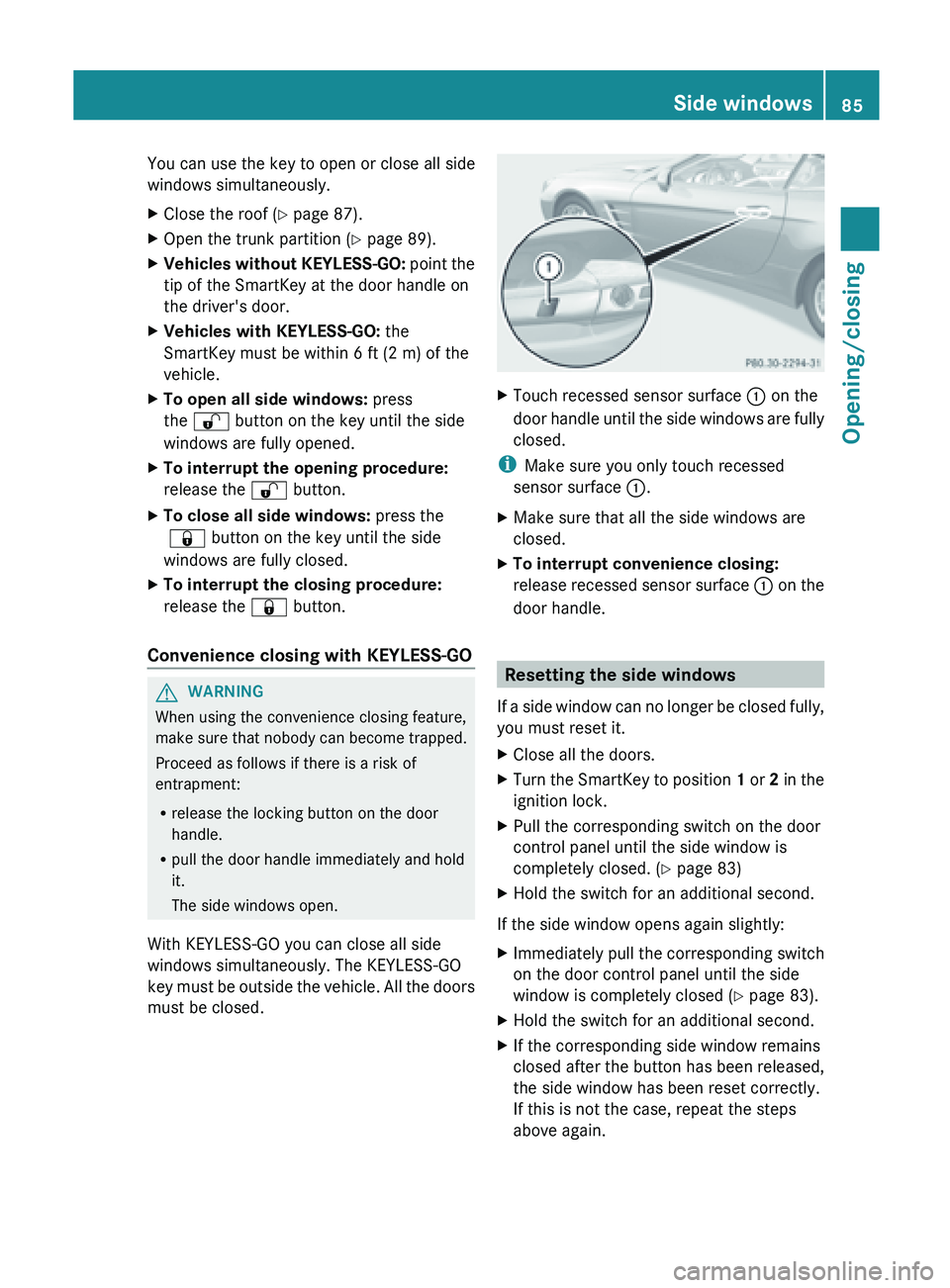
Touch recessed sensor surface : on the
door handle
until the side windows are fully
closed.
i Make sure you only touch recessed
sensor surface :.
X Make sure that all the side windows are
closed.
X To interrupt convenience closing:
release recessed
sensor surface : on the
door handle. Resetting the side windows
If a
side window can no longer be closed fully,
you must reset it.
X Close all the doors.
X Turn the SmartKey to position 1 or 2
in the
ignition lock.
X Pull the corresponding switch on the door
control panel until the side window is
completely closed. ( Y page 83)
X Hold the switch for an additional second.
If the side window opens again slightly:
X Immediately pull the corresponding switch
on the door control panel until the side
window is completely closed (Y
page 83).
X Hold the switch for an additional second.
X If the corresponding side window remains
closed after the button has been released,
the side window has been reset correctly.
If this is not the case, repeat the steps
above again. Side windows
85
Opening/closing Z