light MERCEDES-BENZ SL-CLASS ROADSTER 2014 Repair Manual
[x] Cancel search | Manufacturer: MERCEDES-BENZ, Model Year: 2014, Model line: SL-CLASS ROADSTER, Model: MERCEDES-BENZ SL-CLASS ROADSTER 2014Pages: 284, PDF Size: 45.52 MB
Page 144 of 284
Active Body Control (except AMG
vehicles)
Vehicle level General notes
In order to reduce fuel consumption and
improve the driving dynamics, the vehicle is
lowered as its speed increases. With the
SPORT suspension tuning, it is lowered by up
to 0.5 in (13 mm), with COMFORT by up to
0.2 in (5 mm). As the speed is reduced, the
vehicle is raised up to the set vehicle height.
Select the "Normal" setting for normal road
surfaces and "Raised" for driving with snow
chains or on particularly poor road surfaces.
Your selection remains stored even if you
remove the SmartKey from the ignition lock.
Important safety notes G
WARNING
The vehicle is slightly lowered if you:
R have selected the SPORT suspension
tuning at normal level and
R switch off the engine
Persons in the vicinity of the wheel arch or the
underbody may thus become trapped. There
is a risk of injury.
Make sure that nobody is in the vicinity of the
wheel arch or the underbody when you switch
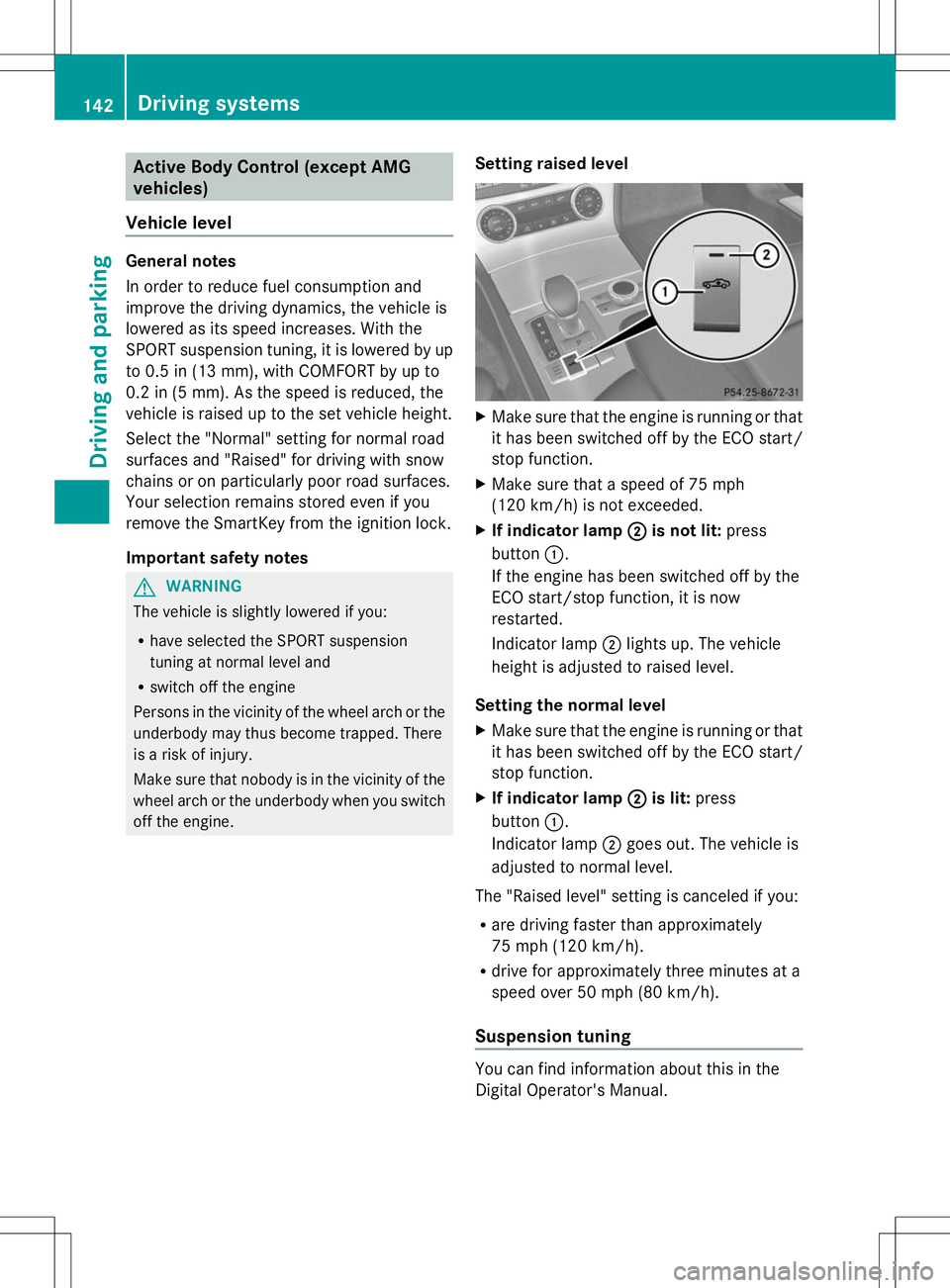
off the engine. Setting raised level X
Make sure that the engine is running or that
it has been switched off by the ECO start/
stop function.
X Make sure that a speed of 75 mph
(120 km/h) is not exceeded.
X If indicator lamp ; ;is not lit: press
button :.
If the engine has been switched off by the
ECO start/stop function, it is now
restarted.
Indicator lamp ;lights up. The vehicle
height is adjusted to raised level.
Setting the normal level
X Make sure that the engine is running or that
it has been switched off by the ECO start/
stop function.
X If indicator lamp ; ;is lit: press
button :.
Indicator lamp ;goes out. The vehicle is
adjusted to normal level.
The "Raised level" setting is canceled if you:
R are driving faster than approximately
75 mph (120 km/h).
R drive for approximately three minutes at a
speed over 50 mph (80 km/h).
Suspension tuning You can find information about this in the
Digital Operator's Manual.142
Driving systemsDriving and pa
rking
Page 145 of 284
Driving conditions menu in the
COMAND display You can find information about this in the
Digital Operator's Manual. Active Body Control (AMG vehicles)
Vehicle level General notes
In order to reduce fuel consumption and
improve the driving dynamics, the vehicle is
lowered as its speed increases. With the
SPORT suspension tuning, it is lowered by up
to 0.5 in (13 mm), with COMFORT by up to
0.2 in (5 mm). As the speed is reduced, the
vehicle is raised up to the set vehicle height.
Select the "Normal" setting for normal road
surfaces and "Raised" for driving with snow
chains or on particularly poor road surfaces.
Important safety notes
The vehicle is slightly lowered when the
engine is switched off. G
WARNING
When the vehicle is being lowered, people
could become trapped if their limbs are
between the vehicle body and the wheels or
underneath the vehicle. There is a risk of
injury.
Make sure no one is underneath the vehicle
or in the immediate vicinity of the wheel
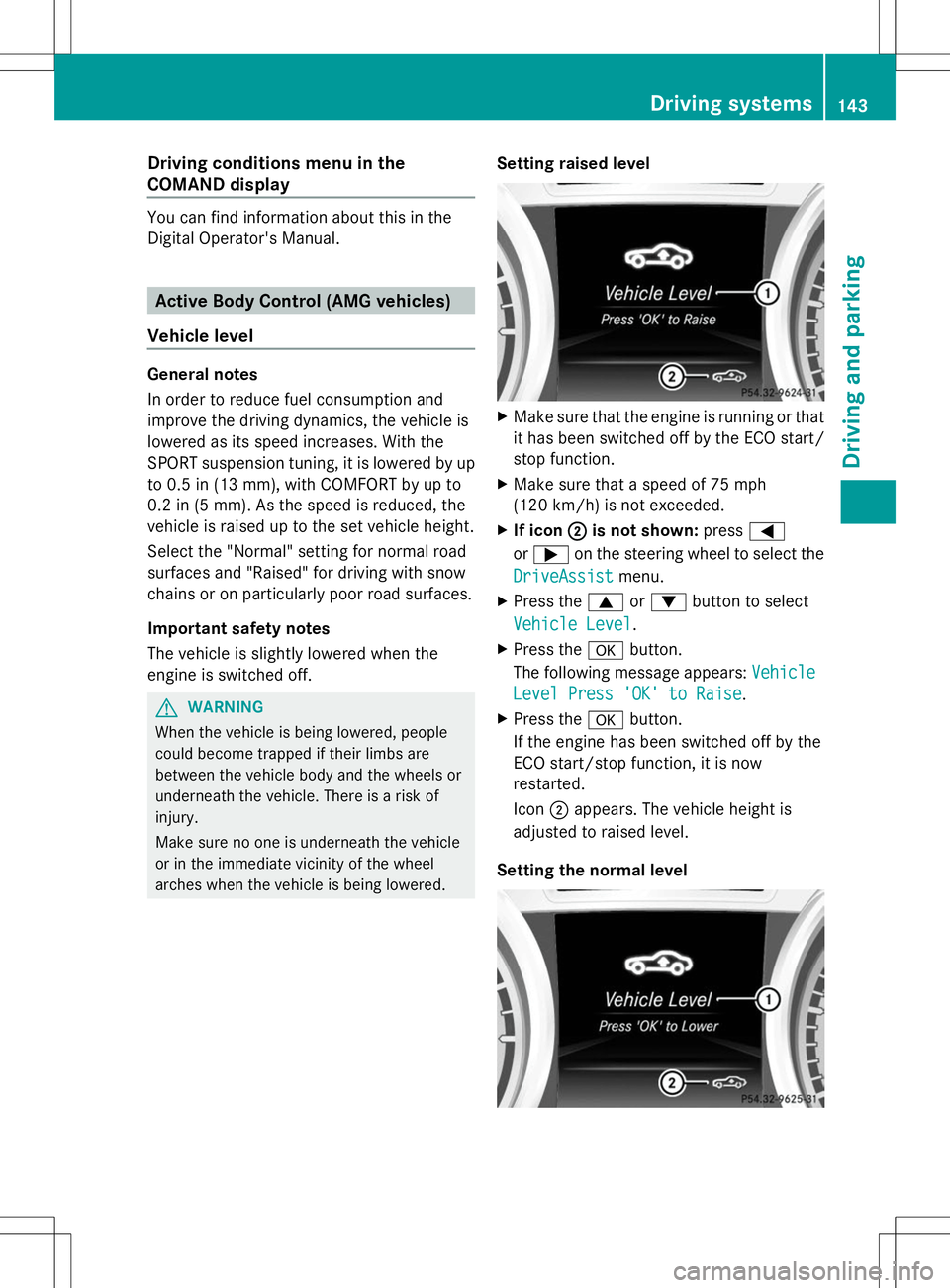
arches when the vehicle is being lowered. Setting raised level X
Make sure that the engine is running or that
it has been switched off by the ECO start/
stop function.
X Make sure that a speed of 75 mph
(120 km/h) is not exceeded.
X If icon ; ;is not shown: press=
or ; on the steering wheel to select the
DriveAssist
DriveAssist menu.
X Press the 9or: button to select
Vehicle Level
Vehicle Level .
X Press the abutton.
The following message appears: Vehicle
Vehicle
Level Press 'OK' to Raise
Level Press 'OK' to Raise .
X Press the abutton.
If the engine has been switched off by the
ECO start/stop function, it is now
restarted.
Icon ;appears. The vehicle height is
adjusted to raised level.
Setting the normal level Driving syste
ms
143Driving an d parking Z
Page 147 of 284
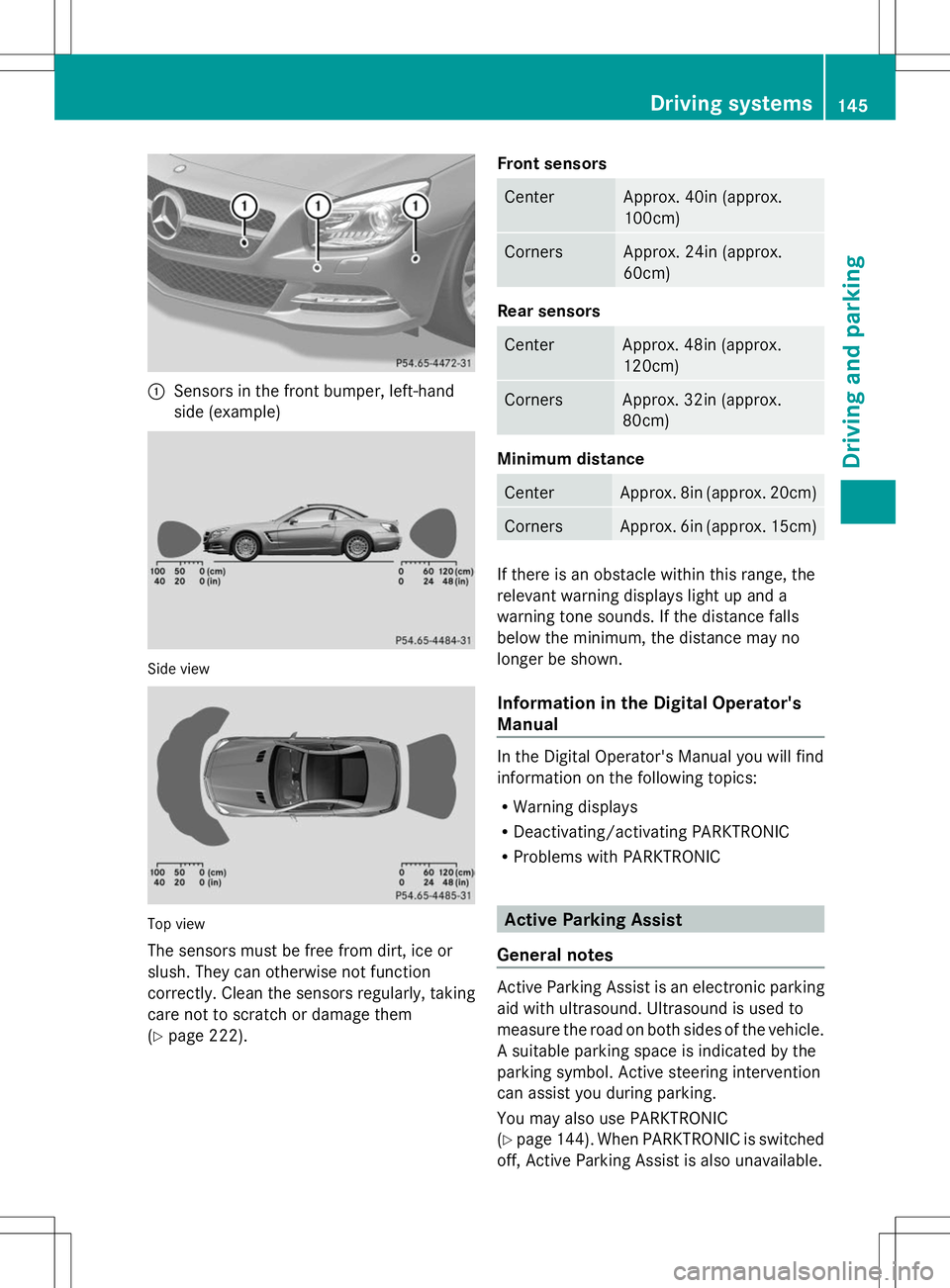
:
Sensors in the front bumper, left-hand
side (example) Side view
Top view
The sensors must be free from dirt, ice or
slush. They can otherwise not function
correctly. Clean the sensors regularly, taking
care not to scratch or damage them
(Y page 222). Front sensors Center Approx. 40in (approx.
100cm)
Corners Approx. 24in (approx.
60cm)
Rear sensors
Center Approx. 48in (approx.
120cm)
Corners Approx. 32in (approx.
80cm)
Minimum distance
Center Approx. 8in (approx. 20cm)
Corners Approx. 6in (approx. 15cm)
If there is an obstacle within this range, the
relevant warning displays light up and a
warning tone sounds. If the distance falls
below the minimum, the distance may no
longer be shown.
Information in the Digital Operator's
Manual
In the Digital Operator's Manual you will find
information on the following topics:
R
Warning displays
R Deactivating/activating PARKTRONIC
R Problems with PARKTRONIC Active Parking Assist
General notes Active Parking Assist is an electronic parking
aid with ultrasound. Ultrasound is used to
measure the road on both sides of the vehicle.
A suitable parking space is indicated by the
parking symbol. Active steering intervention
can assist you during parking.
You may also use PARKTRONIC
(Y
page 144). When PARKTRONIC is switched
off, Active Parking Assist is also unavailable. Driving systems
145Driving and parking Z
Page 149 of 284
Rear view camera
General notes Rear view camera
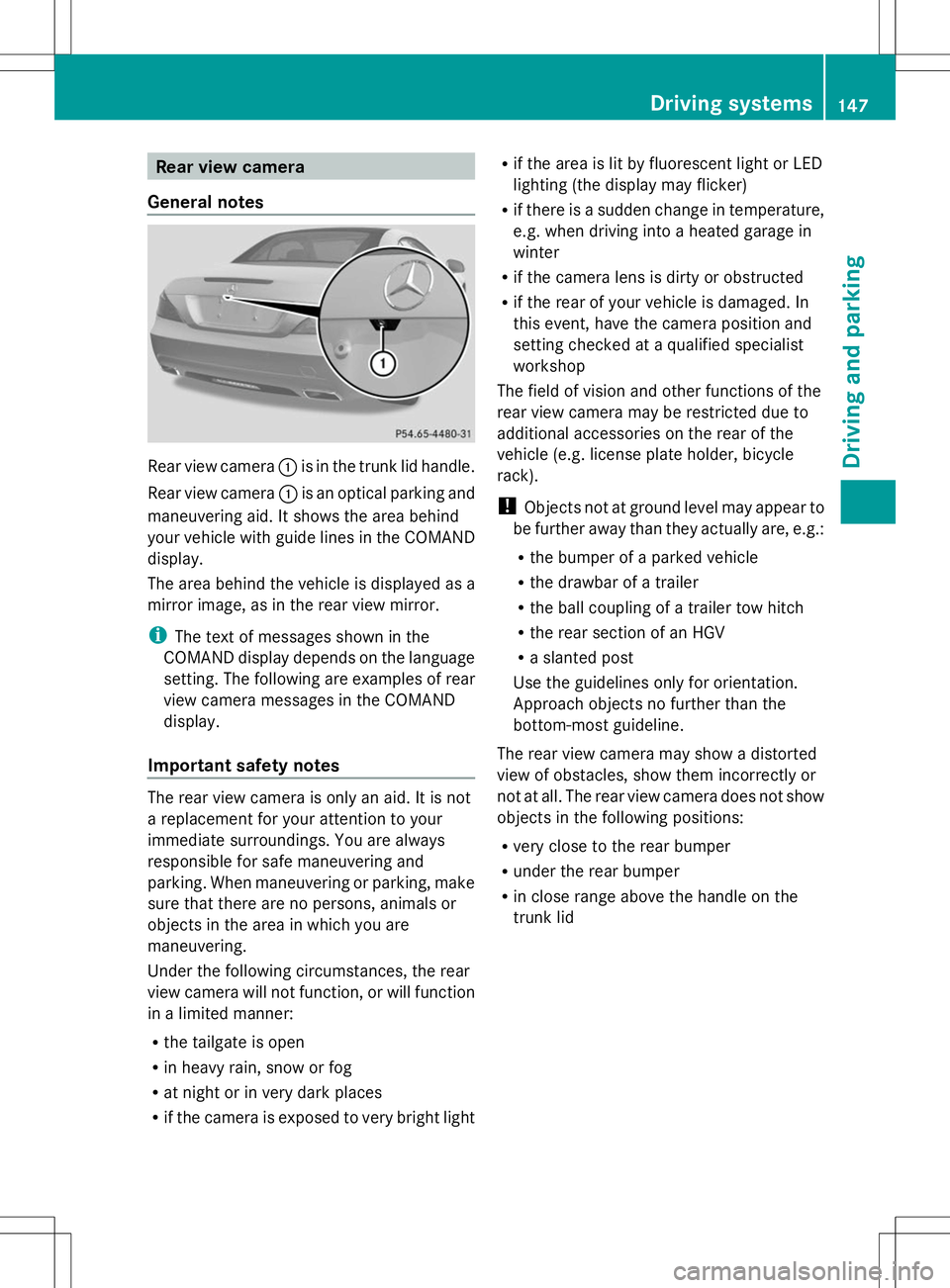
:is in the trunk lid handle.
Rear view camera :is an optical parking and
maneuvering aid. It shows the area behind
your vehicle with guide lines in the COMAND
display.
The area behind the vehicle is displayed as a
mirror image, as in the rear view mirror.
i The text of messages shown in the
COMAND display depends on the language
setting. The following are examples of rear
view camera messages in the COMAND
display.
Important safety notes The rear view camera is only an aid. It is not
a replacement for your attention to your
immediate surroundings. You are always
responsible for safe maneuvering and
parking. When maneuvering or parking, make
sure that there are no persons, animals or
objects in the area in which you are
maneuvering.
Under the following circumstances, the rear
view camera will not function, or will function
in a limited manner:
R the tailgate is open
R in heavy rain, snow or fog
R at night or in very dark places
R if the camera is exposed to very bright light R
if the area is lit by fluorescent light or LED
lighting (the display may flicker)
R if there is a sudden change in temperature,
e.g. when driving into a heated garage in
winter
R if the camera lens is dirty or obstructed
R if the rear of your vehicle is damaged. In
this event, have the camera position and
setting checked at a qualified specialist
workshop
The field of vision and other functions of the
rear view camera may be restricted due to
additional accessories on the rear of the
vehicle (e.g. license plate holder, bicycle
rack).
! Objects not at ground level may appear to
be further away than they actually are, e.g.:
R the bumper of a parked vehicle
R the drawbar of a trailer
R the ball coupling of a trailer tow hitch
R the rear section of an HGV
R a slanted post
Use the guidelines only for orientation.
Approach objects no further than the
bottom-most guideline.
The rear view camera may show a distorted
view of obstacles, show them incorrectly or
not at all. The rear view camera does not show
objects in the following positions:
R very close to the rear bumper
R under the rear bumper
R in close range above the handle on the
trunk lid Driving systems
147Driving and parking Z
Page 151 of 284
message appears in the multifunction
display.
X If necessary, take a break.
X Press the aor% button to confirm
the message.
On long journeys, take regular breaks in good
time to allow yourself to rest properly. If you
do not take a break and ATTENTION ASSIST
still detects increasing lapses in
concentration, you will be warned again after
15 minutes at the earliest.
ATTENTION ASSIST is reset when you
continue your journey and starts assessing
your tiredness again if:
R you switch off the engine.
R you take off your seat belt and open the
driver's door, e.g. for a change of drivers or
to take a break.
When ATTENTION ASSIST is deactivated, the
é symbol appears in the multifunction
display in the assistance graphics display. Night View Assist Plus
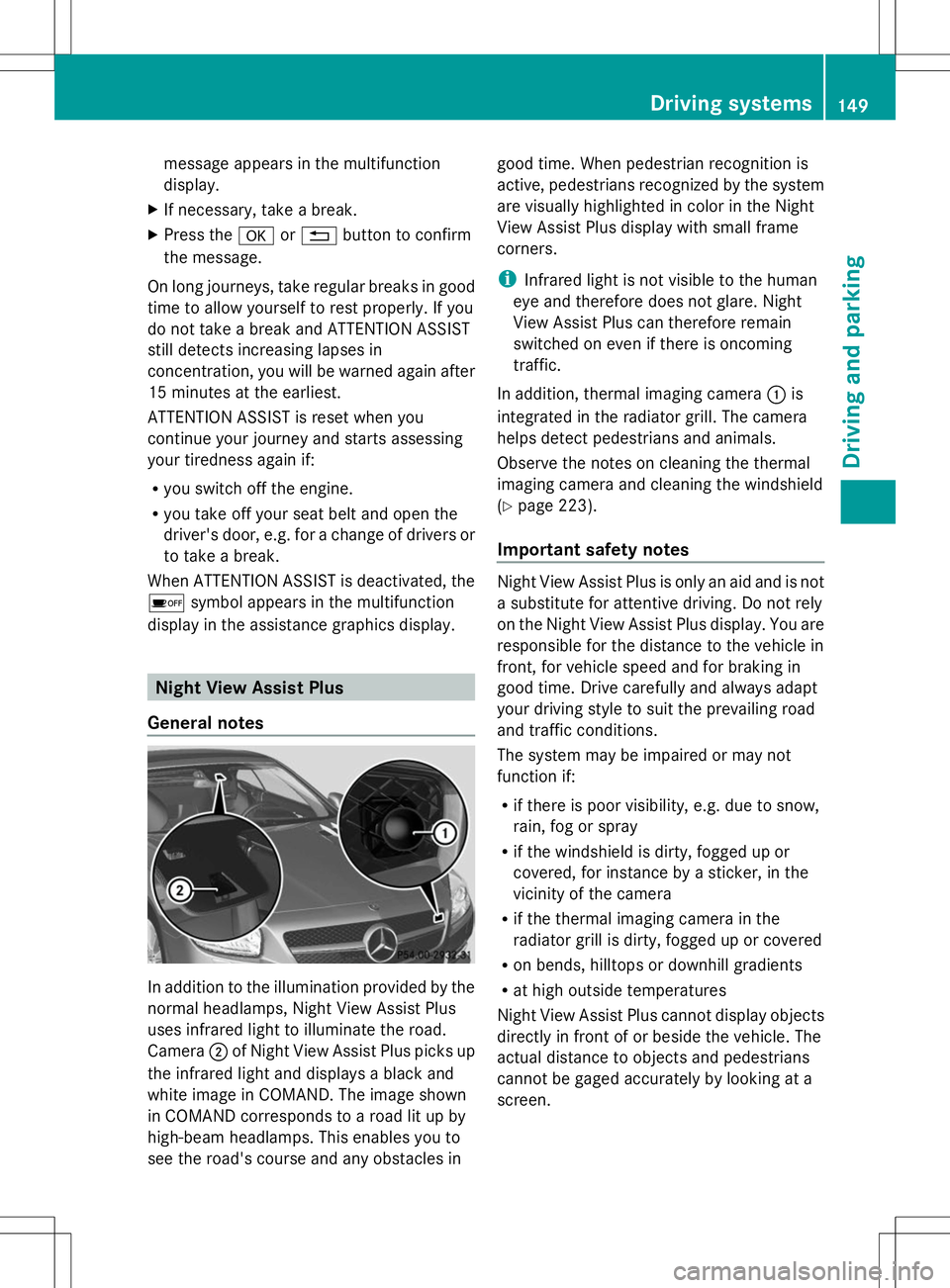
General notes In addition to the illumination provided by the
normal headlamps, Night View Assist Plus
uses infrared light to illuminate the road.
Camera
;of Night View Assist Plus picks up
the infrared light and displays a black and
white image in COMAND. The image shown
in COMAND corresponds to a road lit up by
high-beam headlamps. This enables you to
see the road's course and any obstacles in good time. When pedestrian recognition is
active, pedestrians recognized by the system
are visually highlighted in color in the Night
View Assist Plus display with small frame
corners.
i
Infrared light is not visible to the human
eye and therefore does not glare. Night
View Assist Plus can therefore remain
switched on even if there is oncoming
traffic.
In addition, thermal imaging camera :is
integrated in the radiator grill. The camera
helps detect pedestrians and animals.
Observe the notes on cleaning the thermal
imaging camera and cleaning the windshield
(Y page 223).
Important safety notes Night View Assist Plus is only an aid and is not
a substitute for attentive driving. Do not rely
on the Night View Assist Plus display. You are
responsible for the distance to the vehicle in
front, for vehicle speed and for braking in
good time. Drive carefully and always adapt
your driving style to suit the prevailing road
and traffic conditions.
The system may be impaired or may not
function if:
R
if there is poor visibility, e.g. due to snow,
rain, fog or spray
R if the windshield is dirty, fogged up or
covered, for instance by a sticker, in the
vicinity of the camera
R if the thermal imaging camera in the
radiator grill is dirty, fogged up or covered
R on bends, hilltops or downhill gradients
R at high outside temperatures
Night View Assist Plus cannot display objects
directly in front of or beside the vehicle. The
actual distance to objects and pedestrians
cannot be gaged accurately by looking at a
screen. Driving systems
149Driving and parking Z
Page 152 of 284
It may be the case that other objects are
marked or highlighted as well as pedestrians
and animals.
Pedestrian and animal recognition General notes
Pedestrian or animal recognition may be
impaired or inoperative if:
R pedestrians or animals are partially or
entirely obscured by other objects, e.g.
parked vehicles
R the silhouette of the pedestrian or of the
animal in the Night View Assist Plus display
is incomplete or interrupted, e.g. by
powerful light reflections
R pedestrians or animals do not contrast with
the surroundings
R the camera system no longer recognizes
pedestrians as persons due to special
clothing or other objects
R pedestrians are not in an upright position,
e.g. sitting, squatting or lying
R animals are not recognized by the system,
e.g. because of their size or shape
The pedestrian and animal recognition is
deactivated at temperatures above 90 ‡
(32 †). The spotlight function and automatic
delayed switch-off are then no longer active.
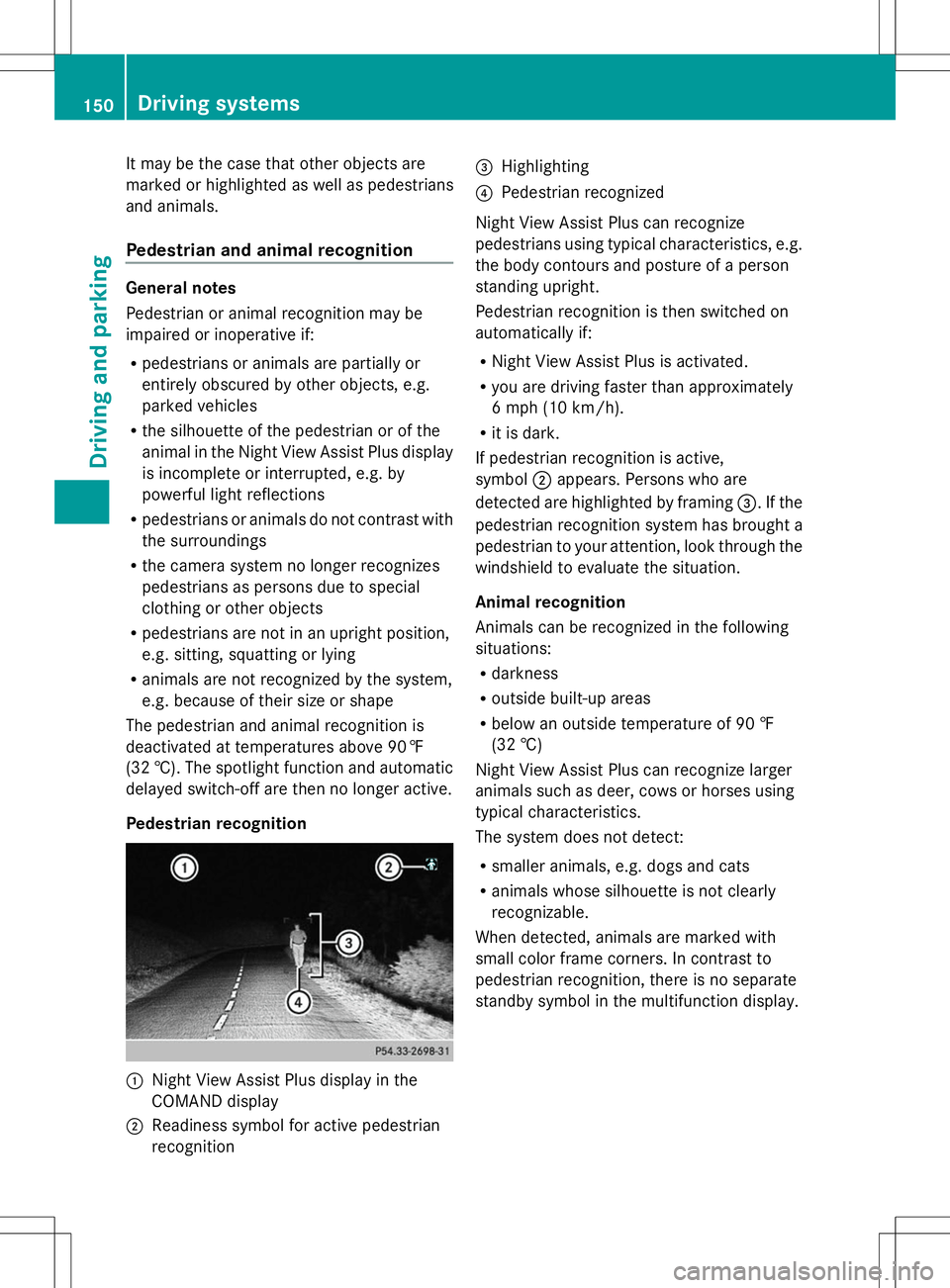
Pedestrian recognition :
Night View Assist Plus display in the
COMAND display
; Readiness symbol for active pedestrian
recognition =
Highlighting
? Pedestrian recognized
Night View Assist Plus can recognize
pedestrians using typical characteristics, e.g.
the body contours and posture of a person
standing upright.
Pedestrian recognition is then switched on
automatically if:
R Night View Assist Plus is activated.
R you are driving faster than approximately
6 mph (10 km/h).
R it is dark.
If pedestrian recognition is active,
symbol ;appears. Persons who are
detected are highlighted by framing =. If the
pedestrian recognition system has brought a
pedestrian to your attention, look through the
windshield to evaluate the situation.
Animal recognition
Animals can be recognized in the following
situations:
R darkness
R outside built-up areas
R below an outside temperature of 90 ‡
(32 †)
Night View Assist Plus can recognize larger
animals such as deer, cows or horses using
typical characteristics.
The system does not detect:
R smaller animals, e.g. dogs and cats
R animals whose silhouette is not clearly
recognizable.
When detected, animals are marked with
small color frame corners. In contrast to
pedestrian recognition, there is no separate
standby symbol in the multifunction display. 150
Driving systemsDriving and parking
Page 153 of 284
Activating/deactivating Night View
Assist Plus Activation conditions
You can only activate Night View Assist Plus
if all of the following conditions are met:
R the ignition is switched on (Y page 121) or
the engine has been started.
R the light switch is in the ÃorL
position.
R reverse gear has not been engaged.
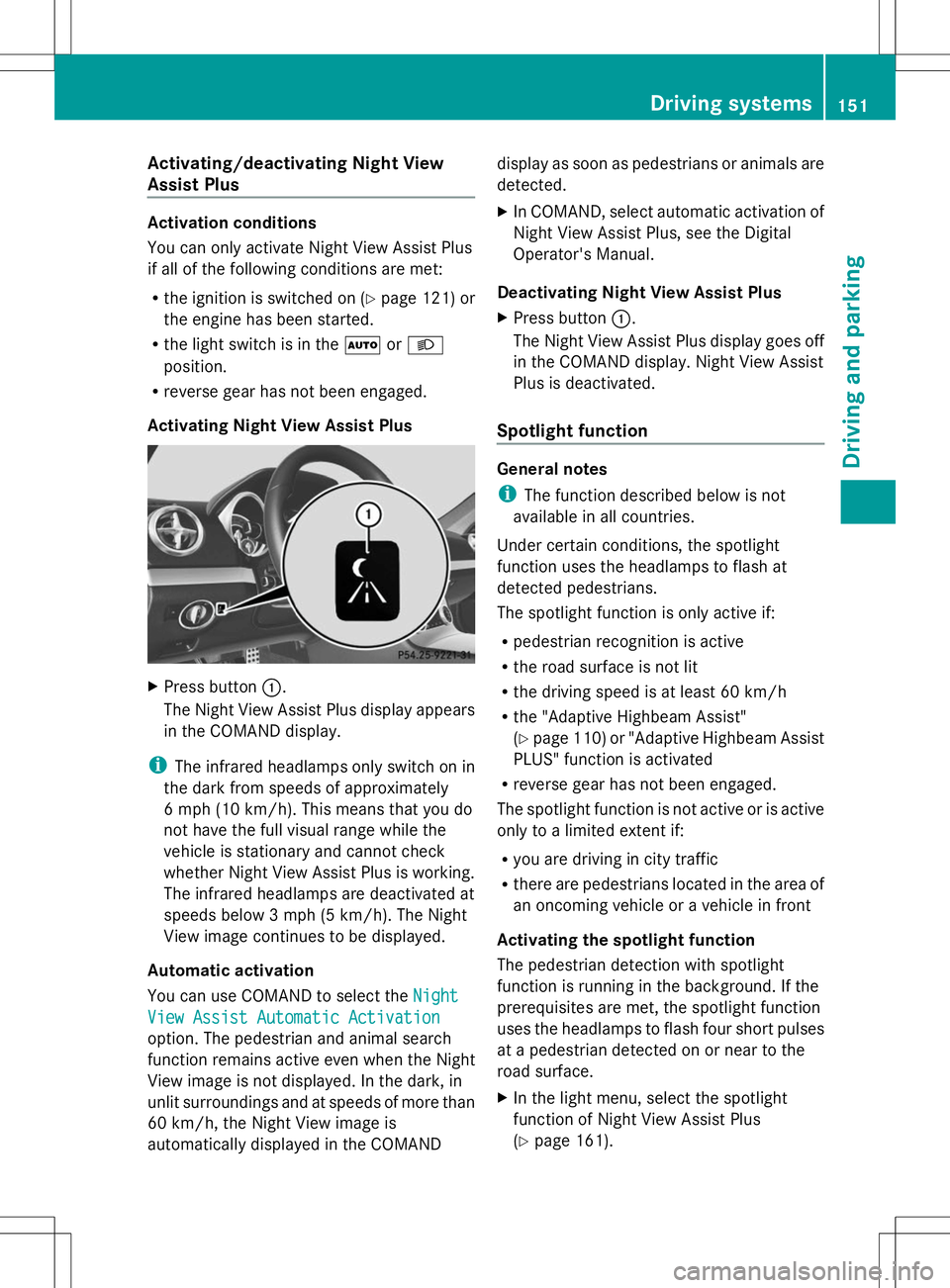
Activating Night View Assist Plus X
Press button :.
The Night View Assist Plus display appears
in the COMAND display.
i The infrared headlamps only switch on in
the dark from speeds of approximately
6 mph (10 km/h). This means that you do
not have the full visual range while the
vehicle is stationary and cannot check
whether Night View Assist Plus is working.
The infrared headlamps are deactivated at
speeds below 3 mph (5 km/h). The Night
View image continues to be displayed.
Automatic activation
You can use COMAND to select the Night
Night
View Assist Automatic Activation View Assist Automatic Activation
option. The pedestrian and animal search
function remains active even when the Night
View image is not displayed. In the dark, in
unlit surroundings and at speeds of more than
60 km/h, the Night View image is
automatically displayed in the COMAND display as soon as pedestrians or animals are
detected.
X
In COMAND, select automatic activation of
Night View Assist Plus, see the Digital
Operator's Manual.
Deactivating Night View Assist Plus
X Press button :.
The Night View Assist Plus display goes off
in the COMAND display. Night View Assist
Plus is deactivated.
Spotlight function General notes
i
The function described below is not
available in all countries.
Under certain conditions, the spotlight
function uses the headlamps to flash at
detected pedestrians.
The spotlight function is only active if:
R pedestrian recognition is active
R the road surface is not lit
R the driving speed is at least 60 km/h
R the "Adaptive Highbeam Assist"
(Y page 110) or "Adaptive Highbeam Assist
PLUS" function is activated
R reverse gear has not been engaged.
The spotlight function is not active or is active
only to a limited extent if:
R you are driving in city traffic
R there are pedestrians located in the area of
an oncoming vehicle or a vehicle in front
Activating the spotlight function
The pedestrian detection with spotlight
function is running in the background. If the
prerequisites are met, the spotlight function
uses the headlamps to flash four short pulses
at a pedestrian detected on or near to the
road surface.
X In the light menu, select the spotlight
function of Night View Assist Plus
(Y page 161). Driving systems
151Driving and parking Z
Page 154 of 284
The spotlight function does not flash at
animals.
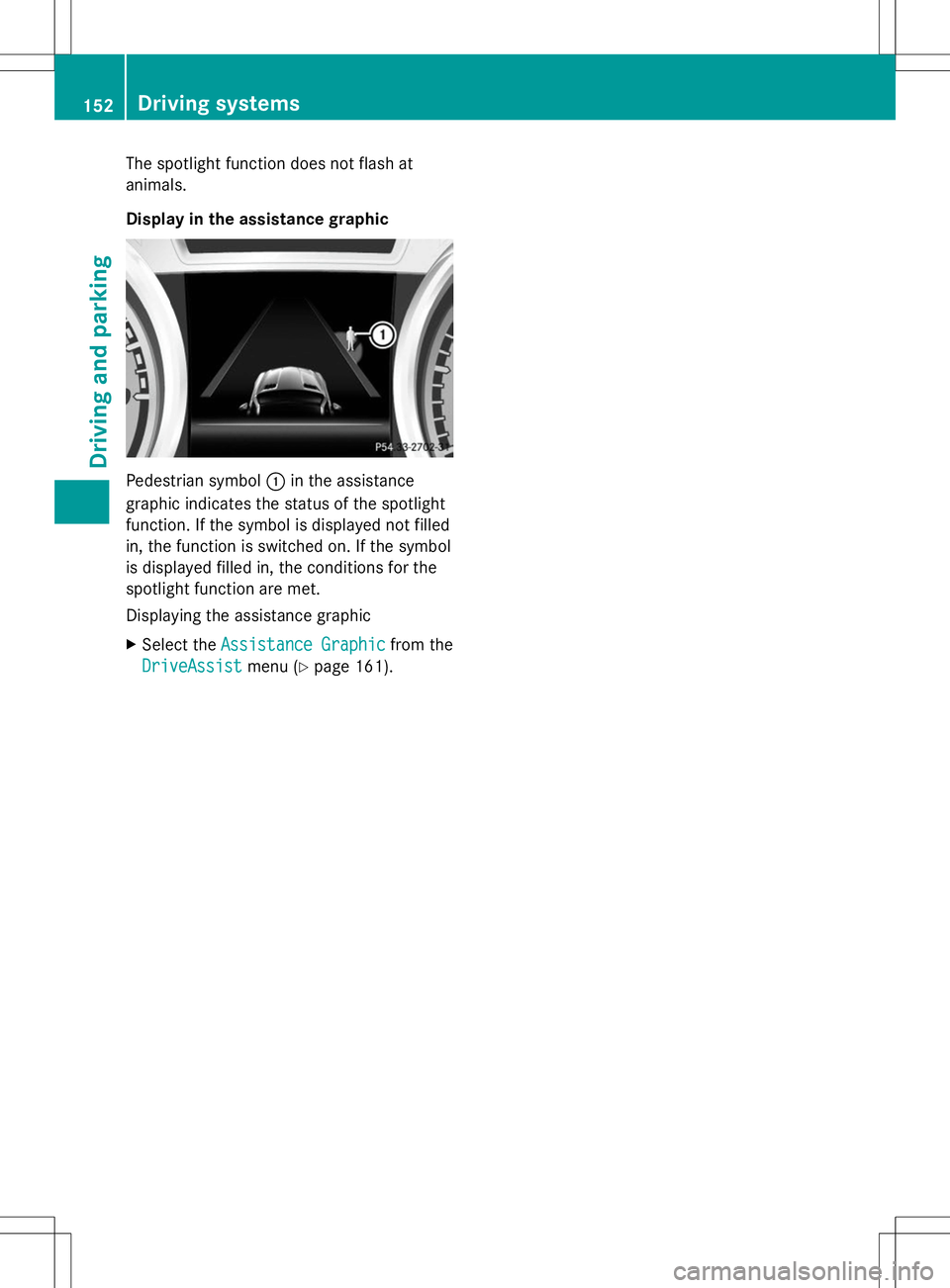
Display in the assistance graphic Pedestrian symbol
:in the assistance
graphic indicates the status of the spotlight
function. If the symbol is displayed not filled
in, the function is switched on. If the symbol
is displayed filled in, the conditions for the
spotlight function are met.
Displaying the assistance graphic
X Select the Assistance Graphic
Assistance Graphic from the
DriveAssist
DriveAssist menu (Ypage 161). 152
Driving systemsDriving and parking
Page 157 of 284
Due to the nature of the system:
R
warnings may be issued in error when
driving close to crash barriers or similar
solid lane borders.
R warnings may be interrupted when driving
alongside particularly long vehicles, e.g.
trucks, for a prolonged time.
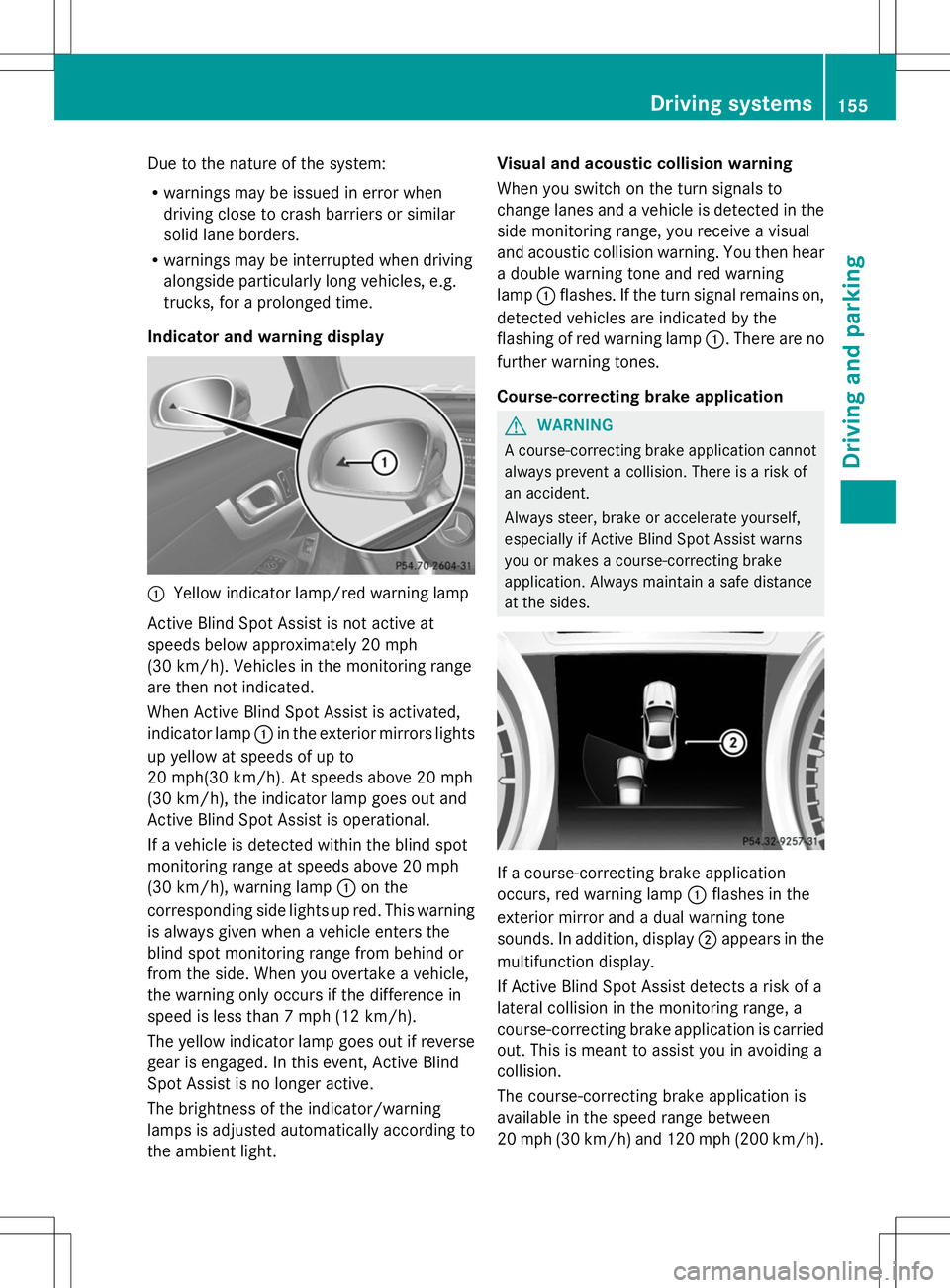
Indicator and warning display :
Yellow indicator lamp/red warning lamp
Active Blind Spot Assist is not active at
speeds below approximately 20 mph
(30 km/h). Vehicles in the monitoring range
are then not indicated.
When Active Blind Spot Assist is activated,
indicator lamp :in the exterior mirrors lights
up yellow at speeds of up to
20 mph(30 km/h). At speeds above 20 mph
(30 km/h), the indicator lamp goes out and
Active Blind Spot Assist is operational.
If a vehicle is detected within the blind spot
monitoring range at speeds above 20 mph
(30 km/h), warning lamp :on the
corresponding side lights up red. This warning
is always given when a vehicle enters the
blind spot monitoring range from behind or
from the side. When you overtake a vehicle,
the warning only occurs if the difference in
speed is less than 7 mph (12 km/h).
The yellow indicator lamp goes out if reverse
gear is engaged. In this event, Active Blind
Spot Assist is no longer active.
The brightness of the indicator/warning
lamps is adjusted automatically according to
the ambient light. Visual and acoustic collision warning
When you switch on the turn signals to
change lanes and a vehicle is detected in the
side monitoring range, you receive a visual
and acoustic collision warning. You then hear
a double warning tone and red warning
lamp :flashes. If the turn signal remains on,
detected vehicles are indicated by the
flashing of red warning lamp :. There are no
further warning tones.
Course-correcting brake application G
WARNING
A course-correcting brake application cannot
always prevent a collision. There is a risk of
an accident.
Always steer, brake or accelerate yourself,
especially if Active Blind Spot Assist warns
you or makes a course-correcting brake
application. Always maintain a safe distance
at the sides. If a course-correcting brake application
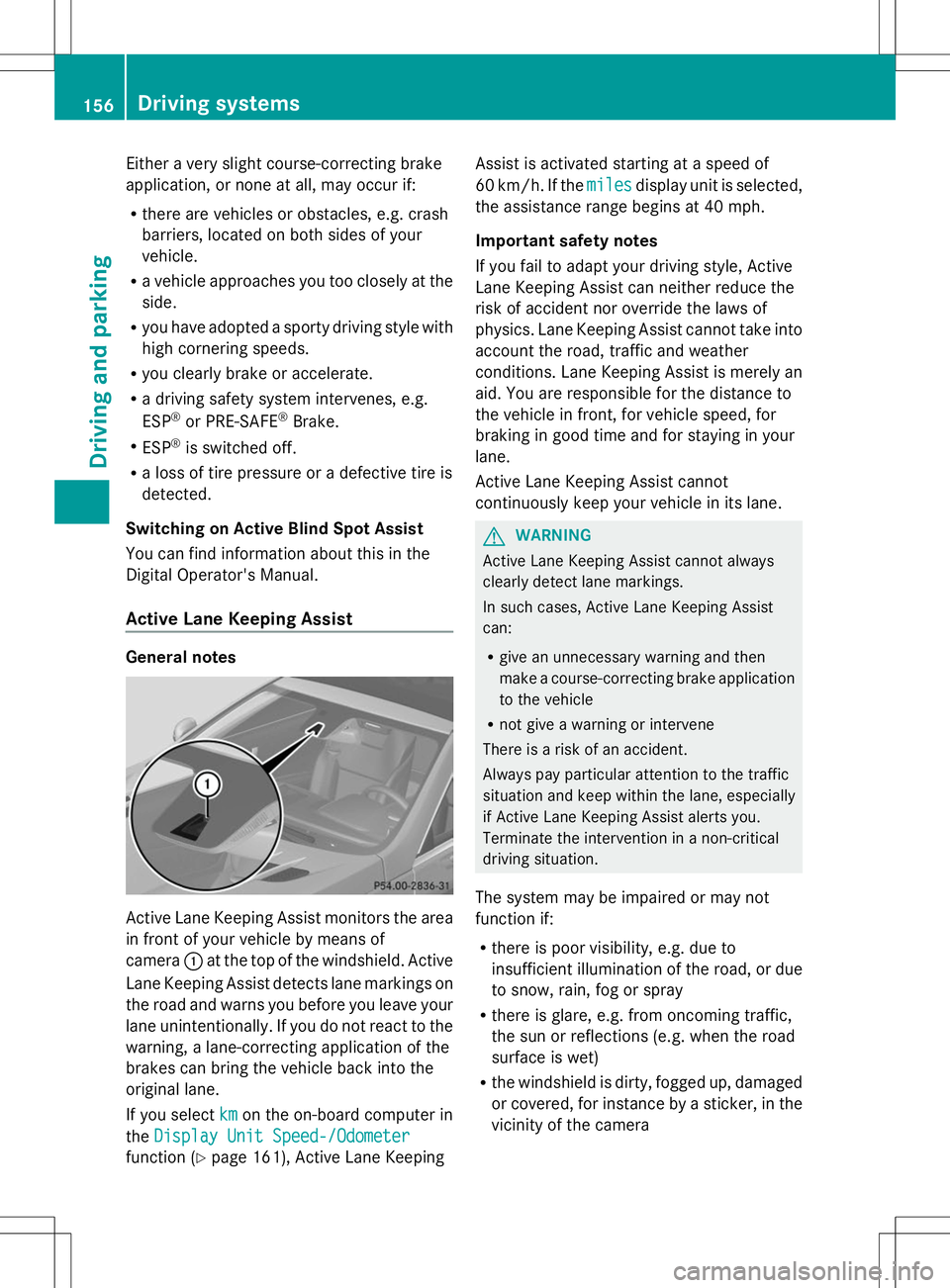
occurs, red warning lamp
:flashes in the
exterior mirror and a dual warning tone
sounds. In addition, display ;appears in the
multifunction display.
If Active Blind Spot Assist detects a risk of a
lateral collision in the monitoring range, a
course-correcting brake application is carried
out. This is meant to assist you in avoiding a
collision.
The course-correcting brake application is
available in the speed range between
20 mph (30 km/h) and 120 mph (200 km/h). Driving systems
155Driving and parking Z
Page 158 of 284
Either a very slight course-correcting brake
application, or none at all, may occur if:
R there are vehicles or obstacles, e.g. crash
barriers, located on both sides of your
vehicle.
R a vehicle approaches you too closely at the
side.
R you have adopted a sporty driving style with
high cornering speeds.
R you clearly brake or accelerate.
R a driving safety system intervenes, e.g.
ESP ®
or PRE-SAFE ®
Brake.
R ESP ®
is switched off.
R a loss of tire pressure or a defective tire is
detected.
Switching on Active Blind Spot Assist
You can find information about this in the
Digital Operator's Manual.
Active Lane Keeping Assist General notes
Active Lane Keeping Assist monitors the area
in front of your vehicle by means of
camera :at the top of the windshield. Active
Lane Keeping Assist detects lane markings on
the road and warns you before you leave your
lane unintentionally. If you do not react to the
warning, a lane-correcting application of the
brakes can bring the vehicle back into the
original lane.
If you select km
km on the on-board computer in
the Display Unit Speed-/Odometer
Display Unit Speed-/Odometer
function ( Ypage 161), Active Lane Keeping Assist is activated starting at a speed of
60 km/h. If the
miles milesdisplay unit is selected,
the assistance range begins at 40 mph.
Important safety notes
If you fail to adapt your driving style, Active
Lane Keeping Assist can neither reduce the
risk of accident nor override the laws of
physics. Lane Keeping Assist cannot take into
account the road, traffic and weather
conditions. Lane Keeping Assist is merely an
aid. You are responsible for the distance to
the vehicle in front, for vehicle speed, for
braking in good time and for staying in your
lane.
Active Lane Keeping Assist cannot
continuously keep your vehicle in its lane. G
WARNING
Active Lane Keeping Assist cannot always
clearly detect lane markings.
In such cases, Active Lane Keeping Assist
can:
R give an unnecessary warning and then
make a course-correcting brake application
to the vehicle
R not give a warning or intervene
There is a risk of an accident.
Always pay particular attention to the traffic
situation and keep within the lane, especially
if Active Lane Keeping Assist alerts you.
Terminate the intervention in a non-critical
driving situation.
The system may be impaired or may not
function if:
R there is poor visibility, e.g. due to
insufficient illumination of the road, or due
to snow, rain, fog or spray
R there is glare, e.g. from oncoming traffic,
the sun or reflections (e.g. when the road
surface is wet)
R the windshield is dirty, fogged up, damaged
or covered, for instance by a sticker, in the
vicinity of the camera 156
Driving systemsDriving an
d parking