USB MERCEDES-BENZ SL-CLASS ROADSTER 2014 Owners Manual
[x] Cancel search | Manufacturer: MERCEDES-BENZ, Model Year: 2014, Model line: SL-CLASS ROADSTER, Model: MERCEDES-BENZ SL-CLASS ROADSTER 2014Pages: 284, PDF Size: 45.52 MB
Page 9 of 284
Switching the rear window
defroster on/of
f............................ 116
Switching the ZONE function on/
off .................................................. 116
Cockpit
Overview .......................................... 34
see Instrument cluster
COMAND
Display ........................................... 191
Examples of operation ...................197
Menu overview .............................. 192
COMAND controller ...........................196
COMAND control panel .....................195
COMAND display Driving conditions menu (AMG
vehicles) ........................................ 144
Driving conditions menu (except
AMG vehicles) ................................ 143
Combination switch ..........................108
Connecting a USB device see also Digital Operator's Manual 188
Consumption statistics (on-board
computer) .......................................... 161
Convenience telephony see also Digital Operator's Manual 188
Coolant (engine)
Checking the level .........................219
Display message ............................ 172
Filling capacity ............................... 277
Important safety notes ..................277
Temperature (on-board
computer) ...................................... 161
Temperature gauge ........................ 160
Warning lamp ................................. 183
Cooling
see Climate control
Copyright ............................................. 32
Cornering light function Display message ............................ 163
Function/notes ............................. 108
Crash-responsive emergency
lighting ............................................... 110
Cruise control Cruise control lever .......................133
Deactivating ................................... 133
Display message ............................ 163
Driving system ............................... 132Function/notes
............................. 132
Important safety notes ..................132
Selecting ........................................ 133
Setting a speed .............................. 133
Storing and maintaining current
speed ............................................ .133
Cup holder
Center console .............................. 206
Important safety notes ..................206
Customer Assistance Center (CAC) ...31
Customer Relations Department .......31 D
Dashboard lighting see Instrument cluster lighting
Data
see Technical data
Daytime running lamps
Display message ............................ 163
Function/notes .....................107, 108
Switching on/off (on-board
computer) ...................................... 161
Dealerships
see Qualified specialist workshop
Declarations of conformity ................. 30
Delayed switch-off Exterior lighting (on-board
computer) ...................................... 161
Interior lighting .............................. 161
Diagnostics connection ......................30
Digital Operator's Manual Contents .......................................... 24
Installation ....................................... 21
Introduction ..................................... 21
Keyword search ............................... 23
Operating notes ............................... 22
Visual search ................................... 22
Digital speedometer .........................161
Display (cleaning instructions) ........223
Display messages ASSYST PLUS ................................ 220
Calling up (on-board
computer) ...................................... 163
Driving systems ............................. 173
Engine ............................................ 172
General notes ................................ 163
Hiding (on-board computer) ...........163 Index
7
Page 194 of 284
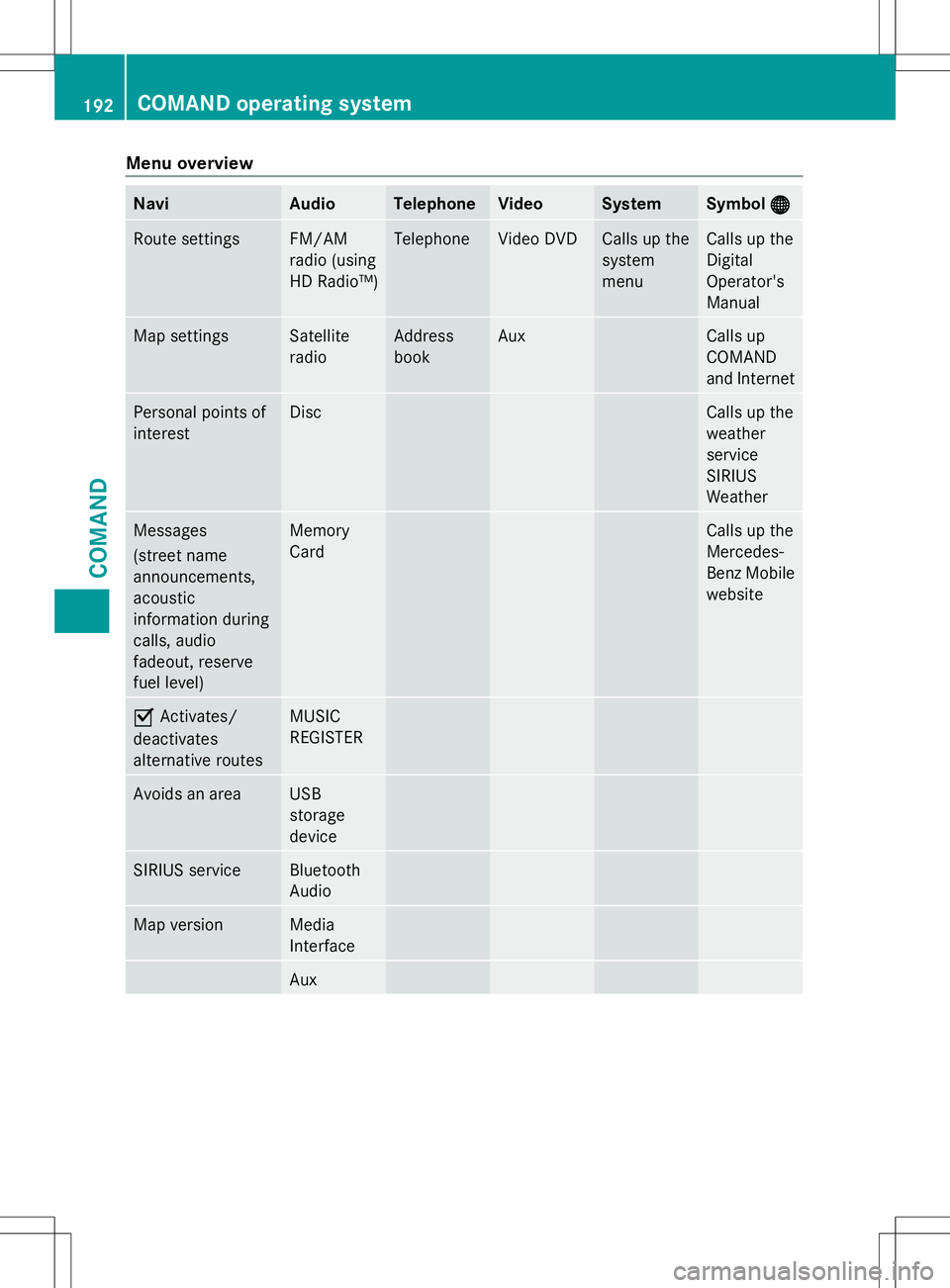
Menu overview
Navi Audio Telephone Video System Symbol
®
® Route settings FM/AM
radio (using
HD Radio™) Telephone Video DVD Calls up the
system
menu Calls up the
Digital
Operator's
Manual
Map settings Satellite
radio Address
book Aux Calls up
COMAND
and Internet
Personal points of
interest Disc Calls up the
weather
service
SIRIUS
Weather
Messages
(street name
announcements,
acoustic
information during
calls, audio
fadeout, reserve
fuel level) Memory
Card Calls up the
Mercedes-
Benz Mobile
website
O
Activates/
deactivates
alternative routes MUSIC
REGISTER
Avoids an area USB
storage
device
SIRIUS service Bluetooth
Audio
Map version Media
Interface
Aux192
COMAND operating systemCOMAND
Page 197 of 284
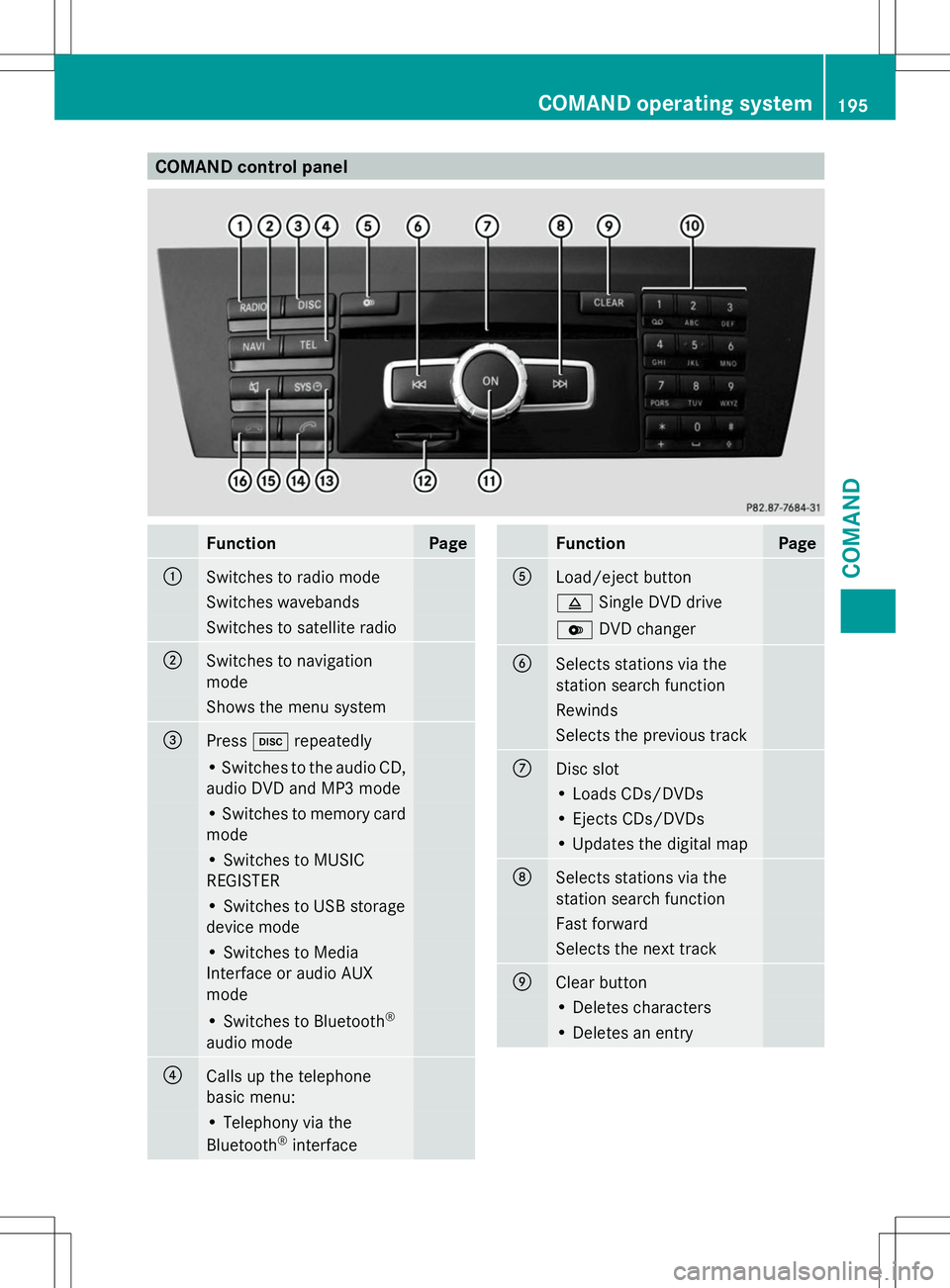
COMAND control panel
Function Page
:
Switches to radio mode
Switches wavebands
Switches to satellite radio
;
Switches to navigation
mode Shows the menu system
=
Press
hrepeatedly • Switches to the audio CD,
audio DVD and MP3 mode
• Switches to memory card
mode
• Switches to MUSIC
REGISTER
• Switches to USB storage
device mode
• Switches to Media
Interface or audio AUX
mode
• Switches to Bluetooth
®
audio mode ?
Calls up the telephone
basic menu: • Telephony via the
Bluetooth ®
interface Function Page
A
Load/eject button
8
Single DVD drive V
DVD changer B
Selects stations via the
station search function
Rewinds
Selects the previous track
C
Disc slot
• Loads CDs/DVDs
• Ejects CDs/DVDs
• Updates the digital map
D
Selects stations via the
station search function
Fast forward
Selects the next track
E
Clear button
• Deletes characters
• Deletes an entryCOMAND operating system
195COMAND Z