change wheel MERCEDES-BENZ SL-CLASS ROADSTER 2014 Owners Manual
[x] Cancel search | Manufacturer: MERCEDES-BENZ, Model Year: 2014, Model line: SL-CLASS ROADSTER, Model: MERCEDES-BENZ SL-CLASS ROADSTER 2014Pages: 284, PDF Size: 45.52 MB
Page 8 of 284
Breakdown
see Flat tire
see Towing away
Buttons on the COMAND controller 197C
California Important notice for retail
customers and lessees ....................28
Calling up a malfunction
see Display messages
Car
see Vehicle
Care
Carpets .......................................... 223
Car wash ........................................ 222
Display ........................................... 223
Exterior lights ................................ 222
Gear or selector lever ....................223
Interior ........................................... 223
Matte finish ................................... 222
Night View Assist Plus ...................223
Notes ............................................. 221
Paint .............................................. 222
Plastic trim .................................... 223
Power washer ................................ 222
Rear view camera .......................... 222
Roof lining ...................................... 223
Seat belt ........................................ 223
Seat cover ..................................... 223
Sensors ......................................... 222
Tail pipes ....................................... 222
Trim pieces .................................... 223
Washing by hand ........................... 222
Wheels ........................................... 222
Windows ........................................ 222
Wiper blades .................................. 222
Wooden trim .................................. 223
Car keys
see SmartKey
Car wash (care) ................................. 222
CD see also Digital Operator's Manual 188
CD player/CD changer (on-board
computer) .......................................... 161Center console
Lower section .................................. 39
Lower section (AMG vehicles) ..........40
Upper section .................................. 38
Central locking
Automatic locking (on-board
computer) ...................................... 161
Locking/unlocking (SmartKey) ........78
Children
In the vehicle ................................... 62
Restraint systems ............................ 62
Special seat belt retractor ...............66
Child seat
LATCH-type (ISOFIX) child seat
anchors ............................................ 65
Cigarette lighter ................................ 206
Cleaning Mirror turn signal ........................... 222
Clear button ....................................... 197
Climate control Automatic climate control (dual-
zone) .............................................. 115
Controlling automatically ...............116
Cooling with air dehumidification ..116
Defrosting the windows .................116
Defrosting the windshield ..............116
Important safety notes ..................114
Indicator lamp ................................ 116
Maximum cooling .......................... 116
Overview of systems ......................114
Problems with cooling with air
dehumidification ............................ 116
Problem with the rear window
defroster ........................................ 116
Refrigerant ..................................... 278
Refrigerant filling capacity .............279
Setting the air distribution .............116
Setting the airflow .........................116
Setting the air vents ......................116
Setting the climate mode (AIR
FLOW) ............................................ 116
Setting the temperature ................116
Switching air-recirculation mode
on/off ............................................ 116
Switching on/off ........................... 116
Switching residual heat on/off ......116 6
Index
Page 29 of 284
Have aftermarket accessories installed at
a qualified specialist workshop.
You could jeopardize the operating safety of
your vehicle if you use parts, tires and wheels
as well as accessories relevant to safety
which have not been approved by Mercedes.
This could lead to malfunctions in safety-
relevant systems, e.g. the brake system. Use
only genuine Mercedes-Benz parts or parts of
equal quality. Only use tires, wheels and
accessories that have been specifically
approved for your vehicle.
Genuine Mercedes-Benz parts are subject to
strict quality control. Every part has been
specifically developed, manufactured or
selected for and adapted to Mercedes-Benz
vehicles. Only genuine Mercedes-Benz parts
should therefore be used.
More than 300,000 different genuine
Mercedes-Benz parts are available for
Mercedes-Benz models.
All authorized Mercedes-Benz Centers
maintain a supply of genuine Mercedes-Benz
parts for necessary service and repair work.
In addition, strategically located parts
delivery centers provide quick and reliable
parts service.
Always specify the vehicle identification
number (VIN) (Y page 274) and the engine
number (Y page 274) when ordering genuine
Mercedes-Benz parts. Operator's Manual
Vehicle equipment
This Operator's Manual describes all models
and all standard and optional equipment of
your vehicle available at the time of going to
print. Country-specific differences are
possible. Bear in mind that your vehicle may
not feature all functions described here. This
also applies to safety-relevant systems and
functions. The equipment in your vehicle may
therefore differ from that shown in the
descriptions and illustrations. The original purchase agreement lists all
systems installed in your vehicle.
Should you have any questions concerning
equipment and operation, please consult an
authorized Mercedes-Benz Center.
The Operator's Manual and Maintenance
Booklet are important documents and should
be kept in the vehicle. Service and vehicle operation
Service and literature
Your vehicle is covered under the terms of the
warranties printed in the Service and
Warranty Information booklet. Your
authorized Mercedes-Benz Center will
exchange or repair any defective parts
originally installed in the vehicle in
accordance with the terms of the following
warranties:
R New Vehicle Limited Warranty
R Emission Systems Warranty
R Emission Performance Warranty
R California, Connecticut, Maine,
Massachusetts, New York, Pennsylvania,
Rhode Island and Vermont Emission
Control Systems Warranty
R State warranty enforcement laws (lemon
laws) Introduction
27 Z
Page 32 of 284
In situations like this, the body, the
undercarriage, chassis parts, wheels or
tires could be damaged without the
damage being visible. Components
damaged in this way can unexpectedly fail
or, in the case of an accident, no longer
withstand the strain they are designed to.
If the underbody paneling is damaged,
combustible materials such as leaves,
grass or twigs can gather between the
underbody and the underbody paneling. If
these materials come in contact with hot
parts of the exhaust system for an
extended period, they can catch fire.
Have the vehicle checked and repaired
immediately at a qualified specialist
workshop. If on continuing your journey
you notice that driving safety is impaired,
pull over and stop the vehicle immediately,
paying attention to road and traffic
conditions. In such cases, visit a qualified
specialist workshop. Declarations of conformity
Vehicle components which receive
and/or transmit radio waves USA:
"The wireless devices of this vehicle
comply with Part 15 of the FCC Rules.
Operation is subject to the following two
conditions: 1) These devices may not cause
harmful interference, and 2) These devices
must accept any interference received,
including interference that may cause
undesired operation. Changes or
modifications not expressly approved by the
party responsible for compliance could void
the user’s authority to operate the
equipment."
Canada: "The wireless devices of this vehicle
comply with Industry Canada license-exempt
RSS standard(s). Operation is subject to the
following two conditions: (1) These devices
may not cause interference, and (2) These
devices must accept any interference, including interference that may cause
undesired operation of the device." Diagnostics connection
The diagnostics connection is only intended
for the connection of diagnostic equipment at
a qualified specialist workshop. G
WARNING
If you connect equipment to the diagnostics
connection in the vehicle, it may affect the
operation of the vehicle systems. As a result,
the operating safety of the vehicle could be
affected. There is a risk of an accident.
Do not connect any equipment to a
diagnostics connection in the vehicle. G
WARNING
Objects in the driver's footwell can restrict the
pedal travel or obstruct a depressed pedal.
The operating and road safety of the vehicle
is jeopardized. There is a risk of an accident.
Make sure that all objects in the vehicle are
stowed correctly, and that they cannot enter
the driver's footwell. Install the floormats
securely and as specified in order to ensure
sufficient clearance for the pedals. Do not use
loose floormats and do not place floormats on
top of one another.
! If the engine is switched off and
equipment on the diagnostics connection
is used, the starter battery may discharge.
Connecting equipment to the diagnostics
connection can lead to emissions monitoring
information being reset, for example. This
may lead to the vehicle failing to meet the
requirements of the next emissions test
during the main inspection. Qualified specialist workshop
An authorized Mercedes-Benz Center is a
qualified specialist workshop. It has the
necessary specialist knowledge, tools and 30
Introduction
Page 128 of 284
Problems with the engine
You can find information about this in the Digital Operator's Manual. Automatic transmission
Selector lever
Overview of transmission positions !
If the engine speed is too high or if the
vehicle is rolling, do not shift the
transmission directly from Dto R, from R
to Dor directly to P.
Do not open the driver's door while the
vehicle is in motion. At low speeds in
transmission position Dor R, park position
P is otherwise engaged automatically.
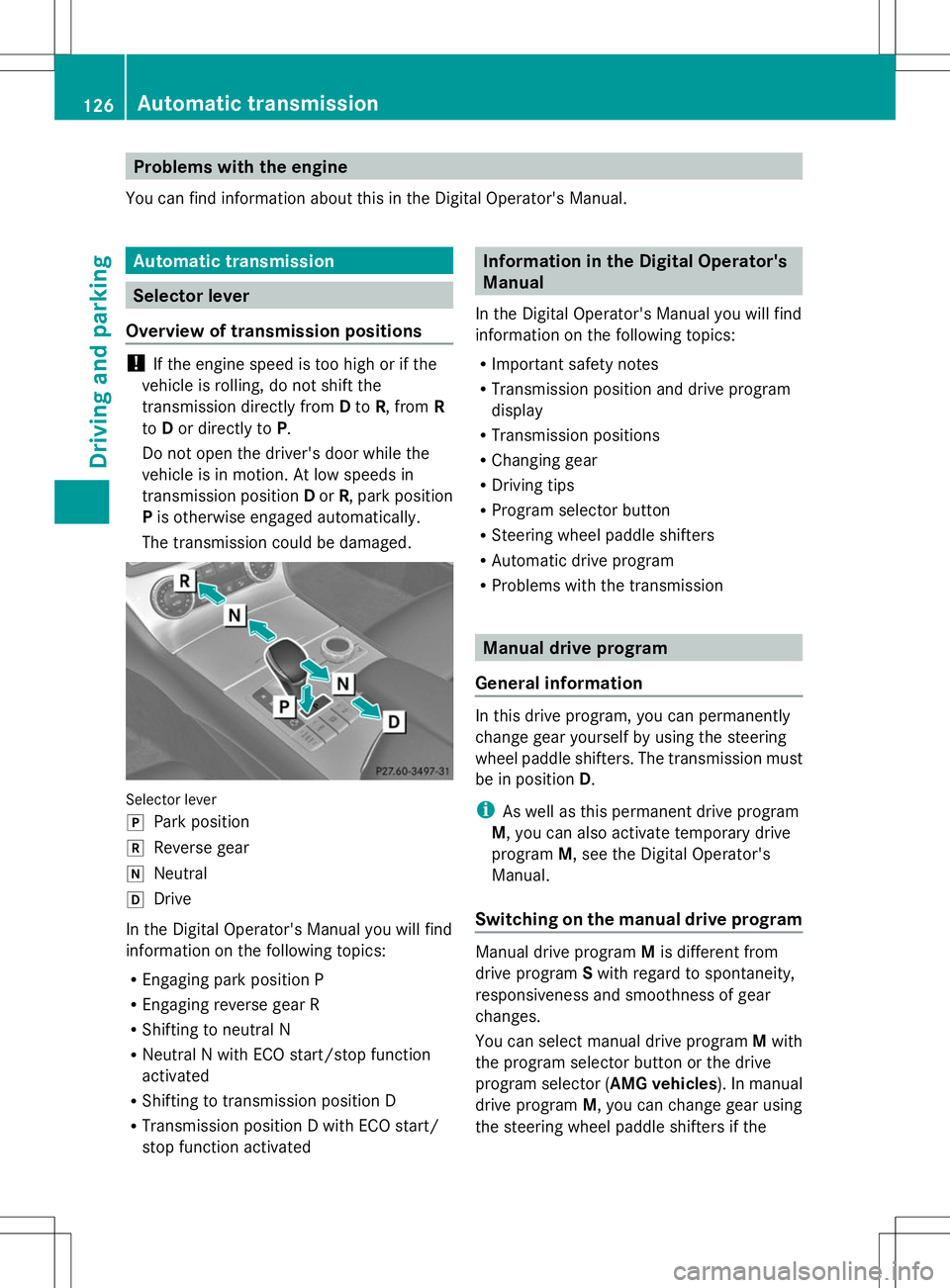
The transmission could be damaged. Selector lever
j
Park position
k Reverse gear
i Neutral
h Drive
In the Digital Operator's Manual you will find
information on the following topics:
R Engaging park position P
R Engaging reverse gear R
R Shifting to neutral N
R Neutral N with ECO start/stop function
activated
R Shifting to transmission position D
R Transmission position D with ECO start/
stop function activated Information in the Digital Operator's
Manual
In the Digital Operator's Manual you will find
information on the following topics:
R Important safety notes
R Transmission position and drive program
display
R Transmission positions
R Changing gear
R Driving tips
R Program selector button
R Steering wheel paddle shifters
R Automatic drive program
R Problems with the transmission Manual drive program
General information In this drive program, you can permanently
change gear yourself by using the steering
wheel paddle shifters. The transmission must
be in position
D.
i As well as this permanent drive program
M, you can also activate temporary drive
program M, see the Digital Operator's
Manual.
Switching on the manual drive program Manual drive program
Mis different from
drive program Swith regard to spontaneity,
responsiveness and smoothness of gear
changes.
You can select manual drive program Mwith
the program selector button or the drive
program selector ( AMG vehicles). In manual
drive program M, you can change gear using
the steering wheel paddle shifters if the 126
Automatic transmissionDriving and parking
Page 129 of 284
transmission is in position
D. The selected
gear appears in the multifunction display.
X Press the program selector button
repeatedly until Mappears in the
multifunction display, see Digital
Operator's Manual.
X AMG vehicles: turn the drive program
selector until Mappears in the
multifunction display, see Digital
Operator's Manual.
Upshifting X
Pull the right-hand steering wheel paddle
shifter, see the Digital Operator's Manual.
The automatic transmission shifts up to the
next gear.
Before the engine speed reaches the red
area, an upshift indicator will be shown in
the multifunction display.
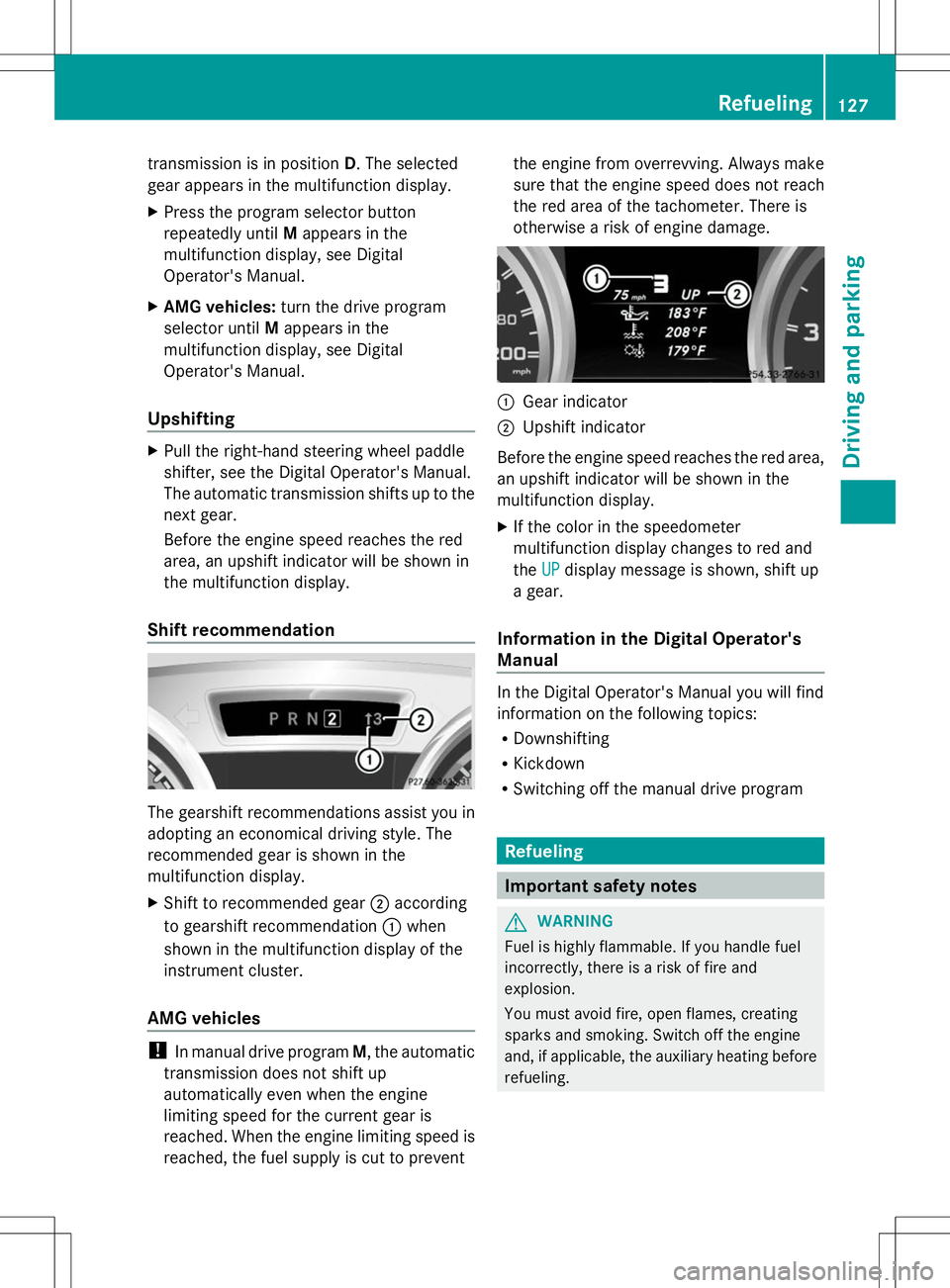
Shift recommendation The gearshift recommendations assist you in
adopting an economical driving style. The
recommended gear is shown in the
multifunction display.
X Shift to recommended gear ;according
to gearshift recommendation :when
shown in the multifunction display of the
instrument cluster.
AMG vehicles !
In manual drive program M, the automatic
transmission does not shift up
automatically even when the engine
limiting speed for the current gear is
reached. When the engine limiting speed is
reached, the fuel supply is cut to prevent the engine from overrevving. Always make
sure that the engine speed does not reach
the red area of the tachometer. There is
otherwise a risk of engine damage.
:
Gear indicator
; Upshift indicator
Before the engine speed reaches the red area,
an upshift indicator will be shown in the
multifunction display.
X If the color in the speedometer
multifunction display changes to red and
the UP UPdisplay message is shown, shift up
a gear.
Information in the Digital Operator's
Manual In the Digital Operator's Manual you will find
information on the following topics:
R
Downshifting
R Kickdown
R Switching off the manual drive program Refueling
Important safety notes
G
WARNING
Fuel is highly flammable. If you handle fuel
incorrectly, there is a risk of fire and
explosion.
You must avoid fire, open flames, creating
sparks and smoking. Switch off the engine
and, if applicable, the auxiliary heating before
refueling. Refueling
127Driving and parking Z
Page 135 of 284
the distance to the vehicle in front, for vehicle
speed, for braking in good time and for
staying in lane.
Do not use cruise control:
R in road and traffic conditions which do not
allow you to maintain a constant speed e.g.
in heavy traffic or on winding roads
R on slippery road surfaces. Braking or
accelerating could cause the drive wheels
to lose traction and the vehicle could then
skid
R when there is poor visibility, e.g. due to fog,
heavy rain or snow
If there is a change of drivers, advise the new
driver of the speed stored. G
WARNING
If you call up the stored speed and it differs
from the current speed, the vehicle
accelerates or decelerates. If you do not know
the stored speed, the vehicle could accelerate
or brake unexpectedly. There is a risk of an
accident.
Pay attention to the road and traffic
conditions before calling up the stored speed.
If you do not know the stored speed, store the
desired speed again.
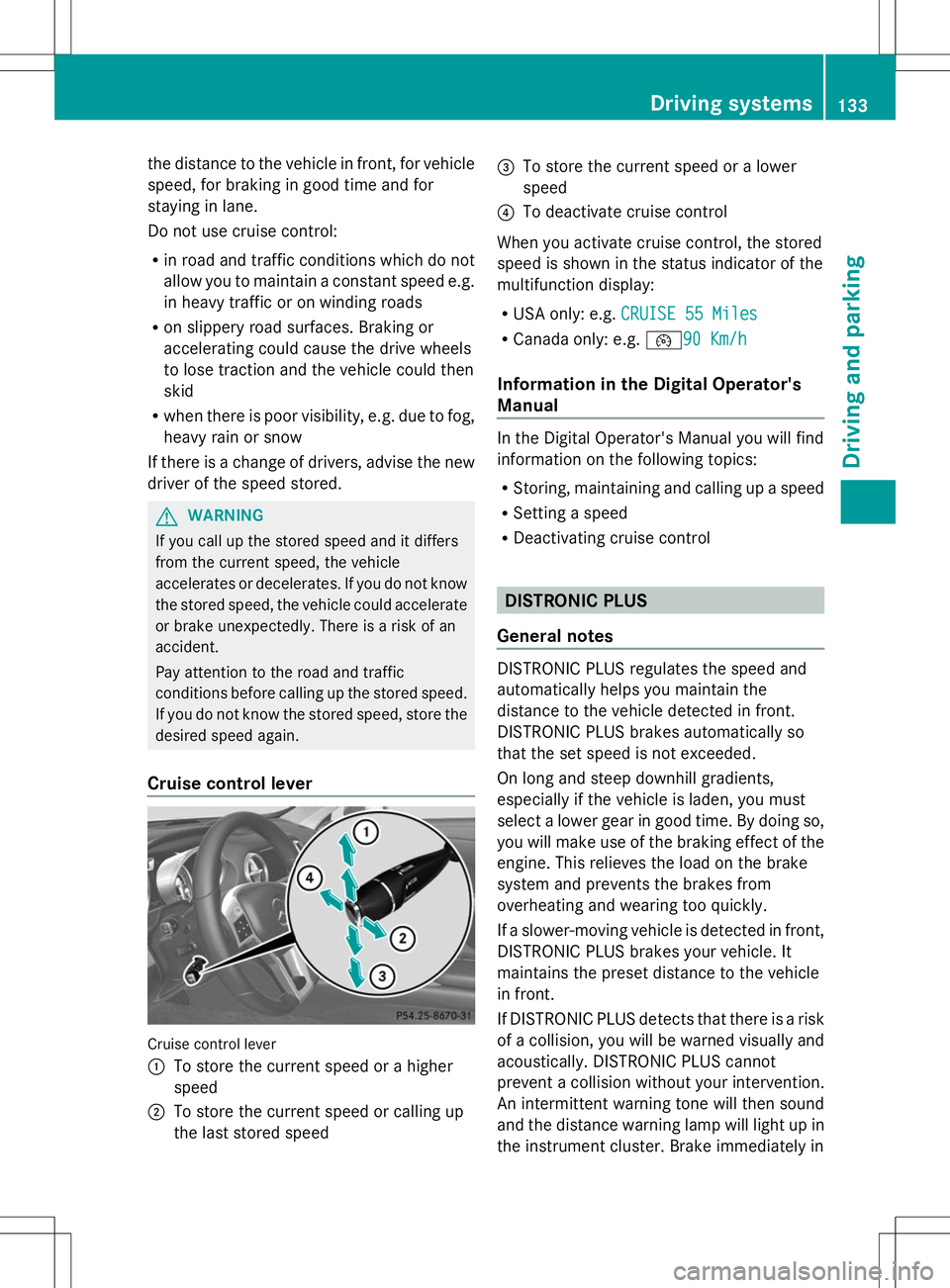
Cruise control lever Cruise control lever
:
To store the current speed or a higher
speed
; To store the current speed or calling up
the last stored speed =
To store the current speed or a lower
speed
? To deactivate cruise control
When you activate cruise control, the stored
speed is shown in the status indicator of the
multifunction display:
R USA only: e.g. CRUISE 55 Miles
CRUISE 55 Miles
R Canada only: e.g. ¯90 Km/h90 Km/h
Information in the Digital Operator's
Manual In the Digital Operator's Manual you will find
information on the following topics:
R
Storing, maintaining and calling up a speed
R Setting a speed
R Deactivating cruise control DISTRONIC PLUS
General notes DISTRONIC PLUS regulates the speed and
automatically helps you maintain the
distance to the vehicle detected in front.
DISTRONIC PLUS brakes automatically so
that the set speed is not exceeded.
On long and steep downhill gradients,
especially if the vehicle is laden, you must
select a lower gear in good time. By doing so,
you will make use of the braking effect of the
engine. This relieves the load on the brake
system and prevents the brakes from
overheating and wearing too quickly.
If a slower-moving vehicle is detected in front,
DISTRONIC PLUS brakes your vehicle. It
maintains the preset distance to the vehicle
in front.
If DISTRONIC PLUS detects that there is a risk
of a collision, you will be warned visually and
acoustically. DISTRONIC PLUS cannot
prevent a collision without your intervention.
An intermittent warning tone will then sound
and the distance warning lamp will light up in
the instrument cluster. Brake immediately in Driving systems
133Driving and parking Z
Page 137 of 284
!
If DISTRONIC PLUS or the HOLD function
is activated, the vehicle brakes
automatically in certain situations. To
prevent damage to the vehicle, deactivate
DISTRONIC PLUS and the HOLD function in
the following or other similar situations:
R when towing the vehicle
R in the car wash
If you fail to adapt your driving style,
DISTRONIC PLUS can neither reduce the risk
of accident nor override the laws of physics.
DISTRONIC PLUS cannot take into account
the road, traffic and weather conditions.
DISTRONIC PLUS is only an aid. You are
responsible for the distance to the vehicle in
front, for vehicle speed, for braking in good
time and for staying in lane.
Do not use DISTRONIC PLUS:
R in road and traffic conditions which do not
allow you to maintain a constant speed e.g.
in heavy traffic or on winding roads
R on slippery road surfaces. Braking or
accelerating could cause the drive wheels
to lose traction and the vehicle could then
skid
R when there is poor visibility, e.g. due to fog,
heavy rain or snow
DISTRONIC PLUS may not detect narrow
vehicles driving in front, e.g. motorcycles, or
vehicles driving on a different line.
In particular, the detection of obstacles can
be impaired if:
R there is dirt on the sensors or anything else
covering the sensors
R snow or heavy rain
R interference by other radar sources
R strong radar reflections, for example, in
parking garages
If DISTRONIC PLUS no longer detects a
vehicle in front, DISTRONIC PLUS may
unexpectedly accelerate the vehicle to the
stored speed. This speed may:
R
be too high if you are driving in a filter lane
or an exit lane
R be so high when driving in the right-hand
lane that you overtake vehicles in the left-
hand lane
R be so high when driving in the left-hand lane
that you overtake vehicles in the right-hand
lane
If there is a change of drivers, advise the new
driver of the speed stored.
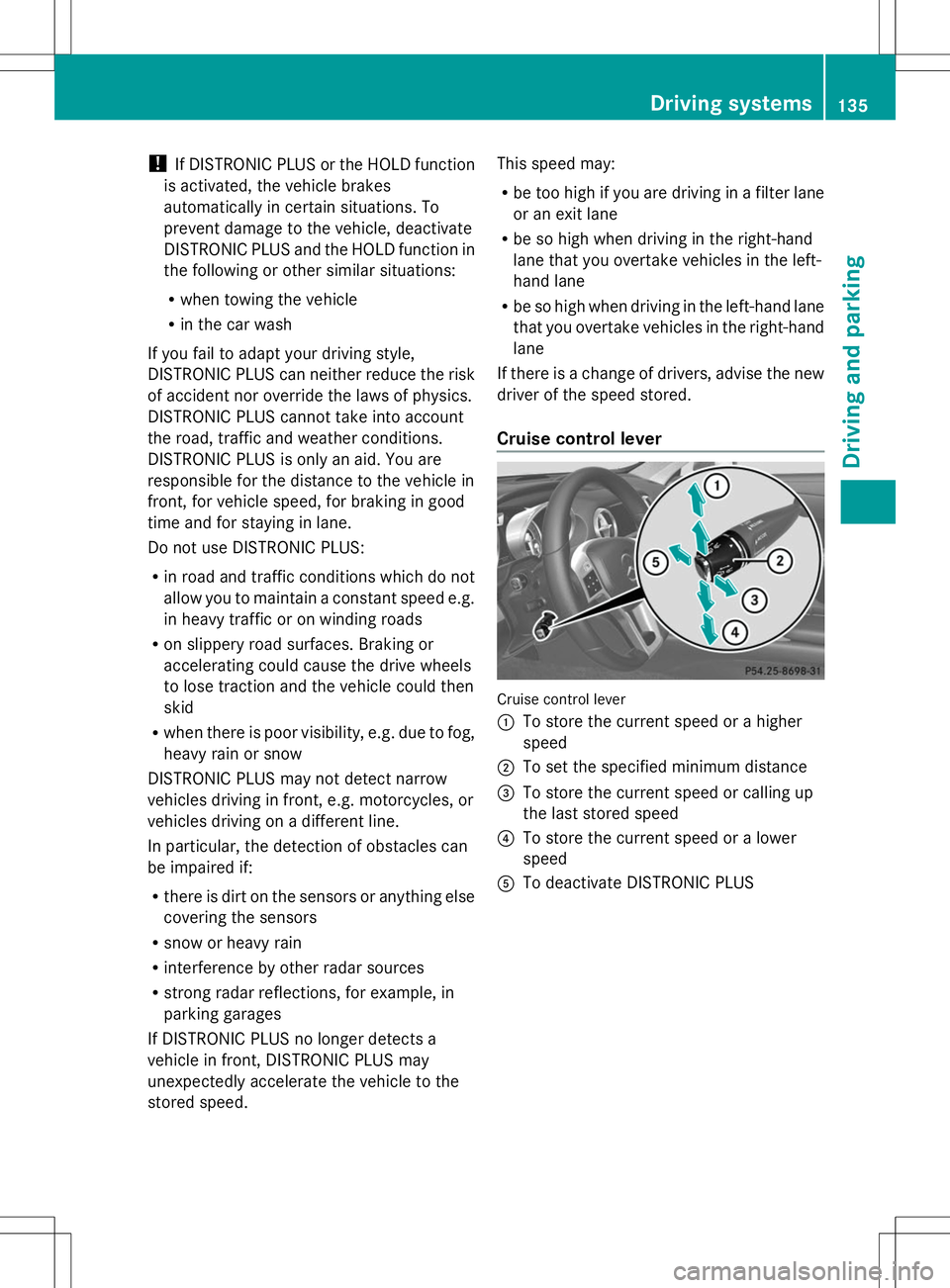
Cruise control lever Cruise control lever
:
To store the current speed or a higher
speed
; To set the specified minimum distance
= To store the current speed or calling up
the last stored speed
? To store the current speed or a lower
speed
A To deactivate DISTRONIC PLUS Driving systems
135Driving and parking Z
Page 159 of 284
R
there are no, several or unclear lane
markings for a lane, e.g. in areas with road
construction work
R the lane markings are worn away, dark or
covered up, e.g. by dirt or snow
R the distance to the vehicle in front is too
small and the lane markings thus cannot be
detected
R the lane markings change quickly, e.g.
lanes branch off, cross one another or
merge
R the road is narrow and winding
R there are strong shadows cast on the lane
Warning vibration in the steering wheel
A warning may be given if a front wheel
passes over a lane marking. It will warn you
by means of intermittent vibration in the
steering wheel for up to 1.5 seconds.
In order that you are warned only when
necessary and in good time if you cross the
lane marking, the system recognizes certain
conditions and warns you accordingly.
The warning vibration occurs earlier if:
R you approach the outer lane marking on a
bend.
R the road has very wide lanes, e.g. a
highway.
R the system recognizes solid lane markings.
The warning vibration occurs later if:
R the road has narrow lanes.
R you cut the corner on a bend.
Lane-correcting brake application G
WARNING
A lane-correcting brake application cannot
always bring the vehicle back into the original
lane. There is a risk of an accident.
Always steer, brake or accelerate yourself,
especially if Active Lane Keeping Assist warns
you or makes a lane-correcting brake
application. G
WARNING
Active Lane Keeping Assist does not detect
traffic conditions or road users. In very rare
cases, the system may make an inappropriate
brake application, e.g. after intentionally
driving over a solid lane marking. There is a
risk of an accident.
An inappropriate brake application may be
interrupted at any time if you steer slightly in
the opposite direction. Always make sure that
there is sufficient distance on the side for
other traffic or obstacles.
In rare cases, Active Lane Keeping Assist can
recognize unclear markings or particular
structures on the roadway as solid lane
markings. An inappropriate brake application
may be interrupted at any time if you steer
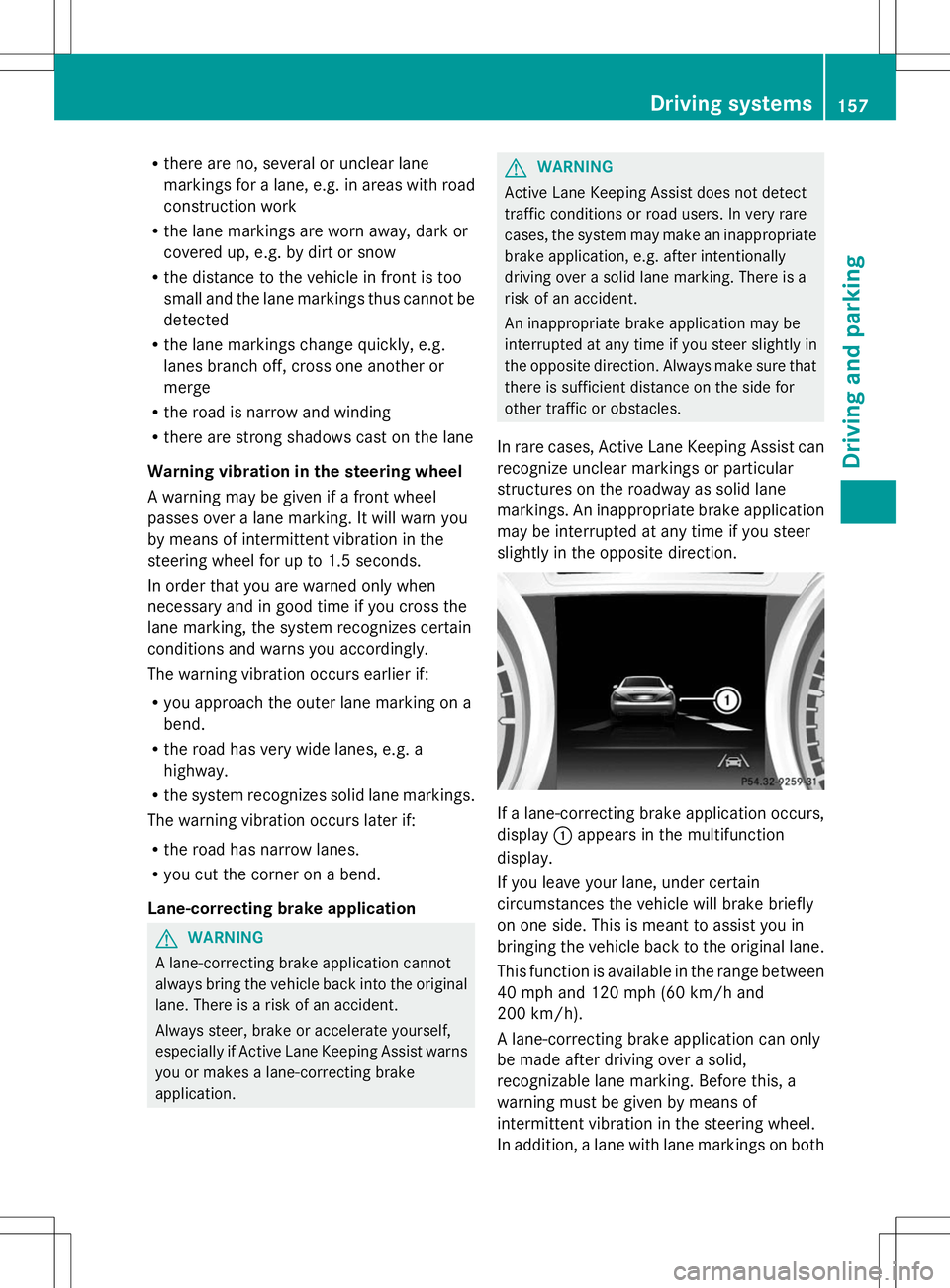
slightly in the opposite direction. If a lane-correcting brake application occurs,
display
:appears in the multifunction
display.
If you leave your lane, under certain
circumstances the vehicle will brake briefly
on one side. This is meant to assist you in
bringing the vehicle back to the original lane.
This function is available in the range between
40 mph and 120 mph (60 km/h and
200 km/h).
A lane-correcting brake application can only
be made after driving over a solid,
recognizable lane marking. Before this, a
warning must be given by means of
intermittent vibration in the steering wheel.
In addition, a lane with lane markings on both Driving systems
157Driving and parking Z
Page 212 of 284
From the vehicle remote malfunction
diagnosis, the Mercedes-Benz Customer
Assistance Center can ascertain the nature of
the problem. Information on the vehicle
remote malfunction diagnosis can be found in
the Digital Operator's Manual.
The Mercedes-Benz Customer Assistance
Center either sends a qualified Mercedes-
Benz technician or makes arrangements for
your vehicle to be transported to the nearest
authorized Mercedes-Benz Center.
You may be charged for services such as
repair work and/or towing.
Further details are available in your mbrace
manual.
i The system has not been able to initiate
a roadside assistance call, if:
R the indicator lamp for Roadside
Assistance call button :is flashing
continuously.
R no voice connection to the Mercedes-
Benz Customer Assistance Center was
established.
This can occur if the relevant mobile phone
network is not available, for example.
The Call Failed
Call Failed message appears in the
multifunction display.
X To end a call: press the~button on the
multifunction steering wheel.
or
X Press the corresponding button for ending
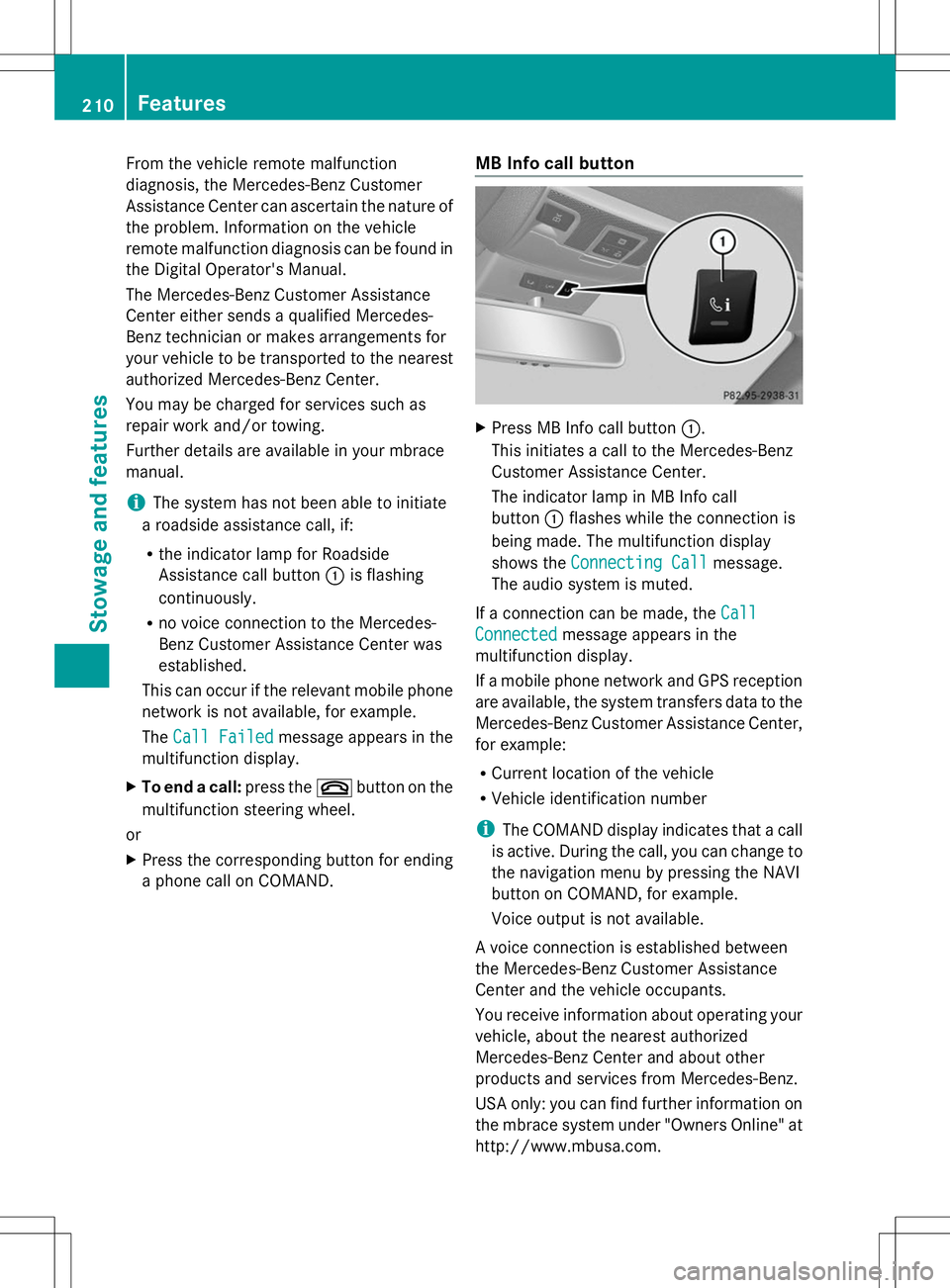
a phone call on COMAND. MB Info call button X
Press MB Info call button :.
This initiates a call to the Mercedes-Benz
Customer Assistance Center.
The indicator lamp in MB Info call
button :flashes while the connection is
being made. The multifunction display
shows the Connecting Call Connecting Call message.
The audio system is muted.
If a connection can be made, the Call
Call
Connected
Connected message appears in the
multifunction display.
If a mobile phone network and GPS reception
are available, the system transfers data to the
Mercedes-Benz Customer Assistance Center,
for example:
R Current location of the vehicle
R Vehicle identification number
i The COMAND display indicates that a call
is active. During the call, you can change to
the navigation menu by pressing the NAVI
button on COMAND, for example.
Voice output is not available.
A voice connection is established between
the Mercedes-Benz Customer Assistance
Center and the vehicle occupants.
You receive information about operating your
vehicle, about the nearest authorized
Mercedes-Benz Center and about other
products and services from Mercedes-Benz.
USA only: you can find further information on
the mbrace system under "Owners Online" at
http://www.mbusa.com. 210
FeaturesStowage and features
Page 223 of 284
Displaying service messages
X Switch on the ignition.
X Press the =or; button on the
steering wheel to select the Service
Service
menu.
X Press the 9or: button to select the
ASSYST PLUS
ASSYST PLUS submenu and confirm by
pressing the abutton.
The service due date appears in the
multifunction display. Information about Service
Resetting the ASSYST PLUS service
interval display !
If the ASSYST PLUS service interval
display has been inadvertently reset, this
setting can be corrected at a qualified
specialist workshop.
Have service work carried out as described
in the Maintenance Booklet. This may
otherwise lead to increased wear and
damage to the major assemblies or the
vehicle.
A qualified specialist workshop, e.g. an
authorized Mercedes-Benz Center, will reset
the ASSYST PLUS service interval display
after the service work has been carried out.
You can also obtain further information on
maintenance work, for example.
Special service requirements The specified maintenance interval takes only
the normal operation of the vehicle into
account. Under arduous operating conditions
or increased load on the vehicle,
maintenance work must be carried out more
frequently, for example:
R regular city driving with frequent
intermediate stops
R if the vehicle is primarily used to travel
short distances R
use in mountainous terrain or on poor road
surfaces
R if the engine is often left idling for long
periods
Under these or similar conditions, have, for
example, the air filter, engine oil and oil filter
replaced or changed more frequently. Under
arduous operating conditions, the tires must
be checked more often. Further information
can be obtained at a qualified specialist
workshop, e.g. an authorized Mercedes-Benz
Center.
Driving abroad An extensive Mercedes-Benz Service network
is also available in other countries. You can
obtain further information from any
authorized Mercedes-Benz Center.
Care
Notes on care
H
Environmental note
Dispose of empty packaging and cleaning
cloths in an environmentally responsible
manner.
! For cleaning your vehicle, do not use any
of the following:
R dry, rough or hard cloths
R abrasive cleaning agents
R solvents
R cleaning agents containing solvents
Do not scrub.
Do not touch the surfaces or protective
films with hard objects, e.g. a ring or ice
scraper. You could otherwise scratch or
damage the surfaces and protective film.
! Do not park the vehicle for an extended
period straight after cleaning it, particularly
after having cleaned the wheels with wheel
cleaner. Wheel cleaners could cause
increased corrosion of the brake discs and
brake pads/linings. For this reason, you Care
221Maintenance and care Z