cooling MERCEDES-BENZ SL-CLASS ROADSTER 2014 Owners Manual
[x] Cancel search | Manufacturer: MERCEDES-BENZ, Model Year: 2014, Model line: SL-CLASS ROADSTER, Model: MERCEDES-BENZ SL-CLASS ROADSTER 2014Pages: 284, PDF Size: 45.52 MB
Page 6 of 284
1, 2, 3 ...
12 V socket see Sockets A
ABS (Anti-lock Braking System) Display message ............................ 164
Function/notes ................................ 67
Important safety notes ....................67
Warning lamp ................................. 177
Activating/deactivating cooling
with air dehumidification .................116
Activating/deactivating Night
View Assist Plus
With spotlight function ................... 151
Active Blind Spot Assist
Activating/deactivating (on-
board computer) ............................ 161
Display message ............................ 163
Function/informatio n.................... 153
Active Body Control (AMG
vehicles)
Display message ............................ 173
Driving conditions menu in the
COMAND display (AMG vehicles) ... 144
Function/notes ............................. 143
Active Body Control (except AMG
vehicles)
Display message ............................ 173
Driving conditions menu in the
COMAND displa y........................... 143
Function/notes ............................. 142
Active Driving Assistance package .153
Active Lane Keeping Assist Activating/deactivating (on-
board computer) ............................ 161
Display message ............................ 163
Function/informatio n.................... 156
Active light function .........................109
Active Parking Assist Display message ............................ 163
Function/notes ............................. 145
Important safety notes ..................146
ADAPTIVE BRAKE ................................. 72
Adaptive Damping System Function/notes ............................. 141Adaptive Highbeam Assist
Display message ............................ 163
Function/notes ............................. 109
Switching on/off (on-board
computer) ...................................... 161
Additives (engine oil) ........................276
Address book see also Digital Operator's Manual 188
Adjusting the vehicle height
Active Body Control (AMG vehicles) 143
Active Body Control (except AMG
vehicles) ........................................ 142
Air bags
Display message ............................ 170
Front air bag (driver, front
passenger) ....................................... 48
Head bag ......................................... 50
Important safety notes ....................46
Knee bag .......................................... 49
PASSENGER AIR BAG OFF
indicator lamp .................................. 51
Safety guidelines ............................. 45
Side impact air bag ..........................49
Air-conditioning system
see Climate control
AIR FLOW ........................................... 116
AIRSCARF Switching on/off ........................... 101
Air vents
Switching AIRSCARF on/off ..........101
Alarm system
see ATA (Anti-Theft Alarm system)
Ambient lighting
Setting the brightness (on-board
computer) ...................................... 161
Setting the color (on-board
computer) ...................................... 161
AMG
Button for AMG menu ....................126
SETUP ............................................ 126
AMG menu (on-board
computer) .......................................... 161
Anti-lock braking system see ABS (Anti-lock Braking System)
Anti-theft alarm system
see ATA (Anti-Theft Alarm system)
Ashtray ............................................... 2064
Index
Page 8 of 284
Breakdown
see Flat tire
see Towing away
Buttons on the COMAND controller 197C
California Important notice for retail
customers and lessees ....................28
Calling up a malfunction
see Display messages
Car
see Vehicle
Care
Carpets .......................................... 223
Car wash ........................................ 222
Display ........................................... 223
Exterior lights ................................ 222
Gear or selector lever ....................223
Interior ........................................... 223
Matte finish ................................... 222
Night View Assist Plus ...................223
Notes ............................................. 221
Paint .............................................. 222
Plastic trim .................................... 223
Power washer ................................ 222
Rear view camera .......................... 222
Roof lining ...................................... 223
Seat belt ........................................ 223
Seat cover ..................................... 223
Sensors ......................................... 222
Tail pipes ....................................... 222
Trim pieces .................................... 223
Washing by hand ........................... 222
Wheels ........................................... 222
Windows ........................................ 222
Wiper blades .................................. 222
Wooden trim .................................. 223
Car keys
see SmartKey
Car wash (care) ................................. 222
CD see also Digital Operator's Manual 188
CD player/CD changer (on-board
computer) .......................................... 161Center console
Lower section .................................. 39
Lower section (AMG vehicles) ..........40
Upper section .................................. 38
Central locking
Automatic locking (on-board
computer) ...................................... 161
Locking/unlocking (SmartKey) ........78
Children
In the vehicle ................................... 62
Restraint systems ............................ 62
Special seat belt retractor ...............66
Child seat
LATCH-type (ISOFIX) child seat
anchors ............................................ 65
Cigarette lighter ................................ 206
Cleaning Mirror turn signal ........................... 222
Clear button ....................................... 197
Climate control Automatic climate control (dual-
zone) .............................................. 115
Controlling automatically ...............116
Cooling with air dehumidification ..116
Defrosting the windows .................116
Defrosting the windshield ..............116
Important safety notes ..................114
Indicator lamp ................................ 116
Maximum cooling .......................... 116
Overview of systems ......................114
Problems with cooling with air
dehumidification ............................ 116
Problem with the rear window
defroster ........................................ 116
Refrigerant ..................................... 278
Refrigerant filling capacity .............279
Setting the air distribution .............116
Setting the airflow .........................116
Setting the air vents ......................116
Setting the climate mode (AIR
FLOW) ............................................ 116
Setting the temperature ................116
Switching air-recirculation mode
on/off ............................................ 116
Switching on/off ........................... 116
Switching residual heat on/off ......116 6
Index
Page 9 of 284
Switching the rear window
defroster on/of
f............................ 116
Switching the ZONE function on/
off .................................................. 116
Cockpit
Overview .......................................... 34
see Instrument cluster
COMAND
Display ........................................... 191
Examples of operation ...................197
Menu overview .............................. 192
COMAND controller ...........................196
COMAND control panel .....................195
COMAND display Driving conditions menu (AMG
vehicles) ........................................ 144
Driving conditions menu (except
AMG vehicles) ................................ 143
Combination switch ..........................108
Connecting a USB device see also Digital Operator's Manual 188
Consumption statistics (on-board
computer) .......................................... 161
Convenience telephony see also Digital Operator's Manual 188
Coolant (engine)
Checking the level .........................219
Display message ............................ 172
Filling capacity ............................... 277
Important safety notes ..................277
Temperature (on-board
computer) ...................................... 161
Temperature gauge ........................ 160
Warning lamp ................................. 183
Cooling
see Climate control
Copyright ............................................. 32
Cornering light function Display message ............................ 163
Function/notes ............................. 108
Crash-responsive emergency
lighting ............................................... 110
Cruise control Cruise control lever .......................133
Deactivating ................................... 133
Display message ............................ 163
Driving system ............................... 132Function/notes
............................. 132
Important safety notes ..................132
Selecting ........................................ 133
Setting a speed .............................. 133
Storing and maintaining current
speed ............................................ .133
Cup holder
Center console .............................. 206
Important safety notes ..................206
Customer Assistance Center (CAC) ...31
Customer Relations Department .......31 D
Dashboard lighting see Instrument cluster lighting
Data
see Technical data
Daytime running lamps
Display message ............................ 163
Function/notes .....................107, 108
Switching on/off (on-board
computer) ...................................... 161
Dealerships
see Qualified specialist workshop
Declarations of conformity ................. 30
Delayed switch-off Exterior lighting (on-board
computer) ...................................... 161
Interior lighting .............................. 161
Diagnostics connection ......................30
Digital Operator's Manual Contents .......................................... 24
Installation ....................................... 21
Introduction ..................................... 21
Keyword search ............................... 23
Operating notes ............................... 22
Visual search ................................... 22
Digital speedometer .........................161
Display (cleaning instructions) ........223
Display messages ASSYST PLUS ................................ 220
Calling up (on-board
computer) ...................................... 163
Driving systems ............................. 173
Engine ............................................ 172
General notes ................................ 163
Hiding (on-board computer) ...........163 Index
7
Page 116 of 284
Useful information
i This Operator's Manual describes all
models and all standard and optional
equipment of your vehicle available at the
time of publication of the Operator's
Manual. Country-specific differences are
possible. Please note that your vehicle may
not be equipped with all features
described. This also applies to safety-
related systems and functions.
i Read the information on qualified
specialist workshops: (Y page 30).Overview of climate control systems
Important safety notes
Observe the settings recommended on the
following pages. The windows could
otherwise fog up.
To prevent the windows from fogging up:
R switch off climate control only briefly
R switch on air-recirculation mode only
briefly
R switch on the cooling with air
dehumidification function
R switch on the defrost windshield function
briefly, if required
Climate control regulates the temperature
and the humidity in the vehicle interior and
filters undesirable substances out of the air.
Climate control can only be operated when
the engine is running. Optimum operation is
only achieved with the side windows and roof
closed.
The residual heat function can only be
activated or deactivated if the ignition is
switched off. See the Digital Operator's
Manual, keyword "Residual heat".
i When the weather is warm, ventilate the
vehicle for a brief period. This will speed up
the cooling process and the desired vehicle
interior temperature will be reached more
quickly. i
It is possible that the dehumidification
function of the climate control system may
be activated automatically an hour after the
SmartKey has been removed. The vehicle
is then ventilated for 30 minutes to dry the
air-conditioning system. 114
Overview of climate control systemsClimate control
Page 117 of 284
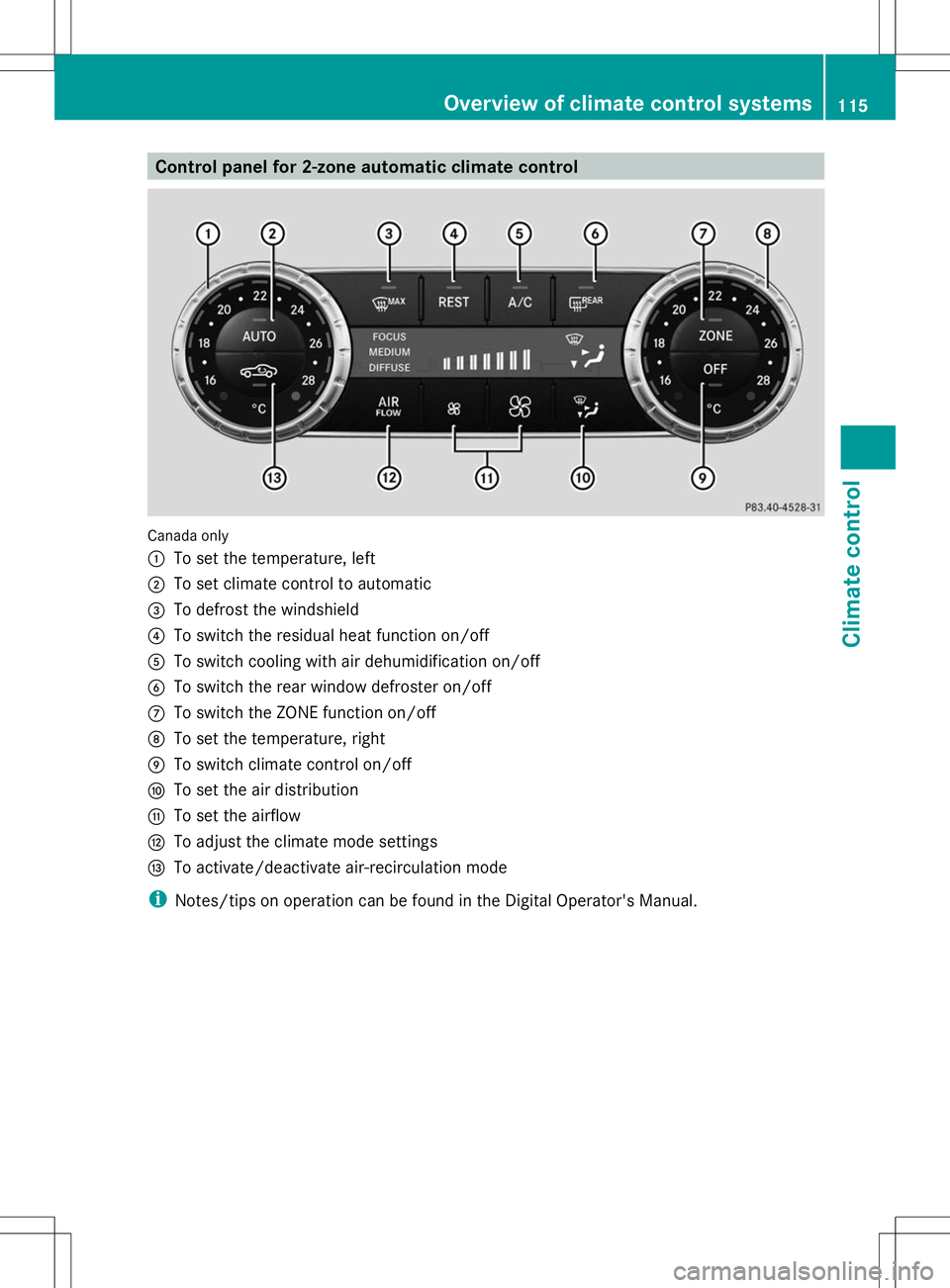
Control panel for 2-zone automatic climate control
Canada only
:
To set the temperature, left
; To set climate control to automatic
= To defrost the windshield
? To switch the residual heat function on/off
A To switch cooling with air dehumidification on/off
B To switch the rear window defroster on/off
C To switch the ZONE function on/off
D To set the temperature, right
E To switch climate control on/off
F To set the air distribution
G To set the airflow
H To adjust the climate mode settings
I To activate/deactivate air-recirculation mode
i Notes/tips on operation can be found in the Digital Operator's Manual. Overview of climate control systems
115Climate control
Page 118 of 284
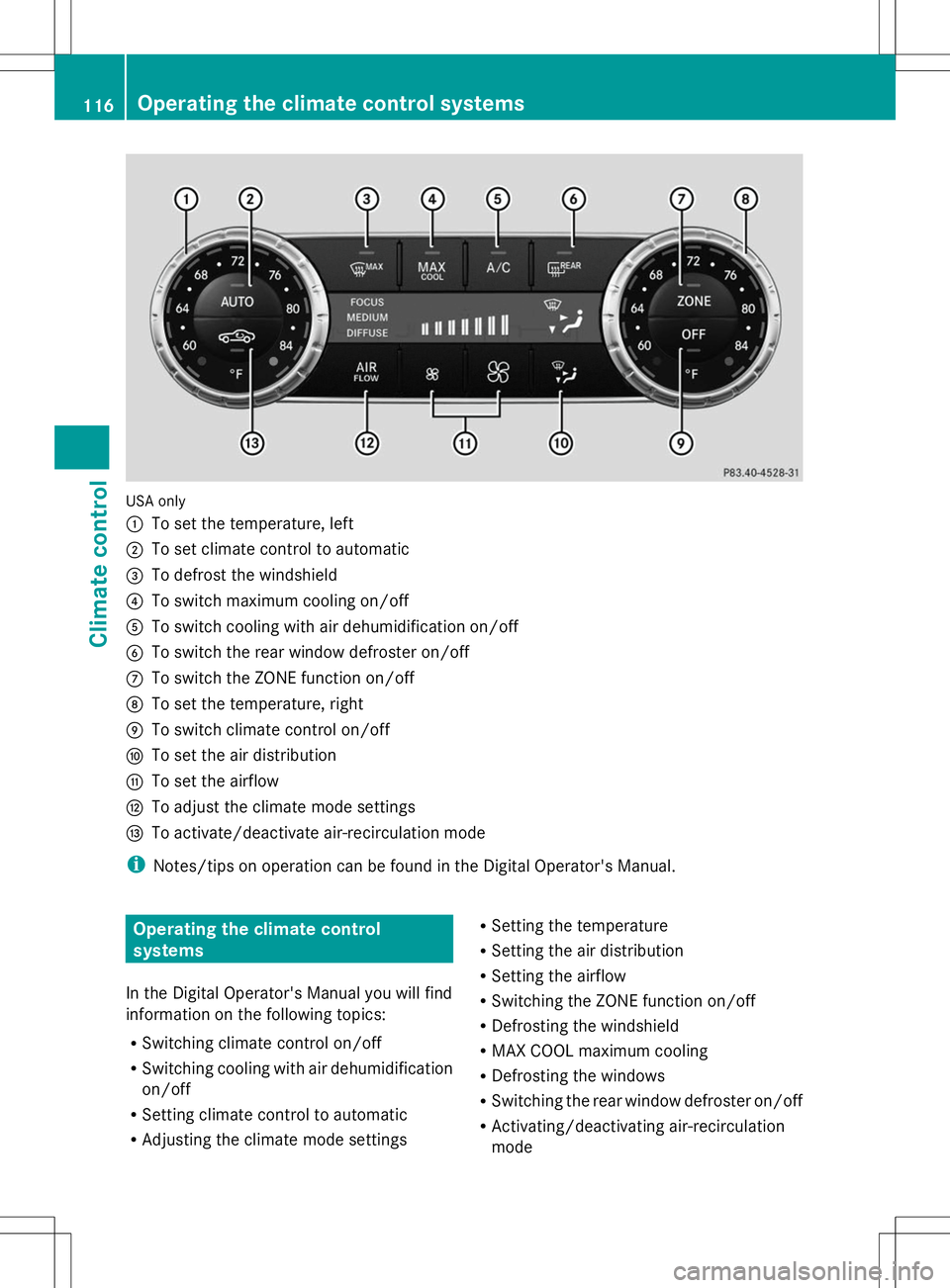
USA only
:
To set the temperature, left
; To set climate control to automatic
= To defrost the windshield
? To switch maximum cooling on/off
A To switch cooling with air dehumidification on/off
B To switch the rear window defroster on/off
C To switch the ZONE function on/off
D To set the temperature, right
E To switch climate control on/off
F To set the air distribution
G To set the airflow
H To adjust the climate mode settings
I To activate/deactivate air-recirculation mode
i Notes/tips on operation can be found in the Digital Operator's Manual. Operating the climate control
systems
In the Digital Operator's Manual you will find
information on the following topics:
R Switching climate control on/off
R Switching cooling with air dehumidification
on/off
R Setting climate control to automatic
R Adjusting the climate mode settings R
Setting the temperature
R Setting the air distribution
R Setting the airflow
R Switching the ZONE function on/off
R Defrosting the windshield
R MAX COOL maximum cooling
R Defrosting the windows
R Switching the rear window defroster on/off
R Activating/deactivating air-recirculation
mode 116
Operating the climate control systemsClimate control
Page 221 of 284
X
Replace cap :on the filler neck and turn
clockwise.
Ensure that the cap locks into place
securely.
X Check the oil level again with the oil
dipstick (Y page 217).
Further information on engine oil
(Y page 276). Checking and adding other service
products
Checking coolant level G
WARNING
Certain components in the engine
compartment, such as the engine, radiator
and parts of the exhaust system, can become
very hot. Working in the engine compartment
poses a risk of injury.
Where possible, let the engine cool down and
touch only the components described in the
following. G
WARNING
The engine cooling system is pressurized,
particularly when the engine is warm. When
opening the cap, you could be scalded by hot
coolant spraying out. There is a risk of injury.
Let the engine cool down before opening the
cap. Wear eye and hand protection when
opening the cap. Open the cap slowly half a
turn to allow pressure to escape. Example X
Park the vehicle on a level surface.
Only check the coolant level when the
vehicle is on a level surface and the engine
has cooled down.
X Turn the SmartKey to position 2in the
ignition lock (Y page 121).
On vehicles with KEYLESS-GO, press the
Start/Stop button twice (Y page 121).
X Check the coolant temperature gauge in
the multifunction display.
The coolant temperature must be below
158 ‡ (70 †).
X Turn the SmartKey to position
0(Y page 121) in the ignition lock.
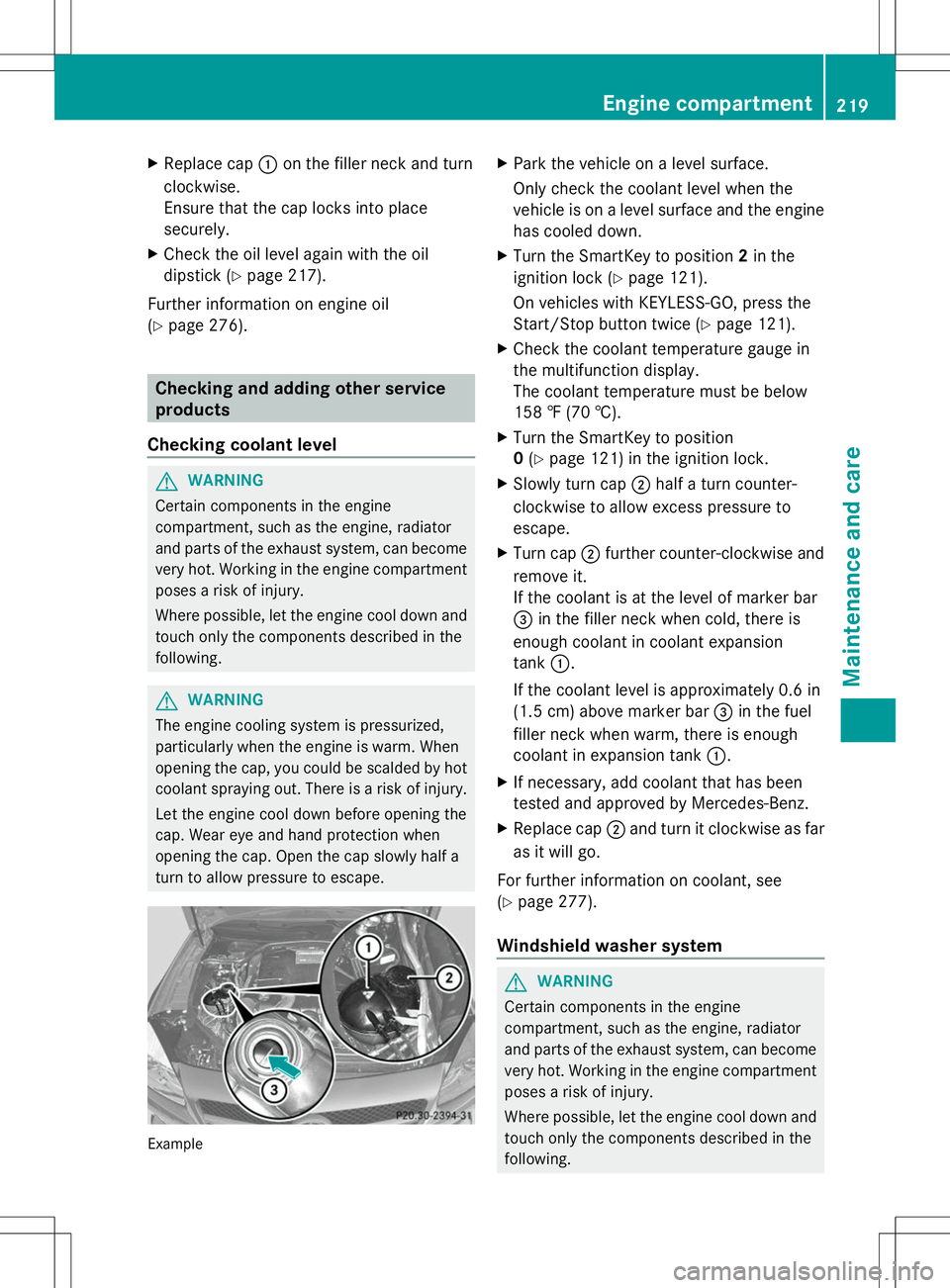
X Slowly turn cap ;half a turn counter-
clockwise to allow excess pressure to
escape.
X Turn cap ;further counter-clockwise and
remove it.
If the coolant is at the level of marker bar
= in the filler neck when cold, there is
enough coolant in coolant expansion
tank :.
If the coolant level is approximately 0.6 in
(1.5 cm) above marker bar =in the fuel
filler neck when warm, there is enough
coolant in expansion tank :.
X If necessary, add coolant that has been
tested and approved by Mercedes-Benz.
X Replace cap ;and turn it clockwise as far
as it will go.
For further information on coolant, see
(Y page 277).
Windshield washer system G
WARNING
Certain components in the engine
compartment, such as the engine, radiator
and parts of the exhaust system, can become
very hot. Working in the engine compartment
poses a risk of injury.
Where possible, let the engine cool down and
touch only the components described in the
following. Engine compartment
219Maintenance and care Z
Page 279 of 284
Coolant
Important safety notes G
WARNING
If antifreeze comes into contact with hot
components in the engine compartment, it
may ignite. There is a risk of fire and injury.
Let the engine cool down before you add
antifreeze. Make sure that antifreeze is not
spilled next to the filler neck. Thoroughly
clean the antifreeze from components before
starting the engine.
! Only add coolant that has been premixed
with the desired antifreeze protection. You
could otherwise damage the engine.
Further information on coolants can be
found in the Mercedes-Benz Specifications
for Service Products, MB Specifications for
Service Products 310.1, e.g. on the
Internet at
http://bevo.mercedes-benz.co m.Or
contact a qualified specialist workshop.
! Always use a suitable coolant mixture,
even in countries where high temperatures
prevail.
Otherwise, the engine cooling system is not
sufficiently protected from corrosion and
overheating.
i Have the coolant regularly replaced at a
qualified specialist workshop and the
replacement confirmed in the Maintenance
Booklet.
Comply with the important safety precautions
for service products when handling coolant
(Y page 275).
The coolant is a mixture of water and
antifreeze/corrosion inhibitor. It performs
the following tasks:
R corrosion protection
R antifreeze protection
R raising the boiling point
If the coolant has antifreeze protection down
to -35 ‡ (-37 †), the boiling point of the coolant during operation is approximately
266 ‡ (130 †).
The antifreeze/corrosion inhibitor
concentration in the engine cooling system
should:
R be at least 50%. This will protect the engine
cooling system against freezing down to
approximately -35 ‡ (-37 †).
R not exceed 55% (antifreeze protection
down to -49 ‡ [-45 †]). Otherwise, heat
will not be dissipated as effectively.
If the vehicle has lost coolant, add equal
amounts of water and antifreeze/corrosion
inhibitor.
Mercedes-Benz recommends an antifreeze/
corrosion inhibitor concentrate in
accordance with MB Specifications for
Service Products 310.1.
i When the vehicle is first delivered, it is
filled with a coolant mixture that ensures
adequate antifreeze and corrosion
protection.
i The coolant is checked with every
maintenance interval at a qualified
specialist workshop.
Filling capacities Model Capacity
SL 550
Approx. 13.7 US qt
(13.0 l) SL 63 AMG
Approx. 11.6 US qt
(11.0 l) SL 65 AMG V12
Approx. 13.5 US qt
(12.8 l) i
Use antifreeze/corrosion inhibitor
according to MB approval 325.0 or 326.0. Service products and filling capacities
277Technical data Z