ignition MERCEDES-BENZ SL-CLASS ROADSTER 2014 Owners Manual
[x] Cancel search | Manufacturer: MERCEDES-BENZ, Model Year: 2014, Model line: SL-CLASS ROADSTER, Model: MERCEDES-BENZ SL-CLASS ROADSTER 2014Pages: 284, PDF Size: 45.52 MB
Page 13 of 284
Head restraints
Adjusting ....................................... 101
see NECK-PRO head restraints
Heating
see Climate control
High-beam headlamps
Display message ............................ 163
Switching Adaptive Highbeam
Assist on/off ................................. 110
Switching on/off ........................... 108
Hill start assist .................................. 124
HOLD function Activating ....................................... 141
Deactivating ................................... 141
Function/notes ............................. 140
Home address
see also Digital Operator's Manual 188
Hood
Closing .......................................... .217
Display message ............................ 175
Important safety notes ..................216
Opening ......................................... 216
Hydroplaning ..................................... 131I
Ignition lock see Key positions
Immobilizer .......................................... 75
Indicator lamps see Warning and indicator lamps
Instrument cluster
Overview .......................................... 35
Warning and indicator lamps ...........36
Instrument cluster lighting ..............160
Intelligent Light System Activating/deactivating .................161
Interior lighting
Automatic control ..........................110
Delayed switch-off (on-board
computer) ...................................... 161
Emergency lighting ........................110
Manual control ............................... 110
Overview ........................................ 110
Reading lamp ................................. 110Setting the brightness of the
ambient lighting (on-board
computer)
...................................... 161
Setting the color of the ambient
lighting (on-board computer) .........161
Internet
Calling up the carousel view ..........200
Conditions for access ....................198
Entering the URL ............................ 200
Internet radio
Calling up ....................................... 199
Searching for stations .................... 199
iPod ®
see also Digital Operator's Manual 188 J
Jack Storage location ............................ 226
Using ............................................. 265
Jump starting (engine) ......................235 K
KEYLESS-GO Display message ............................ 163
Locking ............................................ 79
Start/Stop button .......................... 121
Starting the engine ........................123
Unlocking ......................................... 79
Key positions
KEYLESS-GO .................................. 121
SmartKey ....................................... 121
Kickdown
Driving tips .................................... 126
Knee bag .............................................. 49 L
Lamps see Warning and indicator lamps
Lane Keeping Assist
see Active Lane Keeping Assist
Lap time (RACETIMER) ......................161
LATCH-type (ISOFIX) child seat
anchors ................................................ 65
License plate lamp (display
message) ............................................ 163 Index
11
Page 18 of 284
Switching seat heating on/of
f....... 101
Switching seat ventilation on/off ..101
Selector lever
Positions ........................................ 126
Sensors (cleaning instructions) .......222
Service menu (on-board
computer) .......................................... 161
Service products Brake fluid ..................................... 276
Coolant (engine) ............................ 277
Engine oil ....................................... 276
Fuel ................................................ 275
Important safety notes ..................275
Refrigerant (air-conditioning
system) .......................................... 278
Washer fluid .................................. .278
Service work
see ASSYST PLUS
Settings
Factory (on-board computer) .........161
Menu overview .............................. 192
On-board computer .......................161
Setting the air distribution ...............116
Setting the airflow ............................116
Setting the date/time format see also Digital Operator's Manual 188
Setting the language
see also Digital Operator's Manual 188
Setting the time
see also Digital Operator's Manual 188
SETUP (on-board computer) .............161
Side impact air bag .............................49
Side marker lamp (display
message) ............................................ 163
Side windows Cleaning ......................................... 222
Important safety information .....89, 90
Opening/closing (all) .......................90
Opening/closing (front) ...................90
Overview .......................................... 89
Problem (malfunction) .....................91
Resetting ......................................... 90
SIRIUS services
see also Digital Operator's Manual 188
SmartKey
Changing the battery .......................81
Changing the programming .............79Checking the battery
.......................80
Display message ............................ 163
Door central locking/unlocking .......78
Important safety notes ....................78
Loss ................................................. 82
Mechanical key ................................ 80
Opening/closing the roof ................93
Overview .......................................... 78
Positions (ignition lock) .................121
Problem (malfunction) .....................82
Starting the engine ........................123
SMS
see also Digital Operator's Manual 188
Sockets
Front-passenger footwell ...............206
Points to observe before use .........206
Trunk ............................................. 206
Under the armrest .........................206
Specialist workshop ............................ 30
Special seat belt retractor .................. 66
Speed, controlling see Cruise control
Speedometer
Digital ............................................ 161
In the Instrument cluster .................35
Segments ...................................... 160
Selecting the unit of
measurement ................................ 161
SPORT handling mode
Activating/deactivating (AMG
vehicles) .......................................... 71
Warning lamp ................................. 180
SRS
see SRS (Supplemental Restraint
System)
SRS (Supplemental Restraint
System)
Display message ............................ 168
Introduction ..................................... 45
Warning lamp ................................. 182
Warning lamp (function) ................... 45
Standing lamps
Display message ............................ 163
Switching on/off ........................... 108
Start/stop function
see ECO start/stop function
Starting (engine) ................................ 123
STEER CONTROL .................................. 7416
Index
Page 23 of 284
Introduction
In addition to the printed Operator's Manual,
the vehicle document wallet also contains
further operating instructions, such as:
R Digital Operator's Manual on CD
R Maintenance Booklet
R Equipment-dependent supplements
The printed Operator's Manual provides
information on selected functions of your
vehicle.
You can also access the Digital Operator's
Manual via COMAND. If you have further
questions that are not covered in the printed
Operator's Manual, please consult the Digital
Operator's Manual.
i You will not incur any costs when calling
up the Digital Operator's Manual. It works
without connecting to the Internet.
In the following sections you will find further
information about:
R how to install the Digital Operator's Manual
on your COMAND (Y page 21)
R how to access and operate the Digital
Operator's Manual
R various options for accessing the individual
topics covered by the Digital Operator's
Manual.
There are three options for accessing via the
basic menu of the Digital Operator's Manual:
R Visual search
R Keyword Search
R Contents
You can change the set language for the
Digital Operator's Manual under "Settings" in
the basic menu. Installation
Check whether or not the Digital Operator's
Manual has already been installed. To do so,
call up the Digital Operator's Manual via
COMAND as follows: X
Using the COMAND controller, select the
® symbol from the menu bar in the
COMAND display and press Wto confirm.
X Choose the "Operator's Manual" selection
card and press Wto confirm.
There are two possibilities:
1. The Digital Operator's Manual is
installed. The basic menu for the Digital
Operator's Manual opens.
2. The Digital Operator's Manual is not
installed. The following message appears:
The Operator's Manual has not yet
The Operator's Manual has not yet
been installed. Please insert the been installed. Please insert the
correct disc. correct disc.
If the Digital Operator's Manual has not yet
been installed, you have the option of
installing it yourself. You will find the
installation CD required in the vehicle
document wallet.
The duration of the installation process can
vary.
The installation process takes approximately
5 minutes. This timespan only applies if you
install the Digital Operator's Manual while the
vehicle is at a standstill and no other
COMAND functions are in use at the time. The
duration of the installation process may
increase accordingly if other
COMAND functions such as navigation or
telephony are in use at the time.
If you encounter any problems during
installation, please contact your authorized
Mercedes-Benz Center.
X To install the Digital Operator's
Manual: stop the vehicle safely, paying
attention to road and traffic conditions.
X Turn the SmartKey to position 2in the
ignition lock (Y page 121).
X Switch on COMAND.
X Insert the installation CD into the CD/DVD
drive.
X Select the desired language for the
installation.
X Follow the installation steps on the
COMAND display. Digital Operator's Manual
21
Page 31 of 284
If you have purchased a used car, please send
us the "Notification of Used Car Purchase" in
the Service and Guarantee booklet or simply
call the Mercedes-Benz Customer Assistance
Center (USA) at the hotline number
1-800-FOR-MERCedes(1-800-367-6372) or
Customer Service (Canada) at
1-800-387-0100. Vehicle operation outside the USA
and Canada
If you plan to operate your vehicle in foreign
countries, please be aware that:
R service facilities or replacement parts may
not be readily available.
R unleaded fuel for vehicles with a catalytic
converter may not be available. Leaded fuel
may cause damage to the catalytic
converter.
R the fuel may have a considerably lower
octane rating. Unsuitable fuel can cause
engine damage.
Some Mercedes-Benz models are available
for delivery in Europe through our European
Delivery Program. For details, consult an
authorized Mercedes-Benz Center or write to
one of the following addresses.
In the USA
Mercedes-Benz USA, LLC
European Delivery Department
One Mercedes Drive
Montvale, NJ 07645-0350
In Canada
Mercedes-Benz Canada, Inc.
European Delivery Department
98 Vanderhoof Avenue
Toronto, Ontario M4G 4C9 Operating safety
Important safety notes
G
WARNING
If you do not have the prescribed service/
maintenance work or any required repairs
carried out, this can result in malfunctions or
system failures. There is a risk of an accident.
Always have the prescribed service/
maintenance work as well as any required
repairs carried out at a qualified specialist
workshop. G
WARNING
If you switch off the ignition while driving,
safety-relevant functions are only available
with limitations, or not at all. This could affect,
for example, the power steering and the brake
boosting effect. You will require considerably
more effort to steer and brake. There is a risk
of an accident.
Do not switch off the ignition while driving. G
WARNING
Modifications to electronic components, their
software as well as wiring can impair their
function and/or the function of other
networked components. In particular,
systems relevant to safety could also be
affected. As a result, these may no longer
function as intended and/or jeopardize the
operating safety of the vehicle. There is an
increased risk of an accident and injury.
Never tamper with the wiring as well as
electronic components or their software. You
should have all work to electrical and
electronic equipment carried out at a qualified
specialist workshop.
! There is a risk of damage to the vehicle if:
R the vehicle becomes stuck, e.g. on a high
curb or an unpaved road
R you drive too fast over an obstacle, e.g.
a curb or a hole in the road
R a heavy object strikes the undercarriage
or parts of the chassis. Introduction
29 Z
Page 36 of 284
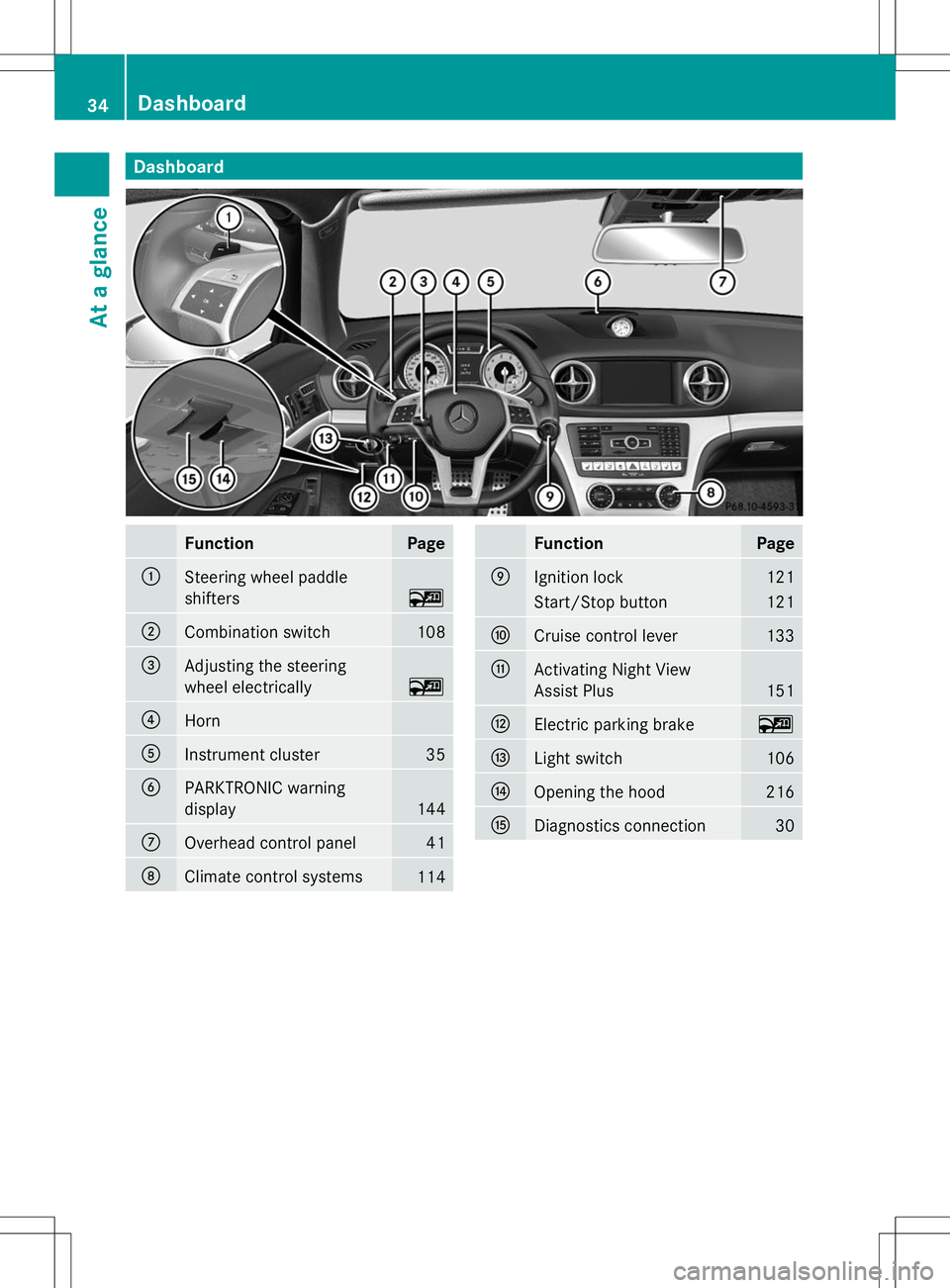
Dashboard
Function Page
:
Steering wheel paddle
shifters
~
;
Combination switch 108
=
Adjusting the steering
wheel electrically
~
?
Horn
A
Instrument cluster 35
B
PARKTRONIC warning
display
144
C
Overhead control panel 41
D
Climate control systems
114 Function Page
E
Ignition lock 121
Start/Stop button 121
F
Cruise control lever 133
G
Activating Night View
Assist Plus 151
H
Electric parking brake ~
I
Light switch 106
J
Opening the hood 216
K
Diagnostics connection 3034
Dashboa
rdAt a glance
Page 46 of 284
Useful information
i This Operator's Manual describes all
models and all standard and optional
equipment of your vehicle available at the
time of publication of the Operator's
Manual. Country-specific differences are
possible. Please note that your vehicle may
not be equipped with all features
described. This also applies to safety-
related systems and functions.
i Read the information on qualified
specialist workshops: (Y page 30).Panic alarm
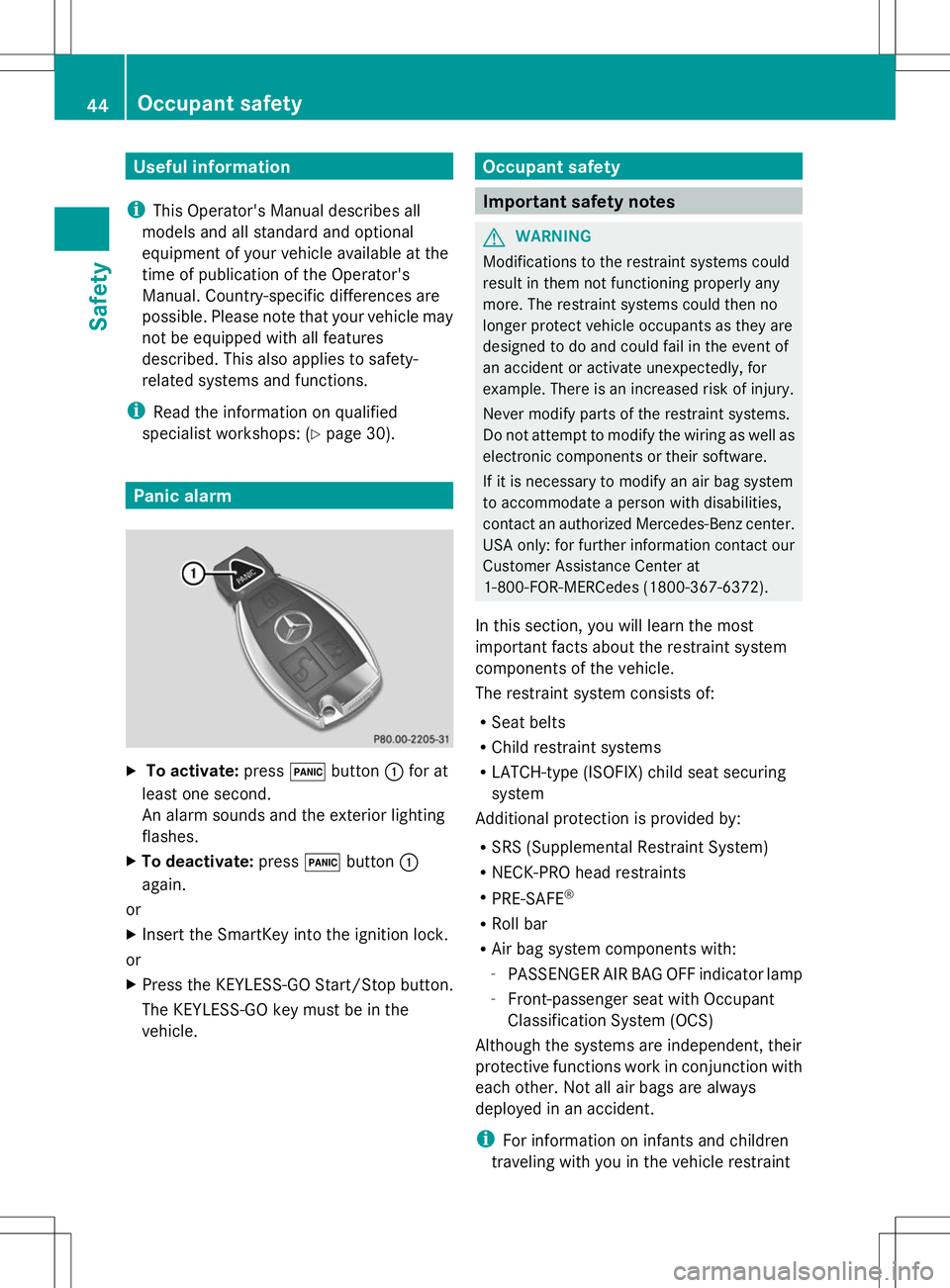
X
To activate: press!button :for at
least one second.
An alarm sounds and the exterior lighting
flashes.
X To deactivate: press!button :
again.
or
X Insert the SmartKey into the ignition lock.
or
X Press the KEYLESS-GO Start/Stop button.
The KEYLESS-GO key must be in the
vehicle. Occupant safety
Important safety notes
G
WARNING
Modifications to the restraint systems could
result in them not functioning properly any
more. The restraint systems could then no
longer protect vehicle occupants as they are
designed to do and could fail in the event of
an accident or activate unexpectedly, for
example. There is an increased risk of injury.
Never modify parts of the restraint systems.
Do not attempt to modify the wiring as well as
electronic components or their software.
If it is necessary to modify an air bag system
to accommodate a person with disabilities,
contact an authorized Mercedes-Benz center.
USA only: for further information contact our
Customer Assistance Center at
1-800-FOR-MERCedes (1800-367-6372).
In this section, you will learn the most
important facts about the restraint system
components of the vehicle.
The restraint system consists of:
R Seat belts
R Child restraint systems
R LATCH-type (ISOFIX) child seat securing
system
Additional protection is provided by:
R SRS (Supplemental Restraint System)
R NECK-PRO head restraints
R PRE-SAFE ®
R Roll bar
R Air bag system components with:
-PASSENGER AIR BAG OFF indicator lamp
- Front-passenger seat with Occupant
Classification System (OCS)
Although the systems are independent, their
protective functions work in conjunction with
each other. Not all air bags are always
deployed in an accident.
i For information on infants and children
traveling with you in the vehicle restraint 44
Occupant safetySafety
Page 47 of 284
systems for infants and children, see
"Children in the vehicle" (Y
page 62).SRS (Supplemental Restraint System)
Introduction SRS consists of:
R
The 6 SRS warning lamp
R Air bags
R The air bag control unit with crash sensors
R Emergency Tensioning Device (ETD) for
seat belts
R Seat belt force limiter
SRS reduces the risk of vehicle occupants
coming into contact with parts of the
vehicle's interior in the event of an accident.
It can also reduce the forces to which vehicle
occupants are subjected during an accident.
SRS warning lamp G
WARNING
If SRS is malfunctioning, child restraint
system components may be triggered
unintentionally or might not be triggered at all
in the event of an accident with a high rate of
vehicle deceleration. There is an increased
risk of injury, possibly even fatal.
Have SRS checked and repaired immediately
at a qualified specialist workshop.
SRS functions are checked regularly when
you switch on the ignition and when the
engine is running. Therefore, malfunctions
can be detected in good time.
The 6 SRS warning lamp in the instrument
cluster lights up when the ignition is switched
on. It goes out no later than a few seconds
after the engine is started.
The SRS components are in operational
readiness when the 6SRS warning lamp
goes out while the engine is running. There is a malfunction if:
R
the 6 SRS warning lamp does not light
up when the ignition is switched on
R the engine is running and the 6SRS
warning lamp does not go out after a few
seconds
R the engine is running and the 6SRS
warning lamp lights up again
Safety guidelines for seat belts,
Emergency Tensioning Devices (ETDs)
and air bags G
WARNING
R Damaged seat belts or seat belts that have
been subjected to stress in an accident
must be replaced. Their anchoring points
must also be checked. Only use seat belts
installed or supplied by an authorized
Mercedes-Benz Center.
R Air bags and pyrotechnic Emergency
Tensioning Devices (ETDs) contain
perchlorate material, which may require
special handling and regard for the
environment. Check your national disposal
guidelines. In California, see
www.dtsc.ca.gov/HazardousWaste/
Perchlorate/index.cfm.
R Air bags and ETDs are designed to function
on a one-time-only basis. An air bag or ETD
that has deployed must be replaced.
R Do not pass seat belts over sharp edges.
They could tear.
R Do not make any modification that could
change the effectiveness of the seat belts.
R Do not bleach or dye seat belts, as this may
severely weaken them. In a crash, they may
not be able to provide adequate protection.
R Do not make any modifications to the SRS
wiring or components.
R Do not modify or remove any components
or parts of the SRS. Occupant safety
45Safety
Z
Page 56 of 284
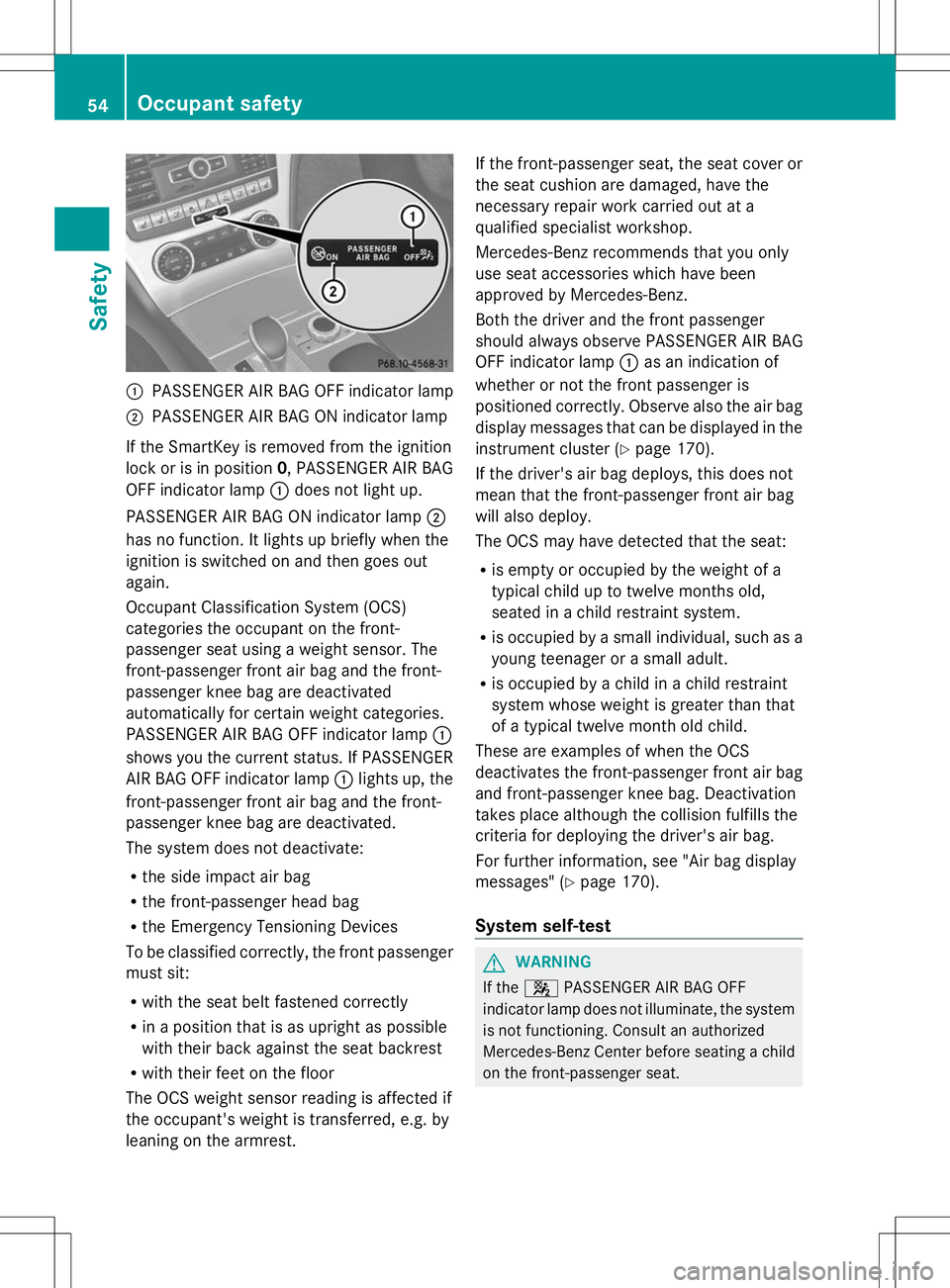
:
PASSENGER AIR BAG OFF indicator lamp
; PASSENGER AIR BAG ON indicator lamp
If the SmartKey is removed from the ignition
lock or is in position 0, PASSENGER AIR BAG
OFF indicator lamp :does not light up.
PASSENGER AIR BAG ON indicator lamp ;
has no function. It lights up briefly when the
ignition is switched on and then goes out
again.
Occupant Classification System (OCS)
categories the occupant on the front-
passenger seat using a weight sensor. The
front-passenger front air bag and the front-
passenger knee bag are deactivated
automatically for certain weight categories.
PASSENGER AIR BAG OFF indicator lamp :
shows you the current status. If PASSENGER
AIR BAG OFF indicator lamp :lights up, the
front-passenger front air bag and the front-
passenger knee bag are deactivated.
The system does not deactivate:
R the side impact air bag
R the front-passenger head bag
R the Emergency Tensioning Devices
To be classified correctly, the front passenger
must sit:
R with the seat belt fastened correctly
R in a position that is as upright as possible
with their back against the seat backrest
R with their feet on the floor
The OCS weight sensor reading is affected if
the occupant's weight is transferred, e.g. by
leaning on the armrest. If the front-passenger seat, the seat cover or
the seat cushion are damaged, have the
necessary repair work carried out at a
qualified specialist workshop.
Mercedes-Benz recommends that you only
use seat accessories which have been
approved by Mercedes-Benz.
Both the driver and the front passenger
should always observe PASSENGER AIR BAG
OFF indicator lamp
:as an indication of
whether or not the front passenger is
positioned correctly. Observe also the air bag
display messages that can be displayed in the
instrument cluster (Y page 170).
If the driver's air bag deploys, this does not
mean that the front-passenger front air bag
will also deploy.
The OCS may have detected that the seat:
R is empty or occupied by the weight of a
typical child up to twelve months old,
seated in a child restraint system.
R is occupied by a small individual, such as a
young teenager or a small adult.
R is occupied by a child in a child restraint
system whose weight is greater than that
of a typical twelve month old child.
These are examples of when the OCS
deactivates the front-passenger front air bag
and front-passenger knee bag. Deactivation
takes place although the collision fulfills the
criteria for deploying the driver's air bag.
For further information, see "Air bag display
messages" (Y page 170).
System self-test G
WARNING
If the 4 PASSENGER AIR BAG OFF
indicator lamp does not illuminate, the system
is not functioning. Consult an authorized
Mercedes-Benz Center before seating a child
on the front-passenger seat. 54
Occupant safetySafety
Page 57 of 284
G
WARNING
Never place anything between seat cushion
and child seat (e.g. a pillow), since it reduces
the effectiveness of the OCS. The underside
and rear side child restraint system must be
placed entirely on the seat cushion and the
backrest of the front-passenger seat
backrest.
If necessary, adjust the tilt of the passenger
seat backrest.
An incorrectly mounted child seat could cause
injuries to the child in case of an accident,
instead of increasing protection for the child.
Follow the manufacturer's instructions for
installation of child restraint systems.
The PASSENGER AIR BAG OFF indicator lamp
lights up:
R if you turn the SmartKey in the ignition lock
to position 1or 2
R if you press the KEYLESS-GO Start/Stop
button once or twice on vehicles with
KEYLESS-GO
R if an adult is seated properly on the front-
passenger seat and the OCS classifies the
occupant as an adult
The PASSENGER AIR BAG OFF indicator lamp
goes out again after approximately
6 seconds.
If the seat is not occupied and the OCS
detects that the front-passenger seat is
empty, the PASSENGER AIR BAG OFF
indicator lamp will continue to light up. The
PASSENGER AIR BAG OFF indicator lamp will
not go out.
For more information about the OCS, see
"Problems with the Occupant Classification
System" (Y page 56). Occupant safety
55Safety Z
Page 62 of 284
around a person and another person or
other objects at the same time.
R Seat belts should not be worn twisted. In a
crash, you would not have the full width of
the seat belt to distribute impact forces.
The twisted seat belt against your body
could cause injuries.
R Pregnant women should also always use a
lap-shoulder belt. The lap belt portion
should be positioned as low as possible on
the hips to avoid any possible pressure on
the abdomen.
R Place the seat backrest in a position that is
as upright as possible.
R Check your seat belt during travel to make
sure it is properly positioned.
R Never place your feet on the instrument
panel, dashboard, or on the seat. Always
keep both feet on the floor in front of the
seat.
R When using a seat belt to secure infant
restraints, toddler restraints, or children in
booster seats, always follow the child seat
manufacturer's instructions.
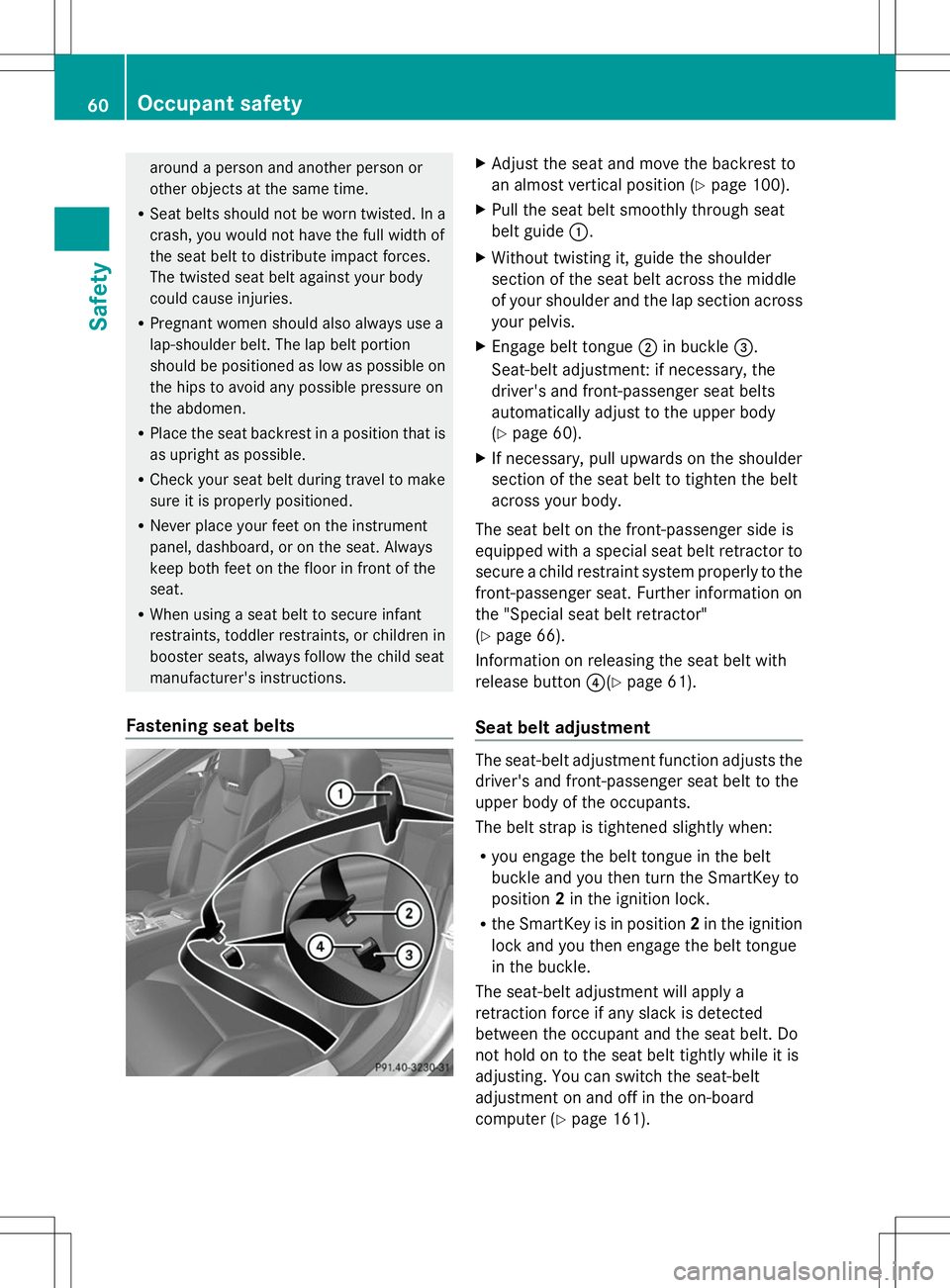
Fastening seat belts X
Adjust the seat and move the backrest to
an almost vertical position (Y page 100).
X Pull the seat belt smoothly through seat
belt guide :.
X Without twisting it, guide the shoulder
section of the seat belt across the middle
of your shoulder and the lap section across
your pelvis.
X Engage belt tongue ;in buckle =.
Seat-belt adjustment: if necessary, the
driver's and front-passenger seat belts
automatically adjust to the upper body
(Y page 60).
X If necessary, pull upwards on the shoulder
section of the seat belt to tighten the belt
across your body.
The seat belt on the front-passenger side is
equipped with a special seat belt retractor to
secure a child restraint system properly to the
front-passenger seat. Further information on
the "Special seat belt retractor"
(Y page 66).
Information on releasing the seat belt with
release button ?(Ypage 61).
Seat belt adjustment The seat-belt adjustment function adjusts the
driver's and front-passenger seat belt to the
upper body of the occupants.
The belt strap is tightened slightly when:
R you engage the belt tongue in the belt
buckle and you then turn the SmartKey to
position 2in the ignition lock.
R the SmartKey is in position 2in the ignition
lock and you then engage the belt tongue
in the buckle.
The seat-belt adjustment will apply a
retraction force if any slack is detected
between the occupant and the seat belt. Do
not hold on to the seat belt tightly while it is
adjusting. You can switch the seat-belt
adjustment on and off in the on-board
computer (Y page 161).60
Occupant safetySafety