phone MERCEDES-BENZ SL-CLASS ROADSTER 2014 Owners Manual
[x] Cancel search | Manufacturer: MERCEDES-BENZ, Model Year: 2014, Model line: SL-CLASS ROADSTER, Model: MERCEDES-BENZ SL-CLASS ROADSTER 2014Pages: 284, PDF Size: 45.52 MB
Page 15 of 284
Messages
see Display messages
Mirrors
see Exterior mirrors
see Vanity mirror (in the sun visor)
Mobile phone
Menu (on-board computer) ............161
Modifying the programming
(SmartKey) ........................................... 79
MOExtended tires .............................. 227
Mounting wheels Lowering the vehicle ......................267
Mounting a new wheel ...................267
Preparing the vehicle .....................264
Raising the vehicle .........................265
Removing a wheel ..........................266
Securing the vehicle against
rolling away ................................... 264
MP3
Operation ....................................... 161
see also Digital Operator's Manual 188
see separate operating instructions
Multifunction display
Function/notes ............................. 160
Permanent displa y......................... 161
Multifunction steering wheel
Operating the on-board computer .160
Overview .......................................... 37
Music files
see also Digital Operator's Manual 188 N
Navigation Menu (on-board computer) ............161
see also Digital Operator's Manual 188
see separate operating instructions
NECK-PRO head restraints
Operation ........................................ .57
Resetting after being triggered ........58
Night View Assist Plus
Activating/deactivating .................151
Cleaning ......................................... 223
Function/notes ............................. 149
Problem (malfunction) ...................153
Notes on breaking-in a new vehicle 120 O
Occupant Classification System
(OCS) Faults ............................................... 56
Operation ........................................ .51
System self-test ............................... 54
Occupant safety
Children in the vehicle .....................62
Important safety notes ....................44
PRE-SAFE ®
(anticipatory
occupant protection) .......................57
OCS
Faults ............................................... 56
Operation ........................................ .51
System self-test ............................... 54
Odometer ........................................... 161
Oil see Engine oil
On-board computer
AMG menu ..................................... 161
Assistance menu ........................... 161
Audio menu ................................... 161
Convenience submenu ..................161
Displaying a service message ........221
Display messages ..........................163
DISTRONIC PLUS ........................... 138
Factory settings submenu .............161
Important safety notes ..................160
Instrument cluster submenu ..........161
Lighting submenu .......................... 161
Menu overview .............................. 161
Message memory .......................... 163
Navigation menu ............................ 161
Operation ....................................... 160
RACETIMER ................................... 161
Service menu ................................. 161
Settings menu ............................... 161
Standard displa y............................ 161
Telephone menu ............................ 161
Trip menu ...................................... 161
Video DVD operation .....................161
Online and Internet functions
Ending the connection ...................199
Establishing/ending the
connection ..................................... 198 Index
13
Page 16 of 284
Operating safety
Declaration of conformity ................30
Important safety notes ....................29
Operating system
see On-board computer
Operator's Manual
Vehicle equipment ...........................27
Outside temperature display ...........160
Overhead control panel ......................41 P
Paint code number ............................274
Paintwork (cleaning instructions) ...222
Panic alarm .......................................... 44
Parking ............................................... 130
Important safety notes ..................130
Position of exterior mirror, front-
passenger side ............................... 102
Rear view camera .......................... 147
see PARKTRONIC
Parking aid
Active Parking Assist .....................145
see Exterior mirrors
see PARKTRONIC
Parking brake
Display message ............................ 163
Parking lamps
Switching on/off ........................... 108
PARKTRONIC
Deactivating/activating .................145
Driving system ............................... 144
Function/notes ............................. 144
Important safety notes ..................144
Problem (malfunction) ...................145
Range of the sensors .....................144
Warning displa y............................. 145
PASSENGER AIR BAG OFF
Problem (malfunction) .....................56
Problems (malfunction) .................. 170
PASSENGER AIR BAG OFF indicator
lamp ...................................................... 51
Phone book see also Digital Operator's Manual 188
Plastic trim (cleaning instructions) .223
Power closing feature .........................84
Power washers .................................. 222Power windows
see Side windows
PRE-SAFE ®
(anticipatory occupant
protection) Display message ............................ 167
Operation ........................................ .57
PRE-SAFE ®
Brake
Activating/deactivating .................161
Display message ............................ 167
Function/notes ................................ 73
Warning lamp ................................. 184
Program selector button ..................126
Protection of the environment General notes .................................. 26
Pulling away (automatic
transmission) ..................................... 124 Q
Qualified specialist workshop ...........30 R
RACE START Important safety notes ..................141
RACETIMER (on-board
computer) .......................................... 161
Radar sensor system Activating/deactivating .................161
Display message ............................ 163
Radio
Selecting a station .........................161
see separate operating instructions
Radio mode
see also Digital Operator's Manual 188
Radio-wave reception/
transmission in the vehicle
Declaration of conformity ................30
Reading lamp ..................................... 110
Rear fog lamp Display message ............................ 163
Rear lamps
see Lights
Rear view camera
Cleaning instructions .....................222
Function/notes ............................. 147
Switching on/off ........................... 14814
Index
Page 19 of 284
Steering (display message)
..............175
Steering wheel Adjusting (electrically) ...................102
Button overview ............................... 37
Buttons (on-board computer) ......... 160
Important safety notes ..................102
Paddle shifters ............................... 126
Storing settings (memory function) 103
Steering wheel (cleaning
instructions) ...................................... 223
Steering wheel paddle shifters ........126
Stopwatch (RACETIMER) ................... 161
Stowage areas ................................... 204
Stowage compartments Armrest (under) ............................. 204
Center console .............................. 204
Cup holders ................................... 206
Display message) ........................... 163
Eyeglasses compartment ...............204
Glove box ...................................... .204
Important safety information .........204
Stowage net ................................... 204
Stowage net ....................................... 204
Stowage space Center console (rear) .....................204
Umbrella holder ............................. 204
Stowage well beneath the trunk
floor .................................................... 206
Sun visor ............................................ 206
Surround lighting (on-board
computer) .......................................... 161
Suspension tuning Active Body Control (AMG vehicles) 144
Active Body Control (except AMG
vehicles) ........................................ 142
SETUP (on-board computer) ..........161
Switching air-recirculation mode
on/off ................................................. 116
Switching off the alarm (ATA) ............75
Systems settings (COMAND) see also Digital Operator's Manual 188 T
Tachometer ........................................ 160
Tail lamps Display message ............................ 163
see Lights Tank content
Fuel gauge ....................................... 35
Technical data
Capacities ...................................... 275
Information .................................... 274
Tires/wheels ................................. 268
Vehicle data ................................... 279
TELEAID
Call priority .................................... 211
Downloading destinations
(COMAND) ..................................... 207
Downloading routes .......................207
Emergency call .............................. 208
Geo fencing ................................... 207
Locating a stolen vehicle ...............207
MB info call button ........................210
Remote vehicle locking ..................207
Roadside Assistance button ..........209
Search & Send ............................... 207
Self-test ......................................... 207
Speed alert .................................... 207
System .......................................... 207
Triggering the vehicle alarm ........... 207
Vehicle remote malfunction
diagnosis ....................................... 207
Vehicle remote unlocking ..............207
Tele Aid
General notes ................................ 207
Telephone
Accepting a call ............................. 161
Menu (on-board computer) ............161
Number from the phone book ....... .161
Redialing ........................................ 161
Rejecting/ending a call .................161
see also Digital Operator's Manual 188
Telephone compartment ................204
Temperature
Coolant .......................................... 160
Coolant (on-board computer) ......... 161
Engine oil (on-board computer) ...... 161
Outside temperature ..................... .160
Setting (climate control) ................116
Theft deterrent systems
ATA (Anti-Theft Alarm system) .........75
Immobilizer ...................................... 75
Timing (RACETIMER) .........................161
TIREFIT kit .......................................... 228 Index
17
Page 39 of 284
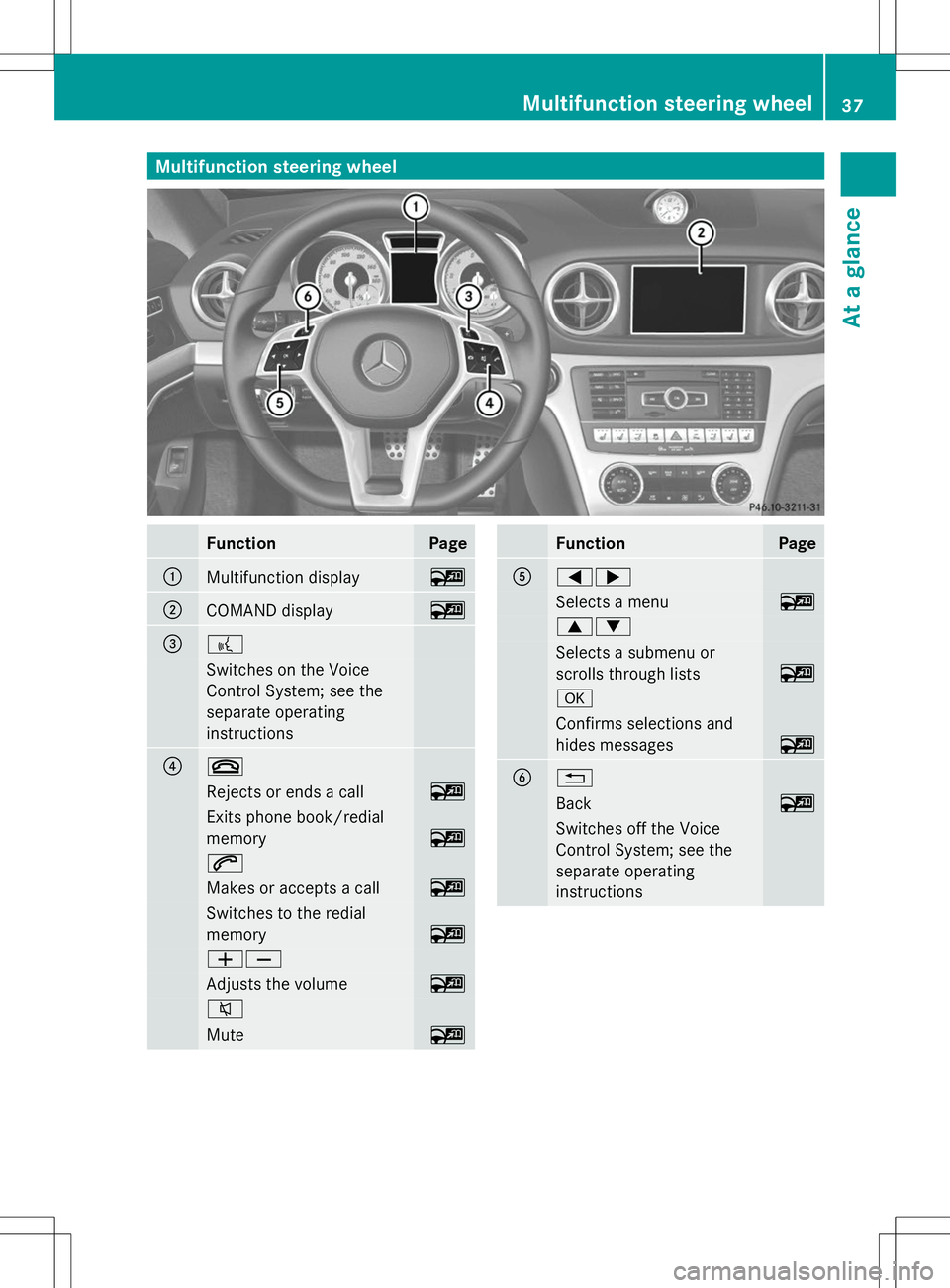
Multifunction steering wheel
Function Page
:
Multifunction display ~
;
COMAND display ~
=
?
Switches on the Voice
Control System; see the
separate operating
instructions ?
~
Rejects or ends a call ~
Exits phone book/redial
memory
~
6
Makes or accepts a call ~
Switches to the redial
memory
~
WX
Adjusts the volume ~
8
Mute ~ Function Page
A
=;
Selects a menu ~
9:
Selects a submenu or
scrolls through lists
~
a
Confirms selections and
hides messages
~
B
%
Back ~
Switches off the Voice
Control System; see the
separate operating
instructionsMultifunction steering wheel
37At a glance
Page 77 of 284
Theft deterrent locking system
Immobilizer
X To activate with the SmartKey: remove
the SmartKey from the ignition lock.
X To activate with KEYLESS-GO: switch the
ignition off and open the driver's door.
X To deactivate: switch on the ignition.
The immobilizer prevents your vehicle from
being started without the correct SmartKey.
When leaving the vehicle, always take the
SmartKey with you and lock the vehicle. The
engine can be started by anyone with a valid
SmartKey that is left inside the vehicle.
i The immobilizer is always deactivated
when you start the engine.
In the event that the engine cannot be
started when the starter battery is fully
charged, the immobilizer may be faulty.
Contact an authorized Mercedes-Benz
Center or call 1-800-FOR-MERCedes (in
USA) or 1-800-387-010 0(in Canada). ATA (anti-theft alarm system)
X
To arm: lock the vehicle with the SmartKey
or KEYLESS-GO.
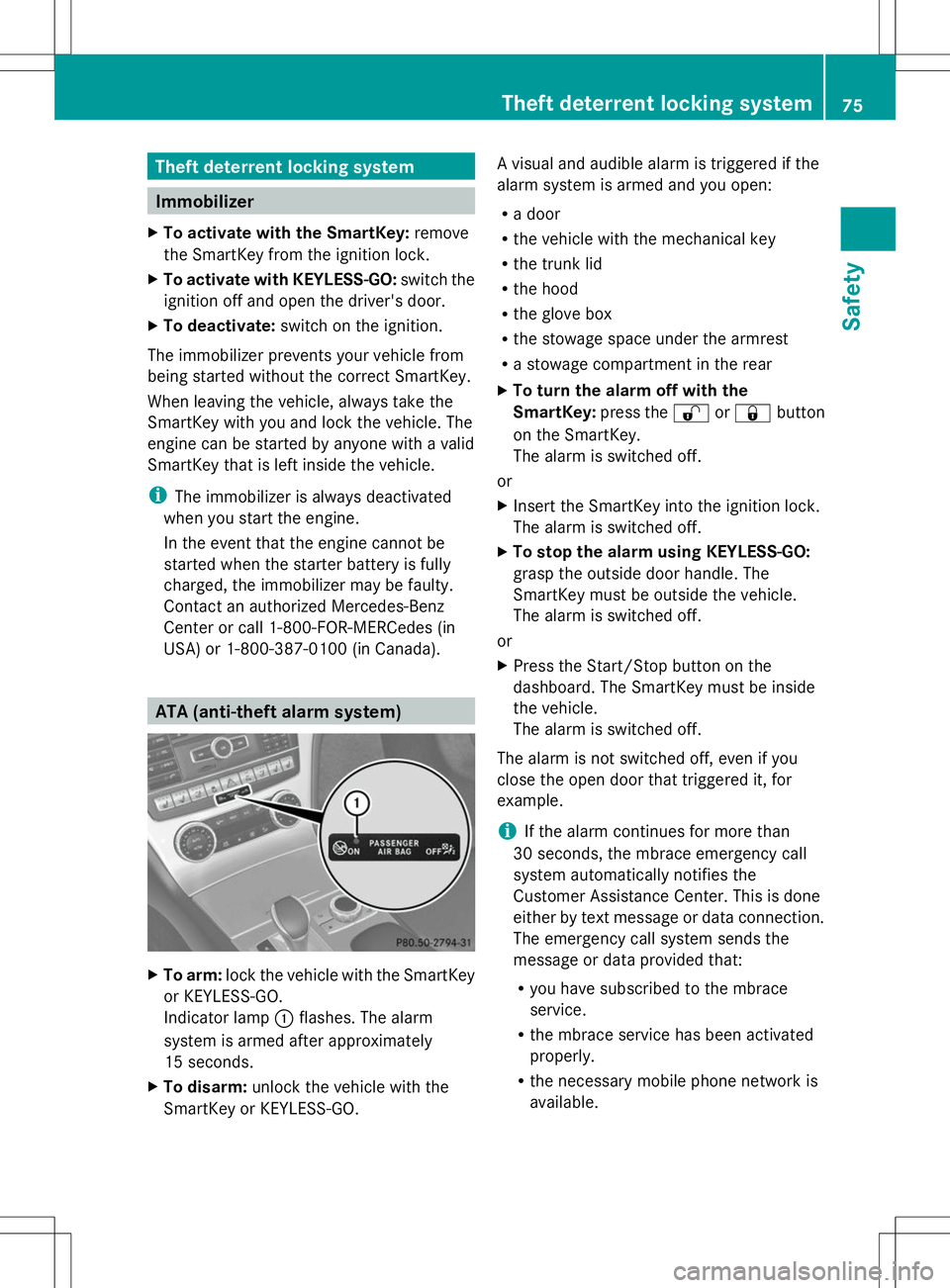
Indicator lamp :flashes. The alarm
system is armed after approximately
15 seconds.
X To disarm: unlock the vehicle with the
SmartKey or KEYLESS-GO. A visual and audible alarm is triggered if the
alarm system is armed and you open:
R
a door
R the vehicle with the mechanical key
R the trunk lid
R the hood
R the glove box
R the stowage space under the armrest
R a stowage compartment in the rear
X To turn the alarm off with the
SmartKey: press the%or& button
on the SmartKey.
The alarm is switched off.
or
X Insert the SmartKey into the ignition lock.
The alarm is switched off.
X To stop the alarm using KEYLESS-GO:
grasp the outside door handle. The
SmartKey must be outside the vehicle.
The alarm is switched off.
or
X Press the Start/Stop button on the
dashboard. The SmartKey must be inside
the vehicle.
The alarm is switched off.
The alarm is not switched off, even if you
close the open door that triggered it, for
example.
i If the alarm continues for more than
30 seconds, the mbrace emergency call
system automatically notifies the
Customer Assistance Center. This is done
either by text message or data connection.
The emergency call system sends the
message or data provided that:
R you have subscribed to the mbrace
service.
R the mbrace service has been activated
properly.
R the necessary mobile phone network is
available. Theft deterrent locking system
75Safety Z
Page 80 of 284
Useful information
i This Operator's Manual describes all
models and all standard and optional
equipment of your vehicle available at the
time of publication of the Operator's
Manual. Country-specific differences are
possible. Please note that your vehicle may
not be equipped with all features
described. This also applies to safety-
related systems and functions.
i Read the information on qualified
specialist workshops: (Y page 30).SmartKey
Important safety notes
G
WARNING
If children are left unsupervised in the vehicle,
they could:
R open the doors, thus endangering other
people or road users.
R get out and disrupt traffic.
R operate the vehicle's equipment.
Additionally, children could set the vehicle in
motion if, for example, they:
R release the parking brake.
R shifting the automatic transmission out of
park position P
R Start the engine.
There is a risk of an accident and injury.
When leaving the vehicle, always take the
SmartKey with you and lock the vehicle. Never
leave children or animals unattended in the
vehicle. Always keep the SmartKey out of
reach of children. G
WARNING
If persons, particularly children are subjected
to prolonged exposure to extreme heat or
cold, there is a risk of injury, possibly even
fatal. Never leave children unattended in the
vehicle. G
WARNING
If you attach heavy or large objects to the
SmartKey, the SmartKey could be
unintentionally turned in the ignition lock. This
could cause the engine to be switched off.
There is a risk of an accident.
Do not attach any heavy or large objects to
the SmartKey. Remove any bulky key rings
before inserting the SmartKey into the
ignition lock.
! Keep the SmartKey away from strong
magnetic fields. Otherwise, the remote
control function could be affected.
Strong magnetic fields can occur in the
vicinity of powerful electrical installations.
Do not keep the SmartKey:
R with electronic devices, e.g. a mobile
phone or another SmartKey
R with metallic objects, e.g. coins or metal
foil
R inside metallic objects, e.g. a metal case
This can affect the functionality of the
SmartKey. SmartKey functions
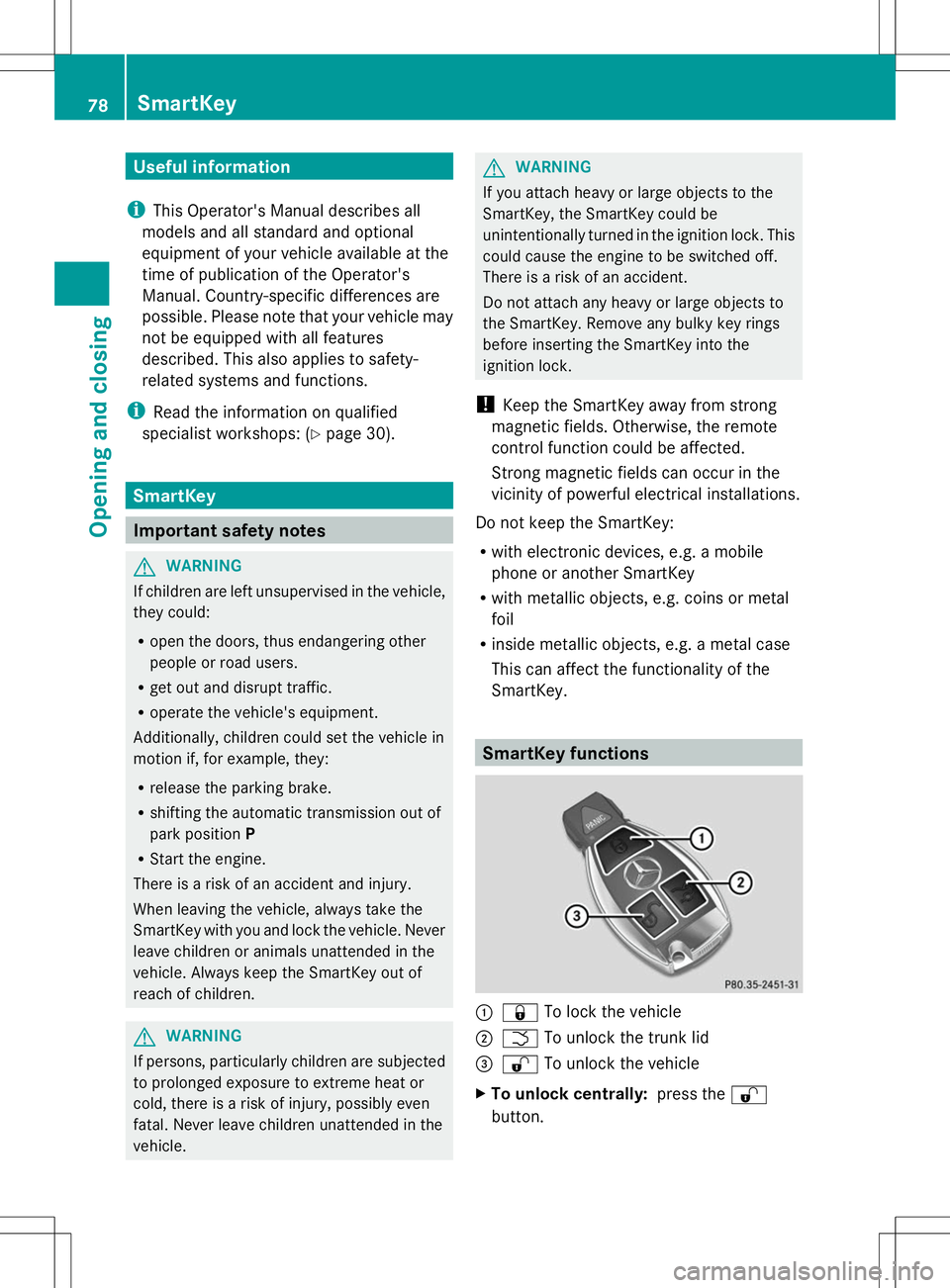
:
& To lock the vehicle
; F To unlock the trunk lid
= % To unlock the vehicle
X To unlock centrally: press the%
button. 78
SmartKeyOpening and closing
Page 150 of 284
Activating/deactivating the rear view
camera X
To activate: make sure that the SmartKey
is in position 2in the ignition lock.
X Make sure that the "Show rear view camera
display" function is selected in COMAND
(see the Digital Operator's Manual).
X Engage reverse gear.
The area behind the vehicle is shown in the
COMAND display with guide lines.
To deactivate: the rear view camera is
deactivated if you:
R shift the transmission to position P
R drive 33 ft (10 m) forwards
R shift the transmission from Rto another
position after 15 seconds
R drive forwards at a speed of over 5 mph
(10 km/h)
Information in the Digital Operator's
Manual In the Digital Operator's Manual you will find
information on the following topics:
R Displays in the COMAND display
R "Reverse parking" function ATTENTION ASSIST
Important safety notes ATTENTION ASSIST helps you during long,
monotonous journeys, such as on highways.
It is active in the range between 50 mph
(80 km/h) and 112 mph (180 km/h).
If ATTENTION ASSIST detects typical
indicators of fatigue or increasing lapses in
concentration on the part of the driver, it
suggests you take a break. ATTENTION ASSIST assesses your level of
fatigue or lapses in concentration by taking
the following criteria into account:
R
your personal driving style, e.g. steering
characteristics
R journey details, e.g. time of day and length
of journey
The functionality of ATTENTION ASSIST is
restricted and warnings may be delayed or
not occur at all:
R if the road condition is poor, e.g. if the
surface is uneven or if there are potholes
R if there is a strong side wind
R if you have adopted a sporty driving style
with high cornering speeds or high rates of
acceleration
R if you are predominantly driving slower
than 50 mph (80 km/h) or faster than
112 mph (180 km/h)
R if you are currently using COMAND or
making a telephone call with it
R if the time has been set incorrectly
R in active driving situations, such as when
you change lanes or change your speed
ATTENTION ASSIST is only an aid to the
driver. It might not always recognize fatigue
or increasing inattentiveness in time or fail to
recognize them at all. The system is not a
substitute for a well-rested and attentive
driver.
Warning and display messages in the
multifunction display X
Activate ATTENTION ASSIST using the on-
board computer (Y page 161).
If ATTENTION ASSIST is active, you will be
warned no sooner than 20 minutes after
your journey has begun. You then hear an
intermittent warning tone twice and the
Attention Assist: Take a Break! Attention Assist: Take a Break! 148
Driving systemsDriving and pa
rking
Page 163 of 284
?
Left control panel
A Back button
X To activate the on-board computer: turn
the SmartKey to position 1in the ignition
lock.
You can control the multifunction display and
the settings in the on-board computer using
the buttons on the multifunction steering
wheel.
Left control panel =
; R
Calls up the menu and menu bar 9
:
Press briefly:
R
Scrolls in lists
R Selects a submenu or function
R In the Audio Audio menu: selects a
stored station, an audio track or
a video scene
R In the Tel Tel(telephone) menu:
switches to the phone book and
selects a name or telephone
number 9
:
Press and hold:
R
In the Audio Audio menu: selects the
previous/next station or selects
an audio track or a video scene
using rapid scrolling
R In the Tel Tel(Telephone) menu:
starts rapid scrolling if the phone
book is open a R
Confirms a selection/display
message
R In the Tel Tel(telephone) menu:
switches to the telephone book
and starts dialing the selected
number
R In the Audio Audio menu: stops the
station search function at the
desired station Right control panel
~ R
Rejects or ends a call
R Exits phone book/redial
memory 6 R
Makes or accepts a call
R Switches to the redial memory W
X R
Adjusts the volume 8 R
Mute Back button
%
Press briefly:
R
Back
R Switches off the Voice Control
System; see the separate
operating instructions
R Hides display messages/calls
up the last Trip Tripmenu function
used
R Exits the telephone book/redial
memory %
Press and hold:
R
Calls up the standard display in
the Trip Trip menu Menus and submenus
Menu overview
Press the =or; button on the
steering wheel to call up the menu bar and
select a menu.
Operating the on-board computer
(Y page 160).
You can find more information on the
individual menus in the Digital Operator's
Manual. Menus and submenus
161On-board computer and displays Z
Page 164 of 284
Depending on the equipment installed in the
vehicle, you can call up the following menus:
R Trip
Trip menu
R Navi Navi menu (navigation instructions)
R Audio
Audio menu
R Tel
Tel menu (telephone)
R DriveAssist
DriveAssist menu (assistance)
R Service
Service menu
R Settings
Settings menu (settings)
R AMG
AMG menu in AMG vehicles 162
Menus and submenusOn-board computer and displays
Page 192 of 284
R
Gracenote ®
is a registered trademark of
Gracenote, Inc.
R ZAGATSurvey ®
and related brands are
registered trademarks of ZagatSurvey,
LLC. Function restrictions
For safety reasons, some COMAND functions
are restricted or unavailable while the vehicle
is in motion. You will notice this, for example
because either you will not be able to select
certain menu items or COMAND will display
a message to this effect. COMAND operating system
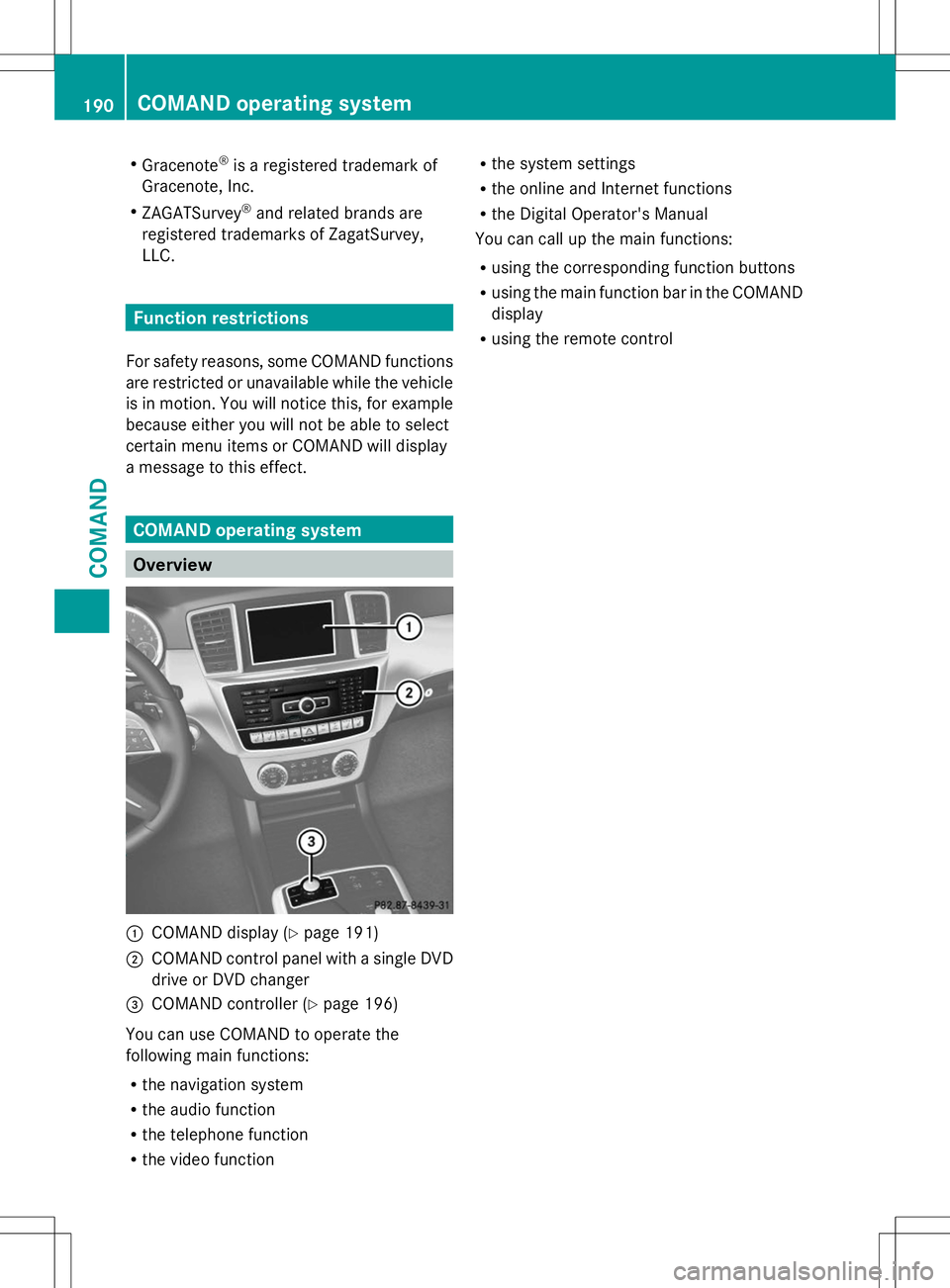
Overview
:
COMAND display (Y page 191)
; COMAND control panel with a single DVD
drive or DVD changer
= COMAND controller (Y page 196)
You can use COMAND to operate the
following main functions:
R the navigation system
R the audio function
R the telephone function
R the video function R
the system settings
R the online and Internet functions
R the Digital Operator's Manual
You can call up the main functions:
R using the corresponding function buttons
R using the main function bar in the COMAND
display
R using the remote control 190
COMAND operating systemCOMAND