bluetooth MERCEDES-BENZ SL-CLASS ROADSTER 2016 Owner's Guide
[x] Cancel search | Manufacturer: MERCEDES-BENZ, Model Year: 2016, Model line: SL-CLASS ROADSTER, Model: MERCEDES-BENZ SL-CLASS ROADSTER 2016Pages: 614, PDF Size: 15.67 MB
Page 410 of 614
XSearch for an entry in the phone book on
the mobile phoned(
Ypage 394).
XSelect the list symbol to the right of the
entry by sliding VYthe COMAND control-
ler and press Wto confirm.
XSelect Save Entryand press Wto con-
firm.
The Data saved
message appears. The
phone book entry is now saved as an
address book entry.
The dsymbol is replaced by the ¥sym-
bol.
Importing contacts
Information and requirements
You can import contacts (vCards) from the
memory card and a USB device into the
address book, or receive vCards via Blue-
tooth
®.
iUp to 2500 entries can be imported into
the address book. A message notifies you
when the maximum number is reached.
You then have to delete existing entries in
order to import new entries (
Ypage 404).
Depending on the source of the contact data,
different requirements apply:
SourcePrerequisites
Memory cardThe SD memory card is
inserted (
Ypage 447). It
contains importable con-
tact details.
USB deviceThe USB device is inserted
into the USB port
(
Ypage 447). It contains
importable contact details.
Requirements for receiving vCards via
Bluetooth®
You can receive vCards from devices (e.g.
from a PC) that support the sending of vCards
via Bluetooth
®. It is not necessary to authorize the device in
COMAND to do so.
Please bear the following in mind:
RBluetooth®must be activated in COMAND
and on the Bluetooth®device; see the oper-
ating instructions for the device.
Rthe Bluetooth®device must be able to send
vCards via Bluetooth®(see operating
instructions for the device).
Rthe Bluetooth®device in the vehicle must
be switched on.
Importing from the memory card or USB
device
Entries imported from the memory card or
from a USB device have the ¯symbol.
The following conditions must be fulfilled in
order to import vCards:
RvCards (vcf files) may be located in the main
directory or in folders. COMAND allows you
to select the relevant folders directly.
RvCards must have the file extension ".vcf".
iOne vcf file may contain several vCards.
COMAND supports vCards in versions 2.1
and 3.0.
XSelect Address Bookin the address book
or, if the telephone basic menu is shown,
select Phone
by sliding VÆand turning
cVd the COMAND controller and press W
to confirm.
XSelect Download Contactsand press W
to confirm.
A menu appears.
XSelect From The Memory CardorFrom
USB Devicein the menu by turning cVd
the COMAND controller and press Wto
confirm.
XSelect AddorOverwriteand press Wto
confirm.
Add
imports the entries from the memory
card or USB device into the address book.
Overwrite
imports the entries from the
memory card or USB device and overwrites
408Telephone
COMAND
Page 411 of 614
all entries in the address book with the
¯symbol. The previous entries are then
no longer available.
After the contact data has been imported
successfully, you will see a message to this
effect. The address book or the respective
telephone basic menu is displayed.
iYou can select Overwriteif the address
book already contains corresponding
entries. A message notifies you when the
address book is full.
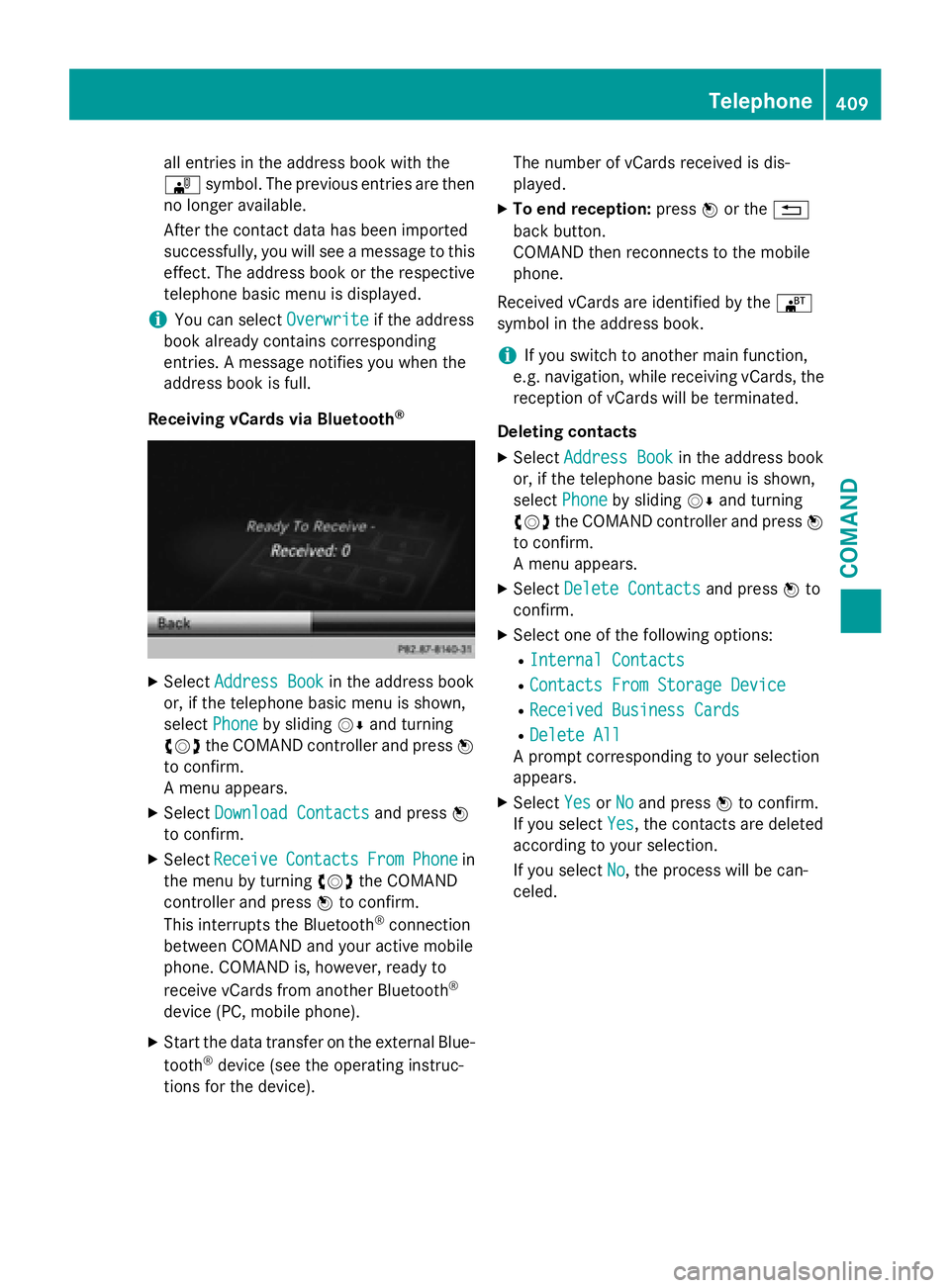
Receiving vCards via Bluetooth
®
XSelect Address Bookin the address book
or, if the telephone basic menu is shown,
select Phone
by sliding VÆand turning
cVd the COMAND controller and press W
to confirm.
A menu appears.
XSelect Download Contactsand press W
to confirm.
XSelect ReceiveContactsFromPhonein
the menu by turning cVdthe COMAND
controller and press Wto confirm.
This interrupts the Bluetooth
®connection
between COMAND and your active mobile
phone. COMAND is, however, ready to
receive vCards from another Bluetooth
®
device (PC, mobile phone).
XStart the data transfer on the external Blue-
tooth®device (see the operating instruc-
tions for the device). The number of vCards received is dis-
played.
XTo end reception:
pressWor the %
back button.
COMAND then reconnects to the mobile
phone.
Received vCards are identified by the ®
symbol in the address book.
iIf you switch to another main function,
e.g. navigation, while receiving vCards, the
reception of vCards will be terminated.
Deleting contacts
XSelect Address Bookin the address book
or, if the telephone basic menu is shown,
select Phone
by sliding VÆand turning
cVd the COMAND controller and press W
to confirm.
A menu appears.
XSelect Delete Contactsand press Wto
confirm.
XSelect one of the following options:
RInternal Contacts
RContacts From Storage Device
RReceived Business Cards
RDelete All
A prompt corresponding to your selection
appears.
XSelect YesorNoand press Wto confirm.
If you select Yes
, the contacts are deleted
according to your selection.
If you select No
, the process will be can-
celed.
Telephone409
COMAND
Z
Page 413 of 614
XTo hide details:selectHideData:
You can allow access to address data ªor
you can prevent access O.
Online and Internet functions
Your COMAND equipment
These operating instructions describe all the
standard and optional equipment for your
COMAND system, as available at the time of
going to print. Country-specific differences
are possible. Please note that your
COMAND system may not be equipped with
all the features described.
General notes
Conditions for access
GWARNING
If you operate information systems and com-
munication equipment integrated in the vehi-
cle while driving, you will be distracted from
traffic conditions. You could also lose control
of the vehicle. There is a risk of an accident.
Only operate the equipment when the traffic
situation permits. If you are not sure that this
is possible, park the vehicle paying attention
to traffic conditions and operate the equip-
ment when the vehicle is stationary.
You must observe the legal requirements for
the country in which you are currently driving
when operating COMAND.
USA only:
To use COMAND Mercedes-Benz Apps and
Internet access, the following conditions
must be fulfilled:
Rmbrace is activated and operational
Rmbrace is activated for COMAND
Mercedes-Benz Apps and Internet access
Priority of connections: an emergency call
has the highest priority. When a service call,
e.g. a breakdown service call or the MB Info Call, is active, an emergency call can still be
initiated.
A service call, on the other hand, has priority
over a current Internet connection. Therefore,
you cannot establish an Internet connection
during a service call.
iThe availability of individual COMAND
Mercedes-Benz Apps may vary depending
on the country.
iThe terms of use are shown when
COMAND is used for the first time and then
once a year thereafter. Only read and
accept the terms of use when the vehicle is
stationary.
iInternet pages cannot be shown on the
driver's side while the vehicle is in motion.
Canada only:
The COMAND Mercedes-Benz Apps and the
Internet access are available via the Blue-
tooth
®interface.
In order to use the functions, the following
conditions are necessary:
RThe mobile phone supports the DUN Blue-
tooth®profile ( Dial-U pNetworking) and is
connected to COMAND via the Bluetooth®
interface (Ypage 383). The DUN Blue-
tooth®profile enables the mobile phone to
establish a dial-up connection to the Inter-
net.
RYou need a valid mobile service contract
with a data option, which is used to calcu-
late the associated connection costs.
RThe access data of the mobile phone net-
work provider must be set on COMAND for
the connected mobile phone (
Ypage 413).
iIf the connected mobile phone supports
the PAN Bluetooth profile (Personal Area
Network), you can use the automatic con-
figuration function (
Ypage 413).
iYou can obtain more detailed information
about suitable mobile phones on the Inter-
net at http://www.mercedes-
Online and Internet functions411
COMAND
Z
Page 414 of 614
benz.com/connector from your author-
ized Mercedes-Benz Center.
iIf you use incorrect access data, addi-
tional costs may be incurred. This can hap- pen when you use details that are different
from the contract or details from another
contract/data package.
iThe availability of individual Mercedes-
Benz Apps may vary depending on the
country.
iThe terms of use are shown when
COMAND is used for the first time and then
once a year thereafter. Only read and
accept the terms of use when the vehicle is
stationary.
iInternet pages cannot be shown on the
driver's side while the vehicle is in motion.
Connection difficulties while the vehi-
cle is in motion (Canada only)
The following could be the cause of call dis-
connection:
Rinsufficient GSM/UMTS network coverage
Rthe vehicle has moved into a GSM cell with
no free channels
Rthe SIM card used is not compatible with
the network available
Ryou are using a mobile phone with "Twin-
card" and the mobile phone with the sec-
ond SIM card is logged into the network at
the same time
Function restrictions (Canada only)
You will not be able to use the mobile phone,
will no longer be able to use the mobile phone, or you may have to wait before using it, in the
following situations:
Rwhen the mobile phone is switched off
Rif the Bluetooth®function is switched off in
COMAND
Rif the Bluetooth®function is switched off on
the mobile phone while you are using Blue-
tooth
®interface telephony
Rif the mobile phone has not logged on to a
mobile phone network
Rif neither the mobile phone network nor the mobile phone allow simultaneous use of a
phone and an Internet connection
iIt is possible that you may not be able to
receive calls when an Internet connection
is active. This depends on the mobile phone
and the mobile phone network used.
Roaming (Canada only)
When you are driving your vehicle in a differ-
ent country and using COMAND and Internet
functions, additional costs may be incurred
(roaming fees). When you are in a different
country, your SIM card must be enabled for
data roaming. If your mobile phone network
provider does not have a data roaming agree-
ment with the roaming partner, it may not be
possible to establish an Internet connection.
Deactivate this function on your mobile
phone if you want to avoid data roaming when
you are in a different country.
Setting access data (Canada only)
Introduction
To use online and Internet functions, you
need Internet access data for the connected
mobile phone. You can obtain this from your
mobile phone network provider.
A selected/manually set mobile phone net-
work provider is only valid for the mobile
phone connected when the selection/setting
is made. The mobile phone network provider
is set automatically upon reconnection.
iWhen you are driving your vehicle in a dif-
ferent country and using the online and
Internet functions on COMAND, you may
incur additional costs (roaming fees).
iWhile initializing the mobile phone for the
Internet connection, access data which is
already on the mobile phone may be over-
written. You should therefore check the
412Online and Internet functions
COMAND
Page 415 of 614
settings on the mobile phone (see the
mobile phone operating instructions).
iAdjust the access data settings when the
vehicle is stationary. You may otherwise be
distracted from the traffic conditions,
cause an accident and injure yourself and
others.
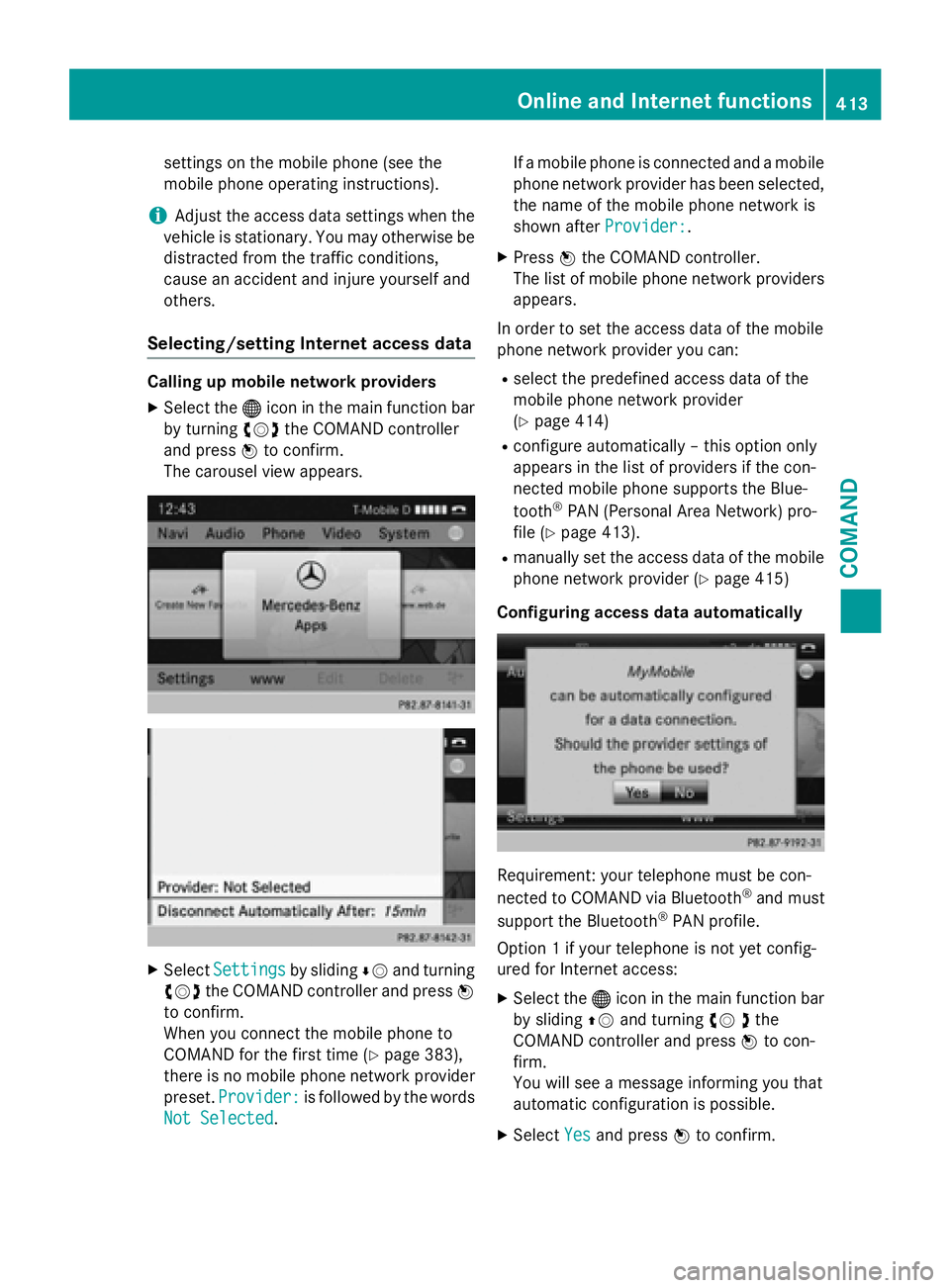
Selecting/setting Internet access data
Calling up mobile network providers
XSelect the ®icon in the main function bar
by turning cVdthe COMAND controller
and press Wto confirm.
The carousel view appears.
XSelect Settingsby sliding ÆVand turning
cVd the COMAND controller and press W
to confirm.
When you connect the mobile phone to
COMAND for the first time (
Ypage 383),
there is no mobile phone network provider
preset. Provider:
is followed by the words
Not Selected
. If a mobile phone is connected and a mobile
phone network provider has been selected,
the name of the mobile phone network is
shown after Provider:
.
XPressWthe COMAND controller.
The list of mobile phone network providers
appears.
In order to set the access data of the mobile
phone network provider you can:
Rselect the predefined access data of the
mobile phone network provider
(
Ypage 414)
Rconfigure automatically – this option only
appears in the list of providers if the con-
nected mobile phone supports the Blue-
tooth
®PAN (Personal Area Network) pro-
file (
Ypage 413).
Rmanually set the access data of the mobile
phone network provider (
Ypage 415)
Configuring access data automatically
Requirement: your telephone must be con-
nected to COMAND via Bluetooth®and must
support the Bluetooth®PAN profile.
Option 1 if your telephone is not yet config-
ured for Internet access:
XSelect the ®icon in the main function bar
by sliding ZVand turning cV dthe
COMAND controller and press Wto con-
firm.
You will see a message informing you that
automatic configuration is possible.
XSelect Yesand press Wto confirm.
Online and Internet functions413
COMAND
Z
Page 450 of 614
Switching to audio CD or MP3 mode
Inserting or connecting a medium
XInsert CDs (Ypage 446)
or
XInserting an SD memory card
(
Ypage 447)
or
XConnect a USB device (Ypage 447).
COMAND loads the medium inserted and
starts to play it.
Switching on using the button
XPress the hbutton one or more times.
By pressing the hbutton repeatedly, you
can switch modes in the following order:
R
R
CD/video DVD/MP3 CD/MP3 DVD in the
single DVD drive (disc mode)
RMemory card mode
RMUSIC REGISTER
RUSB storage device
RMedia Interface or audio AUX mode
RBluetooth®audio mode
XSelect an audio medium from the media list
(
Ypage 449).
Switching modes via the audio menu
XSelect Audioin the main function bar by
sliding ZVand turning cVdthe COMAND
controller and press Wto confirm.
The last active audio source is now activa-
ted.
You can activate a different audio source
using the audio menu.
XSelect Audioby sliding ZVand turning
cVd the COMAND controller and press W
to confirm.
The audio menu appears.
XSelect Disc,MemoryCard,MusicRegis‐
ter, USB Storageor Media Interface
and press Wto confirm.
This switches to the desired audio source.
XSelect an audio medium from the media list (
Ypage 449).
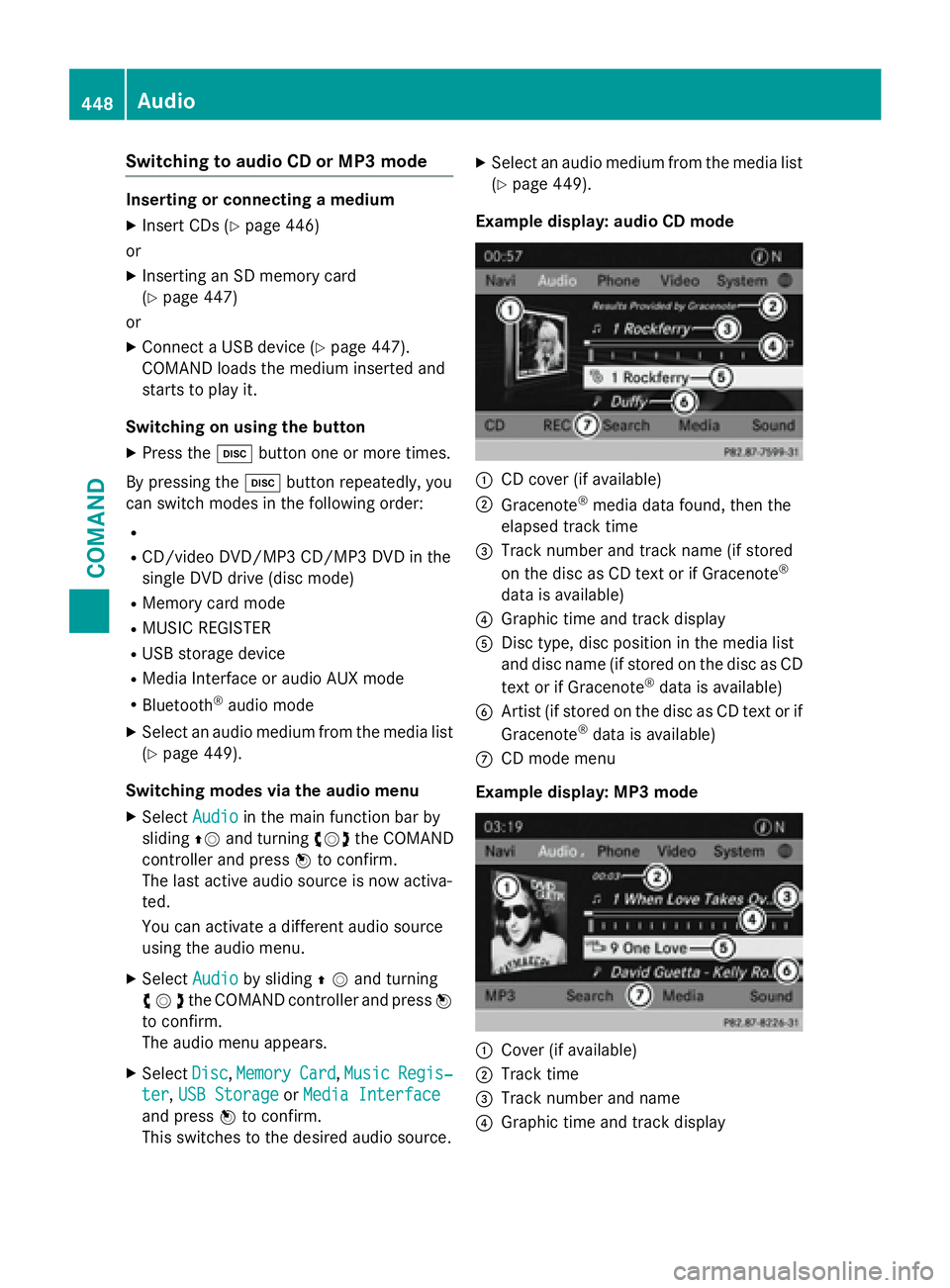
Example display: audio CD mode
:CD cover (if available)
;Gracenote®media data found, then the
elapsed track time
=Track number and track name (if stored
on the disc as CD text or if Gracenote®
data is available)
?Graphic time and track display
ADisc type, disc position in the media list
and disc name (if stored on the disc as CD
text or if Gracenote
®data is available)
BArtist (if stored on the disc as CD text or if
Gracenote®data is available)
CCD mode menu
Example display: MP3 mode
:Cover (if available)
;Track time
=Track number and name
?Graphic time and track display
448Audio
COMAND
Page 451 of 614
AMedium type, position of medium in the
media list, current folder or current album
BArtist (if available)
CMP3 mode menu
Pause function
CD and MP3 mode
XTo pause playback:briefly press the8
button.
The , symbol appears at the top left in
the status bar.
XTo continue playback: briefly press the
8 button again.
The , symbol disappears.
Selecting a CD or MP3 disc
Selecting via the media list
XIn CD and MP3 mode: selectMediausing
the COMAND controller VÆ(slide) and
cVd (turn) and confirm with W.
The media list appears. The #dot indicates
the current medium being played.
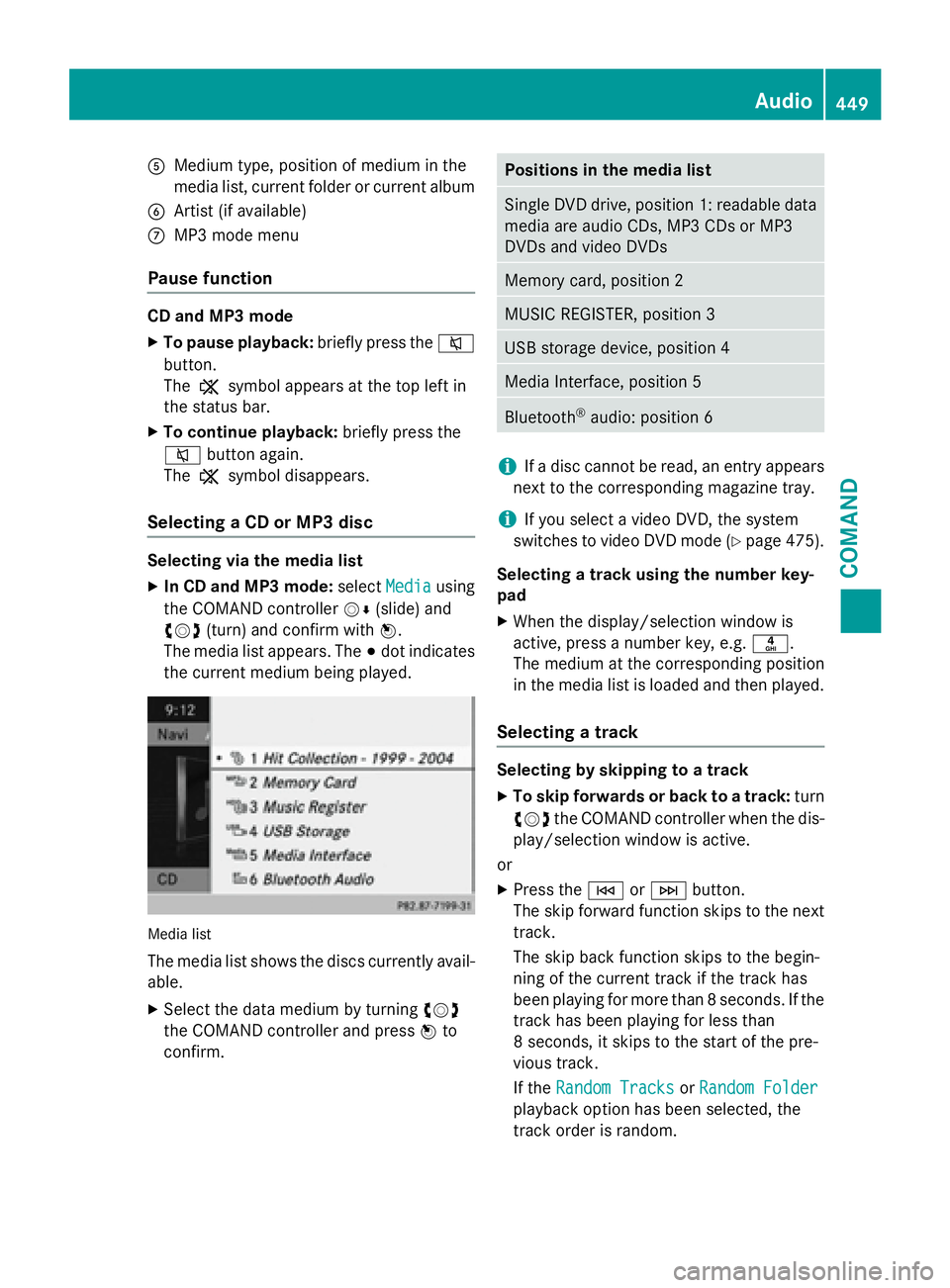
Media list
The media list shows the discs currently avail- able.
XSelect the data medium by turning cVd
the COMAND controller and press Wto
confirm.
Positions in the media list
Single DVD drive, position 1: readable data
media are audio CDs, MP3 CDs or MP3
DVDs and video DVDs
Memory card, position 2
MUSIC REGISTER, position 3
USB storage device, position 4
Media Interface, position 5
Bluetooth®audio: position 6
iIf a disc cannot be read, an entry appears
next to the corresponding magazine tray.
iIf you select a video DVD, the system
switches to video DVD mode (
Ypage 475).
Selecting a track using the number key-
pad
XWhen the display/selection window is
active, press a number key, e.g. n.
The medium at the corresponding position
in the media list is loaded and then played.
Selecting a track
Selecting by skipping to a track
XTo skip forwards or back to a track: turn
cVd the COMAND controller when the dis-
play/selection window is active.
or
XPress the EorF button.
The skip forward function skips to the next
track.
The skip back function skips to the begin-
ning of the current track if the track has
been playing for more than 8 seconds. If the
track has been playing for less than
8 seconds, it skips to the start of the pre-
vious track.
If the Random Tracks
orRandom Folder
playback option has been selected, the
track order is random.
Audio449
COMAND
Z
Page 460 of 614
?Graphic time and track display
APosition of the medium in the media list
and name of the medium, followed by the
current playback option (no display for
Normal Track Sequence
)
BArtist
CMUSIC REGISTER menu bar
Switching on using the DISC button
XPress the hbutton repeatedly until the
MUSIC REGISTER is switched on.
By pressing the hbutton repeatedly, you
can switch modes in the following order:
RCD/MP3 (disc)
RMemory card mode
RMUSIC REGISTER
RUSB storage device
RMedia Interface or audio AUX mode
RBluetooth®audio mode
If music files are available, playback begins at
the point last listened to.
If there are no music files, you will see a mes-
sage to this effect.
XConfirm the message by pressing Wand
store the music data (
Ypage 458).
Switching modes via the audio menu
XSelect Audioin the main function bar by
sliding ZVand turning cVdthe COMAND
controller and press Wto confirm.
If MUSIC REGISTER was the last mode
selected, it is now switched on.
If another audio source is switched on, you
can now switch on the MUSIC REGISTER in
the audio menu.
XSelect Audioby sliding ZVand turning
cVd the COMAND controller and press W
to confirm.
The audio menu appears.
XSelect Music Registerand press Wto
confirm. Switching on with the number buttons
XMake sure that neither radio nor disc is
activated.
XPress the
mnumber key.
The MUSIC REGISTER is switched on.
Importing music files
Introduction
You can import music files from a CD in the
following file formats:
RMP3
RWMA
RAAC (with file extensions .m4p, .m4a, .m4b and .aac)
XSwitch on CD mode (Ypage 448).
XWith an audio CD inserted, select RECin the
basic CD display by sliding VÆand turning
cVd the COMAND controller and press W
to confirm.
iCD information such as album name, disc
name, artist and track is provided by the
Gracenote Media Database (
Ypage 450).
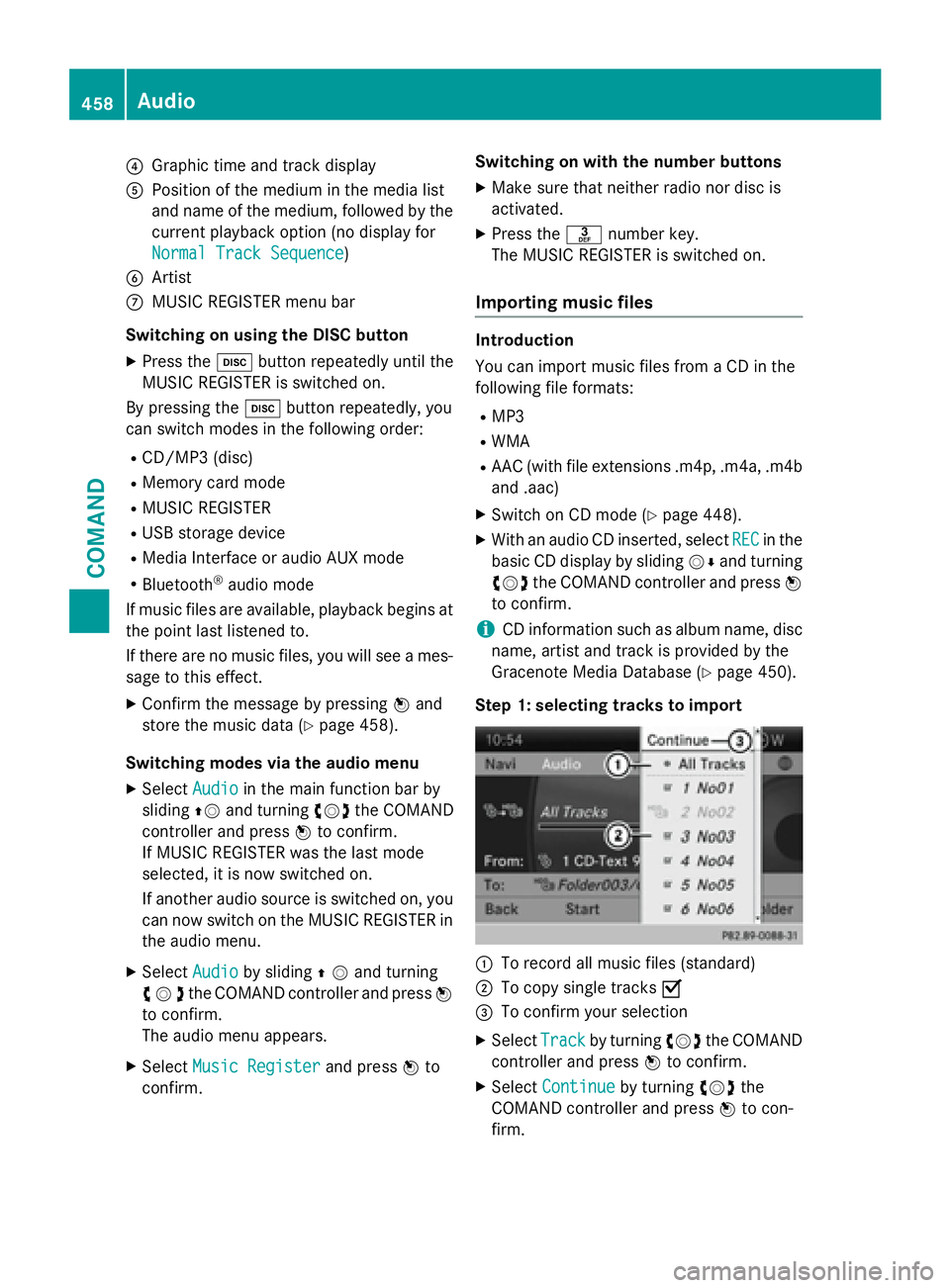
Step 1: selecting tracks to import
:To record all music files (standard)
;To copy single tracks O
=To confirm your selection
XSelectTrackby turning cVdthe COMAND
controller and press Wto confirm.
XSelect Continueby turning cVdthe
COMAND controller and press Wto con-
firm.
458Audio
COMAND
Page 463 of 614
All the tracks on the medium are played in
random order.
RRandom Track List(MP3 mode only)
The tracks in the currently active folder or
the current track list are played in a random
order.
XTo select options: switch to the MUSIC
REGISTER (
Ypage 457).
XSelect MusicRegisterby sliding VÆand
turning cVdthe COMAND controller and
press Wto confirm.
The options list appears. The #dot indi-
cates the option selected.
XSelect an option and press Wto confirm.
The option is switched on. For all options
except Normal Track Sequence
, you will
see a corresponding display in the display/
selection window.
iThe Normal Track Sequenceoption is
automatically selected when you change
the disc you are currently listening to or
when you select a different medium. If an
option is selected, it remains selected after
COMAND is switched on or off.
Bluetooth®audio mode
Preconditions for the Bluetooth
®audio
device
Bluetooth®audio mode requires a Blue-
tooth®-capable audio device. Observe the
information in the Bluetooth®audio device's
operating instructions.
Before using Bluetooth
®audio mode, you
should check your Bluetooth®audio device
for the following:
RBluetooth®audio profile
The Bluetooth
®audio device must support
the A2DP and AVRCP Bluetooth®audio
profiles.
RBluetooth®visibility
Certain Bluetooth
®audio devices do not
just require activation of the Bluetooth®
function. In addition, your device must be
made "visible" to other devices.
RBluetooth®device name
This device name is predetermined but can
usually be changed. To make a clear selec-
tion of the Bluetooth
®device possible,
Mercedes-Benz recommends that you cus-
tomize the device name.
iA2DP ( Advanced Audio Distribution
Profile): Bluetooth®audio profile for audio
data transmission
AVRCP ( Audio Video Remote Control
Profile): Bluetooth
®audio profile for audio
data playback.
iNot all Bluetooth®audio devices available
on the market are equally suitable. To
obtain more informati
on about suitable
Bluetooth®audio devices and about con-
necting Bluetooth®audio devices to
COMAND, visit
http://www.mbusa-mobile.com (USA).
Or call the Mercedes-Benz Customer Assis-
tance center at 1-800-FOR-MERCedes
(1-800-367-6372) (USA) or Customer Rela-
tions at 1-800-387-0100 (Canada).
XActivate Bluetooth®and Bluetooth®visibil-
ity on the Bluetooth®audio device.
Preconditions in COMAND
XActivate the Bluetooth®function in
COMAND (
Ypage 310).
Connecting Bluetooth®audio devices
General information
Before using your Bluetooth
®audio device
with COMAN Dfor the first time, you will need
to authorize it.
When you authorize a new Bluetooth
®audio
device, it is connected automatically. Con-
nection involves first searching for a Blue-
tooth
®audio device and then authorizing it.
Audio461
COMAND
Z
Page 464 of 614
You can authorize up to fifteen Bluetooth®
devices.
iIf you authorize a mobile phone that sup-
ports Bluetooth®audio, the A2DP and
AVRCP Bluetooth®audio profiles are con-
nected automatically.
The mobile phone is then entered:
Rin the Bluetooth®telephone list
(
Ypage 385)
Rin the Bluetooth®device list
(
Ypage 462).
Mercedes-Benz recommends authorizing a
mobile phone in Bluetooth
®telephony
(
Ypage 385).
Searching for and authorizing a Blue-
tooth
®audio device
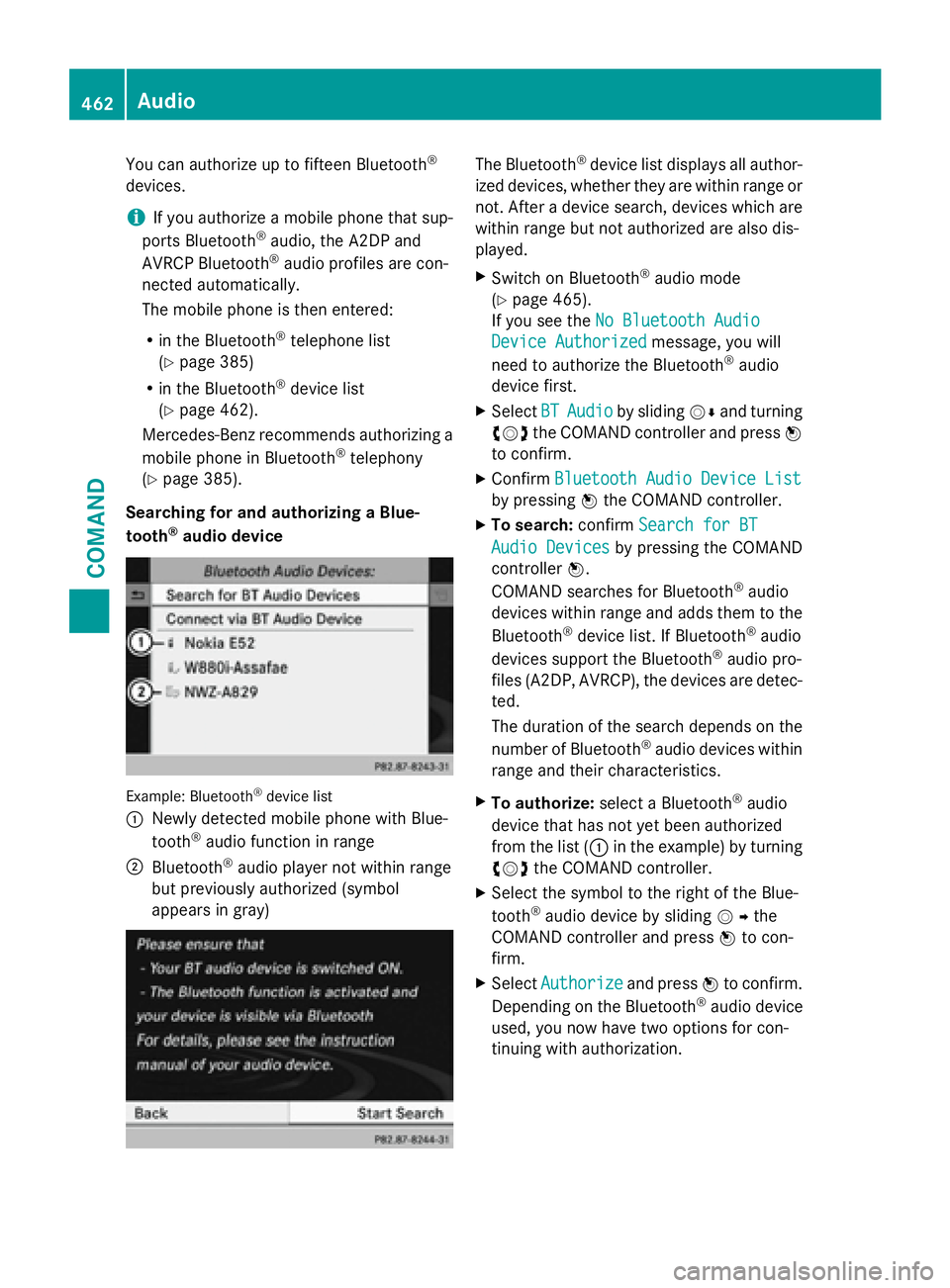
Example: Bluetooth®device list
:
Newly detected mobile phone with Blue-
tooth®audio function in range
;Bluetooth®audio player not within range
but previously authorized (symbol
appears in gray)
The Bluetooth®device list displays all author-
ized devices, whether they are within range or
not. After a device search, devices which are
within range but not authorized are also dis-
played.
XSwitch on Bluetooth®audio mode
(
Ypage 465).
If you see the No Bluetooth Audio
Device Authorizedmessage, you will
need to authorize the Bluetooth®audio
device first.
XSelect BTAudioby sliding VÆand turning
cVd the COMAND controller and press W
to confirm.
XConfirm Bluetooth Audio Device List
by pressing Wthe COMAND controller.
XTo search: confirmSearch for BT
Audio Devicesby pressing the COMAND
controller W.
COMAND searches for Bluetooth
®audio
devices within range and adds them to the
Bluetooth
®device list. If Bluetooth®audio
devices support the Bluetooth®audio pro-
files (A2DP, AVRCP), the devices are detec-
ted.
The duration of the search depends on the
number of Bluetooth
®audio devices within
range and their characteristics.
XTo authorize: select a Bluetooth®audio
device that has not yet been authorized
from the list (: in the example) by turning
cVd the COMAND controller.
XSelect the symbol to the right of the Blue-
tooth®audio device by sliding VYthe
COMAND controller and press Wto con-
firm.
XSelect Authorizeand press Wto confirm.
Depending on the Bluetooth®audio device
used, you now have two options for con-
tinuing with authorization.
462Audio
COMAND