radio MERCEDES-BENZ SL-CLASS ROADSTER 2016 Owner's Guide
[x] Cancel search | Manufacturer: MERCEDES-BENZ, Model Year: 2016, Model line: SL-CLASS ROADSTER, Model: MERCEDES-BENZ SL-CLASS ROADSTER 2016Pages: 614, PDF Size: 15.67 MB
Page 309 of 614
longer. After this period, reactivation on the
front-passenger side means that the settings
from the driver's side will be used.
Transferring the driver's website
XTo switch on SPLITVIEW: selectSystem
from the main function bar by turning cVd
the COMAND controller and press Wto
confirm.
XSelect ;in the menu bar and confirm.
SPLITVIEW symbol :appears in the dis-
play, and display ;switches to Off
.
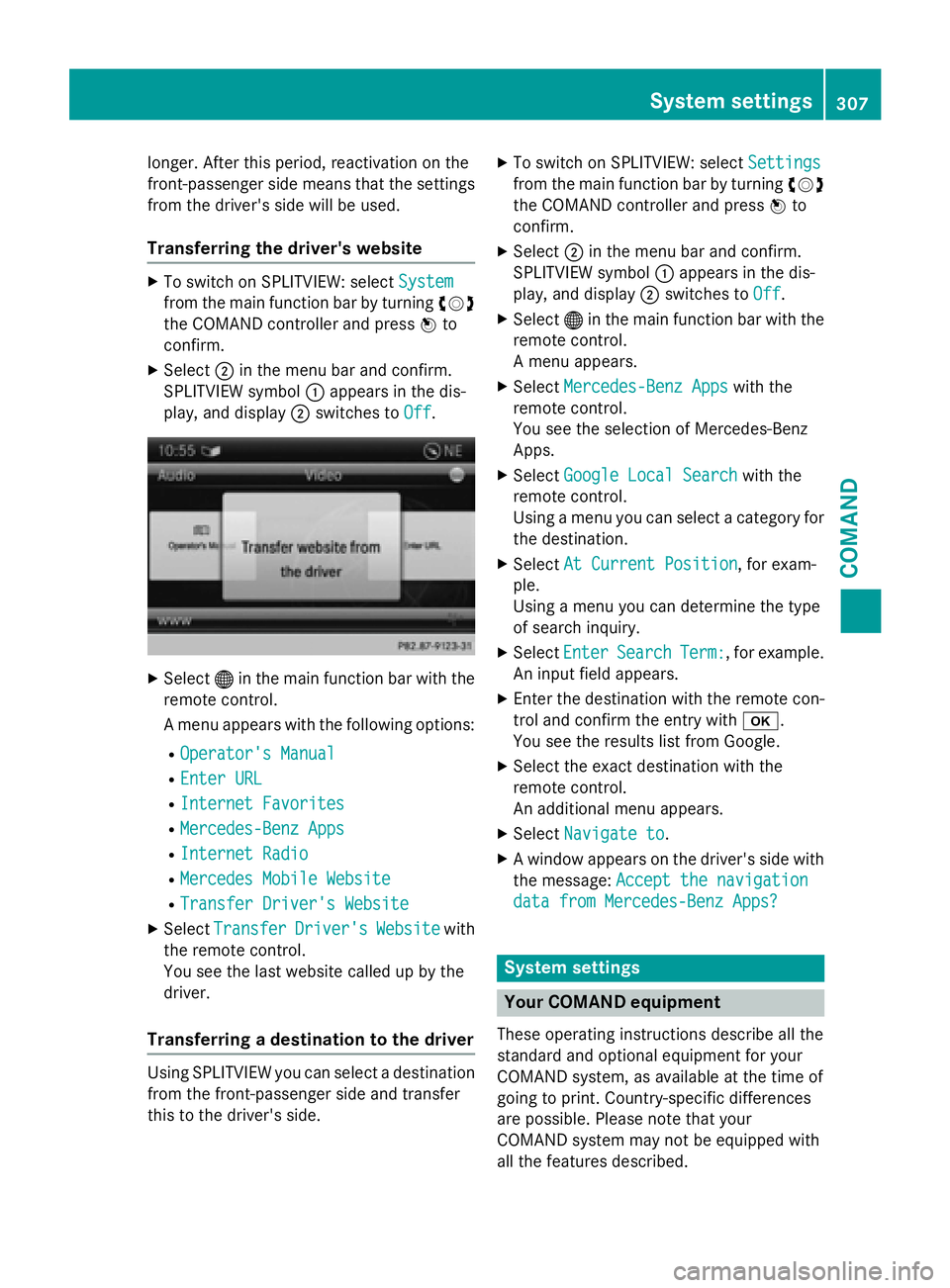
XSelect®in the main function bar with the
remote control.
A menu appears with the following options:
ROperator's Manual
REnter URL
RInternet Favorites
RMercedes-Benz Apps
RInternet Radio
RMercedes Mobile Website
RTransfer Driver's Website
XSelect TransferDriver'sWebsitewith
the remote control.
You see the last website called up by the
driver.
Transferring a destination to the driver
Using SPLITVIEW you can select a destination
from the front-passenger side and transfer
this to the driver's side.
XTo switch on SPLITVIEW: select Settings
from the main function bar by turning cVd
the COMAND controller and press Wto
confirm.
XSelect ;in the menu bar and confirm.
SPLITVIEW symbol :appears in the dis-
play, and display ;switches to Off
.
XSelect®in the main function bar with the
remote control.
A menu appears.
XSelect Mercedes-Benz Appswith the
remote control.
You see the selection of Mercedes-Benz
Apps.
XSelect Google Local Searchwith the
remote control.
Using a menu you can select a category for
the destination.
XSelect At Current Position, for exam-
ple.
Using a menu you can determine the type
of search inquiry.
XSelect EnterSearchTerm:, for example.
An input field appears.
XEnter the destination with the remote con-
trol and confirm the entry with b.
You see the results list from Google.
XSelect the exact destination with the
remote control.
An additional menu appears.
XSelect Navigate to.
XA window appears on the driver's side with
the message: Accept the navigation
data from Mercedes-Benz Apps?
System settings
Your COMAND equipment
These operating instructions describe all the
standard and optional equipment for your
COMAND system, as available at the time of
going to print. Country-specific differences
are possible. Please note that your
COMAND system may not be equipped with
all the features described.
System settings307
COMAND
Z
Page 323 of 614
COMAND can give incorrect navigation com-
mands if the actual street/traff icsituation
does not correspond with the digital map's
data. Dig ital maps donot cover all areas nor
all routes inan area. For example, a route may
have been diverted or the direction of a one-
way street may have changed.
For th isreason, you must always observe
road and traff icrules and regulations during
your journey. Road and traffic rules and reg-
ulations always have priority over the sys-
tem's driving recommendations.
Navigation announcements are intended to
dire ct you whiledriving without diverting your
attention from the road and driving.
Please always use this feature instead of con-
sulting the map display for directions. Look-
ing at the icons or map display can distract
you from traffic cond itions and driving, and
increase the risk of an accident.
General notes
Operational readiness of the navigation
system
The navigation system must determine the
position of the vehicle before first use or
whenever operational status isrestored.
Therefore, you may have to drive for a while
before precise route guidance ispossible.
GPS reception
Among other things, correct functioning of
the navigation system depends on GPS recep-
tion. Incertain situations, GPS reception may
be impaired, there may beinterference or
there may beno reception at all,e.g. in tun-
ne lsor parking garages.
iUsing roof carriers may impair the correct
functioning of a roof antenna (phone, sat-
ellit e radio, GPS).
Entry restriction
On veh icles for certain countries, there isa
restriction on entering data.
The restriction isactive from a vehicle speed
of above approximately 3 mph (5 km/h).As soon as the speed falls below approximately
2 mph (3 km/h), the restriction becomes
inactive.
When the restriction is active, certain entries
cannot be made. This will be indicated by the
fact that certain menu items are grayed out
and cannot be selected.
The following entries are not possible, for
example:
Rentering the destination city and street
Rentering a destination via the map
Rentering POIs in the vicinity of a city or via a
name search
Rediting entries
Rusing the number keypad for direct entry
Other entries are possible, such as entering
points of interest in the vicinity of the desti-
nation or current position.
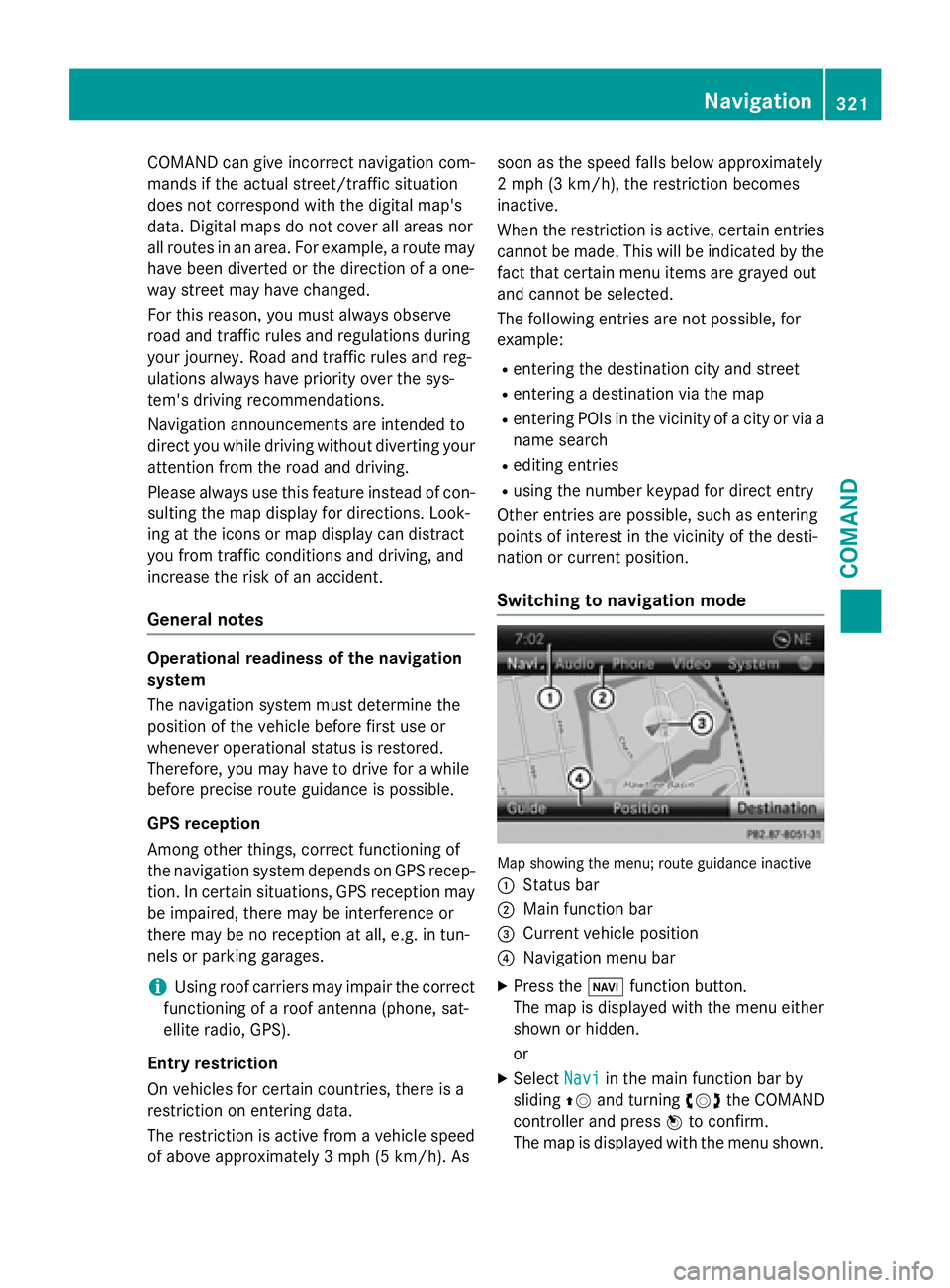
Switching to navigation mode
Map showing the menu; route guidance inactive
:
Status bar
;Main function bar
=Current vehicle position
?Navigation menu bar
XPress the Øfunction button.
The map is displayed with the menu either
shown or hidden.
or
XSelect Naviin the main function bar by
sliding ZVand turning cVdthe COMAND
controller and press Wto confirm.
The map is displayed with the menu shown.
Navigation321
COMAND
Z
Page 359 of 614
COMANDisalso able to guide you to a des-
tination even from an off-road location.
At the start of route guidance, you willsee the
Off Mapped Road
message, an arrow and
the distance to the destination. The arrow
shows the compass heading to the actual
destination.
The route ishighlighted blue, starting from
the last recognized street the vehicle was on before itleft the map.
As soon as the vehicle is back on a road
known to the system, route guidance contin-
ues inthe usual way.
Route guidance fr oman off-map location
to a destination
If the veh icleposition is outside the area cov-
ered bythe digital map, then the vehicle is in
an off-map location. COMAND is also able to
guide you to a destination even from an off-
map location.
At the start of route guidance, you willsee the
Off Mapped Road
message, an arrow and
the distance to the destination. The direction
arrow shows the compass heading to the des-
tination.
The route ishighlighted inblue from the near-
est road known to the system.
As soon as the vehicle isback on a road
known to the system, route guidance contin-
ues inthe usual way.
Off-road du ring route guidance
Due to road works, for example, there may be
diff erences between the data on the digital
map and the actual course of the road.
In such cases, the system will temporarily be
unab leto locate the vehicle position on the
digit al map. The vehicle is therefore in an off-
road position.
In the disp lay, you willsee the Off Mapped
Roadmessage, an arrow and the distance to
the destination. The direction arrow shows
the compass heading to the destination. As soon as the system can assign the vehicle
position to the map again, route guidance
continues inthe usual way.
Traffic reports
Prerequisites
iThis function iscurrently not availab lefor
Canada.
To receive real-time traff icreports viasatel-
lit e radio, you require:
Roptional satellite radio equipment
Ra subscr iption to SIRIUS XM Satellite Radio
Traffic Message Service
Further information on satellite radio
(
Ypage 441).
COMAND can receive traff icreports viasat-
ellite radio and take account of these for
route guidance inthe navigation system.
Received traff icreports are displayed on the
map either as text or as symbols.
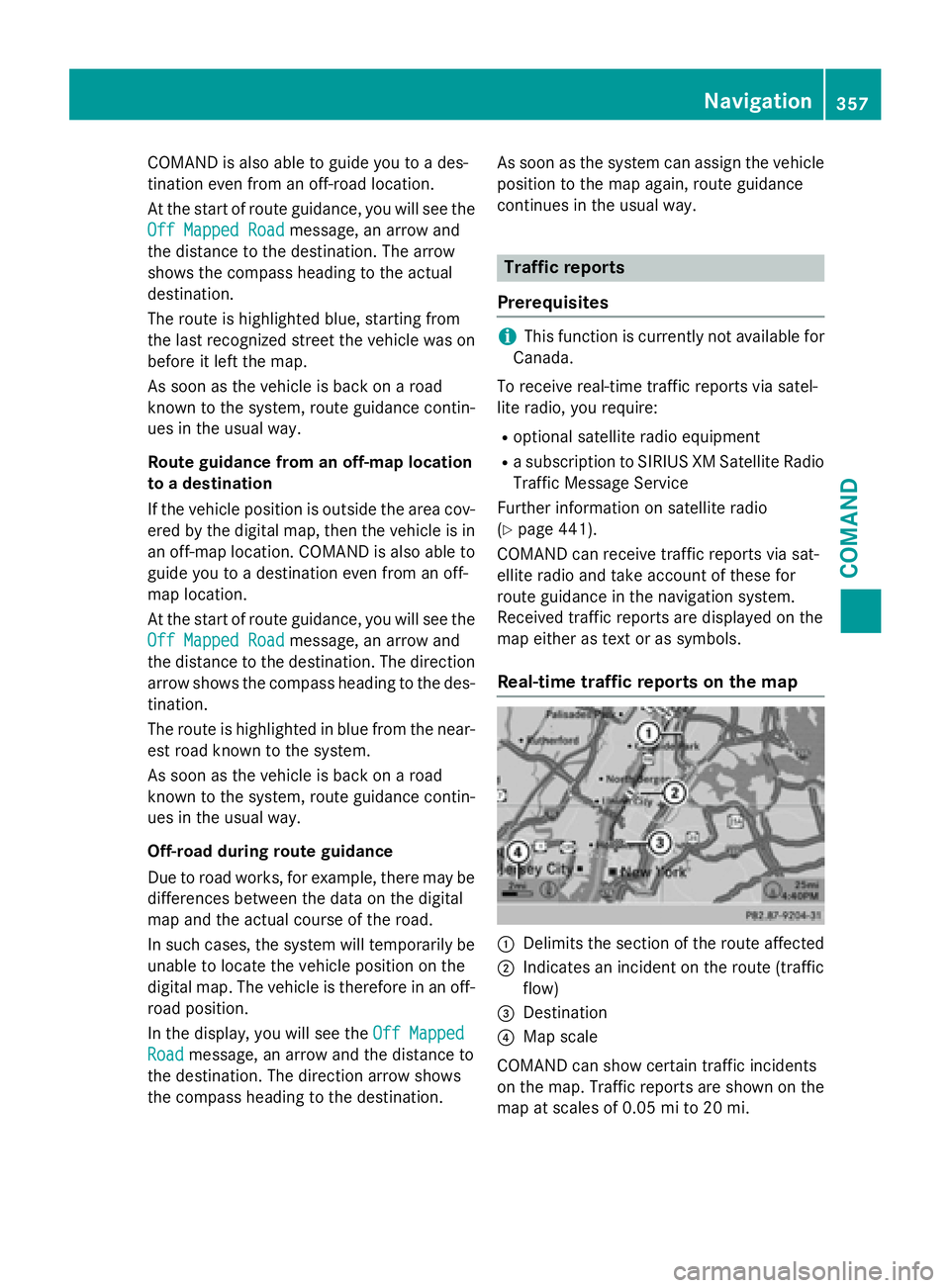
Real-time traffic reports on the map
:Delimits the section of the route affected
;Indic ates an inc ident on the route (traffic
flo w)
=Destination
?Map scale
COMAND can show certain traff icinc iden ts
on the map. Traffic reports are shown on the
map at scales of 0.05 mi to 20 mi.
Navigation357
COMAND
Z
Page 374 of 614
XSelectNaviin the main function bar by
sliding ZVand turning cVdthe COMAND
controller and press Wto confirm.
XSelect MapSettingsand press Wto con-
firm.
The map settings menu appears.
XSelect City(3D)and press Wto confirm.
Depending on the previous status, switch
the option on Oor off ª.
iThe city model is only shown for "Bird's-
eye View" or "3D Map".
It is available in the 0.05 mi and 0.1 mi map
scales.
The data required for displaying buildings is
not available for all cities.
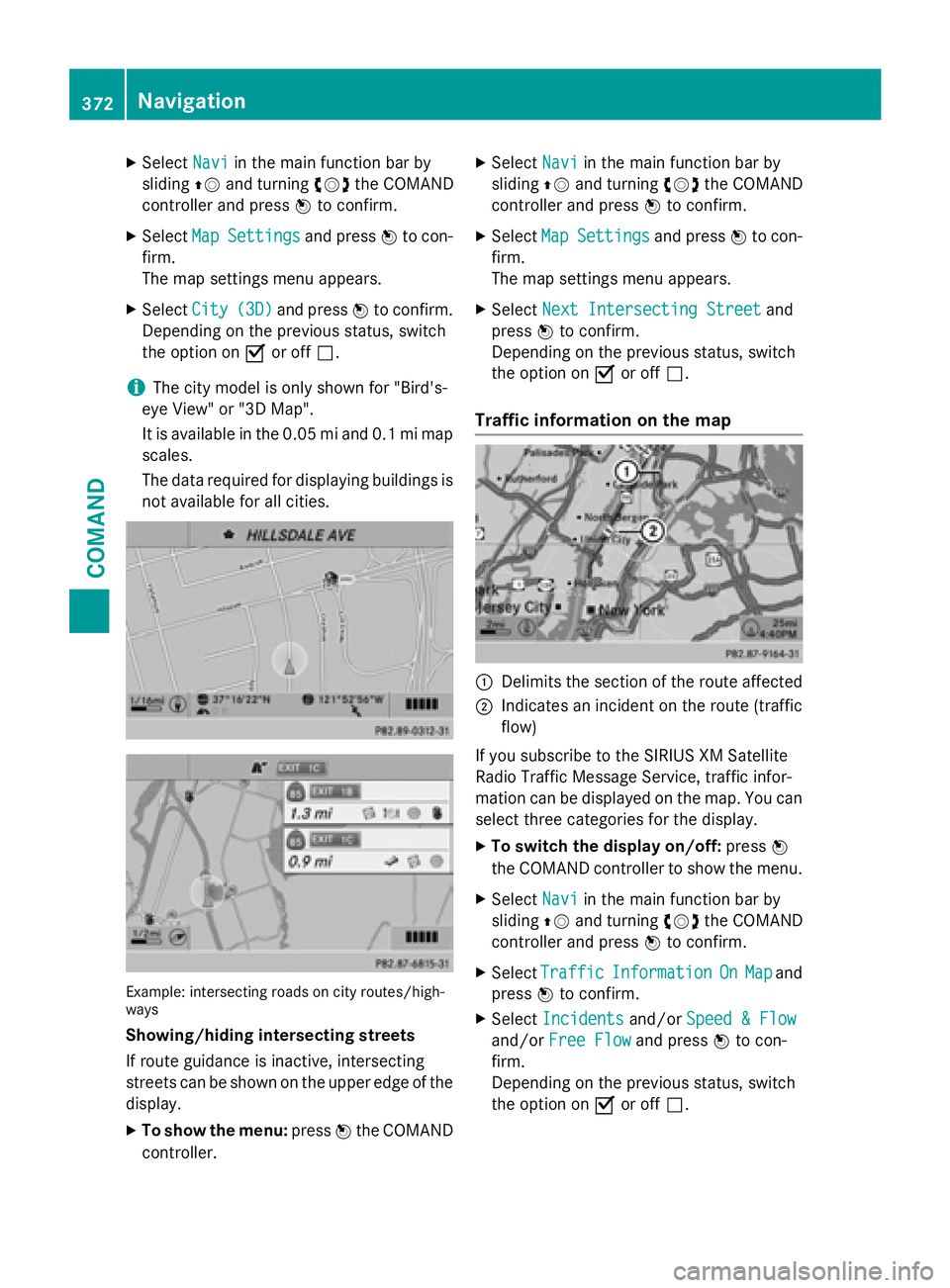
Example: intersecting roads on city routes/high-
ways
Showing/hiding intersecting streets
If route guidance is inactive, intersecting
streets can be shown on the upper edge of the
display.
XTo show the menu: pressWthe COMAND
controller.
XSelect Naviin the main function bar by
sliding ZVand turning cVdthe COMAND
controller and press Wto confirm.
XSelect MapSettingsand press Wto con-
firm.
The map settings menu appears.
XSelect Next Intersecting Streetand
press Wto confirm.
Depending on the previous status, switch
the option on Oor off ª.
Traffic information on the map
:Delimits the section of the route affected
;Indicates an incident on the route (traffic
flow)
If you subscribe to the SIRIUS XM Satellite
Radio Traffic Message Service, traffic infor-
mation can be displayed on the map. You can
select three categories for the display.
XTo switch the display on/off: pressW
the COMAND controller to show the menu.
XSelect Naviin the main function bar by
sliding ZVand turning cVdthe COMAND
controller and press Wto confirm.
XSelect TrafficInformationOnMapand
press Wto confirm.
XSelect Incidentsand/or Speed & Flow
and/orFree Flowand press Wto con-
firm.
Depending on the previous status, switch
the option on Oor off ª.
372Navigation
COMAND
Page 377 of 614
XTo avoid a new area:call up the area menu
again (
Ypage 373).
Switching an avoided area on/off
XCall up the area list (Ypage 374).
XSelect an entry in the list by turning cVd
the COMAND controller and press Wto
confirm.
The avoided area is switched on Oor off
ª depending on the previous status.
Displaying and changing an avoided area
XCall up the area list (Ypage 374).
XSelect an entry in the list by turning cVd
the COMAND controller.
XSlide VYthe COMAND controller and
press Wto confirm.
XSelect Display/Changeand press Wto
confirm.
The area to be avoided is indicated in the
map.
XTo change the location of the area: slide
XVY, ZVÆoraVb the COMAND control-
ler.
The area is moved on the map.
XTo adjust the size of the area: turncVd
the COMAND controller.
The area is enlarged or reduced.
XTo confirm the change: pressWthe
COMAND controller.
The list appears and the change is entered.
Deleting a set area
XCall up the area list (Ypage 374).
XSelect an entry in the list by turning cVd
the COMAND controller.
XSlide VYthe COMAND controller and
press Wto confirm.
XSelect Deleteand press Wto confirm.
A query appears asking whether the entry
should be deleted.
XSelect YesorNo.
If you select Yes
, the entry is deleted. If you select
No
, the process will be can-
celed.
SIRIUS XM service
Displaying SIRIUS XM service information
You can display the SIRIUS XM service infor-
mation.
XTo show the menu: pressWthe COMAND
controller.
XSelect Naviin the main function bar by
sliding ZVand turning cVdthe COMAND
controller and press Wto confirm.
XSelect SIRIUS Serviceand press Wto
confirm.
The window on the right half of the display
shows the telephone number of the pro-
vider (SIRIUS XM) and the serial number of
your service module.
Registering for the SIRIUS XM traffic
report service
XCall the traffic report provider's phone
number shown on the screen.
iYou can also have the satellite service
activated online. To do so, visit the SIRIUS
XM Radio website at
http://www.sirius.com (USA).
Once the connection has been established:
XFollow the instructions of the operator.
The activation process may take up to ten
minutes.
If registration is not included when purchas-
ing the system, your credit card details will be
required to activate your account.
Compass function
You can view the current direction of travel,
the current height and the coordinates of the
current vehicle position in the compass view.
XTo switch to navigation mode: press the
Ø button.
Navigation375
COMAND
Z
Page 379 of 614
Updating the digital map
Important safety notes
GWARNING
Combustion engines emit poisonous exhaust
gases such as carbon monoxide. Inhaling
these exhaust gases leads to poisoning. There
is a risk of fatal injury. Therefore never leave
the engine running in enclosed spaces with-
out sufficient ventilation.
Introduction
The digital maps generated by the map soft-
ware become outdated in the same way as
conventional road maps. Optimal route guid-
ance can only be provided by the navigation
system in conjunction with the most up-to-
date map software.
Information about new versions of the digital
map can be obtained from an authorized
Mercedes-Benz Center. You can have the dig-
ital map updated there with a DVD, or you can
update it yourself.
Carrying out a manual update
iThe update process can take a long time
(over an hour), depending on the size of the
digital map. During this time, you will only
be able to switch on radio mode and to
accept incoming calls. The update will be
completed more quickly if the vehicle is
stationary.
If you start the update with the engine
switched off and the starter battery has
insufficient power, COMAND may automat-
ically switch off. This protects the battery. If
this occurs, restart the update with the
engine running.
XInsert the DVD (Ypage 447).
COMAND checks whether the digital map
on the DVD is compatible with the naviga-
tion system and system software.
A prompt then appears asking if you want
to install the database. Versions of the database currently installed and the data-
base that is to be installed are displayed.
XSelect
YesorNoand press Wto confirm.
After selecting Yes
, an activation code
must be entered when installing a database
for the first time. You will receive the acti-
vation code when you buy the navigation
DVD.
If you select No
, the process will be can-
celed.
XEnter the activation code.
After entering the activation code cor-
rectly, COMAND starts updating the digital
map. Once the update is finished, you will
see a message.
XTo confirm the message: pressWthe
COMAND controller.
XTake the DVD out of the slot.
While the update is running, you will see a
message to this effect and a progress bar.
The navigation system is not operational
until the update is complete.
iYou cannot eject the DVD during the
update. If you switch off COMAND during
the update, the update is interrupted. It
then continues from where it was interrup-
ted when the system is restarted.
COMAND may prompt you to change the DVD
during the update.
XPress the 8load/eject button.
XTake the DVD out of the slot.
XInsert the requested DVD.
Once the update has been successfully
completed, you will see a message to this
effect.
XTo confirm the message: pressWthe
COMAND controller.
XTake the DVD out of the slot.
The update is complete.
If the update is not successfully completed,
you will see a message that the map update
is not possible.
Navigation377
COMAND
Z
Page 430 of 614
Internet radio
General notes
A good Internet connection isrequired to
transmit audio data efficiently. To ensure the
best-possible reception, your mobile phone
should beconnected to the vehicle's exterior
antenna via the phone bracket (optional).
Bear inmind that a relatively large volume of
data can betransmitted when using the Inter-
net radio. An average 12 8kbit per second
data transfer rate can transfer 56 MB of data
in one hour.
The data transfer rate of a station is displayed
while receiving data.
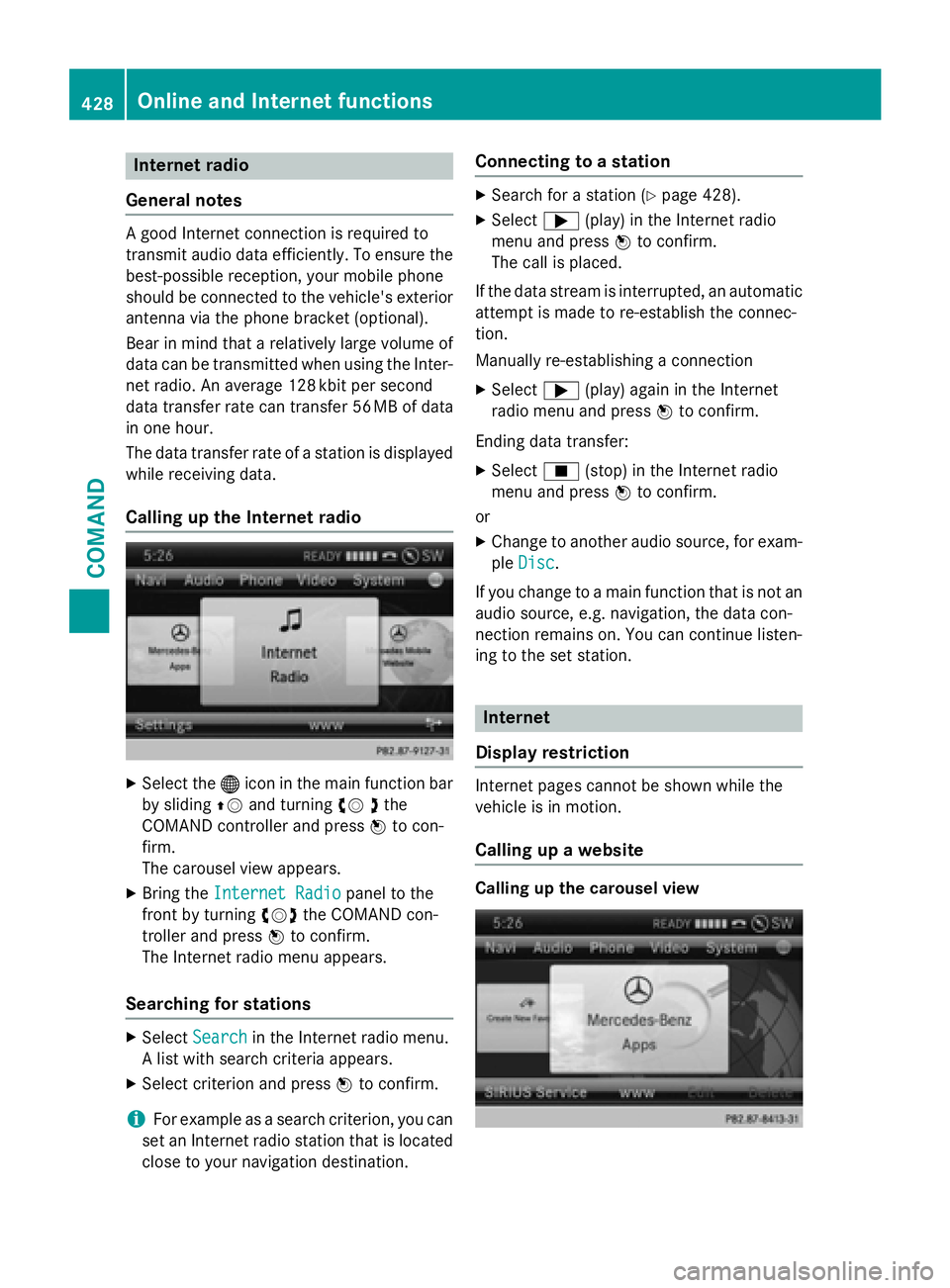
Calling up the Internet radio
XSelect the ®icon in the main function bar
by sliding ZVand turning cV dthe
COMAND controller and press Wto con-
firm.
The carousel view appears.
XBring the Internet Radiopanel to the
front by turning cVdthe COMAND con-
troller and press Wto confirm.
The Internet radio menu appears.
Searching for stations
XSelect Searchin the Internet radio menu.
A list with search criteria appears.
XSelect criterion and press Wto confirm.
iFor example as a search criterion, you can
set an Internet radio station that is located
close to your navigation destination.
Connecting to a station
XSearch for a station (Ypage 428).
XSelect ;(play) in the Internet radio
menu and press Wto confirm.
The call is placed.
If the data stream is interrupted, an automatic
attempt is made to re-establish the connec-
tion.
Manually re-establishing a connection
XSelect ;(play) again in the Internet
radio menu and press Wto confirm.
Ending data transfer:
XSelect É(stop) in the Internet radio
menu and press Wto confirm.
or
XChange to another audio source, for exam-
ple Disc
.
If you change to a main function that is not an
audio source, e.g. navigation, the data con-
nection remains on. You can continue listen-
ing to the set station.
Internet
Display restriction
Internet pages cannot be shown while the
vehicle is in motion.
Calling up a website
Calling up the carousel view
428Online and Internet functions
COMAND
Page 439 of 614
Radio mode
Important notes
Portable electronic devices in the vehicle may
seriously impair radio reception.
Switching to radio mode
Switching modes using the function but-
ton
XPress the $function button.
The radio display appears. You will hear the
last station played on the last waveband.
iRepeatedly pressing this function button
switches through the wavebands in this
order: FM, AM, WB. You then call up satel-
lite radio mode. Pressing the button again
takes you back to FM radio mode.
Switching modes via the audio menu
Example: audio menu
:
Current audio operating mode
;Main function bar
=Audio menu
XSelect Audioin the main function bar by
sliding ZVand turning cVdthe COMAND
controller and press Wto confirm.
If radio mode was the last mode selected, it
will now be active.
If another audio mode is switched on, you
can now switch to radio mode in the audio
menu.
XSelect Audioby sliding ZVthe COMAND
controller and press Wto confirm.
The audio menu appears.
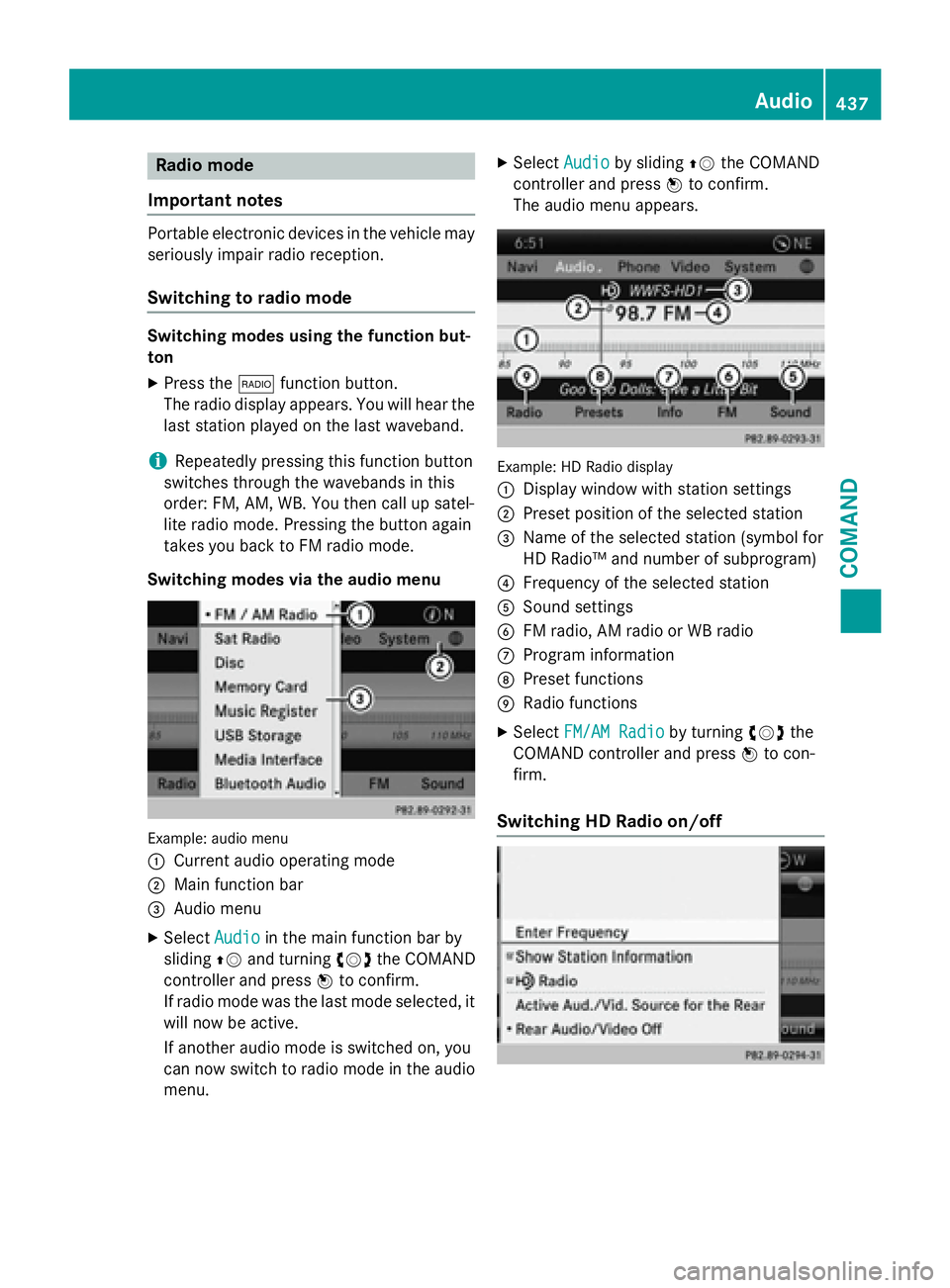
Example: HD Radio display
:
Display window with station settings
;Preset position of the selected station
=Name of the selected station (symbol for
HD Radio™ and number of subprogram)
?Frequency of the selected station
ASound settings
BFM radio, AM radio or WB radio
CProgram information
DPreset functions
ERadio functions
XSelect FM/AM Radioby turning cVdthe
COMAND controller and press Wto con-
firm.
Switching HD Radio on/off
Audio437
COMAND
Z
Page 440 of 614
You can switch off HD Radio™ in the radio
submenu:
XSelectRadioin the radio display by sliding
VÆ the COMAND controller and press W
to confirm.
XSelect HD Radioand press Wto confirm.
HD Radio™ on: O
HD Radio™ off: ª
iNotes on HD Radio™:
HD Radio™ is a digital radio system from
the U.S.A. When HD Radio is off, you will
hear only analog programs on all frequen-
cies.
HD Radio™ provides:
Rdigital transmission on the same wave-
bands as analog AM/FM. The analog
AM/FM stations remain in the same
position when selecting a station.
Rbroadcasting of several program streams
over a single FM frequency (e.g. HD1,
HD2, etc.).
Rclear, interference free reception.
RFM: CD quality sound.
AM: analog FM station sound quality.
Rthe display of text-based information
(e.g. artist, track name) in the display
For further information on HD Radio™, visit
http://www.hdradio.com.
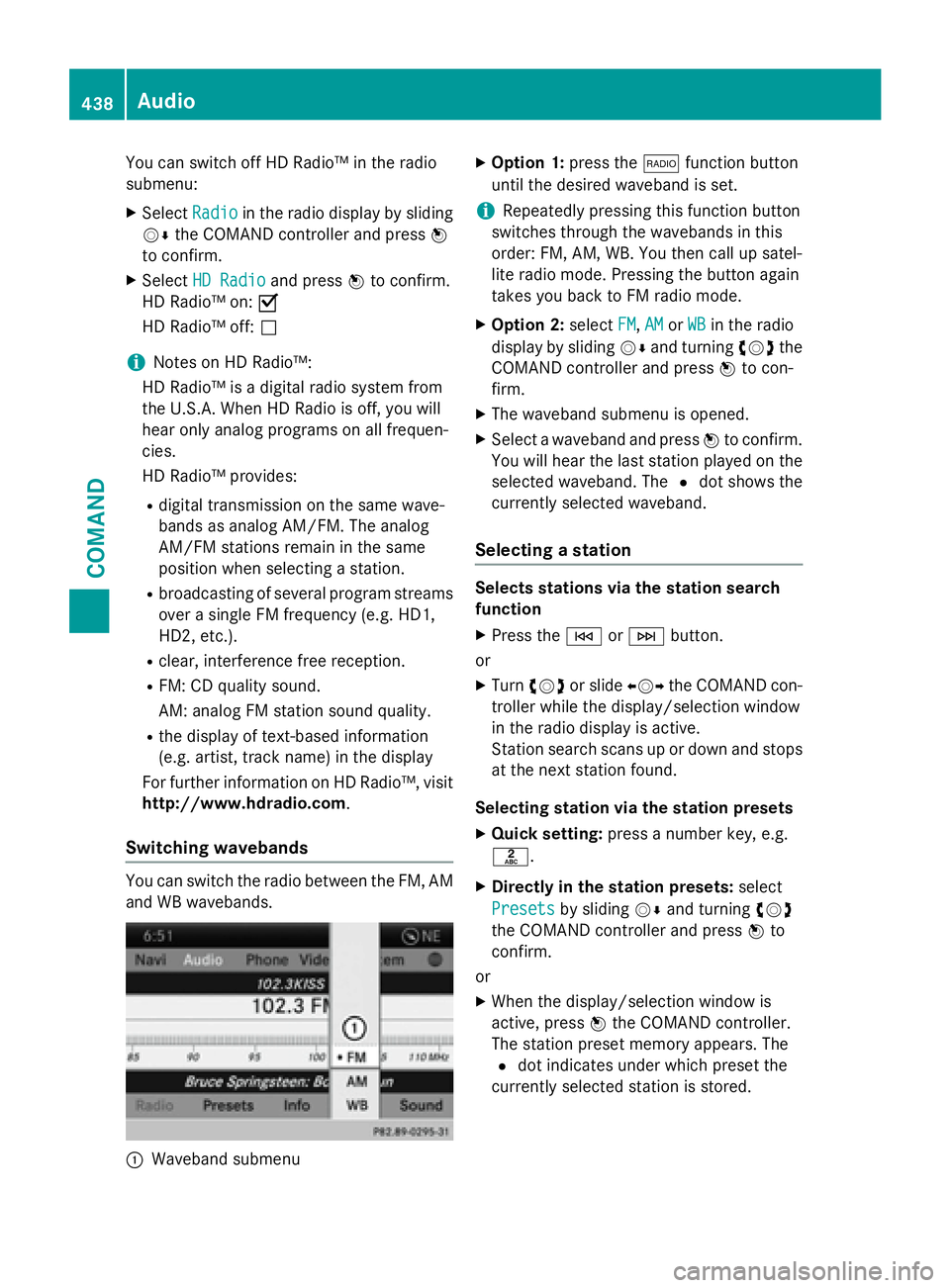
Switching wavebands
You can switch the radio between the FM, AM
and WB wavebands.
:Waveband submenu
XOption 1: press the$function button
until the desired waveband is set.
iRepeatedly pressing this function button
switches through the wavebands in this
order: FM, AM, WB. You then call up satel-
lite radio mode. Pressing the button again
takes you back to FM radio mode.
XOption 2: selectFM,AMor WBin the radio
display by sliding VÆand turning cVdthe
COMAND controller and press Wto con-
firm.
XThe waveband submenu is opened.
XSelect a waveband and press Wto confirm.
You will hear the last station played on the
selected waveband. The #dot shows the
currently selected waveband.
Selecting a station
Selects stations via the station search
function
XPress the EorF button.
or
XTurn cVd or slide XVYthe COMAND con-
troller while the display/selection window
in the radio display is active.
Station search scans up or down and stops
at the next station found.
Selecting station via the station presets
XQuick setting: press a number key, e.g.
l.
XDirectly in the station presets: select
Presets
by sliding VÆand turning cVd
the COMAND controller and press Wto
confirm.
or
XWhen the display/selection window is
active, press Wthe COMAND controller.
The station preset memory appears. The
# dot indicates under which preset the
currently selected station is stored.
438Audio
COMAND
Page 441 of 614
XSelect a station by turningcVdand press-
ing Wto confirm or press a number key,
e.g. l.
Selecting stations by entering the fre-
quency manually
XOption 1: press thelbutton.
XOption 2: selectRadioin the radio display
by sliding VÆand turning cVdthe
COMAND controller and press Wto con-
firm.
XSelect Enter Frequencyand press Wto
confirm.
Irrespective of the option chosen, an input
menu will appear.
XEnter a frequency using the number keys.
COMAND sets the frequency entered.
WavebandFrequency
AM (MF)530 - 1700 kHz
FM (VHF)87.7 - 107.9 MHz
WB (Weather Band)Weather report
channels
iYou can only enter currently permitted
numbers.
iIf you enter a frequency in the FM or AM
wavebands which is outside the frequency
range, COMAND sets the next lower fre-
quency.
Storing station
Storing station manually
There are ten presets available for the FM and AM wavebands.
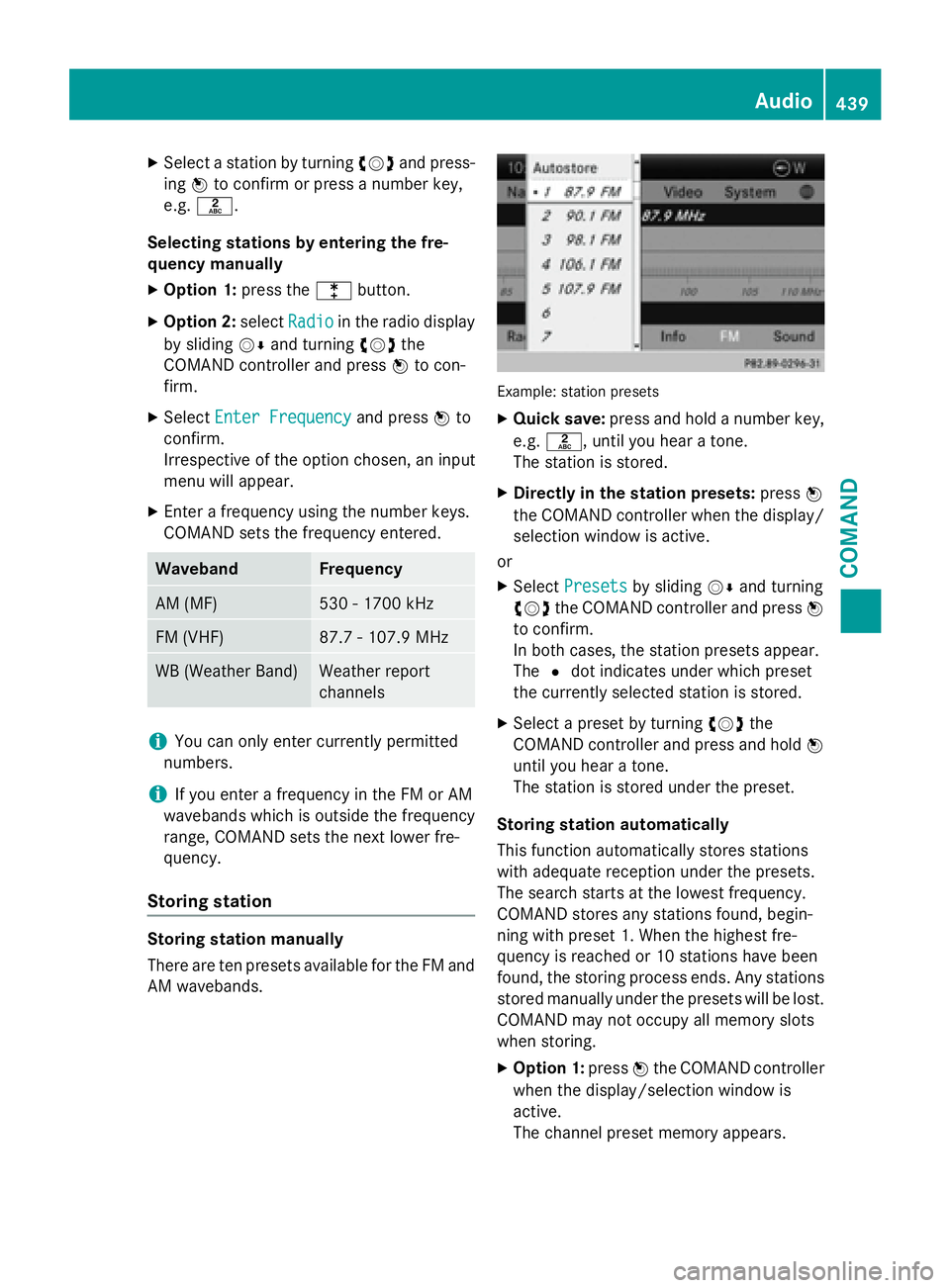
Example: station presets
XQuick save: press and hold a number key,
e.g. l, until you hear a tone.
The station is stored.
XDirectly in the station presets: pressW
the COMAND controller when the display/
selection window is active.
or
XSelect Presetsby sliding VÆand turning
cVd the COMAND controller and press W
to confirm.
In both cases, the station presets appear.
The #dot indicates under which preset
the currently selected station is stored.
XSelect a preset by turning cVdthe
COMAND controller and press and hold W
until you hear a tone.
The station is stored under the preset.
Storing station automatically
This function automatically stores stations
with adequate reception under the presets.
The search starts at the lowest frequency.
COMAND stores any stations found, begin-
ning with preset 1. When the highest fre-
quency is reached or 10 stations have been
found, the storing process ends. Any stations
stored manually under the presets will be lost.
COMAND may not occupy all memory slots
when storing.
XOption 1: pressWthe COMAND controller
when the display/selection window is
active.
The channel preset memory appears.
Audio439
COMAND
Z