steering wheel MERCEDES-BENZ SL-CLASS ROADSTER 2016 Owner's Guide
[x] Cancel search | Manufacturer: MERCEDES-BENZ, Model Year: 2016, Model line: SL-CLASS ROADSTER, Model: MERCEDES-BENZ SL-CLASS ROADSTER 2016Pages: 614, PDF Size: 15.67 MB
Page 166 of 614
iThe automatic transmission shifts to
automatic drive program Ceach time the
engine is started.
iFurther information about permanent
drive program M(
Ypage 166).
As well as this permanent drive program M,
you can also activate temporary drive pro-
gram M(
Ypage 165).
iRS cannot be selected during normal driv-
ing. For further information on RACE
START, see (
Ypage 192).
AMG button (SETUP)
You can save and call up the following pre-
settings with the AMG button:
RDrive program (Ypage 163)
RSuspension tuning
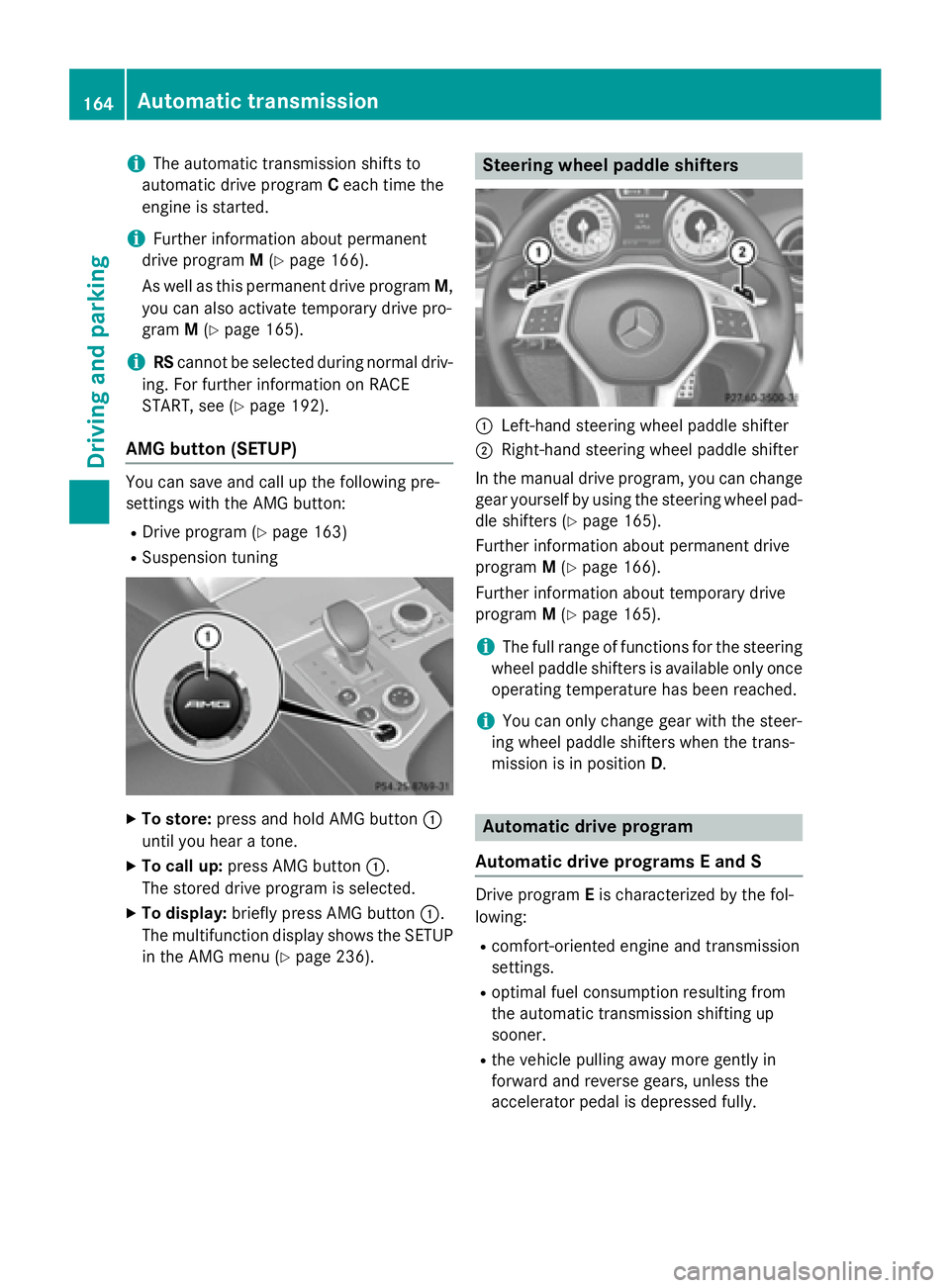
XTo store: press and hold AMG button :
until you hear a tone.
XTo call up: press AMG button :.
The stored drive program is selected.
XTo display: briefly press AMG button :.
The multifunction display shows the SETUP
in the AMG menu (
Ypage 236).
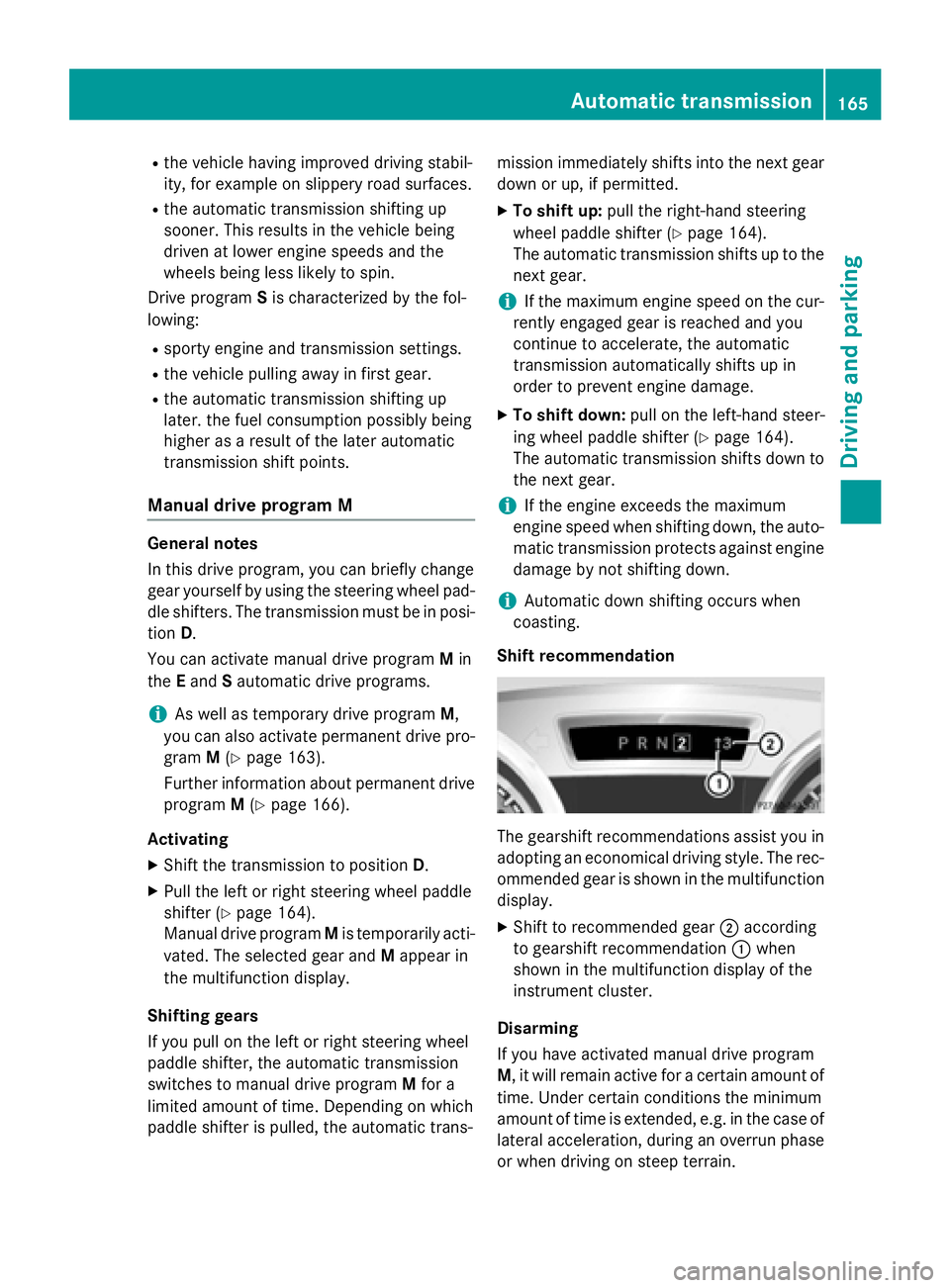
Steering wheel paddle shifters
:Left-hand steering wheel paddle shifter
;Right-hand steering wheel paddle shifter
In the manual drive program, you can change
gear yourself by using the steering wheel pad- dle shifters (
Ypage 165).
Further information about permanent drive
program M(
Ypage 166).
Further information about temporary drive
program M(
Ypage 165).
iThe full range of functions for the steering
wheel paddle shifters is available only once operating temperature has been reached.
iYou can only change gear with the steer-
ing wheel paddle shifters when the trans-
mission is in position D.
Automatic drive program
Automatic drive programs E and S
Drive program Eis characterized by the fol-
lowing:
Rcomfort-oriented engine and transmission
settings.
Roptimal fuel consumption resulting from
the automatic transmission shifting up
sooner.
Rthe vehicle pulling away more gently in
forward and reverse gears, unless the
accelerator pedal is depressed fully.
164Automatic transmission
Driving and parking
Page 167 of 614
Rthe vehicle having improved driving stabil-
ity, for example on slippery road surfaces.
Rthe automatic transmission shifting up
sooner. This results in the vehicle being
driven at lower engine speeds and the
wheels being less likely to spin.
Drive program Sis characterized by the fol-
lowing:
Rsporty engine and transmission settings.
Rthe vehicle pulling away in first gear.
Rthe automatic transmission shifting up
later. the fuel consumption possibly being
higher as a result of the later automatic
transmission shift points.
Manual drive program M
General notes
In this drive program, you can briefly change
gear yourself by using the steering wheel pad- dle shifters. The transmission must be in posi-
tion D.
You can activate manual drive program Min
the Eand Sautomatic drive programs.
iAs well as temporary drive program M,
you can also activate permanent drive pro-
gram M(
Ypage 163).
Further information about permanent drive
program M(
Ypage 166).
Activating
XShift the transmission to position D.
XPull the left or right steering wheel paddle
shifter (
Ypage 164).
Manual drive program Mis temporarily acti-
vated. The selected gear and Mappear in
the multifunction display.
Shifting gears
If you pull on the left or right steering wheel
paddle shifter, the automatic transmission
switches to manual drive program Mfor a
limited amount of time. Depending on which
paddle shifter is pulled, the automatic trans- mission immediately shifts into the next gear
down or up, if permitted.
XTo shift up:
pull the right-hand steering
wheel paddle shifter (
Ypage 164).
The automatic transmission shifts up to the
next gear.
iIf the maximum engine speed on the cur-
rently engaged gear is reached and you
continue to accelerate, the automatic
transmission automatically shifts up in
order to prevent engine damage.
XTo shift down: pull on the left-hand steer-
ing wheel paddle shifter (
Ypage 164).
The automatic transmission shifts down to
the next gear.
iIf the engine exceeds the maximum
engine speed when shifting down, the auto-
matic transmission protects against engine
damage by not shifting down.
iAutomatic down shifting occurs when
coasting.
Shift recommendation
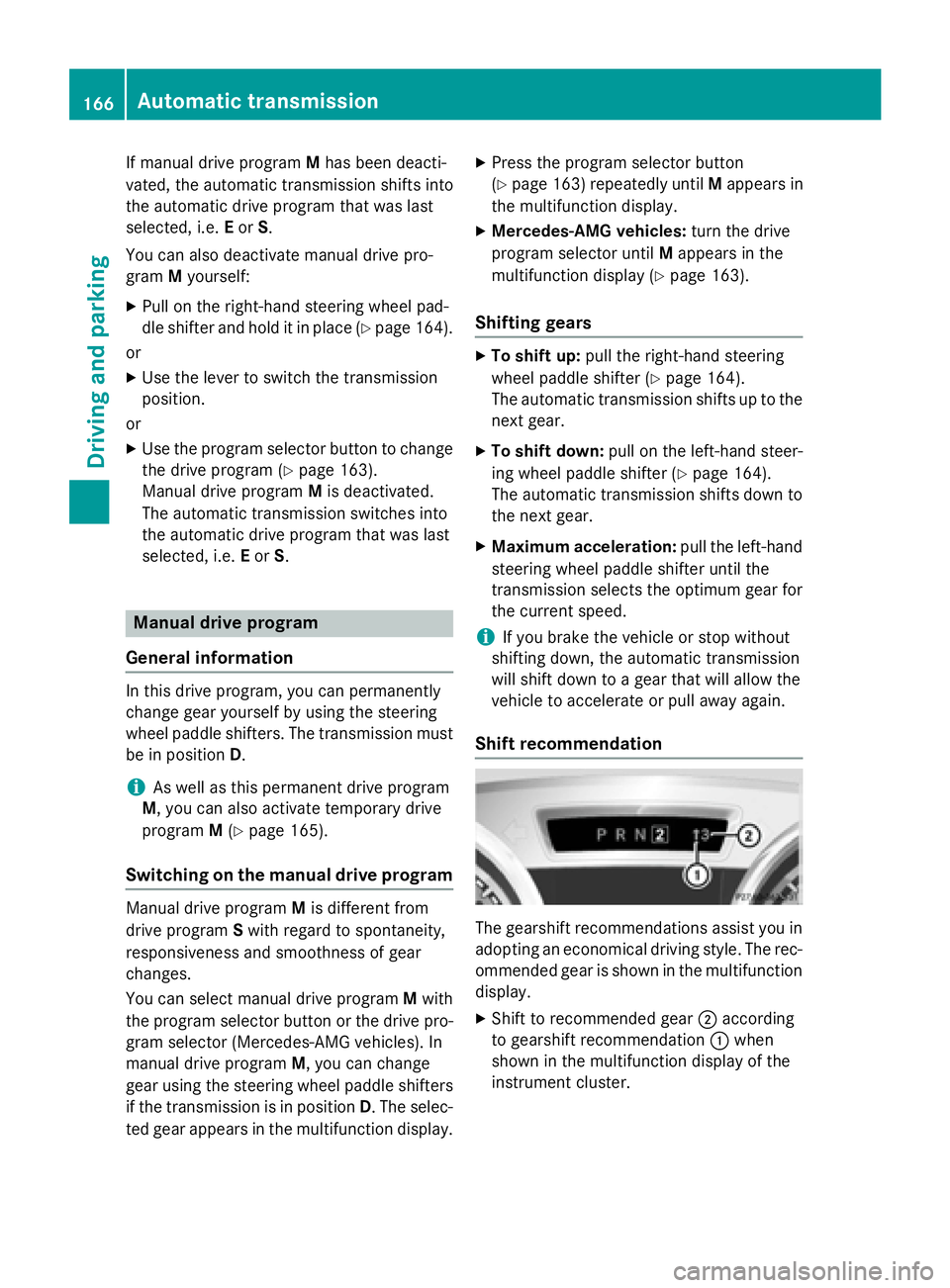
The gearshift recommendations assist you in
adopting an economical driving style. The rec-
ommended gear is shown in the multifunction
display.
XShift to recommended gear ;according
to gearshift recommendation :when
shown in the multifunction display of the
instrument cluster.
Disarming
If you have activated manual drive program
M , it will remain active for a certain amount of
time. Under certain conditions the minimum
amount of time is extended, e.g. in the case of
lateral acceleration, during an overrun phase
or when driving on steep terrain.
Automatic transmission165
Driving an d parking
Z
Page 168 of 614
If manual drive programMhas been deacti-
vated, the automatic transmission shifts into
the automatic drive program that was last
selected, i.e. Eor S.
You can also deactivate manual drive pro-
gram Myourself:
XPull on the right-hand steering wheel pad-
dle shifter and hold it in place (
Ypage 164).
or
XUse the lever to switch the transmission
position.
or
XUse the program selector button to change the drive program (
Ypage 163).
Manual drive program Mis deactivated.
The automatic transmission switches into
the automatic drive program that was last
selected, i.e. Eor S.
Manual drive program
General information
In this drive program, you can permanently
change gear yourself by using the steering
wheel paddle shifters. The transmission must be in position D.
iAs well as this permanent drive program
M, you can also activate temporary drive
program M(
Ypage 165).
Switching on the manual drive program
Manual drive program Mis different from
drive program Swith regard to spontaneity,
responsiveness and smoothness of gear
changes.
You can select manual drive program Mwith
the program selector button or the drive pro- gram selector (Mercedes-AMG vehicles). In
manual drive program M, you can change
gear using the steering wheel paddle shifters
if the transmission is in position D. The selec-
ted gear appears in the multifunction display.
XPress the program selector button
(
Ypage 163) repeatedly until Mappears in
the multifunction display.
XMercedes-AMG vehicles: turn the drive
program selector until Mappears in the
multifunction display (
Ypage 163).
Shifting gears
XTo shift up: pull the right-hand steering
wheel paddle shifter (
Ypage 164).
The automatic transmission shifts up to the
next gear.
XTo shift down: pull on the left-hand steer-
ing wheel paddle shifter (
Ypage 164).
The automatic transmission shifts down to
the next gear.
XMaximum acceleration: pull the left-hand
steering wheel paddle shifter until the
transmission selects the optimum gear for
the current speed.
iIf you brake the vehicle or stop without
shifting down, the automatic transmission
will shift down to a gear that will allow the
vehicle to accelerate or pull away again.
Shift recommendation
The gearshift recommendations assist you in
adopting an economical driving style. The rec-
ommended gear is shown in the multifunction
display.
XShift to recommended gear ;according
to gearshift recommendation :when
shown in the multifunction display of the
instrument cluster.
166Automatic transmission
Driving and parking
Page 169 of 614
Mercedes-AMG vehicles
!In manual drive programM, the automatic
transmission does not shift up automati-
cally even when the engine limiting speed
for the current gear is reached. When the
engine limiting speed is reached, the fuel
supply is cut to prevent the engine from
overrevving. Always make sure that the
engine speed does not reach the red area of
the tachometer. There is otherwise a risk of
engine damage.
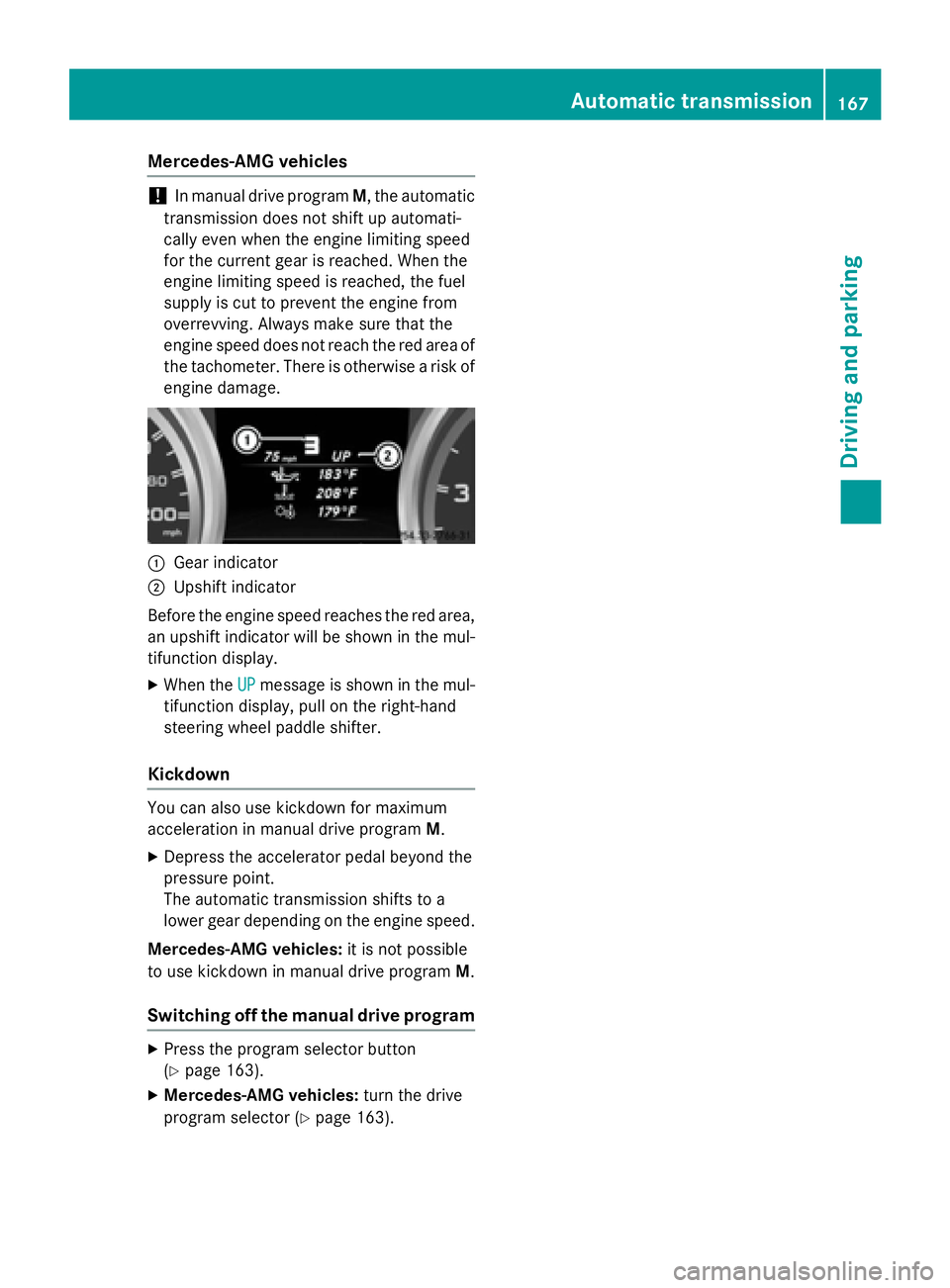
:Gear indicator
;Upshift indicator
Before the engine speed reaches the red area,
an upshift indicator will be shown in the mul-
tifunction display.
XWhen the UPmessage is shown in the mul-
tifunction display, pull on the right-hand
steering wheel paddle shifter.
Kickdown
You can also use kickdown for maximum
acceleration in manual drive program M.
XDepress the accelerator pedal beyond the
pressure point.
The automatic transmission shifts to a
lower gear depending on the engine speed.
Mercedes-AMG vehicles: it is not possible
to use kickdown in manual drive program M.
Switching off the manual drive program
XPress the program selector button
(
Ypage 163).
XMercedes-AMG vehicles:turn the drive
program selector (
Ypage 163).
Automatic transmission167
Driving and parking
Z
Page 173 of 614
Problems with fuel and the fuel tank
This section provides descriptions of and solutions to safety-relevant problems. Descriptions
of and solutions to further problems can be found in the Digital Operator's Manual.
ProblemPossible causes/consequences and MSolutions
Fuel is leaking from the
vehicle.The fuel line or the fuel tank is faulty.
GWARNING
Risk of explosion or fire.
XTurn the SmartKey to position0immediately and remove it
(
Ypage 151).
XDo not restart the engine under any circumstances.
XConsult a qualified specialist workshop.
Parking
Important safety notes
GWARNING
Flammable material such as leaves, grass or
twigs may ignite if they come into contact with
hot parts of the exhaust system or exhaust
gas flow. There is a risk of fire.
Park the vehicle so that no flammable mate-
rials come into contact with parts of the vehi-
cle which are hot. Take particular care not to
park on dry grassland or harvested grain
fields.
GWARNING
If you switch off the ignition while driving,
safety-relevant functions are only available
with limitations, or not at all. This could affect, for example, the power steering and the brake
boosting effect. You will require considerably
more effort to steer and brake. There is a risk
of an accident.
Do not switch off the ignition while driving.
GWARNING
If you leave children unsupervised in the vehi-
cle, they could set it in motion by, for example:
Rrelease the parking brake.
Rshift the automatic transmission out of the
parking position P.
Rstart the engine.
In addition, they may operate vehicle equip-
ment and become trapped. There is a risk of
an accident and injury.
When leaving the vehicle, always take the
SmartKey with you and lock the vehicle. Never
leave children unsupervised in the vehicle.
!Always secure the vehicle correctly
against rolling away. Otherwise, the vehicle
or its drivetrain could be damaged.
To ensure that the vehicle is secured against
rolling away unintentionally:
Rthe electric parking brake must be applied.
Rthe transmission must be in position P.
Rthe SmartKey must be removed from the
ignition lock.
Rthe front wheels must be turned towards
the curb on steep uphill or downhill gradi-
ents.
Parking171
Driving and parking
Z
Page 181 of 614
XHold test gaugeAvertically on brake
disc :and slide measuring pin ;onto
brake disc :.
XCheck which color field ?the arrow on
measuring pin ;is pointing to.
Green: the brake pad/lining thickness is
sufficient.
Red : the brake pad/lining thickness is not
sufficient. Have the brake pads/lining
checked at a qualified specialist workshop.
iTo avoid an inaccurate measurement:
Rmake sure you position the wheels suit-
ably
Rdo not put the measuring pin on a recess
in the brake disc
Driving on wet roads
Hydroplaning
If water has accumulated to a certain depth
on the road surface, there is a danger of
hydroplaning occurring, even if:
Ryou drive at low speeds.
Rthe tires have adequate tread depth.
For this reason, in the event of heavy rain or in
conditions in which hydroplaning may occur,
you must drive in the following manner:
Rlower your speed.
Ravoid ruts.
Ravoid sudden steering movements.
Rbrake carefully.
Driving on flooded roads
!Do not drive through flooded areas.
Check the depth of any water before driving through it. Drive slowly through standing
water. Otherwise, water may enter the
vehicle interior or the engine compartment.
This can damage the electronic compo-
nents in the engine or the automatic trans-
mission. Water can also be drawn in by the
engine's air suction nozzles and this can
cause engine damage.
Winter driving
GWARNING
If you shift down on a slippery road surface in an attempt to increase the engine's braking
effect, the drive wheels could lose their grip.
There is an increased danger of skidding and
accidents.
Do not shift down for additional engine brak-
ing on a slippery road surface.
GDANGER
If the exhaust pipe is blocked or adequate
ventilation is not possible, poisonous gases
such as carbon monoxide (CO) may enter the vehicle. This is the case, e.g. if the vehicle
becomes trapped in snow. There is a risk of
fatal injury.
If you leave the engine or the auxiliary heating
running, make sure the exhaust pipe and area
around the vehicle are clear of snow. To
ensure an adequate supply of fresh air, open a
window on the side of the vehicle that is not
facing into the wind.
Have your vehicle winter-proofed at a quali-
fied specialist workshop at the onset of win-
ter.
Drive particularly carefully on slippery road
surfaces. Avoid sudden acceleration, steeringand braking maneuvers. Do not use cruise
control.
If the vehicle threatens to skid or cannot be
stopped when moving at low speed:
XShift the transmission to position N.
The outside temperature indicator is not
designed to serve as an ice-warning device
and is therefore unsuitable for that purpose.
Changes in the outside temperature are dis-
played after a short delay.
Indicated temperatures just above the freez-
ing point do not guarantee that the road sur-
face is free of ice. The road may still be icy,
especially in wooded areas or on bridges. The
vehicle could skid if you fail to adapt your
driving style. Always adapt your driving style
Driving tips179
Driving and parking
Z
Page 195 of 614
RSPORT handling mode is activated.
(
Ypage 76)
Rthe steering wheel is in the straight-ahead
position.
Rthe vehicle is stationary and the brake
pedal is depressed (left foot).
Rthe transmission is in positionD.
Activating RACE START
XDepress the brake pedal with your left foot
and keep it depressed.
XTurn the drive program selector clockwise
(
Ypage 163) until the RSlamp lights up.
The RACE START Confirm: Paddle UP
Cancel: Paddle DOWNmessage appears
in the multifunction display.
iIf the activation conditions are no longer
fulfilled, RACE START is canceled. The mul-
tifunction display shows the RACE START
Canceledmessage.
XTo cancel: pull the left steering wheel pad-
dle shifter (
Ypage 164).
or
XTo confirm: pull the right steering wheel
paddle shifter (
Ypage 164).
The RACE START Available Depress
gas pedal.message appears in the mul-
tifunction display.
iIf you do not depress the accelerator
pedal fully within two seconds, RACE
START is canceled. The RACE START Not
PossibleSeeOperator'sManualmes-
sage appears in the multifunction display.
XFully depress the accelerator pedal.
The engine speed increases to at least
3,500 rpm.
The RACE START Release brake to
startmessage appears in the multifunc-
tion display.
iIf you do not release the brake pedal
within five seconds, RACE START is can- celed. The multifunction display shows the
RACE START Canceled
message.
XTake your foot off the brake, but keep the
accelerator pedal depressed.
The vehicle pulls away at maximum accel-
eration.
The
RACE
STARTActivemessage appears
in the multifunction display.
RACE START is deactivated when the vehicle
reaches a speed of approximately 30 mph
(Canada: 50 km/h). Drive program S+is acti-
vated. SPORT handling mode remains activa-
ted.
RACE START is deactivated immediately if
you release the accelerator pedal during
RACE START or if any of the activation condi-
tions are no longer fulfilled. The RACE
START
Not Possible See Operator's Manual
message appears in the multifunction dis-
play.
iIf RACE START is used repeatedly within a
short period of time, it is only available
again after the vehicle has been driven a
certain distance.
Adaptive Damping System
General notes
The adjustable damping system adapts to the
current driving conditions. The adjustment
depends on whether you have selected Sport
or Comfort mode. Your selection remains
stored even if you remove the SmartKey from
the ignition lock.
Driving systems193
Driving and parking
Z
Page 199 of 614
Active Body Control(Mercedes-AMG
vehicles)
Vehicle level
Genera lnotes
In order to reduce fuel consumption and
improve th edriving dynamics, th evehicl eis
lowered as it sspee dincreases. In th eSP ORT
suspension setting ,it is lowered by up to
0. 5in (13 mm) and in COMF ORTby up to
0. 2in (5 mm). As th espee dis reduced, th e
vehicl eis raised up to th eset vehicl eheight .
Selec tth e"Normal" setting for normal road
surfaces and "Raised "for driving wit hsnow
chain sor on particularly poor road surfaces.
Important safety notes
The vehicl eis slightly lowered when th e
engin eis switched off .
GWARNING
When th evehicl eis bein glowered, people
could become trapped if their limb sare
between th evehicl ebody and th ewheels or
underneat hth evehicle. There is aris kof
injury.
Mak esur eno on eis underneat hth evehicl eor
in th eimmediat evicinity of th ewhee larches
when th evehicl eis bein glowered.
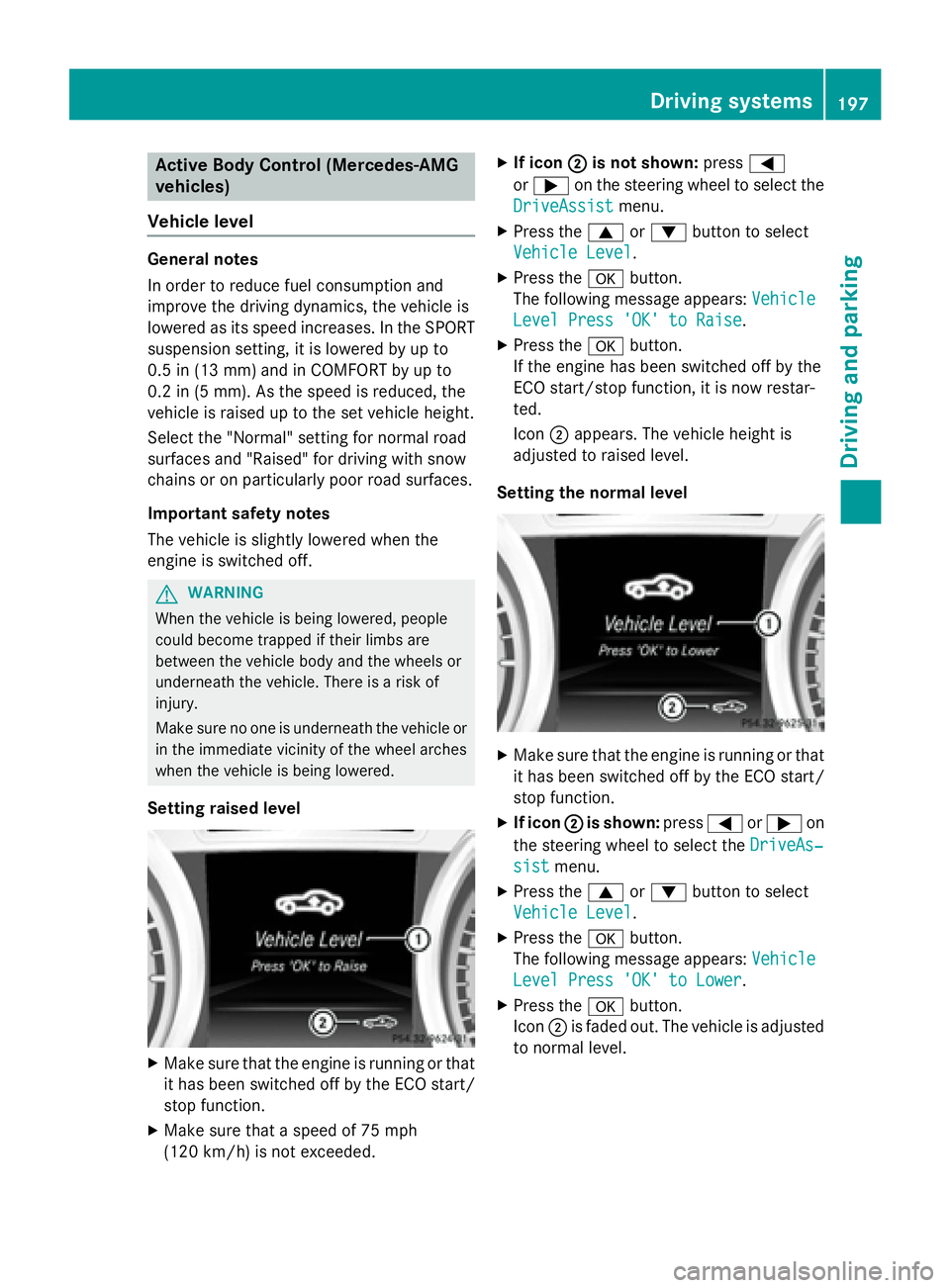
Setting raised level
XMak esur ethat th eengin eis runnin gor that
it has been switched off by th eECO start /
stop function .
XMakesur ethat aspee dof 75 mph
(12 0km/ h)is not exceeded.
XIf icon ;is not shown: press=
or ; on the steering wheel to select the
DriveAssist
menu.
XPress the 9or: button to select
Vehicle Level
.
XPress the abutton.
The following message appears: Vehicle
Level Press 'OK' to Raise.
XPress theabutton.
If the engine has been switched off by the
ECO start/stop function, it is now restar-
ted.
Icon ;appears. The vehicle height is
adjusted to raised level.
Setting the normal level
XMake sure that the engine is running or that it has been switched off by the ECO start/
stop function.
XIf icon ;is shown: press=or; on
the steering wheel to select the DriveAs‐
sistmenu.
XPress the9or: button to select
Vehicle Level
.
XPress the abutton.
The following message appears: Vehicle
Level Press 'OK' to Lower.
XPress theabutton.
Icon ;is faded out. The vehicle is adjusted
to normal level.
Driving systems197
Driving and parking
Z
Page 205 of 614
!If unavoidable, you should drive over
obstacles such as curbs slowly and not at a
sharp angle. Otherwise, you may damage
the wheels or tires.
Active Parking Assist may possibly indicate
parking spaces which are not suitable for
parking, for example:
Rwhere parking or stopping is prohibited
Rin front of driveways or entrances and exits
Ron unsuitable surfaces
Parking tips:
ROn narrow roads, drive as close to the park-
ing space as possible.
RParking spaces that are littered or over-
grown might be identified or measured
incorrectly.
RParking spaces that are partially occupied
by trailer drawbars might not be identified
as such or be measured incorrectly.
RSnowfall or heavy rain may lead to a parking
space being measured inaccurately.
RPay attention to the PARKTRONIC
(
Ypage 200) warning messages during the
parking procedure.
RYou can intervene in the steering procedure
to correct it at any time. Active Parking
Assist will then be canceled.
RWhen transporting a load which protrudes
from your vehicle, you should not use
Active Parking Assist.
RNever use Active Parking Assist when snow
chains are installed.
RMake sure that the tire pressures are
always correct. This has a direct influence
on the parking characteristics of the vehi-
cle.
Parking
Important safety notes
Objects located above the height range of
Active Parking Assist will not be detected
when the parking space is measured. These
are not taken into account when the parking procedure is calculated, e.g. overhanging
loads, tail sections or loading ramps of goods
vehicles. In some circumstances, Active Park-
ing Assist may therefore guide you into the
parking space too early.
GWARNING
If there are objects above the detection range, Active Parking Assist may turn prematurely.
You may cause a collision as a result. There is
a risk of an accident.
If there are objects above the detection range,
stop and deactivate Active Parking Assist.
GWARNING
Active Parking Assist merely aids you by inter- vening actively in the steering. If you do not
brake there is a risk of an accident.
Always apply the brakes yourself when
maneuvering and parking.
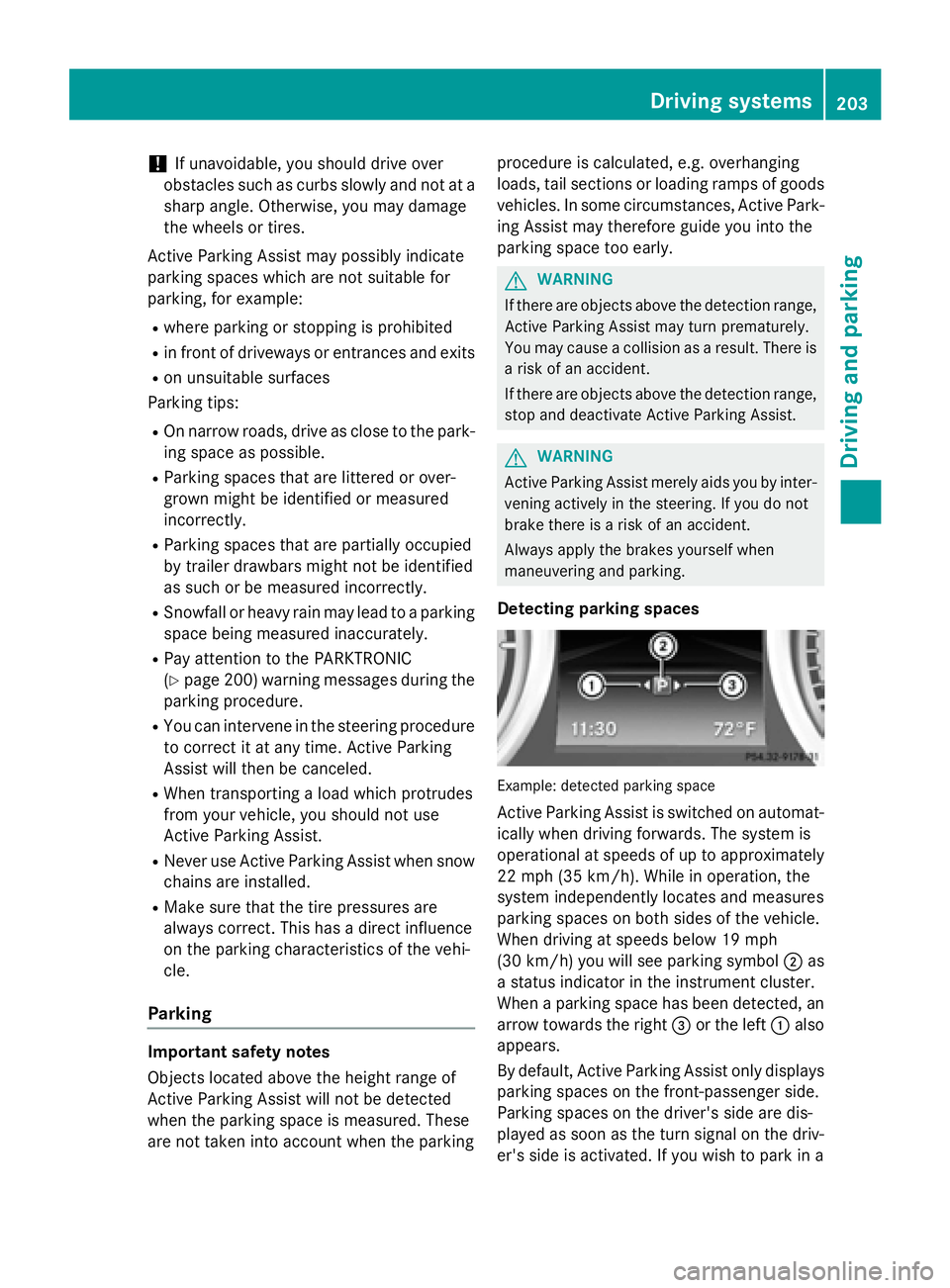
Detecting parking spaces
Example: detected parking space
Active Parking Assist is switched on automat-ically when driving forwards. The system is
operational at speeds of up to approximately
22 mph (35 km/h). While in operation, the
system independently locates and measures
parking spaces on both sides of the vehicle.
When driving at speeds below 19 mph
(30 km/h) you will see parking symbol ;as
a status indicator in the instrument cluster.
When a parking space has been detected, an
arrow towards the right =or the left :also
appears.
By default, Active Parking Assist only displays
parking spaces on the front-passenger side.
Parking spaces on the driver's side are dis-
played as soon as the turn signal on the driv-
er's side is activated. If you wish to park in a
Driving systems203
Driving and parking
Z
Page 206 of 614
space on the driver's side, the indicator on
the driver's side must remain on. The turn
signal must remain switched on until you
acknowledge the use of Active Parking Assist
by pressing theabutton on the multi-
function steering wheel.
Active Parking Assist will only detect parking
spaces:
Rthat are parallel to the direction of travel
Rthat are at least 59 in (1.5 m) wide
Rthat are at least 40 in (1.0 m) longer than
your vehicle
A parking space is displayed while you are
driving past it, and until you are approx-
imately 50 ft (15 m) away from it.
Backing up into the parking space
XStop the vehicle when the parking space
symbol shows the desired parking space in
the instrument cluster.
XShift the transmission to position R.
The Start Park Assist? Yes: OK No:
% message appears in the multifunction
display.
XTo cancel the procedure: press the%
button on the multifunction steering wheel
or pull away.
or
XTo park using Active Parking Assist:
press the abutton on the multifunction
steering wheel.
The Park Assist Active Accelerate
andBrakeObserveSurroundingsmes-
sage appears in the multifunction display.
XLet go of the multifunction steering wheel.
XBack up the vehicle, being ready to brake at
all times. Do not exceed a maximum speed of approximately 6 mph (10 km/h) when
backing up. Otherwise Active Parking
Assist will be canceled.
iWhen parking in tight spaces, you will
achieve the best results by backing up as far as possible. When doing so, also
observe the PARKTRONIC messages.
XStop as soon as PARKTRONIC sounds the
continuous warning tone, if not before.
Additional maneuvering may be required in
tight parking spaces.
The Park Assist Active Select D
ObserveSurroundingsmessage appears in
the multifunction display.
XShift the transmission to position Dwhile
the vehicle is stationary.
Active Parking Assist immediately steers in
the other direction.
The Park Assist Active Accelerate
andBrakeObserveSurroundingsmes-
sage appears in the multifunction display.
iYou will achieve the best results by wait-
ing for the steering procedure to complete
before pulling away.
XDrive forwards and be ready to brake at all
times.
XStop as soon as PARKTRONIC sounds the
continuous warning tone, if not before.
The Park Assist Active Select R
ObserveSurroundingsmessage appears in
the multifunction display.
XDrive forwards and back up according to
the information shown in the multifunction
display.
As soon as the parking procedure is com-
plete, the Park Assist Finished
message
appears in the multifunction display.
PARKTRONIC continues to be available.
XManeuver if necessary.
XAlways observe the warning messages dis-
played by PARKTRONIC (
Ypage 200).
Parking tips:
ROn narrow roads, drive as close to the park-
ing space as possible.
RParking spaces that are littered, overgrown
or partially occupied by trailer drawbars
might be identified incorrectly or not at all.
204Driving systems
Driving and parking