ESP MERCEDES-BENZ SL-CLASS ROADSTER 2016 Manual PDF
[x] Cancel search | Manufacturer: MERCEDES-BENZ, Model Year: 2016, Model line: SL-CLASS ROADSTER, Model: MERCEDES-BENZ SL-CLASS ROADSTER 2016Pages: 614, PDF Size: 15.67 MB
Page 220 of 614
brakes can bring the vehicle back into the
original lane.
If you selectkm
on the on-board computer in
the Display Unit Speed-/Odometer
func-
tion (
Ypage 232), Active Lane Keeping Assist
is activated starting at a speed of 60 km/h. If
the miles
display unit is selected, the assis-
tance range begins at 40 mph.
Important safety notes
If you fail to adapt your driving style, Active
Lane Keeping Assist can neither reduce the
risk of accident nor override the laws of phys-
ics. Lane Keeping Assist cannot take into
account the road, traffic and weather condi-
tions. Lane Keeping Assist is merely an aid.
You are responsible for the distance to the
vehicle in front, for vehicle speed, for braking
in good time and for staying in your lane.
Active Lane Keeping Assist cannot continu-
ously keep your vehicle in its lane.
GWARNING
Active Lane Keeping Assist cannot always
clearly detect lane markings.
In such cases, Active Lane Keeping Assist
can:
Rgive an unnecessary warning and then
make a course-correcting brake application
to the vehicle
Rnot give a warning or intervene
There is a risk of an accident.
Always pay particular attention to the traffic
situation and keep within the lane, especially
if Active Lane Keeping Assist alerts you. Ter-
minate the intervention in a non-critical driv-
ing situation.
The system may be impaired or may not func-
tion if:
Rthere is poor visibility, e.g. due to insuffi-
cient illumination of the road, or due to
snow, rain, fog or spray
Rthere is glare, e.g. from oncoming traffic,
the sun or reflections (e.g. when the road
surface is wet)
Rthe windshield is dirty, fogged up, damaged or covered, for instance by a sticker, in the
vicinity of the camera
Rthere are no, several or unclear lane mark-
ings for a lane, e.g. in areas with road con- struction work
Rthe lane markings are worn away, dark or
covered up, e.g. by dirt or snow
Rthe distance to the vehicle in front is too
small and the lane markings thus cannot be
detected
Rthe lane markings change quickly, e.g.
lanes branch off, cross one another or
merge
Rthe road is narrow and winding
Rthere are strong shadows cast on the road
Warning vibration in the steering wheel
A warning may be given if a front wheel
passes over a lane marking. It will warn you by means of intermittent vibration in the steer-
ing wheel for up to 1.5 seconds.
In order that you are warned only when nec-
essary and in good time if you cross the lane
marking, the system recognizes certain con-
ditions and warns you accordingly.
The warning vibration occurs earlier if:
Ryou approach the outer lane marking on a
bend.
Rthe road has very wide lanes, e.g. a high-
way.
Rthe system recognizes solid lane markings.
The warning vibration occurs later if:
Rthe road has narrow lanes.
Ryou cut the corner on a bend.
Lane-correcting brake application
GWARNING
A lane-correcting brake application cannot
always bring the vehicle back into the original lane. There is a risk of an accident.
Always steer, brake or accelerate yourself,
especially if Active Lane Keeping Assist warns
218Driving systems
Driving and parking
Page 221 of 614
you or makesalane-correcting brak eappli -
cation .
GWARNIN G
Active Lan eKeepin gAssis tdoes no tdetec t
traffic condition sor roa dusers. In ver yrar e
cases, th esystem may mak ean inappropriat e
brak eapplication ,e.g. after intentionally driv-
in gove r asoli dlan emarking .There is aris kof
an accident.
An inappropriat ebrak eapplication may be
interrupted at any time if you steer slightly in
th eopposit edirection .Always mak esur ethat
there is sufficien tdistanc eon th eside for
other traffic or obstacles.
In rar ecases, Active Lan eKeepin gAssis tcan
recogniz eunclear marking sor particular
structures on th eroadway as soli dlan emark-
ings. An inappropriat ebrak eapplication may
be interrupted at any time if you steer slightly
in th eopposit edirection .
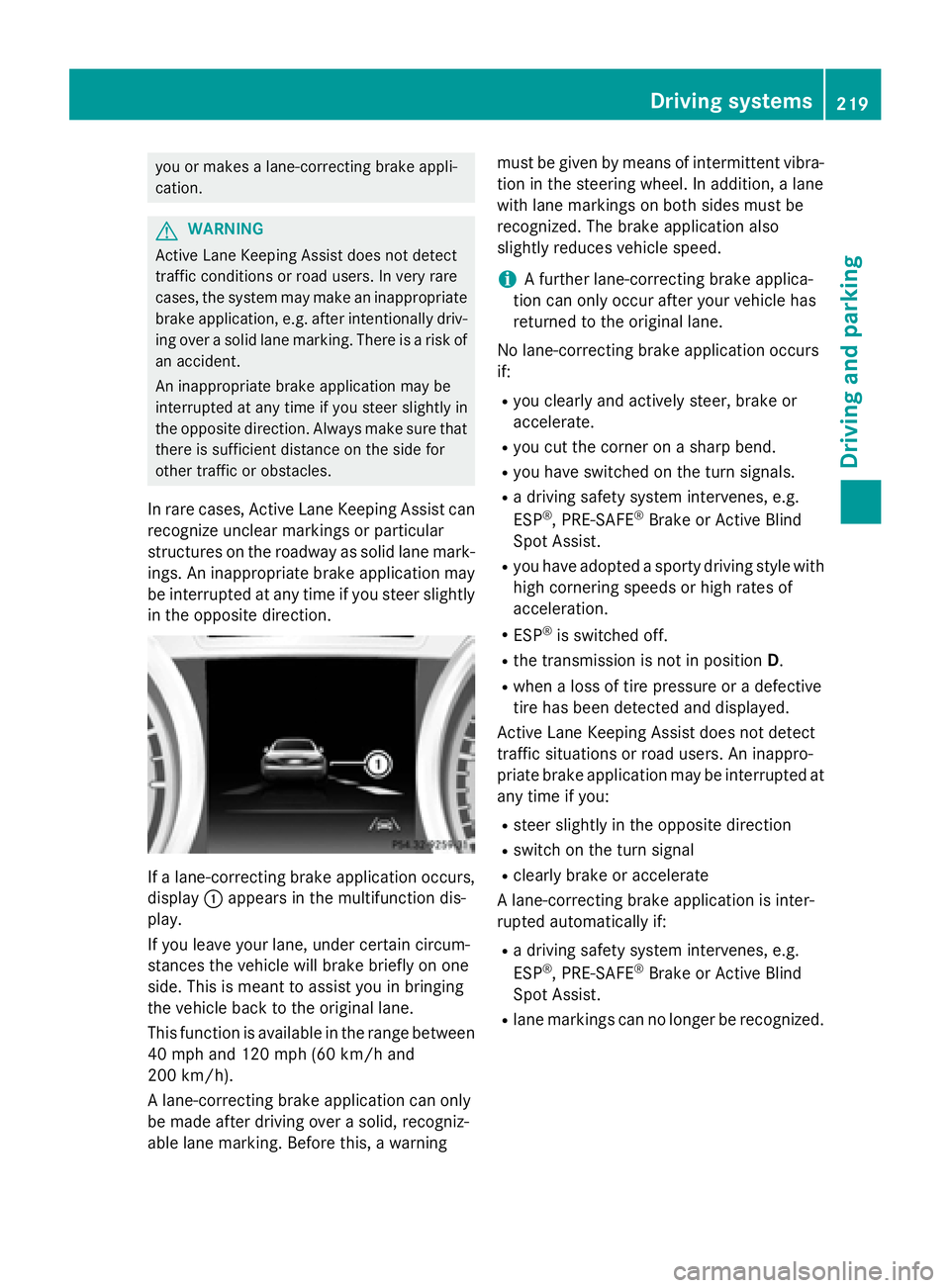
Ifalane-correcting brak eapplication occurs,
display :appear sin th emultifunction dis-
play.
If you leav eyour lane, under certain circum -
stances th evehicl ewill brak ebriefl yon on e
side .This is mean tto assist you in bringin g
th evehicl ebac kto th eoriginal lane.
This function is available in th erange between
40 mph and 12 0mph (60 km/ h and
200 km/h).
A lane-correcting brake application can only
be made after driving over a solid, recogniz-
able lane marking. Before this, a warning must be given by means of intermittent vibra-
tion in the steering wheel. In addition, a lane
with lane markings on both sides must be
recognized. The brake application also
slightly reduces vehicle speed.
iA further lane-correcting brake applica-
tion can only occur after your vehicle has
returned to the original lane.
No lane-correcting brake application occurs
if:
Ryou clearly and actively steer, brake or
accelerate.
Ryou cut the corner on a sharp bend.
Ryou have switched on the turn signals.
Ra driving safety system intervenes, e.g.
ESP®, PRE-SAFE®Brake or Active Blind
Spot Assist.
Ryou have adopted a sporty driving style with high cornering speeds or high rates of
acceleration.
RESP®is switched off.
Rthe transmission is not in position D.
Rwhen a loss of tire pressure or a defective
tire has been detected and displayed.
Active Lane Keeping Assist does not detect
traffic situations or road users. An inappro-
priate brake application may be interrupted at
any time if you:
Rsteer slightly in the opposite direction
Rswitch on the turn signal
Rclearly brake or accelerate
A lane-correcting brake application is inter-
rupted automatically if:
Ra driving safety system intervenes, e.g.
ESP®, PRE-SAFE®Brake or Active Blind
Spot Assist.
Rlane markings can no longer be recognized.
Driving systems219
Driving and parking
Z
Page 222 of 614
Switching on Active Lane Keeping Assist
XSwitch on Active Lane Keeping Assist using
the on-board computer; to do so, select
Standard
orAdaptive(Ypage 232).
If you drive at speeds above 40 mph
(60 km/h) and lane markings are detected,
the lines in the assistance graphics display
(
Ypage 231) are shown in green. Lane
Keeping Assist is ready for use.
If Standard
is selected, no warning vibra-
tion occurs if:
Ryou have switched on the turn signals. In
this event, the warnings are suppressed
for a certain period of time.
Ra driving safety system intervenes, such
as ABS, BAS or ESP®.
When Adaptive
is selected, no warning
vibration occurs if:
Ryou have switched on the turn signals. In
this event, the warnings are suppressed
for a certain period of time.
Ra driving safety system intervenes, e.g.
ABS, BAS or ESP®.
Ryou accelerate hard, e.g. kickdown.
Ryou brake hard.
Ryou steer actively, e.g. swerve to avoid an
obstacle or change lanes quickly.
Ryou cut the corner on a sharp bend.
220Driving systems
Driving and parking
Page 238 of 614
mirrors using the button on the door
(
Ypage 117), they will not fold out automat-
ically. The exterior mirrors can then only be
folded out using the button on the door.
XPress the =or; button on the steer-
ing wheel to select the Sett.
menu.
XPress the:or9 button to select the
Convenience
submenu.
XPress ato confirm.
XPress the :or9 button to select the
Auto. Mirror Folding
function.
If the Auto. Mirror Folding
function is
switched on, the multifunction display
shows the exterior mirror in orange.
XPress the abutton to save the setting.
Restoring the factory settings
XPress the =or; button on the steer-
ing wheel to select the Sett.
menu.
XPress the:or9 button to select the
Factory Setting
submenu.
XPress ato confirm.
The Reset All Settings?
function
appears.
XPress the :or9 button to select No
orYes.
XPress the abutton to confirm the selec-
tion.
If you have selected Yes
and confirmed, the
multifunction display shows a confirmation
message.
For safety reasons, the Daytime Running
Lightsfunction in theLightsubmenu is only
reset if the vehicle is stationary.
AMG menu (Mercedes-AMG vehicles)
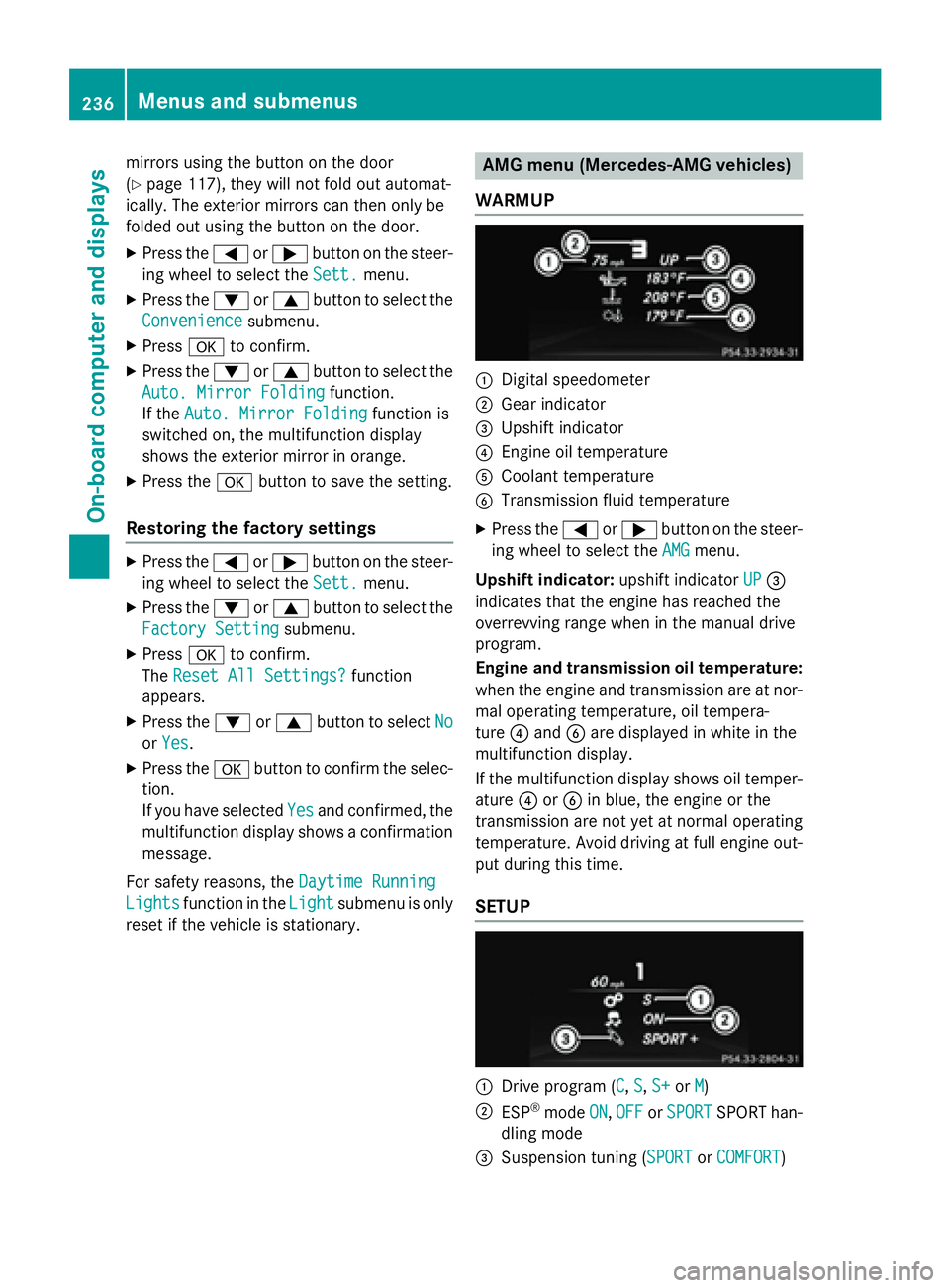
WARMUP
:Digital speedometer
;Gear indicator
=Upshift indicator
?Engine oil temperature
ACoolant temperature
BTransmission fluid temperature
XPress the =or; button on the steer-
ing wheel to select the AMG
menu.
Upshift indicator: upshift indicatorUP
=
indicates that the engine has reached the
overrevving range when in the manual drive
program.
Engine and transmission oil temperature:
when the engine and transmission are at nor-
mal operating temperature, oil tempera-
ture ?and Bare displayed in white in the
multifunction display.
If the multifunction display shows oil temper-
ature ?orB in blue, the engine or the
transmission are not yet at normal operating
temperature. Avoid driving at full engine out-
put during this time.
SETUP
:Drive program (C, S, S+or M)
;ESP®mode ON,OFFor SPORTSPORT han-
dling mode
=Suspension tuning (SPORTor COMFORT)
236Menus and submenus
On-board computer and displays
Page 239 of 614
SETUP shows the drive program, the ESP®
(Electronic Stability Program) mode and the
SPORT handling mode.
XPress the=or; button on the steer-
ing wheel to select the AMG
menu.
XPress9repeatedly until SETUP
appears.
or
XBriefly press the AMG button on the center
console (
Ypage 163).
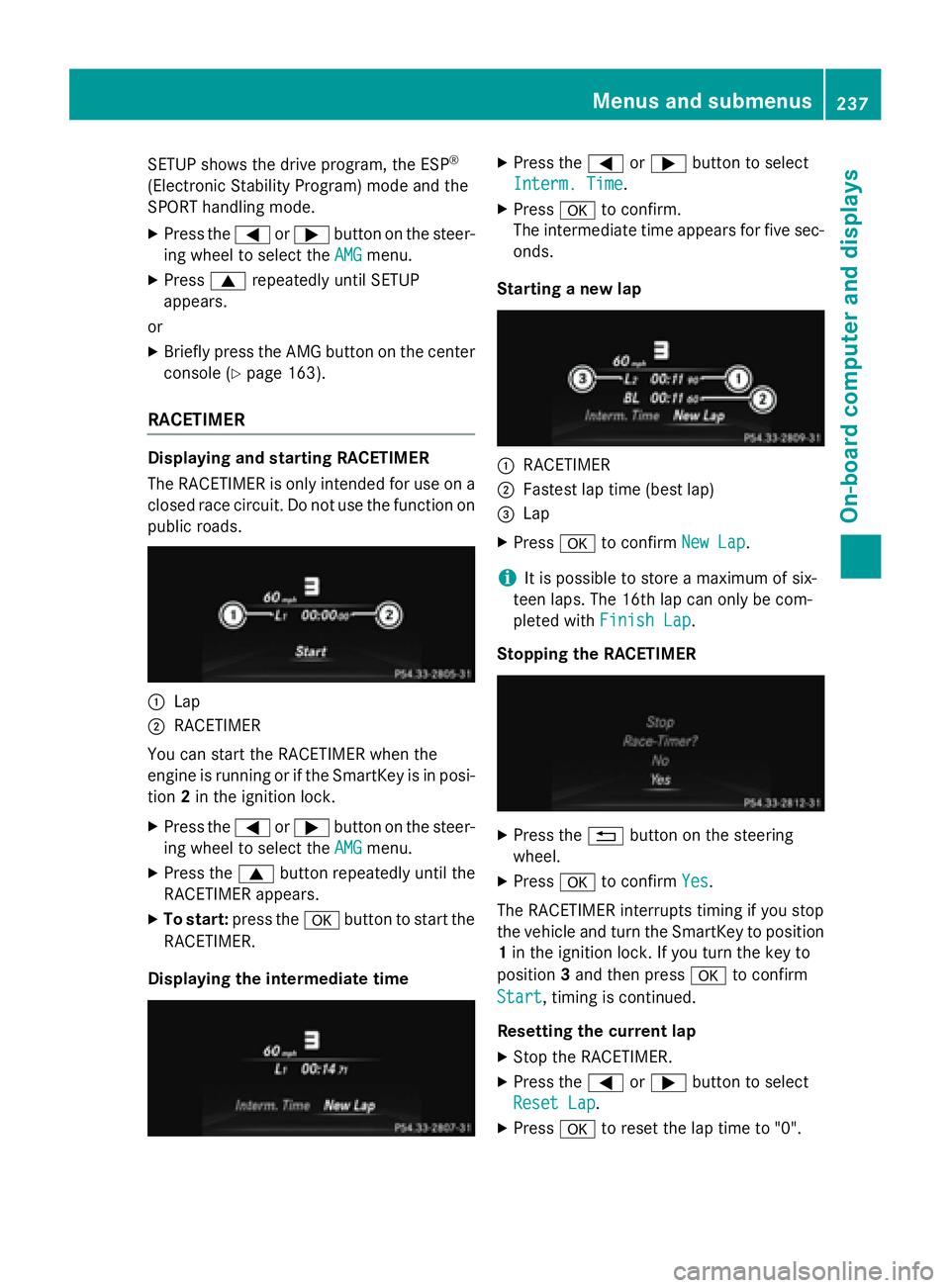
RACETIMER
Displaying and starting RACETIMER
The RACETIMER is only intended for use on a
closed race circuit. Do not use the function on
public roads.
:Lap
;RACETIMER
You can start the RACETIMER when the
engine is running or if the SmartKey is in posi-
tion 2in the ignition lock.
XPress the =or; button on the steer-
ing wheel to select the AMG
menu.
XPress the9button repeatedly until the
RACETIMER appears.
XTo start: press the abutton to start the
RACETIMER.
Displaying the intermediate time
XPress the =or; button to select
Interm. Time
.
XPress ato confirm.
The intermediate time appears for five sec- onds.
Starting a new lap
:RACETIMER
;Fastest lap time (best lap)
=Lap
XPress ato confirm New Lap.
iIt is possible to store a maximum of six-
teen laps. The 16th lap can only be com-
pleted with Finish Lap
.
Stopping the RACETIMER
XPress the %button on the steering
wheel.
XPress ato confirm Yes.
The RACETIMER interrupts timing if you stop
the vehicle and turn the SmartKey to position
1 in the ignition lock. If you turn the key to
position 3and then press ato confirm
Start
, timing is continued.
Resetting the current lap
XStop the RACETIMER.
XPress the =or; button to select
Reset Lap
.
XPress ato reset the lap time to "0".
Menus and submenus237
On-board computer and displays
Z
Page 240 of 614
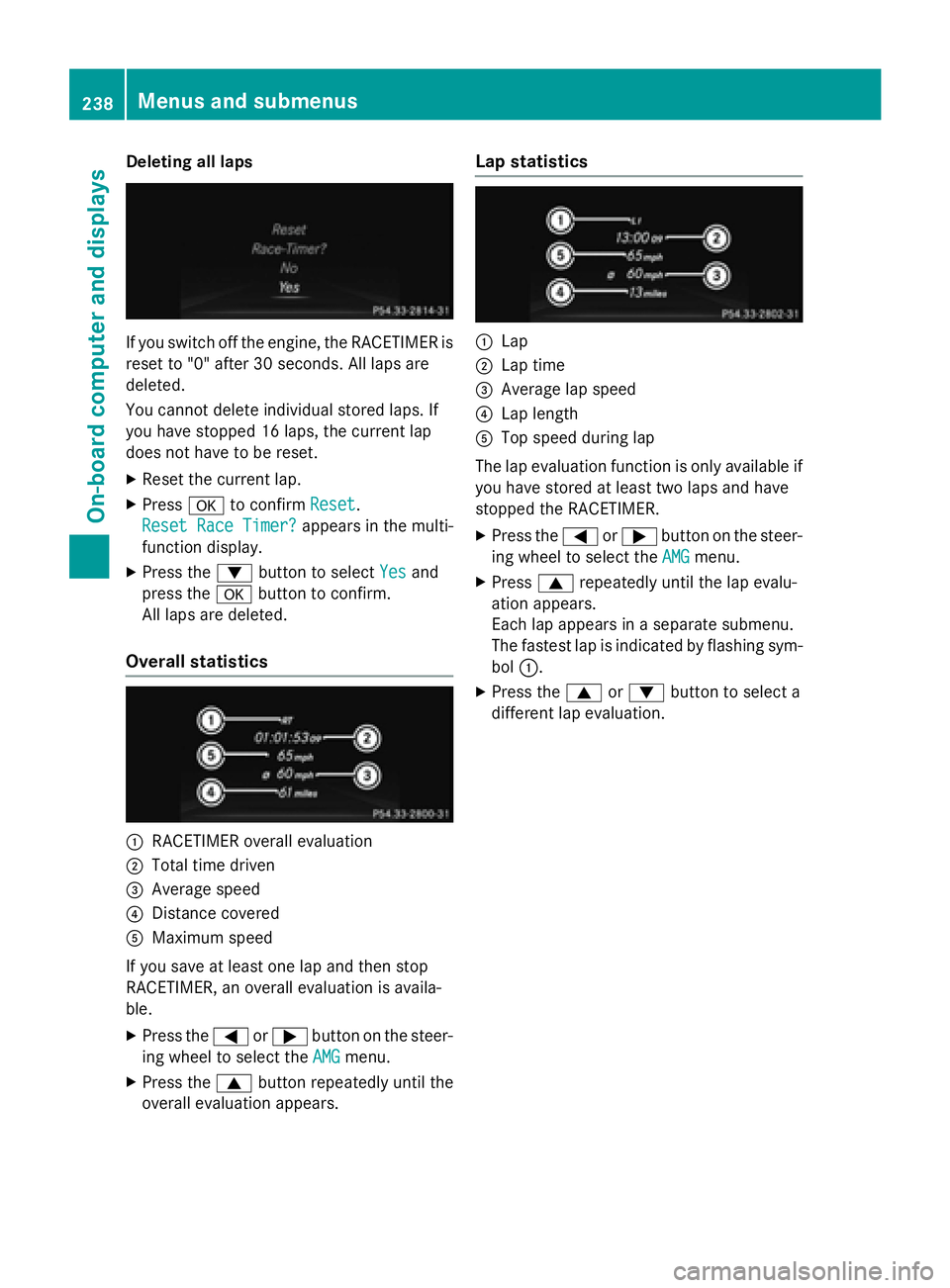
Deleting all laps
If you switch offth eengine, th eRACETIMER is
reset to "0" after 30 seconds. Al llaps are
deleted.
You canno tdelete individual store dlaps .If
you hav estoppe d16 laps ,th ecurren tlap
does no thav eto be reset .
XResetth ecurren tlap.
XPress ato confirm Reset.
Reset Rac eTimer?
appears in th emulti-
function display.
XPress th e: buttonto select Yesand
press th ea buttonto confirm .
Al llaps are deleted.
Overall statistics
:RACETIMER overall evaluation
;Total time driven
=Averag espeed
?Distanc ecovered
AMaximum speed
If you sav eat leas ton elap and then stop
RACETIMER, an overall evaluation is availa-
ble.
XPress th e= or; buttonon th esteer -
in g whee lto select th eAMG
menu.
XPress th e9 buttonrepeatedly until th e
overall evaluation appears .
Lap statistics
:Lap
;Lap time
=Averagelap speed
?Lap lengt h
ATop speed during lap
The lap evaluation function is only available if you hav estore dat leas ttw olaps and hav e
stoppe dth eRACETIMER.
XPress th e= or; buttonon th esteer -
in g whee lto select th eAMG
menu.
XPress 9repeatedly until th elap evalu-
ation appears .
Eac hlap appears in aseparat esubmenu.
The fastest lap is indicate dby flashin gsym -
bol :.
XPress th e9 or: buttonto select a
differen tlap evaluation .
238Menus and submenus
On-board computer and displays
Page 241 of 614
Display messages
Introduction
General notes
Display message sappear in th emultifunction display.
Display message swit hgraphi cdisplays may be shown in simplified form in th eOperator's
Manual and may diffe rfrom th emessage sshown in th emultifunction display.
Please respon din accordance wit hth edisplay message sand follow th eadditional note sin this
Operator's Manual.
Certain display message sare accompanied by an audible warnin gtone or acontinuous tone .
Whe nyou stop and par kth evehicle, pleas eobserv eth enote son :
RHOLD function (Ypage 191)
RParking(Ypage 171)
Hiding display messages
XPress th ea or% buttonon th esteerin gwheel.
The multifunction display hide sth edisplay message .
High-priorit ydisplay message sare shown in red in th emultifunction display. Some high-pri -
orit ydisplay message scanno tbe hidden .
The multifunction display shows these message scontinuously until th ecauses fo rth emes -
sage shav ebeen remedied.
Message memory
The on-boar dcompute rsaves certain display message sin th emessage memory .You can cal l
up th edisplay messages:
XPress th e= or; buttonon th esteerin gwhee lto selec tth eServ.menu.
If there are display messages, th emultifunction display shows 2Messages
,fo rexample.
XPress th e9 or: buttonto selec tth eentry, e.g. 2Messages.
XPress ato confirm .
XPress the9 or: buttonto scroll through th edisplay messages.
Whe nth eignition is switched off, all display message sare deleted, apar tfrom som ehigh-
priorit ydisplay messages. Once th ecauses of th ehigh-priorit ydisplay message shav ebeen
rectified, th ecorrespondin gdisplay message sare also deleted.
Display messages23 9
On-board computer and displays
Z
Page 242 of 614
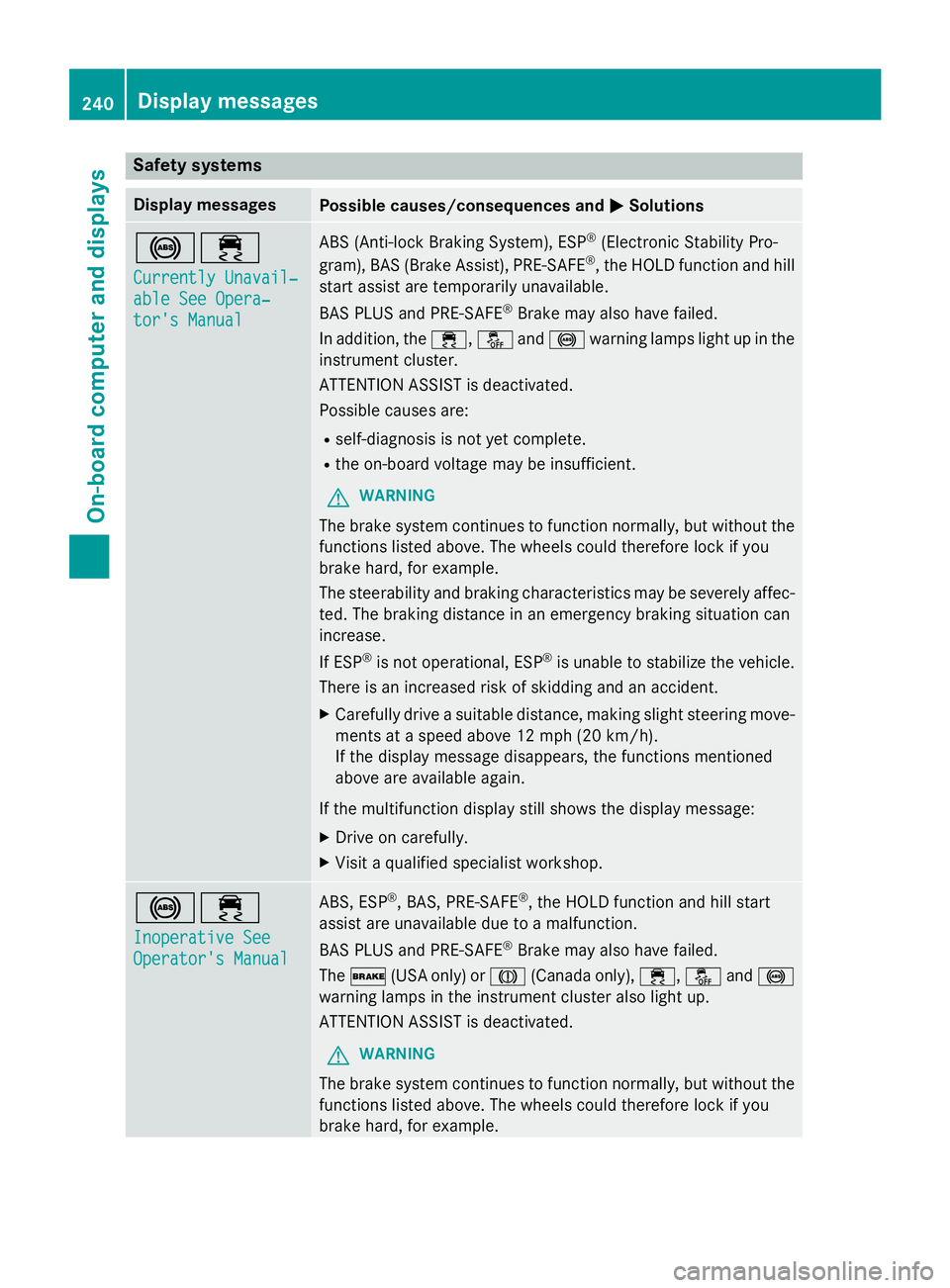
Safety systems
Display messagesPossible causes/consequences andMSolutions
!÷
Currently Unavail‐
able See Opera‐
tor's Manual
ABS (Anti-lock Braking System), ESP®(Electronic Stability Pro-
gram), BAS (Brake Assist), PRE ‑SAFE®, the HOLD function and hill
start assist are temporarily unavailable.
BAS PLUS and PRE‑SAFE
®Brake may also have failed.
In addition, the ÷,åand! warning lamps light up in the
instrument cluster.
ATTENTION ASSIST is deactivated.
Possible causes are:
Rself-diagnosis is not yet complete.
Rthe on-board voltage may be insufficient.
GWARNING
The brake system continues to function normally, but without the
functions listed above. The wheels could therefore lock if you
brake hard, for example.
The steerability and braking characteristics may be severely affec-
ted. The braking distance in an emergency braking situation can
increase.
If ESP
®is not operational, ESP®is unable to stabilize the vehicle.
There is an increased risk of skidding and an accident.
XCarefully drive a suitable distance, making slight steering move-
ments at a speed above 12 mph (20 km/h).
If the display message disappears, the functions mentioned
above are available again.
If the multifunction display still shows the display message:
XDrive on carefully.
XVisit a qualified specialist workshop.
!÷
Inoperative See
Operator's Manual
ABS, ESP®, BAS, PRE‑SAFE®, the HOLD function and hill start
assist are unavailable due to a malfunction.
BAS PLUS and PRE‑ SAFE
®Brake may also have failed.
The $ (USA only) or J(Canada only), ÷,åand!
warning lamps in the instrument cluster also light up.
ATTENTION ASSIST is deactivated.
GWARNING
The brake system continues to function normally, but without the
functions listed above. The wheels could therefore lock if you
brake hard, for example.
240Display messages
On-board computer and displays
Page 243 of 614
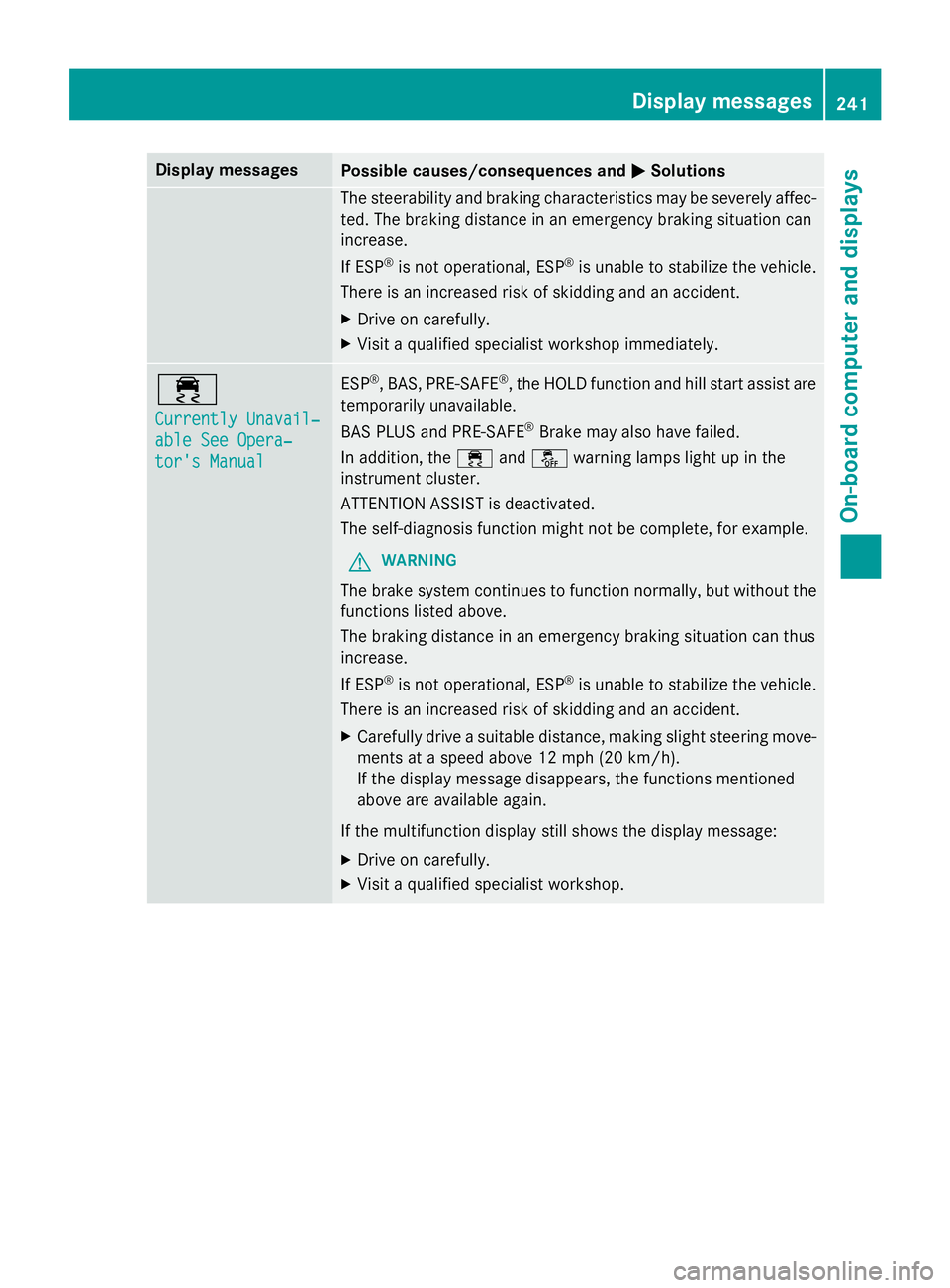
Display messagesPossible causes/consequences andMSolutions
The steerabilityand brakin gcharacteristics may be severely affec -
ted. The brakin gdistanc ein an emergenc ybrakin gsituation can
increase .
If ES P
®is no toperational, ES P®is unable to stabiliz eth evehicle.
There is an increase dris kof skiddin gand an accident.
XDrive on carefully.
XVisit aqualified specialist workshop immediately.
÷
Currently Unavail‐
abl eSee Opera‐
tor's Manual
ES P®,BAS, PRE‑ SAF E®,th eHOLD function and hill start assist are
temporarily unavailable .
BA SPLU Sand PRE‑SAFE
®Brake may also hav efailed.
In addition ,th e÷ andå warnin glamp sligh tup in th e
instrumen tcluster.
ATTENTION ASSIST is deactivated.
The self-diagnosi sfunction might no tbe complete, fo rexample.
GWARNIN G
The brakesystem continues to function normally, but without th e
function slisted above.
The brakin gdistanc ein an emergenc ybrakin gsituation can thus
increase .
If ES P
®is no toperational, ES P®is unable to stabiliz eth evehicle.
There is an increase dris kof skiddin gand an accident.
XCarefull ydrive asuitable distance, makin gslight steerin gmove-
ments at aspeed abov e12 mph (20 km/h).
If th edisplay message disappears, th efunction smentioned
abov eare available again .
If th emultifunction display still shows th edisplay message :
XDrive on carefully.
XVisitaqualified specialist workshop .
Display messages241
On-board computer and displays
Z
Page 244 of 614
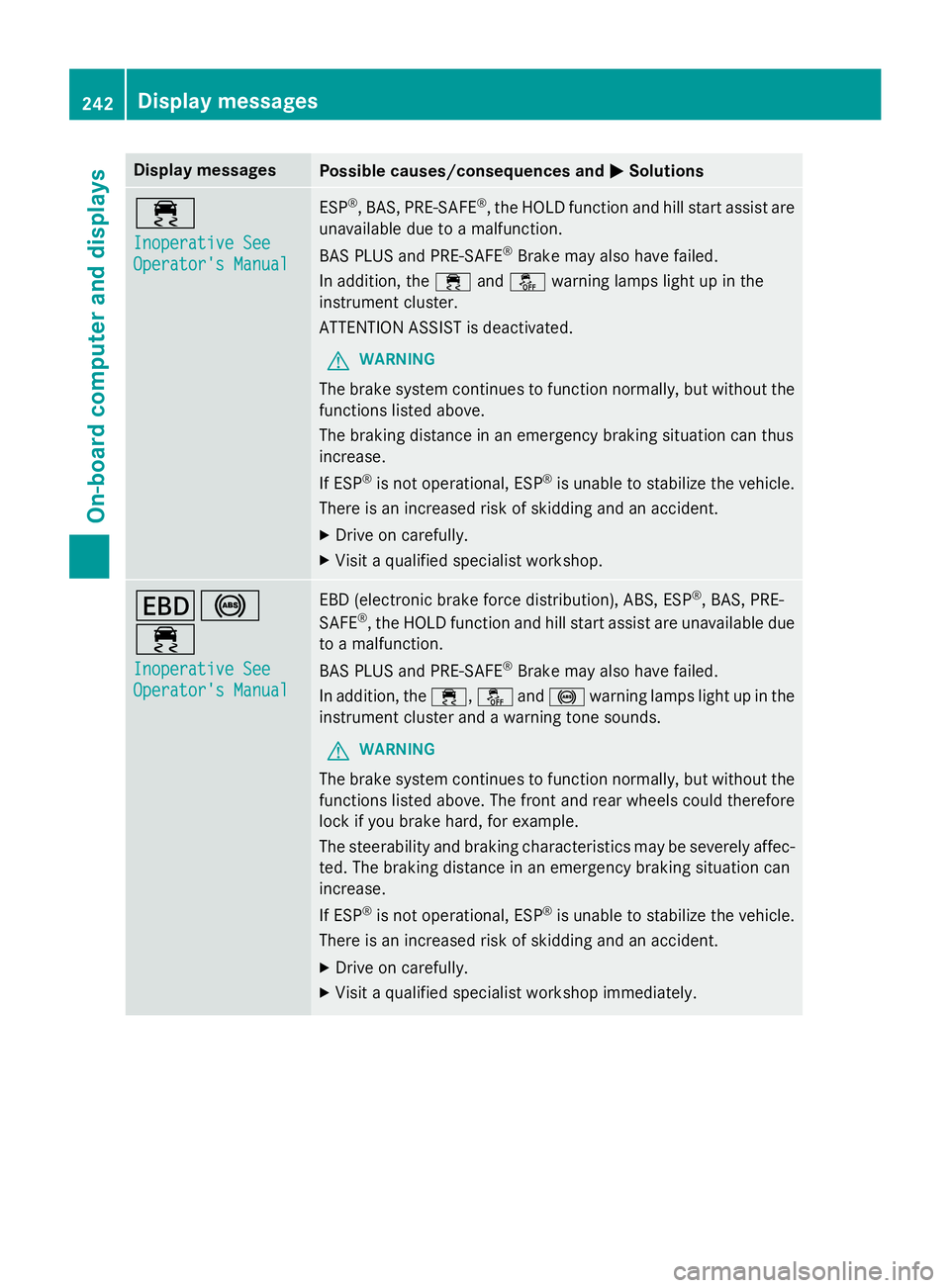
Display messagesPossible causes/consequences andMSolutions
÷
Inoperative See
Operator'sManual
ES P®,BAS, PRE‑ SAF E®,th eHOLD function and hill start assist are
unavailable due to amalfunction .
BA SPLU Sand PRE‑SAFE
®Brake may also hav efailed.
In addition ,th e÷ andå warnin glamp sligh tup in th e
instrumen tcluster.
ATTENTION ASSIST is deactivated.
GWARNIN G
The brakesystem continues to function normally, but without th e
function slisted above.
The brakin gdistanc ein an emergenc ybrakin gsituation can thus
increase .
If ES P
®is no toperational, ES P®is unable to stabiliz eth evehicle.
There is an increase dris kof skiddin gand an accident.
XDrive on carefully.
XVisit aqualified specialist workshop .
T!
÷
Inoperative See
Operator'sManual
EB D(electronic brak eforc edistribution), ABS, ES P®,BAS, PRE -
SAFE®, th eHOLD function and hill start assist are unavailable due
to amalfunction .
BA SPLU Sand PRE‑ SAFE
®Brake may also hav efailed.
In addition ,th e÷, åand! warnin glamp sligh tup in th e
instrumen tcluster and awarnin gtone sounds.
GWARNIN G
The brakesystem continues to function normally, but without th e
function slisted above. The fron tand rear wheels could therefore
loc kif you brak ehard, fo rexample.
The steerabilit yand brakin gcharacteristics may be severely affec -
ted. The brakin gdistanc ein an emergenc ybrakin gsituation can
increase .
If ES P
®is no toperational, ES P®is unable to stabiliz eth evehicle.
There is an increase dris kof skiddin gand an accident.
XDrive on carefully.
XVisit aqualified specialist workshop immediately.
242Display messages
On-board computer and displays