language MERCEDES-BENZ SL ROADSTER 2012 User Guide
[x] Cancel search | Manufacturer: MERCEDES-BENZ, Model Year: 2012, Model line: SL ROADSTER, Model: MERCEDES-BENZ SL ROADSTER 2012Pages: 637, PDF Size: 20.68 MB
Page 359 of 637
Switching announcements and audio
fadeout on/off
X Select Navi
Navi in the main function bar by
sliding ZVand turning cVdthe COMAND
controller and press Wto confirm.
X Select Announcements
Announcements and pressWto
confirm.
A menu appears.
You can activate/deactivate the following
functions:
R Announce street names
Announce street names
Street names are announced during
route guidance.
R Audible info during a phone call Audible info during a phone call
During a phone call, navigation
announcements and traffic reports are
audible in the background.
R Audio fadeout
Audio fadeout
The volume of an active audio or video
source is automatically reduced during a
navigation announcement.
R Reserve fuel level Reserve fuel level
Once you have reached reserve fuel
level, you will see a query asking whether
you wish to start the search for a filling
station (Y page 338).
X Select the function and press Wto confirm.
Switch the function on Oor off ª.
Setting the volume manually
X Adjust the volume using the qcontrol
knob during a navigation announcement.
or
X Select +in the map view with the menu
shown and adjust the volume using the q
control knob.
Announcing street names
If this function is switched on, the name of the
street into which you should turn is
announced.
Announcements are not made in the chosen
language in all countries. They are made when
relevant street names for the selected lan-
guage are available in the database. X
To switch to navigation mode: press the
Ø button.
X To show the menu: pressWthe COMAND
controller.
X Select Navi
Navi in the main function bar by
sliding ZVthe COMAND controller and
press Wto confirm.
X Select Announce
Announce street streetnames
names and press
W to confirm.
The function is switched on Oor off ª,
depending on the previous status.
Street names may be announced in the fol-
lowing languages:
R Danish
R German
R English
R French
R Dutch
R Portuguese
R Swedish
Ending route guidance Cancelling or continuing route guidance
X To switch to navigation mode: press the
Ø button.
X To show the menu: pressWthe COMAND
controller.
X Select Dest.
Dest.in the navigation system
menu bar by turning cVdthe COMAND
controller and press Wto confirm.
X To cancel route guidance: selectCancel
Cancel
route guidance
route guidance and pressWto confirm.
or
X To continue route guidance: selectCon‐
Con‐
tinue route guidance
tinue route guidance and pressWto
confirm.
COMAND Online calculates the route. 356
NavigationCOMAND Online
Page 370 of 637
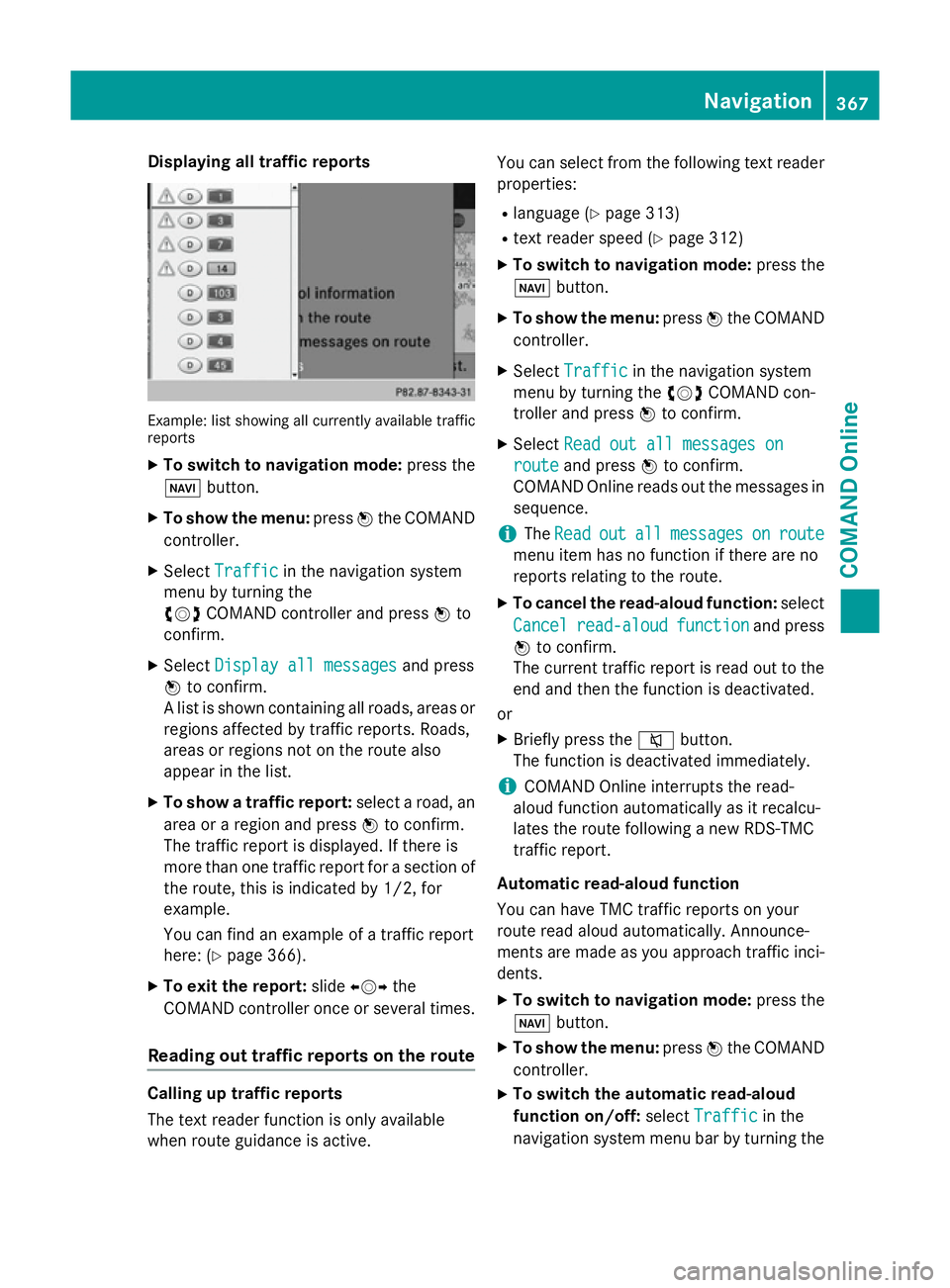
Displaying all traffic reports
Example: list showing all currently available traffic
reports
X To switch to navigation mode: press the
Ø button.
X To show the menu: pressWthe COMAND
controller.
X Select Traffic
Traffic in the navigation system
menu by turning the
cVd COMAND controller and press Wto
confirm.
X Select Display all messages
Display all messages and press
W to confirm.
A list is shown containing all roads, areas or
regions affected by traffic reports. Roads,
areas or regions not on the route also
appear in the list.
X To show a traffic report: select a road, an
area or a region and press Wto confirm.
The traffic report is displayed. If there is
more than one traffic report for a section of
the route, this is indicated by 1/2, for
example.
You can find an example of a traffic report
here: (Y page 366).
X To exit the report: slideXVY the
COMAND controller once or several times.
Reading out traffic reports on the route Calling up traffic reports
The text reader function is only available
when route guidance is active. You can select from the following text reader
properties:
R language (Y page 313)
R text reader speed (Y page 312)
X To switch to navigation mode: press the
Ø button.
X To show the menu: pressWthe COMAND
controller.
X Select Traffic
Traffic in the navigation system
menu by turning the cVdCOMAND con-
troller and press Wto confirm.
X Select Read out all messages on Read out all messages on
route
route and press Wto confirm.
COMAND Online reads out the messages in sequence.
i The
Read
Read out
outall
allmessages
messages on
onroute
route
menu item has no function if there are no
reports relating to the route.
X To cancel the read-aloud function: select
Cancel
Cancel read-aloud read-aloud function
functionand press
W to confirm.
The current traffic report is read out to the
end and then the function is deactivated.
or
X Briefly press the 8button.
The function is deactivated immediately.
i COMAND Online interrupts the read-
aloud function automatically as it recalcu-
lates the route following a new RDS-TMC
traffic report.
Automatic read-aloud function
You can have TMC traffic reports on your
route read aloud automatically. Announce-
ments are made as you approach traffic inci- dents.
X To switch to navigation mode: press the
Ø button.
X To show the menu: pressWthe COMAND
controller.
X To switch the automatic read-aloud
function on/off: selectTraffic
Traffic in the
navigation system menu bar by turning the Navigation
367COMAND Online Z
Page 413 of 637
Reading a text message (SMS)
X Call up the text message (SMS) inbox
(Y page 409)
X Select a text message in the text message
inbox by turning cVdthe COMAND con-
troller and press Wto confirm.
The text message appears.
X To scroll through the display or select
phone numbers in a text message: turn
cVd the COMAND controller.
The display scrolls up or down line by line,
or skips to the next or previous telephone
number and automatically highlights it.
X To return to the list: select the&sym-
bol and press Wto confirm or press the
% back button.
Text message read-aloud function
Settings for the read-aloud function:
R Language (Y page 313)
R Speed (Y page 312)
X Press Wwhile a text message is being dis-
played, select Read
Read aloud aloud and press Wto
confirm.
COMAND Online reads out the text mes-
sage.
X To cancel the read-aloud function: press
the 8 button.
or
X Press W, select Cancel read-aloud
Cancel read-aloud
function
function and pressWto confirm.
Sender or text display
You can switch between displaying the text
message sender or the text message content.
The sender display shows the sender of the
text message. If the sender is stored in the
COMAND phone book, the name is displayed.
The text display shows the first few words of a
text message.
X Select a text message in the text message
inbox by turning cVdthe COMAND con-
troller.
X To switch to the text display: select the
list symbol to the right of the text message by sliding
VYthe COMAND controller and
press Wto confirm.
X Select Display Display text textand press Wto con-
firm.
The view changes.
X To switch to the sender display: select
the list symbol to the right of the text mes-
sage by sliding VYthe COMAND controller
and press Wto confirm.
X Select Display sender
Display sender and pressWto
confirm.
The view changes.
X To return to the telephone basic menu:
press the %button.
Displaying details and phone numbers
COMAND Online can also show a shortened
sender display in full.
X Select a text message in the text message
inbox by turning cVdthe COMAND con-
troller.
X Select the list symbol to the right of the text
message by sliding VYthe COMAND con-
troller and press Wto confirm.
X Select Details Details and press Wto confirm.
The detailed display appears.
X To close the detailed display: slideXVY
the COMAND controller.
X To return to the telephone basic menu:
press the %button.
Managing text messages (SMS) Calling a text message (SMS) sender
X Press Wthe COMAND controller while the
text message is being displayed.
X Select Call sender
Call sender and pressWto con-
firm.
The telephone makes the call to the sender. 410
TelephoneCOMAND Online
Page 423 of 637
The following functions are available in
COMAND Online when the module is used:
R hands-free mode
R data modem mode (Y page 423)
R sending and receiving text messages
(Y page 425)
R access to the phone book of the mobile
phone (if supported by the mobile phone)
(Y page 424)
R loading a mobile phone via the mini USB
connection (Y page 426)
When the module is installed, the vehicle's
exterior aerial is used for reception. This
ensures optimal language quality and Internet connectivity.
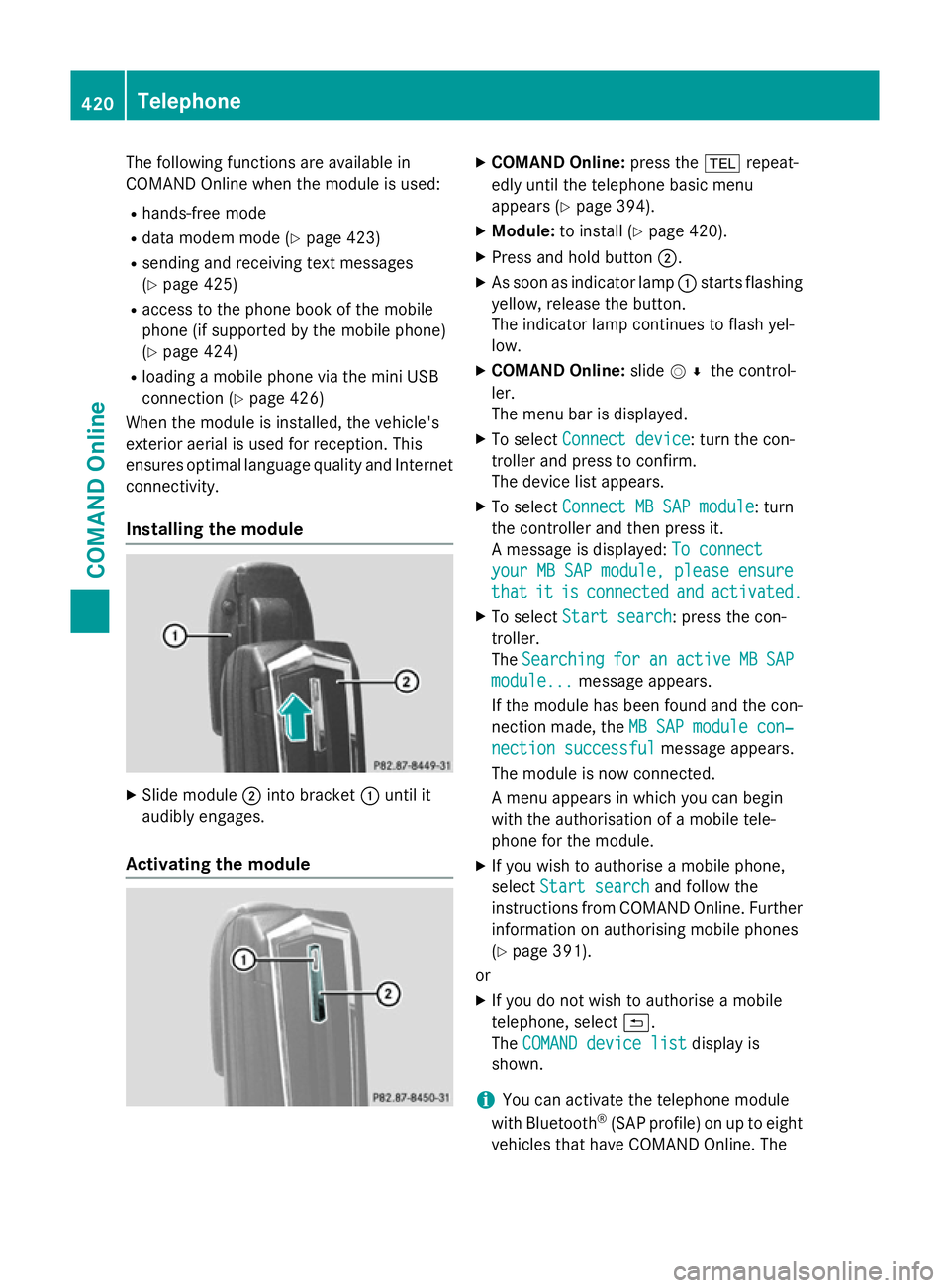
Installing the module X
Slide module ;into bracket :until it
audibly engages.
Activating the module X
COMAND Online: press the%repeat-
edly until the telephone basic menu
appears (Y page 394).
X Module: to install (Y page 420).
X Press and hold button ;.
X As soon as indicator lamp :starts flashing
yellow, release the button.
The indicator lamp continues to flash yel-
low.
X COMAND Online: slideV¬ the control-
ler.
The menu bar is displayed.
X To select Connect device
Connect device: turn the con-
troller and press to confirm.
The device list appears.
X To select Connect MB SAP module Connect MB SAP module: turn
the controller and then press it.
A message is displayed: To connect To connect
your MB SAP module, please ensure
your MB SAP module, please ensure
that that it
itis
isconnected
connected and
andactivated.
activated.
X To select Start search
Start search: press the con-
troller.
The Searching Searching for
foran
anactive
active MB
MBSAP
SAP
module...
module... message appears.
If the module has been found and the con-
nection made, the MB SAP module con‐
MB SAP module con‐
nection successful
nection successful message appears.
The module is now connected.
A menu appears in which you can begin
with the authorisation of a mobile tele-
phone for the module.
X If you wish to authorise a mobile phone,
select Start search Start search and follow the
instructions from COMAND Online. Further
information on authorising mobile phones
(Y page 391).
or
X If you do not wish to authorise a mobile
telephone, select &.
The COMAND device list COMAND device list display is
shown.
i You can activate the telephone module
with Bluetooth ®
(SAP profile) on up to eight
vehicles that have COMAND Online. The 420
TelephoneCOMAND Online
Page 432 of 637
to make arrangements to have the vehicle
towed to a Mercedes-Benz Service Centre.
X To forward the call: press thegkey on
the number keypad.
The voice connection to the Mercedes-
Benz emergency call centre is ended and
the call is automatically forwarded to
Mercedes-Benz Contact Accident Assis-
tance.
After your confirmation, the vehicle data is sent via Mercedes-Benz Contact. An
employee of Mercedes-Benz Contact Acci-
dent Assistance will then make the neces-
sary arrangements with MB Service 24h to have your vehicle towed to a Mercedes-
Benz Service Centre. Mercedes-Benz emergency call sys-
tem
Overview The Mercedes-Benz emergency call system
can help to decisively reduce the time
between an accident and the arrival of emer-
gency services at the site of the accident. It
can also help locate an accident site in places
that are difficult to see.
The emergency call can be made automati-
cally or manually and is transmitted to the
Europe-wide private Mercedes-Benz emer-
gency call number. The vehicle position data
is simultaneously transmitted by text mes-
sage and DTMF to the Mercedes-Benz emer-
gency call centre. The Mercedes-Benz emer-
gency call centre transmits the vehicle posi-
tion data to one of the Europe-wide public
emergency call centres. In almost all coun-
tries, the voice connection can be made in the respective country's language. This allows
measures for rescue, recovery or towing to a
Mercedes-Benz Service Centre to be initiated quickly.
If the Mercedes-Benz emergency call system function is operational, you see the SOS
SOS READY READY
display message in the basic tele-
phone menu (Y page 432).
Information on service availability in Europe
(Y page 429).
i Note that manual emergency calls should
only be used if you or others are in need of rescue, not e.g. in the event of a break-
down.
Operation costs (e.g. for rescue teams)
incurred by a falsely triggered manual
emergency call, must be paid for by the
vehicle owner.
Service availability in Europe The Mercedes-Benz emergency call system is
available for your vehicle for 15 years after
the initial date of production, if:
R it is equipped with COMAND Online
R it was originally produced for the European
market
You can find more information on the regional
availability of the Mercedes-Benz emergency
call system at http://www.mercedes-
benz.com/connect_ecall .
Conditions Equipment requirements
You need:
R a Bluetooth ®
-capable mobile phone which,
if possible, supports the MAP profile (Mes-
sage Access Profile) for sending text mes-
sages, or
R if the vehicle is equipped with permanently
installed/SAP telephony, a SIM card or a
suitable mobile phone
Functional requirements
The vehicle has GPS reception.
Check the following:
R COMAND Online is switched on
R when using the Bluetooth ®
interface, the
mobile phone must be authorised for and
connected with COMAND Online, and log-
ged into a mobile phone network Telephone
429COMAND Online Z
Page 435 of 637
R
a Mercedes-Benz Contact coding
R an indication of whether the call was trig-
gered automatically or manually
R a time stamp
R the language settings on COMAND Online
DTMF sends a reduced data package that
does not contain the vehicle identification
number and time stamp.
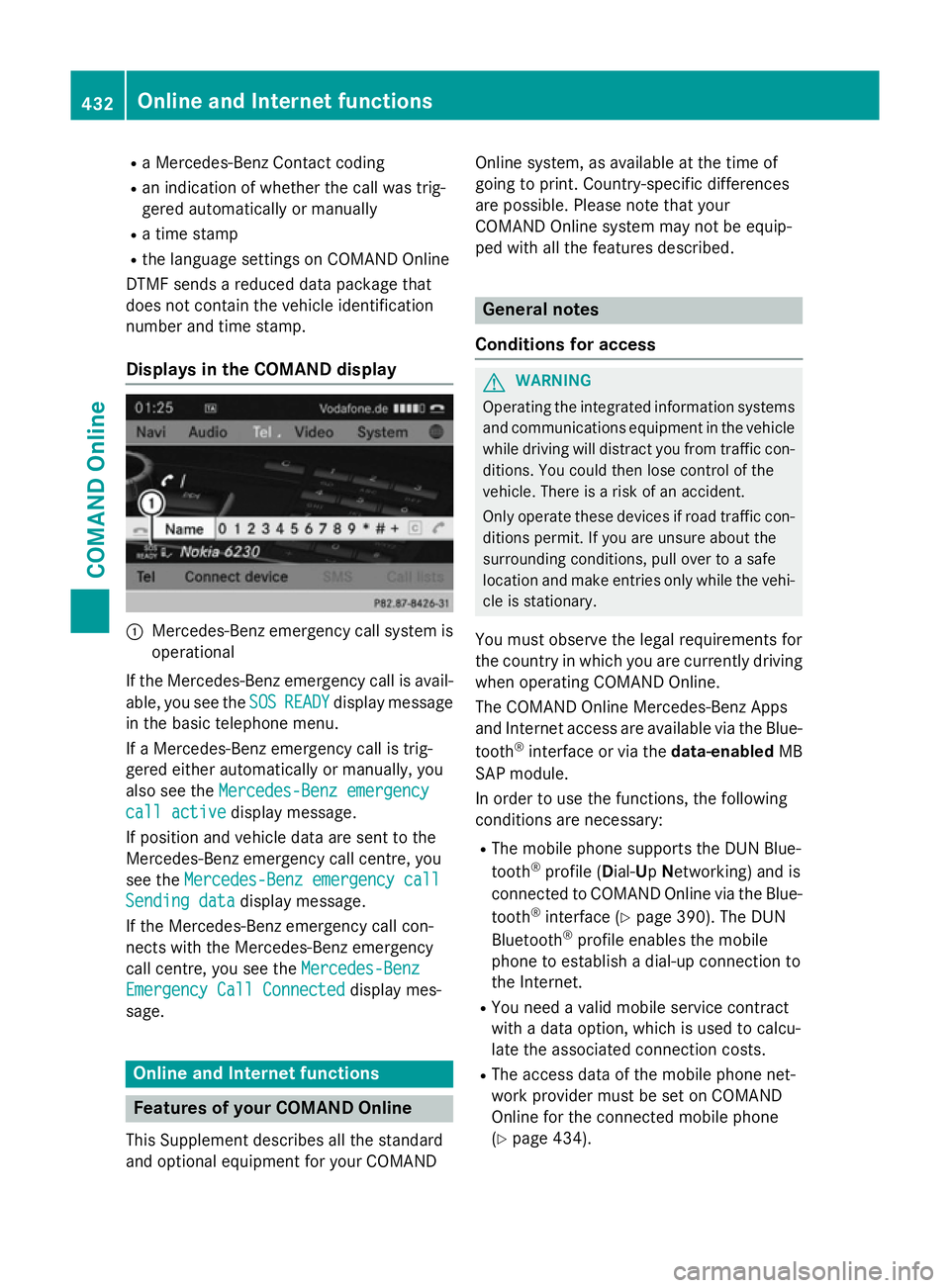
Displays in the COMAND display :
Mercedes-Benz emergency call system is
operational
If the Mercedes-Benz emergency call is avail- able, you see the SOS
SOS READY READY display message
in the basic telephone menu.
If a Mercedes-Benz emergency call is trig-
gered either automatically or manually, you
also see the Mercedes-Benz emergency
Mercedes-Benz emergency
call active call active display message.
If position and vehicle data are sent to the
Mercedes-Benz emergency call centre, you
see the Mercedes-Benz emergency call
Mercedes-Benz emergency call
Sending data
Sending data display message.
If the Mercedes-Benz emergency call con-
nects with the Mercedes-Benz emergency
call centre, you see the Mercedes-Benz
Mercedes-Benz
Emergency Call Connected Emergency Call Connected display mes-
sage. Online and Internet functions
Features of your COMAND Online
This Supplement describes all the standard
and optional equipment for your COMAND Online system, as available at the time of
going to print. Country-specific differences
are possible. Please note that your
COMAND Online system may not be equip-
ped with all the features described. General notes
Conditions for access G
WARNING
Operating the integrated information systems and communications equipment in the vehicle
while driving will distract you from traffic con-
ditions. You could then lose control of the
vehicle. There is a risk of an accident.
Only operate these devices if road traffic con-
ditions permit. If you are unsure about the
surrounding conditions, pull over to a safe
location and make entries only while the vehi-
cle is stationary.
You must observe the legal requirements for
the country in which you are currently driving when operating COMAND Online.
The COMAND Online Mercedes-Benz Apps
and Internet access are available via the Blue-
tooth ®
interface or via the data-enabledMB
SAP module.
In order to use the functions, the following
conditions are necessary:
R The mobile phone supports the DUN Blue-
tooth ®
profile ( Dial-Up Networking) and is
connected to COMAND Online via the Blue-
tooth ®
interface (Y page 390). The DUN
Bluetooth ®
profile enables the mobile
phone to establish a dial-up connection to
the Internet.
R You need a valid mobile service contract
with a data option, which is used to calcu-
late the associated connection costs.
R The access data of the mobile phone net-
work provider must be set on COMAND
Online for the connected mobile phone
(Y page 434). 432
Online and Internet functionsCOMAND Online
Page 501 of 637
i
Reading:
if the media content of the con-
nected device is being read, this is indica-
ted on the upper right by a symbol. When
reading has ended, the categories Select
Select
by cover
by cover andKeyword Search Keyword Search are avail-
able.
Depending on the connected device and
the size of the media content, reading may
take several minutes. When the device is
next started or reconnected, the advanced
functions will be quickly available.
However, if you change the media content
on your iPod ®
/iPhone ®
, it has to be read
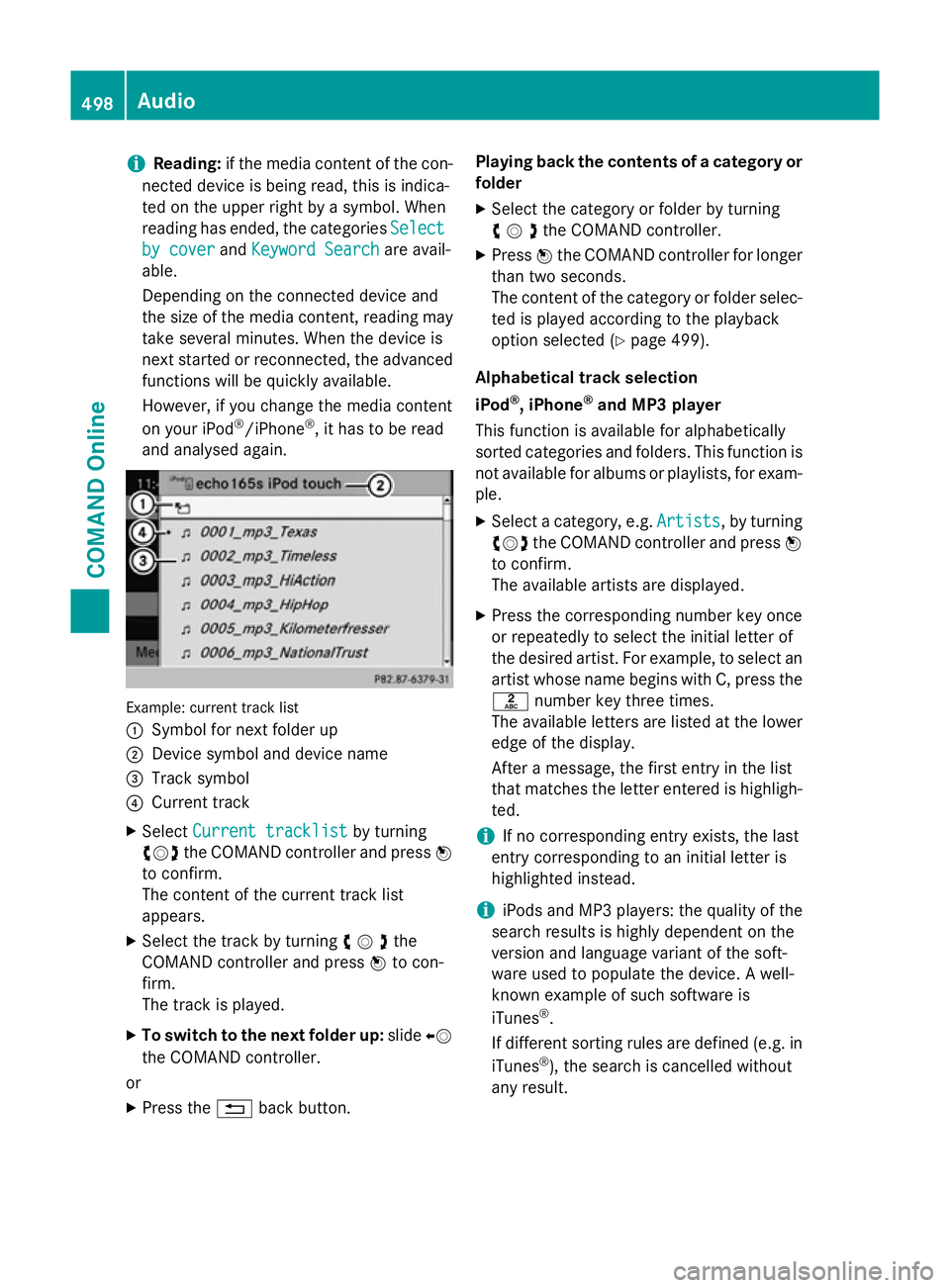
and analysed again. Example: current track list
:
Symbol for next folder up
; Device symbol and device name
= Track symbol
? Current track
X Select Current tracklist Current tracklist by turning
cVd the COMAND controller and press W
to confirm.
The content of the current track list
appears.
X Select the track by turning cVdthe
COMAND controller and press Wto con-
firm.
The track is played.
X To switch to the next folder up: slideXV
the COMAND controller.
or
X Press the %back button. Playing back the contents of a category or
folder
X Select the category or folder by turning
cVdthe COMAND controller.
X Press Wthe COMAND controller for longer
than two seconds.
The content of the category or folder selec-
ted is played according to the playback
option selected (Y page 499).
Alphabetical track selection
iPod ®
, iPhone ®
and MP3 player
This function is available for alphabetically
sorted categories and folders. This function is not available for albums or playlists, for exam-
ple.
X Select a category, e.g. Artists
Artists, by turning
cVd the COMAND controller and press W
to confirm.
The available artists are displayed.
X Press the corresponding number key once
or repeatedly to select the initial letter of
the desired artist. For example, to select an
artist whose name begins with C, press the l number key three times.
The available letters are listed at the lower
edge of the display.
After a message, the first entry in the list
that matches the letter entered is highligh-
ted.
i If no corresponding entry exists, the last
entry corresponding to an initial letter is
highlighted instead.
i iPods and MP3 players: the quality of the
search results is highly dependent on the
version and language variant of the soft-
ware used to populate the device. A well-
known example of such software is
iTunes ®
.
If different sorting rules are defined (e.g. in iTunes ®
), the search is cancelled without
any result. 498
AudioCOMAND Online
Page 512 of 637
X
To return to the TV programme: turn
cVd the COMAND controller.
X Select TV
TVby turning cVdthe COMAND
controller.
or
X Press and hold the %back button on the
left next to the COMAND controller.
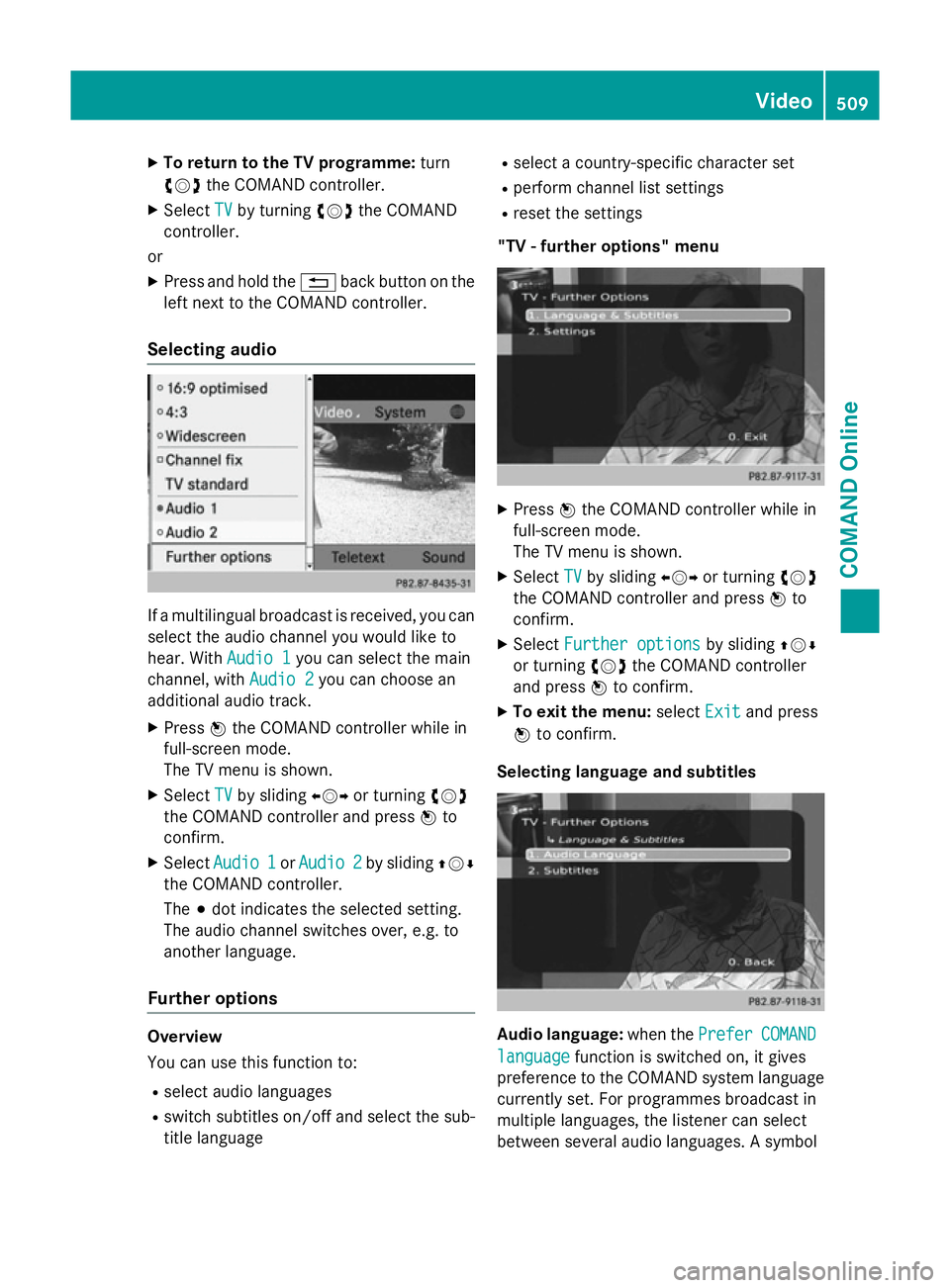
Selecting audio If a multilingual broadcast is received, you can
select the audio channel you would like to
hear. With Audio 1
Audio 1you can select the main
channel, with Audio 2
Audio 2you can choose an
additional audio track.
X Press Wthe COMAND controller while in
full-screen mode.
The TV menu is shown.
X Select TV TVby sliding XVYor turning cVd
the COMAND controller and press Wto
confirm.
X Select Audio 1
Audio 1 orAudio 2
Audio 2 by sliding ZVÆ
the COMAND controller.
The #dot indicates the selected setting.
The audio channel switches over, e.g. to
another language.
Further options Overview
You can use this function to:
R select audio languages
R switch subtitles on/off and select the sub-
title language R
select a country-specific character set
R perform channel list settings
R reset the settings
"TV - further options" menu X
Press Wthe COMAND controller while in
full-screen mode.
The TV menu is shown.
X Select TV TVby sliding XVYor turning cVd
the COMAND controller and press Wto
confirm.
X Select Further options
Further options by slidingZVÆ
or turning cVdthe COMAND controller
and press Wto confirm.
X To exit the menu: selectExit
Exitand press
W to confirm.
Selecting language and subtitles Audio language:
when thePrefer
PreferCOMAND
COMAND
language
language function is switched on, it gives
preference to the COMAND system language currently set. For programmes broadcast in
multiple languages, the listener can select
between several audio languages. A symbol Video
509COMAND Online Z
Page 513 of 637
for programme transmission may appear in
front of the audio language: with audio
explanations (for the visually impaired) in
stereo or for the hearing impaired. If a symbol
does not appear, the programme is either
broadcast in mono or the transmission prop-
erties are unknown.
Subtitles: when this function is activated,
shows subtitles in the selected language for
the programme currently broadcast (if avail-
able).
X In the "Tuner - Further Options" menu, con-
firm Language & Subtitles Language & Subtitles by pressing
W the COMAND controller (Y page 509).
A menu appears.
X To select the language: confirmAudio
Audio
Language
Language by pressing Wthe COMAND
controller.
X Select Prefer COMAND language Prefer COMAND language or one
of the available audio languages.
Switch the setting on Oor off ªor select
an available audio language.
If you select one of the available audio lan-
guages, e.g. English, this setting is used for
the current program only.
X To select subtitles: selectSubtitles Subtitles by
sliding ZVÆor turning cVdthe COMAND
controller and press Wto confirm.
X Select Subtitles
Subtitles and pressWto confirm.
Switch the subtitles on Oor off ª.
X Select Prefer COMAND language
Prefer COMAND language or one
of the available languages for subtitles.
Switch the setting on Oor off ªor select
an available language for subtitles.
If you select one of the available languages
for subtitles, e.g. English, this setting is
used for the current programme.
X To exit the menu: selectBack
Back and press
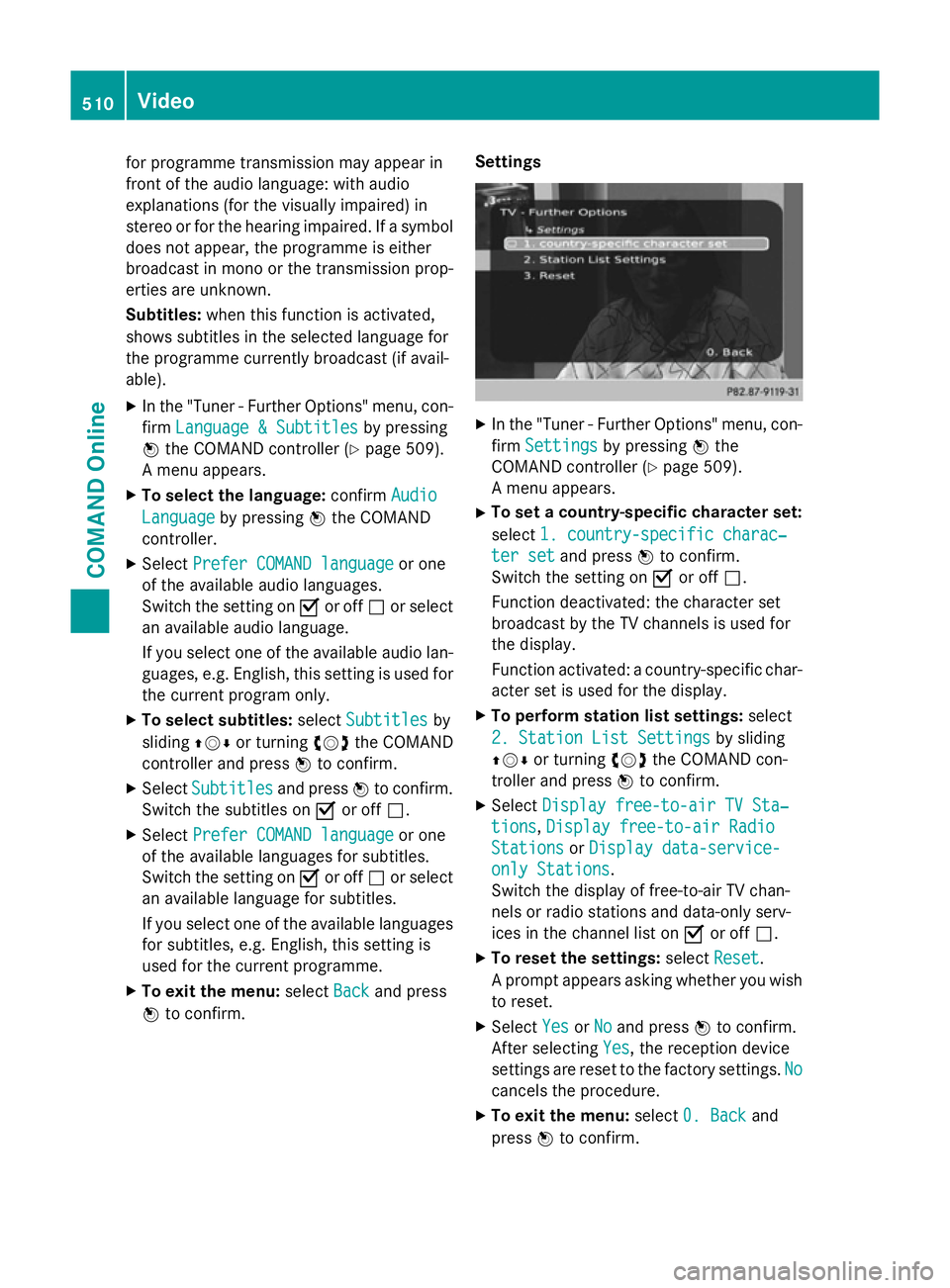
W to confirm. Settings X
In the "Tuner - Further Options" menu, con-
firm Settings Settings by pressing Wthe
COMAND controller (Y page 509).
A menu appears.
X To set a country-specific character set:
select 1. country-specific charac‐ 1. country-specific charac‐
ter set
ter set and press Wto confirm.
Switch the setting on Oor off ª.
Function deactivated: the character set
broadcast by the TV channels is used for
the display.
Function activated: a country-specific char-
acter set is used for the display.
X To perform station list settings: select
2. Station List Settings 2. Station List Settings by sliding
ZVÆ or turning cVdthe COMAND con-
troller and press Wto confirm.
X Select Display free-to-air TV Sta‐
Display free-to-air TV Sta‐
tions
tions, Display free-to-air Radio
Display free-to-air Radio
Stations
Stations orDisplay data-service-
Display data-service-
only Stations
only Stations.
Switch the display of free-to-air TV chan-
nels or radio stations and data-only serv-
ices in the channel list on Oor off ª.
X To reset the settings: selectReset Reset.
A prompt appears asking whether you wish to reset.
X Select Yes
YesorNo
No and press Wto confirm.
After selecting Yes Yes, the reception device
settings are reset to the factory settings. No No
cancels the procedure.
X To exit the menu: select0. Back
0. Back and
press Wto confirm. 510
VideoCOMAND Online
Page 517 of 637
X
On the multifunction steering wheel:
switch to video DVD mode in
COMAND Online (Y page 512).
X Use the =or; button to select the
Audio Audio menu.
X Press the 9or: button to select a
scene/chapter.
If you press and hold the 9or:
button for an extended period, rapid scroll-
ing begins.
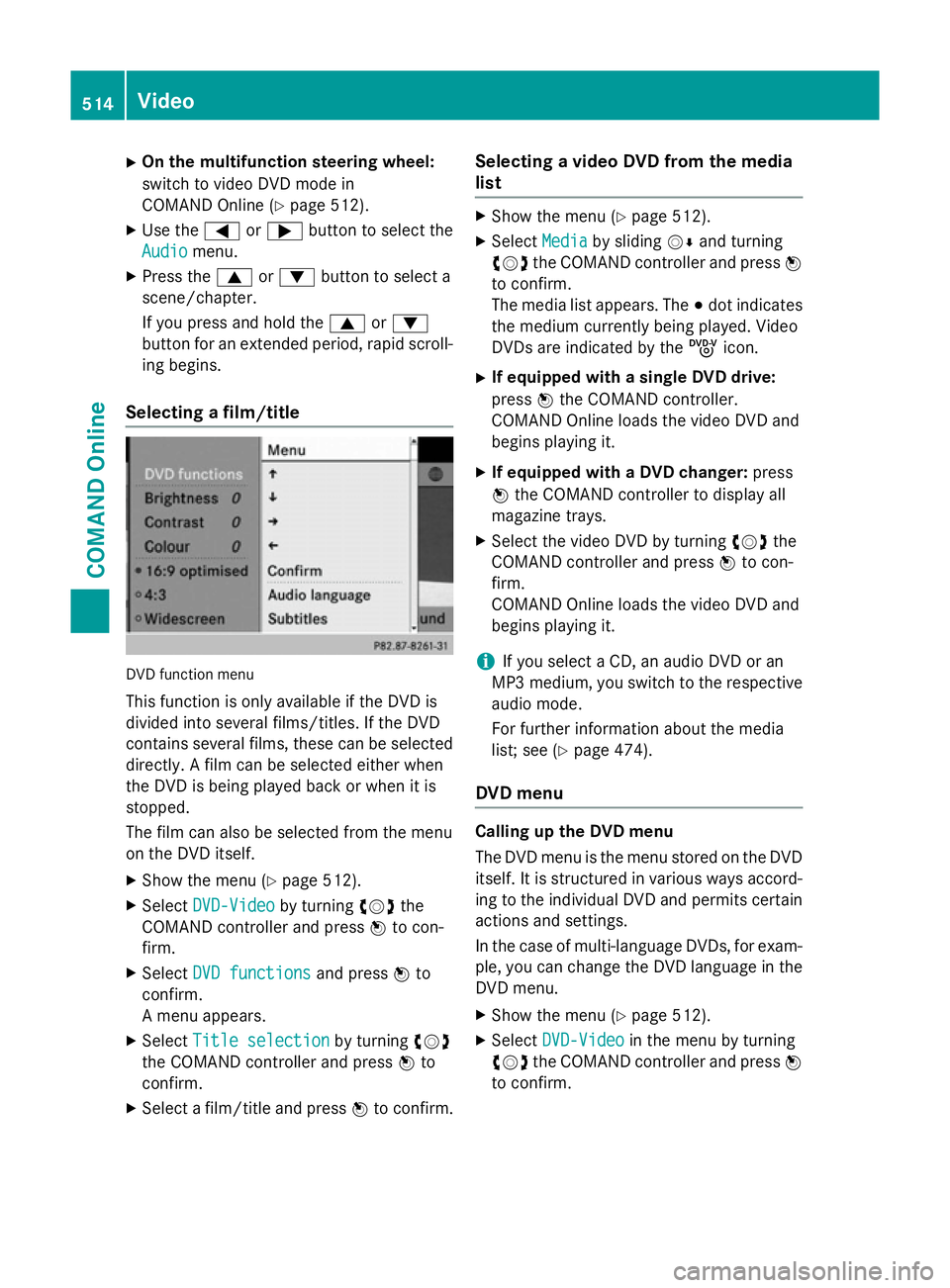
Selecting a film/title DVD function menu
This function is only available if the DVD is
divided into several films/titles. If the DVD
contains several films, these can be selected
directly. A film can be selected either when
the DVD is being played back or when it is
stopped.
The film can also be selected from the menu
on the DVD itself.
X Show the menu (Y page 512).
X Select DVD-Video DVD-Video by turningcVdthe
COMAND controller and press Wto con-
firm.
X Select DVD functions
DVD functions and pressWto
confirm.
A menu appears.
X Select Title selection
Title selection by turningcVd
the COMAND controller and press Wto
confirm.
X Select a film/title and press Wto confirm. Selecting a video DVD from the media
list X
Show the menu (Y page 512).
X Select Media Mediaby sliding VÆand turning
cVd the COMAND controller and press W
to confirm.
The media list appears. The #dot indicates
the medium currently being played. Video
DVDs are indicated by the ýicon.
X If equipped with a single DVD drive:
press Wthe COMAND controller.
COMAND Online loads the video DVD and
begins playing it.
X If equipped with a DVD changer: press
W the COMAND controller to display all
magazine trays.
X Select the video DVD by turning cVdthe
COMAND controller and press Wto con-
firm.
COMAND Online loads the video DVD and
begins playing it.
i If you select a CD, an audio DVD or an
MP3 medium, you switch to the respective
audio mode.
For further information about the media
list; see (Y page 474).
DVD menu Calling up the DVD menu
The DVD menu is the menu stored on the DVD
itself. It is structured in various ways accord-
ing to the individual DVD and permits certain actions and settings.
In the case of multi-language DVDs, for exam-
ple, you can change the DVD language in the DVD menu.
X Show the menu (Y page 512).
X Select DVD-Video DVD-Video in the menu by turning
cVd the COMAND controller and press W
to confirm. 514
VideoCOMAND Online